Policies that detect sensitive information such as credit card numbers or personal data and prevent it from being shared, copied or uploaded in ways that violate company rules.
Title graphic: Data loss prevention (DLP) (Concept)
Data loss prevention (DLP) is a set of policies that detect sensitive information, such as credit card numbers or personal data, and prevent it from being shared, copied or uploaded in ways that violate company rules. In the Microsoft ecosystem, DLP is part of Microsoft Purview and works on content across Microsoft 365. The aim is to protect data while still allowing approved business work to continue.
A DLP policy follows a simple logic: it identifies content that matches defined criteria and then applies a control. According to the episode "Microsoft Purview Data Loss Prevention (DLP) - Simply Explained", Microsoft Purview DLP detects sensitive information and applies policy-based controls across Microsoft 365. Those controls can warn users, block risky sharing, and give security and compliance teams visibility into what is happening. This range of responses matters in practice, because not every situation calls for a hard block. A warning may be enough for a low-risk case, while a block fits content that must never leave the organization.
DLP is often combined with sensitivity labels. Labels classify content, and DLP rules can then act on that classification. The episode "Microsoft Purview Information Protection - Simply Explained" describes labels that can restrict access, encrypt content or add visual markings such as watermarks, and notes that policies can block sharing or trigger alerts when sensitive data is at risk of exposure. It also says this works together with data loss prevention and insider risk management to prevent data leaks and support compliance. In that sense, labeling and DLP are complementary: one identifies and marks the data, the other enforces how it may be handled.
Design choices decide whether a DLP deployment succeeds. The episode "Data Loss Prevention in Microsoft 365: Policies That Actually Work" states that DLP policies fail when they either block everything or catch nothing, and that the sweet spot takes iteration. It covers how to design Microsoft Purview DLP policies through scoping, sensitive information types, policy tips, simulation mode and tuning. It also recommends rolling out DLP in stages and measuring whether the policies actually work, rather than switching on strict enforcement at once. Simulation mode and tuning are the practical tools for that approach, since they allow a policy to be observed and adjusted before it affects users.
DLP also appears in other parts of the Microsoft security portfolio. The episode "Microsoft Defender for Cloud Apps - Simply Explained" lists data loss prevention among the capabilities it covers, alongside Cloud Discovery, app governance, SaaS Security Posture Management, threat detection, OAuth app protection and adaptive access controls. It also describes how that platform integrates with Microsoft Purview, Microsoft Entra ID, Microsoft Defender XDR, Microsoft Sentinel and Microsoft 365, and mentions scenarios such as preventing sensitive data exposure.
There is a link to insider risk as well. The episode "Microsoft Purview Insider Risk Management - Simply Explained" says the system uses Adaptive Protection to identify high-risk actors and to enforce strict data loss prevention policies, so that organizations can act quickly when needed. It also describes analysis of user behavior patterns and contextual signals across services including Exchange, SharePoint and Teams. Here DLP acts as an enforcement mechanism that can be tightened when risk signals rise.
Typical decisions around DLP include which locations and users a policy covers, which sensitive information types it looks for, whether it should only warn or also block, and how long to observe results in simulation before enforcing. The episodes suggest treating DLP as an iterative process of scoping, testing and tuning, with visibility for security and compliance teams, instead of a one-time configuration.
Overview compiled with AI from M365.FM episodes and the facts on this page. You can improve it with the edit button below.
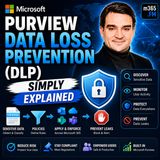
Most data leaks are not attacks but honest mistakes by your own people. This episode explains to IT and security teams how Microsoft Purview Data Loss Prevention protects sensitive data across email, files, Teams chats, devices and Copilot, and how to roll it…
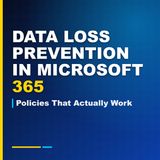
A new DLP policy blocks everything on Monday, and by Friday half the finance team is mailing files from personal accounts. This episode is for Microsoft 365 admins and compliance owners who want Purview DLP policies people actually accept. You'll learn how to…
This episode examines the real return on Copilot by focusing on outcomes rather than features. It argues that the biggest cost in modern organizations isn’t failed projects or bad strategy, but the quiet drain of routine work—emails, meetings, drafts…
Copilot Studio agents don’t have their own ethics—or identities. By default they borrow the caller’s token, so any SharePoint, Outlook, Dataverse, or custom API you can see, your bot can see—and say. That’s how “innocent” answers leak context: connectors…
Is Power Platform actually dangerous for the enterprise—or is that fear hiding a more uncomfortable truth? In this episode, we dismantle the question executives keep asking: “Is Power Platform secure enough?” The answer is sharper than most teams expect.…
In a recent podcast, Mirko Peters discussed the critical importance of effective document management and compliance in organizations, emphasizing that lost documents can lead to organizational failure. He presented strategies for building an audit-ready…
In this episode of the M365.fm podcast, Microsoft MVP Alan Cox joins us to discuss how organizations can securely adopt Microsoft 365 Copilot using Microsoft Purview, Data Loss Prevention (DLP), and Insider Risk Management. As AI becomes increasingly…
Microsoft Purview is Microsoft's unified platform for data security, compliance, and governance, helping organizations understand, protect, and manage their data wherever it lives. As businesses embrace Microsoft 365, Azure, SaaS applications, and AI, keeping…
Copilot can overreach if Graph permissions are too broad. One mis-scoped app permission lets AI surface files, spreadsheets, and confidential client data users couldn’t normally access. Fix it by treating Copilot like any high-privilege app: lock Graph scopes…
Most companies think Copilot = instant productivity. Wrong. Copilot isn’t the ROI engine — Power Automate is. Copilot only “suggests.” Power Automate does the work. In this episode we expose the 5 hacks that turn Copilot from a chatty intern into a…
Your “private” Microsoft Teams channels are quietly bleeding data – and default settings are to blame. In this episode, we walk through real-world incidents where dormant guest accounts, synced libraries, and careless PII pastes turned Teams into a silent…
This episode explores a common fear around AI assistants in enterprise environments: the belief that they create new security risks by exposing sensitive data. Through a narrative explanation, the speaker clarifies that the AI does not widen access or bypass…
Timeline of episodes about Data loss prevention (DLP)
Articles about Data loss prevention (DLP) (91)
Articles in which Data loss prevention (DLP) is a topic:
Questions marked with AI were written with AI from the facts on this page.
What does data loss prevention (DLP) do? (AI)
DLP uses policies to detect sensitive information such as credit card numbers or personal data and prevent it from being shared, copied or uploaded in ways that violate company rules. Controls can warn users, block risky sharing and give security and compliance teams visibility.
Which Microsoft product includes DLP? (AI)
DLP is part of Microsoft Purview and applies to content across Microsoft 365. The episodes also mention DLP as a capability in Microsoft Defender for Cloud Apps and as a mechanism used with Adaptive Protection in Insider Risk Management.
Why do DLP policies sometimes fail? (AI)
The episode "Data Loss Prevention in Microsoft 365: Policies That Actually Work" says policies fail when they either block everything or catch nothing. It recommends scoping, sensitive information types, policy tips, simulation mode and tuning, and rolling out DLP in stages.
What is Microsoft Purview Data Loss Prevention?
A capability that detects sensitive information and applies policy-based controls across Microsoft 365, warning users or blocking risky sharing while letting approved business work continue. · From the episode: Microsoft Purview Data Loss Prevention (DLP) - Simply Explained
Why does DLP matter if you already have firewalls and antivirus?
Relationship map of Data loss prevention (DLP): linked topics
Related topics in brief
Topics linked to Data loss prevention (DLP), each briefly explained:
Microsoft Purview – Identity and security tool by Microsoft· Part of Microsoft's family of data governance, protection and compliance tools. It covers sensitivity labels, data loss prevention, retention, eDiscovery, audit and insider-risk management across Microsoft 365 and other data sources.
Power Platform – Low-code tool by Microsoft· Related to Microsoft's low-code family consisting of Power Apps, Power Automate, Power BI, Power Pages and Copilot Studio. Together with Dataverse it lets business users build apps, automations, reports and agents.
Connector – Concept· Related to Prebuilt wrapper around an API that lets Power Apps, Power Automate and Copilot Studio read and write data in hundreds of services.
Data governance – Concept· Related to Rules, roles and tools that keep data classified, protected and used correctly, essential before and while deploying Copilot and agents.
All relationships of Data loss prevention (DLP), grouped by type of relationship:
Part of
Offerings of which Data loss prevention (DLP) is a part:
Short info above, community knowledge below: add practical tips, examples or corrections. New contributions are reviewed first; trusted members publish directly.
Experts and companies for this topic
Community members with expertise in Data loss prevention (DLP):
 EN
 Deutsch
 Español
 Français
 Italiano
 Português
 Nederlands
 Polski
 Bahasa Indonesia
 Русский
 Українська
 العربية
 עברית
 日本語
 한국어