
 Apple Podcasts
 Spotify
 Youtube Music
 Spreaker
 Podchaser
 Amazon Music
This episode rips apart the illusion that “Copilot training” is a workshop, a slide deck, or a single rollout campaign. It starts with a familiar pain: you trained users on Microsoft Copilot, pinned decks, hosted Q&As, ran office hours—and your help desk ticket queue still grew. Users got smarter for 24 hours, then went straight back to asking, “Which Copilot do I use?” and “Is this safe?” The episode argues that the core problem isn’t users, or even Copilot. The problem is that most organizations are trying to manage a fast-moving, AI-driven behavior engine with static training and scattered documentation. Without a governed, tenant-aware learning system, you’re not doing adoption—you’re role-playing a help desk.
From there, the conversation reframes Copilot adoption as an information architecture and governance problem, not a training problem. Traditional one-off training creates “shadow training” everywhere: rogue slide decks in Teams, PDFs with filenames like “Ultimate Copilot Guide V7 FINAL FINAL”, random wikis with conflicting instructions, and unreviewed prompt examples circulating in private chats. Search becomes noisy, guidance contradicts itself, and users don’t know which Copilot surface to trust—Word, Outlook, Teams, Graph-grounded, Studio agents, or something unofficial someone shared last quarter. The result is higher ticket volume, inconsistent outputs, unclear data boundaries, and leadership questioning Copilot license ROI because nobody can prove that usage is safe, effective, or standardized.






Many organizations face frustration due to ineffective training methods. A staggering 67% of employees report dissatisfaction with traditional training approaches. This dissatisfaction stems from issues of relevancy and accessibility. It's time to Stop Training Your Users Wrong and seek a solution that not only addresses these concerns but also fosters continuous learning. The Copilot Learning Center transforms user experiences by providing ongoing training tailored to your needs. With features that enhance engagement, you can ensure that your users adopt Microsoft 365 Copilot effectively, leading to improved proficiency and confidence.
Key Takeaways
- Traditional training methods often lead to information overload, making it hard for users to retain knowledge.
- Continuous learning is essential to keep up with evolving tools like Microsoft 365 Copilot and to ensure effective usage.
- The Copilot Learning Center offers personalized learning paths that cater to individual roles, enhancing user engagement and skill acquisition.
- Interactive learning experiences, such as real-world exercises, improve retention and make training more enjoyable.
- Access to just-in-time resources reduces reliance on support tickets and empowers users to solve problems independently.
- A centralized knowledge hub ensures that users have quick access to updated information, boosting productivity and confidence.
- Implementing structured training programs can significantly reduce errors and improve overall employee morale.
- Embracing continuous training fosters a culture of learning, helping organizations adapt to changes and maximize the benefits of digital tools.
Issues with Traditional Training
Common Pitfalls
Traditional training often relies heavily on slide decks and one-off sessions. These methods overwhelm you with too much information at once, making it hard to remember key points. Many organizations compress weeks of content into a few days, which leads to information overload. When you attend a long training session, you might feel confident, but studies show you forget up to 70% of what you learned within 24 hours unless you revisit the material.
| Pitfall | Description |
|---|---|
| Information Overload | Overwhelming users with too much information at once instead of digestible, role-specific steps. |
| Outdated Materials | Failing to update onboarding materials as software evolves, leading to confusion. |
| Lack of User Feedback | Skipping user feedback opportunities, which can refine training flows. |
| Sole Reliance on Live Training | Relying only on live training without in-app reinforcement, causing frustration and poor retention. |
Many training programs use outdated materials that do not reflect the latest features or security and compliance best practices. This gap creates confusion, especially when you try to apply what you learned to Microsoft 365 Copilot. Without updated content, you risk mishandling sensitive data or sensitive information, which can lead to privacy and security risks.
Another common pitfall is the lack of user feedback. Training often happens without asking you what works or what you need. This approach misses chances to improve training and enablement. Also, relying only on live sessions without digital tools or prompts for just-in-time learning leaves you without support when you need it most.
Impact on Users
Ineffective training affects your productivity and confidence. When you do not fully understand how to use copilot tools, you spend more time figuring things out or correcting mistakes. This delay reduces your output and can cause frustration. Poor training also leads to more support tickets because users like you need help repeatedly with the same issues.
| Negative Impact | Description |
|---|---|
| Decreased Productivity | Employees lacking necessary skills take longer to complete tasks, leading to delays and reduced output. |
| Increased Employee Turnover | Insufficient training can make employees feel undervalued, prompting them to seek other job opportunities. |
| Quality Issues | Poor training increases the likelihood of errors, resulting in product defects and customer dissatisfaction. |
| Poor Employee Morale and Engagement | Lack of training can demotivate employees, leading to absenteeism and reduced commitment to company goals. |
When you feel unprepared, your morale drops. You may feel discouraged or disengaged, which can make you consider leaving your job. This situation hurts the whole organization because it loses skilled users who understand how to handle sensitive data and maintain compliance. Without proper training, you might also miss important security protocols, increasing risks for your company.
Need for Continuous Learning
Many people believe training ends once Microsoft 365 Copilot activates. This belief stops you from seeking further learning, but it creates a big problem. Copilot and AI tools evolve quickly. New features, security updates, and compliance rules appear regularly. Without continuous training, you cannot keep up with these changes or use copilot safely and effectively.
| Training Type | Knowledge Retention Effectiveness | Key Features |
|---|---|---|
| One-off Training | Less effective | Rapid forgetting without reinforcement. |
| Continuous Learning | More effective | Spaced repetition, microlearning, and integration into daily workflows enhance retention. |
Continuous learning gives you ongoing access to updated data, prompts, and best practices. It helps you apply what you learn immediately, improving your skills and confidence. Just-in-time learning tools and a secure knowledge repository support your daily work and reduce the need to ask for help. This approach lowers support ticket volume and speeds up adoption of copilot tools.
Tip: Stop training your users wrong by shifting from one-off sessions to a structured training system that supports continuous learning. This change helps you stay current with security, privacy, and compliance requirements while maximizing the value of your digital transformation.
By embracing continuous enablement, you protect sensitive information and reduce risks. You also improve your ability to use copilot prompts effectively, which boosts productivity and user satisfaction. Continuous training is essential to unlock the full potential of Microsoft 365 Copilot and ensure your organization thrives in a fast-changing digital world.
Introducing the Copilot Learning Center
The Copilot Learning Center serves as a revolutionary platform designed to enhance your training experience with Microsoft 365 Copilot. This centralized hub provides you with the resources and support you need to navigate the complexities of AI tools effectively. By integrating seamlessly with Microsoft applications, the Copilot Learning Center ensures that you have access to relevant, up-to-date information at your fingertips.
Overview of Features
The Copilot Learning Center offers a variety of features that cater to your learning needs. Here are some key aspects:
- Training Courses: Engage in hands-on training that integrates AI capabilities within Microsoft 365 applications. You will learn to leverage Copilot's features for drafting, summarizing, analyzing, automating tasks, and collaborating efficiently.
- Interactive Learning: Participate in real-world exercises and interactive lectures that enhance your understanding and retention of the material.
- Just-in-Time Resources: Access on-demand materials that provide guidance when you need it most, reducing the reliance on support tickets.
This structured training approach empowers you to use Microsoft 365 Copilot effectively across various applications, including Word, Excel, PowerPoint, Outlook, and Teams. You will quickly gain hands-on experience, enabling you to streamline content creation, meeting management, data analysis, and email communication.
Centralized Knowledge Hub
The Copilot Learning Center acts as a centralized knowledge hub, offering numerous advantages for organizational learning and knowledge sharing. Here’s how it benefits you:
| Advantage | Description |
|---|---|
| Faster onboarding | New hires can quickly become productive, reducing the time and resources needed for training. |
| Fewer errors | Accessible knowledge leads to correct application, enhancing safety and customer satisfaction. |
| Greater confidence | Employees feel empowered and engaged, improving morale and decision-making. |
| Less retraining | On-demand access to information reduces the need for repeated training sessions. |
| Business continuity | Captured knowledge remains within the organization, ensuring processes and best practices are retained. |
With this centralized hub, you can easily find the information you need, which enhances your ability to apply what you learn effectively. This approach not only improves your productivity but also fosters a culture of continuous learning within your organization.
Governance and Structure
The governance structure of the Copilot Learning Center ensures that the content remains accurate and relevant. Microsoft emphasizes employee training and empowerment, which is crucial for maintaining high standards. By providing comprehensive training on sensitivity labeling and data governance, you will better understand and apply the necessary guidelines in your daily tasks. This approach enhances the accuracy of the content generated and fosters a culture of accountability and compliance within your organization.
Tip: Embrace the structured training and governance provided by the Copilot Learning Center. This will help you stay informed about security, privacy, and compliance requirements while maximizing the value of your digital transformation.
Benefits of the Copilot Learning Center

Personalized Learning Paths
The Copilot Learning Center offers personalized learning paths tailored to your unique needs. This customization allows you to focus on specific skills relevant to your role. You can choose courses that align with your job responsibilities, ensuring that you gain the knowledge necessary to excel. By following a structured training approach, you can stop training your users wrong and instead engage in a learning experience that empowers you.
- Role-Specific Training: Access courses designed for your specific job functions.
- Flexible Learning: Learn at your own pace, allowing you to revisit materials as needed.
- Skill Assessment: Regular assessments help you track your progress and identify areas for improvement.
Enhanced User Engagement
Engagement plays a crucial role in effective training. The Copilot Learning Center fosters a more engaging environment, which leads to better training outcomes. Research shows that employees with high self-efficacy are more engaged in their work. This engagement encourages you to embrace challenges and actively pursue new skills. Moreover, reducing technostress allows you to learn in a relaxed environment, enhancing your overall training experience.
Tip: Engage with interactive content and real-world exercises to maximize your learning potential.
By alleviating technostressors, the Copilot Learning Center boosts your engagement. As you adapt to new tools, you will find it easier to learn and apply new skills. This shift not only enhances your confidence but also contributes to a culture of continuous learning within your organization.
Improved Productivity
The Copilot Learning Center significantly improves productivity among users. By automating low-value activities, you can focus on higher-value tasks. This shift leads to increased overall productivity. For instance, employees report that about 75% say AI improves the speed or quality of their work.
- Organizations implementing Microsoft 365 Copilot experience systemic improvements in team operations.
- Faster document creation and automated data analysis lead to reduced project timelines and cut administrative overhead.
You can expect measurable outcomes from using the Copilot Learning Center. Organizations have reported an average time savings of 10 hours per employee each month. This time savings translates to gaining an extra workday, allowing you to reallocate time from manual tasks to more productive activities, such as nurturing client relationships. This shift not only enhances individual productivity but also contributes to overall revenue growth.
Note: Embrace the Copilot Learning Center to unlock your full potential and drive your organization’s digital transformation.
Implementing the Copilot Learning Center
Assessing Training Needs
Before deploying the Copilot Learning Center, you must assess your organization's training needs. This step ensures that you tailor the training to fit your users' specific requirements. Follow these steps to effectively assess training needs:
- Establish baseline metrics before training begins to track progress during rollout.
- Assess user needs through surveys focusing on daily workflows, pain points, and expected Microsoft 365 Copilot use cases.
- Develop role-based and application-specific training content tailored to different departments and job functions.
- Pilot training with early adopters or champions to test materials and gather feedback.
- Use official Microsoft Learn paths as foundational content and customize them for your organization's environment.
- Schedule mandatory core training sessions before users receive Copilot licenses.
- Provide reference materials such as quick-reference guides, prompt libraries, and video tutorials for on-demand learning.
- Establish support channels like dedicated Teams channels or help desk categories for Copilot-related questions.
- Leverage usage analytics and user confidence surveys to identify training gaps and measure readiness.
- Plan training preparation at least one month before license deployment to ensure readiness.
By following these steps, you can stop training your users wrong and create a solid foundation for effective learning.
Setting Up Learning Paths
Creating effective learning paths is crucial for maximizing the benefits of the Copilot Learning Center. Here are some best practices to consider:
- Establish a clear, progressive curriculum structure starting with foundational knowledge, moving through role-based applications, and advancing to topics like prompt engineering.
- Use multi-modal training approaches, including micromodules (5-15 minute focused lessons), interactive tutorials, and sequenced learning paths to accommodate diverse learner needs.
- Integrate existing learning pathways like Viva Learning’s Copilot Academy with your centralized training portal to combine out-of-the-box and custom content.
- Implement continuous learning programs by maintaining an "Evergreen Copilot Hub" updated monthly with release notes and community-curated resources.
- Run regular learning rituals such as biweekly "Copilot Drop-Ins" to keep skills current and share wins.
These practices ensure that your users receive the training they need to navigate Microsoft 365 Copilot effectively.
Training Administrators
Training administrators is essential for managing and updating the Copilot Learning Center effectively. Here are key learning objectives for administrators:
| Learning Objectives | Description |
|---|---|
| Manage Microsoft 365 Copilot settings | Administrators will learn how to configure settings for optimal performance. |
| Manage web access for Microsoft 365 Copilot | Training includes controlling web access to enhance security. |
| Manage Copilot for Microsoft Teams meetings and events | Focus on integrating Copilot into Teams for better collaboration. |
| Identify Microsoft Purview data protections for AI apps | Understanding data protection measures is crucial for compliance. |
| Manage Microsoft Copilot on mobile devices | Training covers mobile management for flexibility. |
| Secure data for AI apps using Microsoft Purview Data Security Posture Management (DSPM) for AI | Emphasizes the importance of data security in AI applications. |
| Monitor the value of Microsoft 365 Copilot through the Copilot Dashboard | Administrators will learn to assess the effectiveness of Copilot. |
| Track Microsoft 365 Copilot readiness and usage across your organization | Training includes monitoring usage metrics for better management. |
| Monitor Microsoft 365 Copilot interactions using a communication compliance policy | Ensures compliance in communications involving Copilot. |
| Delete your Microsoft Copilot interaction history | Administrators will learn how to manage interaction data effectively. |
By focusing on these objectives, you can ensure that your administrators are well-equipped to support users and maintain the Copilot Learning Center effectively.
Success Stories with Copilot
Case Study Highlights
Organizations across various sectors have successfully implemented the Copilot Learning Center, leading to significant improvements in user training and productivity. Here are some notable case studies:
| Case Study | Description |
|---|---|
| A1 Inteligência em Viagens boosts efficiency and customer experience | This case shows how A1 Inteligência em Viagens improved team efficiency and customer experience using Copilot Studio. |
| ABN AMRO Bank enhances AI capabilities with Copilot Studio and Azure services | ABN AMRO improved customer and employee interactions through Copilot Studio. |
| The City of Montréal enhances citizen engagement with Copilot Studio | This illustrates how the City of Montréal used Copilot Studio to improve citizen engagement and information access. |
These examples highlight the versatility of the Copilot Learning Center in enhancing user experiences and operational efficiency.
User Testimonials
Users have shared their positive experiences after adopting the Copilot Learning Center. Here are some testimonials:
"The Copilot Learning Center transformed how we approach training. Our team feels more confident using Microsoft 365 Copilot, and we see fewer support tickets." - Sarah, Project Manager
"I used to struggle with understanding the tools. Now, I access resources on-demand, which makes my work much easier." - James, Data Analyst
These testimonials reflect the impact of the Copilot Learning Center on user confidence and engagement.
Measurable Outcomes
Organizations have reported impressive metrics after implementing the Copilot Learning Center. Here are some key improvements:
| Metric | Improvement |
|---|---|
| Reduction in coding time | 20% |
| Reduction in PR review time | 26% |
| Decrease in overall work time | 24% |
| Average time savings per ticket | 3 full workdays |
| Time savings range | 12% to 85% |
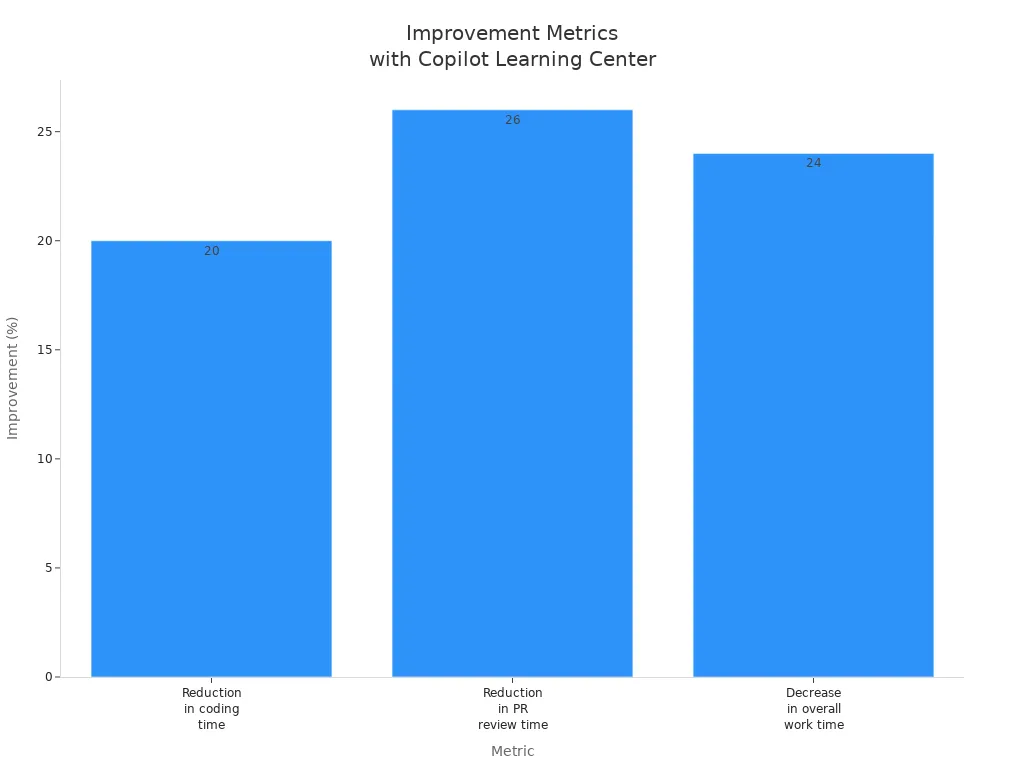
These measurable outcomes demonstrate how the Copilot Learning Center not only enhances training but also leads to tangible benefits like reduced support tickets and improved productivity. By embracing this innovative platform, you can stop training your users wrong and foster a culture of continuous learning and enablement.
The Copilot Learning Center revolutionizes your training experience. It offers role-based learning paths, ensuring you connect Copilot features to your daily tasks. Continuous learning strategies keep you informed about new updates and security measures.
Consider these long-term benefits:
- Contextual Learning: In-app walkthroughs enhance your skill acquisition.
- Role-Based Learning Paths: Customized training speeds up adoption.
- Continuous Reinforcement: Ongoing resources keep you engaged.
- Performance Analytics: Data-driven strategies refine training programs.
Embrace the Copilot Learning Center to enhance your user experience and foster a culture of continuous learning.
Remember, effective training is not a one-time event. It’s an ongoing journey that empowers you to navigate sensitive data and maintain compliance with confidence.
FAQ
What is the Copilot Learning Center?
The Copilot Learning Center is a centralized hub designed to enhance your training experience with Microsoft 365 Copilot. It provides access to resources, training courses, and just-in-time support for navigating AI tools effectively.
How does the Copilot Learning Center improve user training?
The Copilot Learning Center offers personalized learning paths, interactive content, and ongoing resources. This approach helps you stay updated on new features and security measures, ensuring you maximize your use of Copilot.
Can I access the Copilot Learning Center on mobile devices?
Yes, you can access the Copilot Learning Center on mobile devices. This flexibility allows you to learn and access important prompts and resources anytime, anywhere, enhancing your training experience.
How does the Copilot Learning Center ensure data security?
The Copilot Learning Center emphasizes security by providing training on sensitivity labeling and data governance. This training helps you understand how to handle sensitive data safely while using Copilot.
What types of prompts are available in the Copilot Learning Center?
The Copilot Learning Center offers a variety of prompts tailored to different applications within Microsoft 365. These prompts guide you in using Copilot effectively for tasks like drafting, summarizing, and automating workflows.
How can I assess my training needs before using the Copilot Learning Center?
You can assess your training needs by surveying users about their daily workflows and pain points. This feedback helps tailor the training content to fit specific roles and applications within your organization.
Is there ongoing support after initial training?
Yes, the Copilot Learning Center provides ongoing support through access to updated materials and resources. This ensures you can continuously improve your skills and stay informed about new features and best practices.
How can I track my progress in the Copilot Learning Center?
You can track your progress through regular assessments and usage analytics provided within the Copilot Learning Center. These tools help you identify areas for improvement and measure your readiness.
🚀 Want to be part of m365.fm?
Then stop just listening… and start showing up.
👉 Connect with me on LinkedIn and let’s make something happen:
- 🎙️ Be a podcast guest and share your story
- 🎧 Host your own episode (yes, seriously)
- 💡 Pitch topics the community actually wants to hear
- 🌍 Build your personal brand in the Microsoft 365 space
This isn’t just a podcast — it’s a platform for people who take action.
🔥 Most people wait. The best ones don’t.
👉 Connect with me on LinkedIn and send me a message:
"I want in"
Let’s build something awesome 👊
1
00:00:00,000 --> 00:00:03,480
You trained users on co-pilot and your ticket queue got longer.
2
00:00:03,480 --> 00:00:06,560
Fascinating, you gave them decks, office hours, even a Q&A.
3
00:00:06,560 --> 00:00:10,480
They left smarter for 24 hours and then promptly asked which co-pilot do I use.
4
00:00:10,480 --> 00:00:12,320
Again, here's the truth.
5
00:00:12,320 --> 00:00:13,920
Training isn't a meeting, it's a system.
6
00:00:13,920 --> 00:00:15,720
If you don't deploy an evergreen,
7
00:00:15,720 --> 00:00:16,880
governed learning center,
8
00:00:16,880 --> 00:00:18,880
you're funding a help desk cosplay.
9
00:00:18,880 --> 00:00:21,360
In the next few minutes, I'll show you the model that cuts tickets,
10
00:00:21,360 --> 00:00:24,160
kills shadow docs, and centralizes governance.
11
00:00:24,160 --> 00:00:26,240
You'll get architecture, a deployment blueprint,
12
00:00:26,240 --> 00:00:28,080
and the KPIs that prove it's working.
13
00:00:28,080 --> 00:00:30,080
No live demo, real operations.
14
00:00:30,080 --> 00:00:32,240
Why your training fails for co-pilot?
15
00:00:32,240 --> 00:00:36,080
Okay, so basically, you're running a static training program against a moving target.
16
00:00:36,080 --> 00:00:38,320
Co-pilot changes weekly, your slides don't,
17
00:00:38,320 --> 00:00:41,920
users forget, co-pilot doesn't, that mismatch is the root cause.
18
00:00:41,920 --> 00:00:44,320
You trained for a product, you got a behavior engine,
19
00:00:44,320 --> 00:00:45,360
and yes, that matters.
20
00:00:45,360 --> 00:00:46,880
Here's what most people miss.
21
00:00:46,880 --> 00:00:49,520
Traditional adoption plans assume a linear skill path.
22
00:00:49,520 --> 00:00:51,840
Beginner, intermediate, advanced.
23
00:00:51,840 --> 00:00:54,720
Co-pilot isn't linear, it's conversational, context dependent,
24
00:00:54,720 --> 00:00:57,520
and utterly sensitive to data boundaries and prompt quality.
25
00:00:57,520 --> 00:00:59,280
Teach once and you've taught nobody.
26
00:00:59,280 --> 00:01:03,760
Teach inflow and you've covered 80% of daily confusion before it becomes a ticket.
27
00:01:03,760 --> 00:01:06,080
The average user fallacy makes it worse.
28
00:01:06,080 --> 00:01:07,840
When you optimize for the least prepared,
29
00:01:07,840 --> 00:01:10,320
you create lowest common denominator chaos.
30
00:01:10,320 --> 00:01:13,760
You water down prompts, hide nuance, and strip governance until it's harmless,
31
00:01:13,760 --> 00:01:14,640
and useless.
32
00:01:14,640 --> 00:01:15,360
The result?
33
00:01:15,360 --> 00:01:16,000
Two groups.
34
00:01:16,000 --> 00:01:19,200
Power users who ignore you and build their own shadow practices
35
00:01:19,200 --> 00:01:21,760
and confused users who escalate loudly.
36
00:01:21,760 --> 00:01:23,360
Let's name the tickets you keep seeing.
37
00:01:23,360 --> 00:01:25,360
Number one, where do I start?
38
00:01:25,360 --> 00:01:26,880
That's a discovery failure.
39
00:01:26,880 --> 00:01:28,560
Number two, which co-pilot?
40
00:01:28,560 --> 00:01:31,680
Outlook, word, teams, graph grounded studio build.
41
00:01:31,680 --> 00:01:33,360
Users think co-pilot is one thing.
42
00:01:33,360 --> 00:01:36,080
It's multiple surfaces and agents with different abilities and risks.
43
00:01:36,080 --> 00:01:38,320
Number three, is this safe?
44
00:01:38,320 --> 00:01:39,200
Translation?
45
00:01:39,200 --> 00:01:41,760
You never surfaced data boundaries, transcript policies,
46
00:01:41,760 --> 00:01:44,080
or approved connectors where the user actually works.
47
00:01:44,080 --> 00:01:45,840
Number four, why did it answer that?
48
00:01:45,840 --> 00:01:47,120
That's a prompt pattern problem,
49
00:01:47,120 --> 00:01:49,840
plus retrieval context, not a co-pilot is wrong issue.
50
00:01:49,840 --> 00:01:51,360
Enter the shadow training economy.
51
00:01:51,360 --> 00:01:53,440
Dex and teams, PDFs and chats,
52
00:01:53,440 --> 00:01:57,840
Wiki pages with heroic titles like Ultimate Co-Pilot Guide V7 Final Final,
53
00:01:57,840 --> 00:02:01,040
no version control, no ownership, no retirement policy.
54
00:02:01,040 --> 00:02:02,960
The second you publish your official guidance,
55
00:02:02,960 --> 00:02:06,240
five unofficial copies spawn like Gremlins' After Midnight.
56
00:02:06,240 --> 00:02:08,160
Now search returns contradictions,
57
00:02:08,160 --> 00:02:10,640
and your single source of truth is a folktale.
58
00:02:10,640 --> 00:02:13,520
Cost of confusion, increased tickets, inconsistent outputs,
59
00:02:13,520 --> 00:02:15,440
data risk, and my favorite,
60
00:02:15,440 --> 00:02:19,200
executives questioning license spend because we aren't seeing ROI.
61
00:02:19,200 --> 00:02:21,440
Your burning time, teaching prompt basics,
62
00:02:21,440 --> 00:02:24,800
repeatedly while rogue agents multiply in unmanaged environments.
63
00:02:24,800 --> 00:02:26,800
That's not adoption, it's entropy.
64
00:02:26,800 --> 00:02:29,600
Here's the weird part, you try to fix this with quarterly webinars.
65
00:02:29,600 --> 00:02:34,160
Users don't need scheduled lectures, they need answers where the question happens.
66
00:02:34,160 --> 00:02:37,040
In word, in teams, besides the compose box,
67
00:02:37,040 --> 00:02:40,880
if the guidance doesn't live inside the tools or at least one click away,
68
00:02:40,880 --> 00:02:42,720
it might as well be in a museum.
69
00:02:42,720 --> 00:02:46,720
Everything clicked when I realized co-pilot adoption is an information architecture problem
70
00:02:46,720 --> 00:02:48,000
wearing a training costume.
71
00:02:48,000 --> 00:02:51,120
You're mopping the floor answering tickets while the valve above is still
72
00:02:51,120 --> 00:02:55,440
leaking, fixed the valve, built an evergreen governed center that is tenant-aware,
73
00:02:55,440 --> 00:02:56,800
versioned, and findable.
74
00:02:56,800 --> 00:02:58,880
Then point everyone to it, relentlessly.
75
00:02:58,880 --> 00:03:00,720
In other words, stop pushing knowledge.
76
00:03:00,720 --> 00:03:03,040
Make it pullable, purposeful, and provably current.
77
00:03:03,040 --> 00:03:05,440
That means canonical pages with freshness badges,
78
00:03:05,440 --> 00:03:08,080
approved prompt patterns that explain why they work,
79
00:03:08,080 --> 00:03:10,560
and decision trees that root which co-pilot are.
80
00:03:10,560 --> 00:03:12,880
In under three clicks, it means surfacing transcript
81
00:03:12,880 --> 00:03:16,880
and privacy policy before someone dumps sensitive content into the chat and blames the tool.
82
00:03:16,880 --> 00:03:18,400
The simple version is this.
83
00:03:18,400 --> 00:03:22,080
If your training isn't a system with ownership, life cycle, and telemetry,
84
00:03:22,080 --> 00:03:23,360
it will decay into folklore.
85
00:03:23,360 --> 00:03:25,600
And folklore scales beautifully into tickets.
86
00:03:25,600 --> 00:03:28,960
We're going to replace folklore with a governed co-pilot learning center
87
00:03:28,960 --> 00:03:32,480
that answers questions before they exist, deflects intents,
88
00:03:32,480 --> 00:03:35,760
and eliminates the oxygen that shadow training needs to survive.
89
00:03:35,760 --> 00:03:38,240
Now let's build the thing you should have started with.
90
00:03:38,240 --> 00:03:41,200
What the co-pilot learning center actually is architecture.
91
00:03:41,200 --> 00:03:44,880
Okay, so basically this isn't a sharepoint side with some links.
92
00:03:44,880 --> 00:03:49,280
It's a governed tenant-aware hub that centralizes co-pilot know-how, artifacts,
93
00:03:49,280 --> 00:03:52,240
and safe usage patterns, and then makes them unavoidable.
94
00:03:52,240 --> 00:03:56,320
It's the spine of co-pilot adoption, not content decoration, structure.
95
00:03:56,320 --> 00:03:58,640
Think of it like an airport, not a bulletin board,
96
00:03:58,640 --> 00:04:01,360
gates, security, signage, and air traffic control.
97
00:04:01,360 --> 00:04:03,440
People move because the system roots them.
98
00:04:03,440 --> 00:04:06,240
Enter the center, a modern sharepoint hub for the terminal,
99
00:04:06,240 --> 00:04:09,760
SPFX webparts for the gates, PNP modern search for the signage,
100
00:04:09,760 --> 00:04:11,920
and a governance layer for yes security.
101
00:04:11,920 --> 00:04:14,080
You don't visit it, you operate through it.
102
00:04:14,080 --> 00:04:15,120
Foundation first.
103
00:04:15,120 --> 00:04:19,360
Modern SharePoint gives you a fast responsive canvas with native team's integration.
104
00:04:19,360 --> 00:04:23,200
We use a hub site, so every child site inherits navigation, theme, and governance.
105
00:04:23,200 --> 00:04:27,280
That hub hosts three core areas, learn, do, and govern.
106
00:04:27,280 --> 00:04:30,240
Learn is curated knowledge, do is the prompt and agent directory.
107
00:04:30,240 --> 00:04:32,960
Govn is policy upfront where users actually see it,
108
00:04:32,960 --> 00:04:35,360
not buried in compliance archaeology.
109
00:04:35,360 --> 00:04:36,560
Now the components.
110
00:04:36,560 --> 00:04:38,560
SPFX webparts do the heavy lifting,
111
00:04:38,560 --> 00:04:40,640
directory cards for co-pilot studio agents,
112
00:04:40,640 --> 00:04:44,480
role-based prompt galleries, and context panels that show environment scoping.
113
00:04:44,480 --> 00:04:45,280
Why SPFX?
114
00:04:45,280 --> 00:04:48,400
Because it's tenant-aware, fast, and deploys across SharePoint team's tabs
115
00:04:48,400 --> 00:04:50,160
and Viva connections without iFrames.
116
00:04:50,160 --> 00:04:52,640
You want one code bundle that shows up everywhere.
117
00:04:52,640 --> 00:04:56,560
That's called efficiency, which the average user rarely rewards you for.
118
00:04:56,560 --> 00:04:57,840
But leadership does.
119
00:04:57,840 --> 00:05:00,000
Discovery is where projects live or die.
120
00:05:00,000 --> 00:05:03,760
We implement PNP modern search as the Findability Engine.
121
00:05:03,760 --> 00:05:05,120
Taxonomy matters.
122
00:05:05,120 --> 00:05:08,320
Tax for surface, word, outlook, teams, graph,
123
00:05:08,320 --> 00:05:13,120
function, summarize, generate, analyze, role, sales, finance, HR,
124
00:05:13,120 --> 00:05:15,680
and risk, internal external regulated.
125
00:05:15,680 --> 00:05:17,440
Scopes are all my team and org,
126
00:05:17,440 --> 00:05:19,840
so a seller sees approved prompts for their role first,
127
00:05:19,840 --> 00:05:21,600
not a random deck from 2023.
128
00:05:21,600 --> 00:05:24,160
Result templates, render cards with freshness badges,
129
00:05:24,160 --> 00:05:26,880
owner, and last audited, so trust is visible.
130
00:05:26,880 --> 00:05:28,960
Content sources aren't a mystery grab bag.
131
00:05:28,960 --> 00:05:32,080
We aggregate Microsoft Learn and Viva learning feeds into learn
132
00:05:32,080 --> 00:05:33,600
with clear provenance labels,
133
00:05:33,600 --> 00:05:34,880
official community internal,
134
00:05:34,880 --> 00:05:37,280
community pathways are allowed, not authoritative.
135
00:05:37,280 --> 00:05:40,160
Internal SOPs and role guides get lifecycle rules,
136
00:05:40,160 --> 00:05:42,480
draft peer review, publish retire,
137
00:05:42,480 --> 00:05:44,640
monthly refresh cadence with audit trails,
138
00:05:44,640 --> 00:05:46,480
if it doesn't have an owner and an expiry date,
139
00:05:46,480 --> 00:05:47,360
it doesn't go live.
140
00:05:47,360 --> 00:05:48,080
You're welcome.
141
00:05:48,080 --> 00:05:50,480
The AI file directory is your single source of truth
142
00:05:50,480 --> 00:05:53,520
for copilot, surface assets, and studio agents.
143
00:05:53,520 --> 00:05:55,280
Each entry is an object with fields,
144
00:05:55,280 --> 00:05:58,000
owner, environment, data policies, connectors,
145
00:05:58,000 --> 00:06:00,800
purpose, what good looks like, and red lines,
146
00:06:00,800 --> 00:06:02,960
include usage notes and telemetry links,
147
00:06:02,960 --> 00:06:05,200
added try button for safe sandboxes,
148
00:06:05,200 --> 00:06:07,920
and a request access flow that routes through our back,
149
00:06:07,920 --> 00:06:09,040
not wishful thinking.
150
00:06:09,040 --> 00:06:11,440
Governance isn't a footer, it's the front door.
151
00:06:11,440 --> 00:06:13,680
Surface transcript retention, privacy policies,
152
00:06:13,680 --> 00:06:16,080
and data boundaries on every relevant page,
153
00:06:16,080 --> 00:06:17,520
via a header component.
154
00:06:17,520 --> 00:06:19,440
Approved connectors are listed with tooltips,
155
00:06:19,440 --> 00:06:21,280
allowed conditional blocked.
156
00:06:21,280 --> 00:06:24,240
Show examples of disallowed asks in red text.
157
00:06:24,240 --> 00:06:26,960
No one reads policy, everyone remembers a vivid,
158
00:06:26,960 --> 00:06:28,480
don't do this example.
159
00:06:28,480 --> 00:06:32,080
The truth, fear, precisely applied, is a marvelous control.
160
00:06:32,080 --> 00:06:33,760
Just in time matters.
161
00:06:33,760 --> 00:06:36,400
Use Viva connections to pin the center into teams,
162
00:06:36,400 --> 00:06:38,960
add deep links next to compose boxes,
163
00:06:38,960 --> 00:06:41,120
help me write safely that opens roles,
164
00:06:41,120 --> 00:06:43,600
specific prompt patterns with copy and run buttons,
165
00:06:43,600 --> 00:06:46,160
context pages embed directly in teams channels.
166
00:06:46,160 --> 00:06:48,080
If a user has to leave their flow to learn,
167
00:06:48,080 --> 00:06:49,760
they won't, then they'll file a ticket,
168
00:06:49,760 --> 00:06:51,440
then you'll complain, we can avoid all three,
169
00:06:51,440 --> 00:06:53,200
evergreen is non-negotiable.
170
00:06:53,200 --> 00:06:56,160
Set a content lifecycle, monthly refresh waves,
171
00:06:56,160 --> 00:06:58,480
version badges, and auto-retire rules.
172
00:06:58,480 --> 00:07:01,040
SPFX shows freshness status inline,
173
00:07:01,040 --> 00:07:04,480
reviewed 12 days ago versus stale, 94 days.
174
00:07:04,480 --> 00:07:07,680
Owners get nudges, stale pages get demoted in search.
175
00:07:07,680 --> 00:07:11,200
Shadow training dies when canonical pages outrank everything else
176
00:07:11,200 --> 00:07:13,360
and stale links redirect home.
177
00:07:13,360 --> 00:07:15,920
Ownership is explicit, each page has a named owner,
178
00:07:15,920 --> 00:07:17,440
a backup, and an SLA.
179
00:07:17,440 --> 00:07:20,080
Changes are logged, users can see what changed
180
00:07:20,080 --> 00:07:21,440
without a scavenger hunt,
181
00:07:21,440 --> 00:07:24,240
that transparency buys trust, which buys deflection.
182
00:07:24,240 --> 00:07:27,040
In other words, centralize before you evangelize,
183
00:07:27,040 --> 00:07:28,960
you can't govern what you can't see,
184
00:07:28,960 --> 00:07:31,040
and you can't scale what you can't find.
185
00:07:31,040 --> 00:07:34,080
Build the airport, then the planes, your users,
186
00:07:34,080 --> 00:07:35,680
actually land where they're supposed to.
187
00:07:35,680 --> 00:07:39,280
How it fixes tickets and shadow training mechanics?
188
00:07:39,280 --> 00:07:41,440
Okay, so basically we stop answering random questions
189
00:07:41,440 --> 00:07:43,040
and start deflecting intents.
190
00:07:43,040 --> 00:07:45,440
Ticket volume drops when users can map what I want
191
00:07:45,440 --> 00:07:47,760
to where I click without opening Outlook to beg it.
192
00:07:47,760 --> 00:07:49,680
We do that with three levers,
193
00:07:49,680 --> 00:07:52,800
intent mapping, canonical answers, and visible freshness.
194
00:07:52,800 --> 00:07:56,160
Intent mapping first, tie your FAQ to actual queries,
195
00:07:56,160 --> 00:07:57,920
not what you think users ask.
196
00:07:57,920 --> 00:08:00,400
Pass the search logs and tickets into four routes.
197
00:08:00,400 --> 00:08:03,760
Start, which co-pilot is it safe and why that answer?
198
00:08:03,760 --> 00:08:05,920
Each route has a landing page with two assets,
199
00:08:05,920 --> 00:08:08,080
a decision tree and a prompt exemplar.
200
00:08:08,080 --> 00:08:10,800
Decision tree chooses path in under three clicks.
201
00:08:10,800 --> 00:08:13,120
Prompt exemplar shows what good looks like
202
00:08:13,120 --> 00:08:14,880
and the anti-pattern beside it.
203
00:08:14,880 --> 00:08:17,120
Users don't need theory, they need contrast.
204
00:08:17,120 --> 00:08:19,120
Which co-pilot becomes a guided choice?
205
00:08:19,120 --> 00:08:21,120
Surface, role, data sensitivity.
206
00:08:21,120 --> 00:08:22,720
Three toggles.
207
00:08:22,720 --> 00:08:25,680
The page updates live, use teams for meeting notes,
208
00:08:25,680 --> 00:08:28,080
Outlook for triage, word for long form,
209
00:08:28,080 --> 00:08:30,880
and use the studio agent when you need line of business context
210
00:08:30,880 --> 00:08:32,320
with approved connectors.
211
00:08:32,320 --> 00:08:34,320
And yes, it spells out when not to use anything
212
00:08:34,320 --> 00:08:37,120
because do nothing is sometimes the safest action.
213
00:08:37,120 --> 00:08:39,840
Just in time, guidance kills the where is that deck?
214
00:08:39,840 --> 00:08:40,560
Behavior.
215
00:08:40,560 --> 00:08:43,680
Embed context pages in teams add a help me write link
216
00:08:43,680 --> 00:08:47,200
near compose surfaces that opens a role-based prompt
217
00:08:47,200 --> 00:08:48,640
with copy and run.
218
00:08:48,640 --> 00:08:52,080
Not just the prompt, also the why it works note.
219
00:08:52,080 --> 00:08:54,800
It sets intent, scope, and constraints.
220
00:08:54,800 --> 00:08:58,240
It names data sources, it avoids leading instructions.
221
00:08:58,240 --> 00:09:00,640
Underneath the red box, don't do this with attempting
222
00:09:00,640 --> 00:09:02,720
but unsafe example, you're welcome.
223
00:09:02,720 --> 00:09:04,800
The prompt library is opinionated.
224
00:09:04,800 --> 00:09:06,960
Every approved prompt has four fields.
225
00:09:06,960 --> 00:09:09,360
Purpose anatomy, variations, and failure modes.
226
00:09:09,360 --> 00:09:10,720
Purpose is the one line job.
227
00:09:10,720 --> 00:09:14,080
Anatomy labels each clause so users can remix without breaking it.
228
00:09:14,080 --> 00:09:15,920
Variations show tone or role tweaks,
229
00:09:15,920 --> 00:09:18,080
failure modes explain why it went weird.
230
00:09:18,080 --> 00:09:21,360
Ambiguous verbs, missing context, hallucination traps,
231
00:09:21,360 --> 00:09:22,320
plus the quick fix.
232
00:09:22,320 --> 00:09:25,280
Copy and run buttons respect role and data boundaries.
233
00:09:25,280 --> 00:09:28,000
If you don't have access, you see the request access path,
234
00:09:28,000 --> 00:09:29,840
not a 403 surprise.
235
00:09:29,840 --> 00:09:32,400
Shadow training dies when canonical answers outrank
236
00:09:32,400 --> 00:09:34,480
everything else and stale content self-destructs.
237
00:09:34,480 --> 00:09:37,200
We do both, canonical pages get hub level priority
238
00:09:37,200 --> 00:09:39,840
and search boosting, legacy links get redirected
239
00:09:39,840 --> 00:09:42,080
into the relevant canonical page with a banner.
240
00:09:42,080 --> 00:09:45,040
This resource was archived, here's the current guidance.
241
00:09:45,040 --> 00:09:47,600
Sidewikies, they don't get deleted, they expire.
242
00:09:47,600 --> 00:09:49,920
Auto-expire rules flag and demote anything
243
00:09:49,920 --> 00:09:51,920
without a current owner or review.
244
00:09:51,920 --> 00:09:54,960
You can keep your hobby blog, it just won't mislead people at scale.
245
00:09:54,960 --> 00:09:57,920
Ownership clarity prevents who maintains this.
246
00:09:57,920 --> 00:10:00,400
Theater, every page shows owner, backup,
247
00:10:00,400 --> 00:10:02,000
SLA and freshness.
248
00:10:02,000 --> 00:10:03,120
The badge is blunt.
249
00:10:03,120 --> 00:10:05,120
Green, reviewed 30 days,
250
00:10:05,120 --> 00:10:07,840
Amber 3190, red stale 90,
251
00:10:07,840 --> 00:10:10,080
tickets triggered from a red page route to the owner
252
00:10:10,080 --> 00:10:11,200
with a nudge to refresh.
253
00:10:11,200 --> 00:10:13,520
Users see the same badge, so they trust green,
254
00:10:13,520 --> 00:10:15,440
question Amber, and avoid red.
255
00:10:15,440 --> 00:10:17,840
That transparency deflects, is this still current?
256
00:10:17,840 --> 00:10:19,120
Emails before they exist.
257
00:10:19,120 --> 00:10:21,680
Safety scaffolding is not a PDF, it's everywhere.
258
00:10:21,680 --> 00:10:24,080
Data boundaries sit at the top of decision pages.
259
00:10:24,080 --> 00:10:26,240
Approved connectors list allows conditional
260
00:10:26,240 --> 00:10:27,840
and blocked with reason codes.
261
00:10:27,840 --> 00:10:30,400
Transcript retention policy appears before the first chat,
262
00:10:30,400 --> 00:10:31,760
not after a breach.
263
00:10:31,760 --> 00:10:34,000
Redline examples show prohibited asks.
264
00:10:34,000 --> 00:10:36,080
People remember, don't upload patient data,
265
00:10:36,080 --> 00:10:38,560
full stop, more than paragraph seven.
266
00:10:38,560 --> 00:10:40,800
A of your policy, use the frontal cortex,
267
00:10:40,800 --> 00:10:42,160
not compliance theater.
268
00:10:42,160 --> 00:10:43,840
Adoption nudges keep the loop alive.
269
00:10:43,840 --> 00:10:46,320
Each page ends with, was this helpful?
270
00:10:46,320 --> 00:10:49,760
A two-click microsurvey with an optional, what was missing?
271
00:10:49,760 --> 00:10:50,560
Text.
272
00:10:50,560 --> 00:10:52,640
Ask an expert escalates to a governed queue
273
00:10:52,640 --> 00:10:54,640
with categories mapped to owners.
274
00:10:54,640 --> 00:10:56,800
Weekly triage reviews the hits and misses,
275
00:10:56,800 --> 00:10:58,720
monthly refresh ships fixes.
276
00:10:58,720 --> 00:11:00,960
Publish the change log, user see you listening,
277
00:11:00,960 --> 00:11:03,520
and they stop writing their own guides to compensate.
278
00:11:03,520 --> 00:11:04,080
The truth?
279
00:11:04,080 --> 00:11:05,920
You don't reduce tickets by telling people to stop
280
00:11:05,920 --> 00:11:06,880
opening tickets.
281
00:11:06,880 --> 00:11:09,440
You reduce tickets by beating the ticket to the answer,
282
00:11:09,440 --> 00:11:11,520
making that answer obvious, current, and safe.
283
00:11:11,520 --> 00:11:13,520
And by making every unofficial copy
284
00:11:13,520 --> 00:11:15,040
worse than the real thing on purpose.
285
00:11:15,040 --> 00:11:19,200
But case study, before, after results and governance wins.
286
00:11:19,200 --> 00:11:20,480
Baseline first.
287
00:11:20,480 --> 00:11:23,200
One enterprise, thousands of co-pilot licenses,
288
00:11:23,200 --> 00:11:25,200
looked busy and learned nothing.
289
00:11:25,200 --> 00:11:28,080
Ticket queue, dominated by four themes, start,
290
00:11:28,080 --> 00:11:30,720
which co-pilot is it safe, why that answer.
291
00:11:30,720 --> 00:11:32,160
Guidance lived everywhere.
292
00:11:32,160 --> 00:11:35,840
Teams wikis, slide decks, PDFs with heroic file names.
293
00:11:35,840 --> 00:11:37,120
Owners?
294
00:11:37,120 --> 00:11:37,920
Unknown.
295
00:11:37,920 --> 00:11:39,120
Review dates?
296
00:11:39,120 --> 00:11:40,080
Fictional.
297
00:11:40,080 --> 00:11:43,440
Users searched, found contradictions, and escalated.
298
00:11:43,440 --> 00:11:45,600
Shadow agents appeared in random environments
299
00:11:45,600 --> 00:11:46,880
with mystery connectors.
300
00:11:46,880 --> 00:11:48,800
Leadership's question was predictable.
301
00:11:48,800 --> 00:11:50,080
Where's the ROI?
302
00:11:50,080 --> 00:11:51,600
Intervention was not a pep talk.
303
00:11:51,600 --> 00:11:53,600
We deployed the co-pilot learning center hub,
304
00:11:53,600 --> 00:11:55,680
LearnDo, govern, pin, and teams.
305
00:11:55,680 --> 00:11:58,480
We shipped an opinionated FAQ, mapped to intents,
306
00:11:58,480 --> 00:12:00,960
a role-based prompt library with copy and run,
307
00:12:00,960 --> 00:12:03,200
and an agent directory with owner, environment,
308
00:12:03,200 --> 00:12:04,800
and data policy fields.
309
00:12:04,800 --> 00:12:07,440
PNP modern search boosted canonical pages.
310
00:12:07,440 --> 00:12:09,760
Legacy links redirected with archived,
311
00:12:09,760 --> 00:12:11,360
C current guidance banners.
312
00:12:11,360 --> 00:12:15,280
Every page showed owner, backup, SLA, and a freshness badge.
313
00:12:15,280 --> 00:12:17,520
Governance moved from PDF to page header.
314
00:12:17,520 --> 00:12:19,680
Transcript retention, approved connectors,
315
00:12:19,680 --> 00:12:21,120
and red line examples.
316
00:12:21,120 --> 00:12:21,600
Outcomes?
317
00:12:21,600 --> 00:12:22,800
The trend is the story.
318
00:12:22,800 --> 00:12:25,040
Ticket deflection rose week over week
319
00:12:25,040 --> 00:12:27,600
because answers lived where questions occurred.
320
00:12:27,600 --> 00:12:29,440
Search success increased as users landed
321
00:12:29,440 --> 00:12:32,000
on decision trees that resolved which co-pilot
322
00:12:32,000 --> 00:12:33,280
in under three clicks.
323
00:12:33,280 --> 00:12:34,960
Duplicate artifacts decayed.
324
00:12:34,960 --> 00:12:36,960
Side wikis without owners auto-expired
325
00:12:36,960 --> 00:12:38,240
and dropped from results.
326
00:12:38,240 --> 00:12:40,800
The prompt library became the gravitational center.
327
00:12:40,800 --> 00:12:42,960
High reuse on role-start pages.
328
00:12:42,960 --> 00:12:44,800
Fewer, it hallucinated complaints
329
00:12:44,800 --> 00:12:47,360
because failure modes were explicit plus fixes.
330
00:12:47,360 --> 00:12:49,520
Engagement wasn't vanity, it was directional.
331
00:12:49,520 --> 00:12:51,760
Unique visitors concentrated on start here,
332
00:12:51,760 --> 00:12:54,240
which co-pilot and three role guides.
333
00:12:54,240 --> 00:12:56,720
Time on page stabilized at read-then-act lengths,
334
00:12:56,720 --> 00:12:57,840
not doom scroll.
335
00:12:57,840 --> 00:13:00,240
Microsurvey's produced two types of feedback.
336
00:13:00,240 --> 00:13:03,280
Missing variations and clearer boundary examples.
337
00:13:03,280 --> 00:13:05,520
We shipped both in the monthly refresh.
338
00:13:05,520 --> 00:13:07,040
The change log-proofed movement
339
00:13:07,040 --> 00:13:10,240
users learned to return because the content actually evolved.
340
00:13:10,240 --> 00:13:12,160
Governance wins were measurable.
341
00:13:12,160 --> 00:13:14,240
Rogue agents slowed as makers realized
342
00:13:14,240 --> 00:13:17,280
there was a sanctioned directory with an access path and visibility.
343
00:13:17,280 --> 00:13:20,400
Environment routing got respected.
344
00:13:20,400 --> 00:13:23,040
High-risk agents moved into managed environments
345
00:13:23,040 --> 00:13:24,240
with the right DLP.
346
00:13:24,240 --> 00:13:26,160
Transcript guidance stopped being apocrypha
347
00:13:26,160 --> 00:13:27,680
and became a pre-chat reality.
348
00:13:27,680 --> 00:13:29,680
Fewer, we shouldn't have pasted that events occurred
349
00:13:29,680 --> 00:13:32,560
because the page yelled politely before the paste.
350
00:13:32,560 --> 00:13:34,320
Cultural shift is the quiet victory.
351
00:13:34,320 --> 00:13:37,760
The reflex changed from "ask it" to "check the center".
352
00:13:37,760 --> 00:13:39,360
Even power users participated,
353
00:13:39,360 --> 00:13:40,880
submitting prompt variations
354
00:13:40,880 --> 00:13:42,320
through the contribution flow
355
00:13:42,320 --> 00:13:45,040
instead of publishing folklore in private channels.
356
00:13:45,040 --> 00:13:46,560
Ownership clarity killed her.
357
00:13:46,560 --> 00:13:47,440
Who maintains this?
358
00:13:47,440 --> 00:13:49,040
Theater.
359
00:13:49,040 --> 00:13:50,720
Green badges earned trust.
360
00:13:50,720 --> 00:13:52,800
Amber badges triggered helpful nudges.
361
00:13:52,800 --> 00:13:54,560
Red badges were rare and embarrassing.
362
00:13:54,560 --> 00:13:55,680
Precisely the point.
363
00:13:55,680 --> 00:13:57,760
Lessons learned because you'll repeat these mistakes
364
00:13:57,760 --> 00:13:59,040
unless I stop you.
365
00:13:59,040 --> 00:14:01,040
Overindex and findability.
366
00:14:01,040 --> 00:14:04,160
Taxonomy and scopes make or break relevance.
367
00:14:04,160 --> 00:14:05,840
Gas work inflates tickets.
368
00:14:05,840 --> 00:14:08,880
Declayer what's deprecated with ruthless redirects.
369
00:14:08,880 --> 00:14:10,640
Don't negotiate with Link Rot.
370
00:14:11,600 --> 00:14:13,280
Publish role-based starting parts.
371
00:14:13,280 --> 00:14:15,280
Generic guidance invites generic errors.
372
00:14:15,280 --> 00:14:16,720
Instrument everything.
373
00:14:16,720 --> 00:14:17,440
Search terms.
374
00:14:17,440 --> 00:14:18,080
Click through.
375
00:14:18,080 --> 00:14:18,880
Bounce.
376
00:14:18,880 --> 00:14:21,360
The loop tells you what to fix next month.
377
00:14:21,360 --> 00:14:22,800
Now the payoff you were promised.
378
00:14:22,800 --> 00:14:25,040
The governance switch that collapses shadow training.
379
00:14:25,040 --> 00:14:27,040
We set a centralized discovery policy.
380
00:14:27,040 --> 00:14:27,760
Teams app.
381
00:14:27,760 --> 00:14:30,800
Pin plus the SharePoint hub as the authoritative entry point.
382
00:14:30,800 --> 00:14:34,240
All copilot-related content lives under that information architecture.
383
00:14:34,240 --> 00:14:35,680
No side-wiki exceptions.
384
00:14:35,680 --> 00:14:37,600
Legacy links resolve to Canon.
385
00:14:37,600 --> 00:14:39,600
Non-Hub pages display warning banners
386
00:14:39,600 --> 00:14:41,600
and auto archive rules prune the rest.
387
00:14:41,600 --> 00:14:42,720
You don't chase folklore.
388
00:14:42,720 --> 00:14:43,840
You starve it of oxygen.
389
00:14:43,840 --> 00:14:47,040
The governance switch that collapses shadow training.
390
00:14:47,040 --> 00:14:47,920
Here's the switch.
391
00:14:47,920 --> 00:14:50,080
Mandate a single discovery surface.
392
00:14:50,080 --> 00:14:50,880
Not a suggestion.
393
00:14:50,880 --> 00:14:51,520
A policy.
394
00:14:51,520 --> 00:14:54,080
Pin the learning center as a Teams app for everyone.
395
00:14:54,080 --> 00:14:57,040
And set the SharePoint hub as the authoritative entry point.
396
00:14:57,040 --> 00:14:58,480
Every part starts there.
397
00:14:58,480 --> 00:15:00,720
The cognitive tax of where do I look?
398
00:15:00,720 --> 00:15:01,600
Drops to zero.
399
00:15:01,600 --> 00:15:04,480
And your search relevance stops fighting 12 competing wikis
400
00:15:04,480 --> 00:15:05,680
with heroic file names.
401
00:15:05,680 --> 00:15:06,640
Policy next.
402
00:15:06,640 --> 00:15:08,400
All copilot-related content.
403
00:15:08,400 --> 00:15:08,880
Guides.
404
00:15:08,880 --> 00:15:10,800
Prompts agent docs FAQs.
405
00:15:10,800 --> 00:15:13,360
Lives under the hubs information architecture.
406
00:15:13,360 --> 00:15:14,880
No side-wiki exceptions.
407
00:15:14,880 --> 00:15:16,800
No temporary decks in random teams.
408
00:15:16,800 --> 00:15:18,800
No private channel PDFs.
409
00:15:18,800 --> 00:15:20,880
If it's not in the hub, it isn't official.
410
00:15:20,880 --> 00:15:22,800
That binary line is how you kill folklore
411
00:15:22,800 --> 00:15:24,400
without kicking over culture.
412
00:15:24,400 --> 00:15:26,080
Enforcement is boring and beautiful.
413
00:15:26,080 --> 00:15:28,320
First, link governance.
414
00:15:28,320 --> 00:15:30,320
Redirects from legacy URLs.
415
00:15:30,320 --> 00:15:32,960
Root into the canonical page automatically.
416
00:15:32,960 --> 00:15:34,400
Users follow a stay link.
417
00:15:34,400 --> 00:15:37,600
They land on the right answer with a banner explaining the change.
418
00:15:37,600 --> 00:15:39,920
Second, warning banners on non-hub content.
419
00:15:39,920 --> 00:15:41,200
This page is not authoritative.
420
00:15:41,200 --> 00:15:42,800
View the current guidance.
421
00:15:42,800 --> 00:15:44,560
Third, auto archive rules.
422
00:15:44,560 --> 00:15:46,880
Content without an owner or review date gets flagged,
423
00:15:46,880 --> 00:15:49,200
demoted in search, and queued for archival.
424
00:15:49,200 --> 00:15:50,560
You don't delete history.
425
00:15:50,560 --> 00:15:52,480
You remove it from the decision path.
426
00:15:52,480 --> 00:15:56,000
Roles and R-back keep the machine honest.
427
00:15:56,000 --> 00:15:57,760
Name owners for every area.
428
00:15:57,760 --> 00:15:59,920
Learn, do, govern.
429
00:15:59,920 --> 00:16:02,560
Plus each role guide and each agent entry.
430
00:16:02,560 --> 00:16:03,760
Owners have backups.
431
00:16:03,760 --> 00:16:05,760
Quaterally reviews are non-negotiable.
432
00:16:05,760 --> 00:16:08,000
They happen on a calendar, not vibes.
433
00:16:08,000 --> 00:16:12,480
Telemetry drives pruning low-click pages either get fixed, merged or retired.
434
00:16:12,480 --> 00:16:15,040
High-friction searches trigger content creation.
435
00:16:15,040 --> 00:16:18,480
And yes, owners lose privileges if they ghost their SLA.
436
00:16:18,480 --> 00:16:20,240
Accountability isn't meanness.
437
00:16:20,240 --> 00:16:21,680
It's maintenance.
438
00:16:21,680 --> 00:16:23,600
DLP alignment is not a footnote.
439
00:16:23,600 --> 00:16:24,800
It's the prologue.
440
00:16:24,800 --> 00:16:28,240
Surface data policies at the top of relevant pages in plain language,
441
00:16:28,240 --> 00:16:29,440
with examples.
442
00:16:29,440 --> 00:16:31,120
Can summarize internal emails?
443
00:16:31,120 --> 00:16:32,960
Can't paste customer PII.
444
00:16:32,960 --> 00:16:35,680
Conditional external sharing via approved connector?
445
00:16:35,680 --> 00:16:39,280
Include redline examples that trip alarms on purpose with the Y.
446
00:16:39,280 --> 00:16:41,600
The average user doesn't memorize policy codes.
447
00:16:41,600 --> 00:16:45,440
They remember simple, vivid boundaries delivered at the moment of intent.
448
00:16:45,440 --> 00:16:47,520
KPIs tell you if the switch worked.
449
00:16:47,520 --> 00:16:51,360
Watch the topic mix of tickets shift from basics to advanced.
450
00:16:51,360 --> 00:16:53,840
Track time to answer via hub navigation.
451
00:16:53,840 --> 00:16:57,840
Three clicks of fewer for 70% of co-pilot questions is the target.
452
00:16:57,840 --> 00:17:00,160
Monitor still content rate trending down.
453
00:17:00,160 --> 00:17:03,120
Freshness badges should skew green by month too.
454
00:17:03,120 --> 00:17:05,120
Search success rate should climb as
455
00:17:05,120 --> 00:17:06,400
which co-pilot?
456
00:17:06,400 --> 00:17:08,240
Decision trees cannibalize confusion.
457
00:17:08,240 --> 00:17:10,480
Rogue doc decay becomes a line on your dashboard,
458
00:17:10,480 --> 00:17:11,840
not a rumor in a channel.
459
00:17:11,840 --> 00:17:15,360
The counterintuitive part centralization increases contribution.
460
00:17:15,360 --> 00:17:16,640
When people know where the canon lives,
461
00:17:16,640 --> 00:17:19,280
they submit improvements instead of publishing side-law.
462
00:17:19,280 --> 00:17:21,520
Your contribution flow makes that painless.
463
00:17:21,520 --> 00:17:23,840
Propose a change, attach evidence,
464
00:17:23,840 --> 00:17:26,320
root to owner, publish with a change log.
465
00:17:26,320 --> 00:17:28,240
Credit contributors visibly.
466
00:17:28,240 --> 00:17:31,760
Social proof fuels governance far better than a stern memo.
467
00:17:31,760 --> 00:17:33,360
And yes, there's a cultural nudge.
468
00:17:33,360 --> 00:17:36,160
Set your default help guidance in teams to open the center,
469
00:17:36,160 --> 00:17:39,200
include the center in onboarding, performance enablement
470
00:17:39,200 --> 00:17:41,200
and quarterly business reviews.
471
00:17:41,200 --> 00:17:43,520
When leaders ask what's new with co-pilot,
472
00:17:43,520 --> 00:17:46,960
they get the change log link, public dated and mercilessly brief.
473
00:17:46,960 --> 00:17:50,720
The message lands, answers live here, evolve here, and nowhere else.
474
00:17:50,720 --> 00:17:53,600
Flip the switch and starve shadow training on purpose.
475
00:17:53,600 --> 00:17:55,840
KPI playbook proving it worked.
476
00:17:55,840 --> 00:17:59,200
Okay, so basically you need numbers that end arguments.
477
00:17:59,200 --> 00:18:02,000
Start with North Star Matrix, ticket deflection rate,
478
00:18:02,000 --> 00:18:05,040
unique visitors to the hub, prompt library reuse,
479
00:18:05,040 --> 00:18:06,320
and rogue-doc decay.
480
00:18:06,320 --> 00:18:08,880
If those move in the right direction, everything else is commentary.
481
00:18:08,880 --> 00:18:10,800
Leading indicators prove direction early,
482
00:18:10,800 --> 00:18:13,360
track search success rate, click through on which co-pilot
483
00:18:13,360 --> 00:18:15,600
on the time-on-page for road start guides.
484
00:18:15,600 --> 00:18:18,880
If users resolve in three clicks or fewer 70% of the time,
485
00:18:18,880 --> 00:18:20,080
you're routing correctly.
486
00:18:20,080 --> 00:18:22,240
If they bounce, your taxonomy is wrong.
487
00:18:22,240 --> 00:18:23,680
Fix it, not them.
488
00:18:23,680 --> 00:18:25,840
Langing indicators confirm behavior change,
489
00:18:25,840 --> 00:18:28,480
count fewer shadow assets, fewer duplicate agents,
490
00:18:28,480 --> 00:18:30,800
and higher was this helpful satisfaction.
491
00:18:30,800 --> 00:18:33,040
Tie those two telemetry,
492
00:18:33,040 --> 00:18:35,760
our red badges disappearing and green badges holding.
493
00:18:35,760 --> 00:18:37,440
Good, evergreen is working.
494
00:18:37,440 --> 00:18:39,440
Targets because hand waving is for hobbyists,
495
00:18:39,440 --> 00:18:42,800
hit 30, 40% deflection in 60, 90 days.
496
00:18:42,800 --> 00:18:45,680
Convert 70% of co-pilot questions in three clicks.
497
00:18:45,680 --> 00:18:48,640
Reduce stale content rate below 10% by month, too.
498
00:18:48,640 --> 00:18:51,200
Drive prompt reuse on top five road guides weekly.
499
00:18:51,200 --> 00:18:53,440
Instrumentation is lightweight and ruthless.
500
00:18:53,440 --> 00:18:56,240
SharePoint usage analytics, search logs,
501
00:18:56,240 --> 00:18:57,760
and a Power BI dashboard.
502
00:18:57,760 --> 00:18:59,600
Weekly triage, monthly refresh,
503
00:18:59,600 --> 00:19:02,400
quarterly governance audit, publish the scorecard.
504
00:19:02,400 --> 00:19:04,320
Executives want license ROI,
505
00:19:04,320 --> 00:19:08,560
show fewer tickets, faster answers, safer usage, budget secured.
506
00:19:08,560 --> 00:19:11,360
The truth, if it's not on the dashboard, it didn't happen.
507
00:19:11,360 --> 00:19:14,320
Measure, fix, ship, repeat, key takeaway.
508
00:19:14,320 --> 00:19:16,080
Training is an evergreen govern system
509
00:19:16,080 --> 00:19:18,160
that answers questions before tickets exist
510
00:19:18,160 --> 00:19:20,320
and stops shadow training of oxygen.
511
00:19:20,320 --> 00:19:21,920
If this clarified the path,
512
00:19:21,920 --> 00:19:22,960
deploy the learning center,
513
00:19:22,960 --> 00:19:25,520
lock the discovery switch and run the KPI playbook,
514
00:19:25,520 --> 00:19:28,400
then bring the numbers to leadership and collect your budget.
515
00:19:28,400 --> 00:19:30,800
Subscribe for the governance first co-pilot series,
516
00:19:30,800 --> 00:19:33,840
Agent Security Environment Roating and Telemetry next.

Founder of m365.fm, m365.show and m365con.net
Mirko Peters is a Microsoft 365 expert, content creator, and founder of m365.fm, a platform dedicated to sharing practical insights on modern workplace technologies. His work focuses on Microsoft 365 governance, security, collaboration, and real-world implementation strategies.
Through his podcast and written content, Mirko provides hands-on guidance for IT professionals, architects, and business leaders navigating the complexities of Microsoft 365. He is known for translating complex topics into clear, actionable advice, often highlighting common mistakes and overlooked risks in real-world environments.
With a strong emphasis on community contribution and knowledge sharing, Mirko is actively building a platform that connects experts, shares experiences, and helps organizations get the most out of their Microsoft 365 investments.