Microsoft's cloud service for managing devices and apps. It enforces configuration and compliance policies on Windows, macOS, iOS and Android and feeds device status into Conditional Access.
Microsoft Intune is Microsoft's cloud-based endpoint management solution. It is used to manage devices, applications and users across Windows, macOS, iOS, Android and Linux from a single cloud platform. Microsoft develops it, and it is a paid product. On M365.FM it is classified as a Microsoft tool and as an identity and security tool, and it is closely related to Microsoft Entra ID.
In practice, Microsoft Intune lets IT teams deploy applications, enforce security policies, protect company data and manage endpoints centrally. It enforces configuration and compliance policies on managed devices, so that settings and security requirements are applied consistently rather than device by device. The M365.FM overview episode "Microsoft Intune - Simply Explained" describes it as a cornerstone of modern workplace management. Related material in the show notes also mentions remote support, where administrators can resolve problems and offer assistance remotely, and security enforcement that checks devices against organizational standards.
A key part of how Microsoft Intune works is the link to identity. Microsoft Entra ID holds the identities of the users who own the devices, while Intune reports the status of those devices. That device status is fed into Conditional Access, which means access to company data can depend on whether a device is compliant. This is why Intune sits at the boundary between endpoint management and identity protection, and why it is listed as an identity and security tool as well as a management tool.
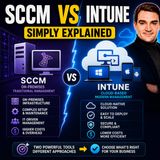
A common decision around Microsoft Intune is how it relates to System Center Configuration Manager (SCCM). The episode "SCCM vs Intune: Key Differences | Simply Explained" presents SCCM as the long-standing enterprise standard and Intune as Microsoft's cloud-first approach to managing modern devices. The episode notes that the choice is not always one or the other: many organizations use both together while they transition to the cloud.
Licensing and security architecture are another recurring theme. In "Licensing, Security & Management: Making Microsoft 365 Defender and Intune Work Together with Videsh Chavan", the discussion frames Microsoft 365 licensing as an architecture decision rather than purely procurement. The episode says that licensing choices directly influence security architecture, endpoint management, identity protection and operational costs, and it explores how licensing, Microsoft Intune, Microsoft Defender, identity and endpoint security can work together instead of operating as separate silos.
Managed service providers also appear in the episodes. "Building a Secure Microsoft-First MSP: Intune, Defender & Entra ID at Scale with Albin Klinaku [MVP]" features a Microsoft Intune MVP and discusses how an MSP can build a scalable, Microsoft-first security practice using Microsoft Intune, Microsoft Defender and Microsoft Entra ID. The episode argues that customers now expect proactive security, cloud expertise and modern identity protection from day one, and that identity has become the new security perimeter.
Looking ahead, "Agentic AI for IT Operations: Windows 365, Intune & Microsoft's AI Vision with Christiaan Brinkhoff [Nerdio]" explores where Windows 365 and Microsoft Intune can support more autonomous IT operations and Cloud PC management. It places Intune alongside Agent 365, Microsoft Foundry and Microsoft Entra, with governed workflows, observability, identity and human oversight as part of the picture. Taken together, the episodes position Microsoft Intune as the device and app management layer that connects endpoint operations, identity and security in the Microsoft ecosystem.
Overview compiled with AI from M365.FM episodes and the facts on this page. You can improve it with the edit button below.
Key points about Microsoft Intune from the episodes, each with its source episode:
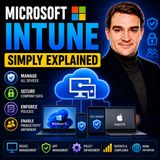
Intune is a cloud service that manages devices, enforces security, deploys apps and protects corporate data without IT touching each device. · Microsoft Intune - Simply Explained
Intune is more than device management: it is the control plane for identity-aware access, protected apps, adaptive risk and verifiable compliance across Microsoft 365. · What Is Microsoft Intune Used For?
Autopilot pilots of fifty devices look perfect, then ten thousand devices start failing in ways nobody predicted. This episode is for endpoint engineers, Intune admins and service desk leads who run large Windows rollouts. You will learn where enrollment…
Microsoft Intune is Microsoft's cloud-based endpoint management solution that helps organizations securely manage devices, applications, and users across Windows, macOS, iOS, Android, and Linux. It enables IT teams to deploy applications, enforce security…
Microsoft Intune isn’t just device management—it’s the control plane for identity-aware access, protected apps, adaptive risk, and verifiable compliance across Microsoft 365. When Intune is wired into Azure AD (Entra ID), Microsoft Defender for Endpoint, and…
Microsoft Intune is a powerful endpoint management solution — but improper deployment can introduce serious security risks. Misconfigured policies, over-permissioned roles, and weak compliance settings often create hidden vulnerabilities that attackers can…
Stop patching ghosts and start running a self-healing workplace. This Podcast reveals why Microsoft Intune alone can’t scale your endpoint management – and how pairing Intune with Azure, Automation, Functions, Microsoft Graph, managed identities and Log…
Should you choose SCCM or Microsoft Intune for endpoint management? The answer isn't as simple as picking one over the other. While SCCM has been the enterprise standard for years, Intune represents Microsoft's cloud-first approach to managing modern devices.…
Most teams still treat Windows patching as a monthly event, while updates now run continuously and exploits arrive within days. This episode walks IT admins through Windows Update for Business, Intune update rings, feature update policies, Windows Autopatch…
Building a successful Managed Service Provider today requires far more than device management and helpdesk support. Customers expect proactive security, cloud expertise, and modern identity protection from day one. In this episode of the M365 Show, Mirko…
Explore agentic AI for IT operations with Christiaan Brinkhoff: Windows 365, Intune, AI agents, governance, security, and Microsoft's agentic OS vision.
Shared Wi-Fi passwords and repeated VPN logins are still common in small businesses, yet running a traditional certificate infrastructure is often too much work. This episode explains certificates and Microsoft Cloud PKI in plain language and shows IT admins…
Tired of chatbots that answer Intune incidents with poetry instead of fixes? In this episode, we go hands-on with Azure AI Foundry and Semantic Kernel to build a mini, self-healing, governed multi-agent system for enterprise IT. You’ll learn why single agents…
Still writing PowerShell against MSOnline and AzureAD modules in 2025? This episode explains why that stack is legacy – and how to go API-first with pure REST and Microsoft Graph. We walk through the core “token, headers, REST call” pattern, three real-world…
Windows 11 ISO Download: The Official Way, Step by Step · Mirko Peters Windows 11 ISO download from Microsoft: pick the right option, choose edition and language, verify the SHA-256 hash and stay away from unofficial copies.
How to Factory Reset Windows 11: Every Method Explained · Mirko Peters How to factory reset Windows 11 from Settings or recovery: keep or remove files, cloud or local reinstall, BitLocker keys, backup and what to do afterwards.
How to Disable BitLocker: Suspend or Decrypt a Drive · Mirko Peters How to disable BitLocker: when to suspend protection, when to decrypt it with Disable-BitLocker or manage-bde -off, and what changes on managed devices.
Avoiding Common Pitfalls in Microsoft Intune Deployments · Mirko Peters Welcome back to the podcast blog! If your organization is like most modern enterprises, you have likely embraced Microsoft Intune as the cornerstone of your endpoin…
Getting Started with Microsoft Intune: A Beginner's Roadmap · Mirko Peters Welcome to our comprehensive guide on getting started with Microsoft Intune. In today's digital workplace, modern endpoint management is no longer just an optional …
Questions marked with AI were written with AI from the facts on this page.
What is Microsoft Intune used for? (AI)
Microsoft Intune is Microsoft's cloud service for managing devices and apps. It enforces configuration and compliance policies on Windows, macOS, iOS and Android, deploys applications and helps protect company data.
How does Microsoft Intune relate to Conditional Access and Microsoft Entra ID? (AI)
Microsoft Intune feeds device status into Conditional Access, so access to company data can depend on device compliance. Microsoft Entra ID holds the identities of the users who own the managed devices.
Does Microsoft Intune replace SCCM? (AI)
The episode "SCCM vs Intune: Key Differences | Simply Explained" presents Intune as Microsoft's cloud-first approach and SCCM as the long-standing enterprise standard. It notes that many organizations use both together during their transition to the cloud.
Why do Intune and Autopilot rollouts fail after the pilot?
Ten devices work, but at ten thousand devices behavior changes. The episode argues the issue is the model: a device is a sequence to orchestrate, not just something to configure. · From the episode: Intune and Autopilot at Scale: What Breaks in Real Rollouts
What is Microsoft Intune?
Microsoft Intune is a cloud service for managing devices and applications. It enforces security, deploys apps and protects corporate data from a single web console. · From the episode: Microsoft Intune - Simply Explained
How does Intune work with Conditional Access?
Intune compliance policies evaluate whether a device meets set conditions, and Conditional Access uses that compliance status to allow or block access to corporate data. · From the episode: Microsoft Intune - Simply Explained
Can Intune manage personal devices?
The show notes say it can enroll and manage both corporate-owned and personal devices from one platform. · From the episode: Microsoft Intune - Simply Explained
What did device setup look like before Intune?
IT had to touch each device: unbox it, install the operating system, configure settings by hand and load apps. Later changes were pushed manually or via on-premises servers. · From the episode: Microsoft Intune - Simply Explained
Relationship map of Microsoft Intune: linked topics
Related topics in brief
Topics linked to Microsoft Intune, each briefly explained:
Microsoft – Organization· Developed by Microsoft Corporation is a technology company that develops software and cloud services such as Microsoft 365, Azure and Dynamics 365.
Microsoft tool – Category· Is a Microsoft tool is a broad category for software products and services developed by Microsoft, used to group offerings and to frame tool-selection decisions.
Identity and security tool – Category· Is a Identity and security tool is a category for tools that protect identities, devices, data and applications, including Microsoft Entra, Purview, Defender and Intune.
Microsoft Entra ID – Identity and security tool by Microsoft· Related to Microsoft's cloud identity and access management service, formerly Azure Active Directory. It handles sign-in, single sign-on, multifactor authentication, Conditional Access and app registrations for Microsoft 365, Azure and thousands of other apps.
Windows 11 – Product by Microsoft· Related to Windows 11 is the current Windows operating system for PCs. IT teams deploy, update and manage it on company devices with tools such as Microsoft Intune and Configuration Manager.
Windows 10 – Product by Microsoft· Related to Windows 10 is the Windows version before Windows 11. Its support ended on October 14, 2025, so those devices no longer receive security updates unless an extended program applies.
Microsoft Intune: Intune Suite - Unattended Remote Help for Windows - Remote Sign-in
Remotely access devices over the cloud without requiring end user involvement by signing in with credentials.
GA: August CY2026
Summaries of official Microsoft release information, checked daily.
Community wiki
Short info above, community knowledge below: add practical tips, examples or corrections. New contributions are reviewed first; trusted members publish directly.
Experts and companies for this topic
Community members with expertise in Microsoft Intune:
 EN
 Deutsch
 Español
 Français
 Italiano
 Português
 Nederlands
 Polski
 Bahasa Indonesia
 Русский
 Українська
 العربية
 עברית
 日本語
 한국어