

 Apple Podcasts
 Spotify
 Youtube Music
 Spreaker
 Podchaser
 Amazon Music
This episode digs into why so many Microsoft Copilot rollouts fail and what organizations can do to turn things around. It starts by breaking down what Copilot actually is — not just a single tool, but an AI layer woven throughout Microsoft 365. The hosts explain how it can summarize documents, draft emails, assist with data in Excel, help build presentations, and streamline communication inside Teams. The promise is big, but the reality is that most organizations struggle to unlock even a fraction of this potential.
The discussion moves quickly into the heart of the problem: adoption. Many companies rush to deploy Copilot without understanding how it fits into their workflows, what their employees actually need, or whether their environment is even ready. The episode highlights that a surprising number of failures come from basic readiness issues — disorganized data, inconsistent governance, licensing confusion, or simply not meeting the technical prerequisites. But the bigger issue is often cultural. Users aren’t trained, they don’t understand what Copilot can do, and no one is guiding them. Without champions, clear examples, or practical use cases, most employees fall back to old habits and never even try the new AI tools.
From there, the hosts unpack common adoption pitfalls: rolling out Copilot without explaining its value, skipping change management, failing to support early users, and assuming people will “figure it out.” They emphasize that real adoption requires structure — a readiness assessment, clear use cases, communication, training, and people who advocate for the tool. When those pieces are missing, Copilot ends up being a costly feature no one uses.






You may expect Microsoft Copilot to boost your productivity, but many organizations hit unexpected roadblocks. Copilot Rollouts Fail when you underestimate the need for clear strategy, strong training, and solid data governance. Change management often gets overlooked. You want practical answers about why adoption breaks down and how to avoid common mistakes.
Key Takeaways
- Set clear goals before launching Microsoft Copilot. Define what success looks like to avoid wasting time and resources.
- Avoid rushing the implementation process. Take the time to assess readiness and plan for training to ensure smooth adoption.
- Customize Copilot to fit your organization's unique workflows and compliance needs. Tailored strategies lead to better results.
- Establish strong data governance. Ensure clear ownership and access policies to protect sensitive information during rollouts.
- Create a structured onboarding process. Train employees on how to use Copilot effectively to maximize its potential.
- Encourage internal champions to drive adoption. Champions help others understand the value of Copilot and provide support.
- Communicate clearly about the benefits of Copilot. Address employee concerns to reduce resistance and build trust.
- Focus on continuous improvement. Set up feedback loops to adapt and enhance the Copilot experience over time.
6 Surprising Facts About Microsoft 365 Copilot Rollouts
Organizations preparing for Microsoft 365 Copilot often assume technical readiness is the main hurdle, but real-world rollouts reveal unexpected pitfalls. Below are six surprising facts that explain why copilot rollouts fail and how to avoid them.
- Human trust gaps outweigh technical bugs. Many pilots show the Copilot works technically but users distrust its suggestions, leading to low usage and perceived failure even when the service is stable.
- Data governance trumps feature parity. Concerns about sensitive data handling and compliance often delay or halt rollouts—one of the leading reasons copilot rollouts fail despite positive pilot results.
- Change management is frequently underestimated. Organizations that skip role-based training and communication see adoption collapse; Copilot needs workflow redesign, not just a new UI.
- Metrics mismatch hides early warning signs. Teams tracking only uptime or API latency miss adoption indicators; failing to measure time saved, task completion, and suggestion acceptance rates can make copilot rollouts fail unnoticed.
- Integration complexity with custom apps is higher than expected. Extending Copilot to legacy or line-of-business systems often uncovers unanticipated authentication, data mapping, and performance issues that stall deployments.
- Legal and procurement timelines can outlast pilot enthusiasm. Contract approvals, vendor risk assessments, and insurance checks frequently slow or cancel rollouts—an operational reality behind many cases where copilot rollouts fail.
Addressing trust, governance, change management, appropriate metrics, integration planning, and procurement alignment significantly reduces the chance copilot rollouts fail.
Why Copilot Rollouts Fail
Common Pitfalls
Unclear Goals
You may expect instant results from Microsoft Copilot, but many organizations struggle because they do not set clear objectives. When you start a project without a defined purpose, you risk wasting time and resources. For example, some teams launch pilots without knowing what success looks like. Others misjudge the timeline, either rushing the process or dragging it out. Both approaches lead to confusion and low engagement.
Tip: Before you begin, ask yourself: What do you want to achieve with Copilot? How will you measure success?
Here is a table that summarizes common pitfalls related to unclear goals and rushed implementation:
| Pitfall | Description |
|---|---|
| Undefined objectives | Implementing Copilot without clear goals can lead to aimless pilots, wasting time and resources. |
| Misjudging the timeline | Rushing a pilot can result in insufficient data collection, while dragging it out may cause user fatigue and disengagement. |
Rushed Implementation
You might feel pressure to deploy quickly, but skipping important steps can cause copilot rollouts fail. Many organizations overlook the need for readiness assessments and proper planning. They underestimate the time needed for training and change management. This leads to confusion, frustration, and poor adoption rates.
A rushed rollout often means you do not collect enough feedback or adjust your approach. You may also miss technical requirements, such as infrastructure upgrades or integration needs. These oversights can create barriers that slow down progress and reduce the value you get from Copilot.
Workflow Challenges
Broken Processes
Even the best technology cannot fix broken business processes. If your workflows are unclear or inconsistent, copilot rollouts fail to deliver results. You may see individuals using Copilot for personal tasks, like summarizing emails or meetings. However, when you try to scale up, the complexity increases. Teams struggle to coordinate, and the tool does not fit well into daily routines.
- Cost and licensing complexity can deter effective use of Copilot.
- Lack of awareness and skills gaps prevent users from maximizing the tool's potential.
- Without a structured approach, organizations risk underutilizing Copilot, leading to wasted potential.
You need to address these issues before you introduce new technology. Otherwise, you risk repeating the same mistakes and seeing little improvement.
Lack Of Customization
Every organization has unique needs. If you do not customize Copilot to fit your workflows, permissions, and compliance requirements, copilot rollouts fail. You must assess both technical and organizational readiness. Customization helps you align Copilot with your business goals and ensures that users see real value.
- Customization is essential for aligning Copilot with unique workflows, permissions, and compliance needs of each application.
- Organizations must assess both technical and organizational readiness to tailor their strategies effectively.
- Change management strategies should be customized to address specific challenges and minimize resistance during deployment.
Note: Customization is not just about technology. You also need to adapt your change management approach to fit your culture and address user concerns.
Table: Frequent Pitfalls in Microsoft Copilot Rollouts
| Pitfall | Description |
|---|---|
| Data Security and Privacy Concerns | Ensuring sensitive information remains protected as Copilot accesses and processes organizational data. |
| Compliance and Legal Risks | Navigating regulations like GDPR and HIPAA to avoid fines and maintain trust. |
| Technical Infrastructure & Integration | Upgrades may be necessary for compatibility and successful deployment. |
| Governance Controls | Without proper governance, there is a risk of inappropriate access or sharing of information. |
| Cost and Licensing Management | Additional costs can escalate without oversight and measurable productivity gains. |
| Inaccurate or Unreliable Outputs | Copilot can produce misleading information, leading to poor decisions. |
| Over-dependence on AI | Employees may become overly reliant, diminishing critical thinking skills. |
| Learning Curve and User Interaction | Users require time and training to effectively utilize Copilot. |
| Decision-making Bias | AI models may reflect biases in training data, resulting in unfair outcomes. |
| Change Management and Resistance | Employees may resist adopting new tools due to fears or skepticism. |
| Measuring ROI and Value | Demonstrating tangible benefits can be challenging, especially with low adoption rates. |
You face many challenges during microsoft copilot rollouts. These include technical barriers, unclear processes, and resistance from users. If you do not address these issues, you increase the risk of failure. You need to focus on clear goals, thoughtful planning, and customization to ensure success.
Low Microsoft Copilot Adoption Barriers
You may expect Microsoft Copilot to transform your work, but many organizations face barriers that slow or stop adoption. These barriers often fall into two main categories: training gaps and user resistance.
Training Gaps
Insufficient Onboarding
You cannot expect employees to use a new tool if they do not know it exists or how it works. Many organizations skip structured onboarding, which leads to confusion and frustration. Some employees do not realize they have access to Copilot. Others try to use it but do not understand prompt engineering, which is the skill of asking the right questions to get useful answers. If you rush to activate Copilot without preparation, you waste its potential.
Here is a table that shows how insufficient onboarding affects adoption:
| Issue | Impact |
|---|---|
| Lack of awareness | Employees do not use Copilot because they do not know about it. |
| No prompt engineering training | Users get poor results and lose trust in the tool. |
| Rushed activation | The organization misses out on Copilot’s full value. |
Tip: Plan a structured onboarding process. Make sure every user knows how to access Copilot and how to use it effectively.
Lack Of Champions
You need internal champions to drive adoption. Champions are employees who understand Copilot and help others see its value. They answer questions, share tips, and show how Copilot fits into daily work. A strong champions community can include a Viva Engage group for discussions, a Teams channel for resources, and regular calls to share best practices. Champions help you pinpoint key usage scenarios, provide feedback, and encourage others to try Copilot.
- Champions identify where Copilot fits best in your workflows.
- They help build rollout plans and demonstrate real-world value.
- They create feedback loops to improve adoption.
User Resistance
Change Management Issues
You may see resistance if you do not communicate clearly about Copilot. Employees need to know why you are introducing the tool and how it will help them. Without enough communication and training, people may make assumptions or worry about their jobs. Leadership must explain the benefits and changes Copilot brings. A good communication plan helps everyone feel included and informed.
- Employees resist change if they do not understand the reasons.
- Clear messages from leaders reduce fear and confusion.
- Training and open discussions help build trust.
Skills Gaps
You cannot ignore skills gaps when rolling out Copilot. Employees need basic digital skills to use AI tools well. If you skip training, you risk low microsoft copilot adoption and wasted investment. For example, a large company spent millions on Copilot but saw poor results because employees lacked the right skills. Productivity dropped, and the project stalled. Proper training boosts confidence and helps you get the most from Copilot.
Note: AI tools can boost productivity, but only if your team has the skills to use them.
Microsoft Copilot Rollouts And Data Governance

You need to pay close attention to data governance when you roll out Microsoft Copilot. Data quality, ownership, security, and compliance all play a big role in how well Copilot works for your organization.
Data Quality Risks
Inconsistent Data
You rely on Copilot to give you accurate answers. If your data is inconsistent, you will see unreliable results. Copilot may give different answers to the same question because it cannot always find the right data. You might notice that some responses do not match your expectations. This happens when Copilot faces strict instructions, incomplete indexing, or outdated content.
- Inconsistent responses can occur when Copilot cannot access all relevant data.
- Duplicate records may confuse Copilot about which data to trust.
- Outdated or conflicting information can lead to incorrect outputs.
If you do not trust the answers you get, you will stop using Copilot. Clean, reliable data builds trust and helps you get the most value from AI.
Ownership Issues
The significant data ownership issues during Microsoft Copilot rollouts include lack of data governance, oversharing of sensitive files, absence of a labeling strategy, and unclear data ownership. These issues lead to ineffective use of Copilot, as it surfaces all available data, including sensitive information that should not be accessed.
You must know who owns your data and who can access it. Without clear ownership, sensitive files may get shared by mistake. You need a strong labeling strategy and clear rules for data access. This keeps your information safe and ensures Copilot only uses the right data.
Security And Compliance
Access Policies
You need to set up access policies the right way. If you misconfigure permissions, Copilot may show confidential information to people who should not see it. This is a big risk in shared environments like SharePoint and Teams.
| Evidence Type | Description |
|---|---|
| Over-Permissioning | Misconfigured permissions can lead to Copilot accessing confidential information that users should not see, especially in shared environments. |
| Compliance Gaps | Misconfigurations in data residency and logging can create compliance gaps with regulations like HIPAA and GDPR, risking violations. |
| Amplification of Risks | Copilot can expose and amplify existing risks if sensitive data is already accessible due to misconfigured permissions, making it easier to misuse. |
You also need to check your data residency and logging policies. If you do not set these up correctly, you may break important rules like HIPAA or GDPR.
- Misconfigured data residency can lead to non-compliance.
- Logging policies that are not properly set can create compliance gaps.
Regulatory Concerns
You face many regulatory challenges when you use Copilot, especially in industries with strict rules. You must keep records of communications and decisions. You also need to protect data privacy and address bias or ethical concerns.
- You must comply with recordkeeping and supervision obligations.
- Data security and privacy vulnerabilities can create risks.
- Bias and ethical compliance issues need attention.
- Technical preparedness gaps must be managed.
- Transparency and explainability are essential.
Many organizations report security and compliance challenges during Copilot rollouts. The table below shows the most common issues:
| Challenge | Percentage of Respondents | Description |
|---|---|---|
| Risk of oversharing and unauthorized access | 60% | Significant concerns regarding default configurations leading to data exposure. |
| Poor response quality | 52% | Issues with AI-generated outputs being misleading or incorrect due to outdated data. |
| Deployment delays due to security concerns | 40% | Organizations facing delays of three or more months due to data security and oversharing risks. |
| Low information management maturity | 27% | Indicates a lack of established processes for data governance, increasing risks of data exposure. |
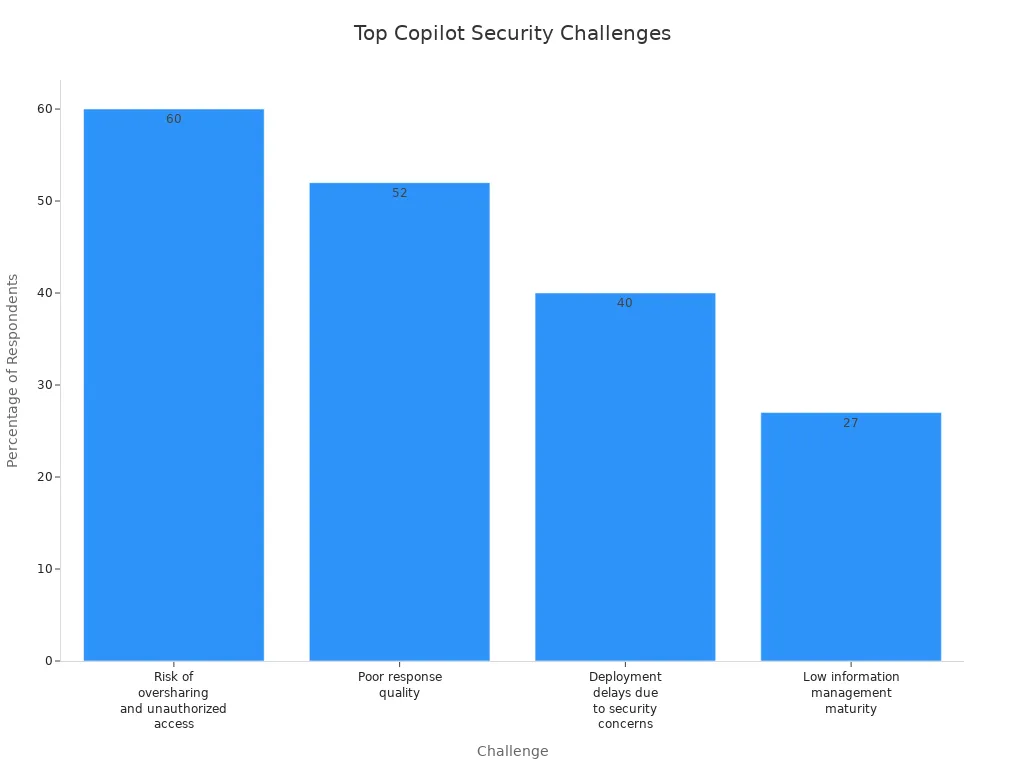
You need to address these risks before you deploy Copilot. Strong data governance, clear ownership, and strict access policies will help you stay compliant and protect your organization.
Misaligned Use Cases And ROI
Undefined Value
Overpromising AI
You may hear bold claims about what Microsoft Copilot can do. Many organizations expect AI to solve every problem right away. This leads to disappointment when results do not match the hype. Overpromising AI can create unrealistic expectations among your teams. When you expect Copilot to transform every workflow overnight, you set yourself up for frustration. You need to focus on real business problems and set clear, achievable goals for your rollout.
Unclear Measurement
You cannot prove value if you do not measure it. Many organizations struggle to define what success looks like for their Copilot projects. Without clear metrics, you cannot show return on investment or make informed decisions about scaling. A structured and tailored strategy helps you track progress and demonstrate impact.
Here is a table that shows how you can define and measure value for your Copilot rollout:
| Step | Description |
|---|---|
| Start with the problem and the outcome | Clearly state the problem you want to solve and the result you expect. |
| Choose one or two value signals to measure | Pick key metrics, such as time saved or improved accuracy. |
| Establish a baseline and track change | Measure results before and after Copilot to see the difference. |
| Make value visible | Share results with your team to guide next steps. |
You should connect costs per user to productivity gains. Track time savings, such as reduced meeting preparation. Monitor user adoption to ensure meaningful change. These steps help you avoid common but failed strategies that focus only on technology, not outcomes.
Use Case Alignment
Limited Workflow Fit
You need to match Copilot’s features to your actual business needs. If you do not, you risk low adoption and wasted investment. Many enterprises buy large numbers of licenses but see only a fraction of users actively engaging with Copilot. For example:
- Companies may purchase 1,000 licenses but have only 300 active users, wasting 70% of the investment.
- Organizations that do not align Copilot’s capabilities with real needs struggle to show ROI.
Limited workflow fit often leads to confusion and misalignment among teams. This can waste resources and cause missed opportunities. A strategic rollout requires you to review your processes and ensure Copilot fits your daily work. Cost and licensing complexity can also become a barrier if you do not plan carefully.
You can improve use case alignment by following best practices. For example, implementing Copilot Circles and champion programs can triple usage rates in the first month. One manufacturing client reduced reconciliation time by 70% by integrating Copilot with legacy systems. These results show the value of a strategic approach.
A successful rollout depends on understanding your workflows and choosing use cases where Copilot can make a real difference. Lack of awareness about Copilot’s strengths and limitations can lead to poor results. You need to focus on business value, not just technology, to achieve lasting success.
Leadership And Culture In Adoption
Executive Sponsorship
Top-Down Support
You need strong executive sponsorship to drive microsoft copilot adoption. Leaders set the tone for change and improvement. When executives show visible support, employees feel more confident about using new tools. You should see leaders using microsoft copilot in meetings and sharing their experiences. This top-down support helps everyone understand the value of ai in daily work.
Leaders must communicate clear goals and provide ongoing support. They should answer questions and address issues quickly. You can create a culture of improvement by encouraging feedback and celebrating small wins. When executives support microsoft copilot, you see faster adoption and better results.
Tip: Ask your leaders to share stories about how microsoft copilot helped them solve real business issues. This builds trust and motivates teams to try new features.
A table below shows how executive support impacts microsoft copilot rollout:
| Leadership Action | Impact on Microsoft Copilot Success |
|---|---|
| Visible tool usage | Builds trust and encourages adoption |
| Clear communication | Reduces confusion and resistance |
| Ongoing support | Solves issues and drives improvement |
| Recognition of progress | Motivates teams and boosts engagement |
Collaboration Barriers
Organizational Silos
You may face collaboration barriers when rolling out microsoft copilot. Silos create gaps between teams and slow down improvement. When departments do not share information, you see duplicate work and inconsistent results. These issues make it hard for microsoft copilot to deliver ai-driven support across your organization.
Most organizations are not failing with Microsoft 365 Copilot because of the technology itself, but because they are structurally unprepared for what it actually represents. The core issue is that Copilot is not just an assistant but an execution layer that operates across data, permissions, and business processes. Without clear governance, defined responsibilities, and controlled access to data, organizations create chaos instead of value. Weak data quality, siloed systems, and unclear ownership lead to unreliable outputs and loss of trust.
You need to break down silos to achieve microsoft copilot success. Start by mapping out your business processes and identifying where support is missing. Encourage cross-team meetings and open communication. You can set up regular check-ins to discuss issues and share improvement ideas. When you connect teams, you unlock the full power of microsoft copilot and ai.
A few steps can help you overcome these barriers:
- Create cross-functional teams to lead improvement projects.
- Use microsoft copilot champions to support users in every department.
- Share best practices and lessons learned to solve issues faster.
You will see more improvement and better support when you focus on collaboration. This approach leads to higher microsoft copilot adoption and long-term success.
What Needs To Change For Success
Strategy And Vision
Clear Goals
You need a clear vision to guide your microsoft 365 Copilot journey. When you set specific goals, you help your team understand what success looks like. A strong vision shapes your implementation strategy, defines use cases, and ensures Copilot fits into your daily workflows. Without this direction, you risk underutilizing the tool and missing out on productivity gains.
| Key Point | Explanation |
|---|---|
| Implementation Strategy | A clear vision guides how you use Copilot in your organization. |
| Defining Use Cases | It helps you find the best ways to use Copilot for your business needs. |
| Integration into Workflows | You make sure Copilot fits into your existing processes. |
| Avoiding Underutilization | Clear goals prevent wasted licenses and low usage. |
| Achieving Productivity | You see real improvements when everyone knows the purpose of Copilot. |
A business-centric approach works best. Focus on how Copilot can drive personal productivity and transform your operational procedures. This mindset helps you avoid common adoption challenges and keeps your digital transformation programs on track.
Customization
Every organization is different. You should customize your microsoft 365 Copilot rollout to match your unique workflows and compliance needs. Develop a tailored adoption strategy that includes deployment plans and ways to measure effectiveness after launch. Integrate Copilot into your existing systems to avoid disruption. Support your team with strong technical help and ongoing training.
- Design training programs for all skill levels.
- Use change management techniques to build support across pilot user groups.
- Encourage champions to share best practices and boost awareness.
Continuous Improvement
Feedback Loops
Continuous improvement is key to successful adoption. Set up feedback loops so users can share their experiences and suggest changes. This approach makes your system more resilient and responsive to real-world needs. When you listen to feedback, you build trust and improve efficiency.
Tip: Make users active partners with Copilot. Their input helps the AI learn and adapt, keeping automation aligned with your goals.
Iterative Adoption
You should roll out microsoft 365 Copilot in stages. Start small, learn from each phase, and adjust your approach. Ongoing coaching helps your team form new habits and reduces fear of new technology. When you standardize best practices and share them, you multiply productivity gains across your organization.
| Aspect | Without Training | With Training | ROI Impact |
|---|---|---|---|
| Standardized Best Practices | Knowledge stays siloed, causing inefficiency. | Shared workflows improve efficiency. | Standardization multiplies productivity gains. |
| Habit Formation | Copilot is used rarely, not part of daily work. | Coaching builds AI-first habits. | Habit formation leads to big time savings and productivity improvements. |
| Reduced Fear and Resistance | Employees resist and feel anxious about AI. | Understanding builds confidence and engagement. | Buy-in creates a positive feedback loop and sustained microsoft 365 usage. |
You can future-proof your digital transformation programs by making continuous improvement part of your culture. Champions and ongoing support play a big role in building awareness and driving engagement. When you focus on what needs to change, you set your microsoft 365 Copilot project up for long-term success and higher ai adoption.
You can achieve a successful copilot rollout by learning from organizations that have improved adoption and experience. Focus on these lessons:
- Understand the risks before enabling copilot.
- Train employees to use copilot as a tool for better experience.
- Prioritize data privacy in every copilot rollout.
Follow these steps for every copilot rollout:
- Develop a clear AI strategy for your copilot rollout.
- Prioritize security and protect sensitive data.
Revisit your approach and commit to continuous improvement. Strong leadership and clear goals will help you maximize the value of every copilot rollout and drive better adoption and experience.
Microsoft 365 Copilot Rollouts: Checklist to Prevent When Copilot Rollouts Fail
Use this checklist to plan, execute, monitor, and recover from issues so copilot rollouts fail less often and recover quickly if they do.
Planning & Strategy
- Define goals and success criteria (performance, adoption, security) for the Copilot rollout.
- Identify stakeholder sponsors, decision owners, and escalation paths.
- Map impacted users, apps, and data sources; prioritize pilot groups by risk and business impact.
- Document rollback criteria and acceptance thresholds before rollout begins.
Prerequisites & Environment
- Verify Microsoft 365 licensing and Copilot entitlements for targeted users.
- Confirm tenant-level settings, Azure AD configuration, and conditional access policies are compatible.
- Ensure required Microsoft Graph permissions and API access are provisioned and audited.
- Validate network requirements (firewall, proxy, DNS) and latency expectations.
- Back up critical configuration and metadata for quick restoration.
Pilot & Staging
- Run a controlled pilot with representative users and use cases before wide rollout.
- Use feature flags or phased group assignment to limit blast radius.
- Collect telemetry baseline (usage, latency, error rates) prior to enabling Copilot.
- Test integrations with line-of-business apps, connectors, and SharePoint/OneDrive content sources.
Deployment & Change Management
- Create a clear enablement schedule with maintenance windows and communication plans.
- Train helpdesk and first-line support on common Copilot behaviors and known issues.
- Publish user guidance and acceptable use policies prior to enabling Copilot for users.
- Apply phased rollout: pilot → limited rollout → broad rollout, with checkpoints at each phase.
Monitoring & Observability
- Enable logging and telemetry for errors, latency, authentication failures, and API quotas.
- Set alerts for spikes in error rates, auth failures, or service degradation.
- Monitor user feedback channels and adoption metrics daily during rollout phases.
- Instrument tracing to identify where copilot rollouts fail (client, network, service, policy).
Troubleshooting When Copilot Rollouts Fail
- Reproduce the issue in the pilot/staging environment and capture error messages and timestamps.
- Check Azure AD sign-in logs and conditional access events for blocked authentications.
- Review Microsoft 365 Service Health and Copilot-specific advisories for known outages.
- Validate Graph API throttling or permission errors and adjust request patterns or scopes.
- Confirm content connectors and data sources are reachable and indexed properly.
- Escalate to Microsoft Support with collected logs, tenant ID, and reproduction steps if root cause remains unclear.
Rollback & Remediation
- Execute pre-defined rollback plan if acceptance criteria are not met; revert feature flags or group assignments.
- Restore affected configuration from backups if a configuration change caused failure.
- Apply mitigations (rate limits, policy adjustments) before retrying a phased rollout.
- Document remediation steps and root cause for knowledge base and future prevention.
Security, Compliance & Data Protection
- Confirm data residency, retention, and eDiscovery settings meet regulatory requirements.
- Validate Copilot prompts and outputs cannot expose sensitive data; implement DLP policies accordingly.
- Audit consented apps and third-party connectors for least privilege access.
- Review privacy notices and obtain necessary user or organizational consents.
Training & Support
- Provide role-based training for end users, admins, and developers on Copilot features and limitations.
- Create quick-reference troubleshooting guides for common issues and how to report them.
- Set SLAs for incident response and include Copilot-specific escalation paths.
- Capture user feedback and iterate on training materials and rollout pace.
Post-Rollout Review
- Conduct a post-mortem for any incidents where copilot rollouts fail to identify root cause and corrective actions.
- Measure adoption, productivity impact, and user satisfaction against initial success criteria.
- Update runbooks, automation, and configuration baselines based on lessons learned.
- Plan periodic reviews for updates, permission audits, and compliance checks.
Checklist complete — use these items to reduce the chance copilot rollouts fail and to recover quickly if they do.
ai insight: copilot adoption fails and a path forward for enterprise
Why do copilot rollouts fail in enterprise environments?
Copilot rollouts fail in enterprise environments for a mix of technical, organizational, and cultural reasons: unclear roadmap and measurable goals, lack of reference data and documentation, poor alignment with key workflows (like Excel or HR processes), architectural friction with existing systems, and insufficient training sessions that leave users unsure how to treat copilot as a feature rather than a novelty.
What are the most common failure modes when copilot becomes part of workflows?
Common failure modes include hallucination (incorrect outputs presented confidently), lack of integration that forces users to copy/paste between a copilot demo and production systems, brittle prompt patterns, no step-by-step guidance for complex scenarios, and falling short of measurable impact so leadership loses interest and adoption stalls.
How can organizations diagnose why a copilot rollout has stalled?
Diagnose by collecting insights: usage analytics, qualitative feedback from power users, documentation gaps, error rates and hallucination instances, friction points in key workflows or spreadsheets, and whether the copilot fails to embed into daily tasks. A combination of experimentation and targeted training sessions helps surface where adoption fails.
What practical steps form a path forward after a failed copilot rollout?
Form a path forward by recalibrating the roadmap with clear, measurable impact goals, starting with a small set of high-value scenarios, embedding the copilot into one or two key workflows (e.g., automating spreadsheet tasks or HR onboarding), improving documentation and demo materials, and running focused training sessions to create a culture of experimentation.
How does a culture of experimentation reduce the chance that copilot rollouts fail?
Creating a culture of experimentation encourages rapid iteration on prompts, testing of architectural changes, and continuous measurement of outcomes. Teams are more likely to surface messy edge cases early, fix hallucination issues, and adapt documentation so the copilot becomes a reliable part of workflows instead of a stalled pilot.
What role does prompt engineering play in preventing copilot adoption fails?
Prompt engineering is critical: well-crafted prompts and templates reduce hallucination, make behavior predictable across users, and enable reproducible outcomes in demos and production. Providing step-by-step prompts and examples in documentation helps users embed copilot into everyday tasks like Excel automation or generating HR communications.
How should you measure whether a copilot rollout is succeeding or failing?
Measure success with both quantitative and qualitative metrics: task completion rates, time saved on key workflows, reduction in errors, user satisfaction scores, frequency of use in targeted scenarios, and business KPIs tied to the roadmap. Measurable impact prevents ambiguous outcomes that often lead to stalled adoption.
Can integrating chatgpt-style models reduce friction in copilot deployments?
Integrating chatgpt-style models can reduce friction when done thoughtfully—by providing clear context and reference data, limiting scope to defined scenarios, and using embedded demos that show step-by-step outcomes. However, without proper documentation and architectural alignment, integration alone won't stop copilot rollouts from failing.
What documentation and demo materials are most effective for real adoption?
Effective materials include concise playbooks for administrators, step-by-step user guides for common tasks, reproducible demos that show measurable impact on workflows like spreadsheets, and troubleshooting notes for known failure modes such as hallucination or API errors. Good documentation helps accelerate adoption and reduces support friction.
How do architectural decisions contribute to copilot rollout success or failure?
Architectural choices—data connectors, latency, security, and where inference runs—directly affect reliability and user trust. Poor architecture can cause inconsistent behavior across environments, increase hallucination risk due to missing reference data, and introduce friction that causes pilots to stall; strong architecture enables smooth embedding of copilot as a feature.
When should you automate vs. keep copilot as an assistive tool?
Automate repeatable, well-understood tasks with clear success criteria (e.g., spreadsheet transformations, routine HR messages) and keep copilot as an assistive tool for open-ended tasks where human judgment is required. Starting with automatable key workflows creates measurable wins that justify broader adoption instead of risking messy failures.
How can training sessions and experimentation programs help recover a failing rollout?
Targeted training sessions teach users reliable prompts and workflows, while structured experimentation programs let teams iterate on prompts, datasets, and integrations quickly. Together they build confidence, reduce hallucination, and surface realistic scenarios that show how copilot accelerates daily work, converting demos into real adoption.
What safeguards reduce hallucination and other risky failure modes?
Safeguards include grounding responses in trusted reference data, adding provenance and confidence indicators, post-processing checks for critical outputs, role-based limits for sensitive actions, and clear escalation paths. These controls reduce risky hallucination and make the copilot safer to embed in enterprise scenarios.
How do you select initial scenarios to avoid copilot rollouts failing?
Choose scenarios that are high-value, repeatable, and bounded—such as Excel automation, generating standard HR templates, or summarizing structured reports. These scenarios are easier to measure, document, and automate, producing demonstrable wins and preventing messy, ambiguous pilots.
What is the role of reference data and documentation in preventing adoption failure?
Reference data supplies factual grounding for model outputs, while documentation provides users with the prompts and workflows that produce consistent results. Together they reduce hallucination, lower friction in key workflows, and make it easier for teams to embed copilot as a feature with measurable outcomes.
How can leaders ensure real adoption instead of temporary interest?
Leaders should set a clear roadmap with measurable milestones, invest in training and documentation, prioritize integration into critical workflows, fund experimentation, and reward teams for demonstrable impact. This combination turns initial demos into sustained, enterprise-wide adoption rather than a stalled pilot.
What should be included in a remediation plan when copilot rollouts fail?
A remediation plan should include an assessment of failure modes, prioritized technical fixes (architecture, data), improved documentation and demo scenarios, targeted training sessions, a revised roadmap with measurable goals, and a schedule for repeated experimentation to validate improvements and rebuild confidence.
How do you balance speed of deployment with avoiding messy failures?
Balance speed and safety by deploying incrementally: start with a narrow scope and high-value scenarios, run fast experiments, collect measurable metrics, and expand only after hitting adoption and reliability thresholds. This reduces the risk of large-scale messy failures while still enabling rapid learning and acceleration.
How can you use spreadsheets and Excel demonstrations to accelerate adoption?
Excel and spreadsheet demos are familiar and tangible: they show time savings and accuracy improvements in a format business users recognize. Building templates and automations that integrate copilot outputs into spreadsheets creates immediate, measurable impact that helps overcome initial friction and skepticism.
What governance practices prevent copilot rollouts from becoming liabilities?
Governance should define acceptable use, data access policies, review processes for produced content, procedures for handling hallucinations, and metrics for ongoing evaluation. Strong governance reduces risk, clarifies responsibilities, and ensures the copilot aligns with enterprise compliance and security needs.
How do you scale from a successful pilot to enterprise-wide adoption without stalling?
Scale by codifying successful scenarios into templates, expanding documentation and training, investing in robust architecture and integrations, monitoring measurable impact, and maintaining a culture of experimentation so lessons from early pilots propagate and prevent stagnation or regression.
🚀 Want to be part of m365.fm?
Then stop just listening… and start showing up.
👉 Connect with me on LinkedIn and let’s make something happen:
- 🎙️ Be a podcast guest and share your story
- 🎧 Host your own episode (yes, seriously)
- 💡 Pitch topics the community actually wants to hear
- 🌍 Build your personal brand in the Microsoft 365 space
This isn’t just a podcast — it’s a platform for people who take action.
🔥 Most people wait. The best ones don’t.
👉 Connect with me on LinkedIn and send me a message:
"I want in"
Let’s build something awesome 👊
Most companies roll out Microsoft 365 Copilot expecting instant productivity boosts. But here’s the catch: without measuring usage and impact, those big expectations collapse fast. If your team can’t prove where Copilot saves time and where it’s ignored, you’ve just invested in another abandoned tool. So why do so many deployments fail quietly—and what can you actually do to make yours stick? Stay with me, because the missing piece isn’t technical—it’s all about turning metrics into a feedback loop that transforms Copilot from hype into measurable ROI.
The Hype vs. Reality of Copilot Rollouts
Most leaders pitch Copilot as the silver bullet for productivity. The promise sounds simple: roll it out, and from day one, the workforce magically produces more with less effort. That’s the story most executives hear and repeat across town halls and leadership meetings. But then six months go by, and the feeling shifts. Instead of showcasing reports of dramatic gains, the organization starts asking quiet questions. Why aren’t the efficiency numbers any different? Why are some teams still clinging to old processes? The hype begins to flatten into uncertainty, and the mood around Copilot changes from excitement to doubt. The expectation driving this disappointment is that Copilot acts like flipping a switch. Leaders often treat it as an instant upgrade to workflows, assuming that once employees have access, they’ll figure out how to integrate it everywhere. It feels intuitive to think an AI assistant will naturally slot into daily tasks. The problem is that rolling out technology doesn’t equal transformation. Without structure, without strategy, and without monitoring, Copilot becomes just another tool among dozens already available in the productivity stack. Employees will try it out, explore its features, and maybe even use it casually. But casual adoption is not the same as measurable improvement. Here’s the disconnect. On paper, adoption might appear strong because licenses are in use. Log-ins are happening. Queries are being made. And yet inside the flow of work, no one actually knows whether those queries are relevant or valuable. Some employees experiment with Copilot to reformat text, while others use it to draft a single email a week. Nothing about that usage says anything about whether productivity has improved. That lack of visibility turns rollout success into guesswork. Soon, leadership starts relying on surface numbers without context. The illusion is there, but the underlying impact remains untested. If you’ve ever helped roll out Microsoft Teams without governing how groups or channels should be structured, you already know this story. At first, adoption rockets up—people are in meetings, sending chats, creating Teams everywhere. But when governance is ignored, chaos compounds faster than adoption. Duplication spreads, abandoned spaces pile up, and engagement quality drops off harder than it grew. Copilot rollouts follow the same trap. Just because everyone has access and plays with it doesn’t mean the organization is benefiting. It often means the opposite: lots of scattered experimentation with no pattern, no structure, and no way to scale the outcomes that work. A common pitfall is the assumption that once IT completes technical deployment, their job is done. Servers are running, identities are synced, licenses are assigned, and the box is ticked. That mindset reduces Copilot to a technical checkbox rather than treating it as a business transformation initiative. Success gets misdefined as “we shipped it” rather than “it’s making a measurable difference.” The result is predictable—organizations claim Copilot has been integrated, but the reality is most usage remains shallow. And shallow adoption doesn’t hold up under scrutiny. The numbers back it up. Roughly seven out of ten Copilot deployments report no measurable return on investment after the initial surge of activity. Those are leaders checking dashboards filled with log-in statistics but struggling to tie them back to any improvement in time saved or output produced. ROI freezes right where rollout started—access has been granted, but productivity has not been proven. And because no baseline comparisons exist, there’s no way to even know whether Copilot changed anything meaningful. Without proper measurement, the organization is essentially guessing. The warning signs often slip by quietly. One department swears by Copilot, but another barely touches it. Leaders chalk this up to differences in workload or maturity. But these patterns point to something much deeper—an uneven adoption curve that reflects a lack of guidance, training, and structure. If certain teams naturally discover value while others drift, you’re not looking at success. You’re looking at missed opportunity. The organization loses out on consistency, shared best practices, and economies of scale. And this is where the real game-changer comes in. Early measurement doesn’t just answer whether adoption is happening. It reveals how, where, and why. It identifies those uneven adoption patterns not as curiosities but as early warning lights. With the right approach, leaders can intervene, adjust training content, identify hidden champions, and redirect focus before momentum flatlines. Rolling out Copilot without measurement is like buying a plane without ever checking if it flies. You may have the engine, the wings, and the seatbelts installed—but until you verify it’s airborne, success exists only in theory. Which raises the bigger question: how do you know, early on, if your Copilot rollout is gliding toward success or dropping like a rock?
The Hidden Metrics that Predict Failure
What if you could tell right from the start that your Copilot rollout was set to fail? Imagine spotting the red flags early, before adoption stalls and the tool quietly becomes shelfware. That’s not only possible—it’s necessary. Because by the time user complaints reach leadership, you’re already too late. Copilot is one of those rollouts where the danger doesn’t look like failure at first. It looks like activity. People log in, licenses get assigned, and surface numbers look healthy. But under the hood, the metrics that truly matter tell a different story. The reality is most organizations don’t track the right signals. IT counts the number of licenses activated and assumes that equals success. On a spreadsheet, adoption looks impressive: thousands of employees have access, and the system reports plenty of usage. Here’s the problem—that number says nothing about whether the workforce is actually gaining value. It’s the equivalent of tallying how many people opened Excel in a day without knowing if they built a budget or just sorted a grocery list. Activated licenses may prove reach, but they prove nothing about impact. Picture a fictional company with 2,000 Copilot licenses deployed across departments. On paper, the rollout looks like a win. But when the data is reviewed more closely, only about 20 percent of queries are tied to meaningful tasks—things like summarizing project notes, producing customer-ready content, or drafting reports. The rest fall into “test” queries: asking Copilot to write jokes, answer basic questions, or repeat functions that don’t improve business workflows. In that picture, the rollout hasn’t failed yet, but the early returns suggest it’s already heading in the wrong direction. If leaders keep applauding increased “usage” without context, they’ll call the rollout a success while value quietly stalls. The same blind spots appear again and again. The first mistake organizations make is counting log-ins. High activity looks good at a glance, but it masks whether any of those interactions push work forward. The second mistake is ignoring context. Tracking queries without attaching them to tasks or domains gives a distorted view—that’s how you end up lumping one user’s casual tests in with another user’s time-saving automation. And the third mistake is the lack of a baseline. Without knowing how long certain workflows took before rollout, there’s no way to measure time savings, efficiency gains, or reduced error rates after Copilot enters the picture. Baseline data turns adoption into measurable outcomes. Without it, all you have are raw counts. So what should teams look for instead? Think about “usage surface area.” That means identifying how Copilot shows up in real workflows, not just that someone prompted it. Is it integrated into meeting prep, document drafting, analysis, or customer-facing tasks? Tracking surface area lets you see where Copilot becomes part of daily rhythm versus where it’s treated like a novelty. A wide surface means employees are embedding it into multiple touchpoints. A narrow one signals risk—Copilot is confined to one or two small use cases and may never expand. This isn’t just theoretical. Behavioral metrics tell richer stories about adoption than counts ever can. Frequency of task-specific queries shows whether Copilot supports critical workflows. Consistency of use across a department hints at whether champions are driving adoption or if success depends on individual experimentation. Even the variety of tasks Copilot supports can predict whether usage will plateau or spread. Research into technology uptake consistently shows that diversified, embedded usage patterns lead to sustained adoption, while shallow, repetitive use leads to drop-off. Copilot is no exception. Here’s the key insight: overlooked metrics reveal ROI clarity faster than any high-level dashboard ever will. If, within 60 days, you can tie Copilot queries to specific outcomes like document turnaround times or reduced manual formatting, you’ll know adoption is scaling. If all you see is log-ins and one-off experiments, you’ll know the rollout is sinking. That’s the difference between waiting until quarter-end to realize nothing improved, and making course corrections in real time while momentum is still fresh. Once you understand these patterns, the challenge shifts. You’ve moved beyond the guesswork of licenses and log-ins. You know where Copilot is gaining traction and where it isn’t. The real question now is how you capture this data in practice—and more importantly, how you make sure the insights feed back into the rollout instead of languishing in a static report.
Turning Raw Data into a Feedback Loop
Capturing usage data is one thing—but most rollouts fail because no one bothers to loop that data back into the system. Numbers get collected, charts get built, and slide decks get circulated, but the insights die right there. The workforce keeps using Copilot the same way they did on day one, and nothing fundamentally changes. That’s the gap between dashboards and feedback loops. A dashboard shows you what happened. A feedback loop says, “Now here’s what we’ll do about it.” And without that shift, Copilot rollouts look busy but stay flatlined. Think about it this way. A static dashboard might tell you 10,000 prompts were entered in a month. Leaders feel reassured—there’s activity, the tool is being used, the investment looks alive. But does anyone pause to ask what those prompts actually were? Or whether they tie back to important business outcomes? That’s the issue. Vanity metrics are easy to chase because they look impressive and can be shared with the board. But when you peel them back, they rarely drive decisions that improve adoption. Copilot ends up locked in a cycle of surface-level validation with no structural improvement. Here’s a concrete picture. Imagine reviewing logs and realizing that 60 percent of all queries are variations of “draft this email” or “rewrite this sentence.” Useful, sure. But while email polish looks good in the short term, it says nothing about deeper automation wins. Meanwhile, whole areas of potential—like document generation for complex contracts, summarizing long policy updates, or preparing data-driven reports—remain untouched. If leaders stop at the surface, they’ll celebrate usage but have no plan to expand it. The result? Copilot is doing repetitive work instead of broadening impact. This is where a feedback loop comes into play. Once you know what the workforce is actually doing with Copilot, you can target training to change the pattern. If email drafting dominates usage, new learning sessions could highlight advanced scenarios—showing teams how Copilot can extract insights from meeting notes, or build first drafts of proposals. Instead of employees repeating “the one use case they figured out,” training pushes them into new areas. That’s how raw data shapes adoption. Without that loop, employees plateau quickly, convinced the tool has only one trick. The unfortunate reality is most organizations spend more time marketing adoption than supporting it. Big communications campaigns celebrate the launch: posters, intranet banners, town halls where leaders talk about AI shaping the future of work. But excitement campaigns don’t build capability. They create awareness without depth. The feedback loop flips that balance. It takes the energy leaders spent on marketing and directs it into practical skills employees can use. Adoption messaging makes people curious. Feedback-driven training ensures that curiosity translates into capability. A modern rollout doesn’t need another static dashboard—it needs an engine that connects usage metrics back into the system. That’s where Viva Insights Copilot Analytics fits. Instead of showing high-level numbers without context, it can drill into adoption patterns and point out areas where training or guidance might close the gap. Think of it less as reporting software and more as a tool for iteration. It continuously asks, “What does this data suggest we should do differently tomorrow?” That’s the mindset shift many leaders miss. When viewed through a static report, data only tells the past tense of the rollout: what happened, how often, where spike points occurred. But in a feedback loop, those same numbers function like recommendations. Low diversity of queries becomes a signal that you need targeted training. Uneven adoption between departments becomes a flag to share best practices from high performers with lagging teams. Slow expansion into advanced use cases triggers coaching rather than panic. This approach shifts data from passive reporting to active guidance. And here’s the kicker—without a feedback loop, Copilot adoption remains static, locked on whatever habits employees stumbled into first. But once usage data flows back into training, communication, and process changes, adoption evolves. Every single interaction becomes sharper because the system learns not just from Copilot’s AI, but from people’s behaviors around it. That compounding effect makes each new rollout cycle stronger than the last. But optimization doesn’t end with refining usage in isolated teams. The real opportunity comes from spotting those high-value practices and scaling them across the business. That’s where feedback moves beyond dashboards and starts building shared playbooks for success.
Scaling Best Practices Across the Organization
What happens when one team figures out how to use Copilot in a way that fundamentally changes how they work? The real opportunity begins when that success story isn’t confined to that single team but becomes the template for the rest of the company. That’s the moment Copilot shifts from being an interesting tool to a force multiplier. But here’s the catch—too often, those success pockets never make it past the department walls. Take HR as an example. Let’s say they refine a set of Copilot prompts to streamline the onboarding process. Instead of manually pulling together documents, policy reminders, and training schedules, Copilot handles the heavy lifting. The result? Onboarding paperwork gets cut in half, and new employees come in with a clear, ready-to-go package. For HR, it’s a game changer. They’ve saved hours of manual coordination and reduced errors that used to creep into the process. It’s the kind of improvement that makes employees’ first days smoother and HR more efficient at the same time. But unless that insight travels further, it stays a local win—powerful but isolated. And that’s the tension every organization faces. In one part of the business, Copilot improves workflows dramatically, while across the hall, another department keeps using it to write simple emails and polish phrasing. The uneven spread wastes potential. The bigger risk is that leaders see inconsistent results across departments and assume Copilot itself isn’t working, when in reality the problem is that best practices never scaled. The HR team doesn’t have a channel to share its playbook, so the win sits behind closed doors instead of lifting the wider organization. The real task, then, is codifying and centralizing these wins so they don’t depend on chance discovery. High-performing use cases shouldn’t just be celebrated in that one department—they need to be documented, tested, and packaged in ways other teams can replicate. Structured prompt libraries, workflow guides, and playbooks become essential artifacts. Without them, Copilot improvements become scattered anecdotes with no cumulative effect. With them, the organization starts compounding insights instead of reinventing the wheel in each department. Centralized insights add another layer of value. It’s not enough to collect what teams are doing; you need aggregated visibility into which workflows consistently generate efficiency spikes. A department head might polish their own processes, but only organizational analytics can pinpoint that onboarding, campaign reporting, policy drafting, or proposal generation consistently see the largest time savings. By elevating individual wins into collective intelligence, leaders can direct enablement efforts toward the highest-yield areas. Without that step, every team is left guessing, each with their own isolated experiments. To make this tangible, picture a marketing team struggling with campaign reporting. They spend days compiling performance summaries, editing metrics, and aligning content into presentable reports. After seeing HR’s structured prompt library around onboarding, they adapt the same idea. Instead of exploring Copilot on their own, they apply HR’s shared framework—structured prompts, documented guardrails, and an example-driven library. Within weeks, their reporting cycle shrinks from days to hours. None of that would’ve happened if HR’s discovery hadn’t been communicated in a usable form. Sharing best practices doesn’t just save time; it multiplies the impact across workflows no one anticipated at the start. That raises the point—how do these stories travel? Communication channels matter as much as the best practices themselves. Without a clear process to spread playbooks, lessons from one team never reach the next. Some organizations use internal knowledge portals, others lean on Yammer or Viva Engage groups, and others integrate playbooks directly into their learning platforms. The method isn’t the hard part—the critical piece is ensuring new Copilot successes don’t get buried in department silos. Structured sharing guarantees that a gain in one function doesn’t just stop there but acts as the launchpad for everyone else. And here’s where the bigger picture starts to take shape. When best practices scale, Copilot stops looking like a personal assistant tucked into Word or Outlook. It begins to look like a strategic asset shaping how the business operates end-to-end. Each department no longer treats Copilot as a standalone curiosity but as part of a company-wide optimization engine. That transformation doesn’t come from adding new licenses. It comes from replicating and reinforcing what already works. The fastest ROI in Copilot adoption isn’t tied to raw access—it’s in scaling winning patterns until they become organizational norms. Which leads to the bigger shift. Sharing across departments is powerful, but it’s still only part of the story. The next challenge is moving from scattered wins and codified best practices into a full enterprise transformation. That requires leadership to stop treating Copilot as a tactical deployment and start framing it as a strategic lever. And that’s where the conversation moves next—what it takes for Copilot to grow from tool into true strategic asset.
From Tool to Strategic Asset
At what point does Copilot stop looking like just another productivity tool and start creating real strategic impact? That’s the turning point companies chase but often miss. Because on the surface, giving people access to Copilot feels like enough. It’s new, it’s advanced, and it seems logical that usage alone will translate into business outcomes. But what separates a tactical rollout from a real transformation is whether leaders capture the bigger picture: using insights to guide decisions, set priorities, and change how the business measures success. That’s the shift from software to strategic asset. Copilot isn’t simply a matter of deploying tech—it represents a cultural shift in how organizations think about decisions. When it’s viewed only through an IT lens, it’s treated as a support tool. Departments experiment with prompts, outputs improve locally, and the story ends there. But when it connects to the way leadership frames strategies, allocates resources, and measures return, it evolves from being a tool used by individuals into a framework that influences direction across the enterprise. In that context, Copilot isn’t about replacing effort—it’s about influencing how effort is prioritized and scaled. The challenge is alignment. Without tying Copilot to business goals, it defaults to being tactical. Maybe it reduces email drafting time or helps polish documents. Those are not meaningless wins, but they remain locked at the level of individual productivity. Local pain points get solved, but the larger outcome—whether projects complete faster, margins improve, or customers see value earlier—never materializes. That’s why organizations that don’t bring strategic context into their rollout often report inconsistent results. It’s not that Copilot failed; it’s that no one connected adoption metrics with what executive boards actually care about. The difference shows when analytics from Copilot usage are tied directly to ROI metrics. Instead of just counting how many people log in, leaders can measure reduced task hours across workflows, shorter cycle times on project deliverables, or increases in employee engagement because repetitive tasks dropped off their plates. Those numbers can speak in ways a log-in chart never could. Time freed from meeting preparation directly affects how quickly teams make decisions. Faster cycle times on contracts can improve cash flow and customer satisfaction. Higher engagement reduces attrition, which saves recruitment costs. In simple terms, metrics tied to outcomes are impossible for leadership to ignore. Picture a fictional executive team reviewing their quarterly insights. They don’t just see “Copilot usage up by 20 percent.” Instead, they see something more useful: average meeting preparation time per manager has dropped by 45 minutes. Scale that across hundreds of managers, and the time savings equates to thousands of hours. That’s time redirected toward decision-making, coaching, or strategy work. Suddenly Copilot isn’t about a cool feature that writes bullet points—it’s a clear driver for bottom-line efficiency. Executives now view Copilot usage not as a tech detail but as a core performance factor. That shift happens because analytics aren’t trapped at the operations level. They are elevated into executive discussions where priorities for resource planning and strategic focus are set. Leaders use them to decide where training budgets should expand, which business units are lagging in transformation, and how to model future productivity goals. In those conversations, Copilot goes from being an experiment to being infrastructure for decision-making. It actively informs choices about where to invest, what to streamline, and even how to measure competitive positioning. This also changes ownership. Early in a rollout, IT often controls the narrative, since deployment sits on their desk. But once usage analytics show a measurable business effect, ownership starts to transition. Leaders across operations, finance, HR, and beyond want to weigh in because the data supports their missions. When Copilot becomes part of executive oversight, it validates IT’s role while freeing it from being the single accountable party. That shift breaks the pattern where tech is deployed and then left to fend for itself without leadership buy-in. Skipping this step constrains results. When Copilot remains stuck at the tactical layer, it never delivers beyond individual productivity bumps. Without executive integration, ROI maxes out far below its potential. Companies that fall into this trap usually conclude the tool was overhyped, when in reality, they failed to evolve how they measured and guided usage. Those who go further, embedding metrics into leadership conversations, push adoption into areas no one planned initially. That’s the compounded return—value discovered not only through use but through strategy guided by actual results. The payoff is straightforward. Copilot only becomes a strategic asset when usage analytics consistently feed leadership decisions. Every prompt, every outcome, every win is no longer just a local improvement but evidence that fuels executive-level choices. And this brings us full circle: success can’t be defined just by rolling out Copilot to the workforce. It depends on embedding measurement into the DNA of how the organization works, plans, and grows.
Conclusion
Copilot isn’t failing because the technology doesn’t work—it’s failing because most companies never measure what matters. They launch it, hope for gains, but never connect usage to real outcomes. That’s why most rollouts fizzle after the initial excitement fades. If you want results, you need a feedback-driven measurement system from the start. Tools like Viva Insights Copilot Analytics turn raw usage into actionable learning, showing where workflow gains actually happen. Transforming Copilot from hype into measurable ROI isn’t optional anymore. It’s the only way organizations will future-proof productivity and turn everyday adoption into strategic advantage.
This is a public episode. If you'd like to discuss this with other subscribers or get access to bonus episodes, visit m365.show/subscribe

Founder of m365.fm, m365.show and m365con.net
Mirko Peters is a Microsoft 365 expert, content creator, and founder of m365.fm, a platform dedicated to sharing practical insights on modern workplace technologies. His work focuses on Microsoft 365 governance, security, collaboration, and real-world implementation strategies.
Through his podcast and written content, Mirko provides hands-on guidance for IT professionals, architects, and business leaders navigating the complexities of Microsoft 365. He is known for translating complex topics into clear, actionable advice, often highlighting common mistakes and overlooked risks in real-world environments.
With a strong emphasis on community contribution and knowledge sharing, Mirko is actively building a platform that connects experts, shares experiences, and helps organizations get the most out of their Microsoft 365 investments.
