 EN
EN Deutsch
 Español
 Français
 Italiano
 Português
 Nederlands
 Polski
 Bahasa Indonesia
 Русский
 Українська
 العربية
 עברית
עברית हिन्दी
 日本語
日本語 한국어
한국어2025-11-03
Reduce Azure PostgreSQL Flexible Server Costs

When using Azure PostgreSQL, you may encounter unexpected costs that can surprise you. Understanding how to allocate resources effectively plays a crucial role in managing these expenses. By categorizing your resources, setting budgets, and monitoring your spending, you can optimize costs and avoid overspending. Establishing alerts can also help you stay on track. This blog aims to equip you with strategies that will enable you to reduce your expenses while maximizing the value of your Azure PostgreSQL deployment.
Key Takeaways
- Right-size your Azure PostgreSQL instances to match actual workload needs. This prevents overpaying for unused capacity.
- Regularly audit your databases and remove any that are no longer in use. This helps avoid unnecessary charges.
- Choose the appropriate storage type for your workloads. Avoid premium storage for tasks that do not require it to save costs.
- Set up budget alerts in Azure Cost Management. This keeps you informed about your spending and helps prevent overruns.
- Utilize auto-scaling features to adjust resources dynamically. This ensures you only pay for what you use during peak and low demand.
- Conduct regular audits to identify hidden costs from unused resources. This practice helps you manage expenses effectively.
- Consider reserved capacity for long-term workloads. This can lead to significant discounts and better budget predictability.
- Monitor data egress costs closely. Minimize unnecessary data transfers to avoid unexpected charges on your bill.
Cost Issues in Azure PostgreSQL

Managing costs in Azure PostgreSQL can be challenging, especially when misconfigurations occur. These misconfigurations often lead to unnecessary expenses that can accumulate over time.
Misconfigured Resources
Overprovisioning Instances
One common mistake is overprovisioning instances. You might choose larger compute resources than necessary, thinking it will improve performance. However, this often results in paying for unused capacity. Instead, assess your actual workload requirements. Right-sizing your instances can significantly reduce your costs.
Inefficient Storage Choices
Another area where you can incur costs is through inefficient storage choices. Azure PostgreSQL allows you to select different storage types, but not all options are cost-effective. For example, using premium storage for workloads that do not require it can inflate your storage costs. Always evaluate your storage needs and choose the most suitable option to avoid unnecessary charges.
Unused Resources
Idle Databases
Idle databases represent a significant source of unexpected expenses. Azure Database for PostgreSQL incurs charges for provisioned compute and storage regardless of usage. If you have databases that you no longer use, they still contribute to your overall costs. To mitigate these expenses, consider scaling down resources or stopping the server when not in use.
Tip: Regularly review your databases and remove any that are no longer needed. This proactive approach can help you avoid accumulating charges indefinitely.
Unused Backups
Unused backups can also lead to increased costs. While backups are essential for data recovery, keeping unnecessary backups can inflate your storage expenses. You should regularly audit your backup policies and delete any backups that are no longer required. This practice not only saves money but also reduces the risk of security vulnerabilities associated with orphaned services.
| Mistake Description | Reason for Cost Impact |
|---|---|
| Spinning up resources without ownership or cost alerts | Leads to unmonitored expenses as resources accumulate. |
| Overprovisioning 'just in case' and never rightsizing | Results in paying for unused capacity. |
| Ignoring egress, backups, and idle environments | Causes unexpected charges from data transfer and storage. |
By addressing these common misconfigurations and unused resources, you can take control of your Azure PostgreSQL expenses and implement effective cost management strategies.
Factors Behind High Costs
Understanding the factors that contribute to high costs in Azure PostgreSQL is essential for effective cost management. By analyzing pricing models and monitoring your usage, you can avoid unexpected expenses.
Pricing Models
Understanding Tiers
Azure PostgreSQL offers various pricing tiers that affect your total cost of ownership. Each tier provides different levels of performance and features. For instance, the Basic tier is suitable for development and testing, while the General Purpose and Memory Optimized tiers cater to production workloads. Choosing the right tier based on your workload requirements can help you manage your expenses effectively.
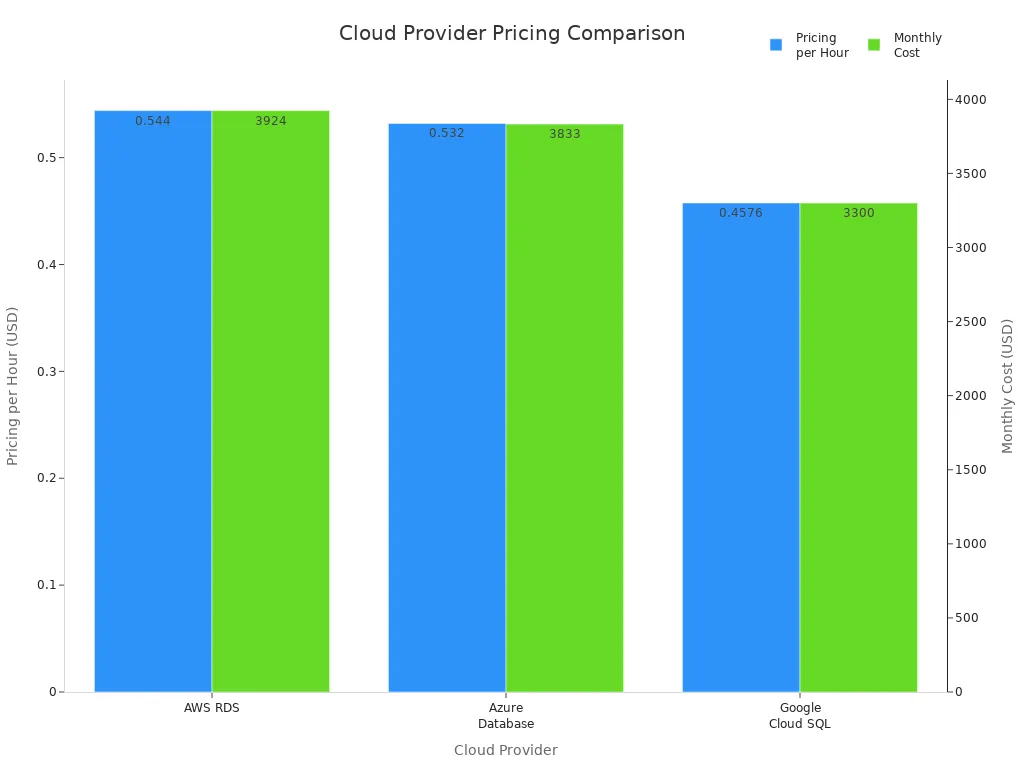
| Cloud Provider | Pricing per Hour | Monthly Cost |
|---|---|---|
| AWS RDS | $0.544 | $3,924 |
| Azure Database | $0.532 | $3,833 |
| Google Cloud SQL | $0.4576 | $3,300 |
Region Impact on Costs
The region where you deploy your Azure PostgreSQL instance significantly impacts your costs. Here are some key points to consider:
- The cost of running Azure PostgreSQL instances varies by region due to differences in computing resource costs.
- Choosing a cost-efficient region can lead to significant savings.
- Evaluate the region's impact on performance and regional requirements to ensure acceptable network latency and data transfer costs.
Monitoring and Alerts
Effective monitoring and alerting are crucial for controlling costs in Azure PostgreSQL. By keeping track of your resource usage, you can identify areas where you can save money.
Cost Monitoring Tools
Azure provides several tools to help you monitor your costs. Here are some important metrics to track:
| Metric | Description |
|---|---|
| Backup Storage Used | Amount of backup storage used, critical for cost control. |
| CPU percent | Percentage of CPU in use, helps monitor resource usage. |
| Storage percent | Percent of storage space that's used, essential for managing costs. |
| Connections Failed | Number of failed connections, indicating potential issues. |
| Resource Health Alerts | Notifications about health status changes, aiding in proactive cost management. |
Budget Alerts
Setting up budget alerts can prevent cost overruns in your Azure PostgreSQL environment. These alerts help you track spending across Azure services and notify you when you approach your budget limits. To set up budget alerts, follow these steps:
- Navigate to Azure Cost Management > Budgets.
- Choose a scope (e.g., subscription, resource group).
- Set a threshold and timeframe.
- Define email recipients for alerts.
By understanding pricing models and utilizing monitoring tools, you can effectively manage your Azure PostgreSQL costs and avoid unexpected charges.
Managing Azure PostgreSQL Costs
Optimizing Resource Allocation
Properly allocating resources plays a vital role in controlling your Azure PostgreSQL expenses. When you optimize resource allocation, you reduce unnecessary charges and improve overall efficiency.
Right-Sizing Instances
Right-sizing your instances means selecting the compute capacity that matches your workload demands without excess. Overprovisioning leads to paying for idle compute power, which inflates your costs unnecessarily. By analyzing your actual usage patterns, you can downsize your instances and save significantly.
- Right-sizing eliminates over-provisioning and reduces idle capacity.
- For example, migrating from a larger instance to a smaller one saved an organization $40,000 per month while maintaining performance.
- Smaller instances reduce compute charges and help you avoid unexpected expenses.
Tip: Regularly review your instance sizes and adjust them based on current workloads. This practice ensures you pay only for what you need.
| Benefit | Description |
|---|---|
| Cost Savings | Up to 80% savings compared to running separate oversized databases. |
| Resource Management | Manage multiple databases centrally, simplifying adjustments. |
| Automatic Scaling | Share resources and adjust automatically based on load fluctuations. |
| Ideal for Irregular Loads | Works well for setups with six or more databases with varying demands. |
Auto-Scaling Features
Auto-scaling helps you match compute and storage resources to your workload dynamically. Azure offers features that automatically increase resources during peak demand and reduce them when demand drops. This flexibility prevents overpaying during low usage periods.
- Auto-scaling adjusts compute and storage based on real-time needs.
- It reduces storage costs by preventing unnecessary over-provisioning.
- Auto-scaling supports irregular workloads, ensuring you only pay for what you use.
- You avoid unexpected expenses caused by fixed resource allocation.
Note: While auto-scaling improves cost optimization, monitor your settings to avoid uncontrolled growth, especially in storage, which can only expand.
Cost Management Tools
Using the right tools helps you track and control your Azure PostgreSQL charges effectively. These tools provide insights into your spending and suggest ways to reduce costs.
Azure Cost Management
Azure Cost Management offers a comprehensive suite of features to help you understand and manage your expenses. It provides detailed analysis, budgeting, and reporting capabilities.
| Feature | Description |
|---|---|
| Cost Analysis | Gain insights into spending patterns and identify cost drivers. |
| Budgets | Set budgets and receive alerts when spending approaches limits. |
| Cost Recommendations | Get tailored suggestions to reduce costs, such as identifying underutilized resources. |
| Reporting | Generate custom reports for detailed spending analysis, ideal for complex environments. |
By leveraging these features, you can proactively manage your Azure PostgreSQL costs and avoid surprises.
Third-Party Analysis Tools
Third-party tools often provide more advanced cost management capabilities than native Azure tools. They offer deeper insights and automation to optimize your resources continuously.
For example, some third-party platforms automate resource adjustments in real time. They reduce the operational burden on your team by handling cost optimization without manual intervention. These tools can analyze data transfer costs, compute usage, and storage costs across your environment, helping you spot inefficiencies quickly.
Tip: Evaluate third-party tools if you manage multiple databases or complex workloads. They can complement Azure’s native tools and enhance your cost management strategy.
By optimizing resource allocation through right-sizing and auto-scaling, you can significantly reduce your Azure PostgreSQL expenses. Combining these strategies with powerful cost management tools allows you to maintain control over your charges and avoid unexpected expenses. Staying proactive in managing your pricing and resource use ensures your deployment remains both efficient and cost-effective.
Hidden Costs in Azure PostgreSQL
Unexpected Usage
Data Egress Costs
Data egress refers to the charges you pay when data leaves Azure’s network. These costs can quickly add up if you transfer large amounts of data out of your Azure PostgreSQL instance. For example, if your application frequently sends query results or backups to external locations, you may face significant data transfer costs.
Many users overlook data egress because it does not appear as a direct resource charge. However, it impacts your overall expenses and can cause unexpected spikes in your bill. Monitoring your data flows and minimizing unnecessary outbound traffic helps control these charges.
Exceeding Free Tier Limits
Azure offers free tier limits for certain services, including Azure PostgreSQL. These limits provide a cost-saving opportunity for small workloads or testing environments. However, if your usage exceeds these free limits, Azure starts billing you for the extra consumption.
Exceeding free tier limits can happen without warning, especially if your workload grows or if you run resource-intensive queries. You should track your usage carefully and set alerts to avoid surprises. Planning your workload within the free tier boundaries or upgrading your pricing tier proactively can prevent unexpected expenses.
Operational Complexity
Setup and Maintenance Costs
Setting up and maintaining Azure PostgreSQL involves more than just provisioning resources. You must configure backups, security, scaling, and performance tuning. These tasks require time and expertise, which translate into operational costs.
Complex setups may also require additional compute or storage resources, increasing your charges. For example, enabling high availability or read replicas improves reliability but adds to your expenses. Balancing your operational needs with cost considerations is essential to avoid hidden costs.
Regular Audits
Regular audits help you identify unused or underutilized resources that contribute to hidden costs. For instance, unattached disks, unused network interfaces, or stopped virtual machines that are not properly deallocated can continue to generate charges. The table below highlights common sources of hidden costs you might overlook:
| Source of Hidden Cost | Description |
|---|---|
| Unattached Disks and Snapshots | Storage costs from disks and snapshots left after VM removal. |
| Management of Stopped VMs | Charges from VMs that appear stopped but still incur costs. |
| Load Balancer Data Transfer | Costs for both usage duration and data transfer through load balancers. |
| Unused Network Interfaces | Expenses from network interfaces that remain active but unused. |
| Overprovisioning of Resources | Hidden costs from allocating more compute or storage than necessary. |
Conducting audits regularly helps you catch these issues early. You can then delete or resize resources to reduce your charges. Automating audits and tagging resources also improves your cost management.
Tip: Establish a routine audit schedule and use Azure’s built-in tools to track resource usage and costs. This practice helps you avoid early deletion fees and other unexpected charges.
| Aspect | Details |
|---|---|
| Symptoms | Queries run slower; CPU usage spikes after major version upgrade |
| Root Cause | Stale or missing statistics lead to bad query plans causing inefficient CPU and memory use |
| Contributing Factors | Large skewed tables, complex multi-join queries, reliance on accurate cost estimates |
| Conditions Observed | No ANALYZE or VACUUM run post-upgrade; any source version affected |
| Operational Checks | Compare query plans pre/post upgrade; check pg_stats for outdated stats |
| Mitigation | Run ANALYZE on all tables to refresh statistics; safe and online operation |
| Post-Resolution | Query performance restored; CPU usage stabilizes; plans align with indexes |
| Prevention | Automate stats refresh after upgrades; validate critical query plans before production |
| Why It Matters | Avoid hours of degraded performance, emergency escalations, and misdiagnosis as engine bugs |
Refreshing statistics regularly prevents inefficient query execution that wastes compute resources and drives up your costs. Automate these maintenance tasks to keep your database running efficiently and avoid hidden expenses.
Strategies to Mitigate Hidden Costs
To reduce hidden costs in Azure PostgreSQL, consider these best practices:
- Establish a mature financial governance (FinOps) practice to reconcile invoices with actual usage.
- Implement consistent resource tagging to attribute costs accurately.
- Use Azure Hybrid Benefit to leverage existing licenses and reduce pricing.
- Opt for reserved instances for long-term workloads to gain discounts.
- Apply Dev/Test pricing for non-production environments.
- Continuously monitor resource metrics to avoid overprovisioning.
- Optimize queries and indexes to improve performance and reduce compute usage.
- Employ dynamic scaling to adjust resources based on demand.
By following these strategies, you can keep your expenses under control and avoid surprises in your Azure bills.
Note: Hidden costs often arise from operational complexity and unexpected usage patterns. Staying proactive with monitoring, auditing, and optimization helps you manage your Azure PostgreSQL environment efficiently.
Best Practices for Cost Efficiency

Regular Audits
Conducting Cost Audits
Regular audits are vital for maintaining cost efficiency in Azure PostgreSQL. You should conduct these audits frequently to ensure your database settings align with your operational needs. Focus on specific areas highlighted by monitoring, such as slow query logs and resource utilization. This thorough examination helps you identify optimization opportunities and bottlenecks. By doing so, you can adjust your resources and settings to support cost efficiency effectively.
Reviewing Usage Patterns
Reviewing usage patterns is another essential practice. Monitoring resource utilization helps you understand how your Azure PostgreSQL resources are being used. Here are some strategies to consider:
- Right-sizing servers based on usage patterns can lead to significant cost reductions.
- Implementing strategies like auto shutdown for non-production environments can further optimize costs.
- Regularly reviewing costs and usage patterns is essential for effective cloud management.
By analyzing your usage, you can make informed decisions that prevent over-provisioning and unnecessary expenses.
Reserved Capacity
Long-Term Commitments
Making long-term commitments through reserved capacity can lead to substantial savings. By reserving capacity for Azure Database for PostgreSQL, you can achieve discounts of up to 51% on your database costs. This option is available for both general and memory-optimized deployments. Such savings enhance your budget predictability, allowing you to manage your finances more effectively.
Cost Savings from Reservations
Utilizing reserved capacity can save organizations up to 65% on compute costs. This significant reduction is influenced by factors such as service type, instance type, and geographical region. Here are some financial benefits of making long-term commitments:
- Predictable pricing through upfront commitments allows for better financial planning and budgeting.
- Organizations can allocate saved funds towards innovation initiatives rather than basic infrastructure expenses.
- Most organizations achieve break-even within eight to twelve months of reservation activation.
By leveraging reserved capacity, you can ensure that your Azure PostgreSQL deployment remains cost-effective while supporting your long-term financial goals.
Summary
Incorporating regular audits and making long-term commitments through reserved capacity are two best practices that can significantly enhance cost efficiency in Azure PostgreSQL. By actively managing your resources and understanding your usage patterns, you can avoid unnecessary charges and optimize your overall expenses.
In summary, managing costs in Azure PostgreSQL requires your active involvement. You should regularly review and clean up unused backups to prevent unnecessary data accumulation. Implementing incremental backups can save you money by reducing storage needs.
Consider these strategies for effective cost management:
- Schedule backups during off-peak hours to minimize bandwidth impact.
- Regularly test backup restorations to ensure data integrity.
- Stay updated on Azure Backup features to capitalize on cost-effective options.
By adopting these practices, you can achieve significant expense reductions. Proactive management leads to savings of up to 72% with Reserved Instances and 65% with Azure Savings Plans. Take control of your Azure PostgreSQL environment today to optimize your costs effectively.
FAQ
What is Azure PostgreSQL?
Azure PostgreSQL is a managed database service that simplifies PostgreSQL deployment. It offers flexibility and scalability, allowing you to focus on application development without worrying about infrastructure management.
How can I reduce costs in Azure PostgreSQL?
You can reduce costs by right-sizing your instances, optimizing storage choices, and regularly auditing unused resources. Implementing auto-scaling features also helps manage expenses effectively.
What are the benefits of using reserved capacity?
Reserved capacity allows you to commit to long-term usage, resulting in discounts of up to 51%. This approach enhances budget predictability and helps you allocate funds toward innovation.
How do I monitor my Azure PostgreSQL costs?
You can monitor costs using Azure Cost Management tools. Set up budget alerts to notify you when spending approaches your limits. Regularly review usage patterns to identify areas for savings.
What are data egress costs?
Data egress costs occur when data leaves Azure's network. These charges can accumulate quickly if you frequently transfer large amounts of data out of your Azure PostgreSQL instance.
How often should I conduct audits?
Conduct audits regularly, ideally monthly or quarterly. Frequent audits help you identify unused resources and optimize your settings, ensuring you avoid unnecessary charges.
Can I use Azure PostgreSQL for development purposes?
Yes, Azure PostgreSQL is suitable for development and testing. The Basic tier provides a cost-effective option for smaller workloads, allowing you to experiment without incurring high costs.
What should I do if I exceed free tier limits?
If you exceed free tier limits, monitor your usage closely. Consider upgrading your pricing tier or optimizing your workload to stay within the free limits and avoid unexpected charges.
Apple Podcasts · Spotify · YouTube · YouTube Music
Host: Mirko Peters