

How Azure PostgreSQL Wastes Your Money (And How to Stop It)

Azure Database for PostgreSQL – Flexible Server isn’t pricey because of traffic; it’s pricey because defaults quietly overprovision compute, storage, and HA. “Managed” means patched, not optimized—you still pay for VM cores at idle, disks that only grow, and standby replicas that double costs while doing nothing. The audit hits five leak paths: baseline vCores (and burstable traps), storage auto-grow with no auto-shrink, Premium SSD v2 overbuy (capacity + IOPS + MB/s), HA mirroring that bills 2× for zero business value in most tiers, and backups/maintenance that charge or reboot when you’re not looking. The playbook: right-size from observed metrics, cap/trim storage, reserve HA for revenue-critical writes, use read replicas where they earn their keep, set custom maintenance windows, and pair snapshots with tested logical dumps. Cost control isn’t a SKU—it’s discipline: measure, cap, schedule, and delete the “temporary” you forgot. Defaults prevent support tickets, not invoices.


When using Azure PostgreSQL, you may encounter unexpected costs that can surprise you. Understanding how to allocate resources effectively plays a crucial role in managing these expenses. By categorizing your resources, setting budgets, and monitoring your spending, you can optimize costs and avoid overspending. Establishing alerts can also help you stay on track. This blog aims to equip you with strategies that will enable you to reduce your expenses while maximizing the value of your Azure PostgreSQL deployment.
Key Takeaways
- Right-size your Azure PostgreSQL instances to match actual workload needs. This prevents overpaying for unused capacity.
- Regularly audit your databases and remove any that are no longer in use. This helps avoid unnecessary charges.
- Choose the appropriate storage type for your workloads. Avoid premium storage for tasks that do not require it to save costs.
- Set up budget alerts in Azure Cost Management. This keeps you informed about your spending and helps prevent overruns.
- Utilize auto-scaling features to adjust resources dynamically. This ensures you only pay for what you use during peak and low demand.
- Conduct regular audits to identify hidden costs from unused resources. This practice helps you manage expenses effectively.
- Consider reserved capacity for long-term workloads. This can lead to significant discounts and better budget predictability.
- Monitor data egress costs closely. Minimize unnecessary data transfers to avoid unexpected charges on your bill.
Cost Issues in Azure PostgreSQL

Managing costs in Azure PostgreSQL can be challenging, especially when misconfigurations occur. These misconfigurations often lead to unnecessary expenses that can accumulate over time.
Misconfigured Resources
Overprovisioning Instances
One common mistake is overprovisioning instances. You might choose larger compute resources than necessary, thinking it will improve performance. However, this often results in paying for unused capacity. Instead, assess your actual workload requirements. Right-sizing your instances can significantly reduce your costs.
Inefficient Storage Choices
Another area where you can incur costs is through inefficient storage choices. Azure PostgreSQL allows you to select different storage types, but not all options are cost-effective. For example, using premium storage for workloads that do not require it can inflate your storage costs. Always evaluate your storage needs and choose the most suitable option to avoid unnecessary charges.
Unused Resources
Idle Databases
Idle databases represent a significant source of unexpected expenses. Azure Database for PostgreSQL incurs charges for provisioned compute and storage regardless of usage. If you have databases that you no longer use, they still contribute to your overall costs. To mitigate these expenses, consider scaling down resources or stopping the server when not in use.
Tip: Regularly review your databases and remove any that are no longer needed. This proactive approach can help you avoid accumulating charges indefinitely.
Unused Backups
Unused backups can also lead to increased costs. While backups are essential for data recovery, keeping unnecessary backups can inflate your storage expenses. You should regularly audit your backup policies and delete any backups that are no longer required. This practice not only saves money but also reduces the risk of security vulnerabilities associated with orphaned services.
| Mistake Description | Reason for Cost Impact |
|---|---|
| Spinning up resources without ownership or cost alerts | Leads to unmonitored expenses as resources accumulate. |
| Overprovisioning 'just in case' and never rightsizing | Results in paying for unused capacity. |
| Ignoring egress, backups, and idle environments | Causes unexpected charges from data transfer and storage. |
By addressing these common misconfigurations and unused resources, you can take control of your Azure PostgreSQL expenses and implement effective cost management strategies.
Factors Behind High Costs
Understanding the factors that contribute to high costs in Azure PostgreSQL is essential for effective cost management. By analyzing pricing models and monitoring your usage, you can avoid unexpected expenses.
Pricing Models
Understanding Tiers
Azure PostgreSQL offers various pricing tiers that affect your total cost of ownership. Each tier provides different levels of performance and features. For instance, the Basic tier is suitable for development and testing, while the General Purpose and Memory Optimized tiers cater to production workloads. Choosing the right tier based on your workload requirements can help you manage your expenses effectively.
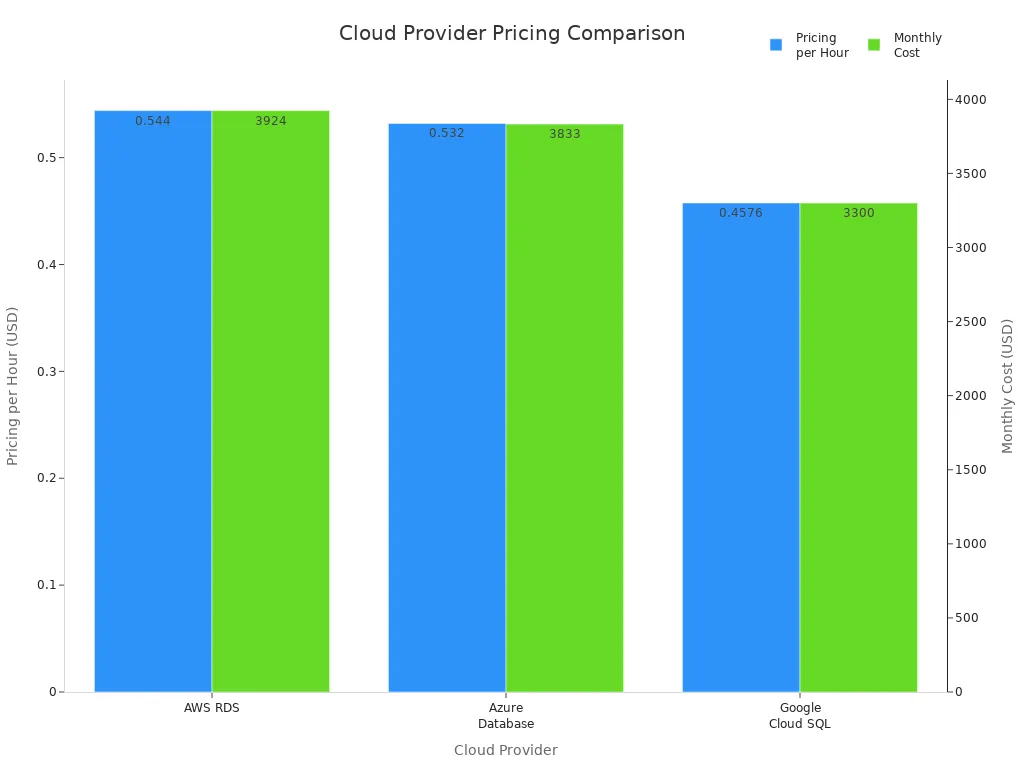
| Cloud Provider | Pricing per Hour | Monthly Cost |
|---|---|---|
| AWS RDS | $0.544 | $3,924 |
| Azure Database | $0.532 | $3,833 |
| Google Cloud SQL | $0.4576 | $3,300 |
Region Impact on Costs
The region where you deploy your Azure PostgreSQL instance significantly impacts your costs. Here are some key points to consider:
- The cost of running Azure PostgreSQL instances varies by region due to differences in computing resource costs.
- Choosing a cost-efficient region can lead to significant savings.
- Evaluate the region's impact on performance and regional requirements to ensure acceptable network latency and data transfer costs.
Monitoring and Alerts
Effective monitoring and alerting are crucial for controlling costs in Azure PostgreSQL. By keeping track of your resource usage, you can identify areas where you can save money.
Cost Monitoring Tools
Azure provides several tools to help you monitor your costs. Here are some important metrics to track:
| Metric | Description |
|---|---|
| Backup Storage Used | Amount of backup storage used, critical for cost control. |
| CPU percent | Percentage of CPU in use, helps monitor resource usage. |
| Storage percent | Percent of storage space that's used, essential for managing costs. |
| Connections Failed | Number of failed connections, indicating potential issues. |
| Resource Health Alerts | Notifications about health status changes, aiding in proactive cost management. |
Budget Alerts
Setting up budget alerts can prevent cost overruns in your Azure PostgreSQL environment. These alerts help you track spending across Azure services and notify you when you approach your budget limits. To set up budget alerts, follow these steps:
- Navigate to Azure Cost Management > Budgets.
- Choose a scope (e.g., subscription, resource group).
- Set a threshold and timeframe.
- Define email recipients for alerts.
By understanding pricing models and utilizing monitoring tools, you can effectively manage your Azure PostgreSQL costs and avoid unexpected charges.
Managing Azure PostgreSQL Costs
Optimizing Resource Allocation
Properly allocating resources plays a vital role in controlling your Azure PostgreSQL expenses. When you optimize resource allocation, you reduce unnecessary charges and improve overall efficiency.
Right-Sizing Instances
Right-sizing your instances means selecting the compute capacity that matches your workload demands without excess. Overprovisioning leads to paying for idle compute power, which inflates your costs unnecessarily. By analyzing your actual usage patterns, you can downsize your instances and save significantly.
- Right-sizing eliminates over-provisioning and reduces idle capacity.
- For example, migrating from a larger instance to a smaller one saved an organization $40,000 per month while maintaining performance.
- Smaller instances reduce compute charges and help you avoid unexpected expenses.
Tip: Regularly review your instance sizes and adjust them based on current workloads. This practice ensures you pay only for what you need.
| Benefit | Description |
|---|---|
| Cost Savings | Up to 80% savings compared to running separate oversized databases. |
| Resource Management | Manage multiple databases centrally, simplifying adjustments. |
| Automatic Scaling | Share resources and adjust automatically based on load fluctuations. |
| Ideal for Irregular Loads | Works well for setups with six or more databases with varying demands. |
Auto-Scaling Features
Auto-scaling helps you match compute and storage resources to your workload dynamically. Azure offers features that automatically increase resources during peak demand and reduce them when demand drops. This flexibility prevents overpaying during low usage periods.
- Auto-scaling adjusts compute and storage based on real-time needs.
- It reduces storage costs by preventing unnecessary over-provisioning.
- Auto-scaling supports irregular workloads, ensuring you only pay for what you use.
- You avoid unexpected expenses caused by fixed resource allocation.
Note: While auto-scaling improves cost optimization, monitor your settings to avoid uncontrolled growth, especially in storage, which can only expand.
Cost Management Tools
Using the right tools helps you track and control your Azure PostgreSQL charges effectively. These tools provide insights into your spending and suggest ways to reduce costs.
Azure Cost Management
Azure Cost Management offers a comprehensive suite of features to help you understand and manage your expenses. It provides detailed analysis, budgeting, and reporting capabilities.
| Feature | Description |
|---|---|
| Cost Analysis | Gain insights into spending patterns and identify cost drivers. |
| Budgets | Set budgets and receive alerts when spending approaches limits. |
| Cost Recommendations | Get tailored suggestions to reduce costs, such as identifying underutilized resources. |
| Reporting | Generate custom reports for detailed spending analysis, ideal for complex environments. |
By leveraging these features, you can proactively manage your Azure PostgreSQL costs and avoid surprises.
Third-Party Analysis Tools
Third-party tools often provide more advanced cost management capabilities than native Azure tools. They offer deeper insights and automation to optimize your resources continuously.
For example, some third-party platforms automate resource adjustments in real time. They reduce the operational burden on your team by handling cost optimization without manual intervention. These tools can analyze data transfer costs, compute usage, and storage costs across your environment, helping you spot inefficiencies quickly.
Tip: Evaluate third-party tools if you manage multiple databases or complex workloads. They can complement Azure’s native tools and enhance your cost management strategy.
By optimizing resource allocation through right-sizing and auto-scaling, you can significantly reduce your Azure PostgreSQL expenses. Combining these strategies with powerful cost management tools allows you to maintain control over your charges and avoid unexpected expenses. Staying proactive in managing your pricing and resource use ensures your deployment remains both efficient and cost-effective.
Hidden Costs in Azure PostgreSQL
Unexpected Usage
Data Egress Costs
Data egress refers to the charges you pay when data leaves Azure’s network. These costs can quickly add up if you transfer large amounts of data out of your Azure PostgreSQL instance. For example, if your application frequently sends query results or backups to external locations, you may face significant data transfer costs.
Many users overlook data egress because it does not appear as a direct resource charge. However, it impacts your overall expenses and can cause unexpected spikes in your bill. Monitoring your data flows and minimizing unnecessary outbound traffic helps control these charges.
Exceeding Free Tier Limits
Azure offers free tier limits for certain services, including Azure PostgreSQL. These limits provide a cost-saving opportunity for small workloads or testing environments. However, if your usage exceeds these free limits, Azure starts billing you for the extra consumption.
Exceeding free tier limits can happen without warning, especially if your workload grows or if you run resource-intensive queries. You should track your usage carefully and set alerts to avoid surprises. Planning your workload within the free tier boundaries or upgrading your pricing tier proactively can prevent unexpected expenses.
Operational Complexity
Setup and Maintenance Costs
Setting up and maintaining Azure PostgreSQL involves more than just provisioning resources. You must configure backups, security, scaling, and performance tuning. These tasks require time and expertise, which translate into operational costs.
Complex setups may also require additional compute or storage resources, increasing your charges. For example, enabling high availability or read replicas improves reliability but adds to your expenses. Balancing your operational needs with cost considerations is essential to avoid hidden costs.
Regular Audits
Regular audits help you identify unused or underutilized resources that contribute to hidden costs. For instance, unattached disks, unused network interfaces, or stopped virtual machines that are not properly deallocated can continue to generate charges. The table below highlights common sources of hidden costs you might overlook:
| Source of Hidden Cost | Description |
|---|---|
| Unattached Disks and Snapshots | Storage costs from disks and snapshots left after VM removal. |
| Management of Stopped VMs | Charges from VMs that appear stopped but still incur costs. |
| Load Balancer Data Transfer | Costs for both usage duration and data transfer through load balancers. |
| Unused Network Interfaces | Expenses from network interfaces that remain active but unused. |
| Overprovisioning of Resources | Hidden costs from allocating more compute or storage than necessary. |
Conducting audits regularly helps you catch these issues early. You can then delete or resize resources to reduce your charges. Automating audits and tagging resources also improves your cost management.
Tip: Establish a routine audit schedule and use Azure’s built-in tools to track resource usage and costs. This practice helps you avoid early deletion fees and other unexpected charges.
| Aspect | Details |
|---|---|
| Symptoms | Queries run slower; CPU usage spikes after major version upgrade |
| Root Cause | Stale or missing statistics lead to bad query plans causing inefficient CPU and memory use |
| Contributing Factors | Large skewed tables, complex multi-join queries, reliance on accurate cost estimates |
| Conditions Observed | No ANALYZE or VACUUM run post-upgrade; any source version affected |
| Operational Checks | Compare query plans pre/post upgrade; check pg_stats for outdated stats |
| Mitigation | Run ANALYZE on all tables to refresh statistics; safe and online operation |
| Post-Resolution | Query performance restored; CPU usage stabilizes; plans align with indexes |
| Prevention | Automate stats refresh after upgrades; validate critical query plans before production |
| Why It Matters | Avoid hours of degraded performance, emergency escalations, and misdiagnosis as engine bugs |
Refreshing statistics regularly prevents inefficient query execution that wastes compute resources and drives up your costs. Automate these maintenance tasks to keep your database running efficiently and avoid hidden expenses.
Strategies to Mitigate Hidden Costs
To reduce hidden costs in Azure PostgreSQL, consider these best practices:
- Establish a mature financial governance (FinOps) practice to reconcile invoices with actual usage.
- Implement consistent resource tagging to attribute costs accurately.
- Use Azure Hybrid Benefit to leverage existing licenses and reduce pricing.
- Opt for reserved instances for long-term workloads to gain discounts.
- Apply Dev/Test pricing for non-production environments.
- Continuously monitor resource metrics to avoid overprovisioning.
- Optimize queries and indexes to improve performance and reduce compute usage.
- Employ dynamic scaling to adjust resources based on demand.
By following these strategies, you can keep your expenses under control and avoid surprises in your Azure bills.
Note: Hidden costs often arise from operational complexity and unexpected usage patterns. Staying proactive with monitoring, auditing, and optimization helps you manage your Azure PostgreSQL environment efficiently.
Best Practices for Cost Efficiency

Regular Audits
Conducting Cost Audits
Regular audits are vital for maintaining cost efficiency in Azure PostgreSQL. You should conduct these audits frequently to ensure your database settings align with your operational needs. Focus on specific areas highlighted by monitoring, such as slow query logs and resource utilization. This thorough examination helps you identify optimization opportunities and bottlenecks. By doing so, you can adjust your resources and settings to support cost efficiency effectively.
Reviewing Usage Patterns
Reviewing usage patterns is another essential practice. Monitoring resource utilization helps you understand how your Azure PostgreSQL resources are being used. Here are some strategies to consider:
- Right-sizing servers based on usage patterns can lead to significant cost reductions.
- Implementing strategies like auto shutdown for non-production environments can further optimize costs.
- Regularly reviewing costs and usage patterns is essential for effective cloud management.
By analyzing your usage, you can make informed decisions that prevent over-provisioning and unnecessary expenses.
Reserved Capacity
Long-Term Commitments
Making long-term commitments through reserved capacity can lead to substantial savings. By reserving capacity for Azure Database for PostgreSQL, you can achieve discounts of up to 51% on your database costs. This option is available for both general and memory-optimized deployments. Such savings enhance your budget predictability, allowing you to manage your finances more effectively.
Cost Savings from Reservations
Utilizing reserved capacity can save organizations up to 65% on compute costs. This significant reduction is influenced by factors such as service type, instance type, and geographical region. Here are some financial benefits of making long-term commitments:
- Predictable pricing through upfront commitments allows for better financial planning and budgeting.
- Organizations can allocate saved funds towards innovation initiatives rather than basic infrastructure expenses.
- Most organizations achieve break-even within eight to twelve months of reservation activation.
By leveraging reserved capacity, you can ensure that your Azure PostgreSQL deployment remains cost-effective while supporting your long-term financial goals.
Summary
Incorporating regular audits and making long-term commitments through reserved capacity are two best practices that can significantly enhance cost efficiency in Azure PostgreSQL. By actively managing your resources and understanding your usage patterns, you can avoid unnecessary charges and optimize your overall expenses.
In summary, managing costs in Azure PostgreSQL requires your active involvement. You should regularly review and clean up unused backups to prevent unnecessary data accumulation. Implementing incremental backups can save you money by reducing storage needs.
Consider these strategies for effective cost management:
- Schedule backups during off-peak hours to minimize bandwidth impact.
- Regularly test backup restorations to ensure data integrity.
- Stay updated on Azure Backup features to capitalize on cost-effective options.
By adopting these practices, you can achieve significant expense reductions. Proactive management leads to savings of up to 72% with Reserved Instances and 65% with Azure Savings Plans. Take control of your Azure PostgreSQL environment today to optimize your costs effectively.
FAQ
What is Azure PostgreSQL?
Azure PostgreSQL is a managed database service that simplifies PostgreSQL deployment. It offers flexibility and scalability, allowing you to focus on application development without worrying about infrastructure management.
How can I reduce costs in Azure PostgreSQL?
You can reduce costs by right-sizing your instances, optimizing storage choices, and regularly auditing unused resources. Implementing auto-scaling features also helps manage expenses effectively.
What are the benefits of using reserved capacity?
Reserved capacity allows you to commit to long-term usage, resulting in discounts of up to 51%. This approach enhances budget predictability and helps you allocate funds toward innovation.
How do I monitor my Azure PostgreSQL costs?
You can monitor costs using Azure Cost Management tools. Set up budget alerts to notify you when spending approaches your limits. Regularly review usage patterns to identify areas for savings.
What are data egress costs?
Data egress costs occur when data leaves Azure's network. These charges can accumulate quickly if you frequently transfer large amounts of data out of your Azure PostgreSQL instance.
How often should I conduct audits?
Conduct audits regularly, ideally monthly or quarterly. Frequent audits help you identify unused resources and optimize your settings, ensuring you avoid unnecessary charges.
Can I use Azure PostgreSQL for development purposes?
Yes, Azure PostgreSQL is suitable for development and testing. The Basic tier provides a cost-effective option for smaller workloads, allowing you to experiment without incurring high costs.
What should I do if I exceed free tier limits?
If you exceed free tier limits, monitor your usage closely. Consider upgrading your pricing tier or optimizing your workload to stay within the free limits and avoid unexpected charges.
🚀 Want to be part of m365.fm?
Then stop just listening… and start showing up.
👉 Connect with me on LinkedIn and let’s make something happen:
- 🎙️ Be a podcast guest and share your story
- 🎧 Host your own episode (yes, seriously)
- 💡 Pitch topics the community actually wants to hear
- 🌍 Build your personal brand in the Microsoft 365 space
This isn’t just a podcast — it’s a platform for people who take action.
🔥 Most people wait. The best ones don’t.
👉 Connect with me on LinkedIn and send me a message:
"I want in"
Let’s build something awesome 👊
Opening – The Hidden Azure Tax
Your Azure PostgreSQL bill isn’t high because of traffic. It’s high because of you. Specifically, because you clicked “Next” one too many times in the deployment wizard and trusted the defaults like they were commandments. Most admins treat Flexible Server as a set-it-and-forget-it managed database. It isn’t. It’s a meticulously priced babysitting service that charges by the hour whether your kid’s awake or asleep.
This walkthrough exposes why your so‑called “managed” instance behaves like a full‑time employee you can’t fire. You’ll see how architecture choices—storage tiers, HA replicas, auto‑grow, even Microsoft’s “recommended settings”—inflate costs quietly. And yes, there’s one box you ticked that literally doubles your compute bill. We’ll reach that by the end.
Let’s dissect exactly where the money goes—and why Azure’s guidance is the technical equivalent of ordering dessert first and pretending salad later will balance the bill.
Section 1 – The Illusion of “Managed”
Administrators love the phrase “managed service.” It sounds peaceful. Like Azure is out there patching, tuning, and optimizing while you nap. Spoiler: “managed” doesn’t mean free labor; it means Microsoft operates the lights while you still pay the power bill.
Flexible Server runs each instance on its own virtual machine—isolated, locked, and fully billed. There’s no shared compute fairy floating between tenants trimming waste. You’ve essentially rented a VM that happens to include PostgreSQL pre‑installed. When it sits idle, so does your budget—except the charges don’t idle with it.
Most workloads hover at 10‑30% CPU, but the subscription charges you as if the cores are humming twenty‑four seven. That’s the VM baseline trap. You’re paying for uptime you’ll never use. It’s the cloud’s version of keeping your car engine running during lunch “just in case.”
Then come the burstable SKUs. Everyone loves these—cheap headline price, automatic elasticity, what’s not to adore? Here’s what. Burstable tiers give you a pool of CPU credits. Each minute below your baseline earns credit—each minute above spends it. Run long enough without idling and you drain the bucket, throttling performance to a crawl. Suddenly the “bargain” instance spends its life gasping for compute like a treadmill on low battery. Designed for brief spurts, many admins unknowingly run them as full‑time production nodes. Catastrophic cost per transaction, concealed behind “discount” pricing.
Now, Azure touts the stop/start feature as a cost‑saving hero. It isn’t. When you stop the instance, Azure pauses compute billing—but the storage meter keeps ticking. Your data disks remain mounted, your backups keep accumulating, and those pleasant‑sounding gigabytes bill by the second. So yes, you’re saving on CPU burn, but you’re still paying rent on the furniture.
Here’s the reality check most teams miss: migration to Flexible Server doesn’t eliminate infrastructure management—it simply hides it behind a friendlier interface and a bigger invoice. You must still profile workloads, schedule stop periods, and right‑size compute exactly as if you owned the hardware. Managed means patched; it doesn’t mean optimized.
Consider managed like hotel housekeeping. They’ll make the bed and replace towels, but if you leave the faucet running, that water charge is yours.
The first big takeaway? Treat your PostgreSQL Flexible Server like an on‑prem host. Measure CPU utilization, schedule startup windows, avoid burstable lust, and stop imagining that “managed” equals “efficient.” It doesn’t. It equals someone else maintaining your environment while Azure’s meter hums steadily in the background, cheerfully compiling your next surprise invoice.
Now that we’ve peeled back the automation myth, it’s time to open your wallet and meet the real silent predator—storage.
Section 2 – Storage: The Silent Bill Multiplier
Let’s talk storage—the part nobody measures until the receipt arrives. In Azure PostgreSQL Flexible Server, disks are the hotel minibar. Quiet, convenient, and fatally overpriced. You don’t notice the charge until you’ve already enjoyed the peanuts.
Compute you can stop. Storage never sleeps. Every megabyte provisioned has a permanent price tag, whether a single query runs or not. Flexible Server keeps your database disks fully allocated, even when compute is paused. Because “flexible” in Azure vocabulary means persistent. Idle I/O still racks up the bill.
Now the main culprit: auto-grow. It sounds delightful—safety through expansion. The problem? It only grows one way. Once a data disk expands, there is no native auto‑shrink. That innocent emergency expansion during a batch import? Congratulations, your storage tier just stayed inflated forever. You can’t deflate it later without manual intervention and downtime. Azure is endlessly generous when giving you more space; it shows remarkable restraint when taking any back.
And here’s where versioning divides the careless from the economical. There are two classes of Premium SSD—v1 and v2. With v1, price roughly tracks capacity, with modest influence from IOPS and throughput. With v2, these performance metrics become explicit dials—capacity, IOPS, and bandwidth priced separately. Most admins hear “newer equals faster” and upgrade blindly. What they get instead is three independent billing streams for resources they’ll rarely saturate. It’s like paying business‑class for storage only to sit in economy, surrounded by five empty seats you technically “own.”
Performance over‑provisioning is the default crime. Developers size disks assuming worst‑case loads: “We’ll need ten thousand IOPS, just in case.” Reality: half that requirement never materializes, but your bill remains loyal to the inflated promise. Azure’s pricing model secretly rewards panic and punishes data realism. It locks you into paying for theoretical performance instead of observed need.
Then there’s the dev‑to‑prod drift—an unholy tradition of cloning production tiers straight into staging or test. That 1 TB storage meant for mission‑critical workloads? It’s now sitting under a QA database containing five gigabytes of lorem ipsum. Congratulations, you just rented a warehouse to store a shoebox.
Storage bills multiply quietly because costs compound across redundancy, backup retention, and premium tiers. Each gigabyte gets mirrored, snapshotted, and versioned. Users think they’re paying for disks; they’re actually paying for copies of copies of disks they no longer need.
Picture a real‑world mishap: a developer requests a “small test environment” for a migration mock‑run. Someone spins up a Flexible Server clone with default settings—1 TB premium tier, auto‑grow enabled. The test finishes, but no one deletes the instance. Months later, that “temporary” server alone has quietly drained four digits from the budget, storing transaction logs for a database no human queries.
The fix isn’t technology; it’s restraint. Cap auto‑grow. Audit disk size monthly. Track write latency and IOPS utilization, then right‑size to actual throughput—not aspiration. For genuine elasticity, use Premium SSD v2 judiciously and dynamically scale performance tiers via PowerShell or CLI instead of baking in excess capacity you’ll never touch.
Storage won’t warn you before it multiplies; it just keeps billing until you notice. The trick is to stop treating each gigabyte as insurance and start viewing it as rented real estate. Trim regularly, claim refunds only in saved megabytes, and never, ever leave a dev database camping on premium terrain.
Fine. Disks are tamed. But now comes the monster that promises protection and delivers invoices—high availability.
Section 3 – High Availability: Paying Twice for Paranoia
High availability sounds noble. It implies uptime, business continuity, and heroic resilience. In Azure PostgreSQL Flexible Server, however, HA often means something far simpler: you’re paying for two of everything so one can sleep while the other waits to feel useful.
By default, enabling HA duplicates your compute and your storage. Every vCore, every gigabyte, perfectly mirrored. Azure calls it “synchronous replication,” which sounds advanced until you realize it’s shorthand for “we bill you twice to guarantee zero‑data‑loss you don’t actually need.” The system keeps a standby replica in lockstep with the primary, writing every transaction twice before acknowledging success. Perfect consistency, yes. But at a perfect price—double.
The sales pitch says this protects against disasters. The truth? Most workloads don’t deserve that level of paranoia. If your staging database goes down for ten minutes, civilization will continue. Analytics pipelines can catch back up. QA environments don’t need a ghost twin standing by in the next zone, doing nothing but mirroring boredom. Yet countless teams switch on HA globally because Microsoft labels it “recommended for production.” A recommendation that conveniently doubles monthly revenue.
Here’s the fun part: the standby replica can’t even do anything interesting. You can’t point traffic at it. You can’t run read queries on it. It sits there obediently replicating and waiting for an asteroid strike. Until then, it produces zero business value, yet the meter spins as if it’s calculating π. Calling it “high availability” is generous; “highly available invoice” would be more accurate.
Now, does that mean HA is worthless? No. It’s essential for transactional, customer‑facing systems where every update matters—think payment processing or real‑time inventory. In those cases, losing even seconds of data hurts. But analytics, staging, and internal tooling? They can survive a reboot. You save thousands simply by honoring that difference.
The smarter pattern is tiered durability. Pair HA only with mission‑critical workloads, and use asynchronous read replicas for everything else. Read replicas can serve actual queries while providing failover options—half the cost, double the usefulness. But we’ll get to their elegance next.
Let’s talk placement economics. Azure offers Availability Zones, supposedly to “spread risk.” Sensible—unless someone interprets that as “deploy HA across three zones for safety.” Fantastic, now you’re paying triple replication costs instead of double. With synchronous modes, inter‑zone latency rises, performance dips, and financial bleeding accelerates. Remember, spreading risk is not the same as duplicating it. You don’t earthquake‑proof a house by building two identical ones side by side.
There’s also the false‑comfort metric of Recovery Point Objective. Synchronous replication gives a theoretical RPO of zero, meaning no data loss. But that assumes failure conditions so coincidental they border on mythology. Hardware failures, yes—covered. Human‑error deletes a table? Congratulations, that same precision deletion just replicated perfectly to your standby. Zero‑data‑loss applies only to power failures, not to bad SQL. You’re buying expensive symmetry for the wrong threat model.
Administrators often enable HA because they confuse availability with reliability. They think it’s insurance. In reality, it’s a mirror. And mirrors don’t fix mistakes; they only show you two of them.
So, when designing PostgreSQL Flexible Server environments, repeat this quietly: resilience is not redundancy. Real resilience means measured recovery, not blind duplication. Protect critical transactions, ignore vanity staging, and keep paranoia proportional to revenue risk.
You don’t need mirror servers for environments nobody cries over. What you need is architecture that earns its keep.
Now that we’ve humbled the bodyguard that charges overtime, let’s meet the cool cousin who actually pays for himself—read replicas.
Section 4 – Read Replicas: Overlooked Compute Capacity
If High Availability is the anxious parent hovering over your database’s shoulder, read replicas are the chill sibling who actually does some work. They’re asynchronous, relaxed, and—this part’s crucial—productive.
A read replica copies changes from the primary through streaming replication, but it doesn’t force synchronous acknowledgment. Translation: your main database doesn’t wait around for the replica to confirm every transaction before proceeding. That tiny philosophical difference—wait vs. don’t wait—is what makes read replicas cheaper, faster, and more useful in the real world.
Think of it like photocopying homework. The synchronous HA twin insists on confirming every line before you hand it in, so you both fail the deadline gloriously. The asynchronous replica just makes its own copy later. Maybe it’s a few minutes behind, but at least it’s contributing.
That “few minutes behind” is called replication lag, and for most use cases—reporting, analytics, read‑heavy workloads—it’s irrelevant. The primary handles the writes, the replicas handle the reads, and your users stay blissfully unaware that the data they’re viewing is thirty seconds vintage. For humans, thirty seconds is still considered “real time”; we’re not measuring speed here in quantum ticks.
Now here’s where cost meets architecture. Splitting read workloads extends compute capacity without multiplying subscription waste. Instead of ramping your primary to a massive VM to handle every query, you distribute reads to cheaper replicas. You gain throughput, minimize contention, and your main instance stops hyperventilating under Power BI abuse. The replica pays for itself because it offsets performance tuning, downtime, and angry analysts asking why dashboards take geological timeframes to load.
But, predictably, there’s an Achilles heel: cascading replicas. On paper, Azure lets you chain them—replica of a replica, up to several layers deep. Sounds scalable. In practice, every hop adds latency and cost. Each new replica inherits the full price tag of a standalone VM. Five per primary might sound generous until you realize each one is basically another Flexible Server contract wearing a fake mustache. Unless you’re running a multi‑region analytics empire, one or two targeted replicas are plenty. Beyond that, you’re just sponsoring Microsoft’s next quarterly bonus.
Speaking of efficiency, Azure’s virtual endpoints deserve credit—they’re the unsung automation layer in this story. Rather than pointing applications to individual servers, you can assign a writer listener and a reader listener. The writer pointer always tracks whichever node currently handles writes—if you promote a replica or experience failover, no connection strings need rewriting. The reader points to your chosen replica for reporting. It’s simple DNS trickery that avoids human panic during failover events.
The optimal pattern? Keep one synchronous HA replica in‑region for zero‑data‑loss critical workloads and one asynchronous read replica cross‑region for DR and analytics. Anything beyond that, and you’ve wandered from resilience into vanity ownership.
The beauty here is economic gravity. Read replicas earn their keep by working—they offload queries, serve insights, and support failover without demanding constant duplication. HA protects; replicas pay rent. Choose employees over babysitters.
And now that we’ve given your compute layers something useful to do, let’s examine the quiet monthly thief undoing all your effort: maintenance.
Section 5 – Maintenance and Hidden Downtime Costs
Maintenance—the cloud’s version of “routine dental work.” It’s necessary, occasionally painful, and always seems to occur at the worst possible moment. In Azure PostgreSQL Flexible Server, maintenance hides under the friendly label “system‑managed updates.” What that really means is: “Your database will unexpectedly reboot whenever Microsoft feels like flossing.”
Here’s the anatomy. There are two types of updates: minor and major. Minor updates—a new patch, OS tweak, or micro‑version of PostgreSQL—run automatically inside a maintenance window once per month. Major ones—version upgrades like 15 to 16—are manual, meaning Azure waits for you to press the big red button before breaking your weekend.
System‑managed windows look convenient. Azure picks the time zone, chooses an hour, and gives you about five days’ notice before rebooting your precious transactional engine. Except emergencies ignore calendars. If a critical security flaw appears, Microsoft won’t politely wait for Saturday night; it’ll patch immediately. Your charming five‑day warning dissolves into “surprise downtime.”
Now throw High Availability into the mix. During upgrades, the system momentarily disables the HA link—both primary and standby end up rebooting sequentially. Congratulations: double downtime neatly achieved in pursuit of reliability. The irony isn’t lost on anyone paying for “always‑on.” Minor misconfiguration, accidental overlap across time zones, and suddenly your production workload enjoys a synchronized nap.
The fix is ironically simple yet rarely used: control your own calendar. Assign system‑managed maintenance to development and testing environments—those can absorb interruptions. Use custom maintenance windows for production. Pick the least risky day and hour, coordinate across geo‑replicas, and treat those settings like you would a surgical schedule. Test changes during dev/PT boxes first: system‑managed ones upgrade earlier in the monthly cycle, giving you a preview of what could go wrong before the same patches hit production.
Also, don’t romanticize “no downtime.” Every patch reboots the underlying VM; that’s a physical law. The goal isn’t elimination—it’s orchestration. Use read replicas to shoulder load temporarily, or point applications through a load balancer that retries connection attempts during maintenance cycles. A few seconds of smart handling beat a minute of user outrage.
Finally, recognize Microsoft’s emergency clause. If the team in Redmond discovers a vulnerability that could turn your database into Swiss cheese, maintenance becomes instantaneous. No one will email in advance. Accept it, architect accordingly, and stop being scandalized by surprise restarts. This isn’t malice; it’s triage.
So your rule of thumb: automate resilience, schedule predictably, but design for chaos. Maintenance isn’t the villain—it’s entropy in uniform. And the more you understand its habits, the less it costs you in lost sleep and lost revenue.
Next up—the self‑congratulatory feature everyone assumes will save them from disaster: backups. Spoiler alert—they’re not the safety net you think.
Section 6 – Backups: The False Sense of Security
Backups make everyone feel virtuous. Like eating a salad after three doughnuts. You don’t quite fix the problem, but at least you can claim to be responsible. Unfortunately, in Azure PostgreSQL Flexible Server, that sense of security is mostly theatre.
The defaults lull you in: daily snapshots, seven‑day retention, automatic right‑ahead‑log archiving every five minutes. Sounds bulletproof—until you realize those backups are stored with the resource. Delete the server, and after a short grace period, Azure deletes the “safety” along with it. Your disaster recovery plan just got garbage‑collected.
This happens because built‑in backups are tied to the lifecycle of the environment. They’re designed for short‑term rollbacks, not historical preservation. Microsoft’s mentality here is simple: if you wanted retention, you’d pay for it. Seven days comes free because it’s essentially cache. Extend it to thirty‑five and you start paying for storage as though you’ve hired an archivist who never forgets to invoice.
Each snapshot uses incremental storage—only changed blocks are billed—but those changes pile up quickly once your database logs never rest. Add WAL files, and you’re now paying per gigabyte for the assurance that you might rewind five minutes. A comforting but expensive illusion.
Then there’s the other problem: snapshots are physical copies. They’re useless if corruption creeps into the data before backup time. Logical errors, ransomware, rogue scripts—those replicate perfectly into each daily snapshot. It’s a clean, synchronized disaster.
That’s why professionals pair automated snapshots with logical backups—dumps of the database structure and data using something like pg_dump. Logical backups are slower, but portable. You can store them in a Recovery Services vault or even in long‑term cool storage, independent of the server’s mortality. They survive deletion, deliver cross‑version restore capability, and, remarkably, cost less per year than weeks of premium snapshot storage.
You can mix both: automatic snapshots for quick recovery, monthly logical dumps for long‑term compliance. Think of snapshots as airbags—they save you from immediate impact—but logical dumps as insurance—they rebuild the car.
When evaluating retention, do the math no one does: a full year of 35‑day rolling snapshots can outprice two years of cold‑tier blob storage holding compressed SQL dumps. The illusion of convenience costs more than actual durability.
The golden model is this: let Azure take its nightly snapshots for short‑term rollback, but automate monthly pg_dump exports to storage vaults tagged for archival. Validate those dumps—most teams never attempt a restore until it’s too late. Backups you’ve never tested are Schrödinger’s safety net: both valid and worthless at the same time.
Backups don’t exist to reassure you; they exist to recreate you. Treat them like a lifeboat, not a framed certificate. And now that you’ve secured the infrastructure, let’s examine the real enemy—human psychology.
Section 7 – Psychology of Cloud Waste
Every burned budget begins with optimism. Admins over‑provision not because they’re reckless, but because fear of downtime outweighs fear of cost. It’s survival instinct disguised as “best practice.” The Azure portal feeds that instinct beautifully—every wizard offers “recommended” defaults phrased like divine revelation, and most users, exhausted by checkout fatigue, accept.
Then anxiety takes over. “What if traffic spikes?” “What if disk latency rises?” You stack on vCores and IOPS like emotional padding, convincing yourself that money equals safety. What you’ve built isn’t resilience; it’s expensive comfort.
This is default bias in cloud form—the belief that Microsoft’s pre‑filled boxes know your workload better than you do. They don’t. Defaults are designed to prevent support tickets, not optimize invoices. Profiling, alerting, and observable metrics replace guesswork far better than “recommended” modes ever will.
Bottom line: your database doesn’t need empathy. It needs measurement.
And since we’ve now traumatized your budget and your ego equally, let’s close with the one truth every engineer learns too late.
Conclusion – The Real Cost of “Set and Forget”
Azure PostgreSQL Flexible Server isn’t outrageously expensive. It becomes expensive the moment you stop paying attention. The real cost isn’t compute—it’s complacency disguised as convenience. The moment you click “Next” without reading, Azure quietly drafts a recurring donation from your department’s funds.
To control cost, you control intent. Pick tiers that match observed workload, not hypothetical nightmares. Cap auto‑grow so excess capacity doesn’t become permanent debt. Enable High Availability only where a single lost minute equals real financial damage. Use replicas where they’ll earn back their keep, not stand in decorative symmetry. Tune maintenance windows before Microsoft does it for you at 3 a.m. And for the love of logic, test your backups before destiny tests them for you.
This entire ecosystem sells peace of mind, but the invoice lists every forgotten toggle you never questioned. Efficiency isn’t in the pricing sheet—it’s in the discipline of those who read it.
If this breakdown saved your budget—or your job—subscribe. The next fix could save both.
This is a public episode. If you'd like to discuss this with other subscribers or get access to bonus episodes, visit m365.show/subscribe

Founder of m365.fm, m365.show and m365con.net
Mirko Peters is a Microsoft 365 expert, content creator, and founder of m365.fm, a platform dedicated to sharing practical insights on modern workplace technologies. His work focuses on Microsoft 365 governance, security, collaboration, and real-world implementation strategies.
Through his podcast and written content, Mirko provides hands-on guidance for IT professionals, architects, and business leaders navigating the complexities of Microsoft 365. He is known for translating complex topics into clear, actionable advice, often highlighting common mistakes and overlooked risks in real-world environments.
With a strong emphasis on community contribution and knowledge sharing, Mirko is actively building a platform that connects experts, shares experiences, and helps organizations get the most out of their Microsoft 365 investments.


