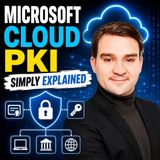
A trusted entity in a public key infrastructure that issues and signs digital certificates; a root CA typically anchors trust while an issuing CA signs certificates for devices and users.
Title graphic: Certificate authority (CA) (Concept)
A certificate authority (CA) is a trusted entity in a public key infrastructure (PKI) that issues and signs digital certificates. In a typical hierarchy, a root CA anchors trust, while an issuing CA signs certificates for devices and users. According to Microsoft Learn, the certification authority is the trusted third party that acts as the root of trust, offering services that authenticate the identity of people, computers and other entities on a network.
The problem a CA addresses is one of ownership. Someone who receives a public key cannot be sure that it truly belongs to the claimed sender, because a third party on the communication channel might have swapped it for another. The CA resolves this by binding an identity to a public key through a certificate. A public key infrastructure as a whole is described as a set of software and hardware elements that lets a trusted third party establish the integrity and ownership of a public key, and the CA is the central element of that arrangement.
The mechanism rests on digital signatures. To issue a certificate, the CA hashes the certificate content, signs that hash with its private key and embeds the signature in the certificate. The CA publishes its own public key in a self-signed CA certificate. A recipient who wants to verify a certificate decrypts the signature with the CA's public key and compares the resulting hash with a hash of the certificate content. If the two match, the content has not been altered and the certificate was signed by that CA. Trust in the whole chain therefore depends on the CA verifying identities correctly before it issues a certificate.
A CA usually operates together with other PKI components. The Microsoft Learn material lists a registration authority, which in Microsoft PKIs is usually called a subordinate CA, a certificate database, a certificate store on the local computer and a key archival server. The split between a root CA and subordinate or issuing CAs reflects the hierarchy described above: the root anchors trust, and the issuing CAs sign the certificates that devices and users actually present.
In the Microsoft ecosystem, the CA appears wherever certificates are requested and consumed. The M365.FM episode "Azure Key Vault - Simply Explained" walks through how certificates are handled in Azure Key Vault and shows where the CA fits into that process. According to the episode, the steps are: create a certificate by starting with a key in the Key Vault; have Key Vault send a TLS/SSL certificate request to the certificate authority; let the application poll Key Vault to see whether the certificate is ready; receive an X509 TLS/SSL certificate from the CA; and complete the creation by merging the CA's X509 certificate. The episode presents this as a simple way to manage secrets, keys and certificates in one place.
Seen from a decision-making perspective, the key points are which CA is trusted and how its identity checks are performed. Because every certificate inherits its credibility from the CA that signed it, the choice of root and issuing CAs, the protection of their private keys and the way identities are validated determine how much confidence relying parties can place in the certificates. The sources treat the underlying signing and verification process in simplified form, and the details of a real deployment can be more involved.
In summary, a certificate authority provides the trust anchor for certificate-based security. It signs certificates with its private key, publishes its public key in a self-signed certificate, and lets others verify that a public key belongs to the identity named in the certificate. Services such as Azure Key Vault rely on this relationship when they request and receive TLS/SSL certificates from a CA on behalf of an application.
Overview compiled with AI from M365.FM episodes and the facts on this page. You can improve it with the edit button below.
Type
Concept
Key points about Certificate authority (CA)
Key points about Certificate authority (CA) from the episodes, each with its source episode:
Microsoft Cloud PKI is a managed Certificate Authority service inside Intune with Microsoft-hosted Root and Issuing CAs. · Microsoft Cloud PKI - Simply Explained
Episodes about Certificate authority (CA)
Episodes in which Certificate authority (CA) is discussed:
Shared Wi-Fi passwords and repeated VPN logins are still common in small businesses, yet running a traditional certificate infrastructure is often too much work. This episode explains certificates and Microsoft Cloud PKI in plain language and shows IT admins…
Articles about Certificate authority (CA) (2)
Articles in which Certificate authority (CA) is a topic:
Migrating from ADCS to Microsoft Cloud PKI in Intune · Mirko Peters Learn how to migrate from traditional ADCS to Microsoft Cloud PKI in Intune. Simplify device authentication, eliminate NDES servers, and secure Wi-Fi and VPNs.
Questions marked with AI were written with AI from the facts on this page.
What does a certificate authority do? (AI)
A certificate authority issues and signs digital certificates that bind an identity to a public key. It hashes the certificate content, signs the hash with its private key and embeds the signature in the certificate.
What is the difference between a root CA and an issuing CA? (AI)
A root CA typically anchors trust in the hierarchy, while an issuing CA signs certificates for devices and users. The root CA publishes its public key in a self-signed CA certificate.
How does a CA relate to Azure Key Vault? (AI)
The episode "Azure Key Vault - Simply Explained" describes Key Vault sending a TLS/SSL certificate request to the CA, which responds with an X509 certificate that is then merged to complete the certificate creation.
What is Microsoft Cloud PKI?
It is Microsoft's managed Certificate Authority service inside Intune. Organizations use Microsoft-hosted Root and Issuing CAs to issue, renew and revoke certificates for Intune-managed users and devices. · From the episode: Microsoft Cloud PKI - Simply Explained
Short info above, community knowledge below: add practical tips, examples or corrections. New contributions are reviewed first; trusted members publish directly.
Experts and companies for this topic
Nobody has listed this topic yet. Add it to your profile.
 EN
 Deutsch
 Español
 Français
 Italiano
 Português
 Nederlands
 Polski
 Bahasa Indonesia
 Русский
 Українська
 العربية
 עברית
 日本語
 한국어