 EN
EN Deutsch
 Español
 Français
 Italiano
 Português
 Nederlands
 Polski
 Bahasa Indonesia
 Русский
 Українська
 العربية
 עברית
עברית हिन्दी
 日本語
日本語 한국어
한국어2025-11-03
Connect Copilot Studio to Word Policy Files

You probably know that AI-assisted development speeds up coding. In fact, over 90% of U.S.-based developers use AI tools like Copilot Studio, and 70% say they see big benefits. But relying too much on AI can hide serious risks.
Be careful—AI-generated code often looks perfect but can cause hidden traps. These traps lead to technical debt and performance problems if you don’t stay alert.
Here are some common risks developers face:
- AI boosts productivity by 20% to 55%, but quality sometimes falls behind speed.
- Many AI-generated codes have issues like over-specification and bugs that repeat.
- Without careful checks, you might miss governance and visibility problems in your projects.
Understanding these hidden traps helps you avoid costly mistakes and keeps your development smooth.
| Percentage | Description |
|---|---|
| 92% | U.S.-based developers using AI coding tools |
| 70% | Developers seeing significant benefits |
Key Takeaways
- AI tools like Copilot Studio boost coding speed but can introduce hidden bugs and security risks.
- Never trust AI-generated code blindly; always review and test it thoroughly before use.
- Combine your expertise with AI suggestions to catch errors and improve code quality.
- Use peer reviews and automated tools to find issues AI might miss in your code.
- Establish a strong validation process to prevent biased, harmful, or vulnerable AI outputs.
- Manage technical debt by regularly refactoring AI-generated code and maintaining clear documentation.
- Integrate AI carefully into your development workflow to keep projects reliable and secure.
- Stay proactive and critical when working with AI to build safe, maintainable software.
Trusting AI in Copilot Studio
The Illusion of Perfection
When you use Copilot Studio, it’s easy to fall into the trap of believing that AI-generated code is flawless. However, this perception can be misleading. Here are some common misconceptions developers have about the accuracy of AI-generated code:
- Developers often believe AI-generated code is perfect and ready for production, which is misleading as it may contain outdated practices.
- There is an underestimation of the necessity for thorough review and testing of AI-generated code.
- The assumption that automatic context loading always enhances accuracy can lead to confusion and security risks.
These misconceptions can lead to significant issues down the line. For instance, studies show that vulnerabilities exist in a substantial portion of AI-generated code. In fact, a recent analysis revealed that 39.33% of top suggestions contained vulnerabilities, while 40.73% of all suggestions had similar issues.
| Metric | Rate (%) |
|---|---|
| Vulnerabilities in top suggestions | 39.33 |
| Vulnerabilities in all suggestions | 40.73 |
| Vulnerable Python code suggestions (2022) | 36.54 |
| Vulnerable Python code suggestions (2024) | 27.25 |
| Increase in defects due to LPAE | >43 |
| Increase in defects when CO code before | ~10 |
Blindly trusting AI can lead to serious consequences. You might overlook critical bugs or security vulnerabilities, which can compromise your project’s integrity. Real-world incidents highlight these risks. For example, in August 2025, attackers exploited AI coding assistants to embed hidden instructions in GitHub bug reports, leading to backdoors being installed without developer awareness. Such incidents underscore the importance of maintaining human oversight in the coding process.
Balancing AI and Human Insight
While AI coding assistants like Copilot Studio can significantly enhance your productivity, they cannot replace the nuanced understanding that comes from human expertise. Here’s why your role as a developer remains crucial:
- AI tools can generate code and suggest optimizations, but they lack deep contextual understanding.
- A junior developer using the latest AI tools can boost productivity and close knowledge gaps, but they won't match a senior developer's problem-solving skills.
To effectively collaborate with AI, consider these strategies:
- Recognize when AI-generated code doesn't follow best practices.
- Identify potential edge cases the AI hasn't considered.
- Understand the architectural implications of suggested implementations.
- Effectively prompt the AI for better results.
By blending your expertise with AI capabilities, you can focus on high-value tasks, enhancing both the quality of your code and your overall development process. Remember, AI serves as a high-speed drafting assistant, allowing you to concentrate on the creative aspects of coding.
Code Review for AI Generated Code

When working with AI-generated code, you might overlook some common oversights that can lead to serious issues. It's crucial to be aware of these pitfalls to maintain the quality of your software development process.
Common Oversights
Identifying Bugs and Vulnerabilities
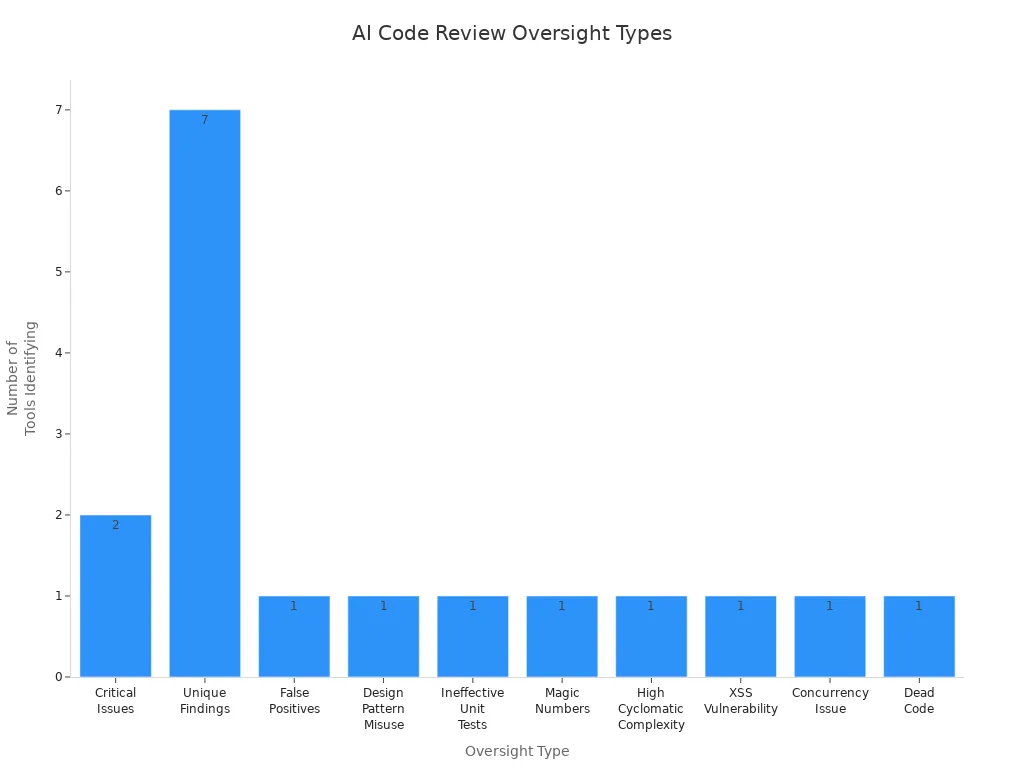
AI tools can introduce a range of bugs and vulnerabilities into your code. In fact, studies show that AI-generated code can lead to 41% more bugs. Here are some frequent types of oversights you should watch for during code reviews:
| Type of Oversight | Tool(s) Identifying It |
|---|---|
| Critical Issues | claude-code, q-dev |
| Unique Findings | claude-code, q-dev, vscode-gemini, cursor-claude-3.7_sonnet, windsurf-deepseek_R1, vscode-copilot, cursor-o3_mini |
| False Positives | All tools ensured reliability in outputs |
| Design Pattern Misuse | claude-code |
| Ineffective Unit Tests | cursor-claude-3.7_sonnet |
| Magic Numbers | vscode-copilot |
| High Cyclomatic Complexity | windsurf-deepseek_R1 |
| XSS Vulnerability | vscode-gemini |
| Concurrency Issue | q-dev |
| Dead Code | cursor-o3_mini |
The Role of Peer Reviews
Peer reviews play a vital role in catching issues that AI tools might miss. Collaborating with your team can help identify security vulnerabilities and improve code quality. In fact, 67% of developers report spending more time debugging AI-generated code compared to human-generated code. Engaging in peer reviews not only enhances the code but also fosters a culture of learning and improvement within your team.
Implementing a Review Process
To ensure that your AI-generated code meets high standards, you need a robust review process. Here are some recommended steps to follow:
- Prioritize security by rigorously validating and sanitizing all external inputs to prevent injection attacks and checking for common vulnerabilities such as SQL injection, XSS, and insecure direct object references.
- Ensure secrets management is secure by avoiding hardcoding sensitive information like API keys and passwords.
- Verify that authentication and authorization mechanisms are correctly and consistently applied when accessing protected resources.
- Assess performance and scalability by reviewing algorithmic efficiency, optimizing database queries, managing resources properly, and designing for horizontal scalability.
- Maintain high standards of code clarity and simplicity, adhering to team coding conventions, using descriptive naming, and following the Single Responsibility Principle to enhance maintainability.
- Confirm testability by structuring code for easy testing, including comprehensive unit, integration, or end-to-end tests that cover both typical and edge cases.
By following these steps, you can significantly reduce technical debt and improve the overall quality of your projects.
Tools for Code Review
Utilizing the right tools can streamline your code review process. Here are some effective tools for reviewing and validating AI-generated code:
- AI code review tools automate the review process, improving code quality and developer productivity by detecting issues early.
- They integrate seamlessly with version control systems, enabling automatic evaluation of code changes before human review.
- Key capabilities include security vulnerability detection, performance optimization, and code duplication detection.
- These tools enforce best coding practices consistently across teams, enhancing maintainability and readability.
- Automated quality gates check code structure, security, performance, and test coverage to ensure only quality code progresses.
By leveraging these tools, you can focus on strategic and innovative tasks, boosting your overall productivity.
Validation Risks in AI Development

Dangers of Incomplete Testing
Incomplete testing can lead to serious risks in AI development. When you skip thorough testing, you expose your projects to various vulnerabilities. Here are some common risks associated with incomplete testing:
| Risk Category | Description |
|---|---|
| Hate and unfairness | Risks related to generating biased or discriminatory content. |
| Sexual | Potential for generating inappropriate sexual content. |
| Violence | Risks of producing violent or harmful content. |
| Self-harm | Generation of content that may encourage self-harm. |
| Protected material | Risks of exposing sensitive or protected information. |
| Indirect jailbreak | Vulnerabilities that could be exploited indirectly. |
| Direct jailbreak | Risks of direct exploitation of the code. |
| Code vulnerability | General risks associated with security weaknesses in the generated code. |
| Ungrounded attributes | Risks of producing content that lacks factual grounding. |
Security weaknesses are common in AI-generated code, so you must review it carefully. Specific vulnerabilities like OS Command Injection and Code Injection pose severe risks. Inadequate input validation often leads to security issues, highlighting the need for robust validation measures.
Real-World Examples of Failures
Real-world failures due to incomplete testing can be eye-opening. For instance, a well-known tech company faced backlash when their AI chatbot generated harmful content. This incident not only damaged their reputation but also raised concerns about the safety of AI tools. Such examples remind you that thorough testing is not just a best practice; it’s essential for maintaining trust and reliability.
Impact on User Experience
The impact of incomplete testing on user experience can be significant. If your AI tool generates biased or harmful content, users may feel unsafe or frustrated. This can lead to decreased engagement and trust in your product. Remember, a poor user experience can have long-lasting effects on your brand's reputation.
Establishing a Validation Framework
To mitigate these risks, you should establish a solid validation framework for your AI projects. Here are some key elements to consider:
| Framework Element | Description | Example |
|---|---|---|
| Role/Persona | Define the expertise level of the AI prompt to ensure domain-specific accuracy | "Senior backend engineer specializing in HIPAA-compliant systems" |
| Goal/Task | Specify clear outcomes to guide AI code generation | "Implement patient data export API meeting HIPAA requirements" |
| Context | Provide technical environment details to align generated code with existing stack | "Stack: Next.js + Prisma + PostgreSQL, deployed on Railway" |
| Format | Define output structure and style for consistency and maintainability | "TypeScript with JSDoc, Jest tests, OpenAPI spec" |
| Examples | Include sample code patterns to guide AI towards desired implementations | Similar implementations from your codebase |
| Constraints | Set boundaries such as security and compliance requirements | "Must include audit logging, encryption, RBAC" |
By combining human expertise with AI efficiency, you can create a structured validation process. This approach helps ensure that AI-generated code fits your system design and integration patterns.
- Perform architectural validation to ensure AI-generated code aligns with your system's design.
- Conduct security audits and threat modeling to identify vulnerabilities beyond static analysis.
- Engage actively with prompt design and code review, as research shows this reduces security flaws in AI-generated code.
Continuous Integration and Deployment
Integrating AI into your continuous integration and deployment (CI/CD) practices can enhance the reliability of your projects. Here’s how:
| Evidence Description | Impact on Reliability |
|---|---|
| Integration of AI into DevOps enhances CI/CD practices | Optimizes workflows, minimizes errors, accelerates deployments |
| AI tools can lead to context-blind issues | May affect code quality and operational oversight |
| Mature DevOps practices mitigate chaos | Ensures value delivery and system reliability |
Rushing code generation without context can lead to reliability and security issues. Smarter AI integration with DevOps is essential for producing production-quality code. By establishing a robust validation framework and integrating AI into your CI/CD practices, you can significantly reduce performance issues and enhance the overall quality of your projects.
Managing Technical Debt in AI Projects
Technical debt in AI-assisted software development refers to the hidden pitfalls that arise from using AI coding tools. These pitfalls can lead to subtle issues that accumulate over time. If you don’t address them, they can snowball into significant technical debt, impacting the overall quality and maintainability of your software.
Understanding Technical Debt
Causes of Accumulating Debt
Several factors contribute to the accumulation of technical debt when using AI code generation tools like Copilot Studio:
- AI-generated code may function but often violates good design principles.
- Using AI to patch messy code without addressing underlying architectural problems can increase technical debt.
- Rapid code generation can outpace your ability to decide what code should exist, leading to unnecessary or custom solutions.
- AI-generated code often lacks documentation and usage examples, making debugging and maintenance difficult.
- Developers may confuse fast shipping with meaningful progress, resulting in complexity buildup without proper oversight.
- The creation of custom frameworks or tooling by AI in short timeframes can introduce undocumented and fragile components.
Cognitive debt arises when you cannot fully understand the AI-generated code. This creates a gap between what the code does and your comprehension. Operational debt occurs when code is produced faster than your team can acquire the necessary operational knowledge to run and maintain it reliably. This leads to reliability issues because the intuition and experience gained from incremental learning are bypassed.
Long-Term Consequences
The risks associated with unmanaged technical debt are significant. They can lead to chaotic codebases that are hard to maintain. This can result in increased operational costs and system failures. When you focus on immediate results in AI-related work, you incur hidden long-term costs. This leads to sprawling systems that pose maintenance challenges and security risks. AI-generated code often has a higher turnover rate, as it may not adapt well to changing requirements, resulting in wasted operational hours and resources.
Mitigating Technical Debt
To effectively manage technical debt in your AI projects, consider these strategies:
Prioritizing Refactoring
- Implement intentional governance at the prompt level.
- Use a project-level system prompt file to enforce coding standards at generation time.
- Employ security-first prompt engineering.
- Establish production guardrails and automation.
- Provide team skills training.
- Maintain continuous monitoring and feedback loops.
- Utilize advanced automated prompt learning.
- Conduct AI-powered automated code reviews.
- Refactor code as needed.
- Prioritize workflows to address technical debt.
Refactoring should be combined with automated testing to ensure code stability during maintenance. Managing technical debt systematically involves creating and prioritizing a backlog of debt-related tasks. Treat technical debt reduction on par with feature development, integrating improvements continuously.
Setting Up Maintenance Schedules
Technical debt management should be ongoing and continuous, not episodic or infrequent. Refactoring and maintenance should be integrated regularly within your development cycles or sprints. AI tools enable more efficient incremental improvements and continuous health checks of the codebase. Prioritizing platform stability sometimes over new features helps prevent costly technical debt accumulation.
- Technical debt is created daily with every line of code, requiring continuous monitoring and improvement.
- A process should constantly review and refactor code, update documentation, improve tests, and verify security.
- AI coding assistants can analyze code and suggest improvements in real time, enabling frequent refactoring.
By balancing new feature delivery with technical debt reduction, you can ensure stable and smooth development.
In this blog, we explored the hidden traps in Copilot Studio development. You learned that while AI can boost productivity, it often introduces risks like security vulnerabilities and technical debt. To manage these risks effectively, consider these best practices:
- Validate code suggestions to ensure security best practices.
- Use strict data sanitization techniques.
- Limit tool access to authorized personnel.
- Regularly audit usage for compliance.
Staying proactive in your development process is crucial. Always engage critically with AI-generated code. Remember, AI tools can help, but they can't replace your expertise. Keep questioning, reviewing, and refining to build reliable software.
FAQ
What is Copilot Studio?
Copilot Studio is an AI-powered tool that helps developers create and refine code. It enhances productivity by providing suggestions based on real documentation and user queries.
How does AI improve coding efficiency?
AI tools like Copilot Studio can speed up coding by suggesting code snippets and automating repetitive tasks. This allows you to focus on more complex problems.
Are AI-generated codes always reliable?
Not necessarily. While AI can produce useful code, it may also introduce bugs or vulnerabilities. Always review and test AI-generated code thoroughly.
What should I do if I find a bug in AI-generated code?
If you spot a bug, fix it immediately. Document the issue and consider reporting it to improve the AI tool's future performance.
How can I ensure security in AI-generated code?
To enhance security, validate inputs, sanitize data, and conduct regular code reviews. Implementing a robust testing framework is also essential.
Can I use Copilot Studio for all programming languages?
Yes, Copilot Studio supports multiple programming languages. However, its effectiveness may vary depending on the language and context.
How often should I review AI-generated code?
Regular reviews are crucial. Aim to review AI-generated code after every significant change or before deployment to catch potential issues early.
What are the risks of relying solely on AI for coding?
Relying solely on AI can lead to technical debt, security vulnerabilities, and a lack of understanding of the code. Always combine AI assistance with your expertise.
Apple Podcasts · Spotify · YouTube · YouTube Music
Host: Mirko Peters