 EN
EN Deutsch
 Español
 Français
 Italiano
 Português
 Nederlands
 Polski
 Bahasa Indonesia
 Русский
 Українська
 العربية
 עברית
עברית हिन्दी
 日本語
日本語 한국어
한국어2026-07-29 · Season 2
Agentic AI for IT Operations: Windows 365, Intune & Microsoft's AI Vision with Christiaan Brinkhoff [Nerdio]
![Agentic AI for IT Operations: Windows 365, Intune & Microsoft's AI Vision with Christiaan Brinkhoff [Nerdio]](https://d3wo5wojvuv7l.cloudfront.net/t_rss_itunes_square_1400/images.spreaker.com/original/495a44625de6fe83597aa709b47a82f3.jpg)
Quick answer: Agentic AI for IT operations combines goal-driven AI agents with governed workflows, observability, identity, and human oversight. In this episode, Christiaan Brinkhoff explains how Windows 365, Microsoft Intune, Agent 365, Microsoft Foundry, and the emerging agentic operating system can reshape endpoint management, security, and cloud operations.
What You Will Learn
- How agentic AI differs from generative AI, chatbots, and traditional automation.
- Where Windows 365 and Intune can support autonomous IT operations and Cloud PC management.
- How Agent 365, Microsoft Foundry, Microsoft Entra, Microsoft Purview, and Defender contribute to governance and security.
- How to introduce autonomy gradually through guardrails, observability, measurable outcomes, and human oversight.
Agentic AI for IT Operations: A Practical Definition
Agentic AI for IT operations describes AI systems that can observe context, plan work, use tools, execute actions, and adapt to results while pursuing a defined objective. Unlike a conventional script, an agent can evaluate changing conditions; unlike a chatbot, it can carry out approved actions. In enterprise environments, autonomy must remain bounded by identity, permissions, policy, logging, and escalation paths.
Artificial intelligence is rapidly transforming IT operations, with "agentic systems" leading the next wave of autonomous, intelligent innovation. Driven by this evolution, the global AIOps market is projected to expand at a compound annual growth rate (CAGR) of 15.2% from 2025 to 2030. Microsoft's AI Vision aligns perfectly with this paradigm shift, seamlessly connecting Windows 365 and Microsoft Intune to redefine IT management, elevate enterprise security, and deliver superior user experiences. Organizations adopting agentic AI can drastically reduce operational overhead and cut manual administrative workloads by up to 80%.
Agentic AI enables powerful self-service capabilities that dramatically lower support expenses. By reducing the cost of individual support interactions to under $2, cloud-driven autonomous workflows offer significant financial advantages over traditional human-assisted helpdesk models.
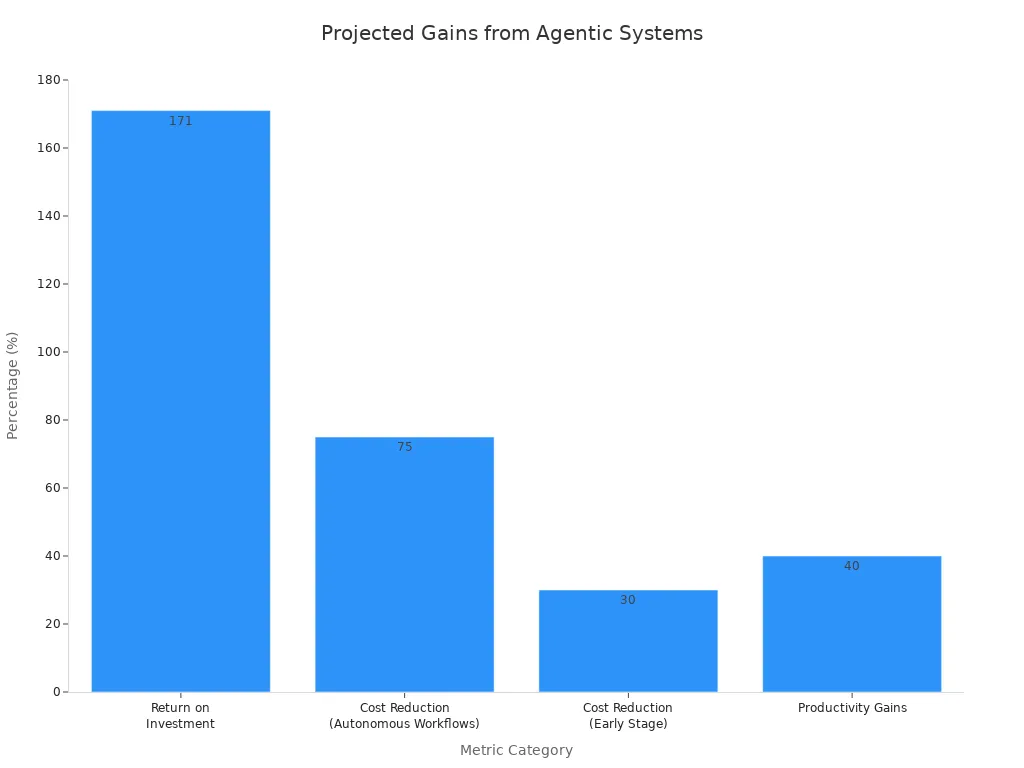
How will agentic AI revolutionize modern IT orchestration, and how does Microsoft's AI Vision shape the future of cloud computing?
Key Takeaways
- Agentic AI systems fix hard problems by themselves. They cut IT costs by 80 percent.
- Microsoft has tools like Agent 365 and Foundry. These help companies make safe AI agents easily.
- Windows 365 and Intune use automatic security agents. They keep devices safe. They stop cyber threats quickly.
- Microsoft is making Windows an Agentic OS. It will do daily work tasks automatically. This will make people more productive.
Agentic Systems: The IT Paradigm Shift
Defining Autonomous AI Agents
Agentic systems are a new kind of artificial intelligence. These AI agents work on their own. They solve hard problems. They learn from their surroundings. This helps them reach their goals. They do not just follow orders. They understand situations. They change what they do. This makes them different. Older automation did not do this.
| Feature Dimension | Traditional Automation / AI | Agentic Systems |
|---|---|---|
| Behavioral Intelligence | Acts only when told. | Watches things all the time. Knows what is needed next. |
| Workflow & Planning | Does simple things. Fails at hard tasks. | Handles many steps. Remembers what happened. Changes plans as needed. |
| Learning & Adaptability | Uses old information. Needs full restart to update. | Learns all the time. Gets better without big changes. |
| Domain Flexibility | Made for one small job. Cannot do other things well. | Is smart in general. Works well in new situations. |
Old systems use fixed rules. People always tell them what to do. But agentic systems think for themselves. They break big goals into small jobs. They use tools to finish these jobs. These AI agents work independently. They change their plans. This is based on new information. It also depends on changes around them.
Transforming IT Operations with Agentic AI
Agentic AI changes IT operations. It is more than simple automation. It makes your work smart. It makes it flexible. This change affects many IT areas.
| IT Operational Area | Agentic AI Impact / Capability |
|---|---|
| Self-Service | Uses talking AI. |
| Service Desk | Uses smart automation. |
| Insights & Analytics | Gets better with smart predictions. |
| Infrastructure & Operations | Fixed automatically. |
| Asset Management | Managed automatically. |
You will see better self-service. Your service desk works better. This is with smart automation. Smart predictions improve your data. Automatic fixes manage your systems. Automatic handling makes asset management better. These AI agents and apps make your IT more active.
Why Agentic Systems are Crucial for Enterprises
Agentic systems are key for businesses today. They offer big business benefits. You get more efficient work. Your employees do more. These systems help businesses grow easily. They make decisions faster. Your operations become very quick. They help find new ways to help customers. You also save money. This is by changing how work is done. Agentic AI improves important tasks. These include risk management. It also helps with supply chain strength.
Microsoft's Agentic AI Frameworks
You need a strong base. This base helps manage new AI agents. Microsoft gives you full frameworks. These frameworks make sure your AI is safe. They make sure it follows rules. They also make sure it is well-managed. They give you one place to control all your AI agents.
Agent 365: The Control Plane for AI Agents
Agent 365 is your main spot. It manages AI agents. You can see everything. You can control everything. This system helps you watch all your AI agents. They are across Microsoft. You can see how agents relate. You can see how well they work. It checks how fast they work. It checks business returns. Agent 365 also makes sure agents follow rules. It makes sure they are safe from the start. It stops agents from using too much. This is for certain users or data. It makes sure they only use what they need. Agent 365 tracks and logs things. This makes it clear. It keeps agent identities safe. It uses Microsoft Entra. It finds weak spots. It stops attacks. It uses Microsoft Defender. This system uses Microsoft Purview. This is for data safety. It stops AI agents from sharing too much data.
Microsoft Foundry for Agent Development
Microsoft Foundry helps you build AI agents. It helps you use them. It has over 11,000 models. You can pick from them. You can make smart agents. They know what is happening. Foundry gives you server space. This is for hosting agents. It connects agents to your company's knowledge. This system lets agents act on their own. This is across other systems. Foundry also gives you one way to manage. It stops security threats. It lets you see things right away. This helps you manage your AI agents well.
Centralized Governance with Entra ID and M365 Admin Center
Entra ID and M365 Admin Center control your AI agents. They are one main source of truth. This has much information for agents. It is across Microsoft. It is also outside Microsoft. You can group agents. This is by how much you trust them. Or by what they do. This applies rules to many agents. Each AI agent gets its own identity. This lets non-human things log in. It also makes sure security rules are followed. You can see everything in one place. Every AI agent made is listed. This helps you manage your security.
Compliance and Data Protection via Purview
Microsoft Purview keeps AI agent data safe. It follows rules. It tracks who looks at data. It flags private things. This is in agent results. Purview warns you about strange data flows. It finds when rules are broken. You get full records of data used. It sets strict limits on permissions. Purview also looks for attack paths. It shows where data might be exposed. This helps stop data loss.
Unified Security with Defender XDR
Microsoft Defender XDR keeps your AI safe. It finds weak spots. It stops bad attacks. It fixes security problems. Microsoft Defender helps keep your AI agents safe. It works with Microsoft Sentinel. This gives you full threat protection. You get advanced protection for AI. This makes your security stronger.
You get a full Windows experience. It is personal. It comes from the cloud. This is with Windows 365. This platform is fully managed. It removes hard VDI problems. You can set up Cloud PCs fast. You can secure them. You can use them quickly. Users get easy access. This is across many devices. Windows 365 works with Microsoft Intune. This integration lets you manage both. You manage physical and Cloud PCs together. You use the same security rules. You use the same compliance checks.
Intelligent Endpoint Management with Intune
Intune manages all your endpoints. It manages physical devices. It also manages Cloud PCs. You use the same security rules. You use the same work steps. Intune uses AI. This makes management smarter. It is more than simple automation. AI agents in Intune work alone. They learn. They change to fit your system.
Think about these smart AI agents in Intune:
| Intelligent AI Agent | Functionality / Capability |
|---|---|
| Change Review Agent | Checks proposed changes. It does this automatically. |
| Policy Configuration Agent | Makes setting up rules faster. |
| Device Offboarding Agent | Handles removing devices. It does this safely. |
These agents help manage devices better. They keep your security posture strong.
Enhancing Cloud PCs with Windows 365 AI
Windows 365 gives personal Windows experiences. AI makes these Cloud PCs much better. Features like Windows 365 Boot exist. Users log right into their cloud desktop. This happens when they start their device. Windows 365 Switch allows easy moving. You move between local and cloud. These features make users happier. AI makes Cloud PCs work better. It uses resources well. You always get the best experience. This makes your Cloud PCs faster. They are also more reliable.
Windows 365 for Agents: Automated Workflows
Windows 365 for Agents gives secure Cloud PCs. They are for AI agents. It has built-in viewing. This platform helps manage your agents. It manages their whole life.
- End-to-End Lifecycle Management: You control sessions. You control networking. You control capacity. You control data location limits.
- Observability & Real-Time Monitoring: You see live pictures. You can take control directly. Audit screenshots have timestamps. They check security.
- Pay-As-You-Go Pricing: This lowers running costs. You pay only for active use. This is good for changing agent work.
- Cross-Platform OS Support: It works with Windows. It works with Linux. It works with browsers. This runs many types of automation.
Windows 365 for Agents is a strong place. It is for your AI work.
| Feature Category | Implementation Details | Operational Benefit |
|---|---|---|
| Execution Environment | Managed Windows Cloud PCs. They run on Azure VM. | Allows agents to work alone. They can browse the web. They can process data. This is inside safe company limits. |
| Management & Identity | Works with Microsoft Intune. This is for device control. Works with Microsoft Entra ID. This is for identity. | Makes sure rules are followed. Gives strong access security. No manual setup is needed. |
| Resource Allocation | Shared Cloud PC groups. They are by team or work. They have ready or planned capacity. | No strict one-to-one rules. Allows changes based on tasks. |
This setup makes your AI agents work well. They work safely.
Proactive Security Agents for Threat Response
AI agents are key for security. They act early against threats. This is in Windows 365 and Intune. These agents watch your system always. They look for strange things. When they find a threat, they act fast. Microsoft Defender XDR works with these agents. This gives strong threat protection. It makes your Windows security better. These agents can cut off bad devices. They can block bad traffic. They can start automated incident response. This means threats are found faster. They are stopped faster.
Streamlining Identity and Access with AI
AI makes identity and access easier. It works across Windows 365 and Intune. AI agents can set up users automatically. They can remove users automatically. They enforce access rules. This is based on the situation. For example, an AI agent can see odd logins. It can then ask for more proof. This makes your compliance stronger. It also makes overall security better. You manage user identities better. This ensures only allowed users. They access your Cloud PCs and data.
Microsoft's AI Vision: The Agentic OS
Microsoft's AI vision is changing Windows. It will become an "Agentic OS." This means AI will do hard tasks. It goes beyond simple chatbots. This is a big step forward. You will get a smarter system. It will be more active.
Windows Evolution as an AI-Native Platform
Microsoft sees Windows as an AI-native platform. This means AI is built in. Key changes make this happen. The Model Context Protocol (MCP) is part of the system. This open system lets AI agents connect. They link with apps. They link with tools. They link with system tasks. This automates daily work for you. The Windows On-Device Registry (ODR) also helps. This safe system stores agent links. It gives you control. Native Agent Connectors are built-in. They work with File Explorer. They work with System Settings. They let agents change settings. They manage files. They help you. You always stay in control. Cloud management with Intune builds a base. This supports new AI. It gets your systems ready.
Copilot's Role in the Agentic Ecosystem
Copilot is key in this AI system. It is an AI helper. It makes you more productive. It helps you be creative. It gives live help. It gives ideas. It gives useful tips. Copilot is the main chat tool. You use it to talk to many AI agents. These include agents for Sales. Also for Service. And for Finance. Copilot makes digital work better. This is in Word. Also in Outlook. And in Teams. And in Copilot Chat. It uses company info. This is from Microsoft Graph. It also provides AI tools. This includes basic models. It includes systems to run agents. These agents work safely. They follow company rules.
Cloud-Powered Flexibility and AI Optimization
Cloud power makes AI flexible. It makes it better. You can get more resources. This is when AI agents need them. Windows 365 is a strong cloud platform. It hosts these smart agents. This gives them power. You get the best work. This cloud way means constant updates. Your AI stays modern. Microsoft uses its big cloud. This gives smooth connections. It gives high uptime. You get reliable AI. It works well. This also makes your platform more secure.
Future-Proofing Endpoints with Agentic Capabilities
You need to prepare your devices. This ensures they adapt. Devices will use chat AI. They will use Copilots. They will use agentic AI. This changes devices. They go from simple tools. They become active. They become smart. They become self-reliant. This means your devices guess needs. They fix problems alone. They make users happier. This keeps your Windows 365 new. It gets them ready for the future.
Securing the Agentic Future: Trust and Resilience
You must make your agentic future safe. Trust and strength are very important. Microsoft guides its AI work. It uses main rules. These rules make sure AI is good.
Microsoft's Responsible AI Principles
Microsoft builds its AI systems. They stand on strong good ideas. These rules make sure your AI agents act well.
| Responsible AI Principle | Core Meaning for Agentic Systems |
|---|---|
| Fairness | It treats every user fairly. It does not create bias. It does not make bias worse. This is based on context. It is not based on sensitive traits. |
| Reliability and Safety | It always works well. This is true in different situations. It works for unusual cases. It works for unexpected user actions. |
| Privacy and Security | It keeps user data safe. It only uses allowed information. It follows safety rules. |
| Inclusiveness | It helps many different users. This includes special needs. It includes language differences. It includes different tech skills. |
| Transparency | It clearly shows what it can do. It shows its limits. It shows how it uses data. It shows how it makes results. Users stay informed. |
| Accountability | People oversee it. It follows rules. Developers watch it. This is for its whole life. |
These rules make sure your AI systems are fair. They are also reliable. They keep things private. They help everyone.
Building Trust in Autonomous IT Systems
You need to trust IT systems that work alone. Microsoft builds this trust. It uses several ways. These ways make sure agents do what they should.
| Mechanism Dimension | Specific Control / Capability | Purpose & Trust Impact |
|---|---|---|
| Scope & Intent | It works within set limits. It sticks to its job. | It makes sure agents do only what is planned. |
| Human Control | People check high-risk actions. They approve them. They can stop them. | People still watch over things. They are responsible for big choices. |
| Observability | There are clear logs. There are feedback loops. There is checking. | You can fully see what the system does. You can see how it works. |
| Data Protection | It only accesses what it needs. It manages data life. | It stops private data from leaking. It stops too many agents. |
| Threat Mitigation | It has many layers of defense. It stops agent takeover. It stops bad inputs. | It can shut down safely. It can stand up to attacks. |
Microsoft also uses many layers of defense. This is for the model. It is for safety systems. It is for application layers. You use Microsoft's full security. You use its management system. This makes sure systems that work alone. They can be watched. They are strong. They are trusted by design.
Advanced Threat Protection for AI Workloads
Keeping your AI workloads safe from threats is key. Microsoft gives advanced safety steps. These steps protect your AI systems.
- Real-time Threat Detection: Microsoft Defender for AI and Defender for Cloud work together. They watch live. They stop AI attacks. This includes jailbreaks. It includes model poisoning. It includes prompt injections.
- Correlated Threat Intelligence: Microsoft Defender XDR links security alerts. These are from AI workloads. They link to wider company threat data. This gives you a full view. It shows possible threats.
- Graph-Based Investigations: Microsoft Sentinel gives data with graph context. This makes checking AI security problems easier.
- Automated Security Operations: Security Copilot helps Security Operations Center (SOC) teams. It uses AI. It makes finding threats faster. It makes fixing them faster.
These tools give strong security. They fight cyberattacks. They make your overall security stronger.
Ensuring Business Continuity and Recovery
You must make sure your agentic systems keep working. You must make sure they can recover. This means making your IT strong. You need plans for bad things. Early security checks help stop problems. Microsoft focuses on constant security. It focuses on security that works alone. This makes sure your systems can get better fast. It means less downtime. It protects your data. Strong Windows security. Good plans for problems. These are key for the future. They keep your security strong.
Agentic systems change IT. They make it work alone. They make it safe. They make it fast. Microsoft's AI vision adds these to Windows 365. It adds them to Intune. This makes a strong Microsoft AI system. You need to accept this change. It will happen. Learn about these new ideas. Get your company ready. AI agents will manage your digital stuff. They will keep it safe. Windows 365 and Intune will start this change.
FAQ
What are agentic systems?
Agentic systems are smart AI. They work by themselves. They learn new things. They change as needed. These agents fix hard problems. They reach goals. People do not need to tell them what to do all the time. You will see them change IT work. This is true for Windows 365.
How do Windows 365 and Intune use AI?
Windows 365 and Intune use AI. This makes management smart. AI agents do tasks by themselves. They make security better. You get smart device control. Cloud PCs work better with AI. This makes your Windows 365 experience good.
What is Windows 365 for Agents?
Windows 365 for Agents gives safe Cloud PCs. These are for your AI agents. It helps manage them fully. You can see what they do. This system helps tasks run by themselves. It makes sure your agents work well.
What benefits do Cloud PCs offer with AI?
Cloud PCs are very flexible. They give you a personal Windows. AI makes them work best. You can use them from anywhere. Windows 365 gives these strong Cloud PCs. They make your work easier. You can manage your Windows 365 easily.
How does Microsoft ensure security for AI agents?
Microsoft uses strong security. Defender XDR keeps AI safe. Purview makes sure data follows rules. You get good threat protection. This is for your Windows. This builds trust in systems that work alone. Microsoft's AI rules guide all security. This is for Windows 365.
Benefits, Use Cases, and Implementation Guidance
Key Benefits of Agentic AI in IT Operations
- Faster incident triage and root-cause analysis.
- More consistent endpoint and Cloud PC administration.
- Reduced repetitive work for service desk and operations teams.
- Earlier detection of security and compliance anomalies.
- Better scalability when infrastructure and agent workloads grow.
Common Agentic AI Use Cases
- Investigating alerts and correlating signals across tools.
- Reviewing device or policy changes before deployment.
- Automating safe onboarding and offboarding workflows.
- Optimizing Cloud PC capacity and user experience.
- Preparing remediation plans while escalating high-risk actions to people.
Implementation Checklist
- Define the business outcome and the agent's permitted scope.
- Classify actions by risk and decide where approval is mandatory.
- Give every agent a controlled identity and least-privilege access.
- Connect only approved data sources and tools.
- Log prompts, decisions, tool calls, outcomes, and overrides.
- Start read-only, measure reliability, then expand autonomy gradually.
Common Mistakes to Avoid
- Granting broad permissions before the agent has demonstrated reliability.
- Confusing a fluent response with a validated operational decision.
- Automating high-impact changes without rollback and human escalation.
- Ignoring data quality, stale inventory, and incomplete context.
- Measuring activity instead of resolution time, reliability, risk, and business value.
Pros and Cons
| Pros | Cons and Risks |
|---|---|
| Faster investigation and response | Incorrect plans can create operational impact |
| Continuous monitoring and optimization | Requires strong identity, permissions, and audit controls |
| Scalable support for hybrid environments | Integration and data-quality work can be substantial |
| Less repetitive administration | Human oversight remains essential for high-stakes actions |
Frequently Asked Questions About Agentic AI for IT Operations
What is the difference between agentic AI and generative AI?
Generative AI primarily creates or transforms content in response to a prompt. Agentic AI adds planning, tool use, execution, and feedback loops so it can pursue a goal across multiple steps under defined controls.
How does agentic AI differ from traditional automation?
Traditional automation follows predefined rules and paths. An agent can interpret context, choose among approved actions, and adapt when conditions change, but it still needs boundaries and validation.
What are the best first use cases?
Start with low-risk, repeatable tasks such as alert summarization, inventory checks, ticket classification, policy recommendations, and read-only investigations.
Can agentic AI replace IT operations engineers?
It is more likely to change their work than eliminate it. Engineers remain responsible for architecture, policy, exception handling, validation, and high-impact decisions.
How should organizations secure AI agents?
Use unique identities, least-privilege permissions, approved tools, strong authentication, data protection, continuous monitoring, and complete audit trails.
How do Windows 365 and Intune support agentic operations?
They provide managed Cloud PCs, endpoint policy, identity integration, device signals, and operational controls that agents can use within an approved governance model.
What role does Microsoft Foundry play?
Microsoft Foundry supports building and operating AI applications and agents, including model selection, connections to enterprise knowledge, and controlled deployment patterns.
What is Agent 365?
In the episode's Microsoft architecture discussion, Agent 365 is presented as a control-plane concept for discovering, governing, securing, and observing agents across the organization.
How can teams measure ROI?
Track resolution time, successful automation rate, avoided manual effort, change failure rate, security outcomes, user experience, and the cost of operating the agent.
What should remain human-controlled?
Keep high-impact identity, security, financial, compliance, and production changes subject to explicit approval until the system has proven reliable and the organization has safe rollback procedures.
What happens when an agent makes a mistake?
Use bounded permissions, approval gates, rollback, monitoring, and escalation. Every action should be attributable so operators can investigate and improve the workflow.
Is agentic AI the same as AIOps?
No. AIOps focuses on applying analytics and automation to IT operations. Agentic AI can be part of an AIOps strategy, but it adds goal-oriented planning and action capabilities.
How should an enterprise begin?
Choose one measurable, low-risk workflow; document the desired outcome; connect only necessary systems; run in read-only mode; and expand autonomy based on evidence.
Related M365.fm Resources
Continue with agentic AI architecture, the difference between agents and workflows in Copilot, Microsoft Copilot and Microsoft 365 Copilot, and Microsoft security topics.
Apple Podcasts · Spotify · YouTube · YouTube Music
Host: Mirko Peters