 EN
EN Deutsch
 Español
 Français
 Italiano
 Português
 Nederlands
 Polski
 Bahasa Indonesia
 Русский
 Українська
 العربية
 עברית
עברית हिन्दी
 日本語
日本語 한국어
한국어2025-11-16
Cut Cloud Costs with Azure Arc and Azure Local on Mini PCs

Are you feeling overwhelmed by rising cloud expenses? You're not alone. Many businesses are searching for ways to cut costs, and it's no surprise that 70% of enterprises plan to adopt hybrid cloud strategies by 2026. Imagine transforming your mini PC into a powerful Azure environment. You can stop paying for cloud VMs and take control of your IT budget. With Azure Arc and Azure Local, you can enjoy the benefits of the cloud while keeping expenses in check. Let's explore how this innovative approach can work for you!
Key Takeaways
- Transform your mini PC into a powerful Azure environment to cut cloud costs significantly.
- Utilize Azure Arc for seamless integration and management of your local devices within the Azure ecosystem.
- Enjoy cost savings by eliminating ongoing expenses associated with cloud virtual machines.
- Achieve predictable IT budgeting by investing in hardware instead of incurring monthly cloud fees.
- Leverage Azure Local to run core Azure services directly on your mini PC, enhancing control and customization.
- Implement zero-touch provisioning for easy setup and management of your Azure environment.
- Monitor and optimize your resources to avoid hidden fees and unexpected charges in cloud services.
- Stay compliant with industry standards while benefiting from Azure's robust security features.
Running Azure on a Mini PC
Azure Arc Overview
Azure Arc is a game-changer for managing your mini PCs and edge devices. With Azure Arc, you can seamlessly integrate your local hardware into the Microsoft Azure ecosystem. This means you can manage your mini PCs just like you would with cloud resources. Here are some key features that make Azure Arc a powerful tool for local Azure environments:
| Key Feature | Description |
|---|---|
| Seamless integration | Allows lifecycle management through Azure portal and APIs. |
| Infrastructure-as-code | Enables deployment via ARM templates for consistent configurations. |
| Automatic installation | Installs Azure Arc extensions automatically on connected machines. |
| Flexible hardware support | Compatible with micro and rugged devices, ideal for mini PCs. |
| Secure infrastructure | Hardened security posture by default, ensuring data protection. |
| Built-in AKS | Supports containerized workloads with Azure Kubernetes Service. |
| General-purpose VMs | Offers full-featured VMs with Azure Arc extensions. |
| Network segmentation | Provides trusted launch security features for enhanced safety. |
| Disconnected operations | Supports isolated environments without Azure connection. |
| Centralized monitoring | Integrates with Azure Monitor for observability across resources. |
| VMware migration | Facilitates migration from VMware environments to Azure Local. |
With these features, you can effectively manage your mini PCs while enjoying the governance and security that Azure provides. This approach allows you to stop paying for cloud VMs, as you can run your workloads locally without sacrificing performance or security.
Managing Mini PCs
Managing mini PCs with Azure Arc is straightforward. You can use the familiar Azure portal to monitor and control your devices. This centralized management simplifies your IT operations, allowing you to focus on what matters most—growing your business.
Governance and Security
Governance and security are top priorities when it comes to managing your IT infrastructure. Azure Arc ensures that your mini PCs adhere to the same compliance standards as your cloud resources. You can apply policies and security measures consistently across your entire environment, giving you peace of mind.
Azure Local Features
Azure Local takes your local Azure experience to the next level. It allows you to run core Azure services directly on your mini PC, making it an ideal solution for small-scale deployments. Here are some of the standout features of Azure Local:
- Azure Local supports customer-owned hardware, allowing use of mini PCs.
- It offers cloud-attached governance, enabling centralized management even for small deployments.
- Optional offline operation is available, which is useful for environments with limited connectivity.
- The solution can scale from a single-node appliance (suitable for mini PCs) up to a 16-node cluster, providing flexibility for small-scale setups.
With Azure Local, you can deploy virtual machines and Kubernetes clusters from the same Azure portal you already know. This means you can enjoy the benefits of Azure without the ongoing costs of cloud rentals.
Core Azure Services
Running core Azure services on your mini PC means you can leverage the power of Azure without the hefty price tag. You can deploy VMs, manage databases, and run applications locally, all while maintaining the same level of control and security you expect from Microsoft Azure.
Zero-Touch Provisioning
One of the most exciting features of Azure Local is zero-touch provisioning. This allows you to enroll your devices quickly and easily. Just plug in a USB stick, and your mini PC will automatically connect to Azure, ready to receive policies and workloads. This simplicity makes it easy for even small businesses to deploy edge computing solutions across multiple locations.
Step-by-Step Setup for Azure
Setting up Azure on your mini PC is easier than you might think! Follow these steps to get started.
Hardware Requirements
Recommended Specifications
To run Azure effectively, you need to choose the right hardware. Here are the recommended specifications for your mini PC:
- CPU: At least a quad-core processor
- Memory: Minimum of 16 GB RAM
- Storage: SSD with at least 256 GB capacity
- Network: Dual NICs with RDMA capabilities for optimal performance
These specifications ensure that your mini PC can handle Azure workloads smoothly.
Additional Peripherals
You might also need some additional peripherals to enhance your setup:
- Monitor: A display for easy management
- Keyboard and Mouse: For direct interaction with your mini PC
- USB Drive: For zero-touch provisioning
Software Installation
Once you have your hardware ready, it’s time to install the necessary software.
Installing Azure Stack
To install Azure Stack on your mini PC, follow these steps:
- Download the Azure Stack installation package from the Microsoft website.
- Create a bootable USB drive using the downloaded package.
- Boot your mini PC from the USB drive and follow the on-screen instructions to install Azure Stack.
Make sure to select the appropriate operating system for your setup. Here’s a quick reference table for compatible operating systems:
| Operating System/Platform | Supported Versions |
|---|---|
| Windows Server | 2016, 2019 |
| Windows | 10 |
| SUSE Linux | Enterprise Server 12 (x86_64) |
| Ubuntu | 16.04.3 LTS |
| macOS | 10.14.1 |
Configuring Azure Local
After installing Azure Stack, you’ll want to configure Azure Local. Here’s how:
- Access the Azure portal and sign in with your credentials.
- Navigate to the Azure Local section and follow the prompts to set up your environment.
- Use the sizing tools to determine the best configuration for your workloads.
By following these steps, you’ll have a fully functional Azure environment on your mini PC. This setup allows you to run VMs locally, reducing your reliance on cloud services and cutting costs significantly.
Azure Cost Optimization
When it comes to managing your IT budget, understanding the costs associated with Azure is crucial. Let's break down the expenses related to cloud virtual machines (VMs) and compare them to the costs of running Azure on a mini PC.
Cloud VM Expenses
Monthly Costs Breakdown
Running Azure virtual machines in the cloud can quickly add up. Here’s a breakdown of the average monthly costs for different types of Azure VMs:
| VM Type | Hourly Rate | Monthly Cost (Example) |
|---|---|---|
| D2 series VM | $0.15 | $108.00 |
| General-purpose VM | $0.0140 | $10.08 |
| Bs-series (burstable) | N/A | $3.80 |
| B2ats v2 (5 VMs) | $0.0198 | $71.28 |
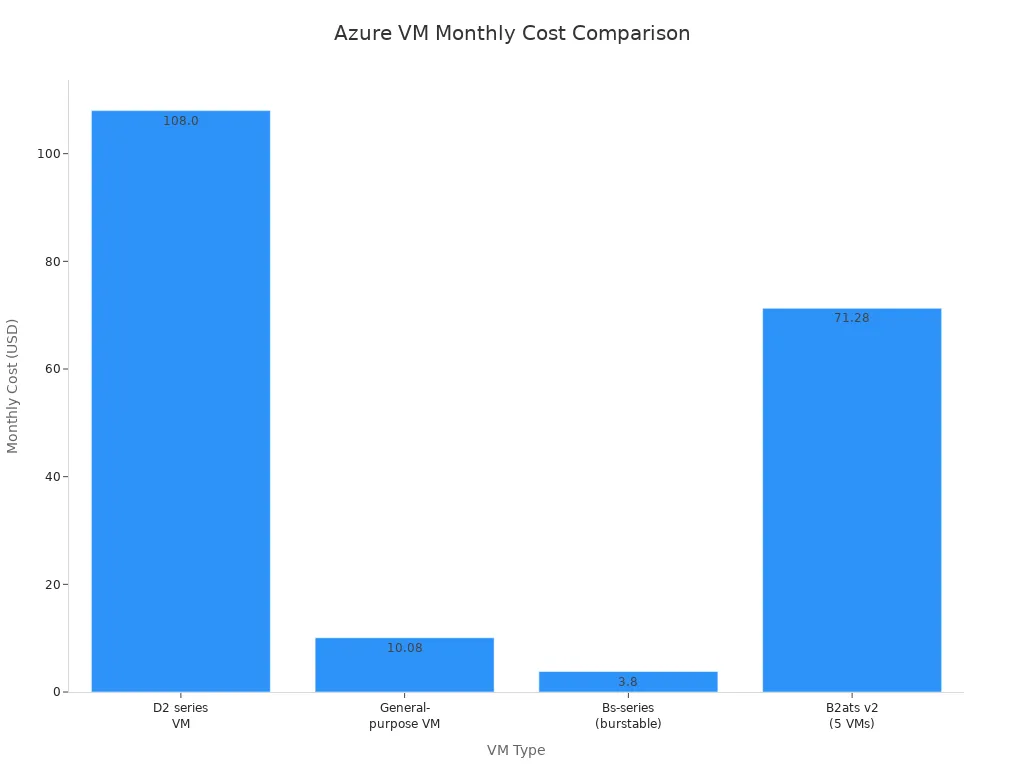
As you can see, the costs vary significantly based on the VM type you choose. While some options may seem affordable at first glance, the cumulative expenses can become overwhelming over time.
Hidden Fees
In addition to the base costs, you should be aware of hidden fees that can inflate your Azure spending. Here are some common hidden fees associated with Azure VM usage:
| Hidden Fee Type | Description |
|---|---|
| Unattached Disks and Snapshots | Ongoing storage costs arise from failing to delete disks and snapshots after VM removal. |
| Stopped but Not Deallocated VMs | VMs in a 'Stopped' state still incur charges; they must be fully deallocated to stop billing. |
| Load Balancer Data Transfer | Charges apply for both the usage of the load balancer and the data transferred through it. |
| Unused Network Interfaces | Regular monitoring and deletion of unused interfaces can prevent unnecessary costs. |
| Overprovisioning Resources | Allocating more resources than necessary leads to hidden costs; policies should be enforced to manage this. |
These hidden fees can catch you off guard, leading to unexpected spikes in your monthly consumption. By staying vigilant and managing your resources effectively, you can avoid these pitfalls.
Mini PC Costs
Initial Investment
Switching to a mini PC for running Azure can require an upfront investment, but it pays off in the long run. The initial costs typically include the purchase of the hardware, which can range from a few hundred to a couple of thousand dollars, depending on the specifications you choose. However, this one-time expense is significantly lower than the ongoing costs of cloud VMs.
Long-term Savings
The long-term savings of running Azure on a mini PC are substantial. Over a three-year period, the total cost of ownership for a mini PC can be dramatically lower than that of cloud services. Here’s a quick comparison:
- On-Prem Cost: $871,912
- Cloud Cost: $4,306,416
- Total Savings Over 5 Years: $3,434,504
While cloud services offer flexibility, they can lead to higher costs due to recurring charges. On-premises infrastructure, despite its higher initial costs, results in substantial long-term savings once capital expenditures are amortized.
By choosing to run Azure locally, you not only gain control over your resources but also optimize your spending. This approach allows you to focus on what matters most—growing your business without the burden of unpredictable cloud expenses.
Benefits of Local Azure
Running Azure on a mini PC offers numerous advantages that can significantly enhance your business operations. Let’s dive into the key benefits, focusing on cost savings and enhanced control.
Cost Savings
Reducing Operational Expenses
One of the most compelling reasons to switch to a local Azure setup is the potential for substantial cost savings. By running Azure on a mini PC, you eliminate the ongoing expenses associated with cloud virtual machines (VMs). Instead of paying monthly fees, you make a one-time investment in hardware. This shift can lead to a dramatic reduction in operational costs.
- You can avoid unexpected charges that often come with cloud services.
- Local deployments allow you to manage resources more efficiently, reducing waste.
- You gain the ability to monitor your spending closely, ensuring you stay within budget.
For example, a small business that struggled with daily losses due to poor cost monitoring implemented Azure Budgets. They set alert thresholds to manage their expenses effectively. As a result, they stabilized their daily spend at just $5.27, gaining full visibility and preventing unexpected costs.
Predictable IT Budget
With Azure running locally, you can achieve a more predictable IT budget. This predictability is crucial for small businesses that need to manage their finances carefully. Here’s how local Azure contributes to budget stability:
- Fixed Costs: You know exactly what your hardware costs are, making it easier to plan for the future.
- No Surprises: You avoid the hidden fees that often accompany cloud services, such as charges for unused resources.
- Budget Control: You can allocate funds more effectively, ensuring that you have the resources you need without overspending.
Enhanced Control
Customization Options
When you run Azure on a mini PC, you gain enhanced control over your environment. This control allows for greater customization, enabling you to tailor your setup to meet your specific needs. Here are some ways you can customize your local Azure environment:
- You can choose the hardware that best fits your workloads, ensuring optimal performance.
- You have the flexibility to configure your Azure services according to your business requirements.
- You can implement specific policies and governance measures that align with your organizational goals.
Security Compliance
Security is a top concern for any business, and running Azure locally can improve your compliance with industry standards. Local deployments allow you to maintain a secure environment while leveraging Azure's robust security features. Here’s how:
| Tool/Feature | Description |
|---|---|
| Azure Blueprints | Groups policies and access controls to streamline compliant development environments. |
| Microsoft Defender for Cloud | Provides continuous security assessment and centralized insights into security posture across environments. |
| Azure Policy | Enables real-time policy enforcement and remediation of non-compliant resources. |
| Microsoft Purview Compliance Manager | Offers customizable templates for compliance controls and continuous assessment of control status. |
| Azure Information Protection | Secures sensitive information and monitors activity to prevent data breaches. |
| Azure Advisor | Provides security and policy recommendations based on best practices and current configurations. |
By utilizing these tools, you can ensure that your local Azure environment meets the necessary compliance standards, giving you peace of mind.
Challenges and Solutions
Running Azure on a mini PC can be a fantastic way to cut costs, but it does come with its own set of challenges. Let’s explore some common issues you might face and how to tackle them effectively.
Performance Limitations
Assessing Mini PC Capabilities
When you switch to a mini PC, understanding its capabilities is crucial. Mini PCs often have limited resources compared to traditional servers. You need to assess your hardware to ensure it can handle your workloads. Here are some strategies to help you make informed decisions:
- Understand resource limitations to make informed design decisions.
- Scale vertically by increasing resource capacity when needed.
- Scale horizontally by adding new resource instances to distribute workloads.
Optimizing Workloads
To get the most out of your mini PC, optimizing workloads is essential. Here are some tips to enhance performance:
- Utilize autoscaling to adjust resources based on workload demand.
- Optimize data performance through dedicated analytics and caching mechanisms.
- Enable virtual network flow logs to capture network activity and use traffic analytics to analyze logs for better resource allocation.
By implementing these strategies, you can ensure that your mini PC runs Azure services smoothly, even under demanding conditions.
Security Considerations
Protecting Local Environments
Security is a top priority when running Azure locally. You want to protect your mini PC from potential threats. Fortunately, Azure Local comes with over 300 security settings enabled by default, providing a solid security baseline. Here are some best practices to enhance your local environment's security:
- Enable Microsoft Defender for Cloud to monitor and protect against threats.
- Implement segmentation strategies to contain potential security breaches.
- Use a trusted identity provider like Microsoft Entra ID for access control.
- Encrypt data in transit, at rest, and in use to protect against tampering.
Compliance with Standards
Maintaining compliance with industry standards is vital for any business. Running Azure locally doesn’t mean you have to compromise on compliance. Regularly review security baselines to strengthen your security posture. Establish a well-documented disaster recovery plan and regularly test recovery procedures to ensure you’re prepared for any situation.
By addressing these challenges head-on, you can enjoy the benefits of running Azure on a mini PC while keeping your environment secure and efficient.
Ideal Use Cases
When you think about running Azure on a mini PC, several ideal use cases come to mind. Let’s explore how this setup can benefit you in development, testing, and edge computing.
Development and Testing
Local Development Environments
Running Azure locally allows you to create efficient development environments. You can set up your mini PC to mirror your production environment, which helps you catch issues early. This setup saves you time and reduces costs associated with cloud VMs. You can quickly test your applications without worrying about incurring extra charges.
CI/CD Integration
Continuous integration and continuous deployment (CI/CD) workflows thrive in a local Azure environment. Here’s how:
| Evidence | Explanation |
|---|---|
| Azure Local allows management of physical machines as cloud resources | This integration simplifies CI/CD workflows by enabling lifecycle operations through a unified interface, reducing the need for separate tools. |
| Azure Kubernetes Service (AKS) is automatically set up with Azure Local | This provides a consistent environment for deploying and managing Kubernetes-based applications, essential for CI/CD processes. |
| One-click integration with Microsoft Defender for Containers and Azure Monitor | This enhances security and monitoring capabilities, which are critical for maintaining CI/CD workflows. |
With these features, you can streamline your development process and ensure that your applications are always ready for deployment.
Edge Computing
Edge computing is another area where running Azure on a mini PC shines. By processing data locally, you can achieve faster response times and improved efficiency.
Processing Data Locally
When you process data on your mini PC, you eliminate the need to send it to distant cloud servers. This local processing is crucial for applications that require real-time decision-making. For instance, autonomous vehicles need to respond to road conditions instantly. By keeping data processing close to its source, you reduce latency significantly.
- Mini PCs facilitate local data processing, which removes the necessity of sending data to far-off cloud servers for analysis.
- Edge computing processes data closer to its source, which reduces the distance data must travel.
Reducing Latency
Latency can be a significant issue in many applications. Traditional cloud systems introduce delays due to their distance from the operational environment. By running Azure locally, you can minimize these delays. This is especially important in production lines, where every second counts.
- Latency can severely impact efficiency in production lines, where every delay between problem detection and response leads to waste.
- Local processing allows for quicker responses, enhancing overall productivity.
Running Azure on a mini PC can transform your IT strategy. You gain control over costs while enjoying the benefits of cloud services. As you look ahead, expect trends like AI-driven automation, edge computing expansion, and advanced security measures to shape local Azure environments. Embracing these innovations will help you stay competitive and efficient. So, why not take the leap? Start optimizing your cloud experience today!
FAQ
What is Azure Arc?
Azure Arc allows you to manage your local devices as if they were part of the Azure cloud. You can apply governance and security policies across your mini PCs, making management easier and more efficient.
How does Azure Local work?
Azure Local enables you to run core Azure services directly on your mini PC. This setup allows you to deploy virtual machines and Kubernetes clusters without incurring ongoing cloud costs.
Can I use my existing hardware with Azure?
Yes! Azure Local supports customer-owned hardware, including mini PCs. You can leverage your existing devices to create a local Azure environment without needing to invest in new equipment.
What are the benefits of running Azure locally?
Running Azure locally reduces operational costs, provides predictable budgeting, and enhances control over your IT environment. You can customize your setup to meet your specific business needs.
Is security maintained with Azure Local?
Absolutely! Azure Local comes with built-in security features that help protect your data. You can also implement additional security measures to ensure compliance with industry standards.
How do I set up Azure on my mini PC?
To set up Azure, you'll need to install Azure Stack on your mini PC. Follow the installation guide provided by Microsoft to get started quickly and easily.
What are the hardware requirements for Azure?
For optimal performance, your mini PC should have at least a quad-core CPU, 16 GB of RAM, and 256 GB SSD storage. Ensure your network supports dual NICs with RDMA capabilities.
Can I scale my Azure Local setup?
Yes! Azure Local can scale from a single-node appliance to a 16-node cluster. This flexibility allows you to adjust your setup based on your workload demands.
Apple Podcasts · Spotify · YouTube · YouTube Music
Host: Mirko Peters