 EN
EN Deutsch
 Español
 Français
 Italiano
 Português
 Nederlands
 Polski
 Bahasa Indonesia
 Русский
 Українська
 العربية
 עברית
עברית हिन्दी
 日本語
日本語 한국어
한국어2026-08-18 · Season 3
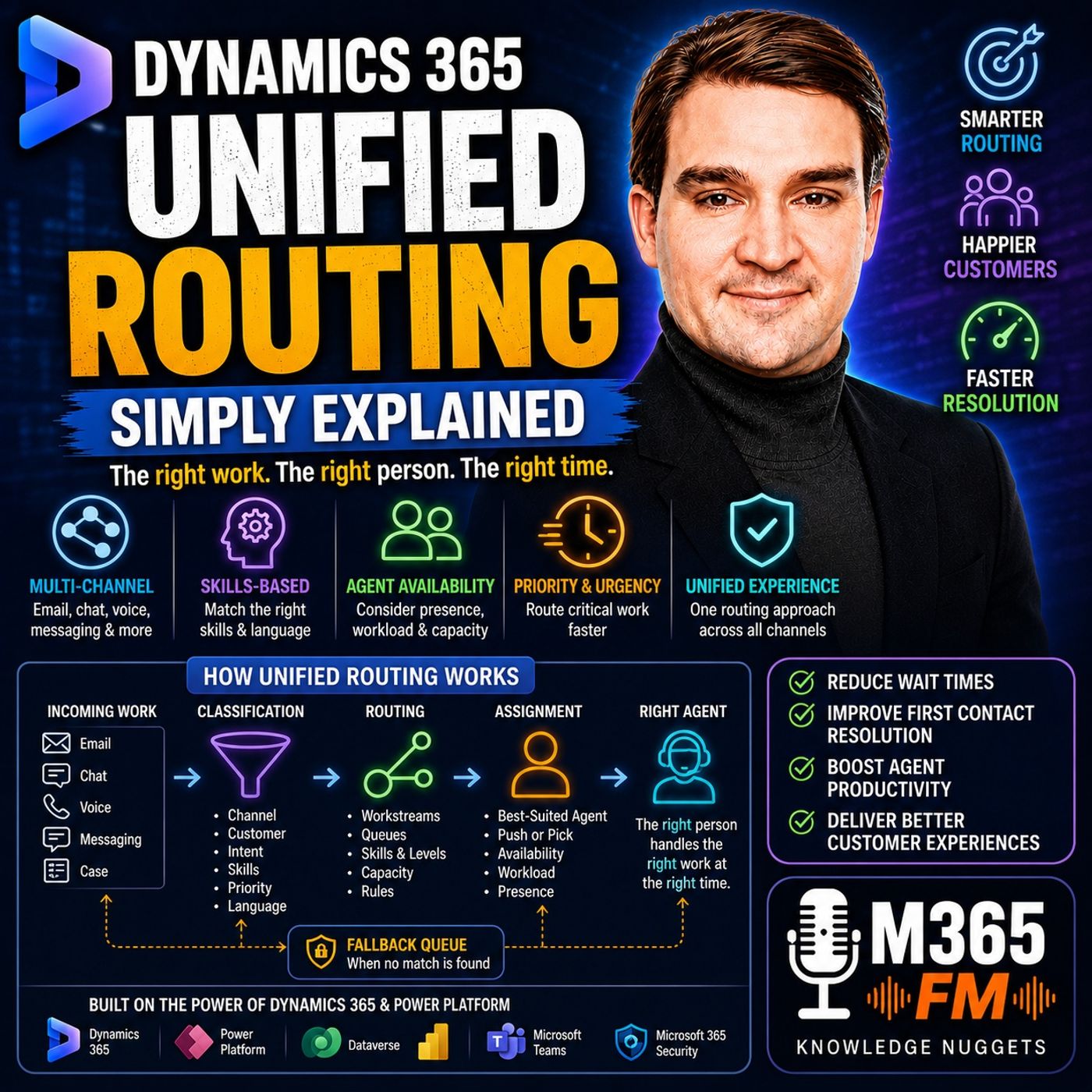
Dynamics 365 Unified Routing - Simply Explained
Show notes
When a customer sends a chat message, email, phone request, or support case, they usually expect one thing: the right person should help them as quickly as possible. But customer service becomes complicated as organizations grow. A shared inbox that worked perfectly for five agents can quickly turn into a bottleneck when hundreds of requests arrive through multiple channels, in different languages, with different priorities, and requiring different technical skills. In https://www.m365.fm/dynamics-365-unified-routing-simply-explained/ of Microsoft Knowledge Nuggets on M365 FM, Mirko Peters explains Microsoft https://www.m365.fm/categories/power-platform-talk/ Unified Routing in plain English. We explore how Unified Routing classifies incoming customer requests, determines priority, identifies required skills, considers agent availability and workload, and then routes the work to the most appropriate person. We also explain workstreams, queues, skills, capacity profiles, presence, push assignment, pick assignment, machine learning, fallback queues, and Copilot Service workspace. WHAT IS DYNAMICS 365 UNIFIED ROUTING? Dynamics 365 Unified Routing is an intelligent routing capability designed to automatically distribute incoming customer service work to appropriate agents. Think of it as a smart front desk. Imagine a large office building where visitors arrive with completely different needs. One person needs accounting. Another needs technical support. Another speaks Spanish and needs someone who can communicate with them. Another has an urgent appointment. A good receptionist does not simply point everybody toward the same waiting room. They understand what each visitor needs and direct them toward the right person. Unified Routing performs a similar function for customer service requests. Instead of simply asking "Which agent is next?", the system can consider what the customer needs, who has the necessary skills, who is available, how much work each agent already has, and how urgently the request should be handled. WHY BASIC CUSTOMER SERVICE QUEUES STOP WORKING Imagine a small customer service department with five employees. Customers send emails to one shared support address. Every email enters the same queue. When an agent finishes their current task, they take the next request. For a small organization with one product, one language, and relatively few requests, this can work perfectly well. Then the organization grows. Customers begin contacting support through email, live chat, voice, messaging, web forms, and case records. Some customers have billing questions. Others need technical assistance. Some require support in another language. Some have routine questions. Others have critical problems affecting their business. Suddenly, the shared queue looks less like an organized support process and more like a pile of papers sitting on somebody's desk. THE PROBLEM WITH FIRST-COME, FIRST-SERVED ROUTING Traditional queues frequently focus on when a request arrived. But arrival time is only one factor. Imagine an experienced technical specialist spending an hour answering basic password questions. Meanwhile, a customer with a serious technical problem waits because nobody noticed that their case requires specialist knowledge. Eventually, another agent opens the case, realizes they cannot solve it, and transfers it. The customer waits again. The organization creates additional work. The specialist eventually receives the request anyway. Unified Routing attempts to reduce these unnecessary handoffs by considering the requirements of the request before assigning it. The goal is to get closer to: Right customer request → right team → right agent → right time. BASIC ROUTING VS UNIFIED ROUTING Basic routing can already provide useful structure. An organization might create a simple rule: Billing cases go to the billing queue. Technical cases go to the support queue. For straightforward customer service environments, that may be sufficient. But a queue answers only part of the routing question. It tells the system where the request should wait. It does not necessarily determine which person inside that queue has the appropriate expertise, who is currently available, who already has several active conversations, or whether another request should receive higher priority. Unified Routing addresses this larger assignment problem. ONE ROUTING APPROACH ACROSS CUSTOMER SERVICE CHANNELS One of the important ideas behind Unified Routing is applying a common routing approach across different types of customer work. A live chat and an email are obviously different interactions. A telephone call has different timing requirements from a case created through a web form. But they share the same fundamental routing problem: Who should handle this request? Unified Routing can evaluate incoming work according to the organization's configured rules and requirements. The channel becomes one part of the decision rather than requiring an entirely disconnected routing philosophy for every customer interaction. SKILLS-BASED ROUTING Skills are one of the most important concepts in Unified Routing. A skill represents something an agent knows how to handle. That might be: A language. A particular product. A technical area. A customer service specialization. A business function. A support level. Incoming work can also receive required skills. Dynamics 365 can then match the requirements of the customer request with the skills associated with available agents. A SIMPLE SKILLS-BASED ROUTING EXAMPLE Imagine two agents. Maria understands the company's advanced product line and speaks Spanish. David specializes in account questions and currently has capacity for another email. A Spanish-language request about an advanced technical problem should not automatically go to David simply because he happens to be the next available person. The work requires Spanish and advanced product knowledge. Maria is therefore a much stronger match when she is available and has sufficient capacity. This illustrates the fundamental difference between basic distribution and intelligent routing. Availability alone does not necessarily make somebody the right agent. THE TWO DECISIONS BEHIND UNIFIED ROUTING Unified Routing essentially performs two connected operations. First, it determines what the incoming request needs. Then it determines who should receive it. Microsoft's routing process can therefore be understood as: Classification → Assignment Classification adds useful information to the work item. Assignment compares those requirements with available agents. Keeping these two stages separate makes the overall routing process easier to understand. WHAT IS CLASSIFICATION? Imagine an email entering Dynamics 365. Initially, it may contain a customer name, subject line, message, and other basic information. That alone may not tell the routing system enough. Is this a billing problem? A product failure? An account question? Which language does the customer require? Does the customer have premium support? Does the case require specialist knowledge? How urgent is the problem? Classification adds the information required to answer those questions. It turns a relatively vague customer request into structured work that the routing system can understand. CLASSIFICATION RULES Organizations can configure rules that examine information associated with incoming work. For example, a rule might determine that a customer has a premium support agreement and therefore assign a higher priority. Another rule could inspect the case category and require a billing skill. Another could identify the customer's language and add that language as a routing requirement. The important point is that these decisions become repeatable. Instead of every agent manually deciding how a request should be categorized, the routing configuration applies the organization's service rules consistently. MACHINE LEARNING AND ROUTING Rules work particularly well when customer information is structured and predictable. But customers do not always describe the same problem using the same words. One customer might say: "My device won't start." Another writes: "The screen stays black." Another says: "I can't turn it on." These sentences may describe the same underlying problem. Creating manual rules for every possible variation quickly becomes difficult. The supplied episode explains that machine-learning-based capabilities can help predict the skills required for a request by examining patterns in customer text. Instead of creating a separate rule for every phrase, a model can help determine whether a request appears to require product expertise, billing knowledge, or another support skill. YOU DO NOT ALWAYS NEED MACHINE LEARNING More intelligence does not automatically mean better routing. A small customer service team with clear case categories may be perfectly successful using straightforward rules. Machine learning becomes more relevant when volumes increase, customer descriptions vary significantly, and maintaining manual routing rules becomes increasingly difficult. The routing architecture should match the complexity of the actual service operation. Organizations should not create an AI problem where a simple business rule already solves the requirement. PRIORITY IS DIFFERENT FROM SKILLS Skills and priority answer two different questions. Skills ask: Who can solve this? Priority asks: How quickly should we deal with it? A routine request may safely wait behind a serious service disruption. A customer with a premium support agreement may require a faster response. An urgent operational problem may need to move ahead of several normal requests even when t Become a supporter of this podcast: https://www.spreaker.com/podcast/m365-fm-microsoft-365-azure-cloud-power-platform-ai--6704921/support.
Apple Podcasts · Spotify · YouTube · Deezer
Host: Mirko Peters
Guests
Related articles
Transcript
Read the full transcript
When a customer sends a chat, email, phone request or case record, they need help now, but their request can easily land in a shared queue where it waits for the right person to notice it. Think of a busy office building with one front desk. Visitors arrive with different needs, and the receptionist has to send each one to the right room, not just point them toward a crowded waiting area. EOTM-M, Mirko Peters from M365FM, and this knowledge nugget puts Dynamics 365 unified rooting into plain English. You will see how it sorts incoming work, chooses who should handle it, and uses workstreams queues, skills and capacity behind the scenes. Why basic queues stop working? Imagine a small support team with five people, where customers email one shared address, every case enters one queue, and an agent picks the next item when they finish their current work. For a small team with one product and one language, that works well enough. Then the company grows. Now customers contact the team through email, chat, voice and messaging, some ask about billing, others report a product problem, and a few need help in another language. Some customers have urgent issues, and some cases can wait until tomorrow. One shared queue starts to look less like a helpful inbox, and more like a pile of papers on a desk. Here are our teams what happens. An experienced product specialist might spend an hour answering simple password questions. Meanwhile, a customer with a serious product problem waits, because nobody notice the case, or because the agent who first opens it needs to pass it to someone else. That handoff creates extra work for the team, and extra waiting for the customer. Public routing can improve this a little by letting you create a rule that sends billing cases to a billing queue or product cases to a support queue. That gives work some structure, and for simple service setups it may be all you need. But a queue only answers part of the question, it can tell you where a request should wait, but it doesn't always decide which available person has the right knowledge, who already handles several chats, or whether a more urgent request should come first. So unified routing tackles the larger problem. It uses one routing approach across different kinds of customer work. A chat and an email don't need completely separate ways of finding the right agent. Instead, the system can look at what the request needs, then consider the people who can take it. That can include in agent skills, whether they're available, how much work they already carry, and how urgent the request is. Picture two agents. Maria knows the company out, TM's Advanced Product Line, and speaks Spanish. David handles account questions and has room for another email. A Spanish email about an advanced product issue shouldn't land with David just because he happens to be next in a list. unified routing can direct that request toward Maria when she out to TM is available and has room for it. If she can't take it, the routing rules follow the path your service team has planned instead of leaving the request stranded. This doesn't replace the people who decide how customer service should work. Your service leaders still decide which customers need faster help, what skills matter, how many chats an agent can manage, and where work should go when nobody matches. Unified routing takes those decisions and applies them the same way each time. So what does it actually do when a new request arrives? It makes two connected decisions. First, it works out what the request needs, then it finds the right place and person for that work. The two decisions behind every assignment. So unified routing does two things, and it does them in a specific order. First, it looks at incoming work and classifies it. Then it assigns that work to a person. Classification is really just a system checking a new request and tagging it with the details needed to root it correctly. Imagine an email comes in from a customer. Right now it only has a subject line, a message, and the customer EOTM is name. That does not might tell your service team enough. Is this a billing question, a broken product, a delivery problem, an account issue? The classification step adds useful labels to answer those questions. It can figure out where the request came from, which product the customer mentioned, what type of customer they are, the language they used, and what kind of help they need. Those labels turn a vague request into work that the routing system can understand and act on. Most of the time you set this up with rules. For example, a rule might look at the customer record and see they have a premium support plan. Another rule could check the case category and add a required skill like billing or technical support. Or a rule could notice the request arrived in Spanish and attach a language requirement. The system does no a timid read every email like a person would. Instead it checks the conditions your team has set. If this customer belongs to a certain group, add this priority. If the case is about this product, require this skill. If the request came from a certain channel, send it that way. That gives you clear, repeatable results every time. But rules can get long when customers describe the same problem in different ways. One person writes only device won't start. Our another writes our the screen stays black. Our third says, oh, I can't turn it on. Your machine learning can handle that kind of pattern much better. Microsoft, our S&T MMO's routing tools can use machine learning models to predict the skills the request needs. Instead of writing a separate rule for every phrase, a model can review the text and guess whether the request needs a product specialist, a billing expert, or another type of support. You don't know what team need machine learning for every setup though. A small team with clear case categories can get everything it needs from simple rules. Machine learning becomes useful when volume grows, customer wording varies a lot, and manual rules start getting hard to manage. Classification can also set the priority of the work. Priority answers a different question from skills. Skills ask, oh, who can solve this? A/O priority asks, oh, how soon should we deal with it? A/O, a routine request might wait behind a serious service problem. A case from a customer with a higher support agreement might need faster attention. Unified routing can use the details from classification to sort that work before an agent ever sees it. So classification gives the request a clear set of labels. It tells the system what the work is, what it needs, and how urgently it should move. Then assignment begins. Assignment looks at the requirements on the work item and compares them to the people who could handle it. The system checks agent skills, their skill level where that applies, their Q membership, their availability, and their current workload. That last part matters more than people often think. An agent might have the right product knowledge, but they could already be handling as much work as their capacity allows. Another agent might have the same skill, show as available, and have room for a new request. The system can choose the person who fits the request and can actually take it right now. This is what Microsoft means by the best suited agent. It does not meant just mean the next name in a list. It means the person who matches the work requirements under the rules you chose. Sometimes that might be the agent with the lowest current workload. In another setup, it could be the next qualified available person, depending on the assignment method your team picks. The presence also feeds into that choice. If someone is offline or way or busy at their limit, rooting should look elsewhere. Without that live view of availability and workload, an assignment system can send work to people who can't respond. So the process follows a simple path. The request arrives. Classification adds the information needed to handle it. Priority places it in the right order. Assignment finds a suitable available agent with enough capacity. The next question is where all those instructions live. So answer that we need to look at the building blocks that shape rooting inside Dynamics 365. The building blocks. Workstreams, queues, skills and capacity. Those rooting decisions need a home inside Dynamics 365. The main starting point is a workstream. Think of a workstream as the front desk for one kind of incoming work. You might create one for live chat, another for voice calls, another for messaging, and another for case records like emails or web forms. Each workstream tells Dynamics 365 what to do when that kind of work arrives. For a record workstream, the incoming item might be a case. For a chat workstream, ETL attempts a live conversation. The work looks different, but the basic job stays the same. Bring the request in, add the right details, and help it reach the right team member. A workstream contains the rules for that journey. It can decide which incoming records belong there through intake rules. It can contain classification rules that add skills, priority, or other details. It can also include rules that send work toward the correct queue. To it me, I'll usually choose a fallback queue as well. That wouldn't be the safe place for work when the normal route cannot automatically find a match. Maybe no agent currently has the required skill, maybe the team has no timid finish setting up a new product category. Rather than letting the request disappear into nowhere, Dynamics 365 can send it to a queue where someone can review it. A workstream also controls how agents receive work. With push assignment, the system sends a new item directly to an eligible agent. The agent gets a notification and starts working on it. This works well when you want the system to keep work moving without agents watching a list all day. Pick assignment takes a different approach. Eligible agents see work waiting in a queue and choose which item to take. That gives agents more control, which can help in teams where people need to judge the work before they accept it. The workstream helps set that behavior, but your team decides which approach fits the job. Now, where does work wait before an agent takes it? That opens where queues come in. A queue is a waiting area and a team boundary. It groups work that belongs with a certain part of the service team, like billing, product support or customer onboarding. Many people treat a queue like the whole routing system. It is no timid. A queue can hold work and identify the group responsible for it, but it does no timid contain the full picture by itself. The routing process still needs to know which person in that group can handle the request right now. For example, a technical support queue might include 10 agents, only four might know a certain product. Of those four, perhaps two are away and one already handles the maximum number of chats. The queue points the request in the right direction, while the other routing details narrow down the right person. Those details often come from skills. A skill is a label that describes something an agent knows how to handle. It might be a language, a product line, a support level, or a business area. You add skills to agents, you can also add required skills to incoming work. If a customer writes in German, the request can require German. If the case concerns advanced network setup, it can require that product skill. Dynamics 365 then looks for agents whose own skills match the request. Skill levels add another layer. Imagine two people both know a product. One handles basic questions after training, while the other solves complex technical faults every day. A simple "oh" work can I find this setting? A/O question may suit either person. A serious product issue can require the advanced level. That keeps simple work from automatically landing with the most experienced person, while difficult work has a better chance of reaching someone ready for it. Skills only describe fit though, they do not want them to tell the system whether an agent has room for another task. That "au" teams the job of capacity profiles. A capacity profile sets the amount and type of work an agent can handle at one time. Picture each agent with a limited number of work slots. A live chat can take one slot, an email may take another. A voice call can fill the agent totems full attention depending on how your team sets it up. You might decide that an agent can handle two chats and one email at once. Another agent might handle one voice call and no additional chats during that call. A senior agent might handle more concurrent work than someone new to the team, but only if that matches the way your service team actually works. Capacity is now too late about pushing more work onto people. It stops the system from treating every available person as equally free, an agent who appears online may already be fully occupied. Without capacity rules, new requests can keep arriving for that person while another qualified agent has room. Presence fills in the other part of the picture. Dynamics 365 needs to know whether someone can receive work at that moment. An agent who is offline away or unavailable should know them. He'd receive a new customer request. An agent who is available and still has capacity becomes a possible match. So these building blocks each handle a different part of the job. Work streams control the path for a type of work. Cue's organized responsibility. Skills describe what the work needs and what agents know. Capacity and presence show who can take the work now. Put those pieces together and a customer request can move through a clear set of decisions instead of relying on somebody to spot it first. One request from customer message to write agent. Let's follow one customer request through the system and see how each piece works. So imagine a customer sends an email in Spanish. Their company uses an advanced product, the issue stops part of their work and their support agreement means it needs quick attention. At first it's just an email or nothing special. That email enters Dynamics 365 as a case record and intakes rule checks whether the record belongs in the right work stream. In this example, the rule sees it arrived by email and roots it into the email or record work stream for customer support. Once that work stream takes over, the classification rules look at the details already attached to the case over the email origin, the customer account, the product listed, the urgency level and the language needed. Each rule adds information that changes the next decision. The customer account may identify a premium support plan, so the case gets a higher priority. The selected product may require an advanced product support skill. The language field adds Spanish as another required skill. Here's the thing, nothing has reached an agent yet. But the request now carries a clear set of needs, high priority, advanced product knowledge and Spanish language support. That gives Dynamics 365 something specific to match instead of sending a vague email to a general team. A root to queue rule can then place the case in the queue responsible for that product area. Notice what the queue does here. It puts the case with the right service group, but the queue doesn't just hand it to the first person it finds. The case still needs an agent who meets its requirements and has capacity for it. So Dynamics 365 looks at the eligible agents in that queue. Take a team of four agents in the Advanced Product Support queue. One speaks Spanish but is away. One is available but only handles basic products. And the third has the right skills but is already at full capacity with active chats and emails. The fourth agent, Elena, speaks Spanish, holds the Advanced Product Skill level, is available and has room for one more email. She becomes the best match. With Push Assignment, Dynamics 365 sends the case directly to Elena. She gets the work notification in the co-pilot service workspace, opens the case and starts with the details already gathered during rooting. Your customer doesn't need to repeat the product issue to a general agent. And Elena doesn't need to dig through a busy queue guessing which cases to take out. She receives a request that fits her skills and current workload. That's Push Assignment in plain English. The system chooses an eligible person and sends the work to them. But some teams need a different approach. Imagine a group of senior technical agents who handle complex cases. Each case might need a quick review before someone accepts it. One agent may know a customer's setup well and another may already work on a related case and can spot the issue faster. For that kind of team, pick Assignment works better. The rooting process still sends the case to the right queue and identifies which agents qualify. Instead of pushing it straight to Elena, eligible agents can see the case in the queue and choose to take it. That doesn't mean the work becomes unstructured again now. Only the people who meet the rooting requirements see it as work they can pick. The team keeps the skills, priority and capacity controls. While agents keep more choice over the order of their own complex work, whether you choose Push or Pick depends on how your service team works. Push Assignment fits a busy service desk where speed and steady distribution matter. Pick Assignment Fits work where the agent needs more control before accepting the next request. Either way, your customer sees a simpler experience. Their message reaches someone who can handle it without unnecessary transfers. The service team spends less time sorting and forwarding cases. And because Dynamics 365 records the assignment, the case has a clearer owner from the start. One email involves quite a few decisions behind the scenes, but the customer only notices one thing, the right person responds. Planning a rooting model that people can run. A good rooting setup starts before anyone opens an admin screen. Start with the service promise you want to keep, which requests need a faster apply, which ones need a specialist, which channels need their own path because a live conversation can't wait, like an email can? Write those answers down in plain language first. For example, product outages go to the technical team with high priority. Billing questions go to billing and Spanish messages need a Spanish-speaking agent. That gives you a clear service policy before you turn it into rules. Now build a setup in a sensible order. Create your cues first, because they show which team owns each type of work. Add the people who belong in those cues, then define the skills those people actually have and set capacity profiles that match their real workload. Only after that should you create work streams and routing rules. Otherwise, you can build rules that point toward teams, skills, or capacity settings that don't exist yet, making it harder to test and much harder to explain later when somebody needs to fix it. Keep cues focused. One giant cue called support can sound simple, but it soon becomes a place where very different requests pile up together. A billing question, a product fault, and an onboarding request may all need different people and different response times. Use cues that match clear ownership. That doesn't mean creating a cue for every tiny case type. It means creating enough separation so that anyone looking at the setup can answer the basic question which team owns this work. Classification rules need the same discipline. Only add a rule when the information changes where the work goes, who can handle it, or how urgently it needs attention. If a detail doesn't affect routing, it may not belong in a routing rule. More rules don't always create better control, or they can create overlapping conditions, confusing results, and long troubleshooting sessions, where nobody knows why a case took a certain path. Keep each rule easy to explain, then test it against real customer examples. Always plan for the cases that don't fit. Maybe a new product appears before its support skill exists. Maybe every qualified agent reaches full capacity, or maybe a case arrives with missing information, so the system can't identify the right route. Your fallback cue needs an owner who watches it, reviews work that lands there, and decides whether the routing setup needs a change. A fallback cue isn't a place to forget difficult work. It's an early warning sign that your planned path needs attention. Testing should include more than the happy path. Test the case with the right skills available, then try the same case when every matching agent is unavailable. Also test what happens when capacity is full, when a skill is missing, and when a classification rule can't find the detail it expects, you want to see where the work goes before a real customer waits there. One more practical point. Agents receive work rooted through unified routing in the co-pilot service workspace, not through unified service desk, so that choice affects the workspace your team uses every day. The setup happens behind the scenes, but agents and customers feel the result right away. Clear rules, sensible ownership, and regular testing keep routing useful, instead of turning it into another system, people work around. Conclusion, Rooting as a shared front desk. Think of unified routing as a smart front desk. It takes your service rules, and makes sure every request goes exactly where it needs to, no waiting in a cue hoping someone notices it. Subscribe to Microsoft Knowledge Nuggets on M365, FM, and check out the next episode to see how Dynamics 365 services work together behind your customer support workspace.