


 Apple Podcasts
 Spotify
 Youtube Music
 Spreaker
 Podchaser
 Amazon Music
 Use Agentic AI in DevOps Safely


This episode explores how agentic AI is reshaping DevOps by automating CI/CD, incident response, and cloud operations. It explains why these autonomous systems are gaining so much attention and shares real stories of teams dramatically speeding up deployments. You’ll also learn the risks — including failures, security blind spots, and how to safely revert when automation goes wrong.
Listeners will get a practical framework for evaluating agentic AI tools, a checklist for testing autonomous agents in staging, and decision guidance on when to rely on automation versus maintaining human oversight. The episode features surprising case studies, tool comparisons, and straightforward tactics to mitigate new attack surfaces created by AI-driven systems.
It’s aimed at SREs, DevOps and platform engineers, CTOs, and researchers working on operational automation. Overall, the episode provides a step-by-step path to adopting agentic AI safely and gaining real benefits from autonomous operational agents.
You now see a dramatic shift in DevOps as agentic AI takes center stage. With autonomous, adaptive, and intelligent automation, agentic AI devops changes how you work. m365.fm’s Agentic AI stands out as a leader. Many organizations see returns of over 100% after deploying these systems. You can automate repetitive tasks and speed up innovation. Companies like Amazon saved years of development time and millions of dollars by using ai agents. Adopting agentic ai brings strategic value, helping you stay ahead in a fast-changing world.
Key Takeaways
- Agentic AI automates complex tasks in DevOps, allowing teams to focus on strategic work instead of repetitive tasks.
- Organizations using agentic AI report significant time savings, with teams saving an average of 19 hours per week.
- Agentic AI enhances decision-making by using context and reasoning, leading to faster incident resolution and improved system reliability.
- Integrating agentic AI with existing tools like GitHub Copilot can streamline workflows and reduce operational costs by up to 30%.
- Adopting agentic AI can speed up release cycles by 75%, helping teams deliver new features faster and more efficiently.
- Proactive threat detection and automated vulnerability management improve security, allowing teams to respond to risks before they escalate.
- Training and change management are crucial for successful adoption of agentic AI, ensuring teams understand new roles and responsibilities.
- Start small by automating one workflow with agentic AI to demonstrate its benefits before scaling up across your organization.
6 Surprising Facts About Agentic AI in DevOps
Below are six surprising facts about agentic AI in DevOps and what they mean for teams adopting autonomous agents.
- Agentic AI can autonomously remediate incidents end-to-end. Modern agentic AI DevOps systems can detect, diagnose, patch, and verify fixes across CI/CD pipelines and production without human scripting for every step, reducing mean time to recovery dramatically.
- They create new feedback-loop complexity. When multiple agentic AI components act concurrently (e.g., auto-scaling, auto-remediation, release agents), their interactions can produce unexpected feedback loops that require new monitoring and governance approaches.
- Agentic AI shifts risk from human error to model-driven errors. While many manual mistakes are eliminated, agentic AI introduces risks tied to model drift, reward mis-specification, and emergent strategies that can cause systemic failures if not constrained.
- Operating costs can drop and spike unpredictably. Agentic AI DevOps often reduces labor and incident costs long-term, but short-term compute, storage, and orchestration demands (and retries by agents) can cause surprising cost bursts without careful quotas and observability.
- Human roles evolve into oversight, intent design, and safety engineering. Rather than replacing engineers, agentic AI shifts skilled staff toward defining intents, guardrails, policies, and verification tests—roles that require domain expertise and stronger interdisciplinary skills.
- Emergent optimization across stack layers is possible. Agentic AI can discover cross-layer optimizations (infrastructure, middleware, application) that human teams hadn’t considered, such as reconfiguring deployment topologies or adaptive caching strategies, improving performance in non-obvious ways.
Adopting agentic ai devops responsibly requires new observability, governance, cost controls, and defined human-in-the-loop practices to capture benefits while limiting unintended consequences.
Agentic AI DevOps: The New Paradigm
What Is Agentic AI?
You may wonder what sets agentic AI apart from the automation you already know. Agentic AI devops introduces a new way of working. Instead of relying on scripts or rules, you use agents that can reason, learn, and act on their own. These agents do not just follow instructions. They make decisions, adapt to changes, and handle complex tasks across your DevOps environment.
Agentic AI represents a leap forward. Machines now plan, decide, and act without waiting for your input. They anticipate needs and take initiative, which means you spend less time managing routine tasks.
To help you see the difference, here is a table comparing traditional automation and agentic AI:
| Capability | Traditional Automation | Agentic AI |
|---|---|---|
| Logic Type | Rule-based | Reasoning-based |
| Flexibility | Low | High |
| Adaptability to Change | Minimal | Autonomous adaptation |
| Decision-Making | Predefined | Contextual, dynamic |
| Handling Exceptions | Weak | Strong |
| Human Collaboration | Limited | Proactive and interactive |
| Learning | None | Continuous |
You can see that agentic AI devops brings flexibility, learning, and proactive collaboration to your workflows.
From Automation to Autonomy
You have used automation to speed up repetitive tasks in DevOps. Now, agentic AI devops takes you further. Instead of just automating steps, you use agents that operate independently. These agents learn from feedback, adapt to new data, and optimize your workflows in real time.
Here is another table to show how agentic AI compares to traditional AI:
| Feature | Traditional AI | Agentic AI |
|---|---|---|
| Autonomy | Responds to input, lacks independent action | Operates independently, initiates actions |
| Adaptability | Follows fixed rules, limited flexibility | Learns, adapts, and refines objectives |
| Task Scope | Task-specific, narrow focus | Handles complex, multi-step processes |
With agentic AI devops, you automate multi-step processes and free up your team for strategic work. You see improved decision-making because these agents use context and reasoning. You also notice enhanced adaptability as the agents learn and adjust to new situations.
Agentic AI devops lowers your mean time to resolution. You get faster insights and responses to risks. Your team becomes more productive because you spend less time on repetitive work and more time on innovation.
Key Features of Agentic AI
Autonomous Agents
You work with agents that function independently. These agents execute tasks without constant oversight. They learn from outcomes and adjust their actions to improve future performance. In agentic AI devops, autonomous agents handle everything from code deployment to incident response.
Decision-Making
You benefit from agents that make decisions based on the current environment and your goals. These agents do not just follow scripts. They assess options, predict outcomes, and choose the best path. This proactive decision-making means you resolve issues faster and keep your systems running smoothly.
Integration with DevOps Tools
You can integrate agentic AI with your existing DevOps tools. For example, m365.fm’s Agentic AI works with platforms like GitHub Copilot. This integration allows you to automate complex workflows, monitor systems, and respond to incidents in real time. You see reduced manual effort, improved accuracy, and faster feature releases.
Organizations using agentic AI devops report up to a 30% reduction in operational costs. You achieve quicker incident resolution and less downtime. Your team enjoys better engagement and work-life balance because you focus on meaningful tasks.
Agentic AI devops is not just a trend. It is a new standard for how you deliver software and manage operations. By adopting this approach, you stay ahead in a world where speed, adaptability, and intelligence matter most.
Core Tasks Automated by Agentic AI

Agentic AI transforms your devops pipeline by automating essential tasks across the software lifecycle. You can rely on intelligent agents to handle everything from planning to deployment. Here are the main categories where agentic AI delivers the most impact:
- Ideation, planning, and requirements gathering become faster with data-driven insights.
- Design, coding, and debugging improve through AI-powered tools.
- Testing gets a boost with automated test case generation and real-time performance monitoring.
- Deployment becomes seamless with AI-driven CI/CD pipelines and smart resource allocation.
- Post-deployment tasks, such as maintenance and user analytics, run more smoothly.
- Documentation and collaboration benefit from automated summaries and updates.
CI/CD Pipelines
You see the biggest gains when you automate your CI/CD pipelines with agentic AI. These agents can manage code integration, testing, and deployment without your constant supervision. They optimize resource allocation and adapt to changes in real time. This means you get faster builds and fewer errors.
When you use agentic AI for ci/cd pipeline optimization, you can reduce test maintenance by up to 85%. Test creation becomes ten times faster. These improvements help you deliver features quickly and keep your systems reliable.
| Improvement Type | Percentage/Factor |
|---|---|
| Reduction in test maintenance | 85% |
| Speed of test creation | 10x faster |
You also notice a drop in your team’s cognitive load. At UC San Diego, developers who used AI tools like GitHub Copilot created first drafts of code 40% faster. Onboarding new team members became easier, and everyone felt more productive.
Incident Response
Agentic AI changes how you handle incidents. You no longer need to wait for alerts or sift through logs. AI agents monitor your systems, detect problems, and act before issues become critical. They can run playbooks, patch vulnerabilities, and even restore services on their own.
- Multi-agent systems detect outages and execute recovery steps automatically.
- Agents integrate with security scanners to patch issues before they reach production.
- Tools like LangChain or AutoGen adjust resources during CI/CD processes for faster recovery.
You can look at how Darktrace uses AI to monitor network traffic. Its agents spot unusual patterns and respond in real time. If they find a threat, they isolate the problem and alert your team. This proactive approach keeps your services running and reduces downtime.
Infrastructure as Code
You gain more control and reliability when you use agentic AI for Infrastructure as Code. These agents embed accountability at every step. They make structured decisions using role-specific lanes and clear stop conditions. Specialized agents handle tasks like scheduling and logistics, making your infrastructure more resilient.
- You see improved operational efficiency because agents automate routine provisioning and configuration.
- The system adapts to changes and recovers from failures quickly.
- You spend less time on manual setup and more time on strategic projects.
Agentic AI helps you build a foundation for continuous improvement. You get a system that learns, adapts, and supports your team at every stage of the devops pipeline.
Security and Compliance
You face new challenges as you move to agentic AI in your DevOps workflows. Security and compliance become more complex when you use autonomous agents. These agents can act on their own, which means you need new ways to monitor and control their actions.
Agentic AI helps you automate many security and compliance tasks. You can use intelligent agents to scan code for vulnerabilities, enforce policies, and track changes across your systems. These agents can check for compliance with industry standards and generate reports for audits. You save time and reduce errors because the agents work faster and more accurately than manual checks.
You also see improvements in how you handle threats. Agents can detect unusual behavior in real time. They respond to risks before they become bigger problems. For example, if an agent finds a suspicious change in your code, it can alert your team or even roll back the change automatically. This quick response keeps your systems safe and reliable.
However, you must understand the new risks that come with agentic AI. Traditional security tools often miss threats like memory poisoning, which can happen inside the agent’s own environment. You may find that logging and auditing agent behavior is not as strong as you expect. Many tools promise full visibility, but there is still a gap between what they claim and what they deliver.
You also need to rethink how you manage permissions. Identity and Access Management tools were not built for autonomous agents. If you give agents too many permissions, you increase your risk. If you give them too few, they cannot do their jobs. Finding the right balance is important for keeping your systems secure.
Fragmented security stacks can make it hard to see what is happening across your environment. When you use many different tools, you may miss important clues during an investigation. This lack of visibility can leave you open to attacks.
To get the most from agentic AI, you should:
- Set clear rules for what agents can and cannot do.
- Use tools that give you strong logging and auditing features.
- Review agent permissions often and adjust them as needed.
- Choose platforms that help you see all agent activity in one place.
Tip: Start with a small project. Test how agentic AI handles security and compliance tasks. Learn from the results before you scale up.
Agentic AI gives you powerful tools to automate security and compliance. You can protect your systems and meet industry standards with less effort. You also need to stay alert and update your practices as the technology evolves.
Enhancing Code Quality with AI
You want your software to work well and stay reliable. Agentic AI gives you new tools to reach this goal. With agentic AI, you can improve every step of your development process. You see fewer errors, better testing, and faster feedback. This approach strengthens code quality and helps you deliver high-quality code every time.
Automated Code Reviews
You no longer need to spend hours reviewing every line of code. Agentic AI reviews your code automatically. It checks for style, logic, and security issues. The system adapts to your team’s standards and learns from past reviews. You get suggestions that match your project’s needs. This means you can focus on building features instead of fixing mistakes.
- Agentic AI patterns reinforce core engineering discipline. You see established practices adapted for AI-assisted software development.
- Automated testing and clear specifications become more important as AI generates more code.
- Specification-driven development evolves. Agents generate and validate output against defined behavior and constraints.
You notice that your team writes better code. You also see that your reviews become faster and more accurate.
Intelligent Testing
Testing is a key part of software development. Agentic AI makes testing smarter and faster. You can create test cases from natural language specifications. The system runs these tests and gives you real-time feedback. You cover more scenarios and catch more bugs before release.
- At Ericsson, a unified platform powered by AI led to 50% faster deployments and saved 130,000 hours in six months.
- Indeed saw a 79% increase in daily software development pipelines and reduced hardware costs by up to 20%.
- CERN achieved 90x faster job startups, helping 10,000 scientists work together from over 100 countries.
- Lockheed Martin moved from monthly to weekly deployments, adding security and compliance checks to their workflows.
You see that intelligent testing with agentic AI supports continuous improvement. Your team learns from each release and gets better over time.
Error Detection
You want to find errors before they reach your users. Agentic AI helps you do this. The system generates test cases from your requirements. It runs these tests and checks the results. You get alerts when something goes wrong. The AI learns from past mistakes and updates its testing strategy.
- Agentic AI creates test cases from natural language, making sure you have full test coverage.
- It runs and checks tests on its own, giving you instant performance feedback.
- The system studies old test data, learns from errors, and improves future testing.
You can trust that your code will meet your standards for quality. Agentic AI makes it easier to deliver reliable software and keep your users happy.
Tip: Use agentic AI to automate your code reviews and testing. You will save time and improve the quality of your releases.
Accelerating DevOps Productivity
Streamlined Collaboration
You can see how agentic AI changes the way your team works together. With intelligent agents, you share information faster and solve problems as a group. AI tools help you save time—DevOps teams report saving an average of 19 hours each week. When you use these tools, you notice that release cycles move 30% faster. Your systems stay up longer, and you fix problems in minutes instead of hours.
Here is a table that shows the outcomes you can expect:
| Outcome | Description |
|---|---|
| Time Savings | Save about 19 hours per week with AI tools. |
| Faster Release Cycles | Achieve 30% quicker releases using AI-powered merge tools. |
| Improved Reliability | Boost uptime by 40% and cut recovery time from hours to minutes. |
You also see cost savings. One company used a cost optimization agent and saved 10%. Another engineer reduced script-building time from eight hours to just 37 seconds. Agents can even diagnose and fix issues in 90 seconds during self-healing events. These improvements make teamwork smoother and help you focus on important goals.
Reducing Manual Work
You spend less time on repetitive tasks when you use agentic AI. The system handles complex research and routine jobs, so you can work on creative projects. Before agentic AI, manual research could take 15 to 30 hours for each client. Now, with agentic retrieval-augmented generation (RAG), you finish the same work in 5 to 12 hours. That is a 63% reduction in manual research time.
Here are some ways agentic AI reduces manual work:
- Automates code reviews and testing.
- Handles infrastructure changes and monitoring.
- Generates reports and documentation.
You see that agentic AI increases productivity by letting you focus on innovation. Your team feels less stress and gets more done each day.
Faster Release Cycles
You want to deliver new features quickly. Agentic AI helps you shrink release cycles from months to weeks, or even days. Many organizations now release updates 75% faster than before. Leaders in the industry believe that scaling AI agents gives them a strong advantage. In fact, 93% of leaders say this technology helps them stay ahead.
Here is a table that highlights the impact:
| Metric | Description |
|---|---|
| Deployment Frequency | Code goes to production more often. |
| Lead Time for Changes | Changes reach users faster. |
| Change Failure Rate | Fewer errors in production. |
| Time to Restore Service | Recover from failures in less time. |
You see that 33% of enterprise software will use agentic AI by 2028. About 15% of daily work decisions will happen without human help. By accelerating devops, you give your team more time for strategic work and less time fixing problems.
Tip: Use agentic AI to automate your pipeline and watch your release cycles speed up. You will see better results and happier teams.
Security and Observability in Agentic AI DevOps

You need strong security and clear observability to keep your DevOps workflows safe and reliable. Agentic AI gives you tools that watch your systems, spot risks, and help you act fast. You can trust these agents to protect your code and data while making your work easier.
Proactive Threat Detection
You can stop threats before they cause harm. Agentic AI uses real-time monitoring to check for problems as soon as they appear. The system learns from new data and adapts to new risks. It does not wait for you to find issues. Instead, it flags unusual activity and helps you respond quickly.
Here is how agentic AI improves security in your environment:
| Capability | Description |
|---|---|
| Real-time vulnerability assessments | Agentic AI performs assessments using models trained on security data, allowing for immediate detection of threats. |
| Anomaly detection | It flags potential threats early, preventing them from escalating into critical issues. |
| Continuous learning | The system refines its strategies through ongoing learning, adapting to new threats effectively. |
You get better protection because the system never stops learning. You also see fewer surprises in your pipeline.
Automated Vulnerability Management
You do not have to spend hours searching for weaknesses. Agentic AI scans your code and systems all the time. It finds problems, ranks them by risk, and even starts the patching process. This automation means you fix issues faster and keep your team focused on important work.
The benefits of automated vulnerability management include:
| Benefit | Description |
|---|---|
| Faster Mean Time to Remediation | Automated workflows cut days or weeks from the patching cycle. |
| Reduced Analyst Burnout | AI handles routine tasks, freeing security teams for strategic work. |
| Improved Coverage | Continuous scanning ensures no asset or vulnerability slips through the cracks. |
| Better Risk Decisions | Context-aware prioritization focuses resources on the most dangerous threats. |
| Scalability | Agentic systems grow with your infrastructure, handling millions of assets without proportional headcount increases. |
| Compliance Confidence | Automated documentation and reporting streamline audit preparation. |
You see that agentic AI makes your security stronger and your team more efficient.
Continuous Compliance
You must meet industry standards and pass audits. Agentic AI helps you do this with less effort. The system checks your pipelines, tests your code, and creates reports for you. You spend less time on paperwork and more time building great products.
You can see the measurable results in your workflow:
| Metric | Improvement |
|---|---|
| Average testing pipeline duration | 78% reduction |
| Manual intervention requirements | 89% decrease |
| Test-to-deployment time | 92% improvement |
| Production incidents due to testing | 84% reduction |
| Defect detection rate | 67% improvement |
| Deployment success rate | 91% increase |
| Average annual savings | $1.8 million |
| Wasted compute resources | 73% reduction |
| Developer productivity | 86% improvement |
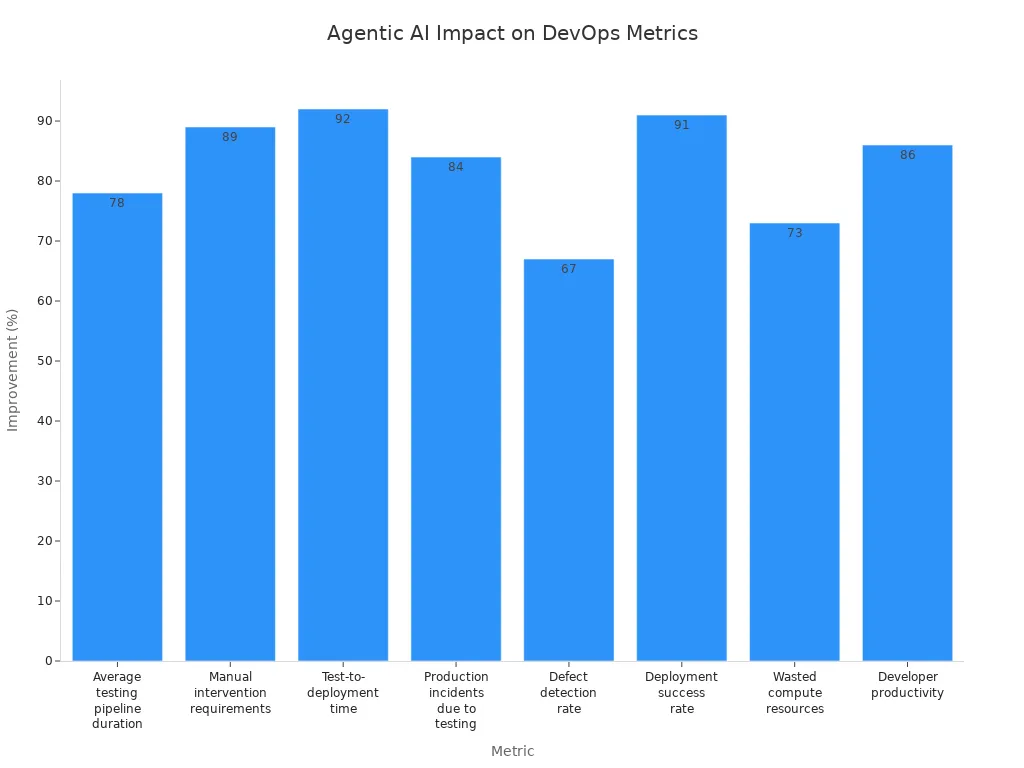
You gain confidence that your releases meet compliance rules. You also see faster deployments and fewer errors. Agentic AI improves security and makes monitoring easier for your whole team.
Tip: Use agentic AI to automate your compliance checks. You will save time and reduce stress during audits.
Implementing Agentic AI in DevOps
Readiness Assessment
You need to start with a clear understanding of your current DevOps environment before you move forward with agentic AI. Begin by assessing the maturity of your processes. Document and standardize your core workflows. This helps you see where you stand and what you need to improve. Check your technical infrastructure. Make sure your data architecture and API connectivity can support advanced AI agents.
You should also develop a governance framework. Set clear policies and oversight mechanisms for managing AI systems. Prepare your workforce for new roles and responsibilities. Align your strategy with your business goals.
Here are some practical steps to guide your readiness assessment:
- Identify key stakeholders and gather their insights.
- Analyze gaps in your organization and assess cultural readiness for change.
- Prioritize opportunities using a scoring framework that considers effort, cost, feasibility, impact, and risk.
Tip: A strong foundation ensures a smoother transition to agentic AI and reduces surprises during implementation.
Platform Selection
Choosing the right platform is a critical step. You want a solution that fits your real business needs and supports your workflows. Use the table below to compare important criteria:
| Criteria | Description |
|---|---|
| Alignment with Real Workflows | Supports actual business use cases to avoid production stalls. |
| Level of Autonomy | Executes tasks with minimal human intervention. |
| Integration with Core Systems | Offers native or API integrations to reduce hidden engineering costs. |
| Customization and Scalability | Provides low-code/no-code options and multi-cloud deployment. |
| Governance and Control | Includes role-based access, policy enforcement, and audit logs for compliance. |
| Operational Reliability | Maintains model health and data integrity in real time. |
| Organizational Readiness | Considers your culture, executive alignment, and risk tolerance. |
| Vendor Support | Offers strong partnerships and enablement programs for success. |
You should start with use cases that matter most to your business. Evaluate the platform’s autonomy and integration capabilities. Make sure it can scale and adapt as your needs grow. Prioritize governance and compliance features to protect your organization.
Integration Steps
You can integrate agentic AI into your DevOps workflows by following best practices. Start by enabling autonomous diagnosis. This allows agents to interpret data and explain errors, which makes troubleshooting faster. Use natural language for complex operations. This makes infrastructure management more accessible to your team.
Let agents anticipate and prevent issues before they happen. This proactive approach reduces the need for reactive problem-solving. Work with your engineers to map out integration points. Test each step and gather feedback to refine your process.
Note: A phased approach helps you manage risks and measure progress at each stage.
By following these steps, you set the stage for a successful agentic AI implementation in your DevOps environment.
Training and Change Management
You must prepare your team for the shift to agentic AI. Training and change management play a key role in making your adoption successful. You want your engineers, managers, and stakeholders to understand how agentic AI works and how it changes daily tasks.
Start by building a training plan. Focus on hands-on learning. Let your team use agentic AI tools in real scenarios. You can set up workshops where engineers practice with real pipelines and workflows. Use sample projects to show how agents automate code reviews, testing, and deployments. This approach helps your team gain confidence and see the benefits firsthand.
Tip: Encourage questions and open discussions during training. This helps your team address concerns early and builds trust in the new system.
You should also create clear documentation. Write guides that explain how to use agentic AI tools step by step. Include screenshots, code samples, and troubleshooting tips. Update these resources as your workflows evolve. Good documentation reduces confusion and speeds up onboarding for new team members.
Change management means more than just training. You need to help your team adjust to new roles and responsibilities. Some tasks will move from humans to AI agents. You may see engineers focus more on strategic planning and less on repetitive work. Hold regular meetings to discuss these changes. Let your team share feedback and suggest improvements.
Here are some best practices for managing change:
- Identify change champions in your team. These people can support others and answer questions.
- Set clear goals for your agentic AI rollout. Track progress and celebrate small wins.
- Communicate often. Share updates about what is working well and what needs adjustment.
- Provide ongoing support. Offer refresher sessions and advanced training as your team gains experience.
You can use a checklist to guide your change management process:
- Assess current skills and knowledge gaps.
- Schedule hands-on training sessions.
- Develop and share updated documentation.
- Assign change champions.
- Set milestones and review progress.
- Collect feedback and adjust plans as needed.
Note: Change takes time. Be patient and support your team as they learn new ways of working.
With strong training and thoughtful change management, you set your team up for success. You build a culture that embraces innovation and continuous improvement. This foundation helps you get the most value from agentic AI in your DevOps workflows.
Challenges and Best Practices
Adoption Hurdles
You may face several challenges when you start using agentic AI in your DevOps workflows. Many teams struggle with resistance to change. People often worry that AI will replace their jobs or make their skills less valuable. You might see confusion about how to trust autonomous agents with important tasks. Some engineers feel unsure about how to monitor or control these new systems.
You also need to think about technical barriers. Your current tools and processes may not work well with agentic AI. Integration can take time and effort. You may need to update your infrastructure or train your team on new platforms. Data quality can also slow you down. If your data is messy or incomplete, AI agents may not perform as expected.
Tip: Start small. Choose one workflow to automate with agentic AI. Show your team the benefits before you scale up.
Risk Mitigation
You must protect your systems and data when you use agentic AI. Security risks can increase if you do not set clear rules for what agents can do. You should review permissions often. Make sure agents only have access to what they need. You also need to monitor agent actions. Use logging and alerts to track what happens in your environment.
Testing is important. You should test agentic AI in a safe environment before using it in production. This helps you find problems early. You can use checklists to make sure agents follow your policies. Regular reviews help you catch issues before they grow.
Here is a simple checklist for risk mitigation:
- Review agent permissions every month.
- Set up logging and alerts for all agent actions.
- Test agents in a sandbox before production.
- Update your policies as your workflows change.
Sustainable Transformation
You want your move to agentic AI to last. Focus on building a culture of learning and improvement. Train your team often. Encourage them to share feedback and ideas. Celebrate small wins to keep everyone motivated.
You should document your workflows and update them as you learn. This helps new team members get up to speed quickly. Choose platforms that can grow with your needs. Look for solutions that support both current and future projects.
Note: Sustainable transformation happens when you combine technology with people and process changes.
You can follow best practices for implementation to guide your journey. These include starting with clear goals, involving all stakeholders, and measuring your progress. When you use these strategies, you set your team up for long-term success with agentic AI.
Agentic AI changes how you approach DevOps. You gain speed, reliability, and smarter automation. By adopting autonomous and adaptive systems, you set your team up for success in a fast-moving world.
Embrace agentic AI to stay ahead of the competition and unlock new levels of innovation.
You should keep learning and adapting as technology evolves. The future of DevOps belongs to those who use intelligent agents to drive progress.
Agentic AI in DevOps — Checklist
Use this checklist to plan, deploy, and operate agentic AI capabilities within DevOps practices.
Planning & Design
Data & Training
Security & Access Control
Infrastructure & Reliability
CI/CD & Automated Workflows
Testing & Validation
Monitoring, Observability & Telemetry
Governance, Compliance & Ethics
Operations & Human Factors
Maintenance & Continuous Improvement
Deployment Readiness
Tailor and prioritize items to your organization's risk tolerance, regulatory environment, and operational maturity.
FAQ
What is agentic AI in DevOps?
Agentic AI uses intelligent agents that can make decisions and act on their own. You get automation that adapts, learns, and improves your DevOps workflows without constant human input.
How does agentic AI differ from traditional automation?
You see agentic AI go beyond scripts and rules. These agents learn from data, adapt to changes, and handle complex tasks. Traditional automation only follows fixed instructions.
Can agentic AI integrate with my current DevOps tools?
Yes, you can connect agentic AI with popular tools like GitHub Copilot, Jenkins, or Kubernetes. Integration helps you automate workflows and improve efficiency.
What tasks can agentic AI automate?
You can automate code reviews, testing, deployments, incident response, and compliance checks. Agentic AI also helps with infrastructure management and documentation.
Is agentic AI secure for my organization?
You get advanced security features. Agentic AI monitors threats, manages vulnerabilities, and supports compliance. You should set clear rules and review agent actions regularly.
How do I start using agentic AI in my DevOps team?
Start with a readiness assessment. Choose a platform that fits your needs. Train your team and integrate agentic AI step by step. Track progress and adjust as you learn.
What benefits will my team see with agentic AI?
You save time, reduce errors, and speed up releases. Your team focuses on creative and strategic work. Productivity and job satisfaction improve.
What is agentic AI DevOps and how does it differ from traditional DevOps?
Agentic AI DevOps uses autonomous AI agents (ai agents for devops, devops agent) to perform development and operations tasks across your entire devops toolchain, automating CI and CD pipelines, infrastructure changes in aws or azure, and monitoring. Unlike traditional ai where a human engineer issues commands, agentic ai systems can create, detect, and remediate issues without human intervention, transforming devops practices by allowing agents to act continuously and coordinate across the software delivery lifecycle.
How do ai agents in devops integrate with CI/CD pipelines?
AI agents integrate with continuous integration (ci) and continuous delivery (cd) by interacting with the github repository, build systems, and deployment platforms (including aws services and azure devops). They can trigger builds, run tests, and promote artifacts, and even optimize pipeline configuration, enabling agents to automate entire devops workflows and reduce manual steps in the software delivery process.
Can agentic devops handle cloud infrastructure changes on aws and azure?
Yes. Agentic DevOps agents can use cloud infrastructure APIs (aws service or azure) to provision resources, update configurations, and enforce policy. Agents working together can manage scaling, security group changes, and rollout strategies across environments, improving reliability and speeding delivery while keeping a record of changes in infrastructure as code.
What are the benefits of using generative AI and ai coding assistants in development?
Generative AI and ai coding assistants accelerate development by generating code, suggesting fixes, and automating repetitive tasks. A coding agent or ai coding assistant can create code snippets, update tests, or modify CI scripts in the github repository, helping teams move faster across the entire software development lifecycle while reducing human error.
How do agentic ai systems detect and fix root cause issues in production?
Agentic systems combine monitoring and incident response with automated troubleshooting: an sre agent or monitoring agent detects anomalies, traces events back to root cause, and either suggests remediation to a human engineer or executes fixes automatically. Using model context protocol and integration with external tools, agents can correlate logs, metrics, and traces to pinpoint the underlying problem.
What safeguards exist to prevent harmful changes when agents act without human intervention?
Safeguards include role-based permissions, change approval workflows, canary deployments, and human-in-the-loop checkpoints for high-risk actions. Agents are often constrained by policies and tested in staging environments; audit logs and model context protocol help maintain transparency and allow rollback if an ai agent creates an unsafe change.
How do multiple agents coordinate—are agents working together reliable?
Agents working together use orchestration patterns and communication protocols to coordinate tasks, hand off context, and avoid conflicting changes. Reliability is improved with explicit contracts, versioned models, and centralized state management so that devops agents and coding agents can collaborate across the entire devops toolchain and the software delivery systems.
Will agentic AI replace the human engineer in DevOps roles?
Agentic AI is transforming devops but does not completely replace human engineers. Agents can handle routine tasks, incident detection, and automated remediation, while human engineers focus on strategy, complex debugging, architecture, and governance. AI remains a force multiplier that augments human capabilities rather than eliminates them.
How do ai agents for devops affect software delivery speed and quality?
AI agents improve speed by automating builds, tests, deployments, and rollback procedures, and improve quality by enforcing standards, catching regressions, and suggesting improvements. When integrated across CI, CD, monitoring, and the devops toolchain, agents continuously optimize pipelines and reduce mean time to recovery.
What role does model context protocol play in agentic DevOps?
Model context protocol provides a structured way for ai models to exchange context, state, and intent so agents can make consistent decisions. It helps agents preserve auditability and repeatability, enabling safer automation when agents create changes or detect incidents and coordinate with external tools and cloud infrastructure.
How do agentic systems interact with external tools like ticketing, observability, and infrastructure-as-code?
Agents integrate via APIs and webhooks to update tickets, create alerts, run playbooks, or modify infrastructure-as-code templates. This tight integration allows devops agents to close the loop between monitoring and remediation, ensuring that actions taken by ai agents are reflected in observability platforms, change logs, and the github repository.
What are the main risks of adopting agentic AI in DevOps and how can they be mitigated?
Risks include incorrect automated actions, over-automation without human oversight, and model drift. Mitigations involve staged rollouts, human-in-the-loop controls for sensitive operations, continuous validation of ai models, permissions and policy enforcement on aws and azure, and thorough testing in simulated environments before agents act in production.
🚀 Want to be part of m365.fm?
Then stop just listening… and start showing up.
👉 Connect with me on LinkedIn and let’s make something happen:
- 🎙️ Be a podcast guest and share your story
- 🎧 Host your own episode (yes, seriously)
- 💡 Pitch topics the community actually wants to hear
- 🌍 Build your personal brand in the Microsoft 365 space
This isn’t just a podcast — it’s a platform for people who take action.
🔥 Most people wait. The best ones don’t.
👉 Connect with me on LinkedIn and send me a message:
"I want in"
Let’s build something awesome 👊
What if your software development team had an extra teammate—one who never gets tired, learns faster than anyone you know, and handles the tedious work without complaint? That’s essentially what Agentic AI is shaping up to be. In this video, we’ll first define what Agentic AI actually means, then show how it plays out in real .NET and Azure workflows, and finally explore the impact it can have on your team’s productivity. By the end, you’ll know one small experiment to try in your own .NET pipeline this week. But before we get to applications and outcomes, we need to look at what really makes Agentic AI different from the autocomplete tools you’ve already seen.
What Makes Agentic AI Different?
So what sets Agentic AI apart is not just that it can generate code, but that it operates more like a system of teammates with distinct abilities. To make sense of this, we can break it down into three key traits: the way each agent holds context and memory, the way multiple agents coordinate like a team, and the difference between simple automation and true adaptive autonomy. First, let’s look at what makes an individual agent distinct: context, memory, and goal orientation. Traditional autocomplete predicts the next word or line, but it forgets everything else once the prediction is made. An AI agent instead carries an understanding of the broader project. It remembers what has already been tried, knows where code lives, and adjusts its output when something changes. That persistence makes it closer to working with a junior developer—someone who learns over time rather than just guessing what you want in the moment. The key difference here is between predicting and planning. Instead of reacting to each keystroke in isolation, an agent keeps track of goals and adapts as situations evolve. Next is how multiple agents work together. A big misunderstanding is to think of Agentic AI as a souped‑up script or macro that just automates repetitive tasks. But in real software projects, work is split across different roles: architects, reviewers, testers, operators. Agents can mirror this division, each handling one part of the lifecycle with perfect recall and consistency. Imagine one agent dedicated to system design, proposing architecture patterns and frameworks that fit business goals. Another reviews code changes, spotting issues while staying aware of the entire project’s history. A third could expand test coverage based on user data, generating test cases without you having to request them. Each agent is specialized, but they coordinate like a team—always available, always consistent, and easily scaled depending on workload. Where humans lose energy, context, or focus, agents remain steady and recall details with precision. The last piece is the distinction between automation and autonomy. Automation has long existed in development: think scripts, CI/CD pipelines, and templates. These are rigid by design. They follow exact instructions, step by step, but they break when conditions shift unexpectedly. Autonomy takes a different approach. AI agents can respond to changes on the fly—adjusting when a dependency version changes, or reconsidering a service choice when cost constraints come into play. Instead of executing predefined paths, they make decisions under dynamic conditions. It’s a shift from static execution to adaptive problem‑solving. The downstream effect is that these agents go beyond waiting for commands. They can propose solutions before issues arise, highlight risks before they make it into production, and draft plans that save hours of setup work. If today’s GitHub Copilot can fill in snippets, tomorrow’s version acts more like a project contributor—laying out roadmaps, suggesting release strategies, even flagging architectural decisions that may cause trouble down the line. That does not mean every deployment will run without human input, but it can significantly reduce repetitive intervention and give developers more time to focus on the creative, high‑value parts of a project. To clarify an earlier type of phrasing in this space, instead of saying, “What happens when provisioning Azure resources doesn’t need a human in the loop at all?” a more accurate statement would be, “These tools can lower the amount of manual setup needed, while still keeping key guardrails under human control.” The outcome is still transformative, without suggesting that human oversight disappears completely. The bigger realization is that Agentic AI is not just another plugin that speeds up a task here or there. It begins to function like an actual team member, handling background work so that developers aren’t stuck chasing details that could have been tracked by an always‑on counterpart. The capacity of the whole team gets amplified, because key domains have digital agents working alongside human specialists. Understanding the theory is important, but what really matters is how this plays out in familiar environments. So here’s the curiosity gap: what actually changes on day one of a new project when agents are active from the start? Next, we’ll look at a concrete scenario inside the .NET ecosystem where those shifts start showing up before you’ve even written your first line of code.
Reimagining the Developer Workflow in .NET
In .NET development, the most visible shift starts with how projects get off the ground. Reimagining the developer workflow here comes down to three tactical advantages: faster architecture scaffolding, project-level critique as you go, and a noticeable drop in setup fatigue. First is accelerated scaffolding. Instead of opening Visual Studio and staring at an empty solution, an AI agent can propose architecture options that fit your specific use case. Planning a web API with real-time updates? The agent suggests a clean layered design and flags how SignalR naturally fits into the flow. For a finance app, it lines up Entity Framework with strong type safety and Azure Active Directory integration before you’ve created a single folder. What normally takes rounds of discussion or hours of research is condensed into a few tailored starting points. These aren’t final blueprints, though—they’re drafts. Teams should validate each suggestion by running a quick checklist: does authentication meet requirements, is logging wired correctly, are basic test cases in place? That light-touch governance ensures speed doesn’t come at the cost of stability. The second advantage is ongoing critique. Think of it less as “code completion” and more as an advisor watching for design alignment. If you spin up a repository pattern for data access, the agent flags whether you’re drifting from separation of concerns. Add a new controller, and it proposes matching unit tests or highlights inconsistencies with the rest of the project. Instead of leaving you with boilerplate, it nudges the shape of your system toward maintainable patterns with each commit. For a practical experiment, try enabling Copilot in Visual Studio on a small ASP.NET Core prototype. Then compare how long it takes you to serve the first meaningful request—one endpoint with authentication and data persistence—versus doing everything manually. It’s not a guarantee of time savings, but running the side-by-side exercise in your own environment is often the quickest way to gauge whether these agents make a material impact. The third advantage is reduced setup and cognitive load. Much of early project work is repetitive: wiring authentication middleware, pulling in NuGet packages, setting up logging with Application Insights, authoring YAML pipelines. An agent can scaffold those pieces immediately, including stub integration tests that know which dependencies are present. That doesn’t remove your control—it shifts where your energy goes. Instead of wrestling with configuration files for a day, you spend that time implementing the business logic that actually matters. The fatigue of setup work drops away, leaving bandwidth for creative design decisions rather than mechanical tasks. Where this feels different from traditional automation is in flexibility. A project template gives you static defaults; an agent adapts its scaffolding based on your stated business goal. If you’re building a collaboration app, caching strategies like Redis and event-driven design with Azure Service Bus appear in the scaffolded plan. If you shift toward scheduled workloads, background services and queue processing show up instead. That responsiveness separates Agentic AI from simple scripting, offering recommendations that mirror the role of a senior team member helping guide early decisions. The contrast with today’s use of Copilot is clear. Right now, most developers see it as a way to speed through common syntax or boilerplate—they ask a question, the tool fills in a line. With agent capabilities, the tool starts advising at the system level, offering context-aware alternatives and surfacing trade-offs early in the cycle. The leap is from “generating snippets” to “curating workable designs,” and that changes not just how code gets written but how teams frame the entire solution before they commit to a single direction. None of this removes the need for human judgment. Agents can suggest frameworks, dependencies, and practices, but verifying them is still on the team. Treat each recommendation as a draft proposal. Accept the pieces that align with your standards, revise the ones that don’t, and capture lessons for the next project iteration. The AI handles the repetitive heavy lift, while team members stay focused on aligning technology choices with strategy. So far, we’ve looked at how agents reshape the coding experience inside .NET itself. But agent involvement doesn’t end at solution design or project scaffolding. Once the groundwork is in place, the same intelligence begins extending outward—into provisioning, deploying, and managing the infrastructure those applications rely on. That’s where another major transformation is taking shape, and it’s not limited to local developer workflow. It’s about the cloud environment that surrounds it.
Cloud Agents Running Azure on Autopilot
So let’s shift focus to what happens when Azure management itself starts running on autopilot with the help of agents. The original way this discussion is framed often sounds like science fiction—“What happens when provisioning Azure resources doesn’t need a human in the loop at all?” A better way to think about it is this: what happens when routine provisioning and drift detection require less manual intervention because agents manage repeatable tasks under defined guardrails? That shift matters, because it’s not about removing people, it’s about offloading repetitive work while maintaining oversight. If you’ve ever built out a serious Azure environment, you already know how messy it gets. You’re juggling templates, scripts, and pipeline YAML, while flipping between CLI commands for speed and the portal for exceptions. Every shortcut becomes technical debt waiting to surface—a VM left running out of hours, costs growing without notice, or a storage account exposed when it shouldn’t be. And in cloud operations, even small missteps create outsized headaches: bills that spike, regions that undermine resilience, or compliance gaps you find at the worst possible time. This is the grind most teams want relief from, and it’s where an agent starts feeling like an autonomous deployment engineer. The idea is simple: you provide business-level objectives—performance requirements, recovery needs, compliance rules, budget tolerances—and the agent translates that intent into infrastructure configurations. Instead of flipping between multiple consoles or stitching IDs by hand, you see IaC templates already aligned to your expressed goals. From there, the same agent keeps watch: running compliance checks, simulating possible misconfigurations, and applying proposed fixes before problems spiral into production. The difference from existing automation lies in adaptability. A normal CI/CD pipeline treats your YAML definitions as gospel. They work until reality changes—a dependency update, a sudden demand spike, or a new compliance mandate—and then those static instructions either break or push through something that looks valid but doesn’t meet business needs. An agent-driven pipeline behaves differently. It treats those definitions as baselines but updates them when conditions shift. Instead of waiting for a person to scale out a service or adjust regional distribution, it notices load patterns, predicts likely thresholds, and provisions additional capacity ahead of time. That adaptiveness makes scenarios less error-prone in practice. Picture a .NET app serving traffic mostly in the US. A week later, new users appear in Europe, latency grows—but nobody accounted for another region in the original YAML. Traditional automation ignores it, you only notice after complaints and logs catch up. By contrast, an agent flags the pattern, deploys a European replica, and configures routing through Azure Front Door right away. It doesn’t just deploy and walk away; it constantly aligns resources with intent, almost like a 24/7 operator who never tires. The real benefit extends beyond scaling. Security and compliance get built into the loop. That might look like the agent observing a storage container unintentionally exposed, then locking it down automatically. Or noticing drift in a VM’s patch baseline and pulling it back into alignment. These are high-frequency, low-visibility tasks that humans usually catch later, and only after effort. By pushing them into the continuous cycle, you don’t remove operators—you free them. Instead of spending energy firefighting, they focus on higher-level planning and strategy. And that’s an important nuance. Human oversight doesn’t vanish. Your role changes from checking boxes line by line to defining guidelines at the start: which regions are allowed, which costs are acceptable, which compliance standards can’t be breached. A practical step for any team curious to test this is to define policy guardrails early—set cost ceilings, designate approved regions, and add compliance boundaries. The agent then acts as an enforcer, not an unconstrained operator. That’s the governing principle: you remain in control of strategic direction, while the agent executes protective detail at scale. It also doesn’t mean you throw production into the agent’s hands on day one. If you’re risk-averse, start in a controlled test environment. Expose the agent to a non-critical workload, or select a single service like storage or logging infrastructure, and let it manage drift and provisioning there. This way, you build confidence in how it interprets guardrails before expanding its footprint. Think of it as running a pilot project with well-defined scope and low stakes—exactly how most reliable DevOps practices mature anyway. At its core, an agentic approach to Azure IaC looks less like writing dozens of static scripts and more like managing a dynamic checklist: generate templates, run pre-deployment checks, monitor for drift, and propose fixes—all under the boundaries you configure. It’s structured enough for trust but flexible enough to evolve when conditions change. Of course, provisioning and scaling infrastructure is only one side of reliability. The harder issue often comes later: ensuring the code you’re deploying onto that environment actually holds up under real-world conditions. And that’s where the next challenge starts to show itself—the question of catching bugs that humans simply don’t see until they’re already in production.
Autonomous Testing: Bugs That Humans Miss
Tests only cover what humans can think of, and that’s the core limitation. Most production failures come not from what’s anticipated, but from what slips outside human imagination. Autonomous testing agents step into this gap, focusing on edge cases and dynamic conditions that would never make it into a typical test suite. Consider the scale-time race condition. A .NET application in Azure may perform perfectly under heavy load during a planned stress test. But introduce scaling events—new instances spun up mid-traffic—and suddenly session-handling errors appear. Unless someone designed a test specifically for that overlap, it goes unnoticed. An autonomous agent spots the anomaly, isolates it, and generates a new regression test around the condition. The next time scaling occurs, that safeguard is already present, turning what was a hidden risk into a monitored scenario. Another example is input mutation. Human testers usually design with safe or predictable data in mind—valid usernames, correct API payloads, or obvious edge cases like empty strings. An agent, by contrast, starts experimenting with variations developers wouldn’t think to cover: oversized requests, odd encodings, slight delays between multi-step calls. In doing so, it can provoke failures that manual test suites would miss entirely. The value isn’t just in speed, but in diversity—agents explore odd corners of input spaces faster than scripted human-authored cases ever could. What makes this shift different from traditional automation is how the test suite evolves. A regression pack designed by humans stays relatively static—it reflects the knowledge and assumptions of the team at a certain moment in time. Agents turn that into a continuous process. They expand the suite as the system changes, always probing for unconsidered states. Instead of developers painstakingly updating brittle scripts after each iteration, new cases get generated dynamically from real observations of how the system behaves. Still, there’s an important caveat: not every agent-generated test deserves to live in your permanent suite. Flaky or irrelevant tests can accumulate quickly, wasting time and undermining trust in automation. That’s why governance matters. Teams need a review process—developers or QA engineers should validate each proposed test for stability and business relevance before promoting it into the stable regression pack. Just as with any automation, oversight ensures these tools amplify reliability instead of drowning teams in noise. Another misconception worth clearing up is the idea that agents “fix” bugs. They don’t rewrite production code or patch flaws on their own. What they do exceptionally well is surface reproducible scenarios with clear diagnostic detail. For a developer, having a set of agent-captured steps makes the difference between hours of guesswork and a quick turnaround. In some cases, agents can suggest a possible fix based on known patterns, but the ultimate decision—and the change—remains in human hands. Seen this way, the division of labor becomes cleaner: machines do the discovery, humans do the judgment and repair. The business impact here is less firefighting. Teams see fewer late-night tickets, fewer regressions reappearing after releases, and a noticeable drop in time lost on step reproduction. Performance quirks get caught in controlled environments instead of first surfacing in front of end users. Security missteps come to light under internal testing, not after a compliance scan or penetration exercise. That shift opens room for QA to focus on higher-level questions like usability, workflow smoothness, and accessibility—areas no autonomous engine can meaningfully judge. For practitioners interested in testing the waters, start small. Run an autonomous test agent against a staging or pre-production environment for a defined window. Compare the list of issues it uncovers with your current backlog. Treat the exercise as data collection: are the new findings genuinely useful, do they overlap existing tests, do they reveal blind spots that matter to your business? Framed this way, you’re measuring return on investment, not betting your release quality on an unproven technique. And when teams do run these kinds of pilots, a pattern emerges: the real long-term benefit isn’t only in catching extra bugs. It’s in how quickly those lessons can be fed back into the broader development cycle. Each anomaly captured, each insight logged, represents knowledge that shouldn’t vanish at the close of a sprint. The question becomes how that intelligence is stored, shared, and carried forward so the same mistakes don’t repeat under different project names.
Closing the Intelligence Loop in DevOps
In DevOps, one of the hardest problems to solve is how quickly knowledge fades between sprints. Issues get logged, postmortems get written, yet when the next project starts, many of those lessons don’t make it back into the workflow. Closing the intelligence loop in DevOps is about stopping that cycle of loss and making sure what teams learn actually improves what comes next. Agentic AI supports this by plugging into the places where knowledge is already flowing. The first integration point is ingesting logs and telemetry. Instead of requiring engineers to comb through dashboards or archived incidents, agents continuously scan metrics, error rates, and performance traces, connecting anomalies across releases. The second is analyzing pull request history and code reviews. Decisions made in comments often contain context about trade-offs or risks that never make it into documentation. By processing those conversations, agents preserve why something happened—not just what was merged. The third is mapping observed failures to architecture recommendations. If certain caching strategies repeatedly create memory bloat, or if scaling patterns trigger timeouts, those insights are surfaced during planning, before the same mistakes recur in a new system. Together, these integration points improve institutional memory without promising perfection. The value isn’t that agents flawlessly remember every detail, but that they raise the odds of past lessons reappearing at the right time. Human oversight still matters. Developers should validate the relevance of surfaced insights, and organizations should schedule regular audits of what agents capture to avoid drift or noise creeping into the system. With careful review, the intelligence becomes actionable rather than overwhelming. Governance is another piece that can’t be skipped. Feeding logs, pull requests, and deployment results into an agent system introduces questions around privacy, retention, and compliance. Not every artifact should live forever, and not all data should be accessible to every role. Before rolling out this kind of memory layer, teams need to define clear data retention limits, set access policies, and make sure sensitive data is scrubbed or masked. Without those boundaries, you risk creating an ungoverned shadow repository of company history that complicates audits rather than supporting them. For developers, the most noticeable impact comes during project kickoff. Instead of vague recollections of what went wrong last time, insights appear directly in context. Start a new .NET web API and the system might prompt: “Last year, this caching library caused memory leaks under load—consider an alternative.” Or during planning it might flag that specific dependency injection patterns created instability. The reminders are timely, not retroactive, so they shift the focus from reacting to problems toward preventing them. That’s how project intelligence compounds instead of resetting every time a new sprint begins. It also changes the nature of retrospectives. Traditional retros collect feedback at a snapshot in time and then move on. With agents in the loop, that knowledge doesn’t get shelved—it’s continuously folded back into the development cycle. Logs from this month, scaling anomalies from the last quarter, or performance regressions noted two years ago all inform the recommendations made today. By turning every release into part of a continuous training loop, teams reduce the chance of déjà vu failures appearing again. Still, results should be measured, not assumed. A simple first step is to integrate the agent with a single telemetry source, like application logs or an APM feed, and run it for two sprints. Then compare: did the agent surface patterns you hadn’t spotted, did those patterns lead to real changes in code or infrastructure, and did release quality measurably improve? If the answer is yes, then expanding to PR history or architectural mapping makes sense. If not, the experiment itself reveals what needs adjustment—whether in data sources, governance, or review processes. Over time, the payoff is cumulative. By improving institutional memory, release velocity stabilizes, architecture grows more resilient, and engineering energy is less wasted on rediscovering old pitfalls. Knowledge stops slipping through the cracks and instead accumulates as a usable resource teams can trust. And at that point, the role of Agentic AI looks different. It isn’t just a helper at one stage of development—it starts stitching the entire process together, feeding lessons forward rather than letting them expire. That continuity is what changes DevOps from a set of isolated tasks into a more connected lifecycle, setting the stage for the broader shift now taking place across software teams.
Conclusion
Agentic AI signals a practical shift in development. Concept: it’s not a code assistant but a system that carries memory, context, and goals across the full lifecycle. Application: the clearest entry points for .NET and Azure teams are scaffolding new projects, letting agents handle routine provisioning, and experimenting with automated test generation. Impact: done carefully, this streamlines workflows, reduces setup overhead, and lowers the chance of déjà vu failures repeating across projects. The best next step is to test it in your own environment. Try enabling Copilot on a small prototype or run an agent against staging, then track one metric—time saved, bugs discovered, or drift prevented. If you’ve got a recurring DevOps challenge that slows your team down, drop it in the comments so others can compare. And if you want more grounded advice on .NET, Azure, and AI adoption, subscribe for future breakdowns. The gains appear small at first but compound with governance, oversight, and steady iteration.
This is a public episode. If you'd like to discuss this with other subscribers or get access to bonus episodes, visit m365.show/subscribe

Founder of m365.fm, m365.show and m365con.net
Mirko Peters is a Microsoft 365 expert, content creator, and founder of m365.fm, a platform dedicated to sharing practical insights on modern workplace technologies. His work focuses on Microsoft 365 governance, security, collaboration, and real-world implementation strategies.
Through his podcast and written content, Mirko provides hands-on guidance for IT professionals, architects, and business leaders navigating the complexities of Microsoft 365. He is known for translating complex topics into clear, actionable advice, often highlighting common mistakes and overlooked risks in real-world environments.
With a strong emphasis on community contribution and knowledge sharing, Mirko is actively building a platform that connects experts, shares experiences, and helps organizations get the most out of their Microsoft 365 investments.




