

 Apple Podcasts
 Spotify
 Youtube Music
 Spreaker
 Podchaser
 Amazon Music
 Automate Excel RFI Responses with an Autonomous Agent

This episode explains how to eliminate manual Excel work by using an autonomous agent that completes spreadsheet-based RFIs without human involvement. Instead of relying on macros or step-by-step automation, the system watches for incoming Excel files, interprets the questions inside them, generates accurate responses using defined knowledge, writes the answers back into the spreadsheet, and sends the completed file automatically.
The episode emphasizes the difference between simple automation and true autonomy. Automation waits for instructions, while an agent acts independently by observing, reasoning, and completing tasks end to end. RFIs are used as the ideal example because they are structured, repeatable, and clearly define what “done” looks like. This structure allows the agent to behave predictably rather than creatively, reducing errors and eliminating wasted effort.
A major theme is the importance of structure and discipline. Clean inputs, consistent spreadsheet layouts, and precise instructions are what make autonomy possible. The agent processes each question individually to avoid context bleed, grounds its answers in trusted internal knowledge, and writes results deterministically instead of improvising. When inputs are malformed or expectations aren’t met, the system fails cleanly and alerts humans rather than silently breaking.
Imagine a world where you can breeze through your Excel tasks without the usual headaches. The introduction of the Autonomous Agent has made this dream a reality. As businesses increasingly rely on data, the need for efficiency has never been greater. For instance, U.S. AutoForce leverages AI agents to summarize spreadsheets, leading to faster financial data management. Similarly, Dow employs these agents to analyze freight invoices, optimizing logistics and cutting costs. With such advancements, it's clear that embracing this technology can significantly enhance your productivity.
Key Takeaways
- Autonomous Agents streamline Excel tasks, making your workflow faster and more efficient.
- These agents learn from your actions, adapting to your preferences for better results over time.
- They handle large datasets easily, automating data cleaning and providing real-time insights.
- Using Autonomous Agents reduces errors in spreadsheets, saving you time and money.
- The agents improve collaboration by sharing updates instantly, keeping everyone on the same page.
- Implementing these agents can lead to significant cost savings and increased productivity.
- Training your team on how to use the agents effectively maximizes their benefits.
- The future of Excel includes more AI-driven tools, making data management smarter and easier.
Traditional Excel Limitations

Manual Processes
When you work with Excel the old-fashioned way, you face many challenges. Manual excel work often means you spend a lot of time on repetitive tasks. For example, entering the same data over and over again slows you down and leaves room for mistakes. You might also spend extra time consolidating data from different sheets or files, which delays your reports and can cause you to miss important business chances.
Here’s a quick look at some common manual processes and how they affect your efficiency:
| Manual Process | Impact on Efficiency |
|---|---|
| Repetitive Data Entry | Causes additional time delays and increases potential for human error. |
| Slow Processes Due to Consolidation | Results in less timely reports and missed business opportunities. |
| Reliance on Complex Formulas | Requires users to master formulas, leading to potential inaccuracies in calculations. |
| Troubleshooting Errors | Difficult to identify and correct errors due to multiple users and revisions. |
You probably know how frustrating it is to fix errors in your spreadsheets. Mistakes like typos or wrong data entries can cause confusion and waste your time. In fact, errors in formulas happen about 23% of the time, while data input mistakes occur 15% of the time. These errors don’t just slow you down—they can cost your company a lot of money. Studies show spreadsheet errors have led to losses exceeding $11.8 billion in the last decade. That’s a big price to pay for manual excel work.
Basic Automation Tools
You might think automation tools solve these problems, but basic automation often falls short. These tools usually handle simple tasks but struggle when your Excel files get complex. For example, if your spreadsheet has merged cells, multiple sheets, or complicated relationships, basic automation tools can’t keep up.
Here’s a table showing some common limitations of basic automation tools:
| Limitation Type | Description |
|---|---|
| Handling Complex Structures | Basic tools struggle with complex layouts, merged cells, and multi-sheet relationships. |
| Limited VBA Capabilities | Generated VBA code often requires manual editing and lacks precision for complex tasks. |
| Reduced Accuracy in Formula Generation | Basic tools perform well with simple data but falter in complex business models and calculations. |
Many users find these tools work fine for straightforward data analysis but hit a wall when they try to automate more sophisticated Excel workflows. This lack of flexibility means you still spend time fixing automation errors or manually adjusting scripts. So, while automation can help, basic tools don’t always deliver the full benefits you need.
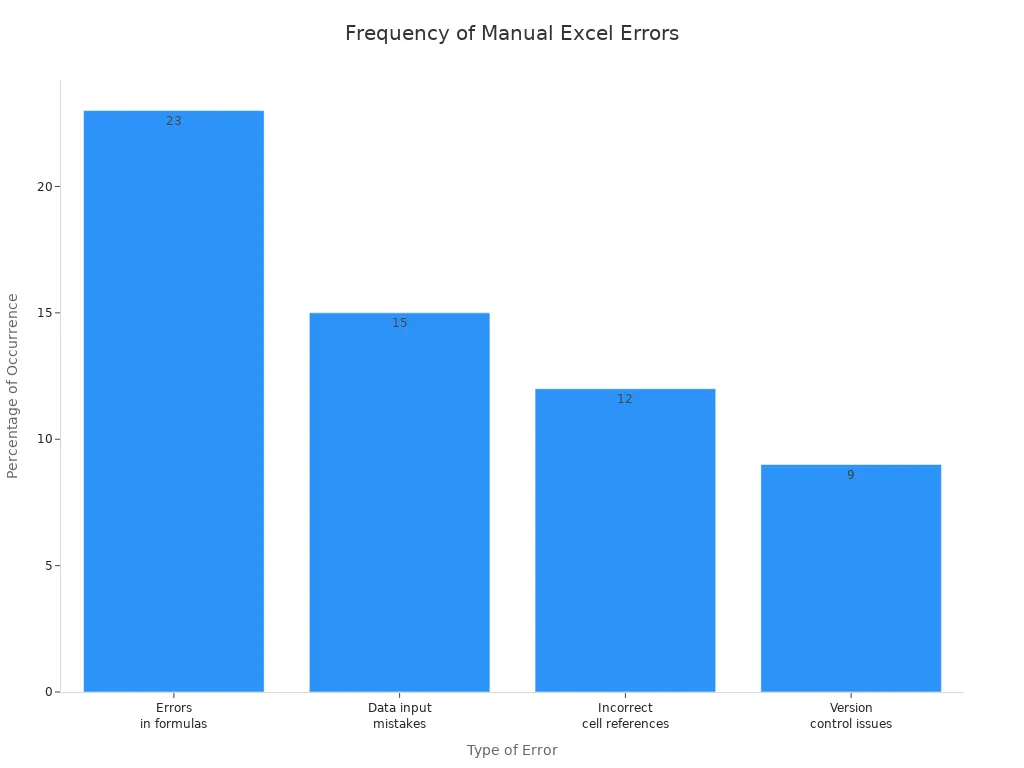
In short, traditional Excel workflows with manual processes and basic automation tools often leave you stuck with time-consuming tasks and error risks. You need a smarter way to handle your spreadsheets.
Features of the Autonomous Agent
Self-Learning Capabilities
Adapting to User Preferences
One of the standout features of the autonomous agent is its ability to learn and adapt. This self-operating system continuously improves its performance based on your interactions and feedback. Imagine an agent that starts with basic rules but evolves over time. It learns which methods yield the best results, whether that's identifying patterns in your data or adjusting workflows based on your preferences. This ongoing learning process not only enhances operational efficiency but also helps you achieve better outcomes in complex environments. Research from Deloitte shows that organizations using self-learning automation experience 35% faster performance improvements compared to those relying on static automation.
Continuous Improvement
The autonomous agent doesn’t just stop learning after its initial setup. It actively seeks to optimize its actions, making it a valuable asset in your Excel workflow. By analyzing past outcomes, it refines its approach, ensuring that you get the most accurate and relevant results. This means less time spent on manual adjustments and more time focusing on strategic tasks. With the agent's ability to adapt, you can trust that it will keep improving, making your Excel experience smoother and more efficient.
Advanced Data Processing
Handling Large Datasets
When it comes to managing large datasets, the autonomous agent truly shines. Unlike traditional methods that often struggle with scalability, this agent leverages AI to handle vast amounts of data effortlessly. Here’s a quick comparison of how it stacks up against traditional methods:
| Feature | Autonomous Agents | Traditional Methods |
|---|---|---|
| Data Handling | Leverages AI for adaptability and scalability | Rigid, rule-based processing |
| Data Cleaning | Automated and intelligent | Manual and time-consuming |
| Insights | Provides real-time insights | Limited to predefined reports |
| Adaptability | Learns and evolves over time | Static and inflexible |
With the autonomous agent, you can automate data cleaning and gain insights in real-time. This means you spend less time sifting through data and more time making informed decisions.
Real-Time Analysis
Real-time analysis is another game-changing feature of the autonomous agent. It continuously monitors your data, detects trends, and provides actionable insights as they happen. Here’s how it enhances your workflow:
- Real-time Monitoring: The agent tracks performance and identifies trends instantly.
- Action Suggestions: It offers recommendations based on the latest data analysis.
- Autonomous Operation: The agent manages complex analytical processes without needing your intervention.
The emergence of multiple AI agent add-ins for Excel indicates a growing ecosystem that supports real-time autonomous analysis, allowing for specialized agents to handle various tasks seamlessly.
With these capabilities, the autonomous agent not only saves you time but also empowers you to make proactive decisions based on the most current information available.
RFI Handling with the Autonomous Agent
Streamlining Data Collection
Automated Responses
Handling Excel RFIs can feel like a mountain of repetitive work. But the autonomous agent changes the game by automating the entire data collection process. Instead of manually opening emails, downloading files, and typing answers, the agent watches for new Excel files, reads each question, and fills in the answers automatically. It uses the knowledge you’ve set up to generate accurate responses without needing your constant input.
This automation works especially well because RFIs usually have a clear structure—each row holds a specific question. The agent processes each question one by one, making sure it doesn’t mix up contexts or miss details. This means fewer errors and faster turnaround times. You get your responses done quickly and reliably, freeing you up to focus on more important tasks.
Centralized Information Management
The agent doesn’t just answer questions; it also keeps everything organized in one place. By updating the Excel files with the latest answers, it creates a centralized hub of information. Everyone on your team can access the most current data without hunting through emails or different versions of spreadsheets.
This centralization improves transparency and reduces confusion. Plus, the agent tracks changes and keeps audit logs, so you always know who did what and when. This level of governance helps your team stay compliant and secure while speeding up the RFI process.
Here’s a quick look at some measurable benefits you can expect from using an autonomous agent for Excel RFIs:
| Measurable Outcome | Description |
|---|---|
| Improved User Satisfaction | Users report higher satisfaction levels with the automated responses. |
| Reduction in Negative Feedback | There is a noticeable decrease in negative feedback from users regarding the responses. |
| Enhanced Quality and Consistency of Responses | The responses generated are of higher quality and more consistent across different requests. |
| Faster Response Times | The time taken to generate responses has significantly decreased. |
| Stronger Governance | Enhanced governance features such as audit logs and analytics ensure compliance and security. |
| Workflow-Level Automation | Features like formula autocompletion and Agent Mode in Excel contribute to more efficient workflows. |
Enhancing Collaboration
Sharing Insights
The autonomous agent helps your team work better together by sharing insights in real-time. When the agent updates the Excel RFIs with answers, everyone involved can see the latest information instantly. This shared visibility means fewer back-and-forth emails and less confusion about what’s been done.
The agent also supports iteration over multiple questions, ensuring that answers come from the right knowledge sources. This keeps your team aligned and confident that the data they rely on is accurate and up to date.
Integrating with Other Tools
Collaboration gets even better when the agent connects with other platforms. For example, it can integrate with systems like Dataverse, allowing your team to combine Excel data with other structured sources. This integration helps you make smarter decisions by reasoning over mixed data sets.
The agent also triggers automatically when new emails with Excel attachments arrive, so your workflow stays smooth and uninterrupted. It handles multiple questions efficiently using loops within topics or flows, which means your team spends less time managing files and more time acting on insights.
Here’s how these collaborative features benefit teams managing Excel RFIs:
| Feature Description | Benefit to Excel Users Managing RFIs |
|---|---|
| Autonomous processing of structured Excel sheets with multiple questions | Streamlines the RFI management process, reducing manual effort. |
| Iteration over questions and generation of answers based on user knowledge sources | Ensures answers are grounded in specific data held by the user. |
| Triggering by incoming emails with Excel attachments | Automates the processing of RFIs, enhancing collaboration. |
| Updating the Excel file with generated answers | Keeps the data current and accessible for all users involved. |
| Integration with platforms like Dataverse | Enhances reasoning over mixed data sources for better decision-making. |
| Use of loops within topics or flows | Efficiently handles multiple questions, improving workflow efficiency. |
Many organizations have seen big productivity gains thanks to these collaboration features. For example:
| Organization | Productivity Improvement | Annual Savings/Equivalent Staff |
|---|---|---|
| Lumen Technologies | Streamlined processes for sales associates | $50 million |
| Honeywell | Productivity gains equivalent to adding 187 full-time employees | N/A |
| Finastra | Reduced creative production time from seven months to seven weeks | N/A |
| Thomson Reuters | Cut legal due diligence workflows time in half | N/A |
With the autonomous agent handling your Excel RFIs, you’ll notice faster responses, fewer errors, and smoother teamwork. It’s like having a smart assistant that never sleeps, always working behind the scenes to keep your data flowing and your projects moving forward.
Implementing the Autonomous Agent
Assessing Your Needs
Before diving into the implementation of the autonomous agent, you need to assess your specific needs. This step is crucial for ensuring that the agent aligns with your workflow and delivers maximum value. Here are some key factors to consider when identifying tasks suitable for automation:
- Task complexity: Focus on tasks that are repetitive and time-consuming.
- Adaptability requirements: Ensure the tasks can be adjusted based on changing needs.
- Cost-benefit analysis: Evaluate the potential return on investment for automating each task.
- Audit of existing processes: Review current workflows to identify inefficiencies.
- Focus on high-volume tasks with clear ROI: Prioritize tasks that occur frequently and have a measurable impact.
- Phased implementation approach: Consider rolling out the agent in stages to manage change effectively.
- Maintain high data quality standards: Ensure that the data processed by the agent remains accurate and reliable.
- Establish clear success metrics: Define what success looks like for each automated task.
By carefully assessing these factors, you can set the stage for a successful implementation of the agent.
Training and Support
Once you've identified the key tasks for automation, the next step is to ensure that your team is well-prepared to use the autonomous agent effectively. Training and support play a vital role in this process. Here’s how you can structure your training programs:
- Establish a multi-level certification structure: Create levels like Foundation, Builder, and Advanced to help users progress from basic concepts to complex agent design.
- Provide hands-on training: Start with simple agent creation, such as chatbots, to teach core AI interaction concepts.
- Focus on platform mastery: Train users on workflow design, AI model usage, API integration, testing, and deployment.
- Incorporate role-specific applications: Encourage learners to identify and build a capstone project that solves real problems, ensuring practical adoption.
- Set up ongoing support systems: Create dedicated communication channels and peer 'AI champions' for continuous assistance.
- Maintain continuous learning: Offer quarterly updates, refresher sessions, challenges, and showcases to keep skills sharp.
- Use templates and examples: Provide resources to reduce the time it takes to create the first useful agent and encourage customization.
- Track business impact: Monitor the effectiveness of the training to demonstrate value and justify ongoing investment.
By investing in comprehensive training and support, you empower your team to leverage the full potential of the agent, enhancing productivity and efficiency in your Excel workflows.
Future of Excel with Autonomous Agents
Trends in Automation
Increased Adoption
As businesses recognize the power of autonomous agents, adoption rates are skyrocketing. By 2028, about 33% of enterprise software applications will feature agentic capabilities. This shift reflects a growing trend where organizations are eager to integrate AI into their workflows. Executives are particularly optimistic, with 46% planning to introduce AI-driven assistants within the next 6 to 12 months. This surge in interest shows that you can expect to see more companies leveraging these tools to enhance their operations.
| Statistic Description | Percentage/Expectation | Year |
|---|---|---|
| Enterprise software applications with agentic capabilities | 33% | 2028 |
| Cognitive tools handling interactions at digital storefronts | 20% | 2028 |
| Routine workplace decisions made independently by agentic systems | 15% | 2028 |
| Executives planning to introduce AI-driven assistants | 46% | Next 6–12 months |
| Executives expecting to adopt copilots | 38% | 1–2 years |
| Executives currently using copilots | 6% | Live support environments |
| Executives expecting to deploy fully autonomous AI CX assistants | 54% | Within 2 years |
| Implementation of AI agents automating routine business tasks | 15% to 50% | By 2027 |
Evolving Technologies
Recent breakthroughs in large language models and multi-agent systems are reshaping the capabilities of autonomous agents. These advancements allow agents to handle more complex tasks, making them more effective in various domains. For instance, they can now understand intricate instructions and execute multi-step plans. This evolution means that agents will transition from passive roles to dynamic systems capable of managing entire production processes. They’ll even negotiate with vendors independently, showcasing a high level of autonomy and decision-making ability.
Long-Term Benefits
Cost Efficiency
Implementing autonomous agents can lead to significant cost savings for your organization. Many businesses report operational savings of 25-40% within just 6 to 12 months of adopting these agents. You’ll also notice a reduction of 50-70% in manual hours spent on financial processes. This efficiency allows you to allocate resources more effectively, ensuring compliance while adapting dynamically to challenges.
- Autonomous agents improve operational efficiency by automating intelligence and action across various supply chain functions.
- They enable businesses to adapt dynamically to challenges, optimizing costs and ensuring compliance.
Enhanced Decision Making
Autonomous agents excel in enhancing decision-making processes. Unlike traditional automation, these agents are goal-oriented and capable of coordinating activities across multiple data inputs. This adaptability allows them to interpret context and adjust their actions accordingly. By performing real-time data analysis, they can make informed decisions rapidly, improving efficiency and reducing human error in repetitive tasks. Over time, these agents learn from past outcomes, refining their decision-making processes for increased accuracy.
As you can see, the Autonomous Agent is a game-changer for your Excel workflow. It streamlines processes, reduces errors, and enhances collaboration. However, challenges like data privacy and ethical decision-making remain. Yet, the opportunities for improved efficiency and scalability are immense.
Looking ahead, researchers suggest exploring advanced orchestration methodologies and developing new performance metrics. They also recommend identifying high-impact research bottlenecks to ensure effective deployment of these agents. Embracing this technology can transform how you manage data, making your work not just easier but also more impactful.
Remember, the future of Excel is bright with autonomous agents leading the way!
FAQ
What is the Autonomous Agent Excel Hack?
The Autonomous Agent Excel Hack automates spreadsheet tasks, especially RFIs. It learns from your preferences and processes data without needing constant input.
How does the agent improve efficiency?
The agent streamlines repetitive tasks, reduces errors, and provides real-time insights. This allows you to focus on more strategic activities.
Can the agent handle large datasets?
Absolutely! The agent excels at managing large datasets, automating data cleaning, and providing insights quickly.
Is training required to use the agent?
While the agent is user-friendly, some training helps you maximize its features. Training ensures you understand how to set it up effectively.
How does the agent ensure data accuracy?
The agent processes each question individually, minimizing context bleed. It also alerts you to any malformed spreadsheets, maintaining high accuracy.
Can the agent integrate with other tools?
Yes! The agent can connect with platforms like Dataverse, enhancing your ability to analyze mixed data sources seamlessly.
What are the long-term benefits of using the agent?
Long-term benefits include cost savings, improved decision-making, and increased productivity. You'll notice significant reductions in manual hours spent on tasks.
How do I get started with the Autonomous Agent?
To start, assess your needs and identify tasks suitable for automation. Then, follow the setup instructions provided with the agent.
🚀 Want to be part of m365.fm?
Then stop just listening… and start showing up.
👉 Connect with me on LinkedIn and let’s make something happen:
- 🎙️ Be a podcast guest and share your story
- 🎧 Host your own episode (yes, seriously)
- 💡 Pitch topics the community actually wants to hear
- 🌍 Build your personal brand in the Microsoft 365 space
This isn’t just a podcast — it’s a platform for people who take action.
🔥 Most people wait. The best ones don’t.
👉 Connect with me on LinkedIn and send me a message:
"I want in"
Let’s build something awesome 👊
1
00:00:00,000 --> 00:00:04,360
Excel, humanity's favorite self-inflicted punishment disguised as productivity software.
2
00:00:04,360 --> 00:00:05,460
Every office has one.
3
00:00:05,460 --> 00:00:09,340
The person who still believes the best way to complete a request for information spreadsheet
4
00:00:09,340 --> 00:00:14,580
is to manually copy and paste 50 answers from a word document into neatly-bordered cells.
5
00:00:14,580 --> 00:00:17,660
Watching them is like watching someone chisel an email on stone tablets.
6
00:00:17,660 --> 00:00:19,560
It's moving in an anthropological sense.
7
00:00:19,560 --> 00:00:25,260
The truth is, most professionals still handle Excel RFIs like it's 1999.
8
00:00:25,260 --> 00:00:27,440
Repetitive, error-prone, painfully manual.
9
00:00:27,440 --> 00:00:30,400
The incoming spreadsheet is another ritual of drudgery.
10
00:00:30,400 --> 00:00:34,520
Open email, download attachment, scan the rows, matter obscenities, start copying answers
11
00:00:34,520 --> 00:00:36,080
cell by cell.
12
00:00:36,080 --> 00:00:40,060
One typo, one wrongpaste, one missing semicolon, and an entire department spends half a day
13
00:00:40,060 --> 00:00:41,400
blaming the formula.
14
00:00:41,400 --> 00:00:43,280
Now imagine refusing that fate.
15
00:00:43,280 --> 00:00:47,440
Imagine delegating the entire misery to a machine that doesn't get bored, doesn't make
16
00:00:47,440 --> 00:00:50,120
typos, and certainly doesn't need coffee.
17
00:00:50,120 --> 00:00:51,760
That's an autonomous agent.
18
00:00:51,760 --> 00:00:54,120
Software that performs the cycle entirely on its own.
19
00:00:54,120 --> 00:00:59,800
It reads the Excel file, interprets the questions, finds the answers, using generative AI, writes
20
00:00:59,800 --> 00:01:04,520
those answers back into the same file, and emails the completed masterpiece straight to
21
00:01:04,520 --> 00:01:05,800
the requester.
22
00:01:05,800 --> 00:01:10,360
You aren't just saving time, you're eliminating the concept of busy work entirely.
23
00:01:10,360 --> 00:01:14,320
We're going to build that agent inside Microsoft co-pilot studio and power automate.
24
00:01:14,320 --> 00:01:17,040
A practical rebellion against the spreadsheet start to scroll.
25
00:01:17,040 --> 00:01:21,160
I call it a hack, because it bends Excel far beyond its original purpose.
26
00:01:21,160 --> 00:01:24,720
20 minutes from now you'll have a process that upgrades itself while you sip your coffee
27
00:01:24,720 --> 00:01:26,920
and contemplate how obsolete you've become.
28
00:01:26,920 --> 00:01:29,160
Let's start by dissecting the organism.
29
00:01:29,160 --> 00:01:31,400
The anatomy of an autonomous agent.
30
00:01:31,400 --> 00:01:32,400
Blueprint.
31
00:01:32,400 --> 00:01:35,400
First, let's define what we're actually creating.
32
00:01:35,400 --> 00:01:40,560
In co-pilot studio, an autonomous agent isn't a polite chatbot that waits for instructions.
33
00:01:40,560 --> 00:01:45,800
It's a self-operating construct with three core components, a trigger, logic, and orchestration.
34
00:01:45,800 --> 00:01:49,920
The trigger starts the process, an event like a new email arrives, or a file is uploaded
35
00:01:49,920 --> 00:01:50,960
to SharePoint.
36
00:01:50,960 --> 00:01:53,600
The logic defines what to do when that happens.
37
00:01:53,600 --> 00:01:57,080
The orchestration handles which external tools or flows to call so everything happens in
38
00:01:57,080 --> 00:01:58,080
the right sequence.
39
00:01:58,080 --> 00:02:02,040
Think of it like an assembly line, but instead of factory workers, you have power platform
40
00:02:02,040 --> 00:02:04,720
components passing digital parts to one another.
41
00:02:04,720 --> 00:02:08,600
Power automate receives the email, stores the file, and notifies the agent.
42
00:02:08,600 --> 00:02:12,960
Co-pilot studio reads the spreadsheet, brain storms answers using generative AI, and writes
43
00:02:12,960 --> 00:02:13,960
them back.
44
00:02:13,960 --> 00:02:17,720
Finally, power automate reattaches the result and sends the email reply.
45
00:02:17,720 --> 00:02:19,960
Three systems, one continuous thought process.
46
00:02:19,960 --> 00:02:22,040
Now, this is where most people get confused.
47
00:02:22,040 --> 00:02:25,240
Microsoft talks about co-pilot as if it's one thing, but there's a crucial difference between
48
00:02:25,240 --> 00:02:27,560
the standard co-pilot and a co-pilot studio agent.
49
00:02:27,560 --> 00:02:29,520
The normal co-pilot waits for you to talk to it.
50
00:02:29,520 --> 00:02:32,160
A studio agent doesn't need your supervision.
51
00:02:32,160 --> 00:02:35,360
It can trigger itself based on conditions you define.
52
00:02:35,360 --> 00:02:39,120
It's the difference between a helpful intern and an employee who runs the department while
53
00:02:39,120 --> 00:02:40,440
you're asleep.
54
00:02:40,440 --> 00:02:43,080
Why use an RFI workflow as the sandbox?
55
00:02:43,080 --> 00:02:45,600
Because RFIs are beautifully structured chaos.
56
00:02:45,600 --> 00:02:48,640
Each row contains a question and expects an answer.
57
00:02:48,640 --> 00:02:50,600
The pattern never changes, just the content.
58
00:02:50,600 --> 00:02:55,120
That makes it a perfect laboratory for machine intelligence, structured enough to automate,
59
00:02:55,120 --> 00:02:57,840
varied enough to justify using generative AI.
60
00:02:57,840 --> 00:02:59,760
You know exactly what good looks like.
61
00:02:59,760 --> 00:03:03,320
Every question answered, neatly returned zero emotional trauma.
62
00:03:03,320 --> 00:03:06,200
Before we dive deeper, let's draw a mental diagram.
63
00:03:06,200 --> 00:03:10,320
Start with an email containing the Excel attachment that email lands in a shared mailbox.
64
00:03:10,320 --> 00:03:14,760
Power automate detects the file, verifies it's the right format, then copies it to a share
65
00:03:14,760 --> 00:03:17,520
point location like a digital staging area.
66
00:03:17,520 --> 00:03:21,840
The agent in co-pilot studio then receives a message telling it which file to process.
67
00:03:21,840 --> 00:03:27,160
The agent opens that file, iterates through the questions, produces answers using its configured
68
00:03:27,160 --> 00:03:32,160
knowledge base or being grounding and writes the responses back into the original table.
69
00:03:32,160 --> 00:03:36,160
When it's done, power automate picks the file up again and emails it to whoever made
70
00:03:36,160 --> 00:03:37,160
the request.
71
00:03:37,160 --> 00:03:38,760
So the data flows like this.
72
00:03:38,760 --> 00:03:43,680
Email, SharePoint, co-pilot studio, Power Automate, email reply.
73
00:03:43,680 --> 00:03:45,360
That's the anatomy of autonomy.
74
00:03:45,360 --> 00:03:49,040
It does initiate logic decides and orchestration executes.
75
00:03:49,040 --> 00:03:53,040
But autonomy doesn't mean omniscience, an agent can't improvise outside its boundaries.
76
00:03:53,040 --> 00:03:57,280
You have to define its permissions and give it the context it needs, where the file lives,
77
00:03:57,280 --> 00:04:00,440
what to read, where to write and when to ask for help.
78
00:04:00,440 --> 00:04:03,840
Leave any of that vague and the agent will pause politely waiting for a human who never
79
00:04:03,840 --> 00:04:04,840
arrives.
80
00:04:04,840 --> 00:04:07,840
That's the blueprint, comprehension before configuration.
81
00:04:07,840 --> 00:04:10,800
Now that you know what the machine needs to be, we can start feeding it because the
82
00:04:10,800 --> 00:04:15,160
next step is teaching power automate to act as the gatekeeper, filtering the inputs and
83
00:04:15,160 --> 00:04:18,880
delivering them to your new digital employee with mechanical precision.
84
00:04:18,880 --> 00:04:23,280
And once that's in place, that's when the fun really starts watching the machine think,
85
00:04:23,280 --> 00:04:25,680
feeding the machine, input flow design.
86
00:04:25,680 --> 00:04:28,840
Every great automation begins with an act of bureaucracy.
87
00:04:28,840 --> 00:04:33,680
In this case, it's an email, specifically an email arriving in a shared mailbox.
88
00:04:33,680 --> 00:04:37,480
The digital equivalent of a pigeonhole where everyone dumps their urgent requests and promptly
89
00:04:37,480 --> 00:04:38,480
forgets them.
90
00:04:38,480 --> 00:04:39,480
That's our entry point.
91
00:04:39,480 --> 00:04:42,640
The incoming message completes the first link in the chain and power automate stands
92
00:04:42,640 --> 00:04:44,000
ready as the gatekeeper.
93
00:04:44,000 --> 00:04:47,880
Our power automate doesn't simply wait around like an intern checking the inbox every five
94
00:04:47,880 --> 00:04:48,880
minutes.
95
00:04:48,880 --> 00:04:53,560
It's configured with a precise trigger when a new email arrives in the shared mailbox.
96
00:04:53,560 --> 00:04:55,880
This is our first automation principle.
97
00:04:55,880 --> 00:04:59,560
Don't rely on human observation, rely on conditions.
98
00:04:59,560 --> 00:05:03,520
The flow springs into existence, the moment and attachment lands, eliminating the age-old
99
00:05:03,520 --> 00:05:05,720
problem of, I didn't see that email.
100
00:05:05,720 --> 00:05:07,200
The first action is filtration.
101
00:05:07,200 --> 00:05:12,320
You tell power automate to ignore every attachment that isn't xlsx, pdf's screenshots and the
102
00:05:12,320 --> 00:05:17,120
occasional cat photo of the team celebrating fiscal year end are discarded with prejudice.
103
00:05:17,120 --> 00:05:20,840
Without this rule, your agent would attempt to interpret a JPEG of a chart and politely
104
00:05:20,840 --> 00:05:24,800
fail, filtering save CPU cycles and your professional dignity.
105
00:05:24,800 --> 00:05:27,920
Inside the flow, the condition reads almost poetically.
106
00:05:27,920 --> 00:05:31,960
If attachment name ends with xlsx, continue.
107
00:05:31,960 --> 00:05:37,120
That one line separates order from chaos because chaos in the world of automation always begins
108
00:05:37,120 --> 00:05:38,880
with unexpected file types.
109
00:05:38,880 --> 00:05:42,560
Once the file passes inspection, the next challenge is structure validation.
110
00:05:42,560 --> 00:05:45,840
A valid xl file must contain a name table and the name matters.
111
00:05:45,840 --> 00:05:48,720
In our universe, it's stubbornly fixed as table one.
112
00:05:48,720 --> 00:05:51,880
If that sounds rigid, good, it keeps power automate sane.
113
00:05:51,880 --> 00:05:56,520
Without a table, xl is just a digital whiteboard full of merged cells, hidden columns and despair.
114
00:05:56,520 --> 00:06:00,840
A defined table, on the other hand, gives the agent a predictable schema.
115
00:06:00,840 --> 00:06:05,600
Columns for question, answer, and any contextual data you define.
116
00:06:05,600 --> 00:06:09,080
The table is the skeleton, without it there's nothing to animate.
117
00:06:09,080 --> 00:06:13,040
When power automate encounters a file, it doesn't edit it directly from the mailbox.
118
00:06:13,040 --> 00:06:14,040
That would be barbaric.
119
00:06:14,040 --> 00:06:17,000
Instead, it creates a controlled copy in SharePoint.
120
00:06:17,000 --> 00:06:21,800
Think of this as moving the file from a noisy public street to a laboratory bench.
121
00:06:21,800 --> 00:06:26,080
SharePoint provides versioning, consistent URLs and secure access tokens, allowing co-pilot
122
00:06:26,080 --> 00:06:28,880
studio to interact with the data safely.
123
00:06:28,880 --> 00:06:31,920
Every automation should log its input somewhere stable.
124
00:06:31,920 --> 00:06:34,880
SharePoint is that stability wrapped in corporate compliance.
125
00:06:34,880 --> 00:06:36,840
What are the file rests in SharePoint?
126
00:06:36,840 --> 00:06:42,080
The flow extracts its file ID, a unique identifier that lets the agent find the exact specimen
127
00:06:42,080 --> 00:06:43,080
later.
128
00:06:43,080 --> 00:06:46,720
Alongside this, it pulls the message ID, the address of the original email that brought
129
00:06:46,720 --> 00:06:48,480
us this problem in the first place.
130
00:06:48,480 --> 00:06:52,440
Both IDs become reference points in the upcoming conversation with the agent.
131
00:06:52,440 --> 00:06:54,400
This is metadata hygiene 101.
132
00:06:54,400 --> 00:06:57,520
Track everything that enters your system so you can close the loop properly on the way
133
00:06:57,520 --> 00:06:58,520
out.
134
00:06:58,520 --> 00:07:02,600
At this point, you might be wondering why we care so much about pristine naming conventions.
135
00:07:02,600 --> 00:07:03,600
Simple.
136
00:07:03,600 --> 00:07:06,720
Our names read like final final RFI V23.
137
00:07:06,720 --> 00:07:07,720
X-clags.
138
00:07:07,720 --> 00:07:10,560
You're effectively speaking in tongues to a robot.
139
00:07:10,560 --> 00:07:12,400
Machines thrive on uniformity.
140
00:07:12,400 --> 00:07:13,760
Humans apparently do not.
141
00:07:13,760 --> 00:07:16,760
Name your files predictably and your agent will thank you by not crashing.
142
00:07:16,760 --> 00:07:20,800
With the file validated and safely stored, the flow sends a precise prompt to the co-pilot
143
00:07:20,800 --> 00:07:22,040
studio agent.
144
00:07:22,040 --> 00:07:26,920
This message is deliberately phrased, something like "perform an RFI on file ID X and reply
145
00:07:26,920 --> 00:07:28,680
to message IDY".
146
00:07:28,680 --> 00:07:32,600
No flowery pros, no passive aggressive context, just clear machine readable intent and
147
00:07:32,600 --> 00:07:34,880
baguity is the mortal enemy of automation.
148
00:07:34,880 --> 00:07:37,920
This is also where the concept of structured prompting appears.
149
00:07:37,920 --> 00:07:40,720
It's not enough to tell the agent process the file.
150
00:07:40,720 --> 00:07:44,800
You must include context, the file scope, the expected action and the destination for the
151
00:07:44,800 --> 00:07:46,160
response.
152
00:07:46,160 --> 00:07:49,320
That triad forms linguistics scaffolding for the AI's behaviour.
153
00:07:49,320 --> 00:07:54,080
Without it, the agent might attempt something admirable but irrelevant, like composing polite
154
00:07:54,080 --> 00:07:56,360
email replies instead of populating sales.
155
00:07:56,360 --> 00:07:58,360
Data integrity is everything here.
156
00:07:58,360 --> 00:08:02,200
Every automation enthusiast eventually learns that unstructured spreadsheets are digital
157
00:08:02,200 --> 00:08:03,200
landmines.
158
00:08:03,200 --> 00:08:06,720
The difference between a clean table and a messy one can decide whether your process looks
159
00:08:06,720 --> 00:08:07,960
brilliant or cursed.
160
00:08:07,960 --> 00:08:09,680
Power automate loves order.
161
00:08:09,680 --> 00:08:13,760
Rows or records, columns are variables and merged sales are crimes against logic.
162
00:08:13,760 --> 00:08:17,240
When you hand the agent a properly formatted table, you're not just giving a data, you're
163
00:08:17,240 --> 00:08:18,600
feeding it understanding.
164
00:08:18,600 --> 00:08:23,680
At this stage, our power automate flow has achieved three milestones, detection, validation
165
00:08:23,680 --> 00:08:24,680
and preparation.
166
00:08:24,680 --> 00:08:28,840
The email trigger caught the incoming message, the filter ensured only legitimate Excel
167
00:08:28,840 --> 00:08:33,280
files survive and the SharePoint copy provided a stable data habitat.
168
00:08:33,280 --> 00:08:35,760
Now the machine has what it needs to begin digestion.
169
00:08:35,760 --> 00:08:37,520
In other words, it's feeding time.
170
00:08:37,520 --> 00:08:42,000
The completed flow hands the button to co-pilot studio, packaging or necessary information,
171
00:08:42,000 --> 00:08:45,720
file location IDs and instructions and sending the prompt for processing.
172
00:08:45,720 --> 00:08:49,320
The agent doesn't care how many people ignored the inbox this morning or how many versions
173
00:08:49,320 --> 00:08:50,720
of the spreadsheet exist.
174
00:08:50,720 --> 00:08:54,800
It simply takes the most recent, opens the table and begins reasoning through the questions
175
00:08:54,800 --> 00:08:55,800
inside.
176
00:08:55,800 --> 00:08:57,440
And that brings us to a turning point.
177
00:08:57,440 --> 00:09:01,800
The machine now holds food for thought, a literal list of questions awaiting responses.
178
00:09:01,800 --> 00:09:06,000
The input stage is done, the gates are open, the parameters are fixed and chaos has been
179
00:09:06,000 --> 00:09:07,160
tamed into schema.
180
00:09:07,160 --> 00:09:08,840
The next phase is cognition.
181
00:09:08,840 --> 00:09:14,000
How the agent reads those rows, interprets them and generates credible answers one by one,
182
00:09:14,000 --> 00:09:15,000
without human prompting.
183
00:09:15,000 --> 00:09:18,400
Now that we fed the machine, it's time to watch it chew.
184
00:09:18,400 --> 00:09:20,720
The AI brain, generative answer loop.
185
00:09:20,720 --> 00:09:24,680
At this point, the file is sitting quietly in SharePoint like a patient in triage.
186
00:09:24,680 --> 00:09:28,840
Now the co-pilot studio agents turn to play doctor, diagnose each question and prescribe
187
00:09:28,840 --> 00:09:29,840
an answer.
188
00:09:29,840 --> 00:09:33,440
This is where intelligence replaces automation, where the system doesn't just move data
189
00:09:33,440 --> 00:09:34,920
but understands it.
190
00:09:34,920 --> 00:09:37,600
Enter the RFI topic, the cognitive hub of our agent.
191
00:09:37,600 --> 00:09:41,520
A topic in co-pilot studio is essentially a conversation blueprint, a series of steps
192
00:09:41,520 --> 00:09:43,360
the agent executes when triggered.
193
00:09:43,360 --> 00:09:46,480
But in this context, there's no chat bubble, no human to appease.
194
00:09:46,480 --> 00:09:50,640
The RFI topic works silently, executing one question at a time in need to deterministic
195
00:09:50,640 --> 00:09:51,640
order.
196
00:09:51,640 --> 00:09:53,280
Each question is a short exam.
197
00:09:53,280 --> 00:09:56,560
Each answer is an essay drafted by the AI's generative brain.
198
00:09:56,560 --> 00:10:00,640
First the topic receives input parameters, namely the file ID pointing to our SharePoint
199
00:10:00,640 --> 00:10:01,640
copy.
200
00:10:01,640 --> 00:10:04,040
It then runs the list rows present in a table action.
201
00:10:04,040 --> 00:10:08,600
This command fetches the entire table, not as rows and columns, but as structured data.
202
00:10:08,600 --> 00:10:11,320
The agent passes this into a record variable.
203
00:10:11,320 --> 00:10:13,880
It's internal snapshot of our Excel world.
204
00:10:13,880 --> 00:10:17,600
Within that record lies an array of all rows stored conveniently under something like
205
00:10:17,600 --> 00:10:18,600
record.
206
00:10:18,600 --> 00:10:19,600
Value.
207
00:10:19,600 --> 00:10:20,600
That's the data buffet.
208
00:10:20,600 --> 00:10:22,080
The agent is about to consume.
209
00:10:22,080 --> 00:10:23,600
It's where structure meets logic.
210
00:10:23,600 --> 00:10:27,640
You instruct the agent to set that array as items, the working collection it will loop through.
211
00:10:27,640 --> 00:10:32,640
Then, using a for each loop, the agent examines every row in sequence, no skipping, no bias,
212
00:10:32,640 --> 00:10:33,640
no complaint.
213
00:10:33,640 --> 00:10:37,800
For each row, it extracts the question field and targets it for the next phase.
214
00:10:37,800 --> 00:10:38,800
Generation.
215
00:10:38,800 --> 00:10:41,880
This design choice, isolating one question at a time, isn't arbitrary.
216
00:10:41,880 --> 00:10:44,360
It's about avoiding what I call context bleed.
217
00:10:44,360 --> 00:10:48,560
In large language models, dropping multiple prompts at once invites contamination.
218
00:10:48,560 --> 00:10:51,200
One question's context may pollute the next answer.
219
00:10:51,200 --> 00:10:54,080
By isolating each prompt, we enforce mental hygiene.
220
00:10:54,080 --> 00:10:58,560
The agent forgets after every row, ensuring each answer is born innocent, untainted by its siblings
221
00:10:58,560 --> 00:10:59,560
confusion.
222
00:10:59,560 --> 00:11:02,520
Now comes the showpiece, the Create Generative Answers node.
223
00:11:02,520 --> 00:11:05,840
This is the co-pilot studio equivalent of a turbocharged brain cell.
224
00:11:05,840 --> 00:11:10,040
You provided the question text, instructed to find or synthesize the best possible answer
225
00:11:10,040 --> 00:11:13,920
based on the agent's knowledge sources, and it does the rest.
226
00:11:13,920 --> 00:11:15,200
The agent doesn't chat.
227
00:11:15,200 --> 00:11:16,400
It computes.
228
00:11:16,400 --> 00:11:17,880
This distinction is critical.
229
00:11:17,880 --> 00:11:19,520
Autonomy doesn't crave conversation.
230
00:11:19,520 --> 00:11:21,120
It just wants to complete the assignment.
231
00:11:21,120 --> 00:11:24,240
To maintain discipline, disable the send message property in this node.
232
00:11:24,240 --> 00:11:29,240
That switch is buried in the advanced settings and turning it off silences the default chat
233
00:11:29,240 --> 00:11:30,240
output.
234
00:11:30,240 --> 00:11:31,240
Why?
235
00:11:31,240 --> 00:11:33,640
Because you don't want this agent trying to hold a polite dialogue with itself.
236
00:11:33,640 --> 00:11:34,880
It's not journaling its thoughts.
237
00:11:34,880 --> 00:11:35,880
It's working.
238
00:11:35,880 --> 00:11:38,720
All answers will instead be stored into a variable.
239
00:11:38,720 --> 00:11:41,600
Usually something elegantly named like AI response.
240
00:11:41,600 --> 00:11:46,120
This is the agent's notebook holding generated answers in a neat, queryable form.
241
00:11:46,120 --> 00:11:50,560
Once the AI response variable is populated, the agent runs an update row command.
242
00:11:50,560 --> 00:11:53,400
Think of these as the robots mechanical arms.
243
00:11:53,400 --> 00:11:57,880
One inserts answers precisely where they belong, matching each response to its original question.
244
00:11:57,880 --> 00:12:01,720
It uses the same file ID, the same table name and targets the correct row based on the
245
00:12:01,720 --> 00:12:03,720
current questions identifier.
246
00:12:03,720 --> 00:12:07,800
Within seconds, the once empty answer column begins filling like a self-writing report.
247
00:12:07,800 --> 00:12:10,560
At this point, you've achieved the AI cognitive loop.
248
00:12:10,560 --> 00:12:13,760
Read, reason, respond, record.
249
00:12:13,760 --> 00:12:15,080
It's not thrilling to watch.
250
00:12:15,080 --> 00:12:18,120
Unless of course, you appreciate the quiet power of automation that thinks.
251
00:12:18,120 --> 00:12:22,200
What used to demand hours now happens faster than Excel can update its own cells.
252
00:12:22,200 --> 00:12:26,280
Now let's talk about knowledge grounding, the invisible compass that guides these answers.
253
00:12:26,280 --> 00:12:28,800
In co-pilot studio, you have two main options.
254
00:12:28,800 --> 00:12:31,720
Use information from the web or custom knowledge base.
255
00:12:31,720 --> 00:12:35,360
The web option connects through Bing's search grounding, allowing the agent to pull live
256
00:12:35,360 --> 00:12:37,560
data, a broad, but volatile approach.
257
00:12:37,560 --> 00:12:41,120
Great for general research, unacceptable for proprietary domains.
258
00:12:41,120 --> 00:12:45,240
When confidentiality matters, you disable web grounding and feed your own SharePoint or
259
00:12:45,240 --> 00:12:46,800
dataverse sources.
260
00:12:46,800 --> 00:12:48,840
That's how you keep the agent smart and loyal.
261
00:12:48,840 --> 00:12:51,080
This decision defines the soul of your build.
262
00:12:51,080 --> 00:12:54,880
Using web grounding gives your agent encyclopedic awareness but little restrained, it might
263
00:12:54,880 --> 00:12:57,880
summarize an outdated blog as gospel truth.
264
00:12:57,880 --> 00:13:02,480
A custom knowledge base narrows its range but increases precision and compliance.
265
00:13:02,480 --> 00:13:06,680
In regulated environments, reliability always outperforms creativity.
266
00:13:06,680 --> 00:13:08,280
Let your lawyer sleep at night.
267
00:13:08,280 --> 00:13:09,680
Choose internal grounding.
268
00:13:09,680 --> 00:13:13,160
To verify the loop works, you can examine co-pilot studio's run transcript.
269
00:13:13,160 --> 00:13:17,480
You'll see each iteration unfold. The prompt dispatched, the generative node responding, and
270
00:13:17,480 --> 00:13:18,960
the updated row written.
271
00:13:18,960 --> 00:13:23,480
It's oddly satisfying like watching a conveyor belt that manufactures understanding.
272
00:13:23,480 --> 00:13:25,760
Each record moves from ignorance to enlightenment.
273
00:13:25,760 --> 00:13:29,880
One question, one answer, one sigh of relief from your future self who didn't have to do
274
00:13:29,880 --> 00:13:30,880
it manually.
275
00:13:30,880 --> 00:13:35,360
Technically, this is low-code design but conceptually its digital philosophy.
276
00:13:35,360 --> 00:13:38,920
The agent's mind, such as it is, exists only for the duration of the loop.
277
00:13:38,920 --> 00:13:41,960
The moment it finishes the last row, it's memory resets.
278
00:13:41,960 --> 00:13:44,760
It doesn't worry about tomorrow's email or last week's mistakes.
279
00:13:44,760 --> 00:13:47,720
It performs, forgets, and waits for the next assignment.
280
00:13:47,720 --> 00:13:53,280
In a sense, it's the perfect employee, tireless, obedient, and incapable of water cooler gossip.
281
00:13:53,280 --> 00:13:56,640
Developers sometimes ask, can't I just send all the questions at once and get a single
282
00:13:56,640 --> 00:13:58,080
giant answer?
283
00:13:58,080 --> 00:14:00,800
You can, but that's not autonomy, that's chaos.
284
00:14:00,800 --> 00:14:04,560
One bloated prompt leads to inconsistent formatting and nonsense context linking.
285
00:14:04,560 --> 00:14:06,280
The loop ensures determinism.
286
00:14:06,280 --> 00:14:08,840
Each question becomes a self-contained unit of work.
287
00:14:08,840 --> 00:14:11,760
A microcontract, the AI must fulfill.
288
00:14:11,760 --> 00:14:13,080
It's a very love's repetition.
289
00:14:13,080 --> 00:14:14,720
It's predictable by design.
290
00:14:14,720 --> 00:14:17,280
By now the Excel file itself is slowly transforming.
291
00:14:17,280 --> 00:14:21,520
Empty cells are being filled with machine-crafted sentences drawn either from Bing's ephemeral
292
00:14:21,520 --> 00:14:24,040
wisdom or your internal documentation.
293
00:14:24,040 --> 00:14:29,400
Each update row command locks those results into permanence, a timestamped act of automation.
294
00:14:29,400 --> 00:14:32,840
From the user's perspective, the file they sent out blank will soon return with every
295
00:14:32,840 --> 00:14:34,520
question neatly answered.
296
00:14:34,520 --> 00:14:38,120
No human typing, no intermediate drafts, no accidental reply all.
297
00:14:38,120 --> 00:14:41,840
This is the moment the system transitions from analysis to execution.
298
00:14:41,840 --> 00:14:43,240
The answers now exist.
299
00:14:43,240 --> 00:14:45,360
They simply need to be delivered.
300
00:14:45,360 --> 00:14:49,600
And that requires reconnecting with power automate, which must collect the updated file
301
00:14:49,600 --> 00:14:51,480
and compose the return email.
302
00:14:51,480 --> 00:14:54,360
But before we hand control back, pause to appreciate what just occurred.
303
00:14:54,360 --> 00:14:58,560
A trigger sparked the process, data became prompts, prompts became pros, and pros became data
304
00:14:58,560 --> 00:14:59,560
again.
305
00:14:59,560 --> 00:15:02,360
The circle is complete, and it all happens silently, without you.
306
00:15:02,360 --> 00:15:03,360
Autonomy isn't magic.
307
00:15:03,360 --> 00:15:06,320
It's just very well-defined logic pretending to think.
308
00:15:06,320 --> 00:15:10,560
Next, the machine stops rationalizing and starts communicating, time to give our newly
309
00:15:10,560 --> 00:15:14,520
enlightened spreadsheet a voice and let it reply on your behalf.
310
00:15:14,520 --> 00:15:16,360
The writeback and reply mechanism.
311
00:15:16,360 --> 00:15:20,720
Now that the agent has finished its quiet scholarship, we hand the pen back to power automate,
312
00:15:20,720 --> 00:15:24,320
the part of the process that turns brain work into bureaucracy once again.
313
00:15:24,320 --> 00:15:28,840
The job, collect the updated Excel file, attach it to an email and send it home, as though
314
00:15:28,840 --> 00:15:31,600
a meticulous human had done the work all along.
315
00:15:31,600 --> 00:15:34,200
Only faster, cleaner and with zero existential dread.
316
00:15:34,200 --> 00:15:35,560
The first challenge is timing.
317
00:15:35,560 --> 00:15:39,040
In automation, time isn't arbitrary, it's mechanical tolerance.
318
00:15:39,040 --> 00:15:43,920
Copilot Studio expects power automate to respond within roughly 100 seconds of being called
319
00:15:43,920 --> 00:15:45,960
or it assumes the process failed.
320
00:15:45,960 --> 00:15:49,280
This is Microsoft's polite way of saying, "Don't doodle."
321
00:15:49,280 --> 00:15:54,080
So the reply flow has to act with precision, following a simple template, receive input,
322
00:15:54,080 --> 00:15:56,920
wait only as long as necessary reply and close.
323
00:15:56,920 --> 00:16:00,080
That's where a small but vital trick comes in, deliberate delay.
324
00:16:00,080 --> 00:16:04,360
Excel, for all its decades of service, updates cloud files about as quickly as a PowerPoint
325
00:16:04,360 --> 00:16:07,760
deck load during a conference call, meaning you need to give it a moment.
326
00:16:07,760 --> 00:16:12,200
Most builders add a two-minute delay block to guarantee all AI-written rows actually register
327
00:16:12,200 --> 00:16:14,600
and SharePoint before anyone retrieves the file.
328
00:16:14,600 --> 00:16:16,600
It's not laziness, it's synchronization.
329
00:16:16,600 --> 00:16:19,080
Computers can execute faster than storage can confirm.
330
00:16:19,080 --> 00:16:22,280
Once the pause expires, the flow performs its surgical retrieval.
331
00:16:22,280 --> 00:16:25,480
It uses get file content to pull the finished spreadsheet from SharePoint.
332
00:16:25,480 --> 00:16:29,720
This step reads the complete binary package, not just the table, ensuring that what's
333
00:16:29,720 --> 00:16:33,760
attached to the outgoing email is precisely what the agent last wrote.
334
00:16:33,760 --> 00:16:37,320
No phantom buffering or half-filled cells.
335
00:16:37,320 --> 00:16:42,760
Paired with this, get email v3 fetches metadata from the original request, sender, subject
336
00:16:42,760 --> 00:16:44,280
and message ID.
337
00:16:44,280 --> 00:16:48,520
Without those, your reply arrives like a lost drone, fast, but to nowhere.
338
00:16:48,520 --> 00:16:52,520
The actual dispatch is handled by sent email with attachment referencing the archived message
339
00:16:52,520 --> 00:16:54,680
ID so the thread remains intact.
340
00:16:54,680 --> 00:16:58,760
Power automate beautifully reattaches the freshly answered Excel file, creating the illusion
341
00:16:58,760 --> 00:17:00,760
of manual correspondence.
342
00:17:00,760 --> 00:17:03,360
Watching this step complete is strangely cathartic.
343
00:17:03,360 --> 00:17:07,520
The once blank sheet is returned, transformed, answers intact, timestamped and perfectly
344
00:17:07,520 --> 00:17:11,400
aligned, like grading a test where the student was an algorithm.
345
00:17:11,400 --> 00:17:14,760
Let's talk failure tolerance because not every Excel file behaves.
346
00:17:14,760 --> 00:17:17,160
Maybe the table name isn't table one.
347
00:17:17,160 --> 00:17:19,880
Maybe someone merged the header cells into a decorative mural.
348
00:17:19,880 --> 00:17:25,040
When this happens, the update flow should surface a controlled error rather than implode.
349
00:17:25,040 --> 00:17:26,360
Add a conditional check.
350
00:17:26,360 --> 00:17:29,600
If the table isn't found, send a courteous notification reading.
351
00:17:29,600 --> 00:17:31,280
RFI processing failed.
352
00:17:31,280 --> 00:17:33,000
Invalid structure.
353
00:17:33,000 --> 00:17:37,480
It sounds human and prevents 20 panicked team's messages wondering why the AI ghost isn't
354
00:17:37,480 --> 00:17:39,280
answering emails anymore.
355
00:17:39,280 --> 00:17:43,520
Performance 2 demands foresight, updating hundreds of rows individually, can bog down a flow.
356
00:17:43,520 --> 00:17:48,400
The trick is batching, collecting rows, updating them in groups, or leveraging parallel branches
357
00:17:48,400 --> 00:17:49,400
with care.
358
00:17:49,400 --> 00:17:53,440
Microsoft's own optimization notes warn that unlimited loops invite latency.
359
00:17:53,440 --> 00:17:54,440
Translation.
360
00:17:54,440 --> 00:17:57,280
Automation doesn't mean recklessness, it means measure deficiency.
361
00:17:57,280 --> 00:17:59,080
By now the full choreography unfolds.
362
00:17:59,080 --> 00:18:03,640
The pilot studio finishes cognition, power, automate delays for sync, retrieves the content,
363
00:18:03,640 --> 00:18:06,880
packages it with metadata, and dispatches the response.
364
00:18:06,880 --> 00:18:10,280
The requester receives an email with their original attachment.
365
00:18:10,280 --> 00:18:14,840
Only now filled with answers generated, validated, and timestamped automatically.
366
00:18:14,840 --> 00:18:18,880
No one typed, no one waited, and nobody opened Excel except the ghost in the machine.
367
00:18:18,880 --> 00:18:20,640
Autonomy has officially achieved output.
368
00:18:20,640 --> 00:18:26,080
But as any responsible adult in IT governance will remind you, autonomy and anarchy are not synonyms.
369
00:18:26,080 --> 00:18:30,520
Before you walk away from your creation, perhaps to brag on LinkedIn, you must confront the
370
00:18:30,520 --> 00:18:34,520
unglamorous frontier of oversight that brings us to the part every technologist loves to
371
00:18:34,520 --> 00:18:35,520
ignore.
372
00:18:35,520 --> 00:18:38,160
Scaling, governance, and reality itself.
373
00:18:38,160 --> 00:18:40,080
Scaling, governance, and reality checks.
374
00:18:40,080 --> 00:18:42,000
Let's shatter the illusion early.
375
00:18:42,000 --> 00:18:44,640
Your autonomous agent is brilliant, but it isn't omnipotent.
376
00:18:44,640 --> 00:18:48,760
It operates within walls, specifically the sandbox that Microsoft built.
377
00:18:48,760 --> 00:18:52,720
Copilot Studio agents follow consumption quotas, API throttles, and what the documentation
378
00:18:52,720 --> 00:18:55,760
charmingly calls responsible behavior boundaries.
379
00:18:55,760 --> 00:18:59,720
In translation, your agent isn't going rogue because Microsoft servers won't let it.
380
00:18:59,720 --> 00:19:03,600
First autonomy boundaries, the agent can act only within explicit instructions.
381
00:19:03,600 --> 00:19:07,040
It won't improvise new processes, correct user mistakes, or self-replicate.
382
00:19:07,040 --> 00:19:08,960
That's not a flaw, that's civilization.
383
00:19:08,960 --> 00:19:13,600
You define its environment, SharePoint paths, table schemas, connection rights, and it abides.
384
00:19:13,600 --> 00:19:16,880
Think of it as a digital intern locked in a well-labeled office.
385
00:19:16,880 --> 00:19:18,840
Leave the door open and it won't explore.
386
00:19:18,840 --> 00:19:20,720
It'll still wait for permission.
387
00:19:20,720 --> 00:19:23,840
That limitation prevents chaos and maintains auditability.
388
00:19:23,840 --> 00:19:25,120
This comes scale.
389
00:19:25,120 --> 00:19:28,320
Excel, while iconic, is a fragile habitat for autonomy.
390
00:19:28,320 --> 00:19:32,960
Once your RFI volumes balloon beyond a few hundred rows, or involve concurrent users,
391
00:19:32,960 --> 00:19:34,560
migrate the data model.
392
00:19:34,560 --> 00:19:38,480
Dataverse or SharePoint lists transform random file handling into properly governed data
393
00:19:38,480 --> 00:19:39,480
operations.
394
00:19:39,480 --> 00:19:43,440
The same power automate logic applies, but the storage back end no longer groans under simultaneous
395
00:19:43,440 --> 00:19:44,440
edits.
396
00:19:44,440 --> 00:19:47,040
In essence, Excel was the training wheels.
397
00:19:47,040 --> 00:19:49,320
Enterprise-grade workflows ride dataverse.
398
00:19:49,320 --> 00:19:54,280
In this governance, Microsoft purview for data classification, and Entra-agent ID for identity
399
00:19:54,280 --> 00:19:55,280
control.
400
00:19:55,280 --> 00:19:59,400
Every autonomous agent should wear a digital badge declaring who owns it, what it can touch,
401
00:19:59,400 --> 00:20:00,840
and when it last behaved.
402
00:20:00,840 --> 00:20:03,040
This isn't theatrics, it's accountability.
403
00:20:03,040 --> 00:20:07,360
In a world of increasingly agentic AI, audit trails are moral fiber.
404
00:20:07,360 --> 00:20:10,960
Keep them intact, or risk your automation being labelled Shadow-Eat.
405
00:20:10,960 --> 00:20:13,320
Now, accuracy and compliance.
406
00:20:13,320 --> 00:20:16,840
The RFI may generate answers, but who guarantees truth?
407
00:20:16,840 --> 00:20:19,160
Generative AI's greatest gift is eloquence.
408
00:20:19,160 --> 00:20:20,920
Its greatest flaw is confidence.
409
00:20:20,920 --> 00:20:24,320
That's why human in the loop remains non-negotiable.
410
00:20:24,320 --> 00:20:27,800
Periodically sample outputs and validate against source documentation.
411
00:20:27,800 --> 00:20:31,160
In regulated sectors, record these checks as compliance evidence.
412
00:20:31,160 --> 00:20:35,400
According to best practices in accuracy testing, combining automated benchmarks with manual
413
00:20:35,400 --> 00:20:38,880
review dramatically reduces hallucination risk.
414
00:20:38,880 --> 00:20:39,880
Translation.
415
00:20:39,880 --> 00:20:42,800
Let AI draft, but let humans judge.
416
00:20:42,800 --> 00:20:44,360
Operationally adopt power.
417
00:20:44,360 --> 00:20:49,520
It best practices, monitor flow run history, watch for throttling, archive logs, and iterate
418
00:20:49,520 --> 00:20:50,920
on schema.
419
00:20:50,920 --> 00:20:52,480
A workflow isn't furniture.
420
00:20:52,480 --> 00:20:54,200
It requires maintenance.
421
00:20:54,200 --> 00:20:58,800
Microsoft even published guidance stressing named tables, minimal loops, and active performance
422
00:20:58,800 --> 00:20:59,800
monitoring.
423
00:20:59,800 --> 00:21:05,240
Ignore it, and your autonomous agent will spend eternity retrying failed runs like Cicifus
424
00:21:05,240 --> 00:21:06,400
pushing data uphill.
425
00:21:06,400 --> 00:21:07,800
And finally, think forward.
426
00:21:07,800 --> 00:21:12,440
Copilot Studio already hints at multi-agent orchestration, agents delegating sub tasks to
427
00:21:12,440 --> 00:21:13,920
other agents.
428
00:21:13,920 --> 00:21:18,420
Even one bot sourcing project data, while another summarizes it and a third dispatches the
429
00:21:18,420 --> 00:21:19,420
report.
430
00:21:19,420 --> 00:21:20,420
That's coming.
431
00:21:20,420 --> 00:21:22,760
Your RFI agent is merely the apprentice to that ensemble.
432
00:21:22,760 --> 00:21:26,120
But without the governance disciplines you establish now multi-agent systems will become
433
00:21:26,120 --> 00:21:27,360
multi-agent messes.
434
00:21:27,360 --> 00:21:30,820
So the reality check, autonomy doesn't absorb your responsibility.
435
00:21:30,820 --> 00:21:31,820
It transfers it.
436
00:21:31,820 --> 00:21:34,120
You've automated labor, not accountability.
437
00:21:34,120 --> 00:21:38,040
The spreadsheet now answers itself, yes, but you still own its truth, its traceability
438
00:21:38,040 --> 00:21:39,040
and its tone.
439
00:21:39,040 --> 00:21:40,600
And that's the paradox of progress.
440
00:21:40,600 --> 00:21:44,220
The smarter your tools, the more deliberate you must be in using them.
441
00:21:44,220 --> 00:21:47,720
Maintain guardrails, document limits, and treat your autonomous Excel hack not as rebellion
442
00:21:47,720 --> 00:21:50,640
but as refinement, civilization by delegation.
443
00:21:50,640 --> 00:21:51,900
Now the machine runs itself.
444
00:21:51,900 --> 00:21:54,040
The only unresolved question is obvious.
445
00:21:54,040 --> 00:21:57,840
If your spreadsheet can operate independently, what exactly do you plan to do with the extra
446
00:21:57,840 --> 00:21:58,840
time?
447
00:21:58,840 --> 00:22:00,560
The elegance of lazy automation.
448
00:22:00,560 --> 00:22:02,200
There's an art to doing less.
449
00:22:02,200 --> 00:22:03,200
Not ignorance.
450
00:22:03,200 --> 00:22:07,080
Efficiency disguised as detachment, what you just built isn't a tool, it's a statement.
451
00:22:07,080 --> 00:22:10,880
You took a task that once required caffeine, despair and overtime and turned it into a job
452
00:22:10,880 --> 00:22:11,960
that completes itself.
453
00:22:11,960 --> 00:22:14,280
That isn't laziness, its civilization showing off.
454
00:22:14,280 --> 00:22:16,600
The autonomous agent doesn't just automate clicks.
455
00:22:16,600 --> 00:22:21,840
It converts attention into architecture, emails become triggers, spreadsheets become conversations,
456
00:22:21,840 --> 00:22:24,520
and power automate becomes the courier that never sleeps.
457
00:22:24,520 --> 00:22:27,360
The outcome is elegant precisely because it disappears.
458
00:22:27,360 --> 00:22:30,720
You don't see the machine working, you only witness the absence of hassle.
459
00:22:30,720 --> 00:22:32,200
So here's the real lesson.
460
00:22:32,200 --> 00:22:34,280
Automation is not about speed, it's about reduction.
461
00:22:34,280 --> 00:22:39,320
Each rule you defined, each flow you connected is one fewer human decision required tomorrow.
462
00:22:39,320 --> 00:22:44,520
The agent answers questions, sends replies and retires silently, leaving you free to chase
463
00:22:44,520 --> 00:22:47,560
higher order problems or take a very dignified nap.
464
00:22:47,560 --> 00:22:51,520
Excel, that ancient symbol of persistence, finally learned self-preservation.
465
00:22:51,520 --> 00:22:55,760
The same program, that once punished inefficiency in our reward's foresight, it reads it responds
466
00:22:55,760 --> 00:22:56,760
it redeems.
467
00:22:56,760 --> 00:22:58,480
The spreadsheet has entered enlightenment.
468
00:22:58,480 --> 00:23:00,920
Of course this hack breaks expectations.
469
00:23:00,920 --> 00:23:03,080
Excel was never meant to hold consciousness.
470
00:23:03,080 --> 00:23:08,000
And yet here we are, watching cells fill themselves out of obligation rather than instruction.
471
00:23:08,000 --> 00:23:12,040
If that doesn't feel like progress, you may still be merging cells manually.
472
00:23:12,040 --> 00:23:14,520
Let the autonomous era begin with humility.
473
00:23:14,520 --> 00:23:17,200
And a checkbox labeled run automatically.
474
00:23:17,200 --> 00:23:23,000
Lock in your upgrade path, subscribe, enable alerts and let knowledge deliver itself.
475
00:23:23,000 --> 00:23:25,720
The next generation of workflows won't ask for your approval.
476
00:23:25,720 --> 00:23:27,040
They'll ask for your email address.
477
00:23:27,040 --> 00:23:28,720
Send it in and the machine will handle the rest.

Founder of m365.fm, m365.show and m365con.net
Mirko Peters is a Microsoft 365 expert, content creator, and founder of m365.fm, a platform dedicated to sharing practical insights on modern workplace technologies. His work focuses on Microsoft 365 governance, security, collaboration, and real-world implementation strategies.
Through his podcast and written content, Mirko provides hands-on guidance for IT professionals, architects, and business leaders navigating the complexities of Microsoft 365. He is known for translating complex topics into clear, actionable advice, often highlighting common mistakes and overlooked risks in real-world environments.
With a strong emphasis on community contribution and knowledge sharing, Mirko is actively building a platform that connects experts, shares experiences, and helps organizations get the most out of their Microsoft 365 investments.




