

 Apple Podcasts
 Spotify
 Youtube Music
 Spreaker
 Podchaser
 Amazon Music
Still paying sky-high cloud rent for servers you can’t even touch? This episode shows you how to bring “the cloud” home, slash your Azure bill, and keep all the governance, security, and automation you actually care about. You’ll learn how Azure Arc lets your own mini-PCs and edge boxes wear an Azure badge, so they obey the same policies, Defender rules, RBAC, and monitoring as any public region. Then we go step-by-step through Azure Local: zero-touch voucher USB enrollment, spinning up a private Azure region on a shoebox-sized PC, and deploying VMs and AKS from the same portal you already use. We expose the AD trap and replace it with certificate-based identity in Azure Key Vault for cleaner, auditable zero-trust at the edge. Finally, we break down the economics: swap 24/7 VM rent for one-off hardware, tiny power draw, and predictable Capex—while keeping burst workloads in the public cloud. If you’re a CIO, architect, or DevOps lead tired of roulette-cloud billing, this is your playbook to make Azure your tenant, not your landlord.






Are you feeling overwhelmed by rising cloud expenses? You're not alone. Many businesses are searching for ways to cut costs, and it's no surprise that 70% of enterprises plan to adopt hybrid cloud strategies by 2026. Imagine transforming your mini PC into a powerful Azure environment. You can stop paying for cloud VMs and take control of your IT budget. With Azure Arc and Azure Local, you can enjoy the benefits of the cloud while keeping expenses in check. Let's explore how this innovative approach can work for you!
Key Takeaways
- Transform your mini PC into a powerful Azure environment to cut cloud costs significantly.
- Utilize Azure Arc for seamless integration and management of your local devices within the Azure ecosystem.
- Enjoy cost savings by eliminating ongoing expenses associated with cloud virtual machines.
- Achieve predictable IT budgeting by investing in hardware instead of incurring monthly cloud fees.
- Leverage Azure Local to run core Azure services directly on your mini PC, enhancing control and customization.
- Implement zero-touch provisioning for easy setup and management of your Azure environment.
- Monitor and optimize your resources to avoid hidden fees and unexpected charges in cloud services.
- Stay compliant with industry standards while benefiting from Azure's robust security features.
Running Azure on a Mini PC
Azure Arc Overview
Azure Arc is a game-changer for managing your mini PCs and edge devices. With Azure Arc, you can seamlessly integrate your local hardware into the Microsoft Azure ecosystem. This means you can manage your mini PCs just like you would with cloud resources. Here are some key features that make Azure Arc a powerful tool for local Azure environments:
| Key Feature | Description |
|---|---|
| Seamless integration | Allows lifecycle management through Azure portal and APIs. |
| Infrastructure-as-code | Enables deployment via ARM templates for consistent configurations. |
| Automatic installation | Installs Azure Arc extensions automatically on connected machines. |
| Flexible hardware support | Compatible with micro and rugged devices, ideal for mini PCs. |
| Secure infrastructure | Hardened security posture by default, ensuring data protection. |
| Built-in AKS | Supports containerized workloads with Azure Kubernetes Service. |
| General-purpose VMs | Offers full-featured VMs with Azure Arc extensions. |
| Network segmentation | Provides trusted launch security features for enhanced safety. |
| Disconnected operations | Supports isolated environments without Azure connection. |
| Centralized monitoring | Integrates with Azure Monitor for observability across resources. |
| VMware migration | Facilitates migration from VMware environments to Azure Local. |
With these features, you can effectively manage your mini PCs while enjoying the governance and security that Azure provides. This approach allows you to stop paying for cloud VMs, as you can run your workloads locally without sacrificing performance or security.
Managing Mini PCs
Managing mini PCs with Azure Arc is straightforward. You can use the familiar Azure portal to monitor and control your devices. This centralized management simplifies your IT operations, allowing you to focus on what matters most—growing your business.
Governance and Security
Governance and security are top priorities when it comes to managing your IT infrastructure. Azure Arc ensures that your mini PCs adhere to the same compliance standards as your cloud resources. You can apply policies and security measures consistently across your entire environment, giving you peace of mind.
Azure Local Features
Azure Local takes your local Azure experience to the next level. It allows you to run core Azure services directly on your mini PC, making it an ideal solution for small-scale deployments. Here are some of the standout features of Azure Local:
- Azure Local supports customer-owned hardware, allowing use of mini PCs.
- It offers cloud-attached governance, enabling centralized management even for small deployments.
- Optional offline operation is available, which is useful for environments with limited connectivity.
- The solution can scale from a single-node appliance (suitable for mini PCs) up to a 16-node cluster, providing flexibility for small-scale setups.
With Azure Local, you can deploy virtual machines and Kubernetes clusters from the same Azure portal you already know. This means you can enjoy the benefits of Azure without the ongoing costs of cloud rentals.
Core Azure Services
Running core Azure services on your mini PC means you can leverage the power of Azure without the hefty price tag. You can deploy VMs, manage databases, and run applications locally, all while maintaining the same level of control and security you expect from Microsoft Azure.
Zero-Touch Provisioning
One of the most exciting features of Azure Local is zero-touch provisioning. This allows you to enroll your devices quickly and easily. Just plug in a USB stick, and your mini PC will automatically connect to Azure, ready to receive policies and workloads. This simplicity makes it easy for even small businesses to deploy edge computing solutions across multiple locations.
Step-by-Step Setup for Azure
Setting up Azure on your mini PC is easier than you might think! Follow these steps to get started.
Hardware Requirements
Recommended Specifications
To run Azure effectively, you need to choose the right hardware. Here are the recommended specifications for your mini PC:
- CPU: At least a quad-core processor
- Memory: Minimum of 16 GB RAM
- Storage: SSD with at least 256 GB capacity
- Network: Dual NICs with RDMA capabilities for optimal performance
These specifications ensure that your mini PC can handle Azure workloads smoothly.
Additional Peripherals
You might also need some additional peripherals to enhance your setup:
- Monitor: A display for easy management
- Keyboard and Mouse: For direct interaction with your mini PC
- USB Drive: For zero-touch provisioning
Software Installation
Once you have your hardware ready, it’s time to install the necessary software.
Installing Azure Stack
To install Azure Stack on your mini PC, follow these steps:
- Download the Azure Stack installation package from the Microsoft website.
- Create a bootable USB drive using the downloaded package.
- Boot your mini PC from the USB drive and follow the on-screen instructions to install Azure Stack.
Make sure to select the appropriate operating system for your setup. Here’s a quick reference table for compatible operating systems:
| Operating System/Platform | Supported Versions |
|---|---|
| Windows Server | 2016, 2019 |
| Windows | 10 |
| SUSE Linux | Enterprise Server 12 (x86_64) |
| Ubuntu | 16.04.3 LTS |
| macOS | 10.14.1 |
Configuring Azure Local
After installing Azure Stack, you’ll want to configure Azure Local. Here’s how:
- Access the Azure portal and sign in with your credentials.
- Navigate to the Azure Local section and follow the prompts to set up your environment.
- Use the sizing tools to determine the best configuration for your workloads.
By following these steps, you’ll have a fully functional Azure environment on your mini PC. This setup allows you to run VMs locally, reducing your reliance on cloud services and cutting costs significantly.
Azure Cost Optimization
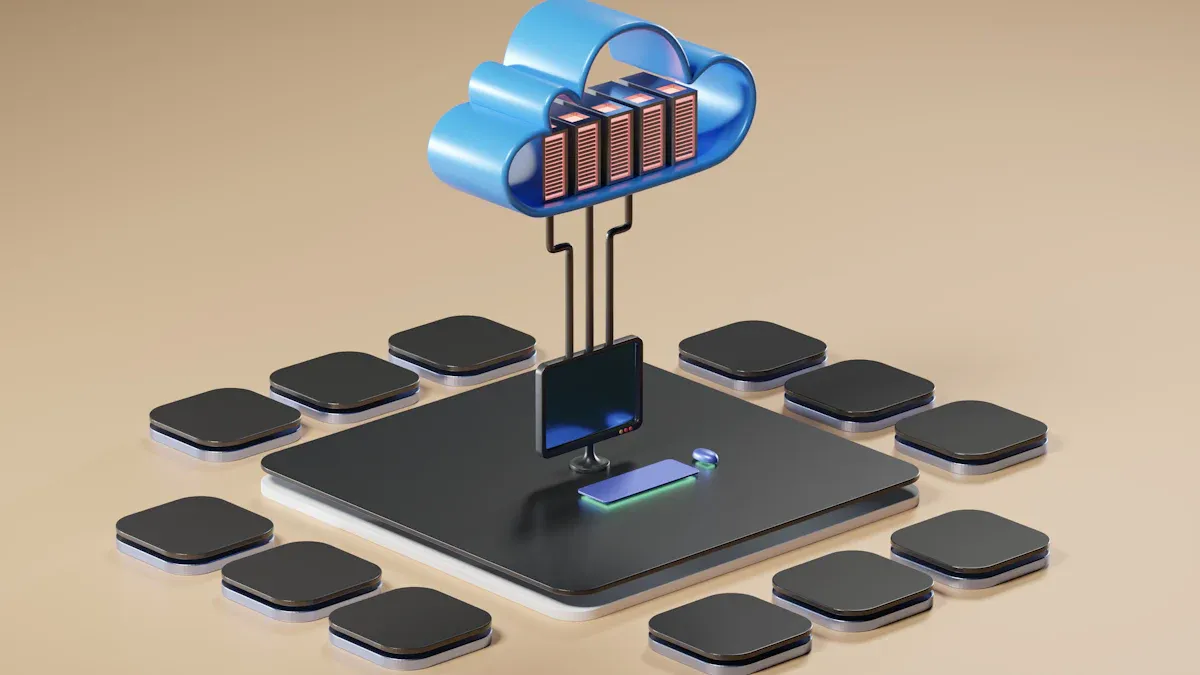
When it comes to managing your IT budget, understanding the costs associated with Azure is crucial. Let's break down the expenses related to cloud virtual machines (VMs) and compare them to the costs of running Azure on a mini PC.
Cloud VM Expenses
Monthly Costs Breakdown
Running Azure virtual machines in the cloud can quickly add up. Here’s a breakdown of the average monthly costs for different types of Azure VMs:
| VM Type | Hourly Rate | Monthly Cost (Example) |
|---|---|---|
| D2 series VM | $0.15 | $108.00 |
| General-purpose VM | $0.0140 | $10.08 |
| Bs-series (burstable) | N/A | $3.80 |
| B2ats v2 (5 VMs) | $0.0198 | $71.28 |
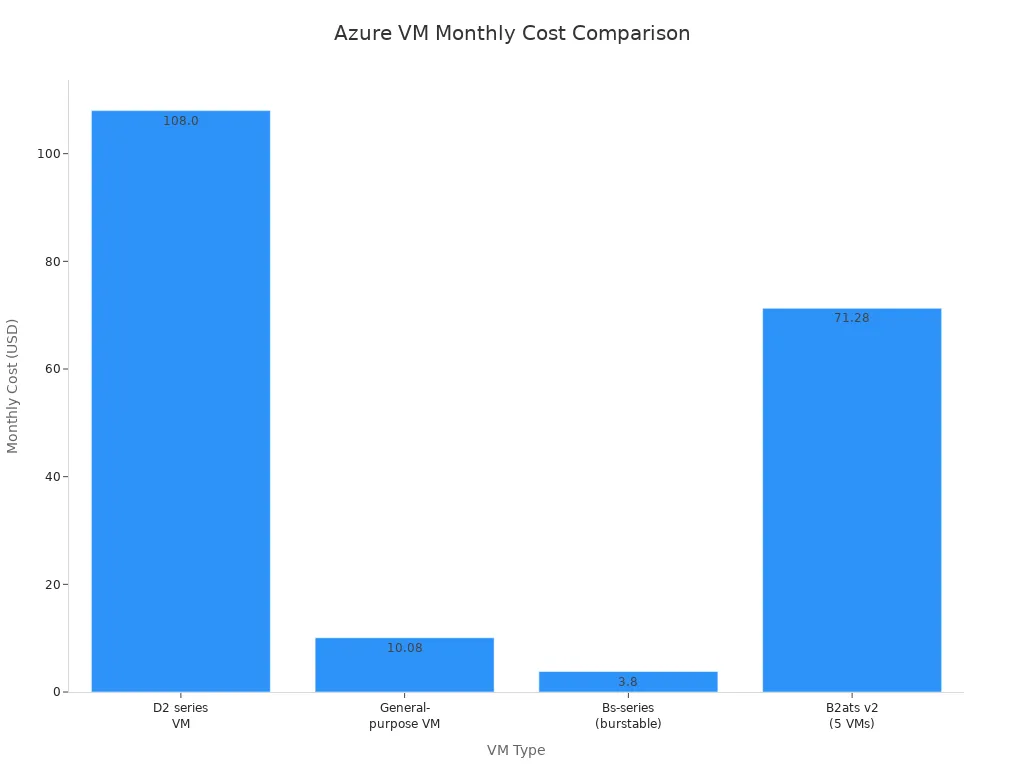
As you can see, the costs vary significantly based on the VM type you choose. While some options may seem affordable at first glance, the cumulative expenses can become overwhelming over time.
Hidden Fees
In addition to the base costs, you should be aware of hidden fees that can inflate your Azure spending. Here are some common hidden fees associated with Azure VM usage:
| Hidden Fee Type | Description |
|---|---|
| Unattached Disks and Snapshots | Ongoing storage costs arise from failing to delete disks and snapshots after VM removal. |
| Stopped but Not Deallocated VMs | VMs in a 'Stopped' state still incur charges; they must be fully deallocated to stop billing. |
| Load Balancer Data Transfer | Charges apply for both the usage of the load balancer and the data transferred through it. |
| Unused Network Interfaces | Regular monitoring and deletion of unused interfaces can prevent unnecessary costs. |
| Overprovisioning Resources | Allocating more resources than necessary leads to hidden costs; policies should be enforced to manage this. |
These hidden fees can catch you off guard, leading to unexpected spikes in your monthly consumption. By staying vigilant and managing your resources effectively, you can avoid these pitfalls.
Mini PC Costs
Initial Investment
Switching to a mini PC for running Azure can require an upfront investment, but it pays off in the long run. The initial costs typically include the purchase of the hardware, which can range from a few hundred to a couple of thousand dollars, depending on the specifications you choose. However, this one-time expense is significantly lower than the ongoing costs of cloud VMs.
Long-term Savings
The long-term savings of running Azure on a mini PC are substantial. Over a three-year period, the total cost of ownership for a mini PC can be dramatically lower than that of cloud services. Here’s a quick comparison:
- On-Prem Cost: $871,912
- Cloud Cost: $4,306,416
- Total Savings Over 5 Years: $3,434,504
While cloud services offer flexibility, they can lead to higher costs due to recurring charges. On-premises infrastructure, despite its higher initial costs, results in substantial long-term savings once capital expenditures are amortized.
By choosing to run Azure locally, you not only gain control over your resources but also optimize your spending. This approach allows you to focus on what matters most—growing your business without the burden of unpredictable cloud expenses.
Benefits of Local Azure
Running Azure on a mini PC offers numerous advantages that can significantly enhance your business operations. Let’s dive into the key benefits, focusing on cost savings and enhanced control.
Cost Savings
Reducing Operational Expenses
One of the most compelling reasons to switch to a local Azure setup is the potential for substantial cost savings. By running Azure on a mini PC, you eliminate the ongoing expenses associated with cloud virtual machines (VMs). Instead of paying monthly fees, you make a one-time investment in hardware. This shift can lead to a dramatic reduction in operational costs.
- You can avoid unexpected charges that often come with cloud services.
- Local deployments allow you to manage resources more efficiently, reducing waste.
- You gain the ability to monitor your spending closely, ensuring you stay within budget.
For example, a small business that struggled with daily losses due to poor cost monitoring implemented Azure Budgets. They set alert thresholds to manage their expenses effectively. As a result, they stabilized their daily spend at just $5.27, gaining full visibility and preventing unexpected costs.
Predictable IT Budget
With Azure running locally, you can achieve a more predictable IT budget. This predictability is crucial for small businesses that need to manage their finances carefully. Here’s how local Azure contributes to budget stability:
- Fixed Costs: You know exactly what your hardware costs are, making it easier to plan for the future.
- No Surprises: You avoid the hidden fees that often accompany cloud services, such as charges for unused resources.
- Budget Control: You can allocate funds more effectively, ensuring that you have the resources you need without overspending.
Enhanced Control
Customization Options
When you run Azure on a mini PC, you gain enhanced control over your environment. This control allows for greater customization, enabling you to tailor your setup to meet your specific needs. Here are some ways you can customize your local Azure environment:
- You can choose the hardware that best fits your workloads, ensuring optimal performance.
- You have the flexibility to configure your Azure services according to your business requirements.
- You can implement specific policies and governance measures that align with your organizational goals.
Security Compliance
Security is a top concern for any business, and running Azure locally can improve your compliance with industry standards. Local deployments allow you to maintain a secure environment while leveraging Azure's robust security features. Here’s how:
| Tool/Feature | Description |
|---|---|
| Azure Blueprints | Groups policies and access controls to streamline compliant development environments. |
| Microsoft Defender for Cloud | Provides continuous security assessment and centralized insights into security posture across environments. |
| Azure Policy | Enables real-time policy enforcement and remediation of non-compliant resources. |
| Microsoft Purview Compliance Manager | Offers customizable templates for compliance controls and continuous assessment of control status. |
| Azure Information Protection | Secures sensitive information and monitors activity to prevent data breaches. |
| Azure Advisor | Provides security and policy recommendations based on best practices and current configurations. |
By utilizing these tools, you can ensure that your local Azure environment meets the necessary compliance standards, giving you peace of mind.
Challenges and Solutions
Running Azure on a mini PC can be a fantastic way to cut costs, but it does come with its own set of challenges. Let’s explore some common issues you might face and how to tackle them effectively.
Performance Limitations
Assessing Mini PC Capabilities
When you switch to a mini PC, understanding its capabilities is crucial. Mini PCs often have limited resources compared to traditional servers. You need to assess your hardware to ensure it can handle your workloads. Here are some strategies to help you make informed decisions:
- Understand resource limitations to make informed design decisions.
- Scale vertically by increasing resource capacity when needed.
- Scale horizontally by adding new resource instances to distribute workloads.
Optimizing Workloads
To get the most out of your mini PC, optimizing workloads is essential. Here are some tips to enhance performance:
- Utilize autoscaling to adjust resources based on workload demand.
- Optimize data performance through dedicated analytics and caching mechanisms.
- Enable virtual network flow logs to capture network activity and use traffic analytics to analyze logs for better resource allocation.
By implementing these strategies, you can ensure that your mini PC runs Azure services smoothly, even under demanding conditions.
Security Considerations
Protecting Local Environments
Security is a top priority when running Azure locally. You want to protect your mini PC from potential threats. Fortunately, Azure Local comes with over 300 security settings enabled by default, providing a solid security baseline. Here are some best practices to enhance your local environment's security:
- Enable Microsoft Defender for Cloud to monitor and protect against threats.
- Implement segmentation strategies to contain potential security breaches.
- Use a trusted identity provider like Microsoft Entra ID for access control.
- Encrypt data in transit, at rest, and in use to protect against tampering.
Compliance with Standards
Maintaining compliance with industry standards is vital for any business. Running Azure locally doesn’t mean you have to compromise on compliance. Regularly review security baselines to strengthen your security posture. Establish a well-documented disaster recovery plan and regularly test recovery procedures to ensure you’re prepared for any situation.
By addressing these challenges head-on, you can enjoy the benefits of running Azure on a mini PC while keeping your environment secure and efficient.
Ideal Use Cases
When you think about running Azure on a mini PC, several ideal use cases come to mind. Let’s explore how this setup can benefit you in development, testing, and edge computing.
Development and Testing
Local Development Environments
Running Azure locally allows you to create efficient development environments. You can set up your mini PC to mirror your production environment, which helps you catch issues early. This setup saves you time and reduces costs associated with cloud VMs. You can quickly test your applications without worrying about incurring extra charges.
CI/CD Integration
Continuous integration and continuous deployment (CI/CD) workflows thrive in a local Azure environment. Here’s how:
| Evidence | Explanation |
|---|---|
| Azure Local allows management of physical machines as cloud resources | This integration simplifies CI/CD workflows by enabling lifecycle operations through a unified interface, reducing the need for separate tools. |
| Azure Kubernetes Service (AKS) is automatically set up with Azure Local | This provides a consistent environment for deploying and managing Kubernetes-based applications, essential for CI/CD processes. |
| One-click integration with Microsoft Defender for Containers and Azure Monitor | This enhances security and monitoring capabilities, which are critical for maintaining CI/CD workflows. |
With these features, you can streamline your development process and ensure that your applications are always ready for deployment.
Edge Computing
Edge computing is another area where running Azure on a mini PC shines. By processing data locally, you can achieve faster response times and improved efficiency.
Processing Data Locally
When you process data on your mini PC, you eliminate the need to send it to distant cloud servers. This local processing is crucial for applications that require real-time decision-making. For instance, autonomous vehicles need to respond to road conditions instantly. By keeping data processing close to its source, you reduce latency significantly.
- Mini PCs facilitate local data processing, which removes the necessity of sending data to far-off cloud servers for analysis.
- Edge computing processes data closer to its source, which reduces the distance data must travel.
Reducing Latency
Latency can be a significant issue in many applications. Traditional cloud systems introduce delays due to their distance from the operational environment. By running Azure locally, you can minimize these delays. This is especially important in production lines, where every second counts.
- Latency can severely impact efficiency in production lines, where every delay between problem detection and response leads to waste.
- Local processing allows for quicker responses, enhancing overall productivity.
Running Azure on a mini PC can transform your IT strategy. You gain control over costs while enjoying the benefits of cloud services. As you look ahead, expect trends like AI-driven automation, edge computing expansion, and advanced security measures to shape local Azure environments. Embracing these innovations will help you stay competitive and efficient. So, why not take the leap? Start optimizing your cloud experience today!
FAQ
What is Azure Arc?
Azure Arc allows you to manage your local devices as if they were part of the Azure cloud. You can apply governance and security policies across your mini PCs, making management easier and more efficient.
How does Azure Local work?
Azure Local enables you to run core Azure services directly on your mini PC. This setup allows you to deploy virtual machines and Kubernetes clusters without incurring ongoing cloud costs.
Can I use my existing hardware with Azure?
Yes! Azure Local supports customer-owned hardware, including mini PCs. You can leverage your existing devices to create a local Azure environment without needing to invest in new equipment.
What are the benefits of running Azure locally?
Running Azure locally reduces operational costs, provides predictable budgeting, and enhances control over your IT environment. You can customize your setup to meet your specific business needs.
Is security maintained with Azure Local?
Absolutely! Azure Local comes with built-in security features that help protect your data. You can also implement additional security measures to ensure compliance with industry standards.
How do I set up Azure on my mini PC?
To set up Azure, you'll need to install Azure Stack on your mini PC. Follow the installation guide provided by Microsoft to get started quickly and easily.
What are the hardware requirements for Azure?
For optimal performance, your mini PC should have at least a quad-core CPU, 16 GB of RAM, and 256 GB SSD storage. Ensure your network supports dual NICs with RDMA capabilities.
Can I scale my Azure Local setup?
Yes! Azure Local can scale from a single-node appliance to a 16-node cluster. This flexibility allows you to adjust your setup based on your workload demands.
🚀 Want to be part of m365.fm?
Then stop just listening… and start showing up.
👉 Connect with me on LinkedIn and let’s make something happen:
- 🎙️ Be a podcast guest and share your story
- 🎧 Host your own episode (yes, seriously)
- 💡 Pitch topics the community actually wants to hear
- 🌍 Build your personal brand in the Microsoft 365 space
This isn’t just a podcast — it’s a platform for people who take action.
🔥 Most people wait. The best ones don’t.
👉 Connect with me on LinkedIn and send me a message:
"I want in"
Let’s build something awesome 👊
1
00:00:00,000 --> 00:00:02,560
You're still paying rent for machines you can't touch.
2
00:00:02,560 --> 00:00:03,480
Think about that.
3
00:00:03,480 --> 00:00:05,720
Every month, the invoice from your cloud provider
4
00:00:05,720 --> 00:00:08,000
arrives like a landlord shaking you down for sunlight,
5
00:00:08,000 --> 00:00:10,080
charging you for compute cycles, you don't even
6
00:00:10,080 --> 00:00:11,320
remember scheduling.
7
00:00:11,320 --> 00:00:13,040
The total cost of your virtual machines
8
00:00:13,040 --> 00:00:15,480
could have bought you 10 physical servers by now,
9
00:00:15,480 --> 00:00:18,000
but you keep paying because you assume the cloud is magic.
10
00:00:18,000 --> 00:00:20,280
Spoiler alert, it's just someone else's computer
11
00:00:20,280 --> 00:00:21,440
with better branding.
12
00:00:21,440 --> 00:00:22,960
The cloud's trick is convenience,
13
00:00:22,960 --> 00:00:24,720
masquerading as innovation.
14
00:00:24,720 --> 00:00:27,280
You rent servers by the hour, and when you stop paying,
15
00:00:27,280 --> 00:00:28,080
they vanish.
16
00:00:28,080 --> 00:00:30,040
Just like your sense of physical responsibility,
17
00:00:30,040 --> 00:00:32,360
what you're really buying isn't metal or silicon.
18
00:00:32,360 --> 00:00:34,600
You're buying management, orchestration, remote control,
19
00:00:34,600 --> 00:00:36,960
essentially a console to tell machines what to do.
20
00:00:36,960 --> 00:00:39,200
Here's the part people consistently misunderstand.
21
00:00:39,200 --> 00:00:41,120
That control panel, the glorified remote,
22
00:00:41,120 --> 00:00:44,320
can run in your environment just as easily as in Microsoft's.
23
00:00:44,320 --> 00:00:45,880
And that's where Azure Arc comes in.
24
00:00:45,880 --> 00:00:47,680
It's the technology that breaks the illusion,
25
00:00:47,680 --> 00:00:49,640
letting you extend Azure's management layer,
26
00:00:49,640 --> 00:00:51,840
its eyes and hands, to any device you own.
27
00:00:51,840 --> 00:00:55,240
Then Azure Local lets that device act like a full Azure region,
28
00:00:55,240 --> 00:00:56,720
except it sits on your desk,
29
00:00:56,720 --> 00:00:58,880
not in a data center a thousand miles away.
30
00:00:58,880 --> 00:01:00,920
Same portal, same security, same policy,
31
00:01:00,920 --> 00:01:02,760
zero per hour compute bill.
32
00:01:02,760 --> 00:01:03,960
By the end of this explanation,
33
00:01:03,960 --> 00:01:05,640
you'll understand exactly how Azure Arc
34
00:01:05,640 --> 00:01:08,920
convinces a humble mini PC that it's part of Microsoft's empire
35
00:01:08,920 --> 00:01:10,600
and why that realization might end
36
00:01:10,600 --> 00:01:12,600
your monthly cloud tribute for good.
37
00:01:12,600 --> 00:01:13,920
The cloud without the cloud.
38
00:01:13,920 --> 00:01:15,560
Let's start by dismantling a myth.
39
00:01:15,560 --> 00:01:18,920
Azure isn't just a warehouse of servers humming in synchronization.
40
00:01:18,920 --> 00:01:22,280
It's two distinct layers, the hardware and the control plane.
41
00:01:22,280 --> 00:01:23,840
The control plane is the brain.
42
00:01:23,840 --> 00:01:25,760
You pay it to allocate workloads,
43
00:01:25,760 --> 00:01:28,880
enforce governance, monitor health and sync policies.
44
00:01:28,880 --> 00:01:30,240
The hardware is just the muscle.
45
00:01:30,240 --> 00:01:31,640
When you rent a cloud VM,
46
00:01:31,640 --> 00:01:35,120
most of your bill goes not toward electricity or hardware depreciation
47
00:01:35,120 --> 00:01:37,520
but toward that automated oversight machinery.
48
00:01:37,520 --> 00:01:38,720
As your resource manager,
49
00:01:38,720 --> 00:01:40,760
policy defender and other services
50
00:01:40,760 --> 00:01:43,320
keeping your imaginary data center in check.
51
00:01:43,320 --> 00:01:44,360
Now enter Azure Arc,
52
00:01:44,360 --> 00:01:46,560
the connective tissue that spreads that same brain
53
00:01:46,560 --> 00:01:49,280
across territories Microsoft doesn't physically own.
54
00:01:49,280 --> 00:01:51,280
Arc lets you attach non-azure servers,
55
00:01:51,280 --> 00:01:53,480
Kubernetes clusters or even other clouds
56
00:01:53,480 --> 00:01:56,040
and treat them as if they were native Azure citizens.
57
00:01:56,040 --> 00:01:58,600
Think of Arc as the universal remote control,
58
00:01:58,600 --> 00:02:00,920
the Logitech Harmony of Cloud Management.
59
00:02:00,920 --> 00:02:03,760
It doesn't care if your device lives in redmond or a broom closet,
60
00:02:03,760 --> 00:02:05,960
it speaks Azure to all of them.
61
00:02:05,960 --> 00:02:07,760
When a machine becomes arc enabled,
62
00:02:07,760 --> 00:02:09,480
it essentially wears an Azure badge.
63
00:02:09,480 --> 00:02:11,040
It believes it belongs to the cloud.
64
00:02:11,040 --> 00:02:13,200
Policies apply, defender protects,
65
00:02:13,200 --> 00:02:14,320
monitor reports health,
66
00:02:14,320 --> 00:02:16,560
all through the same portal you already use.
67
00:02:16,560 --> 00:02:17,560
To your governance logs,
68
00:02:17,560 --> 00:02:19,600
it looks like any other Azure resource.
69
00:02:19,600 --> 00:02:22,000
The cloud shrinks down and follows the machine home.
70
00:02:22,000 --> 00:02:23,600
Now layer on Azure local,
71
00:02:23,600 --> 00:02:25,360
the next logical evolution.
72
00:02:25,360 --> 00:02:28,240
It's what happens when you run actual Azure services,
73
00:02:28,240 --> 00:02:30,720
compute network and Kubernetes orchestration
74
00:02:30,720 --> 00:02:32,240
on that Arc manage machine.
75
00:02:32,240 --> 00:02:33,600
Instead of pretending to be a cloud,
76
00:02:33,600 --> 00:02:34,320
it becomes one.
77
00:02:34,320 --> 00:02:36,200
Think of it as tricking your old workstation
78
00:02:36,200 --> 00:02:39,120
into believing it just joined NASA's compute cluster.
79
00:02:39,120 --> 00:02:42,920
All its local CPUs and storage now answer directly to Azure commands,
80
00:02:42,920 --> 00:02:45,560
but without the round trip lag or metad pricing.
81
00:02:45,560 --> 00:02:48,120
To make this click, picture Azure as a franchise.
82
00:02:48,120 --> 00:02:49,760
Microsoft operates the flagship stores,
83
00:02:49,760 --> 00:02:52,640
complete with power hungry racks and ocean cooled halls.
84
00:02:52,640 --> 00:02:54,560
Azure Arc is the franchising agreement
85
00:02:54,560 --> 00:02:56,360
that lets you open your own branch.
86
00:02:56,360 --> 00:02:58,280
Azure local is your miniature storefront,
87
00:02:58,280 --> 00:03:01,280
same signs, same uniforms, different address.
88
00:03:01,280 --> 00:03:02,680
Customers can't tell the difference.
89
00:03:02,680 --> 00:03:04,360
The beauty here lies in symmetry.
90
00:03:04,360 --> 00:03:06,000
Every arc enabled system speaks
91
00:03:06,000 --> 00:03:07,360
Azure's governance language,
92
00:03:07,360 --> 00:03:09,720
meaning policies, RBIAC permissions,
93
00:03:09,720 --> 00:03:11,640
and compliance tagging our identical.
94
00:03:11,640 --> 00:03:13,880
You can deploy a VM to your mini PC
95
00:03:13,880 --> 00:03:14,880
through the Azure portal
96
00:03:14,880 --> 00:03:17,640
with the same button you'd use for a VM in East US.
97
00:03:17,640 --> 00:03:20,760
The deployment logs, metrics and identities register in one place.
98
00:03:20,760 --> 00:03:22,800
Centralized control, decentralized compute.
99
00:03:22,800 --> 00:03:25,360
This inversion flips cloud economics on its head.
100
00:03:25,360 --> 00:03:29,560
You own the silicon, but Microsoft still handles the orchestration and updates.
101
00:03:29,560 --> 00:03:34,520
No more paying for idle VMs because idle local cores cost you nothing but electricity.
102
00:03:34,520 --> 00:03:36,120
The cloud still manages everything.
103
00:03:36,120 --> 00:03:37,760
It just doesn't meter your cycles.
104
00:03:37,760 --> 00:03:39,560
Of course, there's new ones.
105
00:03:39,560 --> 00:03:43,040
Azure Arc doesn't magically transplant every cloud capability to your closet.
106
00:03:43,040 --> 00:03:44,960
You're renting the brain, not the brawn.
107
00:03:44,960 --> 00:03:48,640
But for workloads that need local speed, AI inferencing,
108
00:03:48,640 --> 00:03:51,160
machine data processing, edge analytics,
109
00:03:51,160 --> 00:03:53,280
the ability to keep the computation on site
110
00:03:53,280 --> 00:03:56,240
while maintaining Azure's governance model is transformative.
111
00:03:56,240 --> 00:03:58,720
And yes, the interface remains indistinguishable.
112
00:03:58,720 --> 00:04:01,480
You'll still see your devices, clusters and applications
113
00:04:01,480 --> 00:04:03,560
inside the familiar Azure portal.
114
00:04:03,560 --> 00:04:06,920
The difference is physical geography, not operational capability.
115
00:04:06,920 --> 00:04:08,920
Azure local gives you the illusion
116
00:04:08,920 --> 00:04:11,920
and the benefits of the cloud right next to your coffee mug.
117
00:04:11,920 --> 00:04:14,560
So the dream of Azure without the bill isn't fiction.
118
00:04:14,560 --> 00:04:18,200
It's simply a redistribution of where the hardware lives and who owns it.
119
00:04:18,200 --> 00:04:20,720
The next step is understanding how to pick the right hardware
120
00:04:20,720 --> 00:04:22,720
to host your private slice of the cloud,
121
00:04:22,720 --> 00:04:26,800
small, affordable, efficient machines that won't melt your budget or your desk.
122
00:04:26,800 --> 00:04:29,240
That's where the mini PC revolution begins.
123
00:04:29,240 --> 00:04:30,800
The mini PC revolution.
124
00:04:30,800 --> 00:04:33,240
So you want to host Azure without a data center?
125
00:04:33,240 --> 00:04:35,920
Then you'll appreciate how little hardware you actually need.
126
00:04:35,920 --> 00:04:39,440
Forget the mental picture of a server rack glowing like a Christmas tree.
127
00:04:39,440 --> 00:04:41,720
The minimum requirement is laughably small.
128
00:04:41,720 --> 00:04:47,320
One machine, virtualization support enabled, a boot disk and a second solid state drive for storage.
129
00:04:47,320 --> 00:04:50,920
Add power and ethernet and you've got yourself a regional compute node,
130
00:04:50,920 --> 00:04:52,520
barely louder than a desk fan.
131
00:04:52,520 --> 00:04:55,240
The real constraint isn't power, it's virtue.
132
00:04:55,240 --> 00:04:59,400
The machine must support virtualization because Azure local spins up both virtual machines
133
00:04:59,400 --> 00:05:01,720
and Kubernetes nodes under its supervision.
134
00:05:01,720 --> 00:05:08,600
Most modern mini PCs, anything with an Intel i5 i7 or AMD Ryzen and 16 to 32 gigabytes of RAM,
135
00:05:08,600 --> 00:05:12,760
are more than capable. In fact, engineers have done full demos using Intel,
136
00:05:12,760 --> 00:05:14,920
NUX and refurbished business desktops.
137
00:05:14,920 --> 00:05:17,720
You know those aging office towers everyone's throwing away?
138
00:05:17,720 --> 00:05:21,000
Congratulations, they're now ready to apply for Azure citizenship.
139
00:05:21,000 --> 00:05:23,880
Researchers and experimenters have already tested these rigs,
140
00:05:23,880 --> 00:05:27,640
some fit in the palm of your hand, others in the space behind the monitor.
141
00:05:27,640 --> 00:05:34,760
One setup ran two Xeon powered mini PCs, each with 64 gigabytes of memory and a one terabyte SSD.
142
00:05:34,760 --> 00:05:38,200
Together they replicated the functional brain of a small Azure region
143
00:05:38,200 --> 00:05:41,640
and yes it cost less than six months of cloud VMs running nonstop.
144
00:05:41,640 --> 00:05:43,960
You pay for the box once and then never again.
145
00:05:43,960 --> 00:05:46,840
Now there's an architectural elegance to this local deployment,
146
00:05:46,840 --> 00:05:48,840
think of it as shipable infrastructure.
147
00:05:48,840 --> 00:05:52,760
In Microsoft's demonstration, provisioning begins with a simple USB stick,
148
00:05:52,760 --> 00:05:54,680
a cryptographic passport of sorts.
149
00:05:54,680 --> 00:06:00,120
You boot the mini PC once, let the stub OS phone home and it automatically enrolls.
150
00:06:00,120 --> 00:06:02,600
When it powers off, you remove the USB,
151
00:06:02,600 --> 00:06:07,000
claim the machine in Azure Arc and there it is in your portal like any other server.
152
00:06:07,000 --> 00:06:10,520
Plug it, voucher it, claim it, the keyboard never even enters the conversation.
153
00:06:10,520 --> 00:06:12,440
Picture the implications.
154
00:06:12,440 --> 00:06:16,600
A small retailer decides to deploy Edge Compute in 50 branch stores.
155
00:06:16,600 --> 00:06:20,440
Instead of hiring an IT team, they mail out pre-vouchered mini PCs.
156
00:06:20,440 --> 00:06:23,960
The employee on site does one thing, connects power and Ethernet.
157
00:06:23,960 --> 00:06:27,400
Within minutes, headquarters sees the machine appear in the Azure console,
158
00:06:27,400 --> 00:06:29,240
ready to receive policies and workloads.
159
00:06:29,240 --> 00:06:33,000
The branch associates never log in, never know there's an internal Kubernetes cluster
160
00:06:33,000 --> 00:06:35,800
doing AI camera analysis above the cash register.
161
00:06:35,800 --> 00:06:39,000
Behind the scenes, it's all Azure Arc managed, remotely configured,
162
00:06:39,000 --> 00:06:40,840
completely oblivious to geography.
163
00:06:40,840 --> 00:06:43,160
The environmental and economic logic are irresistible.
164
00:06:43,160 --> 00:06:46,760
This tiny machine consumes less than 50 watts at full load.
165
00:06:46,760 --> 00:06:51,720
There's no noisy cooling, no collocation rent, no e-waste cascade every refresh cycle.
166
00:06:51,720 --> 00:06:55,800
When you inevitably upgrade, the old one becomes a backup node or a lab system.
167
00:06:55,800 --> 00:06:58,120
Green computing by accident, not committee.
168
00:06:58,120 --> 00:07:01,160
From a performance standpoint, you sacrifice surprisingly little.
169
00:07:01,160 --> 00:07:05,000
Local workloads benefit from zero latency and direct access to on-site data.
170
00:07:05,560 --> 00:07:09,320
Your only network delay is the one between your machine and its wall socket.
171
00:07:09,320 --> 00:07:11,160
And because Arc centralizes management,
172
00:07:11,160 --> 00:07:13,560
you can still apply policies, monitor performance,
173
00:07:13,560 --> 00:07:15,800
and push updates without standing next to it.
174
00:07:15,800 --> 00:07:18,760
What emerges is a kind of democratization of Cloud hardware.
175
00:07:18,760 --> 00:07:21,560
The same Azure fabric that powers multinational operations
176
00:07:21,560 --> 00:07:25,320
now runs inside small offices, retail outlets, manufacturing floors,
177
00:07:25,320 --> 00:07:27,800
on devices you could stack like paperback novels.
178
00:07:27,800 --> 00:07:30,600
The Cloud's footprint shrinks, but its control remains identical.
179
00:07:30,600 --> 00:07:32,920
So by now you have your infrastructure.
180
00:07:32,920 --> 00:07:35,000
Small, silent, cost-controlled.
181
00:07:35,000 --> 00:07:38,040
But there's a trap lurking and it has three letters, AD.
182
00:07:38,040 --> 00:07:41,160
Active directory, the overgrown vine of enterprise identity,
183
00:07:41,160 --> 00:07:43,160
threatens to choke your minimalism.
184
00:07:43,160 --> 00:07:47,400
In the next part, we convert that medieval bureaucracy into something elegant.
185
00:07:47,400 --> 00:07:50,520
Certificate-based identity through Azure Key Vault,
186
00:07:50,520 --> 00:07:52,920
the modern way to log into your local cloud,
187
00:07:52,920 --> 00:07:55,800
without building a cathedral just to flip a switch.
188
00:07:55,800 --> 00:07:57,160
Escaping the AD trap.
189
00:07:57,160 --> 00:07:59,320
Active directory was brilliant in 1999.
190
00:07:59,320 --> 00:08:02,600
It was also designed for an era when servers were beige,
191
00:08:02,600 --> 00:08:06,280
users were predictable, and every device lived on the same carpeted subnet.
192
00:08:06,280 --> 00:08:08,840
Today, forcing AD into a two-note edge deployment
193
00:08:08,840 --> 00:08:10,600
is a crime against efficiency.
194
00:08:10,600 --> 00:08:13,400
Building a domain forest just so two machines can handshake
195
00:08:13,400 --> 00:08:16,360
is like constructing an entire cathedral to power a desk lamp,
196
00:08:16,360 --> 00:08:19,000
solemn, expensive, and completely unnecessary.
197
00:08:19,000 --> 00:08:21,000
And yet, that's what most of this admin still do,
198
00:08:21,000 --> 00:08:23,480
because tradition says identity must come with a forest,
199
00:08:23,480 --> 00:08:25,160
a flock, and a sacrifice to DNS.
200
00:08:25,160 --> 00:08:27,720
The problem is that AD assumes centralization.
201
00:08:27,720 --> 00:08:30,600
It expects a domain controller somewhere issuing permissions
202
00:08:30,600 --> 00:08:32,200
like a digital monarch.
203
00:08:32,200 --> 00:08:35,240
But your shiny new Azure local setup has no patience for monarchy.
204
00:08:35,240 --> 00:08:38,840
These are small, distributed, sometimes offline environments.
205
00:08:38,840 --> 00:08:41,720
The kinds that shouldn't depend on a single sign-on,
206
00:08:41,720 --> 00:08:43,320
temple hundreds of miles away.
207
00:08:43,320 --> 00:08:46,920
You need something lighter, faster, and entirely self-contained.
208
00:08:46,920 --> 00:08:49,160
Enter local identity with Azure Key Vault,
209
00:08:49,160 --> 00:08:51,160
an approach so refreshingly obvious,
210
00:08:51,160 --> 00:08:55,000
you'll wonder why Microsoft didn't market it as active directory detox.
211
00:08:55,000 --> 00:08:57,240
Instead of hurting passwords and replication rules,
212
00:08:57,240 --> 00:08:58,600
you issue certificates.
213
00:08:58,600 --> 00:09:00,520
Mathematically signed trust documents
214
00:09:00,520 --> 00:09:04,200
that machines can verify without ever phoning a domain controller.
215
00:09:04,200 --> 00:09:06,120
Each node keeps its credentials local,
216
00:09:06,120 --> 00:09:07,880
but synchronized through Key Vault,
217
00:09:07,880 --> 00:09:10,920
which acts as the central cloud-backed safe for all your secrets.
218
00:09:10,920 --> 00:09:12,520
Here's how it changes your life.
219
00:09:12,520 --> 00:09:15,320
Key Vault replaces the constant AD heartbeat
220
00:09:15,320 --> 00:09:17,160
with an occasional secure whisper.
221
00:09:17,160 --> 00:09:19,160
It stores things like the cluster certificates,
222
00:09:19,160 --> 00:09:20,840
encryption keys, bitlocker secrets,
223
00:09:20,840 --> 00:09:22,920
and admin credentials in one auditable store.
224
00:09:22,920 --> 00:09:25,000
The machines authenticate with those certificates
225
00:09:25,000 --> 00:09:26,760
to each other, no replication schedules,
226
00:09:26,760 --> 00:09:30,200
no account policies, no domain functional level compatibility quizzes.
227
00:09:30,200 --> 00:09:32,680
You get modern zero-trust style authentication
228
00:09:32,680 --> 00:09:34,680
without the Baroque ceremony of a forest.
229
00:09:34,680 --> 00:09:35,960
The human rights itself.
230
00:09:35,960 --> 00:09:37,800
For every administrator who ever waited
231
00:09:37,800 --> 00:09:39,880
through a 45-minute AD schema update
232
00:09:39,880 --> 00:09:42,840
just to grant one service account, this is sweet vindication.
233
00:09:42,840 --> 00:09:44,440
You click local identity with Key Vault
234
00:09:44,440 --> 00:09:45,800
during Azure local deployment,
235
00:09:45,800 --> 00:09:47,080
select your subscriptions vault,
236
00:09:47,080 --> 00:09:47,720
and that's it.
237
00:09:47,720 --> 00:09:50,440
The machines generate their local identities from that vault.
238
00:09:50,440 --> 00:09:52,280
Permissions propagate instantly because
239
00:09:52,280 --> 00:09:54,360
brace yourself, there's no domain to replicate.
240
00:09:54,360 --> 00:09:56,200
The systems, leaner, quieter,
241
00:09:56,200 --> 00:09:57,640
and paradoxically more secure
242
00:09:57,640 --> 00:09:59,720
because it has fewer moving parts to forget.
243
00:09:59,720 --> 00:10:01,640
Consider the compliance angle Key Vault
244
00:10:01,640 --> 00:10:03,400
is already an audited service integrated
245
00:10:03,400 --> 00:10:05,160
with Azure Policy and Monitor.
246
00:10:05,160 --> 00:10:07,320
So when a regulator asks where credentials live,
247
00:10:07,320 --> 00:10:08,840
you can answer confidently,
248
00:10:08,840 --> 00:10:12,360
inside my Key Vault, encrypted under Microsoft Managed HSMs,
249
00:10:12,360 --> 00:10:14,840
with role-based access locked centrally.
250
00:10:14,840 --> 00:10:16,840
Try giving that answer with a homegrown AD
251
00:10:16,840 --> 00:10:19,720
that half your technicians forgot to patch in 2021.
252
00:10:19,720 --> 00:10:22,200
In Azure Local, certificate rotation and recovery
253
00:10:22,200 --> 00:10:24,520
are controlled from the same portal as everything else.
254
00:10:24,520 --> 00:10:25,400
Lose a node?
255
00:10:25,400 --> 00:10:27,000
Re-issue its gut from Key Vault.
256
00:10:27,000 --> 00:10:28,920
Lose all nodes, restore from Key Vault backups.
257
00:10:28,920 --> 00:10:30,840
No domain rebuilds, no DNS scavenging,
258
00:10:30,840 --> 00:10:32,920
no prayers to FSMO gods.
259
00:10:32,920 --> 00:10:34,440
Now, the skeptic might ask,
260
00:10:34,440 --> 00:10:36,520
isn't AD still more feature rich?
261
00:10:36,520 --> 00:10:37,640
Technically sure.
262
00:10:37,640 --> 00:10:39,640
If your idea of richness is manually adjusting
263
00:10:39,640 --> 00:10:41,640
group policy for i.e. settings on a key
264
00:10:41,640 --> 00:10:43,720
ask that doesn't even run Windows anymore,
265
00:10:43,720 --> 00:10:44,760
for our edge scenario,
266
00:10:44,760 --> 00:10:47,560
the minimalist Key Vault model is pure liberation.
267
00:10:47,560 --> 00:10:49,560
It's agile enough for a two machine deployment
268
00:10:49,560 --> 00:10:51,240
and robust enough for dozens of sites
269
00:10:51,240 --> 00:10:53,320
all without the administrative cholesterol.
270
00:10:53,320 --> 00:10:54,680
Governance doesn't suffer either,
271
00:10:54,680 --> 00:10:57,160
arc reports every identity operation to Azure,
272
00:10:57,160 --> 00:10:58,920
so audit logs remain unified.
273
00:10:58,920 --> 00:11:01,080
Businesses can maintain zero trust compliance
274
00:11:01,080 --> 00:11:03,720
and prove chain of custody from the same dashboard
275
00:11:03,720 --> 00:11:05,080
that deploys their containers.
276
00:11:05,080 --> 00:11:07,800
You finally decouple identity from heavy infrastructure
277
00:11:07,800 --> 00:11:09,400
while keeping full traceability,
278
00:11:09,400 --> 00:11:11,640
a clean severance of control without chaos.
279
00:11:11,640 --> 00:11:14,680
So identity solved, no domain controllers,
280
00:11:14,680 --> 00:11:18,280
no replication, no spiritual crises over trust relationships.
281
00:11:18,280 --> 00:11:20,280
Your Azure Local cluster now wakes up,
282
00:11:20,280 --> 00:11:22,920
authenticates using certificates from Key Vault
283
00:11:22,920 --> 00:11:26,520
and behaves with the politeness of a perfectly trained valley,
284
00:11:26,520 --> 00:11:29,720
secure, quiet and predictably obedient.
285
00:11:29,720 --> 00:11:31,320
And with bureaucracy gone,
286
00:11:31,320 --> 00:11:33,640
you can focus on something that actually matters,
287
00:11:33,640 --> 00:11:36,440
running workloads because a local Azure region
288
00:11:36,440 --> 00:11:39,720
with perfect identity but zero useful applications
289
00:11:39,720 --> 00:11:41,400
is like a Ferrari without fuel,
290
00:11:41,400 --> 00:11:43,640
an object of admiration, not motion.
291
00:11:43,640 --> 00:11:44,680
Next, we'll fire it up,
292
00:11:44,680 --> 00:11:47,640
deploy your private Azure region from the same portal interface
293
00:11:47,640 --> 00:11:50,200
and prove that your tiny cluster isn't just registered,
294
00:11:50,200 --> 00:11:51,400
it's alive.
295
00:11:51,400 --> 00:11:53,640
Deploying your own private Azure region.
296
00:11:53,640 --> 00:11:56,440
Now we reach the part where the illusion becomes reality,
297
00:11:56,440 --> 00:11:58,520
where a couple of small machines stop pretending
298
00:11:58,520 --> 00:12:01,160
and start behaving like a legitimate Azure region.
299
00:12:01,160 --> 00:12:04,040
No, not account of it, it's an officially recognized outpost.
300
00:12:04,040 --> 00:12:06,760
Azure Arc takes your hardware, blesses it with certificates
301
00:12:06,760 --> 00:12:07,960
and welcomes it to the empire.
302
00:12:07,960 --> 00:12:10,760
What happens next is equal parts engineering and sorcery.
303
00:12:10,760 --> 00:12:14,520
The process starts with what Microsoft calls zero touch provisioning.
304
00:12:14,520 --> 00:12:17,320
Translation, you plug in power and Ethernet and walk away.
305
00:12:17,320 --> 00:12:20,680
A special USB stick performs what amounts to digital baptism.
306
00:12:20,680 --> 00:12:22,760
It contains a lightweight bootstrap OS
307
00:12:22,760 --> 00:12:24,920
whose singular purpose is to call home,
308
00:12:24,920 --> 00:12:27,800
authenticate and retrieve the deployment payload.
309
00:12:27,800 --> 00:12:31,640
Once powered, the machine reads the certificate voucher on that USB,
310
00:12:31,640 --> 00:12:35,160
verifies it against Azure and announces, I'm yours now.
311
00:12:35,160 --> 00:12:36,600
Three minutes later, it powers off.
312
00:12:36,600 --> 00:12:38,840
Installation complete, eyes open.
313
00:12:38,840 --> 00:12:41,400
Back at the Azure portal under Arc's provisioning tab,
314
00:12:41,400 --> 00:12:43,880
those freshly awakened nodes appear with serial numbers
315
00:12:43,880 --> 00:12:45,480
identical to their vouchers.
316
00:12:45,480 --> 00:12:48,440
You upload the corresponding voucher files proving ownership,
317
00:12:48,440 --> 00:12:51,000
then categorize them into what Azure calls a site,
318
00:12:51,000 --> 00:12:54,040
essentially a local region named like Redmond or Berlin.
319
00:12:54,040 --> 00:12:57,240
It feels ceremonial like naming your first pet data center.
320
00:12:57,240 --> 00:12:59,240
From there, the cloud finishes the hard work,
321
00:12:59,240 --> 00:13:01,800
downloading the full operating system image you selected,
322
00:13:01,800 --> 00:13:05,000
24H2 for example, configuring storage,
323
00:13:05,000 --> 00:13:06,760
hardening security baselines,
324
00:13:06,760 --> 00:13:09,480
and registering the node as a fully arc enabled machine.
325
00:13:09,480 --> 00:13:13,240
You set administrator credentials, pick your IP schema,
326
00:13:13,240 --> 00:13:15,720
and watch progress bars like a proud parent.
327
00:13:15,720 --> 00:13:17,720
Here's where elegance meets physics.
328
00:13:17,720 --> 00:13:20,840
Those two tiny boxes now greet each other as cluster peers.
329
00:13:20,840 --> 00:13:23,000
As your arc configures their internal networking,
330
00:13:23,000 --> 00:13:24,360
defines logical subnets,
331
00:13:24,360 --> 00:13:27,320
and synchronizes storage replication so that a VM on one
332
00:13:27,320 --> 00:13:29,560
can live migrate to the other in seconds.
333
00:13:29,560 --> 00:13:32,760
No sans, no fiber channel, melodrama, just Ethernet and trust.
334
00:13:32,760 --> 00:13:35,400
Because that Key Vault identity system you configured earlier
335
00:13:35,400 --> 00:13:37,560
provides the certificates for replication,
336
00:13:37,560 --> 00:13:39,480
none of this requires active directory.
337
00:13:39,480 --> 00:13:42,280
Each node knows its sibling, validates it cryptographically,
338
00:13:42,280 --> 00:13:45,080
and proceeds to behave like part of a larger Azure infrastructure.
339
00:13:45,080 --> 00:13:45,800
It gets better.
340
00:13:45,800 --> 00:13:49,400
From the same portal where you deploy a multi-million dollar virtual network,
341
00:13:49,400 --> 00:13:51,320
you now click deploy as your local,
342
00:13:51,320 --> 00:13:54,920
you name the instance perhaps something dignified like local 01,
343
00:13:54,920 --> 00:13:57,800
select your provisioned machines, and let validation run.
344
00:13:57,800 --> 00:14:00,920
Azure checks firmware compatibility, network latency,
345
00:14:00,920 --> 00:14:02,600
and storage throughput.
346
00:14:02,600 --> 00:14:06,440
If all green, the deployment spins up the local control plane components.
347
00:14:06,440 --> 00:14:08,600
Resource providers for compute, network,
348
00:14:08,600 --> 00:14:10,600
and storage services, the local orchestrator,
349
00:14:10,600 --> 00:14:13,400
and AKS Azure Kubernetes service on top.
350
00:14:13,400 --> 00:14:16,280
This is the part where the average user's brain melts slightly.
351
00:14:16,280 --> 00:14:19,320
You can now create a virtual machine or a Kubernetes cluster right here
352
00:14:19,320 --> 00:14:22,520
and it shows up in your Azure portal alongside resources from East US,
353
00:14:22,520 --> 00:14:24,200
West Europe, and anywhere else.
354
00:14:24,200 --> 00:14:27,160
Yet physically it's sitting near your keyboard, humming politely.
355
00:14:27,160 --> 00:14:30,840
The same RBAC policies, cost tags, and monitoring metrics apply.
356
00:14:30,840 --> 00:14:33,480
Azure Monitor sees CPU utilization,
357
00:14:33,480 --> 00:14:35,960
locks events, and defender scans for threats.
358
00:14:35,960 --> 00:14:38,840
All as if these nodes lived in a Microsoft facility,
359
00:14:38,840 --> 00:14:40,920
it's automation theater of the highest order.
360
00:14:40,920 --> 00:14:43,480
You spend an hour watching the provisioning workflow,
361
00:14:43,480 --> 00:14:46,440
networking, storage pools, roll assignments.
362
00:14:46,440 --> 00:14:49,480
And when it finishes, you refresh your Azure Arc dashboard.
363
00:14:49,480 --> 00:14:52,440
Title line reads as your local deployment succeeded.
364
00:14:52,440 --> 00:14:55,800
Below it, two healthy machines, one cluster, zero workloads.
365
00:14:55,800 --> 00:14:57,160
Your miniature region is born.
366
00:14:57,160 --> 00:14:58,440
Now, let's talk workloads.
367
00:14:58,440 --> 00:15:00,120
You navigate to virtual machines,
368
00:15:00,120 --> 00:15:04,120
click Create, and follow a nearly identical wizard to the public cloud.
369
00:15:04,120 --> 00:15:06,280
Choose an image, set VCP and memory,
370
00:15:06,280 --> 00:15:08,920
and within minutes the VM materializes on your local storage.
371
00:15:08,920 --> 00:15:11,560
You can even migrate existing VMs from another platform
372
00:15:11,560 --> 00:15:13,560
by importing them through Azure Migrate
373
00:15:13,560 --> 00:15:15,000
or just uploading their disks.
374
00:15:15,000 --> 00:15:16,840
They'll replicate between your two local nodes
375
00:15:16,840 --> 00:15:19,080
for live migration, achieving availability levels
376
00:15:19,080 --> 00:15:21,800
that would make your old Hyper-VLab blush.
377
00:15:21,800 --> 00:15:24,440
Or if you prefer Kubernetes, as your local,
378
00:15:24,440 --> 00:15:26,920
comes with AKS pre-wired.
379
00:15:26,920 --> 00:15:29,800
You define a logical network, give it an IP range,
380
00:15:29,800 --> 00:15:33,160
and deploy clusters that operate side by side with VMs.
381
00:15:33,160 --> 00:15:35,560
GitHub's integration means any application changes
382
00:15:35,560 --> 00:15:38,040
pushed to your repository automatically redeploy here
383
00:15:38,040 --> 00:15:41,160
with every commit, update your AI inferencing model,
384
00:15:41,160 --> 00:15:42,760
push to git, and seconds later,
385
00:15:42,760 --> 00:15:44,600
the new container spins up locally.
386
00:15:44,600 --> 00:15:45,880
No human required.
387
00:15:45,880 --> 00:15:49,080
Microsoft's own demo shows an AI video processing app
388
00:15:49,080 --> 00:15:50,520
operating exactly this way,
389
00:15:50,520 --> 00:15:52,200
analyzing camera feeds on site,
390
00:15:52,200 --> 00:15:54,760
performing inferencing locally to avoid latency,
391
00:15:54,760 --> 00:15:57,080
and updating directly from GitHub.
392
00:15:57,080 --> 00:15:58,520
The AI doesn't travel to the cloud,
393
00:15:58,520 --> 00:16:00,360
the cloud's brain traveled to the AI.
394
00:16:00,360 --> 00:16:02,840
We tell us love this because customers refuse to wait
395
00:16:02,840 --> 00:16:05,640
for remote frame analysis before they're served.
396
00:16:05,640 --> 00:16:08,360
Factories adore it because predictive maintenance works only
397
00:16:08,360 --> 00:16:10,760
if your inference happens before something breaks.
398
00:16:10,760 --> 00:16:14,120
And running it all locally means no outgoing bandwidth cost
399
00:16:14,120 --> 00:16:16,520
for constant video streaming, no dependency
400
00:16:16,520 --> 00:16:18,280
on the nearest Azure Regions uptime,
401
00:16:18,280 --> 00:16:20,200
and most importantly, a cloud bill
402
00:16:20,200 --> 00:16:22,680
that finally stops resembling a casino receipt.
403
00:16:22,680 --> 00:16:25,800
It's controlled, elegant, and entirely under your jurisdiction.
404
00:16:25,800 --> 00:16:28,200
So now your local region breathes, computes,
405
00:16:28,200 --> 00:16:29,800
and updates with cloud parity.
406
00:16:29,800 --> 00:16:30,840
The system works.
407
00:16:30,840 --> 00:16:35,880
The next obvious question, one that every CFO is about to ask,
408
00:16:35,880 --> 00:16:37,400
is painfully simple.
409
00:16:37,400 --> 00:16:39,000
Does this actually save money,
410
00:16:39,000 --> 00:16:41,880
or have we just reinvented expensive toys?
411
00:16:41,880 --> 00:16:44,520
That, dear listener, is where economics and rebellion finally meet.
412
00:16:44,520 --> 00:16:47,160
The economics of taking the cloud home.
413
00:16:47,160 --> 00:16:49,080
Here's where Fantasy meets finance.
414
00:16:49,080 --> 00:16:52,120
Everyone loves technical wizardry until the invoice arrives.
415
00:16:52,120 --> 00:16:54,600
In the public cloud, that's the moment when joy turns to regret
416
00:16:54,600 --> 00:16:57,320
the same way someone feels when they check their in-app purchases
417
00:16:57,320 --> 00:16:58,600
after a long weekend.
418
00:16:58,600 --> 00:17:01,160
Running VMs in Azure Sounds cheap until you realize,
419
00:17:01,160 --> 00:17:03,880
it's a 24-hour meter sticking out of your wallet.
420
00:17:03,880 --> 00:17:07,320
Those microcharges accumulate like dust bunnies in a data center vent.
421
00:17:07,320 --> 00:17:10,840
Let's dissect the cost model that this mini-region upends.
422
00:17:10,840 --> 00:17:12,840
In the cloud, you're paying for compute time.
423
00:17:12,840 --> 00:17:15,320
Every CPU cycle, every gigabyte of storage,
424
00:17:15,320 --> 00:17:18,120
every inbound and outbound bite, the meter never sleeps.
425
00:17:18,120 --> 00:17:19,800
But when you move that same workload onto
426
00:17:19,800 --> 00:17:21,560
Azure Local, the economics pivot,
427
00:17:21,560 --> 00:17:23,400
you purchase physical hardware once,
428
00:17:23,400 --> 00:17:24,840
connected through Azure Arc,
429
00:17:24,840 --> 00:17:27,400
and keep the management layer, which is the valuable part,
430
00:17:27,400 --> 00:17:29,640
without renting the underlying metal forever.
431
00:17:29,640 --> 00:17:30,680
Here's the blunt math.
432
00:17:30,680 --> 00:17:32,840
Azure Arc's core registration is free.
433
00:17:32,840 --> 00:17:36,360
Once you attach a machine, it behaves like an Azure asset.
434
00:17:36,360 --> 00:17:39,720
Policies, defender alerts, monitoring,
435
00:17:39,720 --> 00:17:42,040
and log integration all function identically.
436
00:17:42,040 --> 00:17:45,080
The only time you start paying is if you enable optional services
437
00:17:45,080 --> 00:17:48,200
like Microsoft Defender for Cloud Azure Policy or Monitor,
438
00:17:48,200 --> 00:17:51,720
each billet, per core, or per gigabyte of data ingested.
439
00:17:51,720 --> 00:17:54,040
In other words, you pay for governance and visibility,
440
00:17:54,040 --> 00:17:55,080
not computation.
441
00:17:55,080 --> 00:17:57,160
Contrast that with a standard VM bill.
442
00:17:57,160 --> 00:18:00,520
Take a modest always-on-for-core instance in an Azure region.
443
00:18:00,520 --> 00:18:02,200
Between compute, storage, and traffic,
444
00:18:02,200 --> 00:18:04,120
you'll hit hundreds of dollars a month.
445
00:18:04,120 --> 00:18:05,880
Multiply that by a few small VMs,
446
00:18:05,880 --> 00:18:07,160
tag on data transfer fees,
447
00:18:07,160 --> 00:18:10,840
and congratulations, you've spent more renting cycles than buying silicon.
448
00:18:10,840 --> 00:18:13,240
With Azure Local, a one-time outlay,
449
00:18:13,240 --> 00:18:15,080
on a capable mini PC,
450
00:18:15,080 --> 00:18:17,160
say $700 for something with a Xeon,
451
00:18:17,160 --> 00:18:19,720
or Ryzen CPU, and a terabyte SSD,
452
00:18:19,720 --> 00:18:21,320
covers years of duty.
453
00:18:21,320 --> 00:18:22,520
Even adding electricity,
454
00:18:22,520 --> 00:18:25,720
you're below the cost of a single quarter's worth of Cloud runtime,
455
00:18:25,720 --> 00:18:27,320
and yes, corporate accountants adore this,
456
00:18:27,320 --> 00:18:30,280
because it turns Cloudy OPEX into predictable capex.
457
00:18:30,280 --> 00:18:32,120
No surprise invoices, no spike,
458
00:18:32,120 --> 00:18:34,200
because a single container looped infinitely.
459
00:18:34,200 --> 00:18:36,680
Stability may not sound sexy, but it pays the bills.
460
00:18:36,680 --> 00:18:38,200
The Cloud sells elasticity.
461
00:18:38,200 --> 00:18:40,680
Most organizations secretly crave reliability.
462
00:18:40,680 --> 00:18:44,840
Operationally, you haven't lost the good parts of Azure Economics either.
463
00:18:44,840 --> 00:18:47,800
Arc-enabled devices still let you apply pay as you go licensing
464
00:18:47,800 --> 00:18:50,280
for Windows Server or SQL if you want flexibility.
465
00:18:50,280 --> 00:18:53,000
You can start with existing licenses under software assurance,
466
00:18:53,000 --> 00:18:55,960
or switch to usage-based pricing if your workloads fluctuate.
467
00:18:55,960 --> 00:18:58,040
You choose which knobs to turn, not the provider,
468
00:18:58,040 --> 00:18:59,320
then comes the hybrid beauty.
469
00:18:59,320 --> 00:19:01,720
Because your mini PC sits under Azure Management,
470
00:19:01,720 --> 00:19:03,880
you can still enable selective premium services,
471
00:19:03,880 --> 00:19:07,160
a Defender scan here, a specific policy compliance check there.
472
00:19:07,160 --> 00:19:08,680
You compose your own pricing model,
473
00:19:08,680 --> 00:19:10,040
like ordering a like heart,
474
00:19:10,040 --> 00:19:13,160
instead of accepting the expensive all you can compute by pay.
475
00:19:13,160 --> 00:19:15,000
It's governance with portion control.
476
00:19:15,000 --> 00:19:16,600
Let's indulge one skepticism,
477
00:19:16,600 --> 00:19:17,960
power and replacement costs.
478
00:19:17,960 --> 00:19:20,280
True physical hardware ages,
479
00:19:20,280 --> 00:19:22,840
but these small devices consume trivial energy.
480
00:19:22,840 --> 00:19:27,080
40 to 50 watts, less than a light bulb from the era when AD made sense.
481
00:19:27,080 --> 00:19:30,280
Over three years, the power cost barely equals one month of Cloud-uptime
482
00:19:30,280 --> 00:19:31,480
for comparable compute.
483
00:19:31,480 --> 00:19:33,640
When hardware fails, you replace it, re-voucher it,
484
00:19:33,640 --> 00:19:37,000
and Azure automatically redeploys workloads via ARC and Github.
485
00:19:37,000 --> 00:19:39,400
That's not downtime, that's routine maintenance.
486
00:19:39,400 --> 00:19:42,680
Here's the subtle but profound psychological change, ownership.
487
00:19:42,680 --> 00:19:44,600
When you host Cloud services locally,
488
00:19:44,600 --> 00:19:47,480
you regain physical awareness of your infrastructure.
489
00:19:47,480 --> 00:19:50,040
You know what's deployed where it sits and who can touch it.
490
00:19:50,040 --> 00:19:52,440
The illusion of infinite hardware dissolves,
491
00:19:52,440 --> 00:19:54,280
replaced by tangible stewardship.
492
00:19:54,280 --> 00:19:57,080
This accountability often leads to smarter provisioning,
493
00:19:57,080 --> 00:19:59,000
less sprawl, more optimization.
494
00:19:59,000 --> 00:20:01,880
Ironically, taking the Cloud home teaches restraint.
495
00:20:01,880 --> 00:20:03,800
Scaling this model outward is straightforward.
496
00:20:03,800 --> 00:20:06,360
A factory adds another node for AI inspection.
497
00:20:06,360 --> 00:20:09,720
A retail chain ships two machines per store for edge analytics.
498
00:20:09,720 --> 00:20:13,720
A healthcare provider drops one in each clinic for offline resilience.
499
00:20:13,720 --> 00:20:16,760
Every site functions as a self-contained,
500
00:20:16,760 --> 00:20:18,200
arc-governed enclave,
501
00:20:18,200 --> 00:20:20,680
reporting metrics like any Azure region.
502
00:20:20,680 --> 00:20:24,760
Central IT still enforces global policy and security center dashboards across them all.
503
00:20:24,760 --> 00:20:27,400
You end up with orchestration, unity and cost isolation,
504
00:20:27,400 --> 00:20:28,520
a rare pairing.
505
00:20:28,520 --> 00:20:31,320
Some executives need a metaphor to digest it, so here's one.
506
00:20:31,320 --> 00:20:33,240
Cloud only is perpetual car rental.
507
00:20:33,240 --> 00:20:36,120
Azure local via arc is buying the car and letting
508
00:20:36,120 --> 00:20:39,480
Microsoft manage traffic lights, navigation and insurance.
509
00:20:39,480 --> 00:20:42,280
You drive, they regulate, you stop paying when you park.
510
00:20:42,280 --> 00:20:44,440
And you will park more often because now you can.
511
00:20:44,440 --> 00:20:46,760
Your workloads aren't bleeding money while idle.
512
00:20:46,760 --> 00:20:49,720
You bought the compute home but left the headaches offshore.
513
00:20:49,720 --> 00:20:51,880
Still think Cloud Rebellion sounds reckless?
514
00:20:51,880 --> 00:20:53,400
Microsoft would politely disagree.
515
00:20:53,400 --> 00:20:55,640
It built Azure local for exactly this reason.
516
00:20:55,640 --> 00:20:59,400
The company knows customers want centralized control without constant metering.
517
00:20:59,400 --> 00:21:03,160
The difference is geographic sovereignty and billing autonomy.
518
00:21:03,160 --> 00:21:05,240
Azure stays the brain, you own the body.
519
00:21:05,240 --> 00:21:07,000
The financial conclusion writes itself.
520
00:21:07,000 --> 00:21:10,440
For stable, long-running workloads or predictable operations,
521
00:21:10,440 --> 00:21:12,360
the local approach wins outright.
522
00:21:12,360 --> 00:21:15,720
For bursty or global scale tasks, the public cloud remains useful.
523
00:21:15,720 --> 00:21:18,680
But combining the two gives businesses the best of both worlds,
524
00:21:18,680 --> 00:21:20,520
elastic management, static expenses.
525
00:21:20,520 --> 00:21:23,480
That's not anti-cloud, that's intelligent hybridization.
526
00:21:23,480 --> 00:21:25,400
At this point you've inverted the model.
527
00:21:25,400 --> 00:21:28,200
Azure once charged you for computing under its roof.
528
00:21:28,200 --> 00:21:30,840
Now it supervises while you compute under yours.
529
00:21:30,840 --> 00:21:33,960
That shift, subtle, technical and bureaucratically scandalous,
530
00:21:33,960 --> 00:21:35,560
redefines IT budgeting.
531
00:21:35,560 --> 00:21:38,040
The Rebellion pays dividends, which brings us full circle.
532
00:21:38,040 --> 00:21:40,360
You no longer depend on the landlord, you own the house,
533
00:21:40,360 --> 00:21:44,360
you still get mail from Azure and the monthly rent line on your budget finally goes silent.
534
00:21:44,360 --> 00:21:46,600
The cloud is now personal.
535
00:21:46,600 --> 00:21:48,600
So here's the epilogue of this Rebellion.
536
00:21:48,600 --> 00:21:51,160
You don't abandon the cloud, you domesticated.
537
00:21:51,160 --> 00:21:54,120
Azure still governs authenticates and observes,
538
00:21:54,120 --> 00:21:57,240
but the humming engine lives 10 centimeters from your mouse pad.
539
00:21:57,240 --> 00:22:00,760
The great migration to the cloud has quietly reversed direction,
540
00:22:00,760 --> 00:22:02,600
not retreating, just maturing.
541
00:22:02,600 --> 00:22:06,280
We stopped renting the sky and started installing fragments of it in our offices.
542
00:22:06,280 --> 00:22:08,680
The advantages align perfectly with common sense.
543
00:22:08,680 --> 00:22:10,920
Fixed hardware cost replaces perpetual billing.
544
00:22:10,920 --> 00:22:13,800
Identity becomes certificate clear, not policy muddy.
545
00:22:13,800 --> 00:22:16,440
Compliance stays centralized, but performance moves local.
546
00:22:16,440 --> 00:22:19,080
You have the same Azure portal, the same defender shields,
547
00:22:19,080 --> 00:22:20,680
the same governance dashboard,
548
00:22:20,680 --> 00:22:23,720
everything except the unpredictable finance department tiers.
549
00:22:23,720 --> 00:22:26,440
The philosophical twist is this, the cloud was never somewhere else.
550
00:22:26,440 --> 00:22:28,760
It was always a management idea, not a place.
551
00:22:28,760 --> 00:22:31,640
By owning hardware and letting Azure Arc administer it,
552
00:22:31,640 --> 00:22:34,040
you've proved that control and economics can coexist.
553
00:22:34,040 --> 00:22:36,200
You can be sovereign and compliant at the same time.
554
00:22:36,200 --> 00:22:38,120
Your data center now fits in a shoebox.
555
00:22:38,120 --> 00:22:40,600
It updates like a region, scales like Kubernetes,
556
00:22:40,600 --> 00:22:42,920
and hums quietly beside your keyboard.
557
00:22:42,920 --> 00:22:43,560
Pause.
558
00:22:43,560 --> 00:22:44,920
Yes, it still runs Azure.
559
00:22:44,920 --> 00:22:46,840
Lock in your upgrade path, subscribe,
560
00:22:46,840 --> 00:22:50,440
enable notifications and let each new episode deploy automatically,
561
00:22:50,440 --> 00:22:54,280
like a well scheduled pipeline maintaining continuous delivery of comprehension.
562
00:22:54,280 --> 00:22:57,560
Efficiency isn't an accident, it's a subscription habit.
563
00:22:57,560 --> 00:22:58,760
Proceed accordingly.

Founder of m365.fm, m365.show and m365con.net
Mirko Peters is a Microsoft 365 expert, content creator, and founder of m365.fm, a platform dedicated to sharing practical insights on modern workplace technologies. His work focuses on Microsoft 365 governance, security, collaboration, and real-world implementation strategies.
Through his podcast and written content, Mirko provides hands-on guidance for IT professionals, architects, and business leaders navigating the complexities of Microsoft 365. He is known for translating complex topics into clear, actionable advice, often highlighting common mistakes and overlooked risks in real-world environments.
With a strong emphasis on community contribution and knowledge sharing, Mirko is actively building a platform that connects experts, shares experiences, and helps organizations get the most out of their Microsoft 365 investments.