
10 Compelling Reasons to Choose Microsoft Azure Bastion Today

In today's digital world, securing your data during remote access is more critical than ever. Cyber threats loom large, making it essential for you to protect your systems. Microsoft Bastion offers a powerful solution for secure remote access, ensuring that your virtual machines remain safe from unauthorized exposure. With Bastion, you can connect seamlessly while maintaining the highest security standards. Don't compromise on security; choose Microsoft Bastion to safeguard your remote access needs.
Key Takeaways
- Microsoft Bastion enhances security by eliminating public IP addresses, reducing exposure to cyber threats.
- Centralized access control simplifies management, allowing you to manage remote access from a single platform.
- Azure Bastion is cost-effective, saving money on infrastructure and maintenance compared to traditional VPNs.
- The setup process for Azure Bastion is user-friendly, enabling quick deployment without extensive technical knowledge.
- Bastion supports both RDP and SSH protocols, providing flexibility for different remote access needs.
- Azure Bastion helps meet compliance standards with features like session logging and role-based access controls.
- The service scales easily to accommodate organizational growth, ensuring optimal performance during peak usage.
- Ongoing updates and technical support from Microsoft ensure that your remote access remains secure and efficient.
6 Surprising Facts About Microsoft Azure Bastion
- No client required: Microsoft Azure Bastion lets you securely RDP/SSH into VMs directly from the Azure portal without installing any client or exposing public IPs on your virtual machines.
- Native HTML5-based experience: The remote session runs over an HTML5-based web client, so connections work from browsers on most devices, including tablets and Chromebooks.
- Zero management of jump servers: Bastion eliminates the need to deploy and maintain separate jump servers or VPN gateways, reducing attack surface and operational overhead.
- Scale with availability zones: Azure Bastion supports zone-redundant deployments, enabling highly available secure access across availability zones in supported regions.
- Advanced session features: It supports clipboard copy/paste, file transfer (with newer SKU options), and port forwarding for SSH, providing richer functionality than many browser-based tunnels.
- Integration with Azure AD and policies: Microsoft Bastion can be combined with Azure RBAC, Azure AD conditional access, and private endpoints to enforce granular access controls and secure management workflows.
1. Microsoft Bastion Security
Secure Access Without Public Exposure
In today's digital landscape, securing your remote access is paramount. Microsoft Bastion offers a robust solution that ensures your virtual machines (VMs) remain protected from unauthorized access. By eliminating the need for public IP addresses, Bastion significantly reduces your exposure to cyber threats.
Protection of Virtual Machines
With Microsoft Bastion, you connect to your VMs securely through the Azure portal. This method allows RDP/SSH connectivity without exposing your machines to the internet. The bastion host acts as a secure gateway, ensuring that only authorized users can access your resources. This setup protects your VMs from common attacks, such as port scanning and zero-day exploits.
Here’s a quick overview of the primary security features that differentiate Microsoft Bastion from other remote access solutions:
| Feature | Description |
|---|---|
| Secure connectivity over TLS | Enables RDP/SSH connections over TLS on port 443, enhancing security during remote access. |
| Protection from external threats | Shields VMs from port scanning and allows deployment with availability zones for resilience. |
| Scalability and flexibility | Offers host scaling, shareable links, and IP address connections for versatile access options. |
| Reduced management overhead | Facilitates a single deployment to serve multiple networks through virtual network peering. |
| Compliance and audit | Provides session recording for compliance needs, available in the Premium SKU. |
Elimination of Public IPs
By using Azure Bastion, you eliminate the need for public IPs entirely. This approach minimizes the attack surface, making it much harder for malicious actors to target your systems. Traditional methods expose RDP and SSH ports directly to the internet, increasing vulnerability. In contrast, Bastion isolates VM management using a private IP address, ensuring that only the bastion host is public-facing.
The integration with Microsoft Entra ID allows for granular access management, enhancing your security posture. You can manage who accesses your VMs without worrying about unauthorized users gaining entry. Additionally, Bastion provides browser-based access, which means you can connect without needing additional client software, further reducing security risks.
2. Simplified Management with Azure Bastion

Centralized Access Control
Managing access to your resources can often feel overwhelming, especially in a complex IT environment. Azure Bastion simplifies this process through centralized access control. You gain a single platform to manage all your remote access needs, reducing the hassle of juggling multiple tools. This streamlined approach allows you to focus on what matters most—your business.
User Management Features
With Azure Bastion, you can easily manage users without the complications of traditional remote access solutions. The platform eliminates the need for multiple VPN connections and the distribution of SSH keys. Instead, you can use a browser-based interface to access resources securely from any device. This feature significantly lowers administrative tasks and enhances the overall user experience.
Imagine being able to grant or revoke access to your virtual machines with just a few clicks. Azure Bastion allows you to do just that. You can quickly onboard new users or remove access for those who no longer need it. This flexibility ensures that your security remains tight while making management a breeze.
Role-Based Access
Role-based access control (RBAC) is another powerful feature of Azure Bastion. This functionality allows you to assign permissions based on user roles within your organization. You can define who has access to what resources, ensuring that sensitive information remains protected.
For example, you might want your developers to have full access to certain virtual networks while restricting access for other team members. With Azure Bastion, you can set these permissions easily. This level of control not only enhances security but also improves compliance with internal policies and external regulations.
3. Cost-Effectiveness of Azure Bastion
Savings Over Traditional VPNs
When it comes to remote access solutions, cost is a significant factor. Azure Bastion stands out as a cost-effective alternative to traditional VPNs. By choosing Azure Bastion, you can save money on both infrastructure and maintenance.
Reduced Infrastructure Costs
Traditional VPN solutions often require extensive infrastructure investments. You might need to set up dedicated servers, manage complex configurations, and maintain additional hardware. In contrast, Azure Bastion simplifies this process. With Azure Bastion, you can provision Azure Bastion host without the need for extra hardware. This means you can focus your budget on other critical areas of your business.
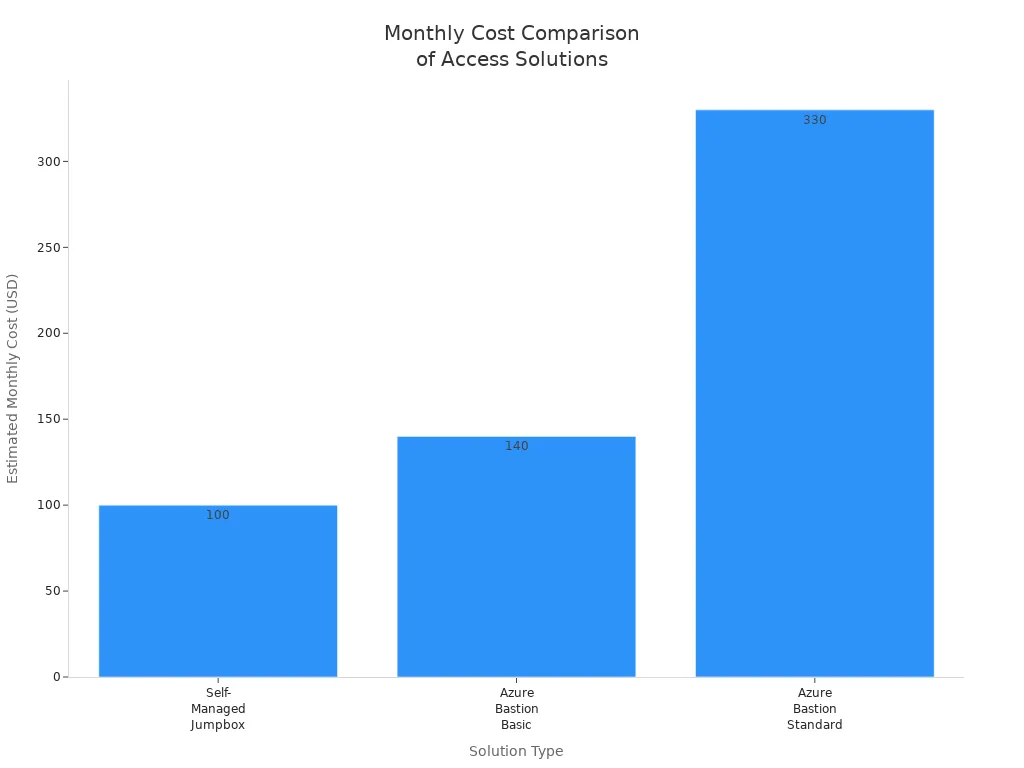
Here’s a quick comparison of costs between self-managed jumpboxes and Azure Bastion:
| Cost Factor | Self-Managed Jumpbox | Azure Bastion (Basic) | Azure Bastion (Standard) |
|---|---|---|---|
| Service Fee | None | ~$140/mo (per host) | ~$330/mo (per host, scalable) |
| Patching / Maintenance | Manual (IT staff hours) | None (fully managed) | None (fully managed) |
| Total Estimated Monthly | ~$35-100 + staff time | ~$140 | ~$330+ (scales with demand) |
This table illustrates how Azure Bastion can help you save significantly on infrastructure costs.
Lower Maintenance Expenses
Maintenance can drain your resources. Traditional VPNs require ongoing patching and updates, which often demand dedicated IT staff hours. Azure Bastion eliminates these concerns. It is a fully managed service, meaning you don’t have to worry about manual updates or security patches. This not only saves you time but also reduces your operational costs.
By choosing Azure Bastion, you can redirect your resources toward growth and innovation instead of maintenance. This shift allows you to invest in your core business activities while enjoying secure remote access.
4. Seamless Integration of Bastion
Compatibility with Azure Services
Integrating Microsoft Bastion with your existing Azure services is straightforward and efficient. You can enhance your remote access capabilities without disrupting your current setup. Here’s how you can get started:
- Sign in to the Azure portal and navigate to your VM or virtual network.
- Select Connect > Bastion in the left pane.
- Choose your deployment method:
- For default settings, select Deploy Bastion.
- For custom settings, select Configure manually and fill in the required instance details.
This simple process allows you to provision Azure Bastion quickly, ensuring you can access your resources securely.
Easy Setup Process
Setting up Azure Bastion is designed to be user-friendly. You don’t need extensive technical knowledge to get started. The Azure portal guides you through each step, making it easy to deploy the bastion host. This ease of use means you can focus on your core business activities rather than getting bogged down in complex configurations.
Additionally, Azure Bastion supports various Azure services, enhancing its functionality. However, it’s important to note that while Azure Bastion supports deployment for Virtual WAN, it does not operate within a Virtual WAN hub. Furthermore, it does not support connectivity to Azure Virtual Desktop. Understanding these limitations helps you plan your integration effectively.
Enhanced Functionality
Once you set up Azure Bastion, you unlock a range of enhanced functionalities. The bastion host provides secure and seamless access to your virtual machines without exposing them to the public internet. This feature significantly reduces your attack surface, allowing you to manage your resources with confidence.
Moreover, Azure Bastion integrates well with other Azure services, providing a cohesive experience. You can easily manage access and authentication, ensuring that only authorized users can connect to your VMs. This integration not only simplifies your workflow but also strengthens your security posture.
5. Improved User Experience with Azure Bastion Host
User-Friendly Interface
When you use Azure Bastion Host, you’ll notice its user-friendly interface right away. This intuitive design simplifies the process of accessing your Azure Virtual Machines securely. You can connect through the Azure Portal using HTTPS, which eliminates the need for complex configurations. As a result, you spend less time managing VMs and more time focusing on your core tasks. This streamlined approach directly enhances productivity for remote users.
Accessibility Features
Accessibility is a key consideration in today’s diverse work environment. Azure Bastion ensures that you can access your resources from anywhere, on any device. The browser-based interface means you don’t need to install additional software or configure VPNs. This flexibility allows you to connect to your virtual machines quickly and securely, whether you’re in the office or working remotely.
Moreover, Azure Bastion supports various accessibility features. You can easily navigate the interface, making it simple to find the resources you need. This ease of use is especially beneficial for team members who may not have extensive technical knowledge. Everyone can access the necessary tools without feeling overwhelmed.
Streamlined Access Process
Setting up Azure Bastion Host is straightforward. You can provision the bastion host in just a few clicks. The Azure portal guides you through each step, ensuring you don’t miss any critical configurations. This streamlined access process means you can get started quickly, allowing you to focus on your work rather than getting bogged down in technical details.
Once you’ve set up Azure Bastion, accessing your virtual machines becomes a breeze. You simply log into the Azure portal, select your VM, and connect through Bastion. This process minimizes delays and maximizes efficiency. You can also manage user authentication seamlessly, ensuring that only authorized personnel can access sensitive information.
6. Scalability of Microsoft Bastion
Adapting to Organizational Growth
As your organization grows, so do your remote access needs. Microsoft Bastion scales effortlessly to meet these demands. You can adjust resources based on your current requirements without compromising security or performance. This flexibility allows you to focus on your core business while Bastion handles the technical details.
Flexible Resource Allocation
With Azure Bastion, you can allocate resources dynamically. This means you can scale up during peak usage times and scale down when demand decreases. Such adaptability prevents over-provisioning, saving you money while ensuring optimal performance. Here are some key features that highlight Bastion's scalability:
- Scalability: Supports extensive VM environments efficiently while maintaining security.
- Dynamic Scaling: Adjusts capacity during peak usage and avoids over-provisioning during low-demand periods.
- Concurrent Connections: Each instance supports 20 concurrent RDP and 40 concurrent SSH connections for precise capacity planning.
This level of flexibility ensures that you can manage your resources effectively, regardless of how your organization evolves.
Support for Increasing User Base
As your team expands, Azure Bastion provides the support you need. You can easily accommodate more users without the hassle of complex configurations. The fully managed nature of Azure Bastion reduces infrastructure maintenance overhead, allowing your IT team to focus on more strategic initiatives.
- Azure Bastion allows seamless connection to multiple VMs, which is crucial for large-scale deployments.
- Administrators can deploy Bastion with minimal effort, enhancing productivity.
- You can manage user access efficiently, ensuring that only authorized personnel connect to your resources.
This capability not only streamlines your operations but also enhances security. You can onboard new users quickly and revoke access when necessary, maintaining tight control over your environment.
7. Compliance and Governance with Azure Bastion
Meeting Regulatory Standards
In today's regulatory environment, compliance is non-negotiable. Azure Bastion helps you meet various regulatory standards, ensuring your organization remains compliant while accessing resources securely. By using Azure Bastion, you can confidently navigate the complexities of compliance without sacrificing security.
Data Protection Standards
Azure Bastion adheres to strict data protection standards. This commitment ensures that your sensitive information remains secure during remote access. With Azure Bastion, you benefit from:
- Encryption: All data transmitted through Azure Bastion is encrypted using industry-standard protocols. This encryption protects your data from unauthorized access.
- Access Controls: You can implement role-based access controls (RBAC) to restrict who can access specific resources. This feature helps you maintain compliance with data protection regulations.
- Data Residency: Azure Bastion allows you to choose where your data resides. You can select specific Azure regions to ensure compliance with local data protection laws.
These features work together to create a secure environment for your data, allowing you to focus on your core business activities.
Audit and Reporting Capabilities
Azure Bastion provides robust audit and reporting capabilities. These features help you monitor access and maintain compliance with regulatory requirements. Key benefits include:
- Session Logging: Azure Bastion logs all user sessions, providing a detailed record of who accessed what resources and when. This logging is crucial for audits and compliance checks.
- Real-Time Monitoring: You can monitor user activity in real-time, allowing you to detect any suspicious behavior immediately. This proactive approach enhances your security posture.
- Compliance Reports: Azure Bastion generates compliance reports that summarize user activity and access patterns. These reports simplify the auditing process and help you demonstrate compliance to regulators.
By leveraging these audit and reporting capabilities, you can ensure that your organization meets its compliance obligations while maintaining a secure remote access environment.
8. Multi-Protocol Support of Bastion
Versatility for Diverse Use Cases
Microsoft Bastion stands out for its ability to support multiple protocols, making it a versatile solution for various remote access needs. Whether you require secure desktop access or command-line interface capabilities, Bastion has you covered. This flexibility allows you to adapt to different use cases without compromising security.
Support for RDP and SSH
With Azure Bastion, you can connect to your virtual machines using two primary protocols: RDP (Remote Desktop Protocol) and SSH (Secure Shell). This dual support means you can choose the best method for your specific tasks.
- RDP: Ideal for users who need a graphical interface to manage their Windows-based virtual machines. You can easily access your desktop environment and perform tasks as if you were sitting right in front of the machine.
- SSH: Perfect for developers and system administrators who prefer command-line access. SSH provides a secure way to manage Linux-based systems, allowing you to execute commands and scripts efficiently.
This multi-protocol support ensures that you can work in the way that suits you best, enhancing productivity and user satisfaction.
Application Access Options
In addition to RDP and SSH, Azure Bastion offers various application access options. This feature allows you to connect to applications hosted on your virtual machines without exposing them to the public internet. You can securely access web applications, databases, and other services through the Azure portal.
- Web Applications: Access your web apps securely without needing to configure complex VPNs or expose your applications to potential threats.
- Database Management: Connect to your databases directly from the Azure portal, ensuring that your data remains protected while you perform necessary operations.
By leveraging these application access options, you can streamline your workflows and maintain a high level of security. Azure Bastion's ability to support multiple protocols and application types makes it an essential tool for any organization looking to enhance its remote access capabilities.
9. Reduced Attack Surface with Azure Bastion
Minimizing Vulnerabilities
In today's digital landscape, minimizing vulnerabilities is crucial for maintaining security. Azure Bastion excels in this area by acting as a protective barrier. It centralizes access through a managed gateway, effectively closing RDP and SSH ports from public access. This approach significantly reduces the risk of unauthorized access and potential data breaches.
Limiting Exposure to Threats
Azure Bastion eliminates the need for public IP addresses, which are common attack vectors. By avoiding open ports, you protect your virtual machines (VMs) from external threats. Here are some key benefits of using Azure Bastion:
- Direct Connectivity: You can connect to your VMs through the Azure portal over SSL, which eliminates the need for public IP exposure.
- Network Security Group (NSG) Rules: These rules can block direct RDP/SSH access while allowing Bastion connections through port 443. This setup enhances your security posture.
- Reduced Security Incidents: Organizations using Bastion report a 60% reduction in security incidents related to remote access. This statistic highlights the effectiveness of Azure Bastion in minimizing vulnerabilities.
By centralizing access and removing public IPs, Azure Bastion simplifies security management. You no longer need to deal with complex VPN configurations or public IPs. Instead, you gain a straightforward solution that integrates directly into Azure, allowing for quick access to your VMs.
Enhanced Security Posture
With Azure Bastion, you enhance your overall security posture. The service provides secure browser-based access through the Azure portal, using HTTPS on port 443. This method ensures that your data remains protected during remote access. Additionally, Azure Bastion integrates with Azure Active Directory (Azure AD) for authentication, further strengthening your security measures.
Moreover, by automating and streamlining the connection process, Azure Bastion reduces the likelihood of human error and configuration mistakes. These errors often lead to security vulnerabilities in traditional setups. With Azure Bastion, you can focus on your core business activities while enjoying peace of mind knowing that your remote access is secure.
10. Continuous Updates and Support for Microsoft Bastion
Commitment to Security
When you choose Microsoft Bastion, you gain access to a service that prioritizes security through continuous updates and support. Microsoft understands the importance of keeping your remote access secure. They commit to enhancing Azure Bastion regularly, ensuring you always have the latest features and security measures at your disposal.
Regular Feature Enhancements
Microsoft Bastion benefits from ongoing feature enhancements that keep it at the forefront of security technology. Here are some key aspects of these enhancements:
- Microsoft emphasizes continuous monitoring and compliance for Azure Bastion resources through Azure Policy. This ensures that security configurations are consistently audited and enforced.
- Built-in TLS encryption protects data in transit, showcasing Microsoft's dedication to data protection.
- Session management capabilities allow you to monitor active sessions and implement session disconnection, maintaining control over user access.
These enhancements not only improve your experience but also strengthen the overall security of your virtual machines.
Ongoing Technical Support
With Azure Bastion, you also receive ongoing technical support. Microsoft provides resources to help you troubleshoot issues and optimize your use of the service. Their support includes:
- Comprehensive documentation that guides you through setup and management.
- Access to community forums where you can connect with other users and share insights.
- Direct support channels for urgent issues, ensuring you can resolve problems quickly.
This level of support means you can focus on your business without worrying about remote access challenges. Microsoft’s commitment to your success is evident in their proactive approach to updates and support.
In summary, Microsoft Bastion offers a comprehensive solution for secure remote access. Its key benefits include:
| Benefit | Description |
|---|---|
| Enhanced Security | Eliminates the need for public IP addresses and uses private, encrypted connections. |
| Ease of Management | Provides direct access to VMs through the Azure portal without compromising security. |
| Cost-Effectiveness | Helps organizations maintain robust security standards while improving operational efficiency. |
By choosing Azure Bastion, you can protect your virtual machines while simplifying management and reducing costs. Don't wait—consider Microsoft Bastion today to enhance your secure remote access strategy.
FAQ
What is Microsoft Bastion?
Microsoft Bastion is a fully managed service that provides secure and seamless remote access to your Azure virtual machines without exposing them to the public internet.
How does Azure Bastion enhance security?
Azure Bastion eliminates the need for public IP addresses, reducing your attack surface. It uses encrypted connections over TLS, ensuring secure access to your virtual machines.
Can I use Azure Bastion for both RDP and SSH?
Yes! Azure Bastion supports both RDP (Remote Desktop Protocol) and SSH (Secure Shell), allowing you to connect to Windows and Linux virtual machines securely.
Is Azure Bastion easy to set up?
Absolutely! Setting up Azure Bastion is straightforward. You can deploy it directly from the Azure portal with just a few clicks, making it user-friendly.
What are the cost implications of using Azure Bastion?
Azure Bastion offers cost savings compared to traditional VPN solutions. You avoid infrastructure costs and maintenance expenses, making it a budget-friendly option for secure remote access.
Does Azure Bastion support compliance requirements?
Yes, Azure Bastion helps you meet various compliance standards. It provides features like session logging and role-based access controls to ensure your organization remains compliant.
How does Azure Bastion improve user experience?
Azure Bastion offers a user-friendly interface that allows easy access to virtual machines through the Azure portal. This simplicity enhances productivity for remote users.
What kind of support does Microsoft provide for Azure Bastion?
Microsoft offers ongoing technical support for Azure Bastion, including comprehensive documentation, community forums, and direct support channels for urgent issues.
deploy bastion on virtual machine and sku considerations
What is Microsoft Bastion and how does it secure connections to my virtual machine?
Microsoft Bastion is a fully managed bastion service that provides secure and seamless RDP/SSH connectivity to Azure VMs directly in the Azure portal without exposing public IP addresses on individual VMs. Bastion provides an integrated platform deployed at the perimeter of your virtual network so you can use Azure Bastion to connect to Windows VM using SSH or RDP via Azure Bastion while benefiting from security updates and an agentless architecture.
How do I deploy Bastion hosts and what are the common bastion deployment steps?
You deploy Bastion by creating an Azure Bastion resource in the same virtual network as your target VMs or in a hub network for peered virtual network access. The typical Bastion deployment includes creating or selecting an azure virtual network, assigning a public IP address (or SKU-specific public ip), configuring subnet (AzureBastionSubnet), and completing bastion configuration settings directly through the Azure portal.
Do I need a public IP or public ip address for Azure Bastion?
Yes, Azure Bastion requires a public IP address for the Bastion resource so clients can reach the bastion service. Depending on your azure bastion pricing tier and sku, you may assign a Standard SKU public IP. For private-only designs you can pair Bastion with Azure Private DNS zones and peered virtual network setups to minimize exposure.
How does Microsoft Entra ID authentication work with Azure Bastion?
Azure Bastion integrates with Microsoft Entra ID authentication to enable secure role-based access and single sign-on scenarios. When using microsoft entra id authentication, administrators can enforce conditional access and MFA for RDP/SSH sessions via Bastion, enhancing security without requiring additional agents on the target Azure VM.
Can I use Azure Bastion with a peered virtual network or local or peered virtual network?
Yes, Bastion supports connections to VMs in peered virtual network topologies when properly configured. Bastion can connect to resources in a peered virtual network if the necessary network peering, routing, and permissions are in place, allowing you to centralize bastion hosts to serve multiple virtual networks.
How does Azure Bastion pricing and sku affect my deployment and costs?
Azure Bastion pricing depends on the selected sku and usage model; some SKUs include fixed hourly costs plus data transfer and session charges. Choosing the right sku and scaling strategy can make bastion more cost-effective than running jump VMs. Review azure bastion pricing and bastion developer guidance on Microsoft Learn to align cost with expected connection volume.
Is Azure Bastion agentless and what are the security benefits compared to jump servers?
Azure Bastion is agentless, which means you do not install agents on your VMs to enable RDP/SSH access. This reduces maintenance overhead and attack surface, and because bastion provides secure, browser-based access (including support in Microsoft Edge Chromium), you avoid managing jump VMs and can apply centralized security updates and policies at the bastion resource.
Can I use Azure Bastion together with Azure Firewall and Azure Private DNS zones?
Yes, you can combine Bastion with Azure Firewall for layered perimeter protections and with azure private dns zones to resolve internal hostnames across virtual networks. A common design and architecture pattern is to use Azure Firewall for outbound control while using bastion with azure private dns zones to ensure internal name resolution for VM connections via azure bastion.
How do I access a VM using Bastion from Microsoft Edge or other browsers?
You can start a RDP/SSH session directly in the Azure portal using Microsoft Edge, Microsoft Edge Chromium, or other supported browsers. The bastion host lets you open a secure, browser-based session to the target VM via Azure Bastion without exposing RDP/SSH ports on the VM to the internet.
Where can I learn more and find FAQs or developer guidance about Azure Bastion?
For hands-on tutorials and developer guidance, see Microsoft Learn for step-by-step articles on how to create a bastion host, bastion using different skus, and deploy bastion hosts. The documentation includes frequently asked questions about Azure, bastion developer resources, and examples showing how to use keys in Azure Key Vault, configure bastion to connect to your azure virtual network, and optimize bastion deployment scenarios.

Founder of M365 Show, M365con.net & m365.fm
Mirko Peters is a Microsoft 365 expert, content creator, and founder of m365.fm, a platform dedicated to sharing practical insights on modern workplace technologies. His work focuses on Microsoft 365 governance, security, collaboration, and real-world implementation strategies.
Through his podcast and written content, Mirko provides hands-on guidance for IT professionals, architects, and business leaders navigating the complexities of Microsoft 365. He is known for translating complex topics into clear, actionable advice, often highlighting common mistakes and overlooked risks in real-world environments.
With a strong emphasis on community contribution and knowledge sharing, Mirko is actively building a platform that connects experts, shares experiences, and helps organizations get the most out of their Microsoft 365 investments.
Microsoft Entra External ID: Managing External Identities and Tenants