


 Apple Podcasts
 Spotify
 Youtube Music
 Spreaker
 Podchaser
 Amazon Music
Don’t build a Copilot—solve a job. Quick, generic copilots demo well but stall in real work because they lack role context and system access. A Copilot Studio agent earns its keep only when it’s built for a specific persona, high-value use cases, and grounded in your data + actions. Our test showed the “fast” option looked good in week 1 and was ignored by week 6; the scoped Studio agent took longer to shape but became the daily default because it answered with authority and could actually do things. The real unlock: a small, intentional scope you can expand—backed by governance, telemetry, and a phased rollout.






When comparing Copilot Agents vs Copilot, you’ll discover new possibilities for your business. Copilot Studio Agent stands out because it adapts to your organization’s specific roles and responsibilities, leveraging your own data to provide accurate answers. With Copilot Studio Agent, you benefit from tailored automation, increased user adoption, and noticeable improvements in productivity.
| KPI | Description |
|---|---|
| Hours saved per user per week | Measures the weekly time savings for each user |
| Reduction in task cycle time | Tracks how quickly tasks are completed |
| Error reduction rate | Monitors mistakes in both manual and AI-assisted work |
| Adoption metrics | Evaluates user count, questions per user, and retention |
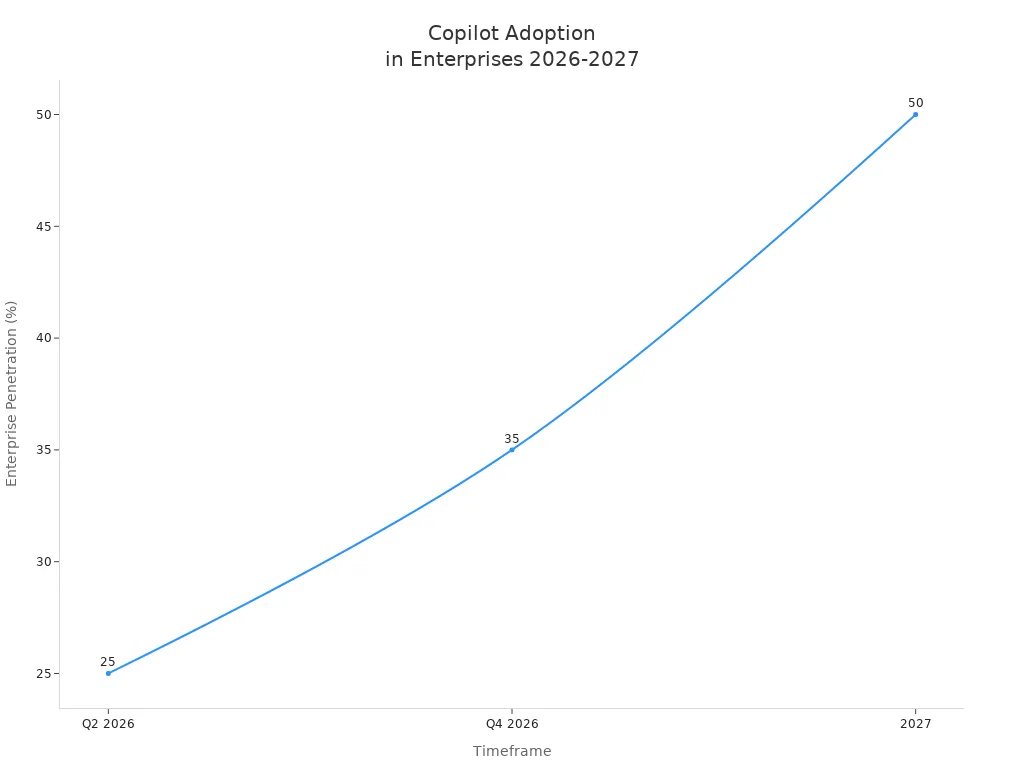
Understanding Copilot Agents vs Copilot is essential for selecting the right solution to drive your business forward.
Key Takeaways
- Copilot Studio Agent changes to fit your business needs. It lets you set up automation for certain jobs.
- Microsoft Copilot helps with daily tasks in Microsoft 365 apps. It is simple to use and does not need tech skills.
- Pick Copilot Studio Agent for hard workflows and automation.
- Microsoft Copilot is better for basic help. Both tools can work together to help you do more. They solve different business problems well.
- Look at what your team needs and wants. This helps you pick the best AI tool for your work.
Copilot Agents vs Copilot: 9 Surprising Facts
- Distinct product roles: Copilot refers to Microsoft's AI assistant integrated across apps, while Copilot Studio is a development environment for building, customizing, and managing Copilot Agents—specialized instances of Copilot for tasks or workflows.
- Customization depth: Copilot Studio allows deep task-specific customization (instructions, tools, connectors), whereas default Copilot offers general-purpose assistance without agent-level tailoring.
- Agent orchestration: Copilot Studio supports composing multiple Copilot Agents that coordinate on complex workflows; standalone Copilot typically runs single-session assistance within an app.
- Extendability with connectors: Copilot Studio enables connecting agents to custom data sources, APIs, and enterprise systems; Copilot alone relies on built-in integrations provided by Microsoft.
- Control and governance: Copilot Studio gives IT and developers governance controls (access, safety policies, versioning) for agents, which is stronger than the standard Copilot user settings.
- Behavior shaping: Copilot Studio exposes behavior controls (system prompts, tool usage, retry logic) so organizations can tune responses; Copilot’s behavior tuning is more centralized and less granular.
- Scaling for enterprise processes: Copilot Studio is designed to scale agent deployments across teams and automate business processes; Copilot focuses on personal or contextual productivity within apps.
- Observable metrics: Copilot Studio provides telemetry and analytics about agent performance and usage to iterate on designs; Copilot’s analytics are typically higher-level usage signals.
- Developer-first vs end-user-first: Copilot Studio is developer- and admin-centric (build, test, deploy agents) while Copilot is end-user-centric (immediate assistance in Microsoft 365 and other apps).
What Is Microsoft Copilot?
Microsoft Copilot is an AI helper that makes work easier. You can use Copilot in many Microsoft 365 apps. It understands what you say or type, just like talking to a friend. You can ask questions or give it commands in your own words.
Main Features
Microsoft Copilot has many features to help you get more done. Here is a table that explains what each feature does for you:
| Core Functionality | Description |
|---|---|
| Conversational Interface and Content Generation | You can talk to Copilot and it helps write emails, reports, and summaries. |
| Context-Aware Insights and Workflow Automation | Copilot uses your work data to give tips and can do tasks like billing and reporting for you. |
| Security, Compliance, and Privacy Controls | Your important data is protected with special controls and live checks. |
| Cross-App Contextual Assistance | Copilot helps you move smoothly between different apps. |
| Intelligent Data Analysis and Automated Meeting Recaps | Copilot looks at data in Excel and gives you meeting notes in Teams, saving you time. |
Copilot helps you write, organize, and look at information. It also keeps your data safe while you work.
Typical Users
Many people at work can use Microsoft Copilot. You might use it to write emails or make reports. You can also use it to keep track of your calendar. Here are some ways you can use Copilot:
- Write and sort emails fast.
- Make and change documents or slides.
- Get help with spreadsheets, like formulas and data.
- Set up meetings and manage your calendar.
- Plan projects and check off tasks.
- Look at data and make charts or graphs.
- Create and improve slideshows.
If you use Microsoft 365 apps like Outlook, Word, Excel, or Teams, Copilot can help you every day. You do not have to be a tech expert to use Copilot. Just ask for help, and Copilot will show you what to do.
What Is Copilot Studio Agent?

Copilot Studio Agent is an AI helper you can change for your business. You build it in Copilot Studio, so it fits your team’s jobs. This agent does more than answer questions. It learns about your company and helps you work better every day.
Key Capabilities
You can make agents for different jobs with Copilot Studio Agent. For example, you can make one for sales, IT, or finance. Each agent can follow special steps that match your company’s way of working. You do not have to use the same tool for everyone.
Here is a table to show how Copilot Studio Agent is different:
| Feature | Copilot Studio Agent | Microsoft Copilot |
|---|---|---|
| Role-Specific Agents | Yes, you can create tailored agents | No, only general assistant |
| Customization Capabilities | High, supports custom workflows and logic | Limited, cannot program new workflows |
| Pre-built Task-Specific Bots | Yes, includes specialized bots | No, only generic tools |
Copilot Studio Agent links to your business tools. It uses your company’s data to give answers that fit your real work. You get faster help because the agent knows your steps. You can also check how well your agent works with built-in reports. These reports help you see important numbers and measure time and money saved.
Personalization and Governance
You can set up Copilot Studio Agent for each job in your company. You pick clear roles and tasks, so the agent knows what to do. This makes your team trust the agent and use it more.
Governance is important for Copilot Studio Agent. You can watch what the agent does with tools like Purview Audit Logs and Application Insights. These tools help you see actions, follow rules, and set how long to keep data. If you work in a business with rules, you can ask your compliance team for help and set rules for data safety. You can also use dashboards to check your agent and make changes as your company grows.
Tip: Make a clear plan for jobs and rules first. This helps you get the best results from your Copilot Studio Agent.
Copilot Agents vs Copilot: Comparison

When you compare Copilot Agents and Copilot, you find two strong tools. Both help you work better, but they do different things. This section shows how they are not the same in features, customization, integration, and how you use them.
Features Overview
The table below shows the main differences between Copilot Agents and Copilot. It helps you see what each tool is good at.
| Feature | Microsoft Copilot | Copilot Agents |
|---|---|---|
| Role | AI-powered assistant | Specialized AI tools |
| Functionality | Provides support and insights | Handles specific processes |
| Interaction | Interface for user interaction | Operates independently or with Copilot |
| Adaptability | Offers contextual guidance | Adapts to new challenges |
| Examples | Microsoft 365 Copilot | Agents for sales, IT, finance, and more |
Microsoft Copilot is a helper for many apps. It gives advice, writes emails, and helps with meetings. Copilot Agents are made for special jobs. You can build one for sales, another for IT, and more. Each agent knows your company’s way of working and can do tasks from start to finish.
Note: Copilot Agents can work alone or with Copilot. This gives you more ways to fix business problems.
Customization and Integration
Customization is a big difference between Copilot Agents and Copilot. Microsoft Copilot is easy to use for daily work. You ask questions, and it helps or does tasks for you. You do not need to set up much.
Copilot Agents let you do more. You can build agents without coding, connect them to your company’s data, and set up special workflows. This means you can make an agent that fits your team’s needs. For example, you can create an agent for finance to approve invoices or one for IT to reset passwords.
Here are some ways Copilot Agents are special:
- You can build and test agents fast without code.
- Agents connect to your business data and automate tasks.
- You get tools to check how well your agents work.
- Users can give feedback with thumbs up or down, and you can see this feedback in reports.
- Agents can automate business processes, not just answer questions.
Microsoft Copilot is simple to set up and works well for general tasks. Copilot Agents give you more control and let you build solutions for your business.
Tip: If you want to automate hard workflows or connect to lots of data, Copilot Agents give you more choices.
Use Cases
When you compare Copilot Agents and Copilot, think about how you want to use them. Microsoft Copilot helps with everyday tasks. It can write emails, summarize meetings, and help you find documents. You use it in apps like Outlook, Teams, and Word.
Copilot Agents are best when you need to solve business problems that are special to your company. You can build agents for:
- Automating HR onboarding steps
- Managing IT support tickets
- Handling finance approvals
- Tracking sales leads
- Custom reporting and analytics
In big companies, Copilot Agents can help many users and handle hard workflows. You can set up rules, manage security, and make sure agents follow your company’s policies. This makes them a good choice for businesses that want to automate and control their work.
Here are some real examples:
- A sales team uses Copilot Agents to track leads and send follow-up emails automatically.
- An IT department builds an agent to reset passwords and answer common tech questions.
- A finance team creates an agent to review and approve invoices, saving hours each week.
Remember: Copilot Agents and Copilot are not just about features. You need to pick the right tool for your business goals. Copilot helps everyone work better. Copilot Agents help you solve special problems and automate your own workflows.
Choosing the Right Solution
Decision Factors
When you choose between Copilot Studio Agent and Microsoft Copilot, you need to look at what your business needs most. Here are some important things to think about:
- Type of Agent Needed: Decide if you want an agent that works inside Microsoft 365 apps or one that runs on its own.
- Skill Level of Your Team: Think about how much your team knows about technology. Copilot Studio Agent lets you build custom solutions, even if you do not code. If your team has more experience, you can use advanced features.
- Level of Control: Ask yourself how much control you want over what the agent does. Copilot Studio Agent gives you more options to change workflows and connect to your data.
- Internal vs. Custom Agents: Figure out if you need the agent for your own team or for customers.
- Start Small, Grow Later: You can begin with Copilot Studio Agent to test your ideas. If your needs grow, you can move to more advanced tools.
Many businesses use decision frameworks to help them pick the right AI tool. Here is a table with some popular models:
| Framework Name | Description |
|---|---|
| Microsoft’s AI Maturity Model | Shows how your use of AI grows from simple help to full automation. |
| PwC’s AI Augmentation Spectrum | Explains how people and AI work together, from advisor to decision-maker. |
| Gartner’s Autonomous Systems Framework | Sorts tasks by how much AI does on its own, from manual to fully automatic. |
| MIT’s Human-in-the-Loop AI Model | Makes sure people can guide or override AI when needed. |
Tip: Use these frameworks to match your business goals with the right AI solution.
Practical Scenarios
You can see the difference between Copilot Studio Agent and Microsoft Copilot in real jobs. Here are some examples:
- Sales Teams: Copilot Studio Agent can answer RFPs, saving up to 80% of the time spent on manual work. Your team can focus on selling instead of paperwork.
- IT Support: An agent can answer common tech questions and create support tickets. This helps your IT team work faster and keeps employees happy.
- Finance Departments: The agent can watch for errors in transactions and help with monthly reports. This means fewer surprises at the end of the month.
- Operations: Copilot Studio Agent can keep documents up to date and help new team members learn faster.
Microsoft Copilot also brings big results. For example, Vodafone employees saved three hours each week. Newman’s Own marketing team tripled their campaigns and saved 70 hours every month. These stories show how both solutions can boost productivity.
Note: Think about your team’s needs and how much you want to customize your AI. The right choice will help you save time, reduce errors, and reach your business goals.
You can see that Copilot Studio Agent and Microsoft Copilot have different uses. The table below shows how they are not the same:
| Feature | Copilot | Agents |
|---|---|---|
| Purpose | Personal productivity | Process automation |
| Scope | Individual user | Organization-wide |
| Interaction | 1 Employee : 1 Copilot | 1 Employee : Many Agents |
| Example | Summarize emails, draft documents | Auto-close support tickets, update CRM |
Knowing these differences helps you pick the right tool for your business. If you choose the tool that matches your needs, your team can get more done and not waste time. Look at your goals and pick the choice that works best for your team.
Checklist: Microsoft Copilot Studio vs Copilot (copilot agents vs copilot)
- Purpose: Copilot Studio is a development and customization platform for building copilots/agents; Copilot is the end-user assistant for productivity and AI tasks.
- Primary Users: Copilot Studio = developers, solution builders; Copilot = business users and everyday end users.
- Agent Support: Copilot Studio enables creation and orchestration of copilot agents; Copilot provides prebuilt assistant capabilities and configured experiences.
- Customization: Copilot Studio offers deep customization of behaviors, prompts, and workflows; Copilot offers limited user-level settings and integrations.
- Integration Options: Copilot Studio supports connecting to custom data sources, APIs, and enterprise systems; Copilot integrates with Microsoft 365 apps and selected third-party connectors.
- Development Tools: Copilot Studio includes tooling for designing, testing, and deploying agents; Copilot is consumed via apps and extensions without development tools.
- Deployment & Management: Copilot Studio provides lifecycle, versioning, and governance controls for copilots/agents; Copilot is managed centrally by Microsoft and tenant admins for access.
- Security & Compliance: Validate data access, identity, and compliance controls in Copilot Studio when creating agents; Copilot follows Microsoft 365 security standards for end-user interactions.
- Data Handling: Copilot Studio lets you define how agents use enterprise data and connectors; Copilot uses data per Microsoft policies and tenant configuration.
- Scenarios & Use Cases: Use Copilot Studio for specialized agent workflows (customer support bots, domain-specific assistants); Use Copilot for general productivity help (summaries, drafts, insights).
- Training & Fine-Tuning: Copilot Studio supports training/grounding agents with domain content and prompts; Copilot relies on Microsoft’s underlying models and configured knowledge sources.
- Cost & Licensing: Assess separate licensing for Copilot Studio development features and Copilot end-user licenses; check Microsoft pricing for agent deployments vs user seats.
- Monitoring & Analytics: Copilot Studio provides logs and analytics for agent performance and usage; Copilot offers telemetry and admin reports within Microsoft 365 admin center.
- Governance & Approval: Establish review and approval processes in Copilot Studio for agent release; apply tenant-level policies for Copilot usage.
- When to Choose Which: Choose Copilot Studio when you need custom copilot agents or enterprise integrations; choose Copilot when you need immediate, integrated productivity assistance for users.
FAQ: microsoft 365 copilot vs copilot agents: understanding ai agent roles
What’s the difference between Copilot and Copilot Agents?
The core difference is purpose and autonomy: Microsoft 365 Copilot (m365 copilot) is an AI copilots feature embedded in the Microsoft 365 ecosystem to assist users within apps like Word, Excel, and Teams, while copilot agents or agentic AI are autonomous or semi-autonomous ai agents designed to perform multi-step tasks, orchestrate multiple tools, and act on behalf of users across services. Copilot focuses on contextual assistance and content generation, and agents provide more agentic workflows and automation.
How do AI agents work compared to Microsoft Copilot?
AI agents work by combining prompts, connectors (like Microsoft Graph), and task logic to execute sequences of actions. Microsoft Copilot provides ai assistance inside apps and can generate content, analyze data, and summarize conversations, whereas agents are built to operate across systems, call APIs, and coordinate multiple steps autonomously. Agents can integrate with m365 services to extend copilot capabilities.
Can I use Copilot for M365 and also deploy custom AI agents?
Yes. Organizations can use Microsoft 365 Copilot for day-to-day productivity while creating custom ai agents (agent builder or declarative agent) for specialized workflows. Custom ai can integrate with the microsoft 365 ecosystem and Microsoft Graph to access files, calendars, and mail while agents optimize and automate multi-step processes that copilot alone may not handle.
What is a declarative agent and how does it relate to Copilot Studio?
A declarative agent is defined by high-level instructions or rules rather than procedural code; it’s often easier to build and maintain. Copilot Studio (vs copilot agents and agents vs copilot studio) provides tools to create, test, and manage copilots and agents. Declarative agent approaches can be supported by agent builders within Copilot Studio or other platforms, enabling faster creation of agentic behaviors that complement Microsoft Copilot features.
Do I need a special Copilot license to use Microsoft 365 Copilot or agents?
Microsoft 365 Copilot typically requires a microsoft 365 copilot license or an add-on license on top of a microsoft 365 subscription. Agents built by your team might leverage existing m365 subscriptions and connectors but may also require separate licensing depending on APIs, hosting, or premium features. Check Microsoft licensing FAQs for exact copilot license and microsoft 365 copilot license requirements.
How does Microsoft Graph factor into agents and Copilot for M365?
Microsoft Graph is the primary API for accessing Microsoft 365 data. Copilot for Microsoft 365 uses Graph to retrieve context and user data for ai copilots, and agents can use Graph to read and write files, calendar events, and emails. Proper permissions via Microsoft Entra (identity) are required to ensure secure access when agents operate across the Microsoft 365 ecosystem.
Are agents autonomous and can they act without user input?
Agents can be autonomous to varying degrees: some autonomous agents execute scheduled or triggered workflows, while others require human approval. Agentic ai is designed to take initiative within defined boundaries, but deploying autonomous agents should consider governance, compliance, and limitations inside enterprise environments such as microsoft 365.
What are common limitations when comparing agents vs Copilot?
Limitations include data privacy and permissions, accuracy of generated content, and the scope of agent actions. Copilot excels at in-context generation but may be limited in automation; agents offer broader automation but need orchestration, error handling, and monitoring. Both depend on the quality of prompts, connectors (like Microsoft Graph), and correct setup of Microsoft Entra and security controls.
Can multiple agents work together and how do they integrate with M365?
Yes, multiple agents can operate together to handle complex workflows, handing off tasks between specialized agents or invoking Microsoft 365 Copilot functions. Agents can integrate with m365 services through APIs, connectors, and event triggers, enabling agents to coordinate tasks across mail, Teams, SharePoint, and other Microsoft 365 apps.
How do I create custom AI or an agent builder for my organization?
Create custom ai by defining goals, data access patterns, and required actions, then use an agent builder or copilot declarative tools to assemble prompts, connectors, and logic. Copilot Studio and other agent builders help you design agentic behaviors, test flows, and deploy agents that leverage the Microsoft 365 ecosystem and GitHub Copilot for developer productivity.
What is the role of Microsoft Entra in deploying Copilot and agents?
Microsoft Entra manages identities and access, ensuring that copilots and agents have the correct permissions to interact with Microsoft Graph and other resources. Proper Entra configuration is essential for secure deploying copilot features, granting least-privilege access to agents, and protecting sensitive organizational data.
How does GitHub Copilot differ from Microsoft 365 Copilot and agents?
GitHub Copilot is an ai copilots coding assistant designed to help developers write code inside IDEs, while Microsoft 365 Copilot assists with content and productivity inside M365 apps. Agents are broader, often combining coding, automation, and business logic to perform tasks across systems. You can use GitHub Copilot to help build agents or integrations.
What are best practices for deploying Copilot and agentic AI in enterprise?
Best practices include defining clear use cases, implementing robust access controls with Microsoft Entra, monitoring agent actions, auditing data access via Microsoft Graph, starting with limited pilots, and educating users on limitations and issue reporting. Governance ensures agents and copilots provide safe, useful ai assistance across the microsoft 365 ecosystem.
How can agents optimize workflows that Copilot can’t handle?
Agents can run multi-step automations, call external APIs, and manage branching logic to complete end-to-end tasks such as order processing or cross-team coordination. While copilot can generate and summarize content, agents are designed to execute, integrate, and continuously operate to optimize repetitive or complex workflows.
What kinds of issues should I expect when integrating agents with Microsoft 365 Copilot?
Common issues include permission mismatches, rate limits on Microsoft Graph, data residency and compliance concerns, unexpected AI outputs, and integration bugs. Planning for error handling, human oversight, and regular updates can reduce the impact of these issues.
🚀 Want to be part of m365.fm?
Then stop just listening… and start showing up.
👉 Connect with me on LinkedIn and let’s make something happen:
- 🎙️ Be a podcast guest and share your story
- 🎧 Host your own episode (yes, seriously)
- 💡 Pitch topics the community actually wants to hear
- 🌍 Build your personal brand in the Microsoft 365 space
This isn’t just a podcast — it’s a platform for people who take action.
🔥 Most people wait. The best ones don’t.
👉 Connect with me on LinkedIn and send me a message:
"I want in"
Let’s build something awesome 👊
Do you really need your own Copilot Studio Agent—or is that just the AI hype talking? This is the decision almost every business runs into right now. Start too fast with the wrong Copilot, and you waste months. Start too slow, and you fall behind competitors already automating smarter. In this session, I’ll walk you through exactly how we tested that question inside a real project, and the surprising twist we found when we compared a quick generic solution with a dedicated Copilot Studio build.
The False Promise of a Quick Fix
What if the fastest way to add AI is also the fastest way to get stuck? That’s the trap many organizations fall into when they reach for the first Copilot that’s marketed to them. On paper, it feels efficient. There’s a polished demo, a clear pitch, and the promise that you can drop AI into your workflows without having to think too hard about design. But speed isn’t always the advantage it looks like. The problem is that these quick implementations rarely uncover the deeper needs of the business, so what starts as a promising shortcut often ends as a dead end. Think about how most teams start. Someone sees a Copilot for email summarization or for document search, and it looks amazing in isolation. Decision makers don’t always stop to ask whether it fits the daily work of their employees, or whether it connects to the systems holding their critical data. Instead of mapping real tasks, they grab what’s already packaged. In the following weeks, the AI gets some attention, maybe even excitement, but then adoption stalls. People realize it’s not actually helping with the issues that drain hours every week. You can see this clearly with sales teams. Imagine a group that spends most of its time chasing leads, preparing quotes, and responding to client questions. If leadership gives them a generic Copilot designed to rephrase emails or summarize meeting notes, it can spark some “wow moments” in a demo. But when the team starts asking it for pricing exceptions, or whether a client falls under a certain compliance requirement, the Copilot suddenly looks shallow. It hasn’t been connected to pricing tables, CRM data, or specific sales playbooks. Without that grounding, answers may sound smooth but remain useless in practice. This is where the natural limits of generic AI tools show up. Without domain-specific knowledge, they work like bright generalists: competent at surface-level communication but unable to provide depth when it matters. Users ask detailed questions, and the Copilot either guesses wrong or defaults to vague, unhelpful phrases. That’s when confidence erodes. Once employees stop trusting what the agent says, they quickly stop using it altogether. At that point, the entire rollout risks being labeled as another “AI toy” rather than a serious capability. The data on AI adoption backs this up. Studies tracking enterprise rollouts have shown that projects without personalization and role-specific tailoring have far lower usage six months after launch. It’s not because the technology itself suddenly stops working, but because the absence of context makes it irrelevant. Companies often confuse demonstration quality with real deployment value. A good demo is built around small, curated examples. Daily operations, in contrast, bring messier inputs and require structured background knowledge. When the Copilot can’t adapt, the mismatch becomes obvious. So why do businesses keep making this mistake? Part of it is hype. AI is marketed as a plug-and-play capability, something you can switch on the same way you activate a new license in Microsoft 365. Leaders under pressure to “show progress in AI” often prioritize quick visibility over sustainable impact. They deploy something fast, point to it in presentations, and check the box. But hype-driven speed does not equal measurable results. The employees who actually have to use the tool feel that gap instantly, even if dashboards report “successful deployment.” This difference between speed and progress creates the real fork in the road: faster doesn’t always mean further. Yes, you can have an agent functioning tomorrow if the bar is just appearing inside Teams or Outlook. But whether that agent becomes indispensable depends entirely on whether it was tailored to actual roles and workflows. Efficiency doesn’t come from hitting “enabled.” It comes from asking the harder question right at the beginning: do we need a Copilot Studio agent that reflects our processes, our language, and our data? That’s the pivot point where projects either stall or scale. Teams that stop to ask it can design agents that employees genuinely want to use, because they recognize immediate relevance. Teams that skip it keep adding tools that look familiar but fail to deliver. The irony is that the slower, more deliberate start often ends up being the faster route to adoption because it prevents wasted cycles on solutions that don’t fit. The next step is figuring out how to ask that harder question in a structured way. And the starting point for that is not technology at all, but people. We need to decide: who exactly is this agent for?
Personas: Who Is the Agent Really For?
It’s easy to fall into the trap of designing something “for everyone.” It feels inclusive, maybe even efficient, but what it usually produces is so watered down that nobody gets real value out of it. In AI projects, that catch-all mindset almost guarantees disappointment. The first real question you need to answer is this: who exactly is the agent meant to help? Without knowing that, you’re not building a Copilot—you’re just building a bot that can hold small talk. Defining personas isn’t a fluffy exercise. It’s the foundation that makes the rest of the project possible. When you hear “persona,” it’s not about marketing profiles or fictional characters with hobbies and favorite drinks. In this context, a persona is about identifying the role, responsibilities, and environment of the person your agent serves. It shapes what the agent needs to know, how it answers questions, and even the tone it should use. A “generic employee” doesn’t help your AI figure out whether it needs to be pulling real-time compliance data or giving step-by-step fix instructions. That vagueness is why so many early projects ended up with agents that could say “hello” in five different ways but couldn’t resolve the actual problem users came for. Here’s the difference it makes in practice. If you picture “the employee” as your persona, you might decide the agent should help with HR policies, IT support, and document queries all in one. The agent then has to spread itself thin across multiple domains while not excelling at any of them. Compare that with defining a persona like “a field engineer who needs compliance answers instantly at customer sites.” Immediately, the design changes. You know this person is often mobile, has limited time, and needs crisp, authoritative guidance. That persona leads you to connect the Copilot to compliance databases, phrase answers in unambiguous ways, and prioritize speed of delivery over long-winded explanations. You can see how one is vague and unfocused, while the other is precise enough to guide the actual build. The real-world difference becomes even clearer when you look at contrasting roles. Take an IT helpdesk agent persona. This group needs quick troubleshooting steps, system outage updates, and the ability to escalate service tickets. The language is technical, the data likely comes from tools like ServiceNow or Intune, and the users expect accurate instructions they can follow under pressure. Now compare that to a finance analyst persona. This user is more concerned with accessing financial models, understanding compliance around expense approvals, or generating reports. They work with numbers, approval chains, and financial terminology, and they need to trust that the Copilot won’t expose sensitive data to the wrong audience. Design for “the employee,” and you miss both completely. Design for each specific persona, and the agent becomes not just useful but trustworthy. Another overlooked benefit of defining personas is alignment inside the organization. When you put a clear persona on the table, teams from HR, IT, compliance, or operations can quickly agree on what the scope actually is. Instead of endless debates about what the Copilot “could do,” everyone now has a reference point for what it *should do*. It turns into a compass for decision-making. If you’re debating whether to add a feature, you can check against the persona: does this help the field engineer get compliance answers faster? If yes, great. If no, then it probably doesn’t belong in the first version. That kind of discipline keeps the project from ballooning into an unfocused wishlist. Personas also go beyond guiding scope. They drive knowledge requirements. For every persona, you have to ask: What information do they need on a daily basis? Where does that information currently live? How fast does it change? That analysis determines how you integrate knowledge sources into the Copilot and how you keep it updated. If you ignore personas, you’ll either overload the agent with irrelevant data or, worse, starve it of the content it actually needs. Either way, trust from end users erodes—and once trust is gone, adoption doesn’t recover easily. A well-defined persona is not about limiting possibility. It’s about direction. Without it, AI projects wander, chasing every cool feature until they collapse under their own ambition. With it, you have a steady guide. The persona becomes the compass, keeping the project on course, making sure that the Copilot is being built for real people with real tasks, not for some abstract idea of “the employee.” And that is the difference between an agent that gets ignored after launch versus one that people actively rely on. With personas in place, the picture finally becomes sharper. You know who you’re building for. The next natural question is: what exactly should we help them do?
Use Cases that Actually Matter
Not every task deserves a Copilot, even if it technically can have one. This is where many organizations get carried away. Once the brainstorming starts, it feels like every small frustration could become an AI feature. Someone proposes, “What if it could remind us to submit our timesheets?” Another adds, “Maybe it could draft thank-you notes after customer meetings.” Before long, the list is so long that nobody remembers what problem they were actually trying to solve. The danger isn’t having too many ideas—it’s trying to make one agent responsible for all of them. At that point, the Copilot stops feeling like a specialist and becomes more like an overwhelmed intern. The reality is that brainstorming sessions almost always generate dozens of possible directions. Finance asks for reporting help. HR imagines onboarding flows. Sales wants automated pitch decks. IT dreams of faster ticket triage. On their own, none of these are bad. But the question isn’t “can AI do this,” it’s “does it matter if AI does this?” That small shift exposes how many ideas sound clever but offer almost no return once implemented. Just because you *can* automate minor questions doesn’t mean it’s worth the effort of building, training, and maintaining that automation. If you’ve ever looked at the outcome of over-scoped projects, the pattern is predictable. The agent ends up loaded with dozens of disconnected tasks, doing each one at a mediocre level. Take something simple like answering whether a meeting room has a projector. Sure, a Copilot can handle this kind of FAQ with ease. But the impact is minimal. Compare that to an agent that validates if a sales proposal meets strict regulatory criteria before it ever gets sent. One saves a bit of annoyance. The other prevents legal risks and accelerates revenue. The contrast shows why prioritization matters. A useful way to cut through the noise is to apply three criteria at the start: value, frequency, and feasibility. Value means asking how much the task really helps the business when automated. Frequency looks at how often it occurs—solving a small pain point that happens 50 times every day may outweigh a bigger challenge that only happens once a quarter. Feasibility keeps the first two honest—if the required data doesn’t exist in digital form or can’t be securely accessed, then it’s not a good candidate for phase one. When teams score every use case through that lens, the overloaded wishlists suddenly shrink into a focused plan. There’s also evidence that smaller pilots with narrow scopes perform better. Organizations that commit to just two or three use cases at the beginning tend to grow adoption internally at a faster pace. It plays out like this: the Copilot launches with clear value in one or two areas, employees gain confidence, and momentum builds. Compare that to agents that tried to cover ten different scenarios at once. Those projects often collapsed under the weight of inconsistent quality and frustrated feedback. It turns out that a narrower start creates a stronger foundation to expand later. Consider two fictional teams as an example. The first decided to design a Copilot that supported HR, IT, finance, and customer service all in one. They spent months mapping data sources, building convoluted workflows, and promising that it would be a one-stop solution for the entire organization. When launch day came, early users discovered it couldn’t handle any of the departments’ needs properly. Most dropped it within weeks. The second team, by contrast, focused only on helping field engineers confirm compliance rules before installations. They launched in a fraction of the time, adoption was immediate, and the engineers started asking for new scenarios based on their positive experience. Same technology, very different results. So the struggle isn’t to find enough use cases—it’s to resist trying to cover all of them at once. The question that matters is: which scenarios are worth betting on? Which ones, if automated, would turn into an everyday tool people actually trust? That’s how you separate the noise from the signal. Those chosen use cases tend to be the ones where employees feel a visible improvement in how they work, not just how many steps are automated. They make tasks less frustrating and more reliable. The takeaway here is that the best use cases don’t just automate work; they actually change how work feels to the end user. When someone can finally say, “this Copilot just made my job less stressful,” you’ve found the right fit. Now that we know who we’re designing for and what they really need, the next step is figuring out which skills and knowledge we have to teach the agent so it can actually deliver.
Teaching the Agent Skills and Knowledge
An agent isn’t smart until you teach it what your team already knows. That’s the part many projects underestimate. Installing a Copilot out of the box may get you something that looks functional, but if it hasn’t been trained with the same knowledge your employees rely on, it won’t get far. At best, it fills in surface-level gaps with polished but vague answers. At worst, it gives users unreliable guidance and undercuts trust completely. What makes the difference is knowledge grounding—feeding the agent with the right data and connecting it to the workflows where real work actually happens. Think about the contrast. A Copilot with no context can tell you how to write a professional email because it’s seen millions of examples. But if someone asks about the specific terms of your company’s refund policy or what counts as capital expenditure in your finance system, the same Copilot suddenly looks empty. It may string together something that sounds reasonable, but being “reasonable” isn’t enough when the wrong wording creates delays, compliance issues, or lost revenue. Now picture an agent that has been connected directly to your company’s approved knowledge bases, documented processes, and up-to-date systems. It doesn’t just respond with generics. It can pull precise rules from your contracts folder, cite the right section of your compliance handbook, or route the request through an internal workflow. That’s when a Copilot moves from being a novelty to being a trustworthy colleague. In Copilot Studio, there are two major ways of tuning this intelligence—knowledge grounding and skills. Knowledge grounding is the part where you connect the Copilot to the sources your organization already depends on. This could be SharePoint libraries where policies live or internal wikis that staff consult every day. By bringing these into the agent’s environment, you give it the ability to retrieve and reuse content that matches your exact requirements rather than relying on vague language models guessing their way through. Skills are what make the Copilot active instead of just informative. They’re the connectors to APIs, workflows, and applications that let the agent take action rather than simply talk. For example, linking to ServiceNow ticketing allows an IT support persona to raise, update, or close tickets directly. Instead of rewriting policy excerpts, the Copilot can guide the user through the steps while actually completing the task in the background. This combination of knowledge grounding and integrated skills separates a chatbot from a real assistant. A chatbot recites; an agent acts. The risks of skipping this step show up quickly. If a Copilot gives even a single high‑stakes answer that turns out wrong, users remember. That memory lingers far longer than any good experience, especially in tightly regulated industries. It takes only one mistaken assurance about compliance or one inaccurate financial statement to damage the trust an entire team has in the tool. Rebuilding adoption after that kind of setback is far harder than investing in proper data integration up front. Even when the groundwork is solid, the challenge isn’t over. Business rules change, workflows evolve, and policies update. That means training an agent isn’t a one‑time task. It’s an iterative process that requires tuning over time. A new compliance framework may require re‑grounding. A system migration might mean updating skills. Even changes in language—like how teams talk about products or processes—can throw off performance if ignored. This continuous refinement loop is what separates teams who see growing value from those whose Copilot fades into irrelevance after launch. The reward for sticking with it is that your Copilot starts to work in real time with the same depth your experts bring to their roles. An HR Copilot can provide policy details without needing to loop in HR staff for every small question. A finance Copilot can walk an analyst through approval chains while pulling the right numbers from current systems. These aren’t just efficiency wins; they change how people feel about using the tool. Instead of being one more system to wrestle with, it becomes the fastest path to reliable answers and completed tasks. This is why the line between a chatbot and a Copilot matters. A chatbot holds conversations; a Copilot takes context, combines it with actions, and turns it into support that people trust. The strongest agents are the ones that mirror what your team already knows and can act on that knowledge immediately. And once the design and training are in place, the final challenge becomes how you manage the rollout itself—because a technically solid Copilot can still fail if it never makes it through adoption.
Avoiding Pitfalls on the Road to Go-Live
The most common way Copilot projects fail isn’t in development—it’s in rollout. Teams often spend weeks fine-tuning personas, building use cases, and wiring in data sources, only to watch the whole initiative stall once it’s time to actually hand the agent to employees. That’s not because the tech doesn’t work, but because the human side of the rollout often gets neglected. Governance isn’t defined, expectations aren’t managed, or adoption plans are an afterthought. What starts with energy at the kick-off often fizzles before real results appear. If you’ve ever seen the excitement of a project launch meeting, you know the feeling. A roadmap is on the wall, milestones are agreed, and everyone is eager for the first demo. The first workflow gets implemented, the Copilot answers test queries, and everything looks promising. But between that demo and a true go-live, the ground shifts. Leaders ask for extra features mid-project, end users aren’t sure how or when to use the new tool, and project teams realize they never nailed down procedures for who reviews changes or approves training data. The gap between the build and the rollout is where momentum quietly dies. Think about an agent that worked perfectly during internal testing but stumbled on release. Employees opened it once or twice, didn’t understand what problems it solved, and walked away unimpressed. In some cases, the builder team focused so much on technical accuracy that they never prepared the communication plan. End users assumed the Copilot could answer everything about their role. Instead, when they asked the first unsupported question, the agent responded vaguely. That one moment was enough to erode trust. Adoption never recovered because the rollout wasn’t designed to handle user perception and feedback. Scope creep adds another layer of trouble. Let’s say a project originally targeted two high-value scenarios for finance analysts. Halfway through, requests start pouring in: can it also help HR onboard new employees, or maybe offer IT troubleshooting steps? Leadership wants to show impact across departments, so those requests get added. Now the project team is stretched thin, deadlines slip, and the initial high-value use cases end up delayed. By the time testing wraps, the Copilot tries to serve five directions at once and satisfies none of them. Rollout gets pushed back again, trust in the project wears thin, and the original promise never materializes. Avoiding that spiral requires structure. One proven method is phased rollouts. Instead of forcing the agent on the entire company at once, start with a small pilot group that represents the core persona. Collect their feedback, monitor the types of questions they ask, and measure adoption rates in a controlled environment. If issues appear, adjustments can be made quietly before scaling up. Alongside this, setting transparent measures of success helps keep enthusiasm grounded. If success is defined as “50 percent of tickets resolved without human help” or “compliance checks completed in under two minutes,” then everyone can see progress in clear terms instead of vague claims. Good AI projects also have champions—individuals who serve as internal translators between the tech team and the everyday user base. These champions help to set the right expectations, showing colleagues where the Copilot excels and where it doesn’t. Instead of promising that “AI will solve everything,” they explain what specific tasks it supports and why those were chosen as priorities. That kind of advocacy has more weight coming from peers than from IT announcements that pop up in a company newsletter. It builds credibility person by person, which scales adoption in a way no announcement alone achieves. Momentum after the first demo comes from managing this balance of ambition and reality. The agent shouldn’t be hidden in an innovation lab without visibility, but it also can’t be thrown to the whole workforce untested. Rollouts that succeed usually have patient sequencing—pilot, expand, then embed into daily workflow. The patience prevents failure, the sequencing builds confidence, and the visible wins give leaders something real to point to when reporting back. Projects collapse when they skip one of those elements, either rushing out too wide or staying too limited for too long. The truth is that agents don’t become superheroes overnight. They grow into their role through steady milestones, structured rollouts, and active guidance from inside the organization. A launch done with clarity and trust gives the Copilot a chance to evolve into an indispensable teammate instead of a novelty. But every step depends on the decision made long before rollout began: choosing wisely at the very first decision point.
Conclusion
The hardest decision in a Copilot project isn’t how to build it—it’s deciding if you actually need one. That first call shapes everything else. Too many teams race ahead because building feels like progress, only to discover the agent never fit a real need. The future of AI in business won’t be defined by who launches the most flashy agents, but by who puts the right ones into the right hands. Before starting an AI pilot, step back. Ask who it’s really for, what problems it should solve, and whether those cases matter enough to justify building an agent.
This is a public episode. If you'd like to discuss this with other subscribers or get access to bonus episodes, visit m365.show/subscribe

Founder of m365.fm, m365.show and m365con.net
Mirko Peters is a Microsoft 365 expert, content creator, and founder of m365.fm, a platform dedicated to sharing practical insights on modern workplace technologies. His work focuses on Microsoft 365 governance, security, collaboration, and real-world implementation strategies.
Through his podcast and written content, Mirko provides hands-on guidance for IT professionals, architects, and business leaders navigating the complexities of Microsoft 365. He is known for translating complex topics into clear, actionable advice, often highlighting common mistakes and overlooked risks in real-world environments.
With a strong emphasis on community contribution and knowledge sharing, Mirko is actively building a platform that connects experts, shares experiences, and helps organizations get the most out of their Microsoft 365 investments.