
 Apple Podcasts
 Spotify
 Youtube Music
 Spreaker
 Podchaser
 Amazon Music
 Connect Copilot Studio to Word Policy Files

Your first Copilot Studio agent shouldn’t guess policy—it should cite it. This episode shows how to recreate a bad reply in the Test pane, ground answers in real docs, shape a trustworthy persona, and publish a pilot that survives Teams/SharePoint quirks. Treat Studio as sparring, not proof; ground, persona-tune, and channel-test before you scale.
You probably know that AI-assisted development speeds up coding. In fact, over 90% of U.S.-based developers use AI tools like Copilot Studio, and 70% say they see big benefits. But relying too much on AI can hide serious risks.
Be careful—AI-generated code often looks perfect but can cause hidden traps. These traps lead to technical debt and performance problems if you don’t stay alert.
Here are some common risks developers face:
- AI boosts productivity by 20% to 55%, but quality sometimes falls behind speed.
- Many AI-generated codes have issues like over-specification and bugs that repeat.
- Without careful checks, you might miss governance and visibility problems in your projects.
Understanding these hidden traps helps you avoid costly mistakes and keeps your development smooth.
| Percentage | Description |
|---|---|
| 92% | U.S.-based developers using AI coding tools |
| 70% | Developers seeing significant benefits |
Key Takeaways
- AI tools like Copilot Studio boost coding speed but can introduce hidden bugs and security risks.
- Never trust AI-generated code blindly; always review and test it thoroughly before use.
- Combine your expertise with AI suggestions to catch errors and improve code quality.
- Use peer reviews and automated tools to find issues AI might miss in your code.
- Establish a strong validation process to prevent biased, harmful, or vulnerable AI outputs.
- Manage technical debt by regularly refactoring AI-generated code and maintaining clear documentation.
- Integrate AI carefully into your development workflow to keep projects reliable and secure.
- Stay proactive and critical when working with AI to build safe, maintainable software.
Trusting AI in Copilot Studio
The Illusion of Perfection
When you use Copilot Studio, it’s easy to fall into the trap of believing that AI-generated code is flawless. However, this perception can be misleading. Here are some common misconceptions developers have about the accuracy of AI-generated code:
- Developers often believe AI-generated code is perfect and ready for production, which is misleading as it may contain outdated practices.
- There is an underestimation of the necessity for thorough review and testing of AI-generated code.
- The assumption that automatic context loading always enhances accuracy can lead to confusion and security risks.
These misconceptions can lead to significant issues down the line. For instance, studies show that vulnerabilities exist in a substantial portion of AI-generated code. In fact, a recent analysis revealed that 39.33% of top suggestions contained vulnerabilities, while 40.73% of all suggestions had similar issues.
| Metric | Rate (%) |
|---|---|
| Vulnerabilities in top suggestions | 39.33 |
| Vulnerabilities in all suggestions | 40.73 |
| Vulnerable Python code suggestions (2022) | 36.54 |
| Vulnerable Python code suggestions (2024) | 27.25 |
| Increase in defects due to LPAE | >43 |
| Increase in defects when CO code before | ~10 |
Blindly trusting AI can lead to serious consequences. You might overlook critical bugs or security vulnerabilities, which can compromise your project’s integrity. Real-world incidents highlight these risks. For example, in August 2025, attackers exploited AI coding assistants to embed hidden instructions in GitHub bug reports, leading to backdoors being installed without developer awareness. Such incidents underscore the importance of maintaining human oversight in the coding process.
Balancing AI and Human Insight
While AI coding assistants like Copilot Studio can significantly enhance your productivity, they cannot replace the nuanced understanding that comes from human expertise. Here’s why your role as a developer remains crucial:
- AI tools can generate code and suggest optimizations, but they lack deep contextual understanding.
- A junior developer using the latest AI tools can boost productivity and close knowledge gaps, but they won't match a senior developer's problem-solving skills.
To effectively collaborate with AI, consider these strategies:
- Recognize when AI-generated code doesn't follow best practices.
- Identify potential edge cases the AI hasn't considered.
- Understand the architectural implications of suggested implementations.
- Effectively prompt the AI for better results.
By blending your expertise with AI capabilities, you can focus on high-value tasks, enhancing both the quality of your code and your overall development process. Remember, AI serves as a high-speed drafting assistant, allowing you to concentrate on the creative aspects of coding.
Code Review for AI Generated Code

When working with AI-generated code, you might overlook some common oversights that can lead to serious issues. It's crucial to be aware of these pitfalls to maintain the quality of your software development process.
Common Oversights
Identifying Bugs and Vulnerabilities
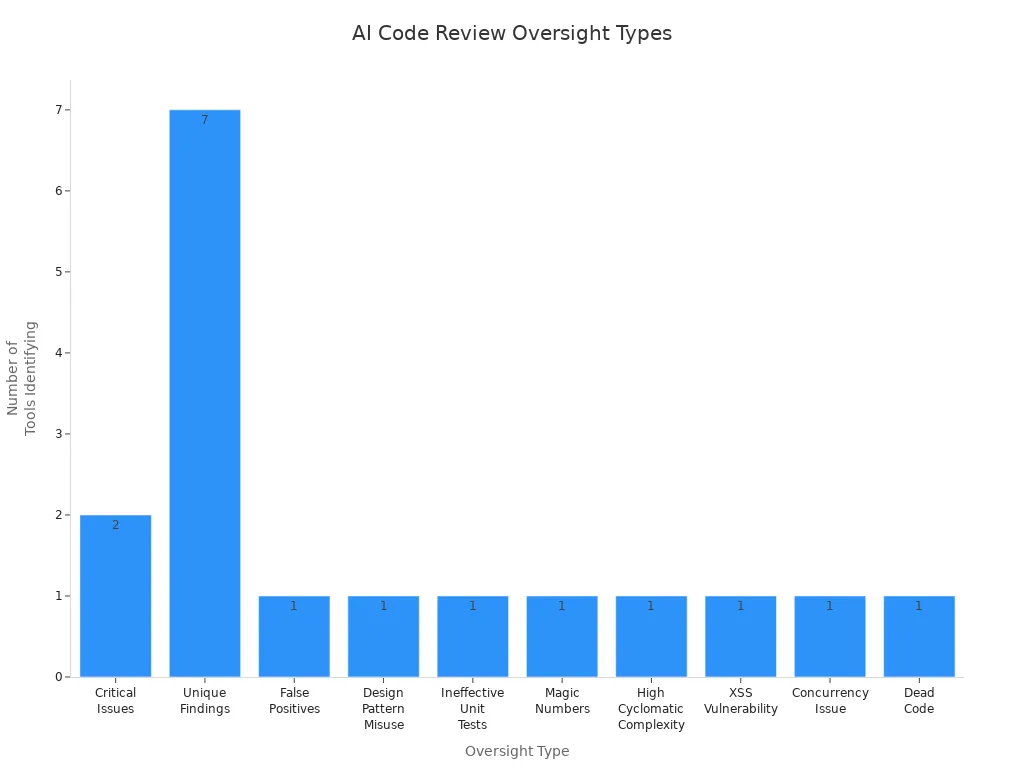
AI tools can introduce a range of bugs and vulnerabilities into your code. In fact, studies show that AI-generated code can lead to 41% more bugs. Here are some frequent types of oversights you should watch for during code reviews:
| Type of Oversight | Tool(s) Identifying It |
|---|---|
| Critical Issues | claude-code, q-dev |
| Unique Findings | claude-code, q-dev, vscode-gemini, cursor-claude-3.7_sonnet, windsurf-deepseek_R1, vscode-copilot, cursor-o3_mini |
| False Positives | All tools ensured reliability in outputs |
| Design Pattern Misuse | claude-code |
| Ineffective Unit Tests | cursor-claude-3.7_sonnet |
| Magic Numbers | vscode-copilot |
| High Cyclomatic Complexity | windsurf-deepseek_R1 |
| XSS Vulnerability | vscode-gemini |
| Concurrency Issue | q-dev |
| Dead Code | cursor-o3_mini |
The Role of Peer Reviews
Peer reviews play a vital role in catching issues that AI tools might miss. Collaborating with your team can help identify security vulnerabilities and improve code quality. In fact, 67% of developers report spending more time debugging AI-generated code compared to human-generated code. Engaging in peer reviews not only enhances the code but also fosters a culture of learning and improvement within your team.
Implementing a Review Process
To ensure that your AI-generated code meets high standards, you need a robust review process. Here are some recommended steps to follow:
- Prioritize security by rigorously validating and sanitizing all external inputs to prevent injection attacks and checking for common vulnerabilities such as SQL injection, XSS, and insecure direct object references.
- Ensure secrets management is secure by avoiding hardcoding sensitive information like API keys and passwords.
- Verify that authentication and authorization mechanisms are correctly and consistently applied when accessing protected resources.
- Assess performance and scalability by reviewing algorithmic efficiency, optimizing database queries, managing resources properly, and designing for horizontal scalability.
- Maintain high standards of code clarity and simplicity, adhering to team coding conventions, using descriptive naming, and following the Single Responsibility Principle to enhance maintainability.
- Confirm testability by structuring code for easy testing, including comprehensive unit, integration, or end-to-end tests that cover both typical and edge cases.
By following these steps, you can significantly reduce technical debt and improve the overall quality of your projects.
Tools for Code Review
Utilizing the right tools can streamline your code review process. Here are some effective tools for reviewing and validating AI-generated code:
- AI code review tools automate the review process, improving code quality and developer productivity by detecting issues early.
- They integrate seamlessly with version control systems, enabling automatic evaluation of code changes before human review.
- Key capabilities include security vulnerability detection, performance optimization, and code duplication detection.
- These tools enforce best coding practices consistently across teams, enhancing maintainability and readability.
- Automated quality gates check code structure, security, performance, and test coverage to ensure only quality code progresses.
By leveraging these tools, you can focus on strategic and innovative tasks, boosting your overall productivity.
Validation Risks in AI Development

Dangers of Incomplete Testing
Incomplete testing can lead to serious risks in AI development. When you skip thorough testing, you expose your projects to various vulnerabilities. Here are some common risks associated with incomplete testing:
| Risk Category | Description |
|---|---|
| Hate and unfairness | Risks related to generating biased or discriminatory content. |
| Sexual | Potential for generating inappropriate sexual content. |
| Violence | Risks of producing violent or harmful content. |
| Self-harm | Generation of content that may encourage self-harm. |
| Protected material | Risks of exposing sensitive or protected information. |
| Indirect jailbreak | Vulnerabilities that could be exploited indirectly. |
| Direct jailbreak | Risks of direct exploitation of the code. |
| Code vulnerability | General risks associated with security weaknesses in the generated code. |
| Ungrounded attributes | Risks of producing content that lacks factual grounding. |
Security weaknesses are common in AI-generated code, so you must review it carefully. Specific vulnerabilities like OS Command Injection and Code Injection pose severe risks. Inadequate input validation often leads to security issues, highlighting the need for robust validation measures.
Real-World Examples of Failures
Real-world failures due to incomplete testing can be eye-opening. For instance, a well-known tech company faced backlash when their AI chatbot generated harmful content. This incident not only damaged their reputation but also raised concerns about the safety of AI tools. Such examples remind you that thorough testing is not just a best practice; it’s essential for maintaining trust and reliability.
Impact on User Experience
The impact of incomplete testing on user experience can be significant. If your AI tool generates biased or harmful content, users may feel unsafe or frustrated. This can lead to decreased engagement and trust in your product. Remember, a poor user experience can have long-lasting effects on your brand's reputation.
Establishing a Validation Framework
To mitigate these risks, you should establish a solid validation framework for your AI projects. Here are some key elements to consider:
| Framework Element | Description | Example |
|---|---|---|
| Role/Persona | Define the expertise level of the AI prompt to ensure domain-specific accuracy | "Senior backend engineer specializing in HIPAA-compliant systems" |
| Goal/Task | Specify clear outcomes to guide AI code generation | "Implement patient data export API meeting HIPAA requirements" |
| Context | Provide technical environment details to align generated code with existing stack | "Stack: Next.js + Prisma + PostgreSQL, deployed on Railway" |
| Format | Define output structure and style for consistency and maintainability | "TypeScript with JSDoc, Jest tests, OpenAPI spec" |
| Examples | Include sample code patterns to guide AI towards desired implementations | Similar implementations from your codebase |
| Constraints | Set boundaries such as security and compliance requirements | "Must include audit logging, encryption, RBAC" |
By combining human expertise with AI efficiency, you can create a structured validation process. This approach helps ensure that AI-generated code fits your system design and integration patterns.
- Perform architectural validation to ensure AI-generated code aligns with your system's design.
- Conduct security audits and threat modeling to identify vulnerabilities beyond static analysis.
- Engage actively with prompt design and code review, as research shows this reduces security flaws in AI-generated code.
Continuous Integration and Deployment
Integrating AI into your continuous integration and deployment (CI/CD) practices can enhance the reliability of your projects. Here’s how:
| Evidence Description | Impact on Reliability |
|---|---|
| Integration of AI into DevOps enhances CI/CD practices | Optimizes workflows, minimizes errors, accelerates deployments |
| AI tools can lead to context-blind issues | May affect code quality and operational oversight |
| Mature DevOps practices mitigate chaos | Ensures value delivery and system reliability |
Rushing code generation without context can lead to reliability and security issues. Smarter AI integration with DevOps is essential for producing production-quality code. By establishing a robust validation framework and integrating AI into your CI/CD practices, you can significantly reduce performance issues and enhance the overall quality of your projects.
Managing Technical Debt in AI Projects
Technical debt in AI-assisted software development refers to the hidden pitfalls that arise from using AI coding tools. These pitfalls can lead to subtle issues that accumulate over time. If you don’t address them, they can snowball into significant technical debt, impacting the overall quality and maintainability of your software.
Understanding Technical Debt
Causes of Accumulating Debt
Several factors contribute to the accumulation of technical debt when using AI code generation tools like Copilot Studio:
- AI-generated code may function but often violates good design principles.
- Using AI to patch messy code without addressing underlying architectural problems can increase technical debt.
- Rapid code generation can outpace your ability to decide what code should exist, leading to unnecessary or custom solutions.
- AI-generated code often lacks documentation and usage examples, making debugging and maintenance difficult.
- Developers may confuse fast shipping with meaningful progress, resulting in complexity buildup without proper oversight.
- The creation of custom frameworks or tooling by AI in short timeframes can introduce undocumented and fragile components.
Cognitive debt arises when you cannot fully understand the AI-generated code. This creates a gap between what the code does and your comprehension. Operational debt occurs when code is produced faster than your team can acquire the necessary operational knowledge to run and maintain it reliably. This leads to reliability issues because the intuition and experience gained from incremental learning are bypassed.
Long-Term Consequences
The risks associated with unmanaged technical debt are significant. They can lead to chaotic codebases that are hard to maintain. This can result in increased operational costs and system failures. When you focus on immediate results in AI-related work, you incur hidden long-term costs. This leads to sprawling systems that pose maintenance challenges and security risks. AI-generated code often has a higher turnover rate, as it may not adapt well to changing requirements, resulting in wasted operational hours and resources.
Mitigating Technical Debt
To effectively manage technical debt in your AI projects, consider these strategies:
Prioritizing Refactoring
- Implement intentional governance at the prompt level.
- Use a project-level system prompt file to enforce coding standards at generation time.
- Employ security-first prompt engineering.
- Establish production guardrails and automation.
- Provide team skills training.
- Maintain continuous monitoring and feedback loops.
- Utilize advanced automated prompt learning.
- Conduct AI-powered automated code reviews.
- Refactor code as needed.
- Prioritize workflows to address technical debt.
Refactoring should be combined with automated testing to ensure code stability during maintenance. Managing technical debt systematically involves creating and prioritizing a backlog of debt-related tasks. Treat technical debt reduction on par with feature development, integrating improvements continuously.
Setting Up Maintenance Schedules
Technical debt management should be ongoing and continuous, not episodic or infrequent. Refactoring and maintenance should be integrated regularly within your development cycles or sprints. AI tools enable more efficient incremental improvements and continuous health checks of the codebase. Prioritizing platform stability sometimes over new features helps prevent costly technical debt accumulation.
- Technical debt is created daily with every line of code, requiring continuous monitoring and improvement.
- A process should constantly review and refactor code, update documentation, improve tests, and verify security.
- AI coding assistants can analyze code and suggest improvements in real time, enabling frequent refactoring.
By balancing new feature delivery with technical debt reduction, you can ensure stable and smooth development.
In this blog, we explored the hidden traps in Copilot Studio development. You learned that while AI can boost productivity, it often introduces risks like security vulnerabilities and technical debt. To manage these risks effectively, consider these best practices:
- Validate code suggestions to ensure security best practices.
- Use strict data sanitization techniques.
- Limit tool access to authorized personnel.
- Regularly audit usage for compliance.
Staying proactive in your development process is crucial. Always engage critically with AI-generated code. Remember, AI tools can help, but they can't replace your expertise. Keep questioning, reviewing, and refining to build reliable software.
FAQ
What is Copilot Studio?
Copilot Studio is an AI-powered tool that helps developers create and refine code. It enhances productivity by providing suggestions based on real documentation and user queries.
How does AI improve coding efficiency?
AI tools like Copilot Studio can speed up coding by suggesting code snippets and automating repetitive tasks. This allows you to focus on more complex problems.
Are AI-generated codes always reliable?
Not necessarily. While AI can produce useful code, it may also introduce bugs or vulnerabilities. Always review and test AI-generated code thoroughly.
What should I do if I find a bug in AI-generated code?
If you spot a bug, fix it immediately. Document the issue and consider reporting it to improve the AI tool's future performance.
How can I ensure security in AI-generated code?
To enhance security, validate inputs, sanitize data, and conduct regular code reviews. Implementing a robust testing framework is also essential.
Can I use Copilot Studio for all programming languages?
Yes, Copilot Studio supports multiple programming languages. However, its effectiveness may vary depending on the language and context.
How often should I review AI-generated code?
Regular reviews are crucial. Aim to review AI-generated code after every significant change or before deployment to catch potential issues early.
What are the risks of relying solely on AI for coding?
Relying solely on AI can lead to technical debt, security vulnerabilities, and a lack of understanding of the code. Always combine AI assistance with your expertise.
🚀 Want to be part of m365.fm?
Then stop just listening… and start showing up.
👉 Connect with me on LinkedIn and let’s make something happen:
- 🎙️ Be a podcast guest and share your story
- 🎧 Host your own episode (yes, seriously)
- 💡 Pitch topics the community actually wants to hear
- 🌍 Build your personal brand in the Microsoft 365 space
This isn’t just a podcast — it’s a platform for people who take action.
🔥 Most people wait. The best ones don’t.
👉 Connect with me on LinkedIn and send me a message:
"I want in"
Let’s build something awesome 👊
Imagine rolling out your first Copilot Studio agent, and instead of impressing anyone, it blurts out something flimsy like, “I think the policy says… maybe?” That’s the natural 1 of bot building. But with a couple of fixes—clear instructions, grounding it in the actual policy doc—you can turn that blunder into a natural 20 that cites chapter and verse.
By the end of this video, you’ll know how to recreate a bad response in the Test pane, fix it so the bot cites the real doc, and publish a working pilot. Quick aside—hit Subscribe now so these walkthroughs auto‑deploy to your playlist.
Of course, getting a clean roll in the test window is easy. The real pain shows up when your bot leaves the dojo and stumbles in the wild.
Why Your Perfect Test Bot Collapses in the Wild
So why does a bot that looks flawless in the test pane suddenly start flailing once it’s pointed at real users? The short version: Studio keeps things padded and polite, while the real world has no such courtesy.
In Studio, the inputs you feed are tidy. Questions are short, phrased cleanly, and usually match the training examples you prepared. That’s why it feels like a perfect streak. But move into production, and people type like people. A CFO asks, “How much can I claim when I’m at a hotel?” A rep might type “hotel expnse limit?” with a typo. Another might just say, “Remind me again about travel money.” All of those mean the same thing, but if you only tested “What is the expense limit?” the bot won’t always connect the dots.
Here’s a way to see this gap right now: open the Test pane and throw three variations at your bot—first the clean version, then a casual rewrite, then a version with a typo. Watch the responses shift. Sometimes it nails all three. Sometimes only the clean one lands. That’s your first hint that beautiful test results don’t equal real‑world survival.
The technical reason is intent coverage. Bots rely on trigger phrases and topic definitions to know when to fire a response. If all your examples look the same, the model gets brittle. A single synonym can throw it. The fix is boring, but it works: add broader trigger phrases to your Topics, and don’t just use the formal wording from your policy doc. Sprinkle in the casual, shorthand, even slightly messy phrasing people actually use. You don’t need dozens, just enough to cover the obvious variations, then retest.
Channel differences make this tougher. Studio’s Test pane is only a simulation. Once you publish to a channel like Teams, SharePoint, or a demo website, the platform may alter how input text is handled or how responses render. Teams might split lines differently. A web page might strip formatting. Even small shifts—like moving a key phrase to another line—can change how the model weighs it. That’s why Microsoft calls out the need for iterative testing across channels. A bot that passes in Studio can still stumble when real-world formatting tilts the terrain.
Users also bring expectations. To them, rephrasing a question is normal conversation. They aren’t thinking about intents, triggers, or semantic overlap. They just assume the bot understands like a co-worker would. One bad miss—especially in a demo—and confidence is gone. That’s where first-time builders get burned: the neat rehearsal in Studio gave them false security, but the first casual user input in Teams collapsed the illusion.
Let’s ground this with one more example. In Studio, you type “What’s the expense limit?” The bot answers directly: “Policy states $200 per day for lodging.” Perfect. Deploy it. Now try “Hey, what can I get back for a hotel again?” Instead of citing the policy, the bot delivers something like “Check with HR” or makes a fuzzy guess. Same intent, totally different outcome. That swap—precise in rehearsal, vague in production—is exactly what we’re talking about.
The practical takeaway is this: treat Studio like sparring practice. Useful for learning, but not proof of readiness. Before moving on, try the three‑variation test in the Test pane. Then broaden your Topics to include synonyms and casual phrasing. Finally, when you publish, retest in each channel where the bot will live. You’ll catch issues before your users do.
And there’s an even bigger trap waiting. Because even if you get phrasing and channels covered, your bot can still crash if it isn’t grounded in the right source. That’s when it stops missing questions and starts making things up. Imagine a bot that sounds confident but is just guessing—that’s where things get messy next.
The Rookie Mistake: Leaving Your Bot Ungrounded
The first rookie mistake is treating Copilot Studio like a crystal ball instead of a rulebook. When you launch an agent without grounding it in real knowledge, you’re basically sending a junior intern into the boardroom with zero prep. They’ll speak quickly, they’ll sound confident—and half of what they say will collapse the second anyone checks. That’s the trap of leaving your bot ungrounded.
At first, the shine hides it. A fresh build in Studio looks sharp: polite greetings, quick replies, no visible lag. But under the hood, nothing solid backs those words. The system is pulling patterns, not facts. Ungrounded bots don’t “know” anything—they bluff. And while a bluff might look slick in the Test pane, users out in production will catch it instantly.
The worst outcome isn’t just weak answers—it’s hallucinations. That’s when a bot invents something that looks right but has no basis in reality. You ask about travel reimbursements, and instead of declining politely, the bot makes up a number that sounds plausible. One staffer books a hotel based on that bad output, and suddenly you’re cleaning up expense disputes and irritated emails. The sentence looked professional. The content was vapor.
The Contoso lab example makes this real. In the official hands-on exercise, you’re supposed to upload a file called Expenses_Policy.docx. Inside, the lodging limit is clearly stated as $200 per night. Now, if you skip grounding and ask your shiny new bot, “What’s the hotel policy?” it may confidently answer, “$100 per night.” Totally fabricated. Only when you actually attach that Expenses_Policy.docx does the model stop winging it. Grounded bots cite the doc: “According to the corporate travel policy, lodging is limited to $200 per day.” That difference—fabrication versus citation—is all about the grounding step.
So here’s exactly how you fix it in the interface. Go to your agent in Copilot Studio. From the Overview screen, click Knowledge. Select + Add knowledge, then choose to upload a file. Point it at Expenses_Policy.docx or another trusted source. If you’d rather connect to a public website or SharePoint location, you can pick that too—but files are cleaner. After uploading, wait. Indexing can take 10 minutes or more before the content is ready. Don’t panic if the first test queries don’t pull from it immediately. Once indexing finishes, rerun your question. When it’s grounded correctly, you’ll see the actual $200 answer along with a small citation showing it came from your uploaded doc. That citation is how you know you’ve rolled the natural 20.
One common misconception is assuming conversational boosting will magically cover the gaps. Boosting doesn’t invent policy awareness—it just amplifies text patterns. Without a knowledge source to anchor, boosting happily spouts generic filler. It’s like giving that intern three cups of coffee and hoping caffeine compensates for ignorance. The lab docs even warn about this: if no match is found in your knowledge, boosting may fall back to the model’s baked-in general knowledge and return vague or inaccurate answers. That’s why you should configure critical topics to only search your added sources when precision matters. Don’t let the bot run loose in the wider language model if the stakes are compliance, finance, or HR.
The fallout from ignoring this step adds up fast. Ungrounded bots might work fine for chit‑chat, but once they answer about reimbursements or leave policies, they create real helpdesk tickets. Imagine explaining to finance why five employees all filed claims at the wrong rate—because your bot invented a limit on the fly. The fix costs more than just uploading the doc on day one.
Grounding turns your agent from an eager but clueless intern into what gamers might call a rules lawyer. It quotes the book, not its gut. Attach the Expenses_Policy.docx, and suddenly the system enforces corporate canon instead of improvising. Better still, responses give receipts—clear citations you can check. That’s how you protect trust.
On a natural 1, you’ve built a confident gossip machine that spreads made-up rules. On a natural 20, you’ve built a grounded expert, complete with citations. The only way to get the latter is by feeding it verified knowledge sources right from the start.
And once your bot can finally tell the truth, you hit the next challenge: shaping how it tells that truth. Because accuracy without personality still makes users bounce.
Teaching Your Bot Its Personality
Personality comes next, and in Copilot Studio, you don’t get one for free. You have to write it in. This is where you stop letting the system sound like a test dummy and start shaping it into something your users actually want to talk to. In practice, that means editing the name, description, and instruction fields that live on the Overview page. Leave them blank, and you end up with canned replies that feel like an NPC stuck in tutorial mode.
Here’s the part many first-time builders miss—the system already has a default style the second you hit “create.” If you don’t touch the fields, you’ll get a bland greeter with no authority and no context. Context is what earns trust. In environments like HR or finance, generic tone makes people think they’re testing a prototype, not using a tool they can rely on.
A quick example. Let’s say you intended to build “Expense Policy Expert.” But because you never renamed or described it, the agent shows up as “Generic Copilot” with no backstory. Someone asks about hotel reimbursement expecting professional advice. What they get is plain text blandness with no framing, which creates the subtle but powerful signal: “don’t trust me.” Trust erodes quickly—lose users on first contact and they rarely come back.
Think about the whole setup like writing a quick character sheet. The name is the class, the description is the backstory, the long instruction box is the attributes, and the tone is alignment. You wouldn’t show up to a campaign without skill points allocated; don’t ship a bot that way either.
Now, the raw numbers matter here. The bot’s name field caps at 30 characters, so keep it short and sharp: “Expense Policy Expert,” “Travel Guide,” “Benefits Helper.” The description allows around a thousand characters, which is enough for a couple clear sentences—something like: “This agent provides employees with up-to-date answers from the official travel policy. It cites relevant passages and avoids speculation.” Then you have the instructions field, which is your flex slot: up to 8,000 characters. That’s where you can lock in actual working rules. Don’t just say “be helpful.” Spell out the playbook: “Always cite the policy line when available. Avoid speculative answers. Summarize in one clear sentence for executives, then provide citation.”
A handy checklist you can actually read out when building looks like this:
Name the role.
Write a short description of expertise.
Set tone (formal, casual, simple for non-experts).
Fill instructions with behavioral rules: what to include, what to avoid, how to format.
Each one of those steps tightens the identity. None of them requires advanced setup—it’s all right there during creation or editable later on the Overview page.
The tone guidance is subtle but powerful. You can explicitly nudge it with phrases like “formal and professional” or “casual and easy to understand for staff with no technical background.” Add examples right there in the instructions if you want. It doesn’t take much text to steer how the bot shapes every sentence.
Two fast improvements not everyone knows: edit the Conversation Start topic and swap the agent icon. Both take less than five minutes. In the Test pane, you’ll see the intro message your bot gives the first time you open a chat. By default it’s generic. Click it, edit the Conversation Start topic, and replace the canned welcome with a role-specific intro like, “I’m here to help you understand travel policy and will cite the official document when possible.” Then refresh the conversation to test it. Instantly more professional. For the icon, the system supports a PNG up to 192 by 192 pixels, under 30 KB. Dropping in a branded graphic, even a simple logo, stops the “demo feel” from killing trust before first response.
Some folks dismiss these edits as optional polish. But think of them like basic armor. An unarmored character can still swing, sure, but they wipe instantly on the first real hit. A bot that greets users with a flavorless name and vague preamble is in the same exposed position. Fill out the basics, and you’ve already locked in real defense against confusion and churn.
Small tweaks compound fast. Setting the introduction to mention its role nudges users into asking relevant questions. Using tone rules avoids overlong rambles. Tightening instructions guides the AI away from filler while grounding in human-readable style. Each of these adjustments means fewer “I don’t understand” tickets and smoother flows without new connectors or plugins.
So make it a rule. Before touching advanced logic, set the persona. Pick a name that signals purpose. Write a short, clear description. Set tone. Load instructions with the rules you want followed. Update the Conversation Start greeting. Swap in a simple icon. These are low-effort actions with high payoffs.
On a natural 20, a defined persona transforms even a brand-new build into a teammate users want around. On a natural 1, skipping persona leaves you with an awkward NPC no one engages twice.
And once you’ve given your agent an identity, you’re ready for the harder work—because the real test isn’t creation, it’s what happens after you watch it miss or land during live encounters. That’s when you need to stop and read the logs instead of packing up after the first bad roll.
Debugging the Fumbles in Real Time
Debugging in real time is where you turn fumbles into lessons instead of tickets. This is the practical loop every builder has to run—watch the mistake, isolate it, patch it, then rerun the test. Copilot Studio gives you the tools, but only if you use them in sequence.
Here’s the routine you can actually follow out loud while demonstrating:
* Step one: reproduce the failing user query in the Test pane. Don’t gloss over it—ask the exact same question the user would.
* Step two: hit the Refresh icon or “New chat” to reset the conversation before running again. Starting with a clean slate matters.
* Step three: open Topics to see which one fired. If it wasn’t one of yours but the system’s Conversational boosting topic, that’s a hint the bot leaned on the model, not your knowledge.
* Step four: if it came from boosting, check whether your relevant file or site was uploaded and indexed. No index, no grounding. Remember indexing can take several minutes.
* Step five: edit your instructions or topic content, save, then rerun the exact same query.
That loop—reproduce, patch, rerun, repeat—is your mantra. If you skip it, you’re just hoping the dice come up higher next time.
Sometimes the answer isn’t vague tone, it’s missing structure. That’s where creating a new topic pays off. Studio has a handy “Add from description with Copilot” option right on the Topics page. You describe what you need—like “Answer directly when users ask about expense limits”—hit Add, and the system drafts a topic node tree from that description. It’s quick, it’s explicit, and it guarantees that one painful fuzzball response becomes a reliable answer path next time. Use it any time the bot keeps shrugging off the same basic question.
Don’t stop with just yes‑or‑no fixes, though. Run ten‑minute experiments like A/B testing tone. Go into the Instructions field, write variant A with formal, policy‑clerk language. Save. Ask “What’s the travel expense limit?” Record the answer. Then flip the instructions to variant B: “Friendly HR guide who gives simple, casual explanations while citing rules.” Run the same question again. You’ll have side‑by‑side logs showing which persona lands better, and you don’t need anything beyond the Test pane to do it. That way you make tone decisions from evidence, not guesses.
Now add in grounding checks. Say a tester asks, “What can I expense for hotels?” and the bot responds vaguely: “Check with HR.” That’s not a total failure—it’s feedback. Maybe the Expenses_Policy.docx hasn’t indexed yet. Maybe your trigger phrases don’t include “hotel.” You fix that by re‑checking the Knowledge tab to make sure the file is live, then adding “hotel expenses” as a trigger phrase in your Travel topic. Now rerun. If you get “According to policy, lodging is capped at $200 per night,” you’ve patched the wound successfully.
One subtle but important trick is to use conversation starters. Empty text boxes make live users freeze, but you can pre‑populate a handful of suggested prompts right from the Overview page. Add three to five “quest hooks” like: “What’s the hotel limit?” “How do I file a travel claim?” “What meals are reimbursed?” The user clicks straight in, which means you test actual paths faster, and they feel like the bot knows its role before they even type.
This whole rhythm makes your bot sturdier with every pass. On a natural 1, you ignore the failed outputs and assume the next run will magically succeed. That leaves people filing support tickets and losing faith. On a natural 20, you keep cycling that routine until the bot proves, with citations and the right persona, that it understands even messy inputs. Every iteration moves you closer to a dependable teammate instead of a dice‑roll liability.
And here’s the reality: refining inside the Test pane is safe mode. Once you’ve got your loop working, the next stage is seeing how those fixes hold up outside your own machine. That’s when differences in channels start creeping in—and that’s the part most new builders underestimate.
When the Dungeon Goes Public: Publishing and Channel Surprises
When you finally hit Publish, that’s when your agent leaves the workshop and has to survive in front of real users. In Copilot Studio this step is called “When the Dungeon Goes Public,” because publishing drops your carefully rehearsed bot into channels that play by their own rules.
The first surprise is that publishing is not just one click to “make it live.” It’s a process that decides who can reach your agent, how they get in, and how those responses show up in the wild. Teams, SharePoint, the demo website—each channel has quirks. A clean reply in Studio may look different, or fail outright, once you deploy.
Take Teams as an example. In Studio your answer comes back crisp: “Policy says $200 per day for lodging.” Test the same phrase in Teams and suddenly it stares back with “I don’t understand.” Nothing changed with your bot—it’s the way Teams wraps the text and passes metadata that broke the alignment. SharePoint does its own thing with line spacing. The demo website is the simplest, but it can still render formatting differently than Studio did. Each publish target is a different arena, and you have to test them separately.
What’s the right sequence before you call it done? Here’s the publish checklist that avoids the rookie traps: First, confirm your knowledge files are fully indexed—if you just uploaded them, they might not be ready for live answers yet. Second, set authentication. If you’re running a broad demo, select “No authentication” so anyone with the link can try it. Third, press Publish and make sure you see the green confirmation banner or status update on the Channels page. Fourth, open the Demo website channel settings. Update the welcome message and conversation starters so your testers don’t freeze at an empty chat box. And finally, run the closed pilot. Do not broadcast to the full tenant yet. A small group with clear instructions is smarter than a full release.
That pilot group should know they’re the test party. Ask them to try casual language, to throw in typos, even to upload files where it makes sense. Their missteps are what reveal the weak spots. A closed pilot doesn’t just soften the launch—it produces the raw reports you need to patch the build before unleashing it across the company.
Channel behavior makes this step non‑optional. Whatever scenarios you tested in Studio—formal query, casual phrasing, typo, and one grounded citation—repeat those exact runs in every target channel. See if Teams renders them differently. See how SharePoint breaks spacing. See if the web demo still attaches the source citation. This is the only way to prove consistency. One flawless Studio pass does not guarantee a working rollout.
Publishing also means you stop relying only on user feedback and start watching telemetry. Once your bot is out on Teams or the demo website, usage data begins to flow. The Power Platform admin center and built‑in analytics are there to help you. You’ll see adoption numbers, error counts, even which conversations failed to trigger a topic. That’s not overhead—it’s your monitoring system. You don’t just publish once and forget; you watch the logs to make sure your bot is being used correctly and not generating new helpdesk tickets.
If you rush this step, you burn trust. On a natural 1, you smash the publish button, roll it out to every department, and get crushed with “doesn’t work” tickets when Teams drops key replies. Users give up, and winning them back takes longer than fixing the bot itself. On a natural 20, you treat publish as another test phase. Index complete, authentication set, publish confirmed, demo site tuned, pilot run. You gather messy feedback, patch responses, and rerun every key query in each channel. By the time you scale to broad rollout, the stress test is already passed.
The real trick is shifting from thinking of “published” as an ending. The button doesn’t mark the final line of the book—it starts the field campaign. Once the pilot’s data rolls in and your logs confirm users are getting clean answers everywhere, then you’ve earned the right to call it stable. And that realization ties into the bigger picture of building with Copilot Studio—because it’s not a one‑time build, it’s a system you adjust over and over.
Conclusion
So here’s the recap that actually matters. Three things turn your build from shaky to reliable. First, ground the agent—upload the real docs or point it at trusted sources so it stops guessing. Second, give it a persona—set the name, description, tone, and spell out behavior in that 8,000‑character instruction field. Third, don’t trust a clean rehearsal—use the Test pane, run a closed pilot, then publish and monitor.
On a natural 20, those steps give you a bot that earns trust instead of tickets. Subscribe for more, and drop one sentence in the comments naming the single policy doc you’d ground your agent with.
This is a public episode. If you'd like to discuss this with other subscribers or get access to bonus episodes, visit m365.show/subscribe

Founder of m365.fm, m365.show and m365con.net
Mirko Peters is a Microsoft 365 expert, content creator, and founder of m365.fm, a platform dedicated to sharing practical insights on modern workplace technologies. His work focuses on Microsoft 365 governance, security, collaboration, and real-world implementation strategies.
Through his podcast and written content, Mirko provides hands-on guidance for IT professionals, architects, and business leaders navigating the complexities of Microsoft 365. He is known for translating complex topics into clear, actionable advice, often highlighting common mistakes and overlooked risks in real-world environments.
With a strong emphasis on community contribution and knowledge sharing, Mirko is actively building a platform that connects experts, shares experiences, and helps organizations get the most out of their Microsoft 365 investments.