

 Apple Podcasts
 Spotify
 Youtube Music
 Spreaker
 Podchaser
 Amazon Music
Power Apps forms turn knowledge workers into typists—rigid fields, copy-paste from emails/PDFs, and slow, error-prone decay that pollutes Dataverse, Power BI, and downstream automations. The fix isn’t more validation; it’s an interpreter: the AI Data Entry Agent. Inside model-driven apps, it converts unstructured input (Smart Paste) and file uploads (OCR) into clean, schema-aligned records—with source snippets, confidence cues, and your existing validation rules enforced. Complex cases shine: multi-address suppliers, related child tables, and certifications become structured data in seconds, not spreadsheets. Architecture matters: entity extraction → schema alignment → pre-submit validation, all within tenant boundaries and Dataverse security. Caveats: premium licensing/AI capacity, regional compliance, domain jargon limits, and “it maps to what exists” (no auto-schema). Roll out with guardrails—pilot libraries, telemetry, naming sanity—then scale. Net result: forms stop demanding typing and start understanding, raising data quality while killing clerical toil. You stop scrubbing; the agent structures.






Imagine spending hours on data entry, only to find mistakes that slow down your projects. Traditional methods can be tedious and error-prone, leading to delays and frustration. The AI Data Entry Agent steps in to change that. This innovative tool transforms how you handle Power Apps Data Entry. It streamlines the process, allowing you to convert unstructured input into organized data with ease. With features like real-time validation, you can expect increased accuracy and efficiency. In fact, organizations have reported a 40% reduction in operational inefficiencies and a whopping 95% improvement in data accuracy after implementing AI solutions.
Key Takeaways
- The AI Data Entry Agent speeds up data entry by automating tasks and handling many requests at once.
- It reduces errors by using smart algorithms that check data accuracy in real time.
- The agent helps keep your data compliant with rules and regulations, making audits easier.
- Integrate the AI agent into PowerApps by planning, configuring, testing, training, and monitoring continuously.
- Connecting the AI agent with Microsoft tools like Outlook and SharePoint boosts productivity and automation.
- Training the AI well and monitoring its performance ensures it works reliably and improves over time.
- Address user concerns with education, involvement, and gradual rollout to encourage adoption.
- Future PowerApps updates will bring more automation, natural language commands, and smarter AI features.
AI Agent Benefits

The AI Data Entry Agent brings a wealth of benefits to your Power Apps data entry processes. By leveraging advanced technology, it significantly enhances both efficiency and accuracy. Let’s dive into how this AI agent can transform your data entry experience.
Efficiency Gains
Time Savings
Imagine cutting down the hours you spend on manual data entry. With the AI Data Entry Agent, you can do just that. This tool processes data at lightning speed, responding in milliseconds. Unlike manual entry, which is limited by human capacity, the AI agent can handle unlimited parallel calls. This means no customer is left waiting, even during peak times. You’ll find that tasks that once took hours can now be completed in mere minutes, freeing you up to focus on more strategic activities.
Reduced Errors
Manual data entry often leads to mistakes that can derail projects. The AI Data Entry Agent minimizes these errors by automating the process. It uses intelligent algorithms to ensure that the data entered is accurate and consistent. As a result, you can expect a significant reduction in errors, which not only saves time but also enhances the overall quality of your data.
Enhanced Accuracy
Real-time Validation
One of the standout features of the AI Data Entry Agent is its real-time validation capability. As you input data, the agent checks for accuracy and compliance with existing rules. This immediate feedback allows you to correct any issues on the spot, ensuring that your data remains reliable and valid. You no longer have to worry about sifting through piles of incorrect entries later on.
Compliance with Rules
Maintaining compliance with various standards is crucial in today’s data-driven world. The AI Data Entry Agent helps you stay on top of compliance by continuously monitoring transactions and flagging any non-compliant behavior. Here’s a quick look at some of the compliance standards it can help enforce:
| Compliance Standard/Rule | Description |
|---|---|
| Monitoring Transactions | AI agents continuously scan transactions to identify suspicious behavior. |
| Risk Assessment | They analyze historical data to predict potential compliance risks. |
| Regulatory Change Management | AI agents keep compliance officers informed about updates from regulatory bodies. |
| Audit Support | They generate compliance reports and maintain audit trails for easier preparation. |
| Policy Enforcement | AI agents flag unauthorized access to sensitive data. |
| Data Privacy Protection | They help comply with regulations like GDPR and HIPAA. |
By automating compliance processes, the AI Data Entry Agent not only improves accuracy but also enhances your organization’s readiness for audits and regulatory changes.
Integrating AI into PowerApps
When you start integrating AI into PowerApps, it helps to follow a clear plan. This way, you avoid surprises and get the most out of your AI Data Entry Agent. Let’s walk through the setup steps and best practices that will make your integration smooth and successful.
Setup Steps
Environment Configuration
First, you need to prepare your environment. This means defining your goals for the AI agent and figuring out what resources you have. Set a timeline so you know when each step should happen. Next, configure the AI agent itself. Connect it to your PowerApps environment and your Dataverse or CRM system. Customize the features to fit your specific needs, like enabling the autofill option to speed up data entry.
Once configured, test the integration thoroughly. Run functional tests to check if the AI agent works as expected. Also, perform performance tests to see how fast and reliable it is under real conditions. After testing, train your team on how to use the AI-powered features. Finally, deploy the AI agent so users can start benefiting from automation in their daily tasks.
Remember, integration doesn’t end at deployment. Keep monitoring the system and optimize it based on feedback and performance data.
Here’s a quick checklist to guide you:
- Plan the integration goals and resources.
- Configure the AI Data Entry Agent and connect it to PowerApps.
- Test the integration for functionality and performance.
- Train your team on the new AI-powered features.
- Deploy the AI agent for everyday use.
- Monitor and optimize continuously.
Tool Integration
PowerApps works best when you connect it with other Microsoft 365 tools. You can integrate your AI agent with Outlook to retrieve emails or schedule meetings automatically. SharePoint integration lets the AI agent search and pull documents when needed. Teams can host AI agents that assist employees in real time. OneDrive also plays a role by managing and accessing documents seamlessly.
By linking these tools, you create a powerful ecosystem where your AI agent can fetch data, trigger workflows, and automate many tasks. This integration boosts productivity and makes your PowerApps data entry smarter and faster.
Best Practices
Training the AI
Training your AI agent is key to success. Start by identifying the exact use cases you want to address. Understand what your users need and map out the workflows the AI will support. Collect good quality training data that reflects real-world scenarios.
Use the AI builder in PowerApps to design and build your AI agent. Test it often, refine its responses, and validate its accuracy. The better you train your AI, the more reliable it becomes at handling your data entry tasks.
Don’t forget to enable the autofill option where possible. This feature helps the AI agent predict and complete fields automatically, saving you even more time.
Performance Monitoring
Once your AI agent is live, keep an eye on how it performs. Track key metrics like goal accuracy, which shows how often the AI achieves the right outcome. Aim for 85% or higher in production environments. Also, watch task adherence to ensure the AI follows your workflows correctly—95% adherence is a good benchmark.
Keep hallucination rates low. This metric measures how often the AI makes up false information. You want this below 2% to maintain trust in your data.
Other important metrics include latency, or how fast the AI responds, and error rates, such as empty or malformed outputs. Monitoring these helps you spot issues early and improve the AI’s performance over time.
Tip: Use PowerApps analytics and AI builder dashboards to track these metrics easily. Regular reviews help you keep your AI agent sharp and effective.
By following these setup steps and best practices, you’ll unlock the full potential of power apps data entry with AI. Your workflows will become more automated, accurate, and user-friendly. Integrating AI into PowerApps is not just about technology—it’s about making your daily work easier and smarter.
Real-World Use Cases
Case Study 1: Finance Industry
Problem Overview
In the finance sector, organizations often face significant challenges with data entry. Many struggle with a lack of technical expertise, leading to resistance when adopting new technologies. Additionally, fragmented data across various systems creates quality issues, making it hard for AI to learn effectively. Without clear expectations, AI initiatives can fail to deliver consistent value.
| Challenge | Description |
|---|---|
| Lack of Technical Expertise | Organizations often struggle with training employees to adapt to new AI technologies, leading to resistance to change. |
| Fragmented Data | Data quality issues arise when information is scattered across different systems, hindering AI learning. |
| Need for Clear Expectations | Without clear goals and onboarding processes, AI initiatives may fail to deliver consistent value. |
Solution and Results
By integrating the AI Data Entry Agent into their Power Apps, a leading finance company streamlined their data entry processes. The AI agent automated data collection from various sources, reducing manual input. As a result, they reported a 70% improvement in processing speed and a significant reduction in errors. Employees could focus on higher-value tasks, enhancing overall productivity.
Case Study 2: Healthcare Sector
Problem Overview
Healthcare organizations often deal with vast amounts of data, from patient records to billing information. Manual data entry can lead to costly mistakes and inefficiencies. Many healthcare providers faced high operational costs due to administrative burdens and lengthy data processing times.
Solution and Results
After implementing the AI Data Entry Agent, a prominent healthcare provider transformed its data entry workflow. The AI agent automated clinical support and administrative tasks, leading to a 50% reduction in costs. Staff could now spend more time on patient care rather than paperwork. The integration of AI-powered features also improved data accuracy, ensuring compliance with healthcare regulations.
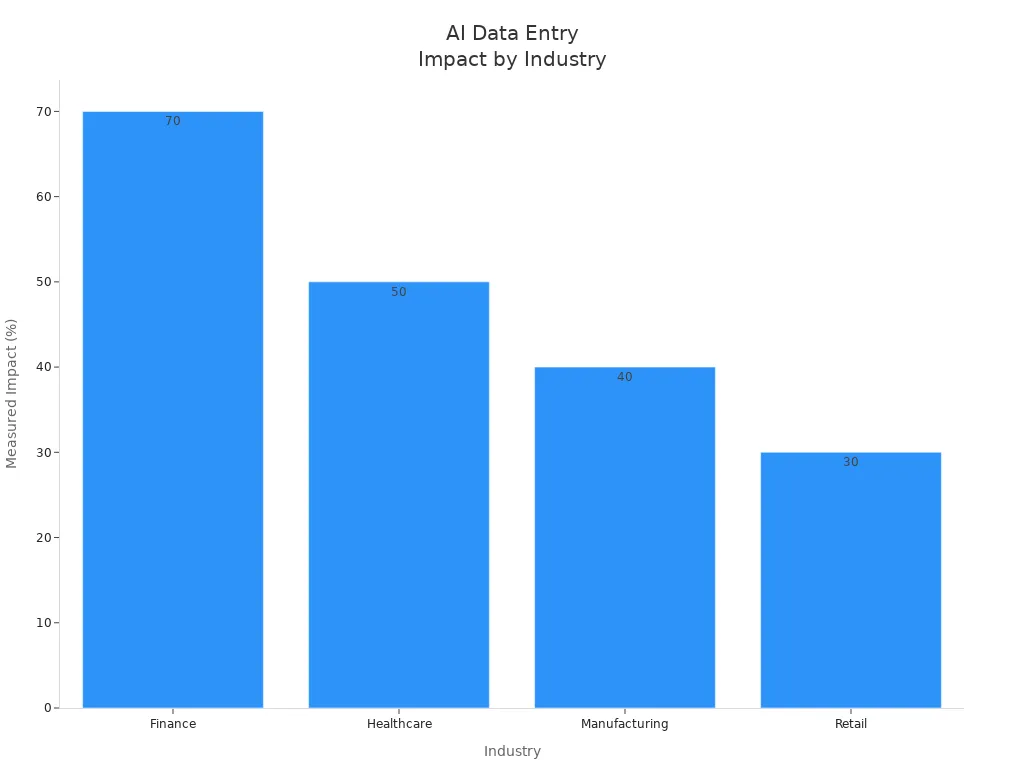
These case studies illustrate how various industries benefit from integrating AI into their data entry processes. The finance and healthcare sectors are just two examples of how the AI Data Entry Agent can enhance efficiency and accuracy, paving the way for smarter automation.
Challenges and Solutions
Integrating an AI agent into your PowerApps can be a game-changer, but it’s not without its challenges. You might encounter user resistance and technical issues along the way. Let’s explore how to tackle these hurdles effectively.
User Resistance
Addressing Concerns
When introducing new technology, it’s common for team members to feel apprehensive. You can ease these concerns by:
- Educating teams on AI capabilities: Help your team understand how the AI agent can assist them. Knowledge reduces fear and builds confidence.
- Involving teams in implementation: Engage your team in the rollout process. When they feel included, they’re more likely to embrace the change.
- Phased rollout: Introduce the AI agent gradually. This approach minimizes disruption and allows for valuable feedback.
- Ongoing training: Provide regular support and training. Continuous learning helps your team adapt to the new tools effectively.
- Monitor and adjust: Keep an eye on how things are going. Regular evaluations ensure that the AI integration meets user needs.
By following these strategies, you can significantly reduce resistance and foster a positive attitude toward the AI Data Entry Agent.
Training Support
Training is crucial for successful AI integration. Make sure your team knows how to use the AI agent effectively. Offer hands-on workshops and resources that demonstrate its features. The more comfortable your team feels, the smoother the transition will be.
Technical Issues
Compatibility Challenges
Technical issues can arise when integrating the AI agent with existing systems. Here are some common challenges and solutions:
| Solution Description | Evidence |
|---|---|
| Legacy database compatibility issues | "Our legacy databases were a significant challenge—they just weren’t easily compatible with Power Apps," Brendan explains. |
| Data flow mapping to identify compatibility issues | "I assembled our IT team to create a detailed mapping of our data flow," he shares. |
| Implementation of data security measures | "Power Apps initially raised data security concerns due to its open access," Ryan explains. |
| User adoption strategies through demonstrations | "Employees were hesitant at first, worried that Power Apps would complicate their work," Ryan recalls. |
| Custom coding for API limitations | "Compatibility was a major issue when integrating Power Apps with legacy on-premise systems," Louis explains. |
| Gradual expansion of functionalities | "Not all processes could be effectively modeled in Power Apps," he adds. |
These solutions can help you navigate compatibility challenges and ensure a smoother integration process.
Integration Solutions
To enhance your AI integration, consider using the AI Builder in PowerApps. This tool allows you to create custom AI models tailored to your specific needs. It simplifies the process of integrating AI capabilities into your applications, making it easier to automate tasks and improve efficiency.
By addressing user resistance and technical challenges head-on, you can unlock the full potential of your AI Data Entry Agent in PowerApps. Embrace the change, and watch your data entry processes transform!
Future of PowerApps and AI
As we look ahead, the future of PowerApps and AI integration is bright. You can expect significant advancements that will enhance your data entry processes and overall user experience. Let’s explore some exciting developments on the horizon.
AI Advancements
Machine Learning
Machine learning is set to revolutionize how you interact with PowerApps. With Microsoft’s AI Builder, you can apply machine learning without needing advanced coding skills. This low-code tool allows you to automate tasks like data entry and document processing. For instance, it can extract data from invoices and enter it into your database, saving you time and reducing errors.
Additionally, PowerApps AI includes pre-built models for object detection, sentiment analysis, and language understanding. These features facilitate tasks like image recognition and text analysis, making your applications smarter and more efficient.
Natural Language Processing
Natural language processing (NLP) is another game-changer. It enables you to interact with applications using natural language commands. This means you can simply type or speak your requests, and the AI will understand and execute them. This capability improves user-friendliness and efficiency, allowing you to focus on what matters most.
PowerApps Evolution
As PowerApps evolves, you’ll notice trends that indicate a shift toward greater automation and enhanced user experiences.
Increased Automation
Automation will become even more integral to PowerApps. The focus will be on modern components that emphasize reusable libraries for consistent UI and faster development cycles. You can expect optimized data loading and minimized app lag, ensuring a seamless user experience.
| Trend | Description |
|---|---|
| Modern Components | Emphasizes reusable component libraries for consistent UI and faster development cycles. |
| Performance Boost | Focuses on optimized data loading and minimizing app lag for a seamless user experience. |
| Responsive Design | Adapts apps to any device and screen size using auto layout containers and Flexbox-style alignment. |
| AI Integration | Incorporates AI for smart formula suggestions and rapid prototyping, making it integral to development. |
| Data Strategy Shift | Moves towards server-side filtering and scalable architecture from the outset. |
Enhanced User Experience
The user experience will also see significant improvements. Future versions of PowerApps are expected to include features like Smart Paste with image support, allowing you to paste images or handwritten notes into forms. The AI will extract relevant details automatically.
| Feature | Description |
|---|---|
| Smart Paste with Image Support | Enables users to paste images or handwritten notes into forms, with AI extracting relevant details. |
| Expanded File Support | Users can upload various file types (.txt, .csv, .docx, .pdf, .png, .jpg) for AI suggestions. |
| New Form Fill Toolbar | A redesigned toolbar for efficient management of AI-generated data entry suggestions. |
| Enhanced Maker Controls | Allows makers to specify fields that require manual input, optimizing AI assistance usage. |
These advancements will not only streamline your data entry processes but also empower you to create more dynamic and responsive applications. The future of PowerApps and AI integration is all about making your work easier and more efficient.
The AI Data Entry Agent truly transforms how you handle data entry in Power Apps. By automating mundane tasks, it boosts efficiency and accuracy, allowing you to focus on what really matters. Here are some key takeaways:
- Interpretation of unstructured data: It automates data extraction from sources like emails.
- Complex form filling automation: The agent reduces manual input by auto-populating forms.
- Conversational data exploration: You can analyze data using natural language queries.
As you consider adopting AI solutions, remember to establish clear governance rules and ensure proper architecture. Embrace this technology to enhance your workflows and drive better outcomes!
FAQ
What is the AI Data Entry Agent?
The AI Data Entry Agent is a tool that automates data entry in Power Apps. It helps you convert unstructured data into structured records, enhancing efficiency and accuracy.
How do I integrate AI assistance into PowerApps?
To integrate AI assistance, configure the agent within your PowerApps environment. Connect it to your Dataverse or CRM system, and customize its features to meet your needs.
What are the benefits of using the AI Data Entry Agent?
Using the AI Data Entry Agent provides time savings, reduced errors, and enhanced accuracy. It streamlines your data entry process, allowing you to focus on more strategic tasks.
How can I ensure proper agent configuration?
To ensure proper agent configuration, define your goals, connect the agent to your systems, and test its functionality. Regularly monitor performance and gather user feedback for continuous improvement.
Can the AI Data Entry Agent handle compliance requirements?
Yes! The AI Data Entry Agent continuously monitors data entries for compliance with existing rules. It helps maintain data integrity and prepares you for audits.
What training is needed for my team?
Your team should receive hands-on training on using the AI Data Entry Agent. Provide resources and workshops to help them understand its features and benefits.
How does the AI Data Entry Agent reduce errors?
The AI Data Entry Agent uses intelligent algorithms to automate data entry. This minimizes human error, ensuring that the data entered is accurate and consistent.
Is the AI Data Entry Agent suitable for all industries?
Yes, the AI Data Entry Agent can benefit various industries, including finance, healthcare, and retail. It streamlines data entry processes across different sectors.
🚀 Want to be part of m365.fm?
Then stop just listening… and start showing up.
👉 Connect with me on LinkedIn and let’s make something happen:
- 🎙️ Be a podcast guest and share your story
- 🎧 Host your own episode (yes, seriously)
- 💡 Pitch topics the community actually wants to hear
- 🌍 Build your personal brand in the Microsoft 365 space
This isn’t just a podcast — it’s a platform for people who take action.
🔥 Most people wait. The best ones don’t.
👉 Connect with me on LinkedIn and send me a message:
"I want in"
Let’s build something awesome 👊
The Data Entry Nightmare
Let’s start with something familiar — the Power Apps form. Every organization has one. Rows of text boxes pretending to be productivity. You click “New Record,” a form opens, and suddenly you’re not an analyst or a manager. You’re a typist. Copying names, phone numbers, addresses, maybe from an email that someone forwarded, maybe from a PDF invoice that refuses to let you copy cleanly. This isn’t digital transformation. It’s clerical labor with branding.
Now multiply that by hundreds of records. Each one entered manually, each one a potential typo waiting to ruin your reports later. The average user calls it “filling forms.” Professionals, however, know the truth — it’s slow, error-prone data decay, and it happens daily across every Power App ever built.
And yet, Power Apps insists on those same rigid fields because, well, someone has to enter the data… right? Wrong. Enter the AI Data Entry Agent — and suddenly, the whole miserable ritual collapses.
Why Traditional Power Apps Forms Fail
Traditional Power Apps forms are a triumph of structure over sanity. They promise governance, validation, and consistency, but what they actually deliver is the illusion of control wrapped in user frustration. Every form designer knows the pain: text inputs aligned like soldiers, drop-down menus cloned from Dataverse tables, and those “required” asterisks that audibly sigh when someone forgets them.
You build a “customer onboarding” form. Ten fields should be easy. But then finance wants two additional fields, sales wants three optional notes, and compliance insists every address follow a specific format. Suddenly your minimalist form looks like it was designed by a committee of auditors. Users stop reading; they tab blindly through fields like they’re trying to finish an exam they didn’t study for.
And accuracy? Forget it. Data doesn’t start clean — it arrives as emails, chat logs, scanned documents, screenshots, half-finished Excel sheets. Each requires manual interpretation before those neat form fields ever see a keystroke. The result is garbage in, garbage out — only slower. Even when you paste in text, you still have to carve it apart. Name in one box, phone in another, and heaven help you if there’s a middle initial because now validation fails.
Power Apps forms were never built for unstructured input. They’re databases disguised as paperwork. And that matters because the modern business world runs on unstructured content. The average customer record might originate in an Outlook thread, a Teams chat, or a photo of a business card someone snapped in a meeting. Expecting humans to manually normalize all that feels like asking accountants to do math on napkins.
The consequence isn’t just inefficiency — it’s inaccuracy. The longer a human touches the data, the more opportunity for deviation creeps in. Typos, inconsistent abbreviations, blank fields. The cost cascades through reports, dashboards, and automated flows. “Why do our customer counts never match Power BI?” Because Susan misspelled Contoso twice. The system didn’t catch it because it was syntactically correct, just semantically wrong.
And yet, this failure perpetuates. Admins add more validation rules. Makers add more labels explaining what to type. Trainers create tutorials teaching people how to copy information correctly — as if accuracy were a skill problem instead of a design flaw. What Power Apps needed wasn’t a better form. It needed a smarter interpreter — one that could read context, understand meaning, and populate fields without making the user think. That, at last, is what the AI Data Entry Agent delivers.
Meet the AI Agent: Overview and Capabilities
The AI Data Entry Agent isn’t a gimmick; it’s a demotion notice for manual data entry. Think of it as a bilingual translator living inside your form. It reads messy human text and speaks perfect Dataverse. When users open a record and activate the agent, they don’t have to interact with every field. They simply paste what they have — an email from a colleague, a paragraph of onboarding info, even raw notes copied from Teams — and the agent parses, interprets, and maps each piece to the correct column.
Microsoft calls this Smart Paste, but that label undersells the brilliance. The model behind it recognizes entities like names, addresses, and phone numbers, but also learns from context within your specific table schema. If your table includes “Preferred Contact Method,” it understands that “email” in the text likely belongs there. It doesn’t hallucinate; it aligns with your metadata. In effect, the AI agent behaves like a form’s internal analyst — it reads unstructured input, determines intent, and builds structured data faster than any human could.
But Smart Paste is only half the trick. The other is File Upload, a feature that feels slightly supernatural. Instead of text, you can drag in an image — say, a screenshot of that same email or a scan of a paper invoice. The AI agent extracts text using OCR, detects field-like patterns, and automatically fills them into your form. And yes, it knows the difference between a company name and a street address because it’s grounded in Microsoft’s AI foundations used across Outlook, Viva, and Dynamics. Most users see it work once and refuse to go back.
Here’s the kicker: the agent doesn’t overwrite anything blindly. Every suggestion appears with its source context. You see exactly where each value came from and can accept or reject it individually — or, for the brave, accept all in bulk. Data accuracy rises not through enforcement, but through intelligent prediction. It makes users faster without making them careless.
In practice, it feels like cheating. What used to take minutes per record now takes seconds. The user experience flips — instead of begging people to fill the form, you now watch them volunteer, simply because it stopped being annoying. And since it works directly within the Model-driven app experience, there’s zero new interface to learn. The same forms, the same tables — except now, they’re sentient enough to do half your job.
Administrators appreciate it for different reasons. Every field filled by the AI agent respects existing validation rules and data types. No rogue inputs, no API calls, no custom connectors sneaking data around. It’s compliance-safe automation baked into the product. Meanwhile, makers can breathe again. They no longer have to redesign forms or create special “quick entry” apps. The AI agent does all the heavy lifting behind the scenes.
So yes, Technically, it’s just another Copilot feature. Functionally, though, it’s the end of manual entry in Power Apps. It transforms forms from passive receivers of text into active participants in data quality — a distinction the average user will never notice but every admin will silently celebrate.
Prerequisites: Enabling the AI Feature
Before you can make your forms magically intelligent, you must first remove the most common obstacle in enterprise IT — disabled settings. The AI Data Entry Agent doesn’t emerge fully formed; it must be explicitly enabled within your environment. Yes, administrators, that means you. This isn’t “plug it in and hope”; it’s a controlled feature switch in Power Platform admin settings, hidden precisely where only the least adventurous will never find it.
Open your Power Platform admin center and navigate to Environment Settings → Product Features. Scroll down until you hit the cluster of options labeled AI capabilities. Inside, look for the one labeled “AI Form Fill.” That unassuming toggle is the gatekeeper. The moment you switch it on, Smart Paste and File Upload become available throughout your model-driven apps. Think of it as an evolutionary gene activation. You’re not installing something new; you’re awakening a function Microsoft already packaged into the platform.
Crucially, this isn’t a tenant-level free-for-all. The feature respects environment boundaries. You can enable it for testing in one sandbox before trusting it in production. Because yes, every enterprise has that one department that copies email signatures into the address field, and you’ll want to test whether the algorithm forgives them. Spoiler: it usually does.
Once enabled, existing forms need no redesign. The AI Agent integrates seamlessly into the current form experience. You’ll notice a small AI button or “Use Copilot to fill” icon appearing near the command bar in new or edit mode. That’s your portal. It connects your unstructured chaos with Dataverse order. If the icon doesn’t appear, either your environment is lagging behind updates, or someone with a deep aversion to change has disabled modern features globally. Politely remind them this is 2025 and that the keyboard is no longer humanity’s finest input device.
After activation, the rest is user-level permission. Because the agent operates within Dataverse security roles, it uses the same privilege model as manual entry. Users who could previously write data can now ask AI to do it on their behalf. No custom roles, no risk of overexposure — just efficiency layered over existing governance. Once that’s confirmed, you’re ready to watch bureaucratic typing die its quiet death.
Demo 1: Effortless Record Creation
Now that the AI feature exists in your environment, let’s abuse it — constructively. Picture the typical onboarding scenario. You receive an email from someone named Sarah in operations: “Hey, we’ve onboarded a new customer called Contoso, here’s their information.” She dumps a few lines of text — address, phone, contact name, maybe the account manager — and expects you to “add it to the system.” Historically, this instruction translates to tabbing through ten required fields with growing resentment.
With the Data Entry Agent active, open your Customers table in a model-driven app and click New Record. The blank form appears, a monument to inefficiency. Previously, this is where your will to live decayed. But now, instead of playing tag with text boxes, you click the Use AI option. A small sidebar appears — think of it as your personal intern with perfect concentration.
Select the message from Sarah in Outlook, copy the body — every word, no formatting hygiene needed — and paste it directly into that AI panel. Instantly, the agent reads it like a detective scanning evidence. Within seconds, it predicts field mappings: “Company Name ➜ Contoso,” “Primary Contact ➜ Sarah Thompson,” “Business Phone ➜ 555-0147,” “City ➜ Seattle.” Each appears with a subtle label showing its textual origin, so you can see it didn’t invent anything. The form populates automatically. If it gets one wrong — maybe it assigns “Operations” to the wrong field — you simply deselect that suggestion. The rest stay. One confirmation click, and your structured data is complete.
What took human minutes now consumes seconds. But let’s raise the stakes. Close the form. Reopen “New Record.” This time, don’t copy text. Go find that same email as an image — maybe a screenshot from Teams or a photo taken on your phone. Click Upload File. The AI agent devours the image, performs OCR (optical character recognition), extracts text, and then repeats the same entity-mapping magic. It identifies names, addresses, IDs, even recognizes that the bold line reading “Account Number: 99-2045” belongs to a custom numeric column in your Dataverse schema. You didn’t even tell it that. It inferred it from context. The interface shows the proposed mappings again, with the source labeled “from uploaded image,” and waits for your approval.
The miracle isn’t speed; it’s context preservation. Humans often forget which email a value came from or who provided it. The agent doesn’t. Every field includes a source snippet, enabling accuracy audits without manual tracing. Accept all, hit save, and Presto — a fully formed customer record materializes, compliant with every validation rule.
At this point, your average user typically exclaims some variation of “that’s insane.” Yes, it is. Insanely overdue. Because we’ve spent decades teaching forms to punish minor deviations instead of teaching them to understand. Now the balance flips. The form interprets you. You provide messy reality; it constructs order.
Administrators watching from the sidelines will notice something subtle: audit logs reflect each accepted suggestion as a normal user edit. That means your compliance pipeline still works, Power Automate triggers fire as before, and not a single new connector had to be built. The AI’s input is indistinguishable from a human’s — except it’s correct.
Under the hood, the agent uses the same AI foundation that powers Copilot in Dynamics and Outlook. It knows common business entities, country formats, and contact patterns. But unlike consumer-grade autocomplete, it adheres strictly to the data model. That’s why it never places a street name in a phone field, no matter how artistically you phrase your input. It’s orderly rebellion: automation constrained precisely enough to be trusted inside enterprise governance.
After witnessing that first record appear, something profound happens — users stop dreading forms. They start bringing messy data forward, feeding the AI willingly. Because when the barrier to entry disappears, so do excuses. The business finally gets cleaner, richer data, not through fear or training, but through an interface that simply stopped fighting its users.
Demo 2: Handling Complex Data & Validation
The true test of any automation system isn’t when it handles tidy examples—it’s what happens when users throw chaos at it. Simple customer records are easy. The real battlefield is complex, multi-field data that would normally demand a spreadsheet exorcism before import. For example, imagine you’re adding a new supplier who has multiple sites, alternate contacts, and a set of regulatory IDs so long it looks like government poetry. Normally that means copy-paste marathons, missing commas, and validation errors stacking like dominoes.
Let’s repeat the process, this time with a messy input source—a full procurement email thread. It includes the supplier’s headquarters, three warehouse addresses in different states, phone extensions for each office, one finance contact buried in a forwarded section, and an embedded PDF attachment listing certifications. To a human, that’s a scroll-and-sigh moment. To the AI Agent, it’s breakfast.
Open your “Suppliers” table in the model-driven app, click “New Record,” and drop all that text—everything from the email including those useless greetings—into Smart Paste. You’ll see the agent pause briefly, identify that multiple entities exist, and start differentiating between them. The top-level contact info populates the main record automatically. Then, notice it offers to spawn related rows—branches, secondary contacts—based on relationship mappings already present in Dataverse. You’re not teaching it structure; it’s reading it from your schema. That’s when it becomes impressive.
Now validation: each Power Apps field already carries a data type and, often, custom logic—regular expressions for phone numbers, specific date formats, mandatory dropdowns. When the AI pre-fills values, it actively checks those same rules before suggesting them. If a phone number doesn’t meet your pattern or an address lacks a ZIP code, it doesn’t blindly submit. It flags them as “review needed,” highlighting the segment of input text it couldn’t normalize. That’s not error; that’s transparency. Users see which part of the source data didn’t comply and fix only that piece rather than guessing what the system wants.
Picture a form with ten fields. Normally, three of them fail validation because someone abbreviated “Street” differently or entered a date as “03-04” instead of “2025-03-04.” With the AI Agent, those issues don’t escalate to red error banners—they die quietly inside its logic layer. It reformats known patterns to comply with locale settings and keeps the data model happy. When it’s uncertain, it asks politely rather than exploding theatrically. The result is no more “Field cannot be null” drama mid-submission.
Let’s complicate it further: you upload the attached PDF of certificates—maybe something exported from a government portal. File Upload reads the multi-page document, detects tables of certificate types, expiry dates, and issue authorities. It maps them to your related table “Certifications” and populates each record. Because the content hierarchy in Dataverse already knows “Supplier → Certifications,” the agent treats that structure as a blueprint. No configuration needed. You watch five relational records generate instantly, all validated, all sourced back to the original PDF.
Behind the scenes, every mapping includes metadata referencing the AI’s extraction confidence score. Values above a certain threshold show green; borderline ones show amber for review. The user remains in control, approving only what’s trustworthy. What used to require weeks of data hygiene now reduces to guided confirmation clicks.
From a governance standpoint, this scenario proves the Data Entry Agent isn’t reckless automation—it’s disciplined delegation. You hand off interpretation to AI, not authority. The system still enforces your schema, data types, and validation exactly as before. The only new behavior is pre-emptive correction. It doesn’t invent; it reinterprets. This distinction turns skepticism into adoption: the finance department no longer fears “AI corruption,” because everything remains within Dataverse’s walls.
In short, complex records go from unpredictable to repeatable. Relationships, lookup fields, multiple addresses—all recognized, mapped, validated. You feed the system chaos, it feeds you order. After one week, users stop treating unstructured data as a nuisance and start regarding it as usable input. The form is finally flexible without losing discipline, and every administrator who once fielded “why won’t this save?” tickets can enjoy a long, smug coffee break.
Architecture Deep Dive: How the Agent Interprets Data
Now, if you’re wondering how it performs this sorcery—spoiler alert—it’s not witchcraft. It’s architecture. The Data Entry Agent sits on three cooperative layers: text understanding, schema alignment, and validation feedback. Think of it as a triage system disguised as an assistant.
First, text understanding. This layer uses foundational language models similar to the ones powering Copilot in Outlook and Dynamics. It performs named-entity recognition—picking out names, addresses, phone numbers, identifiers—and classifying them using probabilistic tagging. Crucially, it doesn’t run wild like general chat models; it operates within a bounded “context window” defined by your environment’s table metadata. That means it already knows which columns exist, their expected data types, and any relationships between them. So while a generic AI might confuse a ZIP code for an ID, this one reads your Dataverse schema like a grammar book—it speaks your database’s dialect.
Next, schema alignment. Once entities are extracted, the agent performs a semantic match between recognized terms and corresponding column names or aliases. It consults field labels, display names, and underlying logical names, applying a confidence ranking. For example, if your schema contains “contact_email” and “account_email,” and the input text includes both “Primary Email:…” and “Billing Email:…,” it splits them correctly based on learned relational context. The intelligence is column-aware, not just text-aware, which prevents misplacements that plague OCR-based automations.
Then comes validation feedback, a loop that ensures harmony between the AI’s suggestions and Power Apps’ strict validation engine. Before presenting data to the UI, the agent simulates field submissions in a protected layer. If a value would trigger a validation error, it reformats or redacts it before you ever see red text. That’s why everything feels so eerily smooth—it’s already run the gauntlet on your behalf.
Technically, these operations rely on Microsoft’s Responsible AI orchestration layer, meaning data never leaves compliance boundaries. Extraction and mapping occur inside the tenant region using Microsoft’s curated models; only transient reasoning tokens exist—no persistent logging of your messy input. When users see “suggested from clipboard,” that content existed only for the duration of parsing. For security posturing, that satisfies even the sternest compliance officer still traumatized by legacy Power Automate flows exposing sensitive values in logs.
Another overlooked aspect: learning without leaking. The agent improves through aggregate pattern refinement, not by training on your company’s content. It notices common phrase structures—like “Ship To,” “Bill To,” or “Account Managed By”—and adapts mappings per environment. Think of it as schema-local intelligence: smarter within context, amnesiac outside it.
Finally, the deployment pairing: every model-driven app simply exposes the form layer; the AI agent runs as a service endpoint integrated through Dataverse AI APIs. That’s why it scales horizontally—you enable the feature once, and every form inherits it automatically. No makers required, no version management chaos.
Understanding this architecture reframes expectations. It’s not a black box replacing human judgment; it’s a white box enforcing consistency faster than humans can think. The output is predictable because the environment itself defines the rules. In essence, the AI Agent doesn’t just fill forms—it humbly enforces structure as an act of linguistic translation, turning human mess into machine order with bureaucratic precision. And really, that’s the kind of magic enterprise IT can finally respect.
Limitations and Licensing Considerations
Before you crown the AI Data Entry Agent as the savior of humanity’s clicking fingers, remember—Microsoft doesn’t hand out miracles without fine print. This feature lives in a licensing landscape that only a procurement lawyer could love. Most of what you saw in action assumes you’re running a Dataverse‑backed, model‑driven Power App under a premium license. Translation: if your users are still living inside the canvas‑only, Microsoft 365‑included tier, they can admire the demos from afar but won’t be pasting anything intelligently.
Even within premium territory, access depends on your environment’s Copilot and AI builder capacity. Each Smart Paste or File Upload trigger consumes computational tokens governed by your tenant’s AI add‑on. In practice, this means an enthusiastic data‑entry team could blow through usage quotas faster than finance can file a budget request. Admins should monitor telemetry in the capacity dashboard, not because the agent misbehaves, but because users will suddenly behave like kids discovering free ice cream.
Then comes the data‑region constraint. The agent’s processing occurs within Microsoft’s secured infrastructure, yet some organizations still panic about data leaving their jurisdiction. The reassuring detail: nothing permanent leaves your tenant, but transient parsing does pass through AI endpoints. Compliance departments will want to read Microsoft’s Responsible AI documentation before approving deployment. Those who don’t will eventually rediscover paranoia the first time an auditor asks where that clipboard text lived for .7 seconds.
There’s also the matter of model domain. The current generation is trained primarily on business English constructs. Feed it mixed‑language content or deeply technical jargon—say, chemical formulas stuffed inside a vendor contract—and it politely gives up. It’s fluent in “Customer Address: London,” less so in “C₂H₅OH at −78 °C.” Expect to curate prompts or pre‑clean highly specialized data.
Another subtle limitation: the agent doesn’t invent relational architecture. If your Dataverse schema lacks a table for branch offices, it can’t conjure one. It maps only to what exists. Makers hoping the AI will magically notice missing relationships will be disappointed; infrastructure must precede intelligence.
And finally, governance discipline. The temptation will be to roll this out everywhere. Don’t. Start with controlled departments, verify mapping accuracy, adjust field names that regularly confuse the algorithm, then scale gradually. Over‑zealous enablement leads to chaos tickets like “the AI filled the wrong country because someone renamed the column to ‘Territory Code v3.’” Yes, it obeys the schema, but it’s not psychic.
Licensing, regional compliance, domain fluency, and schema maturity—those are the four gates. Cross them responsibly and the agent behaves like an obedient assistant. Ignore them and it becomes that intern who cheerfully enters half the data in the wrong place yet still insists it “followed procedure.”
Conclusion and Future of Power Apps UX
What this all signals is a quiet revolution in interaction design. For decades, business apps demanded humans adapt to database logic. Now the equation reverses. The AI Data Entry Agent treats human language as the truth and the schema as the translation target. Users express intent; forms interpret meaning. That shift—from syntax to semantics—isn’t glamorous, but it’s profound.
Expect Microsoft to extend the same approach beyond creation into revision—AI that not only fills forms but also suggests updates when source data changes elsewhere. Picture a contact’s new address in Outlook automatically prompting Power Apps to refresh its record, no workflow authoring required. The era of reactive forms is ending; what’s coming are self‑maintaining ones.
Designers will need to rethink UX entirely. What happens when the primary user gesture is paste, not type? Labels shrink, field counts drop, and “submit” buttons become optional because the agent already knows when a record is complete. Interfaces move from transactional to conversational, and users start expecting that clarity everywhere—from Teams bots to Dynamics dashboards.
For administrators, the future is equally different: fewer training sessions, fewer “why won’t this save?” emails, and more focus on data strategy over data policing. Forms become gateways, not bottlenecks.
So yes, Power Apps isn’t dying; it’s evolving—quietly shedding keyboard dependency in favor of linguistic intelligence. The smart organizations will treat this agent as a baseline capability, not a novelty. The rest will still be typing by hand, wondering why their reports keep lying.
If efficiency still excites you more than nostalgia, subscribe. New automation arrives weekly, punctual as a cron job. Lock in your upgrade path now and let the next episode deploy automatically.
This is a public episode. If you'd like to discuss this with other subscribers or get access to bonus episodes, visit m365.show/subscribe

Founder of m365.fm, m365.show and m365con.net
Mirko Peters is a Microsoft 365 expert, content creator, and founder of m365.fm, a platform dedicated to sharing practical insights on modern workplace technologies. His work focuses on Microsoft 365 governance, security, collaboration, and real-world implementation strategies.
Through his podcast and written content, Mirko provides hands-on guidance for IT professionals, architects, and business leaders navigating the complexities of Microsoft 365. He is known for translating complex topics into clear, actionable advice, often highlighting common mistakes and overlooked risks in real-world environments.
With a strong emphasis on community contribution and knowledge sharing, Mirko is actively building a platform that connects experts, shares experiences, and helps organizations get the most out of their Microsoft 365 investments.