

 Apple Podcasts
 Spotify
 Youtube Music
 Spreaker
 Podchaser
 Amazon Music
people often hear the words sql and t-sql thrown around as if they’re interchangeable, and for a while they feel like they are. you write a query, you get your results, and everything seems straightforward. but the deeper you go into database work, the more you notice that not all sql behaves the same, and the moment you start working with microsoft sql server or azure sql, t-sql shows up and quietly becomes its own world. and suddenly the differences matter—not because they’re confusing, but because they’re the key to building things that are faster, safer, and smarter.
sql itself is the foundation. it’s the shared language every relational database speaks, the set of rules for selecting data, joining tables, filtering results, and reshaping information. it’s the common grammar behind mysql, oracle, postgresql, and sql server. if sql were a language like english, the basic structure would always be the same everywhere you go.
t-sql is what happens when microsoft adds its own dialect on top of that shared foundation. it’s sql with extra power. it gives you procedural programming, variables, error handling, loops, system functions, and the ability to build stored procedures and triggers that behave more like small applications. once you start writing actual business logic inside the database, you’re no longer writing standard sql—you’re writing transact-sql. and if you’re working in sql server or azure sql, t-sql is simply the air you breathe.






You experience faster performance and fewer IT bottlenecks when you use T-SQL, Microsoft’s extension of SQL. T-SQL gives you powerful procedural tools, like IF...ELSE, WHILE, and TRY...CATCH, which help you control data workflows and manage exceptions. These features optimize t-sql queries, speed up database operations, and improve management. Industry reports show that T-SQL vs SQL leads to measurable gains by reducing processing delays and increasing query efficiency.
IF...ELSE and WHILE statements enhance workflow control.
TRY...CATCH blocks provide structured error handling and minimize delays.
Efficient operations boost performance and reduce bottlenecks.
Key Takeaways
T-SQL offers procedural tools like IF...ELSE and WHILE, which enhance control over data workflows.
TRY...CATCH blocks in T-SQL simplify error handling, helping to minimize delays in database operations.
Using stored procedures reduces network traffic by executing multiple queries in a single call to the server.
T-SQL's batch processing allows for efficient handling of large data volumes, speeding up operations.
Advanced features in T-SQL, such as memory grant feedback, optimize query performance and reduce processing delays.
Centralizing business logic in T-SQL stored procedures improves maintainability and consistency across applications.
T-SQL supports automation through triggers, which helps enforce data integrity and streamline database management.
Regularly monitoring and optimizing T-SQL queries can lead to significant performance gains and reduced operational costs.
7 Surprising Facts about SQL vs T-SQL
- T-SQL is a superset: SQL is the ANSI-standard query language; T-SQL (Transact-SQL) extends that standard with procedural programming constructs, additional functions, and SQL Server–specific features.
- Control-of-flow exists only in extensions: Standard SQL has limited procedural control; T-SQL adds IF/ELSE, WHILE, RETURN, and TRY/CATCH for complex procedural logic inside the database.
- Built-in procedural objects: T-SQL supports stored procedures, user-defined functions, triggers, and table-valued parameters natively—features that are vendor-specific and not part of core ANSI SQL.
- Different error handling semantics: Standard SQL error handling is minimal; T-SQL’s TRY...CATCH and THROW provide structured exception handling that changes how transactions and rollbacks are managed.
- Extensions for performance tuning: T-SQL includes hints (e.g., INDEX, FORCESEEK), query plan options, and proprietary metadata views (sys.*) that help tune SQL Server queries beyond standard SQL capabilities.
- Temporal and system-versioned features: While standard SQL has growing support for temporal tables, T-SQL and SQL Server implemented system-versioned temporal tables and related commands earlier and with Microsoft-specific syntax.
- Portability trade-offs: Pure ANSI SQL is portable across database systems; T-SQL adds powerful, productivity-boosting features but creates vendor lock-in—migrating T-SQL-heavy code to other RDBMS often requires substantial rewriting.
T-SQL vs SQL: Key Differences

Syntax and Language Extensions
You will notice clear differences when you compare t-sql vs sql. T-SQL builds on standard SQL by adding new language features and syntax. These extensions give you more control over how you write queries and manage data. The table below highlights the main differences:
Feature | T-SQL Description | SQL Description |
|---|---|---|
Language Type | Control-of-Flow extension, defining execution order in procedures and batches. | Data definition (DDL) and data manipulation language (DML). |
Compatibility | Compatible only with SQL Server and Azure SQL. | Standardized for multiple relational database systems (e.g., Oracle, MySQL). |
Processing Method | Processes code as a block in a logical, procedural way. | Processes SQL statements one at a time. |
Additional Features | Includes unique keywords and functions not found in standard SQL. | Lacks some of the extensions and functions present in T-SQL. |
T-SQL gives you access to unique keywords and functions. You can use these to write more efficient queries and handle complex tasks. These language extensions help you avoid common bottlenecks, such as inefficient queries or non-SARGable queries that slow down your database.
Procedural Programming
T-SQL stands out because it supports procedural programming. This means you can use loops, conditionals, and advanced error handling in your queries. Standard SQL does not offer these features. The table below shows how t-sql vs sql compares in procedural programming:
Feature | T-SQL | Standard SQL |
|---|---|---|
Procedural Constructs | Yes (e.g., loops, conditionals) | No |
Advanced Functions | Yes (e.g., error handling, UDFs) | Limited |
Control over Transactions | Yes (e.g., TRY...CATCH) | Basic support |
Use Cases | Complex business logic, stored procedures | Basic data manipulation |
You can define business logic directly in the database. You can create stored procedures and triggers to automate tasks. T-SQL lets you manage transactions with advanced tools like TRY...CATCH blocks. This level of control helps you build scalable solutions and handle errors without slowing down your queries.
Tip: T-SQL’s procedural features let you centralize logic and reduce the number of queries sent from your application to the database. This reduces network load and improves performance.
Performance Enhancements
T-SQL includes optimizations designed for SQL Server and Azure SQL. These optimizations address common performance bottlenecks and help you get the most out of your database. Here are some ways t-sql vs sql impacts performance:
Memory grant feedback adjusts memory allocation based on past query performance. This makes queries run more efficiently.
Parameter sensitive plan optimization allows SQL Server to store multiple plans for a single query. This helps when your data changes often.
Degree of parallelism feedback tunes how many processors a query uses. This improves performance for repeated queries.
You can also use built-in tools to diagnose high CPU usage and troubleshoot slow queries. T-SQL supports in-memory database objects for high-performance applications. By optimizing queries and fine-tuning interactions, you can boost system responsiveness and reduce operational costs.
Note: Organizations that use T-SQL for query optimization often see lower cloud warehouse bills and better dashboard performance.
When you use t-sql vs sql, you gain access to features that help you write better queries, avoid common pitfalls, and achieve measurable performance impacts. These advantages make T-SQL the preferred choice for Microsoft SQL Server and Azure SQL environments.
Procedural Features in T-SQL
Stored Procedures and Functions
T-SQL gives you the power to create stored procedures and functions that run directly on Microsoft SQL Server or Azure SQL. These tools let you group multiple queries and logic into reusable blocks. You can use variables, loops, and error handling to build complex operations that run efficiently on the server.
Reducing Network Load
When you use stored procedures, you send one call to the server instead of many separate queries. This reduces the amount of data that travels across the network. Your applications become faster because the server handles most of the work. You also avoid delays caused by sending many requests back and forth.
Benefit | Description |
|---|---|
Stored procedures execute as a single batch, minimizing the amount of data sent over the network. | |
Improved Maintainability | Code reuse through stored procedures simplifies updates and maintenance of database operations. |
Enhanced Security | Stored procedures use parameterized queries to protect against SQL injection attacks. |
Performance Optimization | Execution plan analysis helps identify and resolve performance bottlenecks in stored procedures. |
You gain better performance because T-SQL can reuse execution plans. This means the server does not need to recompile your queries every time. You also get stronger security, since parameterized queries help prevent SQL injection.
Centralizing Logic
Centralizing your business logic in stored procedures makes your database easier to manage. You can update or fix logic in one place, and all your applications benefit from the change. This approach ensures consistency and reduces errors. You also make your database more secure and reliable.
T-SQL supports variables, loops, and error handling, which lets you handle complex tasks on the server.
You reduce server traffic by running complex operations directly on the database, not in your application.
Triggers and Automation
T-SQL triggers let you automate actions in response to changes in your data. You can set up triggers to run when someone inserts, updates, or deletes data. This automation helps you enforce rules and keep your data accurate.
Data Integrity
Triggers help you protect your data by checking rules every time someone changes the database. For example, you can use AFTER triggers to make sure audit logs always record the final state of your data. Proper error handling in triggers prevents problems from spreading through your transactions.
Description | |
|---|---|
Use AFTER Triggers for Data Integrity | Implement AFTER triggers for scenarios where the final state of data is crucial, such as in audit logs. |
Use error handling | Ensure proper error handling in triggers to prevent cascading transaction failures. |
Log Changes Separately | For auditing, log changes asynchronously to reduce performance impact. |
Workflow Automation
You can use triggers to automate tasks like backups, data transfers, and report generation. This reduces the workload for database administrators and ensures that important jobs always run on time. Automation also minimizes human error and keeps your operations consistent.
Triggers streamline database management by automating repetitive tasks.
Automation enhances efficiency and accuracy, reducing manual work and mistakes.
T-SQL also supports IF…ELSE blocks, WHILE loops, and CASE expressions. These features let you make decisions, repeat actions, and transform data directly in your queries. By using these procedural tools, you save time, reduce manual coding, and improve operational efficiency in your database projects.
Error Handling and Transactions
TRY...CATCH Blocks
You need reliable error handling to keep your database running smoothly. T-SQL gives you the TRY...CATCH block, which makes error management much easier than in standard sql. With TRY...CATCH, you can catch errors as they happen and respond right away. This approach helps you avoid unexpected failures and keeps your applications stable.
The table below shows how different error handling techniques compare:
Error Handling Technique | Description |
|---|---|
Just let the engine handle it | Bubbles exceptions back to the caller without any additional handling. |
Use BEGIN TRANSACTION and ROLLBACK if @@ERROR <> 0 | Traditional method that requires manual error checking and rollback. |
Use TRY/CATCH with ROLLBACK in the CATCH block | Modern approach in SQL Server (2005+) that simplifies error handling and allows for cleaner code. |
Check for potential violations before executing an insert | Can reduce overhead by avoiding unnecessary error handling if a violation is anticipated. |
TRY...CATCH blocks let you write cleaner code. You do not have to check for errors after every statement. Instead, you can group your logic inside a TRY block and handle any issues in the CATCH block. This method also works well with transaction control, so you can roll back changes if something goes wrong. You get a clear query plan and can focus on building robust solutions.
Transaction Control
You use transaction control to make sure your data stays accurate and your systems stay online. T-SQL supports both pessimistic and optimistic transaction modes. Each mode fits different workloads and helps you manage locking or transaction log throughput.
Transaction Mode | Description | Best Use Case |
|---|---|---|
Pessimistic | Locks rows on first write intent | High contention and long-running transactions |
Optimistic | Proceeds without locks and validates at commit | Low-contention, high-throughput workloads |
Data Consistency
You want your data to stay consistent, even when many users access the database at the same time. T-SQL transaction control helps you achieve this by letting you choose the right plan for your workload. Replication also plays a key role. It copies and maintains database objects across multiple servers. This process ensures that users always see the same data, no matter which server they connect to. You avoid conflicts and keep your query plan efficient.
Downtime Reduction
You can reduce downtime by using high availability features. Replication ensures that if the main server fails, a replica can take over. This switch happens quickly, so your users do not notice any interruption. You keep your services running and protect your data. By planning for failures and using the right transaction mode, you maintain a strong query plan and avoid costly outages.
Tip: Always review your query plan to spot bottlenecks in locking or transaction log throughput. This habit helps you keep your database fast and reliable.
Batch Processing and Data Operations
Efficient Statement Execution
You can process large volumes of data more efficiently with T-SQL batch processing. When you group multiple statements into a single batch, you reduce the overhead that comes from sending many individual requests to the server. This approach speeds up your workflow and helps you manage complex data-changing operations with less effort.
T-SQL compiles and caches your statements. This means the server creates an optimized execution plan and stores it for future use. You do not need to wait for the server to recompile the same logic every time. SQL Server also adjusts execution plans based on statistics, such as the number of rows involved in your query. This dynamic adjustment improves performance, especially when you handle large or unpredictable workloads.
Evidence | Description |
|---|---|
Compiling and Caching | T-SQL statements are compiled and cached, allowing for optimized execution plans. |
Execution Plan Adjustment | SQL Server adjusts execution plans based on statistics like the number of rows involved, enhancing performance. |
You gain faster results and more predictable performance when you use batch processing. This method works well for both routine tasks and complex business logic.
Bulk Data Management
You often need to insert, update, or delete large amounts of data in your database. T-SQL gives you several tools to handle these operations efficiently. You can use stored procedures with table-valued parameters, SQL bulk copy, and advanced integration tools like SSIS. These features help you manage data-changing operations at scale.
Bulk Inserts/Updates
When you perform bulk inserts or updates, you want to minimize network traffic and server load. T-SQL lets you send large batches of data in a single operation. This reduces the number of round trips between your application and the database. You can also use SQL bulk copy to load millions of rows quickly.
Best practices for bulk data management include:
Use stored procedures with table-valued parameters for better performance and flexibility.
Utilize SQL bulk copy for inserting large amounts of data efficiently.
Configure SSIS for advanced data transformation and load options.
Optimize SQL Server settings by temporarily disabling indexes and constraints during large data loads.
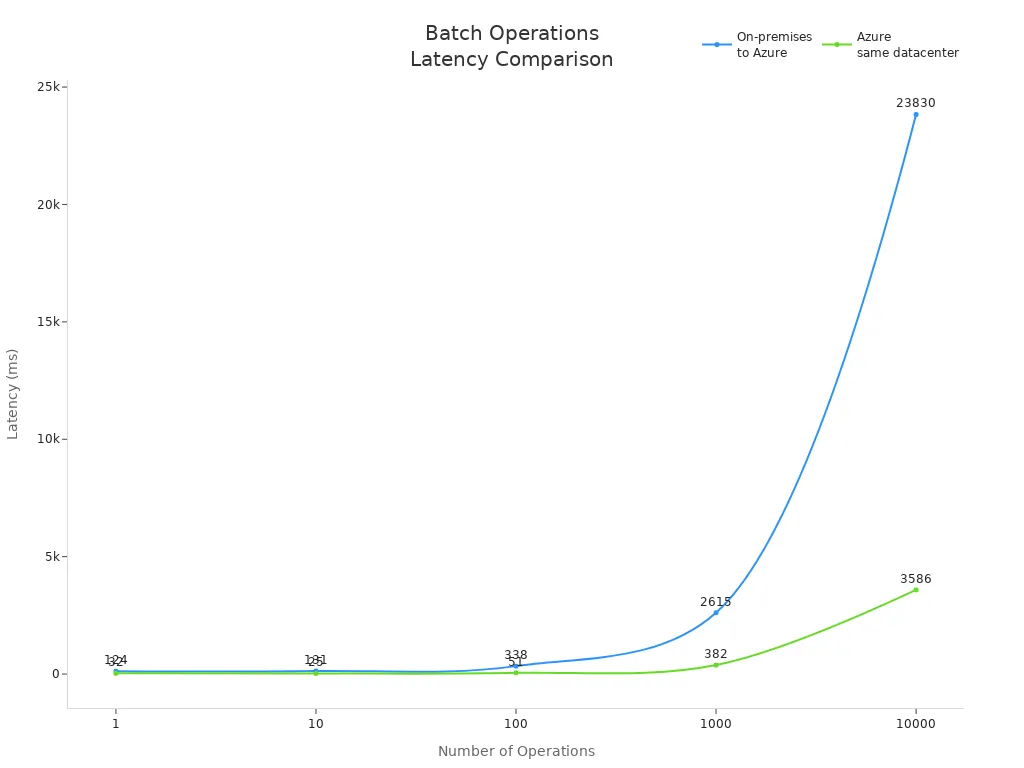
The following table shows how batch operations perform across different environments:
Operations | On-premises to Azure (ms) | Azure same datacenter (ms) |
|---|---|---|
1 | 124 | 32 |
10 | 131 | 25 |
100 | 338 | 51 |
1000 | 2615 | 382 |
10000 | 23830 | 3586 |
You can see that batch processing in Azure reduces latency significantly, especially when you operate within the same datacenter.
Resource Optimization
You can optimize resources by following a few simple strategies. Temporarily disabling indexes and constraints during large data loads speeds up inserts and updates. After you finish, you can rebuild indexes to restore query performance. Using SSIS for data transformation lets you offload heavy processing from your main database server.
T-SQL batch processing helps you avoid bottlenecks and keeps your system responsive. You spend less time waiting for data-changing operations to finish, and you use your hardware more efficiently. This approach supports both on-premises and cloud environments, making it a smart choice for modern data management.
Tip: Always monitor your batch operations and adjust your strategy based on workload and system feedback. This practice ensures you get the best performance from your database.
Integration with Microsoft SQL Server and Azure SQL
Advanced Analytics Support
You can unlock powerful analytics features when you use T-SQL with Microsoft SQL Server and Azure SQL. These platforms offer tools that help you analyze and process information quickly. For example, Azure Synapse Link for SQL lets you run real-time analytics without slowing down your main systems. Intelligent query processing speeds up your results by choosing the best way to handle each request. You also get integration with AI tools, which makes building smart applications easier.
Advanced Analytics Capability | Performance Enhancement Description |
|---|---|
Azure Synapse Link for SQL | Enables real-time analytics without impacting source databases. |
Intelligent query processing | Optimizes query execution, leading to faster response times. |
Integration with AI tools | Enhances application development and reduces complexity in data handling. |
Connection pooling | Improves throughput and reduces latency by reusing connections. |
AI-powered capabilities with GitHub Copilot | Simplifies application creation and accelerates delivery of AI applications. |
Microsoft Fabric for unified data estate | Bridges transactional and analytical workloads for responsive applications. |
A life insurance software company, Hexure, reduced processing time by 97.2% using Azure SQL Managed Instance. This shows how advanced analytics support can transform business operations.
Security and Permissions
You need strong security and clear permissions to protect your information. T-SQL gives you detailed control over who can access your systems. SQL Server uses roles at both the server and database levels. Server roles manage access to the whole system, while database roles control what users can do inside each database. This setup helps you keep your environment safe and organized.
Feature | Database Roles | |
|---|---|---|
Creation | Created at the server level | Created within a specific database |
Scope | Server-Wide | Database-Specific |
Permissions | Control access to server resources | Control access to database objects |
Assignment | Assigned to Logins or other roles | Assigned to database Users or other roles |
Built-in Roles | sysadmin, serveradmin, dbcreator, etc. | db_owner, db_datareader, db_datawriter, etc. |
Permission Mgmt | Server-wide permissions and security | Database-specific permissions and security |
You can assign roles to users based on their job needs. This approach reduces mistakes and keeps sensitive information safe. When you use these features, you also improve performance because the system spends less time checking permissions for each action.
Microsoft Ecosystem Integration
You benefit from deep integration with the Microsoft ecosystem when you use T-SQL. This language forms the backbone for business intelligence, automation, and performance optimization. You can automate business rules with stored procedures and triggers, which reduces manual work and errors. T-SQL also helps you maintain data integrity and security through validation and permission controls.
Feature | Description |
|---|---|
Foundation for Business Intelligence | T-SQL is essential for ETL processes, enabling the creation of dashboards and reports for strategic decision-making. |
Operational Process Automation | T-SQL allows for stored procedures and triggers that automate business rules, reducing manual effort and errors. |
Data Integrity and Security | T-SQL ensures data accuracy and security through validation and permission controls. |
Performance Optimization | Optimized T-SQL queries enhance application performance, leading to faster data access and insights. |
Legacy System Integration | T-SQL facilitates integration with existing SQL Server systems and aids in data migration to modern platforms. |
SQL Server 2025 brings new features for AI, security, and performance. It works with Microsoft Azure Arc and Microsoft Fabric to support modern data architecture.
Azure SQL Database uses an intelligent query optimizer. This optimizer creates the best plan for each query by looking at data size, distribution, and indexes. You get efficient data retrieval and better performance than with other systems.
Tip: When you use T-SQL in the Microsoft ecosystem, you gain tools that help you manage, analyze, and protect your information with ease.
Performance Gains with T-SQL

Case Studies and Examples
You can see the impact of T-SQL in real-world scenarios. Many organizations have reported measurable improvements after adopting T-SQL for their database operations. For example, OneSource Virtual (OSV) migrated to a new platform and saw a 70% increase in performance. The company achieved 100% system uptime and reduced licensing costs by half. OSV processed payroll transactions and tax filings more efficiently, which improved operational efficiency.
OSV increased performance by 70% after migration.
System uptime reached 100%.
Licensing costs dropped by 50%.
Payroll and tax processing became faster and more reliable.
These results show how T-SQL can transform your workflow. You gain faster response times and more reliable operations. You also reduce costs and improve the quality of your services.
You can find more case studies and technical details in Microsoft’s official documentation and SQL Server community forums. These resources help you understand best practices and learn from other professionals.
Quantifiable Improvements
Reduced Latency
You experience reduced latency when you use T-SQL for query processing. The language optimizes execution plans and minimizes the time needed to access data. Batch processing and stored procedures allow you to handle large volumes of information quickly. You spend less time waiting for results, which keeps your applications responsive.
Scenario | Latency Before (ms) | Latency After (ms) |
|---|---|---|
Batch Payroll Processing | 1200 | 350 |
Tax Filing Operations | 900 | 250 |
You notice that latency drops significantly after switching to T-SQL. Your users benefit from faster access to information. Your business processes run smoothly without delays.
Improved Throughput
You achieve improved throughput by leveraging T-SQL’s advanced features. The language supports parallel processing and efficient batch operations. You can process more transactions in less time. This capability is essential for high-volume environments, such as financial systems or online services.
Task | Throughput Before (records/sec) | Throughput After (records/sec) |
|---|---|---|
Payroll Transactions | 500 | 1700 |
Tax Filings | 300 | 1200 |
You see throughput increase by several times after adopting T-SQL. Your database handles more queries and data changes without slowing down. You maintain high performance even during peak workloads.
Tip: You can explore Microsoft’s documentation and join SQL Server community discussions to learn more about optimizing performance. These resources provide guidance on tuning queries and maximizing throughput.
You gain measurable improvements in performance when you use T-SQL. You reduce latency, increase throughput, and enhance the reliability of your database. You build faster, more efficient systems that support your business goals.
Best Practices for T-SQL Performance
Efficient Coding
You can boost performance by following proven T-SQL coding practices. Choosing the right join type makes your queries run faster. INNER JOINs often work better than LEFT JOINs when you only need matching data. Using stored procedures helps you save time because the database pre-compiles your SQL. This means repeated queries run quickly. You should also design your database structure carefully. A well-organized database allows for faster query execution and easier updates.
Here is a table of effective T-SQL coding practices:
Practice | Description | Example |
|---|---|---|
Choosing the right Joins | Use the best JOIN type for your needs. | INNER JOIN for matching data. |
Utilizing stored procedures and execution plans | Pre-compile SQL for repeated queries. | Used in fraud detection for quick data retrieval. |
Optimizing database structure and design | Structure your database for speed and efficiency. | Normalize data to remove redundancies. |
Regularly monitor and update statistics | Keep statistics current for better execution plans. | Update stats for responsive inventory systems. |
Minimize the use of subqueries | Replace subqueries with JOINs when possible. | JOINs in dispatch systems for efficiency. |
Use appropriate data types | Select data types that match your needs. | Use DATE for booking dates. |
Avoid unnecessary calculations in queries | Move calculations outside SQL when possible. | Limit calculations for faster transactions. |
Tip: You should always keep your code simple and clear. This makes it easier to maintain and improves performance.
Indexing and Optimization
You can achieve major performance optimizations by using the right index strategy. An index acts like a map for your data. It helps the database find information quickly without scanning every row. When you use indexes for read-heavy operations, you get faster query results and better response times. Proper index use also reduces I/O operations, which means your system works more efficiently.
Indexes serve as a structured lookup map, enabling quick data retrieval.
They significantly enhance performance for read-heavy operations.
Proper indexing reduces I/O operations and improves response times.
To get the best results, follow these steps:
Align index design with your application’s workflow and future growth.
Regularly validate changes in a nonproduction environment.
You should balance query speed, update costs, and storage costs when you design an index. Modify your index as your application evolves. Avoid overindexing, as too many indexes can slow down performance. The query optimizer will choose the best index for each query, but incorrect choices can hurt performance. Always review the estimated execution plan to see how your index is used.
Note: Displaying the estimated execution plan helps you understand how the optimizer uses your index and where you can make improvements.
Monitoring and Troubleshooting
You need to monitor your database to keep performance high. Real-time dashboards let you track important metrics. Customizable thresholds send alerts when something needs attention. You can monitor your database alongside servers and applications for a complete view. Automated reporting helps you manage multiple SQL Server instances. Historical baselines show you trends and help with planning.
Recommended tools include:
Reports for disk usage and resource-intensive queries.
Extended Events for detailed performance data.
Tools like Redgate SQL Monitor and Datadog Database Monitoring give you deep visibility into your database. They help you troubleshoot issues and keep your system running smoothly.
Tip: Regular monitoring and quick troubleshooting are key to maintaining top performance.
You gain a clear advantage when you choose T-SQL over standard sql. T-SQL helps you eliminate IT bottlenecks, improve data workflows, and achieve faster results. You see real-world benefits like reduced latency and higher throughput. Start by exploring Microsoft’s documentation and testing T-SQL features in your environment. You can unlock new levels of performance and reliability for your database operations.
Checklist: When to Choose SQL vs T-SQL
Use this checklist to decide between standard SQL and Transact-SQL (T-SQL) — keyword: t-sql vs sql.
- Database platform: If you are using Microsoft SQL Server or Azure SQL Database, prefer T-SQL; for multiple vendors or cloud-agnostic systems, prefer standard SQL.
- Portability needs: Choose standard SQL when queries must run across different RDBMS (Oracle, MySQL, PostgreSQL); choose T-SQL when portability is not required.
- Procedural logic: Use T-SQL for stored procedures, user-defined functions, control-of-flow (IF/WHILE) and batch processing; use standard SQL for declarative single-statement queries.
- Advanced server-side features: Choose T-SQL to leverage SQL Server-specific features (TRY/CATCH, MERGE, OUTPUT, table variables, TEMP tables, sp_executesql, LOCK hints).
- Performance tuning: Prefer T-SQL to use SQL Server-specific optimization techniques, query hints, execution plan diagnostics and indexed views.
- Security and permissions: Use T-SQL when you need server-specific security constructs (EXECUTE AS, module signing, SQL Server roles); standard SQL covers basic GRANT/REVOKE across systems.
- Maintenance & automation: Choose T-SQL for scheduled jobs, maintenance scripts and integration with SQL Server Agent or SQL Server Management Studio (SSMS).
- ETL and batch operations: Use T-SQL for complex ETL inside SQL Server (bulk operations, OPENROWSET, BULK INSERT); standard SQL for simple cross-platform data movement.
- Tooling and ecosystem: If you rely on SQL Server-specific tools (SSMS, Azure Data Studio, SQL CLR), use T-SQL; otherwise standard SQL is preferable for generic tools.
- Learning curve and team skills: If your team is experienced with SQL Server and T-SQL idioms, choose T-SQL; if the team focuses on ANSI SQL and multi-database skills, choose standard SQL.
- Third-party application requirements: Follow the application's supported SQL dialect; many applications expect standard SQL, others require T-SQL for customizations.
- Transaction control: Use T-SQL when you need SQL Server-specific transaction syntax and isolation behaviors; standard SQL covers basic BEGIN/COMMIT/ROLLBACK semantics but may vary by vendor.
- Migration plans: If future migration away from SQL Server is likely, minimize T-SQL-specific constructs and prefer standard SQL to reduce refactoring.
- Use of procedural extensions: Prefer T-SQL for complex server-side business logic; prefer set-based standard SQL for simpler, portable queries.
- Compliance and auditing: Choose T-SQL to use SQL Server auditing features, extended events, and DMVs for deep diagnostics; standard SQL lacks these SQL Server-specific facilities.
sql and t-sql: difference between sql and t-sql for microsoft sql server database
What is the core difference between SQL and T-SQL?
Structured Query Language (SQL) is the standard language for querying and managing relational database systems; T-SQL (Transact-SQL) is a proprietary procedural extension to SQL developed by Microsoft for use with Microsoft SQL Server database. SQL provides core SQL constructs like SELECT, INSERT, UPDATE and DELETE, while T-SQL adds procedural programming features, local variables, error handling, and additional built-in functions that work with the SQL Server database engine.
Is T-SQL a separate programming language or just a dialect of SQL?
T-SQL is a SQL dialect and a proprietary procedural language specifically for Microsoft SQL Server and Azure SQL Database. It extends the standard SQL language with programming constructs such as IF...ELSE, WHILE loops, and TRY...CATCH for error handling in T-SQL, making it more suitable for writing stored procedures and complex database logic inside the database engine.
Can standard SQL run on Microsoft SQL Server without changes?
Most standard SQL queries (regular SQL) like basic SELECT, INSERT, UPDATE and DELETE will run on Microsoft SQL Server, but some SQL standard features or vendor-specific SQL used by other database management systems may require modification. When working with SQL Server environments, developers often adapt queries to match T-SQL syntax and SQL Server-specific functions.
What are common T-SQL functions that differ from standard SQL?
T-SQL includes many built-in functions specific to SQL Server, such as ISNULL, NEWID, and DATEADD, and system functions for metadata access. Standard SQL has equivalent functions but with different names or behavior; using T-SQL functions is common when working with Microsoft SQL Server and can provide advantages of tighter integration with the database engine.
When should I use T-SQL instead of standard SQL?
Use T-SQL when you need procedural logic, transaction control, server-side processing, stored procedures, triggers, or advanced error handling in a Microsoft SQL Server database. For simple, portable queries across different relational database management systems, regular SQL (standard SQL) is preferable. Learning T-SQL is essential for working with Microsoft SQL Server and implementing complex database-side logic.
How does error handling in T-SQL compare to standard SQL?
Error handling in T-SQL uses TRY...CATCH blocks and functions like ERROR_NUMBER and ERROR_MESSAGE to manage runtime errors inside stored procedures and batch scripts. Standard SQL does not define a unified procedural error handling mechanism across all implementations, so T-SQL’s TRY...CATCH is a key advantage when building resilient server-side logic in SQL Server environments.
Are stored procedures written in T-SQL portable to other databases?
Stored procedures written in T-SQL are often not portable to other database systems without modification because they rely on T-SQL syntax, proprietary functions, and SQL Server-specific features. To move logic to another RDBMS, you may need to rewrite procedures using that system’s procedural language or adjust queries to comply with the SQL standard.
What are the key differences between T-SQL and other SQL dialects like PL/SQL?
T-SQL (used by Microsoft SQL Server) and PL/SQL (used by Oracle) are both procedural extensions to the SQL standard, but they differ in syntax, built-in packages, error handling mechanisms, and system procedures. Each is specifically designed for its database engine, so code, functions, and administrative commands are not directly interchangeable.
Does using T-SQL affect database performance compared to standard SQL?
T-SQL itself does not inherently slow performance; performance depends on query design, indexing, execution plans, and how well code leverages SQL Server features. Using server-side T-SQL to push logic into the database can reduce network round-trips and improve efficiency, but poorly written T-SQL statements or procedural loops can degrade performance compared with set-based SQL operations.
What are the advantages of learning T-SQL for a SQL developer?
Learning T-SQL is valuable for developers working with Microsoft SQL Server because it enables writing stored procedures, triggers, and complex batch scripts, implementing advanced error handling in T-SQL, and using SQL Server-specific functions. Knowledge of T-SQL also helps in performance tuning, working with the SQL Server database engine, and taking advantage of capabilities introduced in versions like SQL Server 2012 and later.
How does T-SQL handle transactions compared to standard SQL?
T-SQL supports transaction control using BEGIN TRANSACTION, COMMIT, and ROLLBACK like standard SQL, but it also provides SQL Server-specific behaviors and options for nested transactions, savepoints, and transaction isolation levels. When working with Microsoft SQL Server, it’s common to control transactions with T-SQL statements and to combine them with TRY...CATCH for robust error handling.
🚀 Want to be part of m365.fm?
Then stop just listening… and start showing up.
👉 Connect with me on LinkedIn and let’s make something happen:
- 🎙️ Be a podcast guest and share your story
- 🎧 Host your own episode (yes, seriously)
- 💡 Pitch topics the community actually wants to hear
- 🌍 Build your personal brand in the Microsoft 365 space
This isn’t just a podcast — it’s a platform for people who take action.
🔥 Most people wait. The best ones don’t.
👉 Connect with me on LinkedIn and send me a message:
"I want in"
Let’s build something awesome 👊
Summary
Don’t wait on IT for every report — learn how How T-SQL Saves You From Begging IT gives you the power to ask your own data questions. In this episode, I strip away the mystique around SQL and T-SQL, show you that SELECT is safe and non-destructive, and teach you how to move from “begging for reports” to “running your own queries with confidence.”
We break down the essential building blocks (SELECT, FROM, WHERE, ORDER BY), the differences Microsoft adds with T-SQL (TOP, error handling, etc.), and common pitfalls like using SELECT * or missing filters. By the end, you’ll have the courage to open a blank query window, write your first meaningful query, and stop feeling like you need permission just to ask a question.
What You’ll Learn
* Why SELECT is your safe first query (it’s read-only in normal use)
* The four core clauses: SELECT, FROM, WHERE, ORDER BY and how they combine
* How T-SQL differs from generic SQL: Microsoft’s “accent” (TOP vs LIMIT, TRY…CATCH, etc.)
* Pitfalls that make DBAs sigh: SELECT *, missing WHERE, and expensive ORDER BY on big tables
* How JOINs work: INNER JOIN vs LEFT JOIN, and why choosing incorrectly breaks your results
* Simple patterns to begin querying your data without risk or chaos
Full Transcript
Everyone treats SQL like it’s some kind of wizard spell. Truth is, it’s less Harry Potter and more IKEA manual—you just need the basic pieces and how they snap together. And unlike IKEA furniture, there are no missing screws or mystery hex keys. Subscribe and grab the cheat sheet at m365 dot show. Quick and painless.
By the end, you’ll confidently write a safe SELECT that gives you business answers without begging IT. If you can wrangle pivot tables in Excel, you’re already halfway to pulling your first query.
Of course, knowing that doesn’t stop the panic when you’re staring at a totally blank query window.
The Blank Query Window Panic
The Blank Query Window Panic is real. You open SQL Server Management Studio, faced with that gray canvas, and there’s the cursor—blinking at you like it’s judging your entire career. For some folks, that blinking line carries the same weight as a countdown timer in a movie bomb scene. One wrong move and you imagine the whole database going up in flames.
The funny part? That fear isn’t logical. The blank window intimidates because we’ve been conditioned to think SQL is arcane, dangerous, and reserved for high priests of IT. But here’s the truth: your first step—typing SELECT—isn’t destructive. SELECT is read-only in normal usage; it generally doesn’t change the data. That’s worth pausing on: you can hit execute and all you get is information back. Nothing updates, nothing deletes. Still, quick reminder—verify this with Microsoft’s own documentation for your safety, since some edge cases may exist. But the general safe takeaway: SELECT is your way to ask questions, not swing an axe.
So let’s get rid of the fear early. SELECT literally means “choose.” When you say `SELECT CustomerName, TotalSpend FROM Orders WHERE OrderDate >= '2025-01-01' ORDER BY TotalSpend DESC`, you’re not summoning demons. You’re just asking: “Show me customers and what they spent since the new year, highest first.” That’s about as risky as reading a menu. No dragons, no alarms, no smoking servers.
And that’s what most people never get told. SQL was designed to be approachable. It wasn’t supposed to sound like obscure math—terms like “relational algebra” and “expressive query models” are only helpful if you’re writing a textbook. For everyone else, they’re just academic wrappers around a tool that really just helps you pick your data the way you’d pick items from a list. Gatekeeping language turns SQL into Klingon, but once you stop overthinking, it's just commands that read like polite requests.
Meanwhile, the workplace makes this worse. You’ve probably seen the dreaded cycle: a manager asks for a simple breakdown, something like “Who bought the most last month?” Instead of running a quick SELECT to answer in minutes, many people rush to open a ticket. Then the request sits in a queue, lost in IT’s backlog, and by the time you get it, the question is already outdated. This isn’t about blame—it’s about missed opportunity. The tool to get the answer faster is sitting in front of you, but panic keeps it locked away.
That’s why reframing matters. SQL isn’t a bomb—it’s a waiter. You say, “SELECT burger, fries,” but instead of fries, it’s `ProductName, SalesTotal`. The database doesn’t argue, doesn’t get the order wrong, and doesn’t dump soda on your lap. It brings back exactly what you asked for. If you don’t narrow your request, sure, it’ll bring you the entire menu, all at once—and that’s where clauses like WHERE and ORDER BY trim things down. But the base request is still simple, predictable, and safe.
Let’s take the mystique out of the core parts. Think recipe, not ritual. SELECT picks columns. FROM names the table. WHERE filters rows. ORDER BY sorts. Done. You string them together, and the pattern repeats across almost every query. It’s systemized, not mysterious. Once you start seeing SQL as a set of building blocks instead of spells, the intimidation factor drops.
That mental flip is powerful. It moves you from a place of dependence—waiting for IT to hand over reports—to taking direct control of your own questions. You stop worrying you’ll break production just by looking at it, because looking is exactly what SELECT does. And once you see patterns in one query, you’ll recognize them everywhere.
Now, here’s where things get interesting. Microsoft couldn’t resist adding its own brand identity to this. They didn’t just hand you SQL, they spiced it with extras and called it T-SQL. Same foundation, but with quirks, enhancements, and some hurdles if you’re trying to copy-and-paste from Google or Stack Overflow. And that’s where the next layer of confusion comes in.
T-SQL vs SQL: Microsoft’s Branding Spin
Microsoft calls T-SQL “just SQL with extras.” That sounds harmless enough—until you paste in a script from some blog and SQL Server rejects it like you tried to teach it Klingon. Suddenly those little “extras” aren’t so optional. The obvious question is: what are they, and do they matter when you just want a quick report? Sometimes no. Other times yes, and if you’re not ready, they’ll trip you and make you think the database is gaslighting you.
Here’s the plain reality: SQL is the international standard. Think basic grammar rules—SELECT, FROM, WHERE, ORDER BY. T-SQL is Microsoft’s house dialect, their way of seasoning the dish. Most of the time, the core flavor stays the same. A SELECT that pulls customers and sales totals runs fine in SQL, it runs fine in T-SQL. So far, so safe. The real issue comes when you start leaning on functions, error handling, or more complex logic. That’s when Microsoft insists you speak with their accent.
A common frustration looks like this: you grab a query online that uses “LIMIT” to trim results. Paste it into SQL Server, and the error pops up. Why? In T-SQL, the equivalent is “TOP.” Same outcome, different keyword. Now, whether TOP vs LIMIT is the exact difference—check Microsoft’s documentation to confirm. That part matters because if you rely on memory or hearsay, you’ll waste an afternoon rewriting perfectly valid code into Microsoft’s chosen phrasing.
Let’s make this concrete. Verify the details in Microsoft’s docs, but here are the sorts of differences you’re likely to run into:
* Procedural control: IF and WHILE loops, so you can move beyond simple queries and build logic inside your database code.
* Error handling: TRY…CATCH blocks, useful for making automated jobs fail gracefully instead of just exploding mid-run.
* Batch separators: the “GO” keyword, which breaks big scripts into units.
* Result trimming: TOP for the first rows instead of LIMIT.
Again, check each of those with official documentation before you take them as absolute—because SQL standard vs. T-SQL drift is exactly where you can misstep. But the big picture is clear enough: Microsoft bolted on features to help with stored procedures, automation, and error control.
And this is where intent matters. If you’re just running SELECTs for numbers in a meeting? You won’t care. As long as you stick to the basics, you’re safe. SELECT columns, FROM a table, WHERE something matches—all that’s virtually identical in any SQL flavor. Problems only surface when you paste in more advanced snippets that assume a different dialect. That’s when the red squiggly line shows up, and SQL Server tells you nothing more helpful than “incorrect syntax near X.”
The metaphor I like best is this: standard SQL is like English everyone agrees on—short, clear sentences. T-SQL is Microsoft’s local slang. Ninety percent is the same, the extras are just quirks you need when you get deeper. It doesn’t mean English stops working; it just means if you’re in Texas and you ask for “soda,” don’t be surprised when they stare until you say “Coke.”
Here’s the important pivot—those extensions don’t replace what you know, they extend it. Think about automated reports. Without TRY…CATCH, one error in a nightly job kills the whole thing and you wake up to angry emails. With T-SQL’s error handling, you can log the problem, keep the rest of the process running, and avoid a 5 a.m. disaster call. That’s real value, not just Microsoft being fussy. But again, check the docs before you rely on any of these features—you don’t want to build a process on faulty assumptions.
So how do you keep your sanity? First, remember your basics are safe. SELECT, FROM, WHERE, ORDER BY—they’re unchanged. No dialect drama there. Second, when you hit an error on a copied snippet, ask yourself: is this failing because I don’t understand SQL, or because it’s written for a different dialect? Nine times out of ten, it’s the second. That’s not a knowledge gap on your part—it’s a translation problem. Learn the accent, check the syntax differences in Microsoft’s documentation, and you’re back in control.
Bottom line: don’t panic about “extras.” They’re not roadblocks, they’re optional power tools. You don’t need them to pull quick answers, but when you start building repeatable processes, dashboards, or anything automated, they’ll earn their keep. Knowing where T-SQL diverges is like knowing the local slang—it won’t stop you from ordering a sandwich, but it will save you from ordering something you didn’t mean.
And since the basics really are the same, let’s go back to the absolute foundation. Before loops, error handling, or fancy functions—you need to type your very first SELECT. And that’s where things get interesting. Your first SELECT is kind of like your first text message: the shorter and clearer it is, the better.
The SELECT Survival Guide
So let’s strip it down to exactly what you need: the SELECT Survival Guide. This is the part where SQL stops looking like random incantations and starts working for you. SELECT is your opener, and the good news is it doesn’t change your data in standard practice. You can fumble the syntax, run it, and nothing gets deleted. It’s the safest place to learn.
Now, SELECT by itself isn’t enough. Type just “SELECT” and SQL Server stares back at you, thinking, “Select what exactly?” That’s where FROM comes in. SELECT is the what, FROM is the source. Skip FROM and you may as well email your boss with nothing but, “Numbers.” Not helpful. FROM is how you point to the actual table that holds the records you want.
Here’s the shape of a complete request: SELECT specific columns, FROM the table, WHERE the condition, ORDER BY the thing that gives order. It sounds simple, because it is—once you lay the pieces out. Let’s put that in one concrete line: `SELECT CustomerName, TotalSpend FROM Orders WHERE OrderDate >= '2024-01-01' ORDER BY TotalSpend DESC;`. This is short enough to read aloud, easy to copy, and runnable as-is. That one snippet shows you all four core clauses in one breath.
Think of WHERE as your filter. Without it, you’re asking the system to dump every record ever created at your feet. Best case, you waste your time scrolling. Worst case, you choke your machine returning a million rows. WHERE is your shield. Want sales only after January 1st? That condition keeps you safe and sane. You’ll thank yourself the first time a query ends in seconds instead of spinning endlessly.
ORDER BY is your sanity saver. Without it, SQL sends results in whatever random order the engine feels like. You ask for sales, and it sorts them by some unseen internal ID you didn’t care about. ORDER BY lets you make sense of output: by date, by customer name, by spend. Just remember—it can be expensive on massive datasets, so use it deliberately.
Want a micro win while we’re here? Grab the copy-paste friendly cheat sheet—it’s free at m365 dot show. That way you don’t have to rewind this video every time you forget a clause.
Here’s the bottom line: SELECT picks, FROM targets, WHERE narrows, ORDER BY organizes. That’s the rhythm to drill into your muscle memory. Most of the so-called “urgent” tickets managers fire at IT boil down to this exact pattern. “Show me customers who bought last week, sorted by spend.” That’s one clean SELECT statement, not two weeks waiting in the help desk queue.
And because SELECT doesn’t modify data under standard use, practicing it is stress-free. Run it, rerun it, break it, and the only thing you’ll damage is your patience if you forget WHERE. You’re already eliminating bottlenecks just by learning this one pattern.
The empowerment is real. No tickets, no waitlists, no translations through three IT layers—you type it, you run it, and the answer is in your hands. That’s why SELECT is the cornerstone. It’s structured, predictable, and once you see how the pattern repeats, it becomes second nature.
But let’s not pretend this is the whole journey. Up to now, we’ve been pulling data from one tidy table at a time—like shopping from one clean shelf. But your company’s data isn’t arranged neatly like that. It’s scattered between multiple tables: customers here, orders there, payments in a different corner. Sooner or later, those tables need to work together. And that’s where the real survival challenge begins—because linking tables is less like clean shelving and more like messy relationships waiting to implode. Next: when your data lives in different tables, JOINs are how you stitch it together—and they’re where mistakes start costing you time.
JOINs: The Relationship Drama
JOINs are like dating apps—sometimes you get a perfect pair, two tables syncing like they belong together, and sometimes you end up with a messy mismatch that leaves you wondering why one customer ID is suddenly tied to three hundred accounts in Delaware. That’s JOINs for you: the joy, the pain, and the occasional bad blind date. Business data rarely lives neatly in one table. Customers hang out over here, transactions stack up over there, and product info sits in a forgotten corner until an executive demands it on Monday morning. That’s why JOINs exist: they’re the awkward middleman trying to connect everyone.
On paper, JOINs seem straightforward. Tables need to talk, JOINs make introductions. But you don’t have to write many queries before realizing how quickly things go sideways. Pick the wrong one, and half your data vanishes—or worse, duplicates start multiplying like bad macros in Excel. Now your totals are either suspiciously low or weirdly inflated, and people are asking you to explain “phantom revenue” that never existed. INNER versus LEFT JOIN is where most new users stumble, and with names that sound more like workout poses than query logic, the confusion is understandable.
So let’s break it down in plain English—and on-screen with a runnable example. An INNER JOIN only shows rows where both tables agree. If a customer exists in Customers and that same ID exists in Orders, you’ll see the match. No overlap, no row. Think of it like two people swiping right on each other. Mutual yes, and the date happens. The code looks like this:
`SELECT C.Name, O.Total FROM Customers C INNER JOIN Orders O ON C.ID = O.CustomerID;`
Read that slowly out loud—it helps listeners stick the pattern in their memory.
A LEFT JOIN is more forgiving. It keeps every record in the left table, even if the right table doesn’t have a match. You still show up to the date, but sometimes the other seat is empty. That’s where NULLs come in, the database’s way of saying, “Yeah, we don’t know this part.” Example line:
`SELECT C.Name, O.Total FROM Customers C LEFT JOIN Orders O ON C.ID = O.CustomerID;`
Say this one slowly too. It’s the simplest way to demonstrate how a LEFT JOIN hangs onto all the customers, while some order details may come back blank.
Why does this matter? Because the wrong JOIN changes your story. Use INNER when data is still syncing between systems, and suddenly entire orders disappear from your report. Your totals shrink, panic spreads, and leadership thinks sales cratered overnight. I’ve seen it: a revenue report dropped forty percent because the JOIN excluded all new customers not yet pushed into the CRM. The fix was simply flipping INNER to LEFT—or better, ensuring the upstream data integration caught up. But in the moment, the wrong JOIN rewrote the business narrative.
To steer clear of traps, here’s a safe workflow: first, sanity-check whether you even have missing links. Run a quick count of orphaned rows—transactions without matching customers, or customers without linked orders. Knowing those gaps gives you proof before picking INNER or LEFT. If there are orphans, LEFT JOIN usually makes more sense for reporting so you can see everything, blanks included. It’s not a hard rule, but it’s often the safer starting point in reporting scenarios. INNER JOIN is better when you know the relationships are rock-solid, like high-trust partnerships.
And yes, you’ll have to deal with those NULLs—every blank column is a reminder of missing or incomplete data. They aren’t errors; they’re signals. If you see far too many, the problem probably isn’t SQL, it’s your upstream feeds or foreign keys. Pay attention, because fixing the pipeline matters more than patching with a quick syntax tweak.
Compared to Excel gymnastics with VLOOKUP or index-match chains, JOINs in T-SQL are a relief. The syntax is clean. No duct-taped formulas. Customers here, orders there, connect on CustomerID—it just works. Once you practice, JOIN statements almost read like sentences.
By this stage, you’ve got the basics to link tables and avoid the worst misunderstandings. But here’s the thing—JOINs are not what usually brings a database to its knees. The bigger mess comes from rookie mistakes that look harmless but can swamp performance or chew up resources until the DBA calls you out.
Want to watch MVPs walk through real JOIN disasters? Follow M365.Show for livestreams and you’ll see the horror stories live. And stick around, because before those livestreams you need to know which blunders actually make DBAs cry. That’s up next.
Mistakes That Make DBAs Cry
Mistakes That Make DBAs Cry aren’t usually sabotage—they’re the rookie blunders that feel harmless when you type them but hit production like a freight train. You think you’re running a test. The server thinks you’ve declared war. And the DBA? They’re watching their monitoring dashboard light up like a Christmas tree and quietly adding your name to the list of people they mutter about over coffee.
The first culprit is SELECT *. It looks so clean: one star, all the data, done. Except SQL takes you literally—and drags every single column across the wire. That means the useful stuff like CustomerName and OrderDate, but also the detritus: audit columns no one remembers, deprecated fields that should have been dropped ten years ago, and the infamous Notes column where some rep once typed his grocery list. Suddenly, you’re pulling back gigabytes you don’t need. Mitigation tip: pick only the columns you actually require. Don’t type *. Type CustomerName, TotalSpend, and whatever else matters. Your future self—and your network—will thank you.
The second offender is the missing WHERE clause. You thought you ran “last month’s sales.” What you really asked for was “every sale since the dawn of corporate history.” The result: a flood of rows pouring into your result grid, burning temp space, trashing performance, and forcing your coworkers to reboot queries that now won’t finish. Mitigation tip: always scope your queries—at minimum, add a date range or, if you’re just testing, use the TOP keyword to trim results. But because syntax varies, double-check the official T-SQL documentation for TOP and OFFSET/FETCH so you’re not guessing at keywords.
The third mistake is overusing ORDER BY on massive tables. Sure, tidy results look nice, but ORDER BY isn’t free. On small sets it’s a blink. On huge unindexed tables? It’s torture. The engine has to grab the whole pile, shuffle it by hand, and then spit it back. Performance tanks, everything else waits its turn, and you’re suddenly responsible for why response times went from seconds to minutes. Mitigation tip: check if your sort column has an index. If not, test with a subset before hitting production with a full ORDER BY. Again, verify the exact indexing approach in Microsoft’s docs if you’re not sure where to look.
Now, sometimes those three landmines combine. I once saw a “practice query” fire against production with SELECT *, no WHERE, and an ORDER BY on a column with no index. The machine nearly keeled over. That single run ballooned into something that ate temporary storage, locked sessions, and brought backups to a crawl. It wasn’t malicious. It was just shortcut habits all colliding at once. For the DBA on call, though, the difference between ignorance and attack didn’t matter—the system was down either way. And notice I didn’t name numbers here; those were real details in one shop, but don’t assume it happens exactly the same in yours.
These mistakes sting because they scale. You try them in dev with a hundred rows? No harm. You aim them at production with a hundred million? Disaster. And once someone copies your sloppy query into their own, the pain multiplies. That SELECT * turns into a team-wide reflex; that missing WHERE clause gets normalized; that ORDER BY becomes a tradition. Before long, your entire reporting culture becomes a denial-of-service waiting to happen.
The way out is precision. Not perfection, just precision. Choose columns on purpose. Scope your results with WHERE clauses or TOP ranges. Think twice before sorting wide datasets, and when you must, be smart about indexes. Those three habits will dodge the majority of rookie disasters that drive DBAs up the wall.
And yeah, DBAs joke about all this—they’ll sigh, mock you a little, and maybe even send you a screenshot of the server gasping under your query. But the underlying frustration is real, because these aren’t exotic failings. They’re everyday shortcuts that eat resources for sport. Fix them, and you’ll instantly stand out as someone who respects the system instead of treating it like free storage space.
Clean up these three habits, and you won’t just save face—you’ll avoid most of the incidents that make DBAs cry. More importantly, you shift from being the person who “broke it” to the person who reliably gets answers without breaking a sweat.
And that brings us to the bigger win. When you stop tripping over rookie mistakes, even the most basic SELECT starts to feel like a superpower. You’re not waiting for IT, you’re not flooding the system, and you’re finally in control of your own questions.
Conclusion
Let’s wrap this up with three things to keep burned into your brain. One: SELECT is your practice mode—it’s read-only under normal use, so running it is safe. Two: always point to the right table with FROM and cut the noise with WHERE—filters save you from drowning in rows. Three: JOINs are powerful, but treat them carefully. INNER means both sides match, LEFT means you’ll keep everything on the left and blanks where there’s no partner.
Here’s your homework: run one safe query on a read-only dataset—or ask IT for a read-only clone—and try the SELECT+JOIN example we covered. That’s how you build confidence without wrecking production.
Subscribe at m365 dot show for survival guides from MVPs, follow the M365.Show LinkedIn page for livestreams. That’s the toolkit you need to keep your queries—and your reputation—out of trouble.
This is a public episode. If you'd like to discuss this with other subscribers or get access to bonus episodes, visit m365.show/subscribe

Founder of m365.fm, m365.show and m365con.net
Mirko Peters is a Microsoft 365 expert, content creator, and founder of m365.fm, a platform dedicated to sharing practical insights on modern workplace technologies. His work focuses on Microsoft 365 governance, security, collaboration, and real-world implementation strategies.
Through his podcast and written content, Mirko provides hands-on guidance for IT professionals, architects, and business leaders navigating the complexities of Microsoft 365. He is known for translating complex topics into clear, actionable advice, often highlighting common mistakes and overlooked risks in real-world environments.
With a strong emphasis on community contribution and knowledge sharing, Mirko is actively building a platform that connects experts, shares experiences, and helps organizations get the most out of their Microsoft 365 investments.