

 Apple Podcasts
 Spotify
 Youtube Music
 Spreaker
 Podchaser
 Amazon Music
Your M365 AI agent isn’t failing because the model is bad—it’s failing because your plumbing is. This episode exposes why DIY agents that “work in dev” die the second real users and security show up. You’ll hear how app-only auth quietly nukes permission fidelity and audit trails, why stateless bots forget context the moment you add a second node, and how hand-rolled Teams/Slack/Outlook adapters create glitchy, untrustworthy UX that feels cheap and amateur.
The host then reveals the real unlock: the Microsoft 365 Agent SDK as the non-optional backbone for identity, state, channels, and governance. You get act-as-user auth, durable conversation state across clusters, real adapters for Teams/web/Slack/Copilot, streaming that just works, and built-in hooks for Purview, DLP, Defender, and eDiscovery—so security says “yes” instead of “absolutely not.”
If you’re gluing LangChain, SK, and custom tools together and hoping it passes review, this episode is the wake-up call: stop shipping garden hoses and start building on the SDK’s enterprise-grade arteries.






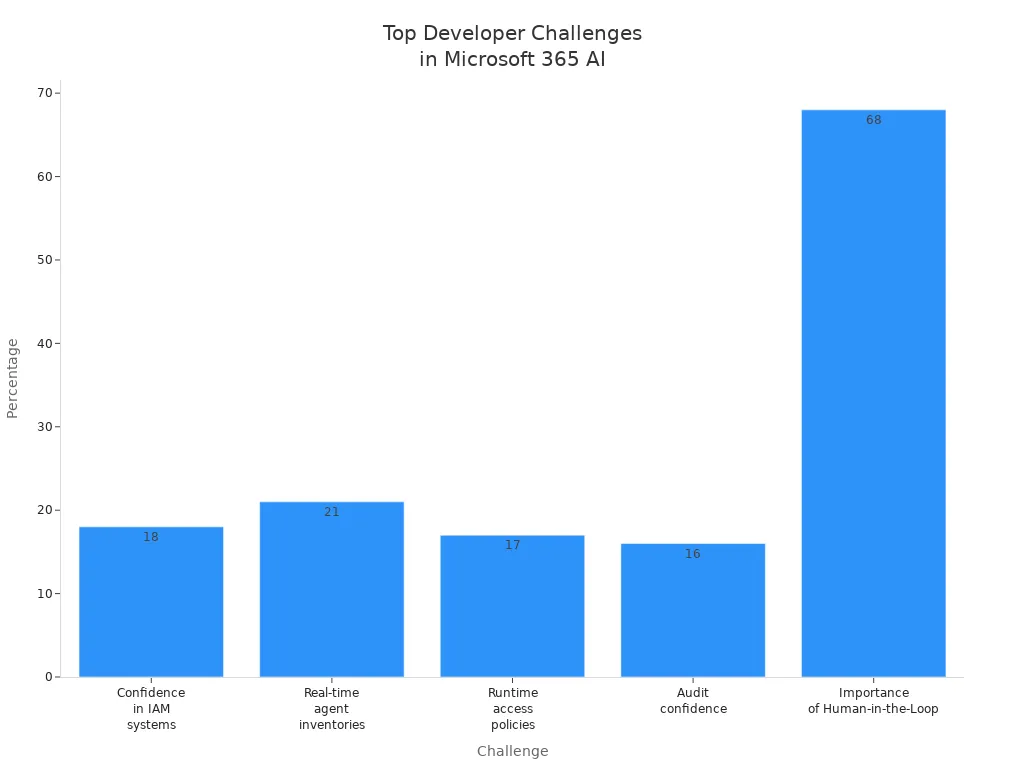
In the fast-evolving landscape of AI development, the Microsoft 365 Agent SDK stands out as a crucial tool for developers. This SDK helps you tackle significant challenges, such as managing identities, ensuring security, and maintaining conversation continuity. For example, a staggering 68% of developers believe that integrating a Human-in-the-Loop (HITL) approach is vital for sensitive actions like data access.
Ignoring the Microsoft 365 Agent SDK can lead to increased complexity in your projects. You may face risks related to compliance and security, while also compromising user experience. Without this SDK, your conversational AI agents could struggle with context retention and multi-channel support, ultimately affecting their effectiveness.
Key Takeaways
- Microsoft 365 Agent SDK simplifies building secure and scalable AI agents with strong identity and permission management.
- The SDK supports multi-channel deployment, letting your agents work smoothly across Teams, Slack, Outlook, and web apps.
- Conversation resumption helps agents remember past interactions, creating natural and continuous user experiences.
- Integration with Microsoft 365 services like Mail, Calendar, SharePoint, and Teams boosts agent capabilities and data access.
- Built-in security and compliance features protect sensitive data and ensure your agents follow organizational policies.
- The SDK enables automation of workflows, improving productivity for enterprises and small businesses alike.
- Not using the SDK can increase development complexity, security risks, and lead to poor user experiences.
- Customizing agents with the SDK is easy, allowing you to tailor solutions to specific business needs and scale confidently.
Core Features of Microsoft 365 Agent SDK
The Microsoft 365 Agent SDK serves as a standardized framework for building robust AI agents. It simplifies identity management, state persistence, and governance compliance. This framework allows you to create conversational AI agents that are not only effective but also secure and compliant with organizational policies.
Identity and Permission Management
Identity and permission management is crucial for any AI agent. The Microsoft 365 Agent SDK provides several components to ensure that your agents operate securely and efficiently. Here’s a breakdown of these components:
| Component | Description |
|---|---|
| Agent blueprint | Defines the agent's identity, permissions, and infrastructure requirements. |
| Agentic app instance | Represents a specific deployment of the agent blueprint with unique configurations. |
| Agentic user | The runtime identity that appears in the organization, designed specifically for agents. |
With features like act-as-user authentication, your agents can operate with the same permissions as the user. This capability ensures permission fidelity and maintains audit trails. The SDK includes built-in sign-in handlers, consent surfaces, and token exchange mechanisms. These features allow agents to act on behalf of users when necessary while adhering to the principle of least privilege. This means your agents will only have the minimal permissions required, which enhances security and compliance.
Multi-Channel Adapters
The Microsoft 365 Agent SDK excels in providing multi-channel support. It includes built-in adapters for popular platforms such as Microsoft Teams, Slack, and Outlook. This native support allows you to deploy your AI agents seamlessly across various environments.
| Supported Platforms |
|---|
| Microsoft 365 Copilot |
| Microsoft Teams |
| Web & Custom Apps |
By leveraging these multi-channel adapters, you can ensure that your conversational AI agents deliver a consistent user experience. The SDK facilitates seamless integration with different enterprise systems and APIs, allowing your agents to function effectively in diverse settings. This capability is essential for maintaining a cohesive environment for managing AI applications.
Scalability and State Persistence
Scalability and state persistence are vital for delivering effective AI solutions. The Microsoft 365 Agent SDK employs several mechanisms to achieve this:
| Mechanism | Description |
|---|---|
| Context Management | AI agents manage context windows to ensure effective processing of tasks, deciding on necessary context for each agent transition. |
| Memory Integration | Supports both volatile and long-term memory, allowing for context-aware reasoning and integration with vector databases. |
| External State Persistence | Shared state is stored externally to maintain task progress and conversation history, enabling agents to resume work after interruptions. |
These features allow your agents to maintain context across multiple interactions. This durability in conversation management prevents stateless bot issues, enhancing user experience. You can scale your agents across multiple nodes while ensuring they retain context, which is crucial for multi-turn interactions.
Conversation Resumption in Microsoft 365 Agents SDK
Durable conversation management is essential for creating effective AI agents. It allows your agents to handle multi-turn interactions smoothly. With durable conversation management, your agents can remember previous messages and context, making conversations feel more natural and engaging.
When you implement conversation resumption, you prevent the common issues associated with stateless bots. Stateless bots often treat each interaction as a standalone event. This approach can lead to frustrating user experiences, as the bot fails to recall previous interactions. In contrast, the Microsoft 365 Agent SDK enables your agents to maintain conversation history. This capability allows for seamless transitions between messages, enhancing the overall user experience.
Here’s a comparison of how conversation resumption in the Microsoft 365 Agent SDK stacks up against stateless bot architectures:
| Feature | Microsoft 365 Agent SDK | Stateless Bot Architectures |
|---|---|---|
| Conversation Context | Maintains context across multiple turns | Does not maintain persistent context internally |
| State Storage | Stores state externally (databases, Redis, etc.) | Relies on shared storage for each interaction |
| Conversation Resumption | Can reload context after restarts or interruptions | Treats each interaction independently |
| User Experience Improvement | Enables multi-turn, context-aware interactions | Limits seamless conversation flow |
The ability to resume conversations on the server side is a game changer. Your agents can reload context after interruptions, ensuring that users do not lose track of their discussions. This feature is particularly useful in scenarios where users may need to pause and return later.
Moreover, the Microsoft 365 Agent SDK allows you to scale your agents across multiple nodes while maintaining context. This means that even as your user base grows, your agents can still provide personalized and coherent interactions. By leveraging conversation management capabilities, you ensure that your agents remain effective, regardless of the load.
Integration with Microsoft 365 Ecosystem

The Microsoft 365 Agent SDK integrates seamlessly with the broader Microsoft 365 ecosystem. This integration enhances your ability to build powerful AI agents that leverage existing Microsoft services.
Microsoft 365 Services Compatibility
You can utilize various Microsoft 365 services with the Microsoft 365 Agent SDK. Here’s a quick overview of the compatible services:
| Compatible Services |
|---|
| Calendar |
| SharePoint |
| Teams |
These services allow you to create agents that can interact with users across multiple platforms, ensuring a cohesive experience. By integrating with these services, your agents can access essential data and provide timely responses.
Extending with Custom Orchestrators
The Microsoft 365 Agent SDK also supports the development of custom orchestrators and foundation models. This flexibility allows you to tailor your agents to meet specific business needs. To extend the SDK effectively, follow these steps:
- Choose a Development Approach: Decide between a low-code approach using Copilot Studio or a pro-code approach using Visual Studio with the Microsoft 365 Agents Toolkit.
- Select the Appropriate SDK: Depending on your needs, choose between the Microsoft 365 Agents SDK for full-stack agents or the Teams SDK for agents specifically designed for Microsoft Teams.
- Integrate Existing Agents: If applicable, integrate Microsoft Foundry agents into Microsoft 365 Copilot and Teams.
By following these steps, you can create agents that not only meet your requirements but also enhance user engagement.
The integration with Microsoft Graph API and Azure services further amplifies the capabilities of your agents. You can install the Azure integration package and the Microsoft.Identity.Web.AgentIdentities package to add support for agent identities. After that, configure your services to add Azure token credential support. This process ensures that your agents can securely access resources and perform actions on behalf of users.
Security and Compliance with Microsoft 365 Agent SDK
Security and compliance are critical when developing AI agents. The Microsoft 365 Agent SDK provides robust features to protect enterprise data and ensure adherence to organizational policies.
The SDK integrates seamlessly with Microsoft compliance tools like Purview and Data Loss Prevention (DLP). This integration allows you to build AI agents that are secure by design. Here are some key benefits of this integration:
- The Purview SDK evaluates prompts and responses in real-time against DLP policies.
- AI interactions are logged in Purview, supporting audit, communication compliance, and data lifecycle management.
- Sensitive data in prompts and responses is automatically protected, ensuring compliance with organizational policies.
The Microsoft 365 Agent SDK also includes several security features that enhance its enterprise-ready capabilities. The following table summarizes these features:
| Security Feature | Description |
|---|---|
| Entra-backed Agent Identity | Provides secure authentication and controlled access to user resources like mailboxes. |
| Open Telemetry | Enables full observability of agent interactions, ensuring actions are auditable and traceable. |
| Governed Model Context Protocol (MCP) | Allows access to Microsoft 365 workloads under admin control, ensuring compliance and security. |
| IT-approved Blueprint System | Ensures agents inherit compliance, governance, and security policies. |
| Integration with Microsoft Purview | Applies data protection policies and audits agent activity. |
| Integration with Microsoft Defender | Detects, investigates, and responds to threats in real time. |
Governance features via MCP servers further enhance security and compliance. These features ensure that your agents operate within defined policies. Here’s how they work:
| Feature | Description |
|---|---|
| Centralized Control | IT administrators manage which Work IQ MCP servers are available to agents, ensuring compliance. |
| Scoped Permissions | Permissions are granted based on what agents need, limiting access to only necessary resources. |
| Observability | Full tracing of tool calls is provided for audits and troubleshooting purposes. |
| Policy Enforcement | Enforces rate limits, payload checks, and security scans during runtime to maintain security. |
By leveraging these features, you can ensure that your AI agents not only meet security standards but also comply with governance requirements. The built-in security measures of the Microsoft 365 Agent SDK make it an ideal choice for developing enterprise-ready solutions. You can focus on creating innovative agents while the SDK handles the complexities of security and compliance.
Real-World Use Cases of Microsoft 365 Agents SDK
The Microsoft 365 Agent SDK empowers organizations to enhance productivity through intelligent automation. Here are some real-world examples of how businesses leverage this powerful tool.
Enterprise Workflow Automation
Organizations can streamline various processes using the Microsoft 365 Agent SDK. Here are three notable examples:
Automating Shared Mailbox Access Management: Teams can simplify the process of granting and revoking access to shared mailboxes. By initiating workflows in Microsoft Teams, you can ensure that the right people have access to the right information without manual intervention.
Adding Users to Active Directory and Azure AD Groups: Automating user provisioning reduces complexity and saves time. This process allows IT teams to efficiently manage user access across both on-premises and cloud directories.
Creating an Employee Onboarding Workflow: The SDK enables IT departments to automate the entire onboarding process. This includes account provisioning and access management, ensuring new employees have everything they need from day one.
Small Business Applications
Small businesses also benefit from the Microsoft 365 Agent SDK. Many use it to enhance their customer relationship management (CRM) and project management solutions. The following table illustrates some common functionalities:
| Functionality | CRM Use Case | Project Management Use Case |
|---|---|---|
| Update records | Update CRM records | N/A |
| Pull customer notes | Pull customer notes | N/A |
| Generate summaries | Generate meeting summaries | Daily standup reports |
| Prepare handover data | Prepare account handover data | Ticket summaries, Task allocation |
| N/A | N/A | Risk updates |
These applications allow small businesses to automate routine tasks, freeing up time for more strategic activities. By integrating the Microsoft 365 Agent SDK, you can create a productivity assistant that enhances your team's efficiency.
Multi-Channel Deployment Benefits
The Microsoft 365 Agent SDK supports multi-channel deployment, allowing your agents to operate seamlessly across various platforms. This capability is crucial for maintaining consistent user experiences. For instance, you can deploy a multi-agent webchat app that interacts with users on Microsoft Teams, Slack, and webchat interfaces. This flexibility ensures that your agents can engage users wherever they are, enhancing overall satisfaction.
Risks of Not Using Microsoft 365 Agent SDK
Choosing not to use the Microsoft 365 Agent SDK can lead to several significant risks that may impact your development projects. Here are some key concerns to consider:
Increased Development Complexity: Without the Microsoft 365 Agent SDK, you may face a more complicated development process. You will need to create custom solutions for identity management, state persistence, and security. This added complexity can lead to longer development times and increased maintenance overhead.
Security, Compliance, and Governance Risks: The absence of the Microsoft 365 Agent SDK can expose your projects to security vulnerabilities. The SDK provides essential security and governance features that help you manage AI agents effectively. Without these features, you may struggle to implement consistent security measures. This inconsistency can lead to compliance issues, putting your organization at risk.
Poor User Experience: If you do not utilize the SDK, your agents may lack conversation resumption and multi-channel support. This limitation can result in frustrating user experiences. Users expect seamless interactions, and without the ability to remember context, your agents may fail to deliver coherent conversations. This can lead to dissatisfaction and decreased engagement.
Competitive Disadvantages: Not using the Microsoft 365 Agent SDK can slow your time to market. Competitors who leverage the SDK can develop and deploy their AI agents more quickly. This advantage allows them to capture market share and innovate faster. You may find it challenging to keep up with industry trends and user expectations without the SDK's capabilities.
The Microsoft 365 Agent SDK offers essential features that empower you to build secure, scalable, and compliant AI agents. Key benefits include multi-channel support, enterprise readiness, and significant time savings in development. This SDK is not just an option; it is a foundational tool for your projects. It provides a trusted platform for managing AI workloads while ensuring compliance with existing security frameworks.
By adopting the Microsoft 365 Agent SDK, you can innovate confidently and deliver superior user experiences across various Microsoft 365 platforms. Embrace this powerful tool to enhance your AI development journey.
FAQ
What is the Microsoft 365 Agent SDK?
The Microsoft 365 Agent SDK is a framework that helps you build secure and scalable AI agents within the Microsoft 365 ecosystem. It simplifies identity management, conversation continuity, and compliance.
How does the SDK handle security?
The SDK integrates with Microsoft compliance tools like Purview and DLP. It ensures that your agents adhere to security policies and protects sensitive data during interactions.
Can I use the SDK for multi-channel deployment?
Yes! The Microsoft 365 Agent SDK supports multi-channel deployment. You can deploy your agents across platforms like Teams, Slack, and Outlook, ensuring a consistent user experience.
Is the SDK suitable for small businesses?
Absolutely! Small businesses can leverage the Microsoft 365 Agent SDK to automate tasks in CRM and project management. It enhances productivity and streamlines workflows.
How does conversation resumption work?
Conversation resumption allows your agents to maintain context across interactions. This feature prevents stateless bot issues, ensuring users have a seamless experience even after interruptions.
What are the benefits of using the SDK?
Using the Microsoft 365 Agent SDK provides benefits like simplified development, enhanced security, and improved user experience. It helps you build compliant and effective AI agents quickly.
Can I customize my agents with the SDK?
Yes, you can customize your agents using the SDK. It supports the development of custom orchestrators and foundation models, allowing you to tailor agents to specific business needs.
How do I get started with the SDK?
To get started, visit the Microsoft 365 Agent SDK documentation. You can choose between low-code or pro-code approaches based on your development preferences and requirements.
🚀 Want to be part of m365.fm?
Then stop just listening… and start showing up.
👉 Connect with me on LinkedIn and let’s make something happen:
- 🎙️ Be a podcast guest and share your story
- 🎧 Host your own episode (yes, seriously)
- 💡 Pitch topics the community actually wants to hear
- 🌍 Build your personal brand in the Microsoft 365 space
This isn’t just a podcast — it’s a platform for people who take action.
🔥 Most people wait. The best ones don’t.
👉 Connect with me on LinkedIn and send me a message:
"I want in"
Let’s build something awesome 👊
1
00:00:00,000 --> 00:00:03,600
You are building custom AI agents for Microsoft 365 the hard way.
2
00:00:03,600 --> 00:00:06,600
That's why they break, stall, and fail security review.
3
00:00:06,600 --> 00:00:09,000
The moment a real user shows up.
4
00:00:09,000 --> 00:00:14,600
The truth, the Microsoft 365 agent SDK isn't optional if you want scale, security, and real multi-channel reach.
5
00:00:14,600 --> 00:00:20,000
You'll learn why custom glue fails, what the SDK gives you out of the box, and exactly how to implement it today.
6
00:00:20,000 --> 00:00:23,100
There's one capability that quietly kills most DIY agents.
7
00:00:23,100 --> 00:00:24,600
I'll reveal it before the end.
8
00:00:24,600 --> 00:00:25,700
Immediate payoff.
9
00:00:25,700 --> 00:00:30,800
You'll leave with a deployable blueprint you can defend to security, ship to teams, and wire to copilot.
10
00:00:30,800 --> 00:00:34,100
Now let's dismantle the common DIY approach quickly.
11
00:00:34,100 --> 00:00:37,900
Why DIY agents fail in M365 ecosystems?
12
00:00:37,900 --> 00:00:45,500
You're treating identity like a checkbox, acting as an app when the action must be as the user destroys permission fidelity,
13
00:00:45,500 --> 00:00:49,100
nukes audit trails, and guarantees a failed review.
14
00:00:49,100 --> 00:00:53,300
In M365 access is identity bound files, chats, calendars, mail.
15
00:00:53,300 --> 00:00:57,900
If your agent uses a blanket service principle, it either over-privileges or gets blocked.
16
00:00:57,900 --> 00:01:01,700
And when auditors ask, "Who accessed this SharePoint file and why?"
17
00:01:01,700 --> 00:01:02,900
Your logs shrug.
18
00:01:02,900 --> 00:01:04,700
That's not governance, that's guesswork.
19
00:01:04,700 --> 00:01:06,300
Now here's where most people mess up.
20
00:01:06,300 --> 00:01:07,300
State.
21
00:01:07,300 --> 00:01:12,800
Your prototype on a laptop, it works once, then you scale to multiple nodes and your multi-turn logic collapses.
22
00:01:12,800 --> 00:01:18,200
Without shared conversation and turn state across instances, clarifications vanish, tool outputs drift,
23
00:01:18,200 --> 00:01:21,100
and the agent repeats itself like a goldfish with amnesia.
24
00:01:21,100 --> 00:01:26,900
Under load, stateless hacks become user-visible bugs, missing context, contradictory answers,
25
00:01:26,900 --> 00:01:29,300
and sorry, what were we talking about?
26
00:01:29,300 --> 00:01:30,900
Energy channel chaos is next.
27
00:01:30,900 --> 00:01:38,200
Teams, web chat, Slack, Outlook, each speaks a different dialect, typing indicators, attachments, cards, streaming.
28
00:01:38,200 --> 00:01:39,700
None of it is consistent.
29
00:01:39,700 --> 00:01:46,400
You handroll adapters, it mostly works, until teams expects activity protocol semantics your adapter never heard of.
30
00:01:46,400 --> 00:01:52,000
The result, broken messages, no streaming, where users expect it, and inconsistent behavior that feels cheap.
31
00:01:52,000 --> 00:01:53,700
Users don't care about your adapter.
32
00:01:53,700 --> 00:01:56,800
They care that the agent behaves like a native citizen everywhere.
33
00:01:56,800 --> 00:02:03,400
Governance cliff, custom bots ignore purview signals, skip DLP enforcement and produce responses, no one can be discovered.
34
00:02:03,400 --> 00:02:05,500
Security says no because they must.
35
00:02:05,500 --> 00:02:10,300
If your agent can't respect sensitivity labels retention and legal hold, it's dead on arrival.
36
00:02:10,300 --> 00:02:14,200
The thing most people miss is that governance isn't a feature you add later.
37
00:02:14,200 --> 00:02:15,600
It's the ground you're standing on.
38
00:02:15,600 --> 00:02:17,300
Build without it and the floor gives way.
39
00:02:17,300 --> 00:02:22,000
Orchestrator sprawl adds entropy, a little length chain here, a bit of semantic kernel there,
40
00:02:22,000 --> 00:02:27,400
Plus bespoke tools duct tape to HTTP calls, no standard execution plan, no uniform retries.
41
00:02:27,400 --> 00:02:31,200
Observability turns into a murder mystery with too many suspects and no timeline.
42
00:02:31,200 --> 00:02:34,900
Swap a model or a planner and you're rewriting the agent, not swapping apart.
43
00:02:34,900 --> 00:02:37,500
That's fragility disguised as flexibility.
44
00:02:37,500 --> 00:02:42,900
Compliance gap, data residency, retention policies, and RBAC don't magically align themselves.
45
00:02:42,900 --> 00:02:46,500
External chats can leak internally if you're rooting ignore tenant boundaries.
46
00:02:46,500 --> 00:02:48,900
Cross tenant scenarios, enjoy the minefield.
47
00:02:48,900 --> 00:02:54,200
If your agent doesn't inherit the org's compliance posture, you're inventing a parallel universe with incompatible laws.
48
00:02:54,200 --> 00:02:57,100
Spoiler alert, that universe never gets production approval.
49
00:02:57,100 --> 00:02:59,800
Debugging despair is the payoff for all of that.
50
00:02:59,800 --> 00:03:04,000
Without a consistent dev tunnel, you're juggling in grogglings and half broken proxies.
51
00:03:04,000 --> 00:03:07,300
Without end to end traces, every failure looks like a ghost.
52
00:03:07,300 --> 00:03:14,500
And channel-aware streaming, if you don't detect capability, you either fake streaming where it doesn't exist or you deprive users where it does.
53
00:03:14,500 --> 00:03:16,700
Both feel wrong, both bleed trust.
54
00:03:16,700 --> 00:03:21,600
The truth DIY in M365 usually means you rebuild plumbing with garden hoses.
55
00:03:21,600 --> 00:03:24,800
You're busy fighting water pressure when you should be designing the brain.
56
00:03:24,800 --> 00:03:32,100
Enter the Microsoft 365 agent SDK, the boring standardized arteries that keep the system alive so you can focus on cognition.
57
00:03:32,100 --> 00:03:39,900
It handles identity properly, persists state across nodes, speaks the activity protocol with real adapters and respects governance by default.
58
00:03:39,900 --> 00:03:43,900
And yes, it's model agnostic, so your orchestrator drama stops being everyone else's problem.
59
00:03:43,900 --> 00:03:51,900
Once you nail the foundation, everything else clicks and what the Microsoft 365 agent SDK actually provides, model agnostic core.
60
00:03:51,900 --> 00:03:53,800
Authentication done right first.
61
00:03:53,800 --> 00:04:00,400
The SDK bakes identity into the activity flow so your agent can act as user when it should and fall back to service credentials when it must.
62
00:04:00,400 --> 00:04:11,100
You get sign-in-handlers that surface a clean consent moment, exchange codes for tokens and hydrate the turn with user-scoped access, graph, share point outlook tied to the actual human.
63
00:04:11,100 --> 00:04:16,500
The benefit is obvious, permission fidelity, real audit trails and least privilege by default.
64
00:04:16,500 --> 00:04:22,500
The thing most people miss is how this unlocks approvals and actions that a faceless app can't perform without over-privileging.
65
00:04:22,500 --> 00:04:27,100
It's not just auth, it's authorization with a conscience. Conversation management next.
66
00:04:27,100 --> 00:04:31,800
The SDK gives you durable session and thread state that survives across clustered nodes.
67
00:04:31,800 --> 00:04:39,300
Turn state shared storage patterns and consistent correlation IDs mean multi-turn doesn't fall apart when a load balancer flips you to another instance.
68
00:04:39,300 --> 00:04:45,100
Clarifications, tool outputs and short term memory persist without you inventing your own sticky session voodoo.
69
00:04:45,100 --> 00:04:49,700
The reason this works is the framework treats conversation as a first class resource.
70
00:04:49,700 --> 00:05:03,700
Your agent stops repeating itself and starts behaving like it knows you because it does across turns, channels and machines. Enter the activity protocol. Think of it as the common language for agents, types for messages, events, typing, attachments, adaptive cards.
71
00:05:03,700 --> 00:05:14,700
So your logic isn't hard wired to a single channel's quirks. The SDK ships adapters for teams, web chat, Slack and co-pilot studio, translating their dialects into the activity model and back out again.
72
00:05:14,700 --> 00:05:25,700
Compare that to bespoke adapters that always miss an edge case, mention entities, file consent flows, live cards, here those semantics are standardized so your agent feels native in every room it enters.
73
00:05:25,700 --> 00:05:34,300
Orchestrator neutrality is where your future self thanks you, plac semantic kernel, Azure AI Foundry Planners, Open AI or your homegrown stack behind a clean interface.
74
00:05:34,300 --> 00:05:42,500
Prompts and tools live in modular units, not smeared across handlers. Swapper model, change a planner, run AB without collapsing your agent.
75
00:05:42,500 --> 00:05:50,900
The SDK doesn't pick winners, it enforces seems so you can. If you remember nothing else, isolate cognition from communication and upgrades stop being rewrites.
76
00:05:50,900 --> 00:06:03,700
Streaming awareness matters because user experience is trust. The SDK detects channel capabilities automatically. If the client supports token streaming, use stream, fast first feedback, partial reasoning, adaptive card finalization.
77
00:06:03,700 --> 00:06:17,300
If it doesn't, you fall back gracefully to typing indicators and chunk messages, no fake streaming hacks, no dead air anxiety. And yes, the same logic covers attachments, cards and suggested actions per channel capability without copy-paste conditionals sprinkled through your code.
78
00:06:17,300 --> 00:06:30,500
Toolkit integration is the boring productivity you actually need. Visual Studio and VS Code scaffolding spins up an agent with a working echo dial tone, dev tunnels expose it safely for real channel testing and diagnostics give you end to end traces.
79
00:06:30,500 --> 00:06:46,100
Request headers tokens present or absent activities in and out. The playground simulates multiple channels so you can see capability differences without running six apps, telemetry hooks emit correlation IDs and timing so you can spot latency in tools versus model calls versus channel IO.
80
00:06:46,100 --> 00:06:56,100
This is how you debug in hours, not in folklore. And since you're about to ask its open source and free. The SDK cost die you pay for downstream services, the models search storage you choose.
81
00:06:56,100 --> 00:07:08,900
That means you inherit enterprise plumbing without surrendering control of your stack, prefer Python this month and see plot for production supported want to pilot open AI then standardized on Azure AI foundry with task adherence and security evaluations.
82
00:07:08,900 --> 00:07:17,300
Swap the orchestrator, keep the agent. The truth, the SDK standardizes identity state protocol and delivery so your code can focus on reasoning and tools.
83
00:07:17,300 --> 00:07:39,300
It's model agnostic by design channel aware by default and governance friendly out of the box great features are cute, these are survival traits now that you know what you get let's talk about how to wire it together so it ships and survives first contact with real users implementation blueprint from zero to multi channel agent start with scaffolding create a new Microsoft 365 agent project with the echo template.
84
00:07:39,300 --> 00:07:52,100
That's your dial tone a guaranteed lights on signal that channel wiring and activity flow are alive run it locally and open the playground send a message if you don't get a response here stop fix environment variables ports and credentials before adding any intelligence.
85
00:07:52,100 --> 00:08:07,300
Average users skip this and then blame the model don't be average now root handlers at a join handler to greet users and a message handler to process input filter by activity type first message conversation update invoke and only then by content keep filters declarative and narrow.
86
00:08:07,300 --> 00:08:16,100
You'll also wire a sign in handler that's where the SDK surfaces consent exchanges codes for tokens and hands you a user scoped access token on the turn the benefit.
87
00:08:16,100 --> 00:08:30,300
You can call Microsoft graph as the user without turning your bot into an over privilege service principle. Yes, that's the grown up way orchestrator plug in next register your orchestrator semantic kernel Azure AI foundry open AI through the SDK service collection.
88
00:08:30,300 --> 00:08:42,300
Separate prompts and tools from handlers prompts live in files tools live as functions with explicit inputs and outputs and both are unit testable without channels the shortcut nobody teaches rap model calls behind an interface.
89
00:08:42,300 --> 00:08:58,300
Today it's a chat completion tomorrow. It's a planner the agent shouldn't care your future migrations will thank you state management is where the toy becomes a system use turn state to persist chat history tool outputs and any short term memory you need for multi turn logic store correlation IDs.
90
00:08:58,300 --> 00:09:19,300
So you can trace a single user journey across nodes the thing most people miss is cross node resilience your load balancer will move a conversation mid stream without shared state clarifications evaporate and your agent status with the SDK state patterns it doesn't channel registration is where you stop being a lab project register your agent with azure bot service as the persistent broker.
91
00:09:19,300 --> 00:09:37,300
ABS terminates channel protocols and forwards activities to your single endpoint point teams web chat and co pilot studio at that ABS endpoint one endpoint many channels consistent semantics compare that to custom sockets per channel brittle unobservable and guaranteed to fail during scale testing flip the streaming switch.
92
00:09:37,300 --> 00:10:06,300
Inable streaming responses in the SDK the agent will auto detect channel capabilities if streaming a supported teams playground you'll stream tokens and give instant feedback if not some web clients you'll see typing indicators and chunked sense you don't branch your code per channel the adapter does the civilized thing fast first feedback reduces abandonment and yes you can finalize with an adaptive card without faking anything diagnostics aren't optional use the playground to simulate multiple channels inspect headers confirm tokens are present when you expect actors user
93
00:10:06,300 --> 00:10:35,300
and trace activities end to end turn on telemetry emit correlation ideas from message receipt to model call to tool invocation to response the truth without correlation you're guessing with it you can prove whether lag lives in the model your tool or the network time to wire a simple capability end to end in your message handler pass intent lightly no heroics just enough to root call your orchestrator with a system prompt that sets constraints and a user message that includes prior turn state if the model plans to call a tool execute the tool with user scope tokens when the action is
94
00:10:35,300 --> 00:11:03,300
graph bound or service credentials when it's external and safe right the tool result to turn state stream partial text if supported when complete render a final adaptive card with the structured output at guard rails scope tools by role and data sensitivity a planner can propose calls your agent authorizes them that means verifying audience labels and action limits before execution if a tool wants to send mail require explicit user confirmation if
95
00:11:03,300 --> 00:11:24,300
sharepoint data check sensitivity labels and respect DLP you are not a genie you're an agent with boundaries deploy a minimal slice echo works good at one tool and one prompt exercise in playground web chat and teams via a B s verify streaming where supported verify act as user flows and audit entries big these checks into your definition of done
96
00:11:24,300 --> 00:11:40,300
only then add more tools more prompt and richer reasoning finally package repeat ability creates scripts that provision the ABS resource register channels configure app IDs and set environment variables commit your prompt files state schema and tool interfaces the outcome is simple a multi channel
97
00:11:40,300 --> 00:11:52,300
stateful identity correct agent that debugs cleanly and survives load now we can talk about security gates because that's the door you actually have to open security compliance and governance why the SDK is non optional
98
00:11:52,300 --> 00:12:03,300
pass enterprise gates by vibes you pass with identity auditability and enforceable policy the SDK hard wires those into your agent so you stop negotiating with security and start inheriting their controls start with
99
00:12:03,300 --> 00:12:20,300
identity for agents it's not some app registration it's a unified identity model where the agent has its own persona can act as user with explicit consent and leaves an audit trail that maps every action to a principle acting as the user means permission fidelity mail calendar sharepoint
100
00:12:20,300 --> 00:12:39,300
teams exactly what that human can do nothing more least privilege isn't a slogan here it's how tokens are minted and scoped on every turn when compliance asks who access this file under whose authority and when you have a deterministic answer because the SDK threats that identity through the activity flow now purview integration
101
00:12:39,300 --> 00:12:49,300
this is where most DIY builds fall off a cliff prompts and responses are content content has labels retention and legal obligations purview enforced classification and DLP can evaluate a
102
00:12:49,300 --> 00:12:57,300
inputs and outputs in real time blocking sensitive leaks honoring sensitivity labels and ensuring generated text doesn't violate policy
103
00:12:57,300 --> 00:13:09,300
e discovery alignment means your agents conversations and artifacts can be discovered placed on legal hold and exported under the exact same controls as mail and documents the thing most people miss is that purview isn't a bolt on in the Microsoft
104
00:13:09,300 --> 00:13:22,300
estate it's the nervous system the SDK roads signals so labels retention and access decisions apply without you writing bespoke reject filters that break on day two enter defender for cloud with AI aware detections
105
00:13:22,300 --> 00:13:36,300
yes jail breaks prompt injections and data expel antipytheticals their Tuesday defender provides posture recommendations and runtime alerts tailored to agentic systems that means you get telemetry that recognizes suspicious tool invocation patterns
106
00:13:36,300 --> 00:13:51,300
anomalous output spikes and token misuse backed by threat intelligence you'll never reproduce in house DIY security engineering pretends it can watch everything the SDK taps the existing watchtowers that already monitor your tenant zero trust for agents isn't a presentation slide
107
00:13:51,300 --> 00:14:07,300
it's the operating mode identity bound actions scope limited tools and task adherence checks in Azure AI foundry constrained the agent's behavior a plan I can suggest an action your policy decides if the agent may execute it for whom and with which token tools operate inside
108
00:14:07,300 --> 00:14:17,300
permission envelopes read only where required explicit confirmation gates for risky operations and hard blocks against crossing tenants or labels the reason this works is simple tokens are the
109
00:14:17,300 --> 00:14:31,300
authority and the SDK controls when and how they're issued and used compliance automation is where you save calendar quarters retention policies apply to conversations audit logs capture who did what when and through which channel legal hold can freeze relevant
110
00:14:31,300 --> 00:14:40,300
interactions without you inventing a parallel archive you're not rebuilding controls you're inheriting them compare that to custom agents that dump logs into a table and call it
111
00:14:40,300 --> 00:14:53,300
client your auditors won't be charmed by Jason the risk delta versus custom is not subtle DIY means months of designing identity flows writing token exchanges bolting on content scanning inventing redaction rules and trying to map outputs to
112
00:14:53,300 --> 00:15:07,300
e discovery then you spend more months proving to security that it works under load across channels and in adversarial scenarios with the SDK you start with defaults that mirror the Microsoft 365 security posture you already run day one you have traceability policy
113
00:15:07,300 --> 00:15:21,300
enforcement and channel aware activity semantics that passed the first sniff test the difference is the inheritance model your agent lives inside the enterprise guard rails instead of oscillating just outside them governance at scale is where projects either become platforms or die centralized
114
00:15:21,300 --> 00:15:35,300
admin control gives it a single place to see agents manage identities or take secrets and apply policies approval flows can get new tools new channels and new scopes policy inheritance means if your orc tightens DLP or revise is retention your agent adapts without a
115
00:15:35,300 --> 00:15:44,300
refactor or wide visibility across teams web and co pilot lets you answer the only question executives care about what are these agents doing in our tenant with
116
00:15:44,300 --> 00:15:57,300
telemetry you can correlate channel events agents steps and model calls under one roof and you can redact sensitive fragments before logs leave the enclave before we continue you need to understand the political reality security never says yes to bespoke a
117
00:15:57,300 --> 00:16:09,300
systems that can't prove identity fidelity content governance and operational observability from day one they'll stall you and they'll be right the SDK isn't optional because it converts those debates into configuration you wire sign in
118
00:16:09,300 --> 00:16:22,300
handlers you inherit least privilege you register through as your bot service you inherit channel controls your surface content via the activity protocol purview and DLP can see an act on it you don't plead your case you
119
00:16:22,300 --> 00:16:37,300
demonstrated if you remember nothing else identity content protection and threat monitoring must be first class citizens in your agent the SDK makes them boring and automatic your custom code should focus on reasoning and tools not reinventing compliance now let's talk about the
120
00:16:37,300 --> 00:17:02,300
ways teams still sabotage themselves and how to avoid that slow motion disaster common pitfalls and how to avoid them building your own channel adapters is the fastest way to reinvent the wheel as a triangle the activity protocol already defines messages events typing attachments and cards use the SDK adapters for teams web chat slack and co pilot studio you'll get consistent semantics file consent flows and capability detection without a
121
00:17:02,300 --> 00:17:25,300
block of edge cases you'll never finish treating agents as stateless is next level sabotage multi turn requires memory persist conversation threats and turn state using the SDK patterns so clarifications to results and correlation IDs survive failover and load balancing the truth without shared state your smart agent develops retrograde amnesia every time traffic spikes hard coding model logic into handlers clues cognition to transport
122
00:17:25,300 --> 00:17:55,260
isolate prompts and tools behind interfaces the SDK can register that way you can swap semantic kernel for azure a i found replaners test open a diverse another provider or a B system prompts without ripping out your rooting and state code upgrades should feel like changing a blade not disassembling the plane mid flight skipping user out and running everything as a service principle flat and permissions and kills auditability implement sign in handler so your agent can act as user when touching graph bound assets and only fall back to apt tokens for non user operations you'll put the
123
00:17:55,260 --> 00:18:25,220
past least privilege checks and finally answer who did what when and under whose authority ignoring streaming semantics produces a UI that feels laggy and amateur enable streaming in the SDK so channels that supported show real time progress and channels that don't gracefully show typing indicators and chunked sense don't fake streaming users notice and trust evaporates bypassing azure board service to wire direct sockets per channel multiplies failure modes ABS is the persistent broker that terminates protocols normalizes activities and points many channels
124
00:18:25,220 --> 00:18:41,620
to one endpoint use it your ops team will thank you when messages root reliably during scale tests instead of vanishing into bespoke socket purgatory no governance story equals shadow agents register identities apply purview and dLP policies and light up audit logs from day one if your compliance team can't
125
00:18:41,620 --> 00:19:11,540
be discovered conversations or see label enforcement on outputs your rollout is already over the game changer nobody talks about is that governance isn't later it's the door to production now here's the checklist you actually run use SDK adapters persist state abstract cognition implement sign in enable streaming register through ABS and wire purview dLP do that and the common traps stop being your traps advance patterns scale extensibility and real enterprise use tool catalogs are
126
00:19:11,540 --> 00:19:29,940
how you keep power without chaos define tools with scopes roles and data sensitivity tears a planer proposes your policy approves based on audience label and action map read calendar to most users sent mail to owners with explicit confirmation and export records to admins only tools live in a registry the agent never free
127
00:19:29,940 --> 00:19:40,140
ranges skill composition moves you beyond single turn party tricks use planar led sequences with retries and circuit breakers at the orchestrator edge external tools fail that's their hobby
128
00:19:40,140 --> 00:20:10,060
wrap them with a damp put in designs and exponential back off keep chain of thought private return summarized rational not raw reasoning you want transparency not prompt leak therapy cross tenant exposure demands paranoia with instrumentation for unauthenticated or B2B scenarios run monitor sessions with rate limits content classification and purview oversight on inputs and outputs identity gates actions anonymous sessions read public docs not private mail every external turn emits auditable events or it doesn't ship
129
00:20:10,060 --> 00:20:17,260
observability is non-negotiable correlate channel events agent steps model calls and tool invocations with a single trace ID
130
00:20:17,260 --> 00:20:32,700
redact sensitive fragments at the edge before logs leave the enclave dashboards should answer three questions instantly where time went where errors originated and who was authorized to do what if you can't see it you can't scale it migration from teams effects there's a path start by
131
00:20:32,700 --> 00:20:46,140
fronting your existing bot with a bs if it isn't already incrementally replace custom adapters with SDK adapters move state into SDK turn state patterns and isolate cognition behind interfaces use SDK templates to stand up parallel roots and switch traffic
132
00:20:46,140 --> 00:20:55,860
gradually the deprecation clock won't wait your refactor plan shouldn't either cost governance matters when your CFO learns what context window costs cash embeddings did you
133
00:20:55,860 --> 00:21:08,660
retrieval and reuse short term context across turns throttle tool calls with back off and cap generations with sane token budgets per intent the short cut nobody teaches classify requests early and root FAQ
134
00:21:08,660 --> 00:21:18,740
great prompts to cheaper models without touching premium planners resilience under load is design not luck use session stickiness were available but assume you'll switch nodes mid turn
135
00:21:18,740 --> 00:21:29,740
that's why state lives outside process make tools i'd important with request ideas so rich trees don't double charge credit cards or recent emails concurrency guards stop two turns from stopping the same resource
136
00:21:29,740 --> 00:21:45,140
tests should simulate burst traffic partial outages and slow dependencies because production will once you nail catalogs composition cross tenant controls observability migration hygiene cost levers and resilience your agent stops being a demo and becomes infrastructure
137
00:21:45,140 --> 00:22:02,740
and yes this is exactly where the SDK earns its keep standardized identity state protocol and channel semantics so your advance patterns sit on bedrock not on vibes the silent killer state identity and channel semantics you can fake promise you can't fake identity bound actions under load across channels
138
00:22:02,740 --> 00:22:13,540
without use of scope tokens your agent either over reaches or gets blocked and your audit trail goes blind without shared conversation state multi turn logic fractures the moment a load balancer does its job
139
00:22:13,540 --> 00:22:30,440
without channel delivery streaming cards and typing semantics degrade into random behavior the SDK solves these three constraints by design act as user with audit ability persist multi turn across nodes and adapt to channel capabilities automatically that's the piece everyone misses while hand wiring LLM calls
140
00:22:30,440 --> 00:22:43,020
ship cognition on bedrock not on vibes or production will teach you the lesson expensively key takeaway in m365 security identity fidelity and multi channel behavior aren't features they're the table stakes the agent
141
00:22:43,020 --> 00:22:53,120
SDK delivers by default next step scaffolding agent wire sign in handlers for act as user register with Azure bought service and light up teams and co pilot with streaming enabled and state
142
00:22:53,120 --> 00:23:01,740
persisted if this made you faster and safer subscribe listen the next podcast on purview enforced AI guard rails so your outputs respect labels DLP and e
143
00:23:01,740 --> 00:23:04,120
discovery from day one your compliance team won't just

Founder of m365.fm, m365.show and m365con.net
Mirko Peters is a Microsoft 365 expert, content creator, and founder of m365.fm, a platform dedicated to sharing practical insights on modern workplace technologies. His work focuses on Microsoft 365 governance, security, collaboration, and real-world implementation strategies.
Through his podcast and written content, Mirko provides hands-on guidance for IT professionals, architects, and business leaders navigating the complexities of Microsoft 365. He is known for translating complex topics into clear, actionable advice, often highlighting common mistakes and overlooked risks in real-world environments.
With a strong emphasis on community contribution and knowledge sharing, Mirko is actively building a platform that connects experts, shares experiences, and helps organizations get the most out of their Microsoft 365 investments.