 EN
EN Deutsch
 Español
 Français
 Italiano
 Português
 Nederlands
 Polski
 Bahasa Indonesia
 Русский
 Українська
 العربية
 עברית
עברית हिन्दी
 日本語
日本語 한국어
한국어2026-08-21 · Season 3
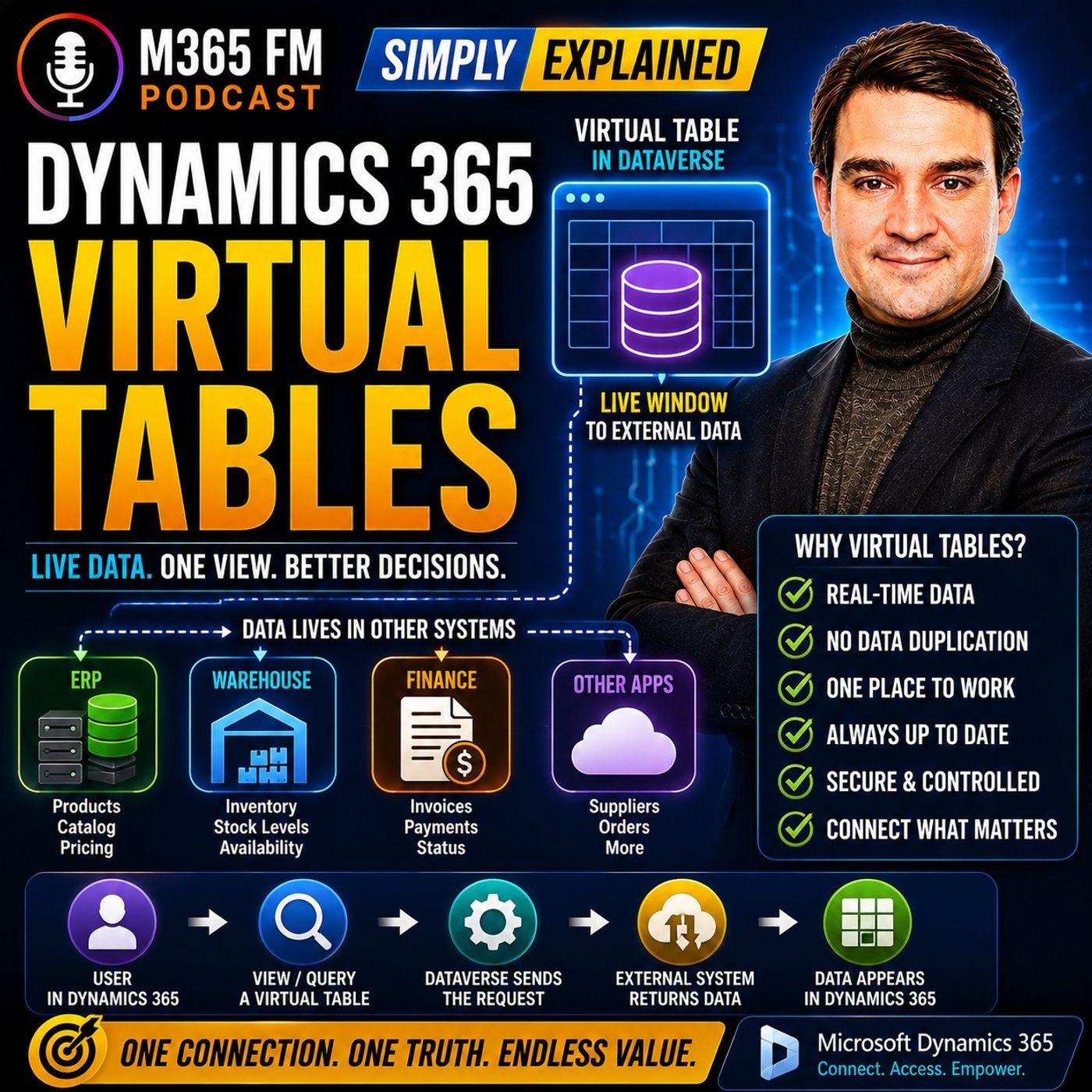
Dynamics 365 Virtual Entities - Simply Explained
Show notes
What happens when your sales team works in https://www.m365.fm/categories/power-platform-talk/, but inventory lives in a warehouse system, invoices live in finance, and product information lives in an ERP? You could copy all that information into Dataverse, but then you create duplicate records, synchronization jobs, delays, and another place where information can become outdated. In https://www.m365.fm/dynamics-365-virtual-entities/ of M365 FM, Mirko Peters explains how Dynamics 365 Virtual Tables, formerly known as Virtual Entities, provide live access to external business data without requiring Dynamics 365 to store another copy. WHAT ARE DYNAMICS 365 VIRTUAL TABLES? A Virtual Table is a table definition inside Microsoft Dataverse that points to records stored somewhere else. Dataverse understands what the information looks like—such as product name, available quantity, price, or invoice status—but the actual records remain in the external system. Think of it as a window into another business system. Dynamics 365 provides the familiar interface while the external application remains responsible for storing and managing the data. VIRTUAL ENTITIES VS VIRTUAL TABLES You may still encounter the term Virtual Entities in older documentation, implementations, and conversations. The current terminology is Virtual Tables. The underlying concept remains the same: Dynamics 365 and Dataverse can expose external information as though users were working with another Dataverse table, while the records themselves remain outside Dataverse. WHY COPYING DATA CREATES PROBLEMS Imagine your warehouse has ten units available when an overnight synchronization runs. The following morning, Dynamics 365 shows ten. At lunchtime, the warehouse ships all ten units. The warehouse system immediately knows inventory has reached zero, but Dynamics 365 could continue displaying ten until the next synchronization occurs. Your salesperson is now making decisions using outdated information. The problem isn't necessarily that synchronization failed. The problem is that the copied information became outdated between synchronization runs. THE DUPLICATE RECORD PROBLEM Copying information also creates another question: Which system owns the truth? The product exists in the ERP system, but another copy exists in Dataverse. Someone changes the description, price, status, or availability. Now somebody needs to determine which version should win. Virtual Tables avoid this problem by allowing the original business system to continue owning the record while Dynamics 365 users access that information when required. THINK OF TWO FILING CABINETS Imagine keeping identical documents in two filing cabinets. One cabinet belongs to sales and another belongs to the warehouse. Whenever somebody changes a document in one cabinet, they need to carry the updated copy to the other. Miss one update and the cabinets disagree. Traditional synchronization follows a similar pattern. Virtual Tables provide another approach: instead of maintaining the second copy, give the sales team a secure way to see information from the original cabinet. ONE PLACE TO WORK DOESN'T REQUIRE ONE DATABASE Organizations frequently say they want "one system." What employees often actually need is one place to work. A salesperson shouldn't need to open Dynamics 365, switch to the ERP to check inventory, open another application to check an invoice, and then return to the customer record. Virtual Tables can bring selected external information into the Dynamics 365 experience while allowing specialized systems to continue managing their respective business processes. A LIVE WINDOW INTO EXTERNAL DATA Suppose an account manager is discussing a large opportunity with a customer. The customer wants 500 units next month. While remaining inside Dynamics 365, the account manager opens related product availability information showing the item number, warehouse, available quantity, and expected replenishment date. That information can come directly from the external warehouse or ERP system rather than yesterday's imported inventory list. Dynamics 365 becomes the workspace while the warehouse system remains the inventory authority. NORMAL DATAVERSE TABLE VS VIRTUAL TABLE With a normal Dataverse table, the records are stored inside Dataverse. Accounts, contacts, opportunities, and cases are common examples. With a Virtual Table, Dataverse defines how the external information should appear and how to retrieve it, but the actual records remain somewhere else. The difference can be summarized as: Standard Table → Dataverse stores the record Virtual Table → Dataverse accesses the record from another system THINK OF A LIBRARY CATALOG A library catalog contains information describing a book. It tells you the title, author, and where to find it. But the catalog isn't the book. A Virtual Table works similarly. Dataverse understands the structure and knows how to request the record, but the external system contains the actual business data. RUNTIME DATA ACCESS Virtual Tables retrieve information when the application needs it. A user might open a view, search for particular records, apply a filter, or select an individual row. Dataverse then requests the relevant information from the external system. The objective isn't to fetch every external record and permanently store it. Instead, the application requests the information required for the current interaction. THE THREE BUILDING BLOCKS The episode explains three important components behind a Virtual Table: Data Provider → translates requests Data Source → identifies and connects to the external service Virtual Table → maps external information into a Dataverse table structure Together, these components allow Dynamics 365 to request external records and present them through a familiar user experience. WHAT IS A DATA PROVIDER? The Data Provider acts as a translator. Dynamics 365 and Dataverse send requests using their own concepts—tables, columns, filters, and record IDs. The external system might use another API or data format. The provider translates between those two sides. Users don't need to understand that conversation. They interact with the resulting records through the Dynamics 365 application. WHAT IS A DATA SOURCE? If the provider knows how to communicate, the Data Source identifies where to communicate. The Data Source contains connection information for the external service. This can include the service address, authentication information, and connection-related settings. Think of the Data Provider as knowing the language and the Data Source as containing the address and connection details required to reach the correct system. ODATA V4 Dataverse includes support for an OData Version 4 provider. OData provides a standardized approach for exposing and requesting data over the web. An external service might expose products containing fields such as product number, description, unit price, and available quantity. The provider can request those records and return them in a structure Dataverse understands. This provides a common integration approach when the external application already supports OData V4. CUSTOM DATA PROVIDERS Not every external business application supports OData. Organizations can use custom Data Providers when another integration method is required. A developer might create a provider connecting Dataverse with a REST API, database, or proprietary company service. The custom provider still performs the same fundamental job: Receive the Dataverse request → communicate with the external system → translate the response → return records to Dataverse. MAPPING EXTERNAL COLUMNS The Virtual Table defines how external fields should appear inside Dataverse. The warehouse application might call a field Available Quantity, while Dynamics 365 users see Stock on Hand. The mapping tells Dataverse that these fields represent the same information. This allows organizations to provide user-friendly terminology inside Dynamics 365 without requiring the external system to rename its own fields. UNIQUE RECORD IDS Dataverse needs to distinguish one external record from another. Virtual Table records therefore require dependable unique identifiers that Dataverse can recognize. Without a reliable ID, Dataverse can't confidently determine which exact product, invoice, customer, or other external record the user selected. Record identity is therefore an important technical requirement when evaluating whether an external data source can work effectively through Virtual Tables. FOLLOWING A VIRTUAL TABLE REQUEST Imagine a salesperson opens a product list and filters for available items. Dataverse recognizes that the request targets a Virtual Table. The Data Provider receives the request. The Data Source provides the information required to contact the external service. The provider translates the filter into something the external service understands. The source system returns matching records. The provider converts those results into Dataverse rows. Dynamics 365 displays them in the familiar interface. The user sees a normal-looking product list while the data remains in the external system. WHERE VIRTUAL TABLES FIT BEST Virtual Tables work particularly well when another system clearly owns the information but Dynamics 365 users need that information during their normal work. Examples include live inventory, product information, purchase status, invoice status, finance information, supplier catalogs, and selected marketing information. The external application remains responsible for managing the lifecycle of the reco Become a supporter of this podcast: https://www.spreaker.com/podcast/m365-fm-microsoft-365-azure-cloud-power-platform-ai--6704921/support.
Apple Podcasts · Spotify · YouTube · Deezer
Host: Mirko Peters
Guests
Related articles
- Stop Copying Your Data: Why Dynamics 365 Virtual Tables Beat Traditional Synchronization
- Dataverse Standard Tables vs Virtual Tables: When to Stop Copying Data
Transcript
Read the full transcript
So what happens when a customer calls about an order, but the stock level lives in your warehouse system and the payment status, lives and finance? You can copy all that data into Dynamics 365, or you can ask your team to open three more systems. Neither option feels great. Here's the simple definition. Virtual entities, are you now often called virtual tables out, give Dynamics 365 a live window into data that already lives somewhere else? Welcome to another knowledge nugget. I'm Mirko Piedas from M365, FM, and today, we're breaking this down in plain English. We'll start with the problem, then look at the building blocks behind it when virtual tables fit and where they can cause trouble. Why copying data creates problems? Imagine a sales team working in Dynamics 365. They can see the customer, the opportunity, and every call they've logged. But the product catalog belongs in an ERP system. Stock levels sit in the warehouse system, invoices belong in finance. Each system owns part of the story. For years, the usual answer was copying records from one system into another. A job might run every night and bring product details, inventory numbers, or invoice status into Dynamics 365. That sounds simple until the data changes at lunchtime. A warehouse worker ships the last 10 units of a product. The ERP system knows the stock is now zero, but Dynamics 365 might still show 10 units until the next scheduled sink runs. Your salesperson sees stock that no longer exists, then there's the duplicate record problem. The product lives in the ERP system, but a copied version lives in DATAverse, the data foundation behind Dynamics 365 and Power Apps. When someone changes a description, price, or status, someone needs to decide which system should win. That question creates a lot of messy work. Think of it like keeping paper files in two filing cabinets. One in the sales office and one in the warehouse. Each time somebody changes a paper in one cabinet, they must carry an updated copy to the other cabinet. Miss one trip and the cabinets disagree. Sync jobs can fail too. A password changes, a connection breaks, a field changes in the source system. The job stops overnight and users may not notice until they start looking at wrong or missing records the next morning. Meanwhile, the people doing the work have their own problem. They open a customer in Dynamics 365, then switch to the ERP system to check stock. Next, they open a finance tool to check an invoice. Then they return to Dynamics 365 and try to remember what they saw. That breaks the flow of the conversation. Now here's the thing, you don't always need a full copy of every record. Sometimes you only need to see the current answer while you work with the customer. For example, an account manager may need today's available quantity before promising a delivery date. The warehouse system should keep control of that number because it tracks goods moving in and out all day. Dynamics 365 doesn't need to become a second warehouse database. This is the choice that matters. Do you need Dynamics 365 to own a local copy of the data or do you need users to see the latest data from the system that already owns it? When copying ads more jobs, more duplicates and more chances for records to disagree, a live connection can be the cleaner path. The source system keeps the record. Dynamics 365 gives users a place to see it alongside their sales or service work. What a virtual entity actually is today. We, Udimer, talking about virtual tables. You might also hear them called virtual entities are the same concept, different name. A virtual table is a table definition inside dataverse that points to records stored somewhere else. Dataverse knows what the columns look like or product name available quantity, price, invoice, status, or but it does now to restore the actual data. Think of it as a blueprint, not the building itself. At first, that difference sounds small. Here are Timers the Thing. It changes everything. With a normal dataverse table, the data lives right inside dataverse. You create an account, contact, or case, and the record is stored there. With a virtual table, you only define the shape of what columns to show or and a path to where the real data actually lives. Think of a library catalog. The catalog card has the title, author, and shelf number. But the card is no, Timer, the book, or it just tells you where to find it. A virtual table works the same way. Dynamics 365 knows how to ask for the record and what feels to expose, but the outside system keeps the real data. The card is no, Tim, the book. So when do you see this in action? When you open a view of external products in a model-driven app, or when you look at live inventory records from a sales opportunity, dataverse sends a request to the other system, grabs the data, and shows it in the familiar Dynamics 365 screen. To the person using the app, it looks like any other table. They see columns in a grid, they open a form, and they select a record and read the fields. Nothing announces that the number came from a different application. The connection happens behind the scenes. But here, Tim's the important part. When someone views the data, it does know to me, silently move into dataverse. It stays where it belongs. Imagine Dynamics 365 as an office with a secure video screen on the wall. Across town, another office manages a stockroom and keeps the product records there. The video screen lets the sales team see what EU team says as on the stockroom shelves without carrying every box into the sales office. The stockroom remains where the work happens. Now, picture and account manager working on a large sales opportunity. The customer wants 500 units next month, and they need an answer while still on the call. The account manager opens a related virtual table called Product Availability. They see the item number, warehouse location available quantity, and expected replenishment date. Those details come straight from the warehouse or ERP system at that moment or not from last night. Tim's imported list. The account manager speaks from current data. Dynamics 365 brings sales and inventory together into one place. The warehouse system still decides the quantity. That separation matters because different systems handle different jobs. A warehouse system tracks stock movements. A finance app manages invoices and payments. The CRM app tracks conversations, opportunities, and service cases. Virtual tables let users see outside information without pretending every system needs to own every record. You might hear the term all run time. Ayo, that simply means the moment the app is running and someone asks for data. The virtual table does now empty to fetch everything once and keep it forever. It asks for the current record when a user opens a view, searches for something, or selects a row. So the virtual table is not a new database. It outtoms a dataverse table that presents outside records through Dynamics 365. Next, the totems follow that request from one click on the screen, out to the other system, and back again. Behind the scenes, provider, data source, and table. So what happens after someone selects a virtual table record in Dynamics 365, imagine the sales rep opens a list of products and types that filter out every item in a certain product group. Dynamics 365 can automatically just look inside dataverse for those rows because the rows live outside. Instead, dataverse sends the request through a data provider. A data provider is the translator in the setup. Dynamics 365 asks for data in its own format, our table name, columns, filters, record IDs. The outside system may speak a completely different language. The provider translates between the two sides. Think of it like a receptionist who speaks two languages. The sales rep asks for available products in English. The receptionist turns that question into the warehouse system out TMS language, sends it, receives the reply, and presents the answer in a form the sales rep can use. Users never see that translation. Behind the scenes, the provider handles the conversation. Dataverse includes a provider for ODATA version 4. ODATA is a standard way for systems to share data over the web. If an external service supports ODATA version 4, it can describe its tables and fields in a way dataverse understands. That gives you a common starting point instead of writing a separate connection from scratch. For example, an outside service might expose a collection called products with fields like product number, description, unit price, and available quantity. The ODATA provider can request those records and pass them back to dataverse. But the provider still needs to know where the service lives and how to reach it. That information sits in a data source record. A data source is the connection card for the outside system. It holds details like the service address, sign in credentials, and how long dataverse should wait before treating a request as timed out. Think of it as the address book entry for the service. The provider knows how to speak the language, the data source tells it which system to call and how to get through the front door. Then comes the virtual table itself. The virtual table gives dataverse a familiar shape for the outside data. You choose a table name, define the columns users need, and connect each column to the matching field from the external system. Maybe the warehouse system calls a field available quantity while your Dynamics 365 app calls it stock on hand. That automates fine. The mapping tells dataverse that both names point to the same piece of data. The user sees stock on hand in the Dynamics screen while the provider knows to request available quantity from the source. Each outside record also needs an ID that dataverse can recognize. For virtual tables, that ID needs to work as a gridau the long unique ID format dataverse uses. The provider uses that ID to connect the record on screen with the record in the source system. Without a dependable ID, dataverse can out empty know which exact record you selected. Now follow the full journey. A user opens a product view and filters for items that are in stock. Dataverse sees the request against the virtual table. The data provider reads the request, uses the data source details to contact the outside service, and translates the filter into a query that service understands. The source system finds the matching records and sends them back. The provider turns those results into dataverse table rows. Then Dynamics 365 displays the product names, prices, and quantities in the same sort of grid your users already know. The screen feels familiar because dataverse does the presentation work. The outside system does the data work. What if the source does now attempt support or data? That items where a custom data provider comes in. A developer can build a provider for another type of service or a REST API, a database connection, or a company system with its own data exchange format. The custom provider still plays translator. It receives a request from dataverse, contacts the outside system, turns the reply into dataverse records, and returns them to the app. That work takes code and careful testing because the provider decides how well filters, searches, and record lookups behave. A provider can also support more than reading. The built-in or data version for provider supports create, read, update, and delete actions. Custom providers can support those same actions when developers build them for the external system. For finance and operations virtual entities, dataverse can also send create, read, update, and delete requests straight to the finance and operations app. That does not mean every virtual table lets users edit records. Write actions depend on the provider and on what the outside system permits. The source system still receives the request and applies its own rules before it changes anything. So there are three building blocks behind every virtual table. The provider translates the request. The data source points to the outside service. The virtual table maps what users see in Dynamics 365 to the fields and records that service returns. Once you see those rolled separately, you can also see why a virtual table fits some kinds of data much better than others. Where virtual entities fit best. So when does a virtual table really make sense? It makes sense when another business system already owns the data, but your people working in Dynamics 365 need to see that data right when they're helping a customer. Picture a sales rep getting a quote ready. They need product details, current stock, maybe a promised delivery date, and the status of an earlier purchase. The ERP system owns all those records because it handles purchasing stock movement, pricing, and fulfillment. You could copy everything into data versus A.U. But if that copy data only exists, so the rep can look at it, you're creating extra work without changing who actually owns the record. A virtual table lets the rep work from one screen while the ERP keeps running the business process behind the scenes. Let's take a live product data. A product catalog might have thousands of items with descriptions, units, prices, supply details, and availability. Sales staff need enough of that information to help a customer, but they shouldn't have to become ERP users just to answer a product question. With a virtual table, that product data appears right next to accounts, opportunities, and quotes inside Dynamics 365. Inventory is another great example. Stock changes all day as goods arrive, orders ship, and warehouse teams move items around. When a customer asks, can you deliver this next week? The answer needs to come from the system, tracking the shelves and deliveries, how, not from a separate list someone copied earlier. Purchase status works in a similar way, a customer service agent might need to check if a replacement part has been ordered, whether it arrived from a supplier or if it's waiting for dispatch. That information lives in the purchasing or warehouse system, but the agent sees it right next to the service case. Finance records can work well too when the goal is visibility. A sales or service person might need to know if an invoice is paid, overdue, or under review before making a decision. Finance keeps responsibility for the invoice. Dynamics 365 just brings the status into the customer conversation. Here's the thing, oh you. People often ask for one system when what they really need is one place to work. Those are two different things. You can give someone a single work screen without cramming every business record into one database. Finance and operations uses this idea directly. Its OD entities can show up as virtual tables in Dataverse, so makers can build customer engagement apps and power platform experiences around finance and operations data without copying that data first. Depending on the setup, users can even create update or delete finance and operations records through Dataverse. The Finance and Operations app still applies its own business rules and that matters because a record does more than just hold fields. When someone changes a purchase order, adjusts stock or updates and invoice related record, the owning system might need to run checks and rules before accepting the change. Virtual tables keep that process in the right place. External marketing data can fit this pattern too. Maybe a marketing platform tracks email opens, event registrations or campaign activity while Dynamics 365 tracks the account manager out there as calls and opportunities. Showing a few selected marketing details beside a customer record gives the account manager better context without creating another permanent set of campaign records inside Dataverse. The same idea works with an outside product catalog. A company might sell products from a supplier, the outcomes catalog, where descriptions and availability change often. The supplier stays responsible for the catalog while your Dynamics 365 users browse current information during sales work, so ask yourself a simple question. Does Dynamics 365 need to run the life cycle of this record? Or do users just need to see and sometimes act on the record while they work? When the source system owns the record and a live view helps people do their jobs, a virtual table fits really well. But keep in mind, oh, a table that looks normal on screen doesn't automatically support every feature of a normal Dataverse table. Limits security and performance. A virtual table can look like a normal Dataverse table on screen, but don't assume it works like one. The data lives outside Dataverse and that changes what Dynamics 365 can do with it. Before you build a process around virtual Data, check whether the feature you need works with the provider and the outside system. Take writing Data back to the source system. Many older virtual entity setups only supported reading AU users could open a record and see current information, but they couldn't edit it from Dynamics 365. Today, the built-in OData V4 provider can support Create, Read, Update and Delete actions and custom providers can support them too. Still, that support doesn't appear automatically. The provider has to understand the action the outside system has to allow it and the user needs permission in that outside system. If any one of those pieces doesn't work and edit can fail, even when the Dynamics 365 form shows an edit button. Some Dataverse features also need stored records. Virtual tables don't support Dataverse auditing, so Dataverse won't keep its own audit history for changes to those records. If you need a clear record of who changed the value and when, the outside system must track that or you need to bring the data into a standard Dataverse table. Dataverse Search doesn't support Virtual tables either and neither do charts and dashboards. You also can't cache Virtual Table records for offline work older field engineer using a mobile device without a connection, can't rely on Virtual Data being available. Calculated columns and roll-up columns don't work on Virtual tables either. Any calculation needs to happen in the outside system or the Data provider needs to return the finished value. For example, if you need a total stock value based on quantity and price, calculated whether product data lives rather than expecting Dataverse to build the number later. Security needs the same careful thought. Virtual tables are organization-owned tables. Dataverse can turn access to the table on or off through security roles, but it doesn't apply the usual user-owned row security model or field-level security to the external rows. In plain English, Dataverse controls who gets through the front door. The outside system decides which records and fields they see once they're inside. For Finance and Operations Virtual tables, Dataverse passes the calling user's identity to Finance and Operations, which then checks that user's permissions and row-level rules before returning the data. That keeps the Finance or Operations app in control of its own records. Other Data providers may handle security differently. Before you expose customer, Finance or stock data through a Virtual Table, ask a direct question. When a user opens this record, which system checks their permission? You need a clear answer, not a guess. Performance also depends on the outside system. A normal Dataverse table reads from DataStore to close to the app. A Virtual Table sends a request to another service, waits for that service to process it, and waits for the reply. A fast source feels natural. A slow source turns a simple view into a long wait. That delay can grow when a view asks for many rows. Includes lots of columns or uses look-up columns that need extra reads. Keep Virtual Views focused. Return the fields people truly need, and avoid treating a Virtual Table as a place to browse thousands of records without a filter. For Finance and Operations connections, Microsoft recommends keeping Dataverse and Finance and Operations in the same Azure region to cut down on delay. The external data also needs a Guide primary key. A Guide is the long, unique record ID the Dataverse uses. Each external row needs one, so Dataverse can tell one product, invoice, or customer record apart from every other record. If the source system can't provide a dependable Guide, this Virtual Table model won't work without extra effort in the provider. One more choice becomes permanent when you create the table. You can't turn a Virtual Table into a standard Dataverse Table later, and you can't take a standard Table and switch it into a Virtual One. Choose the Table Type based on how people actually need to use the data, not just what looks easiest during setup. If you need offline use, audit history, Dataverse search, charts, dashboards, or Dataverse manage calculations, a local Dataverse Table with a plan sink may suit the job better. A Virtual Table gives you live access, but it also brings the outside systems limits straight into your app. Choosing the right approach, window, or local copy. So how do you choose between a Virtual Table and a standard Table with sink? Start with two questions. First, who owns the Data? Second, do your users always need the latest version when they open a record? If another system owns the Data and your team just needs a live view while working in Dynamics 365, use a Virtual Table. Think of it as a window, you see through it, but nothing gets copied. If you need offline access, detailed auditing, custom reporting, or any Dataverse only feature, choose a standard Table with sink. That's your local copy. The data is stored right inside Dataverse. Virtual Entities connect Dynamics 365 to Data that lives elsewhere without creating a second copy. That's the magic of it. Subscribe on your favorite podcast platform and share this knowledge nugget with someone connecting Dynamics 365 to another business system.