


 Apple Podcasts
 Spotify
 Youtube Music
 Spreaker
 Podchaser
 Amazon Music
In a recent podcast, Mirko Peters discussed the challenges of choosing between Synapse Link and Dataflow Gen 2 for Dataverse pipelines, emphasizing the importance of making informed decisions to avoid project failures. The conversation highlighted issues that arise when multiple teams create overlapping data links, leading to data duplication and governance chaos. Peters illustrated the differences between the tools: Synapse Link offers greater control and rollback capabilities but requires more complex setup, while Dataflow Gen 2 allows for quick, user-friendly data transformations but lacks robust governance features. He stressed the need for discipline in managing refresh schedules to prevent data loss and budget overruns. The discussion took place in the context of organizations needing to align their data management tools with their specific operational needs, advocating for a tailored approach rather than a one-size-fits-all solution. This topic is crucial as it addresses the potential pitfalls in data governance and operational efficiency, ultimately impacting organizational trust in data-driven decisions.






In today's competitive landscape, many organizations face challenges with their sales pipelines. You might notice that sales development representatives (SDRs) are expected to generate 30-50% of total pipeline contributions. Despite this, research indicates that only about 37% of companies fully utilize their CRM systems. This gap highlights a critical issue: we must stop blaming users for poor sales performance and instead examine the pipeline itself. Understanding these dynamics can lead to more effective strategies and improved outcomes.
Key Takeaways
- Stop blaming users for poor sales performance; examine the pipeline structure instead.
- Address territory imbalances and lead quality to create a fair playing field for sales reps.
- Set clear and measurable goals to align your sales and marketing teams effectively.
- Implement effective training strategies to close skill gaps and boost confidence in your sales team.
- Utilize data-driven insights to analyze your pipeline and identify areas for improvement.
- Leverage technology like CRM systems and automation tools to streamline sales processes.
- Foster open communication and collaboration within your team to enhance accountability and trust.
- Regularly assess and adjust your strategies to maintain a culture of continuous improvement.
Stop Blaming Users
In many organizations, you often hear the phrase, "If only the users would perform better." This common tendency to blame users for poor sales performance overlooks a crucial aspect: the structure of your pipeline. When sales numbers fall short, it is easy to point fingers at the sales team. However, this approach fails to address the underlying issues that may be affecting their performance.
Consider the following structural factors that can lead to sales underperformance:
- Territory imbalance: If some sales representatives have more leads than others, it creates an uneven playing field.
- Lead quality: Poor-quality leads can frustrate even the most skilled salespeople.
- Unclear expectations: When goals and responsibilities are not clearly defined, confusion can hinder performance.
Managers should focus on these structural issues before expecting improvements in performance. Effective diagnosis of these factors is essential for targeted coaching. Many managers mistakenly attribute underperformance to personal failings rather than recognizing these structural issues. Addressing motivation gaps, coaching misalignment, and skill deficiencies is crucial for improving sales outcomes.
By shifting your perspective, you can start to see that the pipeline itself may be the root cause of the challenges you face. Instead of blaming users, take a step back and evaluate how your pipeline operates. This shift in mindset can lead to more effective strategies and ultimately drive revenue growth.
Pipeline Issues

Inadequate Training
Inadequate training can significantly hinder your sales pipeline's effectiveness. When your team lacks the necessary skills, it leads to several consequences. For instance, skill gaps in consultative selling and negotiation can lower your representatives' confidence. This lack of confidence directly impacts their ability to close complex deals. Additionally, process inconsistencies arise when your team does not follow standardized sales methods. This inconsistency slows progress and creates unpredictable conversion rates.
To combat these issues, consider implementing effective training strategies. Here are some proven methods:
| Training Method | Description |
|---|---|
| Standardize Pipeline Usage | Create a playbook with definitions and expected activities for each pipeline stage. |
| Align Sales and Marketing | Ensure all teams work from a single CRM source, defining clear handoff points. |
| Use Automation for Follow-Ups | Implement automated reminders and follow-up tasks to maintain engagement. |
| Coach Using Live Data | Conduct 1:1 reviews focusing on key deals, using real-time data for coaching. |
| Continuous Improvement | Foster a culture of ongoing development to enhance pipeline management. |
Unclear Goals
Unclear goals can also contribute to inefficiencies in your pipeline. When your sales team lacks clear objectives, it leads to misalignment between sales and marketing. This misalignment often results in receiving leads that do not match your target criteria. Consequently, you may experience low conversion rates and wasted efforts. Additionally, inconsistent qualification criteria can cause your representatives to spend time on leads that are unlikely to convert.
To improve this situation, set clear and measurable goals. Ensure that everyone understands their roles and responsibilities. This clarity will help your team focus on the right opportunities and drive growth.
Office Politics
Office politics can interfere with your pipeline management and hinder sales growth. Decisions based on relationships rather than performance can create a toxic environment. This misalignment reduces collaboration and shifts focus to personal agendas. As a result, your pipeline suffers.
To foster collaboration, align your sales and marketing teams around shared goals and key performance indicators (KPIs). Use shared workflows and systems to minimize turf wars. Additionally, enhance communication by sharing prospect insights. This approach ensures that your representatives deliver the right message at the right time.
Here are some strategies to minimize the negative impact of office politics:
- Lead by example with integrity and accountability.
- Practice empathy to understand colleagues' perspectives.
- Promote transparent communication to prevent misunderstandings.
- Foster teamwork by celebrating collective success.
- Develop emotional intelligence to navigate complex dynamics.
By addressing these pipeline issues, you can create a more effective sales environment that drives growth and improves overall performance.
Analyzing Your Pipeline
Analyzing your pipeline is essential for identifying areas of improvement. By leveraging data-driven insights, you can make informed decisions that enhance your sales processes.
Data-Driven Insights
Importance of Metrics
Metrics play a crucial role in understanding your pipeline's performance. They provide a clear picture of how well your sales processes function. Here are some key metrics to consider:
| Metric | Description | Target Indicator |
|---|---|---|
| Contact Rate | Percentage of connections made with decision-makers | 30% or higher |
| Qualification Rate | Percentage of leads that meet qualification criteria | Above 50% |
| Stage Conversion | How leads progress through pipeline stages | Maintain steady ratios |
| Close Rate | Percentage of opportunities turned into sales | Between 11% and 40% |
| Pipeline Velocity | Average time it takes to close deals | Match industry benchmarks |
By tracking these metrics, you can pinpoint strengths and weaknesses in your pipeline. This data helps you adjust your strategies to improve overall performance.
Tools for Analysis
Utilizing the right tools can streamline your analysis process. Consider using orchestration tools like SQL and Airflow to manage your data workflows effectively. These tools help automate data collection and analysis, reducing friction in your processes. They also enable you to create ETL scripts that transform raw data into actionable insights.
Identifying Bottlenecks
Identifying bottlenecks in your pipeline is vital for maintaining a smooth flow of leads. Common bottlenecks include:
- Stalled Opportunities: Deals that linger too long in one stage without moving forward.
- Misused Resources: Top-performing sales reps spending too much time on tasks like cold calling instead of closing deals.
- Low-Quality Leads: A flood of unqualified leads clogging the early stages of your pipeline.
- Dropping Close Rates: Consistently low conversion rates, often tied to poor lead quality.
Recognizing these issues allows you to take proactive measures to address them.
Solutions to Overcome Bottlenecks
To effectively address bottlenecks, consider the following strategies:
- Real-Time Problem Detection: Use AI to monitor your pipeline continuously. This technology identifies issues before they escalate by tracking deal progression patterns and communication frequency.
- AI-Powered Lead Scoring: Implement AI to analyze various data points. This approach prioritizes leads, ensuring your sales reps focus on high-quality prospects.
- Monitoring and Alerts: Set up alerts for pipeline velocity, engagement changes, and lead scoring. This proactive approach helps you identify and address bottlenecks quickly.
By analyzing your pipeline and addressing bottlenecks, you can create a more efficient sales process that drives growth and improves overall performance.
Transforming Your Pipeline
Transforming your sales pipeline requires a strategic approach that leverages technology and fosters a culture of continuous improvement. By implementing the right tools and practices, you can enhance your pipeline's efficiency and effectiveness.
Implementing Technology
CRM Solutions
Customer Relationship Management (CRM) solutions play a vital role in improving pipeline visibility and conversion rates. These systems help you manage customer interactions and streamline processes. Research shows that organizations using CRM systems experience significant improvements:
| Metric | Before CRM | After CRM | Improvement |
|---|---|---|---|
| Conversion Rate | 20% | 24% | 4% increase |
| Annual Revenue | N/A | $12.8M | 8% growth |
| Reporting Time | N/A | 40 hours/month saved | 95% reduction |
| Forecast Accuracy Improvement | 30-40% variance | 15-20% variance | Improvement |
| Sales Cycle Duration | 10.5 weeks | 9.2 weeks | 12% reduction |
These metrics highlight how CRM solutions can transform your sales pipeline. They provide you with insights that help you make informed decisions and optimize your strategies.
Automation Tools
Automation tools can significantly enhance your pipeline management. They streamline repetitive tasks, allowing your sales team to focus on high-value activities. For instance, automation scripts can handle follow-ups and lead nurturing, ensuring timely communication with prospects.
Consider the following impactful technologies for transforming sales pipelines:
| Technology | Impact on Sales Pipeline |
|---|---|
| Conversational Intelligence | 25% increase in sales conversions |
| Predictive Analytics | 90% of sales professionals find it essential |
| Autonomous Outreach | 40% increase in qualified leads for a client |
| AI Implementation | 73% of companies report increased sales quotas |
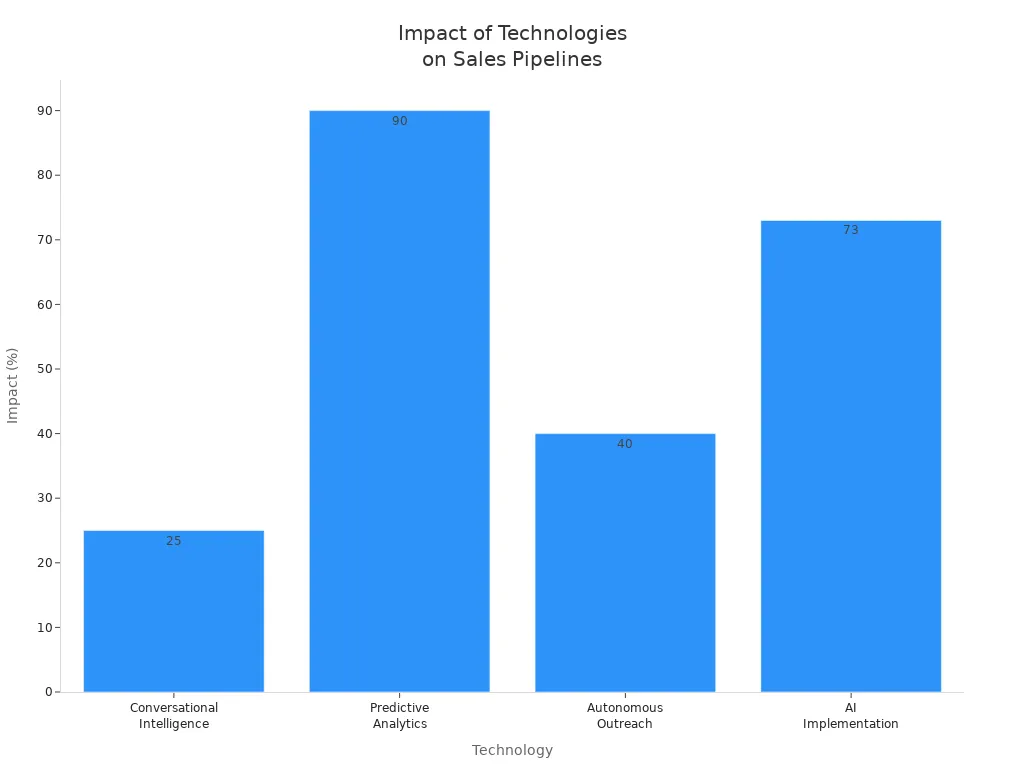
By integrating these technologies, you can create a more efficient and responsive sales pipeline.
Continuous Improvement
Continuous improvement is essential for maintaining long-term pipeline performance. This approach involves regularly assessing your processes and making necessary adjustments.
Feedback Loops
Establishing feedback loops is crucial for effective pipeline management. These loops allow you to capture insights from your sales team and customers. Here are some best practices for creating feedback loops:
- Capture frontline intelligence from sales conversations to inform marketing and outreach.
- Create a simple system for sharing intelligence, such as a dedicated Slack channel or a form for reps to fill out after calls.
- Hold regular sync meetings focused on feedback to review objections and brainstorm messaging adjustments.
- Track objection trends to identify areas for messaging improvement, such as addressing budget constraints earlier in conversations.
- Utilize feedback to create targeted campaigns that address specific concerns raised by prospects.
Implementing these practices can lead to increased win rates, shorter sales cycles, and improved customer satisfaction.
Regular Training Sessions
Regular training sessions are vital for keeping your sales team sharp and informed. These sessions should focus on new tools, techniques, and market trends. By fostering a culture of continuous learning, you empower your team to adapt to changes and improve their performance.
Incorporating structured reviews and data-driven optimization into your training can further enhance your pipeline management. Regularly updating opportunity status and analyzing win/loss rates helps maintain pipeline hygiene. Utilizing metrics to identify areas for improvement informs your decision-making.
By transforming your pipeline through technology and continuous improvement, you can create a more effective sales environment that drives growth and enhances overall performance.
Revenue Accountability
Revenue accountability is crucial for driving sales performance. When you hold your team accountable, you create an environment that fosters growth and improvement. Without accountability, even top talent can miss targets. This situation can lead to a dip in morale and stagnation in pipelines. In fact, 69% of sales representatives miss their quotas due to a lack of accountability. Furthermore, 44% of deals stall out when accountability is absent, and only 30% of a sales rep's day is spent selling.
Empowering Users
Encouraging Ownership
Encouraging ownership among your sales team members can significantly impact pipeline outcomes. When team members take responsibility for their roles, they become more engaged and motivated. This approach leads to broader reach through targeted resource sharing and smarter follow-ups using real-time data.
To empower your users effectively, consider these strategies:
- Launch a referral program by creating engaging content and sharing it through various channels.
- Develop a sales engagement program that includes regular training and resources for the sales team.
- Establish regular communication practices within the sales team to share insights and feedback.
- Analyze sales data to identify trends and areas for improvement in the sales pipeline.
- Choose and implement a sales pipeline management tool that fits your team's needs.
Providing Resources
Providing the right resources is essential for supporting user success in sales pipelines. Utilize CRM systems to organize and automate sales activities. Sales engagement platforms with AI capabilities can enhance performance by streamlining processes. Additionally, training and educational resources can equip your team with the skills they need to excel.
Here are some essential resources to consider:
- CRM systems for organizing and automating sales activities
- Sales engagement platforms with AI and automation capabilities
- Lead generation and qualification tools
- Training and educational resources
- Community and partner networks
Open Communication
Open communication contributes significantly to pipeline transparency and accountability. It builds trust and fosters collaboration among team members. Transparent communication reduces misunderstandings and promotes loyalty.
Importance of Feedback
Feedback is vital for understanding client needs better. It shows that you value their opinions and encourages a culture of continuous improvement. Regular feedback allows your team to identify areas for enhancement and adjust strategies accordingly.
Creating Safe Spaces
Creating safe spaces for open dialogue is essential. Encourage your team to share their thoughts and ideas without fear of judgment. This practice promotes collaboration and strengthens team bonds. Here are some effective strategies for fostering open communication:
- Hold regular meetings to foster collaboration among team members.
- Align goals to ensure everyone works towards the same outcomes.
- Define clear communication channels to streamline interactions.
- Encourage feedback and idea sharing to promote collaboration.
- Celebrate successes to foster a positive team culture.
By focusing on revenue accountability, empowering users, and fostering open communication, you can create a more effective sales environment that drives revenue growth and enhances overall performance.
Transforming your sales pipeline is essential for driving growth and improving performance. By focusing on specific pain points, you can achieve significant results. Here are some key takeaways to consider:
- Start small and address specific challenges.
- Invest in data quality and integration for better lead qualification.
- Automate routine tasks to optimize your sales strategies.
- Analyze top performers to replicate their success.
Measuring the impact of these transformations is crucial. Track metrics like Customer Satisfaction (CSAT) and Customer Lifetime Value (CLV) to evaluate your progress. By embracing these strategies, you can create a more effective sales environment that empowers your team and drives revenue growth.
Remember, the journey to a successful pipeline starts with you! 🚀
FAQ
What is a sales pipeline?
A sales pipeline is a visual representation of your sales process. It helps you track potential customers as they move through different stages, from initial contact to closing the deal.
How can I improve my sales pipeline?
You can improve your sales pipeline by analyzing metrics, providing adequate training, and setting clear goals. Focus on addressing bottlenecks and leveraging technology to streamline processes.
Why is data important in sales?
Data is crucial in sales because it provides insights into customer behavior and preferences. Analyzing data helps you make informed decisions and optimize your sales strategies for better results.
What metrics should I track in my pipeline?
Key metrics to track include conversion rates, qualification rates, and pipeline velocity. Monitoring these metrics helps you identify strengths and weaknesses in your sales process.
How often should I analyze my pipeline?
You should analyze your pipeline regularly, ideally monthly or quarterly. Frequent analysis allows you to spot trends, address issues, and adjust strategies to improve performance.
What role does technology play in pipeline management?
Technology enhances pipeline management by automating tasks, providing real-time data, and improving communication. CRM systems and automation tools help streamline processes and increase efficiency.
How can I foster open communication in my sales team?
You can foster open communication by holding regular meetings, encouraging feedback, and creating a safe space for sharing ideas. Transparency builds trust and collaboration among team members.
What are common bottlenecks in a sales pipeline?
Common bottlenecks include stalled opportunities, low-quality leads, and misused resources. Identifying these issues allows you to implement solutions and maintain a smooth flow of leads.
🚀 Want to be part of m365.fm?
Then stop just listening… and start showing up.
👉 Connect with me on LinkedIn and let’s make something happen:
- 🎙️ Be a podcast guest and share your story
- 🎧 Host your own episode (yes, seriously)
- 💡 Pitch topics the community actually wants to hear
- 🌍 Build your personal brand in the Microsoft 365 space
This isn’t just a podcast — it’s a platform for people who take action.
🔥 Most people wait. The best ones don’t.
👉 Connect with me on LinkedIn and send me a message:
"I want in"
Let’s build something awesome 👊
Ever wonder why your Dataverse pipeline feels like it’s built out of duct tape and bad decisions? You’re not alone. Most of us end up picking between Synapse Link and Dataflow Gen2 without a clear idea of which one actually fits. That’s what kills projects — picking wrong.
Here’s the promise: by the end of this, you’ll know which to choose based on refresh frequency, storage ownership and cost, and rollback safety — the three things that decide whether your project hums along or blows up at 2 a.m. For context, Dataflow Gen2 caps out at 48 refreshes per day (about every 30 minutes), while Synapse Link can push as fast as every 15 minutes if you’re willing to manage compute.
Hit subscribe to the M365.Show newsletter at m365 dot show for the full cheat sheet and follow the M365.Show Linkedin page for MVP livestreams. Now, let’s put the scalpel on the table and talk about control.
The Scalpel on the Table: Synapse Link’s Control Obsession
You ever meet that one engineer who measures coffee beans with a digital scale? Not eyeball it, not a scoop, but grams on the nose. That’s the Synapse Link personality. This tool isn’t built for quick fixes or “close enough.” It’s built for the teams who want to tune, monitor, and control every moving part of their pipeline. If that’s your style, you’ll be thrilled. If not, there’s a good chance you’ll feel like you’ve been handed a jet engine manual when all you wanted was a light switch.
At its core, Synapse Link is Microsoft giving you the sharpest blade in the drawer. You decide which Dataverse tables to sync. You can narrow it to only the fields you need, dictate refresh schedules, and direct where the data lands. And here’s the important part: it exports data into your own Azure Data Lake Storage Gen2 account, not into Microsoft’s managed Dataverse lake. That means you own the data, you control access, and you satisfy those governance and compliance folks who ask endless questions about where data physically lives. But that freedom comes with a trade-off. If you want Delta files that Fabric tools can consume directly, it’s up to you to manage that conversion — either by enabling Synapse’s transformation or spinning up Spark jobs. No one’s doing it for you. Control and flexibility, yes. But also your compute bill, your responsibility.
And speaking of responsibility, setup is not some two-click wizard. You’re provisioning Azure resources: an active subscription, a resource group, a storage account with hierarchical namespace enabled, plus an app registration with the right permissions or a service principal with data lake roles. Miss one setting, and your sync won’t even start. It’s the opposite of a low-code “just works” setup. This is infrastructure-first, so anyone running it needs to be comfortable with the Azure portal and permissions at a granular level.
Let’s go back to that freedom. The draw here is selective syncing and near-real-time refreshes. With Synapse Link, refreshes can run as often as every 15 minutes. For revenue forecasting dashboards or operational reporting — think sales orders that need to appear in Fabric within the hour — that precision is gold. Teams can engineer their pipelines to pull only the tables they need, partition the outputs into optimal formats, and minimize unnecessary storage. It’s exactly the kind of setup you’d want if you’re running pipelines with transformations before shipping data into a warehouse or lakehouse.
But precision has a cost. Every refresh you tighten, every table you add, every column you leave in “just in case” spins up compute jobs. That means resources in Azure are running on your dime. Which also means finance is involved sooner than later. The bargain you’re striking is clear: total control plus table-level precision equals heavy operational overhead if you’re not disciplined with scoping and scheduling.
Let me share a cautionary tale. One enterprise wanted fine-grain control and jumped into Synapse Link with excitement. They scoped tables carefully, enabled hourly syncs, even partitioned their exports. It worked beautifully for a while — until multiple teams set up overlapping links on the same dataset. Suddenly, they had redundant refreshes running at overlapping intervals, duplicated data spread across multiple lakes, and governance meetings that felt like crime-scene investigations. The problem wasn’t the tool. It was that giving everyone surgical precision with no central rules led to chaos. The lesson: governance has to be baked in from day one, or Synapse Link will expose every gap in your processes.
From a technical angle, it’s impressive. Data lands in Parquet, not some black-box service. You can pipe it wherever you want — Lakehouse, Warehouse, or even external analytics platforms. That open format and storage ownership are exactly what makes engineers excited. Synapse Link isn’t trying to hide the internals. It’s exposing them and expecting you to handle them properly. If your team already has infrastructure for pipeline monitoring, cost management, and security — Synapse Link slots right in. If you don’t, it can sink you fast.
So who’s the right audience? If you’re a data engineer who wants to trace each byte, control scheduling down to the quarter-hour, and satisfy compliance by controlling exactly where the data lives, Synapse Link is the right choice. A concrete example: you’re running near-real-time sales feeds into Fabric for forecasting. You only need four tables, but you need them every 15 minutes. You want to avoid extra Dataverse storage costs while running downstream machine learning pipelines. Synapse Link makes perfect sense there. If you’re a business analyst who just wants to light up a Power BI dashboard, this is the wrong tool. It’s like giving a surgical kit to someone who just wanted to open Amazon packages.
Bottom line, Synapse Link gives surgical-grade control of your Dataverse integration. That’s freeing if you have the skills, infrastructure, and budgets to handle it. But without that, it’s complexity overload. And let’s be real: most teams don’t need scalpel-level control just to get a dashboard working. Sometimes speed and simplicity mean more than precision.
And that’s where the other option shows up — not the scalpel, but the multitool. Sometimes you don’t need surgical precision. You just need something fast, cheap, and easy enough to get the job done without bleeding everywhere.
The Swiss Army Knife That Breaks Nail Files: Dataflow Gen2’s Low-Code Magic
If Synapse Link is for control freaks, Dataflow Gen2 is for the rest of us who just want to see something on a dashboard before lunch. Think of it as that cheap multitool hanging by the cash register at the gas station. It’s not elegant, it’s not durable, but it can get you through a surprising number of situations. The whole point here is speed — moving Dataverse data into Fabric without needing a dedicated data engineer lurking behind every button click.
Where Synapse feels like a surgical suite, Dataflow Gen2 is more like grabbing the screwdriver out of the kitchen drawer. Any Power BI user can pick tables, apply a few drag‑and‑drop transformations, and send the output straight into Fabric Lakehouses or Warehouses. No SQL scripts, no complex Azure provisioning. Analysts, low‑code makers, and even the guy in marketing who runs six dashboards can spin up a Dataflow in minutes. Demo time: imagine setting up a customer engagement dashboard, pulling leads and contact tables straight from Dataverse. You’ll have visuals running before your coffee goes cold. Sounds impressive — but the gotchas show up the minute you start scheduling refreshes.
Here’s the ceiling you can’t push through: Dataflow Gen2 runs refreshes up to 48 times a day — that’s once every 30 minutes at best. No faster. And unlike Synapse, you don’t get true incremental loads or row‑level updates. What happens is one of two things: append mode, which keeps adding to the Delta table in OneLake, or overwrite mode, which completely replaces the table contents during each run. That’s great if you’re testing a demo, but it can be disastrous if you’re depending on precise tracking or rollback. A lot of teams miss this nuance and assume it works like a transactionally safe system. It’s not — it’s bulk append or wholesale replace.
I’ve seen the pain firsthand. One finance dashboard was hailed as a success story after a team stood it up in under an hour with Dataflow Gen2. Two weeks later, their nightly overwrite job was wiping historical rows. To leadership, the dashboard looked fine. Under the hood? Years of transaction history were half scrambled and permanently lost. That’s not a “quirk” — that’s structural. Dataflow doesn’t give you row‑level delta tracking or rollback states. You either keep every refresh stacked up with append (risking bloat and duplication) or overwrite and pray the current version is correct.
Now, let’s talk money. Synapse makes you pull out the checkbook for Azure storage and compute. With Dataflow Gen2, it’s tied to Fabric capacity units. That’s a whole different kind of silent killer. It doesn’t run up Azure GB charges — instead, every refresh eats into a pool of capacity. If you don’t manage refresh frequency and volume, you’ll burn CUs faster than you expect. At first you barely notice; then, during mid‑day loads, your workspace slows to a crawl because too many Dataflows are chewing the same capacity pie. The users don’t blame poor scheduling — they just say “Fabric is slow.” That’s how sneaky the cost trade‑off works.
And don’t overlook governance here. Dataflow Gen2 feels almost too open-handed. You can pick tables, filter columns, and mash them into golden datasets… right up until refresh jobs collide. I’ve watched teams unknowingly set up Dev and Prod Dataflows pointing at the same destination tables, overwriting each other at 2:00 a.m. That’s not a one‑off disaster — it’s a pattern if nobody enforces workspaces, naming, and ownership rules. And unlike Synapse, you don’t get partial rollback options. Once that overwrite runs, the old state is gone for good.
Another key guardrail: Dataflow Gen2 is a one‑way street. In Fabric, links into Dataverse are read‑only. You don’t get an event‑driven or supported path to write data back into Dataverse through Dataflow Gen2. If you need to round‑trip updates, you’re back to API calls or pipelines. So if you’ve heard someone pitch Dataflow as a full sync engine, stop them. It’s read from Dataverse into Fabric. Period.
The right fit is clear. Dataflow Gen2 shines in prototypes and business intelligence reporting where near‑real‑time isn’t critical. Pull some Dataverse tables, do some transformations with no code, and serve dashboards in Power BI. It eliminates the barrier to entry. But move beyond that — HR reporting, compliance snapshots, or financial records with rollback needs — and it looks shaky fast. Because governance, refresh limits, and overwrite risks don’t magically solve themselves.
Bottom line: this tool is perfect for analysts who value speed and simplicity. If you’re building dashboards and need a fast, low‑code pipeline, it’s a winner. But don’t mistake it for robust ETL or enterprise‑grade sync. It’s a pocket multitool — handy in a pinch, but the wrong instrument for major surgery.
And that distinction matters most when your boss stops clapping for the demo and finance hands you the actual bill. Because while simplicity feels free, you’ll pay for it in capacity, storage, and wasted refresh jobs if you don’t lock things down. And that unseen bill? That’s the part most teams underestimate.
The Hidden Bill That Eats Budgets Alive
Here’s the part nobody tells you up front: it’s not just about choosing a tool, it’s about who gets stuck with the bill. Fabric Link, Synapse Link, Dataflow Gen2 — they sound like technical options, but each one hides its own budget trap. Pick wrong or set it up sloppy, and finance is going to ping you faster than a Teams notification storm.
Take Fabric Link. On the surface it feels like a gift — hook up Dataverse, all your tables show up in Fabric, everyone claps. The problem hides in the fine print. Dataverse-managed storage is expensive once you go past your licensed entitlement. How expensive? Industry writeups warn that linking to Fabric can generate Dataverse-managed delta tables that rack up very steep overage charges. Some estimates put it in the ballpark of $40,000 per terabyte per month when you’re above quota. That’s not a formal price sheet from Microsoft — that’s analysis of what organizations have actually seen, and it’s enough to make finance sweat bullets. I’ve watched a team light up their environment with hundreds of tables at once, not realizing Fabric grabs every eligible non-system table with change tracking. Within days, their storage bill looked like they were funding a data center in orbit.
Now contrast that with Synapse Link. On paper, this looks like the cheaper path because you’re not paying Dataverse’s premium storage rates. Instead, Synapse drops the data into your own Azure Data Lake Storage Gen2 account. Azure storage itself might run closer to $26 per terabyte per month, which is far from Dataverse’s luxury pricing. But here’s the asterisk: you also own the compute. If you need data in Delta format for Fabric, you’ll be paying for Spark or Synapse jobs to convert it. Depending on your pipeline size, that might mean hundreds to a few thousand dollars a month in compute charges. So yes, you’ve dodged the Dataverse bomb, but you’ve signed up for an ongoing relationship with Azure invoices. It’s a choice between one big hammer or a steady metronome of smaller costs.
And then there’s Dataflow Gen2. At first it feels like free candy. No Dataverse overage to think about, no separate Azure storage account to manage. But look closer — every refresh is really powered by Fabric capacity units, which are tied to your licensing. The more flows and refreshes you schedule, the faster you drain capacity. Push too hard — say 48 daily refreshes across multiple flows — and you’ll see reports slow to a crawl. Not because Fabric “broke,” but because you ate all your own resources with refresh tasks. That’s a classic trap: people think they’ve found the bargain option, then wonder why all their dashboards get sluggish right before the CFO presentation.
These costs aren’t random; they’re traps you trigger by being too casual. Fabric Link auto-adds all tracked tables, Synapse happily lets you schedule compute until your Azure credit card cries, and Dataflow will chew through capacity because nobody bothered to space out refreshes. Finance doesn’t care that “it’s just how Microsoft built it” — all they see is a spike. And explaining these numbers on a Friday call is about as fun as asking for an audit exemption.
So here’s the survival trick: put some guardrails in place before you flip the switch. Scope the tables before linking. Watch that first sync directory to see what delta files are actually created. Track capacity usage like a hawk in Dataflow so you don’t discover refresh collisions the hard way. And in Synapse, don’t let random admins schedule 15‑minute refreshes or spin up compute pools without oversight. These aren’t rocket-science fixes — just boring governance. But boring saves money a lot faster than clever hacks.
And one last note — don’t fall for the temptation to “just ingest everything from Dataverse because it’s easier.” That’s how you end up paying luxury-car money to store audit logs nobody queries. Be deliberate about what goes in. Decide what really needs Fabric visibility and what can stay where it is until there’s a real business case. Less data moved means fewer costs, fewer surprises, and fewer emergency budget requests.
Of course, bills aren’t the only kind of disaster waiting to hit. Money explosions are ugly, but reliability failures are often worse. Because when things go wrong at 2 a.m. and the CFO can’t see sales numbers, storage costs won’t be the fire you’re putting out.
When Things Go Sideways at 2 AM: Reliability and Rollbacks
When data goes bad in the middle of the night, the real test isn’t cost or setup—it’s whether your pipeline can survive the punch. That’s the heart of this section: reliability and rollbacks.
Here’s the baseline: Synapse Link and Dataflow Gen2 handle failure in very different ways. Dataflow Gen2 works on a batch model — either overwrite or append into Delta tables in OneLake. There’s no built-in historic versioning. If the refresh overwrites with bad data, the previous good state is gone unless you had a backup somewhere else. Synapse Link, on the other hand, uses Dataverse change tracking to send incremental updates into your own storage. That means you can implement file- or partition-level versioning and roll back to an earlier parquet or delta file if something corrupts. The difference is night and day when recovery matters.
With Synapse Link, if you prepare correctly, you can backtrack. Data is written to ADLS Gen2 as files you own. You can enable snapshots, partition strategies, and even keep multiple delta versions around. If a refresh introduces corrupt records, file versions give you a ripcord. Recovery might not be instant, but you can rewind to a prior state without rebuilding the entire dataset. The catch? It requires discipline: version retention policies, automated monitoring, and snapshot schedules. Skip those, and Synapse won’t save you.
Dataflow Gen2, in contrast, keeps it simple—and painful when things go sideways. Since the storage inside Fabric doesn’t retain historic versions, “rollback” is just rerunning the last refresh. If that refresh itself was flawed, you’re stuck with garbage. And if the source system already advanced past that state? Your history is permanently replaced. Append mode avoids total wipeouts, but it leaves you with duplication bloat and no clean rollback path. Either way, you’re playing with fewer safety nets.
Here’s the kicker: refresh frequency shapes how recoverable you are. Fabric Link connections typically run on an hourly cadence, which means if something breaks, you’re looking at gaps no shorter than that. Dataflow Gen2 can do up to 48 scheduled refreshes a day—about every 30 minutes—but no better. Synapse Link, by contrast, can go down to 15-minute increments. More check-ins means more checkpoints you can revert to. If you’re running critical pipelines, that timing difference matters.
Let me ground this with an example. One Synapse team structured 15-minute refreshes with file versions stored in their lake. When a batch pulled in corrupt transactions, they rewound to the prior slice, rehydrated the tables, and got reports back online before markets opened. It wasn’t fun, but they survived with their sanity intact. Meanwhile, a Dataflow team in the same org ran daily overwrite jobs. A failed overnight refresh blanked half their fact tables, and the only fix was rerunning the entire job. By the time it finished, users had been staring at error messages for hours. Same company, different tools, very different mornings.
Rollbacks also get messy with governance. Cross-region storage can trip compliance issues if you try to restore from Europe into a US tenant. And if you’re leaning on shortcut objects in Fabric, those don’t always reconnect cleanly after restores. One admin likened it to swapping the hard drive after a failure but forgetting to plug the SATA cable back in—your data might be back, but your reports are still broken.
So what’s the play here? A few survival tips: design a snapshot policy if you’re on Synapse — keep file-level versions or delta retention for at least a few refresh windows. Always schedule backups before high-volume loads. And if you’re relying on Dataflow Gen2, never schedule your first refresh directly in production. Test in a sandbox first so you don’t overwrite live tables with an untested transform. These aren’t flashy features; they’re guardrails that keep your phone quieter at 2 a.m.
Bottom line: Dataflow Gen2 trades resilience for simplicity. Once data is gone, it’s gone. Synapse Link demands more setup pain, but it gives you actual rollback levers if things collapse. Your choice comes down to whether your org values ease of use today or protection during failure tomorrow.
And that’s the real fork in the road. Do you want the precise scalpel with rollback control, or the fast multitool that might snap under stress? Let’s line up the scenarios where each one actually makes sense.
Choosing Your Weapon: The Scalpel or the Swiss Army Knife?
This is where the theory becomes an actual decision. You’ve got Synapse Link on one side, Dataflow Gen2 on the other, and Link to Fabric trying to sneak into the lineup. The wrong choice doesn’t just slow you down — it wrecks governance, drains budgets, and leaves you patching pipelines with duct tape at odd hours.
Here’s the fast map: if you’re running heavy, high‑volume workloads that demand near real‑time sync with clear governance, Synapse Link is where you go. It’s the scalpel. Sharp, precise, but very easy to cut yourself if you don’t have the right hands on it. On the flip side, if you’re mostly building BI dashboards, staging a few tables quickly, and letting Power BI users do their thing without calling IT every day, Dataflow Gen2 is the Swiss Army knife. It’s not a fine instrument, but it’s flexible enough for the business units to build what they need. And then there’s Link to Fabric — which creates delta parquet replicas in a Dataverse‑managed lake. By default it pulls in all non‑system tables that have Track Changes enabled. Handy, sure, but watch out: storage costs can get ugly fast, and the fine print says there’s a practical limit of around a thousand tables before things start breaking. That’s not a rumor; it’s in the documentation. If you light up Link to Fabric for an entire environment without scoping, you’re asking for a screaming match with finance.
To keep it simple, ask yourself three questions:
One, do you need sub‑hour, near‑real‑time updates? If yes, that’s Synapse. If no, Dataflow or Fabric Link may work.
Two, do you have data engineers and the Azure muscle to manage storage and compute? If yes, Synapse is viable. If you don’t, and no one wants to maintain Spark jobs or RBAC in Azure, take it off the table.
Three, are most of your users non‑engineers who just need to self‑serve reports? If yes, that tilts you toward Dataflow Gen2 or Link to Fabric. It’s about putting the right tool with the right owners, not wishful thinking.
Real‑world example: one global enterprise ran Synapse Link for their regional sales pipelines, syncing as often as every 15 minutes. It fed forecasting dashboards where stale data meant missed revenue calls. Meanwhile, HR ran Dataflow Gen2 for headcount reporting a couple of times per day. It was quick for analysts, didn’t need an engineer at every step, and worked fine for quarterly reviews. Same company, two different approaches. That wasn’t indecisive — it was mature. Hybrid is the right answer more often than not.
The trap is pretending one tool should do everything. If you force Synapse into HR’s hands in an analyst‑heavy shop, those analysts spend half their time stuck in service tickets trying to debug pipelines they don’t even want to own. If you drop Dataflow into mission‑critical sales, you’ll miss your refresh windows, overwrite data, and ruin trust in dashboards. Both disasters are caused by somebody trying to shove a square peg into a round hole.
Let’s get practical. Synapse equals control: change tracking, rollback paths, refreshes down to 15 minutes, full ownership of storage. But all of that comes at the cost of complexity — provisioning ADLS, managing compute, and paying attention to governance rules. Dataflow equals simplicity: self‑service, drag‑and‑drop, and reports ready before your coffee’s gone cold. The catch is its limits: 30‑minute minimum refreshes, no built‑in historic rollback, and hidden costs if you overschedule refreshes and crush capacity units. Link to Fabric? It sits in the middle. Table‑level simplicity, instant visibility in Fabric, but it consumes Dataverse storage — the most expensive of the three options if you go over your entitlements.
Culture matters here more than any feature bullet point. Do you actually have engineers who want to build and monitor Synapse? If yes, give them the scalpel. They’ll put processes in place and appreciate the control knobs. If no — if what you’ve really got is a BI shop full of Power BI champions — don’t dump Synapse in their lap and blame them when it implodes. Put them on tools designed for them, like Dataflow or carefully scoped Link to Fabric. Staff first, tools second.
The funny part is there’s no glory in picking one tool for every job. The glory is in picking the right tool for the right workload. Some jobs demand a scalpel. Some only need a multitool. Some can limp along with Fabric’s auto‑replica. There’s no prize for pretending otherwise — only budget spikes, system failures, and late‑night triage sessions that make you hate your tenant.
So the real guidance is simple: map your needs honestly, use Synapse where control is essential, Dataflow where speed and self‑service matter, and Fabric Link only with scoped and governed tables. Hybrid isn’t weakness — it’s survival. And remember, the people aren’t the failure point here. It’s giving them the wrong knife and then acting surprised when things collapse.
Which brings us to the heart of it: the problem was never that someone clicked wrong. It’s that they were handed the wrong weapon for the job.
Conclusion
So let’s land the plane. Match tool to job: Synapse for engineering control and sub‑hour syncs, Dataflow Gen2 for fast analyst delivery, Link to Fabric for the fastest managed route — just keep one eye on those Dataverse storage costs. That’s the whole takeaway in one line.
The cheat sheet lives at m365 dot show; grab it so you don’t have to replay this video during your next governance meeting. And follow the M365.Show LinkedIn page for MVP livestreams where we break these patterns in real tenants.
Final thought: don’t blame the user — blame the pipeline you chose.
This is a public episode. If you'd like to discuss this with other subscribers or get access to bonus episodes, visit m365.show/subscribe

Founder of m365.fm, m365.show and m365con.net
Mirko Peters is a Microsoft 365 expert, content creator, and founder of m365.fm, a platform dedicated to sharing practical insights on modern workplace technologies. His work focuses on Microsoft 365 governance, security, collaboration, and real-world implementation strategies.
Through his podcast and written content, Mirko provides hands-on guidance for IT professionals, architects, and business leaders navigating the complexities of Microsoft 365. He is known for translating complex topics into clear, actionable advice, often highlighting common mistakes and overlooked risks in real-world environments.
With a strong emphasis on community contribution and knowledge sharing, Mirko is actively building a platform that connects experts, shares experiences, and helps organizations get the most out of their Microsoft 365 investments.
