
Improve Entity Framework Core Query Performance

This episode explains how to dramatically improve Entity Framework performance using practical, proven techniques. It highlights common mistakes that slow systems down and shows exactly how to fix them.
You’ll hear real examples of EF performance failures, learn clear steps to optimize queries and memory usage, and get the tools needed to measure your improvements. Topics include diagnosing bottlenecks, writing efficient queries, managing change tracking, batching operations, tuning SQL and indexes, using caching wisely, and applying async or parallel patterns safely.
Quick wins include using No-Tracking for read-heavy endpoints, projecting to lightweight DTOs, and profiling to identify the slowest SQL first.
It’s designed for backend developers, architects, and anyone dealing with latency or database load issues. One guest even shares a small configuration tweak that reduced production CPU usage by 60% in under ten minutes.
Overall, the episode offers practical guidance to avoid costly pitfalls and make your EF applications much faster.


You may encounter performance issues when using Entity Framework as your object-relational mapper. These performance issues can cause your apps to run slowly and become less effective. Common causes include incorrect settings, slow bulk operations, and excessive memory usage when tracking many entities. Default change tracking can quickly consume resources. Utilizing methods like AsNoTracking can help your app perform better for read-heavy queries. If you use EF to enforce domain rules and leverage the Fluent API, you can prevent some performance issues. By learning key performance tips, you can avoid these issues and optimize EF Core’s efficiency. Monitor how your app interacts with the database and identify performance issues early before they impact your users.
Key Takeaways
- Watch how your app works by using tools like EF Core logging and SQL Server Profiler. These tools help you find slow queries so you can make them faster.
- Use Eager Loading with the Include method. This helps stop the N+1 query problem. It gets related data in one query, so your app works better.
- Use AsNoTracking for read-only queries. This makes your app faster and uses less memory. It is very helpful for web APIs that just show data.
- Use pagination with Skip() and Take(). This helps you handle big data sets well. It stops your app from getting slow or crashing.
- Use bulk operations when you add, change, or delete lots of records. This makes your database work much better.
8 Surprising Facts About Entity Framework
- Entity Framework can generate very different SQL for the same LINQ query depending on minor changes in expression structure, which can unexpectedly impact performance.
- Lazy loading, while convenient, can cause the "N+1" query problem by issuing many small queries; disabling it and using explicit eager loading or projection often improves entity framework performance issues.
- Change tracking adds runtime overhead even for read-only operations; using AsNoTracking() can dramatically reduce memory use and speed for large result sets.
- Complex type mappings and inheritance hierarchies can produce inefficient joins and discriminator checks that lead to unexpectedly slow queries.
- Query translation limits mean some C# methods are evaluated in memory after fetching data, potentially pulling more rows than necessary and worsening entity framework performance issues.
- LINQ-to-Entities cannot always reuse parameterized query plans the same way raw SQL does; small differences in queries can prevent plan reuse and increase database CPU.
- Bulk operations are not optimized by default; performing many inserts/updates/deletes one-by-one causes round-trips—using third-party bulk libraries or raw SQL fixes this.
- First-level caching (DbContext lifetime) can hide duplicate loading costs or, if a context lives too long, cause memory bloat and stale data; managing context scope is crucial for avoiding entity framework performance issues.
Identifying EF Performance Issues
Common Signs of Slow Performance
Your app might run slower than you want. This can mean there are problems with your entity framework core setup. Watch for these signs and use good habits to fix them:
| Common Symptoms | Best Practices |
|---|---|
| Slow Where or Join queries | Add indexes on columns you filter often |
| High database CPU usage | Check the SQL made by logging |
If you notice slow queries or high CPU use, look at how your queries work with the database. Sometimes, missing indexes or bad queries cause these issues. You can make things faster by checking your queries and adding indexes where needed.
Tools for Performance Visibility
You need helpful tools to find and fix slow spots in entity framework core. These tools show what happens in the background and help you see how your app performs.
- EF Core logging (ILogger)
- MiniProfiler
- SQL Server Profiler
- Visual Studio Diagnostic Tools
These tools let you check how long queries take, find extra database calls, and spot bad SQL from LINQ. For example, entity framework core lets you see command times with easy logging. If you set logging to Information, you can see each command and how long it takes. This helps you find slow parts fast.
You can also use tools like Glimpse and Performance Counters for more details. Using these tools gives you a clear view of performance and helps you make smart choices to improve your ef apps.
N+1 Query Problem in Entity Framework Core

What is N+1?
The n+1 problem happens when you load related data in a way that causes many extra queries. In entity framework core, this often appears when you access related data inside a loop. For example, you might fetch 100 orders. Then, for each order, you access the customer property. This triggers one query for all orders and then 100 more queries for each customer. You end up with 101 queries instead of just one. This slows down your app, especially when you have lots of data. You may not notice this issue with small datasets, but it becomes a big problem in production.
Detecting N+1
You can spot the n+1 problem by watching how many queries your app sends to the database. Here are some ways to detect it:
- Enable SQL logging to see every query that runs.
- Use profiling tools to check query performance.
- Monitor the number of queries. If you see many queries for a small result, you might have an n+1 problem.
- Test your app with large data sets, similar to what you use in production.
Tip: Always check your logs and profiling tools after you add new queries or change how you load related data.
Fixing N+1 with Eager Loading
You can fix the n+1 problem in entity framework core by using eager loading. Eager loading lets you fetch all the data you need in one query. You do this by using the Include method. This tells ef to join related tables and get everything at once. For example, if you want to get authors and their books, you can write:
var authorsWithBooks = context.Authors.Include(a => a.Books).ToList();
This code runs a single query that joins authors and books. Your app gets all the data in one go. Eager loading reduces the number of queries and makes your app faster. You should use eager loading when you know you need related data right away. This helps you avoid slowdowns and keeps your app running smoothly.
Inefficient Queries and Query Optimization
Causes of Inefficient Queries
Sometimes, ef core queries can run slowly. There are many reasons for this. Check the table below to see the main causes:
| Cause | Explanation |
|---|---|
| Indexing issues | Queries that do not use indexes can slow down your database, especially with large data sets. |
| Lazy loading | This feature loads related data only when you access it. It can create many extra database queries and hurt performance. |
| Buffering vs. streaming | Buffering loads all query results into memory. Streaming processes one result at a time, which uses less memory and works better for large data sets. |
| Tracking and identity resolution | Entity framework tracks changes by default. This can slow down performance when you load many entities. |
If your queries are slow, look for these problems.
Analyzing Generated SQL
You can make ef core queries better by checking the sql they create. When you write linq queries, entity framework core turns them into sql. Sometimes, the sql is too big or has extra joins. You should look at the raw sql to see if it is what you want. Use logging tools to see the sql and find problems. For example, using multi-level Include can make big results and slow things down. You can use split queries to break up hard queries and make them faster. Always check the sql to find slow spots and make things better.
Performance Tips for Query Optimization
Here are some ways to make your ef core queries faster:
- Use pagination with Skip() and Take() to get small pieces of data instead of everything.
- Use AsNoTracking() for read-only queries to use less memory and make things faster.
- Use async methods so your app can do other things while waiting for the database.
- Pick the right loading strategy. Choose lazy loading or eager loading based on what you need.
- Use split queries to stop big joins and cut down on extra data.
- Use compiled queries to make repeated queries faster.
- Use AddDbContextPool to reuse context instances and help busy apps run better.
It is important to know how ef core queries work. This helps you write good queries and get the best speed from your database. Always test your queries with real data and watch how much memory and time they use. Streaming results can also help when you have lots of data.
Tracking and No-Tracking in EF Core
Tracking Impact on Performance
Entity framework core keeps track of every entity you load. This is the default setting. Tracking helps ef know if you change something. But tracking can slow your app down. It is slower with big data sets. You may see your app use more memory. Queries can also take longer when tracking is on. The table below shows how tracking changes performance:
| Method | Mean | Allocated |
|---|---|---|
| Query_Tracked | 45.3 ms | 12.1 MB |
| Query_AsNoTracking | 28.7 ms | 6.3 MB |
Using asnotracking makes queries faster. It also uses less memory. Your app can answer faster and help more users at once.
Tip: If you turn off tracking, your queries run faster. This is best when you only need to read data.
When to Use AsNoTracking
Use asnotracking if you do not want to update or delete the data. Most web APIs just read data. About 70-80% of endpoints only show information. These work better with asnotracking. Here are some good times to use it:
- Reports and dashboards that only show data
- API responses that give lists or details to display
- Search or filter endpoints that only read from the database
Turning off tracking in these cases makes your app faster. Asnotracking is important for read-only situations. It stops extra work from tracking every entity.
Best Practices for Tracking
Entity framework core tracks changes so you can update data. For normal use, keep AutoDetectChangesEnabled set to true. If you add or update many records at once, turn off AutoDetectChanges. This makes things faster. For example, adding thousands of rows is much quicker this way. It can go from over 40 minutes to under 3 minutes. You can use tools like EFCore.BulkExtensions to make bulk work even faster. Always turn AutoDetectChanges back on after you finish bulk work.
Remember to use asnotracking for read-only queries. Use tracking when you want to update data. This gives you the best speed and keeps your data safe.
Loading Strategies and Performance

Eager vs Lazy Loading
There are different ways to get related data in entity framework core. The two main ways are eager loading and lazy loading. Eager loading uses the .Include() method. It gets all the related data in one query. Lazy loading waits until you use the related data. Then it runs a new query each time you access it. This can make lots of extra queries and slow things down.
Here is a table that shows the main differences:
| Aspect | Eager Loading | Lazy Loading |
|---|---|---|
| Timing of Data Retrieval | Fetches all related data in a single query upfront. | Defers loading of related entities until accessed. |
| Efficiency and Performance | More efficient for multiple entities, reducing hits. | May incur additional queries, affecting performance. |
| Usage and Control | Provides control over initial data retrieval. | Offers convenience but can lead to performance issues. |
Eager loading is good when you need related data right away. Lazy loading gives you more choices, but it can cause the N+1 problem. Your app might run many queries if you loop through related items.
Tip: Pick eager loading if you want to stop extra database calls and make your queries faster.
Choosing the Right Strategy
You need to choose the best way to load data for your app. Eager loading is best when you always need the related data. Lazy loading is helpful if you want your first query to be small. But you should watch out for hidden slowdowns. Explicit loading lets you decide when to get related data. This is good for big data sets or when you want more control.
Here is a table to help you decide:
| Loading Strategy | Description | Pros | Cons |
|---|---|---|---|
| Eager Loading | Load related data up front using .Include(). | Great when you know you’ll always need the related data. | Can over-fetch if you don’t need everything. |
| Lazy Loading | Related data is fetched on-demand (when first accessed). | Reduces initial query size. | Multiple queries → risk of N+1 problems. |
| Explicit Loading | You manually control when to load related entities. | Perfect for fine-grained scenarios where you sometimes need related data. | Adds extra code but gives maximum control. |
- Use eager loading if you know you will need the data.
- Use lazy loading for more options, but check for extra queries.
- Use explicit loading if you want the most control or have lots of data.
You can make entity framework faster by picking the right way to load data for each case. Always test your queries and see how your app works.
Pagination and Large Data Sets
Problems with Large Data Loads
When you use ef with lots of data, you can have big problems. Loading too much at once can make your app slow or even crash. Here are some things that can happen:
- Your app might use too much memory and run out.
- It can take a long time to get answers because there is too much data.
- The database might stop working if you try to load too much at once.
The N+1 selects problem has been a problem for databases for a long time. It means your app sends many small queries instead of one big one. This can make things much slower.
If you do not use the right way to get data, your app might freeze. You should not load all the records at the same time. This helps your app stay healthy and keeps users happy.
Efficient Pagination in EF Core
You can fix these problems by using pagination. Pagination splits your data into smaller pieces. This makes your app faster and easier to use. In ef, you can use Skip() and Take() to do this. Skip lets you move past some records. Take gets only the number you want. This helps you work with big data and keeps your app running well.
- Getting lots of data without pagination can slow things down.
- Your app can use too much memory and get slow if you do not use pagination.
- Pagination is important to keep your app working well.
If you use ToList() to get everything, your app can slow down or stop. Instead, just get the data you need for each page. This keeps memory use low and makes your app answer fast.
Offset pagination is simple with Skip and Take. But for really big tables, keyset pagination can be better.
Keyset pagination is a better way for big data. It does not skip rows. It starts after the last record you got. This makes it faster and more steady.
Pick the best way to use pagination for your app. This will help your app stay quick and work well, even with lots of data.
Quick Wins for EF Performance
Using DTO Projection
You can make your app faster by using DTO projection. DTO means Data Transfer Object. With DTOs, you only pick the fields you need from the database. This makes your queries quicker and saves memory. Here are some good things about using DTOs:
- You get less data, so queries finish faster.
- Your app uses less memory and sends smaller data over the network.
- You choose just the properties you want, which helps with big data or busy APIs.
DTO projection is great when you want to show lists or details but not every property. This keeps your app light and quick.
Compiled Queries
Compiled queries help your app run faster if you use the same query a lot. EF lets you compile queries so they work quicker. Use compiled queries where speed is very important. Here is a table that shows the good and bad sides:
| Benefits of Compiled Queries | Limitations of Compiled Queries |
|---|---|
| Performance improvements when executing the same query multiple times | Can complicate debugging and testing due to runtime SQL generation |
| Caching mechanisms that enhance efficiency | Increased complexity in code, making it harder to understand |
Use compiled queries for busy APIs, background jobs, and places where the same query runs many times each second. Compiled queries can make things 8 to 12 percent faster, but they are best for special cases. Do not use them for rare or changing queries.
Async Operations
Async operations help your app handle more users and stay fast. When you use async methods, your app does not stop and wait for the database. This means your app can do other things at the same time. It is important for busy websites. Async APIs keep your app quick even when lots of people use it. You should use async/await in your queries to help your app run well.
Caching Strategies in Entity Framework
Query Caching Basics
Caching makes your app faster by saving data or query plans. When you use ef, there are different kinds of caching. Each kind helps in its own way and works best in certain cases.
| Caching Type | Description | Performance Impact |
|---|---|---|
| Query Plan Caching | Saves how queries run, so similar queries can use the same plan. | Makes repeated queries faster by skipping new plans. |
| Results Caching | Keeps query answers in a local spot, so you do not ask the database again. | Makes things much quicker by lowering database work and wait time. |
| Autocompiled Queries | Saves LINQ queries so you can use them again. | Makes things faster by not making new plans for the same queries. |
You can use results caching, also called second-level caching, with tools like NCache. Entity Framework 5 can save LINQ queries for you with autocompiled queries. If you change how you write a query, ef might make a new plan and not use the saved one.
Tip: Caching is best when you run the same queries a lot or your data does not change often.
When to Use Caching
Use caching for data you look up many times or that takes a long time to get. Data that does not change much, like country or currency lists, is great for caching. Big API answers also work well with caching.
- Caching helps when you need the same data a lot.
- Use caching for things that slow your app down.
- Data that stays the same gives you the most help from caching.
- Always set rules to clear old cache so your data is right.
If you cache data that changes a lot, you might show old info. Make sure you update or clear the cache when the data changes. Caching makes your app answer faster and helps your database do less work.
Bulk Operations and Batching
Bulk Insert, Update, Delete
You can make your database work faster with bulk operations. These methods let you change many records at the same time. Standard EF methods are fine for small jobs. But they get slow when you have lots of data. Bulk operations help you insert, update, or delete thousands of rows quickly. You might use them when you import data from CSV files. They also help when you sync records or do nightly updates.
Here is a table that shows how much faster bulk operations are than standard EF methods:
| Operation Type | EF Core Execution Time | EF Extensions Execution Time | Performance Improvement |
|---|---|---|---|
| Bulk Insert | ~2,800 ms | ~177 ms | ~15x faster |
| Bulk Update | ~1,500 ms | ~100 ms | ~15x faster |
| Bulk Delete | ~800 ms | ~31 ms | over 25x faster |
| Bulk SaveChanges | ~1,400 ms | ~425 ms | ~3.3x faster |
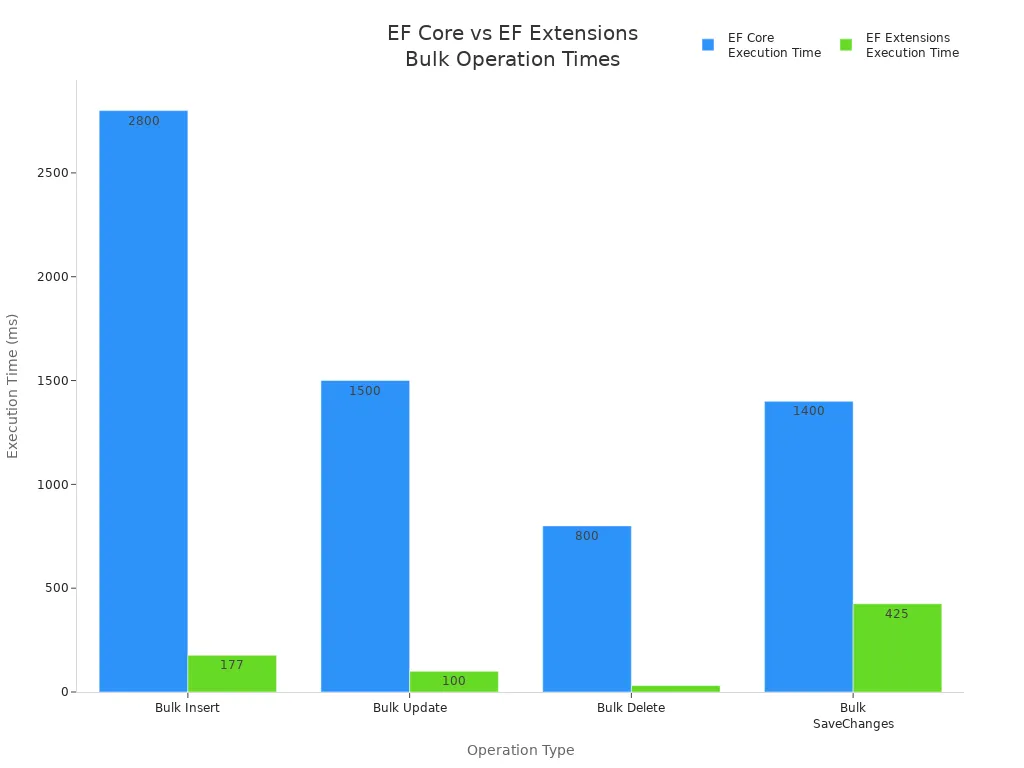
You can see that bulk operations are much faster. They are great for big jobs like moving lots of data or updating inventory.
Batching for Better Performance
Batching lets you group actions so your app works faster. You can use batch updates with UpdateRange() to change many things at once. Try not to call SaveChanges() too often. Each call sends data to the database. EF Core 7 has new methods like ExecuteUpdate and ExecuteDelete for bulk changes.
Here are some ways to batch your work:
- Use
UpdateRange()for batch updates. - Call
SaveChanges()less to cut down on database trips. - Try
ExecuteUpdateandExecuteDeletein EF Core 7 for faster bulk changes. - Pool your DbContext to use it again and lower extra work.
- Turn off change tracking for read-only queries.
- Use streaming for big data sets.
You can use code like this to batch updates:
public void BatchUpdateAuthors(List<Author> authors)
{
    var students = this.Authors.Where(a => a.Id > 10).ToList();
    this.UpdateRange(authors);
    SaveChanges();
}
For EF Core 7 or later, you can use:
_context.Authors.Where(a => a.Id > 10).ExecuteUpdate();
Batching and bulk operations help your database work better. You can finish big jobs fast and keep your app running well.
Indexing and Database Optimization
Impact of Indexes on Performance
Indexes help your database find data faster. When you search for something, the database looks at the index first. This makes your app answer more quickly. But if you add or change records a lot, indexes can slow things down. The database has to keep the index updated every time you change data.
- Indexes make finding rows faster for your queries.
- Composite indexes are good when you filter by more than one column. The order of columns in a composite index is important for speed.
- If your queries use special expressions, you can use persisted columns or expression indexes. These help with hard searches.
You need to have the right number of indexes. Too many indexes can make updates slow. Not enough indexes can make searches slow. Always check your queries and change indexes to get the best speed.
Managing Indexes in Migrations
When you change your database with migrations, you should watch your indexes. Add indexes to columns you search a lot. This helps your database work faster and keeps your app smooth. You can set up indexes in your ef model so they are made in the database for you.
You can add an index in your ef model like this:
protected override void OnModelCreating(ModelBuilder modelBuilder)
{
    modelBuilder.Entity<Book>()
        .HasIndex(b => b.Title)
        .HasDatabaseName("Index_Title");
}
Check your database every time you do a migration. Make sure you add indexes to columns people search or filter. Take away indexes you do not need. This keeps your database neat and fast. You can use tools to find slow queries and add indexes where they help most.
If you plan your indexes well, your database will do searches and updates better. Your ef apps will run faster and work better.
Context Lifetime and Connection Management
DbContext Lifetime Best Practices
You must watch how long you use DbContext. If you use it too long, your app can slow down. It is best to make a new DbContext for each job. For example, make one for each web request or background task. This stops memory leaks and keeps your data up to date.
Here is a table with tips for using DbContext:
| Best Practice | Description |
|---|---|
| Avoid DbContext pooling | Pooling DbContext can cause old data or problems with many users. Use DbContext for short jobs. |
| Use AsNoTracking | Use AsNoTracking when you only need to read data. This makes things faster because it skips tracking. |
| Avoid lazy loading | Lazy loading can make lots of database calls. This can slow your app down. |
Use AsNoTracking if you just want to look at data. This makes your queries run faster and saves memory. Try not to use lazy loading. It can make your app send extra calls to the database and slow things down.
Tip: Always get rid of your DbContext when you are done. This keeps your app working well and stops memory leaks.
Efficient Connection Handling
You should open a database connection only when you need it. Close it right after you finish. This helps your database not run out of connections.
DbContext pooling can help if your app is very busy. Pooling saves time by reusing DbContext objects. This can make your app faster, but you must be careful. Do not use the same DbContext in more than one thread.
| Best Practice | Description |
|---|---|
| DbContext pooling | Pooling helps busy apps by saving time. Use it carefully so you do not have problems. |
Never keep a DbContext for too long. Use it for one job, then let it go. This keeps your app quick and your data safe. Good connection habits help your ef app work well and handle more users.
You can make ef faster by using smart methods. Use Include or projection so you do not get N+1 queries. Add AsNoTracking when you only read data. Pick just the columns you need. Make sure your filters turn into SQL. Group your changes and save them all at once. Put indexes on columns you filter for quicker searches. Use IDbContextFactory for background jobs. Compiled queries are good for requests that happen a lot.
Check your app often with tools like Visual Studio Profiler or dotTrace. Look at your database and how you write queries. This helps your app stay quick and work well.
Optimizing EF Core Query Speed — Checklist
Focus: entity framework performance issues and practical steps to speed up EF Core queries.
- Measure baseline: capture query execution time and SQL generated using logging (EnableSensitiveDataLogging, LogTo) and aprofiler before making changes.
- Use asynchronous queries: prefer ToListAsync/FirstOrDefaultAsync/SingleOrDefaultAsync to avoid blocking threads.
- Project only needed columns: use Select to return DTOs or anonymous types instead of entire entities.
- Avoid unnecessary tracking: use AsNoTracking for read-only queries to reduce change-tracking overhead.
- Filter early: apply Where clauses before Select/Include to reduce data transferred from database.
- Limit results: use Take/Skip for pagination and avoid loading full tables.
- Avoid N+1 problem: use Include/ThenInclude or explicit batch queries to load related data efficiently.
- Prefer explicit joins or Select with navigation access when Include causes excess data duplication in SQL.
- Use compiled queries for frequently executed parameterized queries to reduce LINQ-to-SQL translation cost.
- Optimize query translation: simplify complex client-side expressions that force client evaluation; keep operations translatable to SQL.
- Check generated SQL: inspect queries for unnecessary DISTINCT, subqueries, or CROSS JOINs and refactor LINQ accordingly.
- Use proper indexes: ensure database has indexes that match query predicates and sort orders used by EF Core queries.
- Avoid loading large result sets into memory: stream results or use pagination and server-side projections.
- Batch database calls: use ExecuteUpdate/ExecuteDelete where appropriate and combine multiple operations when safe.
- Use connection pooling and efficient DbContext lifetime: keep DbContext short-lived and avoid creating per-operation overhead.
- Cache static data: use memory cache or distributed cache for rarely changing lookup data instead of querying DB each time.
- Be careful with eager loading depth: limit Include chains to necessary relationships to avoid overly complex joins.
- Use raw SQL or stored procedures for highly complex or performance-critical queries when LINQ cannot generate optimal SQL.
- Avoid heavy client-side evaluation: ensure computed operations are translated to SQL or moved to the database via SQL functions.
- Monitor and tune EF Core change tracking: use ChangeTracker.AutoDetectChangesEnabled = false during bulk operations and re-enable afterward.
- Use bulk extensions for mass inserts/updates/deletes to avoid thousands of individual commands.
- Profile and load-test after each change: confirm fixes reduce latency and throughput issues related to entity framework performance issues.
- Keep EF Core and database provider up to date: apply performance-related fixes and improvements from newer versions.
FAQ
What is the N+1 query problem in Entity Framework?
You see the N+1 problem when your app sends many small queries instead of one big query. This happens when you load related data inside a loop. Use eager loading to fix it.
How can you speed up read-only queries in EF Core?
You can use AsNoTracking() for read-only queries. This skips change tracking and makes your queries faster. Your app uses less memory and responds quicker.
When should you use bulk operations in EF Core?
Bulk operations work best when you need to insert, update, or delete thousands of records. You save time and reduce database load. Use tools like EFCore.BulkExtensions for big jobs.
Why do indexes matter for EF Core performance?
Indexes help your database find data faster. You should add indexes to columns you filter or search often. This makes your queries run quickly and keeps your app responsive.
What tools help you find EF Core performance issues?
You can use EF Core logging, MiniProfiler, and SQL Server Profiler. These tools show slow queries and help you spot bottlenecks. Check logs often to keep your app running well.
Why are my EF Core queries slow compared to raw SQL?
EF Core can be slower because an ORM generates SQL queries, tracks net objects and materializes results which adds overhead compared to hand-written sql query or ADO.NET; EF Core may also produce different queries than you expect, or include unnecessary joins and selects. To improve performance, inspect the actual query EF uses, profile the database server, cache queries where appropriate, and consider using compiled queries or write a custom SQL or use dapper for critical paths.
How does the amount of data affect Entity Framework performance?
Large amount of data amplifies ORM overhead: tracking many entities consumes memory and CPU, and sending big result sets across the network stresses database access. Use pagination, projection to DTOs, AsNoTracking for read-only workloads, and avoid loading entire collections. If you need to insert a lot of data, use bulk operations or ADO.NET batching instead of inserting one entity at a time through an EF context.
Should I use Entity Framework Core or EF6 for better performance in a .NET Core app?
EF Core is optimized for the net core and offers modern improvements, but ef 6 has mature behaviors and optimizations for some scenarios. Benchmark your workload: ef core queries are slow in some complex queries but faster in others. Consider the net ecosystem, your existing codebase, and whether you can use dapper or ado.net for hotspots. Often using EF Core with tuned queries and compiled queries yields the best balance.
What common performance problems arise from using an EF context incorrectly?
Creating and disposing contexts too frequently or keeping a long-lived context that tracks many entities causes performance and memory issues. Opening and closing connections is handled by the context, but repeatedly creating contexts can add overhead. Use context per unit of work, avoid long tracking lifetimes, and when reading, use AsNoTracking to reduce the performance penalty of change tracking.
How can I diagnose slow queries generated by EF?
Look at an example by logging the actual query and parameters EF uses, enable database server profiling, and compare execution plans to your hand-written sql query. Use tools in asp.net core or EF logging to capture queries, and check whether EF caches queries or recompiles LINQ expressions; using compiled queries can avoid the first compile cost for repeated queries.
When should I use Dapper instead of Entity Framework?
Use dapper for simple high-performance data access scenarios where you want minimal ORM overhead and direct control of SQL. Dapper maps results to objects quickly and has less tracking overhead than ORMs. For complex queries, or when you need full ORM features like change tracking, EF is useful. Mixing EF and dapper is common: EF for domain modeling and dapper for performance-critical read paths.
How do complex queries impact EF performance and how can I optimize them?
Complex queries may produce inefficient SQL or multiple round-trips; EF may translate LINQ into several different queries or use subqueries that stress the database. Simplify LINQ, project only needed fields, or write raw SQL when necessary. Consider splitting queries, adding proper indexes on the database server, and measuring execution plans to improve performance.
Is there a performance penalty when using ORMs versus ADO.NET?
Yes, using an orm introduces overhead for change tracking, query generation, and materialization compared to manual ADO.NET. The penalty varies by scenario: small CRUD apps see negligible impact, while high-throughput systems may suffer. To mitigate, reduce tracking, use projections, avoid unnecessary queries, or use ADO.NET/dapper for tight loops and bulk operations.
How can I improve performance when inserting a lot of data with EF?
For bulk inserts, disable change tracking temporarily, batch saves (SaveChanges in groups), or use a bulk insert library that uses native database bulk APIs. Avoid inserting one entity and SaveChanges per row. If you must insert a lot of data regularly, consider using ADO.NET or write a custom bulk loader for the database which bypasses EF overhead.
Does EF cache queries and how does that affect performance?
EF Core compiles LINQ to an internal representation and can cache some query plans, but the first compile of a query has cost; repeated similar queries benefit from caching or using compiled queries explicitly. Caching the results at the application layer can also reduce database load. Be careful to cache based on parameters and invalidate when underlying data changes to avoid stale results.
What role does the database server play in EF performance?
The database server is often the bottleneck: slow disk, missing indexes, poor query plans, or resource contention will make ef core queries are slow regardless of ORM choice. Optimize indexes, update statistics, and tune queries at the server. Use execution plans to identify slow operations and adjust either the EF query or the database schema accordingly.
How can I profile and measure Entity Framework performance in ASP.NET Core?
Use EF logging, query tags, and performance profilers to capture the actual query and execution time. Tools like SQL Server Profiler, Query Store, or third-party profilers can show the database perspective. Measure end-to-end latency in the asp.net core app, identify hotspots, and test different approaches (AsNoTracking, compiled queries, dapper) to see measurable improvements.
Is it better to write a custom SQL query or rely on EF for complex reporting?
For complex reporting where the ORM produces inefficient SQL or you need specific optimizations, write a custom sql query or use dapper to execute the query and map results. Reporting often benefits from tuned, hand-crafted queries that the database server can optimize better than the generic SQL generated by EF.
How should I think about EF and the net objects lifecycle to avoid memory leaks?
Think EF in terms of unit of work: creating and disposing contexts per request or per transaction helps prevent accumulating tracked net objects. Avoid attaching large graphs unnecessarily, detach when appropriate, and monitor memory usage. Properly disposing the context and minimizing tracked entities reduces GC pressure and improves performance.
🚀 Want to be part of m365.fm?
Then stop just listening… and start showing up.
👉 Connect with me on LinkedIn and let’s make something happen:
- 🎙️ Be a podcast guest and share your story
- 🎧 Host your own episode (yes, seriously)
- 💡 Pitch topics the community actually wants to hear
- 🌍 Build your personal brand in the Microsoft 365 space
This isn’t just a podcast — it’s a platform for people who take action.
🔥 Most people wait. The best ones don’t.
👉 Connect with me on LinkedIn and send me a message:
"I want in"
Let’s build something awesome 👊
If you’re using Entity Framework only to mirror your database tables into DTOs, you’re missing most of what it can actually do. That’s like buying an electric car and never driving it—just plugging your phone into the charger. No wonder so many developers end up frustrated, or decide EF is too heavy and switch to a micro-ORM. Here’s the thing: EF works best when you use it to persist meaningful objects instead of treating it as a table-to-class generator. In this podcast, I’ll show you three things: a quick before-and-after refactor, the EF features you should focus on—like navigation properties, owned types, and fluent API—and clear signs that your code smells like a DTO factory. And when we unpack why so many projects fall into this pattern, you’ll see why EF often gets blamed for problems it didn’t actually cause.
The Illusion of Simplicity
This is where the illusion of simplicity comes in. At first glance, scaffolding database tables straight into entity classes feels like the fastest way forward. You create a table, EF generates a matching class, and suddenly your `Customer` table looks like a neat `Customer` object in C#. One row equals one object—it feels predictable, even elegant. In many projects I’ve seen, that shortcut is adopted because it looks like the most “practical” way to get started. But here’s the catch: those classes end up acting as little more than DTOs. They hold properties, maybe a navigation property or two, but no meaningful behavior. Things like calculating an order total, validating a business rule, or checking a customer’s eligibility for a discount all get pushed out to controllers, services, or one-off helper utilities. Later I’ll show you how to spot this quickly in your own code—pause and check whether your entities have any methods beyond property getters. If the answer is no, that’s a red flag. The result is a codebase made up of table-shaped classes with no intelligence, while the real business logic gets scattered across layers that were never designed to carry it. I’ve seen teams end up with dozens, even hundreds, of hollow entities shuttled around as storage shells. Over time, it doesn’t feel simple anymore. You add a business rule, and now you’re diffing through service classes and controllers, hoping you don’t break an existing workflow. Queries return data stuffed with unnecessary columns, because the “model” is locked into mirroring the database instead of expressing intent. At that point EF feels bloated, as if you’re dragging along a heavy framework just to do the job a micro-ORM could do in fewer lines of code. And that’s where frustration takes hold—because EF never set out to be just a glorified mapper. Reducing it to that role is like carrying a Swiss Army knife everywhere and only using the toothpick: you bear the weight of the whole tool without ever using what makes it powerful. The mini takeaway is this: the pain doesn’t come from EF being too complex, it comes from using it in a way it wasn’t designed for. Treated as a table copier, EF actively clutters the architecture and creates a false sense of simplicity that later unravels. Treated as a persistence layer for your domain model, EF’s features—like navigation properties, owned types, and the fluent API—start to click into place and actually reduce effort in the long run. But once this illusion sets in, many teams start looking elsewhere for relief. The common story goes: "EF is too heavy. Let’s use something lighter." And on paper, the alternative looks straightforward, even appealing.
The Micro-ORM Mirage
A common reaction when EF starts to feel heavy is to reach for a micro-ORM. From experience, this option can feel faster and a lot more transparent for simple querying. Micro-ORMs are often pitched as lean tools: lightweight, minimal overhead, and giving you SQL directly under your control. After dealing with EF’s configuration layers or the way it sometimes returns more columns than you wanted, the promise of small and efficient is hard to ignore. At first glance, the logic seems sound: why use a full framework when you just want quick data access? That appeal fits with how many developers start out. Long before EF, we learned to write straight SQL. Writing a SELECT statement feels intuitive. Plugging that same SQL string into a micro-ORM and binding the result to a plain object feels natural, almost comfortable. The feedback loop is fast—you see the rows, you map them, and nothing unexpected is happening behind the scenes. Performance numbers in basic tests back up the feeling. Queries run quickly, the generated code looks straightforward, and compared to EF’s expression trees and navigation handling, micro-ORMs feel refreshingly direct. It’s no surprise many teams walk away thinking EF is overcomplicated. But the simplicity carries hidden costs that don’t appear right away. EF didn’t accumulate features by mistake. It addresses a set of recurring problems that larger applications inevitably face: managing relationships between entities, handling concurrency issues, keeping schema changes in sync, and tracking object state across a unit of work. Each of these gaps shows up sooner than expected once you move past basic CRUD. With a micro-ORM, you often end up writing your own change tracking, your own mapping conventions, or a collection of repositories filled with boilerplate. In practice, the time saved upfront starts leaking away later when the system evolves. One clear example is working with related entities. In EF, if your domain objects are modeled correctly, saving a parent object with modified children can be handled automatically within a single transaction. With a micro-ORM, you’re usually left orchestrating those inserts, updates, and deletes manually. The same is true with concurrency. EF has built-in mechanisms for detecting and handling conflicting updates. With a micro-ORM, that logic isn’t there unless you write it yourself. Individually, these problems may look like small coding tasks, but across a real-world project, they add up quickly. The perception that EF is inherently harder often comes from using it in a stripped-down way. If your EF entities are just table mirrors, then yes—constructing queries feels unnatural, and LINQ looks verbose compared to a raw SQL string. But the real issue isn’t the tool; it’s that EF is running in table-mapper mode instead of object-persistence mode. In other words, the complexity isn’t EF’s fault, it’s a byproduct of how it’s being applied. Neglect the domain model and EF feels clunky. Shape entities around business behaviors, and suddenly its features stop looking like bloat and start looking like time savers. Here’s a practical rule of thumb from real-world projects: Consider a micro-ORM when you have narrow, read-heavy endpoints and you want fine-grained control of SQL. Otherwise, the maintenance costs of hand-rolled mapping and relationship management usually surface down the line. Used deliberately, micro-ORMs serve those specialized needs well. Used as a default in complex domains, they almost guarantee you’ll spend effort replicating what EF already solved. Think of it this way: choosing a micro-ORM over EF isn’t wrong, it’s just a choice optimized for specific scenarios. But expect trade-offs. It’s like having only a toaster in the kitchen—perfect when all you ever need is toast, but quickly limiting when someone asks for more. The key point is that micro-ORMs and EF serve different purposes. Micro-ORMs focus on direct query execution. EF, when used properly, anchors itself around object persistence and domain logic. Treating them as interchangeable options leads to frustration because each was built with a different philosophy in mind. And that brings us back to the bigger issue. When developers say they’re fed up with EF, what they often dislike is the way it’s being misused. They see noise and friction, but that noise is created by reducing EF to a table-copying tool. The question is—what does that misuse actually look like in code? Let’s walk through a very common pattern that illustrates exactly how EF gets turned into a DTO factory, and why that creates so many problems later.
When EF Becomes a DTO Factory
When EF gets reduced to acting like a DTO factory, the problems start to show quickly. Imagine a simple setup with tables for Customers, Orders, and Products. The team scaffolds those into EF entities, names them `Customer`, `Order`, and `Product`, and immediately begins using those classes as if they represent the business. At first, it feels neat and tidy—you query an order, you get an `Order` object. But after a few weeks, those classes are nothing more than property bags. The real rules—like shipping calculations, discounts, or product availability—end up scattered elsewhere in services and controllers. The entity objects remain hollow shells. At this point, it helps to recognize some common symptoms of this “DTO factory” pattern. Keep an ear out for these red flags: your entities only contain primitive properties and no actual methods; your business rules get pulled into services or controllers instead of being expressed in the model; the same logic gets re‑implemented in different places across the codebase; and debugging requires hopping across multiple files to trace how a single feature really works. If any of these signs match your project, pause and note one concrete example—we’ll refer back to it in the demo later. The impact of these patterns is pretty clear when you look at how teams end up working. Business logic that should belong to the entity ends up fragmented. Shipping rules, discount checks, and availability rules might each live in a different service or helper. These fragmented rules look manageable when the project is small, but as the system grows, nobody has a single place to look when they try to understand how it works. The `Customer` and `Order` classes tell you nothing about the business relationships they’re supposed to capture because they’ve been reduced to storage structures. From here, maintainability starts to slide. A bug comes in about shipping calculations. You naturally check the `Customer` class, only to discover it has no behavior at all. You then chase references through billing helpers, shipping calculation services, and controller code. Fixes require interpreting an invisible web of dependencies. Over time, slight differences creep in—two developers might implement the same discount rule in two different ways without realizing it. Those inconsistencies are almost guaranteed when logic isn’t centralized. Testing suffers too; instead of unit testing clear domain behaviors, you have to mock out service networks just to verify rules that should have lived right inside the entity. This structure also fuels the perception that EF itself is at fault. Teams often describe EF as “magical” or unpredictable, wondering why SaveChanges updated fields they thought were untouched, or why related entities loaded differently than expected. In practice, this unpredictability comes from using EF to track hollow objects. When entities are nothing but DTOs, their absence of intent makes EF’s behavior feel arbitrary. It isn’t EF misbehaving, it’s EF being asked to persist structures that never carried the business meaning they needed to. The broader consequence is a codebase stuck in procedural mode. Instead of entities that carry their responsibilities, you get layers of procedural scripts hidden in services that impersonate a domain model. EF merely pushes and pulls these data bags to the database, but offers no leverage because the model itself doesn’t describe the actual domain. It’s not that EF failed—it’s that the model was never allowed to succeed. The good news is that this pattern is not permanent. Refactoring away from EF-as-DTO means rethinking what goes into your entities. Instead of spreading behaviors across multiple services and controllers, you start to treat those objects as the true home for domain rules. The shift is concrete: order totals, eligibility checks, and shipping calculations live alongside the data they depend on. This change consolidates behavior into the model, making it discoverable, testable, and consistent. That naturally raises the big question: how do we move from a library of hollow DTOs to real objects that express business rules, without giving up EF in the process?
Transforming into Proper OOP with EF
Transforming EF into an object-oriented tool starts by flipping the perspective. Instead of letting a database schema dictate the shape of your code, you treat your objects as the real center of gravity and let EF handle the persistence underneath. That doesn’t mean adding layers of ceremony or reinventing architectures. It simply means designing your entities to describe what the business actually does, while EF works in the background to translate that design into rows and columns. For clarity, here’s the flow I’ll walk through in the demo: first, you’ll see a DTO‑style `Order` entity that only carries primitive properties. Then I’ll show you how the same `Order` looks once behavior is moved inside the object. Finally, we’ll look at how EF’s fluent API can persist that richer object without cluttering the domain class itself. Along the way, I’ll highlight three EF features that make this work: navigation properties, owned or value types, and fluent API configurations. Those are the practical tools that let you separate business intent from storage details. Let’s make it concrete. In the hollow DTO model, an `Order` might have just an `Id`, a `CustomerId`, and a list of line items. All the real thinking—like the total price of the order—is pushed out into a service or utility. But in an object‑oriented approach, the `Order` includes a method like “calculate total,” which sums up the included line items and applies any business rules. Placing that method on the object matters: you remove duplication, you keep the calculation close to the data it depends on, and future developers can discover the logic where they expect it. Instead of guessing which service hides a calculation, they can look at the order itself. Many developers hesitate here, worrying that richer domain objects will be harder to persist. That’s an understandable reaction if you’ve only seen EF used as a table‑to‑class mirroring tool. But persistence complexity is exactly what EF’s modern features are designed to absorb. Navigation properties handle relationships naturally. Owned types let you wrap common concepts like an Address or an Email into value objects without breaking persistence. And when you need precise control, the fluent API lets you define database‑specific rules—like decimal precision—without polluting your domain classes. The complexity doesn’t vanish, but it gets pushed into a clear boundary where EF can manage it directly. The fluent API in particular acts as a clean translator. Your `Order` class can focus entirely on the business—rules for adding products, enforcing a warehouse constraint, exposing a property for free shipping eligibility—while the mapping configuration files quietly describe how those rules translate to the database. This keeps your business model tidy and makes persistence more predictable, because all the storage rules sit in one place instead of leaking across entity code. If we scale the example up, the difference grows more obvious. Say an order has multiple line items, each tied to a product with its own constraints. In a DTO approach, you’d fetch the order and then pull in extra services to stitch everything together before applying rules. In a richer model, that work collapses into the entity itself. You can ask the order for its total, or check if it qualifies for free shipping, and the rules are applied consistently every time. EF persists the relationships behind the scenes, but you stay anchored in business logic rather than plumbing. The benefits cascade outward. Logical duplication fades because rules live in one place. Tests become simpler—no more wiring up half a dozen services to verify that discounts apply correctly. Instead, you test an order directly. Debugging also improves: business rules are discoverable inside the entity where they belong, not scattered across controllers and helpers. EF continues doing what it does best—tracking changes and generating SQL—but now it works in service of a model that actually represents your business. Here’s a small challenge you can try after watching: open one of your existing entities and ask yourself, “Could this responsibility live inside the object?” If the answer is yes, move one small piece of logic—like a calculation or a rule—into the entity and use EF mapping to persist it. That experiment alone can show the difference in clarity. Once you’ve seen how to give entities real behavior, the next natural question is why the shift matters over time. Rewriting classes isn’t free, so let’s look at the longer‑term impact of doing EF in a way that aligns with object‑oriented design.
The Long-Term Value of Doing EF Right
So what do you actually gain when you stop treating EF as a DTO copier and start using it to back real objects? The long-term value comes down to three things: cleaner testing, less duplication to maintain, and far clearer code for the next developer who joins the project. Those three benefits may not feel dramatic in the short term, but over months and years they shape whether a codebase stays steady or drifts into constant rework. The first big gain is easier testing. When objects know their own rules, you can test them directly without scaffolding services or mocking dependencies that shouldn’t even exist. An `Order` that calculates its own total can be exercised in isolation, giving you consistent results in small, fast-running tests. Updates or new behaviors are easier to verify because the logic lives exactly where the test points. As projects evolve, this pays off repeatedly—small changes are less risky since testing effort doesn’t balloon with every rule adjustment. The second benefit is reducing duplication and scattered maintenance. In DTO-style systems, one business rule often gets repeated across multiple service methods and controllers. Change a discount formula in one place but forget another, and you’ve created a subtle bug. Centralizing logic inside the object removes that duplication at the source. Here’s a simple check you can try in your own project: when a business rule changes, count how many code files you edit. If the answer is more than one, you’ve likely fallen into duplication. That’s a measurable way to see if technical debt is creeping in. The third benefit is clarity for onboarding and debugging. When EF is only storing DTO shells, new team members have to hunt through services to discover where rules are hidden. That slows them down. By contrast, when behavior sits in the object itself, the path is obvious. Debugging also shifts from hours of tracing service code to dropping one breakpoint inside the object method that enforces the rule. Before, you crossed multiple files to follow the logic. After, you look in one class and see the rule expressed cleanly. That contrast alone saves an enormous amount of wasted time for any team. Performance is also tied to how you shape your models. With table clones, EF often drags back entire rows or related entities that you don’t even use. That costs memory and query time, particularly as data grows. But when the model reflects intent, you can project exactly what belongs in scope. Owned types let you model concepts like addresses without clutter, while selective includes load just what’s needed for the behavior you’re testing. The effect isn’t about micro-benchmarks; it’s the intuition that better-shaped models naturally lead to leaner queries. None of this guarantees a perfect outcome. But in many long-lived projects, I’ve seen that teams who invest early in placing behavior inside models avoid the slow creep of duplicated rules and fragile service layers. Their tests stay lighter, their change costs stay lower, and onboarding looks more like reading straightforward domain objects instead of navigating a maze of procedural code. Teams that skipped that step often end up with technical debt that costs more to untangle than the up-front modeling would have. The pattern shows up again and again. All of this feeds into the bigger picture: proper use of EF doesn’t just clean up the present, it improves how a project survives the future. Rich objects, backed by EF’s persistence features, create models that developers can trust, extend, and understand. That confidence saves teams from the churn of accidental complexity and restores EF to the role it was meant to play. And this leads to the final point. The problem was never that EF itself was too large or too slow—it’s that we often narrow it down into something it was never supposed to be.
Conclusion
So here’s where everything comes together. EF works best when you use it to persist meaningful domain objects rather than empty DTO shells. If you reduce it to a table copier, you lose the advantages that make it worth using in the first place. Keep three takeaways in mind: stop relying on EF as a table-to-class generator, put behavior back into your entities, and use EF’s mappings to take care of persistence details. Here’s a small challenge—pick one entity in your project and comment below: “DTO” or “Model,” along with why. And if this kind of practical EF and .NET guidance helps, subscribe for more focused patterns and real-world practices.
This is a public episode. If you'd like to discuss this with other subscribers or get access to bonus episodes, visit m365.show/subscribe

Founder of m365.fm, m365.show and m365con.net
Mirko Peters is a Microsoft 365 expert, content creator, and founder of m365.fm, a platform dedicated to sharing practical insights on modern workplace technologies. His work focuses on Microsoft 365 governance, security, collaboration, and real-world implementation strategies.
Through his podcast and written content, Mirko provides hands-on guidance for IT professionals, architects, and business leaders navigating the complexities of Microsoft 365. He is known for translating complex topics into clear, actionable advice, often highlighting common mistakes and overlooked risks in real-world environments.
With a strong emphasis on community contribution and knowledge sharing, Mirko is actively building a platform that connects experts, shares experiences, and helps organizations get the most out of their Microsoft 365 investments.

