

 Apple Podcasts
 Spotify
 Youtube Music
 Spreaker
 Podchaser
 Amazon Music
Discover the game-changing tactics experts use to cut costs, reduce downtime, and move to Azure without headaches—this episode reveals the one framework that actually works.
Why most migrations fail and the single mindset shift to avoid it.
Step-by-step Azure migration blueprint you can start this week.
Cost traps and how to save thousands on your cloud migration strategy Microsoft Azure.
Real-world success stories and the tools that made them painless.
Top security and compliance checks nobody tells you about.
Listen to learn the exact checklist and quick wins for a smooth, fast Azure migration.






You can stop most cloud computing problems with good planning. You also need cost controls, security, backup, and monitoring. It is important to see what is happening in your system. A clear migration strategy is very important for success. This is true when you move to Microsoft Azure. The right strategy links technical goals to your business goals. It uses steps that happen one after another. It also includes change management. These actions help you save money and make your system safer. They also help your business keep running. Here is how a good migration plan helps you:
| Aspect | Description |
|---|---|
| Strategic Planning | Connects technical goals with business KPIs. It links results to money and risk targets. |
| Phased Execution | Splits work into discovery, pilots, and waves. This lowers surprises and keeps systems working. |
| Change Management | Gets support from leaders and gives training. It helps people use new technology and track progress. |
| Migration Benefits | Saves money, makes you more flexible, keeps your business going, and meets rules. |
Finding and stopping problems early is the best way to fix them. Security should be part of every step you take in the cloud.
Key Takeaways
- Planning well helps you avoid cloud problems. Make a simple plan that matches your tech goals with your business goals.
- Use tools like Azure Monitor to find issues early. Check often so you can fix problems before they get worse.
- Use good backup and recovery steps. Back up your data often to keep it safe and help you recover fast if you lose it.
- Watch out for security risks. Check your settings and who can access your data to stop data leaks and people getting in without permission.
- Manage cloud costs by making budgets and watching what you spend. Get rid of things you do not use to save money and lower security risks.
7 Surprising Facts About Azure Cloud Computing Security
These points highlight lesser-known aspects of Azure security that relate to common cloud computing problems.
- Azure's default security is permissive in some services. Many Azure resources (like storage accounts or App Service plans) have default settings that prioritize ease of use over strict security, meaning misconfiguration is a leading cause of cloud computing problems unless hardened.
- Managed identities reduce secret sprawl but aren't automatic. Azure Managed Identities remove the need for credentials in code, yet they must be explicitly enabled and designed into architectures—omission leads to persistent secret-management problems.
- Azure's built-in DDoS protection has tiers—basic vs. standard differ widely. The free/basic protection handles common network-level attacks, but more sophisticated DDoS threats require the paid Standard tier; assuming free protection is sufficient causes availability-related cloud computing problems.
- Azure Policy can prevent misconfigurations at scale, but it's often underused. Policies can enforce encryption, private endpoints, and resource tagging; organizations that don't adopt policy-as-code face recurring configuration drift and compliance problems.
- Private Link and Service Endpoints solve different problems. Private Link provides private IP access to PaaS services from your VNet, while Service Endpoints extend network identity—confusing the two can create unexpected data exposure and network security problems.
- Identity misconfigurations are the root cause of many breaches, not platform bugs. Azure's identity services (Azure AD, Conditional Access, MFA) are powerful; incorrect role assignments, over-permissive RBAC, or missing conditional access are common cloud computing problems leading to privilege escalation.
- Security Center (Defender for Cloud) uncovers issues but requires tuning to avoid noise. Defender for Cloud surfaces vulnerability and misconfiguration findings; without proper alert tuning and workflow integration, teams suffer alert fatigue and miss critical security incidents.
Downtime Risks in Cloud Computing

Causes of Downtime
There are many risks when using cloud computing. Downtime can happen for different reasons. Some problems happen in all cloud systems. Others only happen in Azure. The table below lists the main causes of downtime:
| Cause of Downtime | Description |
|---|---|
| Network Connectivity and DNS Issues | Lost connections or slow speeds can stop your apps. |
| Human Errors and Misconfigurations | Mistakes during setup or fixing things can break services. |
| External Dependencies and Certificate Expirations | Third-party problems or expired certificates can block logins and cause downtime. |
| Security Incidents and DDoS Attacks | Attacks can flood your services and make them stop working. |
| Hardware failures | Broken servers or storage can pause your work. |
| Software bugs | Problems in cloud systems or apps can cause outages. |
| Power outages | Losing power can stop your services right away. |
You should also watch for single points of failure. Wrong-sized cloud plans can be a problem too. If you do not have enough resources, your system may fail when busy.
Early Warning Signs
You can see downtime coming if you look for warning signs. Watch for small glitches, slow speeds, or error messages that keep showing up. These signs can mean bigger problems are coming soon. For example, network lag might mean storage is failing. If you act fast, you can fix things before downtime happens.
Prevention Steps
You can stop downtime by using good monitoring tools. Cloud monitoring tools help you see problems early. Azure Migrate helps you move to the cloud and find risks. Azure Monitor checks your system all the time and warns you about issues. Azure Site Recovery helps you recover if something goes wrong. Azure Security Center and Azure Sentinel help you find threats and follow rules. You should check your system often and test your backup plans. This helps you find problems before they get big. Azure Cost Management helps you control spending and avoid running out of resources. By using these tools and staying alert, you can lower downtime and keep your business safe.
Network Latency and Performance Issues
Why Latency Happens
Sometimes, you notice delays when using cloud services. These delays are called latency. Latency happens when data takes time to move between your device and the cloud. In public cloud systems, you use the public internet. This can cause more latency because your data goes through many places and networks. Sometimes, these networks slow down or stop working. Private cloud systems use special resources just for you. They usually have less latency because the network is made for you.
- Public cloud latency happens because you use the public internet and many network stops.
- Private cloud latency is less because the network is special and set up for you.
Spotting Performance Problems
You can find performance problems by checking important numbers. These numbers help you see if latency is making your apps or user experience worse.
- Inter-region latency shows delays between cloud regions.
- Connection time tells you how long it takes to start a connection.
- Throughput consistency helps you see if your data moves well.
- DNS resolution time can show hidden slowdowns.
- Round-trip time changes may show network traffic jams.
- Buffer use patterns can warn you about future slow spots.
- Error rates on network parts may mean hardware problems.
- TCP retransmission rates can show app problems.
- Network traffic symmetry helps you find security problems.
"Google thinks page speed is important for page quality," so slow pages can hurt your ranking and your business.
Improving Speed and Reliability
You can make speed and reliability better by using the right tools and good habits. Azure has built-in monitoring to check latency and performance. You should put your resources close to your users. This makes data travel a shorter distance. Use content delivery networks (CDNs) to keep data near users. Test your system often to find and fix latency problems early.
- 92% of cloud companies say cloud made user experience better.
- 53% of online shoppers want pages to load in three seconds or less.
- Half of shoppers will leave if pages load slowly.
Latency hurts real-time apps the most. High latency can make users leave or stop using your service. If you watch for network latency and fix problems early, you can avoid common cloud computing problems and keep your users happy.
Data Loss and Recovery in the Cloud

Common Causes of Data Loss
There are many risks when you keep data in the cloud. Data loss can happen for many reasons. The table below lists some common causes from misconfiguration:
| Cause of Misconfiguration | Explanation |
|---|---|
| Human Error | Cloud administrators or developers can make mistakes if they do not know enough or do not pay attention. |
| Lack of Expertise | Teams without skilled people may not understand cloud technology, so they make mistakes. |
| Complex Cloud Architecture | Complicated cloud systems make it easy to set things up wrong. |
| Poor Governance | Weak rules and not enough checks can let problems go unnoticed. |
Other risks are failed migrations, shadow IT, and poor security. If you do not use good encryption, you can lose data during migration. Unsecured storage buckets can let attackers steal your data. If you do not sort your data before moving it, you might lose it. Misconfigurations in cloud environments can cause big problems like breaches, losing money, and legal trouble.
Detecting Data Risks
You can find risks before they cause data loss. Look for these warning signs:
- Data loss can happen during migration and remove important business data.
- Data can get messed up while moving if you do not use the right controls.
- New data privacy laws can make moving to the cloud harder and raise the risk of loss.
- Handling sensitive data the wrong way can break rules like GDPR or HIPAA.
- Incomplete or failed data loads can stop other systems that need good data.
- Not following data protection laws can lead to fines and legal loss.
If you see these signs, act fast to keep your data safe.
Backup and Recovery Actions
You can stop most cloud problems by using strong backup and recovery steps. Here are some things you should do:
- Turn on Azure Backup for all supported resources, like Azure Virtual Machines, SQL Server, and Azure Files.
- Set how often you back up based on how much your data changes. Use hourly backups for busy databases and daily backups for less active data.
- Make retention policies that follow the rules you must meet. Balance long-term storage with cost.
- Use instant restore for Azure VM backups. This lets you recover fast from snapshot restore points.
- Schedule backups during quiet times so you do not slow down your main work.
- Test your backups often to make sure you can recover from any loss.
If you follow these steps, you protect your business from data loss and keep your cloud systems safe.
Security Gaps and Privacy Concerns
Security Risks in Cloud Computing
There are many security risks when you use cloud computing. Attackers want to get your data because it is valuable. You need to watch out for these risks:
- Data breach happens when someone gets your cloud data without permission. In 2023, most breaches happened in cloud storage.
- Wrong cloud settings can leave your data open. Checking your settings often helps you find these mistakes.
- Insecure APIs let attackers into your system. Many companies have had problems from weak API security.
- Account hijacking is growing quickly. If someone steals your login, they can control your account.
- Insider threats come from people you trust who use their access the wrong way. These are hard to notice.
- Denial-of-Service attacks can stop your services and cost you money.
- Data loss can happen if you delete something by accident or get hit by ransomware. You need strong backups.
- If you cannot see what is happening in your cloud, you may miss threats. You should always watch your resources.
- Shared responsibility model means you must protect your own data and settings.
- If you do not follow rules like GDPR or HIPAA, you can get fined.
You also need to think about privacy. Sometimes, cloud providers do not explain how they keep your data safe. Shared technology can make risks for everyone. Shadow IT and using tools without approval can make your security weaker.
Tip: Always check your cloud provider’s security and privacy rules before you put sensitive data in the cloud.
Signs of Weak Security
You can find weak security by looking for warning signs. Here are some common ones:
- Insecure interfaces or APIs make it easy for someone to steal your data.
- Account hijacking happens if you use weak passwords.
- If you cannot see what is happening, you may miss threats in your cloud.
- Sharing data outside your company can let the wrong people see it.
- Bad insiders may use their access to do harm.
- Cyberattacks target cloud systems because they are easy to reach.
| Evidence Type | Description |
|---|---|
| Frequency of Breaches | Cloud misconfigurations cause 80% of all data security problems. |
| Consequences | The average cost of a data breach in 2023 is $4.45 million. |
You need to act fast if you see these signs. Security problems can cause big losses.
Strengthening Security
You can make your cloud safer by following some easy steps. Start with strong identity and access management. Use tools to find risks in your system. Make sure you follow all rules and laws. Stop shadow IT by making strict rules. Use a zero trust security model. Encrypt your data when it is stored and when it moves. Watch and check your cloud resources often. Use cloud workload protection and cloud security posture management to keep your system safe.
Note: Check your cloud security often. Reviews and audits help you find and fix problems before they get worse.
You can avoid most cloud problems if you stay alert and use strong security tools.
Managing Cloud Costs and Consumption
Causes of Cost Overruns
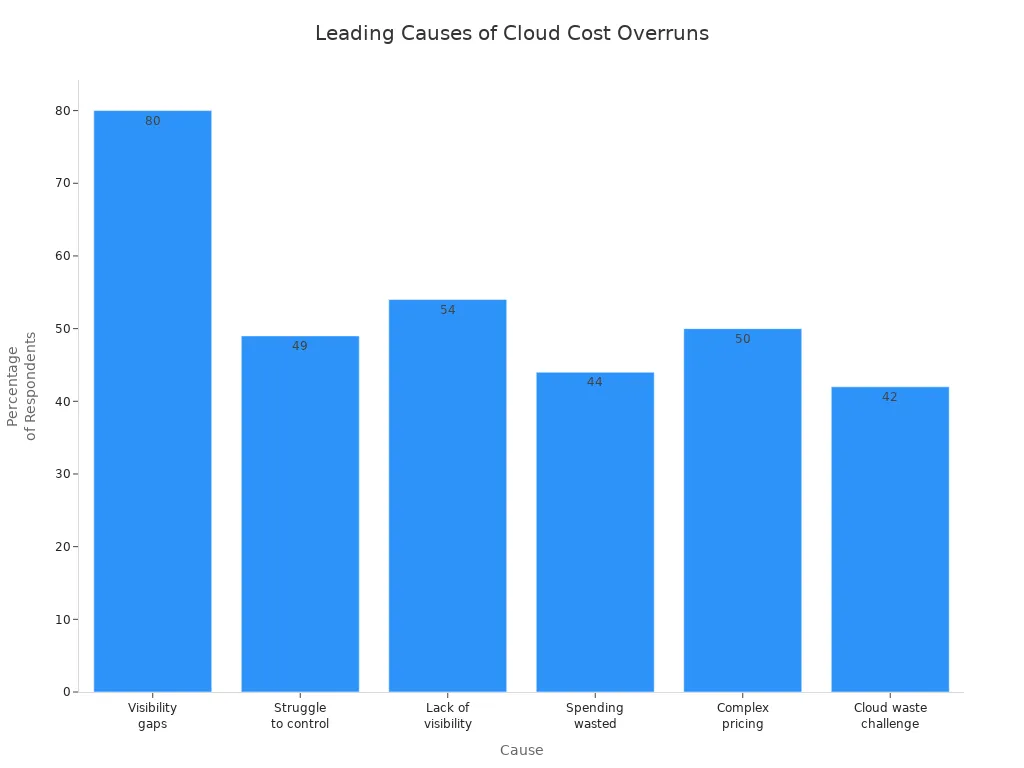
Cloud costs can go up fast if you do not watch them. Many groups have this problem. The main reasons are not seeing spending, tricky prices, and unused things. You need to know where your money goes. The table below shows how often these problems happen:
| Statistic | Description |
|---|---|
| 80% | Groups say they cannot see all cloud spending, so it is hard to track costs. |
| 49% | Many businesses have trouble keeping cloud costs low. |
| 54% | Wasted cloud money often comes from not seeing costs. |
| 44% | Leaders think at least a third of cloud money is wasted. |
| 50% | Half of people say tricky prices are a big problem. |
| 42% | Tech leaders say cloud waste is their biggest worry. |
You also need to think about security when you manage costs. Unused things and weak security can both waste money.
Early Cost Indicators
You can find cost problems early by looking for warning signs. Big jumps in spending, unused things, and quiet scaling can mean trouble. The table below lists common signs:
| Indicator | Description |
|---|---|
| Cost Anomalies | Sudden spending jumps in a service, region, or team. |
| Areas of Waste | Unused things, runaway jobs, or wrong services add to costs. |
| Month-on-Month Cost Growth | Cloud spending goes up without real changes in work. |
| Over-Provisioned Resources | Things that are bigger than you need. |
| Silent Scaling Behavior | Workloads grow without anyone knowing. |
| Uncontrolled Budget Overruns | Not watching for changes can cause surprise bills. |
| Business Risk | Going over budget can hurt your business. |
| Incident Impact | One problem can make your bill very high. |
You should also look at old data and check for odd things. Security problems can make costs go up, so watch both cost and security together.
Cost Control Strategies
You can keep cloud costs low with smart steps. Start by setting budgets and alerts. Tag your things so you can track them. Use auto-scaling, but set limits to stop surprises. Check your deals, like Reserved Instances, often. Let all teams see cloud spending. Clean up test things on a schedule. Review costs every month to find problems.
- Cut down on unused services to save money.
- Pick the best storage for your needs.
- Pause idle clusters to lower costs.
- Use FinOps to help everyone care about costs.
- Use heat maps to see how you use things.
Security is important for saving money. Protect your things to stop waste from attacks or mistakes. Regular checks help you find both cost and security problems. Always link cost checks with strong security steps. When you focus on security, you protect your money and your data. Security checks help you stop hidden costs. You can use Azure Cost Management to watch spending and boost security. Make security part of every cost check. This keeps your cloud safe and your spending under control.
Visibility and Tool Sprawl Challenges
Visibility Gaps in Cloud Environments
It is hard to see everything in your cloud. Sometimes, you do not know about all the resources running. Some resources may be set up wrong. This can make your system unsafe. If a service starts and your security team does not know, attackers can find it. You cannot protect what you do not see. Without a full list, it is hard to follow rules or manage costs. Hidden risks and wasted money can happen when you miss things.
Tip: Always keep your cloud resource list up to date. This helps you find problems early.
- Cloud sprawl means you have extra resources and pay more.
- Security gaps can hide if you do not watch everything.
- Too many cloud resources make work less efficient.
Tool Sprawl and Shadow IT
Tool sprawl is when you use too many apps in your cloud. Shadow IT is when people use tools without asking. Both can cause big problems for your business.
- Broken-up environments are hard to take care of.
- Budgets and resources get stretched by unused cloud things.
- Too many alerts and missing security can happen without one main platform.
- Unchecked apps and personal devices can make security weaker.
- Using tools without approval can cause data leaks and rule problems.
- Buying the same app twice makes you spend more money.
- Devices and connections you do not watch can be attacked.
- Sensitive data might go to places that are not safe.
Note: Rules say you must control and watch sensitive data. Breaking these rules can cost you money.
Simplifying Operations
You can make cloud work easier by doing a few things:
- Remove tools you do not need.
- Manage tools from one place to make things simple.
- Make sure tools work well together for better data sharing.
- Use data analytics to handle lots of information.
- Train your team so they use tools the right way.
- Check your tools often to see if they work well.
- Use a plan to add new tools in a smart way.
- Let your team share ideas about how tools work.
A cloud governance plan gives you clear rules for using the cloud. You work better by automating jobs and picking the right tools. Making things the same and using fewer tools helps you save time and money.
Callout: Making your cloud simpler helps you avoid hidden costs and security risks. You get more control and make your business stronger.
Best Practices for Cloud Computing Health
Right-Sizing and Governance
To keep your cloud healthy, start by right-sizing resources. Only use what you need. This helps you save money and avoid waste. If you use too many resources, costs go up. It can also make your system less safe. Make clear rules for how people use resources. Decide who can use them and how you will watch what happens. Good rules stop people from making changes they should not. This keeps your cloud safer. Check your rules often. Change them if new problems or needs come up. Doing this helps your cloud stay safe and work well.
Monitoring and Optimization
Watching your cloud all the time is important. It helps you use resources the best way. You can find problems early. Seeing how your system acts helps you fix things fast. Automation does simple jobs for you. This means fewer mistakes and better safety. Infrastructure as Code lets you change things quickly. It also helps your cloud grow and stay safe. Keep making your cloud better by using what you learn from watching it. This lowers risks. When you watch and improve your cloud, you make it stronger and safer.
Regular Reviews and Integration
Most groups check who can use important systems every few months. These checks help you find people who should not have access. This stops security problems before they get big. When different teams help with checks, you cover more ground. You can find weak spots in your security sooner. Some places need to check every month to follow rules. Make these checks part of your normal work. This keeps your cloud safe. Watching your cloud often helps you fix problems fast. It also keeps your cloud healthy and secure.
You can stop most cloud computing problems by being careful. Watch your system all the time and use strong security. Check your cloud often to find problems early and keep it healthy. After you move to Azure, keep making your system better and change it when you need to. The table below shows how watching and security steps help your cloud:
| Aspect | Description |
|---|---|
| Ongoing Monitoring | Watches system health and what users do for better safety. |
| Automated Scanning | Finds wrong settings and security risks right away. |
| Configuration Management | Makes sure your cloud settings are safe and follow rules with checks. |
Always pay attention and make security part of your daily work to keep your business safe.
Azure Cloud Computing Security Checklist
Use this checklist to identify and remediate common cloud computing problems in Azure deployments.
FAQ
What is the best way to prevent cloud downtime?
You should use monitoring tools like Azure Monitor. Test your backup plans often. Place your resources close to users. Watch for early warning signs, such as slow speeds or error messages.
How can you keep cloud costs under control?
Set budgets and alerts in Azure Cost Management. Tag your resources for easy tracking. Remove unused services. Review your spending every month. Share cost reports with your team.
Why is regular backup important in the cloud?
Regular backups protect your data from loss. If you lose data by accident or during a migration, you can restore it quickly. Test your backups to make sure they work.
How do you spot security risks in your cloud environment?
Look for strange logins, new devices, or changes in settings. Use Azure Security Center to scan for threats. Review who has access to your data.
What should you do if you find unused cloud resources?
Tip: Delete or pause unused resources right away. This saves money and lowers security risks. Always check your cloud for things you do not need.
What are the most common cloud computing problems organizations face today?
Common cloud computing problems include security issues such as data security and security breaches, vendor lock-in that limits portability between cloud service providers, unexpected outages affecting availability, cost management and expensive or poorly optimized computing services, compliance and regulatory challenges during cloud migration, and implementation challenges when moving complex legacy systems to a cloud platform or hybrid cloud environment.
How does vendor lock-in create challenges in cloud adoption and what can be done about it?
Vendor lock-in occurs when an organization becomes dependent on a single cloud vendor or cloud solution, making migration to another cloud platform difficult and expensive. To reduce this cloud computing challenge, teams should design cloud-native applications using open standards, containerization, abstraction layers, multi-cloud or hybrid cloud strategies, and negotiate exit and data portability clauses with the cloud vendor or cloud provider and the customer relationship.
What security challenges in cloud computing should I prioritize when adopting cloud services?
Prioritize securing the cloud by addressing identity and access management, encryption of data at rest and in transit, protecting against security breaches and cyberattacks, continuous monitoring and logging, secure configuration of cloud infrastructure, and vendor risk management. These security measures are central to reducing security concerns and supporting a successful cloud implementation and ongoing cloud operations.
How do outages and availability problems in cloud computing affect businesses?
Cloud outages can interrupt business-critical cloud applications and computing services, causing downtime, lost revenue, and reputational damage. To mitigate this common cloud problem, implement redundancy across regions or multiple cloud providers, design for failover, use disaster recovery plans, and understand the cloud service level agreements and the vendor’s historical state of the cloud reliability and outage response.
What are the typical implementation challenges when moving to the cloud from on-premise systems?
Implementation challenges include re-architecting legacy applications for the cloud, ensuring data migration integrity, aligning security and compliance controls, managing costs during transition, training staff in cloud operations, and integrating cloud infrastructure with existing premise systems. A phased cloud migration strategy, proof-of-concept pilots, and partnering with experienced cloud vendors or cloud computing service consultants help address these problems in cloud computing.
How can organizations control and optimize cloud costs to avoid expensive surprises?
Control costs by implementing cloud cost governance: use tagging to track computing resource usage, right-size instances, leverage reserved instances or savings plans, monitor idle resources, automate shutdowns for non-production environments, and use cloud provider cost-management tools. Regular cloud report reviews and cost optimization practices prevent cloud computing offers from becoming unduly expensive.
What data security and privacy concerns arise with cloud storage and how are they addressed?
Data security concerns include unauthorized access, data leakage, insufficient encryption, and regulatory noncompliance. Address these by encrypting data at rest and in transit, enforcing strong access controls and multi-factor authentication, applying data loss prevention and classification, maintaining audit logs, and ensuring the cloud platform meets relevant compliance certifications and contractual requirements for data protection.
Is multi-cloud or hybrid cloud a solution to many challenges in cloud computing?
Yes, multiple cloud or hybrid cloud strategies can reduce vendor lock-in, improve resilience against outages, and let organizations select best-of-breed cloud computing solutions. However, they introduce complexity in integration, networking, and consistent security policies across cloud platforms, so organizations must plan cloud strategies, automation, and governance to manage these trade-offs effectively.
How do security breaches in the cloud typically occur and how can they be prevented?
Security breaches often result from misconfigured cloud infrastructure, compromised credentials, unpatched vulnerabilities, insecure APIs, or inadequate monitoring. Prevention requires secure configuration baselines, least-privilege access controls, continuous vulnerability management, strong IAM and credential hygiene, application security testing, and robust incident response plans tailored for the cloud computing environment.
What role does the cloud service provider (CSP) play versus the customer in cloud security responsibilities?
Responsibility is shared: cloud service providers secure the underlying cloud infrastructure, physical data centers, and foundational services, while the customer is typically responsible for securing data, applications, access management, and configurations in the cloud platform. Understanding the provider and the customer shared responsibility model is vital to address security challenges in cloud computing and secure cloud operations.
How do regulatory compliance and governance complicate cloud migration efforts?
Regulatory compliance can require data residency, audit trails, strict access controls, and reporting that complicate cloud migration. Assess compliance requirements early, choose cloud providers and regions that meet regulations, implement appropriate controls and monitoring, document procedures, and work with legal and compliance teams to ensure a compliant cloud adoption and successful cloud implementation.
Can small businesses benefit from cloud computing despite the challenges, and how?
Yes. Benefits of cloud computing—scalability, access to advanced computing resources, reduced capital expenditure, and faster time-to-market—make cloud attractive for small businesses. To mitigate challenges, start with simple cloud solutions, use managed cloud services, adopt best practices for security and cost control, and consider partnering with cloud service providers experienced in supporting small and growing organizations.
What are best practices for securing cloud-native applications and cloud infrastructure?
Best practices include embedding security into the development lifecycle (DevSecOps), using containers and orchestration with secure configurations, enforcing strong IAM and secrets management, automating security testing and compliance checks, encrypting data, implementing network segmentation, and continuously monitoring cloud infrastructure for anomalous activity.
How should organizations evaluate cloud vendors when considering cloud adoption?
Evaluate cloud vendors based on security certifications, service availability and past outages, pricing and cost transparency, data portability and support for open standards to reduce lock-in, available cloud services and integrations, SLAs, customer support, and the vendor’s roadmap for features relevant to your cloud application and computing solutions.
What steps help ensure a successful cloud implementation and long-term cloud operations?
Ensure success by defining clear goals for cloud adoption, choosing the right cloud computing service and vendor, conducting pilot migrations, mapping security and compliance requirements, training staff, implementing governance and cost controls, leveraging automation and DevOps practices, and continuously reviewing cloud performance and security as part of ongoing cloud operations.
🚀 Want to be part of m365.fm?
Then stop just listening… and start showing up.
👉 Connect with me on LinkedIn and let’s make something happen:
- 🎙️ Be a podcast guest and share your story
- 🎧 Host your own episode (yes, seriously)
- 💡 Pitch topics the community actually wants to hear
- 🌍 Build your personal brand in the Microsoft 365 space
This isn’t just a podcast — it’s a platform for people who take action.
🔥 Most people wait. The best ones don’t.
👉 Connect with me on LinkedIn and send me a message:
"I want in"
Let’s build something awesome 👊
You’ve probably heard the promise: move to the cloud and you’ll get speed, savings, and security in one neat package. But here’s the truth—many organizations don’t see all those benefits at the same time. Why? Because the cloud isn’t a destination. It’s a moving target. Services change, pricing shifts, and new features roll out faster than teams can adapt. In this podcast, I’ll explain why the setup phase so often stalls, where responsibility breaks down, and the specific targets you can set this quarter to change that. First: where teams get stuck.
Why Cloud Migrations Never Really End
When teams finally get workloads running in the cloud, there’s often a sense of relief—like the hard part is behind them. But that perception rarely holds for long. What feels like a completed move often turns out to be more of a starting point, because cloud migrations don’t actually end. They continue to evolve the moment you think you’ve reached the finish line. This is where expectations collide with reality. Cloud marketing often emphasizes immediate wins like lower costs, easy scalability, and faster delivery. The message can make it sound like just getting workloads into Azure is the goal. But in practice, reaching that milestone is only the beginning. Instead of a stable new state, organizations usually encounter a stream of adjustments: reconfiguring services, updating budgets, and fixing issues that only appear once real workloads start running. So why does that finish line keep evaporating? Because the platform itself never stops changing. I’ve seen it happen firsthand. A company completes its migration, the project gets celebrated, and everything seems stable for a short while. Then costs begin climbing in unexpected ways. Security settings don’t align across departments. Teams start spinning up resources outside of governance. And suddenly “migration complete” has shifted into nonstop firefighting. It’s not that the migration failed—it’s that the assumption of closure was misplaced. Part of the challenge is the pace of platform change. Azure evolves frequently, introducing new services, retiring old ones, and updating compliance tools. Those changes can absolutely be an advantage if your teams adapt quickly, but they also guarantee that today’s design can look outdated tomorrow. Every release reopens questions about architecture, cost, and whether your compliance posture is still solid. The bigger issue isn’t Azure itself—it’s mindset. Treating migration as a project with an end date creates false expectations. Projects suggest closure. Cloud platforms don’t really work that way. They behave more like living ecosystems, constantly mutating around whatever you’ve deployed inside them. If all the planning energy goes into “getting to done,” the reality of ongoing change turns into disruption instead of continuous progress. And when organizations treat migration as finished, the default response to problems becomes reactive. Think about costs. Overspending usually gets noticed when the monthly bill shows a surprise spike. Leaders respond by freezing spending and restricting activity, which slows down innovation. Security works the same way—gaps get discovered only during an audit, and fixes become rushed patch jobs under pressure. This reactive loop doesn’t just drain resources—it turns the cloud into an ongoing series of headaches instead of a platform for growth. So the critical shift is in how progress gets measured. If you accept that migration never really ends, the question changes from “are we done?” to “how quickly can we adapt?” Success stops being about crossing a finish line and becomes about resilience—making adjustments confidently, learning from monitoring data, and folding updates into normal operations instead of treating them like interruptions. That mindset shift changes how the whole platform feels. Scaling a service isn’t an emergency; it’s an expected rhythm. Cost corrections aren’t punishments; they’re optimization. Compliance updates stop feeling like burdens and become routine. In other words, the cloud doesn’t stop moving—but with the right approach, you move with it instead of against it. Here’s the takeaway: the idea that “done” doesn’t exist isn’t bad news. It’s the foundation for continuous improvement. The teams that get the most out of Azure aren’t the ones who declare victory when workloads land; they’re the ones who embed ongoing adjustments into their posture from the start. And that leads directly to the next challenge. If the cloud never finishes, how do you make use of the information it constantly generates? All that monitoring data, all those dashboards and alerts—what do you actually do with them?
The Data Trap: When Collection Becomes Busywork
And that brings us to a different kind of problem: the trap of collecting data just for the sake of it. Dashboards often look impressive, loaded with metrics for performance, compliance, and costs. But the critical question isn’t how much data you gather—it’s whether anyone actually does something with it. Collecting metrics might satisfy a checklist, yet unless teams connect those numbers to real decisions, they’re simply maintaining an expensive habit. Guides on cloud adoption almost always recommend gathering everything you can—VM utilization, cross-region latency, security warnings, compliance gaps, and cost dashboards. Following that advice feels safe. Nobody questions the value of “measuring everything.” But once those pipelines fill with numbers, the cracks appear. Reports are produced, circulated, sometimes even discussed—and then nothing changes in the environment they describe. Frequently, teams generate polished weekly or monthly summaries filled with charts and percentages that appear to give insight. A finance lead acknowledges them, an operations manager nods, and then attention shifts to the next meeting. The cycle repeats, but workloads remain inefficient, compliance risks stay unresolved, and costs continue as before. The volume of data grows while impact lags behind. This creates an illusion of progress. A steady stream of dashboards can convince leadership that risks are contained and spending is under control—simply because activity looks like oversight. But monitoring by itself doesn’t equal improvement. Without clear ownership over interpreting the signals and making changes, the information drifts into background noise. Worse, leadership may assume interventions are already happening, when in reality, no action follows. Over time, the fatigue sets in. People stop digging into reports because they know those efforts rarely lead to meaningful outcomes. Dashboards turn into maintenance overhead rather than a tool for improvement. In that environment, opportunities for optimization go unnoticed. Teams may continue spinning up resources or ignoring configuration drift, while surface-level reporting gives the appearance of stability. Think of it like a fitness tracker that logs every step, heartbeat, and sleep cycle. The data is there, but if it doesn’t prompt a change in behavior, nothing improves. The same holds for cloud metrics: tracking alone isn’t the point—using what’s tracked to guide decisions is what matters. If you’re already monitoring, the key step is to connect at least one metric directly to a specific action. For example, choose a single measure this week and use it as the trigger for a clear adjustment. Here’s a practical pattern: if your Azure cost dashboard shows a virtual machine running at low utilization every night, schedule automation to shut it down outside business hours. Track the difference in spend over the course of a month. That move transforms passive monitoring into an actual savings mechanism. And importantly, it’s small enough to prove impact without waiting for a big initiative. That’s the reality cloud teams need to accept: the value of monitoring isn’t in the report itself, it’s in the decisions and outcomes it enables. The equation is simple—monitoring plus authority plus follow-through equals improvement. Without that full chain, reporting turns into background noise that consumes effort instead of creating agility. It’s not visibility that matters, but whether visibility leads to action. So the call to action is straightforward: if you’re producing dashboards today, tie one item to one decision this week. Prove value in motion instead of waiting for a sweeping plan. From there, momentum builds—because each quick win justifies investing time in the next. That’s how numbers shift from serving as reminders of missed opportunities to becoming levers for ongoing improvement. But here’s where another friction point emerges. Even in environments where data is abundant and the will to act exists, teams often hit walls. Reports highlight risks, costs, and gaps—but the people asked to fix them don’t always control the budgets, tools, or authority needed to act. And without that alignment, improvement slows to a halt. Which raises the real question: when the data points to a problem, who actually has the power to change it?
The Responsibility Mirage
That gap between visibility and action is what creates what I call the Responsibility Mirage. Just because a team is officially tagged as “owning” an area doesn’t mean they can actually influence outcomes. On paper, everything looks tidy—roles are assigned, dashboards are running, and reports are delivered. In practice, that ownership often breaks down the moment problems demand resources, budget, or access controls. Here’s how it typically plays out. Leadership declares, “Security belongs to the security team.” Sounds logical enough. But then a compliance alert pops up: a workload isn’t encrypted properly. The security group can see the issue, but they don’t control the budget to enable premium features, and they don’t always have the technical access to apply changes themselves. What happens? They make a slide deck, log the risk, and escalate it upward. The result: documented awareness, but no meaningful action. This is how accountability dead zones form. One team reports the problem but can’t fix it, while the team able to fix it doesn’t feel direct responsibility. The cycle continues, month after month, until things eventually escalate. That pattern can lead to audits, urgent remediation projects, or costly interruptions—but none of it is caused by a lack of data. It’s caused by misaligned authority. Handing out titles without enabling execution is like giving someone car keys but never teaching them to drive. That gesture might look like empowerment, but it’s setting them up to fail. The fix isn’t complicated: whenever you assign responsibility, pair it with three things—authority to implement changes, budget to cover them, and a clear service-level expectation on how quickly those changes should happen. In short, design role charters where responsibility equals capability. There’s also an easy way to check for these gaps before they cause trouble. For every area of responsibility, ask three simple questions out loud: Can this team approve the changes that data highlights? Do they have the budget to act promptly? Do they have the technical access to make the changes? If the answer is “no” to any of those, you’ve identified an accountability dead zone. When those gaps persist, issues pile up quietly in the background. Compliance alerts keep recurring because the teams that see them can’t intervene. Cost overruns grow because the people responsible for monitoring don’t have the budget flexibility to optimize. Slowly, what could have been routine fixes turn into larger problems that require executive attention. A minor policy misconfiguration drags on for weeks until an audit forces urgent remediation. A cost trend gets ignored until budget reviews flag it as unsustainable. These outcomes don’t happen because teams are negligent—they happen because responsibility was distributed without matching authority. As that culture takes hold, teams start lowering their expectations. It becomes normal for risks to sit unresolved. It feels routine to surface the same problems in every monthly report. Nobody expects true resolution, just more tracking and logging. That normalization is what traps organizations into cycles of stagnation. Dashboards keep getting updated, reports keep circulating, and yet the environment doesn’t improve in any noticeable way. The real turning point is alignment. When the same team that identifies an issue also has the authority, budget, and mandate to resolve it, continuous improvement becomes possible. Imagine cost optimization where financial accountability includes both spending authority and technical levers like workload rightsizing. Or compliance ownership where the same group that sees policy gaps can enforce changes directly instead of waiting for months of approvals. In those scenarios, problems don’t linger—they get surfaced and corrected as a single process. That alignment breaks the repetition cycle. Problems stop recycling through reports and instead move toward closure. And once teams start experiencing that shift, they build the confidence to tackle improvements proactively rather than reactively. The cloud environment stops being defined by recurring frustrations and begins evolving as intended—through steady, continuous refinement. But alignment alone isn’t the end of the story. Even perfectly structured responsibilities can hit bottlenecks when budgets dry up at crucial moments. Teams may be ready to act, empowered to make changes, and equipped with authority, only to discover the funding to back those changes isn’t there. And when that happens, progress stalls for an entirely different reason.
Budget Constraints: The Silent Saboteur
Even when teams have clear roles, authority, and processes, there’s another force that undercuts progress: the budget. This is the silent saboteur of continuous improvement. On paper, everything looks ready—staff are trained, dashboards run smoothly, responsibilities line up. Then the funding buffer that’s supposed to sustain the next stage evaporates. In many organizations, this doesn’t come from leadership ignoring value. It comes from how the budget is framed at the start of a cloud project. Migration expenses get scoped, approved, and fixed with clear end dates. Moving servers, lifting applications, retiring data centers—that stack of numbers becomes the financial story. What comes after, the ongoing work where optimization and real savings emerge, is treated as optional. And once it’s forced to compete with day-to-day operational budgets, money rarely makes it to the improvement pile. That’s where the slowdown begins. Migration is often seen as the heavy lift. The moment workloads are online, leaders expect spending to stabilize or even slide down. But the cloud doesn’t freeze just because the migration phase ends. Costs continue shifting. Optimization isn’t a one-time box to check—it’s a cycle that starts immediately and continues permanently. If budget planning doesn’t acknowledge that reality, teams watch their bills creep upward, while the very tools and processes designed to curb waste are cut first. What looks like efficiency in trimming those line items instead guarantees higher spend over time. Teams feel this pressure directly. Engineers spot inefficiencies all the time: idle resources running overnight, storage volumes provisioned far beyond what’s needed, virtual machines operating full-time when they’re only required for part of the day. The fixes are straightforward—automation, smarter monitoring, scheduled workload shutdowns—but they require modest investments that suddenly don’t have budget coverage. Leadership expects optimization “later,” in a mythical second phase that rarely gets funded. In the meantime, waste accumulates, and with no capacity to act, skilled engineers become passive observers. I’ve seen this pattern in organizations that migrated workloads cleanly, retiring data centers and hitting performance targets. The technical success was real—users experienced minimal disruption, systems stayed available. Yet once the initial celebration passed, funding for optimization tools was classified as an unnecessary luxury. With no permanent line item for improvement, costs increased steadily. A year later, the same organization was scrambling with urgent reviews, engaging consultants, and patching gaps under pressure. The technical migration wasn’t the problem; the lack of post-migration funding discipline was. Ironically, these decisions often come from the pursuit of savings. Leaders believe trimming optimization budgets protects the bottom line, but the opposite happens. The promise of cost efficiency backfires. The environment drifts toward waste, and by the time intervention arrives, remediation is far more expensive. It’s like buying advanced hardware but refusing to pay for updates. The system still runs, but each missed update compounds the limitations. Over time, you fall behind—not because of the hardware itself, but because of the decision to starve it of upkeep. Cloud expenses also stay less visible than they should. Executives notice when bills spike or when an audit forces a fix, but it’s harder to notice the invisible savings that small, consistent optimizations achieve. Without highlighting those avoided costs, teams lack leverage to justify ongoing budgets. The result is a cycle where leadership waits for visible pain before releasing funds, even though small, steady investments would prevent the pain from showing up at all. Standing still in funding isn’t actually holding steady—it’s falling behind. The practical lesson here is simple: treat optimization budgets as permanent, not optional. Just as you wouldn’t classify electricity or software licensing as temporary, ongoing improvement needs a recurring financial line item. A workable pattern to propose is this: commit to a recurring cloud optimization budget that is reviewed quarterly, tied to specific goals, and separated from one-time migration costs. This shifts optimization from a “maybe someday” item into a structural expectation. And within that budget, even small interventions can pay off quickly. Something as simple as automating start and stop schedules for development environments that sit idle outside business hours can yield immediate savings. These aren’t complex projects. They’re proof points that budget directed at optimization translates directly into value. By institutionalizing these types of low-cost actions, teams build credibility that strengthens their case for larger optimizations down the road. Budget decides whether teams are stuck watching problems grow or empowered to resolve them before they escalate. If improvement is treated as an expense to fight for every year, progress will always lag behind. When it’s treated as a permanent requirement of cloud operations, momentum builds. And that’s where the conversation shifts from cost models to mindset. Budget thinking is inseparable from posture—because the way you fund cloud operations reflects whether your organization is prepared to react or ready to improve continuously.
The Posture That Creates Continuous Improvement
That brings us to the core idea: the posture that creates continuous improvement. By posture, I don’t mean a new tool, or a reporting dashboard, or a line drawn on an org chart. I mean the stance an organization takes toward ongoing change in the cloud. It’s about how you position the entire operation—leadership, finance, and engineering—to treat cloud evolution as the default, not the exception. Most environments still run in reactive mode. A cost spike appears, and the reaction is to freeze spending. A compliance gap is discovered during an audit, and remediation is rushed. A performance issue cripples productivity, and operations scrambles with little context. In all these cases, the problem gets handled, but the pattern doesn’t change. The same incidents resurface in different forms, because the underlying stance hasn’t shifted. This is what posture really determines: whether you keep treating problems as interruptions, or redesign the system so change feels expected and manageable. I worked with one organization that flipped this pattern by changing posture entirely. Their monitoring dashboards weren’t just for leadership reports. Every signal on cost, performance, or security was tied directly to action. Take cost inefficiency—it wasn’t logged for later analysis. Instead, the team had already set aside a recurring pool of funds and scheduled space in the roadmap to address it within one to two weeks. The process wasn’t about waiting for budget approval or forming a new project. It was about delivering rapid, predictable optimizations on a fixed cadence. Security alerts followed the same rhythm: each one triggered a structured remediation path that was already resourced. The difference wasn’t better technology—it was posture, using metrics as triggers for action instead of as static indicators. So how do you build this kind of posture in practice? There are a few patterns you can adopt right away. Make measurement lead to action—tie each signal to a specific owner and a concrete adjustment. Co-locate budget and authority—make sure the team spotting an issue can also fund and execute its fix. Pre-fund remediation—set aside a small, recurring slice of time and budget to act on issues as soon as they crop up. And plan continuous adoption cycles—treat new cloud services and optimization steps as permanent roadmap items, not optional extras. These aren’t silver bullets, but as habits, they translate visibility into movement instead of noise. To validate whether your posture is working, focus on process-oriented goals instead of chasing hard numbers. One useful aspiration is to shorten the time between detection and remediation. If it used to take months or quarters to close issues, aim for days or weeks. The metric isn’t about reporting a percentage—it’s about confirming a posture shift. When problems move to resolution quickly, without constant escalations, that’s proof your organization has changed how it operates. Now, here’s the proactive versus reactive distinction boiled down. A reactive stance assumes stability should be the norm and only prepares to respond when something breaks. A proactive stance assumes the cloud is always shifting. So it deliberately builds recurring time, budget, and accountability to act on that movement. If your organization embraces that mindset, monitoring becomes forward-looking, and reports stop sitting idle because they feed into systems already designed to execute. To make it concrete: today, pick one monitoring signal, assign a team with both budget and authority, and schedule a short optimization sprint within the next two weeks. That’s how posture turns into immediate, visible improvement. The real strength of posture is that once it changes, the other challenges follow. Data stops piling up in unused reports, because actions are already baked in. Responsibility aligns with authority and budget, closing those accountability dead zones. Ongoing optimization is funded as a given, not something that constantly needs to be re-justified. One change in stance helps all the other moving parts line up. And the shift redefines how teams experience cloud operations. Instead of defense and damage control, they lean into cycles of improvement. Instead of being cornered by audits or budget crises, they meet them with plans already in place. Over time, that steadiness builds confidence—confidence to explore new cloud services, experiment with capabilities, and lead change rather than react to it. What started as a migration project evolves into a discipline that generates lasting value for the business. The point is simple: posture is the leverage point. When you design for change as permanent, everything else begins to align. And that’s what turns cloud from a source of recurring frustration into an engine that builds agility and savings over time.
Conclusion
The real shift comes from treating posture as your framework for everything that follows. Think of it as three essentials: make measurement lead to action, align budget with authority, and turn monitoring into change that actually happens. If those three habits guide your cloud operations, you move past reporting problems and start closing them. So here’s the challenge—don’t just collect dashboards. Pick one signal, assign a team with the power and budget to act, and close the loop this month. I’d love to hear from you: what’s the one monitoring alert you wish always triggered action in your org? Drop it in the comments. And if this helped sharpen how you think about cloud operations, give it a like and subscribe for more guidance like this. Adopt a posture that treats change as permanent, and continuous improvement as funded, expected work. That simple shift is how momentum starts.
This is a public episode. If you'd like to discuss this with other subscribers or get access to bonus episodes, visit m365.show/subscribe

Founder of m365.fm, m365.show and m365con.net
Mirko Peters is a Microsoft 365 expert, content creator, and founder of m365.fm, a platform dedicated to sharing practical insights on modern workplace technologies. His work focuses on Microsoft 365 governance, security, collaboration, and real-world implementation strategies.
Through his podcast and written content, Mirko provides hands-on guidance for IT professionals, architects, and business leaders navigating the complexities of Microsoft 365. He is known for translating complex topics into clear, actionable advice, often highlighting common mistakes and overlooked risks in real-world environments.
With a strong emphasis on community contribution and knowledge sharing, Mirko is actively building a platform that connects experts, shares experiences, and helps organizations get the most out of their Microsoft 365 investments.