


 Apple Podcasts
 Spotify
 Youtube Music
 Spreaker
 Podchaser
 Amazon Music
This episode breaks down the real return organizations see from Copilot by reframing it as a time-recovery system rather than a productivity gimmick. It starts with the hidden cost of modern work: hours lost every week to emails, meetings, drafts, reports, and administrative upkeep that create the feeling of motion without real progress. Copilot’s value comes from collapsing this routine work so that time and attention can be redirected toward higher-impact outcomes instead of being consumed by maintenance.
The discussion shows how even small time savings compound at scale. When people recover a handful of hours each month, the effect is modest individually but dramatic across thousands of employees. These reclaimed hours become a flexible currency that can either disappear back into busywork or be intentionally reinvested into strategic work. The episode stresses that results depend heavily on how organizations choose to use that recovered time, not just on deploying the tool.
The conversation then moves into go-to-market impact, where small efficiency gains produce outsized effects. Sales and marketing engines amplify marginal improvements, so faster preparation, better targeting, and reduced friction throughout the funnel can translate into meaningful revenue lift. Copilot’s advantage here isn’t radical strategy, but drag reduction—removing the preparation and personalization bottlenecks that slow momentum and cause deals to stall.
Operationally, the episode explains how time savings show up as lower overhead and smoother throughput rather than dramatic headline changes. Repetitive tasks like summarizing meetings, drafting documents, searching for information, and managing inboxes shrink from hours to minutes. While not every employee adopts at the same pace, consistent usage across roles gradually reduces friction throughout the organization, making work feel lighter and more focused.






Microsoft 365 Copilot saves you both time and money by automating routine tasks and streamlining your workflows. This ai assistant helps you cut down on busywork like email writing, meeting summaries, and data analysis, freeing up hours each month for higher-value work. On average, users save around 9 hours monthly, with advanced users reclaiming up to 20 hours. These productivity gains lead to cost reductions, including up to a 0.24% decrease in operating expenses.
Investing in microsoft 365 Copilot pays for itself by boosting efficiency and enabling data-driven decision-making that accelerates your business outcomes. You can rely on microsoft copilot’s seamless integration with microsoft 365 tools to enhance your daily work without disruption.
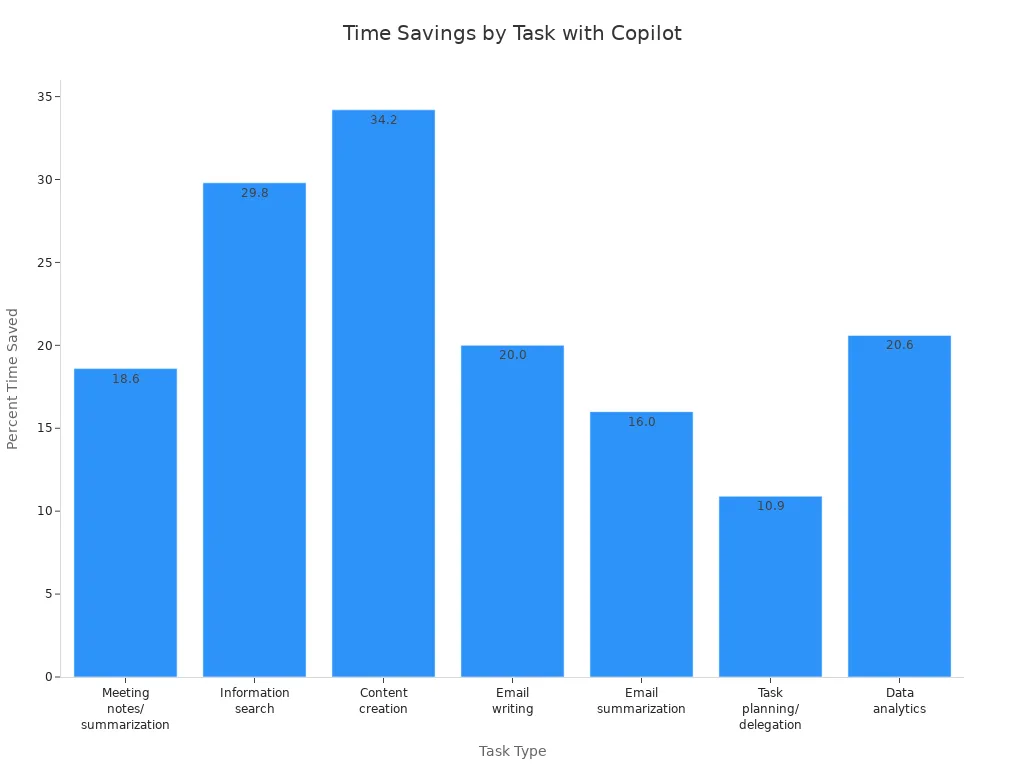
| Metric | Value/Description |
|---|---|
| Average time saved by general users | 8 hours per month |
| Average time saved by advanced users | Up to 20 hours per month |
| Percent time savings by task type | Meeting notes/summarization: 18.6% |
| Information search: 29.8% | |
| Content creation: 34.2% | |
| Email writing: 20.0% | |
| Email summarization: 16.0% | |
| Task planning and delegation: 10.9% | |
| Data analytics: 20.6% | |
| Average fully burdened hourly rate | $38 per hour |
| Reduction in total operating expenses | Up to 0.24% decrease |
Key Takeaways
- Microsoft 365 Copilot automates routine tasks, saving users an average of 9 hours per month.
- Advanced users can reclaim up to 20 hours monthly, allowing more time for high-value work.
- The tool reduces operating expenses by up to 0.24%, making it a cost-effective investment.
- Copilot enhances document creation, speeding up the process by nearly 12% and saving users significant time.
- Effective communication improves with Copilot, which summarizes emails and suggests quick replies.
- Data analysis time can be reduced by 70-90%, enabling quicker insights and better decision-making.
- Organizations can lower labor costs by redirecting workforce efforts to higher-value activities.
- Microsoft 365 Copilot integrates seamlessly with existing tools, enhancing productivity without disruption.
Time Savings with Microsoft 365 Copilot
Automating Routine Tasks
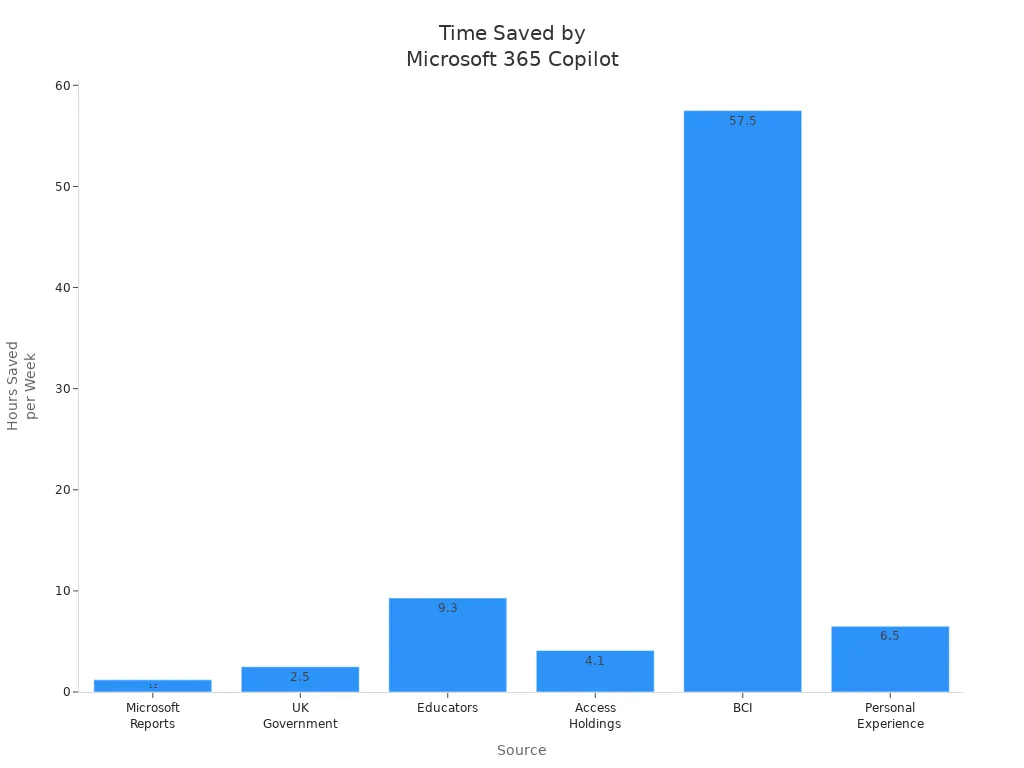
Microsoft 365 Copilot revolutionizes how you handle routine tasks. By automating repetitive activities, you can reclaim valuable time. For instance, studies show that users save an average of 1.2 hours per week just by using Copilot for routine tasks. In some cases, employees report saving up to 30 minutes a day, which adds up to 13 workdays a year.
Here’s a quick overview of time saved across various sources:
| Source | Time Saved |
|---|---|
| Microsoft Reports | 1.2 hours/week |
| UK Government Trial | 30 minutes/day |
| Educators | 9.3 hours/week |
| Access Holdings | 30-60 minutes/day |
| BCI | 2,300 person-hours saved |
| Personal Experience | 6.5 hours/week |
Accelerating Document Creation
Creating documents can often feel like a time-consuming chore. With Microsoft 365 Copilot, you can speed up this process significantly. Users report saving nearly half a day on average when creating documents. Regular users can save almost a full day, which translates to 12% faster document creation.
- Copilot drafts, rewrites, and formats documents quickly.
- You spend less time editing and more time shaping your ideas.
- This tool enhances your overall workflow, making tasks feel smoother.
As one user noted, "Copilot doesn’t replace the work. It removes the drag that slows it down. Once you start using it, the speed feels natural."
Streamlining Communication
Effective communication is crucial in any organization. Microsoft 365 Copilot enhances your communication efficiency by summarizing long email threads and suggesting quick replies. Here’s how it improves your daily interactions:
- Flags urgent items to help you prioritize important emails.
- Groups related threads for better context.
- Summarizes lengthy email chains, saving you from scrolling through them.
- Drafts professional emails with the appropriate tone and style.
By streamlining communication, Copilot allows you to focus on strategic initiatives rather than getting bogged down in mundane tasks. As a result, productivity increases, work accuracy improves, and employee satisfaction rises.
Reducing Data Analysis Time
Data analysis can often feel like a daunting task, consuming hours of your valuable time. Fortunately, Microsoft 365 Copilot transforms this process, allowing you to focus on insights rather than getting lost in data. By leveraging advanced AI capabilities, Copilot reduces data analysis time by an impressive 70-90%.
Imagine this: a typical analysis cycle that once took 148 minutes can now be completed in just 15 minutes. This means you save 133 minutes per cycle, translating to an annual time saving of 114 hours when applied to weekly analyses. With Copilot, you can quickly generate reports, visualize data, and extract actionable insights without the usual hassle.
Here’s how Copilot streamlines your data analysis:
- Automated Data Processing: Copilot handles data gathering and processing, allowing you to skip tedious manual tasks.
- Instant Insights: The tool analyzes trends and patterns in real-time, providing you with immediate feedback.
- User-Friendly Visualizations: Copilot creates charts and graphs that make complex data easy to understand at a glance.
By reducing the time spent on data analysis, you can allocate more resources to strategic decision-making. This shift not only enhances your productivity but also empowers your team to respond swiftly to market changes.
Tip: Embrace the power of Microsoft 365 Copilot to transform your data analysis workflow. The time you save can be reinvested into high-impact projects that drive your business forward.
In a world where data drives decisions, having a tool that accelerates your analysis is invaluable. With Microsoft 365 Copilot, you gain a competitive edge, enabling you to make informed choices faster than ever before.
Cost Benefits of Microsoft Copilot

Lowering Labor Costs
Microsoft 365 Copilot significantly lowers labor costs by automating repetitive tasks. This automation allows you to redirect your workforce toward higher-value activities. As a result, organizations report substantial reductions in labor hours. For instance, users of Microsoft 365 Copilot save an average of 9 hours per month, while advanced users can reclaim up to 20 hours.
Here’s a breakdown of average time saved across various tasks:
| Task | Average Time Saved (%) |
|---|---|
| Meeting notes/summarization | 18.6% |
| Information search | 29.8% |
| Content creation | 34.2% |
| Email writing | 20.0% |
| Email summarization | 16.0% |
| Task planning and delegation | 10.9% |
| Data analytics | 20.6% |
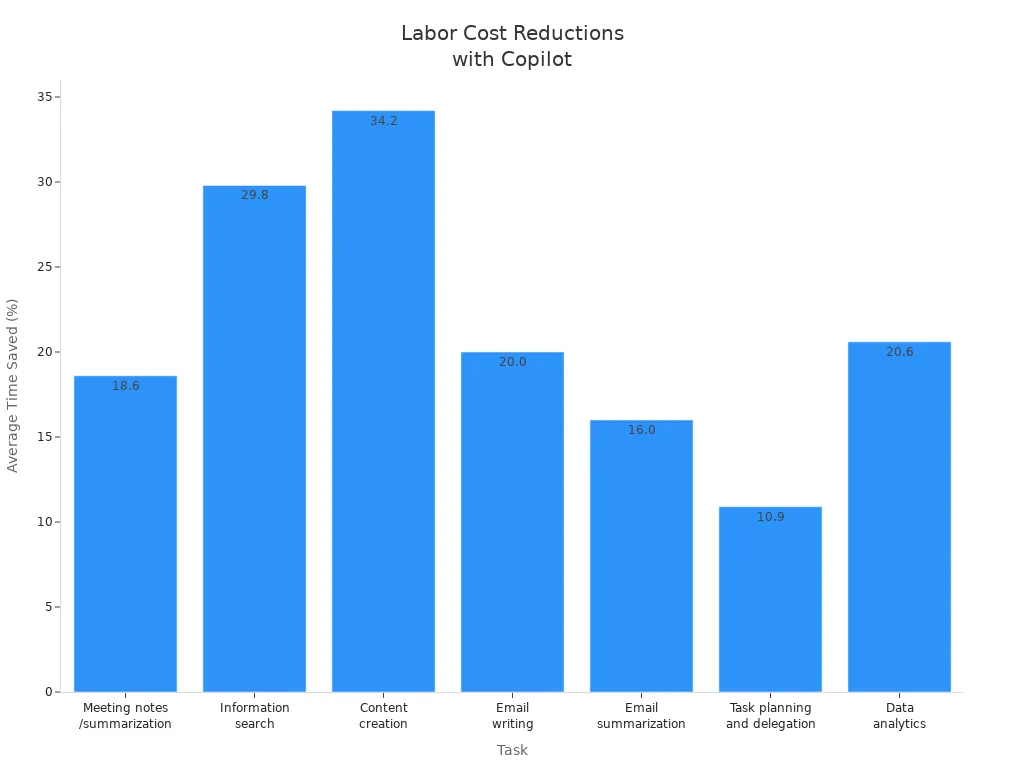
By reducing the time spent on these tasks, you can lower your overall operational costs. In fact, organizations have reported up to a 0.24% decrease in total operating expenses after implementing Microsoft 365 Copilot. This reduction translates into real savings that can be reinvested into strategic initiatives, enhancing your business value.
Minimizing Errors
Another significant cost benefit of Microsoft 365 Copilot is its ability to minimize errors in business processes. By automating time-consuming tasks, Copilot improves accuracy and reduces the likelihood of mistakes. Here are some ways it achieves this:
- Automation of repetitive tasks helps minimize human error.
- Teams can focus on higher-value activities, which reduces the chances of oversight.
- The overall productivity boost from automation accelerates business operations.
When you use Microsoft 365 Copilot, you streamline workflows and enhance the quality of your outputs. This leads to fewer revisions and corrections, saving both time and money. By managing tasks like drafting reports and summarizing information, Copilot allows you to concentrate on more complex and creative problem-solving.
Optimizing Resource Use
Microsoft 365 Copilot also optimizes resource use within your organization. It integrates seamlessly with existing systems, enhancing data consolidation and accelerating decision-making. Here’s how it helps:
- Copilot empowers employees by providing tools that enhance their productivity.
- It facilitates the generation of synergies across departments, streamlining business processes.
- Optimization agents assist with resource allocation and task assignment based on organizational data.
By leveraging Microsoft 365 Copilot, you can ensure that your resources are used efficiently. This optimization not only improves your operational visibility but also helps you tackle financial challenges more effectively. The result is a more agile organization that can respond swiftly to market demands.
Tip: Embrace Microsoft 365 Copilot as a strategic asset. Its ability to lower costs, minimize errors, and optimize resource use makes it a valuable investment for any organization.
Productivity Gains and Value
Enhancing Employee Output
Microsoft 365 Copilot significantly enhances your employee output by automating mundane tasks. With this ai assistant, you can focus on high-impact activities that drive your business forward. By streamlining processes, Copilot allows you to draft documents, summarize information, and analyze data more efficiently. As a result, you can expect a productivity boost of 10% to 20% in your organization. This increase translates into more completed projects and improved team morale.
Supporting Faster Decision-Making
Faster decision-making is crucial in today’s competitive landscape. Microsoft 365 Copilot empowers you to make informed choices quickly. It integrates generative AI into tools like Word, Excel, and Teams, enabling you to access timely insights. Here’s how it supports faster decision-making:
| Business Case | Evidence of Faster Decision-Making |
|---|---|
| British Columbia Investment Management Corporation | Employees report a productivity boost of 10% to 20% due to faster financial analysis and improved decision-making processes. |
| Floww | Copilot helps summarize and cross-reference complex documents, speeding up project timelines and enhancing decision-making. |
| The Rider Firm | Automates data consolidation, improving efficiency in inventory management and decision-making. |
| Sensei | Provides tailored recommendations for patient care, allowing healthcare professionals to focus on outcomes. |
| Joos | Uses Copilot to personalize sales pitches, saving time and enhancing customer relationships. |
| PKSHA Technology | Reduces data analysis time from hours to less than an hour, enabling quicker insights and recommendations. |
By automating routine tasks and providing quick access to relevant data, you can focus on strategic initiatives that matter most.
Improving Workflow Quality
Microsoft 365 Copilot also improves workflow quality across departments. It enhances operational efficiency, reduces errors, and saves time. Here are some examples of how it boosts workflow quality:
- Automated IT documentation reduces manual workload by generating troubleshooting guides and scripts.
- Inventory and supply tracking is streamlined, improving order management and resource tracking.
- Real-time project and maintenance summaries keep teams aligned and operations running smoothly.
These improvements lead to significant gains in productivity. For instance, marketing teams have increased qualified opportunities by using Copilot to generate high-quality campaigns and content. Additionally, product launch preparation has been accelerated, reducing time from five days to just two hours.
With Microsoft 365 Copilot, you can expect a 40% reduction in time spent on recurring tasks, tripling workflow velocity and achieving 85% quality gains in decision-making. This tool not only enhances your output but also positions your organization for success in a fast-paced environment.
ROI Analysis of Microsoft 365 Copilot
Calculating Time and Cost Savings
To understand the return on investment (ROI) for Microsoft 365 Copilot, you need to calculate both time and cost savings. Here’s a straightforward method to determine your ROI:
- Determine Total Annual Cost: Calculate the total annual cost of an employee, including salary, overhead, and taxes. This typically ranges from 1.25 to 1.4 times the base salary.
- Calculate Hourly Costs: Divide the annual cost by the number of working hours in a year to find the hourly cost.
- Fixed Copilot Cost: Use a fixed cost of $30 per month for Microsoft 365 Copilot.
- Calculate ROI: Multiply the hourly cost by the time saved per month, subtract the monthly Copilot cost, and then divide by the Copilot cost.
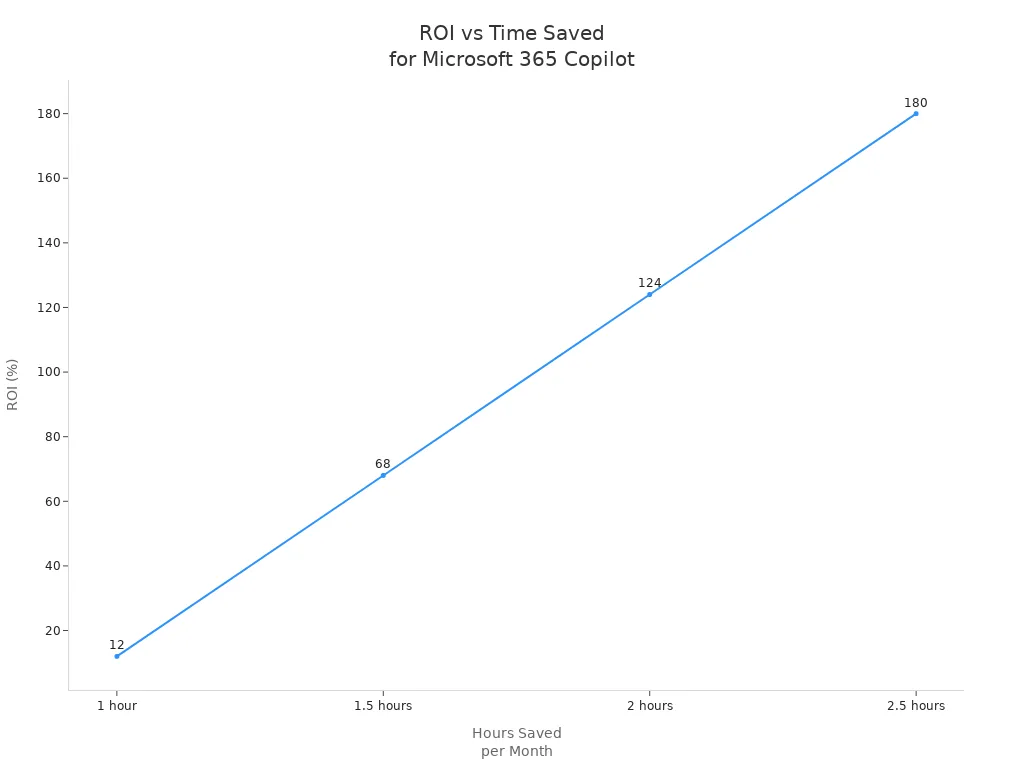
For example, if an employee costs $70,000 annually, the ROI calculations would look like this:
| Hours Saved/Month | ROI Percentage |
|---|---|
| 1 hour | 12% |
| 1.5 hours | 68% |
| 2 hours | 124% |
| 2.5 hours | 180% |
This method shows that saving just 54 minutes per month allows you to break even on your investment in Microsoft 365 Copilot.
Real-World ROI Examples
Organizations that have implemented Microsoft 365 Copilot report impressive ROI results. Here are some notable examples:
| Result | Description |
|---|---|
| 40% AI Knowledge Increase | Teams improved their AI literacy and practical application skills significantly. |
| 100% Workflow Creation | Non-technical teams built production-ready workflows without any coding. |
| 20,000 Hours Saved Annually | One cohort alone achieved over 20,000 hours of annual time savings through optimized workflows. |
These results highlight the transformative impact of Microsoft 365 Copilot on productivity and efficiency. Research from McKinsey indicates that even modest time savings of 30–60 minutes per employee per week can lead to significant cumulative time recovery across large teams. This translates into a competitive advantage for organizations.
By investing in Microsoft 365 Copilot, you not only enhance your team's capabilities but also position your organization for long-term success. The ROI you achieve can be substantial, making it a strategic investment worth considering.
ROI Tips: To maximize your ROI with Microsoft 365 Copilot, regularly assess the time savings across your team and adjust workflows accordingly. This proactive approach ensures you continue to reap the benefits of your investment.
Integration and Ease of Use
Seamless Integration
Microsoft 365 Copilot integrates effortlessly with your existing Microsoft 365 tools, enhancing your productivity without disrupting your workflow. This seamless integration allows you to leverage familiar applications like Word, Excel, and Outlook while benefiting from Copilot's advanced capabilities. Here are some key use cases that demonstrate how Copilot enhances your experience:
| Use Case | Description | Limitations |
|---|---|---|
| Summarizing Lengthy Documents | Assists in summarizing lengthy documents, making it easier for users to grasp key points quickly. | Can miss detailed information, requiring users to review and fill in gaps. |
| Generating Meeting Notes | Generates meeting notes and highlights key agreements and action items. | Sometimes misses detailed points, necessitating further manual additions. |
| Drafting Emails | Helps summarize long emails, draft emails, and provides coaching for improving emails. | Automated drafts may lack personal touch, requiring manual edits. |
| Analyzing Data | Assists with basic data analysis tasks and generating simple reports. | Limited for complex data operations, often requiring manual handling. |
| Drafting Presentations | Drafts PowerPoint presentations based on existing documents or new topics. | Users need to refine AI-generated content to align with their vision. |
With these capabilities, you can streamline your tasks and focus on what truly matters—achieving your business goals.
User Adoption Strategies
To maximize the benefits of Microsoft 365 Copilot, you need effective user adoption strategies. Here are some proven approaches to ensure a smooth transition and high adoption rates:
Prepare Your Organization: Appoint an adoption lead and form a cross-functional team. Define user personas and key scenarios to tailor the experience to your team's needs.
Engage User Cohorts: Activate readiness through targeted onboarding communications. Create champion communities and provide live or self-paced learning materials that demonstrate how Copilot enhances daily work.
Drive Measurable Impact: Promote usage internally and track key performance indicators (KPIs). Gather employee feedback through surveys and listening sessions to refine your adoption activities.
Extend and Optimize Deployment: Explore new high-value use cases and identify opportunities for business process transformation. Encourage employees to share tips and scenarios, fostering a culture of innovation.
Many organizations underinvest in training for generative AI. Making training a priority can significantly enhance user adoption. Microsoft 365 provides usage reports in the admin center, helping you understand user engagement and feature utilization. This insight allows you to tailor your training and support strategies effectively.
Tip: Address any hesitancy around AI by starting with easy tasks. This approach builds confidence and encourages employees to embrace Copilot's capabilities.
By implementing these strategies, you can ensure that your team fully leverages Microsoft 365 Copilot, leading to improved productivity and efficiency.
Addressing Common Concerns
Security and Privacy
You want to protect your data and maintain privacy while using AI tools. Microsoft 365 Copilot takes security seriously and meets top industry standards to keep your information safe. It holds key certifications that prove its commitment to data protection:
| Certification/Standard | Description |
|---|---|
| GDPR | Complies with the General Data Protection Regulation, ensuring strong privacy controls. |
| ISO 27001 | Meets the international standard for information security management. |
| HIPAA | Protects health information according to strict healthcare regulations. |
| ISO 42001 | Follows standards for managing AI systems responsibly and securely. |
Beyond certifications, Microsoft 365 Copilot uses advanced security features to guard your data every step of the way:
| Security Feature | Description |
|---|---|
| Data Encryption | Encrypts your data both at rest and in transit using technologies like BitLocker and TLS. |
| Strong Tenant Isolation | Uses Microsoft Entra authorization to keep your data logically separated from others. |
| Compliance Commitments | Adheres to privacy and security laws such as GDPR and HIPAA to protect your information. |
| Existing Permissions | Only shows content you have permission to access, preventing unauthorized data exposure. |
| User Identity as Access Boundary | Ensures data does not leak between users or groups by enforcing strict access controls. |
| Sensitivity Labels and Usage Rights | Honors Microsoft Purview protections, including encryption and access restrictions. |
🔒 Security Tip: With Microsoft 365 Copilot, you control who sees your data. The system respects your permissions and privacy settings, so your information stays safe and confidential.
Customization for Business Needs
Your business has unique needs, and Microsoft 365 Copilot adapts to fit them. You can customize Copilot to improve workflows, automate tasks, and support your specific goals. Here are some ways you can tailor Copilot to your organization:
- Financial Management: Get help with budgeting, forecasting, and financial analysis in Dynamics 365 Business Central. Copilot offers insights and recommendations to improve your financial decisions.
- Sales and Customer Service: Enhance lead tracking, customer interactions, and issue resolution with smart suggestions in Dynamics 365 Sales and Customer Service.
- Inventory and Supply Chain: Optimize procurement, inventory, and supply chain processes through data-driven insights.
- Development and Deployment: Use Copilot in Azure DevOps to generate code, test, and deploy applications with best practice recommendations.
- Data Analytics and Machine Learning: Analyze data, build models, and visualize results using Azure Machine Learning and Synapse Analytics.
- Infrastructure Management: Automate resource provisioning and monitoring in Azure IaaS and PaaS to reduce costs and boost efficiency.
You can customize Copilot using powerful tools like Copilot Studio, Power Automate, and Microsoft Teams. These tools let you design workflows, automate processes, and deploy solutions that fit your business perfectly.
| Industry | How Copilot Can Help |
|---|---|
| Higher Education | Customize learning plans, automate admin tasks, and create interactive materials. |
| Healthcare | Manage patient data, schedule appointments, and analyze research efficiently. |
| Retail | Analyze customer behavior, manage inventory, and forecast sales accurately. |
| Finance | Automate compliance reporting, evaluate risks, and detect fraud faster. |
| Human Resources | Source and screen talent, personalize onboarding, and analyze employee performance. |
🚀 Customization Tip: Start small by automating routine tasks in your department. Gradually expand Copilot’s use to other areas to unlock greater efficiency and cost savings.
Microsoft 365 Copilot’s flexibility lets you shape AI to work the way you do. This adaptability ensures you get the most value while meeting your organization’s unique challenges and goals.
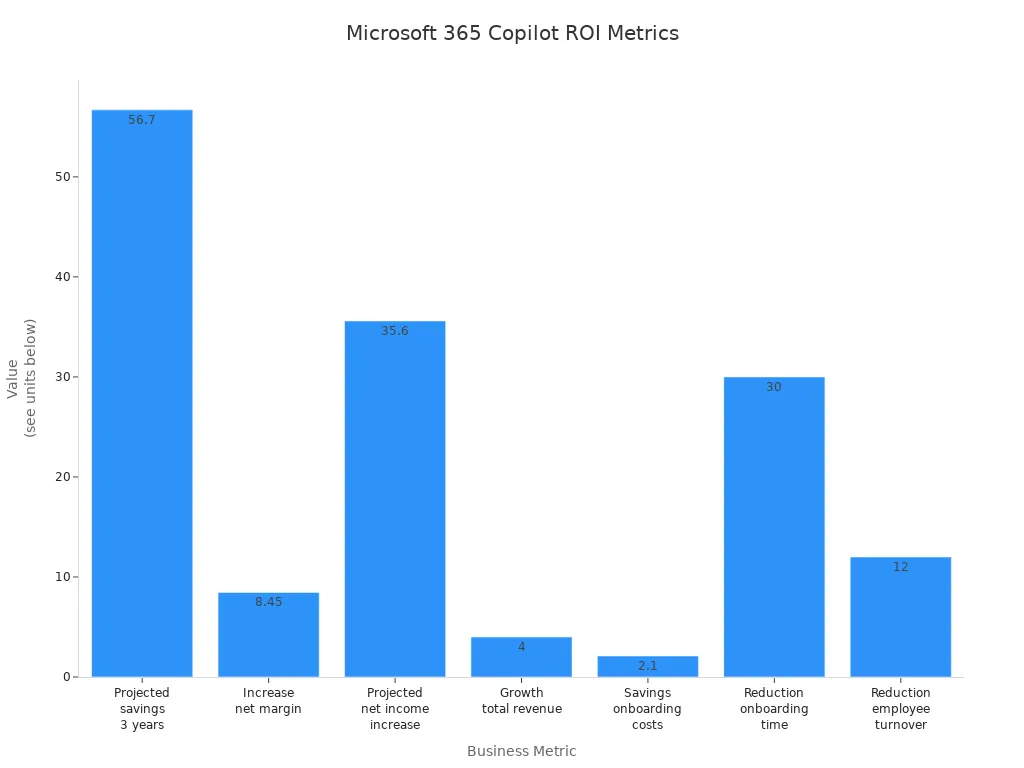
Microsoft 365 Copilot delivers clear time and cost savings that make your investment worthwhile. You gain faster workflows, fewer errors, and more productive employees. The table below shows how businesses see strong returns from this investment:
| Metric | Value |
|---|---|
| Projected savings over three years | 56.7 million US dollars |
| Increase in net margin | 8.45 percent |
| Projected increase in net income | 35.6 million US dollars |
| Projected growth in total revenue | 4 percent |
| Savings on onboarding costs for new hires | 2.1 million US dollars |
| Reduction in onboarding time | 30 percent |
| Reduction in employee turnover | 12 percent |
To get started, follow these steps many organizations use to succeed with microsoft copilot:
- Get ready by assessing your needs and securing leadership support.
- Onboard and engage your teams with clear plans and pilot data.
- Drive adoption by showing how Copilot adds value daily.
- Share success stories to spread benefits across your company.
You can explore microsoft 365 copilot as a strategic, cost-effective tool that fits into your existing microsoft 365 environment. It helps your teams save time and focus on what matters most. Consider this investment to boost your business operations and unlock new growth opportunities.
🚀 Ready to transform your workflows? Start exploring microsoft 365 copilot today and see how it can pay for itself by saving you time and cost.
FAQ
What is Microsoft 365 Copilot?
Microsoft 365 Copilot is an AI-powered productivity tool that automates routine tasks across Microsoft 365 applications. It helps you save time and improve efficiency by streamlining workflows and enhancing document creation, communication, and data analysis.
How does Copilot save time?
Copilot saves time by automating repetitive tasks, such as drafting emails and summarizing documents. Users report reclaiming an average of 9 hours per month, allowing you to focus on higher-value work and strategic initiatives.
Is Microsoft 365 Copilot easy to use?
Yes! Microsoft 365 Copilot integrates seamlessly with existing Microsoft 365 tools. Its user-friendly interface allows you to quickly adapt and start benefiting from its features without extensive training.
What are the cost benefits of using Copilot?
Using Microsoft 365 Copilot can lower labor costs, minimize errors, and optimize resource use. Organizations have reported up to a 0.24% decrease in operating expenses, translating into real savings.
Can Copilot help with data analysis?
Absolutely! Copilot significantly reduces data analysis time by automating data processing and generating insights quickly. Users can complete analyses in minutes instead of hours, enhancing decision-making capabilities.
How secure is Microsoft 365 Copilot?
Microsoft 365 Copilot prioritizes security and privacy. It complies with industry standards like GDPR and HIPAA, ensuring your data remains protected through encryption and strict access controls.
Can I customize Copilot for my business needs?
Yes! You can customize Microsoft 365 Copilot to fit your specific business requirements. Tailor its features to enhance workflows, automate tasks, and support your organization's unique goals.
How can I get started with Microsoft 365 Copilot?
To get started, assess your organization's needs and secure leadership support. Then, onboard your teams with clear plans and demonstrate how Copilot adds value to their daily tasks.
🚀 Want to be part of m365.fm?
Then stop just listening… and start showing up.
👉 Connect with me on LinkedIn and let’s make something happen:
- 🎙️ Be a podcast guest and share your story
- 🎧 Host your own episode (yes, seriously)
- 💡 Pitch topics the community actually wants to hear
- 🌍 Build your personal brand in the Microsoft 365 space
This isn’t just a podcast — it’s a platform for people who take action.
🔥 Most people wait. The best ones don’t.
👉 Connect with me on LinkedIn and send me a message:
"I want in"
Let’s build something awesome 👊
Ah, endless emails, meetings, and reports—the black hole of modern office life. What if I told you there’s a tool that pays for itself by giving you back those lost hours? According to Forrester’s Total Economic Impact model of a composite organization with 25,000 employees and $6.25 billion in revenue, risk‑adjusted returns reached 116% over three years. Not bad for something hiding in your inbox.
Here’s the flight plan: Go‑to‑Market, where revenue shifts up; Operations, where wasted hours become measurable savings; and People & Culture, where onboarding accelerates and attrition slows. Along the way, you’ll see a pragmatic lens for testing whether Copilot pays off for specific roles.
But before we talk multipliers and pipelines, let’s confront the baseline—you already lose staggering amounts of time to the daily grind.
The Hidden Cost of Routine Work
Picture your calendar: a tight orbit of back‑to‑back meetings circling the week, an asteroid belt of unread emails, and stray reports drifting like debris. The view looks busy enough to impress any passing executive, but here’s the trouble—it’s not actually accelerating the ship. It’s gravity posing as momentum.
Most of the energy in a modern workday isn’t spent on breakthrough ideas or strategic leaps forward. It gets consumed by upkeep—clearing inboxes, formatting slides, patching together updates. Each task feels small, but stacked together, they create a gravitational pull that slows progress. The danger is that it feels like motion. You answer another email, the outbox looks full, but the work that builds value drifts further from reach. Busy does not equal valuable.
That mismatch—the appearance of activity without the substance of impact—is the hidden cost of routine work. Companies bleed resources here, quietly and consistently, because time is being siphoned away from goals that actually change outcomes. The most expensive waste isn’t dramatic project failure; it’s the slow leak of a thousand minor chores.
Forrester’s research put numbers to this problem. In one example, they found product launch preparation that normally took five full days shrank to just about two hours when Copilot shouldered the labor of drafting, structuring, and organizing. That’s not shaving minutes off—it’s folding entire calendars of busywork into a fraction of the time. Multiply that shift across repeated projects, and the scale of reclaimed hours becomes impossible to ignore.
From there, the model continued: on average, Copilot users freed about nine hours per person, per month. Now, here’s the essential qualifier—forrester built that figure on a composite company model, risk‑adjusted for realism. It’s an average, not a promise. Actual results hinge on role, adoption speed, and whether your underlying data is ready for Copilot to make use of. What you should take away isn’t a guarantee, but a credible signal of what becomes possible when the routine is streamlined.
And those hours matter, because they are flexible currency. If you simply spend them on clearing the inbox marginally faster, then not much changes. The smarter move is to reassign them. One practical suggestion: pick a single recurring deliverable in each role—be it a weekly report, meeting summary, or pitch draft—and make Copilot the first‑draft engine for that task. This way the recovered time flows straight into higher‑order work instead of evaporating back into low-value cycles.
Imagine what that looks like with consistency. A marketing coordinator reclaims a morning every month to refine messaging instead of copying charts. A project manager transforms hours of recap writing into actual forward planning. Even one intentional swap like this can alter how a day feels—less tactical scrabble, more strategic intent. That’s the hidden dividend of those nine hours: space that allows different choices to be made.
Of course, the risk remains if you don’t prepare the terrain. Without good data governance, without teaching teams how to integrate Copilot thoughtfully, the time gains dilute into noise. The tool will still accelerate drafts, but the uplift shrinks if the drafts aren’t used for meaningful outputs. Success depends as much on organizational readiness as on the software’s cleverness.
So when someone balks at paying thirty dollars per seat, the real comparison isn’t fee against zero. It’s fee against the hours currently being lost to administrative drag. Copilot doesn’t so much add a new expense as it reveals an invisible one you’re already paying: the cost of busy without value.
And when you shift perspective from hours to outcomes, the story sharpens even further. Because the real multiplier isn’t just time returned—it’s how small fractions of efficiency ripple forward when applied to critical engines, like the motions of a sales pipeline. And that’s where the impact becomes unmistakable.
Go-to-Market: The Sales Engine Upgrade
Nowhere is leverage more visible than in go‑to‑market. Sales engines magnify small inputs into outsized results, which means a fractional gain can tilt the entire arc of revenue.
That’s why the numbers matter. In the Forrester composite model, qualified opportunities rose about 2.7% and win rates another 2.5%. On paper, those sound like tiny nudges. In practice, because pipelines are multipliers, those margins compound at every stage—prospecting, pitch, close. By Year 3, that modeled company was up $159.1 million in incremental revenue, simply by smoothing the points of friction in the system it already had.
You can picture how Copilot fits into that picture. Marketing used to wrestle with campaign drafts for days; now they spin up structured outlines in hours, with prompts that add hooks teams wouldn’t have brainstormed on their own. Topics hit inboxes while they’re still timely. Sales teams find half their prep already roughed in: draft slides aligned with company data, first‑pass summaries based on what the prospect actually cared about last call, even cues for next engagement drawn from interaction history. Qualification—the eternal swamp—narrows too. Instead of drowning in weak signals, reps get a list shaped from patterns Copilot teased out of the noise. That lift in focus is often the boundary between nurturing a real deal and losing it to a competitor pacing just faster.
Without the tool, much of the week still bleeds out through bottlenecks. Reps grind through manual personalization, copy‑paste the same boilerplate decks, and miss follow‑ups in the crush of tabs. Energy evaporates. Deals stall. Managers squint at dashboards and wonder why goals keep slipping despite heroic hours. Copilot’s edge isn’t about revolutionary tactics; it’s about removing drag. Fewer hours lost in preparation. More lift placed directly under engagement and closing.
The mechanics are simple but powerful. More qualified opportunities at the top feed a broader funnel. Better win rates mean more of them make it out the bottom. Stack the changes and you begin to feel the compounding. It’s not magic; it’s just math finally working in your favor. Marginal shifts are magnified because each stage inherits the previous gain. A satellite nudged a fraction of a degree gets slung into an entirely different orbit.
But here’s the caveat. Forrester also flagged that these gains aren’t plug‑and‑play. The model assumed cleaned, permissioned data and teams willing to adopt new habits. Feed Copilot outdated or messy information and it simply generates more noise. Skip the training and reps won’t trust its drafts—they’ll drift back to their old process. Governance and coaching act like thruster adjustments: they keep the ship moving toward its actual destination rather than sliding back into inefficiency.
When those conditions line up, though, the benefits start to crystallize. Forrester estimated a net present value of roughly $14.8 million tied to sales and retention gains in just three years for the composite case. And those figures don’t count the peripheral boosts: faster onboarding of new hires, fewer proposals stranded mid‑draft, smoother handoffs between marketing and sales. All of that is productivity you feel but won’t see in a balance sheet line.
The signal is clear enough. Copilot doesn’t just free hours—it transforms the mechanics of revenue itself. It turns a creaking sales engine into a tuned machine: faster prep, cleaner leads, steadier pursuit, and customer interactions guided by sharper insight. The result isn’t just speed; it’s consistency that builds trust and closes deals.
And the moment the sails are trimmed and pulling harder, a new question surfaces. If the revenue engine is running hotter, what about the rest of the crew? Specifically, what do you gain when thousands of employees uncover hours they never had before? That’s where the operational story begins.
Operations: Reclaiming 9 Hours Per Person
Forrester modeled about nine hours saved per Copilot user per month and estimated operational benefits worth roughly $18.8 million in present value for the composite organization. That figure isn’t pulled from thin air—it comes from detailed assumptions. The model excludes sales, marketing, and customer service roles to avoid counting the same benefit twice. It values each recaptured hour at an average fully burdened rate, and crucially, it assumes only half of those hours are put back into productive work. So when you hear the dollar translation, remember: it’s not automatic, it’s a scenario grounded in specific choices about how people actually use their recovered time.
Nine hours on its own doesn’t sound like a revolution. It’s just a little more than a workday each month. But once you pan back to a thousand employees, the arithmetic turns striking—thousands of hours suddenly freed without a single extra hire. The cost savings feel invisible at the level of one person’s packed schedule, but the aggregate is unmistakable. The Forrester model captured that compounding, showing operating expenses thinning by about 0.24 percent. A small fraction, but at enterprise scale, that sliver translates into millions peeled off the budget.
Where do those hours come from? The familiar culprits. Meeting notes that once meant replaying an entire recording now collapse into a digest generated in minutes. Drafting long messages doesn’t involve toggling half a dozen windows. Document summaries that might have cost an afternoon arrive in seconds. Even common chores like sorting through an inbox or searching for a lost file shrink substantially when Copilot automates the scutwork. It’s not dramatic, but week after week the drag vanishes.
And because this efficiency isn’t evenly spread, pockets of an organization feel the impact sooner. In finance, analysts report slashing reporting cycles down to seconds on once‑tedious steps. HR teams find training program materials drafted and organized fast enough to accelerate entire rollouts. Each function pulls different levers, but they all share the same outcome—tasks that devoured bandwidth are stripped down to fractions of their former size.
It’s worth noting: not every user climbs the curve the same way. Sophisticated power users sometimes save 20 hours per month. Others only claw back a handful at first, hesitating with prompts or defaulting to old workflows. Adoption curves matter, which is why leadership can’t just roll out licenses and walk away. You need training, good data governance, and the cultural permission for people to lean on the tool. Otherwise, the model’s averages don’t materialize in practice.
So how do you actually test whether this lands in your world? Don’t start with a grand corporate dashboard. Start with one repetitive cross‑functional activity: something like meeting recaps, contract summaries, or routine email triage. Track how long it eats over two weeks. Then layer in Copilot, use it consistently for that very task, and compare the hours. Whatever your number is, that’s your version of the nine hours. Suddenly the abstract model has a local benchmark you can touch.
When results are reinvested wisely, the difference is tangible. Imagine a project manager who once lost afternoons tidying slides. Now, with presentation scaffolding done in minutes, they redirect their time toward narrative and clarity—the part that actually persuades stakeholders. Or an IT lead who used to assemble stats by hand, now free to focus on what those stats say about performance trends. These are the same roles, yet the contribution shifts from tactical survival to higher‑value work.
From there, the compounding begins. Some of the saved time dissolves into lighter workloads—that’s inevitable. But because the model assumes 50% of the time gets funneled into productive tasks, progress accelerates where it matters. Drafts are finished sooner, projects hit milestones faster, cross‑team requests wait less. The system runs smoother not because people are forced to sprint harder, but because hidden friction got sanded away.
So operational gains show up as slimmer costs and sharper throughput. Even modest percentages add up when layered across thousands of staff. And yet, these balance‑sheet wins are only half the story. Numbers capture dollars, but they don’t capture energy, morale, or exhaustion. That’s the terrain where efficiency crosses over into something harder to measure, but just as critical.
People and Culture: ROI Through Humans, Not Just Math
Numbers alone won’t tell you why employees burn out, leave early, or stay longer than expected. That’s the heart of People and Culture: ROI through humans, not just math. You can chart revenue lift and operational savings, but the texture of someone’s workday—the stress, the confidence, the sense of belonging—never shows up neatly in the ledger. And yet, those human factors steer performance more decisively than any pivot table ever will.
Onboarding is the first stress test. A new hire arrives with energy but spends weeks fumbling through files, asking repeat questions, and waiting on answers that dribble in. Each delay costs time and chips at morale. When this cycle repeats for hundreds of recruits, the cost compounds. And when a frustrated new hire quits within a quarter, or a veteran leaves with years of institutional knowledge, the organization pays again to rebuild what it had already bought once.
Forrester’s composite model assigned shape to this fog. They modeled onboarding acceleration up to 25%—about 11 days saved per new hire by Year 3. Attrition dropped by as much as 5% in that same period. And when they translated what could be measured into value, the present benefit for people and culture factors was about $3.2 million over three years. These are modeled outcomes, not universal promises, but they frame what’s possible when the friction in early workflows eases and people stick around longer.
The mechanics are straightforward. Copilot can answer basic questions without pulling another teammate away, surface templates and prior work instantly, and draft the routine documents that otherwise eat weeks of someone’s ramp. That doesn’t just save time; it reduces the sense of incompetence new hires often feel in silence. Confidence arrives earlier, contribution starts sooner, and teams get the benefit without the endless warm-up phase.
Retention matters just as much. Every departure drains institutional knowledge—why a compliance review follows a quirk, how a system was originally configured, or who to call when a file goes missing. When Copilot reduces frustration by offloading tedious tasks and guiding workflow execution, people feel less like anonymous cogs and more like supported contributors. That’s what makes them stay. And even a 5% attrition shift in a large workforce reshapes the balance sheet through lower hiring costs and steadier team composition.
Still, it’s a mistake to pretend every cultural effect can be monetized neatly. Some benefits—higher morale, willingness to innovate, reduced burnout—are difficult to capture in a model. Forrester treated these as unquantified upside, acknowledging they exist but resisting the temptation to jam them into a dollar cell. That caution is worth repeating: not everything meaningful fits into a financial formula. Culture is the climate inside the ship—it sets whether people contribute fully or simply drift.
Practical adoption is the catalyst. Results in this domain don’t appear just because Copilot is toggled on. Forrester and Microsoft both stress role-based skilling and staged rollouts. That means onboarding teams, hiring managers, or sales cohorts trained together so usage builds into habits. When learning is shared inside these groups, confidence compounds and the practical gains—faster onboarding, lower attrition—actually follow. Skip that groundwork, and the human benefits evaporate into unmeasured potential.
One simple application: take the group most entangled in repetitive document prep—say a hiring team writing job descriptions—and pilot Copilot there first. Instead of four hours spent drafting, the tool can cut this to half an hour. That’s a concrete saving, but more importantly, it frees staff to refine fit, strategy, or outreach rather than grind away at formatting. Each role-based rollout plants examples others can trust, proof that the headline numbers aren’t abstract promises but lived improvements.
From here the cultural return becomes visible if not always quantifiable. Employees feel supported rather than stretched. Managers notice smoother onboarding pipelines. Cohesion builds as fewer people leave, and the ones who stay are aligned on both process and purpose. These aren’t soft perks—they shape whether skill compounds inside the organization or drains away with every departure.
So what emerges is a broader view of ROI: dollars saved, talent retained, morale lifted. Some of it gets modeled, some of it remains unquantified upside, but together it clarifies why Copilot isn’t simply a line-item expense. It’s leverage on the human system that drives every other metric you care about.
And once you recognize the people side of the balance, another question pushes forward—the one every CFO eventually blurts out. If all these streams of value exist, when does the math actually swing positive?
The Payback Clock: How Soon Does It Cover Its Costs?
The real test lands in finance: how long until Copilot covers its own tab? This section is the payback clock. Copilot’s license list price is $30 per user per month. In Forrester’s composite model, the three‑year, risk‑adjusted present value of total costs came to about $17.06 million. That includes far more than license fees—professional services and IT staff to implement and manage the system, plus training and discovery work that made up a large share. Against those costs, the modeled benefits stacked up quickly: payback landed in roughly 10 months, and the three‑year ROI came in at about 116 percent, with a net present value of $19.7 million.
It matters to spell out those cost drivers. The license fee is only the surface. Beneath it are waves of support: IT provisioning, integration with existing systems, compliance checks, and dedicated staff time. Then there’s training. This isn’t optional overhead—it’s one of the largest buckets, because end users need structured instruction and ongoing discovery space to explore the tool. Without that, adoption sputters, and the returns slow. If you’re sketching out your own budget, these are the line items you want to mark in red ink: licenses, management and setup, and especially training.
Now, what does a 10‑month payback feel like in practice? Picture rolling licenses out to your staff in the first quarter. You shoulder the upfront hit—fees, onboarding, coaching sessions. As the year grinds forward, the recovered hours, faster deals, and smoother onboarding begin to pile up. Before the fiscal year closes, those gains balance the expense. By the time finance teams prepare annual reports, the meter has already ticked past breakeven. For enterprise technology, where payback often takes years just to surface, that’s unusually short.
Here’s the catch: the number isn’t guaranteed. Forrester’s study applied risk adjustments based on real company interviews, but outcomes still vary. If you deploy in a disorderly rush, with messy data and little governance, the adoption curve flattens. Employees ignore the tool, drafts come out sloppy, value fragments across teams. On the other hand, a phased rollout—what the composite used with 3,000 licenses in year one, 6,000 in year two, and 10,000 by year three—creates momentum. Training runs in cohorts. Governance policies are ready. People know when and how to lean on Copilot. Under those conditions, the clock to payback runs closer to the optimistic scenario.
That’s why Forrester presented these outcomes as modelled, risk‑adjusted outputs, not universal guarantees. Their analysis was commissioned by Microsoft, built on structured interviews and surveys with current users, then normalized into a composite company for comparability. Always treat it as a directional blueprint, not a personal report card. If you want accuracy for your own case, run the numbers yourself with the ROI calculator. Plug in your headcount, hourly labor costs, and rollout plan. That’s how the headline numbers translate from “a model somewhere” into “us, here.”
Look again at the surplus. Forrester’s three‑year view stacked up $36.8 million in total benefits for the composite, against $17.06 million in costs. After everything—license fees, IT labor, external services, training—the net came out positive by $19.7 million. That figure doesn’t even include the intangible extras: fewer late‑night emails, higher morale, lower frustration. The spreadsheet records money, but the real prize extends beyond clean math.
And that’s a useful point to pause on. Because financial clarity is satisfying, but the bigger story isn’t just a ledger that balances. It’s what happens when time, focus, and energy are freed up across your workforce. The real question isn’t only how soon the investment covers itself—it’s what you choose to do with the capacity that follows. And that folds us back to the broader prize waiting beyond costs and returns.
Conclusion
Ah, so here’s where the story closes. Copilot ROI is more than a tidy cell in a ledger—it’s hours reclaimed from inbox purgatory, funnels moving faster, and workdays that feel less like slow oxygen leaks. The gain is as much human as financial.
Remember: the headline numbers come from a Forrester composite and will vary. That’s why you should test it directly. Step one: map a single 30–60 minute task per role Copilot could absorb. Step two: clock baseline time and cost for two weeks. Step three: plug those numbers into the ROI calculator in the show notes.
Now your move—drop one task you’d happily hand to Copilot in the comments. Meeting recaps? First‑draft proposals? I’ll be watching the feed and pulling the sharpest entries into the discussion.
This is a public episode. If you'd like to discuss this with other subscribers or get access to bonus episodes, visit m365.show/subscribe


Founder of m365.fm, m365.show and m365con.net
Mirko Peters is a Microsoft 365 expert, content creator, and founder of m365.fm, a platform dedicated to sharing practical insights on modern workplace technologies. His work focuses on Microsoft 365 governance, security, collaboration, and real-world implementation strategies.
Through his podcast and written content, Mirko provides hands-on guidance for IT professionals, architects, and business leaders navigating the complexities of Microsoft 365. He is known for translating complex topics into clear, actionable advice, often highlighting common mistakes and overlooked risks in real-world environments.
With a strong emphasis on community contribution and knowledge sharing, Mirko is actively building a platform that connects experts, shares experiences, and helps organizations get the most out of their Microsoft 365 investments.
