Azure Automation Runbooks: Operate Microsoft Azure Architecture on Autopilot
You know that one “tiny” portal click that turns into a 2 a.m. incident? I learned that lesson the hard way after a well-meaning manual VM update snowballed into mismatched configurations across an environment. The fix wasn’t heroics—it was boring, repeatable automation. In Azure, that’s where Azure Automation runbooks, assets, and a few well-placed checkpoints quietly save your week.
9 Surprising Facts about Microsoft Azure Architecture on Autopilot
- Autopilot can bootstrap entire cloud estates: using Azure Autopilot patterns together with Infrastructure as Code (ARM/Bicep/Terraform), organizations can automatically provision landing zones and guardrails for enterprise automation architecture in Azure in hours instead of weeks.
- Policy-driven self-healing is native: combining Azure Policy, Azure Monitor, and Autopilot deployment scripts lets architecture behave like a self-healing system—noncompliant resources are detected and remediated automatically, reducing manual drift in enterprise automation architecture in Azure.
- Identity-first automation scales securely: Autopilot workflows leverage managed identities and Azure AD Conditional Access to rotate credentials and grant least-privilege, enabling enterprise automation architecture in Azure to scale without sprawling secrets.
- Cost governance can be automated at scale: Autopilot templates can embed tagging, budget alerts, and automated shutdown policies so enterprise automation architecture in Azure enforces cost controls across subscriptions without human intervention.
- Hybrid environments become first-class: Azure Autopilot patterns integrate Azure Arc to extend policies and automation to on-premises and multicloud servers, making enterprise automation architecture in Azure truly hybrid and centrally managed.
- Application topology-aware deployments: Autopilot-driven pipelines can deploy distributed applications with topology awareness (regions, availability zones, proximity to data), enabling enterprise automation architecture in Azure to optimize latency and resilience automatically.
- AI-assisted runbooks accelerate ops: integrating Azure Automation with Azure OpenAI or cognitive services allows Autopilot processes to suggest or generate runbooks, speeding the evolution of enterprise automation architecture in Azure operational playbooks.
- Compliance evidence is continuously produced: Autopilot can wire automated evidence collection (logs, policy reports, attestations) into compliance stores, so enterprise automation architecture in Azure generates audit-ready reports on demand.
- Zero-touch environment promotion is possible: Autopilot pipelines can promote infra and app changes from dev to prod with automated testing, approvals, and rollback logic, allowing enterprise automation architecture in Azure to support safe, zero-touch CI/CD for infrastructure and platform changes.
1) Why you automate (before you pick tools)
Picture your last manual change in Azure. Now ask yourself: what part of it could you not reproduce today—the exact steps, the parameters, the timing, the approvals, the rollback? Write it down. That list is your real starting point for Azure Automation and cloud operations automation, not a tool comparison.
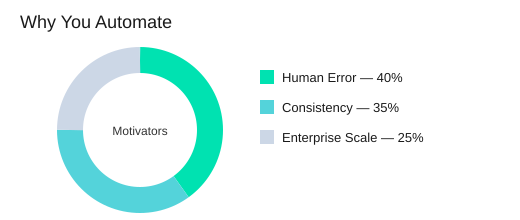
Translate pain into three motivators
Azure Automation is positioned as a foundational service for repeatable, reliable processes using Windows PowerShell Workflow. Your “why” usually maps to three drivers:
- Reduce human error when changes happen under pressure.
- Enforce operational consistency so environments match intent, not memory.
- Support enterprise-scale complexity where manual work does not scale across teams, regions, and shifts.
Scott Guthrie: "Automation turns reliability into a feature, not a scramble."
Map targets to Azure surfaces (IaaS and PaaS)
Be explicit about where you will automate first. IaaS PaaS automation is easier to plan when you name the surfaces:
- IaaS: Azure Virtual Machines (patching, configuration, start/stop, deployments).
- PaaS: Azure SQL Database, Azure Storage, Azure Websites, and cloud services (provisioning, configuration drift checks, scheduled tasks).
Define what “reliable” means before you write runbooks
Teams that define goals in terms of repeatability and recovery tend to produce runbooks that survive staff changes and incident pressure. For you, “reliable” should mean:
- Idempotent steps (safe to run twice).
- Recoverable workflows (resume after failure; use checkpoints where it matters).
- Observable jobs (clear status, logs, and outcomes you can audit).
Azure Automation’s globally accessible, redundancy-backed storage supports high availability and disaster resilience, but your runbook design still has to aim for repeatable outcomes.
Quick gut-check: reminders are automation candidates
If a task needs a calendar reminder, it probably needs a schedule asset. Start with a small set of high-frequency tasks, prove value, then expand iteratively.
Small tangent: legibility is an operational control
The best automation isn’t clever—it’s readable to Future You. Use clear names, simple parameters, and obvious logging. Treat readability as part of operational consistency, not style.
| Item | Count | Details |
|---|---|---|
| Primary motivators | 3 | Human error, consistency, enterprise-scale complexity |
| Azure scenario types | 2 | IaaS, PaaS |
| Core reliability concepts | 2 | High availability, disaster resilience |
| Example Azure services | 5 | VMs, SQL DB, Storage, Websites, cloud services |
2) First hour setup: Automation Account with intentional isolation
Your first win with runbooks starts before you write a single line of code: create an Azure Automation account in the Azure Management Portal at manage.windowsazure.com. Yes, the old portal still shows up in documentation lore—and in real environments you may inherit. Treat this step as your foundation, not a formality.
Name your Azure Automation account like you mean it
Use a standardized pattern: environment + team + purpose. Example: prod-finops-vmops or nonprod-platform-patching. Standardized naming reduces operational friction during incident response and compliance checks because you can quickly answer: “What is this account for, and who owns it?”
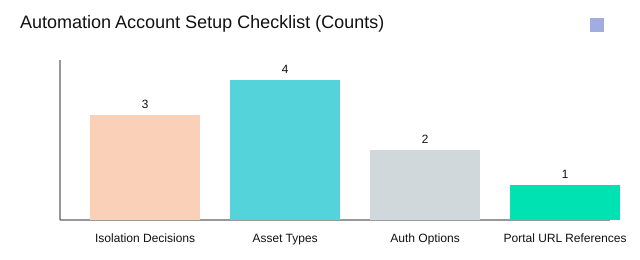
Logical isolation: reduce blast radius on day one
Account-level separation is your simplest safety rail. Separating environments at the account level reduces blast radius when a runbook behaves unexpectedly.
- Prod vs non-prod (minimum baseline)
- Business unit (when ownership and budgets differ)
- Workload sensitivity (regulated or high-impact systems)
Michael McKeown: "Isolation isn’t bureaucracy—it’s how you keep automation predictable as it grows."
Azure AD authentication + RBAC Azure: decide early
Pick your authentication approach up front. Prefer Azure AD authentication over management certificates for a cleaner security story and easier lifecycle management. Then align access with RBAC Azure so operators can publish, start, and monitor jobs without over-privileging. This also makes audits simpler because permissions map to roles instead of shared secrets.
Sketch your Assets tab strategy before runbooks
In each Automation Account, the Assets tab is where shared building blocks live. Plan these four asset types early so your runbooks stay parameterized and repeatable:
- Credentials (use
Get-AutomationPSCredentialinstead of hardcoding) - Variables (environment settings, IDs, feature flags)
- Schedules (patch windows, daily checks, monthly reports)
- Integration modules (standard cmdlets and reusable functions)
Wild-card check: second region next quarter
Ask now: if you onboard a second region next quarter, does your account structure help—or does it become an archaeology dig? If region matters, encode it in naming or isolate by workload sensitivity so expansion stays predictable.
3) Runbooks as the unit of work (and the unit of regret)
In Azure Automation, a runbook is not “just a script in the cloud.” It is your unit of work for repeatable operations—and your unit of regret when you skip discipline. Treat PowerShell runbooks as artifacts with a runbook lifecycle, because production does not forgive “quick edits” that were never tested or monitored.
Jeffrey Snover: "A runbook you can’t read at speed is a runbook you can’t trust at 2 a.m."
Azure runbook management means owning the lifecycle
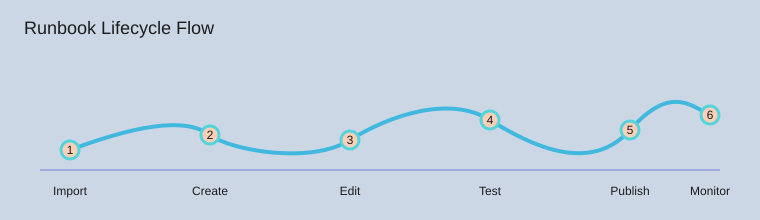
Your safest default is a six-step loop you can repeat without drama:
- Import proven starting points
- Create a new runbook when you need a clean container
- Edit with small, reviewable changes
- Test in Draft before you touch production behavior
- Publish only when results are predictable
- Monitor jobs and logs, then iterate
Research insight matches real operations: teams that enforce test/publish/monitor reduce incidents caused by unreviewed changes. That is the practical payoff of a strict runbook lifecycle.
Use community samples, then refactor to your standards
You can accelerate delivery by importing building blocks from the Azure Automation Runbook Gallery, the Microsoft Script Center, and the MSDN Library (“Sample runbooks for Azure Automation”). Start there, but do not stop there. Community samples get you moving; refactoring into modular standards keeps you sane later.
- Normalize names to verb-object conventions.
- Parameterize inputs instead of hard-coding values.
- Move shared logic into reusable child runbooks.
Respect states and concurrent editing (someone will click “Edit”)
Runbooks live in three states: Draft, Published, and In Edit. In real teams, concurrent editing happens at the worst moment. Your rule: do risky work in Draft, publish intentionally, and rely on version history so you can roll back without panic.
Authoring directly in the Azure Management Portal is useful when you must move fast, but avoid making portal editing a high-wire act. Keep changes small, test every time, and monitor with job views such as Get-AzureAutomationJob.
Personal rule of thumb: if you can’t explain a runbook in one breath, split it into two.
4) Assets: the boring secret sauce (credentials, schedules, modules)
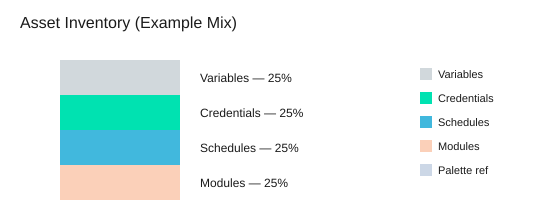
Runbooks stay clean when you treat Azure Automation assets as the place for everything that should never be hard-coded: environment values, authentication, timing, and dependencies. In the Assets tab you manage exactly 4 asset types—variables, credentials, schedules, and integration modules—and they apply across all runbooks in the same Automation Account. This centralized approach reduces duplicated configuration and makes rotations (credentials, endpoints, module versions) predictable instead of painful.
Variables: one source of truth for environment settings
Use variables for values that change by environment (resource group names, storage account names, region hints, feature flags). When you update a variable once, every runbook reads the same value, which helps you avoid “works in dev” drift.
Credential assets + Get-AutomationPSCredential: stop pasting secrets
Store usernames and passwords as credential assets, then retrieve them in code with the single, standard command: Get-AutomationPSCredential. This keeps secrets out of scripts, job output, and source control—because plaintext secrets are how postmortems start.
Mark Russinovich: "Secrets don’t leak from code you never wrote—they leak from code you forgot you wrote."
Security model: Azure AD RBAC over “shared certs”
Prefer Azure AD authentication and Azure AD RBAC so you can explain access in roles and scopes, not “because we emailed a cert around in 2017.” RBAC improves auditability and reduces the risk of broad, unmanaged permissions, especially when multiple teams share an Automation Account.
Schedules: automate the routine, then review it
Schedules turn runbooks into reliable operations: patch windows, cleanup jobs, daily reports, or periodic compliance checks. Set a review cadence so you don’t discover a daily job hammering an API you no longer use.
- Monthly (1/12): review high-impact schedules (cost, security, external APIs).
- Quarterly (1/4): full schedule inventory and ownership check.
Integration modules: keep dependencies tidy
Modules are your shared libraries. Document what you imported, why, and which runbooks depend on it, so upgrades don’t break production silently.
Analogy break: assets are your pantry; runbooks are recipes. You don’t tape a bag of flour to every cookbook page.
5) Designing runbooks that recover: parameters, verbs, checkpoints
Verb-object naming: scan your library like a menu
Use the two-part PowerShell verb-object pattern so you can skim runbooks fast: verb + object. Names like New-AzureEnvironmentResourcesFromGallery, Update-AzureVM, Copy-ItemToAzureVM, and Install-ModuleOnAzureVM tell you intent at a glance. Consistent naming also makes it easier for your team to reuse automation across environments without copy-paste drift.
Design for parameters first (before you write logic)
Parameterize early so the same runbook works across subscriptions, regions, and VM names without edits. In PowerShell Workflow, treat parameters as your contract: resource group or affinity group name, storage account, VM name, image, and credential asset. When you pass values at start time (or from a parent runbook), you keep the runbook portable and reduce “one-off” versions that are hard to maintain.
Runbook checkpoint strategy with Checkpoint-Workflow
Your runbook checkpoint strategy is what turns a long workflow into idempotent automation that can safely restart. Checkpointing reduces the cost of transient failures by letting you resume after completed steps instead of redoing everything. Place Checkpoint-Workflow after major, stable milestones:
- After creating the affinity group
- After creating the storage account
- After VM creation
This gives you two reliability properties: idempotency and recovery. Tiny confession: the first time you skip checkpoints, it works… and that’s how it gets you.
Don Jones: "If you don’t design for reruns, you’re designing for outages."
InlineScript: useful, easy to overuse
Use InlineScript when you must run non-workflow-friendly commands, but treat it like hot sauce: a little helps, too much hides state and makes recovery harder. Keep the workflow “spine” in native activities so checkpoints stay meaningful.
Log like you’ll debug it in a hurry
Write output that supports fast troubleshooting: Verbose and Progress streams, plus job inspection in the Portal Dashboard (status, errors, and timing). When a job fails, you should be able to see what ran, what changed, and which checkpoint you can restart from.
6) Orchestrating runbooks: sync, async, and “who started what?”
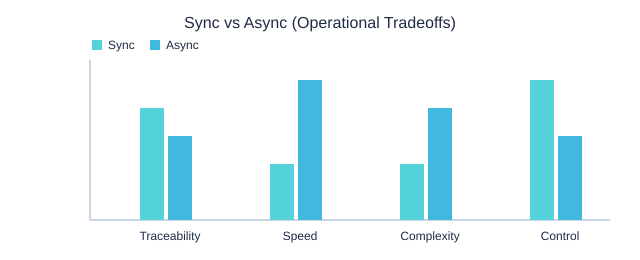
When you orchestrate Azure Automation runbooks, you make one core choice: synchronous or asynchronous. Pick intentionally. Synchronous orchestration (two subtypes: inline and nested) is best when steps have tight dependencies and you need strict order. Asynchronous orchestration is best for long-running or repeatable tasks where parallel work improves throughput—but it also increases the need for job tracking and aggregation.
Gene Kim: "Orchestration isn’t about running more—it’s about knowing what ran, when, and why."
Start-AzureAutomationRunbook and Start-ChildRunbook: choose clarity, not just speed
Use Start-AzureAutomationRunbook when you want to kick off work without blocking the current runbook. Use Start-ChildRunbook when you want a clear parent/child relationship that makes troubleshooting faster and handoffs smoother. That “who started what?” chain matters during incidents, audits, and post-change reviews.
- Synchronous (inline): run commands in the same workflow for simple, ordered steps.
- Synchronous (nested): call another runbook and wait for it to finish when outputs must be consumed immediately.
- Asynchronous: start jobs in parallel for scale (for example, patching many VMs), then track and aggregate results.
Get-AzureAutomationJob and Azure Automation monitoring: prove it ran
The uncomfortable question is: “Did it run, or did it say it ran?” Build your answer into the design. In Azure Automation monitoring, you should track job IDs, status, start/end time, and errors. When you need dashboards or quick triage scripts, query history with the one key job command: Get-AzureAutomationJob.
Hypothetical: you kick off 20 VM patch jobs at once. Your plan should include (1) a throttle limit, (2) a timeout policy, and (3) a failure aggregation story (for example, “fail fast if 3 jobs fail” vs “complete all and summarize”).
Publishing and version control: treat changes as controlled acts
Orchestration breaks when runbooks drift. Use the lifecycle controls—test in Draft, publish deliberately, and rely on version history. Avoid casual overwrites, especially for “parent” runbooks that start many others.
Sync vs Async (Operational Tradeoffs)
7) Real-world scenario: provisioning IaaS resources without babysitting
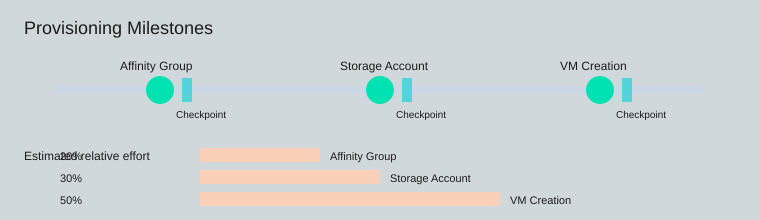
When you own day-to-day cloud operations, the hardest part of IaaS provisioning automation is not writing a script—it’s making it repeatable. In Azure Automation, you can build a single Azure VM deployment runbook that creates your environment in three clear milestones: affinity group, storage account, and VM. Then you add checkpointed provisioning so a rerun continues safely instead of duplicating work.
Start with New-AzureEnvironmentResourcesFromGallery, then parameterize
A practical starting point is the gallery-style runbook New-AzureEnvironmentResourcesFromGallery. Treat it like a template: keep the structure, but tailor parameters to match your naming rules, regions, VM sizes, and network choices. Research and field experience align here: parameter-driven templates speed environment creation while keeping deployments consistent, especially when multiple teams request “the same” environment with small differences.
Define images and credentials explicitly (and store secrets as assets)
Make your VM image selection and admin model explicit. Don’t embed passwords or certificates in code. Instead, store credentials under the Assets tab and retrieve them at runtime:
$cred = Get-AutomationPSCredential -Name 'VmAdminCredential'
Add 3 checkpoints—one after each milestone
Azure control-plane calls can fail intermittently. Checkpointed provisioning runbooks reduce the impact by letting the job resume after a restart or transient error. Place three checkpoints:
- After affinity group creation
- After storage account setup
- After VM creation
Checkpoint-Workflow after each step makes the runbook resilient and easier to operate.
Write for safe reruns: detect, validate, continue
Your runbook should be idempotent. If a storage account already exists, don’t fail—verify it matches the desired state (name, region/affinity, settings) and continue. The same applies to affinity groups and VM names: check first, then create only what’s missing.
Brendan Burns: "The most valuable automation is the one you can rerun without holding your breath."
Aside: the goal isn’t “zero clicks.” It’s no surprises.
8) Update pipelines: patching Azure VMs with less chaos
When patching is manual, you get drift, surprises, and late-night rollbacks. With Azure VM update automation, you turn patching into a repeatable pipeline: run the same steps, capture the same evidence, and reduce configuration drift by keeping module installation and artifact distribution consistent.
Start with the Update-AzureVM runbook, then prove it worked
Use the Update-AzureVM runbook as your core action, but don’t treat “job completed” as success. Wrap validation around it so results are measurable, not assumed. At minimum, log the VM name, update scope, reboot status, and a before/after marker (for example, installed update count or last patch timestamp).
Standardize patch behavior with PSWindowsUpdate Azure
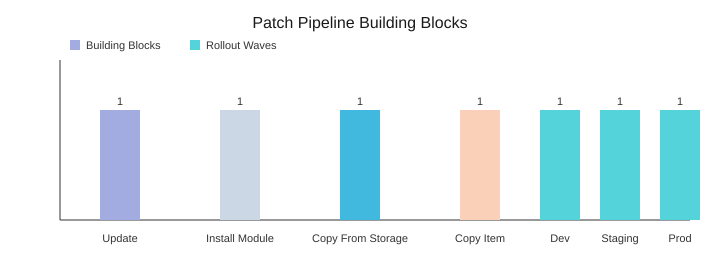
Different VMs often patch differently because they have different tooling. Fix that by installing the same update module everywhere. Run Install-ModuleOnAzureVM to deploy PSWindowsUpdate Azure so each VM uses the same commands, the same reboot handling, and the same reporting format across your fleet.
Move artifacts through Azure Storage blobs (two hops)
For scripts, modules, or configuration files, use Azure Storage blobs as your distribution point. Your pipeline stays predictable with two transport hops:
Copy-FileFromAzureStorageToAzureVM: blob → VM staging folderCopy-ItemToAzureVM: staging → final path (modules, scripts, or tools)
Schedule wave-based rollouts (blast radius stays small)
Wave-based scheduling lowers risk by limiting blast radius and creating predictable maintenance windows. Encode your calendar with three schedules: dev tonight, staging tomorrow, production on the weekend. If dev fails, production never starts—because the schedule is the gate.
Keep access safe with Automation credential assets
Store admin access in Automation credential assets and retrieve it with Get-AutomationPSCredential. You can rotate credentials without rewriting runbooks, and you avoid hard-coded secrets in scripts.
Satya Nadella: "Our industry does not respect tradition—it only respects innovation."
Opinionated tip: always log what changed and where it landed. “Updated successfully” is not a useful sentence.
9) Best practices you’ll actually keep: logs, docs, source control, portability
Runbook documentation that reads like a mini README
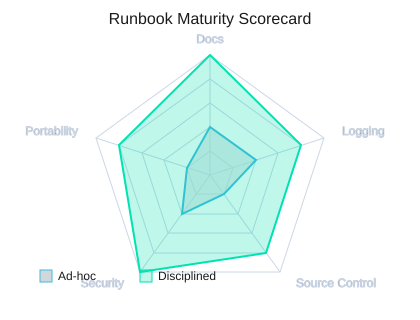
When you treat runbooks as code, you reduce onboarding time and raise reliability. Inside every runbook, write runbook documentation that a teammate can trust without extra meetings. Use the five tags consistently: .SYNOPSIS, .DESCRIPTION, .PARAMETER, .EXAMPLE, and .NOTES. Keep the wording simple, include expected inputs/outputs, and note required assets (credentials, variables, schedules, modules) so the runbook is self-explaining.
Scott Hanselman: "The best scripts are the ones you can hand to a teammate without a meeting."
Non-interactive patterns so jobs never hang
Azure Automation best practices start with removing prompts. Your runbooks should never wait for input, because jobs run unattended. Prefer parameterized design, default values, and asset-driven configuration (for example, Get-AutomationPSCredential) instead of Read-Host or interactive sign-in. This also makes testing and review easier, because behavior is predictable.
Logging and errors: signal, not noise
Standardize how you log and fail. Use Verbose and Progress intentionally to show major steps and timing, not every line. Make errors actionable: include the operation, the target resource, and the next step. Combine this with modular scripts and clear parameter management so you can isolate failures quickly in job history (for example, via Get-AzureAutomationJob).
Source control and portability you can rely on
Put runbooks in Visual Studio Online GIT and run them through reviews like application code. Versioning and pull requests catch risky changes early and create a clear audit trail. For portability, export/import runbooks as a routine backup and as a migration tool; these practices reduce downtime risk when you reorganize Automation Accounts or move between environments.
SMA compatibility and converter expectations
Before you standardize patterns, check SMA compatibility and align with the two tools you will meet in real projects: the Azure Automation Script Converter and Service Management Automation (SMA) requirements. Staying within these expectations keeps your workflows portable and reduces rework.
| Item | Value |
|---|---|
| Documentation tags count | 5 (.SYNOPSIS, .DESCRIPTION, .PARAMETER, .EXAMPLE, .NOTES) |
| Source control system count | 1 (Visual Studio Online GIT) |
| Compatibility tools count | 2 (Script Converter, SMA) |
| Book | Microsoft Azure Essentials series, ©2015, Microsoft Press, ISBN 978-0-7356-9815-4 |
| Feedback channels count | 2 (http://aka.ms/tellpress, @MicrosoftPress) |
To keep improving, lean on the Azure Cmdlet Reference, community forums, and Microsoft Virtual Academy, then close the loop by sharing what worked (and what did not) through http://aka.ms/tellpress and @MicrosoftPress. If you keep your docs, logs, source control, and export/import habits consistent, your runbooks will truly operate on autopilot.
Set up an Azure Automation Account with clear isolation, build modular PowerShell Workflow runbooks, centralize credentials/schedules/modules as assets, use Azure AD + RBAC, add checkpoints for recovery, and treat runbooks like code (tests, logs, version history, and Git).
Enterprise-scale architecture and microsoft azure well-architected framework for cloud adoption
What is enterprise automation architecture in Azure and why is it important?
Enterprise automation architecture in Azure is a design approach that combines azure services, consistent deployment templates for azure resources (for example azure resource manager templates), orchestration (azure logic apps, azure functions, azure event grid) and governance (azure rbac, azure policy) to automate repeatable operations across the cloud environment. It is important because it accelerates cloud adoption, ensures repeatable deployments, reduces human error, supports hybrid automation and provides a secure, scalable foundation for enterprise-scale architecture hosted in azure.
How do azure landing zones and the azure well-architected framework fit into this architecture?
Azure landing zones provide prescriptive guidance and a reference architecture for setting up a cloud platform that meets enterprise requirements (networking, identity, security, governance). The microsoft azure well-architected framework complements landing zones by offering best practices for reliability, security, cost optimization, performance and operational excellence. Together they guide the design of an azure cloud environment that uses azure resource manager templates, azure virtual networks, role-based access control and monitoring with azure monitor.
Which azure services are commonly used to orchestrate calls to enterprise backend systems?
Common services include azure logic apps and azure functions for workflow orchestration and serverless compute; azure api management service to expose and manage APIs; azure service bus and azure event grid for messaging and events; and azure app service when hosting web services or APIs. These components can orchestrate calls to enterprise backend systems including on-premises sql server or other web services through hybrid connectivity.
How should security and compliance be handled in an enterprise automation architecture using Microsoft Defender for Cloud?
Security should be layered: use azure active directory for identity, enforce azure rbac for access control, apply security policies via azure policy, and enable microsoft defender for cloud (formerly azure security center) for threat protection and continuous assessment. Integrate Defender findings into your automation pipelines and incident response workflows so remediation actions can be automated and tracked in the azure portal or via azure devops pipelines.
What role do deployment templates for azure resources and azure resource manager play?
Azure Resource Manager (ARM) and azure resource manager templates provide infrastructure-as-code for consistent deployment templates for azure resources. They enable repeatable provisioning of networks, storage, compute, and platform services across multiple azure regions and environments. Using ARM templates (or Bicep) ensures environments are deployed consistently, support enterprise-scale architecture, and can be integrated with azure devops for CI/CD.
How can monitoring and observability be implemented — should I use Azure Monitor?
Yes, use azure monitor as the central monitoring service to collect metrics, logs and traces from azure resources, app services, virtual machines and serverless functions. Integrate azure monitor with application insights for web services, export alerts to automation runbooks or logic apps for automated remediation, and feed security alerts into microsoft defender for cloud for correlation. Monitoring supports operational excellence and helps enforce the azure well-architected framework.
How do I design for hybrid scenarios and integrate on-premises systems like SQL Server?
Design hybrid automation by using secure connectivity (vpn or expressroute) and services that support hybrid integration: azure api management service and azure service bus for messaging, hybrid connectors for azure logic apps, and data gateway solutions for sql server. Use consistent deployment templates for azure resources that include network setup (azure virtual networks, dns), and implement azure automation state configuration or desired state tools to align configurations across on-prem and cloud resources.
What governance, cost control and operational best practices should be included in an enterprise automation architecture?
Implement governance with azure policy, management groups and role-based access control (use azure rbac or azure role-based access control consistently), define landing zones for isolation of workloads, tag resources for cost reporting, and use cost management tools and azure pricing guidance to optimize spend. Automate enforcement with azure devops or automation runbooks, and adopt the microsoft azure well-architected framework and azure architecture center recommendations to keep the cloud platform aligned with enterprise goals.