Enterprise Cloud Strategy with Azure Cloud Adoption Framework
You know that moment when you open a “simple” closet and an avalanche of old cables, mystery adapters, and unlabeled boxes hits the floor? That’s what your application portfolio feels like when you first say, “Let’s go to the cloud.” I’ve watched teams kick off cloud migration with a heroic spreadsheet and a deadline… and end up discovering three different authentication systems, a compliance requirement nobody wrote down, and a mission-critical app running on a server everyone forgot existed. The good news: you can avoid the chaos if you treat cloud migration like a business transformation—with a roadmap, a few honest conversations, and a willingness to retire what no longer earns its keep.
7 Surprising Facts about the Azure Cloud Adoption Framework for Enterprise Cloud Strategy Azure
- Not just technical guidance: The framework emphasizes organizational change, governance, and skills—making it as much about people and process as it is about technology for enterprise cloud strategy azure.
- Architecture-first but outcomes-driven: It centers on business outcomes (cost, agility, compliance) before prescribing technical architectures, reversing the common "lift-and-shift" reflex.
- Modular and vendor-neutral patterns: Although authored by Microsoft, many governance and landing zone patterns are adaptable across multi-cloud environments in an enterprise cloud strategy azure context.
- Integrated adoption journeys: It includes role-based adoption journeys (IT ops, security, developers, business leaders) to accelerate practical adoption across the enterprise, not just a single team.
- Prescriptive yet extensible landing zones: Azure landing zones provide opinionated, deployable blueprints that enterprises can extend—speeding deployment while allowing custom enterprise cloud strategy azure requirements.
- Continuous improvement baked in: The framework treats migration and modernization as iterative cycles with telemetry and feedback loops, not one-time projects—supporting long-term enterprise cloud strategy azure evolution.
- Free tools and community resources: Microsoft supplies templates, scripts, workshops and a community-driven repository so enterprises can adopt proven artifacts quickly without large upfront consulting spend.
Cloud isn’t a destination—it’s a new operating rhythm
Your enterprise cloud strategy works best when you stop treating cloud as a “data center evacuation” and start treating it as a new way your organization runs: faster delivery, tighter feedback loops, and shared accountability between IT and business leaders. Barry Briggs (former Chief Enterprise Architect, Microsoft DX) and Eduardo Kassner (Director of Cloud Solution Architecture at Microsoft) frame this clearly: you’re not just moving servers—you’re changing how decisions, risk, and value flow through the company.
Barry Briggs: "Cloud adoption works when you treat it as a business transformation first and a technology upgrade second."
As a practical sanity check for CIO cloud transformation, borrow Microsoft’s internal “First and Best” dogfooding mindset: would you run your own mission-critical workload this way? If the answer is “not yet,” your operating model (not your architecture) is the constraint.
If your first cloud meeting is 90 minutes of VM sizing, you’re already off-track. You’ll hear finance ask for predictable spend and security ask for provable controls—plan for both by translating cloud into business language you can repeat in every steering meeting:
- Speed: shorter release cycles and faster experiments tied to business outcomes (this sustains funding longer than infrastructure-only programs).
- Resilience: clearer recovery targets and tested failover, not “hope-based” continuity.
- Global reach: faster entry into new regions without rebuilding core platforms.
Use case studies as pattern libraries, not recipes
Examples from Telenor, Aviva, 3M Parking Systems, and Heineken are most useful when you treat them like pattern libraries: how they aligned stakeholders, sequenced workloads, and modernized operations—rather than copying their exact tooling or org chart.
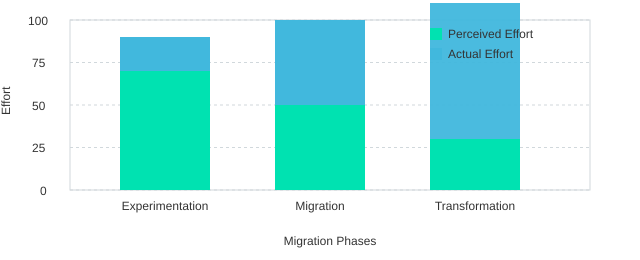
Your cloud migration roadmap has three phases—don’t skip them
A credible cloud migration roadmap moves through experimentation → migration → transformation. Phased adoption reduces risk because you validate security, operations, and skills before scaling. Skipping experimentation often backfires: you scale complexity before you scale competence.
Eduardo Kassner: "The fastest migrations are the ones where governance and operating model evolve alongside the architecture."
Think of it like moving from a home kitchen to a restaurant kitchen: same ingredients, totally different workflow—prep, timing, quality checks, and roles all change.
| Metric | Count |
|---|---|
| Migration phases | 3 |
| Case-study organizations referenced | 4 |
| Authors | 2 |
Picking the right move: the five R’s without the religion
Gartner Inc.’s five R’s cloud migration model—retire, replace, retain and wrap, rehost, reenvision—works best when you treat it as a set of options, not commandments. A mixed-method portfolio (using multiple R’s) usually reduces program risk versus forcing a one-size approach across every app.
Retire: give yourself permission to stop
Some applications are “zombie processes with a UI”: they run, but nobody can explain why. Retiring them is often your fastest win—lower cost, fewer security surfaces, and less operational noise. Make retirement a default question in every app review.
Replace: choose SaaS when it truly fits
Replace when a SaaS product covers your needs with less customization than you think. Be strict about data exit plans (export formats, retention, and contract terms) so you don’t trade technical debt for vendor lock-in.
Retain & wrap: modern controls without moving the core
Some systems can’t move yet due to latency, licensing, or tight integrations. Retain them, but wrap them with modern identity, APIs, and monitoring so they behave like cloud citizens: single sign-on, MFA, centralized logs, and clear SLAs.
Rehost for speed (but label it honestly)
Rehost is the quickest path to “something running in the cloud,” and it fits the experimentation phase well: you validate landing zones, networking, and operational patterns. Research insight: rehost accelerates timeline but may delay optimization benefits unless paired with a later modernization plan. This is where teams get stuck in rehost vs refactor debates—solve it by writing down the follow-on plan and date.
Reenvision: modernize legacy apps when the business changes
Reenvision (often “refactor”) is for true transformation: new channels, new data products, new scale. This is where modernize legacy apps with cloud-native patterns like microservices, containers (Docker), and even the actor model—when they earn their cost. If every app becomes “reenvision,” you’ve just volunteered for a multi-year rewrite.
Martin Fowler: “Rewriting is a gamble; incremental modernization is usually the safer bet.”
Satya Nadella: “Our industry does not respect tradition—it only respects innovation.”
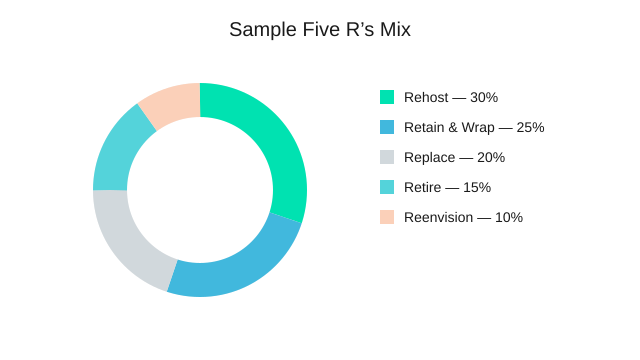
Chart idea: realistic portfolio mix
| R choice | Sample % |
|---|---|
| Rehost | 30% |
| Retain & Wrap | 25% |
| Replace | 20% |
| Retire | 15% |
| Reenvision | 10% |
Architecture choices you’ll be asked to defend (IaaS, PaaS, SaaS)
You will get the question sooner than you think: “Why not just lift-and-shift everything?” Your best answer is not “because it’s modern,” but because operability and long-term cost change when you choose the right service model. Rehosting into IaaS PaaS SaaS decisions is really a decision about who runs what, how fast you can change, and how much risk you carry.
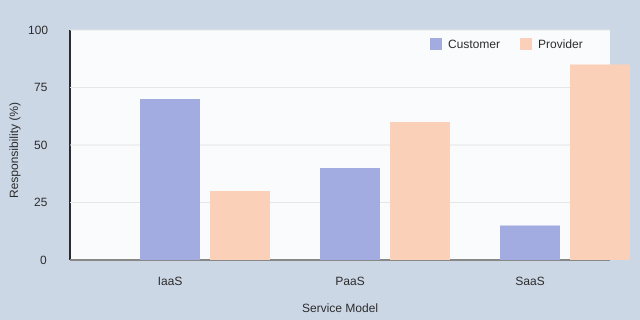
Explain IaaS vs PaaS vs SaaS as a responsibility split
Use plain language:
- IaaS: you rent compute, storage, and networking; you still manage most of the OS and runtime.
- PaaS: you deploy apps and data; the provider runs more of the platform, patching, and scaling.
- SaaS: you consume a finished product; you focus on configuration, data, and user access.
Higher-level managed services (PaaS/SaaS) usually reduce operational overhead, but they require stronger governance around vendor capabilities, limits, and shared responsibility.
A quick decision filter you can defend
- Speed-to-move (IaaS): when you must migrate quickly with minimal code change.
- Speed-to-innovate (PaaS): when you want faster releases, built-in resilience, and less patching.
- Speed-to-outcome (SaaS): when the business wants a capability now, not a custom build.
Make it real with Azure platform services
When you choose PaaS, name the services that remove work: Azure SQL Database for managed data, Storage (Blob/Table/Queue/File) for durable scale, Event Hubs for ingestion, and Logic Apps (or BizTalk Services) for integration. These Azure platform services shift your team from server care to product delivery.
Decide hybrid cloud connectivity early (ExpressRoute or VPN)
Hybrid cloud connectivity is not an afterthought. If you delay ExpressRoute or VPN choices, you often redo identity flows, network segmentation, and performance tuning later—especially when latency-sensitive apps meet on-prem dependencies.
Werner Vogels: "Everything fails, all the time—design for failure, and you’ll sleep better."
Scenario: your weekend e-commerce spike
Your e-commerce site spikes on Saturday night. With PaaS components plus Azure Traffic Manager and a multi-tier pattern, scaling and failover are handled by the platform. Instead of spending Monday recovering servers, you spend it reviewing demand signals and improving the funnel.
Chart idea: responsibility split (customer vs provider)
Security, compliance, and risk: the part you can’t “add later”
Start with identity and device hygiene (before the first wave)
Your fastest path to cloud security compliance starts with the basics: trusted devices and strong identity. Encrypt endpoints with BitLocker, then standardize access through Azure Active Directory and Azure Active Directory MFA. Early identity decisions reduce downstream rework in access design, logging, and audit preparation—because you avoid rebuilding policies after apps are already live.
Make “who can access what, from which device, and under which conditions” a written rule set, not tribal knowledge.
Map regulations to workloads, not to the cloud in general
Compliance is workload-specific. Before you schedule migration waves, map each app and dataset to the regulations it triggers—such as HIPAA, FISMA, and EUDPD. This prevents late surprises like blocked go-lives, missing audit trails, or the wrong data residency choice.
Use data classification tiers to set controls and boundaries
Classify data into simple tiers and tie each tier to required controls, logging depth, and access review frequency. A practical four-level model is:
- Public
- Internal
- Confidential
- High Business Impact
| Level | Control intensity (1–5) |
|---|---|
| Public | 1 |
| Internal | 2 |
| Confidential | 4 |
| High Business Impact | 5 |
Make Enterprise Risk Management your co-author
Don’t treat risk as a final approval gate. Bring enterprise risk management cloud stakeholders into your migration program early and make them co-authors of the shared responsibility model. Embedding ERM improves approval speed and clarifies who owns identity, configuration, monitoring, and incident response.
Bruce Schneier: “Security is a process, not a product.”
NIST: “Risk management is not a one-time activity; it is a continuous cycle of assessing and responding.”
Lean on proven references—and train for misconfiguration
Use the Security Development Lifecycle as your build standard, and validate controls using the Microsoft Azure Trust Center and the Cloud Security Alliance. Then run a reality check: your biggest risk may be misconfiguration, not malware. Train teams on secure defaults, change control, and review routines.
<!-- Chart idea: risk heatmap by data classification vs control intensity -->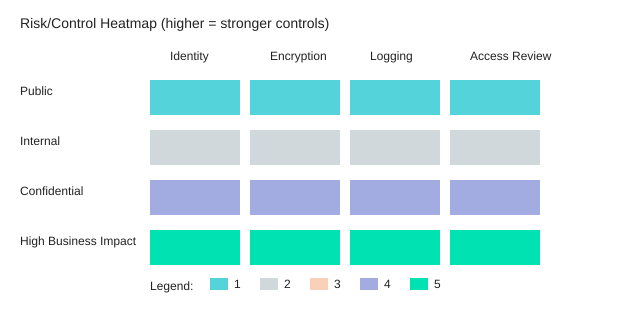
Operations makeover: from System Center habits to cloud-native muscle
Cloud operations transformation starts with a mindset shift
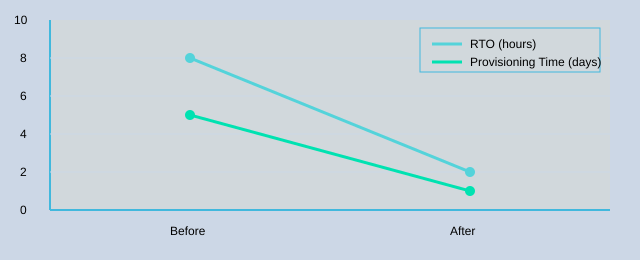
In the data center, you likely “babysat servers.” In the cloud, you manage services: health, performance, cost, and risk. That shift is the core of cloud operations transformation. Cloud-native ops tools can cut recovery and provisioning times, but only when you pair them with clear runbooks and named owners—otherwise you just move old chaos to a new platform.
Replace System Center habits with Azure-native recovery and visibility
Keep what still adds value, but stop forcing on-prem patterns into Azure. Instead of relying only on Microsoft System Center, augment or replace it with:
- Azure Backup Services for policy-based protection and restore testing
- Azure Site Recovery for orchestrated failover and measurable RTO improvements
- Azure monitoring (metrics, logs, alerts, dashboards) so on-call can see issues before users do
Research insight holds: high availability patterns must be designed, not assumed—even with managed services. Build the operational model (alerts, escalation, runbooks) at the same time you build the workload.
Stop paying the “waiting for environments” tax with DevTest Labs
Delivery speed dies quietly when teams wait days for test environments. Use DevTest Labs to standardize templates, enforce policies, and automate provisioning. Treat environments as code, and make ownership explicit:
- Define approved images and sizes
- Automate creation and teardown
- Attach monitoring and cost tags by default
Runbook owner: App Team • Platform owner: Cloud Ops • Escalation: SRE/On-call
Design for availability: availability sets and traffic management
For IaaS and hybrid workloads, use Azure availability sets (or newer constructs like zones where applicable) to avoid single points of failure. Add traffic management to route users around unhealthy instances or regions. Document the failure modes you are designing for, then test them with game days.
Keep your CMDB relevant (and honest)
Your CMDB still matters for audit, ownership, and dependency mapping—but don’t pretend it updates itself. Integrate it with deployment pipelines and monitoring so changes are captured automatically where possible, and reviewed where they can’t be.
Small tangent: a “successful” migration can still fail operations
If on-call has no dashboards, your migration is incomplete. Make Azure monitoring dashboards and alerts a release gate.
Gene Kim: “Improving daily work is even more important than doing daily work.”
Nicole Forsgren: “Software delivery performance and operational reliability can improve together when you invest in capabilities, not heroics.”
Chart idea: RTO and provisioning time improvements
Data + integration: where migrations get real (and messy)
Most migrations don’t fail on compute—they stall on cloud data migration and integration. Integration architecture is often the critical path, because every dependency you missed becomes a schedule risk. As Pat Helland puts it:
“Data is a lot like water—it finds its way into every crack in your architecture.”
Make hybrid + B2B integration a first-class product
Treat integration like a product you own: define SLAs, versioning, monitoring, and clear accountability. If ownership is split across teams (or vendors), you’ll feel it during cutovers and incident response.
- Hybrid storage: when full migration isn’t immediate, use Azure StorSimple patterns to bridge on-prem and cloud while you reduce data gravity over time.
- B2B workflows: for partner messages, transformations, and long-running processes, explore Azure BizTalk Services and Logic Apps. Decide who owns schemas, mappings, and partner onboarding—before you migrate.
Decouple brittle systems with events (and sleep more)
Point-to-point calls create cascading failures. Decoupling via events reduces blast radius when one system slows down or goes offline. Use Event Hubs to buffer spikes and separate producers from consumers, so your core apps can keep working even when downstream services are unhealthy.
Wild-card thought experiment: if a partner API goes down for 6 hours, what’s your graceful degradation story? Queue and replay? Partial functionality? Manual override? Write it down and test it.
Modernize analytics: match tools to real workflows
Analytics modernization succeeds when tooling choices match user workflows (executives vs analysts vs data scientists). Build your target stack intentionally:
- Power BI in Azure for executive dashboards and self-serve reporting.
- HDInsight for big-data processing and batch pipelines.
- Azure Machine Learning when data scientists need experiments, models, and deployment paths.
- SQL Data Warehouse (Synapse-style warehousing) for governed, high-scale analytics.
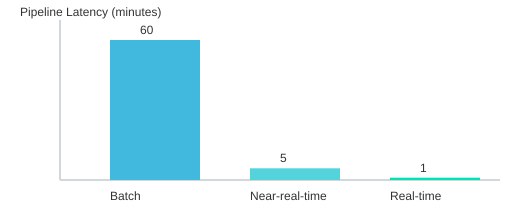
| Mode | Example pipeline latency (minutes) |
|---|---|
| Batch | 60 |
| Near-real-time | 5 |
| Real-time | 1 |
People, roles, and governance: the quiet engine of cloud success
In Enterprise Cloud Strategy (first printing 2015-11-23; copyright 2016; ISBN 978-1-5093-0196-6), Briggs and Kassner make a practical point: cloud migration fails less from missing tools and more from unclear ownership. As John Kotter puts it:
"The central challenge is changing people's behavior."
Expect role evolution: from gatekeepers to enablers
Your DevOps operating model expands beyond “dev + ops.” Platform teams build paved roads (templates, pipelines, guardrails). Security becomes embedded (policy-as-code, threat modeling). And enterprise architects shift from approvers to enablers—helping teams choose the right “five R’s” path and standard patterns, not blocking delivery.
Make stakeholder communication boring on purpose
Set a cadence that reduces surprises: weekly delivery/risks, monthly cost and value, quarterly roadmap. “Boring” is good because surprises are expensive—especially when consumption pricing and shared services are involved.
Build a cloud governance model that fits consumption pricing
A workable cloud governance model includes financial governance, not just policy. FinOps-style thinking is essential so you can sustain cost and value visibility after the first migration wave.
- Budgeting: move from annual capex to rolling forecasts tied to product teams.
- Reporting: require tagging standards (app, owner, environment, cost center).
- Controls: automate budgets, alerts, and spend anomaly detection.
Clarify shared responsibility for security (and speed audits)
Use the “Figure 4-17” idea: explicitly map what the cloud provider secures vs what you secure (identity, data classification, configuration, endpoints). Clear shared-responsibility boundaries reduce security friction and speed audits because evidence collection becomes repeatable.
"Governance should accelerate delivery by making the safe path the easy path." — Kimberly Craven
Modernize ITIL cloud operations with automation
Keep the intent of ITIL cloud operations, but update the mechanics: standard changes become pipeline-driven; incidents link to telemetry; CMDB integrates with cloud inventory. Automate what you can (backup, patching, scaling, policy enforcement) so humans focus on exceptions.
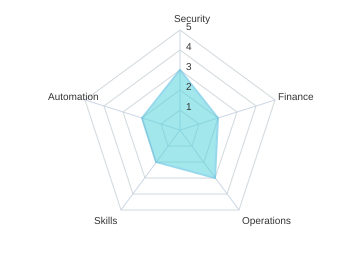
Maturity radar (chart idea) + sample baseline
| Domain | Score (1-5) |
|---|---|
| Security | 3 |
| Finance | 2 |
| Operations | 3 |
| Skills | 2 |
| Automation | 2 |
Treat governance like a product backlog: iterate, measure, and improve—rather than freezing rules into a binder no one reads.
Conclusion: your cloud strategy is a living system
Your enterprise cloud strategy only works when it connects the full system: clear business intent, honest portfolio clarity, the right migration model for each app, and the day-two disciplines of security, operations, and governance. The point of your migration map was never to “move servers.” It was to build a repeatable way to deliver change—safely, faster, and with less waste—using the same structured thinking you saw in real enterprise examples and Microsoft’s own “First and Best” learning loop.
Think back to the closet clean-out metaphor. You didn’t just tidy up and label boxes. You changed how you shop, store, and maintain. In cloud terms, you now know what to retire, what to replace, what to retain and wrap, what to rehost, and what to reenvision. That clarity is what keeps your cloud adoption plan from turning into a never-ending debate. A time-boxed plan reduces analysis paralysis and creates early proof for stakeholders—especially when you can show cost, risk, and delivery outcomes in plain numbers.
Peter Drucker: “What gets measured gets managed.”
Make this conclusion actionable. Pick one pilot application that is meaningful but not mission-critical. Define success metrics before you touch production: deployment frequency, recovery time, security findings closed, and a simple cost baseline (including a metric like Cost/OSI if it fits your environment). Then schedule your first checkpoint with Enterprise Risk Management and finance. When those partners see you treating security responsibilities, compliance, and spend as first-class work—not afterthoughts—trust rises and approvals speed up.
Keep your learning loops open. Programs that treat cloud adoption as continuous improvement DevOps tend to realize compounding benefits in automation and delivery speed, because each release improves the next one. Stay current with updates and guidance from MicrosoftPressStore.com, MicrosoftVirtualAcademy.com, and the Azure Trust Center, and revisit errata and free resources as the platform evolves.
Ben Horowitz: “The hard thing isn’t setting a big, hairy, audacious goal—it’s doing the work every day.”
Your next step is simple: draft your first 90-day cloud adoption plan across people, process, and platform. You will still make a few wrong calls—your job is to make them reversible through good architecture, automation, and governance that can adapt.

Enterprise cloud adoption strategy with microsoft azure
What is an enterprise cloud strategy for Azure and why does my organization need one?
An enterprise cloud strategy for Azure is a documented plan that aligns business goals with cloud technologies, defining how your organization will move to the cloud, which azure cloud services to use, and how to manage cloud investments, security and compliance, and scalability. Establishing this strategy helps ensure your cloud journey meets business needs, optimizes cloud spending, enables a consistent cloud platform, and accelerates your cloud adoption while reducing risk during migration strategy and ongoing operations.
How do I develop a cloud adoption strategy and what role does the Cloud Adoption Framework for Azure play?
To develop a cloud adoption strategy start by assessing readiness, defining business and technology strategies, mapping cloud workloads to business goals, and creating a migration strategy and governance model. The Cloud Adoption Framework for Azure offers prescriptive guidance, best practices, and tools—such as the cloud adoption strategy evaluator—to help cloud architects and strategy teams plan an enterprise cloud adoption, design a cloud platform, and implement modernization while ensuring security, compliance, and disaster recovery.
What is the typical cloud adoption journey and how can we accelerate our cloud initiatives?
The cloud adoption journey includes assessment and readiness, pilot migrations, scale-out of cloud workloads, optimization, and continuous improvement. You can accelerate your cloud adoption by using microsoft offers like Azure provides templates, automation, managed services, and partner resources, leveraging Microsoft Learn for skills, adopting hybrid cloud strategies where appropriate, and aligning cloud initiatives with organization needs and business goals for a faster path to the cloud.
How should we approach readiness for cloud and what assessments are essential?
Readiness for cloud begins with assessing current cloud environment maturity, application dependencies, skills, security posture, and cost baseline. Essential assessments include business needs mapping, cloud platform readiness, network and identity review, compliance and azure security assessment, and a migration strategy feasibility study. These assessments guide decisions about cloud services, migration sequencing, and whether to pursue modernization or lift-and-shift approaches.
Which best practices ensure a secure and compliant enterprise cloud on Azure?
Best practices include adopting the Cloud Adoption Framework for Azure security recommendations, implementing role-based access control, network segmentation, encryption, continuous monitoring, and automated policy enforcement. Use Azure security services, integrate compliance requirements into architecture, ensure disaster recovery and backup plans are tested, and embed security and compliance in the cloud adoption framework strategy from planning through operations to maintain a successful cloud posture.
How can we optimize cloud spending and make our cloud environment scalable?
Optimize cloud spending by right-sizing resources, using reserved instances or savings plans, implementing autoscaling, tag-based cost allocation, and continuous cost monitoring. Design a scalable azure cloud architecture with microservices or serverless where appropriate, use managed services to reduce operational overhead, and adopt a culture of continuous optimization so cloud investments align with performance needs, business goals, and evolving cloud capabilities.
What are recommended disaster recovery and business continuity approaches on Azure?
Recommended approaches include designing geo-redundant architectures, using Azure Site Recovery for orchestrated failover, implementing regular backups with Azure Backup, defining RTO/RPO aligned with business needs, and testing recovery runbooks. Incorporate disaster recovery into your cloud adoption journey and cloud infrastructure plans so applications and services can adapt to market changes and remain resilient during incidents.
How do hybrid cloud strategies fit into an enterprise cloud adoption and when should we use them?
Hybrid cloud strategies enable organizations to extend on-premises investments while leveraging Azure cloud services for scalability, modern workloads, or regulatory reasons. Use hybrid approaches when latency, data sovereignty, or legacy dependencies demand local resources, or as a phased migration strategy during the transition to the cloud. Azure offers tools and services to integrate on-prem systems with the azure cloud platform, helping align cloud capabilities with organization needs and accelerate your cloud modernization.