How to Stop Overengineering Your Microsoft 365 Tenant (And Build What Actually Works)

Overengineering in Microsoft 365 means creating unnecessarily complicated systems that hinder efficiency and user experience. You might think that more features equal better performance, but that’s often not the case. Technical experts, in their quest for control and perfection, frequently design environments that become overly complex. Instead of simplifying decision-making, they end up complicating it. To truly enhance maintainability and usability, it’s crucial to stop overengineering and focus on understanding the context of how users work. This approach can save time and effort while supporting good decision-making.
Key Takeaways
- Focus on user needs to design Microsoft 365 solutions that enhance productivity.
- Simplify processes by reducing unnecessary features and complexity.
- Leverage automation tools to streamline workflows and save time.
- Establish clear naming conventions and permission models to avoid confusion.
- Involve users early in the design process to ensure their needs are met.
- Monitor user behavior to validate designs and make informed adjustments.
- Create a Center of Excellence to promote best practices and consistency.
- Implement simple compliance rules to maintain security without overwhelming users.
Stop Overengineering: Recognize Patterns
What Does Over-Engineering Mean?
Over-engineering refers to the practice of creating systems that are more complex than necessary. In the context of Microsoft 365, this often means building features and configurations that don’t align with how users actually work. You might think that adding more layers of security or customization makes your environment better, but it can lead to confusion and inefficiency. Instead of enhancing user experience, over-engineered software often complicates it, making it harder for people to get their jobs done.
Common Overengineering Patterns
Recognizing the patterns of overengineering is crucial for simplifying your Microsoft 365 tenant. Here are some common examples you might encounter:
Complex Naming Conventions: You may find yourself using 12-level naming conventions that no one follows. This can lead to confusion and make it hard for users to locate files or teams.
Nested Permission Models: Deeply nested permission structures can create a maze that users struggle to navigate. Instead of clarity, you end up with a system that feels restrictive and complicated.
Overuse of Sensitivity Labels: While sensitivity labels are important for security, using too many can overwhelm users. If they have to think too much about which label to apply, they might skip it altogether.
Complicated Provisioning Processes: If your onboarding process for new users requires extensive training, it’s a sign of overengineering. Ideally, provisioning should be straightforward and intuitive.
Governance Documents Nobody Reads: Creating perfect governance documents is great in theory, but if no one reads them, they serve little purpose. Governance should be an ongoing conversation, not a one-time project.
Recognizing these patterns helps you identify where you might be overengineering. Remember, every extra layer of complexity can lead to operational challenges down the line. As experts note, governance failures often drive overengineering, making systems unmanageable and misaligned with actual user behavior.
To avoid these pitfalls, focus on understanding your users' needs and workflows. Start with the right business questions instead of jumping straight into technical solutions. This approach will help you create a more streamlined and effective Microsoft 365 environment.
Understand the Root Causes of Overengineering
Fear of Losing Control
Many architects and IT professionals fear losing control over their systems. This fear often drives them to create overly complex environments. They believe that by adding more features and layers of security, they can manage every possible scenario. However, this approach can backfire. Instead of enhancing control, it leads to confusion and inefficiency.
When you focus too much on control, you might overlook how users actually interact with the system. For instance, you may find yourself implementing intricate permission models or extensive governance documents. While these may seem necessary, they can complicate the user experience. You might even be surprised to realize how much time you spent on these complexities. One professional shared their experience of completing a project that usually took weeks in just a few hours. They realized that their previous approach was overly complicated, driven by a fear of losing control. This revelation highlights how the desire for perfection can lead to an over-engineering problem.
Designing for Edge Cases
Another significant factor contributing to overengineering is the tendency to design for edge cases. As systems scale, the number of potential scenarios increases. Architects often feel compelled to address every possible situation, which can lead to a tangled web of features and configurations. This mindset can create a system that is not only complex but also unwieldy.
Instead of focusing on the most common use cases, you might find yourself spending time on rare scenarios that most users will never encounter. This can result in a system that is difficult to navigate and understand. Remember, Microsoft 365 is a behavior-driven system, not static infrastructure. Users need a straightforward experience that allows them to work efficiently. By prioritizing the top 80% of real usage, you can create a more manageable environment that meets the needs of most users without unnecessary complexity.
Flip Your Design Principles
From Control to User-Centric Design
You might feel tempted to control every detail in your Microsoft 365 tenant. After all, controlling everything seems like the safest way to avoid mistakes. But here’s the catch: focusing too much on control often leads to overengineering. Instead, try shifting your mindset to put users at the center of your design. When you understand what users really need, you create workloads that actually work for them. This approach improves user satisfaction and adoption rates because people feel the system supports their daily tasks, not blocks them.
Involving users early in the design process helps you build solutions that meet real expectations. You don’t have to guess what works—users tell you. Plus, when you keep improving based on their feedback, your environment stays relevant and easy to use. This user-centric design reduces training time and speeds up onboarding. It also creates a collaborative atmosphere where users feel heard and empowered.
Here’s what happens when you focus on user needs:
- You build workflows that match how people actually work.
- You reduce frustration caused by unnecessary complexity.
- You create a system that feels intuitive and natural.
- You save time by avoiding features no one uses.
This shift helps you strike the right balance between control and flexibility. You don’t have to give up governance; you just make it simpler and smarter.
Support Real Workflows
Designing for the top 80% of real usage means focusing on the most common tasks your users perform every day. Instead of trying to cover every rare scenario, concentrate on workflows that bring the most value. For example, many industries use Microsoft 365 automation to simplify routine work:
| Industry | Automation Use Case | Benefits |
|---|---|---|
| Healthcare | Patient scheduling, lab updates | Better patient care, less admin work |
| Finance | Invoice processing, expense tracking | Faster payments, smoother operations |
| HR | Onboarding, document management | Less manual work, better employee experience |
| Education | Class scheduling, attendance | More teaching time, stronger student support |
Tools like Power Automate make it easy to create these workflows with simple code and drag-and-drop interfaces. Even non-technical users can build automations that save time and reduce errors. Microsoft Viva Insights also helps by analyzing data from emails, meetings, and other apps to suggest improvements that fit real work patterns.
By focusing on these common workflows, you avoid building complicated systems that no one uses. You keep things simple and practical. This simplicity encourages users to adopt the tools and trust the environment you’ve built. Remember, if users have to think too much or jump through hoops, they’ll find workarounds that break your design.
So, instead of overengineering every detail, support the real work your users do. Build with simplicity in mind. Use automation and insights to help people work smarter, not harder. This way, you create a Microsoft 365 tenant that just works—without the headache.
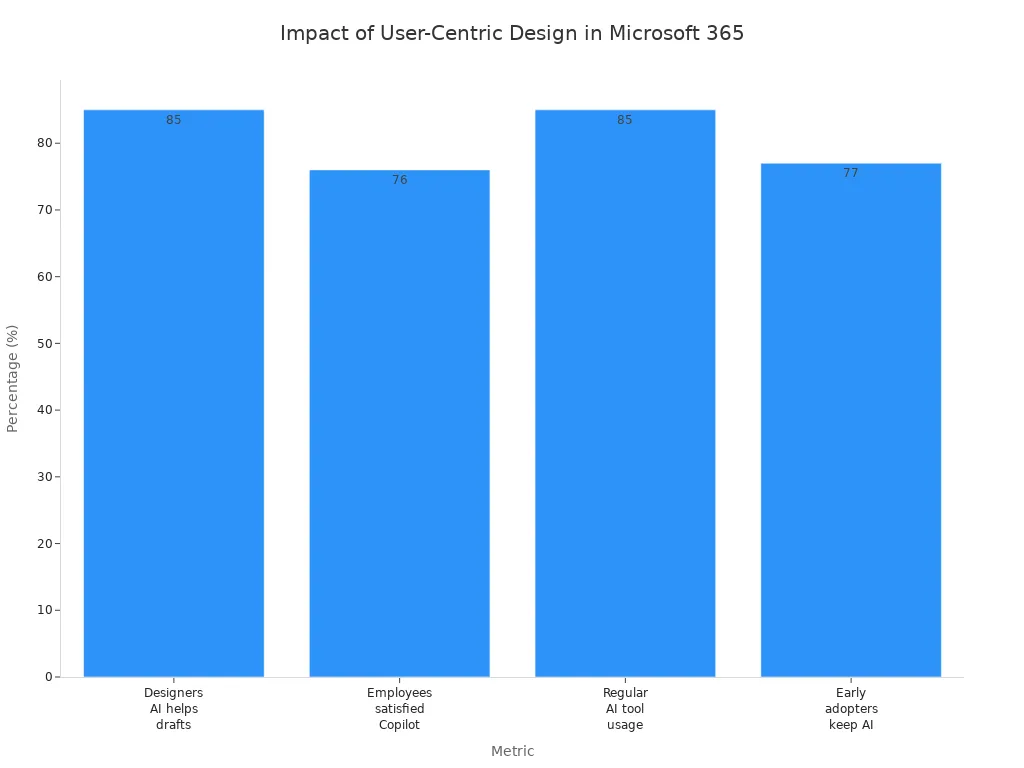
Simplify Core Layers

Focus on Usability
When it comes to Microsoft 365, usability should be your top priority. You want your users to navigate the system effortlessly. Here are some actionable strategies to simplify tenant management:
Define Solution Baselines: Establish a 'gold standard' configuration for your Microsoft 365 services. This ensures consistency and operational efficiency across your organization.
Automate Onboarding: Streamline the discovery and setup of new tenants. Automation can save time and reduce the complexity of onboarding processes.
Centralize Management: Use a single platform to manage your configurations. This centralization helps enforce uniform security and compliance settings, making it easy to maintain standards.
By focusing on usability, you minimize the number of decisions users have to make. The less they have to think about how to use the system, the more they can focus on their actual work. Remember, if a process feels complicated, users will likely find workarounds that could lead to security risks or compliance issues.
Clear Sharing Models
Implementing clear sharing models is essential for both administrators and end users. Here’s how you can achieve this:
| Benefit | Description |
|---|---|
| Enhanced Security | Use the principle of least privilege to ensure users have only the access necessary for their roles. |
| Effective Governance | Security roles help segment duties, reducing the risk of unauthorized actions. |
| Risk Mitigation | Data loss prevention (DLP) policies help control connector usage, preventing misuse of shared resources. |
| Improved Productivity | Regular audits of flow permissions enhance operational efficiency and user trust. |
| User Education | Clear communication of sharing policies helps mitigate risks introduced by user actions. |
By establishing these clear sharing models, you create an environment where users feel secure and informed. They understand what they can share and with whom, which reduces the chances of accidental data leaks.
Replace Complexity with Guardrails
Simple Rules for Compliance
When it comes to compliance in Microsoft 365, simplicity is key. You don’t need a labyrinth of rules that confuse users and slow down processes. Instead, focus on establishing clear, simple rules that everyone can understand. Here are some effective guardrails you can implement:
Establish a Center of Excellence (CoE): This team promotes consistency and quality across your Microsoft 365 environment. They can help ensure that everyone follows the same guidelines, reducing the chances of overengineering.
Implement Tiered Access and Role-Based Controls: Not every employee needs full access to all features. By limiting access based on roles, you can enhance security while keeping things straightforward.
Monitor, Audit, and Tag Everything: Active monitoring is essential. Regular audits help ensure compliance and effectiveness, making it easier to spot issues before they escalate.
These simple rules create a framework that supports compliance without overwhelming users. They help you maintain control while allowing your team to work efficiently.
Automated Enforcement
Automated enforcement tools can significantly reduce administrative overhead and maintain compliance in your Microsoft 365 tenant. Instead of manually checking configurations, you can rely on automation to handle these tasks. Here’s how automated enforcement can benefit you:
| Benefit | Description |
|---|---|
| Standardization | Enforces a consistent baseline across tenants, transforming management from reactive to efficient. |
| Time Savings & Efficiency | Reduces troubleshooting time and training overhead by ensuring uniform configurations across tenants. |
| Security & Compliance | Monitors for configuration drift and automatically remediates issues, ensuring compliance at all times. |
| Profitability | Allows rapid onboarding of new clients without proportional increases in engineering staff. |
By implementing these automated solutions, you can streamline your processes and focus on what really matters—supporting your users. Remember, the goal is to create an environment where compliance is built-in, not bolted on. This way, you can prevent overengineering while ensuring that your Microsoft 365 tenant remains secure and efficient.
Validate Against Reality
Monitor User Behavior
Validating your Microsoft 365 tenant design against real user behavior is crucial. You need to know how users interact with the system to ensure it meets their needs. Here are some effective methods for monitoring user behavior:
- Logs: These record system events, helping you detect and investigate anomalies.
- Metrics: Collect numerical values at regular intervals to describe system performance and user behavior trends.
- Dashboards: Use visual representations to gain insights into user interactions and the state of your workloads.
- Alerts: Set up notifications to inform your team when specific thresholds are met, indicating potential issues.
By employing these methods, you can gain a clearer picture of how your Microsoft 365 environment performs in real-world scenarios. This insight allows you to make informed decisions about necessary adjustments.
Use Data for Optimization
Once you have a handle on user behavior, it’s time to leverage that data for optimization. Microsoft 365 usage analytics can provide valuable insights into actual usage patterns across your organization. You can utilize prebuilt dashboards and reports within Power BI to understand how users engage with different services. This data helps you make informed decisions about service adoption, licensing, and resource allocation based on real user behavior.
For instance, the executive summary dashboard offers a high-level view of adoption, usage, collaboration, and storage. This overview helps you quickly grasp how users interact with Microsoft 365 services, allowing you to tailor configurations to meet organizational needs.
To keep your monitoring efforts organized, consider using the following tools:
| Tool Name | Description | Key Features |
|---|---|---|
| CoreView's CoreSuite | A management platform for optimizing Microsoft 365 environments. | - Distributed Administration - Granular Role-Based Access Control - Action-Enabled Reporting - Workflows & Automation - Auditing & Forensics |
| SolarWinds Server & Application Monitor | IT monitoring solution for detailed performance metrics and alerts. | - Performance Monitoring - Customizable Dashboards - Intelligent Alerting |
| LogicMonitor | SaaS-based monitoring tool for full visibility into IT infrastructures. | - Infrastructure Monitoring - Log Analysis - Network Monitoring |
By using these tools, you can continuously monitor and optimize your Microsoft 365 tenant. This proactive approach helps you identify potential issues before they escalate, ensuring a smoother experience for your users.
Remember, validating your designs against real-world user behavior not only enhances user satisfaction but also builds confidence in your Microsoft 365 environment. When users feel that the system supports their work, they’re more likely to embrace it fully.
To avoid overengineering your Microsoft 365 tenant, focus on simplicity and user needs. Remember, a streamlined environment enhances user experience and boosts productivity. Here are some key takeaways:
- Prioritize User-Centric Design: Build solutions that align with how users actually work.
- Simplify Processes: Reduce unnecessary complexity to make tasks easier.
- Leverage Automation: Use tools like Microsoft 365 Copilot to enhance collaboration and efficiency.
By embracing these principles, you can create a Microsoft 365 environment that not only meets user expectations but also drives better business outcomes. For instance, organizations have seen improved productivity and business performance through seamless integration and robust data security.
| Evidence Type | Description |
|---|---|
| Comprehensive Microsoft integration | Organizations appreciated the seamless integration of Microsoft 365 Copilot with existing tools, enhancing collaboration and information sharing across teams, which leads to improved productivity and business outcomes. |
| Robust data security | The strong security features of Microsoft 365 Copilot reassured organizations about data protection, fostering trust and enabling them to focus on core business activities without fear of data breaches. |
| Business transformation | Interviewees noted that Copilot significantly reduced time spent on manual tasks, allowing employees to engage in higher-value activities, thus driving efficiency and improving overall business performance. |
| Improved accessibility | Copilot's features helped employees with diverse needs communicate more effectively, enhancing inclusivity and productivity, which positively impacts business outcomes. |
| Employee interest and adoption | The proactive adoption of Microsoft 365 Copilot driven by employee interest in generative AI ensured that organizations stayed competitive and met employee expectations, leading to higher job satisfaction and retention rates. |
By focusing on what truly matters, you’ll create a Microsoft 365 tenant that just works—making life easier for everyone involved.
FAQ
What is overengineering in Microsoft 365?
Overengineering in Microsoft 365 means creating overly complex systems that don't align with user needs. This can lead to confusion and inefficiency, making it harder for users to perform their tasks effectively.
How can I simplify my Microsoft 365 tenant?
To simplify your tenant, focus on user-centric design. Streamline processes, reduce unnecessary features, and prioritize clean code to enhance usability and efficiency.
Why is user feedback important?
User feedback helps you understand real needs and workflows. By listening to users, you can create solutions that work for them, reducing frustration and improving adoption rates.
What are some common signs of overengineering?
Signs include complex naming conventions, nested permission models, and governance documents that no one reads. If users struggle to navigate the system, it’s time to reassess your design.
How can automation help reduce complexity?
Automation simplifies repetitive tasks, allowing users to focus on higher-value work. By implementing automated workflows, you can enhance efficiency and maintain clean code across your Microsoft 365 environment.
What role does monitoring play in optimization?
Monitoring user behavior provides insights into how your system performs. By analyzing this data, you can make informed adjustments, ensuring your Microsoft 365 tenant meets user needs effectively.
How can I ensure compliance without overwhelming users?
Establish simple rules and automated enforcement to maintain compliance. This approach allows you to uphold standards while keeping the user experience straightforward and manageable.
What is the benefit of a Center of Excellence (CoE)?
A CoE promotes best practices and consistency across your Microsoft 365 environment. It helps ensure everyone follows the same guidelines, reducing the risk of overengineering and enhancing overall efficiency.

Founder of M365 Show, M365con.net & m365.fm
Mirko Peters is a Microsoft 365 expert, content creator, and founder of m365.fm, a platform dedicated to sharing practical insights on modern workplace technologies. His work focuses on Microsoft 365 governance, security, collaboration, and real-world implementation strategies.
Through his podcast and written content, Mirko provides hands-on guidance for IT professionals, architects, and business leaders navigating the complexities of Microsoft 365. He is known for translating complex topics into clear, actionable advice, often highlighting common mistakes and overlooked risks in real-world environments.
With a strong emphasis on community contribution and knowledge sharing, Mirko is actively building a platform that connects experts, shares experiences, and helps organizations get the most out of their Microsoft 365 investments.

AI Governance Framework: Board's Guide to Responsible AI