 EN
EN Deutsch
 Español
 Français
 Italiano
 Português
 Nederlands
 Polski
 Bahasa Indonesia
 Русский
 Українська
 العربية
 עברית
עברית हिन्दी
 日本語
日本語 한국어
한국어2026-07-16
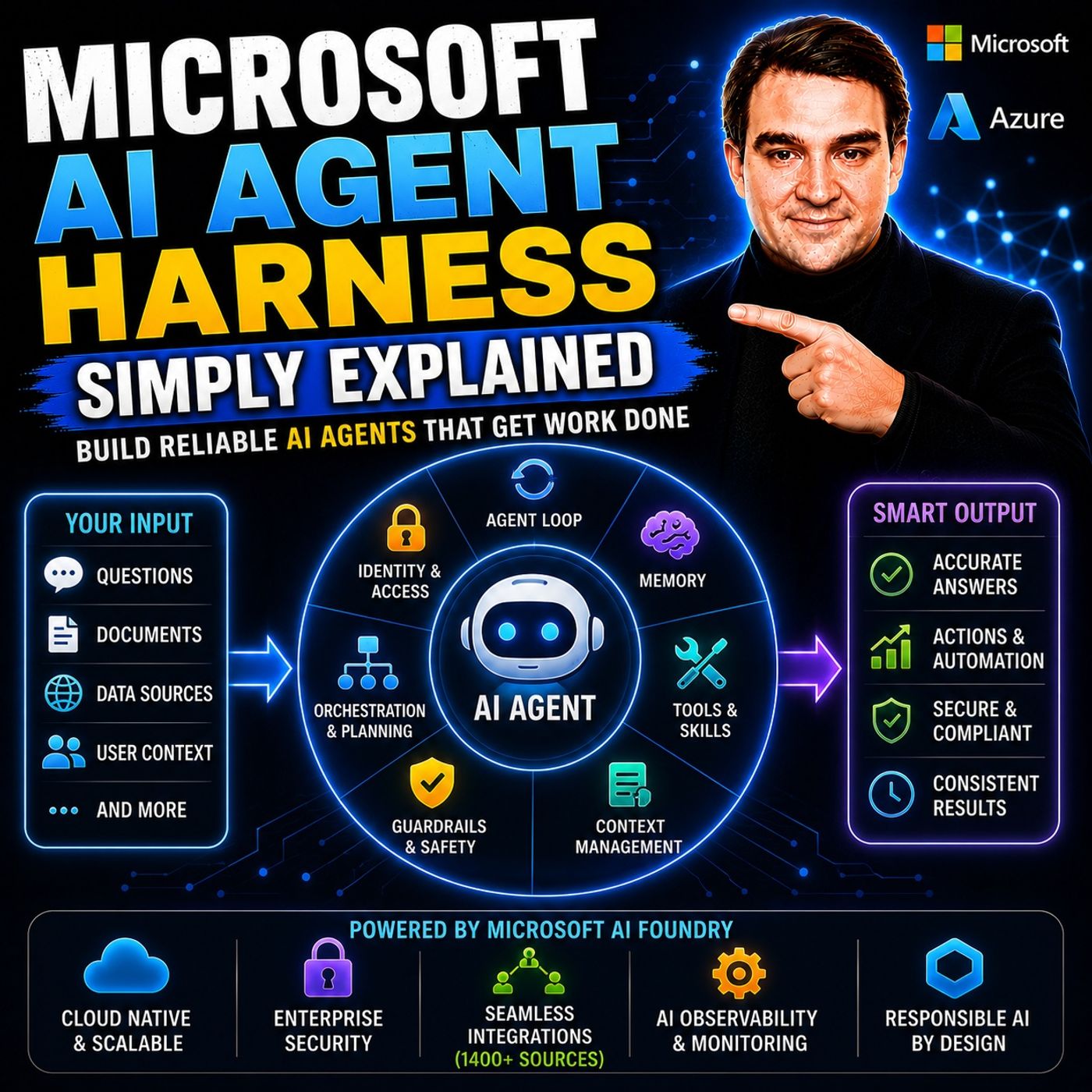
Microsoft AI Agent Harness - Simply Explained
Show notes
Writing the perfect AI prompt used to be the goal of every AI developer. But as businesses began asking AI to perform increasingly complex tasks—analyzing code, researching topics, coordinating workflows, and automating business processes—it became clear that prompts alone were no longer enough. Large Language Models are excellent at reasoning, but they cannot reliably manage long-running tasks, remember previous sessions, coordinate multiple tools, or enforce enterprise security on their own. In this episode of Microsoft Knowledge Nuggets, we explain the Microsoft AI Agent Harness in simple terms and show why modern AI solutions are built around complete systems rather than individual prompts. You'll learn how Microsoft AI Foundry combines memory, orchestration, context management, identity, tools, and governance into an enterprise-ready AI agent platform capable of handling real business workloads. FROM PROMPT ENGINEERING TO HARNESS ENGINEERING The evolution of AI development has happened in three major phases. Prompt Engineering focused on writing better instructions for language models. Context Engineering introduced technologies such as Retrieval-Augmented Generation (RAG), Model Context Protocol (MCP), and tool calling to provide AI with better information at the right time. Today, the industry has entered the era of Harness Engineering, where the focus shifts from the model itself to the complete system surrounding it. An AI agent is no longer just a model—it is a model combined with memory, orchestration, tools, guardrails, identity, and persistent context. The harness transforms a powerful language model into a reliable enterprise worker capable of completing complex, multi-step tasks over extended periods. WHAT AN AI AGENT HARNESS ACTUALLY DOES The AI Agent Harness provides all the capabilities that language models cannot manage independently. At its core is the agent loop, where the model repeatedly reasons, calls tools, evaluates results, and decides on the next action until the task is complete. Context management continuously summarizes conversations and prioritizes relevant information to prevent context windows from overflowing. Memory enables agents to remember previous interactions and learn from earlier tasks, while session persistence allows conversations to continue across multiple days or projects. The harness also provides enterprise tools such as web browsing, file access, database queries, code execution, and API integrations, giving AI agents the ability to perform meaningful work instead of simply generating text. Together, these capabilities create AI systems that behave more like skilled digital employees than traditional chatbots. MICROSOFT AI FOUNDRY: THE ENTERPRISE AI AGENT PLATFORM Microsoft AI Foundry provides the AI Agent Harness as a fully managed enterprise platform. Instead of building orchestration, identity management, context handling, security, and memory from scratch, organizations can focus entirely on their business logic while Foundry manages the underlying infrastructure. Every AI agent receives its own Microsoft Entra Agent ID, giving it a secure digital identity with auditable access to enterprise resources. Foundry also connects to more than 1,400 enterprise data sources, including Microsoft 365, SharePoint, Dynamics 365, Salesforce, Azure services, and custom business systems. Built-in procedural memory, session persistence, enterprise search, monitoring, and governance allow organizations to deploy AI agents that work securely across their existing business applications while maintaining full compliance and operational visibility. MICROSOFT AGENT FRAMEWORK, MULTI-AGENT ORCHESTRATION, AND HERMES This episode also explores Microsoft's Agent Framework, previously known as Semantic Kernel, which enables developers to build custom AI Agent Harnesses using Python and C#. The framework includes built-in orchestration patterns such as Sequential execution, Concurrent processing, Handoff, Group Chat, and Microsoft's Magentic coordination model for managing specialized AI agents. We also introduce Microsoft's hosted Hermes environment, where long-running AI agents operate inside isolated sandboxes with dedicated file systems, persistent memory, maintenance routines, and secure execution environments. Rather than acting as isolated chatbots, these agents can continuously plan, execute, learn, and collaborate while safely operating inside enterprise environments. RESPONSIBLE AI, GOVERNANCE, AND SAFE AUTONOMY Powerful AI systems require equally powerful governance. The AI Agent Harness includes guardrails that define what agents are allowed to do, maximum execution limits, approval workflows for high-risk actions, audit logging, lifecycle hooks, content safety evaluation, and policy enforcement. Microsoft AI Foundry implements the Microsoft Responsible AI Standard together with guidance from the Azure Well-Architected Framework and Cloud Adoption Framework, ensuring enterprise AI systems remain secure, transparent, and accountable. Organizations can evaluate AI agents before deployment, monitor every action they perform, and ensure compliance with corporate policies while still enabling autonomous execution. After listening to this episode, you'll understand why the future of enterprise AI isn't just about choosing the best language model—it's about building the right harness around it to create secure, reliable, and production-ready AI agents. Become a supporter of this podcast: https://www.spreaker.com/podcast/m365-fm-microsoft-365-azure-cloud-power-platform-ai--6704921/support.
Apple Podcasts · Spotify · YouTube · YouTube Music · Deezer
Host: Mirko Peters
Guests
Related articles
- AI-Powered Collaboration: Microsoft Teams Productivity Guide
- Microsoft Copilot Privacy: Data Protection and Governance Guide
- AI Meeting Notes in Microsoft Teams: Complete Guide
- Copilot in Teams Meetings: Features, Use Cases and Governance
- Microsoft Copilot in Teams: Features, Use Cases and Security
- Microsoft Resilience: Learn Continuity & Service Assurance
Transcript
Read the full transcript
Today's topic is one that almost everyone has heard of, but few can actually explain. The AI Agent Harness. You've probably seen it in blog posts or conference talks, but what does it actually mean? Here's the thing. Most people think building an AI agent is about writing the perfect prompt, that one magical instruction that makes the model do exactly what you want. But that's like, thinking a car is just an engine. Sure, the engine is important, but without wheels, a steering wheel breaks and a chassis, you're not going anywhere. By the end of this episode, you'll understand what an agent harness actually is. Why it's the next evolution beyond prompt engineering and how Microsoft AI Foundry brings this to life for real businesses? Grab your coffee and let's dive in. Why prompting isn't enough anymore? Let's go back to the early days. Around 2022 to 2024, working with AI was simple. You wrote a prompt and got an answer. Need a draft email? Write a prompt. Need a summary of an article? Write a prompt for simple one-shot tasks that worked really well. You could ask for something, and the model would give you a reasonable response. But then people got more ambitious. They started asking these models to do real work. Research a topic and write a report, analyze a codebase, and fix a bug or handle a multi-step customer support conversation from start to finish. And suddenly, one prompt couldn't handle it. Here's what happened. The model's context window filled up. It forgot the earlier instructions, and it started making up facts or giving incomplete results. The longer the task went on, the more unreliable the output became. You've probably experienced this yourself. You ask an AI to do something complex. And by the end, it's forgotten what you asked it to do in the first place. Imagine asking a single person to build an entire house from scratch, all in one sitting, without ever checking their work. That's what we were asking these models to do. The results were exactly what you'd expect. A half finished house with missing walls and doors that don't open. The solution wasn't a better prompt. You could spend hours tweaking the wording, adding more examples, and refining the instructions, and it would still fail on long complex tasks because the fundamental problem wasn't the prompt. It was the lack of a system around it. But the model needed wasn't better words, but better support. That's where the evolution from prompt engineering to context engineering began. The three phases of AI evolution. So here's how I see the evolution of AI. Three phases. Each one shifts the focus for engineers. Phase one was prompt engineering that ran from about 2022 to 2024. The big question was simple. What should I say to the model? You'd write one instruction, get one answer, and that was it. The whole craft was about wording and tone. For basic tasks, that was enough. Phase two came next. In context engineering from 2024 through 2025, the question changed from what should I say to what should the model see. Engineers found that what you feed the model matters more than how you ask. So they built systems like tool calling, retrieval augmented generation, and the model context protocol, MCP. These let the model grab the right information on the fly. Instead of stuffing everything into one prompt, the model could fetch what it needed when it needed it. Phase three is where we are now. Harness engineering. Starting around 2026, the question is, what system do I need to build around the model? This is where it gets interesting. Because reliability, memory, orchestration, and guardrails don't come from the model itself, they come from the system you build around it. Here it is, the simplest way to think about it. An agent equals a model plus a harness. The harness is everything else. The model does the thinking, the harness does the rest, and that harness is the secret source that makes the whole thing work. Think of it like this. The model is a skilled worker. Really talented but limited. The harness is the workshop, the tools, the checklist, the supervisor, and the brakes. Without the workshop, the worker has nowhere to work. Without the tools, they can't build anything. Without the checklist, they forget steps. Without the supervisor, they make mistakes. And without brakes, they burn out. The harness provides all that structure. So what exactly is inside this harness? Let's open it up. What a harness actually contains. So what goes into a harness? Let's walk through the pieces one by one. First, the agent loop. This is the cycle that keeps the agent going. The model thinks then decides to call a tool. The tool runs and sends back a result. The model looks at that, thinks again, and maybe calls another tool. The loop keeps going until the agent reaches its goal. Without this loop, you just get a single question and a single answer. With it, you have a system that works through problems step by step. Next, context management. This is critical because models have a limited attention span. Their context window can only hold so much before overflow. The harness steps in. It compresses the conversation, summarizes older messages, and prioritizes what's important. Think of it like a filing system for the conversation. The harness organizes it so the model only sees what's relevant. Without this, long sessions fall apart as the model loses track. Then there are tools and skills. These are the hands of the agent. A model by itself can only generate text. It can't read a file, browse the web, run code, or query a database. The harness gives it those capabilities. File access, web browsing, code execution, database queries, all tools the harness provides. The model decides when to use them and the harness makes them work. Memory and session persistence is another big piece. The harness remembers past sessions. So when you come back to an agent tomorrow, it doesn't start from zero. It remembers your preferences, your project context, the decisions you made. The agent learns over time because the harness keeps that history. Guardrails are the safety layer. Limits you set on the agent's behavior. Think of it as the agent's rule book. Maximum steps before it stops. Actions it's not allowed to take. Human approval gates for high-risk moves like writing files or sending emails. Without guardrails, an agent could run forever or do something you didn't intend. The harness keeps it in check. Finally, orchestration. The harness can spin up specialised sub-agents for different tasks. One handles research, another handles writing, a third handles verification. They work together like a team of specialists on a construction site. Each does what it does best. And the harness makes sure they don't get in each other's way. Now these components aren't just theory. Microsoft has built a full platform that puts all of this into practice. Enter Microsoft AI Foundry, the Enterprise harness. That platform is Microsoft AI Foundry. Think of it as a complete workshop for building and running AI agents at scale. When I say scale, I mean real scale, not a lab experiment. Foundry serves over 70,000 customers today. And last quarter alone, it processed 100 trillion tokens. That's 100 trillion, not a typo. Every day, it powers 2 billion Enterprise search queries. This is a production platform handling some of the biggest workloads in the world. What Foundry actually does is give you the harness as a managed service. You don't build context management, memory, guardrails and coordination from scratch because it's all baked in. You bring your agent and Foundry provides the workshop around it. Now let's talk about identity. This is a big deal. Every agent in Foundry gets its own Entra agent ID. Basically a digital identity. Think of it like an employee badge that the reception desk issues. The agent can log into services, access data and act on behalf of the organization just like a human employee. And because every action is tied to that identity, it's fully auditable. Why does that matter? In an enterprise, you need to know who did what. Every action is logged intracable. It connects to over 1 400 Enterprise data sources from SharePoint and Dynamics 365 to Salesforce and Custom databases. If your company uses it, Foundry probably has a connector. So the agent isn't guessing or making things up. It pulls real data from real systems, which means the answers are grounded in your actual business data. Then there's memory. Foundry includes built-in memory types. Procedural memory helps the agent learn from past tasks. It gets better over time, like on the job training. Session persistence means it remembers previous conversations, so it's not starting from zero every time you talk to it. It makes interactions feel continuous and intelligent, so how does this actually work? Let's break down the components Microsoft provides for building custom harnesses. The agent framework, building custom harnesses. So how do you actually build a harness? Microsoft provides a dedicated SDK called the Microsoft agent framework, which you might know by its earlier name, semantic kernel. It's been rebuilt, but the idea is the same. It lets developers build custom agent harnesses in Python and CSAT. The framework has three layers. But the bottom is the agent loop, the core reasoning cycle where the model thinks, calls tools, gets results, and thinks again. On top of that, sit workflows, coordination patterns that manage multiple agents. And wrapping everything is the harness layer itself, the shell that holds it all together. Microsoft ships five built-in coordination patterns. Sequential runs agents one after another in a defined order. Concerned runs them all in parallel, handoff passes control from one agent to another, based on what's needed. Group chat lets multiple agents talk in a shared conversation. And then there's magentech, a manager pattern from Microsoft Research here, a supervisor agent generates a plan, and then delegates work to specialize sub agents like a project manager assigning tasks to team members. Each pattern handles a different coordination problem. Here's the best part, the framework is extensible. You can plug in any model you want from OpenAI, Anthropic, and Google Gemini to Amazon Bedrock and even local models on Olamma. Same for tools, you connect via OpenAPI, the model context protocol or direct code. Some people worry that using Microsoft's framework locks you into their ecosystem. That's not true. The framework works with whatever stack you're already using. The harness layer adds capabilities like file access, code execution, planning, middleware, and telemetry. So building an agent with this framework means building a complete system that reads files, writes code, plans, multi-step tasks, and logs everything for debugging. It's more than just a chat interface. Here's what that looks like. Imagine a coding agent built on this framework. You give it a task, say, add a new feature to an existing code base. The agent starts by browsing documentation to understand the API. Then it writes the code, then it runs tests to make sure nothing broke. If a test fails, it reads the error, fixes the bug, and runs the tests again, all within the same harness, looping through the think-act check cycle until the job is done. Without the harness, you'd manually feed each step. With it, the agent handles the whole workflow on its own. One popular example of a harness in action is the claw pattern. Microsoft has made it available on Foundry, and it's a great demonstration of how these pieces come together. They're all digital style agents and Hermes. Let's talk about claw style agents. The name comes from open source projects like OpenClaw, these agents live on your machine, wait for instructions, and then run long tasks on their own. They're always there ready to jump in when you need them. Think of them as a personal assistant that never takes a day off. Microsoft's version is called Hermes. It runs inside Foundry's hosted agent sandbox and comes with some impressive abilities. Hermes has its own file system, its own memory, its own set of tools. It can set up its own maintenance routines, cleaning up old files, organizing its workspace. And if it realizes it needs a new skill it doesn't have, it can build one on the fly. Now here's the thing about claw agents. Cloud architects call them pets, not cattle. Pets are unique. You name them, you care for them, you can't easily replace them. Cattle are interchangeable, so if one goes down, you spin up another. Claw agents are definitely pets. Each one has its own state, history, and learned behaviors. That uniqueness makes them powerful, but it also makes recovery and scaling harder. If something goes wrong, you can't just throw away the instance and start over because you'd lose all that accumulated knowledge. Microsoft's solution is something called routines. These are scheduled tasks that let the agent wake up, do maintenance work, and then go back to sleep. Instead of keeping the sandbox running 24/7, which costs money. The agent shuts down after a period of inactivity. The routine system wakes it up when it's time to do something, like clean up old skills, run a backup, or check for new tasks. Then it goes back to sleep. This saves cost while keeping the agent available when you need it. The sandbox isolates each session. Your agent's files, memory, and configuration all stay contained in its own environment, and the harness handles managing that state across sessions, so you don't have to worry about one agent's data leaking into another's. Building your own harness from scratch is possible, but most businesses don't need to. Foundry gives you a ready-made platform with all these capabilities built in. The real question is, what do you want your agent to do? Building and collaboration where harnesses meet humans, so you've built your agent given it tools, memory, orchestration, and a sandbox. Now how do people actually use it? Here's where Foundry makes things easy. Once your agent is built and deployed, you can publish it to Microsoft 365 Co-Pilot and Microsoft Teams with one click, not 10 clicks, not a three-day deployment pipeline, just one click. And your agent shows up right where people already work. In their email, their chat and their documents. Foundry supports two deployment modes. First, assisting agents. These work on your behalf, drafting emails, scheduling meetings, or pulling up documents. They act as an extension of you, like having a really fast assistant who does what you ask. Second, autopilot agents. These are newer and more interesting. They act on their own behalf with their own email address and their own identity. They don't need you to prompt them every time they take initiative. Autopilot agents have a full user account. You can add them to a Teams group chat just like you'd add a human coworker. They follow the conversation and jump in when they can help tracking open items, answering questions about what the team is working on. One on-boarding new team members by sending them the right documents and introducing them to the right people. Here's a concrete example. Say you have a "Workstream Manager" agent. You add it to your Teams group chat. Someone says, "Hey, I need the Q3 report finished by Friday." The agent notices this is an action item. It creates a task, assigns it to the right person, and adds a reminder for Thursday to check on progress. Nobody told it to do that. It just saw something that needed doing and did it. The harness handles all the permissions behind the scenes. Only authorized users can interact with the agent in a group chat. The agent sees messages, it's allowed to see and ignores the rest. It respects the same access controls your human team members do. Here's why harness engineering really pays off. The agent stops being a chatbot you open in a browser tab. It becomes a productive team member. It lives where you live, works the way your team works. And it does all of that because the harness, the system around the model, handles identity, permissions, deployment and integration. Without the harness, you'd just have another chat window to check. But any powerful tool needs safeguards. Let's talk about the guardrails that make all of this safe. Responsible AI and governance in the harness. Here's the thing. Harness engineering isn't just about making agents more capable. It's about making them safe and trustworthy. An agent that can send emails, modify files and acting group chats is powerful, but that power needs controls. Think of it like giving an employee keys to the building. You want them to do their job, but you also set rules about what they can access and when. Microsoft's approach is built on the responsible AI standard. Six principles guide everything. Harness, reliability and safety, privacy and security, inclusiveness, transparency and accountability. These aren't just nice ideas written on a poster. They are the actual foundation for how the entire platform is designed from the ground up. The harness is where these principles become real code. Guardrails limit what the agent can do. Life cycle hooks let you enforce policies at every step of the agent's execution before the agent runs. After it runs, before it calls a tool, after it gets a result, you can inject your own checks at any point. You can do that. Want to require a human approval before the agent sends an email? You can do that too. Both of those are straightforward to set up. As you as well architected framework includes dedicated guidance for AI workloads. It covers everything from data encryption to incident response. The idea is that building an AI system isn't fundamentally different from building any other enterprise system. You still need security, reliability and operational excellence. The well architected framework gives you a structured way to think about all of that without getting lost. Beyond that, there's the cloud adoption framework. It provides a four-stage process for AI governance. First identify risks. What could go wrong? Second measure impact. How bad would it be? Third mitigate with controls. What can you put in place to prevent it? Fourth operate with monitoring. How do you catch problems when they happen? It's a practical step-by-step approach that turns abstract concerns into concrete actions you can actually take. For agent harnesses specifically, this means a few key things. Maximum step limits so the agent can't run forever. Two restrictions so it can only access what it's supposed to. Human approval gates for high-risk actions audit trails so every decision is logged and reviewable, content safety filters that catch problematic outputs before anyone sees them. Every piece works together to keep your agent on a short leash. Microsoft provides built-in content safety and evaluators inside Foundry. You can test your agent against a set of criteria before you deploy it. Does it stay on topic? Does it handle sensitive data properly? Does it refuse requests? It shouldn't fulfill? You can run these evaluations automatically and get a score before you ever publish the agent to your team. It's a bit where you catch problems early, not after something goes wrong. This is the full picture. From a simple prompt to a production grade safe autonomous agent, the model does the thinking, the harness does everything else, the coordination, the guardrails, the governance. Everything that makes it trustworthy. So let's recap the transformation. We started with one-shot prompting. Write a prompt, get an answer. That worked for simple tasks. Then we moved to context engineering, manage what the model sees, load the right information at the right time. That worked for more complex tasks. And now we've arrived at full harness engineering, build a complete system around the model with memory tools, coordination, guardrails and governance. Here's the key takeaway. An agent is only as reliable as the system around it. The model matters absolutely, but the harness is what makes or breaks production. You can have the best model in the world, and without a good harness, it will fail on real tasks. And you can have a decent model with an excellent harness. And it will outperform expectations every time. Here's your challenge. In your next AI project, think beyond the prompt. Don't ask what should I say to the model? Ask what system do I need to build around it? That shift in thinking is what separates demos from production systems. In the next episode, we'll dive deeper into one harness component, memory, how agents learn over time, how they remember what they've done, and how that changes what they can accomplish. Subscribe so you don't miss it.