Apple Podcasts
 Spotify
 Youtube Music
 Spreaker
 Podchaser
 Amazon Music
 Microsoft AI Agent Harness - Simply Explained
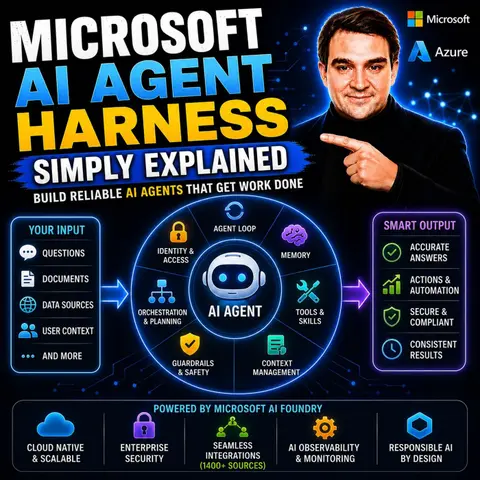
Microsoft AI Agent Harness is the runtime layer that transforms a large language model into a capable AI agent. While an LLM can generate text, an agent harness provides everything needed to complete real work—planning tasks, calling tools, managing memory, handling approvals, and maintaining context across long-running workflows. In this episode of Microsoft Knowledge Nuggets, we explain Microsoft AI Agent Harness in plain English and show why it's becoming a core building block for enterprise AI applications.
You'll learn what an agent harness actually is, how it differs from an AI model, and why modern AI agents need much more than prompts to operate reliably. We cover key concepts including planning, tool calling, context management, conversation history, memory, safety policies, approval workflows, and autonomous execution. You'll also discover how the Microsoft Agent Framework provides these capabilities out of the box, allowing developers to build robust AI agents without creating the orchestration layer from scratch.
The episode also explores real-world scenarios such as coding assistants, research agents, task automation, enterprise copilots, and multi-step business workflows. You'll see how Agent Harness integrates with Azure AI Foundry, Azure OpenAI, MCP servers, and external tools to build AI solutions that can reason, act, and complete complex tasks safely and efficiently.
Whether you're an AI developer, software engineer, cloud architect, or simply exploring the future of agentic AI, this episode provides a practical introduction without unnecessary complexity. By the end, you'll understand why the agent harness is just as important as the underlying AI model and how it enables reliable, secure, and production-ready AI agents
Quick answer: Microsoft AI Agent Harness is covered in this M365 FM episode with a practical focus on what it is, how it works, and the decisions that matter for architecture, adoption, security, governance, or day-to-day operations.
Artificial intelligence is rapidly transforming how businesses operate. As you explore the world of AI, you'll find that the demand for intelligent agents is skyrocketing. In fact, recent statistics show that by 2028, 33% of enterprise software applications will include agentic AI, a significant leap from less than 1% in 2024. Companies like Microsoft lead the way in this evolution, offering solutions like the Microsoft AI Agent that streamline operations and enhance productivity. With 95% of U.S. companies already using generative AI, the future of work is not just automated; it's intelligent.
Key Takeaways
- The Microsoft AI Agent Harness transforms language models into intelligent agents that can execute tasks and manage conversations effectively.
- Key features include automatic context management, task tracking, and file access, enhancing the agent's ability to perform complex tasks.
- Businesses can expect significant efficiency gains, with median hours saved per worker increasing from 3.9 to 6.4 hours per week by 2026.
- The harness promotes responsible AI governance, ensuring safety through guardrails, approval workflows, and audit logging.
- Industries like finance, healthcare, and retail benefit from AI agents, streamlining operations and improving customer interactions.
- Implementing best practices, such as building a Minimal Viable Agent, maximizes the benefits of the AI Agent Harness.
- Organizations can achieve a strong ROI, with a median payback period of around 6.7 months, demonstrating financial advantages.
- The future of AI agents is autonomous, with projections indicating over 2 billion agents by 2030, revolutionizing business operations.
What Is the Agent Harness?
The Microsoft AI Agent Harness is a powerful framework designed to transform language models into fully functional agents. Its primary purpose is to enable these agents to execute tasks, manage conversation history, and apply safety policies effectively. This harness acts as the runtime environment that allows the model to perform actions beyond simple text generation.
"Agent harness is the layer where model reasoning connects to real execution: shell and filesystem access, approval flows, and context management across long-running sessions."
The significance of the agent harness in AI technology cannot be overstated. It represents a pivotal advancement that enhances the capabilities of AI agents. By integrating various features, the harness allows for more sophisticated interactions and task management. Here are some key features that highlight its importance:
| Purpose/Feature | Description |
|---|---|
| Automatic context compaction | Monitors token usage and compacts chat history to prevent overflow during long tool-calling chains. |
| Built-in default instructions | Provides opinionated system instructions for task breakdown, tool usage, and reasoning patterns. |
| Instruction merging | Merges harness instructions with custom agent instructions for better task management. |
| FileMemoryProvider | Allows the agent to persist notes and learnings across sessions. |
| FileAccessProvider | Enables the agent to access and modify necessary files. |
| TodoProvider | Facilitates tracking of work items for multi-step task management. |
| AgentModeProvider | Supports separation of planning and execution modes. |
| AgentSkillsProvider | Enables skill discovery and execution from the file system. |
| BackgroundAgentsProvider | Allows delegation of subtasks to child agents for parallel processing. |
| Web search | Provides a hosted web search tool for information retrieval. |
| Shell execution | Allows running shell commands in a sandboxed environment. |
| ToolApprovalAgent | Implements approval rules for sensitive tool calls. |
| OpenTelemetryAgent | Provides automatic tracing for monitoring and debugging. |
| Pluggable storage backends | Allows swapping of storage implementations for flexibility. |
The Microsoft AI Agent Harness not only enhances the functionality of AI agents but also ensures that they operate within a secure and controlled environment. This control is crucial for maintaining observability and accountability in enterprise applications. As you explore the capabilities of AI agents, you will find that the harness plays a vital role in shaping the future of intelligent automation.
How the Microsoft AI Agent Works
User Interaction
The Microsoft AI Agent operates through a dynamic process known as the agent loop. This loop is essential for enabling the agent to perform tasks effectively. It follows a ReAct pattern, where the model continuously reasons, takes action by invoking a tool, observes the outcome, and repeats this cycle. This iterative approach allows the agent to adapt and respond to various situations, enhancing its problem-solving capabilities.
Here are the main functions performed by the agent loop:
| Step | Description |
|---|---|
| observe_state() | The agent observes its current state. |
| decide_next_action() | The agent determines the next action to take based on the observed state. |
| request_approval() | If necessary, the agent requests approval for the action. |
| execute_action_with_retry() | The agent executes the action, retrying if it fails. |
| update_session_and_context() | The agent updates its session and context with the result of the action. |
| checkpoint_state() | The agent saves its current state. |
| emit_trace_and_metrics() | The agent emits telemetry data for monitoring. |
| compact_or_cleanup() | The agent performs cleanup if needed. |
This structured approach allows the Microsoft AI Agent to maintain control over its operations while ensuring observability. The integration of various tools enhances the agent's execution capabilities. For instance, the harness includes a general-purpose tool like bash, enabling the model to autonomously write and execute code. This flexibility allows the agent to create and utilize tools dynamically, which significantly improves its ability to solve problems independently.
By leveraging these features, the Microsoft AI Agent can handle complex tasks efficiently. You can expect the agent to manage conversation history, apply safety policies, and execute actions in a controlled environment. This capability is crucial for businesses that require reliable AI agents to support their operations.
Benefits of the AI Agent Harness
Efficiency and Reliability
The Microsoft AI Agent Harness offers numerous advantages for businesses seeking to enhance their operations. By streamlining workflows, the harness improves task resolution and model selection. This efficiency leads to faster completion of tasks and better resource management. Here are some key benefits you can expect:
- The harness enhances task resolution and model selection, streamlining workflows across different tools and systems.
- It promotes token efficiency, which can lead to reduced costs and improved performance in enterprise settings.
- The multi-model approach allows you to leverage the best model for specific tasks without needing to change tools frequently.
These features contribute to significant operational improvements. For instance, a recent analysis showed that the median hours saved per worker per week increased from 3.9 hours in 2025 to 6.4 hours in 2026, marking a 64% year-over-year change. Additionally, the cost-per-task reduction improved from a range of 4-22 times to 9-66 times, demonstrating the harness's impact on efficiency.
| Metric | 2026 Median | 2025 Median | YoY Change |
|---|---|---|---|
| Hours saved / worker / week | 6.4 | 3.9 | +64% |
| Cost-per-task reduction | 9-66x | 4-22x | +2.3-3x |
| Median payback period | 6.7 months | 11.4 months | -41% |
| Year-one positive ROI | 41% | 23% | +78% |
In addition to efficiency, the Microsoft AI Agent Harness emphasizes responsible AI governance and security features. These elements ensure that AI agents operate safely and reliably. Here are some key aspects of the harness's governance framework:
- Guardrails that define agent capabilities.
- Maximum execution limits to control agent actions.
- Approval workflows for high-risk actions to ensure safety.
- Audit logging for tracking agent activities.
- Lifecycle hooks for policy enforcement.
- Content safety evaluation to maintain standards.
- Policy enforcement to ensure compliance with corporate guidelines.
The harness is built on the Microsoft Responsible AI Standard, which includes principles such as reliability, safety, privacy, security, inclusiveness, transparency, and accountability. These features help you maintain control over AI agents while ensuring observability and compliance with corporate guidelines.
By integrating these governance features, the Microsoft AI Agent Harness addresses security concerns effectively. It automates the analysis of security alerts, reducing noise from daily operations. Rapid incident response capabilities, such as one-click fixes and prioritized alerts, enable quicker responses to threats. This comprehensive approach ensures that you can confidently deploy AI agents in your enterprise environment.
Real-World Applications

The Microsoft AI Agent Harness finds applications across various industries, showcasing its versatility and effectiveness. Here are some key sectors leveraging this innovative technology:
- Finance: Banks and financial institutions use AI agents for tasks like compliance document review and automating procurement processes.
- Healthcare: Hospitals employ AI agents to streamline patient onboarding and manage internal knowledge bases.
- Retail: Retailers utilize AI agents for sales research and customer support ticket triage, enhancing customer interactions.
- Manufacturing: Companies in this sector automate IT operations and incident routing, improving efficiency and reducing downtime.
- Education: Educational institutions implement AI agents to support HR onboarding and policy management.
In business environments, the Microsoft AI Agent Harness addresses specific needs effectively. Here are some common use cases:
- Customer support ticket triage
- Refund and claims workflows
- Sales research and CRM updates
- Internal knowledge assistants
- Software engineering agents
- Data analysis workflows
- HR onboarding and policy support
These applications demonstrate how the harness enhances productivity and efficiency. For instance, organizations like A1 Inteligência em Viagens boost team efficiency and customer experience using Power Automate and Copilot Studio. ABN AMRO Bank enhances customer and employee interactions through Copilot Studio and Azure services.
| Organization | Description |
|---|---|
| A1 Inteligência em Viagens | Boosts team efficiency and customer experience with Power Automate and Copilot Studio. |
| ABN AMRO Bank | Enhances customer and employee interactions using Copilot Studio and Azure services. |
| Action Apps | Redefines athlete management with Power Platform and Azure AI to centralize athlete data and improve decision-making. |
| AECOM | Simplifies project onboarding using Power Platform, Azure, and Microsoft Fabric. |
| Cineplex | Automates business processes with generative AI and Power Automate. |
| City of Montréal | Enhances citizen engagement with Copilot Studio, improving information access and citizen connections. |
| Concentrix | Modernizes invoice processing with Power Platform and AI, improving data extraction accuracy. |
| Grupo Bimbo | Standardizes global audit processes with Copilot Studio. |
| Holland America Line | Transforms customer experience with Copilot Studio by creating a virtual concierge. |
Key takeaways from these implementations include the importance of governance frameworks to prevent risks associated with AI deployment. Organizations also focus on operationalizing AI agents into daily operations for enhanced efficiency. Multi-agent workflows create complex processes that utilize several AI agents, boosting productivity. Measuring ROI ensures that businesses assess the effectiveness of their AI implementations continuously.
The Microsoft AI Agent Harness empowers you to harness the full potential of AI agents, transforming how you operate in your industry.
The Microsoft AI Agent Harness represents a significant advancement in AI technology. It empowers you to create intelligent agents that enhance productivity and streamline operations. As you consider adopting this innovative framework, keep in mind the following key points:
- The harness integrates various features that improve task management and security.
- Organizations can expect a shift towards more autonomous AI agents, with the number projected to exceed 2 billion by 2030.
- Implementing best practices, such as building a Minimal Viable Agent and integrating governance early, can maximize your benefits.
By leveraging the Microsoft AI Agent Harness, you position your organization at the forefront of the AI revolution, ready to tackle future challenges effectively.
FAQ
What is the Microsoft AI Agent Harness?
The Microsoft AI Agent Harness is a framework that transforms language models into intelligent agents. It enables these agents to execute tasks, manage conversations, and apply safety policies effectively.
How does the agent loop work?
The agent loop follows a ReAct pattern. It continuously observes, decides, executes actions, and updates its context. This iterative process enhances the agent's problem-solving capabilities.
What industries benefit from the AI Agent Harness?
Various industries benefit, including finance, healthcare, retail, manufacturing, and education. Each sector uses the harness to streamline operations and improve efficiency.
How does the harness ensure security?
The harness incorporates responsible AI governance features. It includes guardrails, approval workflows, and audit logging to maintain safety and compliance in enterprise environments.
Can the AI Agent learn from past interactions?
Yes, the AI Agent Harness includes memory capabilities. This allows agents to remember past interactions and learn from them, enhancing their effectiveness over time.
What are some common use cases for the AI Agent?
Common use cases include customer support ticket triage, sales research, HR onboarding, and data analysis workflows. These applications improve productivity and operational efficiency.
How can organizations implement the AI Agent Harness?
Organizations can implement the harness by integrating it into their existing workflows. They should focus on building a Minimal Viable Agent and establishing governance early in the process.
What is the expected ROI from using the AI Agent Harness?
Organizations can expect significant ROI, with improvements in task efficiency and cost reduction. Studies show a median payback period of around 6.7 months, indicating strong financial benefits.
🎧 Listen to this episode
Want a practical explanation of Microsoft AI Agent Harness? This episode breaks down the topic in clear language and shows why it matters for Microsoft 365, Azure, Power Platform, security, AI, and modern work.
Listen to this episode if you want to:
- Understand the key concepts behind Microsoft AI Agent Harness
- See how it fits into the wider Microsoft technology ecosystem
- Learn where it can create practical value for your organization
You may also enjoy these related M365 FM episodes:
- Agent-to-Agent (A2A) Communication - Simply Explained
- Microsoft Agent Builder — Simply Explained
- From AI Hype to AI Harness Engineering – Building AI That People Can Actually Trust with Alan Buscaglia [MVP] from Gentleman Programming
- Microsoft Entra Agent ID: Secure Identity for AI Agents
- Multi-Agent AI with Microsoft Copilot and SharePoint – Reshmee Auckloo [MVP]
Discover more practical Microsoft conversations on M365 FM.
Last reviewed: July 2026.
Who Should Listen
This episode is for Microsoft 365 administrators, architects, IT leaders, and practitioners who need a practical understanding of Microsoft AI Agent Harness before planning, implementing, or supporting it.
🚀 Want to be part of m365.fm?
Then stop just listening… and start showing up.
👉 Connect with me on LinkedIn and let’s make something happen:
- 🎙️ Be a podcast guest and share your story
- 🎧 Host your own episode (yes, seriously)
- 💡 Pitch topics the community actually wants to hear
- 🌍 Build your personal brand in the Microsoft 365 space
This isn’t just a podcast — it’s a platform for people who take action.
🔥 Most people wait. The best ones don’t.
👉 Connect with me on LinkedIn and send me a message:
"I want in"
Let’s build something awesome 👊
1
00:00:00,000 --> 00:00:03,840
Today's topic is one that almost everyone has heard of, but few can actually explain.
2
00:00:03,840 --> 00:00:05,600
The AI Agent Harness.
3
00:00:05,600 --> 00:00:08,960
You've probably seen it in blog posts or conference talks, but what does it actually
4
00:00:08,960 --> 00:00:09,960
mean?
5
00:00:09,960 --> 00:00:10,960
Here's the thing.
6
00:00:10,960 --> 00:00:14,880
Most people think building an AI agent is about writing the perfect prompt, that one
7
00:00:14,880 --> 00:00:18,160
magical instruction that makes the model do exactly what you want.
8
00:00:18,160 --> 00:00:20,440
But that's like, thinking a car is just an engine.
9
00:00:20,440 --> 00:00:24,580
Sure, the engine is important, but without wheels, a steering wheel breaks and a chassis,
10
00:00:24,580 --> 00:00:25,780
you're not going anywhere.
11
00:00:25,780 --> 00:00:29,880
By the end of this episode, you'll understand what an agent harness actually is.
12
00:00:29,880 --> 00:00:35,140
Why it's the next evolution beyond prompt engineering and how Microsoft AI Foundry brings
13
00:00:35,140 --> 00:00:37,440
this to life for real businesses?
14
00:00:37,440 --> 00:00:39,720
Grab your coffee and let's dive in.
15
00:00:39,720 --> 00:00:41,360
Why prompting isn't enough anymore?
16
00:00:41,360 --> 00:00:42,840
Let's go back to the early days.
17
00:00:42,840 --> 00:00:46,080
Around 2022 to 2024, working with AI was simple.
18
00:00:46,080 --> 00:00:47,760
You wrote a prompt and got an answer.
19
00:00:47,760 --> 00:00:49,040
Need a draft email?
20
00:00:49,040 --> 00:00:50,040
Write a prompt.
21
00:00:50,040 --> 00:00:51,480
Need a summary of an article?
22
00:00:51,480 --> 00:00:54,560
Write a prompt for simple one-shot tasks that worked really well.
23
00:00:54,560 --> 00:00:57,920
You could ask for something, and the model would give you a reasonable response.
24
00:00:57,920 --> 00:00:59,240
But then people got more ambitious.
25
00:00:59,240 --> 00:01:02,240
They started asking these models to do real work.
26
00:01:02,240 --> 00:01:06,960
Research a topic and write a report, analyze a codebase, and fix a bug or handle a multi-step
27
00:01:06,960 --> 00:01:10,040
customer support conversation from start to finish.
28
00:01:10,040 --> 00:01:12,080
And suddenly, one prompt couldn't handle it.
29
00:01:12,080 --> 00:01:13,080
Here's what happened.
30
00:01:13,080 --> 00:01:14,680
The model's context window filled up.
31
00:01:14,680 --> 00:01:18,600
It forgot the earlier instructions, and it started making up facts or giving incomplete
32
00:01:18,600 --> 00:01:19,600
results.
33
00:01:19,600 --> 00:01:22,680
The longer the task went on, the more unreliable the output became.
34
00:01:22,680 --> 00:01:25,000
You've probably experienced this yourself.
35
00:01:25,000 --> 00:01:27,080
You ask an AI to do something complex.
36
00:01:27,080 --> 00:01:30,800
And by the end, it's forgotten what you asked it to do in the first place.
37
00:01:30,800 --> 00:01:35,040
Imagine asking a single person to build an entire house from scratch, all in one sitting,
38
00:01:35,040 --> 00:01:36,760
without ever checking their work.
39
00:01:36,760 --> 00:01:38,560
That's what we were asking these models to do.
40
00:01:38,560 --> 00:01:40,400
The results were exactly what you'd expect.
41
00:01:40,400 --> 00:01:43,240
A half finished house with missing walls and doors that don't open.
42
00:01:43,240 --> 00:01:44,560
The solution wasn't a better prompt.
43
00:01:44,560 --> 00:01:49,320
You could spend hours tweaking the wording, adding more examples, and refining the instructions,
44
00:01:49,320 --> 00:01:52,960
and it would still fail on long complex tasks because the fundamental problem wasn't
45
00:01:52,960 --> 00:01:53,960
the prompt.
46
00:01:53,960 --> 00:01:56,280
It was the lack of a system around it.
47
00:01:56,280 --> 00:01:59,360
But the model needed wasn't better words, but better support.
48
00:01:59,360 --> 00:02:03,120
That's where the evolution from prompt engineering to context engineering began.
49
00:02:03,120 --> 00:02:05,160
The three phases of AI evolution.
50
00:02:05,160 --> 00:02:07,480
So here's how I see the evolution of AI.
51
00:02:07,480 --> 00:02:08,480
Three phases.
52
00:02:08,480 --> 00:02:10,720
Each one shifts the focus for engineers.
53
00:02:10,720 --> 00:02:14,640
Phase one was prompt engineering that ran from about 2022 to 2024.
54
00:02:14,640 --> 00:02:16,080
The big question was simple.
55
00:02:16,080 --> 00:02:17,840
What should I say to the model?
56
00:02:17,840 --> 00:02:21,040
You'd write one instruction, get one answer, and that was it.
57
00:02:21,040 --> 00:02:23,000
The whole craft was about wording and tone.
58
00:02:23,000 --> 00:02:24,920
For basic tasks, that was enough.
59
00:02:24,920 --> 00:02:26,240
Phase two came next.
60
00:02:26,240 --> 00:02:31,280
In context engineering from 2024 through 2025, the question changed from what should I say
61
00:02:31,280 --> 00:02:33,320
to what should the model see.
62
00:02:33,320 --> 00:02:36,760
Engineers found that what you feed the model matters more than how you ask.
63
00:02:36,760 --> 00:02:40,960
So they built systems like tool calling, retrieval augmented generation, and the model context
64
00:02:40,960 --> 00:02:42,680
protocol, MCP.
65
00:02:42,680 --> 00:02:45,480
These let the model grab the right information on the fly.
66
00:02:45,480 --> 00:02:49,280
Instead of stuffing everything into one prompt, the model could fetch what it needed when
67
00:02:49,280 --> 00:02:50,280
it needed it.
68
00:02:50,280 --> 00:02:51,760
Phase three is where we are now.
69
00:02:51,760 --> 00:02:53,440
Harness engineering.
70
00:02:53,440 --> 00:02:56,200
Starting around 2026, the question is, what system do
71
00:02:56,200 --> 00:02:58,000
I need to build around the model?
72
00:02:58,000 --> 00:02:59,320
This is where it gets interesting.
73
00:02:59,320 --> 00:03:03,160
Because reliability, memory, orchestration, and guardrails don't come from the model itself,
74
00:03:03,160 --> 00:03:05,480
they come from the system you build around it.
75
00:03:05,480 --> 00:03:07,320
Here it is, the simplest way to think about it.
76
00:03:07,320 --> 00:03:09,240
An agent equals a model plus a harness.
77
00:03:09,240 --> 00:03:10,440
The harness is everything else.
78
00:03:10,440 --> 00:03:14,000
The model does the thinking, the harness does the rest, and that harness is the secret source
79
00:03:14,000 --> 00:03:15,720
that makes the whole thing work.
80
00:03:15,720 --> 00:03:16,720
Think of it like this.
81
00:03:16,720 --> 00:03:18,320
The model is a skilled worker.
82
00:03:18,320 --> 00:03:19,600
Really talented but limited.
83
00:03:19,600 --> 00:03:24,040
The harness is the workshop, the tools, the checklist, the supervisor, and the brakes.
84
00:03:24,040 --> 00:03:26,160
Without the workshop, the worker has nowhere to work.
85
00:03:26,160 --> 00:03:28,360
Without the tools, they can't build anything.
86
00:03:28,360 --> 00:03:30,000
Without the checklist, they forget steps.
87
00:03:30,000 --> 00:03:31,680
Without the supervisor, they make mistakes.
88
00:03:31,680 --> 00:03:33,200
And without brakes, they burn out.
89
00:03:33,200 --> 00:03:34,840
The harness provides all that structure.
90
00:03:34,840 --> 00:03:36,400
So what exactly is inside this harness?
91
00:03:36,400 --> 00:03:37,640
Let's open it up.
92
00:03:37,640 --> 00:03:39,440
What a harness actually contains.
93
00:03:39,440 --> 00:03:41,120
So what goes into a harness?
94
00:03:41,120 --> 00:03:42,920
Let's walk through the pieces one by one.
95
00:03:42,920 --> 00:03:44,120
First, the agent loop.
96
00:03:44,120 --> 00:03:46,280
This is the cycle that keeps the agent going.
97
00:03:46,280 --> 00:03:48,320
The model thinks then decides to call a tool.
98
00:03:48,320 --> 00:03:50,040
The tool runs and sends back a result.
99
00:03:50,040 --> 00:03:53,160
The model looks at that, thinks again, and maybe calls another tool.
100
00:03:53,160 --> 00:03:56,480
The loop keeps going until the agent reaches its goal.
101
00:03:56,480 --> 00:04:00,120
Without this loop, you just get a single question and a single answer.
102
00:04:00,120 --> 00:04:03,880
With it, you have a system that works through problems step by step.
103
00:04:03,880 --> 00:04:05,560
Next, context management.
104
00:04:05,560 --> 00:04:08,480
This is critical because models have a limited attention span.
105
00:04:08,480 --> 00:04:11,360
Their context window can only hold so much before overflow.
106
00:04:11,360 --> 00:04:12,560
The harness steps in.
107
00:04:12,560 --> 00:04:17,680
It compresses the conversation, summarizes older messages, and prioritizes what's important.
108
00:04:17,680 --> 00:04:19,920
Think of it like a filing system for the conversation.
109
00:04:19,920 --> 00:04:22,520
The harness organizes it so the model only sees what's relevant.
110
00:04:22,520 --> 00:04:25,960
Without this, long sessions fall apart as the model loses track.
111
00:04:25,960 --> 00:04:27,400
Then there are tools and skills.
112
00:04:27,400 --> 00:04:28,600
These are the hands of the agent.
113
00:04:28,600 --> 00:04:30,640
A model by itself can only generate text.
114
00:04:30,640 --> 00:04:33,880
It can't read a file, browse the web, run code, or query a database.
115
00:04:33,880 --> 00:04:35,880
The harness gives it those capabilities.
116
00:04:35,880 --> 00:04:42,160
File access, web browsing, code execution, database queries, all tools the harness provides.
117
00:04:42,160 --> 00:04:45,200
The model decides when to use them and the harness makes them work.
118
00:04:45,200 --> 00:04:47,360
Memory and session persistence is another big piece.
119
00:04:47,360 --> 00:04:49,320
The harness remembers past sessions.
120
00:04:49,320 --> 00:04:52,280
So when you come back to an agent tomorrow, it doesn't start from zero.
121
00:04:52,280 --> 00:04:55,760
It remembers your preferences, your project context, the decisions you made.
122
00:04:55,760 --> 00:04:58,960
The agent learns over time because the harness keeps that history.
123
00:04:58,960 --> 00:05:00,400
Guardrails are the safety layer.
124
00:05:00,400 --> 00:05:02,240
Limits you set on the agent's behavior.
125
00:05:02,240 --> 00:05:04,200
Think of it as the agent's rule book.
126
00:05:04,200 --> 00:05:05,720
Maximum steps before it stops.
127
00:05:05,720 --> 00:05:07,520
Actions it's not allowed to take.
128
00:05:07,520 --> 00:05:11,800
Human approval gates for high-risk moves like writing files or sending emails.
129
00:05:11,800 --> 00:05:15,720
Without guardrails, an agent could run forever or do something you didn't intend.
130
00:05:15,720 --> 00:05:17,160
The harness keeps it in check.
131
00:05:17,160 --> 00:05:18,480
Finally, orchestration.
132
00:05:18,480 --> 00:05:22,080
The harness can spin up specialised sub-agents for different tasks.
133
00:05:22,080 --> 00:05:25,920
One handles research, another handles writing, a third handles verification.
134
00:05:25,920 --> 00:05:29,000
They work together like a team of specialists on a construction site.
135
00:05:29,000 --> 00:05:30,720
Each does what it does best.
136
00:05:30,720 --> 00:05:33,320
And the harness makes sure they don't get in each other's way.
137
00:05:33,320 --> 00:05:35,680
Now these components aren't just theory.
138
00:05:35,680 --> 00:05:39,120
Microsoft has built a full platform that puts all of this into practice.
139
00:05:39,120 --> 00:05:42,520
Enter Microsoft AI Foundry, the Enterprise harness.
140
00:05:42,520 --> 00:05:44,880
That platform is Microsoft AI Foundry.
141
00:05:44,880 --> 00:05:49,120
Think of it as a complete workshop for building and running AI agents at scale.
142
00:05:49,120 --> 00:05:52,440
When I say scale, I mean real scale, not a lab experiment.
143
00:05:52,440 --> 00:05:54,800
Foundry serves over 70,000 customers today.
144
00:05:54,800 --> 00:05:59,160
And last quarter alone, it processed 100 trillion tokens.
145
00:05:59,160 --> 00:06:01,320
That's 100 trillion, not a typo.
146
00:06:01,320 --> 00:06:04,280
Every day, it powers 2 billion Enterprise search queries.
147
00:06:04,280 --> 00:06:07,720
This is a production platform handling some of the biggest workloads in the world.
148
00:06:07,720 --> 00:06:11,160
What Foundry actually does is give you the harness as a managed service.
149
00:06:11,160 --> 00:06:15,320
You don't build context management, memory, guardrails and coordination from scratch because
150
00:06:15,320 --> 00:06:16,400
it's all baked in.
151
00:06:16,400 --> 00:06:19,440
You bring your agent and Foundry provides the workshop around it.
152
00:06:19,440 --> 00:06:20,760
Now let's talk about identity.
153
00:06:20,760 --> 00:06:21,840
This is a big deal.
154
00:06:21,840 --> 00:06:25,000
Every agent in Foundry gets its own Entra agent ID.
155
00:06:25,000 --> 00:06:26,760
Basically a digital identity.
156
00:06:26,760 --> 00:06:29,720
Think of it like an employee badge that the reception desk issues.
157
00:06:29,720 --> 00:06:34,120
The agent can log into services, access data and act on behalf of the organization just like
158
00:06:34,120 --> 00:06:35,360
a human employee.
159
00:06:35,360 --> 00:06:38,880
And because every action is tied to that identity, it's fully auditable.
160
00:06:38,880 --> 00:06:39,880
Why does that matter?
161
00:06:39,880 --> 00:06:42,000
In an enterprise, you need to know who did what.
162
00:06:42,000 --> 00:06:44,040
Every action is logged intracable.
163
00:06:44,040 --> 00:06:49,520
It connects to over 1 400 Enterprise data sources from SharePoint and Dynamics 365 to Salesforce
164
00:06:49,520 --> 00:06:50,880
and Custom databases.
165
00:06:50,880 --> 00:06:53,640
If your company uses it, Foundry probably has a connector.
166
00:06:53,640 --> 00:06:55,720
So the agent isn't guessing or making things up.
167
00:06:55,720 --> 00:06:59,800
It pulls real data from real systems, which means the answers are grounded in your actual
168
00:06:59,800 --> 00:07:00,800
business data.
169
00:07:00,800 --> 00:07:01,800
Then there's memory.
170
00:07:01,800 --> 00:07:03,840
Foundry includes built-in memory types.
171
00:07:03,840 --> 00:07:06,160
Procedural memory helps the agent learn from past tasks.
172
00:07:06,160 --> 00:07:08,840
It gets better over time, like on the job training.
173
00:07:08,840 --> 00:07:12,080
Session persistence means it remembers previous conversations, so it's not starting from
174
00:07:12,080 --> 00:07:13,440
zero every time you talk to it.
175
00:07:13,440 --> 00:07:17,520
It makes interactions feel continuous and intelligent, so how does this actually work?
176
00:07:17,520 --> 00:07:21,320
Let's break down the components Microsoft provides for building custom harnesses.
177
00:07:21,320 --> 00:07:24,280
The agent framework, building custom harnesses.
178
00:07:24,280 --> 00:07:26,520
So how do you actually build a harness?
179
00:07:26,520 --> 00:07:30,680
Microsoft provides a dedicated SDK called the Microsoft agent framework, which you might
180
00:07:30,680 --> 00:07:33,160
know by its earlier name, semantic kernel.
181
00:07:33,160 --> 00:07:34,840
It's been rebuilt, but the idea is the same.
182
00:07:34,840 --> 00:07:38,440
It lets developers build custom agent harnesses in Python and CSAT.
183
00:07:38,440 --> 00:07:39,960
The framework has three layers.
184
00:07:39,960 --> 00:07:44,280
But the bottom is the agent loop, the core reasoning cycle where the model thinks, calls tools,
185
00:07:44,280 --> 00:07:45,920
gets results, and thinks again.
186
00:07:45,920 --> 00:07:49,840
On top of that, sit workflows, coordination patterns that manage multiple agents.
187
00:07:49,840 --> 00:07:53,960
And wrapping everything is the harness layer itself, the shell that holds it all together.
188
00:07:53,960 --> 00:07:57,240
Microsoft ships five built-in coordination patterns.
189
00:07:57,240 --> 00:08:00,640
Sequential runs agents one after another in a defined order.
190
00:08:00,640 --> 00:08:04,320
Concerned runs them all in parallel, handoff passes control from one agent to another,
191
00:08:04,320 --> 00:08:05,600
based on what's needed.
192
00:08:05,600 --> 00:08:08,920
Group chat lets multiple agents talk in a shared conversation.
193
00:08:08,920 --> 00:08:13,040
And then there's magentech, a manager pattern from Microsoft Research here, a supervisor
194
00:08:13,040 --> 00:08:17,760
agent generates a plan, and then delegates work to specialize sub agents like a project
195
00:08:17,760 --> 00:08:20,120
manager assigning tasks to team members.
196
00:08:20,120 --> 00:08:22,520
Each pattern handles a different coordination problem.
197
00:08:22,520 --> 00:08:25,000
Here's the best part, the framework is extensible.
198
00:08:25,000 --> 00:08:29,920
You can plug in any model you want from OpenAI, Anthropic, and Google Gemini to Amazon
199
00:08:29,920 --> 00:08:32,640
Bedrock and even local models on Olamma.
200
00:08:32,640 --> 00:08:37,600
Same for tools, you connect via OpenAPI, the model context protocol or direct code.
201
00:08:37,600 --> 00:08:41,240
Some people worry that using Microsoft's framework locks you into their ecosystem.
202
00:08:41,240 --> 00:08:42,240
That's not true.
203
00:08:42,240 --> 00:08:44,760
The framework works with whatever stack you're already using.
204
00:08:44,760 --> 00:08:49,120
The harness layer adds capabilities like file access, code execution, planning, middleware,
205
00:08:49,120 --> 00:08:50,120
and telemetry.
206
00:08:50,120 --> 00:08:53,360
So building an agent with this framework means building a complete system that reads files,
207
00:08:53,360 --> 00:08:56,920
writes code, plans, multi-step tasks, and logs everything for debugging.
208
00:08:56,920 --> 00:08:58,600
It's more than just a chat interface.
209
00:08:58,600 --> 00:08:59,920
Here's what that looks like.
210
00:08:59,920 --> 00:09:02,200
Imagine a coding agent built on this framework.
211
00:09:02,200 --> 00:09:06,040
You give it a task, say, add a new feature to an existing code base.
212
00:09:06,040 --> 00:09:09,200
The agent starts by browsing documentation to understand the API.
213
00:09:09,200 --> 00:09:11,920
Then it writes the code, then it runs tests to make sure nothing broke.
214
00:09:11,920 --> 00:09:15,840
If a test fails, it reads the error, fixes the bug, and runs the tests again, all within
215
00:09:15,840 --> 00:09:20,480
the same harness, looping through the think-act check cycle until the job is done.
216
00:09:20,480 --> 00:09:22,840
Without the harness, you'd manually feed each step.
217
00:09:22,840 --> 00:09:25,560
With it, the agent handles the whole workflow on its own.
218
00:09:25,560 --> 00:09:28,840
One popular example of a harness in action is the claw pattern.
219
00:09:28,840 --> 00:09:31,800
Microsoft has made it available on Foundry, and it's a great demonstration of how these
220
00:09:31,800 --> 00:09:33,480
pieces come together.
221
00:09:33,480 --> 00:09:35,480
They're all digital style agents and Hermes.
222
00:09:35,480 --> 00:09:37,160
Let's talk about claw style agents.
223
00:09:37,160 --> 00:09:41,440
The name comes from open source projects like OpenClaw, these agents live on your machine,
224
00:09:41,440 --> 00:09:44,600
wait for instructions, and then run long tasks on their own.
225
00:09:44,600 --> 00:09:46,960
They're always there ready to jump in when you need them.
226
00:09:46,960 --> 00:09:50,520
Think of them as a personal assistant that never takes a day off.
227
00:09:50,520 --> 00:09:52,040
Microsoft's version is called Hermes.
228
00:09:52,040 --> 00:09:57,120
It runs inside Foundry's hosted agent sandbox and comes with some impressive abilities.
229
00:09:57,120 --> 00:10:00,160
Hermes has its own file system, its own memory, its own set of tools.
230
00:10:00,160 --> 00:10:04,800
It can set up its own maintenance routines, cleaning up old files, organizing its workspace.
231
00:10:04,800 --> 00:10:08,280
And if it realizes it needs a new skill it doesn't have, it can build one on the fly.
232
00:10:08,280 --> 00:10:10,200
Now here's the thing about claw agents.
233
00:10:10,200 --> 00:10:13,040
Cloud architects call them pets, not cattle.
234
00:10:13,040 --> 00:10:14,040
Pets are unique.
235
00:10:14,040 --> 00:10:16,520
You name them, you care for them, you can't easily replace them.
236
00:10:16,520 --> 00:10:19,960
Cattle are interchangeable, so if one goes down, you spin up another.
237
00:10:19,960 --> 00:10:21,480
Claw agents are definitely pets.
238
00:10:21,480 --> 00:10:24,520
Each one has its own state, history, and learned behaviors.
239
00:10:24,520 --> 00:10:28,680
That uniqueness makes them powerful, but it also makes recovery and scaling harder.
240
00:10:28,680 --> 00:10:32,120
If something goes wrong, you can't just throw away the instance and start over because
241
00:10:32,120 --> 00:10:34,280
you'd lose all that accumulated knowledge.
242
00:10:34,280 --> 00:10:36,280
Microsoft's solution is something called routines.
243
00:10:36,280 --> 00:10:40,320
These are scheduled tasks that let the agent wake up, do maintenance work, and then go
244
00:10:40,320 --> 00:10:41,320
back to sleep.
245
00:10:41,320 --> 00:10:44,840
Instead of keeping the sandbox running 24/7, which costs money.
246
00:10:44,840 --> 00:10:47,680
The agent shuts down after a period of inactivity.
247
00:10:47,680 --> 00:10:51,980
The routine system wakes it up when it's time to do something, like clean up old skills,
248
00:10:51,980 --> 00:10:54,160
run a backup, or check for new tasks.
249
00:10:54,160 --> 00:10:55,440
Then it goes back to sleep.
250
00:10:55,440 --> 00:10:58,840
This saves cost while keeping the agent available when you need it.
251
00:10:58,840 --> 00:11:00,800
The sandbox isolates each session.
252
00:11:00,800 --> 00:11:05,880
Your agent's files, memory, and configuration all stay contained in its own environment,
253
00:11:05,880 --> 00:11:09,080
and the harness handles managing that state across sessions, so you don't have to worry
254
00:11:09,080 --> 00:11:11,680
about one agent's data leaking into another's.
255
00:11:11,680 --> 00:11:15,720
Building your own harness from scratch is possible, but most businesses don't need to.
256
00:11:15,720 --> 00:11:19,040
Foundry gives you a ready-made platform with all these capabilities built in.
257
00:11:19,040 --> 00:11:22,920
The real question is, what do you want your agent to do?
258
00:11:22,920 --> 00:11:26,680
Building and collaboration where harnesses meet humans, so you've built your agent given
259
00:11:26,680 --> 00:11:28,880
it tools, memory, orchestration, and a sandbox.
260
00:11:28,880 --> 00:11:30,360
Now how do people actually use it?
261
00:11:30,360 --> 00:11:32,360
Here's where Foundry makes things easy.
262
00:11:32,360 --> 00:11:36,400
Once your agent is built and deployed, you can publish it to Microsoft 365 Co-Pilot and
263
00:11:36,400 --> 00:11:40,640
Microsoft Teams with one click, not 10 clicks, not a three-day deployment pipeline, just
264
00:11:40,640 --> 00:11:41,640
one click.
265
00:11:41,640 --> 00:11:44,280
And your agent shows up right where people already work.
266
00:11:44,280 --> 00:11:46,440
In their email, their chat and their documents.
267
00:11:46,440 --> 00:11:48,080
Foundry supports two deployment modes.
268
00:11:48,080 --> 00:11:49,480
First, assisting agents.
269
00:11:49,480 --> 00:11:53,400
These work on your behalf, drafting emails, scheduling meetings, or pulling up documents.
270
00:11:53,400 --> 00:11:58,720
They act as an extension of you, like having a really fast assistant who does what you ask.
271
00:11:58,720 --> 00:12:00,280
Second, autopilot agents.
272
00:12:00,280 --> 00:12:01,560
These are newer and more interesting.
273
00:12:01,560 --> 00:12:04,920
They act on their own behalf with their own email address and their own identity.
274
00:12:04,920 --> 00:12:08,000
They don't need you to prompt them every time they take initiative.
275
00:12:08,000 --> 00:12:09,840
Autopilot agents have a full user account.
276
00:12:09,840 --> 00:12:12,960
You can add them to a Teams group chat just like you'd add a human coworker.
277
00:12:12,960 --> 00:12:16,920
They follow the conversation and jump in when they can help tracking open items, answering
278
00:12:16,920 --> 00:12:18,960
questions about what the team is working on.
279
00:12:18,960 --> 00:12:23,040
One on-boarding new team members by sending them the right documents and introducing them
280
00:12:23,040 --> 00:12:24,040
to the right people.
281
00:12:24,040 --> 00:12:25,320
Here's a concrete example.
282
00:12:25,320 --> 00:12:27,680
Say you have a "Workstream Manager" agent.
283
00:12:27,680 --> 00:12:29,200
You add it to your Teams group chat.
284
00:12:29,200 --> 00:12:32,080
Someone says, "Hey, I need the Q3 report finished by Friday."
285
00:12:32,080 --> 00:12:34,160
The agent notices this is an action item.
286
00:12:34,160 --> 00:12:38,240
It creates a task, assigns it to the right person, and adds a reminder for Thursday to check
287
00:12:38,240 --> 00:12:39,240
on progress.
288
00:12:39,240 --> 00:12:40,240
Nobody told it to do that.
289
00:12:40,240 --> 00:12:42,800
It just saw something that needed doing and did it.
290
00:12:42,800 --> 00:12:45,520
The harness handles all the permissions behind the scenes.
291
00:12:45,520 --> 00:12:48,160
Only authorized users can interact with the agent in a group chat.
292
00:12:48,160 --> 00:12:50,920
The agent sees messages, it's allowed to see and ignores the rest.
293
00:12:50,920 --> 00:12:53,880
It respects the same access controls your human team members do.
294
00:12:53,880 --> 00:12:55,880
Here's why harness engineering really pays off.
295
00:12:55,880 --> 00:12:58,600
The agent stops being a chatbot you open in a browser tab.
296
00:12:58,600 --> 00:13:00,360
It becomes a productive team member.
297
00:13:00,360 --> 00:13:03,160
It lives where you live, works the way your team works.
298
00:13:03,160 --> 00:13:07,800
And it does all of that because the harness, the system around the model, handles identity,
299
00:13:07,800 --> 00:13:09,560
permissions, deployment and integration.
300
00:13:09,560 --> 00:13:12,560
Without the harness, you'd just have another chat window to check.
301
00:13:12,560 --> 00:13:14,240
But any powerful tool needs safeguards.
302
00:13:14,240 --> 00:13:16,880
Let's talk about the guardrails that make all of this safe.
303
00:13:16,880 --> 00:13:19,240
Responsible AI and governance in the harness.
304
00:13:19,240 --> 00:13:20,240
Here's the thing.
305
00:13:20,240 --> 00:13:22,920
Harness engineering isn't just about making agents more capable.
306
00:13:22,920 --> 00:13:25,160
It's about making them safe and trustworthy.
307
00:13:25,160 --> 00:13:29,400
An agent that can send emails, modify files and acting group chats is powerful, but that
308
00:13:29,400 --> 00:13:30,640
power needs controls.
309
00:13:30,640 --> 00:13:33,120
Think of it like giving an employee keys to the building.
310
00:13:33,120 --> 00:13:36,520
You want them to do their job, but you also set rules about what they can access and
311
00:13:36,520 --> 00:13:37,520
when.
312
00:13:37,520 --> 00:13:41,400
Microsoft's approach is built on the responsible AI standard.
313
00:13:41,400 --> 00:13:43,280
Six principles guide everything.
314
00:13:43,280 --> 00:13:49,640
Harness, reliability and safety, privacy and security, inclusiveness, transparency and accountability.
315
00:13:49,640 --> 00:13:51,720
These aren't just nice ideas written on a poster.
316
00:13:51,720 --> 00:13:55,400
They are the actual foundation for how the entire platform is designed from the ground
317
00:13:55,400 --> 00:13:56,400
up.
318
00:13:56,400 --> 00:13:59,000
The harness is where these principles become real code.
319
00:13:59,000 --> 00:14:00,640
Guardrails limit what the agent can do.
320
00:14:00,640 --> 00:14:04,720
Life cycle hooks let you enforce policies at every step of the agent's execution before
321
00:14:04,720 --> 00:14:06,040
the agent runs.
322
00:14:06,040 --> 00:14:09,880
After it runs, before it calls a tool, after it gets a result, you can inject your own
323
00:14:09,880 --> 00:14:13,800
checks at any point.
324
00:14:13,800 --> 00:14:14,800
You can do that.
325
00:14:14,800 --> 00:14:17,520
Want to require a human approval before the agent sends an email?
326
00:14:17,520 --> 00:14:18,520
You can do that too.
327
00:14:18,520 --> 00:14:20,160
Both of those are straightforward to set up.
328
00:14:20,160 --> 00:14:23,960
As you as well architected framework includes dedicated guidance for AI workloads.
329
00:14:23,960 --> 00:14:27,160
It covers everything from data encryption to incident response.
330
00:14:27,160 --> 00:14:30,640
The idea is that building an AI system isn't fundamentally different from building any
331
00:14:30,640 --> 00:14:31,920
other enterprise system.
332
00:14:31,920 --> 00:14:34,920
You still need security, reliability and operational excellence.
333
00:14:34,920 --> 00:14:38,240
The well architected framework gives you a structured way to think about all of that
334
00:14:38,240 --> 00:14:39,440
without getting lost.
335
00:14:39,440 --> 00:14:41,520
Beyond that, there's the cloud adoption framework.
336
00:14:41,520 --> 00:14:44,280
It provides a four-stage process for AI governance.
337
00:14:44,280 --> 00:14:45,800
First identify risks.
338
00:14:45,800 --> 00:14:46,800
What could go wrong?
339
00:14:46,800 --> 00:14:47,800
Second measure impact.
340
00:14:47,800 --> 00:14:48,800
How bad would it be?
341
00:14:48,800 --> 00:14:50,320
Third mitigate with controls.
342
00:14:50,320 --> 00:14:52,160
What can you put in place to prevent it?
343
00:14:52,160 --> 00:14:53,760
Fourth operate with monitoring.
344
00:14:53,760 --> 00:14:55,360
How do you catch problems when they happen?
345
00:14:55,360 --> 00:14:59,000
It's a practical step-by-step approach that turns abstract concerns into concrete actions
346
00:14:59,000 --> 00:15:00,320
you can actually take.
347
00:15:00,320 --> 00:15:03,440
For agent harnesses specifically, this means a few key things.
348
00:15:03,440 --> 00:15:06,640
Maximum step limits so the agent can't run forever.
349
00:15:06,640 --> 00:15:09,400
Two restrictions so it can only access what it's supposed to.
350
00:15:09,400 --> 00:15:13,080
Human approval gates for high-risk actions audit trails so every decision is logged and
351
00:15:13,080 --> 00:15:18,040
reviewable, content safety filters that catch problematic outputs before anyone sees them.
352
00:15:18,040 --> 00:15:20,760
Every piece works together to keep your agent on a short leash.
353
00:15:20,760 --> 00:15:24,440
Microsoft provides built-in content safety and evaluators inside Foundry.
354
00:15:24,440 --> 00:15:27,360
You can test your agent against a set of criteria before you deploy it.
355
00:15:27,360 --> 00:15:28,600
Does it stay on topic?
356
00:15:28,600 --> 00:15:30,200
Does it handle sensitive data properly?
357
00:15:30,200 --> 00:15:31,200
Does it refuse requests?
358
00:15:31,200 --> 00:15:32,480
It shouldn't fulfill?
359
00:15:32,480 --> 00:15:36,600
You can run these evaluations automatically and get a score before you ever publish the
360
00:15:36,600 --> 00:15:37,920
agent to your team.
361
00:15:37,920 --> 00:15:40,880
It's a bit where you catch problems early, not after something goes wrong.
362
00:15:40,880 --> 00:15:42,120
This is the full picture.
363
00:15:42,120 --> 00:15:46,320
From a simple prompt to a production grade safe autonomous agent, the model does the thinking,
364
00:15:46,320 --> 00:15:50,640
the harness does everything else, the coordination, the guardrails, the governance.
365
00:15:50,640 --> 00:15:52,160
Everything that makes it trustworthy.
366
00:15:52,160 --> 00:15:54,240
So let's recap the transformation.
367
00:15:54,240 --> 00:15:55,880
We started with one-shot prompting.
368
00:15:55,880 --> 00:15:57,720
Write a prompt, get an answer.
369
00:15:57,720 --> 00:15:59,160
That worked for simple tasks.
370
00:15:59,160 --> 00:16:03,160
Then we moved to context engineering, manage what the model sees, load the right information
371
00:16:03,160 --> 00:16:04,160
at the right time.
372
00:16:04,160 --> 00:16:05,960
That worked for more complex tasks.
373
00:16:05,960 --> 00:16:09,840
And now we've arrived at full harness engineering, build a complete system around the model with
374
00:16:09,840 --> 00:16:12,880
memory tools, coordination, guardrails and governance.
375
00:16:12,880 --> 00:16:14,040
Here's the key takeaway.
376
00:16:14,040 --> 00:16:16,680
An agent is only as reliable as the system around it.
377
00:16:16,680 --> 00:16:20,160
The model matters absolutely, but the harness is what makes or breaks production.
378
00:16:20,160 --> 00:16:24,120
You can have the best model in the world, and without a good harness, it will fail on real
379
00:16:24,120 --> 00:16:25,120
tasks.
380
00:16:25,120 --> 00:16:27,640
And you can have a decent model with an excellent harness.
381
00:16:27,640 --> 00:16:30,280
And it will outperform expectations every time.
382
00:16:30,280 --> 00:16:31,680
Here's your challenge.
383
00:16:31,680 --> 00:16:34,680
In your next AI project, think beyond the prompt.
384
00:16:34,680 --> 00:16:36,440
Don't ask what should I say to the model?
385
00:16:36,440 --> 00:16:38,960
Ask what system do I need to build around it?
386
00:16:38,960 --> 00:16:42,000
That shift in thinking is what separates demos from production systems.
387
00:16:42,000 --> 00:16:45,920
In the next episode, we'll dive deeper into one harness component, memory, how agents learn
388
00:16:45,920 --> 00:16:50,880
over time, how they remember what they've done, and how that changes what they can accomplish.
389
00:16:50,880 --> 00:16:51,840
Subscribe so you don't miss it.

Founder of m365.fm, m365.show and m365con.net
Mirko Peters is a Microsoft 365 expert, content creator, and founder of m365.fm, a platform dedicated to sharing practical insights on modern workplace technologies. His work focuses on Microsoft 365 governance, security, collaboration, and real-world implementation strategies.
Through his podcast and written content, Mirko provides hands-on guidance for IT professionals, architects, and business leaders navigating the complexities of Microsoft 365. He is known for translating complex topics into clear, actionable advice, often highlighting common mistakes and overlooked risks in real-world environments.
With a strong emphasis on community contribution and knowledge sharing, Mirko is actively building a platform that connects experts, shares experiences, and helps organizations get the most out of their Microsoft 365 investments.