 EN
EN Deutsch
 Español
 Français
 Italiano
 Português
 Nederlands
 Polski
 Bahasa Indonesia
 Русский
 Українська
 العربية
 עברית
עברית हिन्दी
 日本語
日本語 한국어
한국어2026-05-28 · Season 2
Grounding Microsoft Copilot for Trusted Enterprise AI

Quick answer: grounding Microsoft Copilot for trusted enterprise AI is covered in this M365 FM episode with a practical focus on how it works, where it fits, and the architecture, security, governance, or operational choices that matter in real Microsoft environments.
You face a critical moment in enterprise AI. Trust in Microsoft Copilot shapes how your teams work and make decisions. Many organizations hesitate to adopt Copilot organization-wide, with only about half rolling it out fully. Data security and governance concerns persist, and nearly half of users report making major business decisions based on ungrounded AI output. The grounding gap highlights why you need a grounded copilot to bridge your unique data and drive innovation.
| Industry | Adoption Rate | Notes |
|---|---|---|
| Overall | ~50% | Only about half of companies have deployed Copilot organization-wide. |
| Life Sciences | 58% | Adoption rate outpaces the market; 34% use it for research efforts. |
| Financial Sector | Varies | Barclays and UBS have large deployments, leading in GenAI integrations. |
Key Takeaways
- Trust in AI tools like Microsoft Copilot is essential for effective decision-making in organizations.
- A grounded copilot connects your unique data and workflows, enhancing the reliability of AI outputs.
- Address the grounding gap by using grounded prompts to improve the relevance and accuracy of AI responses.
- Implement strong governance and security measures to protect sensitive information and build user trust.
- Focus on training and support to help teams adapt to AI tools and maximize their benefits.
- Measure success through metrics like task completion rates and user satisfaction to track AI impact.
- Customize AI tools to fit your business needs, ensuring they align with your workflows and processes.
- Start small with pilot programs to refine your approach and build momentum for broader AI adoption.
Building Trust with a Grounded Copilot

What Is a Grounded Copilot?
You need a grounded copilot to unlock the full potential of enterprise ai. This copilot connects your organization’s knowledge, policies, and workflows, making ai outputs more reliable and relevant. You can use grounded copilots to bridge fragmented information streams and deliver trusted instructions to your teams.
A grounded copilot stands out because it follows strict governance and security standards. You can choose between different types of agents, such as personal, line-of-business, and organizational copilots. Each agent has unique capabilities and risk profiles. You must set clear policies and processes to manage low-code ai creations and ensure safe deployment.
- Governance and security are critical for business-critical services.
- You can select agents based on your business needs and risk tolerance.
- Policies and processes help you control how ai interacts with your data.
Developers rely on grounded copilots to access accurate information and streamline their workflows. You can see how github copilot and Microsoft Copilot transform productivity by connecting to your organization’s systems.
The Grounding Gap Challenge
You face the grounding gap when ai lacks access to your organization’s specific data. This gap can lead to generic or misleading responses, making it harder for you to trust ai outputs. Developers often encounter this challenge when using github copilot or other ai tools that do not connect to business systems like ServiceNow or Salesforce.
Research shows that the grounding gap affects user trust and copilot accuracy. For example, Bing’s ai performance tool highlights a visibility gap. Some grounding queries receive many citations, but they do not translate into user engagement. This mismatch means ai-driven search activities may not align with how you use information, which impacts your confidence in ai systems like github copilot.
The National Advertising Division has scrutinized Microsoft’s claims, emphasizing the need for transparent disclosures about limitations and manual interventions required in cross-app workflows.
You can address the grounding gap by using grounded prompts. These prompts enhance relevance and specificity, which is crucial for business users managing fragmented information streams. Developers benefit from fact-checked outputs, which improve productivity and trust. Studies show that developers using accurate code generation tools, such as github copilot, complete tasks faster and make better decisions.
Principles of Trust in Enterprise AI
You must follow key principles to build trust in enterprise ai. These principles guide how you deploy ai tools like grounded copilot and github copilot.
- Fairness: You should ensure ai treats all people fairly.
- Reliability and safety: You must make sure ai performs reliably and safely.
- Privacy and security: You need to protect sensitive information and respect privacy.
- Inclusiveness: You should empower everyone and engage all people, regardless of their backgrounds.
You can measure trust in enterprise ai by defining clear criteria and benchmarks before deploying any high-stakes tool. You should regularly track trust scores and update them with new data. This helps you spot and address potential issues early. You can use trust measurements to guide decisions, improve processes, and build stronger relationships with customers and stakeholders.
Developers depend on these principles to create ai solutions that meet your business needs. You can see how github copilot and grounded copilot help you build a foundation of trust, accuracy, and productivity.
Transformation in Enterprise AI
From Tools to Operating Models
You see a shift in enterprise settings as organizations move from standalone ai tools to integrated copilots. This transformation changes how you approach business processes. You no longer rely on isolated applications. Instead, you use ai to connect workflows and drive efficiency. Developers play a key role in this change. They build and customize ai agents that fit your business needs.
You notice that operating models evolve when you adopt integrated copilots. You must adapt workflows and user interactions. Developers improve data quality and enhance copilot effectiveness. You need active change management and targeted training to address user resistance. Teams measure success using metrics like task completion rate, accuracy, and user satisfaction scores.
| Metric | Description |
|---|---|
| Task completion rate | Percentage of tasks completed without human input |
| Accuracy | Frequency of correct outputs for each use case |
| User satisfaction | Direct feedback on agent performance |
You see ai applications automate patient scheduling in healthcare, enhance customer service, and streamline operations across industries. Developers use tools like Microsoft 365 Copilot, Dynamics 365, and Power Automate to integrate ai into business processes.
The Role of Microsoft Copilot
Microsoft Copilot leads the transformation in enterprise ai. You use Copilot to integrate ai into your daily workflows. Developers benefit from enhanced search capabilities that connect with platforms like Slack and Jira. The Create feature uses OpenAI's GPT-4o to generate content, images, and marketing materials. You interact with Copilot through a chat-based interface that simplifies communication.
You access the Agent Store to find customizable ai agents for your business. Developers use advanced tools like Researcher and Analyst to gain data insights and transparency. Copilot for Service empowers service representatives by automating tasks and improving efficiency. Azure AI enables teams to build and manage machine learning models for predictive analytics.
| Product/Tool | Description |
|---|---|
| Microsoft 365 Copilot | Integrates ai into business processes, enhancing productivity |
| Dynamics 365 | Automates business processes and provides data-driven insights |
| Power Automate | Streamlines repetitive tasks and workflows |
| Copilot for Service | Automates tasks for service representatives |
| Azure AI | Builds and manages machine learning models |
Business Value and Change
You measure the business value of Copilot adoption through clear outcomes. Developers track license utilization and active users to establish a baseline. You quantify hours saved, usage intensity, and sentiment. You link these outcomes to business KPIs like revenue growth, customer satisfaction, and time-to-market.
| Department | License activation | Weekly active users | Average time saved per task | Business outcome trend |
|---|---|---|---|---|
| Sales | 95% | 72% | 18% | Proposal cycle time −22% QoQ |
| Customer Service | 90% | 68% | 15% | AHT −11%; CSAT +0.4 |
| Finance | 88% | 63% | 20% | Close cycle −2 days |
| HR | 92% | 55% | 14% | Time-to-post −25% |
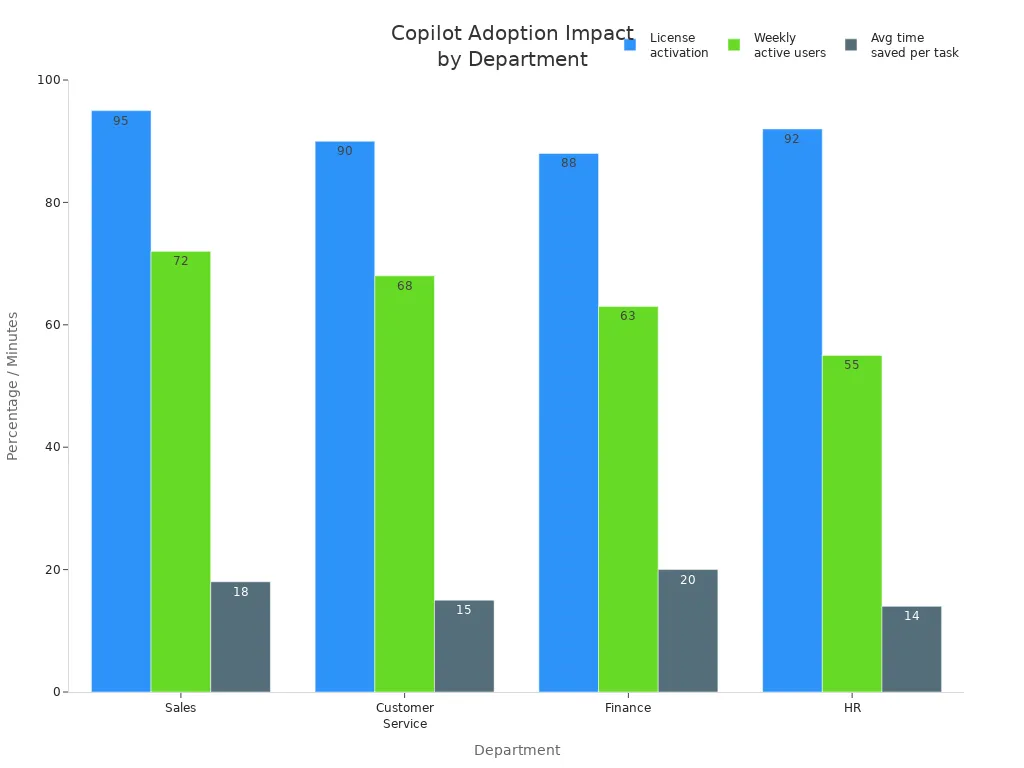
You see real-world impact across industries. Government users save 26 minutes per day, equal to two workweeks annually. Accenture employees complete routine tasks 15 times faster. Financial services automate month-end reporting, reducing manual errors. Healthcare professionals spend more time with patients due to clinical documentation drafting. Developers in software engineering generate boilerplate code and test scaffolds efficiently.
You prepare for change by designing a tailored change management strategy. Developers launch early adopters’ programs and run guided sessions to enhance engagement. You monitor usage and feedback to understand Copilot's effectiveness. This digital transformation unlocks measurable productivity gains and business value.
Grounded Copilot Foundation
A grounded Copilot relies on a strong foundation. You need to focus on three main pillars: data infrastructure, secure and governed platforms, and workflow integration. Each pillar supports trust, accuracy, and adoption in your enterprise AI journey.
Data Infrastructure Essentials
A robust data infrastructure forms the backbone of your Copilot deployment. You must ensure that your systems can deliver reliable, timely, and relevant information to your AI.
Data Quality
You need high-quality data to power your Copilot. Clean, accurate, and up-to-date information helps your AI deliver precise answers. Poor data quality leads to confusion and reduces trust in AI-driven automation. You should regularly audit your data sources and remove outdated or duplicate records. This practice keeps your production systems efficient and your AI outputs relevant.
Integration Across Systems
You often store information in many places—email, cloud storage, CRM, and more. Integration across systems allows your Copilot to access the full spectrum of your organizational knowledge. Secure data integration connects platforms like Microsoft 365, SharePoint, and ServiceNow, making sure your AI can retrieve and process information in real time. This approach bridges gaps between production systems and ensures that your teams always work with the most current data.
Tip: When you connect your systems, you reduce silos and empower your AI to deliver insights that reflect your unique business context.
| Component | Contribution to Reliability |
|---|---|
| Microsoft Global Network | Ensures secure and efficient data flow, optimizing connectivity and reducing latency. |
| Microsoft 365 service boundary | Maintains compliance with security standards and consistent performance across services. |
| Copilot Orchestrator | Manages interactions among AI models, data sources, and plugins, ensuring effective coordination. |
| Large language models | Provides contextually relevant responses by interpreting and generating text based on vast data training. |
| Microsoft Graph | Facilitates access to relevant data while respecting user permissions, ensuring data integrity and security. |
| Copilot Agents | Connects to knowledge and data sources, allowing real-time retrieval and processing of information. |
Secure and Governed Platforms
Security and governance are essential for building trust in your AI platform. You must protect sensitive information and comply with industry regulations.
Security and Compliance
You should develop a comprehensive risk assessment and management framework. This helps you identify and address potential risks in your AI deployments. Establish compliance mechanisms to meet legal and regulatory standards. For example, GDPR requires you to control data access and document user consent. HIPAA demands strict validation and permissioning when handling patient information. SOX compliance means you must track every financial record generated by Copilot. CCPA requires clear opt-out options for consumer data.
- GDPR: Control access, document consent, and manage cross-border data transfers.
- HIPAA: Validate outputs, protect patient data, and maintain audit trails.
- SOX: Map financial records to approved logs for integrity.
- CCPA: Provide opt-out and deletion options for consumer data.
You should also implement runtime access decisions and real-time guardrails on AI inputs and outputs. Continuous testing validates your controls and ensures your platform remains secure.
Governance Policies
Strong governance policies guide your AI platform. You need a cross-functional AI governance board with clear roles and responsibilities. This board oversees your AI strategy and ensures accountability. You should use frameworks like the NIST AI Risk Management Framework and follow the OWASP Top 10 for LLM Applications. These resources help you address core risks and validate your controls throughout the AI lifecycle.
- Create a governance board for oversight.
- Use industry frameworks for risk management.
- Test and update policies regularly.
Note: Ongoing validation and oversight keep your AI platform aligned with business goals and regulatory requirements.
Workflow Integration
Workflow integration brings your Copilot into daily operations. You want your AI to fit naturally into how your teams work.
Automation
AI-driven automation streamlines repetitive tasks. You can use Copilot to handle scheduling, reporting, and customer inquiries. This frees your employees to focus on strategic work. Automation increases efficiency, improves accuracy, and reduces operational costs. Your teams can adapt quickly to new business needs without major changes to production systems.
- AI automation speeds up routine tasks.
- Consistent rule-following reduces errors.
- Lower costs and better scalability support growth.
"AI automation helps meet customer expectations by making experiences more responsive, relevant, and intuitive. AI-powered tools like chatbots and virtual assistants handle common questions and guide people through complex tasks, improving service quality over time."
User Experience
A seamless user experience encourages adoption. You want your Copilot to provide actionable insights tailored to each department. Integration with platforms like Microsoft Teams and SharePoint enables smooth collaboration and information flow. Employees benefit from faster responses and personalized interactions, which leads to higher satisfaction and better decision-making.
- Departments collaborate effectively using integrated tools.
- Actionable insights improve operational efficiency.
- Better user experience drives trust and adoption.
By focusing on these foundational elements, you build a Copilot that is reliable, secure, and ready to transform your enterprise with AI.
Microsoft Copilot Architecture

Graph Connectors vs. Plugins
You can shape the power of ai in your organization by choosing the right architecture for microsoft 365 copilot. Graph Connectors and Plugins serve different purposes, and understanding their roles helps you maximize value. Graph Connectors allow microsoft 365 copilot to retrieve data from both internal and external sources. You can connect SharePoint, ServiceNow, and other platforms, making your ai more knowledgeable. These connectors enhance the chat experience by supporting multiturn conversations and providing content previews.
Plugins extend what you can do with ai. You can interact with web services using natural language. Plugins let you access real-time information, retrieve relational data, and perform actions across applications. For example, you can fetch current information, summarize data, or automate tasks in other business tools. Proper testing ensures that both plugins and connectors respect governance boundaries. Validation checks that data boundaries are enforced and actions stay within intended scopes.
- Graph Connectors: Integrate external data sources, improve discoverability, and enable comprehensive analysis in microsoft 365 copilot.
- Plugins: Enable real-time actions, data retrieval, and cross-application automation for ai-powered workflows.
Microsoft 365 Semantic Index
The Semantic Index is a core part of microsoft 365 copilot. It processes and vectorizes SharePoint content, serving as the ground truth for knowledge retrieval. When you ask a question, the Semantic Index helps ai find the most relevant documents and information. This means you get context-aware answers that reflect your organization’s unique knowledge. The architecture ensures that responses are based only on your organizational data, which increases reliability and accuracy.
- The Semantic Index retrieves relevant documents based on your queries.
- It grounds ai responses in your company’s knowledge, not just public data.
- You benefit from faster, more accurate answers in microsoft 365 copilot.
Security and Compliance Integration
You need to trust that your ai platform protects your data. Microsoft 365 copilot includes built-in security and compliance features that meet industry standards. Your data stays safe and private, and only authorized users can access sensitive information. The platform uses encryption, access controls, and data anonymization to protect your organization.
| Feature | Description |
|---|---|
| Data Protection and Privacy | User data is not used to train Machine Learning models, ensuring organizational data integrity. |
| Data encryption both in transit and at rest, reducing unauthorized access risks. | |
| Compliance with Regulations | Adheres to GDPR and CCPA, ensuring legal standards compliance. |
| EU Data Boundary compliance, ensuring EU customer data remains within EU boundaries. | |
| Access Control and Permissions | Users only see responses based on data they personally access, preventing data leakage. |
| Data anonymization techniques are used to remove Personally Identifiable Information (PII). | |
| Healthcare Compliance | Specialized data boundaries for HIPAA compliance, ensuring patient information is protected. |
| Financial Services Security | Additional security controls implemented by 58% of financial services firms using Copilot. |
You can rely on microsoft 365 copilot to support ai-driven transformation while meeting strict security and compliance requirements. This foundation builds trust and encourages adoption across your teams.
Agents, Copilots, and Trust
Productivity Gains
You can see clear productivity gains when you use ai agents in your daily work. Organizations report that ai reduces operational workload and increases output per employee. You save hours each week because ai handles repetitive tasks and automates routine processes. This means you spend less time on manual work and more time on high-value activities.
- You save hours per user per week.
- You see a reduction in task cycle time.
- You notice fewer errors in your work.
| Metric | Description |
|---|---|
| Cycle time per task | Time taken to complete a specific task |
| Pull request throughput per developer | Number of pull requests handled by each developer |
| Deployment frequency | How often deployments occur |
Many developers say that ai agents make coding more enjoyable. About 60–75% of developers report this improvement. You can maintain your flow state longer, with 73% saying ai helps them stay focused. Most users, 87%, say ai saves mental energy on repetitive tasks. These benefits show that ai agents boost both efficiency and job satisfaction.
Organizations using ai agents see lower process costs and higher productivity across departments.
Building User Confidence
You build user confidence in ai by focusing on training and support. Role-based, continuous training helps you learn how to use ai agents for your specific tasks. Practical workshops show you real-world applications, making it easier to understand how ai fits into your workflow.
- You receive training tailored to your role.
- You join workshops that demonstrate how to use ai agents in real scenarios.
- You have access to a strong support system, including self-service channels and a knowledgeable support team.
- You can join a user community to ask questions, share tips, and learn from others.
Leadership plays a key role in building trust. When leaders use ai agents and share their experiences, you feel more confident about adopting new technology. Clear communication about the impact of ai helps you see its value and encourages you to use it more often.
Tip: Continuous learning and open communication help you get the most out of ai agents.
Real-World Use Cases
You can look at real-world examples to see how ai agents deliver value and build trust in enterprise environments. Many companies have adopted ai agents to solve common business challenges.
| Company | Achievement | Description |
|---|---|---|
| Jamf | 70% adoption | High adoption rate of ai copilot for employee support. |
| Mercari | 74% reduction in IT tickets | Significant decrease in IT ticket volume due to ai copilot implementation. |
| Hearst | 50% of support issues resolved | ai copilots used to efficiently resolve support issues across departments. |
You see that enterprise-grade agents help organizations achieve high adoption rates and solve support issues quickly. These examples show that ai agents can handle complex tasks, reduce ticket volumes, and improve employee experiences. When you use ai agents in your organization, you can expect similar results—greater efficiency, faster problem resolution, and higher satisfaction.
Real-world success stories prove that ai agents are reliable partners in your digital transformation journey.
Implementation Roadmap
Strategy and Planning
You start your Copilot journey with a clear strategy. Begin by identifying your business goals and the problems you want to solve with ai. Select pilot groups from different departments to test Copilot in real scenarios. This approach helps you refine your adoption practices and build momentum. Strategic license planning ensures you allocate resources where they have the most impact. You can track adoption metrics and adjust your plan as you learn from early results.
| Key Step | Evidence Supporting Effectiveness |
|---|---|
| Strategic License Planning | Organizations should start with pilot groups to refine adoption practices, leading to high adoption metrics. |
You also need to set up a measurement plan. Use analytics tools to monitor how teams use ai and where they see the most value. This data helps you make informed decisions and show the return on investment to leadership.
Infrastructure and Platform Setup
A strong infrastructure supports your ai deployment. You need to review your current systems and make sure they can handle the demands of Copilot. Check your network, storage, and security settings. Integrate Copilot with platforms like Microsoft 365, SharePoint, and other business systems. This integration allows ai to access the information it needs to deliver accurate results.
You should also focus on security and compliance. Set up access controls so only authorized users can interact with sensitive data. Regularly update your security policies to match industry standards. This step protects your organization and builds trust in your ai platform.
Tip: Work closely with your IT team to ensure your infrastructure meets the requirements for a smooth Copilot rollout.
Data Preparation
Data is the foundation of effective ai. You need to clean and organize your data before connecting it to Copilot. Remove duplicate records and fix errors to improve data quality. Make sure your data is up to date and relevant to your business needs. This process helps ai deliver precise and useful answers.
You also need to map your data sources. Identify where important information lives, such as in emails, documents, or CRM systems. Connect these sources to Copilot so ai can retrieve and process information quickly. Good data preparation leads to better ai performance and higher user satisfaction.
Training and skill development play a key role here. Offer courses on ai fundamentals and run internal workshops. These activities help your staff become comfortable with ai and boost productivity.
| Key Step | Evidence Supporting Effectiveness |
|---|---|
| Training and Skill Development | Courses on AI fundamentals and internal workshops help staff become comfortable with AI, enhancing productivity. |
Note: Well-prepared data and skilled users set the stage for successful ai adoption.
Copilot Customization
You can unlock the full potential of Microsoft Copilot by customizing it for your organization’s needs. Customization helps you align ai with your business processes and user expectations. You start by identifying the unique workflows and tasks that matter most to your teams. You can then tailor Copilot to support these priorities.
You have several ways to customize Copilot. You can configure prompts to guide ai responses. You can set up custom workflows that automate routine tasks. You can also connect Copilot to your business systems, such as CRM or ERP platforms. This integration allows ai to access the data that drives your operations.
Tip: Work with your IT and business leaders to map out the most valuable use cases for ai. This approach ensures that Copilot delivers real impact.
You can use the following steps to guide your customization process:
- Define your business goals for ai.
- Identify key workflows that benefit from automation.
- Configure Copilot prompts and responses.
- Integrate Copilot with your core business systems.
- Test Copilot with pilot users and gather feedback.
- Refine your customization based on user input.
You can also use Microsoft Graph Connectors and Plugins to extend Copilot’s capabilities. Graph Connectors help ai retrieve knowledge from across your organization. Plugins allow ai to perform actions in real time, such as updating records or sending notifications.
| Customization Option | Benefit |
|---|---|
| Prompt Engineering | Guides ai to deliver relevant responses |
| Workflow Automation | Reduces manual work and increases efficiency |
| System Integration | Connects ai to business-critical data |
| Graph Connectors | Expands ai’s knowledge base |
| Plugins | Enables real-time actions and transactions |
You should always test your customizations before rolling them out to all users. Pilot programs help you spot issues early and make improvements. You can collect feedback from users to see how ai supports their daily work. This feedback loop helps you create a better experience for everyone.
Note: Customization is not a one-time task. You should review and update your ai settings as your business needs change.
You can empower your teams with a Copilot that understands your unique environment. With the right customization, ai becomes a trusted partner in your digital transformation.
Overcoming Challenges in Enterprise AI
Addressing Misconceptions
You may hear many myths about enterprise ai. Some people believe ai will replace jobs or make decisions without oversight. Others think ai always gives perfect answers. These ideas can create fear and slow adoption. You need to understand that ai works best when you guide it. You set the rules, and ai follows your instructions. You also need to know that ai does not replace people. It helps you work faster and smarter. You can use ai to handle routine tasks, but you still make the final decisions.
Tip: Share real examples with your team to show how ai supports, not replaces, human work.
Managing Change
You face change when you bring ai into your organization. Some people may worry about learning new tools. Others may not trust ai at first. You can help your team by offering training and support. Start with small groups and let them test ai in real situations. You can create peer-led learning groups and nominate champions who share their success stories. These steps build trust and make people feel confident.
You should also track how people use ai. Look for wins and share them with everyone. When you celebrate small successes, you encourage more people to try ai. You can use microlearning sessions to teach new skills in short bursts. This keeps training simple and easy to follow.
Solutions and Best Practices
You will face some common challenges when you deploy ai. You need to prevent data exposure, justify costs, connect old systems, avoid mistakes, and drive adoption. The table below shows how you can solve these problems:
| Challenge | Solution |
|---|---|
| Preventing Data Exposure | Use Azure Active Directory reviews, Microsoft Purview, pre-deployment scanning, and logging. |
| Justifying ROI | Focus on high-impact use cases, measure results, build ROI dashboards, and run A/B tests. |
| Integrating Legacy Systems | Audit data sources, use Azure Logic Apps, Copilot Studio, and prompt testing. |
| Preventing AI Hallucinations | Set human-in-the-loop workflows, prompt standards, log responses, and create accuracy checks. |
| Driving User Adoption | Create peer groups, embed microlearning, nominate champions, and track usage metrics. |
You can prevent ai from exposing sensitive data by setting up strong governance. You should scan your data before deployment and keep logs of all activity. To show value, you can measure results before and after using ai. Build dashboards to track return on investment. If you have old systems, use connectors and test how ai interacts with them. You can reduce mistakes by having people review important outputs and by setting clear prompt standards.
Note: Success with ai comes from planning, training, and ongoing support. You need to update your approach as your business grows.
You can lead your organization through these challenges. With the right steps, you will build trust and unlock the full power of ai.
You build a trusted Copilot foundation by focusing on data quality, secure architecture, and strong governance. Address the grounding gap to ensure Copilot delivers accurate, business-specific insights. For success, follow these steps:
- Train each department with real use cases.
- Start with frequent tasks to build confidence.
- Measure hours saved, not just adoption.
- Create internal champions for peer support.
- Begin now and improve as you go.
These actions help you drive real transformation with Microsoft Copilot.
FAQ
What is a grounded copilot?
A grounded copilot connects directly to your organization’s data and systems. You get answers based on your unique business context, not just public information. This approach increases trust and accuracy.
How does Microsoft Copilot protect my data?
You benefit from built-in security features. Microsoft Copilot uses encryption, access controls, and compliance with regulations like GDPR and HIPAA. Only authorized users can access sensitive information.
Can I customize Copilot for my business needs?
Yes! You can tailor Copilot by configuring prompts, integrating with your business systems, and using Graph Connectors or Plugins. This ensures Copilot supports your unique workflows.
What is the difference between Graph Connectors and Plugins?
Graph Connectors help Copilot retrieve knowledge from your internal systems.
Plugins let Copilot perform real-time actions and automate tasks across different applications.
How do I measure Copilot’s impact?
Track metrics like hours saved, user satisfaction, and task completion rates. You can use dashboards to visualize adoption and productivity improvements.
How do I ensure Copilot gives accurate answers?
You improve accuracy by connecting Copilot to high-quality, up-to-date data sources. Regular audits and prompt engineering also help maintain reliable outputs.
What support does Microsoft offer for Copilot deployment?
You get access to training resources, best practice guides, and a support team. Microsoft also provides community forums where you can share experiences and ask questions.
🎧 Listen to this episode
Want a practical explanation of Grounding Microsoft Copilot for Trusted Enterprise AI? This episode breaks down the topic in clear language and shows why it matters for Microsoft 365, Azure, Power Platform, security, AI, and modern work.
Listen to this episode if you want to:
- Understand the key concepts behind Grounding Microsoft Copilot for Trusted Enterprise AI
- See how it fits into the wider Microsoft technology ecosystem
- Learn where it can create practical value for your organization
You may also enjoy these related M365 FM episodes:
- From Data to Intelligent Agents: Building Trusted Enterprise AI with Microsoft AI Foundry with Shubhangi Goyal [MVP]
- Agentic Operating Model for Enterprise AI and Copilot
- Mixture of Experts for Enterprise Copilot and AI Agents
- The Copilot Tax: Hidden Costs of Enterprise AI Strategy
- How to Govern Microsoft Copilot in the Enterprise
Discover more practical Microsoft conversations on M365 FM.
Last reviewed: July 2026.
Who Should Listen
This episode is for Microsoft administrators, architects, developers, security professionals, and business leaders who need a practical foundation before making implementation, operations, or governance decisions.
🎧 You Should Also Listen To
- AI Agents — A strongly related next step for extending this topic.
- Power Platform — A strongly related next step for extending this topic.
- Microsoft Teams — A strongly related next step for extending this topic.
Apple Podcasts · Spotify · YouTube · YouTube Music
Host: Mirko Peters