
Data Classification in Microsoft 365
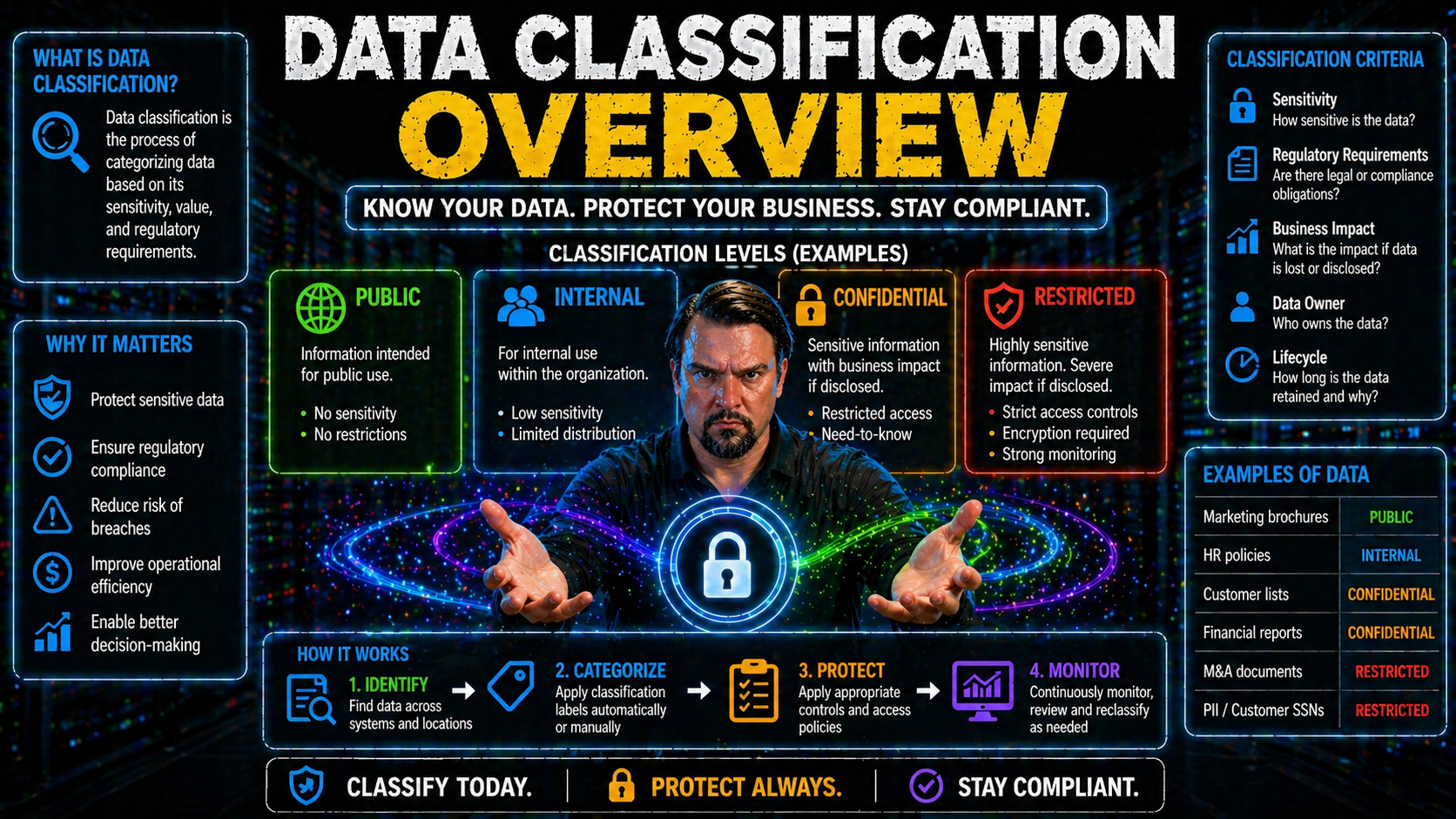
Data classification is quickly becoming a non-negotiable for any modern organization. With sensitive data multiplying by the minute, the pressure’s on to sort, label, and protect your information in a way that makes sense—especially if you’re working in Microsoft 365, Azure, or any cloud-heavy environment. Good classification isn’t just about security; it wraps up business operations, compliance requirements, and data governance all in one. If you want to sleep well knowing your documents, emails, and records aren’t floating around unprotected, you need a clear, step-by-step approach to classification. Ahead, you’ll see exactly why this matters, how it keeps your data safe, and what it takes to get it right from start to finish.
Understanding Data Classification: Key Concepts and Core Benefits
If you’re wondering what all the buzz is about data classification, it’s simple: this is the art and science of putting each piece of data exactly where it belongs, based on how sensitive or important it is. It’s about more than just ticking compliance boxes. Done right, classification keeps your information safe from prying eyes, helps your team work faster, and makes life a lot easier when the auditors come knocking.
Think about it: with so much data flowing between users and devices—especially when you factor in remote work, cloud apps, and new AI-powered tools—you can’t leave it to chance. Data classification lets you control who can see what, and ensures that your crown jewels don’t wind up in the wrong hands. It also lays the groundwork for smoother analytics, safer collaborations, and easier migrations across cloud platforms.
Organizations that prioritize classification aren’t just protecting themselves from risks; they’re setting up smarter governance and getting more value from their data. Of course, there are challenges too, like making sure your classification scheme fits your business and that users actually stick to the rules. In a Microsoft-driven world, where products like Purview and Azure tie everything together, understanding the foundational elements of classification is vital before you dive into the nuts and bolts.
What Is Data Classification and Why It Matters
Data classification is the process of systematically organizing information based on its sensitivity, value, and intended use. This helps organizations control who can access specific data and under what conditions. In business environments with Microsoft 365 or Azure, structured classification means you can tag sensitive documents, emails, or records with labels like confidential or public. These labels trigger access controls and compliance checks that protect critical information from leaks or unauthorized access. Effective data classification not only bolsters security, it also streamlines compliance and makes it easier to manage data throughout its lifecycle.
Core Benefits and Pain Points of Data Classification in Modern Enterprises
- Reduces Security Risk: By labeling sensitive data, you keep control over who can access or share it, lowering the chance of breaches and data loss.
- Supports Compliance: Classification helps meet tough regulations (GDPR, HIPAA, etc.), making audits and reporting a smoother ride—especially across Microsoft cloud apps.
- Enables Better Analytics and Cloud Moves: When your data is organized and tagged, it’s easier to analyze, migrate, or automate securely across platforms.
- Challenges: Implementation can get tricky. User resistance, inconsistent labeling, or clunky tools might slow adoption—particularly if your workflows are deep in Microsoft 365 or Azure.
Data Classification Levels and Sensitivity Tiers
Labeling your data is all about knowing which information is fine to share and what needs to be watched like a hawk. Organizations use sensitivity tiers—from “public” that anyone can see, to “highly restricted” that only a select few ever touch. These tiers bring order to potential chaos, making sure vital business secrets, customer info, and compliance-regulated records stay protected.
But how do you actually pick these tiers, and what frameworks guide the process? Models like C1, C2, and vertical-specific standards offer blueprints for defining classification levels, especially in regulated industries or during audits. They help you set easy-to-follow rules, automate some of the heavy lifting, and provide proof of best practices when outside parties or compliance officers put you under the microscope.
Getting familiar with these sensitivity levels and frameworks is key to crafting a custom approach that fits your organization. The next sections break down typical tier labels and dig into the most common classification frameworks to set the stage for your compliance and governance journey.
Understanding Data Sensitivity Levels and Classification Tiers
- Public: Data you’re fine with the world seeing. Think marketing materials or published reports. No major controls needed.
- Internal: For employees only—like process docs or routine HR forms. Not secret, but not for outside eyes.
- Confidential: Stuff like customer lists or internal financials. Needs stronger protections and maybe encryption, especially across cloud platforms like Microsoft 365 and Azure.
- Highly Restricted: Mission-critical data, trade secrets, or regulatory info. Access is tightly locked down, monitored, and logged at every step.
Industry Classification Frameworks: C1, C2, and Beyond
- C1 Classification: Used for data that needs a basic level of protection—often applied to standard business files that don’t pose serious risk if exposed.
- C2 Classification: Higher protection needed, often in regulated industries. Helps ensure compliance with laws (like SOX or HIPAA) by mandating access controls, monitoring, and strict data handling.
- Other Models: Industries often use layered models (e.g., four- or five-level systems) and align with national or international standards for audit-readiness and governance.
Types and Methods of Data Classification Explained
Let’s talk about how you actually classify data from a technical perspective. There’s more than one way to do it, and the best approach for your team depends on your data, risk appetite, and the size of your organization. Some folks dig into the content itself, searching for keywords or sensitive information. Others base decisions on where the data came from or how it’s used. Still others involve users directly—asking employees to label and categorize files as they handle them.
One of the biggest choices you’ll face is whether to do things by hand or rely on smarter tools to automate the process. Manual methods give you control, but they struggle to keep up at cloud scale. Automated classification, on the other hand, brings speed and consistency—especially when you factor in AI and machine learning built into tools like Microsoft Purview and Azure Information Protection.
Choosing your method (or mixing a few) hinges on finding the right balance between accuracy, simplicity, and overhead. The next sections dive into all the core classification approaches and show how automated discovery tools compare with old-school manual labeling.
Content-Based, Context-Based, and User-Centric Classification Approaches
- Content-Based: Automatically scans files and emails for sensitive data patterns like PII, credit cards, or IP. Perfect for finding hidden risks, but may miss nuance.
- Context-Based: Looks at where data sits, who created it, and its work environment. Useful when location or ownership determines sensitivity—like Azure files in restricted folders.
- User-Centric: Employees label documents themselves. Great for capturing business intent, but depends heavily on user training and adoption—especially in Microsoft-focused shops.
Manual Versus Automated Discovery and Classification Systems
- Manual Labeling: Users pick labels themselves. Fits small organizations or highly sensitive projects but is time-consuming, error-prone, and tough to manage at enterprise scale.
- Automated Classification: Tools like Microsoft Purview and Azure Information Protection scan and tag large datasets consistently, catching things humans might miss. Ideal for cloud and hybrid environments.
- Hybrid Approach: Many shops combine both—using automation for bulk and rules, layering in user input where nuanced context matters. This strikes a balance between accuracy, speed, and real-world relevance. Curious how advanced governance and DLP policies work in Microsoft environments? Check out this deep dive: Advanced Copilot agent governance with Microsoft Purview.
Step-by-Step Data Classification Process
So you know why classification matters and what methods are available. But how do you actually roll out a successful program? It’s not just flipping a switch—there’s a logical sequence to follow, no matter if you’re just starting or modernizing your classification in Microsoft 365 or Azure.
You’ll want to begin by pinning down your objectives—understanding what you’re trying to protect, why, and against what risks. Next, take inventory of all your data across systems, cloud storage, and user devices (yes, that means digging deep). Once you know what you have, it’s time to categorize: apply sensitivity labels and figure out who gets to see what. From there, lock in the right security controls—access restrictions, encryption, and policy enforcement.
Finally, it doesn’t stop at setup. Ongoing monitoring and regular updates keep your classification up to date as your business grows, regulations shift, and new risks pop up. Think of it as an implementation roadmap you’ll revisit often, especially as Microsoft keeps rolling out new features across their stack.
Define Objectives and Business Alignment for Classification
A successful data classification initiative always starts with a clear sense of purpose. Organizations must outline exactly what they want to accomplish, whether it's regulatory compliance, protecting intellectual property, or reducing insider risk. Setting objectives connects the classification process with business goals, risk tolerance, and the requirements of industry regulations. It’s crucial to define the data types, departments, and use cases in scope—so your efforts stay focused, aligned, and measurable right from the beginning.
Step Two: Inventory Your Data
Next up is making sure you actually know what data you own and where it’s hiding. Take a full inventory across cloud platforms, email servers, endpoints, and databases. Don’t just focus on documents—look at logs, archives, and anything else users or apps generate along the way. Automated discovery tools, especially those built into Microsoft Purview and Azure, can help you scan and index your data at scale, making this part far less painful. For more on building audit-ready systems and avoiding document chaos, this episode breaks it down: How to build your Purview shield.
Step Three: Categorize, Classify, and Apply Labels
- Apply Sensitivity Labels: Assign tags like Confidential, Internal Use Only, or Public to everything in your data inventory.
- Integrate With Security Controls: Use Microsoft 365 DLP and Conditional Access to ensure labels automatically drive the right protections—for instance, blocking external sharing on Confidential documents.
- Choose Manual or Automated: Enable label suggestions or rules in Microsoft Purview, or let users self-label based on context. Automation helps with scale; user input helps with intent. For tips on setting up DLP and label-driven security, check the practical guide: How to set up Data Loss Prevention in Microsoft 365 and advanced Copilot agent governance: Microsoft Purview Copilot governance strategies.
Step Four: Implement Security Controls
Once everything is labeled up, it’s time to put security front and center. Configure access controls based on sensitivity—making sure only the right people can open, share, or edit sensitive files or emails. Encrypt critical data, enforce DLP (Data Loss Prevention) policies, and use monitoring to catch risky activity. In Microsoft 365 and Azure, this means combining Purview sensitivity labels with Entra Conditional Access and Defender for Office 365 for a robust security posture. For more tips on securing M365 without annoying your team, see: Ironclad Microsoft 365 security configuration.
Step Five: Monitor and Refine Classification Continuously
Classification isn’t a one-and-done project. You’ll need ongoing monitoring to catch label drift, new risks, or policy violations. Set up reports to watch data flows, label changes, and access patterns—then use this feedback to refine your classification policies. In the Microsoft world, tools like Purview Audit let you track user activity, providing vital signals for both compliance and security. Learn more about continuous monitoring and auditing user actions with Purview right here: Auditing user activity with Microsoft Purview.
Tools, Technologies, and Best Practices for Effective Data Classification
It’s one thing to plan your classification strategy, but pulling it off at scale takes the right mix of technology and technique. Today’s classification tools combine everything from built-in automation to advanced AI, plus integrations across Microsoft, Azure, and cloud-native systems. Picking the right tools—and actually using them well—can mean the difference between a smooth, secure data landscape and a compliance nightmare.
Adopting best practices helps more than just IT. Good processes set clear blueprints for teams, prevent costly mistakes, and streamline user adoption. That said, common pitfalls—like skipping training or letting schema drift—still trip up even the most tech-savvy organizations. Luckily, smarter tech can help pick up the slack, using machine learning to tag data faster and more consistently, while smart metadata policies add extra context and granularity.
Whether you’re just getting started or looking to perfect your data classification over the long term, focusing on best practices and leveraging modern systems is the key. The next sections break down what works, what doesn’t, and how the latest AI and metadata-driven policies make all the difference—especially as your Microsoft ecosystem grows.
Data Classification Best Practices and Common Mistakes to Avoid
- Define and Maintain Clear Schemas: Lay out labeling categories early, avoid “miscellaneous” buckets that muddy the waters—especially in SharePoint and Power Platform projects. Check this episode for data strategy in SharePoint and Power Apps: SharePoint AI governance and data strategy fixes.
- Train Users and Monitor Adoption: Don’t assume everyone knows what “Confidential” means. Regular training reduces mislabeling and boosts user buy-in.
- Automate Where Possible: Hybrid and AI-powered systems speed up classification, lower user friction, and catch hidden risks. Use Microsoft tools for automation whenever practical.
- Watch for Governance Gaps: Even secure platforms like Power Platform can create risks if left ungoverned. Enforce controls and review permissions regularly—see Power Platform governance best practices.
Modern Classification Systems: AI Capabilities and Metadata-Driven Policies
AI and machine learning take data classification into overdrive. These systems rapidly analyze files, emails, and even non-traditional data for patterns—flagging sensitive or risky content automatically. Metadata-driven policies, meanwhile, attach information to data that guides labeling and lifecycle controls.
Microsoft and Azure-native tools like Purview and Fabric integrate AI and metadata rules, making classification smarter, faster, and less reliant on manual effort. For enterprises invested in analytics and governance, leveraging these modern capabilities ensures compliance and keeps your data well-organized from day one. Explore how AI and governance work together in the Microsoft Fabric ecosystem with this resource: Unifying data governance and AI in Microsoft Fabric.
Governance, Compliance, and Industry Solutions for Data Classification
Strong data classification isn’t just a technical win—it’s the backbone of effective governance, rock-solid compliance, and bulletproof audit defenses. With privacy laws growing more stringent and cyberattacks hitting new heights, businesses need classification practices that do more than just keep regulators happy. They must support sustainable governance, streamline reporting, and prove that sensitive data is managed to the highest standard.
Leading organizations often pair in-house systems with industry solutions like Fortra’s Classifier Suite. These tools bring automation, advanced analytics, and proven security models to the table—raising your data protection game while checking all the boxes for third-party certifications and risk audits. Whether you’re prepping for a GDPR audit, keeping up with HIPAA, or just trying to avoid headline-making leaks, industry-aligned platforms provide a level of trust that’s tough to replicate with homegrown approaches.
The sections below highlight how classification supports governance and compliance, and feature a practical look at top-rated solution providers—giving your organization a leg up as data protection stakes get higher every year.
Supporting Governance, Compliance, and Audit-Ready Reporting
Proper data classification is a direct line to compliance with regulations like GDPR, HIPAA, and CCPA. When every file, email, or record is labeled by sensitivity and access, it’s much easier to show auditors or regulators that your organization is managing risks and protecting personal data. Tools in Microsoft 365 and Azure, such as Purview, streamline audit reporting by providing clear evidence of data handling and policy enforcement.
Classification also ties strongly to governance activities—like managing access reviews, ensuring ownership is clear, and enforcing policies with automation. Learn more about Azure governance and how policy enforcement prevents risks: Azure enterprise governance strategy and tackle Microsoft 365 data access and ownership challenges here: Microsoft 365 data access governance.
Industry Solutions Spotlight: Fortra’s Classifier Suite and Award-Winning Data Protection
- Fortra’s Classifier Suite (2024 Cybersecurity Excellence Award Winner): Recognized industry-wide for powerful, user-friendly data labeling and policy enforcement. Integrates with Microsoft 365 and Azure, boosting protection without slowing down workflows.
- Comparison Value: Fortra stands out for rapid implementation, robust analytics, and seamless reporting, making it a top choice for enterprises serious about data classification and governance.
Data Classification in Multi-Cloud and Hybrid Environments
Today’s data isn’t locked away in a single server room. It lives everywhere: AWS, Azure, Google Cloud, and still lurking on on-premises boxes and desktops. Keeping your classification practices consistent across all these platforms is a next-level challenge for IT and security teams. Labels set in one cloud don’t always transfer neatly to the next, and every platform brings its own set of tools, compliance baselines, and quirks.
That’s why multi-cloud and hybrid environments demand special attention to labeling standards, data governance, and policy integrations. If your metadata’s a mess or automation fails to cross platforms, you risk fragmented protections—and that can open doors for compliance failures or security gaps. There’s also increased pressure to make sure automated discovery tools talk to each other, enforcing a unified scheme everywhere sensitive data travels and lives.
In the sections ahead, we’ll tackle what gets in the way of consistency across clouds and outline hands-on strategies for integrating automation between Azure Purview, AWS Macie, and GCP Data Catalog. For a look at the reality of governance beyond just tools, especially in Microsoft Fabric and other evolving environments, these discussions are a must: Microsoft Fabric governance and semantic drift and The illusion of governance in Fabric.
Challenges of Consistent Classification Across Cloud Platforms
Maintaining data classification consistency across cloud and hybrid environments can get tricky. Each platform—be it Microsoft Azure, AWS, or Google Cloud—has its unique labeling systems, metadata standards, and native tools. These inconsistencies make it hard to enforce the same policies everywhere. Without clear standards or integration strategies, organizations may encounter policy drift, misaligned controls, and audit headaches. Adopting cross-platform labeling conventions, frequent inventories, and harmonized automation routines helps keep classification accurate and compliant from end to end.
Integrating Classification With Cloud-Native Data Discovery Tools
- Azure Purview: Provides automated data discovery, sensitivity labeling, and integration with Microsoft 365 DLP. Sync labels to centralize policies across both on-prem and cloud assets.
- AWS Macie: Scans S3 buckets for sensitive data and applies labels based on content patterns. Integrate Macie findings into enterprise data catalogs for unified policy enforcement.
- GCP Data Catalog: Tags and classifies Google Cloud assets automatically. Syncs with external systems via APIs to keep rules and labels in line with enterprise standards.
- Unified Workflows: Leverage all three tools together to ensure consistent discovery and labeling. Document your approach and automate cross-cloud updates for seamless governance. To prevent document chaos in these distributed environments, see best practices here, and for auditing user activity with Purview—even across clouds—see this guide.
Conclusion and Key Takeaways: Building Your Data Classification Strategy
So, here’s the bottom line: if you want your data to actually be protected—not just hope for the best—classification is the secret sauce. It means putting your critical data, like financial records, intellectual property, or customer card numbers, into clear categories and stamping on the right labels. Whether it’s unstructured files, cloud data, or even machine-generated logs, everything needs to be sorted and protected accordingly.
Think of data classification as setting rules about who can see what—limiting access to sensitive stuff and keeping nosy folks out. This helps keep risks and breaches to a minimum. With today’s sky-high data volumes, automation, machine learning models, and AI-driven tools are your friends. They help you find, classify, and secure your data so you don’t drown in paperwork or miss a hidden threat.
It’s not all about technology, though. Good classification calls for clear business objectives and security policies, the right security controls, and continuous monitoring—especially when your data is bouncing between Microsoft 365, Azure, on-prem servers, and who-knows-what cloud. Consistency matters, and the right strategy bridges those gaps, ensuring compliance and audit readiness all the way.
At the end of the day, data classification isn’t a box to check—it’s a living, breathing part of your data management game. Keep your practices sharp, train your people, watch how data is handled, and don’t sleep on those cloud and AI/ML data sources. For organizations looking to get serious about security and governance, classification is where you start and what you keep coming back to.
You Should Also Listen To
If you are researching data classification in Microsoft 365, these episodes add practical context that helps connect governance, security, compliance, and AI concepts to real Microsoft environments.
- Microsoft Purview – Simply Explained — Clarify how classification, retention, compliance, and data governance fit together across Microsoft 365.
- Microsoft Defender XDR – Simply Explained — See how data-risk signals connect with detection, investigation, and coordinated response.
- Conditional Access – Simply Explained — Understand how identity, device, and risk context strengthens protection around sensitive data.
- Microsoft Teams Governance – Simply Explained — Explore the governance operating model needed to turn policies into consistent user behavior.
They are useful next steps when you want to move from a definition or framework to implementation decisions.

Microsoft MVP | Host of M365.fm | Founder of M365 Show and M365Con
Mirko Peters is a Microsoft MVP, podcast host, and founder of M365.fm, M365 Show, and M365Con. His work connects Microsoft practitioners through podcast interviews, livestreams, and community events.
At M365.fm, Mirko hosts conversations with Microsoft MVPs, product experts, architects, and community contributors. Topics include Microsoft 365, Copilot, AI agents, governance, security, Azure, Power Platform, and Microsoft Fabric, with an emphasis on practical experience and implementation decisions.
M365.fm is the podcast and learning platform. M365 Show brings experts together for livestreams, while M365Con provides an online conference setting for community learning.
Official website: Mirko Peters (https://www.mirkopeters.com/). Recognition: Mirko Peters — Microsoft MVP profile (https://mvp.microsoft.com/de-DE/mvp/profile/9b0ca797-db5a-493a-a845-8b9158046cf5). Connect on LinkedIn (https://www.linkedin.com/in/m365showpodcast/).





