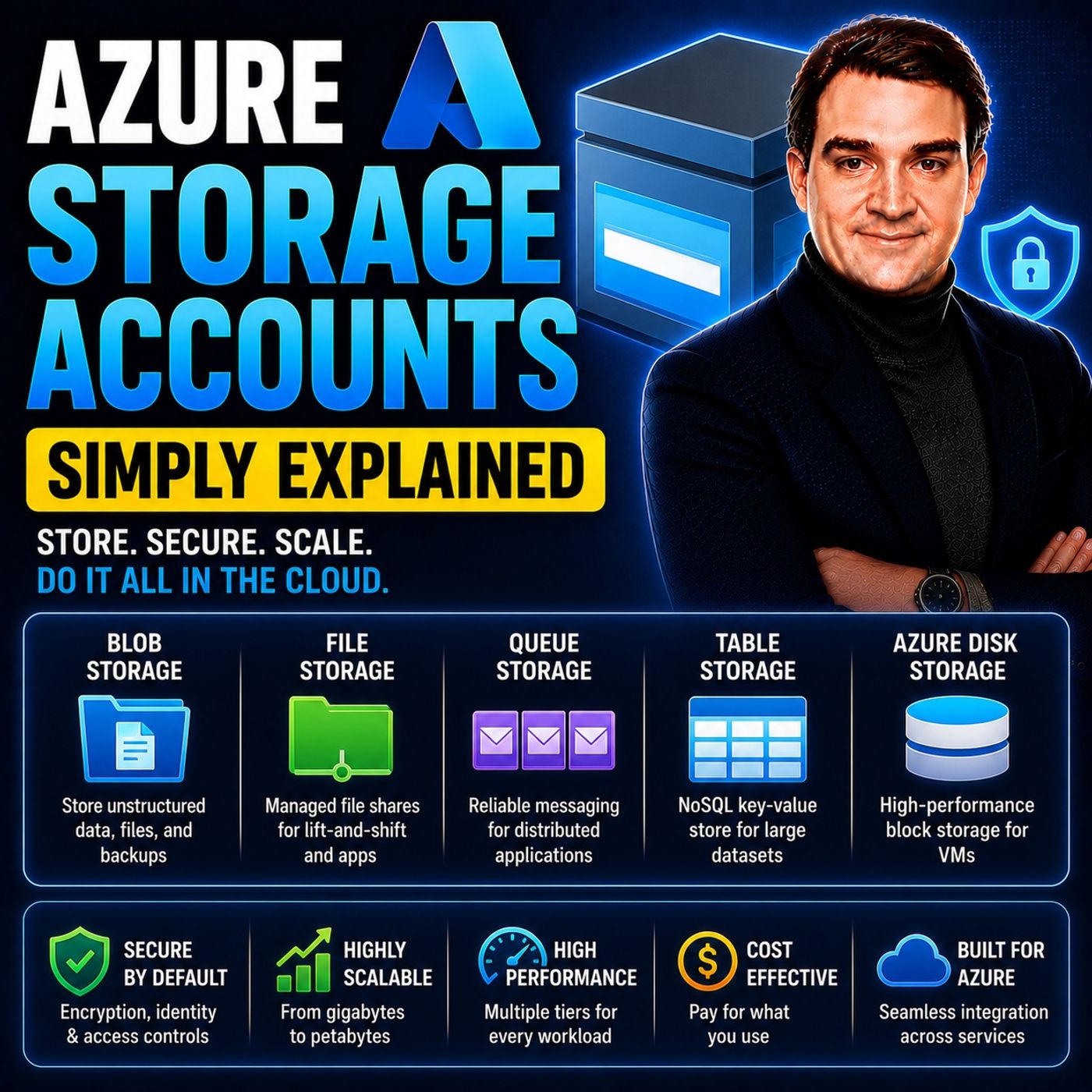
Demystifying Azure Storage Accounts: A Beginner's Guide
Welcome to our deep dive into the world of cloud data management! Whether you are an IT professional just starting your Microsoft Azure journey or an experienced cloud architect looking to refine your cloud strategies, understanding how data is structured and protected is critical. In the fast-paced ecosystem of modern cloud computing, having a dependable foundation for your files, unstructured media, application logs, and NoSQL workloads is non-negotiable. That foundation starts with properly configuring and managing your cloud repositories. To get a foundational understanding of this topic and hear a practical breakdown of how these mechanisms operate in the real world, be sure to check out our related podcast episode, Azure Storage Accounts - Simply Explained.
What Are Azure Storage Accounts?
Definition and Purpose
Azure Storage Accounts serve as the foundation for managing various types of data in the cloud. They provide a unified platform for storing and accessing data, which includes unstructured data, files, messages, and NoSQL data. Each Azure Storage Account creates a unique namespace for your data, ensuring that every object stored has a distinct URL. This structure simplifies data management and enhances accessibility across the Azure platform.
The primary purpose of Azure Storage Accounts is to offer a secure and scalable environment for your data. You can utilize different storage types within a single account, such as:
- Blob Storage: Ideal for unstructured data like images and videos.
- File Storage: Perfect for network file shares.
- Queue Storage: Useful for managing messages between applications.
- Table Storage: Designed for non-relational data.
All Azure Storage services operate within a Storage Account, which acts as the security, billing, and replication boundary. This means you can define the region where your data resides, the performance tier, and the redundancy model. For instance, you can choose from various replication strategies like Locally Redundant Storage (LRS) or Geo-Redundant Storage (GRS) to ensure data durability and high availability.
Importance in Cloud Computing
Azure Storage Accounts play a crucial role in cloud computing by enhancing scalability and reliability. They allow organizations to manage resources efficiently, especially during peak usage times. This flexibility supports the addition of new features and accommodates larger datasets without requiring significant changes to existing architecture.
Moreover, Azure Storage Accounts enhance reliability through data replication across multiple regions. This ensures that your data remains accessible even during unexpected issues, contributing to high availability. The ability to tailor storage solutions to specific requirements further enhances both scalability and reliability in your cloud computing strategies.
Security is another vital aspect of Azure Storage Accounts. They incorporate features like data encryption at rest and in transit, ensuring that your data remains secure throughout its lifecycle. Role-based access controls (RBAC) enforce the principle of least privilege, helping to prevent security incidents and meet compliance requirements.
Types of Storage Accounts in Azure
Blob Storage
Key Features
Blob Storage is designed for storing unstructured data, such as images, videos, and documents. Here are some key features that make Blob Storage a preferred choice for many applications:
- Scalability: You can store massive amounts of data, up to hundreds of terabytes, without worrying about capacity limits.
- Data Replication: Azure offers various replication options, including Locally Redundant Storage (LRS) and Geo-Redundant Storage (GRS), ensuring your data remains durable and available.
- Data Encryption: Azure automatically encrypts your data at rest and in transit, providing an extra layer of security.
- Access Tiers: Blob Storage supports different access tiers (hot, cool, and archive), allowing you to optimize costs based on how frequently you access your data.
Use Cases
Blob Storage is versatile and supports various applications. Here are some common use cases:
- Serving Images and Documents: You can serve images or documents directly to a browser, making it ideal for web applications.
- Backup and Disaster Recovery: Store data for backup, restore, and disaster recovery, ensuring business continuity.
- Streaming Media: Use Blob Storage for streaming videos and audio, providing a seamless experience for users.
- Logging: Write log files for applications, enabling easy access and analysis of operational data.
File Storage
Key Features
Azure File Storage provides a cloud-based file share service that is fully managed. Here are its key features:
- Protocol Support: It supports SMB, NFS, and REST API, allowing for flexible access to file shares.
- Hybrid Cloud Integration: Azure File Storage enables seamless integration with on-premises systems, making it suitable for hybrid cloud scenarios.
- Scalability: You can scale your file shares easily, accommodating growing data needs without hassle.
- Business Continuity: It reduces concerns about local outages affecting operations, enhancing overall business continuity.
Use Cases
File Storage is particularly useful for various business operations. Here are some applications of file storage:
- File Sharing: Use Azure Files for secure and managed file sharing across teams and departments.
- Backup Solutions: Implement file shares for backups, improving disaster recovery strategies.
- Application Migration: Lift and shift applications expecting a file share to the cloud without major changes.
- Azure File Sync: Replicate Azure file shares to Windows Server, improving performance and caching.
Queue Storage
Key Features
Queue Storage is designed for managing messages between applications. Its key features include:
- Asynchronous Communication: It allows for reliable message sending and receiving, even when services operate at different times or speeds.
- Durability: Queue Storage maintains multiple copies of queue and message data, ensuring data is not lost.
- Automatic Fault Handling: The service automatically manages transient faults, enhancing reliability during network issues.
Use Cases
Queue Storage is beneficial for distributed application architectures. Here are some applications of queue storage:
- Decoupling Services: It enhances scalability and resilience by decoupling services, particularly useful for microservices.
- Background Task Processing: Use Queue Storage for background task processing, ensuring tasks are completed even if the main application is busy.
- Event-Driven Architectures: Implement event-driven architectures where different components communicate through messages, improving overall system efficiency.
Table Storage
Key Features
Azure Table Storage is a NoSQL key-value store that provides a simple and cost-effective way to store structured data. Here are some key features that make it a valuable option for developers:
- Scalability: Azure Table Storage can handle large volumes of data by distributing partitions across storage nodes. This allows you to scale your applications without worrying about performance bottlenecks.
- Cost Efficiency: It offers a lower cost compared to relational databases for storing large amounts of structured data. For example, you can store less than 1GB of data for about $0.05 per month.
- Flexibility in Data Modeling: You can use simple attribute sets, making it suitable for various applications. This flexibility allows you to adapt your data model as your application evolves.
- Performance Optimization: Read and write operations are optimized within partitions, enhancing throughput and performance. This ensures that your applications run smoothly even under heavy loads.
Use Cases
Azure Table Storage is ideal for specific scenarios where traditional relational databases may not be the best fit. Here are some common use cases:
- Storing User Profiles: You can store user profiles, preferences, session data, and application state. The low latency offered by Table Storage ensures quick access to this information.
- Web-Scale Applications: It is perfect for web-scale applications that require fast querying through clustered indexes. You can utilize OData protocol and LINQ queries for efficient data retrieval.
- Cost-Effective Solutions: When you need a cost-effective storage solution for large datasets, Table Storage is an excellent choice. It simplifies data management compared to relational databases.
- Limited Access Scenarios: If your application only needs to access a single table at a time, Table Storage is ideal. You can handle joins client-side using LINQ, making it suitable for smaller datasets.
Disk Storage
Key Features
Azure Disk Storage provides high-performance, durable block storage for Azure Virtual Machines (VMs). Here are some key features that make it essential for your cloud infrastructure:
- Persistent Storage: Data remains intact even when a VM is stopped or deallocated. This ensures that you do not lose critical information during maintenance or updates.
- Encryption: Azure Disk Storage supports encryption for enhanced security. This feature protects your data both at rest and in transit, ensuring compliance with security standards.
- Snapshots: You can easily create snapshots of your disks for backup and recovery. This feature simplifies disaster recovery strategies and helps maintain business continuity.
- Performance Tiers: Azure offers different performance levels to suit various workloads. You can choose between standard and premium disks based on your application's performance needs.
Use Cases
Azure Disk Storage is particularly beneficial for various applications. Here are some common use cases:
- Virtual Machines: Use Azure Disk Storage for your VMs to ensure high availability and performance. It provides the necessary storage for operating systems and applications.
- Backup Solutions: Implement disk storage for backups, improving your disaster recovery strategies. Snapshots allow for quick restoration of data when needed.
- Database Storage: Store databases on Azure Disk Storage for improved performance and reliability. The persistent nature of disk storage ensures that your data remains accessible.
- High-Performance Applications: If your application requires low-latency access to data, Azure Disk Storage is the right choice. It offers performance isolation and scalability for demanding workloads.
Choosing the Right Azure Storage Account
Factors to Consider
When selecting an Azure Storage Account, you should evaluate several key factors to ensure it meets your specific needs. Here are some important considerations:
- Usage Patterns: Understand how you plan to use the storage. Different workloads have varying requirements for latency and throughput. For example, if your application is sensitive to read latency, you might prefer SSD file shares over HDD.
- Data Redundancy: Consider how much redundancy you need. The level of data replication within the primary region affects your choice. If your application requires geo-replication to safeguard against regional disasters, this will influence your decision.
- Performance Needs: Assess the performance requirements of your workloads. Higher performance tiers, like Premium, provide better speed but come at a higher cost. You must balance performance with your budget.
- Access Patterns: Think about how often you will access your data. Applications requiring frequent access may benefit from higher-tier storage, while infrequent access can utilize lower-cost options.
Here is a quick overview of how different storage types perform based on usage patterns:
| Usage Pattern Requirements | SSD | HDD |
|---|---|---|
| Write latency (single-digit milliseconds) | Yes | Yes |
| Read latency (single-digit milliseconds) | Yes | No |
Cost Implications
Cost is a crucial factor when choosing an Azure Storage Account. Different storage types and tiers come with varying costs. Here is a breakdown of the cost types you should consider:
| Cost Type | Description |
|---|---|
| Storage capacity costs | Varies by access tier; decreases as the tier gets cooler. |
| Data access costs | Increases as the tier gets cooler; charged per gigabyte for reads. |
| Transaction costs | Per-transaction charge increases as the tier gets cooler. |
| Geo-replication data transfer | Per-gigabyte charge for accounts with geo-replication configured. |
| Outbound data transfer costs | Charged per gigabyte for data transferred out of an Azure region. |
| Tier change charges | Applies when changing the access tier for blobs. |
The performance requirements of your Azure Storage Account directly affect its overall cost. Higher performance tiers, like Premium, incur greater costs. In contrast, lower tiers, such as Cool and Archive, provide cost savings but compromise on performance. You must carefully evaluate your performance needs against your budget to manage costs effectively.
By considering these factors and understanding the cost implications, you can select the right Azure Storage Account that aligns with your data management strategy.
Best Practices for Azure Storage
Security Measures
Securing your Azure Storage Accounts is crucial for protecting sensitive data. Implementing best practices can help you safeguard your information effectively. Here are some recommended security measures:
| Best Practice | Description |
|---|---|
| Enable Immutable Blob Storage | Protect critical Azure Blob Storage data from accidental deletion or modification. |
| Enable Infrastructure Encryption | Ensure infrastructure encryption is enabled for Microsoft Azure Storage accounts. |
| Enable Logging for Azure Storage Blob Service | Ensure that storage logging is enabled for the Azure Storage Blob service. |
| Enable Secure Transfer in Azure Storage | Ensure that "Secure transfer required" security feature is enabled within your Azure Storage account configuration. |
| Enable Soft Delete for Azure Blob Storage | Enable Soft Delete feature for your Microsoft Azure Storage blob objects to recover deleted data. |
| Limit Storage Account Access by IP Address | Restrict access to Azure Storage accounts to specific IP address(es). |
| Disable Public Network Access to Storage Accounts | Ensure that public network access to Azure Storage accounts is disabled. |
| Use encryption to protect data | Azure Storage encrypts all data at rest by default using Microsoft-managed keys. |
| Require secure transfer (HTTPS) to the storage account | All requests to the storage account must be made over HTTPS. |
| Disallow cross-tenant object replication | Prevent object replication across different Microsoft Entra tenants. |
Additionally, enabling logging for Azure Storage Queue Service can provide insights into operations. You should also enable Microsoft Entra Authorization By Default to enhance security further. Versioning for blobs is another useful feature that allows you to recover previous versions of your data.
Performance Optimization
Optimizing performance in Azure Storage can significantly enhance your application's efficiency. Here are some strategies to consider:
- Plan for scale: Understand the scale targets for your storage accounts.
- Choose the optimal storage account type: For high transaction rates and low latency, consider premium block blob storage accounts.
- Reduce travel distance: Place data in regions closest to clients and use object replication or CDNs for distant clients.
- Efficient naming scheme: Use hash tag prefixes to decrease latency in operations.
- Optimize data clients: Select appropriate data transfer tools like AzCopy for performance.
- Optimize custom code: Use Azure SDKs for blob operations instead of custom wrappers.
- Collect performance data: Monitor storage accounts to identify and address performance bottlenecks.
Network configuration also plays a vital role in performance. Ensure that your storage account is in the same region as your applications to minimize latency. You can restrict access via virtual networks or private endpoints to keep data traffic secure.
By following these best practices, you can enhance both the security and performance of your Azure Storage Accounts, ensuring that your data remains safe and accessible.
FAQ
What is an Azure Storage Account?
An Azure Storage Account is a cloud-based service that allows you to store and manage data securely. It supports various storage types, including Blob, File, Queue, Table, and Disk Storage.
How do I create an Azure Storage Account?
You can create an Azure Storage Account through the Azure Portal. Simply log in, navigate to "Storage Accounts," and click "Add." Follow the prompts to configure your account settings.
What types of data can I store in Azure Storage?
You can store unstructured data like images and videos in Blob Storage, files in File Storage, messages in Queue Storage, structured data in Table Storage, and virtual machine disks in Disk Storage.
How does Azure ensure data security?
Azure provides multiple security features, including data encryption at rest and in transit, role-based access control (RBAC), and secure transfer requirements. These measures help protect your data from unauthorized access.
What are the different performance tiers available?
Azure offers several performance tiers, including Standard and Premium. Standard is cost-effective for general workloads, while Premium provides low-latency access for high-performance applications.
Can I change the performance tier later?
Yes, you can change the performance tier of your Azure Storage Account. However, be aware that changing tiers may incur additional costs and require some downtime during the transition.
How is data redundancy managed in Azure?
Azure offers various redundancy options, such as Locally Redundant Storage (LRS) and Geo-Redundant Storage (GRS). These options ensure your data remains available and durable, even in case of hardware failures.
What is the cost of using Azure Storage Accounts?
Costs vary based on storage type, performance tier, and data access patterns. You pay for storage capacity, data access, transactions, and any geo-replication features you enable.
Conclusion
In summary, Azure Storage Accounts are essential for effective data management in the cloud. They provide various storage types, including Blob, File, Queue, Table, and Disk Storage, each tailored to specific needs. You can customize these accounts for performance and availability, ensuring they align with your organizational goals.
Here are some key takeaways:
- Azure Storage Accounts offer enterprise-grade security features, including automatic encryption and role-based access control.
- Understanding these accounts enhances your overall cloud strategy and data governance, supporting compliance and operational efficiency.
Explore Azure Storage options to find the best fit for your needs. By leveraging these resources, you can optimize your data management and drive innovation in your organization. To deepen your knowledge and listen to a comprehensive breakdown of these architectural concepts, make sure to visit our featured episode on Azure Storage Accounts - Simply Explained.

Microsoft MVP | Host of M365.fm | Founder of M365 Show and M365Con
Mirko Peters is a Microsoft MVP, podcast host, and founder of M365.fm, M365 Show, and M365Con. His work connects Microsoft practitioners through podcast interviews, livestreams, and community events.
At M365.fm, Mirko hosts conversations with Microsoft MVPs, product experts, architects, and community contributors. Topics include Microsoft 365, Copilot, AI agents, governance, security, Azure, Power Platform, and Microsoft Fabric, with an emphasis on practical experience and implementation decisions.
M365.fm is the podcast and learning platform. M365 Show brings experts together for livestreams, while M365Con provides an online conference setting for community learning.
Official website: Mirko Peters (https://www.mirkopeters.com/). Recognition: Mirko Peters — Microsoft MVP profile (https://mvp.microsoft.com/de-DE/mvp/profile/9b0ca797-db5a-493a-a845-8b9158046cf5). Connect on LinkedIn (https://www.linkedin.com/in/m365showpodcast/).