
Microsoft Teams Ecosystem Explained: The Ultimate Guide to Digital Transformation and Collaboration
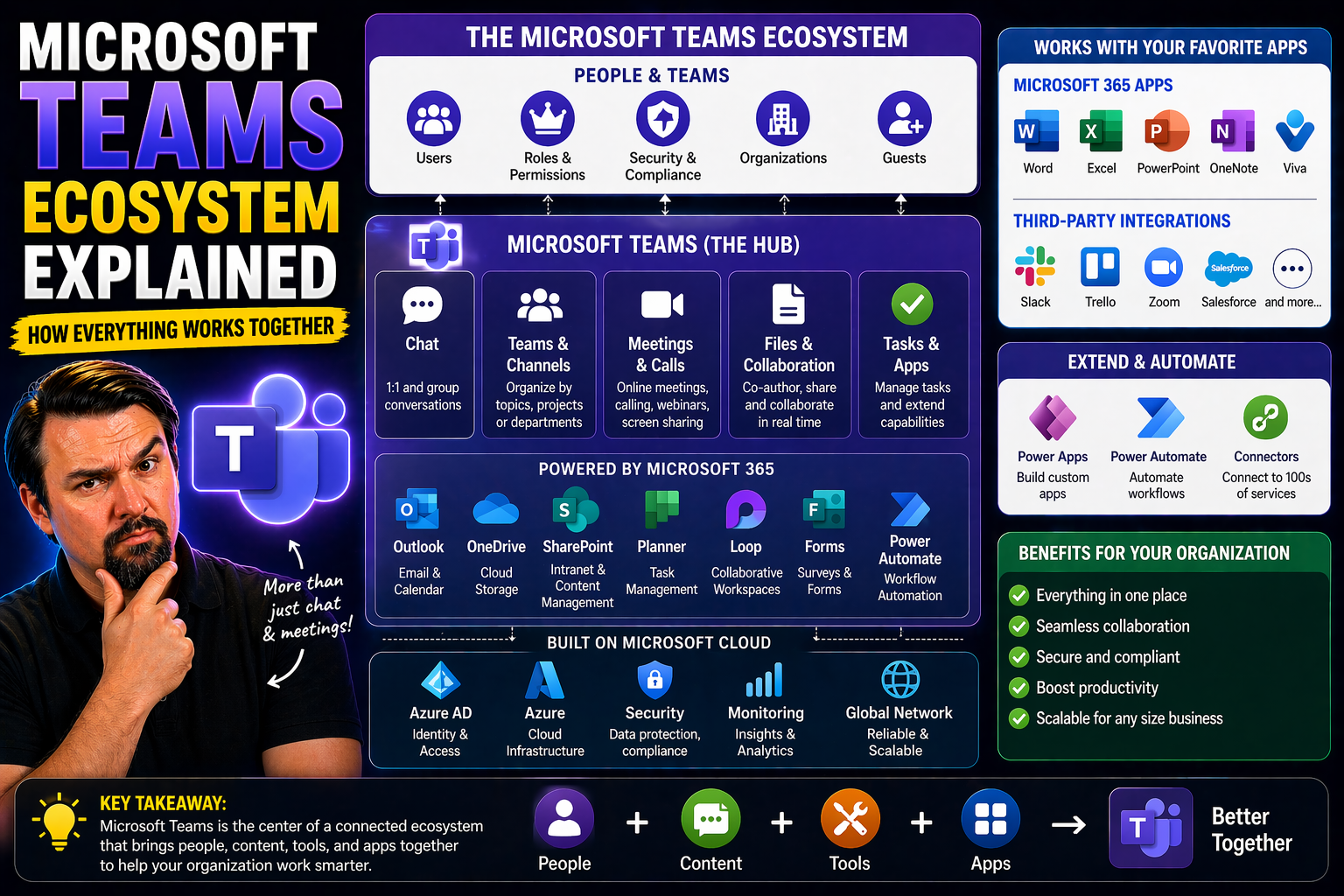
The Microsoft Teams ecosystem isn’t just another chat app—it’s the backbone for modern digital workplaces. As you try to get your head around expensive technology investments and changing how people work, understanding what makes up this ecosystem can save you a headache (or two). This guide unpacks exactly how Teams weaves together communication, collaboration, content management, security, and automation into one connected experience.
Whether you’re an IT leader or just someone tasked with “figuring out Teams,” you’ll get a no-nonsense, practical look at all the moving parts. We’ll cover its core components, how it fits into Microsoft’s bigger ecosystem, and how to deploy, manage, and actually get value from it. By the end, you’ll understand how Teams does more than just make meetings—it's a catalyst for digital transformation, connecting people, information, and workflows in ways most point solutions simply can’t.
Understanding the Ecosystem of Microsoft Teams and the Modern Digital Ecosystem
Let’s set the stage: Microsoft Teams isn’t living out here on its own. It sits at the beating heart of a much bigger digital ecosystem, linking Microsoft 365, Dynamics 365, Power Platform, and Azure under one virtual roof. Why does this matter? Because your business isn’t made of isolated apps or siloed departments—it’s a web of conversations, documents, approvals, data, and goals forever bumping into each other.
Teams pulls all those threads together. Instead of chaos from scattered tools and logins, you get a digital command center for your organization, integrating file sharing, chat, meetings, business apps, and even AI—all secured and governed together. That’s extra important now that the workplace is whatever you make it: at a desk, on your phone, or halfway across the globe.
Today’s digital ecosystem is about more than just connecting people. It’s about breaking down barriers so knowledge can flow, decisions happen faster, and innovation isn’t locked away in someone’s inbox. Teams, by design, doesn’t just support this—it accelerates it. If you’re pushing for digital transformation, you can’t skip the “ecosystem” piece. Coming up, we’ll break down what this Teams ecosystem includes, and why Microsoft’s approach gives organizations a real strategic leg up.
What Makes Up the Microsoft Teams Ecosystem?
The Microsoft Teams ecosystem is more than a single tool—it's an integrated platform of interconnected apps and services. At its core, Teams combines chat, video meetings, file sharing, and project collaboration, all while connecting deeply with Microsoft 365 tools such as Outlook and SharePoint.
It hosts its own app store, supports third-party integrations, and provides extensibility frameworks so organizations can build custom tabs, bots, and workflows for their unique needs. With features like identity management via Azure Active Directory and governance controls, it’s engineered for enterprise collaboration and modern digital workplace initiatives, not just messaging.
Strategic Advantages of the Microsoft Platform Ecosystem
- Unified User Experience: Teams, Microsoft 365, Dynamics 365, Power Platform, and Azure work together for a seamless, consistent experience—no more context switching or jumping between apps.
- Integrated Security: Data protection, access control, and compliance run across the whole ecosystem, making it easier to safeguard sensitive information and meet regulatory demands.
- Scalable Automation: Power Platform enables automation right inside Teams, empowering users to create workflows and apps without development bottlenecks.
- Data-Driven Insights: Combining data from Teams, Dynamics, and Azure analytics gives organizations real-time visibility for decision-making that point solutions can’t match.
- Simplified App Integration: Organizations can build and deploy both custom and third-party apps, maximizing productivity while minimizing silos.
Core Components of the Microsoft 365 Foundation and Teams Platform
To get what makes the Teams ecosystem run, you’ve got to look beneath the surface at the Microsoft 365 foundation. This platform holds together Outlook for email, OneDrive and SharePoint for storage and collaboration, plus Exchange and Azure Active Directory for secure access and identity.
Teams doesn’t reinvent the wheel—it builds on these proven services to deliver unified experiences. When you share a file in a Teams channel, it isn’t floating in space; SharePoint’s handling the storage and permissions. When users join a meeting or access sensitive documents, Azure AD is working behind the scenes for access and security. This tight integration is what makes Teams more than just the sum of its parts.
The SharePoint connection is especially important for powering teamwork. It underpins document management, version control, and team sites. And when it comes to secure collaboration—internally or externally—Azure Active Directory and Microsoft 365 compliance make sure it’s locked down, auditable, and scalable. Coming up, you’ll see how each foundational service plays a role in delivering that “just works” modern workplace vibe.
Microsoft 365 Foundation: The Productivity Core of Teams
Microsoft 365 provides the backbone for Teams—think of it as the productivity toolkit that powers everything you do. Key apps like Outlook manage email and calendaring, OneDrive handles personal file storage, and SharePoint enables shared document libraries and team sites.
Exchange provides robust messaging and calendaring in the background, while Azure Active Directory manages user identity and secure access. By building directly on top of these frameworks, Teams can offer seamless collaboration, centralized user experiences, and strong access control within the Microsoft ecosystem.
Teams SharePoint Integration for Seamless Content and Collaboration
- Centralized File Storage: Every Teams channel gets its own SharePoint document library, so files shared in Teams are stored securely and with version control.
- Collaboration Without Silos: Documents can be co-authored in real-time—no more emailing attachments back and forth. Everyone works on the latest copy, reducing errors and confusion.
- Integrated Team Sites: SharePoint powers rich team sites linked to each channel, making it easy to aggregate wikis, lists, and dashboards at the team level. Need a dashboard showdown? See Teams vs SharePoint: The Dashboard Showdown for best practices.
- Governance & Compliance: By leveraging SharePoint’s controls, organizations can set clear rules and permissions, transforming chaotic Teams workspaces into managed, secure collaboration hubs. For more details, check Teams Governance Best Practices.
Extending Teams Functionality with Power Platform and Business Dynamics 365
If you want to turn Teams from a collaboration space into a business accelerator, look no further than Power Platform and Microsoft Dynamics 365. These integrations boost your ability to automate, analyze, and drive customer impact—right from your Teams workspace.
Power Platform unlocks low-code and no-code workflows, allowing non-developers to build custom apps, bots, and automations directly inside of Teams. It empowers frontline workers and managers to innovate without going through IT bottlenecks. Meanwhile, Dynamics 365 brings powerful suite of CRM and ERP tools right into Teams channels and meetings, moving sales, customer service, and supply chain management out of legacy silos and into the conversation.
This combo helps businesses react faster to customer needs, streamline decision-making, and close the gap between insight and action. Up next, we'll break down how these tools empower users to build apps without advanced skills, and how real-time data drives process transformation for your teams.
Power Platform Empowering Teams Users for Innovation
- Power Apps: Quickly build custom forms, dashboards, and applications to fit unique business needs—all inside Teams with no coding required.
- Power Automate: Automate repetitive tasks like notifications, approvals, or data entry so your team can focus on work that matters. Get inspiration from guides to building custom Teams apps and message extensions.
- Power Virtual Agents: Deploy chatbots and virtual agents right in Teams to answer FAQs, route requests, and improve support operations without IT getting bogged down.
- Citizen Developer Enablement: Business users—“citizen developers”—can create and update workflows themselves, increasing agility and fostering innovation.
Transforming Business Operations with 365 Microsoft Dynamics and Teams
- CRM in Context: Dynamics 365 Sales data lives where your team works; embed customer insights and real-time pipeline updates directly in Teams channels. For a deep dive, see integrating Dynamics 365 Sales with Teams.
- Streamlined Workflows: Automate processes like approvals, order management, and customer service tickets, all triggered and tracked in Teams—reducing context switching and data duplication.
- Collaboration Meets Data: Teams can discuss, update, and act on CRM and ERP records without leaving the Teams interface, increasing productivity for field, sales, and support staff.
- Governance and Security: Manage sensitive business data with granular controls, single sign-on, and audit trails built into Microsoft’s unified security and compliance model.
Azure Cloud Computing and Copilot: Enhancing Productivity Across the Ecosystem
The magic behind Teams doesn’t happen in your desktop app—it’s powered by Azure’s cloud infrastructure and now, driven by the intelligence of Microsoft Copilot. Azure sits at the core, giving Teams reliable hosting, secure access, global reach, and the ability to scale with your organization’s needs. It also delivers advanced analytics and robust identity management to keep your workforce running smoothly, whether they’re down the hall or halfway around the globe.
On top of all that, the rise of artificial intelligence—especially Copilot—begins a new chapter in workplace productivity. Copilot plugs directly into Teams and Microsoft 365, using AI to summarize meetings, automate follow-ups, surface actionable insights, and let you spend less time clicking through tools. It’s not just about productivity though; Copilot comes packed with compliance controls and security by design, ensuring that AI-driven automation fits safely into regulated or complex scenarios.
This section will help you understand how Azure and Copilot form the next generation of digital workplace tools. With AI and cloud working together, organizations can move faster, automate smarter, and keep their data protected across every channel.
The Power of Azure in the Enterprise Microsoft Ecosystem
Azure is the backbone of the Microsoft ecosystem, providing cloud infrastructure, storage, and compute resources for Teams and all connected Microsoft 365 services. With services like Azure Active Directory, organizations get centralized identity and access management across their digital estate.
Azure handles data analytics, scalable app hosting, and compliance, offering reliability and security whether your workforce is remote, hybrid, or global. Advanced integration with security tools—such as those detailed in how Security Copilot is transforming SOC operations—helps enterprises reduce risk, speed up investigations, and adopt a proactive security posture.
Microsoft Copilot: Enhancing Productivity and the Copilot Ecosystem
- Automated Meeting Summaries: Copilot can instantly generate action items, recaps, and highlights after any Teams meeting, freeing up time for teams to focus on what matters most. Get practical examples at Copilot in Teams: Real World Scenarios.
- Information Retrieval: Use Copilot to quickly surface documents, past conversations, or business insights—no more hunting through endless folders.
- AI-Driven Insights and Decision Support: Copilot taps into Teams and Microsoft 365 data, delivering real-time prompts, tailored recommendations, and context-aware assistance to speed up everyday decisions.
- Robust Security & Governance: Following strict data governance—including role-based access and privacy by design—Copilot fits securely into regulated industries. Dive deeper with Copilot governance strategy best practices.
- Customizable Productivity Boosts: Unlock even more power by mastering prompt engineering; find best practices at Best Prompts for Microsoft Copilot.
Managing, Securing, and Scaling the Teams Platform Ecosystem
Getting value from Microsoft Teams isn’t just about switching it on and letting people poke around—managing, securing, and scaling the platform is where the rubber meets the road. Organizations need best practices for simplifying app deployment, training users, setting guardrails, and making sure Teams supports continuous, secure business growth.
This section explores how to govern the Teams app ecosystem, deploy and manage third-party and custom apps, and ensure operational success as you scale up or out. Security is never an afterthought; Microsoft delivers a layered model that keeps data protected, blocks unauthorized access, and meets compliance standards from HIPAA to GDPR.
And with hybrid work now a core expectation, the Teams ecosystem must empower people to connect and work efficiently from anywhere—without missing a beat when it comes to automation or process optimization. Read on for strategies to boost adoption, streamline operations, and make every Teams workspace easy to manage and audit.
Deploying and Managing Teams App Ecosystem for Success
- Simplified Deployment: Leverage automation tools and admin policies to roll out approved apps quickly, reducing IT overhead and speeding user adoption.
- Permissions and Lifecycle Management: Assign appropriate app permissions and implement automated lifecycle tools for onboarding, offboarding, and updating apps as business needs evolve.
- User Training and Governance: Build robust frameworks with training programs and clear rules, so users get the most out of Teams without creating chaos. Dive into Teams Governance Best Practices to see how clear structures and roles boost productivity and trust.
Ensuring Security, Trust, and Compliance in Microsoft Teams
- Layered Security: Microsoft employs a five-layer strategy—ranging from strong authentication to DLP—to protect data and block unauthorized access. See Teams Security Best Practices for actionable guidance.
- Risk and Access Controls: Utilize Azure Active Directory, Conditional Access, and Purview DLP policies for fine-grained governance.
- Compliance Built-In: Tools and frameworks within Teams help organizations comply with standards from HIPAA to GDPR. Copilot and other AI features maintain privacy by design—see details at Copilot Data Privacy Framework.
- Preventing Data Leakage: Continuous monitoring, audit logs, and least-privilege models guard sensitive information; learn more at Copilot Security Model.
Empowering Hybrid Workforces and Driving Operational Efficiency
- Flexible Collaboration: Teams enables anyone, anywhere to join meetings, share documents, and co-edit in real time, supporting true hybrid work.
- Integrated Cloud Services: Workspace management tools, like Microsoft Places (see Microsoft Places: Optimizing Hybrid Work), streamline booking, collaboration, and space utilization—all powered by Teams and Microsoft 365.
- Automation and Continuity: Built-in workflow automation and robust governance enable organizations to respond fast, minimize downtime, and optimize business processes no matter where people are located.
Partnering for Success: Expert Guidance and Ecosystem ROI
No one wins the digital transformation game alone, and that’s where Microsoft partners come in handy. Expert partners aren’t just there for initial deployment—they bring deep industry knowledge, guide you through complex requirements, and help tailor Teams and the broader ecosystem to your organization’s unique needs.
With their help, you avoid the classic pain points: botched rollouts, user resistance, governance gaps, and wasted investment. Strategic guidance helps you plan, implement, and continuously optimize your Teams solution for evolving goals. And when it comes to ROI, partners help you track what matters—engagement, process improvements, and flexibility gains—so you’re always improving, not just maintaining.
In the next sections, we’ll talk about the specific ways consultants add value and how enterprises can reliably measure real business outcomes from their investment in Teams and the Microsoft ecosystem.
Achieving Strategic Guidance and End-to-End Implementation
- Industry Expertise: Partners understand regulatory, operational, and cultural nuances for tailored solutions.
- Strategic Ecosystem Guidance: Holistic planning helps navigate integrations, customizations, and risk across Microsoft’s platform.
- Tailored Implementation: End-to-end services—from requirements gathering to migration—ensure solutions fit both technical and business goals.
- Ongoing Optimization: Continuous consulting keeps Teams evolving and aligned with business growth and change.
Measuring Value, Addressing Customer Pain Points, and Delivering Bottom-Line Results
- Governance Challenges: Partners help clients overcome confusion or chaos in Teams structure and permissions, improving security and productivity.
- User Engagement: Monitoring adoption and feedback uncovers bottlenecks; partners run effective training to boost usage.
- ROI Tracking: Measuring real benefits—time savings, process gains, or lower support costs—proves investment value.
- Benchmarking & Flexibility: Regular benchmarks show progress; adjustments based on analytics and business needs ensure long-term scalability and success.
Tools Enhanced for Meetings and Collaboration in Teams
Meetings and collaboration in Teams go far beyond simply sharing your screen or dropping files in a chat. Microsoft has loaded the platform with powerful tools—integrated video conferencing, shared workspaces, custom apps, bots, and even advanced contact center features—so your organization can connect, collaborate, and automate in ways that weren’t possible even a few years ago.
For meeting-heavy teams, Teams offers AI-powered features like real-time transcriptions, automated meeting notes, and interactive whiteboards—leveling the field for remote and in-person participants alike. Developers and IT professionals can build custom apps, side panels, or use Microsoft Graph to orchestrate meeting events, creating workflow automations that make every meeting actionable. See more about extending meetings at Advanced Teams Meeting Extensibility.
Seamless collaboration doesn’t stop at meetings. Teams integrates project tools like Planner and Lists for structured task management, Power Automate for workflow triggers, and Copilot AI for real-time chat summarization and project follow-ups. Administrators will appreciate governance tools that ensure secure, compliant collaboration across devices. For insight into automation and workflow advancements, check out How M365 Copilot Orchestrates Meetings, Chat, and Workflow.
All these features help your organization move faster and smarter—whether you’re troubleshooting with IT or tracking sales from the field. It’s Teams working as a digital collaboration hub, letting every team get the most from remote, hybrid, or dispersed operations.
Frequently Asked Questions, Expert Access, and Final Thoughts
- What’s the main benefit of using the Microsoft Teams ecosystem? Teams delivers connected communication, file sharing, automation, and business insights—all in one secure platform. That means fewer silos, better collaboration, and faster decision-making, regardless of where your team works.
- How secure is Microsoft Teams for enterprise use? Teams employs enterprise-grade security, layered permissions, and compliance frameworks like GDPR and HIPAA. For a technical breakdown, review hardening tips at Teams Security Hardening Best Practices.
- Can Teams be tailored for specific business or industry needs? Yes—thanks to custom apps, connectors, bots, and integrations. For project management, see Transforming Project Management with Teams. For regulated industries, Teams supports granular governance and auditability.
- How do organizations drive user adoption? Best results come from structured onboarding, targeted training, and continuous feedback. Measuring user engagement and addressing resistance early are key for high adoption rates.
- Where can I learn more or get expert help? For practical examples of Teams and Copilot integration, check Copilot in Microsoft Teams: Examples and Scenarios, or connect for a tailored demo.
No matter where you are in your Microsoft Teams journey, there’s a solution for your organization—whether it’s improving security, taming Teams sprawl, or unlocking new productivity with Copilot and Power Platform. If you need further guidance, access in-depth articles, downloadable guides, or book a session with certified experts. Teams isn’t just a communication tool—it’s designed to help you build a smarter, more connected, and more resilient workplace for the future.

Microsoft MVP | Host of M365.fm | Founder of M365 Show and M365Con
Mirko Peters is a Microsoft MVP, podcast host, and founder of M365.fm, M365 Show, and M365Con. His work connects Microsoft practitioners through podcast interviews, livestreams, and community events.
At M365.fm, Mirko hosts conversations with Microsoft MVPs, product experts, architects, and community contributors. Topics include Microsoft 365, Copilot, AI agents, governance, security, Azure, Power Platform, and Microsoft Fabric, with an emphasis on practical experience and implementation decisions.
M365.fm is the podcast and learning platform. M365 Show brings experts together for livestreams, while M365Con provides an online conference setting for community learning.
Official website: Mirko Peters (https://www.mirkopeters.com/). Recognition: Mirko Peters — Microsoft MVP profile (https://mvp.microsoft.com/de-DE/mvp/profile/9b0ca797-db5a-493a-a845-8b9158046cf5). Connect on LinkedIn (https://www.linkedin.com/in/m365showpodcast/).




