 EN
EN Deutsch
 Español
 Français
 Italiano
 Português
 Nederlands
 Polski
 Bahasa Indonesia
 Русский
 Українська
 العربية
 עברית
עברית हिन्दी
 日本語
日本語 한국어
한국어2026-07-16 · Season 3
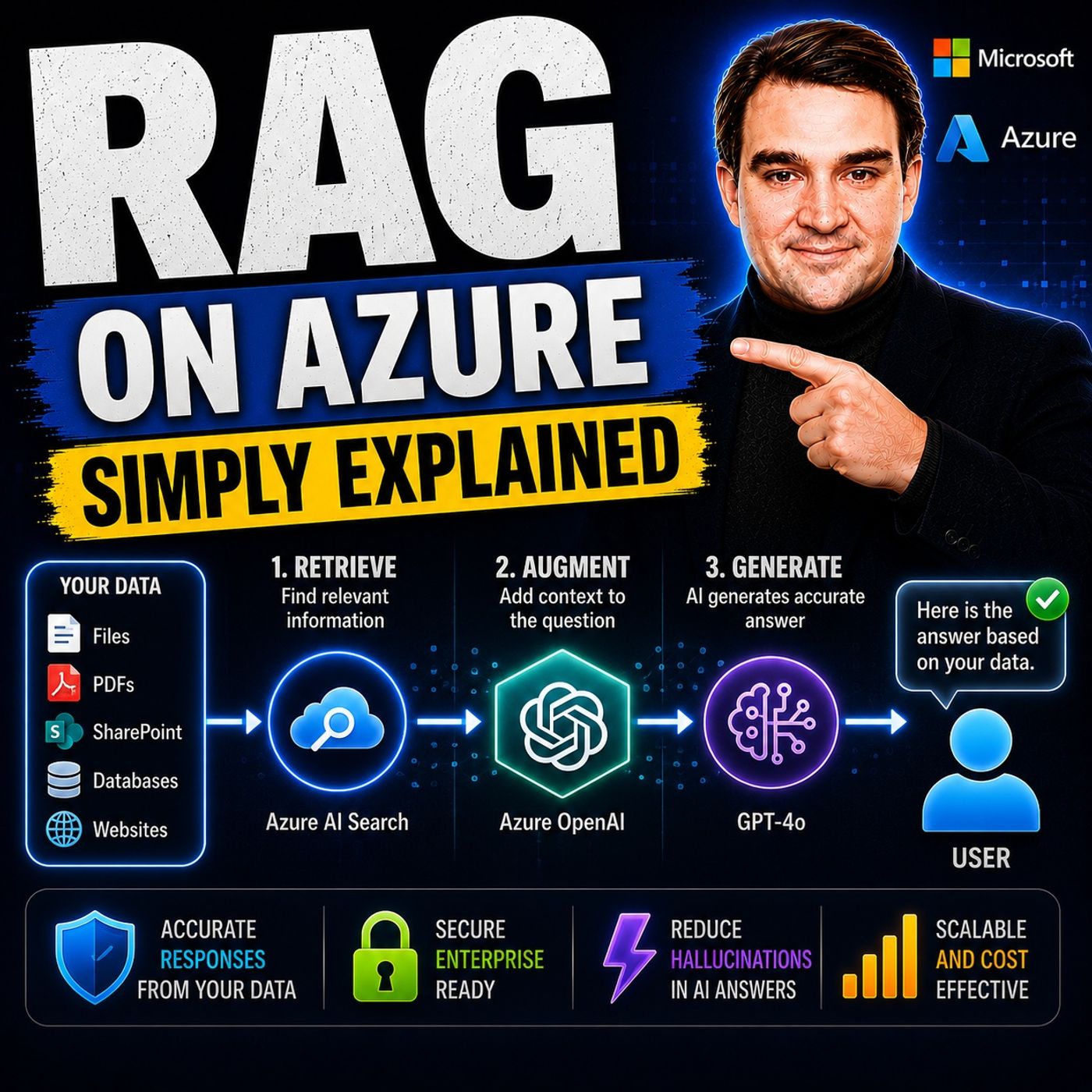
RAG on Azure — Simply Explained
Show notes
Large Language Models like GPT-4o are incredibly powerful, but they have two major limitations. First, their knowledge is frozen in time, meaning they don't automatically know about recent events, changing regulations, or newly created documents. Second, they have no built-in knowledge of your organization's private data, including internal documentation, policies, product manuals, customer information, or business processes. Without additional context, AI models are forced to guess, increasing the risk of inaccurate or hallucinated answers. In this episode of Microsoft Knowledge Nuggets, we explain Retrieval-Augmented Generation (RAG) in simple terms and show how Azure combines Azure AI Search, Azure OpenAI, and Azure AI Foundry to build AI applications that answer questions using your own trusted data instead of relying solely on model memory. WHY RETRIEVAL-AUGMENTED GENERATION SOLVES THE BIGGEST AI CHALLENGE Rather than retraining or fine-tuning a language model every time your business information changes, RAG follows a much smarter approach. Before generating an answer, it first retrieves the most relevant information from your documents, databases, SharePoint sites, PDFs, websites, or other enterprise knowledge sources. That information is then added to the user's question before being sent to the language model. The AI generates its response based on the retrieved context instead of relying purely on its training data. This approach dramatically improves accuracy, reduces hallucinations, keeps information current, and ensures sensitive enterprise data never becomes part of the model itself. VECTOR EMBEDDINGS, SEMANTIC SEARCH, AND AZURE AI SEARCH One of the most important concepts behind RAG is semantic search. Instead of searching for exact keywords, Azure AI Search converts documents and user questions into vector embeddings—mathematical representations of meaning. This allows the search engine to understand concepts rather than simply matching words. For example, a search for "budget hotels" can successfully find documents discussing "affordable accommodation" because their meanings are closely related. We explain how Azure AI Search indexes enterprise data, creates vector embeddings using embedding models, performs hybrid search, applies semantic ranking, and retrieves the most relevant content within milliseconds before passing it to the language model. HOW AZURE OPENAI AND AZURE AI FOUNDRY POWER RAG APPLICATIONS Once Azure AI Search retrieves the relevant knowledge, Azure OpenAI uses models like GPT-4o or GPT-4.1 to generate a natural language response based entirely on the supplied context. Azure AI Foundry then acts as the orchestration layer that connects models, prompts, enterprise knowledge, tools, and deployment into one unified AI development platform. This episode explains how developers create Foundry projects, connect Azure AI Search indexes, configure system prompts, deploy AI agents, and build production-ready RAG solutions without manually wiring together multiple Azure services. Together, Azure AI Search, Azure OpenAI, and Azure AI Foundry provide a complete enterprise architecture for building secure, scalable, and trustworthy generative AI applications. CLASSIC RAG VS AGENTIC RAG Not every AI application retrieves information in the same way. We compare Classic RAG, where a single search retrieves relevant documents before generating an answer, with the newer Agentic RAG approach, where AI agents can perform multiple searches, combine information from different sources, reason across datasets, and dynamically decide which knowledge to retrieve. While Classic RAG delivers fast, predictable responses for straightforward question-and-answer scenarios, Agentic RAG offers significantly higher accuracy for complex, multi-step business questions by allowing AI agents to intelligently orchestrate retrieval before generation. Understanding the strengths of both architectures helps organizations choose the right design for their specific AI workloads. BUILDING YOUR FIRST ENTERPRISE RAG SOLUTION ON AZURE Getting started with RAG on Azure is simpler than many developers expect. This episode walks through storing enterprise documents in Azure Storage, indexing them with Azure AI Search, generating vector embeddings, deploying GPT-4o through Azure OpenAI, connecting everything inside Azure AI Foundry, and testing AI responses against real business knowledge. Whether you're building customer support assistants, enterprise copilots, document search applications, internal knowledge bots, or AI-powered automation, RAG provides one of the most effective ways to combine generative AI with trusted enterprise data. After listening to this episode, you'll understand why Retrieval-Augmented Generation has become the foundation of nearly every modern enterprise AI solution built on Microsoft Azure. Become a supporter of this podcast: https://www.spreaker.com/podcast/m365-fm-microsoft-365-azure-cloud-power-platform-ai--6704921/support.
Apple Podcasts · Spotify · YouTube · YouTube Music · Deezer
Host: Mirko Peters
Guests
Transcript
Read the full transcript
Today's topic is one that almost everyone has heard of, but almost nobody can explain in plain English. Ragh, retrieval, augmented, generation. You've seen the acronym everywhere, Microsoft announcements, AI conference talks, blog posts, but what does it actually mean? And more importantly, why should you care? Here's the thing. Large language models like GPT-4O are powerful. They can write essays, summarize documents, even generate code. But they come with two big problems. First, their knowledge is frozen in time, ask chat GPT about something that happened yesterday and it has no idea. Second, these models never saw your company's internal data, your policies, product details, customer emails. So when you ask an LLM a question about your business, it's guessing. So that's where retrieval, augmented, generation comes in. Ragh isn't a new model. It's not a bigger or better GPT. It's a different approach entirely. Instead of asking the LLM to pull answers from its training memory, Ragh first looks up the right information from your own data and hands that information to the model alongside the question. The model then uses that context to give you answers grounded in real up-to-date content, not guesses. Without Ragh, your AI works from memory that's months or years old. With Ragh, it works from your actual documents right now. That's the difference between an AI that sounds confident but might be wrong and one that shows you exactly where it got its answer. Here's what we'll cover today. First we'll look at the two problems that make Ragh necessary. Then we'll break down what Ragh actually is, the retrieval, the augmentation, the generation. Next we'll walk through the key Azure services. Azure AI search, Azure Open AI and Azure AI Foundry. And we'll finish with a real example so you can see how the pieces fit together. Let's start with the problem itself. Once you see that, the solution becomes obvious. The two problems LLMs have. So what's wrong with large language models? Two things actually. First their knowledge is frozen. Think about it. When GPT-40 was trained, it learned from a snapshot of the internet that's now months or years old. So it doesn't know about new products, recent regulations, or yesterday's news. It's got about a policy change from last week and it has no way to know that information simply isn't in its training data. Second, LLMs never saw your private data, your internal documents, customer emails, proprietary databases. The model has zero access to any of that. So when an employee asks about your specific business processes, the model can't answer. It doesn't know what you know. Some people think fine tuning solves this. You take the base model and train it a bit more on your own data. But fine tuning has its own problems. It's expensive, you're paying for GPU time and engineering effort. It doesn't fix staleness. Once you fine tune, the model is still frozen at that point in time. And it can't handle data that changes frequently like inventory levels or pricing. Fine tuning is like teaching someone a textbook by heart. Useful, but they still can't look up today's newspaper. The real solution is simpler. Give the model access to your knowledge at the moment it needs to answer. Instead of trying to cram everything into its memory, don't make it memorize everything. Let it look things up in real time, from your actual data. That's what Ragn does, simple idea, but it changes everything. What Ragn actually is. So here's Ragn in one sentence. Instead of asking the model to pull an answer from its training data, we first go and find the relevant information, then feed that to the model alongside the question. That's the core idea. Three simple steps. Retrieve, augment, and generate. Let me give you an analogy. Think of a librarian. You walk into a librarian, ask a question. You wouldn't expect the librarian to have memorized every book, right? That would be ridiculous. Instead you ask them to find the right book, open it to the right page, and read you the answer. The librarian doesn't memorize a thing. They retrieve first and read second. And that's exactly what Ragn does. Retrieve will first, generation second. So here's how it actually works in practice. The user asks a question. The system then searches a knowledge base. Your documents, your data, your private information. Whatever it finds gets fed into the large language model and the model generates an answer based on that context. And here's the part that matters. The LLM never sees your raw data. It only sees what the retrieval system hands it. It's not a drawback, so it's a security feature. Your sensitive documents stay in your own storage. At query time, the model only gets the relevant snippets it needs to answer that specific question. No training on your data, no memorization, no leakage. Your data stays where it belongs. So Ragn solves both problems we talked about earlier. Stale data? Not an issue. Your knowledge base stays current. Private data? The model only sees what you choose to retrieve. It's like giving the librarian access to your filing cabinet, but only letting them pull out the one folder you need right when you need it. What do you think about your data? What do you think about the data? It handles two main tasks and lets walk through them. First, indexing, that's getting your data ready to be searched, second, searching. That's actually finding the right content when someone asks a question. Let's go through the indexing process first. You start by pointing Azure AI search at your data source, which could be a blob storage container full of PDFs, a SQL database with customer records or any number of other sources. The service reads those documents, breaks them into smaller pieces called chunks, creates vector embeddings for each chunk, using that embedding model we talked about earlier, and stores everything in a search index. Think of the index as a giant, highly organized catalog. Every piece of content gets a unique ID, a chunk of text, and a set of coordinates on that map of meaning. Now the searching process. When a user asks a question, AI search converts that question into a vector using the same embedding model, then scans the index to find chunks whose coordinates are closest to the questions coordinates. It returns the top matches, usually the five to ten most relevant ones, and does all of this in milliseconds. You get a few strong options here. Pure vector search finds content by meaning, so similar concepts show up even if the exact words don't match. Keyword search works like a traditional search engine, finding exact word matches. Or you can use hybrid search, which combines both approaches, and that's usually the best choice. There's also something called semantic re-ranking, which takes those initial results and resorts them based on how well they actually answer the question. It's like a second pass that catches things the first one might have missed. One thing you should know. Azure AI search can get expensive. The basic tier starts around $75 a month and climbs from there. If you're just experimenting, use the free tier, or make sure you delete your resources when you're done. For production use though, the cost usually pays off. You're buying speed and reliability at scale. Azure Open AI plus AI Foundry, Generation and Orchestration. So now your data is indexed and ready for retrieval, but the LLM still needs to understand your question and generate a solid answer. That's where Azure Open AI and Azure AI Foundry come in. Azure Open AI provides the actual language model, GPT-40, GPT-4.1, or whatever model you choose. This is the Generation Engine. It receives a prompt that includes both the original question from the user and the context that Azure AI search retrieved. The model reads through that context and produces an answer based on what it finds. Now you can't just dump everything in and hope for the best. You need a system prompt, a set of instructions you give the model upfront about how to behave. You tell it to use only the provided context to cite its sources. And most importantly to say, I don't know if the relevant information isn't in the retrieve documents. That's what keeps the model honest. Without a good system prompt, the model might fall back on its training data or worse, make something up. So how do you actually wire all these pieces together? That's where Azure AI Foundry comes in. It's the portal where you create a project, deploy your models, connect your data sources and test your agent. Think of it as the control center for your entire rag setup. You can add your Azure AI search index as a knowledge source to your agent without writing custom code for the basic setup. You just create a connection, select your index and the agent can start querying it automatically. The portal handles the orchestration. When a user asks a question, the agent knows to call AI search, get the relevant chunks and pass them to the LLM along with the original question. Here's a concrete example. In one tutorial I came across, someone built a movie recommendation agent using a Netflix data set. They uploaded a CSV file with movie titles, descriptions and cast information to Azure Blob Storage, then used Azure AI search to index that data. In Azure AI Foundry, they created an agent with GPT-4O and connected the AI search index. When a user asked, "I like thrillers, give me some recommendations," the agent searched the index, found thriller movies from that specific data set, and returned recommendations. And here's the key. It only recommended movies that were actually in that data set. It didn't invent anything, didn't pull from its training data and worked exclusively from the content they provided. That's the power of Ragn. Classic vs. AgenteGrag. Now let's talk about setting this up. There are two main patterns, classic Ragn and AgenteGrag, which one you pick depends on what you're building. Classic Ragn is the straightforward approach. One query goes in, one search runs, and one answer comes out. Simple, fast, predictable. Think of it like walking up to the reception desk in an office building and asking for one specific file. The receptionist grabs it, hands it to you, done. Classic Ragn works great for factual Q&A on a single topic. Like, what's the company policy on remote work? Or show me the troubleshooting steps for this error code? It's reliable, cheap, and easy to fix when something goes wrong because the flow is linear. AgenteGrag is different. The AI agent decides how to retrieve information. It can ask multiple subquestions, search different indexes, iterate on results, and synthesize across sources before answering. It's like having a building manager who coordinates with different departments to gather all the pieces. They don't just grab one file. They talk to HR, check records, cross-reference policies, and then come back with a complete answer. Microsoft ran their own tests and found AgenteGrag gives about a 40% improvement in answer relevance for complex questions. That's significant, but it uses 3 to 10 times more tokens and adds latency. For simple questions, that extra work is wasted. Classic Ragn handles those just fine. So when do you use each? Classic for routine, high volume queries where speed and cost matter most. AgenteG for multi-step ambiguous or cross-domain questions where accuracy is worth the extra compute. Connection section end to end example. Let's see how all these pieces fit together with a real example. Imagine you're building a customer support agent for a travel agency called Marygold Travels. You have trip brochures, hotel reviews, and policy documents scattered across your organization. You want customers to ask questions and get accurate answers based on your actual content, not generic guesses. Step 1. Store all that content as your blob storage. Brochures in one folder, reviews in another, policies in a third, just files in a container. Step 2. Use Azure AI search to index that data by running the import data wizard, pointing it at your blob storage and letting it work. The service reads every document, chunks them into pieces, creates vector embeddings, and builds a searchable index. The whole process takes a few minutes. Step 3. Go into Azure AI Foundry and create an agent. Deploy GPT-4.0 as your model, write a system prompt that tells it to use only the provided context and site its sources, then connect your Azure AI search index as a knowledge source. A few clicks and it's done. Now a customer asks, what's the best review hotel in Dubai under $300? The agent takes that question and sends it to Azure AI search. Azure AI search converts it to a vector and finds the most relevant chunks from your reviews and brochures. Those chunks get passed to GPT-4.0 along with the original question. The model reads through them, identifies the top match, and generates a response with citations pointing back to your source documents. Here's the thing, the LLM never memorizes that data. It never trained on your hotel reviews, it works from your specific content every single time, add new reviews tomorrow and the answers update automatically. Remove an outdated brochure and it stops showing up. The model doesn't need retraining, it just needs the right retrieval layer. So how do you actually start building Ragnar Azure? Let's break it down into three steps. First things first, know your data. Before you even pick a service, figure out where your content lives, how it's organized, and who should have access. Ragnar lives or dies on the quality of your data. Next, keep it simple, don't overcomplicate the setup. Use the import data wizard in Azure AI search to index just one set of documents. Test with basic queries. Make sure your retrieval works perfectly before you add the LLM. Most Ragn failures aren't model problems, they're retrieval problems. Last step, add the LLM. Once your search is returning the right results, then you layer in generation. That's when you connect as you open AI and write your system prompt. Here's the thing, Ragnar isn't something you buy, it's a pattern you build. Azure gives you the pieces, storage, search, models, and the glue to connect them. You just need to put it all together the right way. If this helped you see the big picture, hit subscribe for more play in English breakdowns. Drop a comment with your Ragnar use case. I'd love to know what you're building.