


 Apple Podcasts
 Spotify
 Youtube Music
 Spreaker
 Podchaser
 Amazon Music
 RAG on Azure — Simply Explained
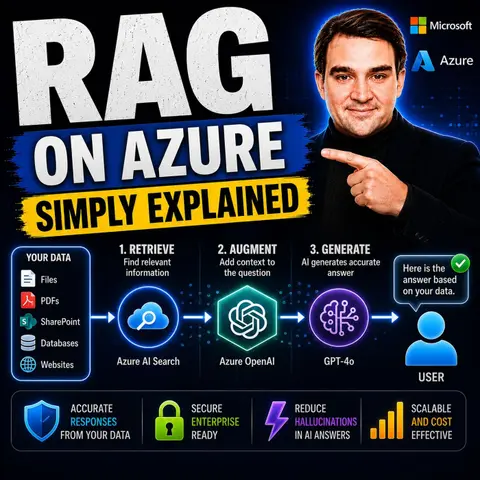
Retrieval-Augmented Generation (RAG) is one of the most important techniques behind modern AI applications, enabling large language models to answer questions using your own business data instead of relying only on their training knowledge. In this episode of Microsoft Knowledge Nuggets, we explain RAG on Azure in plain English and show how organizations build secure, accurate, and trustworthy AI solutions with Microsoft Azure.
You'll learn how the RAG process works—from ingesting documents and creating vector embeddings to storing them in a vector database and retrieving the most relevant information for every user query. We explain key concepts including vector search, embeddings, chunking, semantic search, Azure AI Search, Azure OpenAI, and grounding AI responses with your organization's private knowledge. You'll also discover why RAG dramatically reduces hallucinations while providing more accurate, up-to-date, and source-aware answers.
The episode also explores real-world use cases such as AI chatbots, internal knowledge assistants, customer support, document search, and enterprise copilots. We discuss how Azure services like Azure AI Search, Azure OpenAI, Azure AI Foundry, and Azure Storage work together to build scalable, secure, and production-ready AI applications that keep sensitive business data under your control.
Whether you're an Azure developer, AI engineer, cloud architect, IT professional, or simply curious about enterprise AI, this episode provides a practical introduction without unnecessary complexity. By the end, you'll understand why RAG has become the foundation of modern AI applications and how Azure makes it possible to build intelligent systems that deliver accurate, context-aware answers using your own data.
Retrieval-Augmented Generation (RAG) represents a groundbreaking approach in the realm of artificial intelligence. RAG on Azure enhances your AI solutions by improving how systems retrieve and generate information. This method integrates external data sources to ensure that the responses are not only accurate but also relevant to your specific queries. Recent studies show that RAG improves data retrieval accuracy through hybrid queries, which combine both keyword and vector searches. This approach leads to contextually accurate results, significantly reducing hallucination rates in AI-generated content.
Key Takeaways
- RAG combines information retrieval with generative AI, improving the accuracy and relevance of responses.
- Integrating external data sources allows RAG to provide real-time, evidence-based answers, crucial for fields like healthcare.
- RAG enhances AI performance, reducing customer support response times by 40-50%, leading to higher satisfaction.
- The architecture of RAG on Azure includes key components like retrievers and generators, ensuring efficient data retrieval.
- Implementing RAG can lead to a 25-30% reduction in operational costs, offering a strong return on investment.
- RAG's flexibility allows it to adapt to various business needs, supporting different content types and indexing options.
- Using RAG in customer support can resolve issues 47% faster, improving first-contact resolution rates significantly.
- Emerging trends in RAG include real-time data integration and multimodal capabilities, enhancing its future applications.
Understanding RAG
Definition of RAG
Retrieval-Augmented Generation (RAG) combines information retrieval with generative AI to enhance the quality of responses. It allows AI systems to access relevant data from external sources before generating answers. This approach ensures that the information you receive is accurate and contextually relevant. Here are some formal definitions of RAG from reputable sources:
| Source | Definition |
|---|---|
| IBM | RAG adds an information retrieval component to the AI workflow, gathering relevant information and feeding that to the generative AI model to enhance response quality and utility. |
| ServiceNow | RAG enhances large language models by incorporating data from external knowledge bases to improve the accuracy and relevance of outputs without retraining. |
| NVIDIA | RAG is a technique for enhancing the accuracy and reliability of generative AI models with information fetched from specific and relevant data sources. |
| Microsoft Azure | RAG combines two techniques: retrieving information from sources and using that information to inform the generation of responses. |
Importance in AI
RAG plays a crucial role in the advancement of AI solutions. By integrating external data sources, RAG enhances the accuracy and relevance of AI-generated responses. This capability is particularly significant in fields like healthcare, where accurate information can impact decision-making. For instance, RAG provides evidence-based answers by accessing the latest research and clinical guidelines, which is vital for accurate diagnoses.
- RAG enhances AI accuracy by integrating external data sources, leading to more reliable responses.
- In a study, RAG-enhanced models achieved 99.0% accuracy in interpreting hepatologic disease guidelines, significantly outperforming traditional models.
- RAG systems, like IBM Watson, matched expert recommendations in 96% of cancer diagnosis cases, demonstrating their effectiveness in real-world applications.
RAG vs. Traditional Models
RAG differs significantly from traditional AI models in several ways. Traditional models rely solely on pre-trained data, which can become outdated. In contrast, RAG employs a two-step data retrieval process. It generates sub-queries to fetch relevant information, allowing for more nuanced responses. Here are some key differences:
- RAG integrates retrieved data with its pre-trained knowledge, while traditional models may provide outdated answers.
- RAG's architecture utilizes transformers and attention mechanisms to focus on relevant text parts, enhancing response coherence compared to traditional models.
- RAG can provide responses informed by the most current data, making it ideal for applications requiring up-to-date information.
By leveraging both pre-trained knowledge and external data, RAG improves performance on complex queries. This adaptability allows RAG to stay current without retraining, unlike traditional models that require updates to their knowledge base.
RAG on Azure: How It Works

Retrieval-Augmented Generation (RAG) on Azure operates through a well-defined architecture that enhances AI capabilities. Understanding this architecture helps you grasp how RAG integrates various components to deliver accurate and relevant responses.
Architecture Overview
The architecture of RAG on Azure consists of several key components that work together seamlessly. Here’s a breakdown of these components:
- Retriever: This component searches external data sources for relevant information to enhance your query response.
- Generator: The large language model (LLM) combines your original query with the retrieved context to produce accurate answers.
- Vector Database: This database stores data as embeddings, which aids the retriever in finding relevant information efficiently.
- Document Ingestion and Chunking: This process involves splitting raw documents into manageable chunks for effective retrieval.
- Embedding Generation: This step converts document chunks into vectors for comparison with your queries.
- Retrieval Layer: This layer matches your input against stored vectors to retrieve the most relevant chunks.
- Prompt Construction and Generation: This final step merges your query with the retrieved text to create a structured context for the response.
Data Flow Process
The data flow in RAG on Azure follows a systematic approach. First, the retriever identifies relevant data from various sources. Next, the generator uses this data along with your query to create a response. This process ensures that the information you receive is not only accurate but also contextually relevant.
Integration with Azure AI Search
Integrating RAG with Azure AI Search enhances data retrieval capabilities significantly. Here’s how this integration benefits you:
- Enhanced Control: RAG aligns responses with specific enterprise content, ensuring that the information is tailored to your needs.
- Improved Relevance: Incorporating Azure AI Search leads to more accurate responses, as it retrieves vetted sources.
- Flexibility: The integration supports various content types and indexing options, making it adaptable to different business requirements.
To implement RAG effectively, consider the following best practices:
- Ingestion and Indexing: Ensure that your data is properly ingested and indexed for optimal retrieval.
- Retrieval: Regularly evaluate the retrieval process to maintain accuracy.
- Generation: Continuously refine the generation process to enhance response quality.
By following these practices, you can maximize the effectiveness of your RAG on Azure implementation.
Technical Requirements
Deploying RAG architecture on Azure requires specific components. Here’s a summary of the essential services:
| Service/Component | Description |
|---|---|
| Azure OpenAI Service | Provides access to large language models for processing data. |
| Azure AI Search | Enables retrieval of relevant information from business data sources. |
| Microsoft Fabric | Supports data integration and management for RAG systems. |
| Azure Machine Learning | Facilitates model training and deployment for RAG applications. |
| Azure Blob Storage | Stores large datasets that can be accessed by RAG systems. |
| SharePoint integrations | Allows for the retrieval of enterprise data from SharePoint. |
| Microsoft Graph API | Provides access to Microsoft 365 data for enhanced context in responses. |
By understanding the architecture and integration of RAG on Azure, you can leverage its capabilities to enhance your AI solutions effectively.
Benefits of RAG on Azure
Enhanced Data Retrieval
RAG on Azure significantly improves data retrieval processes. By integrating external data sources, you can access accurate and relevant information quickly. Organizations using RAG report a 40% faster information discovery rate. This speed enhances your ability to make informed decisions. Additionally, RAG reduces operational costs by 25% to 30%. You can expect a return on investment within 6 to 12 months of deployment.
RAG also addresses common data retrieval challenges in enterprise environments. It allows you to:
- Access enterprise knowledge securely
- Respect existing permissions and governance policies
- Provide real-time responses
- Reduce hallucinations in AI-generated content
- Improve operational efficiency
- Support compliance requirements
By grounding AI responses in authoritative data, RAG enhances the accuracy of your AI systems. This capability reduces hallucinations and increases confidence in AI-generated answers.
Improved AI Performance
RAG enhances AI performance by allowing systems to utilize real-time data. This integration leads to quicker and more accurate responses. Companies using RAG report a 40-50% reduction in customer support response times. This improvement boosts customer satisfaction significantly. Furthermore, internal efficiency improves, with teams spending up to 30% less time on manual document searches.
RAG also streamlines decision-making processes. AI agents can reference actual support documentation, leading to prompt and precise responses. In finance, RAG pulls relevant historical data for accurate forecasting. Legal teams can reference contracts effectively, ensuring compliance. Enhanced search relevance improves user satisfaction and engagement by up to 20%.
Scalability and Flexibility
RAG on Azure offers remarkable scalability and flexibility for large-scale AI deployments. Azure Container Apps and Azure Kubernetes Service (AKS) enable seamless scaling of AI workloads. You can deploy RAG solutions on-premises or at the edge, supporting dynamic IoT applications. This flexibility is crucial for organizations with strict data residency requirements.
Azure AI Foundry Local allows developers to run RAG workflows on-premises or at the edge. Deploying RAG at the edge on AKS clusters running on Azure Local empowers you to leverage generative AI capabilities while maintaining data sovereignty. This adaptability ensures that your AI applications can grow alongside your business needs.
Practical Use Cases of RAG
Customer Support Automation
RAG on Azure transforms customer support by providing accurate and timely responses. AI assistants leverage RAG systems to retrieve information from various sources, enhancing the overall support experience. Here are some real-world examples of how RAG improves customer support:
| Example | Description |
|---|---|
| AI Assistants | RAG systems help AI assistants pull relevant information from multiple sources. |
| Customer Support | These systems enhance customer support by delivering precise answers quickly. |
| Overall Impact | Organizations see improved customer satisfaction and reduced support workloads. |
Implementing RAG leads to measurable outcomes. For instance, AI-assisted agents resolve issues 47% faster, achieving a 25% higher first-contact resolution rate. Companies like Vanguard report a 12% accuracy boost for support representatives using RAG-powered tools. This efficiency allows teams to focus on more complex issues, improving service quality.
Internal Knowledge Bots
RAG also enhances internal knowledge bots, which provide employees with quick access to precise, contextually relevant data. This capability boosts productivity by reducing the time spent on data gathering and analysis. Here are some benefits of using RAG in internal knowledge bots:
- Quick access to accurate information enhances employee productivity.
- Employees can focus on actionable insights rather than searching for data.
- Teams automate time-consuming tasks, leading to efficient decision-making.
RAG-powered chatbots ground their responses in company documents, eliminating AI 'hallucinations.' This ensures that the information provided is trustworthy and accurate. For example, customer support chatbots retrieve information from support documents and FAQs, enhancing user satisfaction.
AI-Powered Automation Tools
RAG on Azure significantly enhances various AI-powered automation tools across industries. Here are some examples of applications that benefit from RAG:
- Customer Support Agents: AI chatbots utilize RAG to provide accurate responses based on policy documents.
- Healthcare Knowledge Assistants: Applications assist healthcare practitioners by retrieving relevant medical literature.
- Legal Document Analysis: Tools help legal professionals summarize and extract information from legal documents.
- Educational Platforms: Systems generate tailored lesson plans and quizzes based on student progress.
- Enterprise Search and Decision Support: Solutions help employees access relevant reports and metrics for decision-making.
- Personalized E-Commerce Assistants: AI tools enhance shopping experiences by retrieving product information and recommendations.
In the legal and compliance sector, RAG significantly improves contract analysis and eDiscovery processes. It can reduce manual contract review time by over 80%, enabling legal teams to conduct faster due diligence on extensive data rooms.
By leveraging RAG, organizations can improve decision-making, enhance customer support, and increase productivity. This technology provides accurate, up-to-date information, allowing businesses to respond quickly to market changes.
The Future of RAG in AI
Emerging Trends
As you look ahead, several emerging trends will shape the future of RAG in AI. These trends enhance the capabilities of RAG systems and expand their applications across various industries. Here are some key trends to watch:
- Multimodal Retrieval and Generation: RAG systems will increasingly integrate various data types, such as text, images, and videos. This integration enhances their ability to process complex datasets, making responses richer and more informative.
- Real-Time Data Integration: The demand for real-time data will grow, especially in industries like finance and news. RAG systems will need to incorporate live data feeds to provide timely and relevant information.
- Ethical Considerations and Bias Mitigation: As RAG systems become more prevalent, there will be a stronger focus on transparency and equity. Developers will work to address biases in retrieval processes, ensuring fair and accurate outputs.
Potential Challenges
While RAG offers many advantages, it also faces challenges that you should consider. Scaling RAG solutions on Azure can present hurdles, particularly during peak usage times. For example, an e-commerce platform may struggle to update user reviews quickly during a sale due to overwhelming data volume. Here are some challenges to keep in mind:
- Data Complexity: Enterprises often deal with diverse data types and formats. Identifying the right files and versions can be challenging.
- Data Consistency: Ensuring that all data formats are consistent and compatible is crucial for effective analytics.
- Security Protocols: Balancing data accessibility with stringent security measures is essential to protect sensitive information.
To overcome these challenges, organizations must implement efficient indexing and parallel processing. This approach can help mitigate issues related to data ingestion scalability.
RAG's Role in Next-Gen AI Solutions
RAG is poised to play a significant role in the next generation of AI solutions. By integrating information retrieval with large language models (LLMs), RAG enhances response relevance and accuracy. Here’s how RAG will influence future AI developments:
- RAG allows for control over grounding data, ensuring responses are tailored to specific domain knowledge.
- It improves user experience by generating more accurate and targeted responses.
- The flexibility of modern information retrieval systems enables RAG to be applied across diverse content types.
Experts predict that RAG will enhance user confidence and satisfaction by providing accurate, up-to-date AI-generated responses. This capability allows users to make timely decisions based on the most current data available. Additionally, RAG reduces hallucinations typical of LLMs by connecting to reliable knowledge bases, improving transparency and personalization.
In summary, RAG significantly enhances AI solutions on Azure. You gain accurate and relevant responses by integrating external data sources. This approach improves data retrieval and reduces the risk of hallucinations in AI-generated content. As you explore RAG, consider its potential to transform customer support, internal knowledge management, and automation tools. The future of RAG looks promising, with advancements in real-time data integration and multimodal capabilities. Embrace RAG to elevate your AI applications and drive better outcomes for your organization.
FAQ
What is RAG on Azure?
RAG on Azure combines retrieval and generation techniques to enhance AI solutions. It allows you to access real-time data, improving the accuracy of responses generated by large language models.
How does RAG improve data retrieval?
RAG enhances data retrieval by integrating Azure AI Search. This integration allows you to fetch relevant information quickly, ensuring that your responses are accurate and contextually relevant.
Can RAG be used for customer support?
Yes, RAG can significantly improve customer support. By retrieving information from various sources, it enables AI assistants to provide accurate answers quickly, enhancing customer satisfaction.
What are the key components of RAG architecture?
The key components of RAG architecture include the retriever, generator, vector database, and embedding generation. These elements work together to ensure efficient data retrieval and response generation.
How does RAG differ from traditional AI models?
RAG differs from traditional models by integrating real-time data retrieval with generative capabilities. This approach allows you to receive up-to-date information, unlike traditional models that rely solely on pre-trained data.
Is there a tutorial available for implementing RAG on Azure?
Yes, you can find various tutorials and guides online that provide step-by-step instructions for implementing RAG on Azure. These resources help you understand the architecture and integration processes.
What is a search index in RAG?
A search index in RAG refers to the organized structure that stores data for efficient retrieval. It allows the retriever to quickly access relevant information based on your queries.
How scalable is RAG on Azure?
RAG on Azure is highly scalable. You can deploy it on Azure Container Apps or Azure Kubernetes Service, allowing you to adjust resources based on your organization's needs.
🎧 Listen to this episode
Want a practical explanation of RAG on Azure? This episode breaks down the topic in clear language and shows why it matters for Microsoft 365, Azure, Power Platform, security, AI, and modern work.
Listen to this episode if you want to:
- Understand the key concepts behind RAG on Azure
- See how it fits into the wider Microsoft technology ecosystem
- Learn where it can create practical value for your organization
You may also enjoy these related M365 FM episodes:
- Copilot Studio AI Agents and RAG with Nilüfer Doğan [MVP]
- Private RAG Security: Authorization-Aware Data Retrieval
- How to Build Private RAG with SharePoint and n8n
- When to Use RAG vs Microsoft 365 Copilot
- Build Traceable Copilots with Agentic RAG on Azure
Discover more practical Microsoft conversations on M365 FM.
🚀 Want to be part of m365.fm?
Then stop just listening… and start showing up.
👉 Connect with me on LinkedIn and let’s make something happen:
- 🎙️ Be a podcast guest and share your story
- 🎧 Host your own episode (yes, seriously)
- 💡 Pitch topics the community actually wants to hear
- 🌍 Build your personal brand in the Microsoft 365 space
This isn’t just a podcast — it’s a platform for people who take action.
🔥 Most people wait. The best ones don’t.
👉 Connect with me on LinkedIn and send me a message:
"I want in"
Let’s build something awesome 👊
1
00:00:00,000 --> 00:00:03,520
Today's topic is one that almost everyone has heard of, but almost nobody can explain in
2
00:00:03,520 --> 00:00:04,520
plain English.
3
00:00:04,520 --> 00:00:06,840
Ragh, retrieval, augmented, generation.
4
00:00:06,840 --> 00:00:11,400
You've seen the acronym everywhere, Microsoft announcements, AI conference talks, blog posts,
5
00:00:11,400 --> 00:00:12,400
but what does it actually mean?
6
00:00:12,400 --> 00:00:14,040
And more importantly, why should you care?
7
00:00:14,040 --> 00:00:15,040
Here's the thing.
8
00:00:15,040 --> 00:00:17,920
Large language models like GPT-4O are powerful.
9
00:00:17,920 --> 00:00:21,280
They can write essays, summarize documents, even generate code.
10
00:00:21,280 --> 00:00:23,080
But they come with two big problems.
11
00:00:23,080 --> 00:00:26,600
First, their knowledge is frozen in time, ask chat GPT about something that happened yesterday
12
00:00:26,600 --> 00:00:30,240
and it has no idea.
13
00:00:30,240 --> 00:00:32,360
Second, these models never saw your company's internal data, your policies, product details,
14
00:00:32,360 --> 00:00:33,360
customer emails.
15
00:00:33,360 --> 00:00:36,600
So when you ask an LLM a question about your business, it's guessing.
16
00:00:36,600 --> 00:00:38,840
So that's where retrieval, augmented, generation comes in.
17
00:00:38,840 --> 00:00:39,840
Ragh isn't a new model.
18
00:00:39,840 --> 00:00:41,440
It's not a bigger or better GPT.
19
00:00:41,440 --> 00:00:42,840
It's a different approach entirely.
20
00:00:42,840 --> 00:00:46,960
Instead of asking the LLM to pull answers from its training memory, Ragh first looks up
21
00:00:46,960 --> 00:00:51,160
the right information from your own data and hands that information to the model alongside
22
00:00:51,160 --> 00:00:52,320
the question.
23
00:00:52,320 --> 00:00:57,120
The model then uses that context to give you answers grounded in real up-to-date content,
24
00:00:57,120 --> 00:00:58,120
not guesses.
25
00:00:58,120 --> 00:01:01,080
Without Ragh, your AI works from memory that's months or years old.
26
00:01:01,080 --> 00:01:04,080
With Ragh, it works from your actual documents right now.
27
00:01:04,080 --> 00:01:07,760
That's the difference between an AI that sounds confident but might be wrong and one that
28
00:01:07,760 --> 00:01:09,800
shows you exactly where it got its answer.
29
00:01:09,800 --> 00:01:11,320
Here's what we'll cover today.
30
00:01:11,320 --> 00:01:14,000
First we'll look at the two problems that make Ragh necessary.
31
00:01:14,000 --> 00:01:18,360
Then we'll break down what Ragh actually is, the retrieval, the augmentation, the generation.
32
00:01:18,360 --> 00:01:20,400
Next we'll walk through the key Azure services.
33
00:01:20,400 --> 00:01:23,840
Azure AI search, Azure Open AI and Azure AI Foundry.
34
00:01:23,840 --> 00:01:27,200
And we'll finish with a real example so you can see how the pieces fit together.
35
00:01:27,200 --> 00:01:28,680
Let's start with the problem itself.
36
00:01:28,680 --> 00:01:31,480
Once you see that, the solution becomes obvious.
37
00:01:31,480 --> 00:01:33,160
The two problems LLMs have.
38
00:01:33,160 --> 00:01:35,000
So what's wrong with large language models?
39
00:01:35,000 --> 00:01:36,800
Two things actually.
40
00:01:36,800 --> 00:01:38,200
First their knowledge is frozen.
41
00:01:38,200 --> 00:01:39,200
Think about it.
42
00:01:39,200 --> 00:01:42,600
When GPT-40 was trained, it learned from a snapshot of the internet that's now months
43
00:01:42,600 --> 00:01:43,600
or years old.
44
00:01:43,600 --> 00:01:47,320
So it doesn't know about new products, recent regulations, or yesterday's news.
45
00:01:47,320 --> 00:01:51,200
It's got about a policy change from last week and it has no way to know that information
46
00:01:51,200 --> 00:01:53,920
simply isn't in its training data.
47
00:01:53,920 --> 00:01:59,120
Second, LLMs never saw your private data, your internal documents, customer emails, proprietary
48
00:01:59,120 --> 00:02:00,120
databases.
49
00:02:00,120 --> 00:02:02,160
The model has zero access to any of that.
50
00:02:02,160 --> 00:02:06,400
So when an employee asks about your specific business processes, the model can't answer.
51
00:02:06,400 --> 00:02:07,680
It doesn't know what you know.
52
00:02:07,680 --> 00:02:09,440
Some people think fine tuning solves this.
53
00:02:09,440 --> 00:02:12,440
You take the base model and train it a bit more on your own data.
54
00:02:12,440 --> 00:02:14,000
But fine tuning has its own problems.
55
00:02:14,000 --> 00:02:17,320
It's expensive, you're paying for GPU time and engineering effort.
56
00:02:17,320 --> 00:02:19,040
It doesn't fix staleness.
57
00:02:19,040 --> 00:02:22,520
Once you fine tune, the model is still frozen at that point in time.
58
00:02:22,520 --> 00:02:26,920
And it can't handle data that changes frequently like inventory levels or pricing.
59
00:02:26,920 --> 00:02:29,560
Fine tuning is like teaching someone a textbook by heart.
60
00:02:29,560 --> 00:02:32,280
Useful, but they still can't look up today's newspaper.
61
00:02:32,280 --> 00:02:33,960
The real solution is simpler.
62
00:02:33,960 --> 00:02:37,320
Give the model access to your knowledge at the moment it needs to answer.
63
00:02:37,320 --> 00:02:41,240
Instead of trying to cram everything into its memory, don't make it memorize everything.
64
00:02:41,240 --> 00:02:43,800
Let it look things up in real time, from your actual data.
65
00:02:43,800 --> 00:02:46,960
That's what Ragn does, simple idea, but it changes everything.
66
00:02:46,960 --> 00:02:48,400
What Ragn actually is.
67
00:02:48,400 --> 00:02:49,920
So here's Ragn in one sentence.
68
00:02:49,920 --> 00:02:54,120
Instead of asking the model to pull an answer from its training data, we first go and find
69
00:02:54,120 --> 00:02:58,440
the relevant information, then feed that to the model alongside the question.
70
00:02:58,440 --> 00:02:59,640
That's the core idea.
71
00:02:59,640 --> 00:03:00,800
Three simple steps.
72
00:03:00,800 --> 00:03:03,200
Retrieve, augment, and generate.
73
00:03:03,200 --> 00:03:04,720
Let me give you an analogy.
74
00:03:04,720 --> 00:03:05,960
Think of a librarian.
75
00:03:05,960 --> 00:03:08,160
You walk into a librarian, ask a question.
76
00:03:08,160 --> 00:03:10,840
You wouldn't expect the librarian to have memorized every book, right?
77
00:03:10,840 --> 00:03:11,840
That would be ridiculous.
78
00:03:11,840 --> 00:03:16,000
Instead you ask them to find the right book, open it to the right page, and read you the answer.
79
00:03:16,000 --> 00:03:17,960
The librarian doesn't memorize a thing.
80
00:03:17,960 --> 00:03:20,080
They retrieve first and read second.
81
00:03:20,080 --> 00:03:21,840
And that's exactly what Ragn does.
82
00:03:21,840 --> 00:03:23,320
Retrieve will first, generation second.
83
00:03:23,320 --> 00:03:25,280
So here's how it actually works in practice.
84
00:03:25,280 --> 00:03:26,640
The user asks a question.
85
00:03:26,640 --> 00:03:28,600
The system then searches a knowledge base.
86
00:03:28,600 --> 00:03:31,240
Your documents, your data, your private information.
87
00:03:31,240 --> 00:03:35,040
Whatever it finds gets fed into the large language model and the model generates an answer
88
00:03:35,040 --> 00:03:36,320
based on that context.
89
00:03:36,320 --> 00:03:37,600
And here's the part that matters.
90
00:03:37,600 --> 00:03:39,200
The LLM never sees your raw data.
91
00:03:39,200 --> 00:03:41,320
It only sees what the retrieval system hands it.
92
00:03:41,320 --> 00:03:43,800
It's not a drawback, so it's a security feature.
93
00:03:43,800 --> 00:03:46,240
Your sensitive documents stay in your own storage.
94
00:03:46,240 --> 00:03:50,560
At query time, the model only gets the relevant snippets it needs to answer that specific question.
95
00:03:50,560 --> 00:03:53,600
No training on your data, no memorization, no leakage.
96
00:03:53,600 --> 00:03:54,960
Your data stays where it belongs.
97
00:03:54,960 --> 00:03:57,760
So Ragn solves both problems we talked about earlier.
98
00:03:57,760 --> 00:03:58,760
Stale data?
99
00:03:58,760 --> 00:03:59,760
Not an issue.
100
00:03:59,760 --> 00:04:01,280
Your knowledge base stays current.
101
00:04:01,280 --> 00:04:02,280
Private data?
102
00:04:02,280 --> 00:04:04,000
The model only sees what you choose to retrieve.
103
00:04:04,000 --> 00:04:07,480
It's like giving the librarian access to your filing cabinet, but only letting them pull
104
00:04:07,480 --> 00:04:10,600
out the one folder you need right when you need it.
105
00:04:10,600 --> 00:04:12,600
What do you think about your data?
106
00:04:12,600 --> 00:04:13,600
What do you think about the data?
107
00:04:13,600 --> 00:04:14,600
What do you think about the data?
108
00:04:14,600 --> 00:04:15,600
What do you think about the data?
109
00:04:15,600 --> 00:04:16,600
What do you think about the data?
110
00:04:16,600 --> 00:04:17,600
What do you think about the data?
111
00:04:17,600 --> 00:04:18,600
What do you think about the data?
112
00:04:18,600 --> 00:04:19,600
What do you think about the data?
113
00:04:19,600 --> 00:04:20,600
What do you think about the data?
114
00:04:20,600 --> 00:04:21,600
What do you think about the data?
115
00:04:21,600 --> 00:04:22,600
What do you think about the data?
116
00:04:22,600 --> 00:04:23,600
What do you think about the data?
117
00:04:23,600 --> 00:04:24,600
What do you think about the data?
118
00:04:24,600 --> 00:04:25,600
What do you think about the data?
119
00:04:25,600 --> 00:04:26,600
What do you think about the data?
120
00:04:26,600 --> 00:04:27,600
What do you think about the data?
121
00:04:27,600 --> 00:04:28,600
What do you think about the data?
122
00:04:28,600 --> 00:04:29,600
What do you think about the data?
123
00:04:29,600 --> 00:04:30,600
What do you think about the data?
124
00:04:30,600 --> 00:04:31,600
What do you think about the data?
125
00:04:31,600 --> 00:04:32,600
What do you think about the data?
126
00:04:32,600 --> 00:04:33,600
What do you think about the data?
127
00:04:33,600 --> 00:04:34,600
What do you think about the data?
128
00:04:34,600 --> 00:04:35,600
What do you think about the data?
129
00:04:35,600 --> 00:04:36,600
What do you think about the data?
130
00:04:36,600 --> 00:04:37,600
What do you think about the data?
131
00:04:37,600 --> 00:04:38,600
What do you think about the data?
132
00:04:38,600 --> 00:04:39,600
What do you think about the data?
133
00:04:39,600 --> 00:04:40,600
What do you think about the data?
134
00:04:40,600 --> 00:04:41,600
What do you think about the data?
135
00:04:41,600 --> 00:04:42,600
What do you think about the data?
136
00:04:42,600 --> 00:04:43,600
What do you think about the data?
137
00:04:43,600 --> 00:04:44,600
What do you think about the data?
138
00:04:44,600 --> 00:04:45,600
What do you think about the data?
139
00:04:45,600 --> 00:04:46,600
What do you think about the data?
140
00:04:46,600 --> 00:04:47,600
What do you think about the data?
141
00:04:47,600 --> 00:04:48,600
What do you think about the data?
142
00:04:48,600 --> 00:04:49,600
What do you think about the data?
143
00:04:49,600 --> 00:04:50,600
What do you think about the data?
144
00:04:50,600 --> 00:04:51,600
What do you think about the data?
145
00:04:51,600 --> 00:04:52,600
What do you think about the data?
146
00:04:52,600 --> 00:04:53,600
What do you think about the data?
147
00:04:53,600 --> 00:04:54,600
What do you think about the data?
148
00:04:54,600 --> 00:04:55,600
What do you think about the data?
149
00:04:55,600 --> 00:04:56,600
What do you think about the data?
150
00:04:56,600 --> 00:04:57,600
What do you think about the data?
151
00:04:57,600 --> 00:04:58,600
What do you think about the data?
152
00:04:58,600 --> 00:04:59,600
What do you think about the data?
153
00:04:59,600 --> 00:05:00,600
What do you think about the data?
154
00:05:00,600 --> 00:05:01,600
What do you think about the data?
155
00:05:01,600 --> 00:05:02,600
What do you think about the data?
156
00:05:02,600 --> 00:05:03,600
What do you think about the data?
157
00:05:03,600 --> 00:05:04,600
What do you think about the data?
158
00:05:04,600 --> 00:05:05,600
What do you think about the data?
159
00:05:05,600 --> 00:05:06,600
What do you think about the data?
160
00:05:06,600 --> 00:05:07,600
What do you think about the data?
161
00:05:07,600 --> 00:05:08,600
What do you think about the data?
162
00:05:08,600 --> 00:05:09,600
What do you think about the data?
163
00:05:09,600 --> 00:05:10,600
What do you think about the data?
164
00:05:10,600 --> 00:05:11,600
What do you think about the data?
165
00:05:11,600 --> 00:05:12,600
What do you think about the data?
166
00:05:12,600 --> 00:05:13,600
What do you think about the data?
167
00:05:13,600 --> 00:05:14,600
What do you think about the data?
168
00:05:14,600 --> 00:05:15,600
What do you think about the data?
169
00:05:15,600 --> 00:05:16,600
What do you think about the data?
170
00:05:16,600 --> 00:05:17,600
What do you think about the data?
171
00:05:17,600 --> 00:05:18,600
What do you think about the data?
172
00:05:18,600 --> 00:05:19,600
What do you think about the data?
173
00:05:19,600 --> 00:05:20,600
What do you think about the data?
174
00:05:20,600 --> 00:05:21,600
What do you think about the data?
175
00:05:21,600 --> 00:05:22,600
What do you think about the data?
176
00:05:22,600 --> 00:05:23,600
What do you think about the data?
177
00:05:23,600 --> 00:05:24,600
What do you think about the data?
178
00:05:24,600 --> 00:05:25,600
What do you think about the data?
179
00:05:25,600 --> 00:05:26,600
What do you think about the data?
180
00:05:26,600 --> 00:05:27,600
What do you think about the data?
181
00:05:27,600 --> 00:05:28,600
What do you think about the data?
182
00:05:28,600 --> 00:05:29,600
What do you think about the data?
183
00:05:29,600 --> 00:05:30,600
What do you think about the data?
184
00:05:30,600 --> 00:05:31,600
What do you think about the data?
185
00:05:31,600 --> 00:05:32,600
What do you think about the data?
186
00:05:32,600 --> 00:05:33,600
What do you think about the data?
187
00:05:33,600 --> 00:05:34,600
What do you think about the data?
188
00:05:34,600 --> 00:05:35,600
What do you think about the data?
189
00:05:35,600 --> 00:05:36,600
What do you think about the data?
190
00:05:36,600 --> 00:05:37,600
What do you think about the data?
191
00:05:37,600 --> 00:05:38,600
What do you think about the data?
192
00:05:38,600 --> 00:05:39,600
What do you think about the data?
193
00:05:39,600 --> 00:05:41,600
It handles two main tasks and lets walk through them.
194
00:05:41,600 --> 00:05:45,600
First, indexing, that's getting your data ready to be searched, second, searching.
195
00:05:45,600 --> 00:05:48,600
That's actually finding the right content when someone asks a question.
196
00:05:48,600 --> 00:05:50,600
Let's go through the indexing process first.
197
00:05:50,600 --> 00:05:53,600
You start by pointing Azure AI search at your data source,
198
00:05:53,600 --> 00:05:56,600
which could be a blob storage container full of PDFs,
199
00:05:56,600 --> 00:06:00,600
a SQL database with customer records or any number of other sources.
200
00:06:00,600 --> 00:06:04,600
The service reads those documents, breaks them into smaller pieces called chunks,
201
00:06:04,600 --> 00:06:06,600
creates vector embeddings for each chunk,
202
00:06:06,600 --> 00:06:09,600
using that embedding model we talked about earlier,
203
00:06:09,600 --> 00:06:11,600
and stores everything in a search index.
204
00:06:11,600 --> 00:06:14,600
Think of the index as a giant, highly organized catalog.
205
00:06:14,600 --> 00:06:17,600
Every piece of content gets a unique ID, a chunk of text,
206
00:06:17,600 --> 00:06:20,600
and a set of coordinates on that map of meaning.
207
00:06:20,600 --> 00:06:21,600
Now the searching process.
208
00:06:21,600 --> 00:06:23,600
When a user asks a question,
209
00:06:23,600 --> 00:06:26,600
AI search converts that question into a vector using the same embedding model,
210
00:06:26,600 --> 00:06:31,600
then scans the index to find chunks whose coordinates are closest to the questions coordinates.
211
00:06:31,600 --> 00:06:35,600
It returns the top matches, usually the five to ten most relevant ones,
212
00:06:35,600 --> 00:06:37,600
and does all of this in milliseconds.
213
00:06:37,600 --> 00:06:39,600
You get a few strong options here.
214
00:06:39,600 --> 00:06:41,600
Pure vector search finds content by meaning,
215
00:06:41,600 --> 00:06:44,600
so similar concepts show up even if the exact words don't match.
216
00:06:44,600 --> 00:06:48,600
Keyword search works like a traditional search engine, finding exact word matches.
217
00:06:48,600 --> 00:06:51,600
Or you can use hybrid search, which combines both approaches,
218
00:06:51,600 --> 00:06:53,600
and that's usually the best choice.
219
00:06:53,600 --> 00:06:55,600
There's also something called semantic re-ranking,
220
00:06:55,600 --> 00:06:59,600
which takes those initial results and resorts them based on how well they actually answer the question.
221
00:06:59,600 --> 00:07:02,600
It's like a second pass that catches things the first one might have missed.
222
00:07:02,600 --> 00:07:04,600
One thing you should know.
223
00:07:04,600 --> 00:07:06,600
Azure AI search can get expensive.
224
00:07:06,600 --> 00:07:10,600
The basic tier starts around $75 a month and climbs from there.
225
00:07:10,600 --> 00:07:12,600
If you're just experimenting, use the free tier,
226
00:07:12,600 --> 00:07:15,600
or make sure you delete your resources when you're done.
227
00:07:15,600 --> 00:07:18,600
For production use though, the cost usually pays off.
228
00:07:18,600 --> 00:07:21,600
You're buying speed and reliability at scale.
229
00:07:21,600 --> 00:07:25,600
Azure Open AI plus AI Foundry, Generation and Orchestration.
230
00:07:25,600 --> 00:07:27,600
So now your data is indexed and ready for retrieval,
231
00:07:27,600 --> 00:07:31,600
but the LLM still needs to understand your question and generate a solid answer.
232
00:07:31,600 --> 00:07:34,600
That's where Azure Open AI and Azure AI Foundry come in.
233
00:07:34,600 --> 00:07:36,600
Azure Open AI provides the actual language model,
234
00:07:36,600 --> 00:07:40,600
GPT-40, GPT-4.1, or whatever model you choose.
235
00:07:40,600 --> 00:07:42,600
This is the Generation Engine.
236
00:07:42,600 --> 00:07:45,600
It receives a prompt that includes both the original question from the user
237
00:07:45,600 --> 00:07:48,600
and the context that Azure AI search retrieved.
238
00:07:48,600 --> 00:07:52,600
The model reads through that context and produces an answer based on what it finds.
239
00:07:52,600 --> 00:07:55,600
Now you can't just dump everything in and hope for the best.
240
00:07:55,600 --> 00:07:59,600
You need a system prompt, a set of instructions you give the model upfront about how to behave.
241
00:07:59,600 --> 00:08:03,600
You tell it to use only the provided context to cite its sources.
242
00:08:03,600 --> 00:08:08,600
And most importantly to say, I don't know if the relevant information isn't in the retrieve documents.
243
00:08:08,600 --> 00:08:10,600
That's what keeps the model honest.
244
00:08:10,600 --> 00:08:15,600
Without a good system prompt, the model might fall back on its training data or worse, make something up.
245
00:08:15,600 --> 00:08:17,600
So how do you actually wire all these pieces together?
246
00:08:17,600 --> 00:08:19,600
That's where Azure AI Foundry comes in.
247
00:08:19,600 --> 00:08:24,600
It's the portal where you create a project, deploy your models, connect your data sources and test your agent.
248
00:08:24,600 --> 00:08:27,600
Think of it as the control center for your entire rag setup.
249
00:08:27,600 --> 00:08:33,600
You can add your Azure AI search index as a knowledge source to your agent without writing custom code for the basic setup.
250
00:08:33,600 --> 00:08:37,600
You just create a connection, select your index and the agent can start querying it automatically.
251
00:08:37,600 --> 00:08:39,600
The portal handles the orchestration.
252
00:08:39,600 --> 00:08:47,600
When a user asks a question, the agent knows to call AI search, get the relevant chunks and pass them to the LLM along with the original question.
253
00:08:47,600 --> 00:08:48,600
Here's a concrete example.
254
00:08:48,600 --> 00:08:53,600
In one tutorial I came across, someone built a movie recommendation agent using a Netflix data set.
255
00:08:53,600 --> 00:09:01,600
They uploaded a CSV file with movie titles, descriptions and cast information to Azure Blob Storage, then used Azure AI search to index that data.
256
00:09:01,600 --> 00:09:06,600
In Azure AI Foundry, they created an agent with GPT-4O and connected the AI search index.
257
00:09:06,600 --> 00:09:14,600
When a user asked, "I like thrillers, give me some recommendations," the agent searched the index, found thriller movies from that specific data set, and returned recommendations.
258
00:09:14,600 --> 00:09:15,600
And here's the key.
259
00:09:15,600 --> 00:09:17,600
It only recommended movies that were actually in that data set.
260
00:09:17,600 --> 00:09:22,600
It didn't invent anything, didn't pull from its training data and worked exclusively from the content they provided.
261
00:09:22,600 --> 00:09:24,600
That's the power of Ragn.
262
00:09:24,600 --> 00:09:26,600
Classic vs. AgenteGrag.
263
00:09:26,600 --> 00:09:27,600
Now let's talk about setting this up.
264
00:09:27,600 --> 00:09:32,600
There are two main patterns, classic Ragn and AgenteGrag, which one you pick depends on what you're building.
265
00:09:32,600 --> 00:09:34,600
Classic Ragn is the straightforward approach.
266
00:09:34,600 --> 00:09:37,600
One query goes in, one search runs, and one answer comes out.
267
00:09:37,600 --> 00:09:39,600
Simple, fast, predictable.
268
00:09:39,600 --> 00:09:43,600
Think of it like walking up to the reception desk in an office building and asking for one specific file.
269
00:09:43,600 --> 00:09:46,600
The receptionist grabs it, hands it to you, done.
270
00:09:46,600 --> 00:09:49,600
Classic Ragn works great for factual Q&A on a single topic.
271
00:09:49,600 --> 00:09:55,600
Like, what's the company policy on remote work? Or show me the troubleshooting steps for this error code?
272
00:09:55,600 --> 00:09:59,600
It's reliable, cheap, and easy to fix when something goes wrong because the flow is linear.
273
00:09:59,600 --> 00:10:03,600
AgenteGrag is different. The AI agent decides how to retrieve information.
274
00:10:03,600 --> 00:10:10,600
It can ask multiple subquestions, search different indexes, iterate on results, and synthesize across sources before answering.
275
00:10:10,600 --> 00:10:14,600
It's like having a building manager who coordinates with different departments to gather all the pieces.
276
00:10:14,600 --> 00:10:16,600
They don't just grab one file.
277
00:10:16,600 --> 00:10:21,600
They talk to HR, check records, cross-reference policies, and then come back with a complete answer.
278
00:10:21,600 --> 00:10:26,600
Microsoft ran their own tests and found AgenteGrag gives about a 40% improvement in answer relevance for complex questions.
279
00:10:26,600 --> 00:10:30,600
That's significant, but it uses 3 to 10 times more tokens and adds latency.
280
00:10:30,600 --> 00:10:33,600
For simple questions, that extra work is wasted.
281
00:10:33,600 --> 00:10:35,600
Classic Ragn handles those just fine.
282
00:10:35,600 --> 00:10:36,600
So when do you use each?
283
00:10:36,600 --> 00:10:40,600
Classic for routine, high volume queries where speed and cost matter most.
284
00:10:40,600 --> 00:10:45,600
AgenteG for multi-step ambiguous or cross-domain questions where accuracy is worth the extra compute.
285
00:10:45,600 --> 00:10:50,600
Connection section end to end example. Let's see how all these pieces fit together with a real example.
286
00:10:50,600 --> 00:10:55,600
Imagine you're building a customer support agent for a travel agency called Marygold Travels.
287
00:10:55,600 --> 00:11:00,600
You have trip brochures, hotel reviews, and policy documents scattered across your organization.
288
00:11:00,600 --> 00:11:06,600
You want customers to ask questions and get accurate answers based on your actual content, not generic guesses.
289
00:11:06,600 --> 00:11:09,600
Step 1. Store all that content as your blob storage.
290
00:11:09,600 --> 00:11:14,600
Brochures in one folder, reviews in another, policies in a third, just files in a container.
291
00:11:14,600 --> 00:11:19,600
Step 2. Use Azure AI search to index that data by running the import data wizard,
292
00:11:19,600 --> 00:11:22,600
pointing it at your blob storage and letting it work.
293
00:11:22,600 --> 00:11:28,600
The service reads every document, chunks them into pieces, creates vector embeddings, and builds a searchable index.
294
00:11:28,600 --> 00:11:29,600
The whole process takes a few minutes.
295
00:11:29,600 --> 00:11:32,600
Step 3. Go into Azure AI Foundry and create an agent.
296
00:11:32,600 --> 00:11:39,600
Deploy GPT-4.0 as your model, write a system prompt that tells it to use only the provided context and site its sources,
297
00:11:39,600 --> 00:11:42,600
then connect your Azure AI search index as a knowledge source.
298
00:11:42,600 --> 00:11:44,600
A few clicks and it's done.
299
00:11:44,600 --> 00:11:48,600
Now a customer asks, what's the best review hotel in Dubai under $300?
300
00:11:48,600 --> 00:11:51,600
The agent takes that question and sends it to Azure AI search.
301
00:11:51,600 --> 00:11:56,600
Azure AI search converts it to a vector and finds the most relevant chunks from your reviews and brochures.
302
00:11:56,600 --> 00:11:59,600
Those chunks get passed to GPT-4.0 along with the original question.
303
00:11:59,600 --> 00:12:05,600
The model reads through them, identifies the top match, and generates a response with citations pointing back to your source documents.
304
00:12:05,600 --> 00:12:08,600
Here's the thing, the LLM never memorizes that data.
305
00:12:08,600 --> 00:12:15,600
It never trained on your hotel reviews, it works from your specific content every single time, add new reviews tomorrow and the answers update automatically.
306
00:12:15,600 --> 00:12:18,600
Remove an outdated brochure and it stops showing up.
307
00:12:18,600 --> 00:12:21,600
The model doesn't need retraining, it just needs the right retrieval layer.
308
00:12:21,600 --> 00:12:23,600
So how do you actually start building Ragnar Azure?
309
00:12:23,600 --> 00:12:25,600
Let's break it down into three steps.
310
00:12:25,600 --> 00:12:27,600
First things first, know your data.
311
00:12:27,600 --> 00:12:33,600
Before you even pick a service, figure out where your content lives, how it's organized, and who should have access.
312
00:12:33,600 --> 00:12:35,600
Ragnar lives or dies on the quality of your data.
313
00:12:35,600 --> 00:12:38,600
Next, keep it simple, don't overcomplicate the setup.
314
00:12:38,600 --> 00:12:42,600
Use the import data wizard in Azure AI search to index just one set of documents.
315
00:12:42,600 --> 00:12:47,600
Test with basic queries. Make sure your retrieval works perfectly before you add the LLM.
316
00:12:47,600 --> 00:12:51,600
Most Ragn failures aren't model problems, they're retrieval problems.
317
00:12:51,600 --> 00:12:56,600
Last step, add the LLM. Once your search is returning the right results, then you layer in generation.
318
00:12:56,600 --> 00:12:59,600
That's when you connect as you open AI and write your system prompt.
319
00:12:59,600 --> 00:13:03,600
Here's the thing, Ragnar isn't something you buy, it's a pattern you build.
320
00:13:03,600 --> 00:13:08,600
Azure gives you the pieces, storage, search, models, and the glue to connect them.
321
00:13:08,600 --> 00:13:11,600
You just need to put it all together the right way.
322
00:13:11,600 --> 00:13:15,600
If this helped you see the big picture, hit subscribe for more play in English breakdowns.
323
00:13:15,600 --> 00:13:17,600
Drop a comment with your Ragnar use case.
324
00:13:17,600 --> 00:13:19,600
I'd love to know what you're building.

Founder of m365.fm, m365.show and m365con.net
Mirko Peters is a Microsoft 365 expert, content creator, and founder of m365.fm, a platform dedicated to sharing practical insights on modern workplace technologies. His work focuses on Microsoft 365 governance, security, collaboration, and real-world implementation strategies.
Through his podcast and written content, Mirko provides hands-on guidance for IT professionals, architects, and business leaders navigating the complexities of Microsoft 365. He is known for translating complex topics into clear, actionable advice, often highlighting common mistakes and overlooked risks in real-world environments.
With a strong emphasis on community contribution and knowledge sharing, Mirko is actively building a platform that connects experts, shares experiences, and helps organizations get the most out of their Microsoft 365 investments.




