Mastering Hybrid Infrastructure with Azure Arc
Welcome back to the podcast companion blog! In today's post, we are diving deep into the world of hybrid cloud management. If you manage a complex web of on-premises servers, edge locations, and multicloud setups, you know how difficult it is to maintain visibility and consistent security policies. That is where Azure Arc steps in to change the game. Discover how Azure Arc acts as a unified control plane to bridge the gap between on-premises environments and the cloud. This post explores how organizations can achieve centralized visibility and efficient resource management without migrating existing workloads. Whether you are an IT administrator, cloud architect, or system engineer, mastering this technology will transform how you handle your infrastructure.
To get a foundational audio walkthrough of these concepts, be sure to check out the related podcast episode Azure Arc - Simply Explained.
Azure Arc Overview

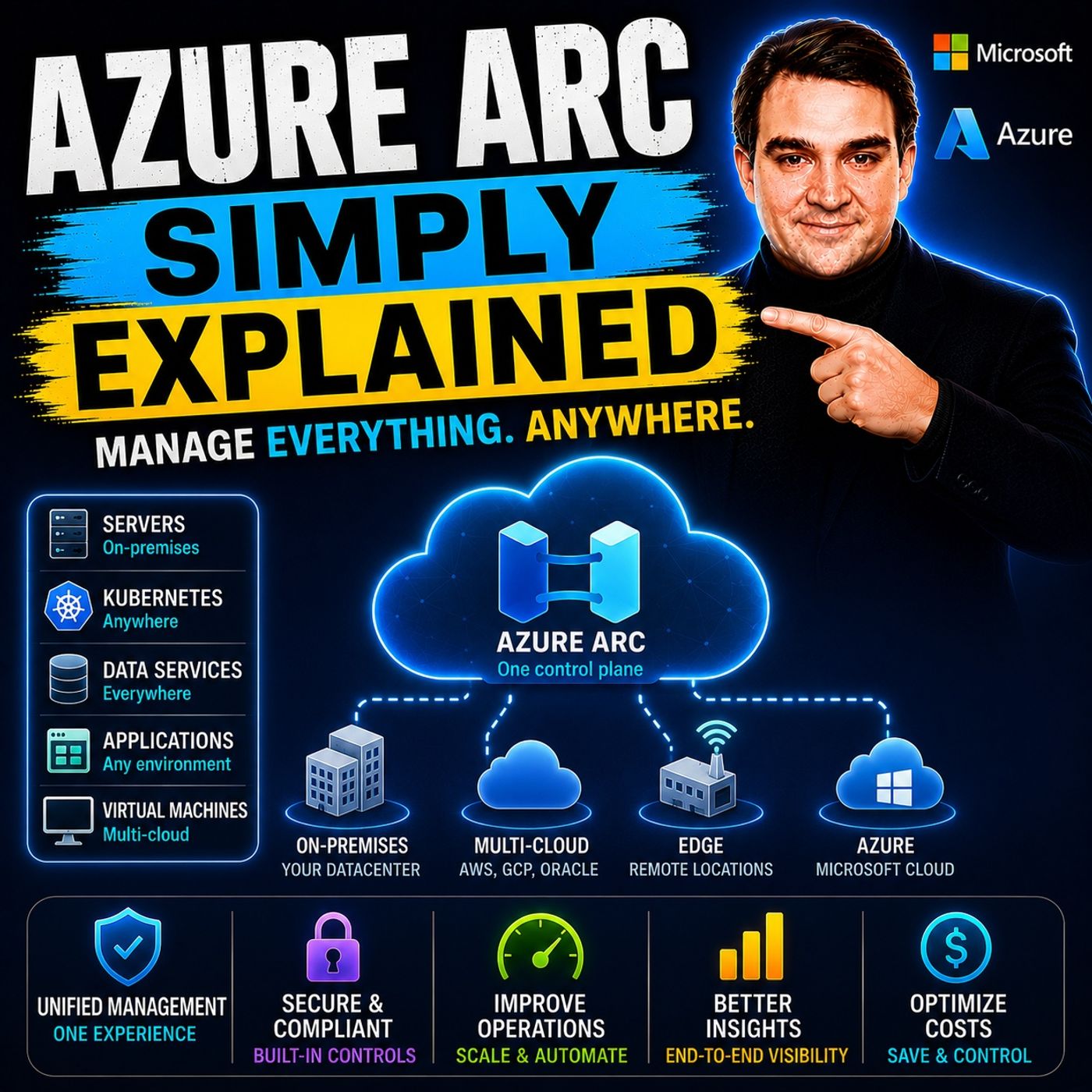
Azure Arc serves as a unified management plane that integrates resources from on-premises, edge, or other clouds into Azure Resource Manager. This integration allows you to manage your entire infrastructure seamlessly, regardless of where your resources reside. Azure Arc is particularly beneficial in hybrid and multicloud environments, where organizations often face challenges in visibility and control.
Key Features of Azure Arc
Azure Arc offers several features that set it apart from other hybrid cloud management solutions. Here are some of the core features:
| Feature | Azure Arc | Other Solutions |
|---|---|---|
| Workload Management | Supports both traditional VMs and modern containers | Limited to specific workloads |
| Automation | Utilizes ARM templates and Azure API for automation | Varies by provider |
| Compliance | Integrates with Azure Security Center for compliance | May not offer centralized compliance management |
| Resource Management | Centralized management of resources across clouds | Often requires proprietary hardware |
| Database Services | Managed data services from day one | Limited support for managed databases |
| Flexibility | Mix and match VMs, physical servers, and Kubernetes | Typically focused on one type of infrastructure |
With Azure Arc, you gain unified visibility, control, and security across your on-premises, edge, and multicloud environments without needing to migrate your resources. You can manage your resources as if they were native Azure resources, applying consistent policies and governance across all environments.
Here are some ways Azure Arc simplifies management:
- It allows you to onboard existing on-premises servers using lightweight agents, enabling management through Azure Resource Manager.
- You can register Kubernetes clusters with Azure Arc for policy enforcement and integration with Azure services.
- Azure Arc centralizes identity and access governance, reducing complexity and ensuring consistent security across all environments.
Managing Hybrid Resources with Azure Arc

Azure Arc simplifies the management of both on-premises and cloud resources, allowing you to connect and control your entire infrastructure from a single platform. This capability is crucial for organizations operating in hybrid environments, where resources may span multiple locations and platforms.
Azure Arc for Servers
With Azure Arc, you can manage your on-premises servers as if they were native Azure resources. This integration enhances visibility and governance across various environments, including physical servers and virtual machines. To connect your servers to Azure Arc, you need to meet certain technical requirements:
- Prerequisites: You must have an active Microsoft Azure subscription, on-premises servers with supported operating systems, and sufficient permissions.
- Supported Operating Systems: Azure Arc supports various versions of Windows and Linux, including:
- Windows Server (2008 R2 SP1 to 2022)
- Ubuntu (LTS versions 16.04 to 22.04)
- Red Hat Enterprise Linux (RHEL) (Versions 7 to 9)
- Other distributions like CentOS, Debian, and Oracle Linux.
- Network Requirements: Ensure outbound communication over TCP port 443, with options for proxy configuration.
To connect your servers, you must install the Azure Connected Machine Agent. This agent transforms your server into an Azure Arc-enabled server, integrating it into Azure's control plane. Once connected, you can manage your servers through a unified interface, applying consistent policies and governance across all environments.
Azure Arc enables you to project on-premises or multi-cloud servers into Azure. You can manage these servers similarly to native Azure virtual machines. This centralized management approach improves operational consistency and reduces configuration drift.
Azure Arc for Kubernetes
Azure Arc also extends its capabilities to Kubernetes clusters, allowing you to manage them alongside your other resources. Connecting your Kubernetes clusters to Azure Arc involves several steps:
- Prerequisites: Ensure you have an Azure account, the latest Azure CLI, necessary extensions, and an operational Kubernetes cluster.
- Create a Resource Group: Use the command
az group create --name AzureArcRes -l EastUS -o tableto create a resource group. - Connect to the Cluster: Use the command
az connectedk8s connect --name AzureArcTest1 --resource-group AzureArcResto attach your Kubernetes cluster to Azure Arc. - Verify Connected Clusters: Run
az connectedk8s list -g AzureArcRes -o tableto check the status of connected clusters. - Register Providers: Execute the commands to register necessary providers:
az provider register --namespace Microsoft.Kubernetesaz provider register --namespace Microsoft.KubernetesConfigurationaz provider register --namespace Microsoft.ExtendedLocation
Once connected, Azure Arc allows you to enforce policies uniformly across your Kubernetes clusters. You can extend Azure Policy to resources outside of Azure, ensuring compliance with security baselines and regulatory requirements. Azure Arc-enabled Kubernetes utilizes GitOps for configuration management, employing Flux to deploy application configurations from Git repositories. This approach allows you to define the desired state in a Git repository, ensuring that your clusters automatically converge to that state.
Azure Arc in a Multicloud Environment
Azure Arc simplifies management across various cloud providers, including AWS and Google Cloud. This service extends Azure’s management capabilities beyond its own cloud, allowing you to control resources from multiple environments through a single interface. With Azure Arc, you can manage servers, Kubernetes clusters, and applications as if they were native Azure resources. This integration streamlines your operations and enhances your governance capabilities.
Integration with Other Clouds
Azure Arc facilitates seamless integration with other cloud platforms. Here are some key aspects of this integration:
- Azure Arc projects Azure’s management framework onto resources in other clouds, such as AWS and Google Cloud.
- You can standardize governance and security without overhauling your existing infrastructure.
- Azure Arc enables multi-cloud registration, bringing resources from AWS or GCP under Azure oversight.
This unified management plane allows you to apply Azure policies and role-based access control (RBAC) across different cloud platforms. You gain consistent governance and security policies, which are crucial for maintaining compliance in a multicloud environment.
Benefits of Multicloud Management
Managing resources across multiple clouds offers several advantages. Here are some key benefits of using Azure Arc for multicloud management:
| Benefit | Description |
|---|---|
| Unified Management | Centralizes management for resources across on-premises, multi-cloud, and edge environments. |
| Consistent Security and Compliance | Enforces consistent security and compliance policies across all connected resources. |
| Enhanced Resource Governance | Provides centralized governance with the ability to apply policies and monitor compliance. |
| Scalability and Flexibility | Supports scalable deployments across hybrid and multi-cloud environments. |
| Improved DevOps Practices | Facilitates Kubernetes and containerized application management across distributed environments. |
| Cost Optimization | Offers tools for monitoring and optimizing resource costs across hybrid and multi-cloud environments. |
By leveraging Azure Arc, you can enhance your operational efficiency and reduce administrative overhead. The ability to manage diverse resources from a single platform simplifies your workflows and improves your overall IT strategy.
Pricing and Licensing for Azure Arc
Understanding the pricing and licensing structure for Azure Arc is essential for managing your costs effectively. Azure Arc employs a flexible pricing model that allows you to pay based on your usage. Here are some key points regarding the cost structure:
- Azure Stack HCI: Charges are based on the number of physical cores. This model provides clarity for on-premises resources.
- Arc-enabled services: Costs typically incur per resource or per feature. You need to track your usage carefully to manage expenses effectively.
Azure Arc offers various options for organizations looking to evaluate its capabilities without immediate financial commitment. Here are some available free tiers and trial options:
- Free Services: Azure provides over 65 services that are free for the first 12 months or always free up to certain limits. These services are beneficial for development, testing, and experimentation without incurring costs.
- Azure Free Tier: This tier includes a limited set of services available at no cost, which is useful for proof-of-concept work.
When comparing Azure Arc's pricing to similar hybrid cloud management solutions, you may find it advantageous. The following table outlines some differences:
| Feature | Azure Arc | AWS Outposts |
|---|---|---|
| Cost | Free for server management; pay for services consumed | Significant upfront investment; 3-year commitment ($200K-$1M+) |
| Approach | Software-based management of existing servers | AWS-owned hardware racks installed in your data center |
| Unique Features | Multi-cloud management (manage AWS and GCP resources) | Requires proprietary hardware and high capital costs |
This comparison highlights Azure Arc's flexibility and cost-effectiveness. You can manage your resources without the need for significant upfront investments. The pay-as-you-go licensing model allows you to scale your usage according to your needs.
Benefits of Using Azure Arc
Implementing Azure Arc brings numerous advantages to your organization. You can simplify governance and enhance security and compliance across your hybrid cloud environment. Here’s how Azure Arc can transform your management processes.
Simplified Governance
Azure Arc streamlines governance by providing a unified management plane for all your resources. This integration allows you to enforce consistent policies across your entire infrastructure, regardless of where your resources reside. Here are some key governance features:
| Governance Feature | Description |
|---|---|
| Consistent Policy Enforcement | Apply security, compliance, and operational policies regardless of where the resource lives. |
| Integration with Azure Policy | Enables consistent security and compliance policies across distributed resources. |
| Centralized Governance | Streamlines policy and compliance management across hybrid and multi-cloud environments. |
With Azure Arc, you can deploy agents on servers or Kubernetes clusters. This deployment enables governance controls like Azure Policy and role-based access across hybrid infrastructures. Consistency in governance enhances productivity and mitigates risks, which is crucial for compliance. Azure Security Center ensures compliance for all resources registered with Azure Arc, regardless of their deployment location.
Enhanced Security and Compliance
Security is a top priority for any organization. Azure Arc enhances your security posture by integrating with Azure Sentinel. This integration enables centralized security monitoring and automated incident response across hybrid and multicloud environments. Here are some security enhancements offered by Azure Arc:
- The Azure Connected Machine agent includes its own security controls that take precedence over cloud restrictions.
- It operates under local, system-managed identities, reducing credential exposure and avoiding dependency on domain infrastructure.
- The agent enforces a machine-scoped security boundary, minimizing unintended access to domain resources.
Additionally, Microsoft Defender for Cloud identifies weak spots in configurations. This proactive approach strengthens your security posture and helps meet compliance requirements across various platforms like Azure, AWS, and GCP. Continuous compliance tracking through automated monitoring ensures quick addressing of any compliance deviations.
By leveraging Azure Arc, you can achieve significant operational efficiency improvements. For instance, organizations report a 30% productivity increase due to a single interface for managing assets and improved automation. Furthermore, Azure Arc simplifies audit preparation and compliance reporting, saving time and effort.
Azure Arc plays a crucial role in modern IT management. It enables you to unify control over hybrid and multicloud environments, enhancing operational efficiency. By adopting Azure Arc, organizations like Rackspace have anticipated significant savings and improved service offerings.
Consider implementing Azure Arc to streamline your management processes. This solution allows you to leverage cloud capabilities while maintaining control over your on-premises resources. Embrace the future of IT management with Azure Arc for a more efficient and flexible infrastructure.
FAQ
What is Azure Arc?
Azure Arc is a service that extends Azure management capabilities to any infrastructure. It allows you to manage resources across on-premises, edge, and multicloud environments through a unified management plane.
How does Azure Arc enhance security?
Azure Arc integrates with Azure Security Center, enabling you to enforce consistent security policies across all your resources. This integration helps you maintain compliance and monitor vulnerabilities effectively.
Can I use Azure Arc for Kubernetes?
Yes, Azure Arc supports Kubernetes management. You can connect your Kubernetes clusters to Azure Arc, allowing you to enforce policies and manage configurations uniformly across your environments.
What are the pricing options for Azure Arc?
Azure Arc offers flexible pricing models, including pay-as-you-go licensing. You can choose between Azure Arc with BYOL (Bring Your Own License) or pay-as-you-go options based on your usage.
How does Azure Arc simplify management?
Azure Arc simplifies management by allowing you to manage all your resources from a single Azure portal. You can apply consistent governance and security policies across your entire infrastructure without needing to migrate resources.
Is there a trial option for Azure Arc?
Yes, Azure offers free services for the first 12 months, allowing you to explore Azure Arc's capabilities without incurring costs. This option is ideal for testing and development purposes.
What types of workloads can I manage with Azure Arc?
You can manage various workloads with Azure Arc, including virtual machines, physical servers, and Kubernetes clusters. This flexibility allows you to unify management across diverse environments.
How does Azure Arc support automation?
Azure Arc supports automation through Azure Resource Manager templates and Azure APIs. You can automate tasks like updates and policy enforcement, enhancing operational efficiency across your hybrid environment.
🎧 Listen to this episode
Want a practical explanation of Azure Arc? This episode breaks down the topic in clear language and shows why it matters for Microsoft 365, Azure, Power Platform, security, AI, and modern work.
Listen to this episode if you want to:
- Understand the key concepts behind Azure Arc
- See how it fits into the wider Microsoft technology ecosystem
- Learn where it can create practical value for your organization
You may also enjoy these related M365 FM episodes:
Discover more practical Microsoft conversations on M365 FM.

Microsoft MVP | Host of M365.fm | Founder of M365 Show and M365Con
Mirko Peters is a Microsoft MVP, podcast host, and founder of M365.fm, M365 Show, and M365Con. His work connects Microsoft practitioners through podcast interviews, livestreams, and community events.
At M365.fm, Mirko hosts conversations with Microsoft MVPs, product experts, architects, and community contributors. Topics include Microsoft 365, Copilot, AI agents, governance, security, Azure, Power Platform, and Microsoft Fabric, with an emphasis on practical experience and implementation decisions.
M365.fm is the podcast and learning platform. M365 Show brings experts together for livestreams, while M365Con provides an online conference setting for community learning.
Official website: Mirko Peters (https://www.mirkopeters.com/). Recognition: Mirko Peters — Microsoft MVP profile (https://mvp.microsoft.com/de-DE/mvp/profile/9b0ca797-db5a-493a-a845-8b9158046cf5). Connect on LinkedIn (https://www.linkedin.com/in/m365showpodcast/).