


 Apple Podcasts
 Spotify
 Youtube Music
 Spreaker
 Podchaser
 Amazon Music
 Azure Arc - Simply Explained
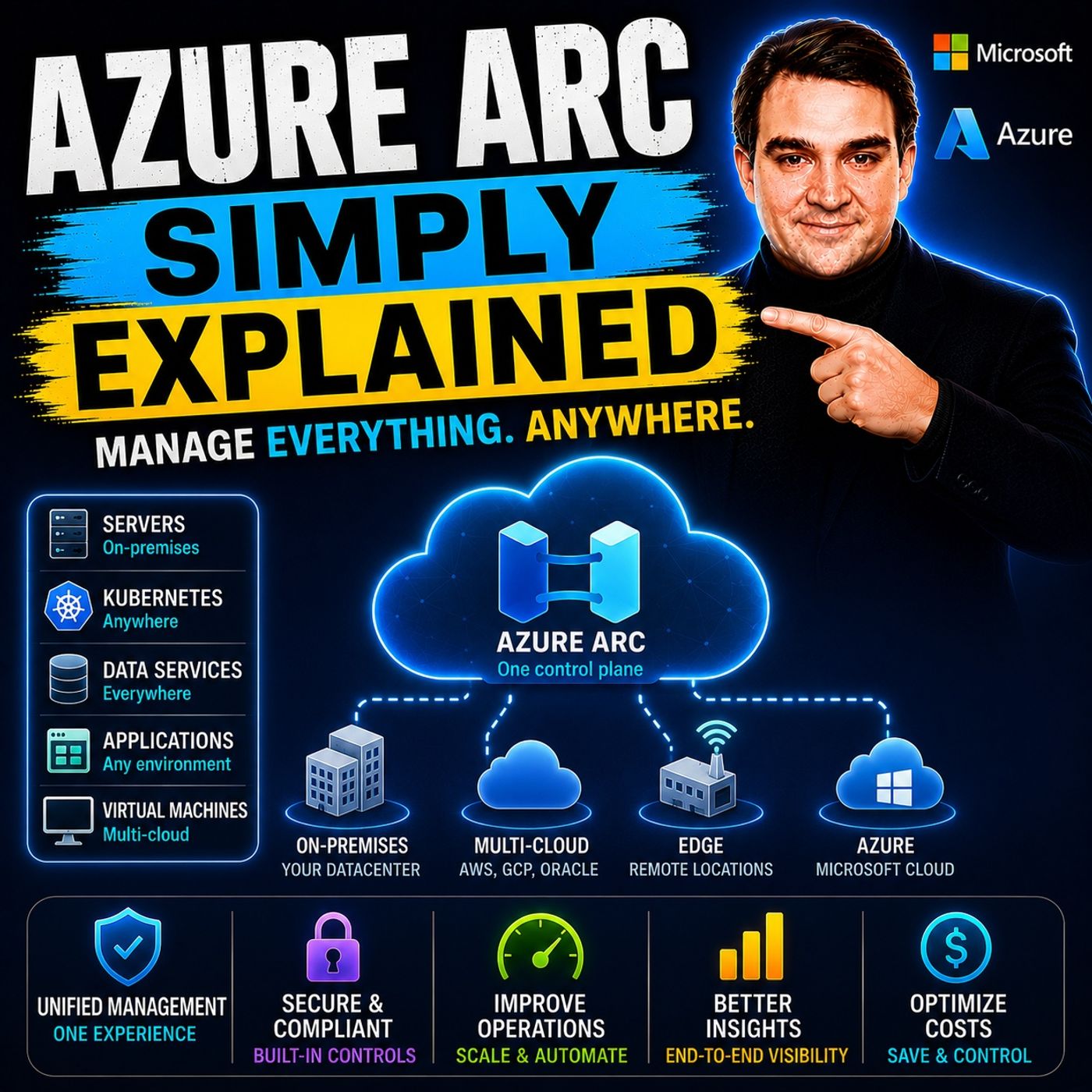
Azure Arc extends Azure's management, security, and governance capabilities beyond the Azure cloud, allowing you to manage servers, Kubernetes clusters, databases, and other resources running on-premises, at the edge, or in other cloud providers from a single control plane. Instead of moving workloads into Azure, Azure Arc brings Azure services to wherever your infrastructure already exists. In this episode of Microsoft Knowledge Nuggets, we explain Azure Arc in plain English and show why it's a key technology for hybrid and multicloud environments.
You'll learn how Azure Arc works, what it can manage, and why organizations use it to create a consistent operational model across Azure, AWS, Google Cloud, and on-premises datacenters. We cover key concepts including Arc-enabled servers, Kubernetes, Azure Policy, Azure Monitor, Microsoft Defender for Cloud, GitOps, and Infrastructure as Code. You'll also discover how Azure Arc projects non-Azure resources into Azure Resource Manager, enabling centralized management without migrating workloads.
The episode also explores real-world scenarios such as managing hybrid servers, governing Kubernetes clusters, deploying applications with GitOps, monitoring distributed environments, and applying consistent security and compliance policies across multiple platforms. You'll see how Azure Arc integrates with services like Azure Monitor, Microsoft Defender for Cloud, Azure Policy, and Azure Update Manager to simplify hybrid cloud operations.
Whether you're a cloud architect, Azure administrator, DevOps engineer, IT professional, or preparing for Azure certifications like AZ-104 or AZ-305, this episode provides a practical introduction without unnecessary complexity. By the end, you'll understand how Azure Arc enables organizations to man
In today's IT landscape, many organizations are adopting hybrid cloud strategies. Approximately 10% of companies are integrating this approach, with over 1,000 Microsoft customers already using Azure Arc to manage their hybrid environments. Azure Arc empowers you to extend Azure management capabilities across all infrastructures, simplifying your management processes.
This service addresses common challenges such as lack of centralized visibility, inconsistent security policies, and complex compliance requirements. With Azure Arc, you can unify your management and enhance operational efficiency in your hybrid cloud environment.
Key Takeaways
- Azure Arc enables unified management of resources across on-premises, edge, and multicloud environments.
- It simplifies governance by allowing consistent policy enforcement across all infrastructures.
- Azure Arc enhances security by integrating with Azure Security Center for centralized monitoring.
- You can manage both traditional VMs and modern containers seamlessly with Azure Arc.
- The service supports automation through Azure Resource Manager templates and APIs, improving operational efficiency.
- Azure Arc allows you to connect existing servers and Kubernetes clusters without needing to migrate resources.
- Flexible pricing models, including pay-as-you-go options, make Azure Arc cost-effective for organizations.
- Utilizing Azure Arc can lead to significant productivity gains and streamlined compliance reporting.
Azure Arc Overview

Azure Arc serves as a unified management plane that integrates resources from on-premises, edge, or other clouds into Azure Resource Manager. This integration allows you to manage your entire infrastructure seamlessly, regardless of where your resources reside. Azure Arc is particularly beneficial in hybrid and multicloud environments, where organizations often face challenges in visibility and control.
Key Features of Azure Arc
Azure Arc offers several features that set it apart from other hybrid cloud management solutions. Here are some of the core features:
| Feature | Azure Arc | Other Solutions |
|---|---|---|
| Workload Management | Supports both traditional VMs and modern containers | Limited to specific workloads |
| Automation | Utilizes ARM templates and Azure API for automation | Varies by provider |
| Compliance | Integrates with Azure Security Center for compliance | May not offer centralized compliance management |
| Resource Management | Centralized management of resources across clouds | Often requires proprietary hardware |
| Database Services | Managed data services from day one | Limited support for managed databases |
| Flexibility | Mix and match VMs, physical servers, and Kubernetes | Typically focused on one type of infrastructure |
With Azure Arc, you gain unified visibility, control, and security across your on-premises, edge, and multicloud environments without needing to migrate your resources. You can manage your resources as if they were native Azure resources, applying consistent policies and governance across all environments.
Here are some ways Azure Arc simplifies management:
- It allows you to onboard existing on-premises servers using lightweight agents, enabling management through Azure Resource Manager.
- You can register Kubernetes clusters with Azure Arc for policy enforcement and integration with Azure services.
- Azure Arc centralizes identity and access governance, reducing complexity and ensuring consistent security across all environments.
Managing Hybrid Resources with Azure Arc

Azure Arc simplifies the management of both on-premises and cloud resources, allowing you to connect and control your entire infrastructure from a single platform. This capability is crucial for organizations operating in hybrid environments, where resources may span multiple locations and platforms.
Azure Arc for Servers
With Azure Arc, you can manage your on-premises servers as if they were native Azure resources. This integration enhances visibility and governance across various environments, including physical servers and virtual machines. To connect your servers to Azure Arc, you need to meet certain technical requirements:
- Prerequisites: You must have an active Microsoft Azure subscription, on-premises servers with supported operating systems, and sufficient permissions.
- Supported Operating Systems: Azure Arc supports various versions of Windows and Linux, including:
- Windows Server (2008 R2 SP1 to 2022)
- Ubuntu (LTS versions 16.04 to 22.04)
- Red Hat Enterprise Linux (RHEL) (Versions 7 to 9)
- Other distributions like CentOS, Debian, and Oracle Linux.
- Network Requirements: Ensure outbound communication over TCP port 443, with options for proxy configuration.
To connect your servers, you must install the Azure Connected Machine Agent. This agent transforms your server into an Azure Arc-enabled server, integrating it into Azure's control plane. Once connected, you can manage your servers through a unified interface, applying consistent policies and governance across all environments.
Azure Arc enables you to project on-premises or multi-cloud servers into Azure. You can manage these servers similarly to native Azure virtual machines. This centralized management approach improves operational consistency and reduces configuration drift.
Azure Arc for Kubernetes
Azure Arc also extends its capabilities to Kubernetes clusters, allowing you to manage them alongside your other resources. Connecting your Kubernetes clusters to Azure Arc involves several steps:
- Prerequisites: Ensure you have an Azure account, the latest Azure CLI, necessary extensions, and an operational Kubernetes cluster.
- Create a Resource Group: Use the command
az group create --name AzureArcRes -l EastUS -o tableto create a resource group. - Connect to the Cluster: Use the command
az connectedk8s connect --name AzureArcTest1 --resource-group AzureArcResto attach your Kubernetes cluster to Azure Arc. - Verify Connected Clusters: Run
az connectedk8s list -g AzureArcRes -o tableto check the status of connected clusters. - Register Providers: Execute the commands to register necessary providers:
az provider register --namespace Microsoft.Kubernetesaz provider register --namespace Microsoft.KubernetesConfigurationaz provider register --namespace Microsoft.ExtendedLocation
Once connected, Azure Arc allows you to enforce policies uniformly across your Kubernetes clusters. You can extend Azure Policy to resources outside of Azure, ensuring compliance with security baselines and regulatory requirements. Azure Arc-enabled Kubernetes utilizes GitOps for configuration management, employing Flux to deploy application configurations from Git repositories. This approach allows you to define the desired state in a Git repository, ensuring that your clusters automatically converge to that state.
Azure Arc in a Multicloud Environment
Azure Arc simplifies management across various cloud providers, including AWS and Google Cloud. This service extends Azure’s management capabilities beyond its own cloud, allowing you to control resources from multiple environments through a single interface. With Azure Arc, you can manage servers, Kubernetes clusters, and applications as if they were native Azure resources. This integration streamlines your operations and enhances your governance capabilities.
Integration with Other Clouds
Azure Arc facilitates seamless integration with other cloud platforms. Here are some key aspects of this integration:
- Azure Arc projects Azure’s management framework onto resources in other clouds, such as AWS and Google Cloud.
- You can standardize governance and security without overhauling your existing infrastructure.
- Azure Arc enables multi-cloud registration, bringing resources from AWS or GCP under Azure oversight.
This unified management plane allows you to apply Azure policies and role-based access control (RBAC) across different cloud platforms. You gain consistent governance and security policies, which are crucial for maintaining compliance in a multicloud environment.
Benefits of Multicloud Management
Managing resources across multiple clouds offers several advantages. Here are some key benefits of using Azure Arc for multicloud management:
| Benefit | Description |
|---|---|
| Unified Management | Centralizes management for resources across on-premises, multi-cloud, and edge environments. |
| Consistent Security and Compliance | Enforces consistent security and compliance policies across all connected resources. |
| Enhanced Resource Governance | Provides centralized governance with the ability to apply policies and monitor compliance. |
| Scalability and Flexibility | Supports scalable deployments across hybrid and multi-cloud environments. |
| Improved DevOps Practices | Facilitates Kubernetes and containerized application management across distributed environments. |
| Cost Optimization | Offers tools for monitoring and optimizing resource costs across hybrid and multi-cloud environments. |
By leveraging Azure Arc, you can enhance your operational efficiency and reduce administrative overhead. The ability to manage diverse resources from a single platform simplifies your workflows and improves your overall IT strategy.
Pricing and Licensing for Azure Arc
Understanding the pricing and licensing structure for Azure Arc is essential for managing your costs effectively. Azure Arc employs a flexible pricing model that allows you to pay based on your usage. Here are some key points regarding the cost structure:
- Azure Stack HCI: Charges are based on the number of physical cores. This model provides clarity for on-premises resources.
- Arc-enabled services: Costs typically incur per resource or per feature. You need to track your usage carefully to manage expenses effectively.
Azure Arc offers various options for organizations looking to evaluate its capabilities without immediate financial commitment. Here are some available free tiers and trial options:
- Free Services: Azure provides over 65 services that are free for the first 12 months or always free up to certain limits. These services are beneficial for development, testing, and experimentation without incurring costs.
- Azure Free Tier: This tier includes a limited set of services available at no cost, which is useful for proof-of-concept work.
When comparing Azure Arc's pricing to similar hybrid cloud management solutions, you may find it advantageous. The following table outlines some differences:
| Feature | Azure Arc | AWS Outposts |
|---|---|---|
| Cost | Free for server management; pay for services consumed | Significant upfront investment; 3-year commitment ($200K-$1M+) |
| Approach | Software-based management of existing servers | AWS-owned hardware racks installed in your data center |
| Unique Features | Multi-cloud management (manage AWS and GCP resources) | Requires proprietary hardware and high capital costs |
This comparison highlights Azure Arc's flexibility and cost-effectiveness. You can manage your resources without the need for significant upfront investments. The pay-as-you-go licensing model allows you to scale your usage according to your needs.
Benefits of Using Azure Arc
Implementing Azure Arc brings numerous advantages to your organization. You can simplify governance and enhance security and compliance across your hybrid cloud environment. Here’s how Azure Arc can transform your management processes.
Simplified Governance
Azure Arc streamlines governance by providing a unified management plane for all your resources. This integration allows you to enforce consistent policies across your entire infrastructure, regardless of where your resources reside. Here are some key governance features:
| Governance Feature | Description |
|---|---|
| Consistent Policy Enforcement | Apply security, compliance, and operational policies regardless of where the resource lives. |
| Integration with Azure Policy | Enables consistent security and compliance policies across distributed resources. |
| Centralized Governance | Streamlines policy and compliance management across hybrid and multi-cloud environments. |
With Azure Arc, you can deploy agents on servers or Kubernetes clusters. This deployment enables governance controls like Azure Policy and role-based access across hybrid infrastructures. Consistency in governance enhances productivity and mitigates risks, which is crucial for compliance. Azure Security Center ensures compliance for all resources registered with Azure Arc, regardless of their deployment location.
Enhanced Security and Compliance
Security is a top priority for any organization. Azure Arc enhances your security posture by integrating with Azure Sentinel. This integration enables centralized security monitoring and automated incident response across hybrid and multicloud environments. Here are some security enhancements offered by Azure Arc:
- The Azure Connected Machine agent includes its own security controls that take precedence over cloud restrictions.
- It operates under local, system-managed identities, reducing credential exposure and avoiding dependency on domain infrastructure.
- The agent enforces a machine-scoped security boundary, minimizing unintended access to domain resources.
Additionally, Microsoft Defender for Cloud identifies weak spots in configurations. This proactive approach strengthens your security posture and helps meet compliance requirements across various platforms like Azure, AWS, and GCP. Continuous compliance tracking through automated monitoring ensures quick addressing of any compliance deviations.
By leveraging Azure Arc, you can achieve significant operational efficiency improvements. For instance, organizations report a 30% productivity increase due to a single interface for managing assets and improved automation. Furthermore, Azure Arc simplifies audit preparation and compliance reporting, saving time and effort.
Azure Arc plays a crucial role in modern IT management. It enables you to unify control over hybrid and multicloud environments, enhancing operational efficiency. By adopting Azure Arc, organizations like Rackspace have anticipated significant savings and improved service offerings.
Consider implementing Azure Arc to streamline your management processes. This solution allows you to leverage cloud capabilities while maintaining control over your on-premises resources. Embrace the future of IT management with Azure Arc for a more efficient and flexible infrastructure.
FAQ
What is Azure Arc?
Azure Arc is a service that extends Azure management capabilities to any infrastructure. It allows you to manage resources across on-premises, edge, and multicloud environments through a unified management plane.
How does Azure Arc enhance security?
Azure Arc integrates with Azure Security Center, enabling you to enforce consistent security policies across all your resources. This integration helps you maintain compliance and monitor vulnerabilities effectively.
Can I use Azure Arc for Kubernetes?
Yes, Azure Arc supports Kubernetes management. You can connect your Kubernetes clusters to Azure Arc, allowing you to enforce policies and manage configurations uniformly across your environments.
What are the pricing options for Azure Arc?
Azure Arc offers flexible pricing models, including pay-as-you-go licensing. You can choose between Azure Arc with BYOL (Bring Your Own License) or pay-as-you-go options based on your usage.
How does Azure Arc simplify management?
Azure Arc simplifies management by allowing you to manage all your resources from a single Azure portal. You can apply consistent governance and security policies across your entire infrastructure without needing to migrate resources.
Is there a trial option for Azure Arc?
Yes, Azure offers free services for the first 12 months, allowing you to explore Azure Arc's capabilities without incurring costs. This option is ideal for testing and development purposes.
What types of workloads can I manage with Azure Arc?
You can manage various workloads with Azure Arc, including virtual machines, physical servers, and Kubernetes clusters. This flexibility allows you to unify management across diverse environments.
How does Azure Arc support automation?
Azure Arc supports automation through Azure Resource Manager templates and Azure APIs. You can automate tasks like updates and policy enforcement, enhancing operational efficiency across your hybrid environment.
🎧 Listen to this episode
Want a practical explanation of Azure Arc? This episode breaks down the topic in clear language and shows why it matters for Microsoft 365, Azure, Power Platform, security, AI, and modern work.
Listen to this episode if you want to:
- Understand the key concepts behind Azure Arc
- See how it fits into the wider Microsoft technology ecosystem
- Learn where it can create practical value for your organization
You may also enjoy these related M365 FM episodes:
Discover more practical Microsoft conversations on M365 FM.
🚀 Want to be part of m365.fm?
Then stop just listening… and start showing up.
👉 Connect with me on LinkedIn and let’s make something happen:
- 🎙️ Be a podcast guest and share your story
- 🎧 Host your own episode (yes, seriously)
- 💡 Pitch topics the community actually wants to hear
- 🌍 Build your personal brand in the Microsoft 365 space
This isn’t just a podcast — it’s a platform for people who take action.
🔥 Most people wait. The best ones don’t.
👉 Connect with me on LinkedIn and send me a message:
"I want in"
Let’s build something awesome 👊
1
00:00:00,000 --> 00:00:01,380
Let's start with the problem.
2
00:00:01,380 --> 00:00:04,200
You've probably felt it even if you never had a name for it.
3
00:00:04,200 --> 00:00:06,340
Most companies today don't have one single place
4
00:00:06,340 --> 00:00:07,580
where everything lives.
5
00:00:07,580 --> 00:00:09,220
You've got servers in your own data center
6
00:00:09,220 --> 00:00:11,100
that once your predecessor set up 10 years ago
7
00:00:11,100 --> 00:00:12,120
that still run payroll.
8
00:00:12,120 --> 00:00:14,020
You've got virtual machines in Azure,
9
00:00:14,020 --> 00:00:16,520
maybe for a new application, your team built last year.
10
00:00:16,520 --> 00:00:18,300
You've got stuff running on Amazon Web Services
11
00:00:18,300 --> 00:00:21,240
because a department went rogue and spun up their own account.
12
00:00:21,240 --> 00:00:24,040
Maybe even some Google Cloud for a specific analytics job.
13
00:00:24,040 --> 00:00:24,920
Here's the thing.
14
00:00:24,920 --> 00:00:27,280
Each one of those environments has its own portal.
15
00:00:27,280 --> 00:00:30,260
Its own management tools, its own way of applying policies,
16
00:00:30,260 --> 00:00:32,760
its own security dashboard, its own patching schedule.
17
00:00:32,760 --> 00:00:33,980
So what does that mean for you?
18
00:00:33,980 --> 00:00:36,260
Your team ends up jumping between four different consoles
19
00:00:36,260 --> 00:00:38,500
just to see what you have let alone manage it.
20
00:00:38,500 --> 00:00:40,440
Security policies get applied unevenly
21
00:00:40,440 --> 00:00:43,060
because nobody remembers to check every environment.
22
00:00:43,060 --> 00:00:44,240
Patches slip through the cracks
23
00:00:44,240 --> 00:00:46,560
because one environment uses a different update tool
24
00:00:46,560 --> 00:00:47,400
than the others.
25
00:00:47,400 --> 00:00:50,420
And when something breaks, you're digging through multiple log
26
00:00:50,420 --> 00:00:53,040
sources trying to piece together what happened.
27
00:00:53,040 --> 00:00:54,880
This fragmentation creates blind spots
28
00:00:54,880 --> 00:00:56,200
and blind spots create risk.
29
00:00:56,200 --> 00:00:59,360
You don't know if every server has the latest security patch.
30
00:00:59,360 --> 00:01:01,040
You don't know if a configuration drifted
31
00:01:01,040 --> 00:01:03,120
on that one machine running in AWS.
32
00:01:03,120 --> 00:01:05,080
You don't even know how many servers you actually have
33
00:01:05,080 --> 00:01:06,360
across all these environments.
34
00:01:06,360 --> 00:01:07,320
The pain is real.
35
00:01:07,320 --> 00:01:09,200
Managing a hybrid or multi-cloud world
36
00:01:09,200 --> 00:01:10,600
without a single control plane
37
00:01:10,600 --> 00:01:12,840
leads to wasted time, security gaps,
38
00:01:12,840 --> 00:01:14,960
and operational inefficiency.
39
00:01:14,960 --> 00:01:17,000
You're spending more time switching tools
40
00:01:17,000 --> 00:01:18,640
than actually managing your infrastructure.
41
00:01:18,640 --> 00:01:21,040
But what if you could bring all those environments together
42
00:01:21,040 --> 00:01:22,040
under one roof?
43
00:01:22,040 --> 00:01:25,640
What Azure Arc actually is, the bridge.
44
00:01:25,640 --> 00:01:27,280
That's where Azure Arc comes in.
45
00:01:27,280 --> 00:01:29,520
Let me be clear about what it is right from the start.
46
00:01:29,520 --> 00:01:31,240
Azure Arc is not a cloud.
47
00:01:31,240 --> 00:01:32,680
It doesn't replace your data center.
48
00:01:32,680 --> 00:01:34,600
It doesn't migrate your servers anywhere.
49
00:01:34,600 --> 00:01:35,800
Think of it as a bridge.
50
00:01:35,800 --> 00:01:38,040
A connection between the servers you already have
51
00:01:38,040 --> 00:01:39,440
and Azure's management tools.
52
00:01:39,440 --> 00:01:40,440
Here's how it works.
53
00:01:40,440 --> 00:01:43,000
Azure Arc projects any machine running outside Azure
54
00:01:43,000 --> 00:01:44,280
into Azure Resource Manager.
55
00:01:44,280 --> 00:01:46,360
That's the engine that powers everything in Azure.
56
00:01:46,360 --> 00:01:48,600
Every virtual machine, every database,
57
00:01:48,600 --> 00:01:50,200
every resource you see in the portal
58
00:01:50,200 --> 00:01:52,200
has a record in Azure Resource Manager.
59
00:01:52,200 --> 00:01:54,280
With Arc, a server sitting in your basement,
60
00:01:54,280 --> 00:01:56,240
a virtual machine running on AWS,
61
00:01:56,240 --> 00:01:57,920
or a Kubernetes cluster at the edge
62
00:01:57,920 --> 00:02:00,000
all get their own Azure Resource ID.
63
00:02:00,000 --> 00:02:02,760
They show up in the portal just like native Azure resources.
64
00:02:02,760 --> 00:02:04,680
And once they're there, you can do things with them.
65
00:02:04,680 --> 00:02:07,680
You can apply Azure Policy to enforce security settings.
66
00:02:07,680 --> 00:02:10,600
You can use Azure Monitor to collect performance data and logs.
67
00:02:10,600 --> 00:02:12,880
You can enable Microsoft Defender for Cloud
68
00:02:12,880 --> 00:02:15,560
to scan for vulnerabilities and detect threats.
69
00:02:15,560 --> 00:02:17,400
All on servers that aren't running in Azure.
70
00:02:17,400 --> 00:02:18,600
The core idea is simple.
71
00:02:18,600 --> 00:02:19,920
You don't need to migrate anything
72
00:02:19,920 --> 00:02:21,880
to get Azure's management capabilities.
73
00:02:21,880 --> 00:02:23,240
You don't move your workloads.
74
00:02:23,240 --> 00:02:25,000
You don't re-architect your applications.
75
00:02:25,000 --> 00:02:26,400
You just connect what you already have
76
00:02:26,400 --> 00:02:27,960
to Azure's management plane.
77
00:02:27,960 --> 00:02:29,280
This works with Windows Server.
78
00:02:29,280 --> 00:02:30,480
It works with Linux.
79
00:02:30,480 --> 00:02:32,960
It works with Kubernetes clusters running anywhere.
80
00:02:32,960 --> 00:02:34,560
It works with SQL Server instances.
81
00:02:34,560 --> 00:02:37,040
It even works with Azure Data Services
82
00:02:37,040 --> 00:02:38,640
that you can run on your own hardware.
83
00:02:38,640 --> 00:02:40,760
So whether your server is in a data center,
84
00:02:40,760 --> 00:02:43,320
a remote branch office, an AWS region,
85
00:02:43,320 --> 00:02:44,720
or a Google Cloud Zone,
86
00:02:44,720 --> 00:02:46,840
Arc brings it into the same management experience.
87
00:02:46,840 --> 00:02:48,400
That's the simplest definition.
88
00:02:48,400 --> 00:02:50,920
Azure Arc brings Azure's management plane
89
00:02:50,920 --> 00:02:52,400
to where your servers already live.
90
00:02:52,400 --> 00:02:53,920
So how does this bridge actually work?
91
00:02:53,920 --> 00:02:56,040
It starts with a small piece of software.
92
00:02:56,040 --> 00:02:58,480
The secret source, the connected machine agent.
93
00:02:58,480 --> 00:03:01,040
So what exactly is the Azure connected machine agent?
94
00:03:01,040 --> 00:03:02,640
It's a lightweight piece of software
95
00:03:02,640 --> 00:03:05,560
you install on each server you want to manage through Arc.
96
00:03:05,560 --> 00:03:07,360
Once installed, the agent connects outbound
97
00:03:07,360 --> 00:03:10,200
to Azure over HTTPS on port 443,
98
00:03:10,200 --> 00:03:11,720
the same port your browser uses.
99
00:03:11,720 --> 00:03:14,800
So you don't need to open inbound ports or set up a VPN.
100
00:03:14,800 --> 00:03:17,160
The server reaches out to Azure, not the other way around,
101
00:03:17,160 --> 00:03:18,520
which means better security
102
00:03:18,520 --> 00:03:20,520
without punching holes in your firewall.
103
00:03:20,520 --> 00:03:22,600
Once that connection is made, your server,
104
00:03:22,600 --> 00:03:25,080
whether it's in your data center or running on AWS,
105
00:03:25,080 --> 00:03:27,760
appears in the Azure portal as a full Azure resource.
106
00:03:27,760 --> 00:03:29,880
It gets a resource ID, a region assignment,
107
00:03:29,880 --> 00:03:32,160
and a resource group just like any Azure VM.
108
00:03:32,160 --> 00:03:34,920
You can tag it, apply policies, monitor it, and manage it.
109
00:03:34,920 --> 00:03:35,880
Here's the best part.
110
00:03:35,880 --> 00:03:36,720
The agent is free.
111
00:03:36,720 --> 00:03:39,560
Connecting a server to Azure Arc costs nothing.
112
00:03:39,560 --> 00:03:41,520
You only pay for the services you enable on top,
113
00:03:41,520 --> 00:03:43,120
like Microsoft Defender for Cloud,
114
00:03:43,120 --> 00:03:45,080
Azure Update Manager, or Azure Monitor.
115
00:03:45,080 --> 00:03:47,040
So your bill only covers what you actually use.
116
00:03:47,040 --> 00:03:48,280
What does the agent actually do?
117
00:03:48,280 --> 00:03:50,960
It keeps the communication channel with Azure open.
118
00:03:50,960 --> 00:03:52,320
It handles extensions.
119
00:03:52,320 --> 00:03:55,240
Think of those as add-ons for monitoring or security scanning.
120
00:03:55,240 --> 00:03:56,640
And it sends inventory data back
121
00:03:56,640 --> 00:03:59,320
so you always know what's running on that machine.
122
00:03:59,320 --> 00:04:01,040
Installation is straightforward.
123
00:04:01,040 --> 00:04:03,600
In the Azure portal, navigate to Azure Arc,
124
00:04:03,600 --> 00:04:06,560
select servers, and generate an onboarding script,
125
00:04:06,560 --> 00:04:08,960
PowerShell for Windows, or Shell for Linux.
126
00:04:08,960 --> 00:04:10,960
Run it on the target machine with admin rights,
127
00:04:10,960 --> 00:04:12,960
authenticate to Azure, and within minutes,
128
00:04:12,960 --> 00:04:14,520
the server appears in your portal.
129
00:04:14,520 --> 00:04:17,000
All you need is admin rights and internet access.
130
00:04:17,000 --> 00:04:19,840
Once connected, you manage it just like any Azure VM.
131
00:04:19,840 --> 00:04:22,040
Install extensions, run scripts, apply policies,
132
00:04:22,040 --> 00:04:24,200
monitor performance, the experience is identical.
133
00:04:24,200 --> 00:04:26,360
With the agent in place, you unlock capabilities
134
00:04:26,360 --> 00:04:28,360
that change how you manage that server.
135
00:04:28,360 --> 00:04:30,160
Let's start with governance.
136
00:04:30,160 --> 00:04:31,280
What arc unlocks?
137
00:04:31,280 --> 00:04:32,520
Governance at scale.
138
00:04:32,520 --> 00:04:34,440
So you've connected a server to Arc.
139
00:04:34,440 --> 00:04:35,280
Now what?
140
00:04:35,280 --> 00:04:36,880
The first thing you'll notice is that you can apply
141
00:04:36,880 --> 00:04:38,120
Azure policy to it.
142
00:04:38,120 --> 00:04:40,520
The same policy engine that governs Azure resources
143
00:04:40,520 --> 00:04:43,520
now extends to your on-prem or AWS servers.
144
00:04:43,520 --> 00:04:45,840
In practice, you enforce compliance rules
145
00:04:45,840 --> 00:04:48,760
across your entire fleet, no matter where machines live.
146
00:04:48,760 --> 00:04:51,200
Need every server to have a specific security setting,
147
00:04:51,200 --> 00:04:53,560
write a policy, assign it to your Arc enabled servers,
148
00:04:53,560 --> 00:04:55,720
and Azure continuously checks compliance.
149
00:04:55,720 --> 00:04:57,480
If a server drift, you get an alert.
150
00:04:57,480 --> 00:04:59,160
You can even set up automatic remediation
151
00:04:59,160 --> 00:05:01,120
in some cases, tagging is another piece.
152
00:05:01,120 --> 00:05:03,080
You already tag Azure resources
153
00:05:03,080 --> 00:05:05,520
with environment, cost center, and owner tags.
154
00:05:05,520 --> 00:05:07,440
With Arc, you tag hybrid servers the same way.
155
00:05:07,440 --> 00:05:10,280
So that machine in your basement gets the same tags
156
00:05:10,280 --> 00:05:13,000
as your Azure VMs, making cost tracking, ownership,
157
00:05:13,000 --> 00:05:16,360
and environment separation consistent across your whole estate.
158
00:05:16,360 --> 00:05:17,920
Next up is access control.
159
00:05:17,920 --> 00:05:20,160
Azure RBAC lets you define who can do what
160
00:05:20,160 --> 00:05:22,960
on your on-prem servers through the Azure portal.
161
00:05:22,960 --> 00:05:25,080
Give your junior admin read only access
162
00:05:25,080 --> 00:05:27,320
to see inventory without making changes
163
00:05:27,320 --> 00:05:29,800
and let your security team run vulnerability scans
164
00:05:29,800 --> 00:05:33,040
without full admin access, or control from Azure,
165
00:05:33,040 --> 00:05:35,160
not from local policies on each server.
166
00:05:35,160 --> 00:05:36,880
Azure machine configuration goes further.
167
00:05:36,880 --> 00:05:38,760
It audits and sets OS level settings
168
00:05:38,760 --> 00:05:41,080
across your entire fleet from one place.
169
00:05:41,080 --> 00:05:43,800
Want Bitlocker enabled on every Windows server?
170
00:05:43,800 --> 00:05:46,160
Write a policy that checks and reports compliance.
171
00:05:46,160 --> 00:05:48,160
Need a specific registry key set correctly
172
00:05:48,160 --> 00:05:49,560
on all your Linux machines?
173
00:05:49,560 --> 00:05:50,320
Same thing.
174
00:05:50,320 --> 00:05:53,000
Define the desired state once, and Azure evaluates
175
00:05:53,000 --> 00:05:55,240
every Arc enabled server against it.
176
00:05:55,240 --> 00:05:56,560
Let me give you a concrete example.
177
00:05:56,560 --> 00:05:59,120
Say you have servers spread across three data centers,
178
00:05:59,120 --> 00:06:01,880
two cloud providers, and a dozen remote retail locations.
179
00:06:01,880 --> 00:06:03,960
You want to enforce a security baseline?
180
00:06:03,960 --> 00:06:06,080
Encryption enabled, certain ports closed,
181
00:06:06,080 --> 00:06:07,760
a specific antivirus installed.
182
00:06:07,760 --> 00:06:09,920
Without Arc, you'd check each environment
183
00:06:09,920 --> 00:06:11,080
with different tools.
184
00:06:11,080 --> 00:06:14,480
With Arc, you write one policy, assign it to the relevant scope,
185
00:06:14,480 --> 00:06:16,800
and Azure shows you which servers are compliant
186
00:06:16,800 --> 00:06:19,560
and which aren't, all in a single dashboard.
187
00:06:19,560 --> 00:06:20,760
That's governance at scale.
188
00:06:20,760 --> 00:06:22,600
One set of rules, one view of compliance,
189
00:06:22,600 --> 00:06:24,240
no matter where your servers live.
190
00:06:24,240 --> 00:06:26,160
Once you have that governance layer in place,
191
00:06:26,160 --> 00:06:27,920
the next thing to tackle is security,
192
00:06:27,920 --> 00:06:30,880
because threats don't care where your server runs.
193
00:06:30,880 --> 00:06:32,080
What Arc unlocks?
194
00:06:32,080 --> 00:06:33,520
Security and monitoring.
195
00:06:33,520 --> 00:06:37,040
Here's where Arc really shows its value, security.
196
00:06:37,040 --> 00:06:39,120
The hard truth is, a vulnerability sitting
197
00:06:39,120 --> 00:06:41,200
on a server in your data center is just as dangerous
198
00:06:41,200 --> 00:06:42,480
as one running in Azure.
199
00:06:42,480 --> 00:06:44,400
But without Arc, you're probably handling those
200
00:06:44,400 --> 00:06:46,080
with different tools, different processes,
201
00:06:46,080 --> 00:06:47,440
maybe even different teams.
202
00:06:47,440 --> 00:06:48,840
That changes now.
203
00:06:48,840 --> 00:06:51,040
With Arc, Microsoft Defender for Cloud extends
204
00:06:51,040 --> 00:06:52,280
to your hybrid servers.
205
00:06:52,280 --> 00:06:53,800
So the same vulnerability assessments,
206
00:06:53,800 --> 00:06:55,600
threat detection, and security recommendations
207
00:06:55,600 --> 00:06:58,320
you already get for Azure VMs, now applied to machines
208
00:06:58,320 --> 00:07:00,840
running on-prem, on AWS, or at the edge.
209
00:07:00,840 --> 00:07:02,680
Defender scans your entire hybrid fleet
210
00:07:02,680 --> 00:07:04,520
for missing patches, weak configurations,
211
00:07:04,520 --> 00:07:05,800
and suspicious activity.
212
00:07:05,800 --> 00:07:07,440
Then surfaces everything in the dashboard
213
00:07:07,440 --> 00:07:09,320
you already use for Azure resources.
214
00:07:09,320 --> 00:07:10,840
No more juggling separate tools.
215
00:07:10,840 --> 00:07:12,240
What about incident response?
216
00:07:12,240 --> 00:07:15,000
Microsoft Sentinel can pull logs from Arc machines too.
217
00:07:15,000 --> 00:07:16,840
So if Sentinel is your security information
218
00:07:16,840 --> 00:07:18,160
and event management tool,
219
00:07:18,160 --> 00:07:20,120
you get one unified security dashboard
220
00:07:20,120 --> 00:07:21,200
for every environment.
221
00:07:21,200 --> 00:07:22,960
No more jumping between different log sources,
222
00:07:22,960 --> 00:07:24,840
trying to piece together what happened.
223
00:07:24,840 --> 00:07:28,400
All your security data from all your servers lands in one place.
224
00:07:28,400 --> 00:07:29,480
Then there's monitoring.
225
00:07:29,480 --> 00:07:31,960
Azure Monitor collects performance metrics, logs,
226
00:07:31,960 --> 00:07:33,640
and alerts from hybrid machines,
227
00:07:33,640 --> 00:07:35,760
just like it does from native Azure VMs.
228
00:07:35,760 --> 00:07:37,440
Set up a log analytics workspace,
229
00:07:37,440 --> 00:07:39,160
configure your data collection rules,
230
00:07:39,160 --> 00:07:41,720
and start seeing CPU, memory, disk, and network data
231
00:07:41,720 --> 00:07:43,320
from every Arc enabled server.
232
00:07:43,320 --> 00:07:46,320
Want to know if a server's CPU stays above 90%
233
00:07:46,320 --> 00:07:47,760
for more than 15 minutes?
234
00:07:47,760 --> 00:07:48,960
You create an alert,
235
00:07:48,960 --> 00:07:51,880
and that alert fires whether that server lives in Azure,
236
00:07:51,880 --> 00:07:54,240
your data center, or in AWS region.
237
00:07:54,240 --> 00:07:56,440
VM Insights gives you real-time visibility
238
00:07:56,440 --> 00:07:59,360
into CPU, memory, and disk usage across your entire fleet.
239
00:07:59,360 --> 00:08:01,280
You can open a map of your servers,
240
00:08:01,280 --> 00:08:02,920
spot which ones are running hot,
241
00:08:02,920 --> 00:08:04,440
and drill into performance details
242
00:08:04,440 --> 00:08:06,360
without leaving the Azure portal.
243
00:08:06,360 --> 00:08:09,000
And this works for servers on-prem in AWS
244
00:08:09,000 --> 00:08:11,000
anywhere they happen to be.
245
00:08:11,000 --> 00:08:13,680
One more piece, extended security updates.
246
00:08:13,680 --> 00:08:15,080
Running an out-of-support version
247
00:08:15,080 --> 00:08:17,800
like SQL Server 2012 or Windows Server 2012,
248
00:08:17,800 --> 00:08:19,800
before you have to migrate those workloads
249
00:08:19,800 --> 00:08:21,560
to Azure to keep getting security patches.
250
00:08:21,560 --> 00:08:23,600
With Arc, you get those patches on-prem,
251
00:08:23,600 --> 00:08:25,160
no migration required.
252
00:08:25,160 --> 00:08:26,840
The updates come through the Arc channel,
253
00:08:26,840 --> 00:08:30,240
keeping your legacy system secure while you plan your next move.
254
00:08:30,240 --> 00:08:31,200
And here's a key point.
255
00:08:31,200 --> 00:08:34,800
You don't need a VPN or a bastion host to get remote visibility.
256
00:08:34,800 --> 00:08:37,120
All that monitoring data flows through the Arc agent
257
00:08:37,120 --> 00:08:38,720
secure outbound channel,
258
00:08:38,720 --> 00:08:40,760
no inbound ports, no complex networking,
259
00:08:40,760 --> 00:08:43,360
just the agent talking to Azure over HTPS.
260
00:08:43,360 --> 00:08:46,320
So you can see your servers monitor them and keep them secure,
261
00:08:46,320 --> 00:08:48,240
but what happens when you actually need to fix something
262
00:08:48,240 --> 00:08:49,720
or install an update?
263
00:08:49,720 --> 00:08:50,760
What Arc unlocks?
264
00:08:50,760 --> 00:08:52,400
Updates and remote management.
265
00:08:52,400 --> 00:08:55,520
You can see your servers, monitor them, and enforce policies.
266
00:08:55,520 --> 00:08:57,200
But eventually you need to do things,
267
00:08:57,200 --> 00:08:59,800
install updates, run scripts, troubleshoot issues.
268
00:08:59,800 --> 00:09:00,720
Arc handles that too.
269
00:09:00,720 --> 00:09:02,920
Azure Update Manager lets you schedule patching across
270
00:09:02,920 --> 00:09:05,320
all your Arc machines from a single dashboard.
271
00:09:05,320 --> 00:09:06,560
See which servers need updates,
272
00:09:06,560 --> 00:09:08,760
create a maintenance window and deploy patches,
273
00:09:08,760 --> 00:09:10,320
and it's not just Arc machines.
274
00:09:10,320 --> 00:09:13,560
You can include Azure VMs and even AWS EC2 instances
275
00:09:13,560 --> 00:09:14,480
in the same schedule.
276
00:09:14,480 --> 00:09:16,040
One dashboard, one patching rhythm,
277
00:09:16,040 --> 00:09:17,520
no matter where the server lives.
278
00:09:17,520 --> 00:09:19,280
Need to run a script on a remote machine.
279
00:09:19,280 --> 00:09:21,440
The custom script extension works on Arc servers
280
00:09:21,440 --> 00:09:23,360
just like it does on Azure VMs.
281
00:09:23,360 --> 00:09:25,120
Upload a PowerShell or Bash script,
282
00:09:25,120 --> 00:09:26,640
pick which servers to target
283
00:09:26,640 --> 00:09:28,680
and Azure executes it through the Arc agent.
284
00:09:28,680 --> 00:09:31,600
No RDP, no SSH into each machine individually.
285
00:09:31,600 --> 00:09:33,840
You can run the same script across hundreds of servers
286
00:09:33,840 --> 00:09:34,840
with a few clicks.
287
00:09:34,840 --> 00:09:36,840
Windows Admin Center in Azure gives you
288
00:09:36,840 --> 00:09:38,920
browser-based management for Arc servers.
289
00:09:38,920 --> 00:09:41,480
Open a console, view event logs, manage services,
290
00:09:41,480 --> 00:09:44,000
work with files, all through the Azure portal
291
00:09:44,000 --> 00:09:46,840
without a VPN or a public IP on the target server.
292
00:09:46,840 --> 00:09:49,360
The connection goes through the Arc agent's secure channel.
293
00:09:49,360 --> 00:09:52,160
That's a game changer for servers in remote locations
294
00:09:52,160 --> 00:09:53,800
or locked down environments
295
00:09:53,800 --> 00:09:56,600
where opening remote access ports isn't an option.
296
00:09:56,600 --> 00:09:58,600
Remote support provides just in time access
297
00:09:58,600 --> 00:10:00,080
with full audit logging.
298
00:10:00,080 --> 00:10:01,680
When you need to troubleshoot a problem,
299
00:10:01,680 --> 00:10:03,880
you grant temporary access through Arc.
300
00:10:03,880 --> 00:10:06,800
The session gets logged, everything that happens is recorded
301
00:10:06,800 --> 00:10:08,800
and when you're done, the access is revoked,
302
00:10:08,800 --> 00:10:11,880
no standing admin accounts, no permanent remote access paths.
303
00:10:11,880 --> 00:10:14,160
And as your automation runbooks can automate workflows
304
00:10:14,160 --> 00:10:16,840
across your hybrid environment, onboarding new servers,
305
00:10:16,840 --> 00:10:19,400
fixing configuration drift, responding to alerts.
306
00:10:19,400 --> 00:10:20,480
You write a runbook once
307
00:10:20,480 --> 00:10:22,680
and it runs across all your Arc enabled machines.
308
00:10:22,680 --> 00:10:24,520
So now you've got governance, security, monitoring,
309
00:10:24,520 --> 00:10:26,080
updates and remote management,
310
00:10:26,080 --> 00:10:28,240
all from one place for servers that aren't even in Azure.
311
00:10:28,240 --> 00:10:30,600
That's the core of what Arc delivers.
312
00:10:30,600 --> 00:10:34,360
Beyond servers, Kubernetes, SQL Server and data.
313
00:10:34,360 --> 00:10:36,560
So far, we've been talking about individual servers,
314
00:10:36,560 --> 00:10:38,320
your physical or virtual machines,
315
00:10:38,320 --> 00:10:39,840
but Arc doesn't stop there.
316
00:10:39,840 --> 00:10:43,680
It extends to Kubernetes clusters, SQL Server instances
317
00:10:43,680 --> 00:10:44,800
and even data services.
318
00:10:44,800 --> 00:10:46,040
Let's start with Kubernetes.
319
00:10:46,040 --> 00:10:47,840
If you're running Kubernetes on premises,
320
00:10:47,840 --> 00:10:51,200
on AWS, EKS or at the edge, Azure Arc projects
321
00:10:51,200 --> 00:10:53,520
those clusters into Azure resource manager,
322
00:10:53,520 --> 00:10:56,720
so they show up in the portal right alongside your other resources.
323
00:10:56,720 --> 00:11:00,040
You see all your clusters in one inventory, no matter where they run.
324
00:11:00,040 --> 00:11:01,440
Once the cluster is connected,
325
00:11:01,440 --> 00:11:04,640
you can use GitOps with Flux to define your cluster's desired state
326
00:11:04,640 --> 00:11:06,960
in a Git repository and Flux continuously
327
00:11:06,960 --> 00:11:08,720
reconciles the cluster to match it.
328
00:11:08,720 --> 00:11:10,960
Deployments, configurations, namespace settings,
329
00:11:10,960 --> 00:11:13,960
all managed through code and consistent across every environment.
330
00:11:13,960 --> 00:11:16,040
Plus, you get performance monitoring through Azure Monitor
331
00:11:16,040 --> 00:11:17,960
for containers or from the same dashboard
332
00:11:17,960 --> 00:11:19,400
you use for everything else.
333
00:11:19,400 --> 00:11:22,560
For SQL Server, Arc brings a whole new set of capabilities.
334
00:11:22,560 --> 00:11:24,440
Best practice assessments run automatically
335
00:11:24,440 --> 00:11:27,280
to evaluate your SQL instances for configuration issues,
336
00:11:27,280 --> 00:11:28,960
performance problems and security gaps
337
00:11:28,960 --> 00:11:31,960
while vulnerability scanning identifies potential weaknesses.
338
00:11:31,960 --> 00:11:33,920
And you get pay as you go licensing,
339
00:11:33,920 --> 00:11:36,600
paying per core per hour through your Azure subscription,
340
00:11:36,600 --> 00:11:38,880
even though the instance runs on your own hardware.
341
00:11:38,880 --> 00:11:42,240
Arc enabled SQL managed instance is where things get really interesting.
342
00:11:42,240 --> 00:11:44,320
It lets you run a fully managed SQL instance
343
00:11:44,320 --> 00:11:45,680
on your own infrastructure
344
00:11:45,680 --> 00:11:48,160
with the same engine as Azure SQL managed instance,
345
00:11:48,160 --> 00:11:51,320
including automatic updates, built in higher availability
346
00:11:51,320 --> 00:11:52,520
and elastic scaling.
347
00:11:52,520 --> 00:11:54,680
But it runs on your hardware in your data center,
348
00:11:54,680 --> 00:11:57,320
perfect for workloads that can't move to the cloud yet
349
00:11:57,320 --> 00:12:00,400
due to latency, regulation or legacy dependencies,
350
00:12:00,400 --> 00:12:02,680
but still need modern management.
351
00:12:02,680 --> 00:12:05,880
Migration assessments run automatically every seven days,
352
00:12:05,880 --> 00:12:08,320
evaluating your SQL databases and telling you
353
00:12:08,320 --> 00:12:09,920
what's ready to move to Azure,
354
00:12:09,920 --> 00:12:12,640
whether the right target is Azure SQL database,
355
00:12:12,640 --> 00:12:15,720
SQL managed instance or a SQL VM.
356
00:12:15,720 --> 00:12:17,600
And what blockers you need to address.
357
00:12:17,600 --> 00:12:20,680
This runs continuously so you always know where you stand.
358
00:12:20,680 --> 00:12:22,920
And for SQL Server 2012 and older,
359
00:12:22,920 --> 00:12:25,360
Arc delivers extended security updates
360
00:12:25,360 --> 00:12:27,640
without requiring you to migrate to Azure.
361
00:12:27,640 --> 00:12:29,560
The security patches come through the Arc channel
362
00:12:29,560 --> 00:12:31,240
to keep your legacy systems protected
363
00:12:31,240 --> 00:12:32,800
while you plan your next steps.
364
00:12:32,800 --> 00:12:35,160
This is where Arc becomes more than a management tool.
365
00:12:35,160 --> 00:12:36,920
You get cloud-like management and security
366
00:12:36,920 --> 00:12:38,400
on your existing infrastructure
367
00:12:38,400 --> 00:12:41,320
with a clear path to migration when you're ready.
368
00:12:41,320 --> 00:12:45,720
The multi-cloud reality, managing AWS and GCP.
369
00:12:45,720 --> 00:12:48,880
What about when your servers live inside another cloud entirely?
370
00:12:48,880 --> 00:12:50,440
Arc has an answer for that too.
371
00:12:50,440 --> 00:12:52,840
The multi-cloud connector for AWS is a resource
372
00:12:52,840 --> 00:12:55,680
you create an Azure that connects to your AWS environment,
373
00:12:55,680 --> 00:13:00,680
discovers EC2 instances, S3 buckets, and over 125 resource types,
374
00:13:00,680 --> 00:13:03,200
and replicates them all into Azure resource manager.
375
00:13:03,200 --> 00:13:06,640
So you see AWS resources alongside your Azure resources
376
00:13:06,640 --> 00:13:09,440
in the portal across Azure resource graph queries
377
00:13:09,440 --> 00:13:10,800
and in your dashboards.
378
00:13:10,800 --> 00:13:13,200
The connector can automatically install the Arc agent
379
00:13:13,200 --> 00:13:15,160
on discovered EC2 instances
380
00:13:15,160 --> 00:13:17,400
so you don't have to manually onboard each one.
381
00:13:17,400 --> 00:13:19,600
It identifies your AWS servers,
382
00:13:19,600 --> 00:13:22,960
installs the agent and brings them under Azure management.
383
00:13:22,960 --> 00:13:25,240
And when new instances spin up in AWS,
384
00:13:25,240 --> 00:13:27,920
they're automatically discovered and onboarded.
385
00:13:27,920 --> 00:13:29,360
For Google Cloud Platform,
386
00:13:29,360 --> 00:13:31,920
a similar connector brings inventory visibility
387
00:13:31,920 --> 00:13:33,360
and management capabilities.
388
00:13:33,360 --> 00:13:35,200
You provide your GCP project details
389
00:13:35,200 --> 00:13:36,760
and the connector discovers resources
390
00:13:36,760 --> 00:13:38,480
and makes them visible in Azure.
391
00:13:38,480 --> 00:13:40,040
Once these machines are connected,
392
00:13:40,040 --> 00:13:43,360
you can run Azure Policy and Azure Update Manager across them.
393
00:13:43,360 --> 00:13:45,400
The same policies you apply to your Azure VMs
394
00:13:45,400 --> 00:13:48,240
and on-prem servers now apply to machines running in AWS
395
00:13:48,240 --> 00:13:50,400
and GCP with the same update schedules
396
00:13:50,400 --> 00:13:53,320
and the same compliance reporting or from one place.
397
00:13:53,320 --> 00:13:54,760
This gives you a single pane of glass
398
00:13:54,760 --> 00:13:57,120
for all servers regardless of provider.
399
00:13:57,120 --> 00:14:00,640
You stop thinking about my Azure servers and my AWS servers
400
00:14:00,640 --> 00:14:02,840
and start thinking about simply my servers.
401
00:14:02,840 --> 00:14:04,880
The location becomes a property of the resource,
402
00:14:04,880 --> 00:14:06,880
not a separate management domain.
403
00:14:06,880 --> 00:14:08,160
What Arc is not?
404
00:14:08,160 --> 00:14:09,560
Clearing up confusion.
405
00:14:09,560 --> 00:14:11,280
Now that you've seen what Arc can do,
406
00:14:11,280 --> 00:14:12,880
let's clear up a few common myths.
407
00:14:12,880 --> 00:14:14,040
Here's what Arc is not.
408
00:14:14,040 --> 00:14:16,280
Myth number one is Azure Arc a Cloud?
409
00:14:16,280 --> 00:14:16,960
No.
410
00:14:16,960 --> 00:14:19,320
It doesn't give you compute storage or networking.
411
00:14:19,320 --> 00:14:21,040
It doesn't run your applications.
412
00:14:21,040 --> 00:14:22,400
Think of it as a management layer.
413
00:14:22,400 --> 00:14:24,080
It connects your existing infrastructure
414
00:14:24,080 --> 00:14:25,320
to Azure's management tools.
415
00:14:25,320 --> 00:14:26,840
Your workloads stay where they are.
416
00:14:26,840 --> 00:14:28,760
Arc just gives you a better way to manage them.
417
00:14:28,760 --> 00:14:31,120
Imagine you have a building with its own security system.
418
00:14:31,120 --> 00:14:32,440
Arc doesn't move the building.
419
00:14:32,440 --> 00:14:33,840
It just installs a new smart lock
420
00:14:33,840 --> 00:14:35,720
you can control from anywhere.
421
00:14:35,720 --> 00:14:38,320
Myth number two, does Arc migrate your servers?
422
00:14:38,320 --> 00:14:39,160
Not at all.
423
00:14:39,160 --> 00:14:40,120
Nothing moves.
424
00:14:40,120 --> 00:14:42,120
The machine stays right where it is.
425
00:14:42,120 --> 00:14:45,320
In your data center on AWS or wherever you run it,
426
00:14:45,320 --> 00:14:48,080
Arc creates a pointer in Azure resource manager, not a copy.
427
00:14:48,080 --> 00:14:50,080
Think of it as a bookmark instead of a photocopied.
428
00:14:50,080 --> 00:14:52,920
The actual workload never leaves its original location.
429
00:14:52,920 --> 00:14:55,760
Myth number three, do you need Arc on a VM that's already in Azure?
430
00:14:55,760 --> 00:14:56,600
No.
431
00:14:56,600 --> 00:14:59,200
Native Azure VMs already have the Azure VM agent built in.
432
00:14:59,200 --> 00:15:01,480
That agent gives you the same management capabilities.
433
00:15:01,480 --> 00:15:03,280
Arc is only for machines outside Azure.
434
00:15:03,280 --> 00:15:06,600
If your VM is already in Azure, you're already set.
435
00:15:06,600 --> 00:15:10,080
Myth number four is Arc a replacement for your current tools?
436
00:15:10,080 --> 00:15:10,720
No.
437
00:15:10,720 --> 00:15:13,680
It adds Azure's capabilities on top of what you already have.
438
00:15:13,680 --> 00:15:16,600
You can keep using System Center, Configuration Manager,
439
00:15:16,600 --> 00:15:18,280
or whatever tools you've invested in,
440
00:15:18,280 --> 00:15:19,800
Arc complements those tools.
441
00:15:19,800 --> 00:15:21,960
It adds a new layer of cloud-based governance
442
00:15:21,960 --> 00:15:25,960
and security that your existing tools might not offer.
443
00:15:25,960 --> 00:15:27,920
Myth number five, what about the agent?
444
00:15:27,920 --> 00:15:28,600
Is it heavy?
445
00:15:28,600 --> 00:15:29,880
No, it's lightweight.
446
00:15:29,880 --> 00:15:32,520
Uses minimal CPU and memory, and it's free.
447
00:15:32,520 --> 00:15:34,760
The cost comes from the services you enable on top,
448
00:15:34,760 --> 00:15:36,760
like Defender for Cloud or Azure Monitor,
449
00:15:36,760 --> 00:15:38,800
connecting a server costs nothing.
450
00:15:38,800 --> 00:15:41,200
Zero, Zilch.
451
00:15:41,200 --> 00:15:44,080
Myth number six is Arc only for servers?
452
00:15:44,080 --> 00:15:46,680
No, it works with Kubernetes, SQL Server,
453
00:15:46,680 --> 00:15:48,160
data services, and more.
454
00:15:48,160 --> 00:15:50,240
It's a platform that extends as your management
455
00:15:50,240 --> 00:15:53,320
to any resource type anywhere you have it running.
456
00:15:53,320 --> 00:15:55,120
The big picture, one control plane.
457
00:15:55,120 --> 00:15:56,680
So what does all of this add up to?
458
00:15:56,680 --> 00:15:59,000
Here's the thing, the real value of Azure Arc
459
00:15:59,000 --> 00:16:00,280
isn't any single feature.
460
00:16:00,280 --> 00:16:02,920
It's integration, not the agent, not the policies,
461
00:16:02,920 --> 00:16:04,040
not the monitoring.
462
00:16:04,040 --> 00:16:05,920
It's how all these pieces work together
463
00:16:05,920 --> 00:16:07,680
to give you one consistent way
464
00:16:07,680 --> 00:16:09,720
to manage every server you own.
465
00:16:09,720 --> 00:16:11,160
Now imagine your day to day.
466
00:16:11,160 --> 00:16:13,440
You stop jumping between four different portals.
467
00:16:13,440 --> 00:16:15,160
You stop worrying if a policy was applied
468
00:16:15,160 --> 00:16:17,400
to that one server running in AWS.
469
00:16:17,400 --> 00:16:18,880
You stop searching through different tools
470
00:16:18,880 --> 00:16:19,960
for the information you need.
471
00:16:19,960 --> 00:16:22,720
Instead, you have one place to govern, one to monitor,
472
00:16:22,720 --> 00:16:24,760
one to secure, one to patch.
473
00:16:24,760 --> 00:16:27,160
Your entire server estate, no matter where it lives,
474
00:16:27,160 --> 00:16:28,800
managed through a single control plane.
475
00:16:28,800 --> 00:16:30,080
That's the magic of it.
476
00:16:30,080 --> 00:16:32,120
And getting started is easier than you think.
477
00:16:32,120 --> 00:16:34,360
The hardest part only takes about 10 minutes.
478
00:16:34,360 --> 00:16:36,200
First, register the resource providers
479
00:16:36,200 --> 00:16:37,560
in your Azure subscription,
480
00:16:37,560 --> 00:16:39,400
then install the agent on one server.
481
00:16:39,400 --> 00:16:40,880
Watch it appear in the portal
482
00:16:40,880 --> 00:16:43,120
from there you add capabilities one at a time.
483
00:16:43,120 --> 00:16:45,440
Enable Azure policy, turn on Defender for Cloud,
484
00:16:45,440 --> 00:16:47,080
set up update manager.
485
00:16:47,080 --> 00:16:48,400
Each step builds on the last.
486
00:16:48,400 --> 00:16:50,080
You don't have to do everything at once.
487
00:16:50,080 --> 00:16:52,080
Start small and grow from there.
488
00:16:52,080 --> 00:16:52,960
Start simple.
489
00:16:52,960 --> 00:16:55,480
Head to the Azure portal, find Azure Arc,
490
00:16:55,480 --> 00:16:57,520
pick servers and hit create.
491
00:16:57,520 --> 00:16:59,360
Choose your subscription and resource group,
492
00:16:59,360 --> 00:17:00,840
generate the onboarding script
493
00:17:00,840 --> 00:17:02,320
and run it on a test machine.
494
00:17:02,320 --> 00:17:03,960
About 10 minutes later, you'll see a server
495
00:17:03,960 --> 00:17:05,920
that isn't inside Azure sitting right there
496
00:17:05,920 --> 00:17:07,840
in your portal ready to manage.
497
00:17:07,840 --> 00:17:10,040
That one experiment teaches you more about what Arc
498
00:17:10,040 --> 00:17:12,080
actually does than anything I can explain here.
499
00:17:12,080 --> 00:17:14,520
Subscribe to the show for more knowledge nuggets like this.
500
00:17:14,520 --> 00:17:17,480
Every week we break down Microsoft's platform in plain English
501
00:17:17,480 --> 00:17:18,920
and drop a comment with your biggest question
502
00:17:18,920 --> 00:17:20,800
about hybrid or multi-cloud management.
503
00:17:20,800 --> 00:17:22,040
I read every single one.

Founder of m365.fm, m365.show and m365con.net
Mirko Peters is a Microsoft 365 expert, content creator, and founder of m365.fm, a platform dedicated to sharing practical insights on modern workplace technologies. His work focuses on Microsoft 365 governance, security, collaboration, and real-world implementation strategies.
Through his podcast and written content, Mirko provides hands-on guidance for IT professionals, architects, and business leaders navigating the complexities of Microsoft 365. He is known for translating complex topics into clear, actionable advice, often highlighting common mistakes and overlooked risks in real-world environments.
With a strong emphasis on community contribution and knowledge sharing, Mirko is actively building a platform that connects experts, shares experiences, and helps organizations get the most out of their Microsoft 365 investments.




