

 Apple Podcasts
 Spotify
 Youtube Music
 Spreaker
 Podchaser
 Amazon Music
 Build ETL with Microsoft Fabric Dataflows Gen2

Fabric Dataflows Gen2 redefine how ETL processes are built and managed inside Microsoft Fabric. Unlike legacy Power BI Dataflows, Gen2 introduces scalable, reusable, and Lakehouse-integrated data transformation capabilities designed for enterprise-grade analytics environments.
In this guide, we explain how Fabric Dataflows Gen2 work, how they integrate with OneLake and Lakehouse architecture, and when to use them instead of pipelines or notebooks. Whether you're modernizing your ETL strategy or building a new Fabric-based data platform, this breakdown helps you understand the architectural impact and governance considerations of Gen2 Dataflows.
If you're building scalable, maintainable ETL inside Microsoft Fabric — this is essential reading.
You can transform your ETL strategy with Microsoft Fabric Dataflows Gen2. This enterprise solution uses a low-code/no-code approach so you work faster and automate data transformation. Microsoft Fabric Dataflows brings consistency and governance to your data. Over 25,000 organizations, including 67% of Fortune 500 companies, now use Microsoft Fabric for scalable dataflows and improved transformation efficiency.
| Metric | Value |
|---|---|
| Organizations using Fabric | 25,000+ |
| Fortune 500 companies deploying Fabric | 67% |
| ROI over three years | 379% |
Key Takeaways
- Microsoft Fabric Dataflows Gen2 simplifies ETL processes with a low-code/no-code approach, making data transformation accessible to non-technical users.
- The platform supports multiple data sources and destinations, enhancing flexibility and scalability in data management.
- Automation features, such as scheduled refreshes and Git integration, streamline workflows and improve collaboration among teams.
- Managed staging and compute separation optimize performance and reduce costs, allowing organizations to scale efficiently without overspending.
- Canonical dataflows promote reusability, ensuring consistent transformation logic across projects and reducing errors.
- AI and Copilot features assist users in building dataflows quickly, allowing for natural language prompts to generate complex tasks.
- Regular monitoring and alerts help maintain data accuracy and reliability, ensuring timely updates and error detection.
- Adopting best practices, such as clear naming conventions and documentation, enhances team collaboration and project organization.
10 Surprising Facts about Microsoft Fabric Gen2 Dataflow Features
- Microsoft Fabric Dataflows Gen2 can natively run ETL logic in a distributed, serverless compute environment, reducing the need for dedicated ETL servers.
- Gen2 dataflows support incremental refresh at the dataflow level with built-in change detection, dramatically cutting compute and time for large datasets.
- Data lineage is captured automatically across Microsoft Fabric Dataflows Gen2, making end-to-end tracing of transformations and dependencies easier for compliance and troubleshooting.
- Gen2 allows direct integration with Lakehouse and OneLake storage, enabling dataflows to write parquet-optimized files for high-performance analytics.
- Microsoft Fabric Dataflows Gen2 expose a metadata-first design: schemas, sample data, and transformation steps are stored as versioned artifacts for reproducibility.
- Dataflows Gen2 can leverage built-in data quality and profiling features, surfacing anomalies and column-level statistics during design time.
- Gen2 supports parameterization and reusable templates, allowing teams to create modular dataflow components and speed up development across projects.
- Security is integrated at multiple layers: role-based access, data masking, and encryption for Microsoft Fabric Dataflows Gen2, enabling enterprise-grade governance.
- Microsoft Fabric Dataflows Gen2 can push certain transformations down to the storage or compute layer (query folding), optimizing performance by avoiding unnecessary data movement.
- Gen2 provides programmatic access via APIs and SDKs, allowing automation of dataflow lifecycle tasks (deployments, refreshes, and monitoring) as part of CI/CD pipelines.
What is Microsoft Fabric Dataflows Gen2?
Core Purpose and Evolution
You need a modern solution for data transformation, and microsoft fabric dataflows delivers just that. Dataflow gen2 builds on the foundation of Power BI Dataflows, but it brings a new level of flexibility and performance. You can now connect to more data sources and use advanced transformation functions. The platform uses enhanced compute engines, so you get faster processing and better scalability.
Here’s a quick comparison to show how gen2 improves on its predecessor:
| Feature | Dataflow Gen1 | Dataflow Gen2 |
|---|---|---|
| Authoring experience | Basic Power Query Online experience | Enhanced with autosave and background validation |
| Output destination | Limited to internal storage or ADLS Gen2 | Multiple destinations per query, including Azure SQL, ADLS Gen2, and more |
| Output shape | Publishes entities as tables | Can publish both tables and files |
| Execution and compute | Runs on shared Power BI capacity | Runs on Fabric SQL compute engines |
| Incremental refresh | Partition-based mechanism | Fixed single-unit buckets with replace approach |
You can see that gen2 supports more destinations and offers a smoother authoring experience. The platform also introduces managed staging and improved governance, so you can handle dataflows more efficiently.
No-Code/Low-Code Approach
You do not need to be a coding expert to use microsoft fabric dataflow gen2. The platform uses a low-code data transformation model, which means you can build and manage data pipelines with simple drag-and-drop actions. This approach opens up data transformation to a wider audience, including business analysts and data stewards.
- You can use Power Query to shape and clean your data without writing code.
- The interface provides live feedback and validation, so you catch errors early.
- You can deploy dataflows directly into your workspace and see results in real time.
This no-code/low-code approach helps you move data from source to destination quickly. You can focus on business logic instead of technical details, making your ETL processes more efficient.
Integration with OneLake and Lakehouse
Integration is a key strength of microsoft fabric dataflows. You can connect your dataflows directly to OneLake and Lakehouse, which means you store and access data in a unified environment. This setup allows you to:
- Ingest data from multiple sources into OneLake without extra steps.
- Store data in open formats like Delta and Parquet, making it accessible across different workloads.
- Push transformed data back into Lakehouse, Warehouse, or other destinations with ease.
You can also define and manage schemas within your databases, which helps you organize your data assets. With schema-level access controls, you keep your data secure and easy to find. This seamless integration supports both real-time and batch processing, so you can handle any data scenario.
Pros and Cons of Microsoft Fabric Dataflows Gen2
Pros
- Integrated platform: Native integration with Microsoft Fabric, Power BI, Lakehouses, and other Microsoft services enables streamlined end-to-end analytics workflows.
- Improved performance: Gen2 uses an optimized execution engine (Spark-based and cloud-native) for faster data processing and transformations at scale.
- Separation of storage and compute: Decoupled architecture allows independent scaling of compute resources and storage for cost and performance optimization.
- Scalability: Handles large datasets and concurrent workloads, suitable for enterprise-scale ETL/ELT pipelines.
- Low-code/No-code authoring: Visual dataflow designer and built-in transformations make it accessible to analysts and data engineers without heavy coding.
- Reusable, modular pipelines: Dataflows support reuse, parameterization, and orchestration to standardize and simplify data engineering tasks.
- Data lineage and governance: Built-in lineage, metadata, and integration with Fabric governance features help with compliance and auditability.
- Security and compliance: Enterprise-grade security, role-based access controls, and integration with Azure Active Directory simplify secure deployments.
- Wide connectivity: Connectors to many sources (databases, cloud services, files, SaaS) simplify ingesting diverse data.
- Pay-as-you-go and cost controls: Flexible capacity options and workload management help control costs when tuned appropriately.
Cons
- Platform maturity: Gen2 is newer and still evolving; some features, integrations, or community best practices may be less mature than long-standing alternatives.
- Learning curve: Familiarity with Fabric concepts, orchestration, and Spark tuning may be required for complex scenarios.
- Potential vendor lock-in: Deep integration with Microsoft ecosystem can make multi-cloud or multi-vendor migration more difficult.
- Cost complexity: Billing for compute, storage, and Fabric capacities can be complex; without careful governance, costs can rise unexpectedly.
- Advanced transformations and debugging: Complex transformations or performance troubleshooting may require deeper engineering skills and visibility into Spark execution.
- Feature parity and third-party tooling: Some third-party data engineering tools or niche connectors may not be fully supported or as integrated as in other ecosystems.
- Data movement considerations: Moving large volumes between environments or external systems can incur latency and egress costs.
- Operational overhead: Managing orchestration, monitoring, and lifecycle (CI/CD) across many dataflows may require additional tooling and processes.
Microsoft Fabric Dataflows Gen2 Capabilities
Canonical Dataflows and Reusability
You can boost your ETL workflows by using canonical dataflows in Microsoft Fabric Dataflows Gen2. This feature lets you define a single transformation logic and reuse it across different projects and teams. You do not need to duplicate your work or worry about inconsistent results. Instead, you create scalable and reusable pipelines that save time and reduce errors.
- Dataflow Gen2 supports large-scale data processing for the entire Microsoft Fabric ecosystem.
- You can build enterprise-grade data engineering solutions with reusable datasets.
- The low-code interface makes it easy to prepare data for analytics without writing complex code.
- Integration with OneLake helps you share and manage dataflows efficiently across your organization.
By standardizing your transformation logic, you ensure that everyone works with the same trusted data. This approach improves collaboration and helps you maintain high data quality.
Compute Separation and Cost Efficiency
Gen2 introduces compute separation, which means you can scale your transformation power without increasing storage costs. You only pay for the compute resources you use, making your ETL processes more cost-effective. This model helps you avoid unnecessary expenses from data duplication, repeated transformations, or redundant pipelines.
Here is a table that shows how different factors affect cost efficiency:
| Factor Affecting Cost Efficiency | Description |
|---|---|
| Data Duplication | Increases costs due to redundant storage and processing. |
| Cross-Region Access | Higher latency leads to longer operations, increasing compute usage. |
| Repeated Transformations | Consumes compute resources, impacting overall costs. |
| Redundant Ingestion Pipelines | Increases capacity utilization and costs. |
| OneLake Shortcuts | Reduces physical data movement, lowering storage and compute costs. |
You can use OneLake shortcuts to minimize physical data movement. This reduces both storage and compute costs. By managing your compute resources wisely, you keep your ETL operations efficient and predictable.
Managed Staging and Storage Optimization
Managed staging in Microsoft Fabric Dataflows Gen2 helps you process large datasets quickly and at a lower cost. The platform uses advanced features like Fast Copy and a modern evaluator to speed up data ingestion and transformation. You can see significant improvements in performance and storage optimization.
| Feature | Performance Improvement |
|---|---|
| Fast Copy | Up to 9x faster ingestion |
| Modern Evaluator | 1.6x improvement in transformation speed |
| Partitioned Compute | 15x faster performance; 22x with Modern Evaluator |
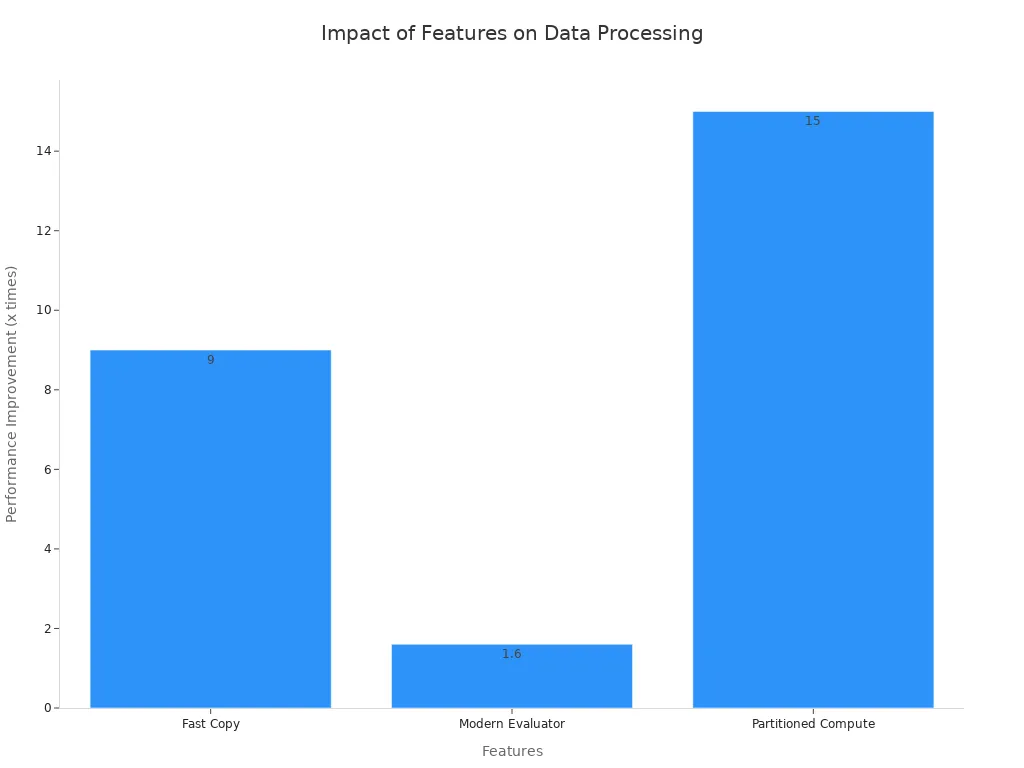
Managed staging reduces compute usage, which leads to lower storage costs. You can process large volumes of data efficiently, even in high-scale scenarios. When you run queries on the Lakehouse or Warehouse SQL engine, the system tracks compute time closely. Each second of compute time uses 6 CU seconds, so efficient processing helps you manage costs.
With these dataflow gen2 capabilities, you gain better refresh performance and can conduct an in-depth performance evaluation of your ETL pipelines. Microsoft gives you the tools to optimize both speed and cost, making your data workflows more effective.
Git Integration for Collaboration
You can make teamwork easier and more effective with Git integration in Microsoft Fabric Dataflows Gen2. Git gives you a powerful way to manage your dataflows, track changes, and work with others. You do not have to worry about losing your work or making mistakes that you cannot fix. Git keeps a history of every change, so you can always go back if needed.
Here is a table that shows how Git integration helps you and your team:
| Benefit | Description |
|---|---|
| Automated deployments | Streamline your deployment process by integrating Dataflow with your CI/CD processes in Fabric. |
| Version control | Use Git to manage and version your Dataflow Gen2, ensuring you have a history of changes and can easily roll back if needed. |
| Collaboration | Enhance team collaboration by leveraging Git’s branching and merging capabilities. |
| Multitasking support | You can now have multiple Dataflows open at the same time as other Microsoft Fabric experiences. |
You can create branches for new features or experiments. Your team can review changes before merging them into the main project. This process helps you avoid conflicts and keeps your dataflows consistent. You can also automate deployments, which saves time and reduces errors. With multitasking support, you can work on several dataflows at once without losing focus.
Tip: Use Git branches to test new ideas safely. You can merge them later when you are ready.
AI and Copilot Assistance
AI and Copilot features in Microsoft Fabric Dataflows Gen2 help you work smarter and faster. You do not need to write complex code or spend hours on repetitive tasks. AI tools guide you through the process and automate many steps.
Here is a table that highlights some key AI-powered features:
| Feature | Description |
|---|---|
| Pipeline Expression Copilot | Allows you to use natural language to generate expressions, simplifying complex tasks. |
| AI-powered Transform | Lets you create new columns through natural language descriptions, eliminating the need for coding. |
| Model Context Protocol (MCP) | Facilitates seamless interaction with external tools, enhancing automation capabilities. |
You can use natural language prompts to build dataflows and pipelines. This means you describe what you want, and Copilot generates the steps for you. You save time and reduce the chance of errors. AI also checks your data types and joins, so your data quality improves.
- Automatically generate dataflows and pipelines using simple prompts.
- Get intelligent code suggestions that speed up your ETL development.
- Validate data types and joins to minimize mistakes.
- Building scalable data pipelines can take a lot of time.
- Copilot helps by creating dataflows from your prompts.
- You move from idea to production in minutes, which boosts your productivity.
Note: AI and Copilot do not just save time—they help you focus on solving business problems instead of technical details.
With these tools, you can handle more projects and deliver results faster. You empower your team to innovate and keep your data processes running smoothly.
Overview: Key Benefits of Microsoft Fabric Dataflows Gen2
- Unified data preparation: Consolidates ETL/ELT tasks in a single environment for Microsoft Fabric Dataflows Gen2, reducing tool sprawl and simplifying pipelines.
- Scalability and performance: Leverages Fabric's elastic compute and distributed processing to handle large volumes of data with faster refreshes and transformations.
- Separation of compute and storage: Allows independent scaling of compute resources and storage, optimizing cost and performance for dataflow workloads.
- Native integration with Fabric services: Seamless connectivity to OneLake, Power BI, Data Factory, and Lakehouses for end-to-end analytics and governance.
- Improved governance and security: Centralized policies, access controls, lineage, and auditing built into the Fabric platform to maintain compliance and data quality.
- Reusable, modular data entities: Create shared dataflows and entities that can be reused across reports and projects, promoting consistency and reducing duplication.
- Support for modern data formats and connectors: Broad connector support and native handling of parquet, Delta, and other lake formats for efficient lake-centric workflows.
- Low-code and advanced transformation options: Combines user-friendly Power Query-style interfaces with advanced SQL/compute options for both business users and data engineers.
- Automated refresh and orchestration: Built-in scheduling, incremental refresh, and integration with Fabric pipelines for reliable, automated data delivery.
- Cost optimization: Pay-for-what-you-use model and capabilities like incremental refresh and compute autoscaling help reduce operational costs for Microsoft Fabric Dataflows Gen2 workloads.
Dataflow Gen2 vs Traditional ETL Tools

Architecture and Workflow Differences
You will notice clear differences when you compare Dataflow Gen2 with traditional ETL tools. Dataflow Gen2 uses a modern architecture that helps you manage data more easily. You do not have to deal with the rigid setups that older tools often require. The table below shows how these two approaches differ:
| Feature | Microsoft Fabric Dataflows Gen2 | Traditional ETL Tools |
|---|---|---|
| Architecture | Redesigned with powerful compute engines and data movement capabilities | Often rigid and less flexible in handling data sources |
| Complexity Management | Abstracts complexities of ETL/ELT processes | Requires manual orchestration and management of complexities |
| Data Integration Approach | Supports both simple and complex data integration projects | Typically focused on predefined ETL processes |
| Authoring Tool | Uses Power Query for dataflows | Varies by tool, often requires coding |
| Execution | Generates orchestration plans automatically | Manual orchestration and execution required |
| Staging and Compute | Utilizes Lakehouse and Warehouse artifacts for staging and compute | Often lacks integrated staging and compute capabilities |
You can see that Dataflow Gen2 automates many steps. You do not need to write code for most tasks. This makes your workflow smoother and faster.
Improvements and Limitations
With Gen2, you gain better automation, scalability, and flexibility. You can handle large amounts of data and support many types of projects. The platform uses advanced scheduling, triggers, and APIs to automate your data tasks. You also get full monitoring and data lineage, which helps you track every step.
| Feature | Gen1 | Gen2 | Why It Matters for Banking |
|---|---|---|---|
| Performance & Scalability | Limited parallelism | Optimized compute with enhanced parallelism | Handles high-volume transaction data effortlessly |
| Data Destination Flexibility | Only Dataverse | Lakehouse, Warehouse, KQL DB, and more | Supports diverse analytical needs across departments |
| Transformation Engine | Power Query only | Power Query + Spark | Enables complex, scalable transformations for fraud detection, risk modeling, etc. |
| Scheduling & Automation | Basic refresh | Advanced scheduling, triggers, APIs | Automates regulatory reporting and daily reconciliations |
| Monitoring & Lineage | Minimal | Full lineage, logging, and monitoring | Critical for audit trails and compliance reviews |
| Integration with Fabric | Isolated | Deep integration with Lakehouse, Notebooks, Power BI | Enables unified analytics across silos |
Tip: You can use Gen2 to support both simple and complex data projects. This flexibility helps you meet changing business needs.
When you move from traditional ETL tools to Dataflow Gen2, you may need to learn new concepts. You will work with Pipelines, Lakehouse, Notebooks, and Power BI. This learning curve is normal when you adopt a modern platform.
Cost and Resource Management
You want to keep costs predictable and manage resources well. Microsoft Fabric uses a capacity-based pricing model. This means you can estimate costs more easily, especially if your workloads stay steady. Traditional ETL tools often use a consumption-based model, which can make costs harder to predict.
| Feature | Microsoft Fabric | Databricks |
|---|---|---|
| Pricing Model | Capacity-based (predictable costs) | Consumption-based (variable costs) |
| Cost Predictability | High (for steady workloads) | Low (can vary significantly) |
| Complexity | Lower (integrated services) | Higher (multiple tools needed) |
| Cloud Platform Specificity | Azure-specific | Consistent across cloud platforms |
- Microsoft Fabric brings many services together in one platform. You do not have to manage many vendors or tools.
- Traditional ETL tools often require you to use different products, which can make your setup more complex.
Note: You can save time and reduce errors by using an integrated platform like Microsoft Fabric.
Impact on ETL Processes
Data Extraction and Connectivity
You need reliable access to your data sources. Microsoft fabric dataflows makes this easy by centralizing your connections. You can pull data from many systems, such as Salesforce, SQL databases, and cloud storage, all in one place. This approach reduces the number of API calls, which helps you avoid hitting limits and keeps your processes running smoothly.
| Feature | Benefit |
|---|---|
| Centralized API Calls | Reduces total API calls to Salesforce, preventing limit exhaustion and enhancing reliability. |
| Optimized Storage in OneLake | Stores processed data in Delta Parquet format, enabling fast access and eliminating re-processing. |
| Persistent Data Layer | Isolates complexity of API extraction, resulting in faster reports and better resource utilization. |
You store your processed data in OneLake using the Delta Parquet format. This means you can access your data quickly and do not need to repeat extractions. The persistent data layer also helps you manage complex API extractions. You get faster reports and better use of your resources. With these features, you improve performance and reliability in your ETL processes.
Transformation Consistency and Automation
You want your transformation steps to be consistent every time you run your ETL pipelines. In gen2, every transformation step is recorded. This makes it easy to replay your processes and keep results the same across different ingestions. You do not have to worry about missing a step or making a mistake.
You can schedule your dataflows to refresh automatically. Set them to run hourly, daily, or weekly. You can also trigger them as part of a larger pipeline. This ensures your data stays fresh without manual work. When you update your transformation logic, every connected service uses the new version right away. If you change an upstream column, you only update the logic once. All dependent services see the change immediately.
Tip: Keep your transformation logic in one place. This helps you maintain consistency and saves time when you need to update your processes.
Automation and consistency help you deliver trusted results. You spend less time fixing errors and more time using your data for insights.
Streamlined Data Loading
You need to move data into your analytics systems quickly and efficiently. Microsoft fabric dataflows gen2 streamlines this process. You can load data into Lakehouse, Warehouse, or Power BI models with just a few clicks. The platform optimizes the loading process to boost performance and reduce wait times.
- Use managed staging to handle large datasets without slowing down your system.
- Take advantage of partitioned compute to speed up data loading.
- Avoid unnecessary data movement by using OneLake shortcuts.
These features help you transform and load data faster. You can support both real-time and batch processes, so your analytics stay up to date. Streamlined loading means you get results sooner and can react to changes in your business right away.
Note: Fast and reliable data loading improves your overall ETL performance and helps you keep your processes efficient.
Workflow Orchestration and Monitoring
You need strong workflow orchestration and monitoring to keep your ETL processes running smoothly. Microsoft Fabric Dataflows Gen2 gives you tools to automate, schedule, and track every step in your data pipeline. You can build reliable workflows that deliver fresh data on time.
Orchestrate Your ETL Workflows
You can use Dataflows Gen2 to design and control the flow of your data. The platform lets you:
- Schedule dataflows to run at specific times, such as hourly or daily.
- Trigger dataflows based on events, like new data arriving in OneLake.
- Chain multiple dataflows together to create complex pipelines.
- Integrate with Fabric Pipelines for advanced orchestration.
This orchestration means you do not have to start jobs manually. You set up your rules once, and the system handles the rest. You can focus on analyzing your data instead of managing jobs.
Monitor Your Dataflows with Ease
Monitoring helps you catch problems early and keep your data accurate. Microsoft Fabric Dataflows Gen2 provides built-in monitoring features. You can:
- View refresh history and see when each dataflow ran.
- Check the status of each run (success, failure, or in progress).
- Get detailed error messages if something goes wrong.
- Track resource usage, such as compute time and storage.
Here is a table that shows what you can monitor:
| Monitoring Feature | What You See |
|---|---|
| Refresh History | List of past runs with timestamps |
| Run Status | Success, failure, or in progress |
| Error Details | Specific error messages and steps |
| Resource Usage | Compute and storage consumption |
Tip: Check your refresh history often. You can spot trends and fix issues before they affect your reports.
Set Up Alerts and Notifications
You can set up alerts to stay informed about your dataflows. The system can send you notifications if a dataflow fails or takes too long. You get updates by email or in the Fabric workspace. This helps you respond quickly and keep your data pipeline healthy.
Visualize and Audit Your Workflows
You can use built-in dashboards to visualize your ETL workflows. These dashboards show you how data moves through each step. You can also audit your workflows to see who made changes and when. This supports data governance and helps you meet compliance needs.
Key Benefits of Orchestration and Monitoring
- You automate routine tasks and reduce manual work.
- You improve reliability by catching errors early.
- You gain visibility into every step of your ETL process.
- You support compliance with detailed audit trails.
With Microsoft Fabric Dataflows Gen2, you take control of your ETL workflows. You ensure your data stays fresh, accurate, and ready for analysis.
Dataflows Integration and Collaboration
Unified Refresh Orchestration
You can manage your scheduled refresh tasks in one place with Microsoft Fabric Dataflows Gen2. This unified approach helps you keep all your dataflows up to date without extra effort. You set up a scheduled refresh for each dataflow, and the system handles the rest. You do not need to worry about missing a refresh or running jobs manually.
- You can schedule a refresh for each dataflow based on your needs.
- The platform supports both hourly and daily scheduled refresh options.
- You can monitor the status of every scheduled refresh from a single dashboard.
Tip: Use the unified dashboard to check the results of each scheduled refresh. This helps you spot issues early and keep your data accurate.
You can also chain multiple dataflows together. When one scheduled refresh finishes, the next one starts automatically. This orchestration saves you time and reduces errors.
Version Control and Teamwork
You can work with your team more easily using built-in version control. Microsoft Fabric Dataflows Gen2 connects with Git, so you track every change to your dataflows. You create branches for new features or fixes. Your team reviews changes before merging them into the main branch.
| Benefit | How It Helps You |
|---|---|
| Branching | Test new ideas without risk |
| Pull Requests | Review changes before they go live |
| History Tracking | See who changed what and when |
You can roll back to a previous version if something goes wrong. This makes teamwork safer and more organized. Everyone works on the latest version, and you avoid conflicts. You can also use version control to manage scheduled refresh settings, making sure your refresh plans stay consistent.
Governance and Security
You need to keep your data safe and follow company rules. Microsoft Fabric Dataflows Gen2 gives you tools for strong governance and security. You set permissions for each dataflow, so only the right people can edit or run them. You can control who can set up a scheduled refresh or change its timing.
- Use role-based access to manage who can view or edit dataflows.
- Audit logs show every change, including updates to scheduled refresh settings.
- You can enforce policies for scheduled refresh frequency and timing.
Note: Good governance helps you meet compliance needs and keeps your data secure.
You can trust that your scheduled refresh tasks run as planned. The system tracks every action, so you always know who did what. This level of control helps you protect your data and build trust in your analytics.
Practical Use Cases for Dataflow Gen2
Modernizing Legacy ETL
You may have old ETL systems that slow down your business. These systems often require manual updates and complex scripts. With dataflow gen2, you can modernize your ETL processes. You move away from rigid workflows and adopt a flexible, low-code solution. This helps you reduce errors and save time. You can connect to many data sources and automate your data movement. You also gain better control over your transformation logic. This makes your data more reliable and easier to manage.
Tip: Start by identifying your most repetitive ETL tasks. Use dataflow gen2 to automate these steps and free up your team for more valuable work.
Real-Time and Batch Processing
You need to handle both real-time and batch data in your organization. Gen2 supports both types of processing, so you do not have to choose one over the other. You can use real-time features for scenarios like IoT telemetry or website clickstream analysis. Batch processing works well for daily reports or large data loads.
Here is a table that shows how gen2 supports both real-time and batch processing:
| Feature | Description |
|---|---|
| Eventstreams | Provides a real-time, event-driven data ingestion experience. You can use this for IoT or logs. |
| Batch Processing | Allows you to schedule and automate dataflows for efficient batch processing in enterprise tasks. |
You can set up eventstreams to capture live data as it happens. For regular updates, you schedule batch jobs. This flexibility helps you meet different business needs without switching tools.
Self-Service Data Preparation
You want your team to prepare data without waiting for IT. Dataflows make self-service data preparation possible. You use a simple interface to clean, shape, and combine your data. This speeds up your analytics projects and gives you more control.
- Dataflow Gen2 is the most modern and scalable way to prepare data on your own.
- Performance improves because the platform uses Fabric OneLake and powerful compute engines.
- Copilot integration lets you use natural language to build dataflows, making the process even easier.
The largest self-serve data preparation user community in the world supports Microsoft Fabric. You join a group of users who share tips and best practices. Microsoft Fabric and Power BI work together on one platform. This streamlines your analytics process and builds trust in your results.
Note: Self-service data preparation helps you deliver insights faster and respond quickly to business changes.
Cross-Platform Data Integration
You often need to bring data together from many different systems. Microsoft Fabric Dataflows Gen2 helps you do this with ease. You can connect to cloud services, on-premises databases, and third-party platforms without switching tools. This flexibility lets you build a single source of truth for your organization.
Dataflows Gen2 supports integration with a wide range of data sources. You can use public APIs to automate and manage your dataflows. This means you can pull data from external systems and push results to other platforms. You do not need to write complex code or manage separate ETL tools for each system. Instead, you use one platform to handle all your data integration needs.
Here is a table that shows how Dataflows Gen2 supports cross-platform integration:
| Feature | Description |
|---|---|
| Automated deployments | Streamline deployment processes by integrating Dataflow with CI/CD practices in Fabric. |
| Version control | Manage and version Dataflow Gen2 using GIT, ensuring a history of changes and easy rollbacks. |
| Collaboration | Enhance team collaboration through GIT’s branching and merging capabilities. |
| Multitasking support | Open multiple Dataflows simultaneously alongside other Microsoft Fabric experiences. |
| Public APIs | Automate and manage dataflows efficiently, allowing integration with various data sources. |
| Dynamic parameterization | Allow dynamic adjustments without altering the dataflow, improving workflow efficiency. |
| Incremental refresh | Optimize performance and resource utilization for large-scale analytics and operational data. |
You can see that Dataflows Gen2 gives you tools to manage your dataflows across different platforms. You can automate deployments, use version control, and support teamwork. These features help you keep your data integration process smooth and reliable.
You also benefit from dynamic parameterization. This feature lets you adjust your dataflows on the fly. You do not need to change the entire workflow when you want to update a parameter. This saves you time and reduces errors.
- Improved workflow efficiency means you spend less time on manual tasks.
- Dynamic parameterization lets you adapt quickly to new data or requirements.
- Support for incremental refresh helps you handle large datasets without slowing down your system.
You can open multiple dataflows at once and work on them alongside other Microsoft Fabric experiences. This multitasking support helps you manage complex projects more easily.
Tip: Use public APIs and dynamic parameters to connect to new data sources as your business grows. This keeps your integration process flexible and future-proof.
With Microsoft Fabric Dataflows Gen2, you can unify data from many platforms. You gain better control, faster results, and a more efficient workflow. This approach helps you deliver insights that drive your business forward.
Challenges and Best Practices
Migration and Adoption
When you move your organization to Microsoft Fabric Dataflows Gen2, you may face several challenges. Many teams discover that existing queries are complex and have hidden dependencies. You should start with a comprehensive audit of all Power BI queries. This helps you spot performance issues and understand how each transformation works.
Migrating in phases is a smart approach. Test your dataflows in a development environment before you go live. This lets you catch problems early and avoid disruptions. Always check your authentication setup. Make sure your connection credentials and permissions are valid before migration.
Here is a step-by-step guide to help you:
- Audit all existing queries for complexity and dependencies.
- Migrate in small, manageable phases.
- Test each phase in a safe environment.
- Validate all authentication and permissions.
- Monitor performance and adjust as needed.
Tip: Careful planning and testing make your migration smoother and reduce risks.
Skill Requirements and Learning Curve
You do not need to be a coding expert to use dataflow gen2. The user-friendly interface lowers the barrier for new users, especially if you have experience with GUI-based ETL tools. If you already know Power BI, you will find the transition to gen2 straightforward.
Dataflows Gen2 focuses on efficient transformation and ingestion. You can handle both small and large datasets with ease. While the basics are easy to learn, advanced features like data cleansing and modeling may require extra training. You should explore tutorials and documentation to build your skills.
- The platform specializes in transformation, which is key for preparing data for analysis.
- You can use the GUI to shape and clean your data quickly.
- Advanced users can dive deeper into modeling for more complex needs.
Note: Continuous learning helps you unlock the full power of gen2 and improve your transformation workflows.
Security and Compliance
Security and compliance are top priorities when you manage enterprise data. Microsoft Fabric Dataflows Gen2 gives you strong tools to protect your information. Data Loss Prevention (DLP) policies help you detect sensitive data and control who can access it. Microsoft Entra ID ensures secure authentication for every user.
You benefit from always-on encryption for data at rest and in transit. The platform meets many compliance standards and supports data sovereignty requirements. You can use governance tools like data lineage and information protection labels to track and secure your transformation processes.
| Security Feature | Benefit |
|---|---|
| DLP Policies | Detect and restrict sensitive data |
| Entra ID Authentication | Secure user access |
| Encryption | Protects data at rest and in transit |
| Governance Tools | Track data lineage and apply protection |
Tip: Regularly review your security settings to ensure compliance with your organization’s policies.
Optimizing Dataflow Gen2 Usage
You want to get the best results from your Microsoft Fabric Dataflows Gen2 experience. To do this, you need to follow some best practices and use the platform’s features wisely. Start by planning your dataflows before you build them. Sketch out the steps you need and decide which sources and destinations you will use. This helps you avoid confusion and keeps your projects organized.
Use clear and consistent naming for your dataflows, tables, and columns. When you use good names, you make it easier for your team to understand and maintain your work. You also reduce the risk of errors when you update or reuse your dataflows.
Monitor your refresh schedules closely. Set up alerts so you know when a refresh fails or takes longer than expected. This lets you fix problems quickly and keep your reports up to date. You can use the built-in monitoring tools to track performance and spot trends over time.
Take advantage of partitioning and incremental refresh. Partitioning breaks large datasets into smaller pieces. This speeds up processing and makes troubleshooting easier. Incremental refresh updates only the new or changed data, which saves time and resources.
Here are some tips to help you optimize your workflows:
- Limit the number of steps in each dataflow. Simple dataflows run faster and are easier to debug.
- Reuse transformation logic by creating canonical dataflows. This ensures consistency and reduces maintenance.
- Use managed staging to handle temporary data efficiently.
- Schedule refreshes during off-peak hours to avoid resource conflicts.
- Regularly review your dataflows for unused steps or outdated logic.
Tip: Document your dataflows and share notes with your team. Good documentation helps everyone understand the process and speeds up onboarding for new members.
You can also use Git integration to manage changes and collaborate with others. Branching and pull requests help you test updates safely before moving them to production. This keeps your environment stable and reduces the risk of errors.
Finally, keep learning about new features in gen2. Microsoft often adds updates that improve performance or add new capabilities. Stay informed by reading release notes and joining the user community. When you follow these best practices, you make your data projects more reliable, efficient, and scalable.
You can transform your ETL workflows with microsoft fabric dataflows. The platform gives you powerful tools for collaboration, automation, and cost control. Start by reviewing your current processes and plan your migration in phases. Align your ETL modernization with business goals and data governance. Explore the features from microsoft to build a future-ready data integration strategy.
Start with Microsoft Fabric Dataflows Gen2 Checklist
Use this checklist to get started with Microsoft Fabric Dataflows Gen2.
data factory - new dataflow gen2
What is Microsoft Fabric Dataflows Gen2 and how does it relate to gen1?
Microsoft Fabric dataflows gen2 is the new dataflow architecture in Microsoft Fabric designed to replace dataflow gen1 by providing improved scale, performance, semantic capabilities and native integration with Fabric services. It builds on familiar Power Query experiences while introducing a medallion architecture for data engineering, better refresh history, and support for enterprise patterns previously implemented with SSIS or external data factory solutions.
How does dataflow gen2 in Microsoft Fabric connect to various data sources?
Dataflow Gen2 in Microsoft Fabric can connect to various data sources including Azure Data services, Dynamics 365, Power Platform connectors and on-premises sources. Using the Power Query Editor and built-in connectors, you can get data from cloud and on-prem systems, transform it, and ingest data into Fabric workspaces or data destinations for further processing.
workspace - use dataflows
Can I include a dataflow in pipelines in Microsoft Fabric and how are pipelines different from a dataflow?
Yes, you can include a dataflow in pipelines in Microsoft Fabric. Dataflows focus on extract, transform and load (ETL) using Power Query while pipelines orchestrate multiple tasks, dependencies and workloads across data engineering, ingestion and semantic layers, similar to data factory patterns but native to Fabric.
Does Microsoft Fabric's dataflow gen2 support git integration support for version control?
Microsoft Fabric's dataflow gen2 includes git integration support to manage versions of your transformations and collaborate with teams. This enables branching, commit history and better lifecycle management for data engineering artifacts built with familiar Power Query experiences.
How do I load the data after preparing it with dataflow gen2?
After preparing data with dataflow gen2 you can load the data into Fabric data destinations like OneLake tables, semantic models or downstream power bi datasets. Load the data to the desired data destination using built-in connectors and configure refresh history and schedules to keep data current.
What is the familiar power query experience in new dataflow gen2?
New dataflow gen2 provides the familiar Power Query Editor experience so authors who know Power Query in Power BI or Excel can easily shape and transform data. This familiar interface reduces the learning curve while adding enterprise features like medallion patterns and improved performance for large workloads.
power bi - ingest data
How do medallion architectures work with Fabric Dataflows Gen2?
Medallion architectures in Fabric dataflows gen2 organize data into bronze, silver and gold layers to support incremental ingestion, refined transformations and semantic models. Dataflows can handle ingest tasks for the bronze layer, apply transformations for silver, and prepare curated semantic datasets for gold that power BI and other consumers use.
Is there a diagram view to visualize dataflow and pipeline dependencies?
Yes, Fabric offers a diagram view to visualize dataflow relationships, pipeline steps and dependencies. This helps teams understand end-to-end data movement, troubleshoot refresh history and plan data engineering workflows across workspaces and data destinations.
How does security updates and technical support work for dataflow gen2?
Microsoft delivers security updates for Fabric and dataflows gen2 via the platform's regular release cadence, and technical support is available through Microsoft support channels, Microsoft Learn documentation and community resources such as the Microsoft Fabric blog. Administrators should monitor security updates and follow best practices for workspace access and data governance.
Can dataflow gen2 replace SSIS for my ETL processes?
Dataflow gen2 can replace many SSIS use cases, especially for cloud-native ingestion and transformation scenarios, but SSIS may still be appropriate for complex on-prem ETL or specialized tasks. For many organizations, dataflow gen2 combined with pipelines in Microsoft Fabric provides a modern replacement path with simpler management and integration to semantic workloads.
How do I migrate from dataflow gen1 to new dataflow gen2?
Migration from dataflow gen1 to new dataflow gen2 involves assessing existing queries and transformations, recreating or importing Power Query expressions in the new environment, and validating data loads. Use Microsoft Learn guides and the Microsoft Fabric blog for migration patterns and tools to streamline the transition while preserving semantic models and refresh history.
Can dataflows in Fabric be used to power semantic models and Power BI reports?
Yes, Fabric dataflows gen2 are designed to feed semantic layers and power BI reports. By ingesting and refining data into semantic datasets, you enable consistent metrics and performant reports. Dataflows integrate with Fabric's semantic capabilities to provide governed, reusable data for BI consumption.
How do refresh history and scheduling work for dataflow gen2?
Dataflow gen2 provides detailed refresh history and scheduling options so you can track load durations, failures and incremental updates. You can configure automated refresh schedules within a workspace and view refresh history to troubleshoot issues and optimize performance for regular ingests.
What role does Power Platform and Dynamics 365 play with Microsoft Fabric dataflows?
Power Platform and Dynamics 365 are common data sources for Fabric dataflows. You can get data from these systems and transform it in dataflow gen2, making it available for analytics, reporting and downstream power BI datasets. This tight integration simplifies data consolidation across business apps and analytic workloads.
How do I ensure data governance and security when using Fabric dataflows?
Ensure governance by configuring workspace permissions, data access policies, and following security recommendations in Microsoft Learn. Use role-based access, data masking and monitor activity logs. Microsoft Fabric's integration with Azure Data security features helps maintain compliance and protect sensitive data during ingest and processing.
Are there cost implications when using dataflow gen2 in Microsoft Fabric?
Costs depend on workload size, compute used during transformations, storage in Fabric data destinations and frequency of refreshes. Planning medallion architectures, optimizing queries in the Power Query Editor, and monitoring workloads can help control costs. Refer to Microsoft Learn and pricing documentation for detailed estimates.
How can I get started learning dataflows gen2 and where can I find tutorials?
Start with Microsoft Learn modules and the Microsoft Fabric blog for step-by-step tutorials, best practices and sample scenarios. Hands-on labs in Learn, documentation for the Power Query Editor and community articles will help you build pipelines, include a dataflow in workspaces and ingest data into Fabric.
Does Fabric support hybrid scenarios with on-premises data sources?
Yes, Fabric dataflows gen2 can connect to on-premises data sources using supported gateways or hybrid connectors, enabling you to get data from legacy systems and load the data into Fabric for further processing while maintaining security and compliance controls.
🚀 Want to be part of m365.fm?
Then stop just listening… and start showing up.
👉 Connect with me on LinkedIn and let’s make something happen:
- 🎙️ Be a podcast guest and share your story
- 🎧 Host your own episode (yes, seriously)
- 💡 Pitch topics the community actually wants to hear
- 🌍 Build your personal brand in the Microsoft 365 space
This isn’t just a podcast — it’s a platform for people who take action.
🔥 Most people wait. The best ones don’t.
👉 Connect with me on LinkedIn and send me a message:
"I want in"
Let’s build something awesome 👊
If you’ve spent hours duct-taping together Power Query scripts and manually tweaking ETL jobs, Microsoft just changed the game. Fabric Dataflows Gen2 isn’t just a facelift — it’s a complete rethink of how your data moves from source to insight.In the next few minutes, you’ll see why features like compute separation and managed staging could mean the end of your most frustrating bottlenecks. But before we break it down, there’s one Gen2 upgrade you’ll wonder how you ever lived without… and it’s hidden in plain sight.
From ETL Pain Points to a Unified Fabric
Everyone’s fought with ETL tools that feel like they were built for another era — ones where jobs ran overnight because nobody expected data to refresh in minutes, and where error logs told you almost nothing. Now imagine the whole thing redesigned, not just re-skinned, with every moving part built to actually work together. That’s the gap Microsoft decided to close. For a long time in the Microsoft data stack, ETL lived in these disconnected pockets. You might have a Power Query script inside Power BI, a pipeline in Data Factory running on its own schedule, and maybe another transformation process tied to a SQL Warehouse. Each of those used its own refresh logic, its own data store, and sometimes its own credentials. You’d fix a transformation in one place only to realize another pipeline was still using the old logic months later. And if you wanted to run the same flow in two environments — good luck keeping them aligned without a manual checklist. Even seasoned teams ran into a wall trying to scale that mess. Adding more data sources meant adding more pipeline templates and more dependency chains. If one step broke, it could hold up a whole set of dashboards across departments. So the workaround became building parallel processes. One team in Sales would pull their copy of the data to make sure a report landed on time, while Operations would run their own load from the same source to feed monthly planning. The result? Two big jobs pulling the same data, transforming it in slightly different ways, then arguing over why the numbers didn’t match. It wasn’t just the constant duplication. Maintaining those fragile flows ate an enormous amount of development time. Internal reviews from data teams often found that anywhere from a third to half of their ETL hours in a given month went to patching, rerunning, or reworking jobs — not building anything new. Every schema change upstream forced edits across multiple tools. Version tracking was minimal. And because the processes were segmented, troubleshooting could mean jumping between five or six different environments before finding the root cause. Meanwhile, Microsoft kept expanding its platform. Power BI became the default analytics layer. The Fabric Lakehouse emerged as a unified storage and processing foundation. Warehouses provided structured, governed tables for enterprise systems. But the ETL story hadn’t caught up — the connective tissue between these layers still involved manual exports, linked table hacks, or brittle API scripts. As more customers adopted multiple Fabric components, the lack of a unified ETL model started to block adoption of the ecosystem as a whole. That’s the context where Gen2 lands. Not as another “new feature” tab, but as a fundamental shift in how ETL is designed to operate inside Fabric. Instead of each tool owning its own isolated dataflow logic, Gen2 positions dataflows as a core Fabric resource — on par with your Lakehouse, Warehouse, and semantic models. It treats transformation steps as assets that can move freely between these environments without losing fidelity or needing a custom bridge. This matters because it changes what “maintainable” actually looks like. In Gen1, the same transformation might exist three times — in Power Query for BI, in a pipeline feeding the warehouse, and in a notebook prepping the Lakehouse. In Gen2, it exists once, and every connected service points to that canonical definition. If an upstream column changes, there’s one place to update the logic, and every dependent service sees it immediately. That’s the kind of alignment that stops shadow processes from creeping in. And because this overhaul involves more than just integration points, it sets the stage for other benefits. The architecture itself has been realigned to make scaling independent of storage — something we’ll get into next. The authoring experience has been rebuilt with shared governance in mind. And deployment pipelines aren’t an afterthought; they’re baked into the lifecycle from the start. So the real takeaway here is that Gen2 is a first-class Fabric citizen. It’s built into the platform’s identity, not sitting on the sidelines as an add-on service. Instead of stitching together three or four tools every time you move data from source to insight, the pieces are already part of the same framework. Which is why, when we step into the architectural blueprint of Gen2, you’ll see how those connections hold up under real-world scale.
The Core Architecture Blueprint
You can’t see them in the interface, but under the hood, Dataflows Gen2 runs on a very different set of building blocks than Gen1 — and those changes shift how you think about performance, flexibility, and long-term upkeep. On the surface it still looks like you’re authoring a transformation script. Underneath, there’s a compute engine that runs independently from where your data lives, a managed staging layer for temporary steps, a broader set of connectors, an authoring environment that’s built for collaborative work, and deep hooks into Fabric’s deployment pipeline framework. Each part has a job, and the way they fit together is what makes Gen2 behave so differently in practice. In Gen1, compute and storage were tightly coupled. If you needed to scale up your transformation performance, you were often also scaling the backend storage — whether you needed to or not. That meant more cost and more risk when resources spiked. Troubleshooting was equally frustrating. One team might hit refresh on a high-volume dataflow right as another job was processing, and suddenly the whole thing would slow to a crawl or fail outright. You’d get partial loads, half-finished temp tables, and spending a day debugging only to find it was a resource contention problem all along. Think about a nightly refresh window where a job pulls in millions of rows from multiple APIs, applies transformations, and stages them for Power BI. In the old setup, if external API latency increased and the job took longer, it could collide with the next scheduled flow and both would fail. You couldn’t isolate and scale the transformation power without dragging storage usage — and costs — along for the ride. Gen2’s compute separation removes that choke point. The transformation logic executes in a dedicated compute layer, which you can scale up or down based on workload size, without touching the underlying storage. If you have a month-end process that temporarily needs high throughput, you give it more compute just for that run. Your data lake footprint stays constant. When the run finishes, compute spins down, and costs stop accruing. This not only solves the collision issue, it also makes performance tuning a more precise exercise instead of a blunt-force resource increase. The other silent workhorse is managed staging. Every transformation flow has intermediate steps — partial joins, pivot tables, type casts — that don’t need to live on disk forever. In Gen1, these often landed in semi-permanent storage until someone cleaned them up manually, taking up space and creating silent costs. Managed staging in Gen2 is an invisible workspace where those steps happen. Temp data exists only as long as the process needs it, then it’s automatically purged. You never have to script cleanup jobs or worry about zombie tables eating storage over time. Here’s a real-world example: imagine a retail analytics pipeline that ingests point-of-sale data, cleans it, joins with product metadata, aggregates by region, and outputs both a detailed table and a summary for dashboards. In Gen1, each of those joins and aggregates would either slow the single-threaded process or produce intermediate files you’d later have to delete. In Gen2, the compute engine processes those joins in parallel where possible, using managed staging to hold temporary results just long enough to feed the next transformation. By the time the flow finishes, only your output tables exist in storage. That’s faster processing, no manual cleanup, and predictable storage usage every time it runs. None of these features live in isolation. The connectors feed the compute engine; the managed staging is part of that execution cycle; the authoring environment ties into deployment pipelines so you can push a tested dataflow into production without manual rework. The separation of responsibilities means you can swap or upgrade individual parts without rewriting everything. It also means if something fails, you know which module to investigate, instead of sifting through one giant, monolithic process for clues. This modular architecture is the real unlock. It’s what takes ETL from something you tiptoe around to something you can design and evolve with confidence. Scaling stops being a guessing game. Maintenance stops being a fire drill. And because every part is built to integrate with the rest of Fabric, the same architecture that powers your transformations is ready to hand off data cleanly to the rest of the ecosystem — which is exactly where we’re going next.
Seamless Flow Across Fabric
Imagine building a single dataflow and having it immediately feed your Lakehouse, Warehouse, and Power BI dashboards without exporting, importing, or writing a single line of “glue” logic. That’s not a stretch goal in Gen2 — that’s the baseline. The days of creating one version for analytics, another for storage, and a third for machine learning jobs are over if you’re working inside Fabric’s native environment. Before Gen2, moving the same data across those layers meant juggling several disconnected steps. You might start inside Power Query for initial transformations, then export to a CSV or push it into Azure Data Lake. From there, you’d set up a separate load into your warehouse, often through a Data Factory pipeline. Once in the warehouse, you’d manage linked tables for reporting, manually configure refresh schedules, and hope none of it fell out of sync. Every extra system in the chain was another opportunity for drift — schema mismatches, refreshes failing on one side, or logic updates making it into one version but not the others. That fragmentation came with real consequences. Say you’ve got a revenue dataset coming in from multiple regions. In Power BI, the model owner might apply logic to reclassify certain products under new categories. Meanwhile, in the warehouse, a separate SQL job groups them differently for operational reporting. On paper, both look correct — they just don’t agree. So the finance dashboard shows one number, the inventory planning report shows another, and you spend a week reconciling a problem that didn’t exist at the source. The fix often meant rewriting transformations in multiple tools to get both sides aligned, which never felt like a good use of anyone’s time. Gen2 addresses this head-on. Connectors aren’t just wider in coverage, they’re built as Fabric-native pathways. When you publish a dataflow in Gen2, every service in your Fabric workspace can read from it directly — Lakehouse, Warehouse, Power BI — with no intermediate scripts or table mapping. The transformation logic isn’t copied into each destination; it’s referenced from the same definition. That means if you change the classification rule for those products once in the dataflow, every connected workload starts using it automatically. Refresh schedules are unified because they’re based on a single source of truth, not chained triggers between unrelated jobs. Picture a sales analytics team asked to provide both quarterly executive dashboards and a dataset for data scientists training churn prediction models. In the old setup, they’d build the Power BI layer first, then extract and clean a separate dataset for the ML team. In Gen2, they author the ETL once. The summary tables feed directly into Power BI, while the cleaned transactional data is available to the Lakehouse for machine learning. There’s no “ML extract” to maintain. When the sales categorization changes, both the dashboards and the model training data reflect it on the next refresh. That single definition model extends to collaboration. Gen2’s version control integration means analysts and developers can work off the same dataflow repository. A developer can branch the pipeline to test a new transformation without freezing the production flow. Analysts can continue iterating on visualizations knowing the main ETL stays stable. When the change is approved, it’s merged back into the main branch, and everyone gets the update. No more passing around copies of queries or waiting for one person to “finish” before another can start. Because these pipelines are Fabric-native, they also tie into newer features like Fabric streaming. That means parts of your dataflow can handle real-time ingestion — think live IoT sensor data or transaction streams — and feed them directly into the same data model that batch jobs use. Your Lakehouse, Warehouse, and dashboards stay in sync whether the data arrived five seconds ago or as part of a nightly run. The result is that reusable ETL in Fabric stops being an aspirational idea. You really can maintain one transformation path and have it reliably feed every downstream service without data being reshaped or reinterpreted along the way. That’s not just good for consistency; it’s an operational advantage. And when you clear out all those manual handoffs, you also free up headroom to manage the resources behind it more intelligently — which Gen2’s architecture is about to make a lot easier.
Resource Control Without the Guesswork
What if you could scale ETL performance exactly when you need it, without touching your queries — and the meter only runs while it’s in use? That’s the shift Gen2 brings. You aren’t locked into one fixed level of resources that’s either too much most of the time or not enough when heavy jobs hit. In Gen1, resource scaling was more like a blunt instrument than a dial. You picked your capacity tier, paid for it all month, and hoped it could handle peak workloads. If a job failed because there wasn’t enough power during a spike, the only option was to provision more — often permanently — just to cover those outlier events. And when you did overprovision to avoid those failures, the extra cost sat on the books every day, whether or not you used the capacity. Technical teams saw it as insurance; finance teams saw it as waste. That tension played out in every reporting cycle. Underprovision, and you’d miss refresh deadlines or spend hours rerunning failed jobs. Overprovision, and you were essentially buying idle horsepower “just in case.” The lack of transparency didn’t help either. It was hard to predict how much resource a new dataflow would actually consume until it ran in production. By then, you were already in damage control mode. Gen2 changes the equation with compute separation and on-demand scaling. Processing runs in its own environment, completely separate from storage, so you can scale compute up or down without touching your data footprint. Need a short-term boost for a big job? You set the compute to a higher level for that run. When the work finishes, it scales back down, and you’re no longer paying for resources you don’t need. The rest of the time, you can run with a lower baseline that still meets day-to-day needs. Take a common example — a quarterly data load. Imagine an ETL pipeline that usually processes a few million rows per night. At quarter’s end, that balloons to hundreds of millions due to consolidated reporting and deeper historical pulls. In Gen1, that spike could crush your existing capacity, forcing you to either accept failures or pay for higher performance all the time. In Gen2, you can tell the system to allocate a bigger compute tier for just that quarterly run. It chews through the backlog quickly, then returns to the standard level. There’s no architectural change, no query rewrites, and no long-term capacity increase hanging over your budget. Managed staging plays its part in cost control too. Because Gen2 clears out temporary data automatically at the end of a run, you’re not paying for storage that only exists to hold intermediate calculations. In Gen1, those temp layers often lingered — either forgotten or saved “just in case” — slowly inflating your storage bills. Now, temp data lives only as long as it needs to for the transformation to complete, then it’s gone. You still get the performance benefit of staging without the hidden, accumulating cost. This approach to elasticity isn’t just convenient — it’s financially impactful. Analysts who’ve studied elastic compute in ETL environments consistently find significant savings when workloads can be matched to resources dynamically. It’s the difference between running your car at full throttle all day because you might need to overtake someone versus pressing the accelerator only when you actually do. Costs track with actual usage rather than some inflated worst-case estimate. The predictability this creates is a rare win for both sides of the house. Technical teams can design flows knowing they have a safety net for heavier-than-normal workloads without ballooning everyday operating costs. Finance teams get usage patterns that line up with value delivered — no more paying for 100% capacity to handle the 10% of the time when you really need it. And because the scaling is configuration-driven rather than code-driven, there’s no development debt every time you change it. The net effect is a platform where performance tuning and cost management aren’t at odds. You can aim for faster refreshes in specific scenarios while keeping a leaner footprint the rest of the time. That control — without the constant guesswork — sets the stage for something equally important: making ETL a true team effort instead of a one-person-at-a-time process.
Collaborating Without Collisions
ETL has always worked fine when one person owns the process. The trouble starts when two people open the same file, make their own changes, and hit save. One set of transformations quietly replaces the other, and you only find out later when reports start returning different numbers. For years, teams have avoided this by handing off files like relay batons, or by splitting work into separate, semi-duplicated flows. It kept collisions down, but it also meant slower development and more places for bugs to hide. The common pattern in most Microsoft-based ETL setups went something like this: an analyst would handle cleaning and shaping data in Power Query for a BI model. Meanwhile, a developer might add steps to prepare a warehouse table. Both would work from slightly different copies of the same logic, often exported and imported manually. Weeks later, someone would notice that one version had a new filter or field, and the other didn’t. You could try to merge them, but there was no native system tracking those changes, so you were guessing which version to trust. In traditional environments, version control for ETL was mostly an afterthought. Some teams tried manual documentation — naming conventions and change logs in Excel. Others bolted on third-party Git syncs that exported M code from Power Query. Those solutions sort of worked if you were careful, but they weren’t built into the ETL process. That meant it was easy to skip them in the name of speed, and once you bypassed the process, the audit trail was gone. Gen2 changes that by baking Git integration directly into the dataflow layer. It’s not an export step or an optional plugin. The dataflow itself can live in a Git repo as the source of truth. You can create branches, commit changes, and merge updates just like you would in a software development project. The difference is you’re working with transformation logic instead of application code. That opens up development patterns that just weren’t possible before. Say your production dataflow is feeding daily executive dashboards. You need to test a new transformation that changes how regional sales are grouped. In Gen1, you’d either risk altering the live flow or have to clone the whole thing into a separate workspace for testing. In Gen2, you open a development branch of the same dataflow. Your changes run in isolation, leaving production untouched. You can see the results, run checks, and only merge when you’re confident it’s correct. Because it’s Git, branching is only part of the story. Code reviews and pull requests now apply to ETL. If you work in a team, a second pair of eyes can review your transformation logic before it hits production. That’s more than just formatting — someone can see exactly which filters, joins, or calculated columns you’ve added or removed in a commit. It makes it easier to catch logic errors or unintended field drops before they cause wider issues. Every change is also tracked historically. If a schema change upstream breaks part of the flow and you’re not sure when it happened, you can scroll back through commits to find the last version that worked. Rolling back isn’t a matter of retyping steps from memory — it’s checking out the prior commit. That’s a level of control most ETL teams haven’t had inside the Microsoft ecosystem without heavy customization. For engineering teams that have already adopted this workflow, it’s done more than prevent accidental overwrites. Controlled deployment flows mean fewer unplanned outages, cleaner audit trails for governance, and the ability to push updates on their own schedule instead of rushing fixes into live workflows. It also reduces the reliance on single “data heroes” who know exactly which version of a flow is correct, because the repo’s history makes that visible to everyone. The end result is that ETL work in Gen2 feels much less like a fragile, one-person task and much more like a modern software project. You can have multiple contributors, safe experimentation, peer review, and a full history — all built into the platform. Which ties back to the bigger picture we’ve been building: every design choice in Gen2, from architecture to integration to governance, shifts ETL from a collection of workarounds to a connected, maintainable part of the Fabric ecosystem.
Conclusion
Gen2 isn’t just about faster refresh times or cleaner staging. It changes the way data teams actually work. Instead of patching together tools, you’re building workflows that live in one place, evolve together, and stay consistent across every part of Fabric. If you want to see that difference, try building a single Gen2 dataflow, hook it to your Lakehouse and Power BI, and watch how much maintenance disappears. In a few years, we may look back at pre‑Gen2 ETL the same way we remember dial‑up internet — it worked, but the idea of going back won’t even cross your mind.
Get full access to M365 Show - Microsoft 365 Digital Workplace Daily at m365.show/subscribe

Founder of m365.fm, m365.show and m365con.net
Mirko Peters is a Microsoft 365 expert, content creator, and founder of m365.fm, a platform dedicated to sharing practical insights on modern workplace technologies. His work focuses on Microsoft 365 governance, security, collaboration, and real-world implementation strategies.
Through his podcast and written content, Mirko provides hands-on guidance for IT professionals, architects, and business leaders navigating the complexities of Microsoft 365. He is known for translating complex topics into clear, actionable advice, often highlighting common mistakes and overlooked risks in real-world environments.
With a strong emphasis on community contribution and knowledge sharing, Mirko is actively building a platform that connects experts, shares experiences, and helps organizations get the most out of their Microsoft 365 investments.




