
Mastering Agentic AI: How Copilot Studio and Dataverse MCP Are Transforming M365
Welcome back to the podcast companion blog! In today's post, we are diving deep into the massive evolution happening within Microsoft 365. We are moving past basic chatbots and traditional low-code solutions straight into the era of autonomous, agentic AI. If you have been wondering how technologies like Microsoft Copilot Studio and the Model Context Protocol (MCP) are changing the enterprise landscape, you are in the right place. To get a comprehensive audio breakdown complete with expert perspectives, make sure to check out the related podcast episode: Agentic AI with Copilot Studio and Dataverse MCP with Nathan Rose [MVP].
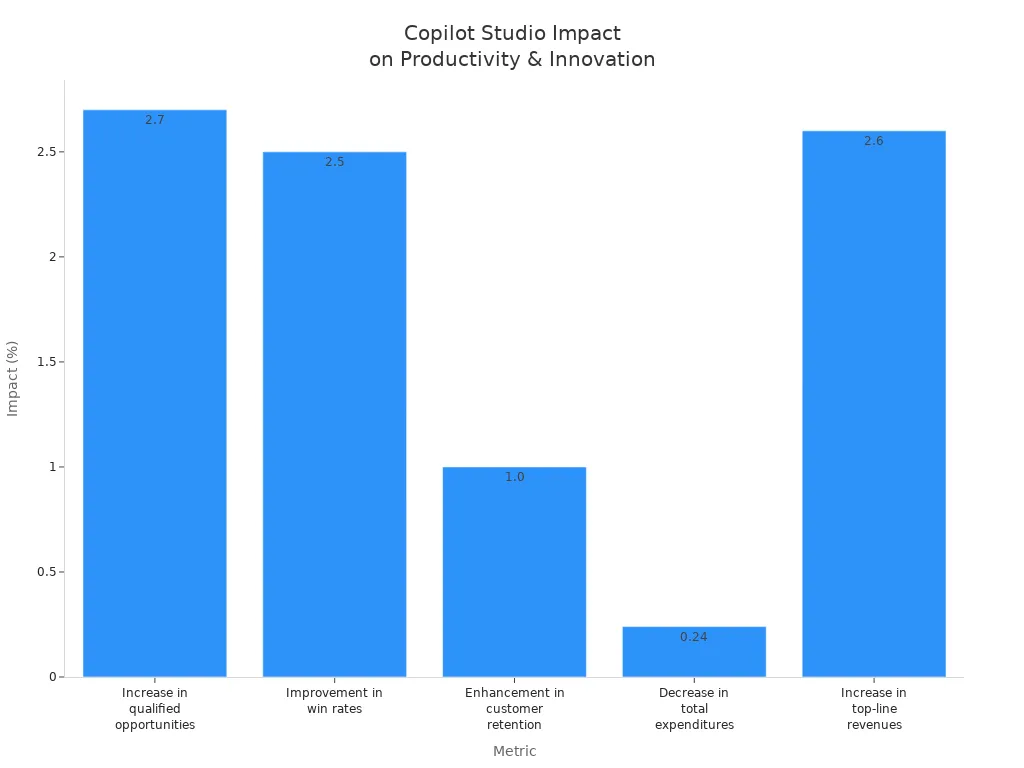
You now experience a transformation in how AI empowers your daily work with Microsoft 365. Copilot Studio gives you the tools to boost business productivity and drive innovation. When you use agentic AI, you see real results:
| Metric | Impact |
|---|---|
| Increase in qualified opportunities | 2.7% |
| Improvement in win rates | 2.5% |
| Enhancement in customer retention | 1.0% |
| Decrease in total expenditures | 0.24% |
| Increase in top-line revenues | 2.6% |
- The shift from low-code to agentic AI means you move toward more autonomous systems.
- You take on new roles, focusing on orchestrating AI agents.
- You participate in the next wave of digital transformation with Copilot and Microsoft, shaping the future of your experience.
Key Takeaways
- Copilot Studio helps you automate tasks and improve workflows in Microsoft 365 apps like Word, Excel, and Teams.
- You can create AI agents without coding using a drag-and-drop interface, making it accessible for non-developers.
- AI agents save time by handling repetitive tasks, allowing you to focus on more important work.
- Multi-agent orchestration lets several AI agents work together to solve complex problems efficiently.
- Copilot Studio integrates with tools like Dataverse and Power Platform for seamless automation and insights.
- Advanced AI features like natural language processing make interactions with agents easy and intuitive.
- Microsoft ensures strong security and compliance, protecting your data and maintaining privacy.
- You can scale AI agents as your business grows, adapting to new challenges and opportunities.
Copilot Studio’s Impact on Agentic AI
Transforming Microsoft 365 Workflows
You can see how Copilot Studio changes the way you work in Microsoft 365 Copilot. With this platform, you use AI to automate tasks and streamline processes across your organization. Many companies now rely on AI agents to handle customer service, employee support, and data analysis. For example, a large retail chain uses a customer service copilot to answer common questions about orders and returns. This reduces wait times and lets human agents focus on more complex issues. HR teams use AI agents to respond to policy questions and leave requests, making sure employees get fast and accurate answers. Finance teams use copilots to analyze spreadsheets and create reports in real time. IT helpdesk agents help users reset passwords and solve technical problems around the clock. In industries like healthcare and finance, AI agents guide users through compliance checks and flag risks before they become problems.
- Customer service copilots handle routine questions and integrate with CRM systems.
- HR bots automate responses to policy and payroll inquiries.
- Finance copilots analyze data and generate reports.
- IT helpdesk agents provide 24/7 technical support.
- Compliance agents help you follow regulations and reduce risk.
You benefit from faster service, fewer errors, and more time to focus on important work. This AI-driven approach helps your business stay competitive and efficient.
Empowering Autonomous Agents
Copilot Studio gives you the power to create and manage autonomous agents inside Microsoft 365 Copilot. You can design agents for single tasks or build multi-agent solutions that work together. These agents can focus on your unique business needs and adapt to different roles. For example, you might create an agent that manages meeting schedules or another that tracks inventory. You can also connect agents to the Microsoft 365 graph, so they can access and act on data across your organization.
- You streamline processes with agentic workflows.
- You build agents for specific challenges, like onboarding new hires or managing customer feedback.
- You scale up by using multiple agents that work together for bigger results.
- You tailor agents to your business functions and extend their reach beyond Microsoft 365 Copilot.
This AI transformation means you rely less on manual work and more on smart automation. You see measurable improvements in how your teams operate and deliver value.
Enhancing Productivity and Decision-Making
When you use Copilot Studio, you unlock new levels of productivity and smarter decision-making. Organizations report saving up to 9 hours per user each month. New hires get onboarded up to 25% faster. Companies see a financial impact of $3.25 million from better retention. These gains come from AI-powered capabilities that automate routine tasks and provide instant insights.
| Metric | Improvement |
|---|---|
| Time saved per user per month | 9 hours |
| Reduction in new hire onboarding time | Up to 25% |
| Financial impact of increased retention | $3.25 million |
The model context protocol in Copilot Studio makes these results possible. This protocol lets agents discover data, search knowledge sources, and interact with business records. Agents can answer questions, update information, and generate custom responses based on real business context. You get relevant and actionable insights without extra steps.
| Capability | Description |
|---|---|
| Query | Discover tables, explore schema, and retrieve real-time data with structured or natural language queries |
| Knowledge and search | Let agents chat over your data, search knowledge sources, and deliver contextual answers |
| Upload (Create/Update) | Insert or update records in Dataverse with schema-aware mapping |
| Generate with prompts | Run custom prompts grounded in business context, like summarizing records or drafting replies |
With multi-agent orchestration, you can coordinate several AI agents to handle complex workflows. This means you make better decisions faster and keep your business moving forward.
What Is Copilot Studio?
Microsoft’s Platform for AI Agents
You use Copilot Studio as a powerful platform that brings AI agents into your daily work with Microsoft 365. This platform stands out because it lets you build, customize, and deploy AI solutions that fit your business needs. You create tailored AI models using pre-built templates and fine-tuning options. You choose from supervised, unsupervised, or reinforcement learning techniques. You integrate data from internal and external sources, including Azure Machine Learning, for real-time processing and insights. You extend functionality with custom plugins and third-party API integrations. You align AI assistants with your brand voice and workflows, giving your team a personalized experience. You connect Copilot Studio to applications and data sources for real-time information and task execution. You scale the platform as your organization grows, handling more data and interactions. You benefit from advanced AI capabilities, including natural language processing and machine learning, for accurate and contextually relevant interactions.
Tip: You can use Copilot Studio to create agents that automate tasks, answer questions, and deliver insights across Microsoft 365. This approach helps you save time and improve productivity.
| Core Component | Benefit |
|---|---|
| AI Model Development | Tailored models for business needs |
| Data Integration | Real-time insights from multiple sources |
| Custom Plugin Development | Extend functionality with APIs and plugins |
| Customizable Solutions | Personalized AI assistants |
| Scalability | Grows with your organization |
| Advanced AI Capabilities | Accurate, context-aware interactions |
Model Context Protocol Overview
You rely on the model context protocol to make your AI agents smarter and more adaptive. This protocol lets agents understand context, reason about data, and select the right tools for each task. You use it to enable agents to discover tables, explore schema, and retrieve real-time data with structured or natural language queries. You allow agents to chat over your data, search knowledge sources, and deliver contextual answers. You insert or update records in Dataverse with schema-aware mapping. You run custom prompts grounded in business context, such as summarizing records or drafting replies. The model context protocol gives your agents the ability to interact with business data dynamically, making every interaction more relevant and actionable.
Note: The model context protocol helps agents adapt to changing business requirements and deliver insights that matter to you.
Integration with Dataverse and Power Platform
You connect Copilot Studio seamlessly with Dataverse and the Power Platform. You use the common knowledge graph to link agents to enterprise systems, simplifying integration and letting you focus on building agents. You automate document workflows with the document processor agent, which extracts information and stores it in Dataverse. You manage business data effectively, enabling agents to perform adaptive tasks while ensuring human oversight. Dataverse supports low-code app development and AI-powered search, enhancing the capabilities of agents you create. You benefit from the Dataverse model context protocol, which makes business data interactive and allows for dynamic queries. You deploy agents across multiple channels and enjoy enterprise security, making Copilot Studio a reliable choice for organizations of all sizes.
Callout: You do not need extensive technical skills to use Copilot Studio. The drag-and-drop agent builder and canvas-based interface make it easy for business analysts and operations teams to define conversation flows and integrate data sources.
You see how Copilot Studio, GitHub Copilot, and GitHub work together to bring AI innovation to your organization. You build agents that automate workflows, analyze data, and support your team, all within the Microsoft ecosystem.
Key Features of Copilot Studio
No-Code and Low-Code Agent Creation
You can build powerful AI agents in Copilot Studio without writing complex code. The platform gives you a drag-and-drop interface that makes it easy to design conversation flows and automate tasks. You set up agents to follow your organization’s guidelines, tone, and branding. You expand their knowledge base so they answer questions with accuracy and context. You connect agents to external tools like Azure, Salesforce, and Dataverse for seamless automation and real-time insights.
| Feature | Description |
|---|---|
| Customization | You configure behavioral guidelines, tone, branding, and expand the knowledge base. |
| Integrations and Automation | You connect to external tools like Salesforce and Dataverse for automation and insights. |
| Multi-channel Deployment | You deploy agents across Teams, websites, and mobile apps. |
| Natural Language Understanding | You use NLU to interpret user intent and respond appropriately. |
| Drag-and-drop Conversation Design | You create conversational flows without coding. |
| Monitoring and Metrics | You track performance and user satisfaction for continuous improvement. |
You can deploy agents on multiple channels, including Microsoft Teams, websites, and mobile apps. You monitor their performance with built-in analytics, which helps you improve user satisfaction and agent effectiveness. You use Dataverse Business Skills to define reusable business logic. These skills describe your organization’s processes and policies in natural language. You update them in one place, and every agent benefits from the change. This approach ensures consistency and saves time.
Tip: You do not need to be a developer to create AI agents that automate business processes and deliver value.
Multi-Agent Orchestration
You can orchestrate multiple AI agents to work together in Copilot Studio. This feature lets you build solutions where each agent manages a specific area of expertise. For example, one agent can handle HR questions, while another manages IT support. These agents coordinate their responses, so you get clear and context-aware answers without switching between different interfaces.
- You enable agents to work with Fabric agents, which lets them reason over enterprise data and analytics at scale.
- You use the Microsoft 365 Agents SDK to orchestrate Copilot Studio agents alongside existing Microsoft 365 agents. This reduces duplication and allows you to reuse capabilities.
- You let agents communicate and delegate tasks to each other using an open protocol. This promotes interoperability and allows agents to operate across different platforms.
- You create a system where agents work together, not as disconnected solutions, but as a unified team that improves workflow efficiency.
You can automate complex workflows by combining the strengths of specialized agents. You see faster results and more accurate outputs because each agent focuses on what it does best.
Natural Language Processing
You interact with AI agents in Copilot Studio using natural language. The platform uses advanced natural language processing powered by large language models. You describe your needs in your own words, and the agents understand and respond fluently. You do not need to memorize menu paths or use technical terms.
| Advancement | Benefit |
|---|---|
| Large Language Models (LLMs) | You get accurate and fluent responses in human language. |
| Natural Language Understanding | You express needs in your own words, making AI more accessible. |
| Generative AI Conversation Boosters | Agents access and summarize information from URLs, improving their answers. |
| Conversational IVR | You interact naturally, replacing old menu-based systems. |
You benefit from advanced speech recognition models that interpret spoken inputs, even in noisy environments. You can ask questions, give instructions, or request summaries, and the agents respond with relevant information. This technology makes AI agents more helpful and easier to use in your daily work.
Note: You can rely on Copilot Studio, GitHub Copilot, and GitHub to bring the latest advancements in AI and natural language processing to your organization. These tools work together with Azure AI Foundry and Azure to deliver a seamless experience.
You see how Copilot Studio combines no-code creation, multi-agent orchestration, and natural language processing to transform the way you use AI in Microsoft 365. You empower your team to build, deploy, and manage agents that drive productivity and innovation.
Extensibility and Integration
You can extend Copilot Studio to fit your business needs. The platform gives you tools to connect with Microsoft 365 products and many third-party services. You add new features to your AI agents by using connectors and plugins. These connectors help your agents reach more data and perform more actions.
Here is a table that shows how you can use different types of extensibility in Copilot Studio:
| Extensibility Type | Microsoft 365 Product Availability | Learn More |
|---|---|---|
| Copilot connectors | Microsoft 365 Copilot, Power Automate, Power Apps, Azure Logic Apps | Extend agent capabilities with Copilot connectors |
| Microsoft 365 Copilot connectors | Microsoft 365 Copilot, Microsoft Search, Microsoft 365 Copilot app | Copilot connector experiences |
You use Copilot connectors to link your agents with services like Power Automate, Power Apps, and Azure Logic Apps. This lets your agents automate tasks across many platforms. You can also use Microsoft 365 Copilot connectors to bring Copilot-powered experiences into Microsoft Search and other apps.
Tip: You do not need to write code to connect your agents to these services. The platform gives you a simple way to add connectors and expand what your agents can do.
You can access important business knowledge in a secure way. Your agents reach indexed enterprise data and AI-generated meeting content. This helps you get answers and insights from your company’s information.
You can embed Copilot-powered chat into your own applications. This means your users get smart, conversational help wherever they work. You can also export user prompts and responses. This helps you monitor usage and meet compliance needs.
Here are some ways you benefit from extensibility and integration in Copilot Studio:
- Securely access Microsoft 365 knowledge, including enterprise data and meeting content.
- Embed Copilot-powered chat into your business applications.
- Export prompts and responses for compliance and monitoring.
- Connect to third-party services for more automation and insights.
You make your AI agents smarter and more useful by connecting them to the tools your business already uses. This flexibility helps you solve more problems and adapt to new challenges.
Applications in Microsoft 365 Copilot
Automating Business Processes
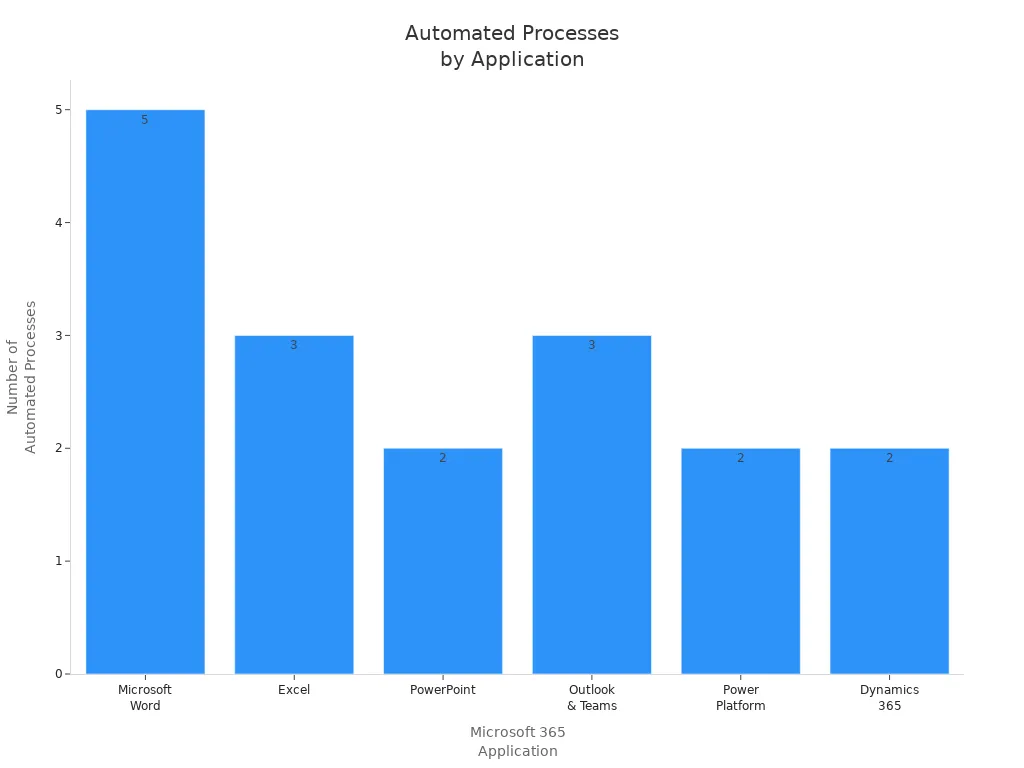
You can use Microsoft 365 Copilot to automate many business processes across your organization. The platform helps you save time and reduce manual work by letting AI agents handle repetitive tasks. These agents work in popular applications like Word, Excel, PowerPoint, Outlook, Teams, and the Power Platform. For example, you can draft and rewrite documents, translate languages, and summarize content in Word. In Excel, you can ask questions in natural language, analyze trends, and get narrative summaries. PowerPoint lets you auto-generate slides and receive smart design suggestions. Outlook and Teams help you summarize emails, extract action items, and reduce meeting fatigue. The Power Platform allows you to create low-code apps and automate flows, making it easier to manage business processes.
| Application | Automated Processes | Business Impact |
|---|---|---|
| Microsoft Word | Drafting, rewriting, generating structured documents, language translation, summarization | Reduces drafting time, improves communication quality. |
| Excel | Natural language queries, automated trend analysis, narrative summaries | Reduces data prep time, empowers non-analysts. |
| PowerPoint | Auto-generation of decks, smart design suggestions | Reduces time-to-deck, improves consistency. |
| Outlook & Teams | Email summarization, meeting summarization, action item extraction | Reduces meeting fatigue, accelerates task closure. |
| Power Platform | Generative creation of low-code apps, auto-generation of flows | Lowers automation barriers, reduces IT backlog. |
| Dynamics 365 | Summarization of customer interactions, automated drafting of communications | Improves sales productivity, shortens response times. |
With AI agents, you can focus on higher-value work while the system handles routine tasks. This approach leads to faster results and better outcomes for your business.
Enhancing Collaboration and Communication
You can improve teamwork and communication using AI agents in Microsoft 365 Copilot. These agents help you complete tasks, answer questions, and escalate work items based on enterprise data and context. Multi-agent orchestration lets agents collaborate across systems to achieve a single business outcome. You can use agent flows and templates to streamline structured tasks like IT support, recruitment, and compliance checks. Governance and security features are built into the Power Platform admin center, so you can deploy agents safely.
| Capability | Description |
|---|---|
| Custom and autonomous agents | Complete tasks, answer questions, and escalate work items based on enterprise data and context. |
| Multi-agent orchestration | Agents collaborate across systems to achieve a single business outcome. |
| Agent flows and templates | Streamline structured tasks like IT support, recruitment, and compliance checks. |
| Governance and security | Built into the Power Platform admin center for safe deployment and lifecycle management. |
- You help new hires navigate policies and find information.
- You provide instant access to process documentation and best practices.
- You enable self-service support for internal tools and workflows.
You can also use AI to support cross-team knowledge discovery, change management, and communications. For example, you can draft adoption plans, analyze messaging sentiment, and onboard new employees with adaptive paths. Customer and partner collaboration becomes easier through integrated tools. Engineering teams can use Loop components for real-time collaboration.
Tip: Use AI agents to connect people, share knowledge, and keep everyone on the same page.
Data Analysis and Insights
You can unlock powerful data analysis and insights with AI in Microsoft 365 Copilot. The platform gives you clear, customizable visuals that help you understand your data. You can quickly transform raw data into actionable insights. Trends become easy to spot and discuss, even if you do not have a background in analytics.
| Feature | Description |
|---|---|
| Clear, customizable visuals | Users can create visuals that are tailored to their needs. |
| Trends made digestible | Insights are presented in a way that is easy to understand for discussions. |
| Instant transformation of data | Raw data can be quickly converted into actionable insights. |
- You analyze complex datasets quickly.
- You identify trends across multiple sources.
- You generate scenarios to evaluate strategic options.
With AI agents, you can make better decisions and respond to changes faster. These tools help you stay ahead in a data-driven world.
Specialized AI Agents for Workflows
You can unlock new levels of efficiency by building specialized AI agents for your business workflows in Microsoft 365. Copilot Studio gives you the tools to design agents that focus on unique tasks and roles. These agents do not just automate general processes. They handle specific challenges that matter to your team.
Specialized AI agents can support many areas in your organization. You can create agents that manage sales, finance, support, or training. Each agent brings expertise to its workflow. This means you get better results and more reliable automation.
Here are some examples of specialized AI agents you can build with Copilot Studio:
- You can develop a sales agent that manages product information, handles customer inquiries, and follows up with leads. This agent helps your sales team stay organized and respond quickly.
- You can automate finance tasks by creating agents that reconcile balance sheets. These agents check records, flag errors, and save your team hours of manual work.
- You can set up support agents that triage tickets. These agents sort requests, assign priorities, and route issues to the right person. Your support team can resolve problems faster.
- You can enhance training by using agents that simulate sales conversations. These agents give your staff a safe space to practice and improve their skills.
Tip: You can customize each agent to match your business rules and data sources. This flexibility ensures that your agents fit your workflow perfectly.
The table below shows how specialized agents can help different departments:
| Department | Example Agent Function | Benefit |
|---|---|---|
| Sales | Manage product info and follow-ups | Faster response to customers |
| Finance | Reconcile balance sheets | Fewer errors, time savings |
| Support | Triage and route tickets | Quicker issue resolution |
| Training | Simulate sales conversations | Better staff preparation |
You do not need advanced coding skills to build these agents. Copilot Studio’s no-code and low-code tools make the process simple. You can use templates, drag-and-drop features, and natural language prompts to define what each agent should do.
Specialized AI agents help you focus on high-value work. You spend less time on repetitive tasks and more time on strategy and growth. As you add more agents, your organization becomes more agile and responsive.
Note: You can start small with one agent and expand as your needs grow. Copilot Studio scales with your business, so you always have the right tools for the job.
Responsible AI and Governance in Microsoft 365
Security and Compliance
You trust Microsoft to protect your data when you use Copilot Studio and Azure AI Foundry. The platform follows strict security and compliance standards. Your data stays in the right region because Microsoft supports geographic data residency. You control how your information moves and who can access it. Data loss prevention features help you keep sensitive information safe. Microsoft meets important standards like GDPR, HIPAA, and ISO/IEC 27001. You can use customer-managed encryption keys for extra security. Audit logs in Microsoft Purview and Microsoft Sentinel let you track what agents do. Sensitivity labels in SharePoint help you classify and protect your files. The Security Development Lifecycle guides every step, making sure security stays strong. You can set up data policies to control agent actions, authentication, and data movement. Automated compliance checks help you follow rules without extra work.
Tip: You can rely on Azure AI Foundry and Azure to support secure AI development and deployment.
Governance Controls for AI Agents
You need strong controls to manage agents in your organization. Microsoft gives you tools to set limits and monitor agent behavior. You can restrict who creates or publishes agents. You can scope permissions to specific workflows, so agents only do what you allow. Predefined actions reduce risky or random behavior. Controlled connectors stop unsafe integrations. Republish gates help you keep control over changes. Isolation features limit the impact if something goes wrong. You can stop an agent fast with disablement options.
A table below shows how you can manage agents with governance controls:
| Control Type | Benefit |
|---|---|
| Access controls | Reduce privilege escalation |
| Data security | Prevent data leaks and risky interactions |
| Monitoring | Spot and respond to risks quickly |
| Change management | Keep control over agent updates |
| Emergency stop | Disable agents in urgent situations |
You get centralized visibility into agent usage and risks with Agent 365. This helps you enforce guardrails and protect sensitive data. You can use flexible options like reducing connector scopes or revoking tokens to fix problems fast. Microsoft makes sure you have the tools to keep your environment safe.
Ethical and Responsible AI Practices
You want your AI to act fairly and safely. Microsoft and Azure AI Foundry help you build ethical agents. You should use diverse and representative training data. This prevents bias and supports fairness. You need to avoid training AI only on data from one region or group. Regular audits and testing help you find and fix problems. You should design agents to understand different languages and accents. Update training data and algorithms often to keep your AI accurate. Use analytics and feedback to improve performance. Set clear guidelines for how you use and develop AI. Always tell users when they interact with an AI assistant. Explain what the AI can and cannot do. Get consent before collecting data. Use data minimization and strong security to protect privacy.
Note: Microsoft promotes transparency, accountability, and inclusiveness in all AI systems. You keep human oversight in decision-making and follow legal requirements. Azure AI Foundry supports these practices, making sure your agents stay reliable and safe.
You can trust Microsoft, Azure AI Foundry, and Azure to help you deploy responsible AI. These tools help you address bias, protect privacy, and keep your organization compliant.
Future Trends for Agentic AI

Evolving Workplace AI
You will see big changes in how you work as AI becomes a normal part of your daily tools. Microsoft 365 Copilot brings AI agents into apps like Outlook, Word, and Teams. These agents act as smart assistants. They help you write emails, summarize meetings, and organize your work. You can also use low-code tools like Copilot Studio to build your own agents. This means you do not need to be a developer to create solutions that fit your needs.
Here is a table that shows the main features shaping workplace AI:
| Feature | Description |
|---|---|
| Governance | Centralized control for managing AI agents |
| Security | Ensures safe deployment of AI technologies |
| Management | Tools for overseeing AI agent performance and integration |
You can trust that Microsoft focuses on security and management. You get tools that help you control and monitor your AI agents. This makes your workplace safer and more productive.
Microsoft’s Vision for Agentic AI
Microsoft wants to create an open world where AI agents work across many platforms. You will see AI agents that can move between different apps and tasks. This vision helps Copilot Studio grow stronger. You can use Copilot Tuning to train models with your own data. This lets you build agents that understand your business and give better answers.
You will notice that Microsoft supports multi-agent orchestration. This means you can have several agents working together to solve complex problems. Developers can use these tools to boost productivity. You can expect AI to become a bigger part of how you build and use technology.
- Microsoft’s vision supports an open agentic web.
- Copilot Studio lets you create domain-specific agents.
- Multi-agent orchestration helps agents work together.
- Developers and business users both benefit from these advances.
Innovation and Workforce Transformation
You will experience a transformation in how you and your team work. Copilot Studio brings new innovations that change the workplace. You can automate processes, which reduces manual labor and cuts costs. Employees become force multipliers, doing more without extra hires. You get better insights for decision-making because AI gives you real-time answers.
Here is a table that shows how these innovations impact your work:
| Innovation | Impact |
|---|---|
| Automation of processes | Cuts operational costs and reduces errors |
| Enhanced employee productivity | Lets you deliver more output without hiring more people |
| Better insights | Gives you faster, more accurate information |
| Faster innovation | Helps you adapt quickly to market changes |
| Scalable AI adoption | Supports long-term growth and return on investment |
You can use no-code and low-code tools to design and deploy agents quickly. You do not need to wait for IT teams. You can test new ideas and see results fast.
Leaders can justify AI investments by demonstrating clear, incremental ROI, ensuring that each new AI agent builds on previous successes.
You will see AI agents guide you through workflows, surface the right data, and handle routine follow-ups. This gives you more time to focus on important work. Microsoft and Azure help you adopt these changes safely and at scale. You can expect the next five years to bring even more opportunities for growth and innovation.
Maximizing Value with Copilot Studio
Boosting Productivity
You can unlock new levels of productivity by using Copilot Studio in your daily work. Copilot agents automate high-volume, repetitive processes, which reduces costs and minimizes errors. When you deploy these agents, you guide employees and increase output without needing to hire more staff. You gain better insights by integrating data from different sources, which helps you make faster and more confident decisions. The table below shows strategies you can use to maximize productivity gains:
| Strategy | Description |
|---|---|
| Operational Efficiency | Automates high-volume, repetitive processes, reducing costs and minimizing errors. |
| Employee Productivity | Deploys AI agents to guide employees, increasing output without additional hires. |
| Better Insights | Integrates data for real-time insights, enabling faster and more confident decision-making. |
| Faster Innovation | Provides no-code tools for rapid deployment of AI agents, enhancing organizational agility. |
| Scalable AI Adoption | Starts small with targeted AI agents, ensuring sustainable and scalable adoption tied to ROI. |
You can follow a step-by-step approach to maximize your results:
- Define your success metrics and build a cross-functional team.
- Select high-impact scenarios for pilot testing.
- Collect data and improve based on feedback.
- Expand to new units and run enablement programs.
- Monitor key performance indicators and maintain governance.
Driving Innovation
Copilot Studio helps you drive innovation across your business. You can use no-code and low-code tools to experiment with new ideas and deploy agents quickly. This flexibility lets you adapt to changes and stay ahead of the competition. Copilot agents streamline repetitive tasks, so you can focus on meaningful challenges. You can use advanced data analysis to extract insights that inform your strategies. Agents operate independently, prioritizing tasks and recommending actions based on data. Over time, these agents learn from your interactions and feedback, which improves their performance.
| Aspect | Description |
|---|---|
| Operational Efficiency | Automates high-volume, repetitive processes, reducing costs and minimizing errors. |
| Employee Productivity | Deploys AI agents to guide employees, increasing output without additional hires. |
| Better Insights | Integrates data for smarter decision-making, providing real-time visibility into performance. |
| Faster Innovation | Enables rapid experimentation with no-code/low-code tools, allowing quick adaptation. |
| Scalable AI Adoption | Supports targeted AI initiatives that align with long-term business goals. |
You can use Copilot, GitHub, and GitHub Copilot together to build applications that support your business goals. These tools help you create agents that improve customer experience and drive continuous improvement.
Adapting to Change
You can adapt to changes in your organization by following best practices for agentic AI in Microsoft 365 Copilot. Start by structuring agent creation across different toolsets and sharing options. Build a community of peer leaders to promote adoption and share knowledge. Use a multi-pronged strategy that includes centralized communication, peer-driven leadership, and regular feedback. Identify your key metrics for success and track your progress. Leverage your technical team’s experience to create effective support materials. Maintain strong governance policies and ensure data hygiene. Encourage the use of pre-built AI agents to speed up adoption and deliver value quickly.
Tip: When you use Copilot, GitHub, and GitHub Copilot, you gain access to a wide range of support resources and best practices. This helps you adapt to new processes and technologies with confidence.
You can create agents that support your team, improve customer interactions, and streamline business processes. As you continue to use Copilot Studio, you will see your organization become more agile and ready for future challenges.
You gain real advantages with Copilot Studio and agentic AI in Microsoft 365. Early adopters report these benefits:
| Benefit | Description |
|---|---|
| Productivity | Autonomous agents boost productivity and manage complex workflows. |
| Efficiency | Automation improves efficiency and speeds up decision-making. |
| Client satisfaction | Faster, more accurate service increases satisfaction. |
- You need strong AI governance to ensure safe and responsible use.
- You can explore Copilot Studio to prepare your business for the future.
- Microsoft continues to lead with innovation, shaping the next era of workplace transformation.
FAQ
What is Copilot Studio?
Copilot Studio is a platform from Microsoft that lets you build, customize, and deploy AI agents in Microsoft 365. You can automate tasks, analyze data, and improve workflows without needing advanced coding skills.
How do you create AI agents in Copilot Studio?
You use a drag-and-drop interface to design agents. You can define conversation flows, connect to data sources, and set up automation. Templates and natural language prompts help you build agents quickly.
Can you use Copilot Studio if you are not a developer?
Yes, you can use Copilot Studio even if you do not have coding experience. The platform offers no-code and low-code tools, making it easy for business users and analysts to create AI agents.
How does Copilot Studio keep your data secure?
Copilot Studio follows Microsoft’s security standards. You control access, set data policies, and use encryption. Audit logs and compliance tools help you monitor agent actions and protect sensitive information.
What apps can you connect Copilot Studio agents to?
You can connect agents to Microsoft 365 apps like Word, Excel, PowerPoint, Outlook, and Teams. You can also link to Power Platform, Dataverse, and third-party services using connectors.
How do you monitor and improve agent performance?
You track agent performance with built-in analytics. You review user feedback, monitor usage, and adjust agent settings to improve accuracy and satisfaction.
What is the Model Context Protocol?
The Model Context Protocol lets agents understand business context, reason about data, and select tools for tasks. You get smarter, more adaptive AI that delivers relevant answers and actions.
Can you scale Copilot Studio agents as your business grows?
Yes, you can start with one agent and add more as your needs change. Copilot Studio supports scalable deployment, so you can expand automation across your organization.
🎧 Listen to this episode
Want a practical explanation of Agentic AI? This episode breaks down the topic in clear language and shows why it matters for Microsoft 365, Azure, Power Platform, security, AI, and modern work.
Listen to this episode if you want to:
- Understand the key concepts behind Agentic AI
- See how it fits into the wider Microsoft technology ecosystem
- Learn where it can create practical value for your organization
You may also enjoy these related M365 FM episodes:
- Dataverse MCP Integration with Nathan Rose [MVP]
- Fix an MCP Server That Is Invisible to Copilot Studio
- Agentic Operating Model for Enterprise AI and Copilot
- Copilot Studio AI Agents and RAG with Nilüfer Doğan [MVP]
- MCP Architecture for Microsoft Copilot and AI Agents
Discover more practical Microsoft conversations on M365 FM.
Last reviewed: July 2026.
Who Should Listen
This episode is for Microsoft administrators, architects, developers, security professionals, and business leaders who need a practical foundation before making implementation, operations, or governance decisions.
🎧 You Should Also Listen To
- Microsoft Fabric — A strongly related next step for extending this topic.
- Microsoft Fabric OneLake — A strongly related next step for extending this topic.
- Power BI Copilot — A strongly related next step for extending this topic.

Microsoft MVP | Host of M365.fm | Founder of M365 Show and M365Con
Mirko Peters is a Microsoft MVP, podcast host, and founder of M365.fm, M365 Show, and M365Con. His work connects Microsoft practitioners through podcast interviews, livestreams, and community events.
At M365.fm, Mirko hosts conversations with Microsoft MVPs, product experts, architects, and community contributors. Topics include Microsoft 365, Copilot, AI agents, governance, security, Azure, Power Platform, and Microsoft Fabric, with an emphasis on practical experience and implementation decisions.
M365.fm is the podcast and learning platform. M365 Show brings experts together for livestreams, while M365Con provides an online conference setting for community learning.
Official website: Mirko Peters (https://www.mirkopeters.com/). Recognition: Mirko Peters — Microsoft MVP profile (https://mvp.microsoft.com/de-DE/mvp/profile/9b0ca797-db5a-493a-a845-8b9158046cf5). Connect on LinkedIn (https://www.linkedin.com/in/m365showpodcast/).





![Agentic AI with Copilot Studio and Dataverse MCP with Nathan Rose [MVP]](https://d3wo5wojvuv7l.cloudfront.net/t_rss_itunes_square_1400/images.spreaker.com/original/23ba273cbdaa9f2d9eda51ad32085bf8.jpg "Agentic AI with Copilot Studio and Dataverse MCP with Nathan Rose [MVP]")