


 Apple Podcasts
 Spotify
 Youtube Music
 Spreaker
 Podchaser
 Amazon Music
 Agentic AI with Copilot Studio and Dataverse MCP with Nathan Rose [MVP]
![Agentic AI with Copilot Studio and Dataverse MCP with Nathan Rose [MVP]](https://d3wo5wojvuv7l.cloudfront.net/t_rss_itunes_square_1400/images.spreaker.com/original/23ba273cbdaa9f2d9eda51ad32085bf8.jpg "Agentic AI with Copilot Studio and Dataverse MCP with Nathan Rose [MVP]")
In this episode of the M365.fm podcast, Nathan Rose joins the show to explore how Copilot Studio, Dataverse, and the Model Context Protocol (MCP) are shaping the future of agentic AI in Microsoft 365. The conversation dives into how organizations can move beyond simple chatbots and build intelligent agents that understand intent, access business data, and take meaningful actions across systems.
Nathan explains why Dataverse has become a critical foundation for AI-powered business applications, providing structured data, security, and governance that enterprise AI solutions require. The discussion then focuses on MCP, an emerging open standard that enables AI agents to connect with external tools, data sources, and business systems in a more consistent and scalable way.
Listeners will learn how MCP reduces integration complexity, allowing Copilot Studio agents to interact with Dataverse, Dynamics 365, Microsoft services, and even third-party systems without relying on large numbers of custom connectors. Nathan shares real-world examples, including case management and CRM scenarios, demonstrating how modern agents can retrieve information, reason over context, and execute actions with minimal development effort.
The episode also explores important topics such as governance, security, custom MCP servers, multi-agent architectures, and the challenges organizations should consider when deploying autonomous AI solutions. Rather than focusing on hype, Nathan provides practical guidance on where agentic AI delivers value today and where the technology is heading next.
If you're working with Microsoft 365, Power Platform, Dynamics 365, or Copilot Studio, this episode offers a clear and practical look at how AI agents are evolving from simple assistants into intelligent digital coworkers capable of understanding context, accessing business data, and driving real business outcomes.
Quick answer: Copilot Studio Dataverse MCP agentic AI is covered in this M365 FM episode with a practical focus on how it works, where it fits, and the architecture, security, governance, or operational choices that matter in real Microsoft environments.
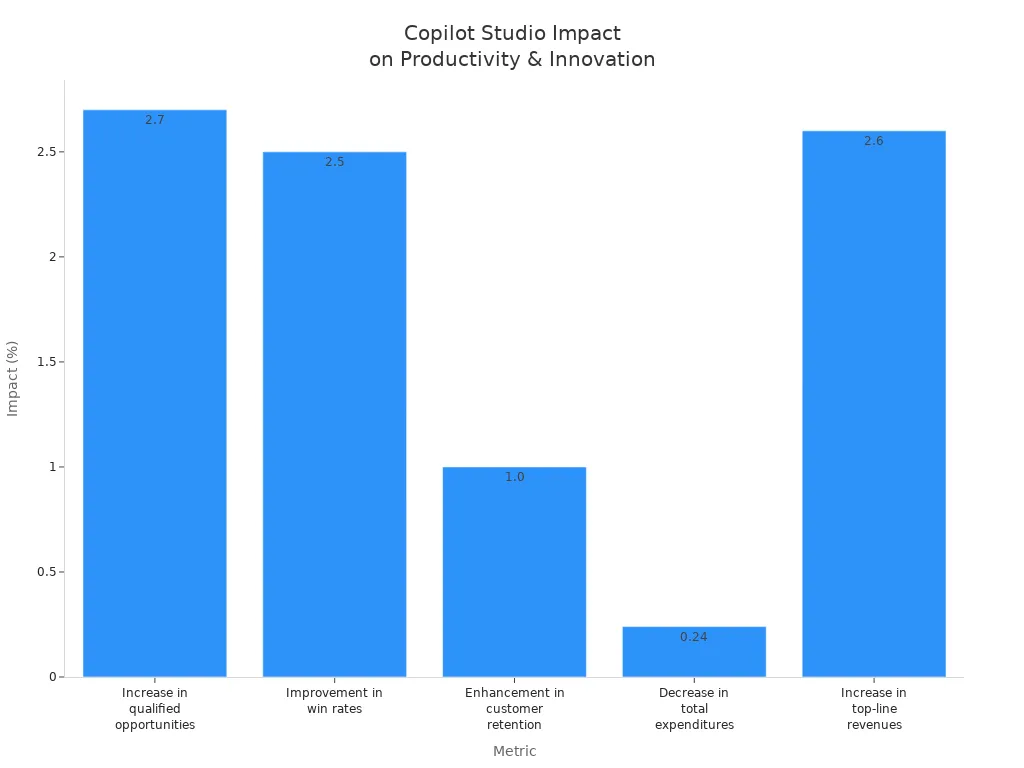
You now experience a transformation in how ai empowers your daily work with microsoft 365. Copilot studio gives you the tools to boost business productivity and drive innovation. When you use agentic ai, you see real results:
| Metric | Impact |
|---|---|
| Increase in qualified opportunities | 2.7% |
| Improvement in win rates | 2.5% |
| Enhancement in customer retention | 1.0% |
| Decrease in total expenditures | 0.24% |
| Increase in top-line revenues | 2.6% |
- The shift from low-code to agentic ai means you move toward more autonomous systems.
- You take on new roles, focusing on orchestrating ai agents.
- You participate in the next wave of digital transformation with copilot and microsoft, shaping the future of your experience.
Key Takeaways
- Copilot Studio helps you automate tasks and improve workflows in Microsoft 365 apps like Word, Excel, and Teams.
- You can create AI agents without coding using a drag-and-drop interface, making it accessible for non-developers.
- AI agents save time by handling repetitive tasks, allowing you to focus on more important work.
- Multi-agent orchestration lets several AI agents work together to solve complex problems efficiently.
- Copilot Studio integrates with tools like Dataverse and Power Platform for seamless automation and insights.
- Advanced AI features like natural language processing make interactions with agents easy and intuitive.
- Microsoft ensures strong security and compliance, protecting your data and maintaining privacy.
- You can scale AI agents as your business grows, adapting to new challenges and opportunities.
Copilot Studio’s Impact on Agentic AI
Transforming Microsoft 365 Workflows
You can see how copilot studio changes the way you work in microsoft 365 copilot. With this platform, you use ai to automate tasks and streamline processes across your organization. Many companies now rely on ai agents to handle customer service, employee support, and data analysis. For example, a large retail chain uses a customer service copilot to answer common questions about orders and returns. This reduces wait times and lets human agents focus on more complex issues. HR teams use ai agents to respond to policy questions and leave requests, making sure employees get fast and accurate answers. Finance teams use copilots to analyze spreadsheets and create reports in real time. IT helpdesk agents help users reset passwords and solve technical problems around the clock. In industries like healthcare and finance, ai agents guide users through compliance checks and flag risks before they become problems.
- Customer service copilots handle routine questions and integrate with CRM systems.
- HR bots automate responses to policy and payroll inquiries.
- Finance copilots analyze data and generate reports.
- IT helpdesk agents provide 24/7 technical support.
- Compliance agents help you follow regulations and reduce risk.
You benefit from faster service, fewer errors, and more time to focus on important work. This ai-driven approach helps your business stay competitive and efficient.
Empowering Autonomous Agents
Copilot studio gives you the power to create and manage autonomous agents inside microsoft 365 copilot. You can design agents for single tasks or build multi-agent solutions that work together. These agents can focus on your unique business needs and adapt to different roles. For example, you might create an agent that manages meeting schedules or another that tracks inventory. You can also connect agents to the microsoft 365 graph, so they can access and act on data across your organization.
- You streamline processes with agentic workflows.
- You build agents for specific challenges, like onboarding new hires or managing customer feedback.
- You scale up by using multiple agents that work together for bigger results.
- You tailor agents to your business functions and extend their reach beyond microsoft 365 copilot.
This ai transformation means you rely less on manual work and more on smart automation. You see measurable improvements in how your teams operate and deliver value.
Enhancing Productivity and Decision-Making
When you use copilot studio, you unlock new levels of productivity and smarter decision-making. Organizations report saving up to 9 hours per user each month. New hires get onboarded up to 25% faster. Companies see a financial impact of $3.25 million from better retention. These gains come from ai-powered capabilities that automate routine tasks and provide instant insights.
| Metric | Improvement |
|---|---|
| Time saved per user per month | 9 hours |
| Reduction in new hire onboarding time | Up to 25% |
| Financial impact of increased retention | $3.25 million |
The model context protocol in copilot studio makes these results possible. This protocol lets agents discover data, search knowledge sources, and interact with business records. Agents can answer questions, update information, and generate custom responses based on real business context. You get relevant and actionable insights without extra steps.
| Capability | Description |
|---|---|
| Query | Discover tables, explore schema, and retrieve real-time data with structured or natural language queries |
| Knowledge and search | Let agents chat over your data, search knowledge sources, and deliver contextual answers |
| Upload (Create/Update) | Insert or update records in Dataverse with schema-aware mapping |
| Generate with prompts | Run custom prompts grounded in business context, like summarizing records or drafting replies |
With multi-agent orchestration, you can coordinate several ai agents to handle complex workflows. This means you make better decisions faster and keep your business moving forward.
What Is Copilot Studio?
Microsoft’s Platform for AI Agents
You use copilot studio as a powerful platform that brings ai agents into your daily work with microsoft 365. This platform stands out because it lets you build, customize, and deploy ai solutions that fit your business needs. You create tailored ai models using pre-built templates and fine-tuning options. You choose from supervised, unsupervised, or reinforcement learning techniques. You integrate data from internal and external sources, including azure machine learning, for real-time processing and insights. You extend functionality with custom plugins and third-party API integrations. You align ai assistants with your brand voice and workflows, giving your team a personalized experience. You connect copilot studio to applications and data sources for real-time information and task execution. You scale the platform as your organization grows, handling more data and interactions. You benefit from advanced ai capabilities, including natural language processing and machine learning, for accurate and contextually relevant interactions.
Tip: You can use copilot studio to create agents that automate tasks, answer questions, and deliver insights across microsoft 365. This approach helps you save time and improve productivity.
| Core Component | Benefit |
|---|---|
| AI Model Development | Tailored models for business needs |
| Data Integration | Real-time insights from multiple sources |
| Custom Plugin Development | Extend functionality with APIs and plugins |
| Customizable Solutions | Personalized ai assistants |
| Scalability | Grows with your organization |
| Advanced AI Capabilities | Accurate, context-aware interactions |
Model Context Protocol Overview
You rely on the model context protocol to make your ai agents smarter and more adaptive. This protocol lets agents understand context, reason about data, and select the right tools for each task. You use it to enable agents to discover tables, explore schema, and retrieve real-time data with structured or natural language queries. You allow agents to chat over your data, search knowledge sources, and deliver contextual answers. You insert or update records in Dataverse with schema-aware mapping. You run custom prompts grounded in business context, such as summarizing records or drafting replies. The model context protocol gives your agents the ability to interact with business data dynamically, making every interaction more relevant and actionable.
Note: The model context protocol helps agents adapt to changing business requirements and deliver insights that matter to you.
Integration with Dataverse and Power Platform
You connect copilot studio seamlessly with Dataverse and the Power Platform. You use the common knowledge graph to link agents to enterprise systems, simplifying integration and letting you focus on building agents. You automate document workflows with the document processor agent, which extracts information and stores it in Dataverse. You manage business data effectively, enabling agents to perform adaptive tasks while ensuring human oversight. Dataverse supports low-code app development and ai-powered search, enhancing the capabilities of agents you create. You benefit from the Dataverse model context protocol, which makes business data interactive and allows for dynamic queries. You deploy agents across multiple channels and enjoy enterprise security, making copilot studio a reliable choice for organizations of all sizes.
Callout: You do not need extensive technical skills to use copilot studio. The drag-and-drop agent builder and canvas-based interface make it easy for business analysts and operations teams to define conversation flows and integrate data sources.
You see how copilot studio, github copilot, and github work together to bring ai innovation to your organization. You build agents that automate workflows, analyze data, and support your team, all within the microsoft ecosystem.
Key Features of Copilot Studio
No-Code and Low-Code Agent Creation
You can build powerful ai agents in copilot studio without writing complex code. The platform gives you a drag-and-drop interface that makes it easy to design conversation flows and automate tasks. You set up agents to follow your organization’s guidelines, tone, and branding. You expand their knowledge base so they answer questions with accuracy and context. You connect agents to external tools like azure, Salesforce, and Dataverse for seamless automation and real-time insights.
| Feature | Description |
|---|---|
| Customization | You configure behavioral guidelines, tone, branding, and expand the knowledge base. |
| Integrations and Automation | You connect to external tools like Salesforce and Dataverse for automation and insights. |
| Multi-channel Deployment | You deploy agents across Teams, websites, and mobile apps. |
| Natural Language Understanding | You use NLU to interpret user intent and respond appropriately. |
| Drag-and-drop Conversation Design | You create conversational flows without coding. |
| Monitoring and Metrics | You track performance and user satisfaction for continuous improvement. |
You can deploy agents on multiple channels, including microsoft Teams, websites, and mobile apps. You monitor their performance with built-in analytics, which helps you improve user satisfaction and agent effectiveness. You use Dataverse Business Skills to define reusable business logic. These skills describe your organization’s processes and policies in natural language. You update them in one place, and every agent benefits from the change. This approach ensures consistency and saves time.
Tip: You do not need to be a developer to create ai agents that automate business processes and deliver value.
Multi-Agent Orchestration
You can orchestrate multiple ai agents to work together in copilot studio. This feature lets you build solutions where each agent manages a specific area of expertise. For example, one agent can handle HR questions, while another manages IT support. These agents coordinate their responses, so you get clear and context-aware answers without switching between different interfaces.
- You enable agents to work with Fabric agents, which lets them reason over enterprise data and analytics at scale.
- You use the Microsoft 365 Agents SDK to orchestrate copilot studio agents alongside existing microsoft 365 agents. This reduces duplication and allows you to reuse capabilities.
- You let agents communicate and delegate tasks to each other using an open protocol. This promotes interoperability and allows agents to operate across different platforms.
- You create a system where agents work together, not as disconnected solutions, but as a unified team that improves workflow efficiency.
You can automate complex workflows by combining the strengths of specialized agents. You see faster results and more accurate outputs because each agent focuses on what it does best.
Natural Language Processing
You interact with ai agents in copilot studio using natural language. The platform uses advanced natural language processing powered by large language models. You describe your needs in your own words, and the agents understand and respond fluently. You do not need to memorize menu paths or use technical terms.
| Advancement | Benefit |
|---|---|
| Large Language Models (LLMs) | You get accurate and fluent responses in human language. |
| Natural Language Understanding | You express needs in your own words, making ai more accessible. |
| Generative AI Conversation Boosters | Agents access and summarize information from URLs, improving their answers. |
| Conversational IVR | You interact naturally, replacing old menu-based systems. |
You benefit from advanced speech recognition models that interpret spoken inputs, even in noisy environments. You can ask questions, give instructions, or request summaries, and the agents respond with relevant information. This technology makes ai agents more helpful and easier to use in your daily work.
Note: You can rely on copilot studio, github copilot, and github to bring the latest advancements in ai and natural language processing to your organization. These tools work together with azure ai foundry and azure to deliver a seamless experience.
You see how copilot studio combines no-code creation, multi-agent orchestration, and natural language processing to transform the way you use ai in microsoft 365. You empower your team to build, deploy, and manage agents that drive productivity and innovation.
Extensibility and Integration
You can extend Copilot Studio to fit your business needs. The platform gives you tools to connect with Microsoft 365 products and many third-party services. You add new features to your AI agents by using connectors and plugins. These connectors help your agents reach more data and perform more actions.
Here is a table that shows how you can use different types of extensibility in Copilot Studio:
| Extensibility Type | Microsoft 365 Product Availability | Learn More |
|---|---|---|
| Copilot connectors | Microsoft 365 Copilot, Power Automate, Power Apps, Azure Logic Apps | Extend agent capabilities with Copilot connectors |
| Microsoft 365 Copilot connectors | Microsoft 365 Copilot, Microsoft Search, Microsoft 365 Copilot app | Copilot connector experiences |
You use Copilot connectors to link your agents with services like Power Automate, Power Apps, and Azure Logic Apps. This lets your agents automate tasks across many platforms. You can also use Microsoft 365 Copilot connectors to bring Copilot-powered experiences into Microsoft Search and other apps.
Tip: You do not need to write code to connect your agents to these services. The platform gives you a simple way to add connectors and expand what your agents can do.
You can access important business knowledge in a secure way. Your agents reach indexed enterprise data and AI-generated meeting content. This helps you get answers and insights from your company’s information.
You can embed Copilot-powered chat into your own applications. This means your users get smart, conversational help wherever they work. You can also export user prompts and responses. This helps you monitor usage and meet compliance needs.
Here are some ways you benefit from extensibility and integration in Copilot Studio:
- Securely access Microsoft 365 knowledge, including enterprise data and meeting content.
- Embed Copilot-powered chat into your business applications.
- Export prompts and responses for compliance and monitoring.
- Connect to third-party services for more automation and insights.
You make your AI agents smarter and more useful by connecting them to the tools your business already uses. This flexibility helps you solve more problems and adapt to new challenges.
Applications in Microsoft 365 Copilot
Automating Business Processes
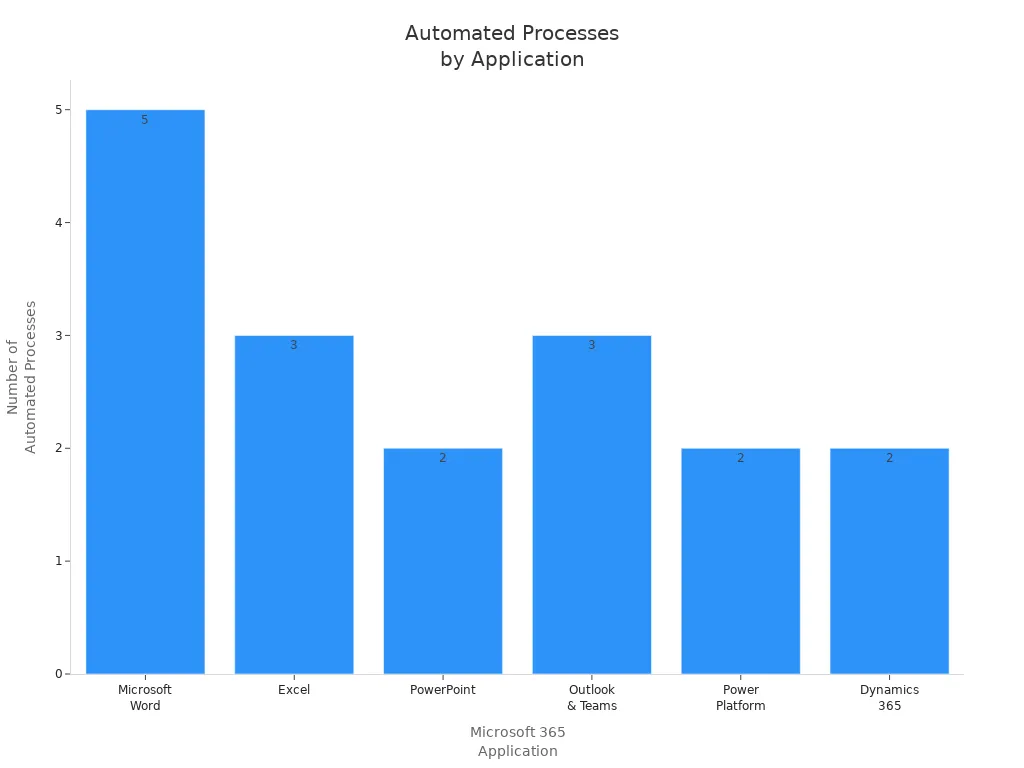
You can use microsoft 365 copilot to automate many business processes across your organization. The platform helps you save time and reduce manual work by letting ai agents handle repetitive tasks. These agents work in popular applications like Word, Excel, PowerPoint, Outlook, Teams, and the Power Platform. For example, you can draft and rewrite documents, translate languages, and summarize content in Word. In Excel, you can ask questions in natural language, analyze trends, and get narrative summaries. PowerPoint lets you auto-generate slides and receive smart design suggestions. Outlook and Teams help you summarize emails, extract action items, and reduce meeting fatigue. The Power Platform allows you to create low-code apps and automate flows, making it easier to manage business processes.
| Application | Automated Processes | Business Impact |
|---|---|---|
| Microsoft Word | Drafting, rewriting, generating structured documents, language translation, summarization | Reduces drafting time, improves communication quality. |
| Excel | Natural language queries, automated trend analysis, narrative summaries | Reduces data prep time, empowers non-analysts. |
| PowerPoint | Auto-generation of decks, smart design suggestions | Reduces time-to-deck, improves consistency. |
| Outlook & Teams | Email summarization, meeting summarization, action item extraction | Reduces meeting fatigue, accelerates task closure. |
| Power Platform | Generative creation of low-code apps, auto-generation of flows | Lowers automation barriers, reduces IT backlog. |
| Dynamics 365 | Summarization of customer interactions, automated drafting of communications | Improves sales productivity, shortens response times. |
With ai agents, you can focus on higher-value work while the system handles routine tasks. This approach leads to faster results and better outcomes for your business.
Enhancing Collaboration and Communication
You can improve teamwork and communication using ai agents in microsoft 365 copilot. These agents help you complete tasks, answer questions, and escalate work items based on enterprise data and context. Multi-agent orchestration lets agents collaborate across systems to achieve a single business outcome. You can use agent flows and templates to streamline structured tasks like IT support, recruitment, and compliance checks. Governance and security features are built into the Power Platform admin center, so you can deploy agents safely.
| Capability | Description |
|---|---|
| Custom and autonomous agents | Complete tasks, answer questions, and escalate work items based on enterprise data and context. |
| Multi-agent orchestration | Agents collaborate across systems to achieve a single business outcome. |
| Agent flows and templates | Streamline structured tasks like IT support, recruitment, and compliance checks. |
| Governance and security | Built into the Power Platform admin center for safe deployment and lifecycle management. |
- You help new hires navigate policies and find information.
- You provide instant access to process documentation and best practices.
- You enable self-service support for internal tools and workflows.
You can also use ai to support cross-team knowledge discovery, change management, and communications. For example, you can draft adoption plans, analyze messaging sentiment, and onboard new employees with adaptive paths. Customer and partner collaboration becomes easier through integrated tools. Engineering teams can use Loop components for real-time collaboration.
Tip: Use ai agents to connect people, share knowledge, and keep everyone on the same page.
Data Analysis and Insights
You can unlock powerful data analysis and insights with ai in microsoft 365 copilot. The platform gives you clear, customizable visuals that help you understand your data. You can quickly transform raw data into actionable insights. Trends become easy to spot and discuss, even if you do not have a background in analytics.
| Feature | Description |
|---|---|
| Clear, customizable visuals | Users can create visuals that are tailored to their needs. |
| Trends made digestible | Insights are presented in a way that is easy to understand for discussions. |
| Instant transformation of data | Raw data can be quickly converted into actionable insights. |
- You analyze complex datasets quickly.
- You identify trends across multiple sources.
- You generate scenarios to evaluate strategic options.
With ai agents, you can make better decisions and respond to changes faster. These tools help you stay ahead in a data-driven world.
Specialized AI Agents for Workflows
You can unlock new levels of efficiency by building specialized AI agents for your business workflows in Microsoft 365. Copilot Studio gives you the tools to design agents that focus on unique tasks and roles. These agents do not just automate general processes. They handle specific challenges that matter to your team.
Specialized AI agents can support many areas in your organization. You can create agents that manage sales, finance, support, or training. Each agent brings expertise to its workflow. This means you get better results and more reliable automation.
Here are some examples of specialized AI agents you can build with Copilot Studio:
- You can develop a sales agent that manages product information, handles customer inquiries, and follows up with leads. This agent helps your sales team stay organized and respond quickly.
- You can automate finance tasks by creating agents that reconcile balance sheets. These agents check records, flag errors, and save your team hours of manual work.
- You can set up support agents that triage tickets. These agents sort requests, assign priorities, and route issues to the right person. Your support team can resolve problems faster.
- You can enhance training by using agents that simulate sales conversations. These agents give your staff a safe space to practice and improve their skills.
Tip: You can customize each agent to match your business rules and data sources. This flexibility ensures that your agents fit your workflow perfectly.
The table below shows how specialized agents can help different departments:
| Department | Example Agent Function | Benefit |
|---|---|---|
| Sales | Manage product info and follow-ups | Faster response to customers |
| Finance | Reconcile balance sheets | Fewer errors, time savings |
| Support | Triage and route tickets | Quicker issue resolution |
| Training | Simulate sales conversations | Better staff preparation |
You do not need advanced coding skills to build these agents. Copilot Studio’s no-code and low-code tools make the process simple. You can use templates, drag-and-drop features, and natural language prompts to define what each agent should do.
Specialized AI agents help you focus on high-value work. You spend less time on repetitive tasks and more time on strategy and growth. As you add more agents, your organization becomes more agile and responsive.
Note: You can start small with one agent and expand as your needs grow. Copilot Studio scales with your business, so you always have the right tools for the job.
Responsible AI and Governance in Microsoft 365
Security and Compliance
You trust microsoft to protect your data when you use Copilot Studio and azure ai foundry. The platform follows strict security and compliance standards. Your data stays in the right region because microsoft supports geographic data residency. You control how your information moves and who can access it. Data loss prevention features help you keep sensitive information safe. Microsoft meets important standards like GDPR, HIPAA, and ISO/IEC 27001. You can use customer-managed encryption keys for extra security. Audit logs in Microsoft Purview and Microsoft Sentinel let you track what agents do. Sensitivity labels in SharePoint help you classify and protect your files. The Security Development Lifecycle guides every step, making sure security stays strong. You can set up data policies to control agent actions, authentication, and data movement. Automated compliance checks help you follow rules without extra work.
Tip: You can rely on azure ai foundry and azure to support secure AI development and deployment.
Governance Controls for AI Agents
You need strong controls to manage agents in your organization. Microsoft gives you tools to set limits and monitor agent behavior. You can restrict who creates or publishes agents. You can scope permissions to specific workflows, so agents only do what you allow. Predefined actions reduce risky or random behavior. Controlled connectors stop unsafe integrations. Republish gates help you keep control over changes. Isolation features limit the impact if something goes wrong. You can stop an agent fast with disablement options.
A table below shows how you can manage agents with governance controls:
| Control Type | Benefit |
|---|---|
| Access controls | Reduce privilege escalation |
| Data security | Prevent data leaks and risky interactions |
| Monitoring | Spot and respond to risks quickly |
| Change management | Keep control over agent updates |
| Emergency stop | Disable agents in urgent situations |
You get centralized visibility into agent usage and risks with Agent 365. This helps you enforce guardrails and protect sensitive data. You can use flexible options like reducing connector scopes or revoking tokens to fix problems fast. Microsoft makes sure you have the tools to keep your environment safe.
Ethical and Responsible AI Practices
You want your AI to act fairly and safely. Microsoft and azure ai foundry help you build ethical agents. You should use diverse and representative training data. This prevents bias and supports fairness. You need to avoid training AI only on data from one region or group. Regular audits and testing help you find and fix problems. You should design agents to understand different languages and accents. Update training data and algorithms often to keep your AI accurate. Use analytics and feedback to improve performance. Set clear guidelines for how you use and develop AI. Always tell users when they interact with an AI assistant. Explain what the AI can and cannot do. Get consent before collecting data. Use data minimization and strong security to protect privacy.
Note: Microsoft promotes transparency, accountability, and inclusiveness in all AI systems. You keep human oversight in decision-making and follow legal requirements. Azure ai foundry supports these practices, making sure your agents stay reliable and safe.
You can trust microsoft, azure ai foundry, and azure to help you deploy responsible AI. These tools help you address bias, protect privacy, and keep your organization compliant.
Future Trends for Agentic AI

Evolving Workplace AI
You will see big changes in how you work as ai becomes a normal part of your daily tools. Microsoft 365 Copilot brings ai agents into apps like Outlook, Word, and Teams. These agents act as smart assistants. They help you write emails, summarize meetings, and organize your work. You can also use low-code tools like Copilot Studio to build your own agents. This means you do not need to be a developer to create solutions that fit your needs.
Here is a table that shows the main features shaping workplace ai:
| Feature | Description |
|---|---|
| Governance | Centralized control for managing AI agents |
| Security | Ensures safe deployment of AI technologies |
| Management | Tools for overseeing AI agent performance and integration |
You can trust that microsoft focuses on security and management. You get tools that help you control and monitor your ai agents. This makes your workplace safer and more productive.
Microsoft’s Vision for Agentic AI
Microsoft wants to create an open world where ai agents work across many platforms. You will see ai agents that can move between different apps and tasks. This vision helps Copilot Studio grow stronger. You can use Copilot Tuning to train models with your own data. This lets you build agents that understand your business and give better answers.
You will notice that microsoft supports multi-agent orchestration. This means you can have several agents working together to solve complex problems. Developers can use these tools to boost productivity. You can expect ai to become a bigger part of how you build and use technology.
- Microsoft’s vision supports an open agentic web.
- Copilot Studio lets you create domain-specific agents.
- Multi-agent orchestration helps agents work together.
- Developers and business users both benefit from these advances.
Innovation and Workforce Transformation
You will experience a transformation in how you and your team work. Copilot Studio brings new innovations that change the workplace. You can automate processes, which reduces manual labor and cuts costs. Employees become force multipliers, doing more without extra hires. You get better insights for decision-making because ai gives you real-time answers.
Here is a table that shows how these innovations impact your work:
| Innovation | Impact |
|---|---|
| Automation of processes | Cuts operational costs and reduces errors |
| Enhanced employee productivity | Lets you deliver more output without hiring more people |
| Better insights | Gives you faster, more accurate information |
| Faster innovation | Helps you adapt quickly to market changes |
| Scalable AI adoption | Supports long-term growth and return on investment |
You can use no-code and low-code tools to design and deploy agents quickly. You do not need to wait for IT teams. You can test new ideas and see results fast.
Leaders can justify AI investments by demonstrating clear, incremental ROI, ensuring that each new AI agent builds on previous successes.
You will see ai agents guide you through workflows, surface the right data, and handle routine follow-ups. This gives you more time to focus on important work. Microsoft and azure help you adopt these changes safely and at scale. You can expect the next five years to bring even more opportunities for growth and innovation.
Maximizing Value with Copilot Studio
Boosting Productivity
You can unlock new levels of productivity by using copilot studio in your daily work. Copilot agents automate high-volume, repetitive processes, which reduces costs and minimizes errors. When you deploy these agents, you guide employees and increase output without needing to hire more staff. You gain better insights by integrating data from different sources, which helps you make faster and more confident decisions. The table below shows strategies you can use to maximize productivity gains:
| Strategy | Description |
|---|---|
| Operational Efficiency | Automates high-volume, repetitive processes, reducing costs and minimizing errors. |
| Employee Productivity | Deploys AI agents to guide employees, increasing output without additional hires. |
| Better Insights | Integrates data for real-time insights, enabling faster and more confident decision-making. |
| Faster Innovation | Provides no-code tools for rapid deployment of AI agents, enhancing organizational agility. |
| Scalable AI Adoption | Starts small with targeted AI agents, ensuring sustainable and scalable adoption tied to ROI. |
You can follow a step-by-step approach to maximize your results:
- Define your success metrics and build a cross-functional team.
- Select high-impact scenarios for pilot testing.
- Collect data and improve based on feedback.
- Expand to new units and run enablement programs.
- Monitor key performance indicators and maintain governance.
Driving Innovation
Copilot studio helps you drive innovation across your business. You can use no-code and low-code tools to experiment with new ideas and deploy agents quickly. This flexibility lets you adapt to changes and stay ahead of the competition. Copilot agents streamline repetitive tasks, so you can focus on meaningful challenges. You can use advanced data analysis to extract insights that inform your strategies. Agents operate independently, prioritizing tasks and recommending actions based on data. Over time, these agents learn from your interactions and feedback, which improves their performance.
| Aspect | Description |
|---|---|
| Operational Efficiency | Automates high-volume, repetitive processes, reducing costs and minimizing errors. |
| Employee Productivity | Deploys AI agents to guide employees, increasing output without additional hires. |
| Better Insights | Integrates data for smarter decision-making, providing real-time visibility into performance. |
| Faster Innovation | Enables rapid experimentation with no-code/low-code tools, allowing quick adaptation. |
| Scalable AI Adoption | Supports targeted AI initiatives that align with long-term business goals. |
You can use copilot, github, and github copilot together to build applications that support your business goals. These tools help you create agents that improve customer experience and drive continuous improvement.
Adapting to Change
You can adapt to changes in your organization by following best practices for agentic ai in microsoft 365 copilot. Start by structuring agent creation across different toolsets and sharing options. Build a community of peer leaders to promote adoption and share knowledge. Use a multi-pronged strategy that includes centralized communication, peer-driven leadership, and regular feedback. Identify your key metrics for success and track your progress. Leverage your technical team’s experience to create effective support materials. Maintain strong governance policies and ensure data hygiene. Encourage the use of pre-built ai agents to speed up adoption and deliver value quickly.
Tip: When you use copilot, github, and github copilot, you gain access to a wide range of support resources and best practices. This helps you adapt to new processes and technologies with confidence.
You can create agents that support your team, improve customer interactions, and streamline business processes. As you continue to use copilot studio, you will see your organization become more agile and ready for future challenges.
You gain real advantages with copilot studio and agentic AI in Microsoft 365. Early adopters report these benefits:
| Benefit | Description |
|---|---|
| Productivity | Autonomous agents boost productivity and manage complex workflows. |
| Efficiency | Automation improves efficiency and speeds up decision-making. |
| Client satisfaction | Faster, more accurate service increases satisfaction. |
- You need strong AI governance to ensure safe and responsible use.
- You can explore copilot studio to prepare your business for the future.
- Microsoft continues to lead with innovation, shaping the next era of workplace transformation.
FAQ
What is Copilot Studio?
Copilot Studio is a platform from Microsoft that lets you build, customize, and deploy AI agents in Microsoft 365. You can automate tasks, analyze data, and improve workflows without needing advanced coding skills.
How do you create AI agents in Copilot Studio?
You use a drag-and-drop interface to design agents. You can define conversation flows, connect to data sources, and set up automation. Templates and natural language prompts help you build agents quickly.
Can you use Copilot Studio if you are not a developer?
Yes, you can use Copilot Studio even if you do not have coding experience. The platform offers no-code and low-code tools, making it easy for business users and analysts to create AI agents.
How does Copilot Studio keep your data secure?
Copilot Studio follows Microsoft’s security standards. You control access, set data policies, and use encryption. Audit logs and compliance tools help you monitor agent actions and protect sensitive information.
What apps can you connect Copilot Studio agents to?
You can connect agents to Microsoft 365 apps like Word, Excel, PowerPoint, Outlook, and Teams. You can also link to Power Platform, Dataverse, and third-party services using connectors.
How do you monitor and improve agent performance?
You track agent performance with built-in analytics. You review user feedback, monitor usage, and adjust agent settings to improve accuracy and satisfaction.
What is the Model Context Protocol?
The Model Context Protocol lets agents understand business context, reason about data, and select tools for tasks. You get smarter, more adaptive AI that delivers relevant answers and actions.
Can you scale Copilot Studio agents as your business grows?
Yes, you can start with one agent and add more as your needs change. Copilot Studio supports scalable deployment, so you can expand automation across your organization.
🎧 Listen to this episode
Want a practical explanation of Agentic AI? This episode breaks down the topic in clear language and shows why it matters for Microsoft 365, Azure, Power Platform, security, AI, and modern work.
Listen to this episode if you want to:
- Understand the key concepts behind Agentic AI
- See how it fits into the wider Microsoft technology ecosystem
- Learn where it can create practical value for your organization
You may also enjoy these related M365 FM episodes:
- Dataverse MCP Integration with Nathan Rose [MVP]
- Fix an MCP Server That Is Invisible to Copilot Studio
- Agentic Operating Model for Enterprise AI and Copilot
- Copilot Studio AI Agents and RAG with Nilüfer Doğan [MVP]
- MCP Architecture for Microsoft Copilot and AI Agents
Discover more practical Microsoft conversations on M365 FM.
Last reviewed: July 2026.
Who Should Listen
This episode is for Microsoft administrators, architects, developers, security professionals, and business leaders who need a practical foundation before making implementation, operations, or governance decisions.
🎧 You Should Also Listen To
- Microsoft Fabric — A strongly related next step for extending this topic.
- Microsoft Fabric OneLake — A strongly related next step for extending this topic.
- Power BI Copilot — A strongly related next step for extending this topic.
🚀 Want to be part of m365.fm?
Then stop just listening… and start showing up.
👉 Connect with me on LinkedIn and let’s make something happen:
- 🎙️ Be a podcast guest and share your story
- 🎧 Host your own episode (yes, seriously)
- 💡 Pitch topics the community actually wants to hear
- 🌍 Build your personal brand in the Microsoft 365 space
This isn’t just a podcast — it’s a platform for people who take action.
🔥 Most people wait. The best ones don’t.
👉 Connect with me on LinkedIn and send me a message:
"I want in"
Let’s build something awesome 👊
1
00:00:00,000 --> 00:00:07,040
Welcome to back to the M665, the podcast where we explore the people, technologies and ideas,
2
00:00:07,040 --> 00:00:11,400
shaping the future of Microsoft 365 AI and modern world places.
3
00:00:11,400 --> 00:00:16,160
Today I'm joined by Nature Rose, a Microsoft business application and we be from Auckland.
4
00:00:16,160 --> 00:00:20,640
Nathan is a power platform solution architect with experience,
5
00:00:20,640 --> 00:00:26,960
interesting from the CRM to 2011 days all the way to days,
6
00:00:26,960 --> 00:00:29,200
AI part, local ecosystem.
7
00:00:29,680 --> 00:00:32,720
He worked with organizations across Australia and New Zealand,
8
00:00:32,720 --> 00:00:38,640
helping both public and private sector, customers build enterprise-grads solutions
9
00:00:38,640 --> 00:00:40,800
using Microsoft business applications.
10
00:00:40,800 --> 00:00:44,800
Nathan is also a particular passionate about co-pilot studio data
11
00:00:44,800 --> 00:00:52,320
worse and MCP and helping organizations create scalable AI agents that actively solve business problems.
12
00:00:52,320 --> 00:00:56,080
You may know Nathan from his content platform, no code no mercy,
13
00:00:56,080 --> 00:01:00,640
his YouTube channel off from speaking at events, likes and New Zealand Business
14
00:01:00,640 --> 00:01:02,560
Application Summit and definitely.
15
00:01:02,560 --> 00:01:06,320
Yeah Nathan, welcome to the 365 podcast.
16
00:01:06,320 --> 00:01:08,880
Thanks so much, Mirko. Thanks for having me on.
17
00:01:08,880 --> 00:01:09,600
Great to be here.
18
00:01:09,600 --> 00:01:17,840
So tell us a little bit about your journey into the Microsoft technology.
19
00:01:17,840 --> 00:01:24,560
Sure. So I always used to say that I have a non-traditional background for
20
00:01:25,280 --> 00:01:30,400
technical people but that's not actually true anymore because in the low-code
21
00:01:30,400 --> 00:01:35,840
power platform world pretty much all of us come from doing something else.
22
00:01:35,840 --> 00:01:38,960
Mark Smith was a groundskeeper.
23
00:01:38,960 --> 00:01:46,880
Craig White was a bookkeeper, Natalie Leander's,
24
00:01:46,880 --> 00:01:53,600
was a hairdresser. We all did different things and then eventually got hands-on with
25
00:01:54,160 --> 00:01:57,040
power platform, fell in love with it and here we all are.
26
00:01:57,040 --> 00:02:03,280
So I worked in corporate sales for about a decade, was really bad at it.
27
00:02:03,280 --> 00:02:06,000
Don't ask me how to close a deal, I don't know.
28
00:02:06,000 --> 00:02:15,760
And segwayed into working as a business analyst and being a BA is not a bad role.
29
00:02:15,760 --> 00:02:21,280
And just for me, I got to, and I was always working with Dynamics, CRM and
30
00:02:21,280 --> 00:02:26,080
eventually power platform. But I found that I was much more interested in actually solving
31
00:02:26,080 --> 00:02:30,400
the problem than doing what a BA is supposed to do, which is to find the problem.
32
00:02:30,400 --> 00:02:35,840
Yeah. And so, yeah, I eventually found my way into the consulting world and
33
00:02:35,840 --> 00:02:40,880
yeah, that's what I've been doing for the last six years working as a consultant and architect
34
00:02:40,880 --> 00:02:43,360
with Dynamics and Power Platform.
35
00:02:43,360 --> 00:02:49,920
This is also, yeah, I think a lot of people have not the classic, I don't know,
36
00:02:49,920 --> 00:02:58,880
study IT or something background. And yeah, with the citizen development, Microsoft, do a lot of
37
00:02:58,880 --> 00:03:08,080
that all the, I say, normal people can join these areas. But your long time was in the CRM area,
38
00:03:08,080 --> 00:03:10,560
what changes to see you there?
39
00:03:10,560 --> 00:03:18,240
Yeah. So I started with version 2011 of CRM and just always worked with
40
00:03:19,440 --> 00:03:23,200
what today is called Dynamics 365 CE or customer engagement.
41
00:03:23,200 --> 00:03:31,440
In 2019, I was part of a private preview for what we now know today is co-pilot studio,
42
00:03:31,440 --> 00:03:39,760
what was Power Virtual Agent, what it was first introduced. And I absolutely fell in love
43
00:03:39,760 --> 00:03:44,240
with the Power Platform because for the first time, I got hands on the Power Automate
44
00:03:44,240 --> 00:03:50,560
and all these different tools because on its own Power Virtual Agent when it first came out was
45
00:03:50,560 --> 00:03:54,880
somewhat limited. It was really cool that we could build these deterministic chat experiences.
46
00:03:54,880 --> 00:04:00,080
But what was really amazing about it was we could hook it up to Dataverse by way of Power Automate,
47
00:04:00,080 --> 00:04:05,200
which is the first thing I did. And back then, we didn't have connectors. I literally had
48
00:04:05,200 --> 00:04:11,200
people in product group in Redmond writing JSONs for me because prior to this, you know, I thought
49
00:04:11,200 --> 00:04:16,400
JSON was a movie character. I didn't realize that it was something that we actually did professionally.
50
00:04:16,400 --> 00:04:22,720
But that was how we connected to Dataverse using HTTP connectors.
51
00:04:22,720 --> 00:04:31,440
So I just absolutely fell in love with it. And kind of started my tradition of
52
00:04:31,440 --> 00:04:36,720
the demos I build are things that you should not try at home. Don't do this in production kids.
53
00:04:37,760 --> 00:04:42,880
I literally hooked Dataverse up to the to the bottom was opening and closing cases and customer
54
00:04:42,880 --> 00:04:48,560
service and inserting rows and doing all kinds of things. And I showed it to a colleague whose first
55
00:04:48,560 --> 00:04:53,920
response was, why are you letting authenticated, unauthenticated users into Dataverse? And I was like,
56
00:04:53,920 --> 00:04:58,480
well, you know, the joy of preview features is we get to work out what's possible. And then we walk
57
00:04:58,480 --> 00:05:06,000
it back to what's responsible for GA. But that was how I got into Power Platform through what we
58
00:05:06,000 --> 00:05:10,000
now know today is Copilot Studio. So it is something very special to my heart.
59
00:05:10,000 --> 00:05:18,000
And what could you give advice for someone who entering the Power Platform, so they don't field,
60
00:05:18,000 --> 00:05:20,720
like meeting JSON?
61
00:05:20,720 --> 00:05:32,320
Yeah, I would say, get hands on as fast as you can. Don't be afraid. So just try stuff.
62
00:05:33,040 --> 00:05:39,520
The community is incredibly welcoming. That's probably one of the best things about Power Platform.
63
00:05:39,520 --> 00:05:47,600
Well, it's just everybody is so incredibly inclusive and welcoming. We're not fussed about
64
00:05:47,600 --> 00:05:54,800
what you study or what your background is. We just want to hear your ideas and we want to
65
00:05:54,800 --> 00:06:00,160
help you solve problems. And that's kind of what we all do for each other. And that's what makes it
66
00:06:00,160 --> 00:06:05,200
such an amazing thing to be a part of. So it's say there's never been a better time to get into
67
00:06:05,200 --> 00:06:12,480
Power Platform if you're thinking of doing it. The best way is just to get hands on. And you're
68
00:06:12,480 --> 00:06:19,600
probably going to find, you know, you'll just start doing solving problems in your workplace today.
69
00:06:19,600 --> 00:06:25,200
That's how most of us got onto it. You know, we discovered Power Apps, Power Automate, Dataverse,
70
00:06:25,200 --> 00:06:32,880
things like that. And we started making business problems go away after I had had my private preview
71
00:06:32,880 --> 00:06:40,560
experience with Power Virtual Agent and started to get good with Power Automate. I had a process
72
00:06:40,560 --> 00:06:45,200
as part of my job that took three days a week of my time. So there was a design flaw on our CRM.
73
00:06:45,200 --> 00:06:52,880
We had a custom table associated to cases that had payment details for warranty upgrades. So when
74
00:06:52,880 --> 00:06:57,840
people wanted to, you know, they had a warranty issue and it was like, hey, we could fix it or for
75
00:06:57,840 --> 00:07:04,320
another hundred bucks, you could upgrade, right? So who's not going to do that? The problem was,
76
00:07:04,320 --> 00:07:11,360
they would close the cases which meant all the child tables, you couldn't do anything on them. So
77
00:07:11,360 --> 00:07:18,000
by the time something got shipped from the factory, the case was closed and so the credit cards
78
00:07:18,000 --> 00:07:23,520
never got built. So we get these huge spreadsheets from finance saying we've got $30,000 worth of
79
00:07:23,520 --> 00:07:27,840
product that we've shipped and, you know, we haven't collected it in cash for it. And so I would
80
00:07:27,840 --> 00:07:34,880
literally have to go in, open the case, do the thing to build a credit card and close the case again.
81
00:07:34,880 --> 00:07:40,320
And that took three days a week in my time. And I eventually got to the point where I had it built
82
00:07:40,320 --> 00:07:44,720
in Power Automate. And this was a iterative thing. But by the end, literally the email would come in
83
00:07:44,720 --> 00:07:52,320
from the failed integration, snip out the case ID from the subject line. Go look it up,
84
00:07:52,320 --> 00:07:58,080
open the case, do the thing, close the case, and three days a week in my time went to zero. And
85
00:07:58,080 --> 00:08:04,480
so those are the kinds of things, you know, if you've got access to Power Platform to start looking
86
00:08:04,480 --> 00:08:09,920
for those things and work, it's even more exciting now is we're moving into this agentic world. So
87
00:08:09,920 --> 00:08:17,280
the example I just gave was in this, you know, deterministic world that most of us lived in prior to
88
00:08:17,280 --> 00:08:24,240
LLM's. Today it is, you know, there's so many more problems that you can solve because you are not
89
00:08:24,240 --> 00:08:30,400
limited by, you know, we have this deterministic thing that always must work this way, you know, we can
90
00:08:30,400 --> 00:08:37,680
start to, you know, when we need to look at an email and decide who it goes to and all that type of
91
00:08:37,680 --> 00:08:44,880
stuff, we can start to bring in that agentic layer. And in many ways, building agents is in some ways
92
00:08:44,880 --> 00:08:51,280
a lot easier than building the deterministic workflows that we did in the past. I mean, it's funny,
93
00:08:51,280 --> 00:08:55,360
I was thinking about this this morning. There are so many times when I'm doing something with
94
00:08:55,360 --> 00:08:59,920
generative AI, whether it's building a prompt, whether it's creating a skill, whether it's
95
00:08:59,920 --> 00:09:06,640
building an agent where it's literally as easy as just writing out what I wanted to do.
96
00:09:07,280 --> 00:09:12,240
In the low-code world, it was never that easy, you know, it was, you know, okay, I might describe what I
97
00:09:12,240 --> 00:09:16,560
wanted to do, but that's the document and then I have to go in and start configuring stuff. Now,
98
00:09:16,560 --> 00:09:21,600
like, I literally just say, I want you to go do these things and it goes and does those things. So
99
00:09:21,600 --> 00:09:24,800
the barrier to entry is getting lower and lower all the time.
100
00:09:24,800 --> 00:09:32,880
What did you think is, okay, we have a low-code, no-code, and I think,
101
00:09:32,880 --> 00:09:41,600
Goliik, Basbord is, is, is, is, why I quote, but how did think, is there, what is there any new
102
00:09:41,600 --> 00:09:51,520
challenges that's coming up with this kind of AI functions and, oh, yeah, tons. So I, I released a
103
00:09:51,520 --> 00:09:57,760
video on Friday showing some of the new dataverse plugins from the product team and doing some
104
00:09:57,760 --> 00:10:02,400
amazing things with, with GitHub Copilot, stuff that, you know, used to take us hours and hours.
105
00:10:02,800 --> 00:10:07,440
Creating tables and columns and adding stuff to forms and moving users between business units.
106
00:10:07,440 --> 00:10:12,080
And that's just the tip of the iceberg of what these things can do. And in the comments, you know,
107
00:10:12,080 --> 00:10:18,000
there's all the usual, well, you know, you've got to look out for hallucinations and, you know,
108
00:10:18,000 --> 00:10:24,880
this doesn't replace good design and all that and it's, and, like, yeah, of course, obviously. But,
109
00:10:27,440 --> 00:10:33,600
yeah, it's, so, you know, you do need, you know, those are all things that need to be taken into
110
00:10:33,600 --> 00:10:38,960
consideration. I don't, you know, even those of us who, you know, I would say, yeah, I'm a bit of a
111
00:10:38,960 --> 00:10:47,600
cheerleader and an apologist for, for AI and, and natural language. But at the same time, we've got to
112
00:10:47,600 --> 00:10:54,320
do these things responsibly. And so, yeah, you know, there, there are a lot of challenges that we have
113
00:10:54,320 --> 00:11:00,160
to look at in terms of, let's make sure that, you know, we are getting the intended effect that we're
114
00:11:00,160 --> 00:11:08,640
not creating, you know, just more issues for ourselves. I think a lot of company think also about
115
00:11:08,640 --> 00:11:17,200
the topic, governance, compliance, risk. How do you see these topics, especially with this AI,
116
00:11:17,200 --> 00:11:22,560
all-partful, local staff? Yep. I think they're becoming increasingly more important. So,
117
00:11:23,200 --> 00:11:30,160
in the low-code era of power platform, we didn't hear a lot about governance until kind of
118
00:11:30,160 --> 00:11:38,320
the late 2010s, 2020s. That's when governance started to kind of take off as a conversation.
119
00:11:38,320 --> 00:11:49,520
The power platform, sorry, I'm going to blank on the governance tool that you can install. I've
120
00:11:49,520 --> 00:11:55,360
never actually successfully installed it. It's a bit of a drama. We probably should edit that bit out.
121
00:11:55,360 --> 00:12:06,320
But the, you know, that was a bit of an afterthought. So, because it was like, hey, let's turn the
122
00:12:06,320 --> 00:12:13,520
citizen devs loose. And then it was like, oh, no, we've got all these apps and all these automations
123
00:12:13,520 --> 00:12:18,720
and so many, you know, same, same, but different. You know, we've got 17 different expensive approval
124
00:12:18,720 --> 00:12:23,040
apps because Nathan has his app and it's different from Mary's, which is different from Miracles,
125
00:12:23,040 --> 00:12:30,960
which is, and it was this idea of, oh, wow, we need to govern this. Microsoft have been very early
126
00:12:30,960 --> 00:12:39,680
in the piece with AI. There's agent 365, which came out earlier this year. It's been really
127
00:12:39,680 --> 00:12:44,800
encouraging to see them. So, early to the table saying, hey, here's an inventory of your agents. Here's
128
00:12:44,800 --> 00:12:50,640
how you manage and control this. Here's how you can block agents and push them to specific users
129
00:12:50,640 --> 00:12:57,680
and have some control over what's going on with AI in your organization. I had a look at it the
130
00:12:57,680 --> 00:13:03,600
other day and post-build. There's a new shadow AI feature in there. And so it's really starting to
131
00:13:03,600 --> 00:13:13,600
help with the governance of this. And I think our role as consultants is going to increasingly move
132
00:13:13,600 --> 00:13:20,720
from being hands-on tools, which is what we've done today, right? Our job has been to go away and
133
00:13:20,720 --> 00:13:28,640
build this stuff. And as we are increasingly seeing, AI can do a lot of this stuff for us. Now,
134
00:13:28,640 --> 00:13:37,360
it's not going to 100% replace what we do as consultants today, but I think we are going to be
135
00:13:37,360 --> 00:13:42,880
in, you know, it is going to push us in an exciting direction, I think, which is more towards
136
00:13:42,880 --> 00:13:47,600
looking at things like governance, looking at things like how does this align with strategy,
137
00:13:47,600 --> 00:13:56,640
how does this align with business value and business goals? Which to me, those are the exciting
138
00:13:56,640 --> 00:14:03,120
conversations to have as opposed to, you know, did I use the right solution and that type of thing.
139
00:14:03,120 --> 00:14:09,760
So, yeah, so that's, and let me just caveat, when I say solution, I mean, the solution in
140
00:14:09,760 --> 00:14:17,920
data verse to move stuff around. So, yeah, that's, so yeah, so that's, I do see governance is
141
00:14:17,920 --> 00:14:24,000
increasingly becoming a big part of what we will be doing as consultants. And yeah, you have
142
00:14:24,000 --> 00:14:31,200
become particularly known for your work with co-pilot studio. What check you do it?
143
00:14:31,200 --> 00:14:37,920
Yeah, so as I said, I have a kind of deep history with co-pilot studio because it was,
144
00:14:38,560 --> 00:14:43,120
I was involved with the private preview of its predecessor and that kind of started everything
145
00:14:43,120 --> 00:14:53,120
for me with, with Power Platform. I did, I was a bit resistant at first because I, you know, I kind of
146
00:14:53,120 --> 00:14:59,040
came up in the low code world, the low code world kind of gave me everything. You know, I, you know,
147
00:14:59,040 --> 00:15:04,640
what it's kind of what allowed me to break out from a more unfulfilling role as a business analyst
148
00:15:04,640 --> 00:15:11,520
into consulting. It's kind of where I made my name and how I became an MVP working with a lot
149
00:15:11,520 --> 00:15:18,960
of this low code technology. And the writing was on the wall pretty early with AI that it's not clear
150
00:15:18,960 --> 00:15:26,400
that low code is going to be the way forward. And, you know, like anyone, I felt so much threatened,
151
00:15:26,400 --> 00:15:30,240
you know, because I was like, oh, no, like, you know, this stuff that I love and I'm kind of known for
152
00:15:30,240 --> 00:15:39,360
as an earth threat. And then last year at Power Platform Bootcamp, Clive Oldridge, who's one of our
153
00:15:39,360 --> 00:15:44,560
other MVPs here in New Zealand was giving a demo showing just some amazing stuff in data
154
00:15:44,560 --> 00:15:49,840
verse with using some AI tools that he had built and the penny dropped and I was like, okay,
155
00:15:49,840 --> 00:15:57,600
low code has an expiry date. And so I, you know, very quickly shifted my focus in terms of the,
156
00:15:57,600 --> 00:16:02,880
the demos I build and the content that I produced to be heavily co-pilot studio and AI focused
157
00:16:02,880 --> 00:16:09,920
just because that is the direction of travel. And it was a good choice because at Power Platform
158
00:16:09,920 --> 00:16:14,720
Conference last year, Charles LeMonna dropped the mic and said that low code is dead as we know it.
159
00:16:14,720 --> 00:16:26,240
And so yeah, that's kind of how and why I shifted into being more focused on co-pilot studio.
160
00:16:27,360 --> 00:16:35,920
We have got an in power apps. We have these, I think, how other we have the Kanba app and the
161
00:16:35,920 --> 00:16:42,240
model driven app announced some new AI code apps. Yeah, and the other product.
162
00:16:42,240 --> 00:16:46,960
What's the difference between code apps and and co-pilot studio?
163
00:16:46,960 --> 00:16:55,440
Yep. So code apps are simply applications that you are that you can build with React code. So
164
00:16:56,480 --> 00:17:03,760
they, my understanding is that it's probably going to be the replacement for Kanba Saps at some point.
165
00:17:03,760 --> 00:17:09,200
That's just my personal opinion that's nothing official. But, you know, the idea of Kanba Saps was for
166
00:17:09,200 --> 00:17:17,360
the first time we could create a custom UI for for the user and do that in a low code way.
167
00:17:17,360 --> 00:17:24,320
With code apps and the challenge we have with Kanba Saps was used Power Effects, which
168
00:17:24,320 --> 00:17:32,000
was kind of what I got known for as that abstraction layer to create the application. It basically
169
00:17:32,000 --> 00:17:37,040
lets you use those Excel type formulas. So you could use Excel. You could create an app to go
170
00:17:37,040 --> 00:17:44,480
and customize the UI and do things with data. Now, because you had that layer between the JavaScript
171
00:17:44,480 --> 00:17:51,120
that was being compiled underneath and the Power Effects, you did have some performance issues and
172
00:17:51,120 --> 00:17:58,400
other types of things that would present themselves. There were delegation type of issues when you
173
00:17:58,400 --> 00:18:02,240
were dealing with larger amounts of data and some of it was in the app and some of it you'd have to
174
00:18:02,240 --> 00:18:10,880
go off to the dataverse to get that type of thing. With code apps, we can now control the experience
175
00:18:10,880 --> 00:18:18,560
far more because it is a full fledged pro code app as opposed to this low code app using an abstraction
176
00:18:18,560 --> 00:18:24,720
layer. So it is pro code that's being written. And so as a dev, you can go and write the React app
177
00:18:24,720 --> 00:18:32,160
today and deploy it to power apps. There is also the vibe.powerapps experience where those of us
178
00:18:32,160 --> 00:18:35,920
who don't write code can just put in natural language and it will go and create all of the
179
00:18:35,920 --> 00:18:43,360
dataverse tables and that React app for you. Now, at the moment, you can see the code files for
180
00:18:43,360 --> 00:18:49,680
vibe.powerapps, you can't edit them. Somebody might need to backcheck that. Last I checked it a
181
00:18:49,680 --> 00:18:55,680
few months ago, you couldn't do it. The plan is to bring them to parity. So whether you start with
182
00:18:55,680 --> 00:19:01,760
writing code or you start with vibe.powerapps, the plan is for them to be basically the same thing.
183
00:19:01,760 --> 00:19:08,960
But it does give you a, you know, that much more custom experience. Now, how that differs from
184
00:19:08,960 --> 00:19:16,400
co-pilot studio is co-pilot studio is really meant to be an agentic experience. So the idea that
185
00:19:16,400 --> 00:19:24,480
you are either conversing with an AI agent or an AI agent is autonomously acting on a trigger to
186
00:19:24,480 --> 00:19:31,600
go and do stuff. So it's, it's a different experience than an application, whereas a user I go
187
00:19:31,600 --> 00:19:37,920
and I start interacting with things that either trigger automations or possibly agents to do things.
188
00:19:38,240 --> 00:19:44,720
Now, where this starts to get really interesting is there is an MCP server for power apps.
189
00:19:44,720 --> 00:19:53,840
And what that will do is that will surface a form, a power up form in a conversational agent.
190
00:19:53,840 --> 00:19:58,640
So that's something it's all my list of things to play with. But what gets, what's really exciting
191
00:19:58,640 --> 00:20:04,240
about that is there are times where let's say I'm working in an agentic experience,
192
00:20:05,120 --> 00:20:09,600
but I all necessarily want to have that turned my turn backwards and forth. Let's say I need to
193
00:20:09,600 --> 00:20:16,160
log a case. And the way you would log a case previously with co-pilot studio was you'd have this turn
194
00:20:16,160 --> 00:20:21,200
by turn conversation. What's your first name? What's your surname? What's your email? What's the issue?
195
00:20:21,200 --> 00:20:27,200
What's the right? And instead of having to wait for that, we can just surface up a case form.
196
00:20:27,200 --> 00:20:30,560
You know, so if you're conversing with the agent, it's like, hey, it sounds like you need to
197
00:20:31,520 --> 00:20:36,080
log a case that'll just go, hey, here's the form, fill this in. And then the agent can then take those
198
00:20:36,080 --> 00:20:45,280
parameters and work with them. So at the moment, they are distinct experiences where I think things are
199
00:20:45,280 --> 00:20:54,080
going is you are we're getting to a place where whether you are in business applications or so,
200
00:20:54,080 --> 00:20:59,840
you know, an internal user in an organization using business applications or an external user,
201
00:21:00,480 --> 00:21:05,280
you're going to have an agent experience and you're not going to care. Am I in co-pilot studio and
202
00:21:05,280 --> 00:21:09,920
my power apps, it doesn't matter, right? Because I'm just going to start from a screen and,
203
00:21:09,920 --> 00:21:15,200
you know, I might start conversing with the agent and then it's going to surface up a form and then
204
00:21:15,200 --> 00:21:22,560
it's going to go into other things and it might, you know, give me a chart if I need or, you know,
205
00:21:22,560 --> 00:21:28,320
but yeah, this this idea of, you know, this stuff kind of coming together and
206
00:21:29,600 --> 00:21:36,560
that's where I see it going and that's that's very exciting. Yeah, data was, it's a really interesting
207
00:21:36,560 --> 00:21:42,560
topic for me because I see I can choose so many databases when I use Azure, uh, uh,
208
00:21:42,560 --> 00:21:49,760
Svalve, Foundry, what is the big different or what makes data was standing out from a normal
209
00:21:49,760 --> 00:21:58,560
database? Yep. Yeah, so dataverse, what makes it so exciting is it is this common data layer
210
00:21:58,560 --> 00:22:05,040
in an organization. So prior to dataverse, when you needed to create different applications,
211
00:22:05,040 --> 00:22:11,520
let's say you had your CRM and then let's say you had, you know, for your salespeople and then let's
212
00:22:11,520 --> 00:22:16,640
say you had a marketing system and then you had a system for customer service and then maybe you
213
00:22:16,640 --> 00:22:21,520
had a system to manage assets and other things, they would all have distinct databases and,
214
00:22:22,640 --> 00:22:29,520
you know, you generally have a common pool of customers and people that work at those customers
215
00:22:29,520 --> 00:22:35,840
and then you need to integrate things because let's let's say, um, you know, somebody
216
00:22:35,840 --> 00:22:41,680
puts an order into the sales system while that needs to go to other systems to, um,
217
00:22:41,680 --> 00:22:50,960
be actioned. Um, and so you were writing integrations or you were putting in, um, complex middleware
218
00:22:50,960 --> 00:22:57,040
and things like that. Dataverse makes all of that irrelevant because you, it's basically the shared
219
00:22:57,040 --> 00:23:04,000
pool of data, which means once it's there, um, let's say, you know, we've set it up for our sales
220
00:23:04,000 --> 00:23:08,640
department and now we need to get started with customer service, well, we don't have to go and reintegrate
221
00:23:08,640 --> 00:23:15,680
because our customer data is already there. Um, and so let, you know, if I need to surface up cases
222
00:23:15,680 --> 00:23:20,240
to the salespeople so they can see what service cases have been logged, I don't have to go writing
223
00:23:20,240 --> 00:23:25,600
an integration, I just have to add that to the form and make it available to the sales users. So
224
00:23:25,600 --> 00:23:33,280
it really is that magic behind the scenes. Um, when Microsoft first introduced it, when it first
225
00:23:33,280 --> 00:23:39,680
started to kind of become a thing in the mid 2010, so it was kind of 2016, 2017, when, when I started
226
00:23:39,680 --> 00:23:49,040
to hear about it, my first response was, I think Microsoft is about to replicate in Bizzaps, what they
227
00:23:49,040 --> 00:23:56,640
did in desktop computing in the 1980s and, you know, where they basically have created the, the thing
228
00:23:56,640 --> 00:24:03,600
that everybody is going to use because it's just so easy. Um, so yeah, so, so data versus is
229
00:24:03,600 --> 00:24:07,200
incredibly special in terms of what it does. It is not just data base.
230
00:24:07,200 --> 00:24:15,280
And there's something, uh, I think you are really, you familiar with it. It's data worth business skills.
231
00:24:15,280 --> 00:24:22,080
I think it is, as as Microsoft is for quote by the agents when I'm right. Yeah. Can you explain
232
00:24:22,080 --> 00:24:28,080
this concept a little bit? Yeah. So this is a pre new feature from the dataverse team. Um, and it is,
233
00:24:28,080 --> 00:24:33,280
you can think of it. Um, so you might have started to hear a lot about skills, particularly at
234
00:24:33,280 --> 00:24:39,600
build last week. This is starting to become a thing. I am, I am saying that we in 26 is the year of skills.
235
00:24:41,280 --> 00:24:47,440
So if you have used tools like cloud code, you might be familiar with adding skills to it. Um,
236
00:24:47,440 --> 00:24:57,840
but dataverse skills is basically a low code way for you to add logic to your, um, to your agents.
237
00:24:57,840 --> 00:25:02,240
And so when you, when you create an agent, you're going to, it's going to have instructions and
238
00:25:02,240 --> 00:25:06,320
it's going to have tools like an mcp server or something like that that hooks it up to dataverse
239
00:25:06,320 --> 00:25:15,840
and let's do things. Um, now, um, let's, let's say, um, our agent works in our customer service
240
00:25:15,840 --> 00:25:21,920
department. And we've got different procedures that it follows based on, um, what needs to happen.
241
00:25:21,920 --> 00:25:26,320
And let's say we add a new procedure or we modify a procedure. Um,
242
00:25:26,320 --> 00:25:34,640
if we do this at the agent level, this is going to require us rewiring the agent adding instructions
243
00:25:34,640 --> 00:25:40,560
to it, possibly modifying tools, um, testing it and then moving it between environments. And
244
00:25:40,560 --> 00:25:44,400
there's always some level of risk when you do these things. I mean, it's, you know, we do this
245
00:25:44,400 --> 00:25:50,560
every day as consultants, but there is always risk associated with, with modifications and deployments.
246
00:25:50,560 --> 00:25:57,520
So just, there just is, um, but with business skills, these are discoverable by that mcp
247
00:25:57,520 --> 00:26:02,960
connection. So as I add and modify instructions, firstly, this can, this doesn't need to be done
248
00:26:02,960 --> 00:26:09,040
by a technical person. This can be done by the business user. So I manage during the customer
249
00:26:09,040 --> 00:26:14,000
service department can say, this is our new procedure for gold level clients or something like that.
250
00:26:14,000 --> 00:26:21,200
And they can write out instructions in business language. Um, and then the mcp server, these are
251
00:26:21,200 --> 00:26:30,160
discoverable by the mcp server. So, um, you, uh, so as our, as our procedures for the agent change,
252
00:26:30,800 --> 00:26:36,000
as we need to add new ones, we simply add them in, in data verse and we can do this in the production
253
00:26:36,000 --> 00:26:40,960
system. Now I know the ALM nerds are going to be freaking out at this point. Um, but, you know,
254
00:26:40,960 --> 00:26:45,280
we're not fundamentally changing the agent. We're just giving it different capabilities that are
255
00:26:45,280 --> 00:26:52,320
discoverable by its mcp tool set, um, which means we don't have to go modify the agent and redeploy it
256
00:26:52,320 --> 00:26:57,200
or anything like that. And so I think of it like a microservice because it's the small little bit of
257
00:26:57,200 --> 00:27:03,360
functionality that we can add, um, at the business level that extends the capability of that agent.
258
00:27:03,360 --> 00:27:08,960
So hey, we've got a new procedure for gold tiered customers or something like that. And we,
259
00:27:08,960 --> 00:27:16,720
we can go and do that without all the rigmarole of, of, of ALM. Yeah, uh, the mcp top, like I
260
00:27:16,720 --> 00:27:24,400
found it really interesting. Um, I read, uh, I don't know where it's very about the sublice. Yeah,
261
00:27:24,400 --> 00:27:33,760
mcp is a new name for API. So how will you explain mcp to someone who doesn't family always work?
262
00:27:33,760 --> 00:27:40,000
Yeah. So, um, earlier this year at Canadian Power Platform Summit, um,
263
00:27:40,000 --> 00:27:47,200
Rami Moonla Clive Aldridge and I gave a presentation on this. And the way I like to frame it is,
264
00:27:48,880 --> 00:27:56,960
an API is like Spotify. And mcp is like a DJ. Now you've probably never thought about why do we pay
265
00:27:56,960 --> 00:28:01,360
DJs when we just have Spotify to play music? It's an, it's an interesting question. I'd never
266
00:28:01,360 --> 00:28:06,480
thought of it before. But what the, what the DJ is doing is they're actually curating the experience
267
00:28:06,480 --> 00:28:11,920
because they are participating in the event with you. They are there. They are taking in all the
268
00:28:11,920 --> 00:28:16,000
context. They can see how many people are there and are they on the dance floor and enjoying
269
00:28:16,000 --> 00:28:21,200
themselves. And so they can adjust the music that they're playing accordingly, whereas
270
00:28:21,200 --> 00:28:31,760
Spotify playlist just shuffles through the songs. Um, so, um, mcp is far more than an API. It uses
271
00:28:31,760 --> 00:28:38,320
APIs, but you're basically bringing the brains of an LLM into the process and it can start to
272
00:28:38,320 --> 00:28:43,680
read the context. And so when it's triggered, it receives the prompt and this is,
273
00:28:44,640 --> 00:28:50,160
you know, this is what I'm being asked to do. Okay. Um, I'm being asked to do this. What do I know how to do?
274
00:28:50,160 --> 00:28:56,080
Okay, know how to do these things? So I think I need tool, you know, let's say I've got five tools.
275
00:28:56,080 --> 00:29:02,480
I need tools one, three and five. And so I can go and, and do the thing. And then, you know, it gets
276
00:29:02,480 --> 00:29:09,520
the next request. And it's like, oh, I need to run tool five and then tool one and then tool four
277
00:29:09,520 --> 00:29:14,560
based on what I'm, you know, and so it can, it can dynamically make these changes. Whereas APIs
278
00:29:14,560 --> 00:29:22,880
are far more brittle. They, they have a, they are, you know, they have a expected input, um, and
279
00:29:22,880 --> 00:29:29,920
to give you a defined output. So if that API is expecting a string, you would better give it a
280
00:29:29,920 --> 00:29:36,560
string. If you give it anything else, it's going to fail. Whereas mcp can determine what it's getting.
281
00:29:36,560 --> 00:29:43,280
Oh, um, you know, um, and, and it's cool to watch it learn on the fly and figure this out the way
282
00:29:43,280 --> 00:29:48,720
human would. So you pass it some, you know, you pass it something. It's like, oh, I've got, I've got
283
00:29:48,720 --> 00:29:54,080
a string, but I actually need a number. We'll hang on, they sent me 15, but it's in string format.
284
00:29:54,080 --> 00:29:58,800
Let me convert that to a number. And now I can use it with my tool. And it, and you watch it reason
285
00:29:58,800 --> 00:30:04,400
over and do these things. It's really, really cool to watch. Um, so it is, it is far more dynamic in
286
00:30:04,400 --> 00:30:10,640
terms of its capabilities. Um, yeah. So that's, that's how I would explain the difference. Yeah. I think
287
00:30:10,640 --> 00:30:19,200
that's a really good, uh, quote, which was the, the Spotify and the DJ. Um, but, uh, what role is,
288
00:30:19,200 --> 00:30:27,200
is then data was in this picture? Yep. So data verse is just your store of data. Um, so your,
289
00:30:27,200 --> 00:30:34,400
so your data is sitting in data verse, whether it's opportunities or leads, customers, um, or,
290
00:30:34,400 --> 00:30:39,520
you know, the business skills that we talked about previously. And when you connect it to an agent
291
00:30:39,520 --> 00:30:48,880
by a model context protocol, the, the exciting thing is that, um, MC, the MCP server can reason over
292
00:30:48,880 --> 00:30:55,360
your data and figure out how to solve things. So you don't have to explicitly put in all of that
293
00:30:55,360 --> 00:31:01,680
plumbing. So for example, if I, if I was just using an API, so things like agent flows, connectors,
294
00:31:01,680 --> 00:31:09,520
the traditional stuff that we've worked with, um, if I connected up to accounts, and then I ask
295
00:31:09,520 --> 00:31:13,440
it about contacts, well, it's not going to be able to do that. It's, it's going to fail. Whereas with
296
00:31:13,440 --> 00:31:20,080
MCP, it's going to say, Oh, yeah, I, I can talk to account, you know, I'm connected to accounts,
297
00:31:20,080 --> 00:31:26,240
I'm connected to contacts, I'm connected to all of that. Um, now in co pilot studio, you are, um,
298
00:31:26,240 --> 00:31:31,440
you know, it, what you can see and what you can do is governed by who you are as a user,
299
00:31:31,440 --> 00:31:39,040
and that's all baked in. So, um, which is, which is, um, um, you know, one of the kind of
300
00:31:39,040 --> 00:31:47,840
row selling points of, of the Microsoft solution, because, um, if, let's say, I am not entitled to
301
00:31:47,840 --> 00:31:52,960
look at customer records, it's not going to let me do that or it's not going to let me look at records
302
00:31:52,960 --> 00:31:58,240
that I don't have permissions to see. Maybe I'm only allowed to see my records and if I has to see yours,
303
00:31:58,240 --> 00:32:05,200
it's not going to let me do that. Um, so, but yeah, um, but yeah, MCP just has, you know, it has access to
304
00:32:05,200 --> 00:32:12,000
all the tables in Dataverse. And so it is, it, it, you know, can give you a far more dynamic, um,
305
00:32:13,040 --> 00:32:20,720
experience. Have you, uh, yeah, say a real world architecture from your, uh, from your work,
306
00:32:20,720 --> 00:32:28,240
you can walk out through without exploding with the client? Yeah. Um, so at this point, it's still
307
00:32:28,240 --> 00:32:38,160
early days. So, um, Dataverse MCP went GA, I want to say late last year. Um, so I've, I don't have
308
00:32:38,160 --> 00:32:45,200
anything in production that I've built for customers with, with Dataverse MCP. Um, some of the stuff that I
309
00:32:45,200 --> 00:32:51,280
have been building in terms of demos. Um, so one of the things that I've explored recently using
310
00:32:51,280 --> 00:32:58,640
business skills in Dataverse MCP is this idea of a CPQ or configure price course. So, um, it's something
311
00:32:58,640 --> 00:33:07,600
dynamics does not have natively, um, but it is fairly common in certain industries like telecommunications,
312
00:33:07,600 --> 00:33:14,960
specialty manufacturing where we need to configure, um, very complex quotes, um, quotes where there's
313
00:33:14,960 --> 00:33:21,120
a lot of governance. Or just to give a simple example, let's say we are building cabinets and we know
314
00:33:21,120 --> 00:33:30,240
that if we choose cabinet type X, it uses wood type Y, wood type Y requires screw type Z and screw
315
00:33:30,240 --> 00:33:38,080
type and we need paint type one. Um, and so when I use a CPQ, that's all taken care of for me. I add
316
00:33:38,080 --> 00:33:43,760
the cabinet and all of that other stuff is added, um, as opposed to having to trust the salesperson to
317
00:33:43,760 --> 00:33:48,720
make the right choice about what they add to the quote, because as we all know, salespeople tend to be
318
00:33:48,720 --> 00:33:54,880
allergic to process. Um, now CPQ systems are pretty expensive. Um, they're not cheap, the license,
319
00:33:54,880 --> 00:34:01,680
they have a lot of rules, um, um, rules that allow you to do this, this level of automation.
320
00:34:01,680 --> 00:34:06,640
So what I started playing with was, well, what if I just created instructions in data versus business
321
00:34:06,640 --> 00:34:13,680
skills and used an agent with data versus some CP to start assembling these types of things? And, um,
322
00:34:13,680 --> 00:34:20,400
it can do it. It can go and say, oh, for this, you know, you want this type of product that needs
323
00:34:20,400 --> 00:34:24,800
three of these and four of those and five of those and six of that and just goes and adds all that to
324
00:34:24,800 --> 00:34:28,800
the opportunity for you, which is really, really cool. The adds the opportunity product to the
325
00:34:28,800 --> 00:34:37,680
opportunity. So, um, yeah, we can, we can start to do some really cool stuff with, um, with data versus
326
00:34:37,680 --> 00:34:45,680
some CP, um, with our agents in terms of some of the business processes that we either needed to have
327
00:34:45,680 --> 00:34:53,920
very expensive automation for or things that, um, you know, we're just kind of one in the too hard basket
328
00:34:53,920 --> 00:35:01,760
to, um, to automate. So, for example, um, there was a government customer that we worked with here
329
00:35:01,760 --> 00:35:07,680
a number of years ago and this came out of a request that they have in case for it. So they used
330
00:35:07,680 --> 00:35:14,240
customer service to manage cases and they said, hey, we'd like to be able to mask profanity in cases.
331
00:35:14,240 --> 00:35:19,840
Sometimes people are just having a bad day, you know, they needed to complain to someone, they chose us
332
00:35:19,840 --> 00:35:26,480
and so if we could just, you know, mask profanity in the cases is, yeah, you know, who wants to read that.
333
00:35:26,480 --> 00:35:32,800
Um, and it ended up becoming a demo that I created using Copilot Studio to say, well,
334
00:35:32,800 --> 00:35:39,840
let's say 80% of your cases you could answer from knowledge on your website, right?
335
00:35:40,400 --> 00:35:46,640
on your government, you've got pre-detailed knowledge. So let's just answer that, right? Then there's a
336
00:35:46,640 --> 00:35:55,520
subset, say 15% of your cases that need to actually become a case that goes to a human. Well,
337
00:35:55,520 --> 00:36:01,280
the agent can make that determination and then there's that final 5% where somebody is just,
338
00:36:01,280 --> 00:36:05,680
they're having a bad day and they needed to complain to somebody, well, they just need to get an
339
00:36:05,680 --> 00:36:10,560
empathetic response. So why does a human need to read through that? You know, I mean, you know,
340
00:36:10,560 --> 00:36:17,200
be, you know, nobody wants to read through that all day, right? And so using, using an agent in
341
00:36:17,200 --> 00:36:26,000
Copilot Studio and MCP, you could do that. You can literally have it read incoming, in this case,
342
00:36:26,000 --> 00:36:30,400
I use emails, but you could use a portal or really anything you want it to, you know, because it's
343
00:36:30,400 --> 00:36:35,600
just language. You get language and say, what does this person want to do? Hey, do I know
344
00:36:35,600 --> 00:36:41,920
how to solve this from my, from my knowledge? No, okay. Do I think they need to create a case? Yeah, I do.
345
00:36:41,920 --> 00:36:47,120
Or no, I can't solve this from my knowledge. It's really nothing I can do anything about. So I just
346
00:36:47,120 --> 00:36:53,520
need to craft an empathetic reply and send it to them. Now, when we demoed this with the product
347
00:36:53,520 --> 00:36:59,200
group in Vegas at Power Platform conference last year, somebody in the front row hand goes up and
348
00:36:59,200 --> 00:37:03,440
they're like, hey, shouldn't a human review this first before the email gets sent? And I was like,
349
00:37:03,440 --> 00:37:09,360
yes, great point. I'm glad you asked. Don't try this at home. Absolutely human in the loop.
350
00:37:09,360 --> 00:37:20,000
But it gives you an idea of some of the stuff that we can start to automate. And again, we can have
351
00:37:20,000 --> 00:37:24,400
a human just reviewing. This is what was sent in and this is the response. Yep, that's good to go.
352
00:37:24,400 --> 00:37:29,680
So yeah, this is some of the stuff that's possible with with model context protocol.
353
00:37:30,800 --> 00:37:38,000
I really say, I think data was NCP and business skills are really new products. Are they enterprise
354
00:37:38,000 --> 00:37:47,600
ready yet? Or still beta? So business skills are still in preview. So it is, so I would say
355
00:37:47,600 --> 00:37:54,960
at the enterprise level definitely try them out in a sandbox environment. I'd be careful about
356
00:37:54,960 --> 00:38:02,480
using it in production just because as we always say with with things that aren't GA, you just,
357
00:38:02,480 --> 00:38:07,680
you want to be careful about using it in production because the feature could drastically change or
358
00:38:07,680 --> 00:38:14,880
disappear altogether without prior notice. That's that's the deal with preview. But they are definitely
359
00:38:14,880 --> 00:38:23,120
capable of handling enterprise grade tasks. So you think about, you know, assembling a bill of materials
360
00:38:23,120 --> 00:38:30,800
for a product or working out the next best action for a salesperson. It's in a lot of ways it's
361
00:38:30,800 --> 00:38:35,920
kind of like a prompt. You know, you're just giving instructions to your agent to say, okay,
362
00:38:35,920 --> 00:38:42,720
I'm working on this, you know, let's say I'm working with the salespeople and
363
00:38:42,720 --> 00:38:50,640
they've got an opportunity that has gone to this, you know, these things have happened on the
364
00:38:50,640 --> 00:38:54,640
opportunity. So I need to figure out the next best action and serve that up to the salesperson.
365
00:38:54,640 --> 00:39:00,720
So those are all things that you can do in business skills and you provide those kinds of
366
00:39:00,720 --> 00:39:08,080
instructions to the agent. So, so yeah, I would say enterprises should definitely be evaluating it
367
00:39:08,080 --> 00:39:14,960
because as it, as they progress towards GA, I think these are going to make agents just
368
00:39:14,960 --> 00:39:22,560
increasingly more scalable in the organization because again, if I don't have to go through a whole SDLC
369
00:39:22,560 --> 00:39:29,280
cycle to make changes every time, you know, because let's face in, you know, business processes change
370
00:39:29,280 --> 00:39:35,280
very quickly, which is why we often end up with all of the Excel spreadsheets and other things because
371
00:39:35,280 --> 00:39:40,880
we just IT doesn't have time to keep up. And so with things like business skills, we've got that
372
00:39:40,880 --> 00:39:47,120
microservice layer that can be edited at the business level to ensure that our agents can keep up
373
00:39:47,120 --> 00:39:56,400
with with our business. And in the case, Microsoft doesn't rename it. Where do you see the NCP in the
374
00:39:56,400 --> 00:40:10,240
next 12 or 24 months? So, MCP is, I see it, it's really exciting. So I was just chatting with a
375
00:40:10,240 --> 00:40:16,160
friend of mine the other day because I, I was very behind, I was one of the kind of the big, you know,
376
00:40:16,160 --> 00:40:23,440
cheerleaders for power FX functions, what was called low code plugins, which kind of got usurped by AI.
377
00:40:23,440 --> 00:40:30,960
So I was wrong about that, but I don't think I was wrong about MCP because you see it increasingly
378
00:40:30,960 --> 00:40:39,040
being used behind the scenes and things like work IQ and things like, um, co-work and in skills,
379
00:40:40,000 --> 00:40:47,360
all of these tools are using model context protocol behind the scenes. So it is increasingly becoming
380
00:40:47,360 --> 00:40:54,320
a big deal and a big part of how these AI tools work. So it is, it is that kind of secret sauce
381
00:40:54,320 --> 00:41:03,040
that's letting us do all kinds of stuff with, um, with our AI agents. And the best part about it is,
382
00:41:03,040 --> 00:41:07,520
we don't have to do a lot of plumbing. We literally just give it natural language and say,
383
00:41:08,320 --> 00:41:15,040
go do this thing and it can process that and go and start creating stuff in data verse and
384
00:41:15,040 --> 00:41:20,160
updating stuff in data verse for us. Whereas previously we'd have to go and configure
385
00:41:20,160 --> 00:41:26,400
something in power automate to our connector in our agent. So there'd be quite a bit of conflict,
386
00:41:26,400 --> 00:41:34,800
which we don't really have to do as much of now. That a lot of people, they, they ride something like,
387
00:41:34,800 --> 00:41:41,840
I don't know, run my entry company with agents. Yep. Okay, we have this human in the loop topic,
388
00:41:41,840 --> 00:41:49,520
but did you think, uh, organizations will eventually have dozens or even hundreds or thousands of
389
00:41:49,520 --> 00:41:55,840
specialized agents in this future? Oh, I think it's inevitable. Um, at some point, that's, that's what we
390
00:41:55,840 --> 00:42:03,920
will, we will see. Now, I am an optimist. I, you know, the doom, doom scenario is, you know, the agents
391
00:42:03,920 --> 00:42:10,400
are going to do all the jobs. We're not going to need humans anymore. We saw that from, um,
392
00:42:10,400 --> 00:42:19,120
um, Microsoft's AI CEO, um, sorry, his name is, I'm drawing a blank on his name. Um,
393
00:42:19,120 --> 00:42:25,760
Mustafa Sullivan, um, just a few weeks ago saying, you know, in 18 months, you know,
394
00:42:25,760 --> 00:42:33,520
we're not going to need humans anymore. Um, I, I don't agree with that. So now, do I think that
395
00:42:33,520 --> 00:42:41,840
AI is able to do a lot of the tasks that people do today? Yes. Um, but I believe it is going to create
396
00:42:41,840 --> 00:42:48,640
far more opportunities for us as humans to more fully express our humanity because we're not going to
397
00:42:48,640 --> 00:42:56,240
have to do the boring stuff that, um, automation has been able to do that AI will increasingly be able
398
00:42:56,240 --> 00:43:02,640
to do. Read this and summarize it. Read this and figure out what team it routes to that type of
399
00:43:02,640 --> 00:43:11,200
stuff. And that's going to free us up to spend time, um, really developing relationships,
400
00:43:11,200 --> 00:43:17,280
understanding. Um, the example that I love to give is five years ago when I bought my house. Um,
401
00:43:17,280 --> 00:43:23,360
as a first time home buyer, I had absolutely no idea what was going on, right? It's terrifying
402
00:43:23,360 --> 00:43:27,440
because you are spending the most amount of money you have ever spent in your life. Everybody
403
00:43:27,440 --> 00:43:34,560
involved in the process is rushing you along. Um, you know, your, your attorney is speaking a language
404
00:43:34,560 --> 00:43:38,800
that sounds like English, but clearly isn't because you have no idea what they said, right? They're
405
00:43:38,800 --> 00:43:44,560
getting paid a lot of money to do something that an AI agent could do. Now imagine if the AI agent
406
00:43:44,560 --> 00:43:52,480
is handling the paperwork, right? So now that lawyer, that mortgage broker, that real estate agent,
407
00:43:52,480 --> 00:43:59,680
is now freed up to spend time engaging with me, understanding me, understanding what I want,
408
00:43:59,680 --> 00:44:05,520
understanding my fears, guiding me through the process. It's, I guarantee that people would be
409
00:44:05,520 --> 00:44:10,240
willing to pay a lot more money for that than they are for, I mean, literally the other week,
410
00:44:10,240 --> 00:44:15,440
um, got a bill from my lawyer for looking at a contract for a house that we were looking to buy,
411
00:44:15,440 --> 00:44:19,520
for 300 bucks for an hour of their time. And I'm like, you got to be kidding me, right? Like,
412
00:44:20,160 --> 00:44:23,840
and, yeah, I feel like an idiot because I should have put it into co-pilot instead of having the,
413
00:44:23,840 --> 00:44:29,600
the lawyer look at it, but it's like, yeah, like, you know, you are clipping a ticket for a very low
414
00:44:29,600 --> 00:44:34,880
value task. And so I have no problem with that stuff going away, right? Because it's not creating a lot
415
00:44:34,880 --> 00:44:41,280
of value. Um, and yeah, there's going to be, you know, for people that can adapt, like, yeah, that's,
416
00:44:41,280 --> 00:44:49,280
that's not great, but look, you're not generating a lot of value. But if you are able to pivot and say,
417
00:44:49,280 --> 00:44:54,320
all right, I'm not going to focus so much on the nuts and bolts of shuffling paperwork around,
418
00:44:54,320 --> 00:45:01,200
but I am going to focus on understanding you, Nathan, as a customer, as a person, um, then you
419
00:45:01,200 --> 00:45:05,920
probably be able to charge a lot more money for that. So, so yeah, I'm incredibly optimistic about
420
00:45:05,920 --> 00:45:16,240
where it's going. Awesome. Yeah. Uh, yeah, congrats to the house. Um, and also what, what did you think,
421
00:45:16,240 --> 00:45:25,360
do's, um, yeah, I'd say leadership or, or company culture or changement and play in in these modern
422
00:45:25,360 --> 00:45:32,080
AI books? Yeah. That's a great question. Um, yeah, change management is the eternal question,
423
00:45:32,080 --> 00:45:38,800
right? We, we never seem to get it right. Um, I think, um, you know, we, you know, we try, um, but it,
424
00:45:38,800 --> 00:45:43,440
it just, I guess rule number one of life is it always could have been handled better. Um,
425
00:45:44,480 --> 00:45:53,760
I think for, I think in a lot of organizations, the challenge is really going to be,
426
00:45:53,760 --> 00:45:58,240
how do we bring everybody along on this journey? Because you're going to have people that are
427
00:45:58,240 --> 00:46:05,440
going to be very resistant and fearful, right? Take my solicitor, right? No, I don't want an AI agent
428
00:46:05,440 --> 00:46:09,440
doing that. You know, I've been doing this since longer than you've been a lot of Nathan and the agent
429
00:46:09,440 --> 00:46:14,080
can't do this, this and this. And it's like, sure. Okay. But, um, it still offers a lot more
430
00:46:14,080 --> 00:46:19,040
value. And so it's going to be, how do we bring people on this journey? How do we upskill them?
431
00:46:19,040 --> 00:46:28,160
How do we help them see, you know, the, the potential, um, and where, and how, you know, their jobs can
432
00:46:28,160 --> 00:46:34,000
open up and how they can do stuff that is far more fulfilling and creates a lot more value.
433
00:46:34,000 --> 00:46:42,480
There's also the, um, issue of how do we tackle shadow AI in the organization? Because,
434
00:46:43,280 --> 00:46:48,320
you know, we've got official tools like them, 365 co-pilot that, you know, that's what we want you to
435
00:46:48,320 --> 00:46:54,640
use. But it is, it is, you know, it's like whack them all trying to say, okay, well, how do we,
436
00:46:54,640 --> 00:47:00,720
how do we prevent somebody from going to clot or chat GPT or perplexity or one of these other tools
437
00:47:00,720 --> 00:47:07,520
in a browser or, you know, even on a mobile device? I mean, you know, it just, it is, it is
438
00:47:07,520 --> 00:47:13,760
increasingly difficult to try and lock the stuff down. And so it, it's really, you know, there,
439
00:47:13,760 --> 00:47:19,440
there needs to be this education piece around, here's how you do this stuff responsibly. And, and this is
440
00:47:19,440 --> 00:47:23,760
what it's going to enable you to do and how it's going to open your horizons as a result of doing it.
441
00:47:23,760 --> 00:47:32,000
So it's incredibly important that we get it right. Um, exactly how we do that, um, is, yeah, that's,
442
00:47:32,000 --> 00:47:39,760
that's the million dollar question. Yeah, I have also a client, uh, the first time I have talked in
443
00:47:39,760 --> 00:47:46,000
they, they will start with only, yeah, they think about starting with power platform and they have also
444
00:47:46,000 --> 00:47:52,560
the shadow, I, I, T topic. And I say, hey, we don't activate it. And I say, okay, the people use other tools.
445
00:47:52,560 --> 00:47:58,480
So it's better have the shadow, I, T, you can control in your company tenant or you have it
446
00:47:58,480 --> 00:48:03,920
as an external and the same company have also the questions about co pilot, they're saying the same thing.
447
00:48:03,920 --> 00:48:11,520
Um, yeah, I think that's, that's the topic, but there are, I think in Microsoft, there are really
448
00:48:11,520 --> 00:48:18,560
great tools like PueView and when you use it right, I think you can find a lot of shadow, I, T stuff. So
449
00:48:18,560 --> 00:48:25,440
that's, it's something you, yeah, you have to think about, but I think the risk is more high,
450
00:48:26,080 --> 00:48:34,800
if the people do we get the addict there? So it, it's, uh, I think, yeah, that's, it's a topic, um,
451
00:48:34,800 --> 00:48:43,680
yeah, companies must, must think about, um, yeah. Uh, so what, when you have, uh, one thing on
452
00:48:43,680 --> 00:48:50,720
data worse or on, on, on co pilot studio, you can say to Microsoft, they should develop a feature,
453
00:48:51,360 --> 00:48:57,760
what should it be? I'm sorry. Uh, when Microsoft, when you get got Microsoft's, it's
454
00:48:57,760 --> 00:49:05,280
nation, uh, you get, uh, you, you get all the money, the time and, uh, the resources you need,
455
00:49:05,280 --> 00:49:10,000
what feature will you develop for data worse or for, uh, co pilot studio?
456
00:49:10,000 --> 00:49:13,680
Hmm, that's a very good question. Um,
457
00:49:16,160 --> 00:49:23,760
yeah, I don't have a great, like, I don't have an amazing answer, but I would, probably
458
00:49:23,760 --> 00:49:30,000
the biggest one would be, I would love when I copy environments, I would love to be able to specify
459
00:49:30,000 --> 00:49:37,200
which tables and data verse are reference data versus which ones are transactional or operational
460
00:49:37,200 --> 00:49:42,400
data, because there are times when you're copying an environment and I don't want to bring all the
461
00:49:42,400 --> 00:49:46,560
data across, but there's some data that I need to bring across in order to use it, you know,
462
00:49:46,560 --> 00:49:52,080
master data, reference data, stuff like that. To be able to classify that when you're copying
463
00:49:52,080 --> 00:49:59,520
environments, that would be amazing. Um, that, that, so it's not a super sexy feature, but it would,
464
00:49:59,520 --> 00:50:04,880
that would make life so much easier. Yeah, the, the, the most normal, the most sexy thing.
465
00:50:06,160 --> 00:50:17,280
Um, so, um, let's jump in in the quick fire round. Uh, yeah, coffee, uh, tea or energy drain
466
00:50:17,280 --> 00:50:22,160
during development. Coffee. Power apps or power automate?
467
00:50:22,160 --> 00:50:30,560
Oh, it's a tough one. Um, can I say agent? Okay, yeah, yeah.
468
00:50:33,600 --> 00:50:38,800
Dejaunversa, GL, dataverse, makers or develop us.
469
00:50:38,800 --> 00:50:48,480
What's the difference? Oh, so, so a good answer. From engineer or traditional coding.
470
00:50:48,480 --> 00:50:54,000
From engineer. Uh, keeps our outlook.
471
00:50:56,960 --> 00:51:03,840
Neither. And the piece I'm not well-ignite. MVP summit all the way.
472
00:51:03,840 --> 00:51:12,480
Biggest productivity hack. Biggest productivity hack, um, when I said neither for teams in
473
00:51:12,480 --> 00:51:18,960
outlook, if, if we could uninvent distractions all day, that would be amazing. Um, so yeah,
474
00:51:18,960 --> 00:51:23,520
shutting down teams, shutting down outlook, um, let's be focused.
475
00:51:24,560 --> 00:51:29,280
And one product that deserves more attention. Who?
476
00:51:29,280 --> 00:51:37,360
That's a tough one. Um,
477
00:51:37,360 --> 00:51:46,240
yeah, I'm completely drawing a blank. Um,
478
00:51:49,760 --> 00:52:00,080
yeah, um, yeah, I would say, um, dataverse and dataverse um, CP because that is,
479
00:52:00,080 --> 00:52:06,480
that is powering so much of what we, what we do today is powered by that. So yeah,
480
00:52:06,480 --> 00:52:15,200
I think a lot of people are a little bit overwhelming with all these new Microsoft releases.
481
00:52:15,200 --> 00:52:22,000
How do you learn about it and what tips can you get? Yeah, that's a great question. I was actually
482
00:52:22,000 --> 00:52:29,360
talking with my team about this last week. And one of the things that I'm keen to come up with
483
00:52:29,360 --> 00:52:36,080
personally is just a framework for what do you focus on? Um, because it does, you know, it does
484
00:52:36,080 --> 00:52:41,040
change quite rapidly and, you know, we've all got limited time for learning and development.
485
00:52:41,040 --> 00:52:47,120
You want to make sure you focus on the right thing. Um, I would say, um, based on everything
486
00:52:47,120 --> 00:52:53,680
that I'm seeing, you can't go wrong with M365 Copilot at this point. That is increasingly becoming
487
00:52:53,680 --> 00:53:01,520
um, our kind of anchor during the day. It used to be outlook, then it was teams. It is increasingly
488
00:53:01,520 --> 00:53:09,360
becoming M365 Copilot. Um, and we'll probably even more so be co-work very soon. Um, that's,
489
00:53:09,360 --> 00:53:17,760
that's still a new new feature. Um, but, um, yeah, I would say you can't go wrong with M365 Copilot.
490
00:53:17,760 --> 00:53:28,880
Um, and I would say, yeah, um, otherwise, you know, do you learn MCP, do you learn skills? You know,
491
00:53:28,880 --> 00:53:34,640
it's not always a bad idea to kind of give it a bit of time to see what kind of shakes out.
492
00:53:34,640 --> 00:53:40,880
Um, generally in the MVP community, we tend to be very far out on the bleeding edge. Um, but,
493
00:53:40,880 --> 00:53:47,520
you know, um, the stuff does change a lot. So for the average, um, you know, kind of, um,
494
00:53:47,520 --> 00:53:54,720
listener at home, you know, I've got limited time, you know, just give it a few months. See,
495
00:53:54,720 --> 00:54:00,640
you know, you don't necessarily have to be the first on, on every new thing that's announced, um,
496
00:54:01,520 --> 00:54:07,680
in the AI sphere, or you can kind of wait to see, you know, what, what starts to get a bit of traction. Um,
497
00:54:07,680 --> 00:54:13,520
yeah, yeah, that's, and that's the only thing you're actually learning.
498
00:54:13,520 --> 00:54:22,960
So I, I am really focused on kind of what came out of build last week. So starting to get hands on
499
00:54:22,960 --> 00:54:30,560
with skills and putting plugins into co-work and, um, yeah, I'm pretty excited of this idea of,
500
00:54:31,520 --> 00:54:37,280
you know, um, this, really this idea of what I call headless CRM or headless CRP where, you
501
00:54:37,280 --> 00:54:44,960
know, I can start to use dataverse skills and plugins to, um, in tools like co-work. And suddenly,
502
00:54:44,960 --> 00:54:50,800
the idea of the CRM as an application starts to go away because I can start chatting with it and
503
00:54:50,800 --> 00:54:58,560
it knows to update opportunities or work with cases or whatnot based on who I am or, um,
504
00:54:58,560 --> 00:55:08,480
what context I give it. And so I think our, our days of building these, um, you know, very comprehensive
505
00:55:08,480 --> 00:55:13,200
monodriven apps may, may be coming to a close, which, which is interesting and exciting to see how
506
00:55:13,200 --> 00:55:20,080
we can do this agentically. Yeah, thank you. So then my last question is for the listeners.
507
00:55:20,080 --> 00:55:24,560
What, what shall they take from, from the conversion to, uh,
508
00:55:25,280 --> 00:55:32,320
conversion? Yeah. From the talk today, uh, quote about co-pilot studio dataverse, CPNs and the agent.
509
00:55:32,320 --> 00:55:37,600
What, what should it be when they take one thing from this session? I would say if you take one
510
00:55:37,600 --> 00:55:47,520
thing away is to be open-minded about change and getting hands on with it, um, don't, don't be
511
00:55:47,520 --> 00:55:54,160
resistant. I was a bit resistant at first, um, but this is, this is the where industry is going.
512
00:55:54,160 --> 00:56:01,600
Um, there will, you know, I think it will be the, it's like that quote from the Sun also rises by
513
00:56:01,600 --> 00:56:06,640
having way, how did you go broke, gradually, then suddenly, um, our world is going to follow a
514
00:56:06,640 --> 00:56:11,440
similar trajectory. How did you become an unemployed low-coder, gradually, then suddenly, right?
515
00:56:11,440 --> 00:56:16,480
There will be less and less of the traditional stuff that we have done, um, but there is going
516
00:56:16,480 --> 00:56:23,840
to be an exponential growth in agents and skills and understanding tools like MCP and understanding
517
00:56:23,840 --> 00:56:29,440
scout that was just announced last week and, um, Windows claw and all these different, different
518
00:56:29,440 --> 00:56:36,000
things and being able to, um, um, work with them, understand when to use them. So yeah, I would say,
519
00:56:36,000 --> 00:56:43,840
have an open mind, understand it, um, and yeah, you will, you will find that you are in demand for
520
00:56:43,840 --> 00:56:49,440
years to come. Yeah, then, uh, yeah, which thank you, Nathan Rose. This for joining us today and
521
00:56:49,440 --> 00:56:54,640
sharing all your insights about the power platform, co-pilot studio data, RIS, MCP business skills,
522
00:56:54,640 --> 00:57:02,320
and the future of the Eugenic AI with sparkles of 65. Yeah, um, and yeah, uh, yeah, this was awesome.
523
00:57:02,320 --> 00:57:09,680
So thank you very much. And yeah, one thing I can say, I hope the people, uh, see, uh, these AI
524
00:57:09,680 --> 00:57:15,600
still knows about it Jason more than, I don't know, uh, and any nice guy on, uh, the movies we have.
525
00:57:15,600 --> 00:57:22,080
And yeah, thank you so much for this. Yeah, thanks for having me, Mirko.

Founder of m365.fm, m365.show and m365con.net
Mirko Peters is a Microsoft 365 expert, content creator, and founder of m365.fm, a platform dedicated to sharing practical insights on modern workplace technologies. His work focuses on Microsoft 365 governance, security, collaboration, and real-world implementation strategies.
Through his podcast and written content, Mirko provides hands-on guidance for IT professionals, architects, and business leaders navigating the complexities of Microsoft 365. He is known for translating complex topics into clear, actionable advice, often highlighting common mistakes and overlooked risks in real-world environments.
With a strong emphasis on community contribution and knowledge sharing, Mirko is actively building a platform that connects experts, shares experiences, and helps organizations get the most out of their Microsoft 365 investments.

Power Platform Architect
Nathan Rose is a Microsoft Business Applications MVP and seasoned Power Platform Solution Architect based in Auckland, New Zealand. With deep expertise spanning from CRM 2011 to today’s modern low-code ecosystem, Nathan is passionate about empowering people to solve real-world problems using the Power Platform, particularly Copilot Studio and Agents.
He has delivered enterprise-grade solutions for public and private sector clients across Australia and New Zealand, working with industry leaders such as Capgemini, HSO, Intergen, and Datacom. His focus is on making low-code technology accessible, sustainable, and impactful especially in environments where scale, governance, and user adoption matter.
Nathan regularly speaks at industry events, including the New Zealand Business Applications Summit and Difinity. His sessions often explore the convergence of AI, natural language interfaces, and low-code development pushing the boundaries of what’s possible with tools like Copilot Studio and Dataverse.
Through his blog and content platform No Code | No Mercy, as well as his YouTube channel, Nathan shares practical insights, demos, and strategies for building solutions with clarity and precision. He’s known in the community for his straight-talking style, deep technical knowledge, and commitment to helping others succeed.




