


 Apple Podcasts
 Spotify
 Youtube Music
 Spreaker
 Podchaser
 Amazon Music
 Microsoft Fabric OneLake - Simply Explained
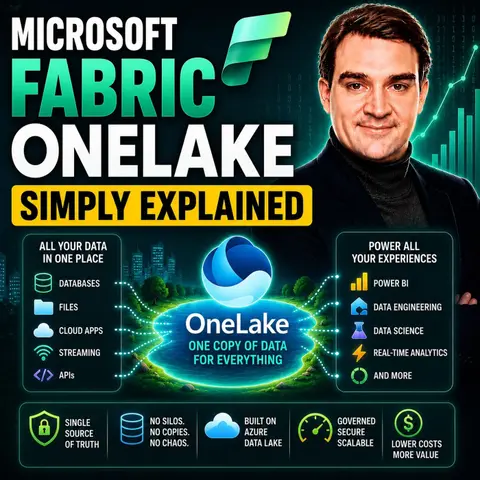

Microsoft Fabric OneLake is the unified data lake at the heart of Microsoft Fabric, providing a single, centralized location for all your organization's analytics data. Instead of storing copies of data across multiple systems, OneLake enables every Fabric workload—from Power BI and Data Engineering to Data Science and Data Warehouse—to access the same data, reducing duplication and breaking down data silos.
In this episode of Microsoft Knowledge Nuggets, Mirko Peters explains Microsoft Fabric OneLake in simple terms and shows why it's often described as the "OneDrive for data." You'll learn how OneLake simplifies data management by providing a single source of truth for analytics, AI, and business intelligence across your organization.
The episode covers key concepts including lakehouses, Delta tables, shortcuts, zero-copy data access, governance, security, and workspace organization. It also explains how OneLake integrates with Power BI, Data Factory, Data Engineering, Data Science, Real-Time Intelligence, and Microsoft Copilot, enabling teams to collaborate without constantly moving or duplicating data.
You'll also discover why OneLake is a foundational component for modern AI and analytics projects. By centralizing data and making it accessible across multiple workloads, organizations can accelerate reporting, machine learning, and AI initiatives while maintaining consistent governance and security.
Whether you're a data analyst, data engineer, Power BI professional, Fabric administrator, or cloud architect, this episode provides a practical introduction to Microsoft Fabric OneLake. By the end, you'll understand how OneLake eliminates data silos, simplifies analytics, and serves as the foundation for the unified Microsoft Fabric platform.
Quick answer: Microsoft Fabric OneLake is covered in this M365 FM episode with a practical focus on what it is, how it works, and the decisions that matter for architecture, adoption, security, governance, or day-to-day operations.
In today's data-driven landscape, organizations face significant challenges in managing their information. Microsoft Fabric OneLake emerges as a powerful solution to streamline these processes. With over 31,000 customers and an impressive annual recurring revenue of $2 billion, this platform is not just gaining traction; it's transforming how businesses handle data.
OneLake centralizes access and governance, making data management more efficient. For example, its unified data lake feature allows seamless integration across various environments, while advanced security measures protect sensitive information. This innovative approach addresses the complexities of data management, providing businesses with the tools they need to thrive.
Key Takeaways
- OneLake centralizes all analytics data, simplifying data management across your organization.
- The unified data architecture reduces data duplication, enhancing collaboration among teams.
- Utilize the OneCopy principle to access data without unnecessary duplication, saving storage costs.
- Leverage OneLake's robust governance features to ensure data security and compliance effortlessly.
- Integrate OneLake with Microsoft tools like Power BI and Teams to streamline workflows and improve decision-making.
- Experience significant performance benefits, including faster data queries and reduced operational costs.
- Adopt OneLake to enhance collaboration and foster a data-driven culture within your organization.
- Real-world applications show that OneLake can lead to increased productivity and optimized operations across various industries.
What is OneLake?

Overview of Microsoft Fabric
Microsoft Fabric OneLake serves as a unified storage solution designed to simplify data management across your organization. It acts as a single, logical data lake that centralizes all your analytics data. This approach eliminates the need for multiple data lakes or silos, which often complicate data architecture and hinder collaboration among teams.
Microsoft OneLake is Fabric's single, unified, logical data lake for the whole organization. OneLake comes automatically with every Fabric tenant with no infrastructure to manage.
OneLake integrates seamlessly with various components of Microsoft Fabric, enhancing its functionality. Here’s a quick overview of these components:
| Component | Description |
|---|---|
| Data Lake Store | A scalable and durable repository for data of any type and size, enabling high-performance analytics and batch processing. |
| Data Management Service | Provides a unified view for simplified data management across various sources, essential for big data processing. |
| Data Lake Analytics | An on-demand analytics job service for running big data queries on data stored in Data Lake Store or Azure Blob Storage. |
| Integration with Ecosystem | OneLake integrates with Azure Data Factory, Azure Databricks, and Synapse Analytics, forming a comprehensive platform for data engineering, warehousing, and analytics. |
The significance of OneLake in data management cannot be overstated. By serving as a centralized repository for all analytics data, OneLake streamlines your analytics data management processes. This unified approach simplifies data architecture and enhances collaboration across teams.
- OneLake is designed to be the single place for all analytics data.
- It is built on Azure Data Lake Storage (ADLS) Gen2, accommodating various file types.
- It reduces the need to maintain multiple separate systems for data processing.
Using OneLake leads to cost savings and increased operational efficiency. The integration of OneLake with other components like Data Factory and Power BI simplifies infrastructure management and streamlines workflows. This enables you to leverage your data more effectively for informed decision-making.
Key Features of OneLake

Unified Data Architecture
OneLake's unified data architecture stands out as a game-changer in data management. Unlike traditional data lake architectures, which often suffer from fragmentation, OneLake provides a centralized storage layer for all your data. This approach significantly reduces data duplication, which is a common issue in conventional systems.
Here’s a quick comparison of OneLake's architecture versus traditional data lakes:
| Feature | OneLake's Unified Data Architecture | Traditional Data Lake Architecture |
|---|---|---|
| Storage Layer | Centralized | Fragmented |
| Data Duplication | Reduced | Common |
| Collaboration | Seamless across teams | Often complex |
| Data Governance and Security | Simplified | Complicated |
With OneLake, you can access data from various tools without the hassle of managing multiple systems. This seamless integration enhances collaboration across your analytics workloads, allowing teams to work together more effectively.
OneCopy Principle
The OneCopy principle is another innovative feature of OneLake that revolutionizes how you handle data. This principle emphasizes virtualization over duplication. Instead of asking, "What do we copy?" you focus on "What can we virtualize first?" This shift leads to significant improvements in storage efficiency.
- By using shortcuts in Microsoft Fabric, you can access data without physical duplication.
- This approach eliminates unnecessary data duplication, reducing storage costs and sync failures associated with traditional methods.
The OneCopy principle not only simplifies data management but also ensures that you always work with the most current data. This means you can trust the insights derived from your analytics, leading to better decision-making.
Enhanced Governance
OneLake offers robust data governance features that ensure your data remains secure and compliant. These features include:
- Monitor and Audit: Regular auditing of data usage to ensure compliance and security.
- Data Discovery and Classification: Automatically identify and label sensitive data.
- Access Control Management: Implement fine-grained permissions for data access.
- Data Lineage Tracking: Understand data provenance for audits.
With OneLake, you gain centralized control over your data estate. This allows you to manage settings for tenants, domains, and workspaces from one place. You can also verify user access quickly, ensuring that only authorized personnel can access sensitive information.
In comparison to traditional enterprise data storage solutions, OneLake's governance approach is centralized and automated. This means consistent policy enforcement across tools, making compliance easier to achieve.
By leveraging OneLake's enhanced governance capabilities, you can secure your data while promoting a culture of data discovery and collaboration within your organization.
Collaboration Tools
Microsoft Fabric OneLake enhances teamwork through its robust collaboration tools. These tools integrate seamlessly with various applications, allowing you to work efficiently across departments. Here are some of the key collaboration tools you can leverage within OneLake:
- Asana
- Microsoft Teams
- Trello
- Slack
- Google Classroom
- Jira
- Microsoft SharePoint
- Zoom
- ClickUp
- Webex
These tools create a unified environment where you can access and analyze data together. This integration breaks down communication barriers and improves the quality and speed of collaborative efforts.
Cary Holley, VP of Data and AI at Hitachi, noted, "With Fabric, we've automated many manual processes... Everything is now online with robust governance." This statement highlights how OneLake's collaboration tools lead to improved productivity.
- Improved productivity for data engineers and business analysts, as highlighted in the Total Economic Impact™ study by Forrester Consulting.
- Real-world example of Hitachi leveraging Fabric to automate manual processes, leading to streamlined operations.
By utilizing these collaboration tools, you can ensure that everyone in your organization works with the same data. This consistency enhances decision-making and fosters a culture of collaboration.
Performance Benefits
OneLake offers significant performance benefits that can transform how you manage data. Its architecture centralizes all analytics data, eliminating the need for multiple data lakes or silos. This streamlining leads to several advantages:
- Enhanced collaboration: You can share and reuse data across teams, ensuring consistency and quality.
- Improved performance: OneLake utilizes the Delta Parquet format for efficient data queries. It supports various analytical engines, allowing you to get insights faster.
- Cost savings: By reducing storage and compute costs, OneLake optimizes resource utilization.
The performance benchmarks for OneLake demonstrate its efficiency compared to other data lake solutions. Here’s a quick look at the latency benchmarks:
| Storage mode | Cold cache | Warm cache | 95th pct warm |
|---|---|---|---|
| Import | 340ms | 45ms | 68ms |
| DirectQuery (SQL DW) | 890ms | 620ms | 1,100ms |
| Direct Lake+ | 210ms | 58ms | 85ms |
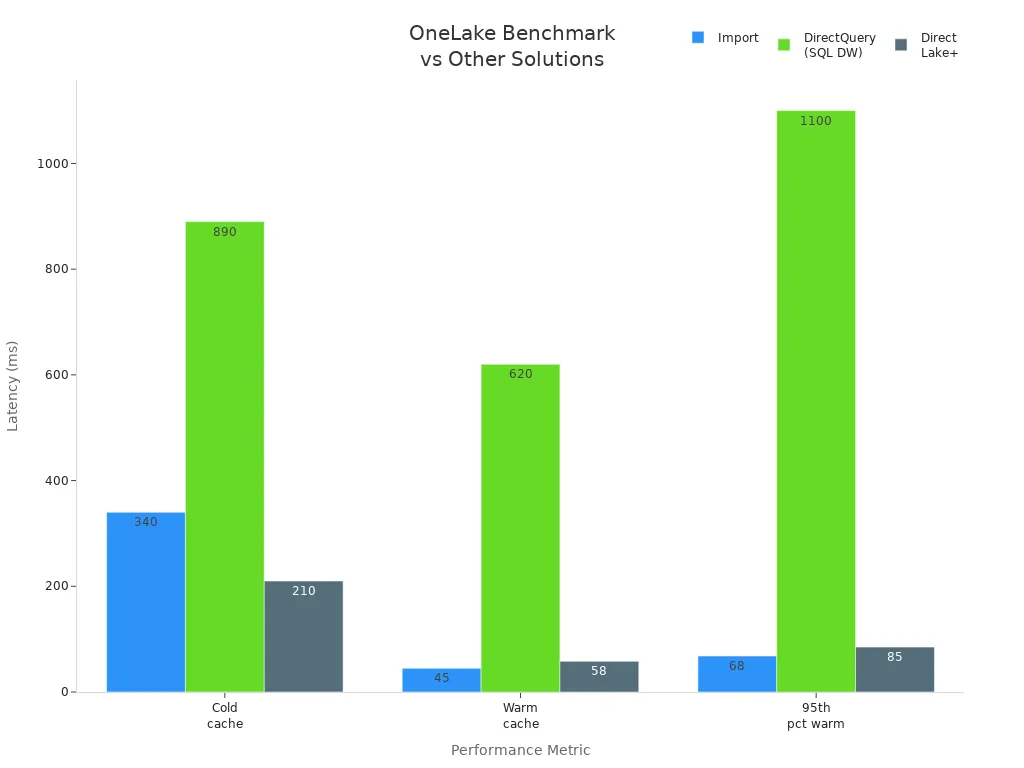
These benchmarks illustrate how OneLake outperforms traditional data lake solutions. By leveraging OneLake's performance benefits, you can streamline your data architecture and enhance your organization's overall efficiency.
OneLake vs. Azure Data Lake Gen2
When comparing Microsoft Fabric OneLake and Azure Data Lake Gen2, you will notice distinct differences in functionality and use cases. Both platforms serve as powerful data storage solutions, but they cater to different needs and scenarios.
Functionalities Comparison
Here’s a quick look at how OneLake and Azure Data Lake Gen2 stack up against each other:
| Feature/Functionality | OneLake | Azure Data Lake Gen2 |
|---|---|---|
| Type | SaaS (Software-as-a-Service) | PaaS (Platform-as-a-Service) |
| Data Storage | Unified logical data lake for the organization | Multiple storage accounts possible |
| Workspace Management | Managed resource with restrictions | More flexible container management |
| Region Allocation | Workspace allocated to Fabric Capacity region | Storage account created in a specific region |
| API Support | Supports ADLS Gen2 APIs | Native ADLS Gen2 APIs |
| Data Visibility | Single instance across Fabric tenancy | Multiple accounts can lead to disparate views |
Use Cases
Different use cases align better with OneLake or Azure Data Lake Gen2. Here’s a breakdown of which platform fits specific scenarios:
| Use Case | Best Fit | Reason |
|---|---|---|
| Power BI-centric analytics | OneLake | Direct Lake support eliminates refresh delays |
| Real-time reporting | OneLake | Native integration with Fabric Real-Time Analytics |
| Custom Spark pipelines | Azure Data Lake | Mature Spark support with low-level tuning |
| Machine learning at scale | Azure Data Lake | Better integration with Azure ML, Databricks |
| Data democratization across departments | OneLake | Workspace-based access and unified governance |
| Enterprise multi-cloud data lakes | Azure Data Lake | More flexible for hybrid and multi-cloud setups |
Advantages of OneLake
OneLake offers several advantages over Azure Data Lake Gen2, making it a compelling choice for many organizations. Here are some key benefits:
| Advantage | Description |
|---|---|
| Open & Interoperable | Compatible with various analytical tools, preventing vendor lock-in. |
| Data Governance | Features like data lineage tracking and audit logs ensure data quality and compliance. |
| Unified Namespace | Provides a single namespace for all data, simplifying access regardless of storage location. |
| Multi-Engine Support | Supports multiple analytics platforms, allowing users to choose the best fit for their needs. |
| Security and Management | Robust security features and integration with Azure Active Directory for access control. |
| Scalability and Performance | Designed to scale with large organizations, ensuring high performance for resource-intensive tasks. |
Real-World Applications of OneLake
Microsoft Fabric OneLake has found applications across various industries, showcasing its versatility and effectiveness. Organizations in finance, healthcare, and retail have successfully implemented OneLake to streamline their data management processes. Here are some notable examples:
-
Bajaj Finserv: This financial services company unified its data estate with OneLake. As a result, Bajaj Finserv experienced a 40% increase in productivity. The organization migrated its analytics workloads to Fabric Data Warehouse, which operates on data stored in OneLake. This migration enhanced operational efficiency and ensured consistent access controls across the business.
-
Genpact: This global professional services firm migrated 15TB of data to OneLake. They connected 300 reports and engaged over 1,000 active users. Genpact reported rapid value delivery, AI-powered insights, and centralized metrics for better resource allocation and cost optimization.
The benefits of OneLake extend beyond individual organizations. Many companies have reported measurable outcomes after deploying OneLake. Here are some key results:
- Lower platform costs: Unifying data in OneLake eliminates redundant storage patterns and reduces the need for duplicated pipelines.
- Shorter time to insight: Direct Lake enables near-real-time decision-making, removing long refresh cycles.
- Higher Copilot accuracy and governance: Well-established data organization leads to higher-quality answers and fewer errors.
- A smoother AI adoption curve: Structured data environments prevent inconsistencies and rework during AI implementation.
Organizations have also leveraged OneLake to optimize their operations. For instance, companies have achieved:
- Crew deployment optimization: Predicting field labor needs based on real-time conditions and historical patterns maximizes utilization while minimizing wasted labor hours.
- Automated financial approvals: Accelerating invoice processing and CapEx approvals through AI-driven routing based on thresholds and business rules.
- Dynamic pricing and quoting: Equipping sales teams with AI-driven insights that adjust pricing based on inventory levels, customer behavior, and historical margins.
- Cash flow acceleration: Improving collections by automating escalation workflows and surfacing at-risk accounts earlier based on payment patterns.
These examples illustrate how OneLake empowers organizations to harness their data effectively. By centralizing data management, OneLake enhances collaboration, drives efficiency, and supports informed decision-making across various sectors.
In summary, Microsoft Fabric OneLake revolutionizes data management by providing a unified data lake that enhances accessibility and governance. You can leverage its features to streamline decision-making and foster a data-driven culture.
Here are some key takeaways:
- OneLake serves as a scalable repository for all organizational data.
- It integrates seamlessly with Microsoft 365 applications, promoting informed decision-making.
- Future trends indicate that solutions like OneLake will reduce data duplication and improve collaboration.
By adopting OneLake, you position your organization to thrive in an evolving data landscape.
FAQ
What is Microsoft Fabric OneLake?
Microsoft Fabric OneLake is a unified storage solution that centralizes data management across organizations. It eliminates data duplication and provides a single logical data lake for all analytics workloads.
How does OneLake improve data governance?
OneLake enhances data governance through features like access control management, data lineage tracking, and automated auditing. These tools ensure compliance and security while simplifying data management.
Can I integrate OneLake with other Microsoft tools?
Yes, OneLake integrates seamlessly with various Microsoft tools, including Power BI, Azure Data Factory, and Azure Databricks. This integration enhances collaboration and streamlines workflows across your organization.
What is the OneCopy principle?
The OneCopy principle allows you to access data without duplication. It emphasizes virtualization, enabling multiple users to work with the same dataset without creating unnecessary copies.
How does OneLake support collaboration?
OneLake supports collaboration through integration with tools like Microsoft Teams and Slack. These features allow teams to work together efficiently, improving communication and decision-making.
What industries benefit from OneLake?
OneLake benefits various industries, including finance, healthcare, and retail. Organizations in these sectors use OneLake to streamline data management and enhance operational efficiency.
Is OneLake a fully managed service?
Yes, OneLake is a fully managed Software-as-a-Service (SaaS) platform. You do not need to manage infrastructure or create storage accounts, simplifying your data management processes.
How does OneLake reduce costs?
OneLake reduces costs by eliminating data duplication and optimizing resource utilization. Its unified architecture minimizes storage and maintenance expenses, leading to significant savings for organizations.
🎧 Listen to this episode
Want a practical explanation of Microsoft Fabric OneLake? This episode breaks down the topic in clear language and shows why it matters for Microsoft 365, Azure, Power Platform, security, AI, and modern work.
Listen to this episode if you want to:
- Understand the key concepts behind Microsoft Fabric OneLake
- See how it fits into the wider Microsoft technology ecosystem
- Learn where it can create practical value for your organization
You may also enjoy these related M365 FM episodes:
- Eliminate Data Silos with Microsoft Fabric and OneLake
- Copilot for Microsoft Fabric - Simply Explained
- Enterprise AI Agent Fabric: Architecture Beyond Chatbots
- Security Agent Fabric: Autonomous AI for Cyber Defense
- How to Build a Microsoft Copilot Agent Fabric
Discover more practical Microsoft conversations on M365 FM.
Last reviewed: July 2026.
Who Should Listen
This episode is for Microsoft 365 administrators, architects, IT leaders, and practitioners who need a practical understanding of Microsoft Fabric OneLake before planning, implementing, or supporting it.
🚀 Want to be part of m365.fm?
Then stop just listening… and start showing up.
👉 Connect with me on LinkedIn and let’s make something happen:
- 🎙️ Be a podcast guest and share your story
- 🎧 Host your own episode (yes, seriously)
- 💡 Pitch topics the community actually wants to hear
- 🌍 Build your personal brand in the Microsoft 365 space
This isn’t just a podcast — it’s a platform for people who take action.
🔥 Most people wait. The best ones don’t.
👉 Connect with me on LinkedIn and send me a message:
"I want in"
Let’s build something awesome 👊
1
00:00:00,000 --> 00:00:03,600
Today's topic is one that almost everyone working with data has heard of,
2
00:00:03,600 --> 00:00:07,320
but few people actually understand Microsoft fabric, one lake.
3
00:00:07,320 --> 00:00:10,680
You've probably seen it in Microsoft's marketing or heard someone call it the unified
4
00:00:10,680 --> 00:00:12,600
data lake for your entire organization.
5
00:00:12,600 --> 00:00:14,520
But what does that actually mean?
6
00:00:14,520 --> 00:00:17,520
Is it just another storage bucket or is it something fundamentally different?
7
00:00:17,520 --> 00:00:18,960
Here's the simplest definition.
8
00:00:18,960 --> 00:00:22,960
One lake is a single logical data lake that sits at the center of Microsoft fabric.
9
00:00:22,960 --> 00:00:27,960
Every fabric service, lake house warehouse, even house, power BI stores its data here.
10
00:00:28,080 --> 00:00:32,000
And the key rule is simple, one physical copy of data accessible by many different
11
00:00:32,000 --> 00:00:35,360
engines, no more copying data from one tool to another, no more wondering which
12
00:00:35,360 --> 00:00:36,720
version of a report is correct.
13
00:00:36,720 --> 00:00:40,480
By the end of this episode, you'll understand what one lake actually is, how it
14
00:00:40,480 --> 00:00:44,760
eliminates data duplication and why it changes the game for power BI data engineering and AI.
15
00:00:44,760 --> 00:00:46,520
So let's start with the problem.
16
00:00:46,520 --> 00:00:49,560
One lake was built to solve the problem.
17
00:00:49,560 --> 00:00:51,040
Every department has its own lake.
18
00:00:51,040 --> 00:00:52,920
Imagine you work at a mid-sized company.
19
00:00:52,920 --> 00:00:55,520
Your sales team uses a CRM system to track deals.
20
00:00:55,720 --> 00:01:00,160
Your finance team runs the ERP for billing and invoices, your marketing team pulls data from
21
00:01:00,160 --> 00:01:04,720
their campaign tools and your data engineering team manages a data warehouse for reporting.
22
00:01:04,720 --> 00:01:06,200
So here's what I want you to think about.
23
00:01:06,200 --> 00:01:09,400
How many copies of the same customer data exist across these systems?
24
00:01:09,400 --> 00:01:11,800
In most companies, the answer is four or five.
25
00:01:11,800 --> 00:01:16,240
The CRM stores it, the ERP stores it, marketing exports it into their analytics tool.
26
00:01:16,240 --> 00:01:21,240
Someone in finance builds a spreadsheet from the ERP and the data engineering team copies
27
00:01:21,240 --> 00:01:22,120
it into the warehouse.
28
00:01:22,120 --> 00:01:23,480
So power BI can read it.
29
00:01:23,800 --> 00:01:28,560
That's the same customer ID, the same sales amount, the same invoice date stored in five different places.
30
00:01:28,560 --> 00:01:30,160
This isn't because people are careless.
31
00:01:30,160 --> 00:01:32,160
It's because the old tools didn't talk to each other.
32
00:01:32,160 --> 00:01:37,480
If you wanted to run a report that combines sales data from the CRM with financial data from the ERP,
33
00:01:37,480 --> 00:01:40,000
you had to copy both into something that could read them together.
34
00:01:40,000 --> 00:01:44,280
That meant building pipelines, scheduling jobs and hoping nothing broke overnight.
35
00:01:44,280 --> 00:01:49,040
The hidden costs add up fast storage bills grow because you're paying for the same data five times.
36
00:01:49,040 --> 00:01:52,240
Reports go stale because one copy gets updated while another doesn't.
37
00:01:52,560 --> 00:01:56,040
And then someone asks the question, nobody wants to answer which version is the right one?
38
00:01:56,040 --> 00:01:58,360
That confusion erodes trust in data.
39
00:01:58,360 --> 00:02:02,560
And once trust is gone, people stop using the analytics platform altogether.
40
00:02:02,560 --> 00:02:05,320
So Microsoft looked at this mess and asked a simple question,
41
00:02:05,320 --> 00:02:08,320
what if you could have one copy of your data that every tool could read?
42
00:02:08,320 --> 00:02:11,640
No duplication, no confusion, one source of truth.
43
00:02:11,640 --> 00:02:13,760
What exactly is one lake?
44
00:02:13,760 --> 00:02:16,200
One lake is Microsoft's answer to that question.
45
00:02:16,200 --> 00:02:19,040
It's a single logical data lake for your entire organization.
46
00:02:19,040 --> 00:02:20,680
The key phrase to remember is this.
47
00:02:21,160 --> 00:02:24,560
One lake per tenant, not one lake per team under the hood.
48
00:02:24,560 --> 00:02:29,240
One lake is built on Azure data lake storage, Gen 2, same technology, same APIs.
49
00:02:29,240 --> 00:02:32,280
But Microsoft has repackaged it as a fully managed SaaS service.
50
00:02:32,280 --> 00:02:33,760
You don't create storage accounts.
51
00:02:33,760 --> 00:02:35,120
You don't manage containers.
52
00:02:35,120 --> 00:02:36,440
You don't set up access keys.
53
00:02:36,440 --> 00:02:37,120
You just use it.
54
00:02:37,120 --> 00:02:39,240
Think of it like one drive for your company's data.
55
00:02:39,240 --> 00:02:43,440
One drive gives you one place for your personal files, documents, photos, spreadsheets.
56
00:02:43,440 --> 00:02:45,480
You don't think about where they're physically stored.
57
00:02:45,480 --> 00:02:47,120
You just open them and work.
58
00:02:47,120 --> 00:02:49,960
One lake does the same thing, but for your organization's data.
59
00:02:50,360 --> 00:02:53,840
It gives every team every project, every workload, one shared pool of storage.
60
00:02:53,840 --> 00:02:55,440
Now, here's an important distinction.
61
00:02:55,440 --> 00:02:57,680
One lake is logical, not physical under the hood.
62
00:02:57,680 --> 00:03:00,200
It can span multiple storage accounts across different regions.
63
00:03:00,200 --> 00:03:02,360
But to you, it looks like one giant pool.
64
00:03:02,360 --> 00:03:04,280
You don't care which server holds the files.
65
00:03:04,280 --> 00:03:05,440
You just see your data.
66
00:03:05,440 --> 00:03:07,600
Every fabric service stores its data here.
67
00:03:07,600 --> 00:03:09,920
When you create a lake house, the data lives in one lake.
68
00:03:09,920 --> 00:03:12,160
When you build a warehouse, the tables live in one lake.
69
00:03:12,160 --> 00:03:16,240
When you run a power BI report, if it uses direct lake mode, it reads directly from one lake.
70
00:03:16,520 --> 00:03:20,480
Even event house, the real time analytics store can expose its data into one lake.
71
00:03:20,480 --> 00:03:22,160
Everything points to the same place.
72
00:03:22,160 --> 00:03:24,760
And the default data format is Delta Parkage.
73
00:03:24,760 --> 00:03:27,000
That's an open format, not a Microsoft lock-in.
74
00:03:27,000 --> 00:03:29,200
Databricks uses it, Spark engines read it.
75
00:03:29,200 --> 00:03:31,040
Tools like pandas and Polars can work with it.
76
00:03:31,040 --> 00:03:33,360
So your data isn't trapped inside Microsoft's world.
77
00:03:33,360 --> 00:03:36,440
It's open and portable, but the real magic isn't storage.
78
00:03:36,440 --> 00:03:39,720
It's how one lake eliminates the need to copy data in the first place.
79
00:03:39,720 --> 00:03:41,480
The one copy principle.
80
00:03:41,480 --> 00:03:45,360
Now, here's the core idea that makes one lake different from anything that came before.
81
00:03:45,400 --> 00:03:46,880
It's called the one copy principle.
82
00:03:46,880 --> 00:03:47,560
And it's simple.
83
00:03:47,560 --> 00:03:50,680
One physical copy of data accessible by many different engines.
84
00:03:50,680 --> 00:03:52,400
Let me show you what that means in practice.
85
00:03:52,400 --> 00:03:56,040
Say you have a table of sales data sitting in one lake, a data engineer runs a spark
86
00:03:56,040 --> 00:03:56,880
notebook to clean it.
87
00:03:56,880 --> 00:03:59,760
A business analyst writes a t-school query to aggregate it.
88
00:03:59,760 --> 00:04:02,280
And a power BI report reads it for a dashboard.
89
00:04:02,280 --> 00:04:03,800
All three happen at the same time.
90
00:04:03,800 --> 00:04:05,240
All three read the same file.
91
00:04:05,240 --> 00:04:08,480
Nobody copied anything in the old world that never happened.
92
00:04:08,480 --> 00:04:10,920
You'd copy data from the data lake into a warehouse.
93
00:04:10,920 --> 00:04:13,880
Then you'd copy it from the warehouse into a semantic model.
94
00:04:14,080 --> 00:04:15,480
Then you'd refresh the report.
95
00:04:15,480 --> 00:04:19,000
That's three copies of the same data, each one taking time and storage space.
96
00:04:19,000 --> 00:04:21,280
And if any step failed, your numbers were wrong.
97
00:04:21,280 --> 00:04:22,680
One copy eliminates all of that.
98
00:04:22,680 --> 00:04:27,840
The data sits in one lake once the engines, spark, SQL, power BI, all read it directly.
99
00:04:27,840 --> 00:04:31,040
No movement, no duplication, no synchronization issues.
100
00:04:31,040 --> 00:04:36,280
The cost savings are real less storage because you're not paying for the same data five times less ETL
101
00:04:36,280 --> 00:04:39,480
because you're not building pipelines just to move data between tools.
102
00:04:39,480 --> 00:04:42,840
Fewer things to maintain because there's nothing to break between copies.
103
00:04:43,040 --> 00:04:44,640
And the freshness benefit is huge.
104
00:04:44,640 --> 00:04:49,760
One copy means one source of truth when the data updates every report sees the update immediately.
105
00:04:49,760 --> 00:04:53,400
No more asking, is this report using last week's data or this week's?
106
00:04:53,400 --> 00:04:55,560
It's always the same data everywhere.
107
00:04:55,560 --> 00:04:58,800
Now you might be thinking, well, isn't this just a Zua data lake storage?
108
00:04:58,800 --> 00:04:59,640
Not exactly.
109
00:04:59,640 --> 00:05:00,840
Adolesce is a past service.
110
00:05:00,840 --> 00:05:02,040
You create storage accounts.
111
00:05:02,040 --> 00:05:03,120
You manage containers.
112
00:05:03,120 --> 00:05:04,320
You set up access keys.
113
00:05:04,320 --> 00:05:06,040
You decide which region holds what.
114
00:05:06,040 --> 00:05:07,960
It's flexible, but it's also work.
115
00:05:07,960 --> 00:05:09,600
One lake is a SaaS service.
116
00:05:09,600 --> 00:05:11,040
You don't create storage accounts.
117
00:05:11,040 --> 00:05:12,240
You don't manage containers.
118
00:05:12,240 --> 00:05:13,240
You just use it.
119
00:05:13,240 --> 00:05:16,040
The underlying infrastructure is handled for you.
120
00:05:16,040 --> 00:05:18,720
One copy is great for data that lives inside fabric.
121
00:05:18,720 --> 00:05:20,720
But what about data that lives somewhere else?
122
00:05:20,720 --> 00:05:21,800
Shortcuts.
123
00:05:21,800 --> 00:05:23,320
Leave the data where it lives.
124
00:05:23,320 --> 00:05:25,000
So this is where shortcuts come in.
125
00:05:25,000 --> 00:05:26,440
A shortcut is a virtual pointer.
126
00:05:26,440 --> 00:05:28,840
Think of it like a symbolic link for your data lake.
127
00:05:28,840 --> 00:05:33,800
And it lets you access data that physically lives outside one lake without moving or copying it.
128
00:05:33,800 --> 00:05:35,320
Here's how it works.
129
00:05:35,320 --> 00:05:37,960
You create a shortcut inside a lake house or a warehouse.
130
00:05:37,960 --> 00:05:40,800
And that shortcut points to a file or folder somewhere else.
131
00:05:40,960 --> 00:05:43,080
Could be in an Azure Data Lake storage account.
132
00:05:43,080 --> 00:05:47,440
An Amazon S3 bucket, Google Cloud storage, or even another fabric workspace.
133
00:05:47,440 --> 00:05:51,200
The data stays where it is, but from inside fabric, it looks like it's right there in one lake.
134
00:05:51,200 --> 00:05:53,000
Let me give you a real scenario.
135
00:05:53,000 --> 00:05:56,480
Your sales team has been running their analytics on AWS for years.
136
00:05:56,480 --> 00:05:58,600
So all their data sits in S3 buckets.
137
00:05:58,600 --> 00:06:04,160
Your finance team uses fabric and power BI and they need to combine sales data with financial data.
138
00:06:04,160 --> 00:06:06,720
In the old world, you'd export everything from S3,
139
00:06:06,960 --> 00:06:10,960
upload it to Azure, build a pipeline to keep it in sync and hope nothing broke.
140
00:06:10,960 --> 00:06:14,560
With shortcuts, you create a shortcut from your lake house to the S3 bucket.
141
00:06:14,560 --> 00:06:18,960
The data stays in AWS, but finance can query it in power BI like it's sitting in one lake.
142
00:06:18,960 --> 00:06:21,840
No export, no upload, no pipeline to worry about.
143
00:06:21,840 --> 00:06:23,560
Shortcuts work internally too.
144
00:06:23,560 --> 00:06:28,560
If one team has a curated data set in their workspace, another team can create a shortcut to it.
145
00:06:28,560 --> 00:06:30,560
No copying, no duplication.
146
00:06:30,560 --> 00:06:34,160
The data stays in the original workspace and everyone else just references it.
147
00:06:34,160 --> 00:06:36,160
There's one limitation you need to understand.
148
00:06:36,560 --> 00:06:40,760
Shortcuts don't copy data, so query performance depends on the source systems speed.
149
00:06:40,760 --> 00:06:43,760
If you're shortcutting to an S3 bucket on the other side of the world,
150
00:06:43,760 --> 00:06:47,760
your queries will be slower than if the data was local for frequently accessed data,
151
00:06:47,760 --> 00:06:49,560
consider mirroring it instead.
152
00:06:49,560 --> 00:06:54,160
And that brings us to our next topic, mirroring automatically bring in database data.
153
00:06:54,160 --> 00:06:58,960
Shortcuts cover external file storage really well, but what about your existing databases?
154
00:06:58,960 --> 00:07:03,160
The ones running your ERP, your CRM, your operational applications.
155
00:07:03,160 --> 00:07:04,560
That's where mirroring comes in.
156
00:07:04,760 --> 00:07:09,760
Mirroring is a way to get data from databases into one lake in near real time without building a single pipeline.
157
00:07:09,760 --> 00:07:17,160
You point fabric at your database and it handles the rest by creating an automatic incremental copy of the data into Delta Parquet format inside one lake,
158
00:07:17,160 --> 00:07:20,160
keeping that copy up to date as changes happen in the source.
159
00:07:20,160 --> 00:07:25,760
The supported sources include Azure SQL Database, SQL Server running on premises, Cosmos DB and others,
160
00:07:25,760 --> 00:07:30,560
and Microsoft is adding more over time, but the most common scenario is your business critical database.
161
00:07:30,560 --> 00:07:34,160
The one your ERP runs on or your line of business application. Here's how it works.
162
00:07:34,360 --> 00:07:38,560
You enable mirroring on a database and fabric reads the change feed inserts updates,
163
00:07:38,560 --> 00:07:41,560
deletes and replicates those changes into one lake.
164
00:07:41,560 --> 00:07:48,160
The first sync copies the full data set after that it's incremental only moving the changed rows.
165
00:07:48,160 --> 00:07:52,360
The data lands in Delta Parquet format ready to be queried by any fabric engine.
166
00:07:52,360 --> 00:07:55,760
Now, here's the key difference from shortcuts shortcuts don't copy data.
167
00:07:55,760 --> 00:07:58,560
They point to it mirroring actually copies the data.
168
00:07:58,560 --> 00:08:02,360
So the data lives in one lake physically and query performance is fast,
169
00:08:02,560 --> 00:08:05,360
regardless of how fast or slow the source databases.
170
00:08:05,360 --> 00:08:10,560
The tradeoff is your storing a copy, but the benefit is near real time access with no pipeline to build,
171
00:08:10,560 --> 00:08:13,560
no scheduling to manage and no maintenance to worry about.
172
00:08:13,560 --> 00:08:19,560
Let me give you a concrete use case your company runs an ERP on SQL Server and it holds all your financial data.
173
00:08:19,560 --> 00:08:24,960
In voices, payments, general ledger in the old world you'd build an ETL job that runs every night,
174
00:08:24,960 --> 00:08:29,160
extracts the data, transforms it and loads it into a warehouse that job breaks,
175
00:08:29,360 --> 00:08:34,160
someone has to fix it and the data is always at least a day old with mirroring you enable it once
176
00:08:34,160 --> 00:08:37,160
and fabric replicates the data into one lake continuously.
177
00:08:37,160 --> 00:08:41,760
Your power be I reports read directly from one lake and see data that's minutes old, not hours or days.
178
00:08:41,760 --> 00:08:43,160
And you never touch the pipeline.
179
00:08:43,160 --> 00:08:47,560
Now you have data in one lake from shortcuts, from mirroring and from direct uploads.
180
00:08:47,560 --> 00:08:48,960
How do you actually use it?
181
00:08:48,960 --> 00:08:50,760
One lake and the three data stores.
182
00:08:50,760 --> 00:08:53,960
So one lake is the storage layer, the place where all your files live.
183
00:08:53,960 --> 00:08:56,960
But here's the thing you don't actually work with one lake directly.
184
00:08:57,160 --> 00:09:04,160
Instead you interact with it through what we call data stores, which are interfaces that give you different ways to work with the same underlying data.
185
00:09:04,160 --> 00:09:08,360
There are three main data stores in fabric, lake house, warehouse and event house.
186
00:09:08,360 --> 00:09:12,360
They all store their data in the same one lake, but each one serves a different purpose.
187
00:09:12,360 --> 00:09:18,360
Let's start with lake house, the flexible data store that accepts files like CSV, JSON and images along with delta tables.
188
00:09:18,360 --> 00:09:23,160
You use it when you're doing data engineering, machine learning or landing raw data from source systems.
189
00:09:23,160 --> 00:09:25,960
It's a workbench where you clean, transform and prepare data.
190
00:09:26,160 --> 00:09:30,960
If you're building a medallion architecture with bronze, silver and gold layers, the lake house is where that happens.
191
00:09:30,960 --> 00:09:36,560
You can access it through Spark notebooks or through the SQL analytics endpoint for read only queries.
192
00:09:36,560 --> 00:09:38,960
Next is warehouse, the structured data store.
193
00:09:38,960 --> 00:09:41,560
It gives you full t-sucle read and write support.
194
00:09:41,560 --> 00:09:47,960
So you can create tables, views, stored procedures and functions and run insert, update, delete statements.
195
00:09:47,960 --> 00:09:52,360
It feels like a traditional SQL server database because it's designed for people who think in SQL.
196
00:09:52,560 --> 00:09:58,360
You use warehouse when you're building BI reports, running complex aggregations or migrating from an existing data warehouse.
197
00:09:58,360 --> 00:10:00,760
Think of it as the gold layer for enterprise reporting.
198
00:10:00,760 --> 00:10:06,160
Then there's event house, the real time data store built on the Kusto engine, the same technology behind Azure Data Explorer.
199
00:10:06,160 --> 00:10:12,160
It handles streaming data, logs, IoT telemetry and click streams, anything that arrives fast and needs to be queried immediately.
200
00:10:12,160 --> 00:10:14,560
You query it with KQL, the Kusto query language.
201
00:10:14,560 --> 00:10:20,960
And when you enable one lake availability, that event data becomes accessible to lake house and warehouse as delta tables.
202
00:10:21,160 --> 00:10:24,560
So here's what you need to understand, all three store their data in the same one lake.
203
00:10:24,560 --> 00:10:27,760
A table created in a lake house can be read by a warehouse query.
204
00:10:27,760 --> 00:10:30,560
A table in a warehouse can be accessed from a Spark notebook.
205
00:10:30,560 --> 00:10:34,160
Data ingested into event house can be exposed as delta tables for power BI.
206
00:10:34,160 --> 00:10:37,560
They're not separate databases. They're different views into the same data lake.
207
00:10:37,560 --> 00:10:42,360
A lot of people get this wrong. They think lake house warehouse and event house are competing products, but they're not.
208
00:10:42,360 --> 00:10:45,560
You actually use all three because each one solves a different problem.
209
00:10:45,560 --> 00:10:49,160
Lake house for data engineering, warehouse for BI event house for real time.
210
00:10:49,360 --> 00:10:54,360
And they all share the same storage one lake handles the storage and the data stores handle the access.
211
00:10:54,360 --> 00:11:01,360
But who gets to see what security and governance in one lake because all your data lives in one place security become simpler.
212
00:11:01,360 --> 00:11:04,960
You manage access in one spot instead of across 10 different systems.
213
00:11:04,960 --> 00:11:12,160
No more setting permissions in the CRM then again in the warehouse then again in power BI one lake gives you a single security model for everything.
214
00:11:12,160 --> 00:11:17,160
At the top level you have workspace roles admin member contributor viewer.
215
00:11:17,360 --> 00:11:22,560
These control who can work in a given workspace if someone is a viewer they can see items but not modify them.
216
00:11:22,560 --> 00:11:32,560
If they're an admin they control everything simple enough, but you can take it further one like security roles let you control access at the folder level, the table level, the column level and even the row level.
217
00:11:32,560 --> 00:11:37,360
For example column level security means you can hide salary information from everyone except HR.
218
00:11:37,360 --> 00:11:44,760
Row level security means a sales manager only sees their own region's data and it works the same way across all the data stores because they all sit on the same one lake.
219
00:11:44,960 --> 00:11:53,760
There's also the one lake catalog a central view where you can see all data across all workspaces you can find certified data sets check who owns what and manage governance from one place.
220
00:11:53,760 --> 00:11:59,160
It integrates with Microsoft purview for classification sensitivity labels and data loss prevention.
221
00:11:59,160 --> 00:12:09,360
So if you need to mark certain data as confidential or highly restricted you can do that at the lake level and it applies everywhere and there's one lake diagnostics which captures who accessed what and when.
222
00:12:09,760 --> 00:12:18,960
It's useful for all its compliance checks and answering the question who touched this data last week it logs every read and write operation and stores those logs as Jason files inside a lake house.
223
00:12:18,960 --> 00:12:31,160
You can analyze them with spark SQL or power BI the big picture is this one security model for all your data instead of managing separate rules for every tool that's a massive simplification for any organization.
224
00:12:31,160 --> 00:12:33,760
Practical takeaways what this means for you.
225
00:12:33,760 --> 00:12:38,160
So what does all this actually mean if you're starting your fabric journey today let's break it down.
226
00:12:38,360 --> 00:12:59,560
If you're building a new data platform one leg removes the need to architect complex data movement you don't have to plan how data flows from a lake into a warehouse into a semantic model just put it in one lake and every tool reads from there one lake one copy that's the whole architecture if you're migrating from an older system short cuts and mirroring let you leave data where it is while gradually shifting workloads.
227
00:12:59,560 --> 00:13:07,960
No big bang migration needed point a shortcut at your existing data lake mirror your SQL server database start using fabric while your old systems keep ticking along.
228
00:13:08,160 --> 00:13:27,360
You move at your own pace here's the mindset shift stop thinking about storage per project stop creating a new data lake for every new initiative start thinking about one shared lake that every project accesses your sales teams data your finance teams data your engineering teams data it all lives in the same place they just see different parts of it for power BI uses reports read directly from one lake.
229
00:13:27,360 --> 00:13:37,360
No separate import no duplicated semantic models the data is fresh because it's the same data the data engineers work with for data engineers that means fewer pipelines to build maintain and debug.
230
00:13:37,560 --> 00:13:48,960
You land the data once everyone else just references it the bottom line is this one lake isn't just another data lake it's the foundation that makes fabric different from anything before it it's the reason you can stop copying data and start trusting it.
231
00:13:48,960 --> 00:14:06,760
So there you have it one lake is your organization's single data lake built on the one copy principle one physical copy of data accessible by any tool any team any workload no more duplication no more confusion about which version is correct your homework is simple start with a shortcut from an external source or mirror a database
232
00:14:06,960 --> 00:14:25,160
see how simple it becomes when you don't have to build pipelines just to move data around most organizations won't make this shift quickly be the one that does if this episode helped you understand one lake subscribe to Microsoft knowledge nuggets for more fabric content in plain English and share this with someone who's still managing five separate data lakes they'll thank you later.

Founder of m365.fm, m365.show and m365con.net
Mirko Peters is a Microsoft 365 expert, content creator, and founder of m365.fm, a platform dedicated to sharing practical insights on modern workplace technologies. His work focuses on Microsoft 365 governance, security, collaboration, and real-world implementation strategies.
Through his podcast and written content, Mirko provides hands-on guidance for IT professionals, architects, and business leaders navigating the complexities of Microsoft 365. He is known for translating complex topics into clear, actionable advice, often highlighting common mistakes and overlooked risks in real-world environments.
With a strong emphasis on community contribution and knowledge sharing, Mirko is actively building a platform that connects experts, shares experiences, and helps organizations get the most out of their Microsoft 365 investments.




