
GDPR Compliance with Purview: A Practical Guide for Microsoft Environments
Quick Answer: GDPR compliance with Microsoft Purview means using documented data-handling processes and Microsoft 365 controls to support accountability, protection, retention, auditability, and investigation. Begin with your organisation’s data inventory, roles, legal requirements, and risk assessment; then configure and test appropriate controls with legal, privacy, security, and business owners involved.
Navigating GDPR compliance is no small feat — especially if your organization operates in the United States and handles data tied to folks in the European Union. The reality is simple: if you’re working with EU personal data, those rules follow the data, no matter which side of the Atlantic you’re on. That's where Microsoft Purview steps in, giving you a toolkit that tackles data governance, security, and compliance, all in one platform.
In this guide, you’ll get a practical, no-nonsense look at how GDPR affects organizations like yours and how Microsoft Purview can make these complex regulations a whole lot more manageable. From understanding the basics of data protection law to real-world steps for mapping and securing sensitive data — and even handling advanced topics like breach management — we’ve laid out a roadmap that’s actionable and tailored to the realities of Microsoft environments. Whether your goal is to avoid fines, protect your reputation, or just keep all the data ducks in a row, this article will point you in the right direction.
Understanding GDPR and the Importance of Data Protection Regulations
Let’s start at the top. The General Data Protection Regulation, or GDPR, is the European Union’s foundational law for protecting personal data. It’s been in force since 2018, and its reach is global — any organization processing personal data of EU citizens has to follow these rules, regardless of where they’re physically based. If your systems touch EU personal data, you’re on the hook.
GDPR is all about putting people in control of their own information. That means strict rules on how you collect, store, use, and share that data. Think about names, emails, health info, even IP addresses — the things that can identify someone. Organizations must be transparent, get clear consent where needed, and give people rights to access, correct, or erase their own information.
Data protection regulations aren’t just about avoiding fines (which, by the way, can be serious under the GDPR). They’re about giving customers and employees peace of mind, proving you’re a good steward of their data, and building real trust. In today’s world, reputation isn’t just built on products or services. It’s built on keeping data safe and private.
So, why does this matter, even for US-based businesses? Because digital borders don't match up with legal ones. If you’re holding or handling EU personal data—customers, employees, partners—you have legal obligations. Ignoring privacy rules just isn’t an option anymore. That’s why companies are turning to purpose-built solutions like Microsoft Purview, which can help turn these obligations into manageable, day-to-day practices.
How Microsoft Purview Enables Compliance for GDPR Requirements
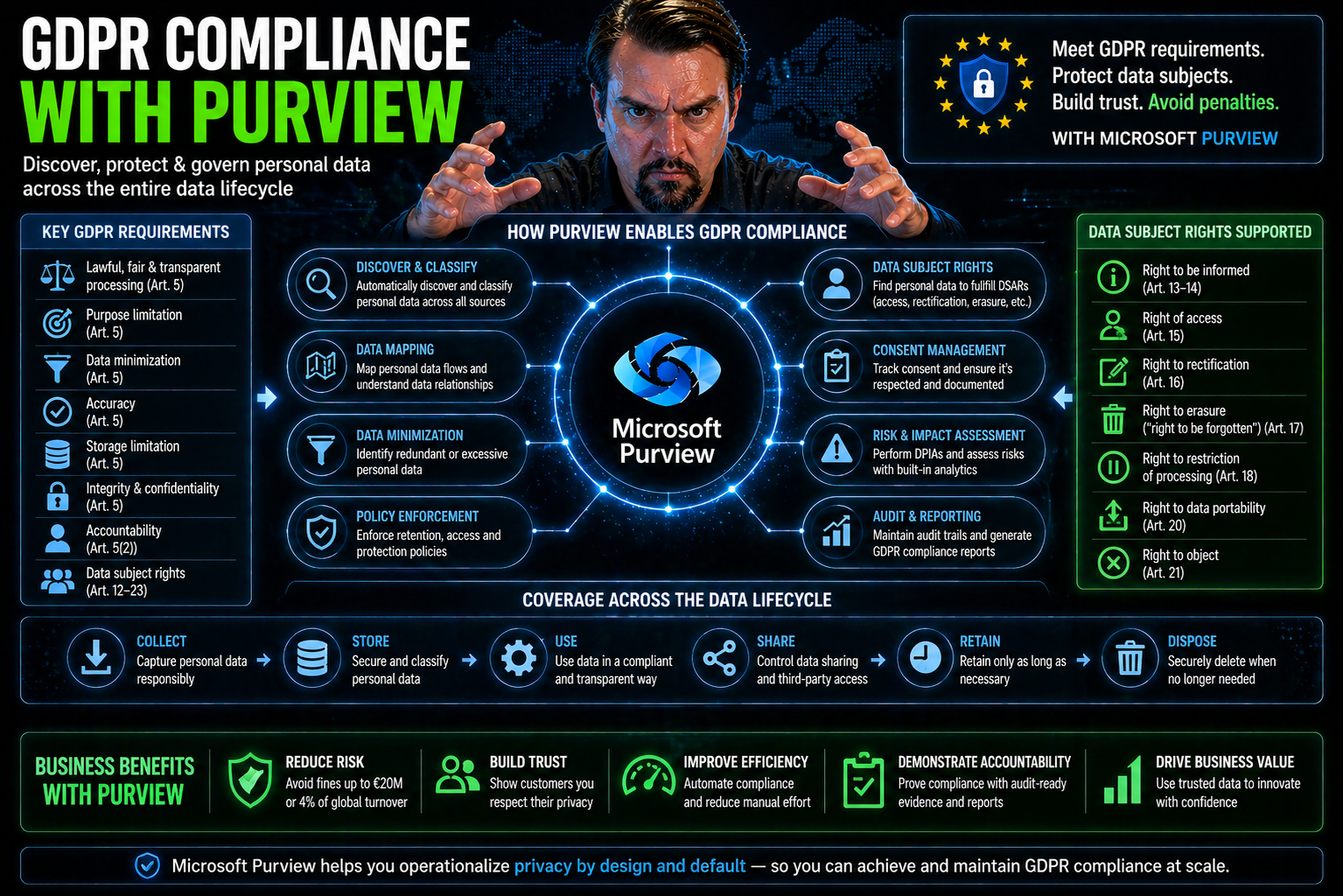
Microsoft Purview is designed to help organizations navigate the complex maze of GDPR compliance by offering unified data governance, compliance, and risk assessment tools. At its core, Purview brings together policy management, data mapping, and technical controls into a single, cloud-based platform that supports GDPR-mandated transparency and accountability.
A major feature is automated data discovery, which helps identify and classify personal data wherever it lives: across Microsoft 365, Azure, or even on-premises servers. This makes it easier to fulfill GDPR requirements for knowing what data you have, where it’s stored, and how it’s used. Technical controls like role-based permissions and data loss prevention help you enforce policies and keep sensitive information from slipping through the cracks.
With integrated auditing and comprehensive reporting, you can demonstrate compliance whenever a regulator comes knocking. Features like Purview Audit are built specifically for organizations in regulated environments, offering in-depth logs and forensic data — a must for compliance reviews and investigations. For content management and document governance, using Purview with SharePoint can help you stay organized and audit-ready, as discussed in this podcast episode.
Purview also includes compliance manager dashboards, offering a bird’s eye view of your risk profile and compliance posture. By centralizing these capabilities, Purview enables practical, ongoing GDPR compliance, helping you address both day-to-day operations and unexpected requests or incidents.
Key Purview Features for GDPR: Data Collection, Discovery, and Lifecycle
Meeting GDPR requirements means knowing what personal data you have, where it lives, and how it moves through your systems. Microsoft Purview makes this practical with its data discovery, classification, and governance features that span Microsoft 365, Azure, and beyond.
With automated data scanning, Purview can track down sensitive data across cloud and on-premises sources—so you’re not left guessing about where personal information might be hiding. Classification policies label data based on sensitivity or category, making it much easier to apply correct handling and retention rules throughout the data’s lifecycle. This is crucial for GDPR’s “data minimization” principle and obligations like the right to erasure.
The platform’s cataloging features help document each data asset, showing what kind of personal data is stored and who can access it. Coupled with comprehensive management tools, Purview empowers you to set clear guidelines for data retention, usage, and protection. This reduces manual effort and helps keep you out of hot water when those Data Subject Requests or audits show up.
If you’re worried about document chaos and regulatory headaches, Purview’s collaboration with platforms like SharePoint—highlighted in this episode—can provide structure, audit readiness, and proactive data protection. The right controls not only help you comply with the law but also build a culture of privacy and responsibility across teams.
Implementing Security Controls and Managing Risk with Purview
Securing personal data is a cornerstone of GDPR, and Microsoft Purview equips you with a toolbox of risk management and compliance controls to meet these demands head-on. It’s not just about ticking boxes—it’s about building a security-first organization where preventable incidents become a rarity.
Key capabilities like Data Loss Prevention (DLP), Advanced Audit, and Insider Risk Management enable you to detect and address threats before they turn into costly compliance violations. DLP, for example, lets you set precise rules on how sensitive data can be accessed or shared—essential for preventing data leaks. You can learn more about sound DLP practices and avoiding common pitfalls in this guide tailored for developers and IT admins.
But don’t stop there. Effective security isn’t just about technical controls, it’s about strategy. As highlighted in this podcast episode, thinking about environment strategy and connector governance prevents those silent compliance gaps that sneak in through default configurations.
When risk management is woven into day-to-day operations—mapping access, tracking activities, and automating alerts—compliance isn’t a one-off project, but an ongoing process. These managed controls not only satisfy the legal needs of GDPR but also reduce operational risk and support a resilient, trustworthy security posture for your organization.
Capabilities and Limitations of Microsoft Purview for GDPR
Microsoft Purview stands out for GDPR compliance with its integrated policy automation, granular classification, and robust reporting — especially if you’re deep in the Microsoft cloud or hybrid world. It streamlines data mapping, automates retention, and centralizes compliance dashboards, making it easier to show auditors you’re on top of your obligations.
However, Purview can’t do everything out of the box. It’s strongest with native Microsoft 365 and Azure sources, but if your data is scattered across AWS, Salesforce, or legacy systems, you’ll likely face extra work to get full visibility and control. For those mixed environments, you may need integrations or additional tooling to bridge compliance gaps and achieve comprehensive data governance.
Operationalizing GDPR Compliance: Mapping, Retention, and Data Subject Requests
Turning GDPR theory into practice means actually mapping out your organization’s personal data flows, setting up effective retention policies, and staying on top of Data Subject Requests (DSRs). Microsoft Purview gives you a practical framework for all three, helping you turn compliance from a headache into a daily habit.
For data mapping, Purview makes it much simpler to document what personal data you’re collecting, where it's stored, and how it gets processed across your digital landscape. Comprehensive catalogs and automated scans give you a solid foundation for GDPR’s documentation requirements, and make it easier to respond when someone asks, “What do you have on me?”
Retention policies are a big sticking point with GDPR, but Purview lets you automate the hard work — defining who keeps what, for how long, and securely disposing of data when it’s no longer needed. As you weigh these policies, remember that the right configuration is just as important as the right intentions, especially as discussed in this discussion on compliance drift.
Managing DSRs, meanwhile, is streamlined through search, access review, and response workflows embedded in Purview. And for full compliance, don’t forget about informing data subjects and keeping a sharp eye on subcontractors or vendors processing your data — with Purview’s vendor risk insights, you don’t have to take anything on blind faith.
Using Compliance Manager for GDPR: Assessments, Policies, and Reporting
Staying compliant with GDPR isn’t a one-and-done deal; it’s an ongoing journey. Microsoft Purview Compliance Manager is your dashboard for this journey, giving you tools for regular assessments, policy management, and automated reporting to keep you ready for whatever the regulators throw at you.
With built-in and customizable templates, you can evaluate your current GDPR posture, track what’s improved, and see which areas need attention. The platform’s scoring and evidence tracking features help you set clear baselines, manage documentation, and maintain a complete record of your efforts—vital for showing due diligence during inspections.
Policy automation is another advantage, letting you apply organizational policies across teams and environments with less manual oversight. These automated controls ensure that as environments and workflows change, your compliance effort doesn’t get stuck in the past.
For organizations integrating Microsoft compliance with broader security frameworks, continuous monitoring is key. Automation and real-time reporting across clouds—highlighted in this resource—help reduce compliance drift, unify governance efforts, and make sure leadership always has the right metrics at their fingertips.
Advanced GDPR: DPIA, Breach Management, and Accountability Readiness
Once you’ve mastered the basics, GDPR demands more: proactive risk management, readiness for unforeseen incidents, and a demonstrable framework of accountability. This is where Microsoft Purview’s advanced capabilities really show their worth.
Conducting a Data Protection Impact Assessment (DPIA) is required for many high-risk processing activities under GDPR. Purview helps you identify where personal data risks are hiding, document them, and design proper mitigation plans — so you’re not caught off guard when regulators start asking tough questions.
Data breaches aren’t a matter of if, but when. Purview allows you to set up proactive monitoring and incident response protocols to detect, contain, and report breaches within the 72-hour GDPR window. Detailed audit logs simplify the process and ensure you have everything you need for transparent reporting.
Don’t sleep on the value of accountability readiness either. Readiness checklists and clear documentation trails are critical for proving to both auditors and your organization that you’re running a privacy-first operation. If you’re dealing with AI or emerging technology risks, governance boards and compliance guardrails, as discussed in this governance-focused episode, add an extra layer of oversight and peace of mind.
Integrating Purview with Non-Microsoft Data Sources for Complete GDPR Coverage
- Connect to Third-Party Data Sources: Set up Purview to scan and catalog data from AWS, Salesforce, Oracle databases, or legacy on-premises environments using built-in connectors or APIs, ensuring no personal data slips through the cracks outside Microsoft’s native platforms.
- Standardize Data Classification Across Platforms: Extend Purview’s labeling and classification policies to these external sources, so GDPR-sensitive data is tagged and governed consistently, no matter where it lives.
- Centralize Compliance Monitoring and Reporting: Collect discovery, governance, and access insights from both Microsoft and non-Microsoft systems to enable true organization-wide GDPR mapping, data request fulfillment, and risk analytics. For Power Platform scenarios, avoid common governance pitfalls by leveraging robust backbones like Dataverse instead of under-governed solutions, as explained here.
- Automate Ongoing Data Syncs: Set up regular scans and policy updates to ensure compliance coverage keeps pace as new systems and data sources are added, minimizing manual follow-up and compliance drift.
FAQs, Resources, and Ongoing Support for GDPR in Microsoft Purview
- What is a Data Subject Request (DSR), and how does Purview help? DSRs are requests from individuals to access, correct, or delete their personal data. Purview streamlines DSR handling with search, review, and automated response workflows, making it easy to locate and process relevant data.
- How can I stay audit-ready? Use Purview’s audit and compliance reports, automated evidence tracking, and integrated policy management to demonstrate GDPR adherence at any given time. For document management best practices, see this episode.
- Where can I find official GDPR compliance documentation for Microsoft environments? Microsoft’s official documentation is updated regularly. Start with the Microsoft Purview Documentation Center and Compliance Manager resources via your Microsoft 365 admin center.
- How do I provide feedback or get help? Use the feedback tools built into the Microsoft Purview portal or visit the admin center for live support, community forums, and user-driven improvement requests.
- What other resources are available for ongoing learning? Industry podcasts, such as this one focused on Purview and SharePoint, as well as webinars, Microsoft Learn courses, and community Q&As, can enrich your knowledge and keep you ahead of regulatory changes.
Use Purview as part of a GDPR operating model
- Map the personal-data scenarios, systems, owners, and legal responsibilities that apply to your organisation.
- Use classification, access, retention, audit, and DLP controls where they support the defined policy and risk treatment.
- Test policy impact and document exceptions, escalation, and subject-rights processes.
- Review controls regularly as data, business processes, and regulations change.
Use Microsoft Learn’s Purview documentation for current product guidance. This article is not legal advice; validate GDPR obligations with qualified legal and privacy professionals.
Frequently asked questions
Does Microsoft Purview make an organisation automatically GDPR compliant?
No. Purview can support operational controls and evidence, but compliance depends on the organisation’s complete legal, technical, and business processes.
Which team should own GDPR-related Purview policies?
Ownership is shared: privacy and legal define requirements, while security, IT, and business owners implement, operate, and review the controls.
🎧 You Should Also Listen To
These episodes deepen the protection and governance foundations needed for GDPR compliance with Microsoft Purview.
- Microsoft Purview – Simply Explained provides the high-level compliance and governance landscape.
- Microsoft Purview Information Protection – Simply Explained explains sensitivity and protection choices for data that needs careful handling.
- Microsoft Purview Data Loss Prevention (DLP) – Simply Explained explores the prevention layer for accidental or unauthorised data movement.
Last reviewed: July 2026. GDPR obligations require organisation-specific legal and privacy review.

Microsoft MVP | Host of M365.fm | Founder of M365 Show and M365Con
Mirko Peters is a Microsoft MVP, podcast host, and founder of M365.fm, M365 Show, and M365Con. His work connects Microsoft practitioners through podcast interviews, livestreams, and community events.
At M365.fm, Mirko hosts conversations with Microsoft MVPs, product experts, architects, and community contributors. Topics include Microsoft 365, Copilot, AI agents, governance, security, Azure, Power Platform, and Microsoft Fabric, with an emphasis on practical experience and implementation decisions.
M365.fm is the podcast and learning platform. M365 Show brings experts together for livestreams, while M365Con provides an online conference setting for community learning.
Official website: Mirko Peters (https://www.mirkopeters.com/). Recognition: Mirko Peters — Microsoft MVP profile (https://mvp.microsoft.com/de-DE/mvp/profile/9b0ca797-db5a-493a-a845-8b9158046cf5). Connect on LinkedIn (https://www.linkedin.com/in/m365showpodcast/).




