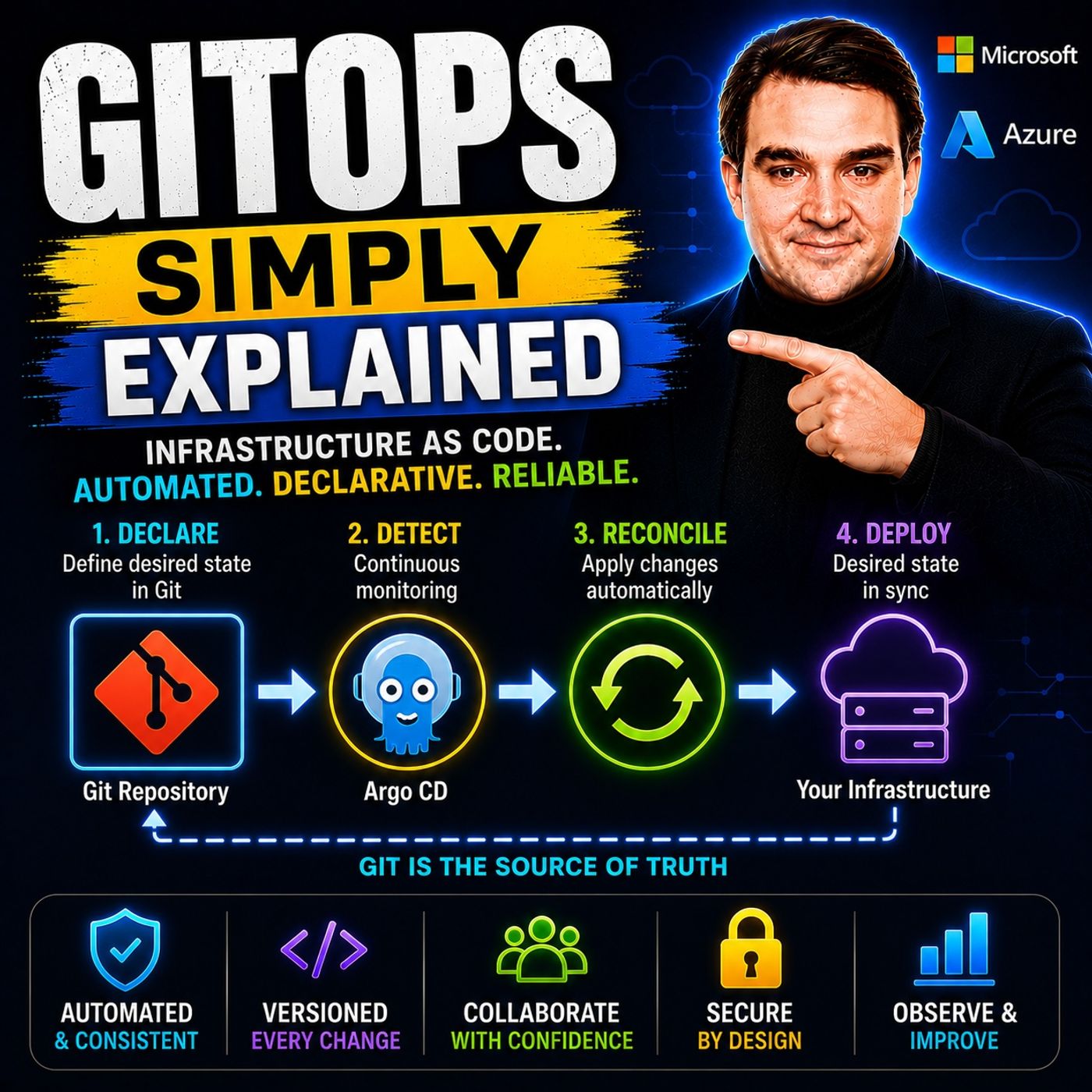
Mastering the GitOps Workflow: From Code Push to Automated Reconciliation
Welcome back, podcasters and tech enthusiasts! If you have been following our audio episodes, you know we love breaking down complex architectural concepts into practical, actionable insights. Today, we are expanding on one of our most requested topics: the modern approach to infrastructure management. If you manage containerized environments, cloud resources, or Kubernetes clusters, you have likely heard whispers—or shouts—about GitOps. But what does a GitOps workflow actually look like from the moment a developer hits enter on a code push to the final automated deployment on a cluster? Let us take a deep dive into the end-to-end lifecycle of GitOps, exploring how changes flow through systems and why continuous reconciliation is changing the game for DevOps teams worldwide.
Understanding GitOps
GitOps Principles
GitOps operates on four core principles that enhance the management of Kubernetes infrastructure. These principles ensure that your deployments are consistent, secure, and efficient. Here is a closer look at each principle:
| Principle | Description |
|---|---|
| Declarative configuration | All configurations are defined as code, ensuring clarity and consistency in the desired state. |
| Git as the single source of truth | Git serves as the canonical source for all configurations, enabling audit trails and controlled changes. |
| Automated reconciliation | Continuous comparison of live state with Git-defined state ensures any drift is corrected automatically. |
| Continuous delivery through Git | Facilitates a streamlined process for deploying changes, enhancing security and operational consistency. |
By adopting these GitOps principles, you can minimize errors and configuration drift. Declarative configuration allows you to specify the desired state of your infrastructure, which enhances operational consistency. This approach guarantees repeatable deployments across different environments, making scaling and recovery processes much smoother.
GitOps Workflow
The GitOps workflow simplifies the process of managing your Kubernetes infrastructure. Here is how it typically unfolds:
- You make changes to application code and push those changes to a Git repository.
- Continuous Integration (CI) builds the changes, and the updated image version is pushed to the container registry.
- A CI job commits changes to the GitOps repository, updating YAML files to reflect the latest application code changes.
- A GitOps operator, such as Argo CD or Flux, monitors the cluster's live state and applies changes to ensure it matches the desired state.
This workflow emphasizes the importance of Git as a single source of truth. It ensures that all changes are tracked and auditable, which improves security. The automated reconciliation process continuously checks for discrepancies between the actual and desired states, correcting them as needed. This self-healing capability allows your infrastructure to maintain its integrity without manual intervention.
Key Benefits of GitOps Adoption
Adopting GitOps brings several advantages that can significantly enhance your software development and infrastructure management processes. Here are some of the key benefits you can expect:
-
Improved Collaboration: GitOps fosters a collaborative environment among development and operations teams. By using Git as a single source of truth, teams can work together more effectively. In fact, 80% of companies utilizing Infrastructure as Code technologies report enhanced collaboration through version-controlled deployments.
Statistic Description 80% Percentage of companies utilizing Infrastructure as Code technologies, which supports GitOps adoption and enhances collaboration through version-controlled deployments. -
Faster Recovery: GitOps streamlines recovery processes after infrastructure failures. With automated rollbacks and version control, you can revert to previous configurations quickly. Industry reports show that recovery times drop significantly after adopting GitOps. For example, recovery time reduced from over 3 hours to just 18 minutes.
Metric Pre-GitOps Post-GitOps Deployment Success Rate 78% 99.9% Recovery Time 3+ hours 18 minutes Rollback Time 45 minutes 3 minutes -
Enhanced Security: GitOps improves security in cloud environments by implementing several best practices. Here are some documented enhancements:
- Shift Security Left: Fix vulnerabilities at the source before they propagate.
- Avoid Manual Changes: The Git repository acts as the source of truth, preventing unauthorized modifications.
- Rollback Changes: Easily revert to previous configurations if a security issue is introduced.
- Fast Response: Quickly update vulnerable container images through pull requests.
- Traceability: Audit logs are automatically generated, showing changes and who made them.
- Disaster Recovery: The Git repository contains the application definitions for redeployment.
- Access Control: Implement permissions and policies for user actions in the Git repository.
- Linting: Check application definitions for syntax errors and missing parameters.
- Testing: Automate testing of changes in a temporary Kubernetes cluster.
- Vulnerability Scanning: Scan container images for vulnerabilities before deployment.
- Policy-as-Code: Apply policies to manifests to check for potential issues.
-
Improved Governance and Compliance: GitOps provides a version-controlled approach to infrastructure management. This results in a complete audit trail of all changes made to the code, which is crucial for compliance in regulated industries. By using GitOps and policy-as-code, you can codify compliance requirements and automatically enforce them, ensuring that the desired state is maintained.
Challenges in GitOps Implementation
Implementing GitOps can present several challenges that organizations must navigate. Understanding these challenges helps you prepare for a smoother transition. Here are some common issues you might encounter:
- Sync Failures: Sometimes, the GitOps tool struggles to apply configurations successfully. This can lead to discrepancies between your desired state and the actual state of your infrastructure.
- Resource Conflicts: Multiple GitOps applications may manage the same resource, causing conflicts. This situation complicates deployments and can lead to unexpected behaviors.
- Permission Issues: GitOps agents often require specific Role-Based Access Control (RBAC) permissions. If these permissions are insufficient, it can hinder the deployment process.
In addition to these challenges, you may also face:
- Configuration drift between environments.
- Manual deployment errors that can disrupt operations.
- A lack of an audit trail, making it difficult to track changes.
Transitioning to GitOps workflows involves a considerable learning curve. You may need to dedicate weeks or even months to gain the necessary skills. This initial effort is worthwhile, as it leads to reduced operational overhead and enhanced consistency in the long term. Here are some aspects of the learning curve you should consider:
- You might need to learn new tools and practices, which requires training and onboarding.
- Familiarizing yourself with the reconciliation loop and CI/CD processes can take time.
Tooling issues can also arise during GitOps adoption. Here are some common problems and potential solutions:
- Programmatic Updates: Git is not designed for automated updates. Conflicts can occur when multiple CI processes attempt to push changes simultaneously. You can mitigate this by using more repositories.
- Repository Proliferation: As you add new applications or environments, the number of Git repositories can increase significantly. This complicates access rights and management. Consolidating repositories can help.
- Lack of Visibility: Tracking changes and deployments becomes challenging as the number of repositories grows. This can hinder your ability to answer critical operational questions.
- Centralized Secret Management: GitOps does not inherently solve the issue of managing secrets securely, which is crucial in complex environments.
- Auditing Difficulties: While GitOps repositories provide a history of changes, extracting specific deployment histories can be cumbersome and error-prone.
- Input Validation Issues: There is no straightforward way to validate files committed to a Git repository, which can lead to errors in deployment.
By being aware of these challenges, you can better prepare your organization for a successful GitOps implementation.
Getting Started with GitOps
Embarking on your GitOps journey can seem daunting, but following best practices can simplify the process. Here are some key recommendations to help you implement GitOps effectively:
- Choose branches over repositories: Limit your repositories to one per team. Use branches instead to simplify your system overview and facilitate code sharing.
- Pull instead of push: Always use pull requests for new code. This approach provides context for changes, aiding in troubleshooting.
- Automate: Ensure all manual tasks are automated. This step helps avoid errors and guarantees repeatability in your deployments.
- Monitor continuously: Keep an eye on your system to quickly identify and resolve issues. This practice enables automated rollbacks if necessary.
By adopting these practices, you can create a more efficient and reliable GitOps environment.
When it comes to selecting GitOps tools, several options stand out. Each tool offers unique advantages that can enhance your infrastructure automation:
- Argo CD: This tool is widely used and offers a strong user interface for monitoring application states. It integrates well with other Argo tools.
- Flux CD: Known for its customization and flexibility, Flux CD may require more configuration time but provides powerful capabilities.
- Codefresh: This tool enhances Argo CD with centralized control and improved visibility, making it ideal for enterprise teams.
- GitLab: By integrating Flux for GitOps, GitLab offers a single application approach for the entire software development lifecycle.
- Harness: This tool supports both pipeline-based and GitOps-based deployments, integrating seamlessly with Argo CD for enterprise-grade features.
To deepen your understanding of GitOps, consider exploring these valuable resources:
- A guide that details how to organize deployment processes around code repositories, focusing on application and environment configuration.
- An article explaining how GitOps utilizes Git repositories as a single source of truth for infrastructure as code, emphasizing version control benefits.
- A resource discussing the standard workflow for application development using GitOps, highlighting its role in enhancing innovation and stability in DevOps practices.
Real-world case studies illustrate the effectiveness of GitOps. For instance, Slite experienced a fivefold increase in deployment frequency after implementing a GitOps workflow. Similarly, a hospital management system reduced environment setup time from three weeks to just three days, achieving over 7,000 successful releases in a year. These examples showcase how GitOps can significantly improve operational efficiency and deployment speed.
By following these best practices and utilizing the right tools, you can successfully implement GitOps in your organization, paving the way for streamlined infrastructure management.
In summary, GitOps centralizes Git as the source of truth for infrastructure management. It promotes declarative infrastructure, allowing for reproducibility through YAML files. Key pillars include pipelines for linking systems, observability for monitoring impacts, and control for ensuring desired states match running states. By streamlining and automating infrastructure management, GitOps enhances operational efficiency and reduces manual errors.
You should consider implementing GitOps in your workflows. Explore its benefits, such as improved collaboration and faster software delivery. Embrace the future of infrastructure management with GitOps and enjoy the advantages of immutable infrastructure.
FAQ
What is GitOps?
GitOps is a modern approach to managing Kubernetes infrastructure. It uses Git as the single source of truth for configurations, enabling automated deployments and continuous reconciliation.
How does GitOps improve security?
GitOps enhances security by preventing manual changes to infrastructure. It maintains an audit trail, allows for quick rollbacks, and implements access controls to manage user actions effectively.
What tools are commonly used for GitOps?
Popular GitOps tools include Argo CD, Flux CD, Codefresh, GitLab, and Harness. Each tool offers unique features that enhance infrastructure automation and deployment processes.
Can GitOps be used with non-Kubernetes environments?
While GitOps primarily focuses on Kubernetes, you can adapt its principles to other environments. The core concepts of version control and automation apply broadly across various infrastructure types.
What are the key benefits of adopting GitOps?
Key benefits include improved collaboration, faster recovery from failures, enhanced security, and better governance. These advantages streamline infrastructure management and reduce operational overhead.
How do I get started with GitOps?
To start with GitOps, choose a GitOps tool, define your infrastructure as code, and implement best practices like using branches and automating tasks. Continuous monitoring is also essential.
Is there a learning curve for GitOps?
Yes, transitioning to GitOps involves a learning curve. You may need to familiarize yourself with new tools, practices, and CI/CD processes, which can take time but is worthwhile.
How does GitOps handle configuration drift?
GitOps continuously monitors the live state of your infrastructure against the desired state defined in Git. If discrepancies arise, it automatically reconciles them, ensuring consistency.
🎧 Listen to this episode
Want a practical explanation of GitOps? This episode breaks down the topic in clear language and shows why it matters for Microsoft 365, Azure, Power Platform, security, AI, and modern work.
Listen to this episode if you want to:
- Understand the key concepts behind GitOps
- See how it fits into the wider Microsoft technology ecosystem
- Learn where it can create practical value for your organization
Discover more practical Microsoft conversations on GitOps - Simply Explained.

Microsoft MVP | Host of M365.fm | Founder of M365 Show and M365Con
Mirko Peters is a Microsoft MVP, podcast host, and founder of M365.fm, M365 Show, and M365Con. His work connects Microsoft practitioners through podcast interviews, livestreams, and community events.
At M365.fm, Mirko hosts conversations with Microsoft MVPs, product experts, architects, and community contributors. Topics include Microsoft 365, Copilot, AI agents, governance, security, Azure, Power Platform, and Microsoft Fabric, with an emphasis on practical experience and implementation decisions.
M365.fm is the podcast and learning platform. M365 Show brings experts together for livestreams, while M365Con provides an online conference setting for community learning.
Official website: Mirko Peters (https://www.mirkopeters.com/). Recognition: Mirko Peters — Microsoft MVP profile (https://mvp.microsoft.com/de-DE/mvp/profile/9b0ca797-db5a-493a-a845-8b9158046cf5). Connect on LinkedIn (https://www.linkedin.com/in/m365showpodcast/).