


 Apple Podcasts
 Spotify
 Youtube Music
 Spreaker
 Podchaser
 Amazon Music
 GitOps - Simply Explained
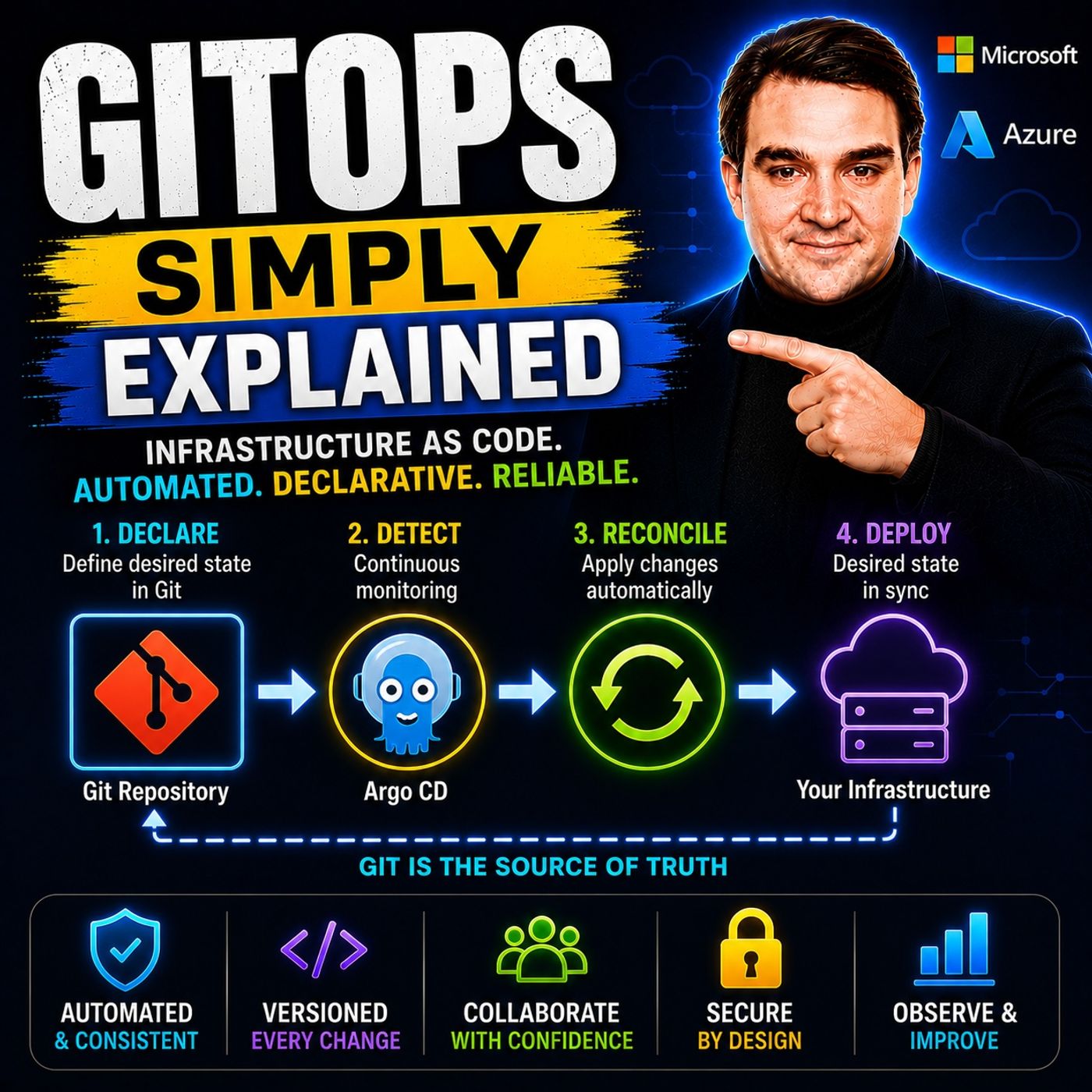
GitOps is a modern approach to deploying and managing infrastructure and applications using Git as the single source of truth. Instead of making manual changes to cloud environments, every configuration change is stored, reviewed, and version-controlled in a Git repository. In this episode of Microsoft Knowledge Nuggets, we explain GitOps in plain English and show why it has become a best practice for Kubernetes, cloud-native development, and DevOps teams.
You'll learn how GitOps works, why declarative infrastructure is important, and how automated deployment tools continuously compare your desired state in Git with what's actually running in your environment. We explain key concepts including Git repositories, pull requests, continuous reconciliation, Infrastructure as Code (IaC), Kubernetes manifests, Helm charts, and popular GitOps tools like Flux and Argo CD.
The episode also explores real-world scenarios such as deploying applications to Kubernetes, managing Azure Kubernetes Service (AKS), automating infrastructure changes, rolling back failed deployments, and improving security through auditable change management. You'll discover how GitOps integrates with Azure DevOps, GitHub, Bicep, Terraform, and CI/CD pipelines to create reliable, repeatable, and scalable deployment workflows.
Whether you're a developer, DevOps engineer, cloud architect, Kubernetes administrator, or preparing for Azure certifications, this episode provides a practical introduction without unnecessary complexity. By the end, you'll understand how GitOps improves deployment reliability, simplifies operations, strengthens security, and enables teams to manage cloud infrastructure using familiar Git workflows.
GitOps is a modern approach that transforms how you manage your Kubernetes infrastructure. It leverages Git as a single source of truth, ensuring that your configuration data remains consistent and reliable. This method enhances operational efficiency, as studies show that using Git reduces errors and streamlines operations.
With 93% of software development professionals adopting GitOps, the trend is clear. Organizations increasingly recognize the value of integrating GitOps into their DevOps practices, paving the way for more efficient and secure infrastructure management.
| Evidence | Description |
|---|---|
| Centralized Repository | Git serves as a centralized and reliable repository for configuration data, reducing inconsistencies and errors. |
| Streamlined Operations | The use of Git enhances collaboration and ensures infrastructure is in sync with the desired state. |
| Data Model-Driven Automation | Git supports a data model-driven approach, which is essential for effective network automation and management efficiency. |
Key Takeaways
- GitOps uses Git as the single source of truth for managing Kubernetes infrastructure, ensuring consistency and reliability.
- Adopting GitOps can significantly improve collaboration between development and operations teams, leading to more effective workflows.
- Automated rollbacks and version control in GitOps streamline recovery processes, reducing downtime from hours to minutes.
- GitOps enhances security by preventing unauthorized changes and maintaining a complete audit trail of all modifications.
- Implementing GitOps can improve governance and compliance by providing a version-controlled approach to infrastructure management.
- To get started with GitOps, focus on using branches instead of multiple repositories to simplify management.
- Continuous monitoring of your infrastructure is essential in GitOps to quickly identify and resolve issues.
- Utilizing tools like Argo CD or Flux CD can enhance your GitOps implementation, providing powerful capabilities for automation.
Understanding GitOps
GitOps Principles
GitOps operates on four core principles that enhance the management of Kubernetes infrastructure. These principles ensure that your deployments are consistent, secure, and efficient. Here’s a closer look at each principle:
| Principle | Description |
|---|---|
| Declarative configuration | All configurations are defined as code, ensuring clarity and consistency in the desired state. |
| Git as the single source of truth | Git serves as the canonical source for all configurations, enabling audit trails and controlled changes. |
| Automated reconciliation | Continuous comparison of live state with Git-defined state ensures any drift is corrected automatically. |
| Continuous delivery through Git | Facilitates a streamlined process for deploying changes, enhancing security and operational consistency. |
By adopting these GitOps principles, you can minimize errors and configuration drift. Declarative configuration allows you to specify the desired state of your infrastructure, which enhances operational consistency. This approach guarantees repeatable deployments across different environments, making scaling and recovery processes much smoother.
GitOps Workflow
The GitOps workflow simplifies the process of managing your Kubernetes infrastructure. Here’s how it typically unfolds:
- You make changes to application code and push those changes to a Git repository.
- Continuous Integration (CI) builds the changes, and the updated image version is pushed to the container registry.
- A CI job commits changes to the GitOps repository, updating YAML files to reflect the latest application code changes.
- A GitOps operator, such as Argo CD or Flux, monitors the cluster's live state and applies changes to ensure it matches the desired state.
This workflow emphasizes the importance of Git as a single source of truth. It ensures that all changes are tracked and auditable, which improves security. The automated reconciliation process continuously checks for discrepancies between the actual and desired states, correcting them as needed. This self-healing capability allows your infrastructure to maintain its integrity without manual intervention.
Key Benefits of GitOps Adoption
Adopting GitOps brings several advantages that can significantly enhance your software development and infrastructure management processes. Here are some of the key benefits you can expect:
-
Improved Collaboration: GitOps fosters a collaborative environment among development and operations teams. By using Git as a single source of truth, teams can work together more effectively. In fact, 80% of companies utilizing Infrastructure as Code technologies report enhanced collaboration through version-controlled deployments.
Statistic Description 80% Percentage of companies utilizing Infrastructure as Code technologies, which supports GitOps adoption and enhances collaboration through version-controlled deployments. -
Faster Recovery: GitOps streamlines recovery processes after infrastructure failures. With automated rollbacks and version control, you can revert to previous configurations quickly. Industry reports show that recovery times drop significantly after adopting GitOps. For example, recovery time reduced from over 3 hours to just 18 minutes.
Metric Pre-GitOps Post-GitOps Deployment Success Rate 78% 99.9% Recovery Time 3+ hours 18 minutes Rollback Time 45 minutes 3 minutes -
Enhanced Security: GitOps improves security in cloud environments by implementing several best practices. Here are some documented enhancements:
- Shift Security Left: Fix vulnerabilities at the source before they propagate.
- Avoid Manual Changes: The Git repository acts as the source of truth, preventing unauthorized modifications.
- Rollback Changes: Easily revert to previous configurations if a security issue is introduced.
- Fast Response: Quickly update vulnerable container images through pull requests.
- Traceability: Audit logs are automatically generated, showing changes and who made them.
- Disaster Recovery: The Git repository contains the application definitions for redeployment.
- Access Control: Implement permissions and policies for user actions in the Git repository.
- Linting: Check application definitions for syntax errors and missing parameters.
- Testing: Automate testing of changes in a temporary Kubernetes cluster.
- Vulnerability Scanning: Scan container images for vulnerabilities before deployment.
- Policy-as-Code: Apply policies to manifests to check for potential issues.
-
Improved Governance and Compliance: GitOps provides a version-controlled approach to infrastructure management. This results in a complete audit trail of all changes made to the code, which is crucial for compliance in regulated industries. By using GitOps and policy-as-code, you can codify compliance requirements and automatically enforce them, ensuring that the desired state is maintained.
Challenges in GitOps Implementation
Implementing GitOps can present several challenges that organizations must navigate. Understanding these challenges helps you prepare for a smoother transition. Here are some common issues you might encounter:
- Sync Failures: Sometimes, the GitOps tool struggles to apply configurations successfully. This can lead to discrepancies between your desired state and the actual state of your infrastructure.
- Resource Conflicts: Multiple GitOps applications may manage the same resource, causing conflicts. This situation complicates deployments and can lead to unexpected behaviors.
- Permission Issues: GitOps agents often require specific Role-Based Access Control (RBAC) permissions. If these permissions are insufficient, it can hinder the deployment process.
In addition to these challenges, you may also face:
- Configuration drift between environments.
- Manual deployment errors that can disrupt operations.
- A lack of an audit trail, making it difficult to track changes.
Transitioning to GitOps workflows involves a considerable learning curve. You may need to dedicate weeks or even months to gain the necessary skills. This initial effort is worthwhile, as it leads to reduced operational overhead and enhanced consistency in the long term. Here are some aspects of the learning curve you should consider:
- You might need to learn new tools and practices, which requires training and onboarding.
- Familiarizing yourself with the reconciliation loop and CI/CD processes can take time.
Tooling issues can also arise during GitOps adoption. Here are some common problems and potential solutions:
- Programmatic Updates: Git is not designed for automated updates. Conflicts can occur when multiple CI processes attempt to push changes simultaneously. You can mitigate this by using more repositories.
- Repository Proliferation: As you add new applications or environments, the number of Git repositories can increase significantly. This complicates access rights and management. Consolidating repositories can help.
- Lack of Visibility: Tracking changes and deployments becomes challenging as the number of repositories grows. This can hinder your ability to answer critical operational questions.
- Centralized Secret Management: GitOps does not inherently solve the issue of managing secrets securely, which is crucial in complex environments.
- Auditing Difficulties: While GitOps repositories provide a history of changes, extracting specific deployment histories can be cumbersome and error-prone.
- Input Validation Issues: There is no straightforward way to validate files committed to a Git repository, which can lead to errors in deployment.
By being aware of these challenges, you can better prepare your organization for a successful GitOps implementation.
Getting Started with GitOps
Embarking on your GitOps journey can seem daunting, but following best practices can simplify the process. Here are some key recommendations to help you implement GitOps effectively:
- Choose branches over repositories: Limit your repositories to one per team. Use branches instead to simplify your system overview and facilitate code sharing.
- Pull instead of push: Always use pull requests for new code. This approach provides context for changes, aiding in troubleshooting.
- Automate: Ensure all manual tasks are automated. This step helps avoid errors and guarantees repeatability in your deployments.
- Monitor continuously: Keep an eye on your system to quickly identify and resolve issues. This practice enables automated rollbacks if necessary.
By adopting these practices, you can create a more efficient and reliable GitOps environment.
When it comes to selecting GitOps tools, several options stand out. Each tool offers unique advantages that can enhance your infrastructure automation:
- Argo CD: This tool is widely used and offers a strong user interface for monitoring application states. It integrates well with other Argo tools.
- Flux CD: Known for its customization and flexibility, Flux CD may require more configuration time but provides powerful capabilities.
- Codefresh: This tool enhances Argo CD with centralized control and improved visibility, making it ideal for enterprise teams.
- GitLab: By integrating Flux for GitOps, GitLab offers a single application approach for the entire software development lifecycle.
- Harness: This tool supports both pipeline-based and GitOps-based deployments, integrating seamlessly with Argo CD for enterprise-grade features.
To deepen your understanding of GitOps, consider exploring these valuable resources:
- A guide that details how to organize deployment processes around code repositories, focusing on application and environment configuration.
- An article explaining how GitOps utilizes Git repositories as a single source of truth for infrastructure as code, emphasizing version control benefits.
- A resource discussing the standard workflow for application development using GitOps, highlighting its role in enhancing innovation and stability in DevOps practices.
Real-world case studies illustrate the effectiveness of GitOps. For instance, Slite experienced a fivefold increase in deployment frequency after implementing a GitOps workflow. Similarly, a hospital management system reduced environment setup time from three weeks to just three days, achieving over 7,000 successful releases in a year. These examples showcase how GitOps can significantly improve operational efficiency and deployment speed.
By following these best practices and utilizing the right tools, you can successfully implement GitOps in your organization, paving the way for streamlined infrastructure management.
In summary, GitOps centralizes Git as the source of truth for infrastructure management. It promotes declarative infrastructure, allowing for reproducibility through YAML files. Key pillars include pipelines for linking systems, observability for monitoring impacts, and control for ensuring desired states match running states. By streamlining and automating infrastructure management, GitOps enhances operational efficiency and reduces manual errors.
You should consider implementing GitOps in your workflows. Explore its benefits, such as improved collaboration and faster software delivery. Embrace the future of infrastructure management with GitOps and enjoy the advantages of immutable infrastructure.
FAQ
What is GitOps?
GitOps is a modern approach to managing Kubernetes infrastructure. It uses Git as the single source of truth for configurations, enabling automated deployments and continuous reconciliation.
How does GitOps improve security?
GitOps enhances security by preventing manual changes to infrastructure. It maintains an audit trail, allows for quick rollbacks, and implements access controls to manage user actions effectively.
What tools are commonly used for GitOps?
Popular GitOps tools include Argo CD, Flux CD, Codefresh, GitLab, and Harness. Each tool offers unique features that enhance infrastructure automation and deployment processes.
Can GitOps be used with non-Kubernetes environments?
While GitOps primarily focuses on Kubernetes, you can adapt its principles to other environments. The core concepts of version control and automation apply broadly across various infrastructure types.
What are the key benefits of adopting GitOps?
Key benefits include improved collaboration, faster recovery from failures, enhanced security, and better governance. These advantages streamline infrastructure management and reduce operational overhead.
How do I get started with GitOps?
To start with GitOps, choose a GitOps tool, define your infrastructure as code, and implement best practices like using branches and automating tasks. Continuous monitoring is also essential.
Is there a learning curve for GitOps?
Yes, transitioning to GitOps involves a learning curve. You may need to familiarize yourself with new tools, practices, and CI/CD processes, which can take time but is worthwhile.
How does GitOps handle configuration drift?
GitOps continuously monitors the live state of your infrastructure against the desired state defined in Git. If discrepancies arise, it automatically reconciles them, ensuring consistency.
🎧 Listen to this episode
Want a practical explanation of GitOps? This episode breaks down the topic in clear language and shows why it matters for Microsoft 365, Azure, Power Platform, security, AI, and modern work.
Listen to this episode if you want to:
- Understand the key concepts behind GitOps
- See how it fits into the wider Microsoft technology ecosystem
- Learn where it can create practical value for your organization
Discover more practical Microsoft conversations on M365 FM.
🚀 Want to be part of m365.fm?
Then stop just listening… and start showing up.
👉 Connect with me on LinkedIn and let’s make something happen:
- 🎙️ Be a podcast guest and share your story
- 🎧 Host your own episode (yes, seriously)
- 💡 Pitch topics the community actually wants to hear
- 🌍 Build your personal brand in the Microsoft 365 space
This isn’t just a podcast — it’s a platform for people who take action.
🔥 Most people wait. The best ones don’t.
👉 Connect with me on LinkedIn and send me a message:
"I want in"
Let’s build something awesome 👊
1
00:00:00,000 --> 00:00:02,680
Today's topic is one that almost everyone is heard of,
2
00:00:02,680 --> 00:00:05,000
but very few people can actually explain.
3
00:00:05,000 --> 00:00:06,000
Githops.
4
00:00:06,000 --> 00:00:07,840
You've probably seen it mentioned in job postings,
5
00:00:07,840 --> 00:00:10,000
conference talks, or Azure documentation.
6
00:00:10,000 --> 00:00:11,040
But what exactly is it?
7
00:00:11,040 --> 00:00:13,200
Is it just another DevOps buzzword,
8
00:00:13,200 --> 00:00:14,840
or is it something fundamentally different?
9
00:00:14,840 --> 00:00:16,040
Here's the short version.
10
00:00:16,040 --> 00:00:18,280
Githops is an operating model where Git becomes
11
00:00:18,280 --> 00:00:21,200
the single source of truth for your entire infrastructure.
12
00:00:21,200 --> 00:00:24,320
Not just your application code, but everything that runs it.
13
00:00:24,320 --> 00:00:25,560
By the end of this episode,
14
00:00:25,560 --> 00:00:27,200
you'll understand what Githops actually is,
15
00:00:27,200 --> 00:00:30,040
why it's become the standard for managing Kubernetes on Azure,
16
00:00:30,040 --> 00:00:34,280
and how it makes rollbacks as simple as a single command.
17
00:00:34,280 --> 00:00:36,840
The old way, manual deployments and configuration drift.
18
00:00:36,840 --> 00:00:38,600
Let's start with the problem GitHub solves.
19
00:00:38,600 --> 00:00:41,120
Imagine you're managing a Kubernetes cluster on Azure.
20
00:00:41,120 --> 00:00:42,560
You have developers pushing code,
21
00:00:42,560 --> 00:00:44,880
a CI pipeline building container images,
22
00:00:44,880 --> 00:00:47,960
and someone runs, Quebec will apply to deploy those images.
23
00:00:47,960 --> 00:00:49,560
Maybe you, maybe a teammate,
24
00:00:49,560 --> 00:00:51,280
or you click a button in Azure DevOps,
25
00:00:51,280 --> 00:00:52,960
and either way the deployment happens.
26
00:00:52,960 --> 00:00:54,480
That works fine until it doesn't.
27
00:00:54,480 --> 00:00:55,680
Here's what happens next.
28
00:00:55,680 --> 00:00:57,920
Someone on your team needs to fix a QuickBug,
29
00:00:57,920 --> 00:00:59,640
so they SSH into a node,
30
00:00:59,640 --> 00:01:00,720
use the Azure portal,
31
00:01:00,720 --> 00:01:03,200
or run Quebec to edit directly on a deployment.
32
00:01:03,200 --> 00:01:05,600
They make a small change like a config map tweak,
33
00:01:05,600 --> 00:01:07,280
or a different environment variable,
34
00:01:07,280 --> 00:01:08,600
and it seems harmless.
35
00:01:08,600 --> 00:01:10,520
Or so they think, the problem is,
36
00:01:10,520 --> 00:01:12,360
that change never made it back to Git,
37
00:01:12,360 --> 00:01:14,240
so your cluster now has a configuration
38
00:01:14,240 --> 00:01:16,320
that doesn't match what's in your repository.
39
00:01:16,320 --> 00:01:18,200
That's called configuration drift.
40
00:01:18,200 --> 00:01:19,960
Drift is a silent killer because it works fine
41
00:01:19,960 --> 00:01:21,200
until the next deployment,
42
00:01:21,200 --> 00:01:22,680
when someone runs Quebec to apply
43
00:01:22,680 --> 00:01:25,800
with the original manifest and overrides that QuickFix.
44
00:01:25,800 --> 00:01:28,080
Or worse, the drift causes unexpected behavior
45
00:01:28,080 --> 00:01:29,280
that nobody can explain.
46
00:01:29,280 --> 00:01:30,640
You start debugging, check the logs,
47
00:01:30,640 --> 00:01:32,040
look at the YAML and Git,
48
00:01:32,040 --> 00:01:32,920
and nothing seems wrong,
49
00:01:32,920 --> 00:01:34,720
but the cluster is doing something different.
50
00:01:34,720 --> 00:01:36,760
You have no idea what changed when it changed,
51
00:01:36,760 --> 00:01:37,840
or who changed it.
52
00:01:37,840 --> 00:01:38,840
I've seen this happen.
53
00:01:38,840 --> 00:01:40,840
A teammate, SSH, into a node,
54
00:01:40,840 --> 00:01:42,440
tweaks a config to test something,
55
00:01:42,440 --> 00:01:44,960
forgets to revert it and goes home.
56
00:01:44,960 --> 00:01:46,680
The next day, a deployment breaks,
57
00:01:46,680 --> 00:01:48,320
and nobody can explain why.
58
00:01:48,320 --> 00:01:49,600
The Git repo looks clean,
59
00:01:49,600 --> 00:01:50,760
but the cluster is a mess,
60
00:01:50,760 --> 00:01:53,520
and your stack spending hours trying to figure out what happened.
61
00:01:53,520 --> 00:01:54,840
So here's the question.
62
00:01:54,840 --> 00:01:56,920
What if there was a way to force the cluster
63
00:01:56,920 --> 00:01:58,520
to always match what's in Git?
64
00:01:58,520 --> 00:02:01,160
What if you could guarantee that whatever is in your repository
65
00:02:01,160 --> 00:02:02,800
is exactly what's running in production?
66
00:02:02,800 --> 00:02:04,960
That's the core idea behind GitOps.
67
00:02:04,960 --> 00:02:06,360
What GitOps actually is.
68
00:02:06,360 --> 00:02:07,720
So what exactly is GitOps?
69
00:02:07,720 --> 00:02:10,160
Here's the simplest definition I can give you.
70
00:02:10,160 --> 00:02:11,960
Git becomes your single source of truth,
71
00:02:11,960 --> 00:02:13,080
not just for your code,
72
00:02:13,080 --> 00:02:15,520
but for everything your infrastructure needs to run.
73
00:02:15,520 --> 00:02:17,760
Every configuration, every deployment, manifest,
74
00:02:17,760 --> 00:02:19,320
every environment variable,
75
00:02:19,320 --> 00:02:20,880
it all lives in Git.
76
00:02:20,880 --> 00:02:23,280
Nothing runs on your cluster unless it's defined there.
77
00:02:23,280 --> 00:02:25,040
Now, GitOps isn't a tool you can buy.
78
00:02:25,040 --> 00:02:27,880
It's an operating model, like DevOps or DevSecOps.
79
00:02:27,880 --> 00:02:29,160
A set of principles that guide
80
00:02:29,160 --> 00:02:31,320
how you manage your infrastructure.
81
00:02:31,320 --> 00:02:34,080
The open GitOps standard lays out four core principles,
82
00:02:34,080 --> 00:02:35,520
and I want to walk through each one.
83
00:02:35,520 --> 00:02:37,400
First, your system has to be declarative.
84
00:02:37,400 --> 00:02:39,320
That means you describe the end state,
85
00:02:39,320 --> 00:02:40,720
not the steps to get there.
86
00:02:40,720 --> 00:02:42,200
So instead of writing a script that says,
87
00:02:42,200 --> 00:02:44,640
"Created deployment, scale it to five replicas,
88
00:02:44,640 --> 00:02:47,040
expose port 8080, you write a YAML file
89
00:02:47,040 --> 00:02:49,960
that says I want five replicas on port 8080,
90
00:02:49,960 --> 00:02:51,400
and the system figures out the steps.
91
00:02:51,400 --> 00:02:52,400
That's declarative.
92
00:02:52,400 --> 00:02:54,000
Second, it must be versioned.
93
00:02:54,000 --> 00:02:56,640
Every change you make to your cluster state is a commit in Git.
94
00:02:56,640 --> 00:02:59,400
So you get a complete history who changed what, when and why,
95
00:02:59,400 --> 00:03:01,440
no more guessing or digging through logs.
96
00:03:01,440 --> 00:03:03,360
Third, changes are pulled automatically.
97
00:03:03,360 --> 00:03:05,480
The cluster reaches out to Git to see what's new.
98
00:03:05,480 --> 00:03:07,240
Later, I'll explain why this matters so much.
99
00:03:07,240 --> 00:03:09,680
And fourth, the system is continuously reconciled.
100
00:03:09,680 --> 00:03:11,760
There's a software agent running inside your cluster
101
00:03:11,760 --> 00:03:14,840
that constantly compares what's in Git to what's actually running.
102
00:03:14,840 --> 00:03:16,760
If they don't match, it fixes the difference.
103
00:03:16,760 --> 00:03:18,080
That's the reconciliation loop.
104
00:03:18,080 --> 00:03:19,280
Think of it this way.
105
00:03:19,280 --> 00:03:20,960
Git is your architect's blueprint.
106
00:03:20,960 --> 00:03:23,680
It describes exactly what the building should look like.
107
00:03:23,680 --> 00:03:25,360
Kubernetes is the construction site.
108
00:03:25,360 --> 00:03:27,520
And the GitOps operator, that's the foreman.
109
00:03:27,520 --> 00:03:29,680
He walks around with the blueprint, checking every wall,
110
00:03:29,680 --> 00:03:30,880
every beam, every window.
111
00:03:30,880 --> 00:03:33,000
If something doesn't match, he fixes it.
112
00:03:33,000 --> 00:03:35,640
Suppose someone on the crew makes an unauthorized change.
113
00:03:35,640 --> 00:03:37,400
He spots it and reverts it.
114
00:03:37,400 --> 00:03:39,640
The blueprint is always the source of truth.
115
00:03:39,640 --> 00:03:41,200
But here's where the real shift happens,
116
00:03:41,200 --> 00:03:42,920
how deployments actually work.
117
00:03:42,920 --> 00:03:45,560
In traditional CI/CD, you push changes to the cluster.
118
00:03:45,560 --> 00:03:47,480
In GitOps, the cluster pulls them.
119
00:03:47,480 --> 00:03:50,360
And that difference is more important than it sounds.
120
00:03:50,360 --> 00:03:52,400
Pull-based deployments versus push-based.
121
00:03:52,400 --> 00:03:54,200
Let's talk about how deployments actually work
122
00:03:54,200 --> 00:03:56,480
because this is where GitOps changes everything.
123
00:03:56,480 --> 00:03:59,840
In the traditional push-based model, your CI pipeline does everything.
124
00:03:59,840 --> 00:04:03,160
Azure Pipelines, Jenkins, GitHub Actions.
125
00:04:03,160 --> 00:04:05,280
It builds the container, runs tests,
126
00:04:05,280 --> 00:04:08,640
and then pushes that image directly to your Kubernetes cluster.
127
00:04:08,640 --> 00:04:10,880
The pipeline holds credentials that give it direct access
128
00:04:10,880 --> 00:04:12,200
to the cluster API.
129
00:04:12,200 --> 00:04:15,080
It says, here's the new deployment, apply it now.
130
00:04:15,080 --> 00:04:17,360
And that works, but it creates a security problem.
131
00:04:17,360 --> 00:04:18,200
Here's the thing.
132
00:04:18,200 --> 00:04:19,880
If that pipeline gets compromised,
133
00:04:19,880 --> 00:04:22,600
someone injects a malicious step, a token leaks,
134
00:04:22,600 --> 00:04:24,320
a dependency gets hijacked.
135
00:04:24,320 --> 00:04:27,440
That pipeline has a direct line to your production cluster.
136
00:04:27,440 --> 00:04:29,760
It can destroy deployments, delete namespaces,
137
00:04:29,760 --> 00:04:32,160
change configurations, all with the permissions
138
00:04:32,160 --> 00:04:33,800
you gave it to do its job.
139
00:04:33,800 --> 00:04:35,040
Now look at the GitOps model.
140
00:04:35,040 --> 00:04:36,000
The flow starts the same.
141
00:04:36,000 --> 00:04:38,280
CI builds the container and pushes it to a registry
142
00:04:38,280 --> 00:04:39,600
like Azure Container Registry.
143
00:04:39,600 --> 00:04:40,560
That's where CI stops.
144
00:04:40,560 --> 00:04:41,800
It does not touch the cluster.
145
00:04:41,800 --> 00:04:44,120
Instead, CI updates a Git repository
146
00:04:44,120 --> 00:04:45,560
with a new image tag.
147
00:04:45,560 --> 00:04:49,000
It changes a single line in a YAML file, the image version,
148
00:04:49,000 --> 00:04:50,120
and commits that change.
149
00:04:50,120 --> 00:04:50,640
That's it.
150
00:04:50,640 --> 00:04:51,920
No direct cluster access.
151
00:04:51,920 --> 00:04:54,360
Then the GitOps operator running inside your cluster
152
00:04:54,360 --> 00:04:55,360
sees that change.
153
00:04:55,360 --> 00:04:57,920
It pulls the latest state from Git and applies it.
154
00:04:57,920 --> 00:05:00,440
The cluster reaches out to Git, not the other way around.
155
00:05:00,440 --> 00:05:01,840
This is the pool-based model.
156
00:05:01,840 --> 00:05:04,520
Your cluster never exposes its API to external systems.
157
00:05:04,520 --> 00:05:05,760
It only pulls from Git.
158
00:05:05,760 --> 00:05:07,640
If someone compromises your CI pipeline,
159
00:05:07,640 --> 00:05:10,040
the worst they can do is change and manifest in a repository.
160
00:05:10,040 --> 00:05:11,760
They can't touch the cluster directly.
161
00:05:11,760 --> 00:05:13,600
The operator decides what to apply and when.
162
00:05:13,600 --> 00:05:14,720
There's another benefit too.
163
00:05:14,720 --> 00:05:16,600
You decouple building from deploying.
164
00:05:16,600 --> 00:05:19,520
CI does what it's good at, building, testing, scanning.
165
00:05:19,520 --> 00:05:21,360
The GitOps operator handles deployment.
166
00:05:21,360 --> 00:05:22,960
Each system focuses on one job.
167
00:05:22,960 --> 00:05:25,160
If the build fails, nothing changes in the cluster.
168
00:05:25,160 --> 00:05:27,880
If the deployment fails, the operator retries or alerts you.
169
00:05:27,880 --> 00:05:29,000
Clean separation.
170
00:05:29,000 --> 00:05:31,240
So instead of a pipeline pushing changes into your cluster,
171
00:05:31,240 --> 00:05:33,520
your cluster pulls its desired state from Git.
172
00:05:33,520 --> 00:05:36,640
That simple inversion makes your infrastructure more secure,
173
00:05:36,640 --> 00:05:40,560
more auditable, and harder to break by accident.
174
00:05:40,560 --> 00:05:42,080
The reconciliation loop.
175
00:05:42,080 --> 00:05:44,080
So how does the operator know when to update?
176
00:05:44,080 --> 00:05:45,760
It doesn't wait for a notification.
177
00:05:45,760 --> 00:05:47,120
It runs a continuous loop.
178
00:05:47,120 --> 00:05:50,320
Watch Git, compared to the cluster, apply changes if needed,
179
00:05:50,320 --> 00:05:52,200
then do it again and again forever.
180
00:05:52,200 --> 00:05:53,960
This is called the reconciliation loop.
181
00:05:53,960 --> 00:05:56,360
It runs constantly every few seconds or minutes,
182
00:05:56,360 --> 00:05:57,960
depending on your configuration.
183
00:05:57,960 --> 00:05:59,680
The operator never stops watching.
184
00:05:59,680 --> 00:06:01,560
Think of it like a thermostat in your house.
185
00:06:01,560 --> 00:06:04,360
You set the desired temperature, say 21 degrees,
186
00:06:04,360 --> 00:06:06,920
the thermostat constantly checks the actual temperature.
187
00:06:06,920 --> 00:06:09,360
If it drops below 21, the heating turns on.
188
00:06:09,360 --> 00:06:11,080
If it goes above the heating turns off,
189
00:06:11,080 --> 00:06:13,080
it keeps adjusting to match your setting.
190
00:06:13,080 --> 00:06:14,800
The GitOps operator works the same way.
191
00:06:14,800 --> 00:06:17,680
Git holds the desired state, the cluster has the actual state,
192
00:06:17,680 --> 00:06:20,480
and the operator compares them continuously making adjustments.
193
00:06:20,480 --> 00:06:22,000
So what happens when someone manually
194
00:06:22,000 --> 00:06:23,480
edits a deployment in the cluster?
195
00:06:23,480 --> 00:06:26,240
Maybe they run Quebecal Edit to change a replica count.
196
00:06:26,240 --> 00:06:27,840
The operator detects that difference
197
00:06:27,840 --> 00:06:29,760
on its next reconciliation cycle.
198
00:06:29,760 --> 00:06:32,520
The cluster now has three replicas, but Git says five.
199
00:06:32,520 --> 00:06:34,480
So the operator applies the Git defined state
200
00:06:34,480 --> 00:06:36,600
and the cluster goes back to five replicas.
201
00:06:36,600 --> 00:06:37,800
The unauthorized change is gone.
202
00:06:37,800 --> 00:06:39,440
What happens when you push a change to Git?
203
00:06:39,440 --> 00:06:40,480
Same process.
204
00:06:40,480 --> 00:06:42,760
The operator detects the difference and applies it.
205
00:06:42,760 --> 00:06:45,120
A developer merges a PR that updates the image version
206
00:06:45,120 --> 00:06:47,360
from V1.2 to V1.3.
207
00:06:47,360 --> 00:06:50,480
The operator sees the new manifest, pulls the new image,
208
00:06:50,480 --> 00:06:52,240
and spins up the new pods.
209
00:06:52,240 --> 00:06:54,400
Within seconds, the cluster matches Git again.
210
00:06:54,400 --> 00:06:56,720
Now, there's an important distinction here.
211
00:06:56,720 --> 00:06:58,560
If a pod crashes, the operator doesn't care.
212
00:06:58,560 --> 00:07:01,440
That's Kubernetes job handled by the replica set controller.
213
00:07:01,440 --> 00:07:04,040
The GitOps operator only cares about the configuration.
214
00:07:04,040 --> 00:07:08,200
If the deployment manifest says five replicas, image V1.3,
215
00:07:08,200 --> 00:07:11,000
and the cluster has five replicas running V1.3,
216
00:07:11,000 --> 00:07:14,440
the operator is happy, it doesn't care if a specific pod restarted.
217
00:07:14,440 --> 00:07:16,240
That's normal Kubernetes behavior.
218
00:07:16,240 --> 00:07:17,840
But if someone changes the manifest in Git
219
00:07:17,840 --> 00:07:19,400
or if someone changes the cluster directly
220
00:07:19,400 --> 00:07:21,320
and creates drift, the operator acts.
221
00:07:21,320 --> 00:07:22,880
That's what makes GitOps self-healing.
222
00:07:22,880 --> 00:07:24,240
It doesn't just deploy changes.
223
00:07:24,240 --> 00:07:25,840
It actively prevents your infrastructure
224
00:07:25,840 --> 00:07:27,960
from drifting away from what's defined.
225
00:07:27,960 --> 00:07:30,560
So you need a GitOps operator running in your cluster.
226
00:07:30,560 --> 00:07:32,880
That's where Argo CD and Flux come in.
227
00:07:32,880 --> 00:07:34,360
Argo CD versus Flux.
228
00:07:34,360 --> 00:07:36,680
So you need a GitOps operator
229
00:07:36,680 --> 00:07:39,320
and you have two main choices, both excellent.
230
00:07:39,320 --> 00:07:42,520
Argo CD and Flux are both CNCF graduated projects,
231
00:07:42,520 --> 00:07:44,040
meaning they've passed the highest bar
232
00:07:44,040 --> 00:07:47,000
for stability, community, and production readiness.
233
00:07:47,000 --> 00:07:49,480
But they approach the same job from different angles.
234
00:07:49,480 --> 00:07:51,160
Argo CD was originally built by Intuit
235
00:07:51,160 --> 00:07:52,640
and it comes with a web UI.
236
00:07:52,640 --> 00:07:55,080
When you install Argo CD, you get a dashboard
237
00:07:55,080 --> 00:07:57,720
where you can see every application, its sync status,
238
00:07:57,720 --> 00:07:59,640
its health, and its deployment history.
239
00:07:59,640 --> 00:08:02,640
You can click around view diffs between Git and the cluster,
240
00:08:02,640 --> 00:08:05,080
manually trigger things and approve changes.
241
00:08:05,080 --> 00:08:07,400
It's designed for teams that want visual dashboards
242
00:08:07,400 --> 00:08:08,960
and manual control points.
243
00:08:08,960 --> 00:08:11,520
Flux came from Weaveworks and it's more modular.
244
00:08:11,520 --> 00:08:13,160
There's no UI by default.
245
00:08:13,160 --> 00:08:14,520
You work from the command line
246
00:08:14,520 --> 00:08:17,120
and you define everything as Kubernetes custom resources.
247
00:08:17,120 --> 00:08:20,560
You create a Git repository object that says, "Watch this repo"
248
00:08:20,560 --> 00:08:23,640
and a customization object that says, "Apply this path."
249
00:08:23,640 --> 00:08:25,360
Flux picks it up in reconciles.
250
00:08:25,360 --> 00:08:27,480
It forces you to embrace Git native workflows
251
00:08:27,480 --> 00:08:29,680
because there's no dashboard to fall back on.
252
00:08:29,680 --> 00:08:31,280
Now here's what matters for Azure users.
253
00:08:31,280 --> 00:08:33,000
Flux is the default GitOps option
254
00:08:33,000 --> 00:08:34,600
on Azure Kubernetes service.
255
00:08:34,600 --> 00:08:37,560
Microsoft built the native integration around Flux V2.
256
00:08:37,560 --> 00:08:39,560
When you enable GitOps on an AKS cluster
257
00:08:39,560 --> 00:08:42,520
through the Azure portal, you're using Flux under the hood.
258
00:08:42,520 --> 00:08:45,120
Azure Arc also uses Flux for multi cluster management.
259
00:08:45,120 --> 00:08:46,440
So if you're an Azure engineer,
260
00:08:46,440 --> 00:08:48,120
Flux is the natural starting point.
261
00:08:48,120 --> 00:08:49,840
But Argo CD has its own strengths.
262
00:08:49,840 --> 00:08:52,040
It's more popular for platform engineering scenarios
263
00:08:52,040 --> 00:08:53,440
where you want a central control plane
264
00:08:53,440 --> 00:08:54,880
managing multiple clusters.
265
00:08:54,880 --> 00:08:56,320
The UI makes it easier for teams
266
00:08:56,320 --> 00:08:58,320
that aren't comfortable with the command line.
267
00:08:58,320 --> 00:09:00,280
And it integrates tightly with Argo rollouts
268
00:09:00,280 --> 00:09:02,280
for progressive delivery like Canary deployments,
269
00:09:02,280 --> 00:09:04,080
blue green deployments, that kind of thing.
270
00:09:04,080 --> 00:09:05,960
The key architectural difference is this.
271
00:09:05,960 --> 00:09:08,120
Argo CD runs as a standalone application
272
00:09:08,120 --> 00:09:09,720
with its own API server.
273
00:09:09,720 --> 00:09:11,960
Flux runs as a set of Kubernetes controllers
274
00:09:11,960 --> 00:09:14,160
more deeply embedded in the cluster itself.
275
00:09:14,160 --> 00:09:17,000
Flux feels like part of your Kubernetes control plane
276
00:09:17,000 --> 00:09:19,560
while Argo CD feels like a separate platform sitting
277
00:09:19,560 --> 00:09:20,320
on top of it.
278
00:09:20,320 --> 00:09:22,120
Flux also relies heavily on customize,
279
00:09:22,120 --> 00:09:24,280
which is a Kubernetes native templating tool.
280
00:09:24,280 --> 00:09:27,640
Argo CD can use customized Helm or plain YAML.
281
00:09:27,640 --> 00:09:30,440
Both support Helm, but Flux has a dedicated Helm controller
282
00:09:30,440 --> 00:09:32,600
that handles Helm releases natively.
283
00:09:32,600 --> 00:09:33,560
There's no wrong choice here.
284
00:09:33,560 --> 00:09:35,120
Both tools do the same job.
285
00:09:35,120 --> 00:09:38,120
But for Azure engineers, Flux is the path of least resistance.
286
00:09:38,120 --> 00:09:40,120
You can enable get-ups with Flux in a few clicks
287
00:09:40,120 --> 00:09:42,920
through the Azure portal, pointed at a Git repo,
288
00:09:42,920 --> 00:09:43,960
and it starts syncing.
289
00:09:43,960 --> 00:09:47,240
No additional installation, no separate server to manage.
290
00:09:47,240 --> 00:09:50,760
GitOps on Azure, AKS, Azure Arc, and Azure DevOps.
291
00:09:50,760 --> 00:09:52,080
So what does this actually look like
292
00:09:52,080 --> 00:09:53,520
when you tie it together with Azure?
293
00:09:53,520 --> 00:09:54,720
Let's start with AKS.
294
00:09:54,720 --> 00:09:57,320
Azure Kubernetes service has built-in GitHub support
295
00:09:57,320 --> 00:09:58,640
using Flux V2.
296
00:09:58,640 --> 00:10:01,000
In the Azure portal, you go to your cluster,
297
00:10:01,000 --> 00:10:03,960
find the GitOps section, and configure it by pointing it
298
00:10:03,960 --> 00:10:05,480
at a Git repository.
299
00:10:05,480 --> 00:10:07,760
Azure Repos GitHub anywhere.
300
00:10:07,760 --> 00:10:10,840
Flux starts watching and whatever manifests you put in that repo
301
00:10:10,840 --> 00:10:12,840
get applied to your cluster automatically.
302
00:10:12,840 --> 00:10:14,200
But AKS is just one piece.
303
00:10:14,200 --> 00:10:17,600
Azure Arc extends GitOps to clusters that aren't in Azure.
304
00:10:17,600 --> 00:10:20,200
On-premises, in other clouds, or at the edge.
305
00:10:20,200 --> 00:10:22,360
Connect them to Azure Arc, and you manage them all
306
00:10:22,360 --> 00:10:24,240
with the same GitOps configuration.
307
00:10:24,240 --> 00:10:26,640
One repo, many clusters, consistent state everywhere.
308
00:10:26,640 --> 00:10:27,640
That's what Arc does.
309
00:10:27,640 --> 00:10:28,920
Now let's talk about the pipeline.
310
00:10:28,920 --> 00:10:31,200
Azure DevOps integrates naturally with this model,
311
00:10:31,200 --> 00:10:32,600
and here's the common patent.
312
00:10:32,600 --> 00:10:35,280
Your source code lives in Azure Repos or GitHub,
313
00:10:35,280 --> 00:10:37,400
and Azure Pipelines handles CI.
314
00:10:37,400 --> 00:10:41,080
It builds the container image, runs tests, scans for vulnerabilities,
315
00:10:41,080 --> 00:10:43,640
and pushes the image to Azure container registry.
316
00:10:43,640 --> 00:10:46,200
Then the pipeline updates the manifests in your GitOps repo
317
00:10:46,200 --> 00:10:48,960
by changing the image tag from V1.2 to V1.3,
318
00:10:48,960 --> 00:10:50,320
commits that change and pushes it.
319
00:10:50,320 --> 00:10:51,000
That's it.
320
00:10:51,000 --> 00:10:52,920
The pipeline never touches the cluster.
321
00:10:52,920 --> 00:10:55,880
Flux running inside AKS detects the change in Git,
322
00:10:55,880 --> 00:10:58,320
pulls the new manifest, sees the updated image tag,
323
00:10:58,320 --> 00:10:59,720
and applies the deployment.
324
00:10:59,720 --> 00:11:01,960
New pods spin up and the cluster reconciles.
325
00:11:01,960 --> 00:11:04,400
You can use GitHub actions instead of Azure Pipelines
326
00:11:04,400 --> 00:11:05,440
if you prefer.
327
00:11:05,440 --> 00:11:06,640
The patent is the same.
328
00:11:06,640 --> 00:11:09,440
CI handles the build, updates the manifests,
329
00:11:09,440 --> 00:11:11,640
and the GitOps operator handles the deployment.
330
00:11:11,640 --> 00:11:13,680
The tool doesn't matter, the model does.
331
00:11:13,680 --> 00:11:14,840
Here's an important detail.
332
00:11:14,840 --> 00:11:16,840
You never store secrets directly in Git,
333
00:11:16,840 --> 00:11:19,960
not API keys, not connection strings, not certificates.
334
00:11:19,960 --> 00:11:22,720
Even in a private repository secrets in Git are a risk.
335
00:11:22,720 --> 00:11:25,960
Instead, use Azure Key Vault or an external secrets operator.
336
00:11:25,960 --> 00:11:28,160
The manifest references the secret by name,
337
00:11:28,160 --> 00:11:30,160
and the operator pulls the actual value
338
00:11:30,160 --> 00:11:31,760
from the Vault at deploy time.
339
00:11:31,760 --> 00:11:33,440
You can also layer policy on top.
340
00:11:33,440 --> 00:11:35,400
Azure Policy with Gatekeeper can enforce rules
341
00:11:35,400 --> 00:11:37,480
like no privileged containers,
342
00:11:37,480 --> 00:11:40,680
or only use approved container registries.
343
00:11:40,680 --> 00:11:43,640
If someone tries to deploy a manifest that violates policy,
344
00:11:43,640 --> 00:11:46,000
Gatekeeper blocks it before it reaches the cluster.
345
00:11:46,000 --> 00:11:47,640
The real world benefit here is scale.
346
00:11:47,640 --> 00:11:51,120
With 50 AKS clusters, you don't manage each one individually.
347
00:11:51,120 --> 00:11:54,480
Define the desired state in a single Git repo,
348
00:11:54,480 --> 00:11:57,200
and every cluster reconciles to that state.
349
00:11:57,200 --> 00:11:59,320
Add a new cluster, point it at the repo,
350
00:11:59,320 --> 00:12:00,640
and it configures itself.
351
00:12:00,640 --> 00:12:03,080
Need to update a configuration across all clusters,
352
00:12:03,080 --> 00:12:04,440
change one file in Git,
353
00:12:04,440 --> 00:12:06,400
and the operators handle the rest.
354
00:12:06,400 --> 00:12:08,520
That's the promise of GitOps on Azure.
355
00:12:08,520 --> 00:12:11,400
One source of truth, many clusters, no drift.
356
00:12:11,400 --> 00:12:13,400
The key benefits.
357
00:12:13,400 --> 00:12:14,960
So all of this sounds good in theory,
358
00:12:14,960 --> 00:12:16,600
but what does it actually mean for your team?
359
00:12:16,600 --> 00:12:19,000
Let's start with the one that gets everyone's attention.
360
00:12:19,000 --> 00:12:20,600
Rollbacks become trivial.
361
00:12:20,600 --> 00:12:22,040
A bad deployment goes out,
362
00:12:22,040 --> 00:12:25,160
your application starts throwing errors, users are complaining.
363
00:12:25,160 --> 00:12:27,360
In the old world, you'd scramble to find the last known
364
00:12:27,360 --> 00:12:30,120
good configuration, run a series of manual commands,
365
00:12:30,120 --> 00:12:31,640
and pray you didn't miss something.
366
00:12:31,640 --> 00:12:33,880
In GitOps, you revert the Git commit.
367
00:12:33,880 --> 00:12:35,800
That's it, one command.
368
00:12:35,800 --> 00:12:38,400
The operator sees the revert, pulls the previous state,
369
00:12:38,400 --> 00:12:40,400
and the cluster goes back to what was working before.
370
00:12:40,400 --> 00:12:44,160
No need to SSH in, no coupactal, and definitely no panic.
371
00:12:44,160 --> 00:12:46,040
Audit trail is built in automatically.
372
00:12:46,040 --> 00:12:48,360
Every change to your infrastructure is a commit.
373
00:12:48,360 --> 00:12:49,840
You know who made it when they made it
374
00:12:49,840 --> 00:12:51,320
and exactly what they changed.
375
00:12:51,320 --> 00:12:53,520
No more guessing whether someone edited a deployment
376
00:12:53,520 --> 00:12:55,320
at 2am and forgot to mention it.
377
00:12:55,320 --> 00:12:57,720
The history is there, immutable, and reviewable.
378
00:12:57,720 --> 00:13:00,080
Self-healing is another one that sounds like magic
379
00:13:00,080 --> 00:13:01,320
until you see it work.
380
00:13:01,320 --> 00:13:03,640
Someone manually edits a deployment in the cluster,
381
00:13:03,640 --> 00:13:06,240
maybe a junior engineer trying to fix something quickly.
382
00:13:06,240 --> 00:13:08,960
The operator detects the drift on the next reconciliation cycle
383
00:13:08,960 --> 00:13:09,720
and reverts it.
384
00:13:09,720 --> 00:13:11,640
The cluster heals itself, and you don't even know it
385
00:13:11,640 --> 00:13:13,360
happened unless you check the logs.
386
00:13:13,360 --> 00:13:15,840
Consistency across environments becomes automatic.
387
00:13:15,840 --> 00:13:18,200
Dev, test, staging, production, they all pull
388
00:13:18,200 --> 00:13:20,920
from the same Git repo, different branches or folders,
389
00:13:20,920 --> 00:13:22,360
but the same source of truth.
390
00:13:22,360 --> 00:13:25,000
No more it works on my machine because your staging cluster
391
00:13:25,000 --> 00:13:27,040
drifted away from production weeks ago.
392
00:13:27,040 --> 00:13:29,200
Security improves because the cluster pulls from Git
393
00:13:29,200 --> 00:13:30,560
instead of being pushed to.
394
00:13:30,560 --> 00:13:33,240
Your CI pipeline never holds credentials that give it direct access
395
00:13:33,240 --> 00:13:33,840
to production.
396
00:13:33,840 --> 00:13:35,400
If someone compromises the pipeline,
397
00:13:35,400 --> 00:13:37,080
they can't touch the cluster.
398
00:13:37,080 --> 00:13:39,240
The operator decides what gets applied and when.
399
00:13:39,240 --> 00:13:40,480
Least privileged by design.
400
00:13:40,480 --> 00:13:42,160
There's data backing this up too.
401
00:13:42,160 --> 00:13:44,760
According to Dora Research, teams that adopt GitHub's
402
00:13:44,760 --> 00:13:47,480
see about a 25% drop in deployment errors
403
00:13:47,480 --> 00:13:49,800
and mean time to recovery drops to under two minutes
404
00:13:49,800 --> 00:13:51,440
in well-implemented setups.
405
00:13:51,440 --> 00:13:52,560
That's not theory.
406
00:13:52,560 --> 00:13:54,280
That's what organizations are reporting.
407
00:13:54,280 --> 00:13:56,920
And there's a collaboration benefit that's easy to overlook.
408
00:13:56,920 --> 00:13:59,920
Infrastructure changes go through pull requests, code reviews,
409
00:13:59,920 --> 00:14:01,200
and automated tests.
410
00:14:01,200 --> 00:14:03,240
Exactly the same as application code.
411
00:14:03,240 --> 00:14:05,680
Your ops team and your dev team speak the same language.
412
00:14:05,680 --> 00:14:08,600
Git, no more handoffs, no more, just deploy this for me.
413
00:14:08,600 --> 00:14:10,080
Everyone works the same way.
414
00:14:10,080 --> 00:14:11,840
But there are still some common misunderstandings
415
00:14:11,840 --> 00:14:14,080
worth clearing up.
416
00:14:14,080 --> 00:14:15,880
Common myths and getting started.
417
00:14:15,880 --> 00:14:18,360
Let's start by clearing up some common myths about GitOps.
418
00:14:18,360 --> 00:14:21,320
First up, many people think GitOps is only for Kubernetes
419
00:14:21,320 --> 00:14:23,080
and sure it works best on Kubernetes.
420
00:14:23,080 --> 00:14:24,000
No question there.
421
00:14:24,000 --> 00:14:26,040
Kubernetes is built around declarative state
422
00:14:26,040 --> 00:14:28,320
and reconciliation, so it's a natural fit.
423
00:14:28,320 --> 00:14:30,720
But here's the thing, those same principles apply
424
00:14:30,720 --> 00:14:32,800
anywhere you have declarative configurations.
425
00:14:32,800 --> 00:14:34,360
You can use GitOps with terraform,
426
00:14:34,360 --> 00:14:37,400
poloomy, even Ansible, just store those configs in Git
427
00:14:37,400 --> 00:14:38,960
and have a pipeline apply them.
428
00:14:38,960 --> 00:14:41,520
The self-healing part is harder outside Kubernetes,
429
00:14:41,520 --> 00:14:44,120
but the source of truth discipline works everywhere.
430
00:14:44,120 --> 00:14:45,920
Another myth is that you absolutely need
431
00:14:45,920 --> 00:14:48,240
RGO CD or flux to do GitOps.
432
00:14:48,240 --> 00:14:50,400
If you want the full model, pull-based deployment
433
00:14:50,400 --> 00:14:52,840
continuous reconciliation, drift detection,
434
00:14:52,840 --> 00:14:55,200
then yes, you need some kind of GitOps operator.
435
00:14:55,200 --> 00:14:56,440
But you can start much simpler.
436
00:14:56,440 --> 00:14:58,040
Just put all your manifests in Git
437
00:14:58,040 --> 00:14:59,720
and use pull requests for changes.
438
00:14:59,720 --> 00:15:01,400
That alone gives you most of the ordered
439
00:15:01,400 --> 00:15:02,720
and collaboration benefits.
440
00:15:02,720 --> 00:15:04,320
You can always add an operator later
441
00:15:04,320 --> 00:15:05,920
when you need the automation.
442
00:15:05,920 --> 00:15:07,960
And finally, there's the myth that GitOps replaces
443
00:15:07,960 --> 00:15:09,280
CI/CD entirely.
444
00:15:09,280 --> 00:15:09,960
It doesn't.
445
00:15:09,960 --> 00:15:11,200
It replaces the CD part.
446
00:15:11,200 --> 00:15:14,560
CI still builds your code, runs tests, scans for vulnerabilities,
447
00:15:14,560 --> 00:15:16,880
and pushes container images to a registry.
448
00:15:16,880 --> 00:15:18,120
That all stays the same.
449
00:15:18,120 --> 00:15:20,400
What changes is how those images get deployed.
450
00:15:20,400 --> 00:15:23,160
Instead of the CI pipeline pushing them into the cluster,
451
00:15:23,160 --> 00:15:25,960
the GitOps operator pulls the updated manifests from Git.
452
00:15:25,960 --> 00:15:28,840
So CI and GitOps work together, not instead of each other.
453
00:15:28,840 --> 00:15:30,400
Getting started is actually straightforward.
454
00:15:30,400 --> 00:15:33,960
Pick a small AKS cluster and enable flux through the Azure portal.
455
00:15:33,960 --> 00:15:35,560
It takes just a few clicks.
456
00:15:35,560 --> 00:15:37,480
Then point it at a Git repository
457
00:15:37,480 --> 00:15:40,520
that contains a simple deployment IAML, watch it sync,
458
00:15:40,520 --> 00:15:42,040
and you're off to the races.
459
00:15:42,040 --> 00:15:43,960
Try changing a value in the IAML, commit it,
460
00:15:43,960 --> 00:15:45,120
and watch the cluster update.
461
00:15:45,120 --> 00:15:46,560
That's your first GitHub workflow.
462
00:15:46,560 --> 00:15:49,280
From there, you can add environments, learn customized,
463
00:15:49,280 --> 00:15:52,440
since flux uses it heavily, and setup automated image updates
464
00:15:52,440 --> 00:15:54,920
with tools like renovate or dependable.
465
00:15:54,920 --> 00:15:56,400
So that's GitOps in a nutshell.
466
00:15:56,400 --> 00:15:59,080
It turns your infrastructure into a Git repository,
467
00:15:59,080 --> 00:16:02,520
making everything traceable, revertible, and self-healing.
468
00:16:02,520 --> 00:16:04,080
If you manage Kubernetes on Azure,
469
00:16:04,080 --> 00:16:06,440
go try the GitOps integration in AKS today.
470
00:16:06,440 --> 00:16:08,440
It takes 10 minutes to setup and will change
471
00:16:08,440 --> 00:16:09,760
how you think about deployments.
472
00:16:09,760 --> 00:16:11,760
Subscribe for more plain English explanations
473
00:16:11,760 --> 00:16:13,840
of Microsoft's cloud tools.

Founder of m365.fm, m365.show and m365con.net
Mirko Peters is a Microsoft 365 expert, content creator, and founder of m365.fm, a platform dedicated to sharing practical insights on modern workplace technologies. His work focuses on Microsoft 365 governance, security, collaboration, and real-world implementation strategies.
Through his podcast and written content, Mirko provides hands-on guidance for IT professionals, architects, and business leaders navigating the complexities of Microsoft 365. He is known for translating complex topics into clear, actionable advice, often highlighting common mistakes and overlooked risks in real-world environments.
With a strong emphasis on community contribution and knowledge sharing, Mirko is actively building a platform that connects experts, shares experiences, and helps organizations get the most out of their Microsoft 365 investments.




