
Purview vs Google Vault: Ultimate Guide for Enterprise Compliance in Microsoft 365 and Google Workspace
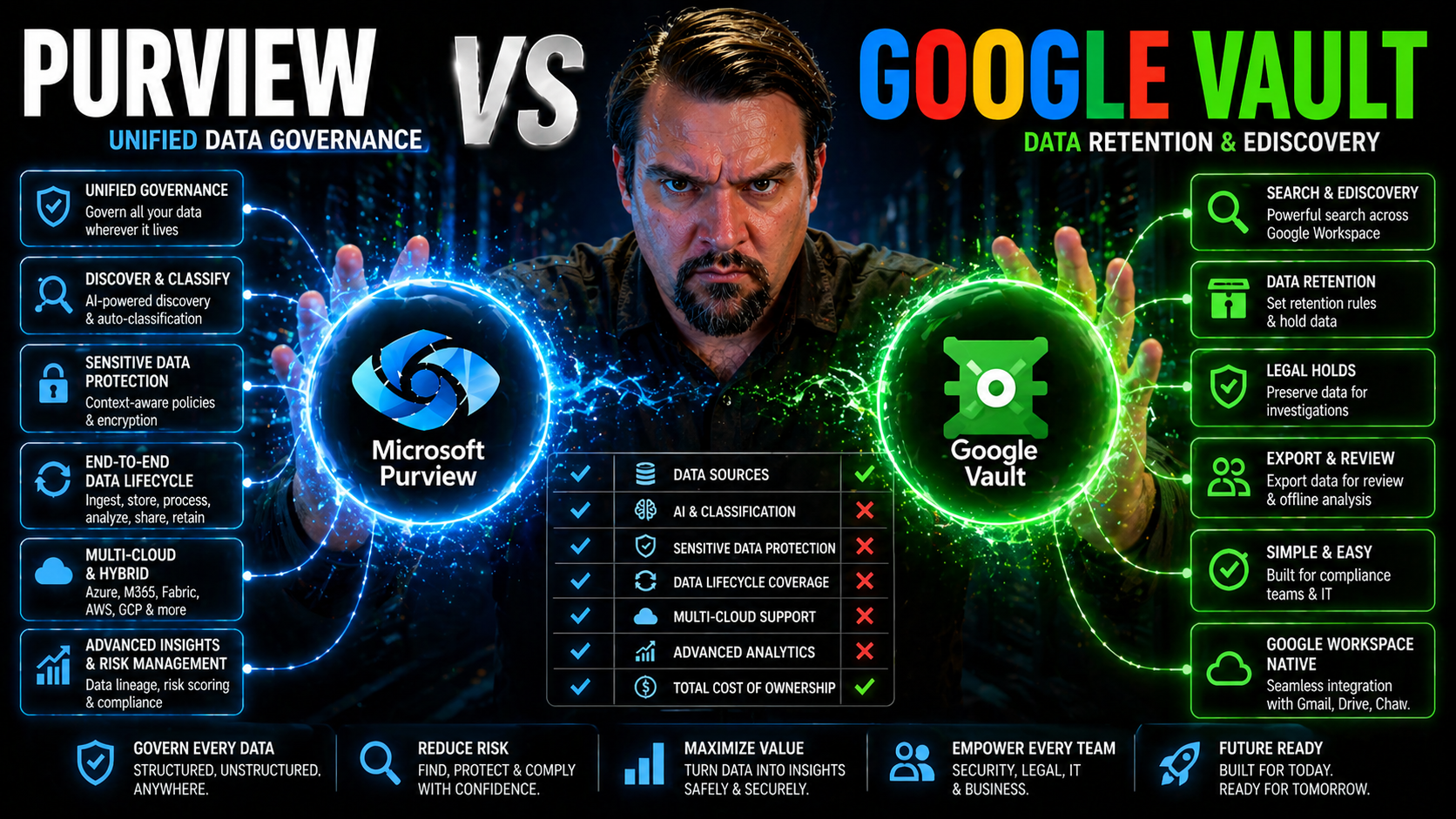
Quick Answer: Purview vs Google Vault should be evaluated against the collaboration platforms you operate, the data you need to protect or retain, investigation requirements, and the ownership model for compliance. Map your actual Microsoft 365 and Google Workspace scenarios first, then compare controls, evidence, lifecycle needs, and the operating cost of separate or integrated processes.
When it comes to enterprise compliance in the cloud, most organizations eventually reach a crossroads: stick with Microsoft Purview as part of your Microsoft 365 environment or dive into Google Vault with Google Workspace. Both platforms promise to keep your data safe, searchable, and retention-ready, but they go about things differently, each bringing their own strengths and quirks to the table.
This guide lays out the facts, side by side, so you’re not just guessing which solution is right for your organization. Whether you’re wrestling with data retention laws, curious about eDiscovery, or just want peace of mind come audit time, you’ll find real-world advice and actionable insights here. Let’s walk through the difference between Purview and Vault, the pros, cons, and show you how to pick what fits your needs—all in plain English.
Overview of Microsoft Purview and Google Vault in Cloud Compliance
Microsoft Purview and Google Vault are the linchpins of compliance and data governance in their respective cloud ecosystems. Purview works hand-in-hand with Microsoft 365, letting organizations manage, classify, and protect data across services like Exchange, SharePoint, Teams, and OneDrive. Purview brings tools for retention, legal holds, Data Loss Prevention (DLP), and robust eDiscovery—making it a one-stop shop for compliance-minded enterprises.
On the other side, Google Vault sits in the heart of Google Workspace, covering Gmail, Drive, and Google Chat. It handles retention, holds, and data search for what happens inside the Google universe. While the core concept is the same—keep critical info locked down and retrievable when regulators or lawyers come calling—Vault’s reach and integration is tightly bound to the Google ecosystem.
Both systems let you set policies that determine how data is kept, when it’s deleted, and how you respond to legal requests. Security and access controls are front and center too, letting only approved folks control sensitive information. If you're responsible for audit readiness, monitoring retention behavior (like those sneaky changes from autosave and co-authoring that can hide compliance drift—in Purview’s case, here’s a helpful resource), or just need better document management (audit-ready strategies for Purview), these tools are essential.
At the end of the day, Purview and Vault both aim to simplify the chaos of regulatory compliance, but the choice often comes down to your existing cloud platform and where your organization wants to streamline governance, discovery, and security.
Mindshare Comparison and Industry Adoption
Across the enterprise landscape, Microsoft Purview and Google Vault have carved out clear identities. Gartner consistently places Microsoft 365 at the top for market share—over 80% of Fortune 500 companies rely on Microsoft for compliance needs, especially those in regulated sectors like finance, healthcare, and pharmaceuticals.
Google Vault has seen strong adoption with tech-driven organizations, educational institutions, and fast-growth startups that already live and breathe Google Workspace. According to Synergy Research, Microsoft still leads in regulated industry penetration, but Google is steadily gaining traction, particularly with younger, cloud-native organizations.
Well-known brands using Purview include JPMorgan Chase and Kaiser Permanente, while names like Airbnb and Spotify have adopted Google Vault. Ultimately, organizational size and industry compliance demands often tip the scales toward one ecosystem over the other.
Compliance, Retention, and Legal Hold Features in Google Workspace vs Microsoft 365
Compliance requirements aren’t just about checking boxes—they’re about keeping your business safe from costly mistakes, fines, or reputational hits. That’s where both Google Vault and Microsoft Purview jump in, helping organizations meet those ever-growing standards for data retention, legal holds, and regulatory proof.
At a high level, both platforms allow organizations to define how long sensitive data must be kept, enforce legal holds during investigations, and support the kinds of detailed audits that regulators might demand for industries like healthcare (HIPAA), pharma (GxP), or finance (GDPR, SOX, and friends). They automate the grunt work of classifying and protecting data in their native cloud environments, reducing manual effort and potential gaps.
What matters most, though, is how granularly you can set those policies, how deeply the automation runs, and whether the solution helps you prove compliance to a regulator. The next sections dig into these mechanics—retention policies, legal workflows, and step-by-step controls—showing how Vault and Purview stand apart under the hood.
Modern compliance isn’t static; it needs ongoing attention. If you want to see how continuous monitoring and automation help tighten controls (such as with Microsoft Defender for Cloud or DLP policy management), these approaches can be game-changers for organizations working toward bulletproof, audit-ready compliance. (Learn more about compliance automation and Defender for Cloud and DLP strategies for automation reliability.)
Data Retention and Legal Hold Management: Google Workspace vs Microsoft 365
- Retention Policy Flexibility
- Microsoft Purview lets you create policies with surgical precision—by content type, user, date, or even metadata tags. Google Vault offers retention at the organizational, unit, or custom level, but is generally less granular when compared to Purview’s options for dynamic rules and adaptive scopes.
- Legal Holds and Case Management
- Both platforms let admins place users or data under legal hold to prevent deletion. Purview’s eDiscovery Case workflow is highly advanced, deeply integrated into the Microsoft 365 stack, with role-based permissions and case tie-in. Vault’s holds apply at the user level across Gmail, Drive, and Chat, but case organization and audit features are more basic.
- Automation and Policy Enforcement
- Purview offers automation for periodic review and lifecycle retention across content types, including emails, chats, meeting recordings, and documents. Vault has rules for Google Drive and Gmail, but its automation is more limited and focuses primarily on Google’s own products.
- Discovery Support and Audit Logging
- Purview logs nearly every admin action, policy change, and access event within the compliance center, making reconstructing a timeline far easier for audits or legal reviews. Vault has simple logs but lacks some of the in-depth, system-level tracking that regulated industries expect for chain-of-custody verification.
- Scalability and Hybrid States
- Purview allows hybrid retention strategies (e.g., for companies migrating to the cloud), letting you enforce controls across M365 and on-premises data. Vault, by comparison, is less robust supporting hybrid or multi-cloud environments; its strength is within pure Google Workspace setups.
- For a deeper dive on why Microsoft 365 compliance sometimes stumbles—not from the tech, but from fragmented tool ownership—see this governance discussion.
Regulatory Controls Validation and Compliance Alignment
- Industry-Specific Certifications
- Microsoft Purview boasts certifications like HIPAA, GxP, FedRAMP, and SOC 2, addressing verticals such as healthcare, finance, and pharma. Google Vault supports HIPAA and GDPR compliance as well but not as many industry-specific frameworks.
- Compliance Reporting and Audit Tools
- Purview offers robust reporting, audit-ready dashboards, and deep content analysis, which are vital for regulatory defenses. Vault covers audit basics but isn’t as detailed for complex regulatory requirements or organizations dealing with frequent audits.
- Lifecycle and Behavioral Monitoring
- Purview supports advanced monitoring, catching issues with compliance drift like those caused by autosave or co-authoring (see more on this in this compliance drift podcast), ensuring policies don’t just exist on paper but are actually being enforced in a fast-changing environment.
- Data Integrity and Governance
- Both Purview and Vault meet the baseline for data integrity checks and information governance, but regulated industries often find Purview’s validation and reporting capabilities offer more peace of mind when facing an audit.
Advanced eDiscovery and Data Export Workflows
eDiscovery is often the moment of truth for compliance teams, especially when faced with a tight deadline or a complex legal request. Microsoft Purview and Google Vault both promise powerful search and export capabilities across their cloud platforms, but there are sharp differences in how they support investigators, handle scale, and maintain chain of custody.
At a high level, both solutions offer keyword search, metadata filtering, and the ability to create legal cases that tie together search, discovery, and export. Microsoft leans heavily into integration across Teams, SharePoint, and Exchange, making it ideal for companies handling mixed workloads and lots of collaborative files.
Meanwhile, Google Vault shines within Gmail, Drive, and Chat workflows. The difference becomes clear when you start exporting big datasets or dealing with files that contain embedded hyperlinks, comments, or version histories common in cloud-first collaboration.
If you want to get laser-focused on user activity logs and audit trails, take a look at Microsoft Purview’s audit tools. These make a major difference when proving compliance or reconstructing events in a contentious investigation.
Processes for Exporting Google Data and Managing Data Volume
- Export File Structure
- Microsoft Purview exports structured, context-rich packages that keep metadata, conversation threading, and permissions intact. This aids eDiscovery chains and forensic reviews. Google Vault exports data as MBOX (Gmail) or as folder/file structures (Drive), but some metadata or context (like comments and prior file versions) may be lost or require extra steps to correlate.
- Handling Hyperlinked and Embedded Content
- Purview attempts to maintain relationships between files and references (like linked docs in SharePoint or Teams chats). Vault struggles more with preserving links—exported Google Docs referring to other internal docs may lose those relationships, which can be a nightmare in a legal case with embedded or referenced evidence.
- Export Automation and Scale
- Purview’s compliance center allows scalable, recurring exports, automates complex search criteria, and handles high volumes of data (think: multi-terabyte eDiscovery requests) with batching and indexing. Vault provides reliable export for most use cases, but can get bogged down at massive scale, requiring manual downloads or repeated queries.
- Legal-Grade Audit Trails
- Purview supports chain-of-custody validation with detailed logs, so you can show who touched what data, when, and why. Vault records downloads and holds but isn’t as comprehensive in logging every user or admin activity across the export lifecycle.
- If you want audit-ready document management and best practices for avoiding “file chaos,” check out this Purview and SharePoint resource for practical strategies.
Security, Data Protection, and Sensitivity Controls
- Encryption Standards
- Microsoft Purview relies on Azure’s layered encryption, offering tenant-specific keys and locking down data at rest and in transit. Google Vault matches with strong Google Cloud encryption but provides less customization for keys or hardware security modules.
- Threat Detection and Protection
- Purview integrates with Microsoft Defender for Office 365 and Sentinel for robust threat monitoring, anomaly detection, and incident response. Google Vault doesn’t have built-in threat protection, relying instead on broader Google Workspace security features.
- Access Control & Sensitivity Labels
- In Purview, sensitivity labels tie into Entra ID conditional access, DLP, and rights management—for precise control over data access and labeling sensitive content. Vault has basic access controls via Google admin, but lacks advanced labeling and automated access segmentation.
- Data Residency & Sovereignty
- Purview allows organizations to specify data residency by region and enforces policies for geographic compliance—a must for GDPR or local data laws. Vault stores Google Workspace data in Google’s distributed data centers, with more limited options for region-specific residency enforcement.
- Privilege Management
- Microsoft’s role-based access delivers granular, auditable privileges for compliance admins. Vault’s admin structure is more streamlined but less fine-tuned for advanced delegation. For step-by-step security hardening, explore these Microsoft Purview and Defender best practices and tighter controls for AI-powered compliance via governed AI strategies.
Pros and Cons Based on Real User Opinions
- Microsoft Purview ProsDeep native integration with the entire Office 365 suite, including Teams and SharePoint.
- Extensive automation, policy granularity, and role-based access controls.
- Highly customizable retention, audit logs, and compliance reporting.
- Advanced eDiscovery and legal hold workflows.
- Strong support for hybrid and multi-cloud states.
- Microsoft Purview ConsSteepest learning curve, requiring significant admin training.
- Complex setup for organizations migrating from non-Microsoft platforms.
- Can be overkill for smaller or less regulated companies.
- Google Vault ProsStraightforward interface for Google Workspace admins and end users.
- Simpler setup and quicker onboarding for cloud-native organizations.
- Lower cost at entry compared to Purview premium tiers.
- Strong for Gmail, Drive, and Chat legal discovery within Google ecosystem.
- Google Vault ConsLimited policy granularity and export context for large, regulated firms.
- Weaker audit trails and access controls compared to Microsoft.
- Struggles with hybrid or overlapping jurisdictional demands.
Pricing, Comparison Advice, and Buyer’s Guide for Companies and Industries
- Microsoft Purview Pricing
- Comes bundled within M365 E3/E5 licenses for basic compliance, with advanced features (like Premium eDiscovery) in higher E5 or add-on tiers. Costs can escalate in large enterprises if every user needs top-level functionality.
- Google Vault Pricing
- Included in many Google Workspace Business and Enterprise plans or as an add-on, making entry-level compliance affordable. Feature depth mirrors the Workspace plan chosen.
- Buyer’s AdviceLarge or regulated organizations (healthcare, finance, government) often favor Purview for its extensive controls, hybrid support, and audit confidence.
- Cloud-native, education, or small-to-medium businesses may find Google Vault’s simplicity and lower upfront cost easier to manage.
- Calculate total cost of ownership: factor in not just licenses, but also admin training, migration support, and needed third-party integrations for both systems.
- Always align your compliance solution with your primary productivity stack—don’t force Google Vault onto a Microsoft shop or vice versa unless you're ready for a learning and workflow curve.
Key Takeaways, Decision Framework, and Conclusion
- Summary of Key DifferencesPurview is built for advanced, highly regulated, and hybrid environments. Vault suits smaller, fully cloud-based Google environments.
- Purview leads in automation, granularity, and hybrid support; Vault wins on affordability and simplicity within Google Workspace.
- Security, audit, and regional compliance tools are stronger in Purview; Vault offers faster setup and straightforward access for simple compliance needs.
- Selecting the Right ToolStart with your core productivity platform. Microsoft shops get maximum alignment, advanced compliance, and tighter integration with Purview; Google shops benefit from rapid deployment and a gentler curve with Vault.
- For organizations juggling compliance across multiple jurisdictions or hybrid platforms, Purview’s system-level governance and data residency capabilities deliver peace of mind—but with a higher price and complexity.
- Budget, compliance maturity, admin skills, and regulatory scope should all factor into your final decision.
- Final word: don’t just buy for today. Pick what meshes best with your long-term cloud, legal, and operational roadmap. For deeper strategies on AI governance, continuous monitoring, and keeping emerging tech compliant in Microsoft 365, see tips at advanced governance with Purview.
Compare Purview vs Google Vault using real scenarios
| Question | Why it matters |
|---|---|
| Which collaboration platforms contain regulated data? | Defines where collection, retention, and investigation must work. |
| Who owns legal, privacy, and compliance decisions? | Prevents fragmented policies and unclear escalation. |
| How will cross-platform cases be managed? | Determines evidence, search, export, and audit workflows. |
Use Microsoft Learn’s Purview documentation and current Google Workspace documentation for exact capability validation.
Frequently asked questions
Can one platform govern another platform’s native data automatically?
Do not assume it can. Validate data-source support, integrations, and case processes for each organisation-specific scenario.
🎧 You Should Also Listen To
These episodes expand the governance and protection context behind this Microsoft Purview topic.
- Microsoft Purview – Simply Explained provides the broad platform view for compliance, audit, retention, and information governance.
- Microsoft Purview Information Protection – Simply Explained explains classification and persistent protection for sensitive data.
- Microsoft Purview Data Loss Prevention (DLP) – Simply Explained adds the policy and prevention layer for risky data movement.
Last reviewed: July 2026. Product capabilities and commercial terms can change.

Microsoft MVP | Host of M365.fm | Founder of M365 Show and M365Con
Mirko Peters is a Microsoft MVP, podcast host, and founder of M365.fm, M365 Show, and M365Con. His work connects Microsoft practitioners through podcast interviews, livestreams, and community events.
At M365.fm, Mirko hosts conversations with Microsoft MVPs, product experts, architects, and community contributors. Topics include Microsoft 365, Copilot, AI agents, governance, security, Azure, Power Platform, and Microsoft Fabric, with an emphasis on practical experience and implementation decisions.
M365.fm is the podcast and learning platform. M365 Show brings experts together for livestreams, while M365Con provides an online conference setting for community learning.
Official website: Mirko Peters (https://www.mirkopeters.com/). Recognition: Mirko Peters — Microsoft MVP profile (https://mvp.microsoft.com/de-DE/mvp/profile/9b0ca797-db5a-493a-a845-8b9158046cf5). Connect on LinkedIn (https://www.linkedin.com/in/m365showpodcast/).




