Apple Podcasts
 Spotify
 Youtube Music
 Spreaker
 Podchaser
 Amazon Music
 Microsoft 365 Copilot Adoption with Chris Hinch [Microsoft]
![Microsoft 365 Copilot Adoption with Chris Hinch [Microsoft]](https://d3wo5wojvuv7l.cloudfront.net/t_rss_itunes_square_1400/images.spreaker.com/original/914780fa7b3bc99df95a0551a3994e82.jpg "Microsoft 365 Copilot Adoption with Chris Hinch [Microsoft]")
Microsoft 365 Copilot has generated enormous excitement, but successful adoption requires much more than assigning licenses. In this episode, Microsoft’s Chris Hinch shares practical lessons from real-world Copilot deployments, explaining why organizations that focus on people, processes, and change management consistently achieve better results than those chasing quick wins.
Chris explains that effective adoption starts by identifying business challenges rather than asking where AI can be used. Employees need to understand how Copilot fits naturally into their daily workflows, whether that's drafting emails, summarizing meetings, creating presentations, analyzing documents, or accelerating repetitive administrative tasks. Building confidence through small, measurable successes encourages long-term usage and helps users develop better prompting skills over time.
The discussion also highlights the importance of executive sponsorship, internal champions, governance, and continuous training. Organizations should measure adoption through business outcomes instead of simple usage statistics, focusing on productivity improvements, time savings, and employee satisfaction. Chris emphasizes that AI adoption is an ongoing journey requiring regular feedback, iterative improvements, and a culture that encourages experimentation while maintaining security and responsible AI practices.
Whether you're leading a Copilot rollout or just beginning your AI journey, this episode provides actionable advice for turning Microsoft's AI investment into measurable business value by focusing on people first and technology second.
Quick answer: Microsoft 365 Copilot adoption strategies is covered in this M365 FM episode with a practical focus on how it works, where it fits, and the architecture, security, governance, or operational choices that matter in real Microsoft environments.
When you start your microsoft copilot adoption journey, you step into a new era of workplace transformation. Many teams already use AI tools—70% in technology, 58% in life sciences, and 30% in legal departments—showing how quickly this shift is happening. You need a strategy that puts people first, with strong governance, clear objectives, and ongoing training. Champions programs help your team embrace change and build trust in AI. Security and data quality matter at every step.
| Benefit | Description |
|---|---|
| Faster document creation | Streamlines the process of creating documents. |
| Quicker decision-making through data insights | Enhances the ability to make informed decisions rapidly. |
| Better customer engagement | Improves interactions with customers. |
| Reduced manual effort in sales, service, and operations | Minimizes the workload on employees. |
| More consistent and accurate communication | Ensures messages are clear and precise across the board. |
Set realistic expectations to capture opportunities and address challenges as you integrate Copilot into your teams.
Key Takeaways
- Microsoft Copilot enhances productivity by streamlining document creation and data analysis.
- Adopt a people-first strategy with clear communication and ongoing training to ease the transition.
- Set clear objectives and measure success regularly to align Copilot with business goals.
- Address employee concerns about AI by emphasizing productivity benefits and ensuring data security.
- Implement champions programs to foster trust and encourage peer support during the adoption process.
- Choose a phased or big bang rollout strategy based on your organization's readiness and goals.
- Regularly review analytics to track Copilot's impact and identify areas for improvement.
- Continuous training and feedback loops are essential for sustaining Copilot adoption and maximizing its value.
Microsoft Copilot Adoption Essentials
Understanding Copilot’s Role
You need to understand how Microsoft Copilot fits into your daily work. Copilot works inside familiar Microsoft 365 apps, such as Word, Excel, PowerPoint, Teams, and Outlook. It helps you draft documents, analyze data, create presentations, summarize meetings, and manage emails. Copilot modernizes spreadsheets and workflows, improves collaboration, and enables data-driven decision-making. You gain a productivity partner that adapts to your needs and keeps your data secure within the Microsoft environment.
| Function | Description |
|---|---|
| Document Drafting | Assists in drafting documents in Word. |
| Data Analysis | Helps analyze data in Excel. |
| Presentation Creation | Aids in creating presentations in PowerPoint. |
| Meeting Summarization | Summarizes meetings in Teams. |
| Email Management | Manages emails in Outlook. |
Copilot stands out because it understands your emails, meetings, and files. It operates directly within your apps, so you do not need to switch between tools. You can rely on enterprise-grade security and access controls.
People-Centric Change
Microsoft copilot adoption succeeds when you focus on people. You should develop communication plans that explain the benefits and goals of Copilot. Training and resources, such as user guides and FAQs, help your team learn and adapt. You need to gather feedback from employees and use it to improve your rollout. When you foster a culture of continuous learning, your team feels empowered.
Tip: Open communication increases excitement about AI. When you share your plans, 75% of employees feel more positive about new technology.
You should measure employee awareness and motivation. Tools like Viva Insights and Viva Glint help you track sentiment and usage. Building psychological safety encourages your team to share concerns and trust the process. When you align organizational goals with measurement strategies, you create value for both employees and your business.
Setting Clear Objectives
You must set clear objectives before making adoption decisions. Structured onboarding, continuous learning, and executive sponsorship form the foundation of a strong strategy. Organizational leadership guides the process, while department-specific use cases ensure Copilot meets unique needs. You should define business objectives and measure success regularly.
- Essential components of a successful Microsoft Copilot adoption strategy include:
- Clear objectives
- Structured onboarding
- Continuous learning
- Organizational leadership
- Department-specific use cases
- Executive sponsorship
- Ongoing success measurement
Microsoft 365 Copilot integrates practical AI into daily workflows. Teams work more efficiently, communicate better, and use data to make informed choices. For example, the British Heart Foundation found that users saved up to 30 minutes per day by using Copilot. This shows how Copilot aligns with business goals and boosts productivity.
You need to empower employees and connect Copilot to your business objectives. When you do this, you unlock measurable value and drive successful microsoft copilot adoption.
Overcoming Microsoft Copilot Adoption Barriers
Resistance to Change
Adopting new technology often brings hesitation. You may notice employees worry about how Microsoft Copilot will affect their daily work. Some fear that AI will replace their jobs or change their routines. Others feel unsure about trusting AI with sensitive information.
Addressing Employee Concerns
You can address these concerns by focusing on clear communication and support. When you explain how Copilot helps employees focus on higher-value tasks, you reduce anxiety. Employees see that Copilot is a tool for productivity, not a replacement. You should also highlight Copilot’s compliance with security standards. This builds confidence in the system.
| Strategy | Description |
|---|---|
| Emphasizing productivity enhancement | Show employees how Copilot lets them spend more time on important work. |
| Addressing data privacy concerns | Explain Copilot’s data encryption and access controls. |
| Ensuring ongoing support and training | Offer help desks and automated FAQs to answer questions as adoption grows. |
Tip: When you provide ongoing support and training, employees feel more comfortable using Copilot.
Building Trust in AI
Trust grows when you involve employees in the process. You can create champions programs where team members share their positive experiences. These champions help others learn practical workflows and build confidence. Open discussions about AI help employees voice concerns and ask questions. You should encourage feedback and use it to improve your rollout. When employees see real benefits, trust increases.
Technical and Integration Issues
Technical challenges can slow down adoption patterns. You may face problems with data quality, workflow alignment, or integration with existing systems. These issues often appear when Copilot does not match business goals or when employees lack proper training.
Data Quality Challenges
Poor data quality can lead to inaccurate AI recommendations. You need to check your data for errors and inconsistencies. Data sprawl and fragmented processes make it harder for Copilot to deliver useful insights. You should clean and organize your data before rollout. This ensures Copilot works as intended.
- Common technical barriers include:
- Misalignment with business goals
- Inadequate employee training
- Poor data quality
- Fragmented processes
- Data sprawl
Note: Clean data helps Copilot provide accurate suggestions and improves user satisfaction.
Security and Governance
Security and access risks are a top concern for many organizations. You must protect sensitive information and follow compliance rules. Copilot respects Microsoft 365 permissions, so users only see data they are allowed to access. You should review your governance policies and fix any weaknesses. Inconsistent governance can expose your organization to risks. Strong security practices keep your data safe and build trust among employees.
- Security and governance barriers include:
- Data security and privacy concerns
- Compliance and legal risks
- Inconsistent governance
Callout: Regular audits and clear policies help you manage security and access risks.
Skill Gaps and Training
Skill gaps can limit the success of Microsoft Copilot adoption. Employees may not understand how Copilot fits into their workflows or how to interact with AI. You need to provide structured training and clear use cases. Training should cover prompt maturity, showing employees how to ask Copilot the right questions.
| Skill Gap | Solution |
|---|---|
| Lack of understanding of the tool's purpose | Structured training and clear use cases to define where Copilot fits in workflows. |
| Undeveloped prompting skills | Training to build prompt maturity, teaching employees how to interact effectively with AI. |
| Absence of modeled success | Training to create a cohort of confident users, demonstrating successful use of Copilot. |
| Trust issues regarding data security | Training that addresses data security and privacy concerns directly with specifics. |
| Insufficient training | Expert-led training covering real use cases to ensure effective adoption of Copilot. |
You should create a group of confident users who can model success for others. When employees see real examples, they learn faster and feel more comfortable. Expert-led training helps everyone understand how to use Copilot effectively.
Tip: Continuous training and feedback keep your team up to date and ready for new features.
Microsoft 365 Copilot Rollout Strategies
When you plan your microsoft 365 copilot rollout, you need a strategy that matches your organization’s size, goals, and readiness. The Microsoft 365 Copilot Adoption Playbook recommends aligning leadership, building cross-functional teams, and choosing the right deployment approach. You can select a phased rollout or a big bang deployment, each with unique benefits and challenges.
Phased vs. Big Bang Deployment
You must decide how to introduce microsoft 365 copilot to your teams. A phased rollout lets you start small and expand gradually. A big bang deployment launches the solution across your organization all at once. The table below compares these two strategies:
| Deployment Strategy | Advantages | Disadvantages |
|---|---|---|
| Phased Rollout | - Risk containment: Failures affect only active modules. - Smooth change management: Step-by-step adoption reduces resistance. - Budget flexibility: Costs are spread over time. - Iterative improvement: Processes can be refined as rollout progresses. - Continuity of operations: Legacy systems remain active until ready. | - Delayed ROI: Full benefits realized only after all phases. - Dual-system complexity: Challenges with integration and data synchronization. - Change fatigue: Employees face repeated disruptions. - Higher long-term costs: Each phase incurs its own costs. |
| Big-Bang Rollout | - Accelerated transformation: Modernization happens in one step. - Immediate ROI visibility: Complete value seen earlier. - Avoidance of parallel systems: No confusion from managing dual systems. - Cultural reset: Drives consistency and alignment. | - High risk of disruption: Errors can lead to downtime. - Steep learning curve: Sudden transition increases resistance. |
A phased approach works well if you want to test microsoft 365 copilot in high-value areas first. You can measure results and adjust your plan before an enterprise-wide deployment. A big bang rollout suits organizations ready for rapid change and strong executive support.
Executive Sponsorship and AI Council
Strong leadership drives successful microsoft 365 copilot adoption. Executive sponsors set the vision, secure resources, and guide your teams through change. When leaders host forums and lead by example, you see higher adoption rates. The table below shows the impact of executive sponsorship:
| Success Rate | With Strong Sponsors | Without Strong Sponsors |
|---|---|---|
| Percentage | 72% | 29% |
You should form an AI council with leaders from IT, HR, and business units. This group ensures strategic alignment, manages resources, and supports change management. An AI council helps you coordinate your enterprise-wide deployment and address challenges quickly.
Tip: Executive sponsors and AI councils create a collaborative environment. They help reduce resistance and keep your microsoft 365 copilot project on track.
Champions Program
Champions programs play a key role in driving engagement and business transformation. Champions are employees who support their peers, share best practices, and encourage adoption. They receive role-specific training and help others use microsoft 365 copilot effectively.
| Role | Description |
|---|---|
| Champions | Drive engagement and business transformation by evangelizing and helping peers with technology. |
| Training | Provide role-specific training to ensure effective use of Microsoft Copilot. |
| Feedback | Gather feedback for continuous improvement and maximizing ROI from Copilot usage. |
You can start with focused pilots in high-value departments. Champions measure outcomes, model best practices, and coach their peers. For example, EPAM’s Champions of Change program enrolled 50 regional champions to unify adoption efforts and raise awareness. This approach builds momentum and supports long-term success with microsoft 365 copilot.
Note: Champions programs and cross-functional councils help you maximize the value of your microsoft 365 copilot investment.
Driving Value and ROI
Productivity and Collaboration Gains
You will see real improvements in how your teams work together when you use Microsoft Copilot. Many organizations report faster processes and better teamwork. For example, a global bank reduced its quarterly reporting times by 40%. Retailers now automate inventory reporting, which gives store managers more time to focus on customers. Healthcare providers have improved the accuracy of patient records by streamlining clinical documentation.
| Sector | Reported Gain |
|---|---|
| Financial Sector | 40% reduction in quarterly reporting times and greater standardization. |
| Retail and E-Commerce | Automation of inventory reporting, improving real-time oversight. |
| Healthcare | Streamlined clinical documentation leading to time savings and accuracy. |
You can expect Copilot to help your teams create documents faster, share information more easily, and make decisions with better data. These gains lead to higher productivity and stronger collaboration across departments.
Measuring Success with Analytics
You need to measure the impact of Copilot to understand its value. Start by tracking key metrics like Customer Satisfaction (CSAT) and Net Promoter Score (NPS). These scores show how much your users like Copilot and how likely they are to recommend it. Use performance dashboards to watch trends over time. Look for improvements in sales win rates, faster proposal turnaround, and higher customer satisfaction.
You can also use tools like Worklytics to track adoption and measure the impact of Copilot. Worklytics helps you see how Copilot changes productivity while keeping employee data private. During pilot programs, targeted training can boost adoption rates by over 20%. When you connect Copilot usage to business results, you get a clear picture of its success.
Tip: Regularly review your analytics to spot new opportunities and keep improving your Copilot rollout.
Cost and Efficiency Benefits
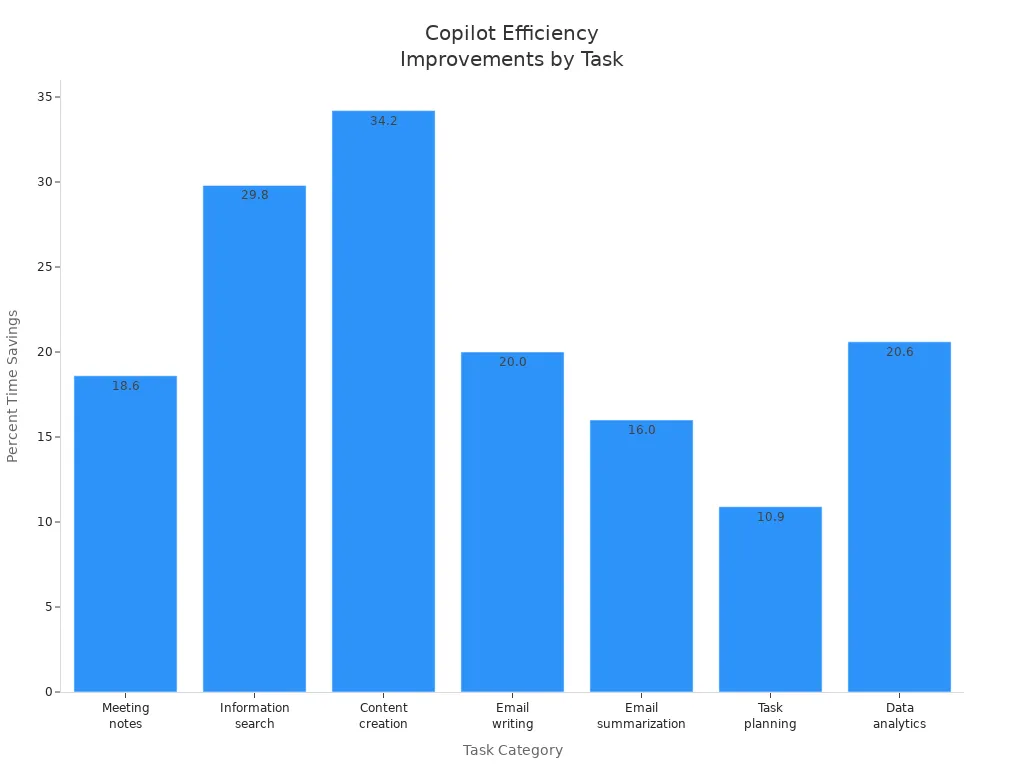
Microsoft Copilot delivers strong cost savings and efficiency improvements. Over three years, organizations have saved more than $18 million. General users save about 8 hours each month, while advanced users save up to 20 hours. You will notice big time savings in tasks like meeting notes, content creation, and data analytics.
| Metric | Value |
|---|---|
| Three-year total savings | $18,612,068 |
| Three-year present value | $14,801,002 |
| Average time savings (general users) | 8 hours/month |
| Average time savings (sophisticated users) | 20 hours/month |
| Percent time savings on meeting notes | 18.6% |
| Percent time savings on information search | 29.8% |
| Percent time savings on content creation | 34.2% |
| Percent time savings on email writing | 20.0% |
| Percent time savings on email summarization | 16.0% |
| Percent time savings on task planning | 10.9% |
| Percent time savings on data analytics | 20.6% |
| Reduction in average contract error rate | from 11.1% to 6.9% |
You will also see fewer errors in contracts and other documents. These improvements help your organization save money, reduce manual work, and focus on higher-value tasks.
Governance and Security in Copilot Adoption

Leveraging Microsoft 365 Permissions
You can rely on Microsoft 365 permissions to keep your data secure when using Copilot. Copilot uses the same role-based access control (RBAC) framework as the rest of Microsoft 365. This means only authorized users can access sensitive information. You can fine-tune permissions to control which data sources Copilot can use. Monitoring and auditing tools help you track Copilot’s actions and ensure accountability.
| Aspect | Description |
|---|---|
| Role-Based Access Control | Copilot uses the existing RBAC framework to ensure only authorized users can access sensitive data. |
| Permissions Management | Permissions can be finely tuned to control data sources accessible to Copilot. |
| Monitoring and Auditing | Comprehensive logs of activities enable auditability and traceability of Copilot's actions. |
Tip: Copilot only accesses data that a user can see based on their Microsoft 365 permissions. You should review and update permissions regularly to prevent accidental exposure of sensitive data.
Addressing Governance Weaknesses
Strong governance helps you avoid common pitfalls during Copilot adoption. Many organizations discover weaknesses in their governance processes when they start using AI tools. You can address these issues by taking a proactive approach:
- Automate certification with tools that review access rights on a regular schedule.
- Delegate responsibility for access reviews to business users, making them more accountable.
- Monitor offboarding and role changes closely to update permissions right away.
- Fix broken or misconfigured permissions to prevent accidental data leaks.
- Train your team and build a culture that values responsible AI use.
- Communicate the reasons behind governance policies so everyone understands their importance.
- Establish AI champions in each department to promote best practices.
- Encourage users to learn prompt engineering and critical thinking for safe AI use.
Note: Building a governance-minded culture turns data governance concerns into opportunities for safe innovation.
Ensuring Data Privacy
You play a key role in protecting data privacy when using Copilot. Start by setting up a clear governance framework for how Copilot uses data. Educate both users and administrators about safe AI practices. Automated policy enforcement helps you stay compliant with regulations. Assign specific roles for oversight and clarify responsibilities for everyone involved.
- Centralize logs to make compliance checks and incident responses easier.
- Create a Copilot Learning Center to provide ongoing training and support.
- Conduct regular data privacy workshops for users.
- Organize admin workshops to keep IT professionals up to date.
- Set up feedback loops so users can share their experiences and concerns.
Callout: Ongoing education and clear policies help you maintain trust and protect sensitive information as you expand Copilot’s use.
Sustaining Microsoft Copilot Adoption
Continuous Training and Support
You need to keep your team’s skills sharp to get the most from Microsoft Copilot. Training should not stop after the initial rollout. You should offer ongoing learning opportunities that fit your team’s needs. Tailored training for each department helps employees see how Copilot works in their daily tasks. Flexible e-learning and self-paced resources let everyone learn at their own speed.
- Provide department-specific training for practical use.
- Empower champions to support their peers and answer questions.
- Use change management strategies to address concerns and build trust.
- Offer e-learning modules and self-paced guides for easy access.
Champions play a big role in sustaining adoption. You can give them advanced training so they become peer coaches. Champions should hold regular sessions to share tips and real-life examples. This approach creates a self-sustaining ecosystem where employees help each other succeed.
Tip: Regular check-ins and refresher sessions keep everyone up to date with new Copilot features.
Fostering a Culture of AI Integration
You build a strong AI culture by involving leaders and encouraging teamwork. Executive sponsors set the tone for change and show that AI is a priority. Education initiatives, like workshops and online courses, help your team understand how to use Copilot. Peer-to-peer knowledge sharing speeds up adoption and creates a supportive community.
- Leadership involvement signals the importance of AI.
- Workshops and online courses boost understanding.
- Peer learning encourages sharing of best practices.
- Regular measurement of progress helps you see what works.
You should use AI-powered insights to show how Copilot improves productivity. When you measure outcomes and share success stories, you motivate your team to keep learning and growing.
Callout: A culture that values learning and sharing helps everyone feel confident using AI tools.
Gathering Feedback and Iterating
You improve Copilot adoption by listening to your team and making changes based on their feedback. Encourage employees to give specific, constructive feedback in a safe environment. Structured peer reviews help you gather useful insights. Leaders should model positive responses to feedback, which builds trust and openness.
- Practice giving feedback on low-stakes topics.
- Use structured peer reviews for honest exchanges.
- Discuss feedback openly to improve its effectiveness.
- Leaders should respond positively to suggestions.
- Normalize learning from mistakes and making improvements.
Treat Copilot as a tool that gets better with each use. Start with your best prompt, evaluate the results, and refine your approach. This cycle of feedback and iteration leads to better outcomes and higher satisfaction.
Note: High-quality results come from trying, learning, and improving together.
Next Steps for Leaders
Assessing Readiness
You need to check if your organization is ready for Microsoft Copilot. Start by identifying the best use cases. List where Copilot can help most and score each idea based on impact and how easy it will be to start. Pick a few use cases that offer high value and are easy to launch. Next, build training materials and prepare your IT support team. Internal champions can help answer questions and support their peers. Set clear metrics to measure Copilot’s impact. Collect data on how things work now so you can compare results after rollout. Finally, create a readiness report. This report should highlight your strengths, gaps, risks, and a plan for moving forward.
Checklist for Readiness:
- Identify and rank Copilot use cases.
- Prepare training and support resources.
- Set metrics and gather baseline data.
- Summarize findings and create a roadmap.
Tip: A clear readiness assessment helps you avoid surprises and sets your team up for success.
Creating an Action Plan
You need a step-by-step plan to guide your Copilot adoption. Begin with a technical and security review to make sure your systems are ready. Define clear use cases and decide if you want a phased rollout or a full launch. Empower champions in each department and build a user community. Champions will share best practices and help others learn. Offer role-based training that continues after launch. Track your progress and measure return on investment. Use what you learn to improve your approach.
Key Steps for Your Action Plan:
- Review technical and security readiness.
- Choose use cases and rollout strategy.
- Empower champions and build community.
- Deliver ongoing, role-based training.
- Measure ROI and keep improving.
Note: A strong action plan keeps your Copilot project on track and helps you reach your goals.
Sustaining Momentum
You must keep the energy high after your initial rollout. Start with a small group of users to test Copilot and gather feedback. Share early wins with your teams to build excitement. Address any technical issues right away. Expand to larger groups only when you see stability and value. Track usage and measure the effects to show the benefits of Copilot. Make sure leaders support Copilot as part of daily work.
| Strategy | Description |
|---|---|
| Structured Rollout | Roll out Copilot in phases and collect feedback before expanding. |
| Monitor Usage | Track who uses Copilot and measure its impact to support ongoing investment. |
| Executive Buy-in | Keep leaders involved to ensure Copilot becomes part of standard processes. |
Callout: Celebrate small wins and keep sharing success stories to inspire your teams and maintain momentum.
You can expect Microsoft Copilot to transform how your teams work by boosting productivity, collaboration, and employee satisfaction. Success depends on strong leadership, clear governance, and ongoing support. Build a champions network, use pilot programs, and provide continuous training to help your teams adapt. Leaders should assess readiness, set clear goals, and use resources like the Microsoft Customer Hub and Copilot scenario library. Over time, Copilot will help you drive innovation, improve retention, and unlock new opportunities for digital transformation.
FAQ
What is Microsoft Copilot?
Microsoft Copilot is an AI-powered assistant that works inside Microsoft 365 apps. You can use it to draft documents, analyze data, summarize meetings, and manage emails. It helps you work faster and smarter.
How does Copilot keep my data secure?
Copilot uses Microsoft 365’s built-in permissions. You only access data you are allowed to see. Copilot follows your organization’s security and privacy policies.
Who should lead a Copilot rollout?
You need executive sponsors and an AI council. These leaders set goals, guide teams, and ensure everyone follows best practices. Champions in each department help drive adoption.
What training do employees need for Copilot?
You should provide role-based training, e-learning modules, and hands-on workshops. Champions support their peers. Ongoing training helps everyone use Copilot effectively.
How do I measure Copilot’s success?
Track key metrics like time saved, user satisfaction, and productivity gains. Use dashboards and feedback tools to see how Copilot improves your workflows.
Can Copilot work with existing workflows?
Yes. Copilot integrates with Microsoft 365 apps you already use. You can add it to your daily tasks without changing your main tools.
What if employees resist using Copilot?
You should communicate benefits clearly and offer support. Champions and leaders can share success stories. Training and open discussions help build trust in AI.
🎧 Listen to this episode
Want a practical explanation of Microsoft 365 Copilot Adoption with Chris Hinch [Microsoft]? This episode breaks down the topic in clear language and shows why it matters for Microsoft 365, Azure, Power Platform, security, AI, and modern work.
Listen to this episode if you want to:
- Understand the key concepts behind Microsoft 365 Copilot Adoption with Chris Hinch [Microsoft]
- See how it fits into the wider Microsoft technology ecosystem
- Learn where it can create practical value for your organization
You may also enjoy these related M365 FM episodes:
- Microsoft Copilot Adoption with Edyta Gorzoń [MVP]
- Scale Microsoft Copilot Adoption in 90 Days with Carina de Vries [MVP]
- Increase Microsoft 365 Copilot Adoption with Behavior Change
- Microsoft 365 Copilot Agents: Real Business Value with Steve Corey [MVP]
- Copilot for Dynamics 365 Finance and Operations - Simply Explained
Discover more practical Microsoft conversations on M365 FM.
Last reviewed: July 2026.
Who Should Listen
This episode is for Microsoft administrators, architects, developers, security professionals, and business leaders who need a practical foundation before making implementation, operations, or governance decisions.
🎧 You Should Also Listen To
- AI Agents — A strongly related next step for extending this topic.
- Power Platform — A strongly related next step for extending this topic.
- Microsoft Graph Data Connect — A strongly related next step for extending this topic.
🚀 Want to be part of m365.fm?
Then stop just listening… and start showing up.
👉 Connect with me on LinkedIn and let’s make something happen:
- 🎙️ Be a podcast guest and share your story
- 🎧 Host your own episode (yes, seriously)
- 💡 Pitch topics the community actually wants to hear
- 🌍 Build your personal brand in the Microsoft 365 space
This isn’t just a podcast — it’s a platform for people who take action.
🔥 Most people wait. The best ones don’t.
👉 Connect with me on LinkedIn and send me a message:
"I want in"
Let’s build something awesome 👊
1
00:00:00,000 --> 00:00:14,000
Hello everyone and welcome to another episode of the MC65 podcast where we explore the latest innovations across Microsoft 365, Azure AI, Power Platform security and everything, shaping the future of modern work.
2
00:00:14,000 --> 00:00:32,000
Today I'm excited to welcome Chris Hinch from Microsoft. Chris is has spending years helping organization designing secure and modernization modernization IT environments from networking and cloud infrastructure to Azure, Kubernetes disaster recovery and enterprise security.
3
00:00:32,000 --> 00:00:44,000
Today, this focus is helping organizations unlock the future potential of Microsoft co pilot by driving successful adaption and engineering user accurately benefit from AI and that daily work.
4
00:00:44,000 --> 00:00:52,000
In this episode, we go beyond the product announcement and marketing headlines to explore what makes Microsoft co pilot successful in the real organizations.
5
00:00:52,000 --> 00:01:00,000
We'll discuss user adoption licensing governance change management productivity new futures and where Microsoft AI is heading next.
6
00:01:00,000 --> 00:01:10,000
Whenever you are a 90 professional Microsoft partner, business leader or simply curious about the future of work, this conversation is packed with practical insights. So welcome Chris to the show.
7
00:01:10,000 --> 00:01:13,000
Hey, I appreciate it. Yeah, thanks.
8
00:01:13,000 --> 00:01:25,000
Yeah, can you tell us before we start a little bit about you how you start your technology career and how you end up on Microsoft.
9
00:01:25,000 --> 00:01:46,000
Yeah, sure. So I mean, I started out working help desks and just kind of work my way up and then I found myself climbing that ladder pretty quickly went to work on way back. So I mean, I built data centers, built, you know, a bunch of different server actually for several companies that built some data centers for them.
10
00:01:46,000 --> 00:01:59,000
Namely, I work, I was working with one of the blue crossble shields and I helped stand up there Medicaid or Medicare sorry Medicare data center, so pulling all the cabling for that.
11
00:01:59,000 --> 00:02:14,000
Again, that's going going way back, but then I live in the States and when office 365 came out, I was working at basically an IT kind of shop where we helped a bunch of different customers and I did.
12
00:02:14,000 --> 00:02:34,000
So I was a handful of the first O 365 migrations in the state that I live in, so I mean, I was kind of where I got into the cloud world, then I worked some other companies ended up being a CTO at an Azure and 365 partner.
13
00:02:34,000 --> 00:02:49,000
So I went into another company and I ran their Microsoft practice in Microsoft for them was all of 365 so teams voice, you share point into defender all that stuff as well as the Azure side of the world.
14
00:02:49,000 --> 00:03:02,000
And then I went to another company, which is where I got my Microsoft MVP and I built their Microsoft practice up as well, and so we were doing anything and everything Microsoft there.
15
00:03:02,000 --> 00:03:06,000
I mean, if you put the Microsoft tag on it, we did it.
16
00:03:06,000 --> 00:03:25,000
Once I got the MVP kind of badge, I guess you could say I started doing a lot of speaking engagements, a lot of trainings in that and then I saw a position at Microsoft that thought was going to be a good fit and I applied and I got.
17
00:03:25,000 --> 00:03:32,000
Yeah, awesome. So yeah, well, how it looked to work at Microsoft today.
18
00:03:32,000 --> 00:03:48,000
How is it to work? It's so I have a great team team that I'm on some of cloud solutions architect and we are role is to ensure customers use what they purchase because you know inside the bundle sets of licensing.
19
00:03:48,000 --> 00:04:15,000
And there's lots of different features and functionalities and so we educate them on what's all there and we help them utilize it because why have all these products that your disposal if you're not going to use them, I understand that you might have, you know, two or three different kind of applications that do the same thing, but it's more to help them try to eliminate shelter with what they have inside their licensing and specifically right now I'm doing everything in anything and everything around copals.
20
00:04:15,000 --> 00:04:25,000
Copilot chat that's agents that's co work it's governance it's you know, whatever you want to put underneath that copilot umbrella.
21
00:04:25,000 --> 00:04:36,000
Yeah, you have worked across net networking infrastructure cloud security and now I how did this evolution happen.
22
00:04:36,000 --> 00:04:54,000
So when co Valley came out. I had a friend that was at Microsoft I was on the partner side of things then and I had a friend at Microsoft and we were both kind of enamored by the marketing where it wasn't even out yet it was just the announcements right you couldn't do anything you had.
23
00:04:54,000 --> 00:05:06,000
Microsoft he had a little bit of access to it, but it was still very early on and only people that were in the the EAP the early access program truly had anything that they could actually try in here.
24
00:05:06,000 --> 00:05:17,000
So we were just doing looking at all the videos and the marketing where we both thought like this is cool. This is where everything's going again he was at Microsoft I was at the partner side of things.
25
00:05:17,000 --> 00:05:39,000
We just started diving into what was available and it really fascinated me and so ever since just the marketing stuff happened I got really intrigued and so I just kind of dove head first in and every time there's announcements I try them out and now that I'm here, you know, whenever there's internal announcements I try them out.
26
00:05:39,000 --> 00:05:52,000
Yeah, if you talk to our organizations what misconception do they have a still about Microsoft co pilot.
27
00:05:52,000 --> 00:06:07,000
Oh, I mean it's the biggest one. I think it's a magic bullet and they think it's just going to solve everything. I mean it's not just necessarily co pilot, but they think AI is it's a magic bullet and they're going to use AI for AI's sake and that's where I find most companies fill.
28
00:06:07,000 --> 00:06:14,000
If you don't have a goal and that you can just take AI out of it, right? You can just put any tool you buy a tool because it's cool.
29
00:06:14,000 --> 00:06:23,000
So to speak and you're trying to use it and then you just put it out there and anticipate or expect the users to learn it themselves.
30
00:06:23,000 --> 00:06:32,000
Like put it this in this example. You're not going to go and purchase and configure a new CRM or new ERP application and just say, OK, go use it. Right.
31
00:06:32,000 --> 00:06:42,000
You're going to give them proper training and how to do it, but a lot of organizations. They don't see that from any kind of AI. They're like, oh, it's AI. They can figure it out.
32
00:06:42,000 --> 00:06:57,000
But then they don't understand that they're actually wasting time instead of saving time because they're not giving people the proper training or even guidance on what you're allowed to do with a company slated AI.
33
00:06:57,000 --> 00:07:06,000
And so, and I mean, I'm going to dovetail here a little bit. And we talk to companies that don't know what they're wanting to do.
34
00:07:06,000 --> 00:07:17,000
We always say create some create a policy, even if it's on paper, because if it's on paper, then you have something to point back to that they use.
35
00:07:17,000 --> 00:07:32,000
You know, name your AI here and they're not supposed to and then come Asian goes where it's not supposed to as well. Then you can you have something to point back to, but if you never tell them, they're just going to do whatever they want.
36
00:07:32,000 --> 00:07:50,000
And there's I think a lot of products or functions co pilot, so and Microsoft drops a lot of every is in every three day new features. How did you?
37
00:07:50,000 --> 00:07:59,000
Yeah, can can not not overburnt as all this information. How did you handle this?
38
00:07:59,000 --> 00:08:09,000
So before I started working here, I kept up with every single blog, so I made sure that I had the first thing that I would do in the morning is I would look at all the blogs that came out from the previous day.
39
00:08:09,000 --> 00:08:19,000
Some days, especially if it was after a major conference or a major announcements like the ones after bill, the ones after ignite, like those those take a little bit longer.
40
00:08:19,000 --> 00:08:32,000
And even when they started doing the wave releases like the spring wave release in the fall wave release, those were a little bit more intense, but just trying to stay up on it in the mornings when I'm drinking my coffee, I would just say, what did they release yesterday?
41
00:08:32,000 --> 00:08:47,000
And at that point, it wasn't my day job, right? It was I was helping companies do everything across the Microsoft on the partner side. So it was more making sure that I was at least aware of what was coming out.
42
00:08:47,000 --> 00:09:02,000
I mean, you can see it all in the roadmap too. So it's not like it's, it's, you know, hush hush. We put it out there on the roadmap. So you can look at, you know, just open up any kind of search engine and say, you know, m365 covali roadmap. So you can look at what's coming.
43
00:09:02,000 --> 00:09:27,000
And so I just kind of kept my my eyes on those things and just learned about them and then being in the MVP community too, that helped tremendously because we got a little bit of the information beforehand, because we were able to get into some of the product group conversations like they would bring product marketing or product group people into our monthly, they call them PG meetings, product meetings.
44
00:09:27,000 --> 00:09:32,000
So we would get information there as well.
45
00:09:32,000 --> 00:09:45,000
So I like to talk a little bit about the adoption. What separates successful core pilot requirements from yeah, unsuccessful ones. What's your experience here?
46
00:09:45,000 --> 00:10:05,000
Kind of when I was just a living to like if they an organization needs to have an AI plan again, don't just do it for a I sake, because you're going to fail. And you're going to have, you're going to have some people that use it, but most people are going to be like, oh, this is just another thing that they bought. It's another turning thing. I'm going to continue doing work like I work.
47
00:10:05,000 --> 00:10:34,000
So the organizations need to figure out how to put it in each user's flow of work on, you know, however they move throughout the day, how can it help them and they need to look at a department, the by department instead of first, first they need to org vision and then they need to look at a department by department to see how the tools are going to help them going back to this, the CRM example, you know marketing is going to use CRM completely different in sales completely different in operation.
48
00:10:34,000 --> 00:10:52,000
So he's going to use tools slightly different. And so you need to figure out talk with the leaders in each department, figuring out what are some pain points because AI is fantastic about solving pain points. So you need to identify first what I always suggest.
49
00:10:52,000 --> 00:11:02,000
So people this helps get the ball rolling so to speak where you find low hanging fruit, what's some pain points and it can be, hey, if we eliminate this pain point, it will save me five minutes a day.
50
00:11:02,000 --> 00:11:13,000
Okay, that's great. Well, there's, you know, five normally five days in the week. So this one thing will save us approximately. I'm going to round up approximately 30 minutes. It's a start.
51
00:11:13,000 --> 00:11:23,000
Okay, and how many people so we'll say we'll pick on sales again sales is 20 people. All right, so 30 minutes, 20 people, you just say 10 hours.
52
00:11:23,000 --> 00:11:32,000
So now you're starting to get a trickle into the ROI, but that's just to get people bought in and then you start really solving some of the more complex problems.
53
00:11:32,000 --> 00:11:44,000
And so if you take this very methodical approach where you have this challenge or this pain point and you're trying to eliminate it and you're giving the users the proper training on how to use it.
54
00:11:44,000 --> 00:11:53,000
And when you say, Chris, AI is easy, just a huge, you can just put in a question. Yeah, but are you formulating the question in a way that's going to get you to your answer quicker.
55
00:11:53,000 --> 00:12:06,000
Because if you're just putting a question in and then answering or asking another question and then asking another question and now you're 15 questions in and you still have an answer. Are you saving.
56
00:12:06,000 --> 00:12:20,000
So normally not. That's what I'm saying. You need proper training on how to ask the questions in a way to get to the outcome that you're wanting quicker.
57
00:12:20,000 --> 00:12:28,000
What did you think is the technology or is the change management, the ability to build a challenge.
58
00:12:28,000 --> 00:12:38,000
I think it's just change in general. I don't think it's necessarily change management. I think it's just change because the workforce today.
59
00:12:38,000 --> 00:12:47,000
I mean it's always been this way. There's a mixture of ages, but more so today than you know when we were kind of growing up in the end.
60
00:12:47,000 --> 00:12:58,000
And in our careers, we have different people that have entered technology at different points. And so if you think about the older generations is working on, I'm not picking on anybody.
61
00:12:58,000 --> 00:13:07,000
But they grew up in the search engine era where you know you're used to asking your search engines, you know your bings and your yahos and your Googles and all those.
62
00:13:07,000 --> 00:13:19,000
And you're used to asking questions a very specific way so you can get to a very specific set of links that you can click on to go find your answer, right. And that's that's what we call a search.
63
00:13:19,000 --> 00:13:26,000
And then you have some of the kind of middle people like where I grew up where we grew up in this search engine more.
64
00:13:26,000 --> 00:13:36,000
And yet we were in the very infancy of AI when I and I don't mean GPT. I mean like you know Siri and Amazon like those kind of a eyes.
65
00:13:36,000 --> 00:13:51,000
So we grew up in that world where you're you don't when you have to say hey you know if you're on your phone and you hit Hey Siri or if you're on an Android, Hey Google, you know all these things where we understood how we could just ask a very specific question now.
66
00:13:51,000 --> 00:13:59,000
So we already had a little bit of that in our minds and then you have the generation after us that grew up in this GPT world.
67
00:13:59,000 --> 00:14:09,000
And like they're just flying with it because they understand it, but they don't know they don't understand search like we do. So you have this mixture of people and you need a level set.
68
00:14:09,000 --> 00:14:19,000
And that's why I'm saying like you're going to have to train people on the best way just to put in a prompt and I'm not saying prompt engineering that word is so overdone.
69
00:14:19,000 --> 00:14:23,000
But there is a way how you can.
70
00:14:23,000 --> 00:14:33,000
And this is any AI across the board. It doesn't matter which one you're going to use. If you ask a very question like you were in a search area, you're not going to get the answer to your one.
71
00:14:33,000 --> 00:14:37,000
And then you're going to like, oh, this is you so something to go back to what I was doing.
72
00:14:37,000 --> 00:14:46,000
Yeah, a little miss Cortana and especially a clicky. He can't possibly the answer before you ask.
73
00:14:46,000 --> 00:14:49,000
And we was a great guy.
74
00:14:49,000 --> 00:14:52,000
Yeah, you must clicky.
75
00:14:52,000 --> 00:15:07,000
How did you see when when we adapt when we start with adaption, showed a company start with pilot groups or or showed companies deployed broadly.
76
00:15:07,000 --> 00:15:24,000
Yeah, I mean, every works going to be slightly different. I do suggest with a smaller group. So if you're trying to prove a use case out, then yeah, just start with insert department insert HR insert finance insert legal whatever insert department here.
77
00:15:24,000 --> 00:15:35,000
And because then you're very use case driven when you're trying to show them the value of a is as an example, if you're in HR, then you know if you're trying to compare.
78
00:15:35,000 --> 00:15:58,000
How can you speed up recruiting, right? You can have AI do some matching for you based on this job description, take all these resumes that we got and stack rank them for me. I don't want you to eliminate them. I just want you to stack rank them based on what the resumes are according to the job description because that's what they're going to do anyways.
79
00:15:58,000 --> 00:16:07,000
Because normally HR doesn't have all the knowledge that the technical manager is going to have if it's a tech kind of interview.
80
00:16:07,000 --> 00:16:17,000
And so they're just going to go and look through keywords anyway. So have a I do it. Now they're not opening up, you know, what 25 30 resumes, they're having an AI do it.
81
00:16:17,000 --> 00:16:30,000
Now they can be stack ranked and then they can say, okay, now that we have our stack ranks look to these again is there anything that doesn't necessarily match our job description, but is something that I need to call out because you want to be fair to the candidates as well.
82
00:16:30,000 --> 00:16:40,000
So you don't want to just take that first step, like maybe somebody has a doctorate as an example and that might rank them and their heads a little bit better.
83
00:16:40,000 --> 00:16:56,000
And they need to kind of put all those parameters in there and that's where I'm talking about where the training we need to show them how to do all things, but, but they can get to this endpoint a lot quicker versus reading 25 resumes that would take them normally, you know, a little while to do versus AI could do it.
84
00:16:56,000 --> 00:17:08,000
And now they're there of one step closer and then, you know, you can have all the HR notes and then you can have the resumes and then you can have the manager notes and again, you can have AI come in and do another analysis for you.
85
00:17:08,000 --> 00:17:13,000
Let's just help you get to the endpoint quicker and it's just an example.
86
00:17:13,000 --> 00:17:37,000
Yeah, yeah, I see what's interesting at the start it was, I don't know what is a plying and tell it to deployment, tell it to implement much systems are working with, yeah, with vector search and you have exactly put in the keywords and when I arrived.
87
00:17:37,000 --> 00:18:00,000
And then we look something for NPC technology and have I have the g rpc json rpc x and rpc all I drive and all these keywords to get that to the, I think that's something what AI can can really, really good do understand the context also not only keywords.
88
00:18:00,000 --> 00:18:12,000
Let's go to the department route, I mean, but then there's the other way to you, there's another pilot you can do. And we, we call it here at Microsoft when I was on the partner side, I called it something differently because it was my own kind of framework.
89
00:18:12,000 --> 00:18:22,000
But we call it a champions program where you pick people that you feel like will adopt it and that are hungry and that want to use it in each department.
90
00:18:22,000 --> 00:18:39,000
And then we do a training for them, just a little bit more generalized because it's going to not be very specific to their day to day, but you do a little bit more generalized and then you set it up in a way where maybe this person in sales has this prompt and it got them exactly what they needed.
91
00:18:39,000 --> 00:18:48,000
So you give them a scenario where they can share that prompt team chat, a loop space, whatever to everybody. And then you have weekly meetings.
92
00:18:48,000 --> 00:19:01,000
Hey, what's one thing that you took away this week that really helped you are really saved time now sales is going to be different than HR and it's going to be different than finance, I get that, but they're all in the same company and same industry.
93
00:19:01,000 --> 00:19:10,000
So there's going to be something that they do is like, oh, well, if Jason over here did this, I understand what he did because I know what he does because he works at this company.
94
00:19:10,000 --> 00:19:31,000
Let me try to formulate that a little bit into what I do for this organization. And so it's one of those sharing is caring type scenarios where you're feeding all this stuff in and now you're naturally creating champions and when you go for a wider rollout, you have those champions in the departments that are basically you know waving your flag as well.
95
00:19:31,000 --> 00:19:44,000
And I found this champion program, I think it's a really, really good idea and I think also what I'm really impressed, actually, skills, I love skills.
96
00:19:44,000 --> 00:20:04,000
So I can have my own, I don't know, project management expert and say, okay, we do project management like agile, the other, but I think that's, and I think, yeah, also to bring all these technology and see.
97
00:20:04,000 --> 00:20:17,000
Yeah, can they play a huge role? I think that's, it's really, really good for companies. And I think that's one of the mistakes companies do it's, yeah.
98
00:20:17,000 --> 00:20:32,000
Hope it's works. I don't know, they say, yeah, you have the software or the co pilot or co pilot studio or sometimes I see also companies they give anyone access to AI foundry.
99
00:20:32,000 --> 00:20:47,000
Yeah, but yeah, when we talk about all these tools, co pilot, co pilot studio and AI foundry, what different roles did they play?
100
00:20:47,000 --> 00:21:00,000
So one of the way I tend to tell people on this because so there's two versions of studio, right? There's used to be called co Val studio light, now it's called agent builder, but they can do that right inside co Val.
101
00:21:00,000 --> 00:21:16,000
So you need this low code type mindset, I guess you could say you don't have to understand topics, you don't have to understand workflows, you can just basically open up this instruction module until tell the agent what you need to do.
102
00:21:16,000 --> 00:21:40,000
So you can do it entry point into agents once they understand how instructions work because when you get into studio, you can do so much and it's a good thing and it's a bad thing because if you're overwhelmed, you don't know what you're doing, you can do when I say damage, you could accidentally do something that just got some focus and you know, now it's expensive.
103
00:21:40,000 --> 00:21:51,000
Studio and agents, I personally feel like you definitely need to do a crawl walk run kind of method on that so make sure that they understand the different models, make sure they understand how instructions work.
104
00:21:51,000 --> 00:22:09,000
How that if you throw too many knowledge sources in versus precise knowledge sources in, you could get the more that's in there, right, you could get contradictions, especially if it's internal data because you could have the old problem that we still have everywhere, we have a lot, right?
105
00:22:09,000 --> 00:22:18,000
You can have outdated files that nobody's updated, but you added this into a source and that's going to contradict with the new source and now you're going to say, well, this agent isn't great.
106
00:22:18,000 --> 00:22:28,000
No, the agent's fine. It's the knowledge that you're pointing to it. So it's more you need to understand the holistic thing of everything that you're wanting the agent to do.
107
00:22:28,000 --> 00:22:46,000
What's the clear goal of the agent and how if you were a human, how would you accomplish that goal? What files would you look into? You know that if it's a file that's 10 years old, probably not one you need to look at it. So why did you include the knowledge sources?
108
00:22:46,000 --> 00:23:02,000
You need to that crawl walk run because they need to understand the mentality on those and you can easily solve that by putting in the instructions, hey, if this modified date is over X amount of months, years old, it's not relevant.
109
00:23:02,000 --> 00:23:06,000
It's easy line that you can throw any instructions.
110
00:23:06,000 --> 00:23:32,000
There was when I think about adoption, there was, yeah, I think there was a little bit problems with measure success or some company's balance with, oh, you have a, I don't know, a level where you where are the people are ranked on first, they overspend the most tokens.
111
00:23:32,000 --> 00:23:44,000
What are good, yeah, how to measure a roll out and what KPIs, I think you actually matter for a copilot adoption.
112
00:23:44,000 --> 00:23:51,000
For copilot itself, it's actually how, so there's two things you can see how much they're using it.
113
00:23:51,000 --> 00:24:04,000
And that's going to not 100% correlate, but if they're using it, then you'll see are they more productive and I know that's like a very subjective thing that you can look at here.
114
00:24:04,000 --> 00:24:20,000
But people that are not using it versus using it, there's going to be a huge difference in how they go out throughout their day when people use AI are they, are they happier and what I mean by that because one thing about copilot that I think is great is it gets you your five.
115
00:24:20,000 --> 00:24:37,000
And what I mean by that is you're no longer like stop your day at five like your calendars block, but you're still working for another hour, two hours catching up on emails catching up on project catching up on one other just so you can start the next day on time.
116
00:24:37,000 --> 00:24:48,000
AI specifically copilot in my opinion helps you stay on top of tasks a lot quicker. So if you get your five to nine back meaning you know your personal time your family time back.
117
00:24:48,000 --> 00:25:05,000
What does that do for you that makes you happier as an employee and your turn starts to go away because if you have employees that are that are happy and what they do to on the day today and they have this fantastic work life balance because they now have a tool that can give them this work life balance.
118
00:25:05,000 --> 00:25:20,000
You're not going to have as much churn and you're going to end up going from this mode where you're just trying to get through the day to really you know churning through your day and making it very successful and productive today and I like to call that you're going from surviving to thriving.
119
00:25:20,000 --> 00:25:30,000
Yeah and what there or is there any copilot feature you say that's still underrated actually.
120
00:25:30,000 --> 00:25:37,000
Oh that's underrated that's a good question um copilot itself.
121
00:25:37,000 --> 00:25:41,000
Oh man.
122
00:25:41,000 --> 00:25:52,000
I would say if you if I had to pick one because if you would ask me to select six months ago there was inside the applications need to work when I say inside like word Excel PowerPoint.
123
00:25:52,000 --> 00:26:04,000
It did okay we have come leaps and bounds the product team is listen to all the feedback specifically in PowerPoint PowerPoint PowerPoint's pretty solid now what you can do but to answer the question.
124
00:26:04,000 --> 00:26:21,000
I would probably say everything you can do inside outlook I mean people just scratch the surface on what you can do with copilot and outlook I mean you can set custom instructions if you're in sales like if you're really targeting a very specific client as an example.
125
00:26:21,000 --> 00:26:47,000
You can say anytime that you can go and custom instructions and say hey client XYZ is going to be priority no matter what so anytime I ask you this question to prioritize or summarize my inbox they always need to be called out if I accidentally missed an email right as an example so people are not doing that and it's easily you can go in and change those things but there's so much you can do inside copilot and outlook I mean when I do the trainings.
126
00:26:47,000 --> 00:27:12,000
I always try to gear my trainings for organizations around their industry like where where they work and how they work I don't want to do general because you can just go out on the line and get general training so I try to give them tips and tricks for that and I have me myself I have to pull back all the examples that I want to show them because I only have so much time in my training because there's so much you can do with it.
127
00:27:12,000 --> 00:27:24,000
And if there are some yeah or is there yeah and then you can be legally that impressed you most.
128
00:27:24,000 --> 00:27:33,000
In CavaLin general or in my underrated one no no general.
129
00:27:33,000 --> 00:27:48,000
So then I mean all the work the product group is done inside PowerPoint I think they how you can use the ease of use to pull blankets in now so when you're having it create.
130
00:27:48,000 --> 00:27:57,000
Powerpoint from whatever it whether it's just going out and getting information from the web or if it's doing it from documents internally.
131
00:27:57,000 --> 00:28:26,000
The ability to have a usable PowerPoint extremely quick you talk about if you're somebody that creates a lot of slides that is a huge benefit on being able to get those things done it's no longer I have to have a focus block for two hours to try to refine this it's three prompts to reviews you know we're talking 15 minutes and I'm done.
132
00:28:26,000 --> 00:28:39,000
I think that's that's pretty pretty cool now co work I don't want to I don't want to not give co work it's it's do I think co work is really really cool but.
133
00:28:39,000 --> 00:28:54,000
There's also things you can do inside co work that you don't need co work for as long as you know how to use the product like with agents and just general prompting itself but if you actually use co work why it was developed.
134
00:28:54,000 --> 00:29:00,000
Work is it slick man it is it can do some really cool things.
135
00:29:00,000 --> 00:29:12,000
And yeah when we talk about prompt what yeah which prompt consciously produce great results and which prompt showed people avoid.
136
00:29:12,000 --> 00:29:21,000
The one that so if you've got any kind of Microsoft training we have a framework goal context source and expectation.
137
00:29:21,000 --> 00:29:30,000
I think the biggest one that gets people closer I mean you're always going to have a goal right because you're always going to have a question your question is always going to be your goal.
138
00:29:30,000 --> 00:29:49,000
I found that if you give it the context on why you're needing it you are getting a lot closer to that final output i'm not saying that they're not all important but if you can say what like so the goal is either going to be the what or the how or the you know those that's.
139
00:29:49,000 --> 00:29:54,000
No the how's the expectation sorry the what or the why that this goal.
140
00:29:54,000 --> 00:30:02,000
Sorry the what of the goal the context is why you need it so if you when you ask your questions.
141
00:30:02,000 --> 00:30:14,000
Why are you asking it to summarize your email why are you asking it to create this power point why are you creating this pivot table so if you throw that why in there you're going to get.
142
00:30:14,000 --> 00:30:21,000
And then the immediate results that are better than it was before.
143
00:30:21,000 --> 00:30:27,000
I talk a lot of with a lot of companies they have.
144
00:30:27,000 --> 00:30:43,000
There's one topic in the adoption that's it's security and they say oh it's so so unsafe use AI or especially copilot in my part what should organize understand before they deploy copilot.
145
00:30:43,000 --> 00:31:03,000
So the one thing about copilot there's two things that they need to understand your data is always your data copilot is never Microsoft and copilot never going to do anything with your data to train that we do not do that you can read every single thing that we put out there we do not use your data to train.
146
00:31:03,000 --> 00:31:32,000
So to sub processors we are sending the prompt and it's an encrypted in a way in the agreements that we have with the sub processors that they cannot use our prompts as well for training materials so our stuff that is going to be your data is your data is going to be protected so you don't have to worry about that that's that goes back to the early on example that I always use and I don't want to call anybody out specifically on what they did or do not do but there was a major.
147
00:31:32,000 --> 00:31:55,000
So in fact sure that does a lot of electronics they had some developers that were trying to debug some source code and this was early on in the GPC world like early on in the GPC world and nobody knew what that meant and so they threw the source code out there and now it's public domain Microsoft is not going to do everything is protected.
148
00:31:55,000 --> 00:32:24,000
So another thing about copilot so that's the first thing that's just organization might the second thing is the way how Microsoft builds everything with the SFI the security first initiative that if you have access to something so does your copilot but on the flip side if you do not have access to something neither does your copilot so it's going to respect the permissions of the user that's using it and I think those are two big security features that we have inside of our
149
00:32:24,000 --> 00:32:32,000
product that a lot of other platforms or providers out there do not.
150
00:32:32,000 --> 00:32:50,000
I think a little bit what I often hear or often get asked it can copilot expose poor governance and I say okay you ask this question you have to look at your governance but is it possible.
151
00:32:50,000 --> 00:33:19,000
Everybody's term a governance is going to be different so if you don't have proper permissioning so like like what I just said if you have access to something so does your copilot so if you have copied a user that's from another user from another user from another user that's for governance just in its own right that has nothing to do with AI that has to do with your user could that user search or could they go down like the file path to get to it 100% now most aren't because they don't have time but.
152
00:33:19,000 --> 00:33:37,000
But can it expose poor governance 100% it can because it's going to respect the bounds of the permissions of the user that's using it and if you have sloppy I'm just going to give everybody access to everything that's on you right that means you're from an organization you're not set up in a proper way but.
153
00:33:37,000 --> 00:34:02,000
We have tools in place that can help you with that so when you get copilot you get SharePoint events management so if it isn't SharePoint you can say restrict this from the search queries right so all the sudden oh we didn't know that we gave everybody access to this let's just restrict it and so now that doesn't mean that the users can't get to it that just means AI copilot can't get to it.
154
00:34:02,000 --> 00:34:22,000
And what role do you play does what oh purview purview is so there's there's a lot of slick things that you can do inside purview today as well so if there's um you have specific kind of labeling setup and specific terms are considered.
155
00:34:22,000 --> 00:34:51,000
Like prior to one which you know high confidential that nobody needs to talk about it so even if they accidentally have some type of hole in their governance for people do have access to it you can say if it's data label this or this kind of category that purview or copilot will have a response hey I see that I see this data but I'm not allowed to based on rules from our organization I'm not allowed to reason or give guidance on this.
156
00:34:51,000 --> 00:35:19,000
So you can do some really cool things with with purview i mean that's we don't have enough time to talk about everything you can do inside of that um you can you can tag it into especially if you have edge is the primary browser that you have for your organizations even when they go out to the web you can prevent them from doing the whole copy pasta into any type of AI engine so there's rules in there that it will prevent you from you know putting it in.
157
00:35:19,000 --> 00:35:25,000
Name your AI provider right so you can do things like that as well.
158
00:35:25,000 --> 00:35:40,000
Yeah to other tools are often yeah show up with copilot and security it's it's enter ID and uh defend which role do they be both tools play.
159
00:35:40,000 --> 00:35:54,000
So it interest going to play a more of a role than it does now especially with age 365 coming out because it's going to be extremely tied to the understack so that's going to help tremendously.
160
00:35:54,000 --> 00:36:05,000
More to come on that because it would it just went GA we're just on release one I think we're still on release one really suits coming out soon um but as that product gets more mature.
161
00:36:05,000 --> 00:36:18,000
And what you're going to be able to do inside just from the agent ecosystem with agent 365 it's all going to be dependent on on true so make sure that the groups are controlled that way but um today you can even.
162
00:36:18,000 --> 00:36:34,000
You can take agent 365 out of it and just copilot studio on trades huge inside that you can give controlling access and who can do what from creating to publishing to sharing to which models you want them to have access to so if you're.
163
00:36:34,000 --> 00:36:55,000
If you're if you're we are wary of which models people are going to use in your concerned over token usage then you can control that with on to groups today so I mean on to is going to be the key point to it from a defender standpoint.
164
00:36:55,000 --> 00:37:12,000
Oh that's that's another big topic to you I think the biggest one that I really liked it's inside defender is if you remember um we used to have a common shadow I see another we don't still have it but most people have.
165
00:37:12,000 --> 00:37:20,000
Become aware of shadow I see and they they have a general idea of what the organization's using them once they're not using what the tools that we have after today.
166
00:37:20,000 --> 00:37:42,000
Now you have shadow AI or B y away I in defender the defender platform can help you from that aspect as well that if you're on you know accompany device you're not allowed to use an AI source that has a low rating in the ratings depend on a lot of different things out there so if you don't want them to use one that's under.
167
00:37:42,000 --> 00:37:52,000
Pick a random number seven as an example um you can block them so you can start getting a handle on the whole B y away I.
168
00:37:52,000 --> 00:38:10,000
Yeah what when I often see when I talk about security their companies there are really whoa they're really fear there there is topic in the other say oh we have pay all of this Microsoft product they do it for us.
169
00:38:10,000 --> 00:38:15,000
So I think that's often something yeah companies will.
170
00:38:15,000 --> 00:38:17,000
I don't know.
171
00:38:17,000 --> 00:38:20,000
I don't know.
172
00:38:20,000 --> 00:38:37,000
Yeah and I mean to your point there there's lots of tools out there there are some really good companies that will just do one portion of the whole kind of journey and I'm not saying that they're not good I am that's not what I'm saying what I will say though is.
173
00:38:37,000 --> 00:38:56,000
The way how Microsoft has been able to piece everything together into a platform where you don't have to worry about the integrations or the plugins or the API calls and everything is like I'm going to use this security tool but now I need to connect it into.
174
00:38:56,000 --> 00:39:06,000
You know the tenant so it can govern you don't have to worry about all that it's everything is inside the tenant from a management perspective and even a governance perspective it takes that.
175
00:39:06,000 --> 00:39:18,000
The effort in all the knowledge that you need because we've we've pieced it all together for you inside the platform so I feel like we've made it.
176
00:39:18,000 --> 00:39:24,000
While there's a lot of tools we make it as simple as it can be.
177
00:39:24,000 --> 00:39:43,000
So I just want to see one thing I don't know really what what it's mean there it's it's it's on on on laptops is on on software it's it's it's called co pilot ready or co pilot readiness what doesn't mean.
178
00:39:43,000 --> 00:39:57,000
It's one of those terms that I don't necessarily this is a me thing on a Microsoft thing this is I don't like that term but I mean co pilot readiness is going to be more about how are you.
179
00:39:57,000 --> 00:40:14,000
So sharing rules set properly do you have the correct owners on SharePoint sites is in example is this a site that was created and maintained and then somebody left and now it's ownerless and now you have stale data.
180
00:40:14,000 --> 00:40:29,000
So it goes back to the something we were just saying it's only as good as the knowledge that it's going again so if you're if your internal data isn't kept up to date then yeah it's not going to be good because it's using that as the source.
181
00:40:29,000 --> 00:40:36,000
So I mean just making sure some of your protected settings are out there and there's actually something that came out.
182
00:40:36,000 --> 00:41:05,000
How long ago it was a few months ago but baseline security mode it's a set of guidelines that you can set inside different portals being on to being defender being SharePoint that it says here's here's a baseline needs to be are your settings here and if so that's going to get to even closer to you know readiness as an example but every organization's readiness is going to be different but I would highly encourage you to go out there and look at baseline security mode and make sure that those are set up.
183
00:41:05,000 --> 00:41:34,000
And there are also another yeah I think I yeah the password I don't know it's the password but okay I have this PC here it's I don't know what the workstation is five six seven years old I also have by co pilot plus laptop I don't know both work it works co pilot and now I hear there come something new it's I think that's the same.
184
00:41:34,000 --> 00:41:54,000
I think that's co pilot 365 or something so a complete cloud based solution so what's the different and and should I really buy all all this this stuff or what's different.
185
00:41:54,000 --> 00:42:23,000
So co pilot PC and then just the way how co pilot work so co pilot today and will always be this way it's cloud based so it works in the cloud so you can you can run it on your phone you can run on a underpowered machine you don't have to have a bee key machine to run co pilot because it's done in the cloud and that's one of the benefits I think co work has over a lot of things is you can fire off the prompt to co work and let it run maybe it's a complicated task that you're wanting to do.
186
00:42:23,000 --> 00:42:51,000
And you can even you can shut down your computer because it's running in the cloud where the other ones that are doing this co work that capability they require things to be on and is doing it on your computer so we're co pilot PC comes into play is we are starting to do a mix mode of computer use and cloud use so co pilot PC is going to put the required software and make sure you have the required hardware to do some of these intensive
187
00:42:51,000 --> 00:43:11,000
LLM type tasks on the local machines you're not having to do it in the cloud so because you're not always connected to the cloud if you're on a airplane is an example and you need to do things so co pilot PC is going to give you those controls to do certain things locally instead of in the cloud and that's what that's for
188
00:43:11,000 --> 00:43:34,000
But just I mean co pilot is that right it's it's it's in the cloud it's in your in your tenant so it's always has that protection and it's never meant to do your work for you it's meant to accelerate and assist you in doing your work and that's what I want people to always understand here with co pilot is it's not that magic bullet but we are
189
00:43:34,000 --> 00:43:42,000
working with things and how can we embed it inside the OS being windows and that's that co pilot PC that you're talking about.
190
00:43:42,000 --> 00:43:52,000
Yeah okay so what did you think will I will co pilot evolve in the next few months years.
191
00:43:52,000 --> 00:44:13,000
So I mean if you kept up a build I mean scout scout's going to be really slick but it's it's one of the things it's still fairly new it's just in front here you do need get licensing as well with this for it to work but I mean we played around with it because we get internal access to it.
192
00:44:13,000 --> 00:44:30,000
It is pretty slick because it's using more of the open claw type scenarios and what it can do and what it can create especially if you say hey creep me that dashboard take all this data and I want you to create me a dashboard so I can easily see this data and a glance.
193
00:44:30,000 --> 00:44:41,000
I mean that's that's significant work that it's having to do when you're saying a dashboard right this is like an HTML this pulling in things or power be out of this pulling all these connections it's really advanced stuff that it's doing.
194
00:44:41,000 --> 00:45:08,000
And the output added already in just the frontier release is quite amazing to be honest it's impressive so I think you're going to really start seeing some instead of I don't want to call it a novelty but where people are actually using AI to get multi-step processes.
195
00:45:08,000 --> 00:45:37,000
And when I say multi I mean complex multi-step processes and actually getting tangible assets out of that not saying that you can't do that today with you know studio and all this stuff especially if you know the power plant plant the power platform so you can use some of the workflows and agent flows and all the things are actually disposal inside power plant but that's that's a limited population scout brings that to everybody.
196
00:45:37,000 --> 00:45:49,000
So this this garage makes I think when I understand right it's it's like mcp accessible to all people.
197
00:45:49,000 --> 00:45:52,000
Yep it does.
198
00:45:52,000 --> 00:46:10,000
So when so some some personal questions and what's your favorite Microsoft product beside co pilot.
199
00:46:10,000 --> 00:46:15,000
I would probably go with loop.
200
00:46:15,000 --> 00:46:38,000
It took so when when we when Microsoft came up with the idea that you could collaborate inside of a document with word and you could see the edits that other people are making or PowerPoint you know you could be working on the slide and your co work could be working on the same slide and you can see that stuff working inside the camera but you had to be inside the application to do it.
201
00:46:38,000 --> 00:46:49,000
So loop take us into the next level where you can just have this whole brainstorming session and you can see people working in real time and you can pull people in on just certain components where before in PowerPoint if I just wanted.
202
00:46:49,000 --> 00:47:05,000
Hey Kevin I just want you to update slide 16 I still had to give him update to the whole deck and inside loop I can say hey Kevin here's the component I need you to work on so I can pull everything together so from a collaboration and also security standpoint all together.
203
00:47:05,000 --> 00:47:15,000
And it brings that all pretty tightly in a in a product that is very underrated I don't think people understand the power that loop can do.
204
00:47:15,000 --> 00:47:29,000
I have a look a little bit into the linked in open graph data and I think we have one keyword it's coming up was prompt engineering and now it's.
205
00:47:29,000 --> 00:47:47,000
It's not in the when we look at the yeah at the prompt crafting is what we call it a prompt framework those are the terms we use now and is it still available skill or why is it yeah leaving all the job application job description.
206
00:47:47,000 --> 00:47:51,000
Oh you mean your time at the prompt lab is which I'm out right.
207
00:47:51,000 --> 00:47:57,000
How they just remain the prompt gallery to the prompt lab and all that stuff in the redesign is that we are referring to.
208
00:47:57,000 --> 00:48:14,000
Yeah so I like to be old revision of prompt gallery where you could search by job description so you can say hey I'm an exact what's there some good promise they can get me start I thought that was really cool how they organized them.
209
00:48:14,000 --> 00:48:29,000
You can it's now it's a freeform search in there so you can use the freeform search but it's not intuitive but I do like how they put all the categories out there where if you're just trying to create something here's a good core orchestration of create prompts for you.
210
00:48:29,000 --> 00:48:41,000
But what's coming and this was this is already on the on the road map is organizations can load organizational prompts inside prompt lab as well now so if it's going to be some prompts that have been.
211
00:48:41,000 --> 00:48:51,000
Curated for your organization by whoever that can now easily be shared via the prompt lab as well.
212
00:48:51,000 --> 00:49:05,000
If your boss suddenly value accounts to you and say hey Chris you get all the money the resources and someone for a developed co-party feature what would it be.
213
00:49:05,000 --> 00:49:12,000
Great question oh man.
214
00:49:12,000 --> 00:49:21,000
Oh man I'm not prepared to answer that one let's see.
215
00:49:21,000 --> 00:49:27,000
I think and this is coming to but this.
216
00:49:27,000 --> 00:49:40,000
Yeah I'll go with this one right now because this is kind of on the spot asking about it we see this today inside chat you can do this and cop out chat where you can have a one to one voice conversation.
217
00:49:40,000 --> 00:49:56,000
I would like the voice one to one to come like when I say voice one this is not talk to text this is not me talking and it's writing the text in the prompt I'm talking I'm talking to copilot and copilot is coming across in my speakers or my headset that I'm using it so it's a true on natural language.
218
00:49:56,000 --> 00:50:16,000
I would like to have that turned into a more of a collaborative or I could have other people on the team as well as copilot so it's more copilot is brought into a group conversation but in an audible way because.
219
00:50:16,000 --> 00:50:45,000
You're typing sometimes you'll lose certain things it's the whole thing is like you can't tell tone in text right but you can tell tone when you're talking so I think if you could have a multi person collaboration type voice chat with AI I think that would be really slick especially from a team aspect when you're having like brainstorm ideas or white boarding sessions and you have that AI.
220
00:50:45,000 --> 00:50:54,000
And idea there with you to not necessarily fact check but to help accelerate those sessions I think that would be really cool.
221
00:50:54,000 --> 00:50:57,000
Yeah that was a great question by the way.
222
00:50:57,000 --> 00:50:59,000
Thank you.
223
00:50:59,000 --> 00:51:12,000
Yeah so I make a quick fire around so I will give you a short question and you say what's come on your mind so dark motor light motor.
224
00:51:12,000 --> 00:51:22,000
One co-pilot feature everyone should try today.
225
00:51:22,000 --> 00:51:26,000
Prior to my inbox and outlook.
226
00:51:26,000 --> 00:51:34,000
Right one perfect prompt or iterates into it's perfect.
227
00:51:34,000 --> 00:51:42,000
I don't think there's a such thing as a perfect prompt so iteration but start with as best as you can.
228
00:51:42,000 --> 00:51:45,000
I like that one that's a really good one.
229
00:51:45,000 --> 00:51:54,000
Microsoft gave you one extra product team to work on which will it you shows.
230
00:51:54,000 --> 00:52:04,000
So far as co-pilot concerns I would like to work with the connector team finish the sentence the future of work is.
231
00:52:04,000 --> 00:52:07,000
Just getting started.
232
00:52:07,000 --> 00:52:12,000
One AI with you like to bust.
233
00:52:12,000 --> 00:52:18,000
I've said it once it's not a miracle worker.
234
00:52:18,000 --> 00:52:23,000
Teams are outlook.
235
00:52:23,000 --> 00:52:31,000
Personally teams but I don't think it's going away but personally teams.
236
00:52:31,000 --> 00:52:39,000
What what's it's more important clean data or good prompts clean data.
237
00:52:39,000 --> 00:52:42,000
You're a morning person or night.
238
00:52:42,000 --> 00:52:51,000
Oh morning 100% podcast on YouTube podcast I would rather listen.
239
00:52:51,000 --> 00:52:57,000
Yeah so thank you for this this great session.
240
00:52:57,000 --> 00:53:03,000
So yeah then my closing question is.
241
00:53:03,000 --> 00:53:05,000
Yeah.
242
00:53:05,000 --> 00:53:13,000
Well what did you see or what's exciting you about the next 12 months.
243
00:53:13,000 --> 00:53:19,000
What what what did you think what coming where you most excited about.
244
00:53:19,000 --> 00:53:24,000
I would say right now would probably be.
245
00:53:24,000 --> 00:53:32,000
Scout what you can do inside the open claw models what what's coming out in that I know it's super early and I get that.
246
00:53:32,000 --> 00:53:40,000
But what it's going to be able to do and create more more the ladder what it's going to be able to create is going to be.
247
00:53:40,000 --> 00:53:54,000
So if you're a 10 fold if not more fold then what you can do today.
248
00:53:54,000 --> 00:53:58,000
Yeah then yeah Chris thank you so much for joining me today.
249
00:53:58,000 --> 00:54:06,000
It was a fantastic hearing your insights into Microsoft co pilot attention strategies and yeah the future of a iPod work.
250
00:54:06,000 --> 00:54:20,000
Yeah it looks what's happened there and so yeah also all links from Chris inch you find in the show notes and yeah so the last words are yours.
251
00:54:20,000 --> 00:54:24,000
Yeah just give it a chance and if you haven't.
252
00:54:24,000 --> 00:54:28,000
If you used it in the past and you weren't happy with it.
253
00:54:28,000 --> 00:54:35,000
This is the fastest growing product ever so go out and give it a try because I think you will be impressed.
254
00:54:35,000 --> 00:54:38,000
Thank you, bye.

Founder of m365.fm, m365.show and m365con.net
Mirko Peters is a Microsoft 365 expert, content creator, and founder of m365.fm, a platform dedicated to sharing practical insights on modern workplace technologies. His work focuses on Microsoft 365 governance, security, collaboration, and real-world implementation strategies.
Through his podcast and written content, Mirko provides hands-on guidance for IT professionals, architects, and business leaders navigating the complexities of Microsoft 365. He is known for translating complex topics into clear, actionable advice, often highlighting common mistakes and overlooked risks in real-world environments.
With a strong emphasis on community contribution and knowledge sharing, Mirko is actively building a platform that connects experts, shares experiences, and helps organizations get the most out of their Microsoft 365 investments.

Founder / Co-Host of Feature Frontier | Cloud Solutions Architect
Creating cloud technology solutions to help people and companies work smarter not harder.
Designing, Implementing, Securing and Supporting Networks and Configurations to help make businesses more efficient.
Specialties: Network Design, Network Troubleshooting, Server Deployments (Physical and Virtual), SSL VPN, NEC VOIP, Astaro Firewalls, Sonicwall, Windows Server O/S, Windows Virtual Desktops, Microsoft Azure, Amazon Web Services, Google Cloud Platfor, Kubernetes, Kaspersky Security Center, Symantec Endpoint Protection, Active Directory, Group Policy, Disaster Recovery, Crystal Reports, VBScript/ASP