
Async Collaboration in Microsoft Teams: Strategies and Best Practices
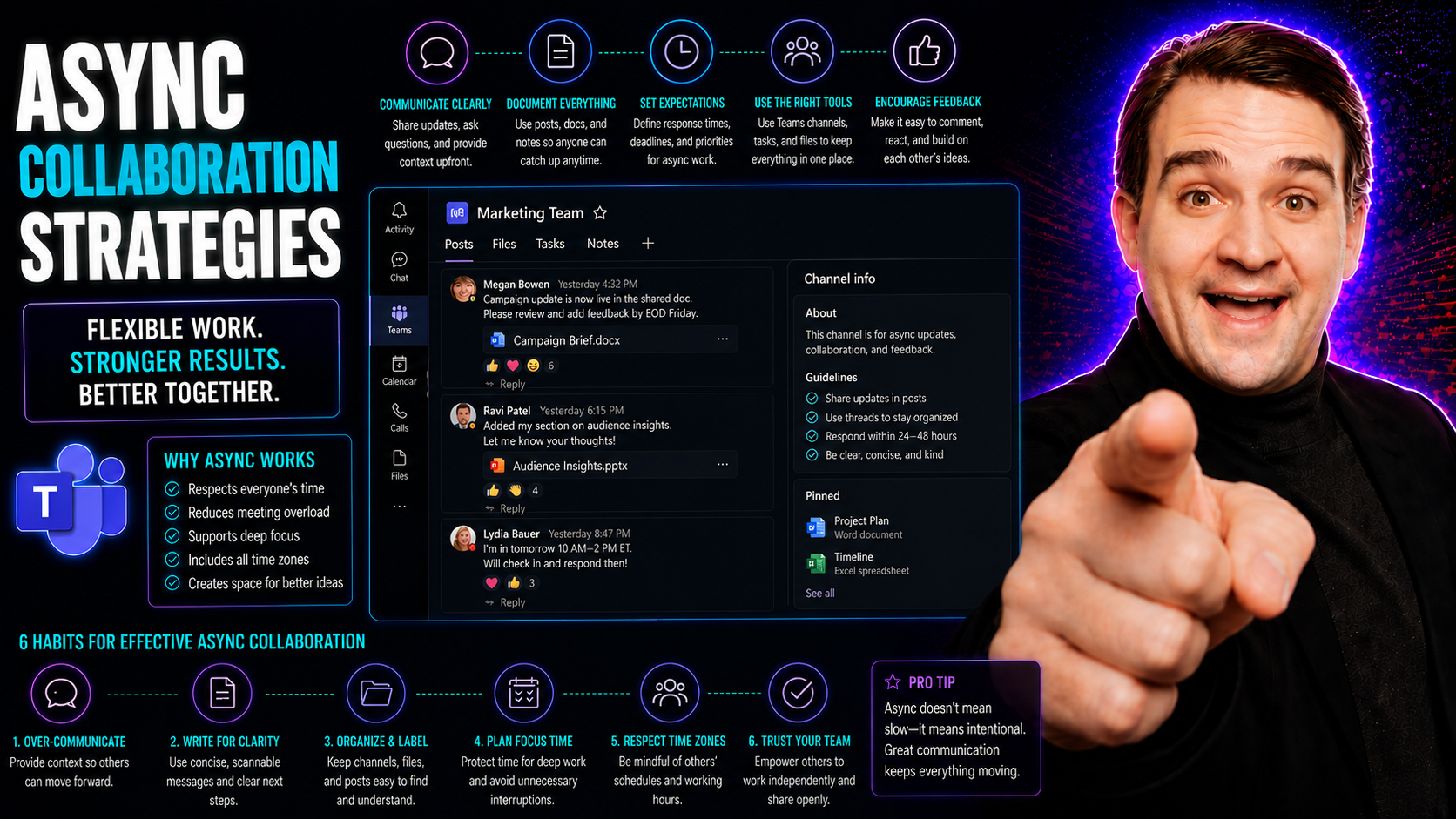
You know how it is—remote and hybrid work are here to stay, and the old way of hustling from meeting to meeting just can’t keep up. This guide lays out exactly why asynchronous collaboration strategies matter right now, and how they make work smoother for everyone, no matter where they’re logging in.
We’ll break down what makes async work tick, the big wins for your team, and real-world tactics that are actually practical to implement with tools like Microsoft Teams and SharePoint. You’ll see how a smart approach—grounded in strong governance—turns async work from chaos into something that actually boosts productivity and morale. By the end, you’ll know not just why async matters, but how to get it right for your organization.
Understanding the Asynchronous Landscape
The workplace isn’t what it used to be. As companies shift their focus to remote and hybrid models, asynchronous collaboration—where team members engage on their own schedules—has become essential. Instead of relying on everyone being in the same place (or even online at the same time), organizations are waking up to the power of async tools to connect people across locations and time zones.
Platforms like Microsoft Teams are at the center of this change, making it possible for teams to contribute when it fits their workflow—not just when the calendar says it’s meeting time. Asynchronous work is more than a buzzword; it’s a response to the real limitations and pressures facing distributed teams today. With careful planning and the right set of digital tools, async collaboration brings more flexibility to how work gets done, making teams more resilient and adaptable.
Understanding the ideas behind async work is the first step. Before jumping into application, it’s important to appreciate the evolution from real-time meetings to workflows that support independent productivity. The following sections will define asynchronous collaboration and show why investing in this shift can set your team up for success—well beyond just saving a few hours a week.
What Is Asynchronous Collaboration? Benefits for Modern Work
Asynchronous collaboration means working together without having to be present at the same time. Unlike synchronous (real-time) work—like instant chat or team calls—async workflows let team members reply and contribute when it suits their schedule.
This approach thrives in remote and hybrid organizations, providing flexibility for distributed teams. Async collaboration helps reduce scheduling headaches, makes room for deeper focus, and ensures that people in different locations aren’t left out. It’s a best practice among digital-first companies using Microsoft Teams, supporting both productivity and teamwork across time zones.
The Road to Remote Asynchronous Success
Transitioning from traditional real-time meetings to an asynchronous setup isn’t just flipping a switch—it takes intention. Organizations need to rethink their culture, update how they communicate, and make sure leadership truly supports the change.
Clear communication protocols are a must: set expectations for response times, document key decisions, and use governance features in Microsoft Teams to keep everyone informed. Secure leadership buy-in by highlighting async’s long-term benefits, like flexibility and business continuity. With planning and team-wide alignment, remote async collaboration can become both sustainable and successful.
Asynchronous Collaboration Advantages: Why Teams Are Making the Shift
Async collaboration is getting a lot of buzz, but there are solid reasons behind the trend. As organizations lean into distributed work, the ability to unplug from constant meetings and let people contribute at their own pace unlocks some real-world gains.
The advantages aren’t just about convenience. Teams that adopt async strategies often report higher productivity, less workplace stress, and stronger morale. This is especially true in US-based enterprises where Microsoft Teams is the hub for getting things done. Async methods make it easier for global and hybrid teams to connect, while keeping projects moving forward—no matter the time zone or work schedule.
Async collaboration doesn’t just make work more efficient. It builds in flexibility and autonomy, while boosting innovation and giving every team member—regardless of role or location—a fair shot to be heard. Next, we’ll break down the specific ways async work is reshaping flexibility, efficiency, and team culture.
Flexibility and Work Autonomy in Async Environments
One of the standout benefits of asynchronous collaboration is true flexibility. Employees can set their hours and tackle their work when they’re most productive—not just when a meeting pops up. This flexibility isn’t just a perk; research shows it improves work-life balance and boosts focus.
In Microsoft Teams, features like messaging, task assignment, and document sharing are all available around the clock. Distributed teams can respond, deliver feedback, and move projects along—without waiting for a scheduled call. That autonomy means better results, and a workflow that respects everyone’s individual rhythms.
How Async Collaboration Increases Efficiency and Sparks Innovation
Async collaboration chops out much of the wasted time that typical meetings bring. By exchanging updates, sharing ideas, or leaving video messages in platforms like Microsoft Teams, teams can focus on thoughtful responses rather than rushed decisions.
Innovation rises too, as more people get a chance to weigh in—even if they're not in the same room, city, or even country. Features like threaded conversations and collaborative documents mean teams can brainstorm, share drafts, and build on each other's ideas with fewer interruptions. If you want an extra push, AI features like Microsoft Copilot provide real-world efficiency wins—see examples here.
Boosting Inclusivity, Transparency, and Morale Across Distributed Teams
Async work can open the door to a more inclusive team culture, particularly when your group is spread out geographically. Everyone has the same space to contribute, no matter their style or location. With Microsoft Teams, features like shared channels and transparent communication records help make sure no voice is drowned out.
Good async governance is part of this formula. For more on building a transparent—and secure—collaboration culture, check out how Teams governance drives collaboration and success. Leaders who prioritize open sharing and make updates visible to all foster higher team morale and trust, especially when remote work might otherwise lead to people feeling isolated.
Core Strategies for Effective Asynchronous Collaboration
Now that you see the upside of async, how do you make it work in real life? It all starts with intentional leadership and some solid team habits. Standardizing communication, modeling best practices, and shifting away from “meetings for everything” help teams run smoother and lighten everyone’s load.
Microsoft Teams and SharePoint are packed with features to make this happen—if you know how to set the right guardrails. Embedding transparency, clarifying how (and when) to communicate, and being strategic about when you actually need to meet sets teams apart. The right strategies give you back your focus time, reduce burnout, and transform Teams from a notification firehose into a high-value collaboration hub. Next, we'll break down proven methods leaders can adopt today.
Standardize Communication Norms and Lead by Example
- Set clear expectations: Spell out when to use chat, email, or posts in Microsoft Teams, and define expected response windows.
- Model transparency: Leaders should openly share updates, priorities, and decision rationales in Teams channels to encourage openness.
- Celebrate wins regularly: Use public channels to recognize effort and achievements—part of building trust and positive habits.
- Embrace “always off” mindset: Reinforce that it’s okay to respond thoughtfully (not instantly), which helps break the cycle of digital burnout.
- Support governance: Leverage best practices like those found here to set clear rules, reduce confusion, and protect sensitive data.
Reevaluate Meetings: Moving Toward Async Alternatives
- Audit recurring meetings: Identify which status updates or check-ins can be shifted to written or recorded updates in Teams.
- Use shared documentation: Replace regular check-ins with living docs and project boards for real-time project visibility.
- Leverage meeting automation: Deploy tools like M365 Copilot to automate note-taking and chat summarization—learn more here.
- Promote async feedback cycles: Create clear times to review and respond, but don’t force everyone into the same live call.
- Be intentional about meetings kept: Use scheduled meetings only for decisions or topics that truly require live discussion.
Intentional Synchronous Communication: When Meetings Still Matter
Not every conversation fits the async mold. Synchronous meetings are still valuable when real-time input or rapid decision-making is needed—think workshops, conflict resolution, or urgent project pivots.
The trick is to keep these meetings focused and purpose-driven. When scheduling inside Microsoft Teams, set clear agendas, define the outcome you want, and involve only the necessary participants. This way, meetings remain high-impact instead of high-burden, and your team gets the best of both worlds—async efficiency and intentional live interaction.
Essential Tools and Tech Stack for Async Collaboration
Tech is the backbone of async collaboration, and picking the right mix of tools is where it all starts. Microsoft Teams leads the pack for chat, calls, and channels, but real async work needs more than just a chat app.
Think about your communication stack—messaging, document management, visual collaboration, and project tracking. A well-thought-out tech stack can make asynchronous workflows seamless. Cloud-based solutions like SharePoint, OneDrive, and Lucidspark are essentials, letting teams share files, track projects, and collaborate visually no matter where they are.
This section lays out the main tool categories you’ll want to cover, explains why each matters, and paves the way for teamwide adoption. The right combo is what transforms Teams from “just another inbox” into your go-to collaboration command center.
Selecting and Implementing Effective Communication Tools
- Microsoft Teams: The gold standard for unified chat, meetings, and file collaboration, allowing seamless async updates, group chats, and threaded discussions.
- Slack: Another strong option for fast, async team messaging with integrations to countless collaboration platforms.
- Email for external comms: Still crucial when Teams or Slack aren’t appropriate—keep emails clear and use links to cloud docs for context.
- SharePoint & OneDrive: Essential for document storage, asynchronous review, and real-time co-authoring—see governance strategies here.
- Private and shared channels: Leverage guidance here to choose the right channel for secure or cross-functional collaboration.
Maximizing Document Sharing and Visual Collaboration
- Teams + SharePoint integration: Connect Teams directly to SharePoint libraries for seamless, permission-based document collaboration.
- OneDrive co-authoring: Share files for group review, enabling asynchronous edits or comments at any time.
- Lucidspark and whiteboard apps: Enable visual collaboration outside of meetings with shared boards and sticky notes.
- Microsoft Loop components: Use dynamic Loop components for live-updating info, as explained here, to bust data silos and maintain a single source of truth.
- Visual feedback workflows: Embed comment threads or video explainers to cut back on back-and-forth and clarify feedback instantly.
Practical Applications of Async Collaboration in Daily Workflows
Enough theory—let’s get into how async really plays out day to day. Async collaboration isn’t just about fewer meetings; it’s about smarter ways to handle everything from status updates to project planning. Teams that nail async communication cut through the busywork and create more space for high-value tasks.
Microsoft Teams offers countless tools for status tracking, task management, and feedback collection all within a single platform. Group onboarding, brainstorming, and even strategic planning can all be run asynchronously with the right templates and automation. The following sections break down concrete ways async tactics boost efficiency, inclusion, and project momentum in your everyday work.
Providing Status Updates, Assigning Tasks, and Collecting Feedback
- Status updates in channels: Share progress asynchronously with summary posts, so everyone is in the loop at their convenience.
- Task assignment: Use Microsoft Teams Planner or To-Do for clear, trackable assignments to prevent things falling through the cracks.
- Feedback surveys and polls: Collect structured input in Teams using Forms or Polls, so stakeholders can respond async and at scale.
- Notification management: Tailor alerts to cut noise and catch what matters with tips found here.
- Single source of truth: Keep all updates and feedback visible in designated Teams channels for transparency and historical context.
Async Approaches to Ideation, Planning, and Onboarding
- Brainstorming with shared docs: Run ideation sessions asynchronously with collaborative Word or Loop docs so all voices are included.
- Planning via Teams wikis: Build out project plans in Teams wiki tabs, letting team members contribute on their schedule.
- Onboarding checklists: Share onboarding guides and self-paced training in Teams or SharePoint, streamlining the new hire ramp-up.
- Visual project boards: Utilize digital whiteboards for async group planning, feedback, and task reviews.
- Leverage AI for process automation: For advanced productivity, see how prompts can unlock Microsoft Copilot’s full value here.
Overcoming Challenges in Async Collaboration and Building Trust
No system is perfect. Going async brings its own hurdles, from misunderstandings in written messages to the risk of team members feeling disconnected. But with attention and the right tweaks, remote teams can sidestep these pitfalls—and even come out stronger.
The keys to success are managing communication nuance, setting up clear feedback loops, and proactively building relationships, all within Teams. A healthy async culture doesn’t just dodge miscommunication; it gives everyone a seat at the table. The tips below break down actionable solutions for some of the most common async issues—inclusive, transparent, and morale-boosting strategies included.
Managing Misunderstandings, Tone, and Communication Gaps
- Clarify your writing: Use simple, direct language and avoid jargon in Teams messages.
- State the context: Preface your posts with a summary or reason to reduce confusion or misinterpretation.
- Emojis and tags for tone: Judicious use of emojis and mentions helps soften messages and highlight key actions.
- Limit information overload: Break messages into smaller threads and link to resources—don’t overwhelm with a wall of text.
- Set expectations for reply times: Communicate when a response is needed to curb anxiety over delayed replies and avoid accidental ghosting.
Fostering Connection, Transparency, and Team Morale
- Regular team spotlights: Recognize individual and team achievements in a public channel to build camaraderie.
- Transparent updates: Share leadership decisions and roadmaps in open channels—don’t let people feel left in the dark.
- Casual chats and “watercooler” spaces: Set up channels just for social conversation to help remote team members connect.
- Open Q&A sessions: Schedule periodic async “ask me anything” threads for leadership to build approachability.
- Pulse checks and surveys: Encourage honest, regular feedback on morale and process, then act openly on results to show you’re listening.
Future-Proofing Teams With Training and Continuous Improvement
The world of teamwork is always shifting—and what works today could be outdated tomorrow. That’s why smart organizations build continuous learning, feedback, and improvement into their async playbook.
Rolling out effective async collaboration relies on setting up solid training, documenting processes, and keeping up with new digital tools. You need robust knowledge repositories, easy access to learning resources, and a culture where everyone feels able to suggest improvements. Microsoft Teams and SharePoint enable this kind of open, living documentation, while ongoing feedback from the team ensures your processes never gather dust.
Measuring what’s working (and what isn’t) with clear KPIs, periodic check-ins, and the help of AI solutions like Microsoft Copilot helps teams keep the bar moving up. For advice on launching advanced training and AI features, see how to get started here.
Training, Knowledge Sharing, and Feedback Loops for Async Success
- Structured onboarding: Use step-by-step async guides in Teams to bring new hires up to speed quickly.
- Central knowledge bases: Store process docs, FAQs, and training videos where all can contribute and find answers easily.
- Regular feedback cycles: Establish recurring surveys or retrospective meetings to surface improvement areas and measure team sentiment.
- Update process repositories: Continuously refine SOPs and async protocols based on what’s working on the ground.
Measuring Impact and Scaling High-Value Async Collaboration
- Productivity metrics: Track task completion rates, time saved on meetings, and velocity of project delivery for tangible proof of success.
- Cognitive capital assessment: Evaluate how well knowledge is shared and reused, looking beyond typical output metrics.
- User feedback and surveys: Run periodic surveys—tips here—to understand what’s working (or not) with async tools and processes.
- Adopt AI insights: Leverage Copilot and similar AI features to uncover efficiency gaps and new opportunities for scaling async across the org.
Asynchronous Leadership and Decision-Making Strategies
If you want async to really work, leadership has to step up. Managers can’t just wait for folks to “figure it out”—they need frameworks for decision-making, concrete context sharing, and a bias for transparency that cuts through confusion. Without these, even the best async processes can end up stuck or misunderstood.
These leadership strategies fill a major gap that competitors often skip: how to gather input, build alignment, and make timely decisions without falling back on the “let’s just meet about it” reflex. By embracing structured documentation, open forums, and clear rationale trails, leaders not only move faster—they bring everyone along. These next sections dive into how to implement async decision-making frameworks and how to arm teams with the information they need to succeed on their own schedules.
Frameworks for Asynchronous Decision-Making
- Transparent documentation: Capture options, pros/cons, and context in shared docs so all stakeholders can review and comment async.
- Async polls and voting: Use Teams polls or Forms to gather input and consensus from the group without a live call.
- Decision timelines: Set clear windows for responses—decisions aren’t stalled waiting on the last person to chime in.
- Final summary posts: Recap the outcome and reasoning in a visible channel for maximum alignment and zero surprises.
Proactive Context Sharing: Leading With Clarity in Async Environments
Leaders who want to avoid confusion and duplication in async environments must share background, intent, and priorities upfront. Proactive context sharing means documenting your vision, explaining why a project matters, and linking to any relevant resources before work begins.
Microsoft Teams channels, pinned leadership updates, and executive summaries in shared docs keep everyone in the loop. This not only speeds up async decisions but also builds trust, as all contributors have the details needed to do their jobs well. For a look at how architecture shapes secure and context-rich collaboration, see how Microsoft Copilot architecture integrates into enterprise environments.
You Should Also Listen To
If you are researching async collaboration in Teams, these episodes add practical context on collaboration, architecture, and governance:
- Microsoft Teams Governance – The Illusion of Control — Learn how ownership, lifecycle, and policy choices keep collaboration manageable.
- Teams Telephony – Simply Explained — Understand the communication architecture behind reliable Teams work.
- Azure AI Foundry – Simply Explained — See how modern AI and automation solutions are built and governed.
- Microsoft Defender XDR – Simply Explained — Connect collaboration design with security visibility and response.

Microsoft MVP | Host of M365.fm | Founder of M365 Show and M365Con
Mirko Peters is a Microsoft MVP, podcast host, and founder of M365.fm, M365 Show, and M365Con. His work connects Microsoft practitioners through podcast interviews, livestreams, and community events.
At M365.fm, Mirko hosts conversations with Microsoft MVPs, product experts, architects, and community contributors. Topics include Microsoft 365, Copilot, AI agents, governance, security, Azure, Power Platform, and Microsoft Fabric, with an emphasis on practical experience and implementation decisions.
M365.fm is the podcast and learning platform. M365 Show brings experts together for livestreams, while M365Con provides an online conference setting for community learning.
Official website: Mirko Peters (https://www.mirkopeters.com/). Recognition: Mirko Peters — Microsoft MVP profile (https://mvp.microsoft.com/de-DE/mvp/profile/9b0ca797-db5a-493a-a845-8b9158046cf5). Connect on LinkedIn (https://www.linkedin.com/in/m365showpodcast/).





