
Designing a Frontline Worker Experience With Viva Connections
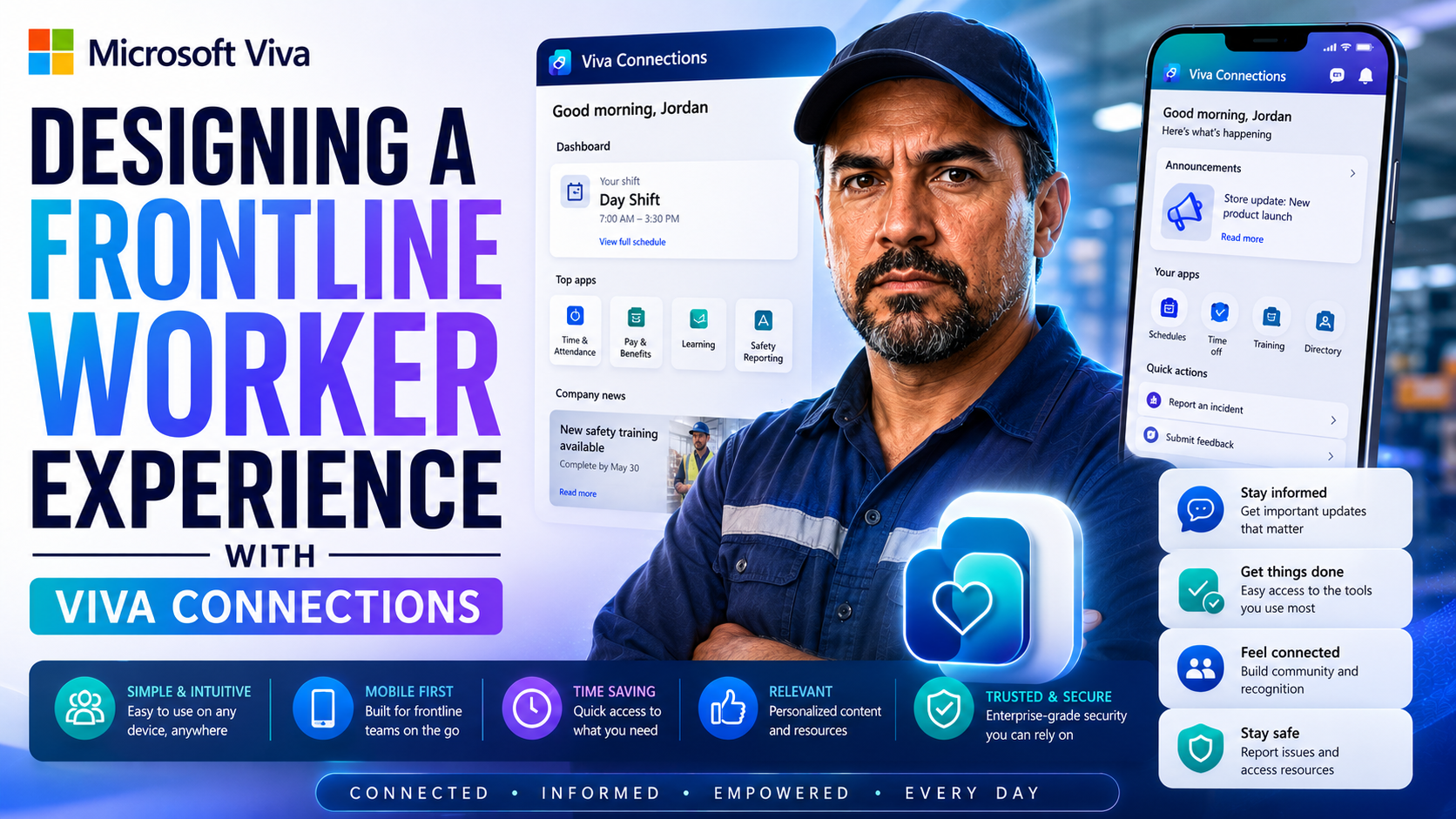
The digital workplace can feel like a far-off land to many frontline workers—think folks stocking store shelves, caring for patients, or fixing stuff out in the field. Microsoft Viva Connections flips that script, bringing company news, critical resources, and workplace tools straight to their fingertips. The goal here is simple: connect the people who keep everything running with the info and support they need, wherever they happen to be and whatever device they have handy.
In this article, you’ll get hands-on, practical insights into how organizations are using Viva Connections to support, empower, and engage frontline staff. We’ll walk through the nuts and bolts—from customizing dashboards to strategic rollout—and hit on lessons learned from real deployments. If you want to boost engagement, work smarter, and build culture where it matters most, you’re in the right spot.
What Is Viva Connections and How Is It Improving Frontline Workers’ Digital Experience?
Viva Connections is Microsoft’s answer to a challenge every large organization faces: how do you keep your frontline staff in the loop, online, and on the same page as everyone in the head office? At its core, Viva Connections serves as a personalized gateway—right inside Microsoft Teams—that gives workers easy access to news, policies, HR tools, and whatever else their particular job calls for.
For frontline workers, who often don’t have a desk, a company laptop, or even a corporate email account, this is a game changer. They get direct, real-time access to updates, schedules, and company resources, all through a mobile-friendly app they can open on the go. Viva Connections isn’t just another intranet; it’s designed for engagement and two-way communication, breaking down the old walls between desk and non-desk employees.
With Connections, organizations can target content by role, region, or shift. You get a single source of truth, no more chasing paper bulletins or word-of-mouth updates. This unified hub also helps boost morale—staff feel recognized and supported—and it streamlines daily routines by making everything easy to find. The result? Higher engagement, less turnover, and a team that feels like part of something bigger than just their next task on the floor.
From Intranet to Viva Connections: Building a Modern Digital Workplace
Traditional company intranets often feel like digital ghost towns, especially for frontline workers juggling shifts, mobile devices, and limited time. The old model—static web pages, clunky navigation, and “read at your desk” communications—just doesn’t cut it. This left many frontline folks out of the loop, relying on printed memos or secondhand news, and often missing key company updates or resource links.
Viva Connections transforms that entire experience. Instead of a one-size-fits-all intranet site, you get a fully integrated, mobile-first platform built on Microsoft 365. Information isn’t just dumped out there; it’s curated and served up based on who you are, where you work, and what you need right now. That means retail clerks see daily deals, maintenance techs get their checklists, and nurses catch policy changes—all from their phones.
With integration across Teams and other Viva modules, updates are instant, and workflows are streamlined. Interactive dashboards make navigation simple—no more clicking through endless menus. Personalization is woven in from the ground up, and organizations can finally speak directly to frontline workers without swapping between platforms or letting things fall through the cracks. By moving beyond outdated static intranets, companies position themselves for better communication, more agile operations, and a truly connected digital workplace.
Core Features Driving Frontline Engagement in Viva Connections
When you’re thinking about improving the daily work experience for frontline staff, the details matter—but so does the big picture. Viva Connections brings together several powerful features aimed at making life simpler, smoother, and much more connected for those out in the field, on the shop floor, or walking the hospital corridors.
At the center is the customizable dashboard and home site. These are more than just landing pages; they become personalized launchpads that surface job-critical tools, updates, and company resources for each worker’s unique context. Targeted feeds and preference settings help ensure every message or alert is worth reading, not just more digital noise.
Mobile-first design is also built in, with all features deeply integrated into Teams and the broader Viva suite. That means no matter how or where frontline workers connect—on their phones, tablets, or shared kiosks—they get fast, consistent access to everything they need, tailored to their role. In the next sections, we’ll dig into how each of these elements work together for real-world results.
Customizing the Dashboard and Home Site for Frontline Needs
- Map Dashboard Layouts to Job Roles
- Start by analyzing what frontline workers actually do in a day. Is it inventory, maintenance checks, checking schedules, or accessing patient records? Design the dashboard so the most-used tasks and resources are always front and center—no fishing around. Use role-based cards (like Powell Cards) that launch straight into timeclocks, shift swaps, safety forms, or incident reports.
- Curate and Prioritize Content
- Nobody wants to scroll past head office updates to find their lunch schedule. Spotlight quick links to relevant documents, training videos, pay stubs, or location-based notices. You can leverage audience targeting to ensure, say, nurses get policy changes while technicians see equipment updates, all in their own corner of the dashboard.
- Integrate Essential Tools and Resources
- Go beyond news. Plug line-of-business systems (think ERP, shift management, POS, or maintenance logs) right into the dashboard using custom or third-party connectors. Actionable cards let workers check in, log safety incidents, or fill out supply requests without jumping between apps.
- Optimize for Usability and Mobile Access
- Use big buttons, simple icons, and minimal menu layers, especially for teams with varied digital literacy. Group similar tools and use consistent labels. Test layouts on shared mobile devices to make sure everything loads fast and stays readable, even under low bandwidth or with gloves on.
- Continually Evolve with Frontline Feedback
- Don’t guess—ask. Use pulse surveys, feedback cards, or frontline champions to keep dashboards relevant. Tweak what shows up first, streamline outdated cards, and use analytics to remove clutter over time. A dashboard that grows with worker needs drives adoption and loyalty and helps everyone work smarter—not harder.
Personalized Content Feeds and Targeted Preferences for Frontline Workers
- Individualized News and Updates
- Set up targeted preference feeds so each worker sees news, alerts, and resources specific to their job, shift, or location. Whether it’s a store manager, forklift driver, or home health aide, they get updates that truly matter—no information overload or digging for the right memo.
- Favorites and Personal Links Shortcuts
- Let staff save favorite links or files—like time-off requests, benefits, or team chats—for one-tap access. These personal shortcuts reduce daily friction and empower frontline teams to control their own digital toolkit. The result? Less wasted time and higher engagement.
- Audience Targeting and Role-Based Feeds
- Use Microsoft 365 audience features to deliver content to distinct groups—say, all bakery clerks or field repair techs. This avoids one-size-fits-all blasts and ensures that highly specialized frontline roles always get what’s timely and relevant.
- Reduce Noise, Boost Relevance
- By filtering out the generic chatter and only surfacing content proven relevant to frontline routines, personalized feeds make communications feel less like “just another app” and more like an integral part of getting work done.
- Empower Comms Teams to Refine Strategy
- Built-in analytics show which content hits home and what gets ignored. Communication leads can then tweak stories, segment audiences further, and experiment with new formats. That way, the right people see the right info—driving action, not just reading.
Mobile-First Access With Microsoft Teams and Viva Suite Shortcuts
For frontline workers, access can’t just be from a desktop—they need reliable, secure connectivity from the break room, factory floor, or hospital corridor. Microsoft Viva Connections is intentionally built for a mobile-first world, living right inside the Teams app most organizations already use.
With this setup, staff can open up news, tasks, and resource cards from their own devices or shared company phones. Everything’s designed to load quickly and work smoothly, no matter if you’ve got a strong Wi-Fi signal, spotty mobile data, or even run into low-bandwidth challenges. Lightweight content and compressed images keep load times fast even in poor connectivity environments.
Integration with other Viva modules and Microsoft 365 apps is seamless. Users can hop between Teams chat, the Viva dashboard, and HR tools without logging in and out, saving time and avoiding digital headaches. Shortcuts let workers launch frequently used features—like shift swaps or safety checklists—with just a tap.
This mobile-first approach also means updates can be pushed instantly, ensuring staff get emergency notifications, training prompts, or schedule changes in real time. All these features combine to make sure frontline workers never feel out of sync, no matter where their shift takes them.
Strategy Planning and Implementation Steps for Frontline Deployment
Rolling out Viva Connections isn’t just a matter of flipping a switch and hoping people use it. To get real results, organizations need to line their goals and deployment process up with the on-the-ground realities facing frontline teams. That means thinking about what success really looks like—not just in terms of tech adoption, but in how daily work and communication improve for the folks who are actually clocking in out there every day.
Engaging leadership early and building a solid management strategy are crucial. You’ll want to get buy-in from all sides—from the C-suite down to district managers and local supervisors. Success depends on clear communication, setting expectations, handling change management gracefully, and keeping feedback loops open during and after rollout.
Assessing your digital maturity is another piece of the puzzle. Is your team ready for AI-powered workflows and smarter communication tools? Are your systems set up for mobile access and seamless integration across departments? Evaluating digital and AI readiness helps you spot potential roadblocks before launch, streamlining the journey to a connected frontline experience.
The following sections will break down concrete steps for creating a frontline-first management strategy, guiding organizational change, and benchmarking readiness so your project gets off the ground right—and stays on track for the long haul.
Developing a Frontline-First Strategy and Change Management Plan
- Identify Frontline Pain Points and Needs
- Start by talking directly to frontline teams. Survey staff, hold focus groups, or shadow workers to see where current tools fall short—maybe info comes too late, is hard to find, or isn’t in the worker’s language of choice. These insights are your roadmap.
- Engage Leadership and Stakeholders
- Win buy-in by showing how a better digital experience supports safety, efficiency, and retention. Bring together IT, HR, ops managers, and union reps (if relevant) to shape common goals, clear responsibilities, and a budget everyone respects.
- Assess Organizational Readiness
- Don’t overlook basics: Does everyone have the devices they’ll need? Is Wi-Fi strong enough? Are digital literacy and training plans in place, especially for teams less familiar with apps? Tackle gaps now to avoid surprises down the line.
- Define Project Milestones and Success Metrics
- Set goals that reflect frontline realities—like time saved finding schedules, staff satisfaction, or number of shift requests processed digitally. Build in regular checkpoint reviews so problems can be flagged and fixed quickly.
- Drive Frontline Buy-In and Communication
- Use champions—trusted team leads or respected workers—to pilot features and advocate for adoption. Keep messages clear, friendly, and relevant. Make it easy to offer feedback and share quick wins as you go.
- Facilitate Ongoing Support and Continuous Improvement
- Set up channels for ongoing help, whether that’s a digital help desk, training videos, or local troubleshooting. Adapt as you learn from frontline feedback, and make sure updates always align with what staff actually need on the job.
Assessing AI Readiness and Digital Transformation Maturity
- Leverage Academic Research and Frameworks
- Use proven maturity models developed by universities and industry experts to assess where your organization stands with AI adoption, digital tools, and frontline tech support. This benchmarking helps you see how ready your team is for smarter, AI-powered workflows.
- Evaluate Current Internal Comms Systems
- Review if your fleet of communication tools is already leveraging any automation, personalized feeds, or intelligent analytics. Spot areas that need upgrading before adding new layers from Viva or other Microsoft solutions.
- Identify Skills and Infrastructure Gaps
- Check if team members are prepared to use AI-driven content delivery, and whether infrastructure can handle real-time data syncs and mobile requests. Gaps here signal areas where extra training or investment will pay off before launch.
Enhancing Frontline Communication and Engagement With Viva Engage
Frontline workers have been stuck with top-down, one-way communication for decades—bulletin boards, mass emails, or hurried shift briefings. But things are changing fast. Viva Engage brings conversation, interactivity, and feedback loops direct to the hands of non-desk staff, all inside the tools they already use day to day.
Turning company announcements into real conversations is about more than just technology—it’s a cultural shift. With Viva Engage, workers don’t just hear from head office; they reply, ask questions, and even help shape team goals. AI-powered communication tools then help internal comms teams segment audiences, personalize updates, and see what’s landing versus what’s falling flat.
In the next sections, we’ll dig into specific tactics for fostering these two-way conversations and see how smart analytics and automated targeting make communication feel relevant, actionable, and empowering—no matter how big your team or how scattered your sites.
Transforming Broadcast Communications Into Conversations With Viva Engage
- Replace Top-Down Announcements With Interactive Threads
- Use Viva Engage to turn company bulletins or safety updates into discussion threads where staff can comment, ask questions, and share their take. Team leaders can reply directly, clarifying confusion and preventing rumors before they spread.
- Deploy Quick Polls and Feedback Prompts
- Polls or “pulse” questions help gauge mood and gather input, fast. Need to check how a new uniform policy is going over? Or which breakroom snacks people actually want? Ask, and you’ll know in minutes.
- Highlight Frontline Stories and Recognition
- Encourage staff to share wins, safety moments, or creative problem-solving. Recognizing these stories in public threads boosts pride and helps build a culture where everyone feels seen—not just the desk-bound employees.
- Moderate for Inclusion and Civility
- Set ground rules and appoint moderators to keep debate lively but respectful, especially in large, diverse teams. Make sure everyone can contribute, regardless of their native language, literacy, or digital skills.
- Establish Feedback Loops
- Use “Ask Me Anything” sessions, anonymous question boxes, and live Q&As to show staff their voices are valued. Close the loop by reporting back on how feedback led to changes—turning conversation into real impact.
Leveraging AI-Powered Tools for Targeted Internal Communications
- Segment and Personalize Messaging
- Let AI group staff by role, shift, or location, ensuring every update hits only the right audience. This keeps information relevant and avoids overwhelming staff with off-topic news.
- Optimize Feeds With Analytics
- Use real-time dashboards to see what posts get read, liked, or ignored. Fine-tune communication strategies on the fly to boost open rates and staff reactions.
- Automate Follow-ups and Alerts
- Smart comms tools can send reminders for training due dates, policy acknowledgments, or critical safety checks based on worker actions and preferences, keeping everyone in sync without manual chasing.
Scaling With Integration Ecosystems: Powell Intranet and Silicon Reef Solutions
When frontline teams stretch across hundreds of sites, languages, or job roles, a “plain vanilla” digital workplace just isn’t enough. That’s where integration partners come in—offering plug-and-play solutions and custom development that extend the power of Viva Connections to fit the needs of complex, global organizations.
Platforms like Powell Intranet help organizations build employee portals with deep customization, broader language options, and scaling features that Microsoft’s out-of-the-box dashboard might not cover. Likewise, partners like Silicon Reef offer workflow extensions, safety modules, and specialized analytics—bringing together line-of-business systems so field workers don’t have to juggle five apps for simple tasks.
In the coming sections, you’ll see how these partnership approaches give companies flexibility, meet tough regulatory requirements, and unlock new ways to keep frontline teams informed, engaged, and safe—all while future-proofing your investment as business needs shift.
Amplifying Viva Connections With Powell Intranet for Employee Portals
- Advanced Dashboard Customization
- Powell Intranet allows organizations to design dashboards that go well beyond standard templates—adding rich visuals, streamlined workflows, and unique layouts to better fit global or diverse teams.
- Internationalization at Scale
- With built-in multilingual support, Powell enables global enterprises to push news, links, and documents in multiple languages—all maintainable from a single admin console—making communications truly accessible.
- Enhanced Resource Delivery
- Powell integrates with HR systems, e-learning, or benefits platforms, letting frontline workers access necessary tools without switching apps. Features like the “Powell Cards dashboard” drive productivity and reduce digital friction.
- Best-Fit for Large or Decentralized Teams
- Organizations with high site count or complex hierarchies find Powell’s capacity for segmentation and roles management vital to delivering a personalized, high-value experience at scale.
Enhancing Frontline Capabilities Through Silicon Reef Solutions
Silicon Reef specializes in extending Viva Connections for unique frontline scenarios, especially where workflow automation, safety, or engagement analytics are high priorities. Their solutions connect business applications like HR, ERP, and maintenance systems directly into the dashboard, so tasks like reporting a safety incident or viewing a work order can be done without leaving Teams.
Silicon Reef also brings expertise in accessibility, offline support, and rapid deployment for industries with tough compliance or security rules. For organizations rolling out digital workplace upgrades in remote, industrial, or regulated environments, having a partner like Silicon Reef means better adoption, more usable tools, and less risk of vital information falling through the cracks.
Key Takeaways and Practical Lessons From Frontline Viva Deployments
- Prioritize User-Centric Design
- Start with what frontline workers actually need. Simplicity and clarity beat fancy features. Use easy icons, clear language, and reduce navigation steps wherever possible.
- Migrate Away from Static Intranet Habits
- Don’t just port over old pages. Rethink what matters—actionable workflows, real-time alerts, and seamless mobile access win out over static news.
- Invest in Change Management
- Even the slickest tech fails without buy-in. Pilot early, showcase quick wins, and pick frontline champions to anchor the rollout.
- Address Connectivity and Offline Needs
- In low-bandwidth or remote settings, optimize content and cache vital info for offline viewing. Let staff submit forms or log incidents that sync when a connection is restored.
- Support Diversity and Inclusion
- Offer multilingual interfaces, text-to-speech options, and literacy-adaptive content. Regularly test features with staff across sites and cultural backgrounds.
- Leverage Ecosystem Partners
- Enlist solutions like Powell Intranet or Silicon Reef to fill functional gaps, fast-track integration, or support highly complex needs—especially important with global or regulated workforces.
- Measure, Iterate, and Improve
- Don’t set-and-forget. Use usage analytics and direct feedback to refine dashboards, update content feeds, and keep staff engaged as needs and tech evolve.
Conclusion: Empowering Frontline Workers Through Innovative Digital Experiences
Empowering frontline workers means more than plugging in a new tool—it’s about crafting digital experiences that fit the realities of daily work, wherever it happens. With Viva Connections and its partner ecosystem, organizations can bring relevant news, tools, and communication into every worker’s pocket, breaking down barriers between teams and headquarters.
Staying ahead means committing to ongoing improvement, ensuring accessibility for all, and adapting as job roles, tech, and company cultures shift over time. The payoff? A more united, engaged, and productive frontline workforce that feels connected, valued, and ready for anything the day throws at them.
You Should Also Listen To
Designing Viva Connections for frontline workers means prioritizing quick access, small-screen usability, role relevance, low-friction tasks, and secure shared-device scenarios. These episodes provide valuable next steps:
- Customize Microsoft Viva Connections Dashboards — Learn how targeted cards and actionable dashboards can bring essential workflows closer to frontline employees.
- Govern SPFx Adaptive Card Extensions in Teams and Viva — Understand how to avoid fragile custom solutions that create support and compliance problems in distributed environments.
- Make SharePoint Search Show the Right Files First — See why simple navigation, consistent metadata, and accurate search are critical for employees with limited time.
- Microsoft 365 Copilot Adoption with Chris Hinch [Microsoft] — Apply practical adoption lessons to training, scenario selection, feedback, and sustained frontline usage.

Microsoft MVP | Host of M365.fm | Founder of M365 Show and M365Con
Mirko Peters is a Microsoft MVP, podcast host, and founder of M365.fm, M365 Show, and M365Con. His work connects Microsoft practitioners through podcast interviews, livestreams, and community events.
At M365.fm, Mirko hosts conversations with Microsoft MVPs, product experts, architects, and community contributors. Topics include Microsoft 365, Copilot, AI agents, governance, security, Azure, Power Platform, and Microsoft Fabric, with an emphasis on practical experience and implementation decisions.
M365.fm is the podcast and learning platform. M365 Show brings experts together for livestreams, while M365Con provides an online conference setting for community learning.
Official website: Mirko Peters (https://www.mirkopeters.com/). Recognition: Mirko Peters — Microsoft MVP profile (https://mvp.microsoft.com/de-DE/mvp/profile/9b0ca797-db5a-493a-a845-8b9158046cf5). Connect on LinkedIn (https://www.linkedin.com/in/m365showpodcast/).





