Flat vs Hierarchical Architecture: What Every Leader Should Know
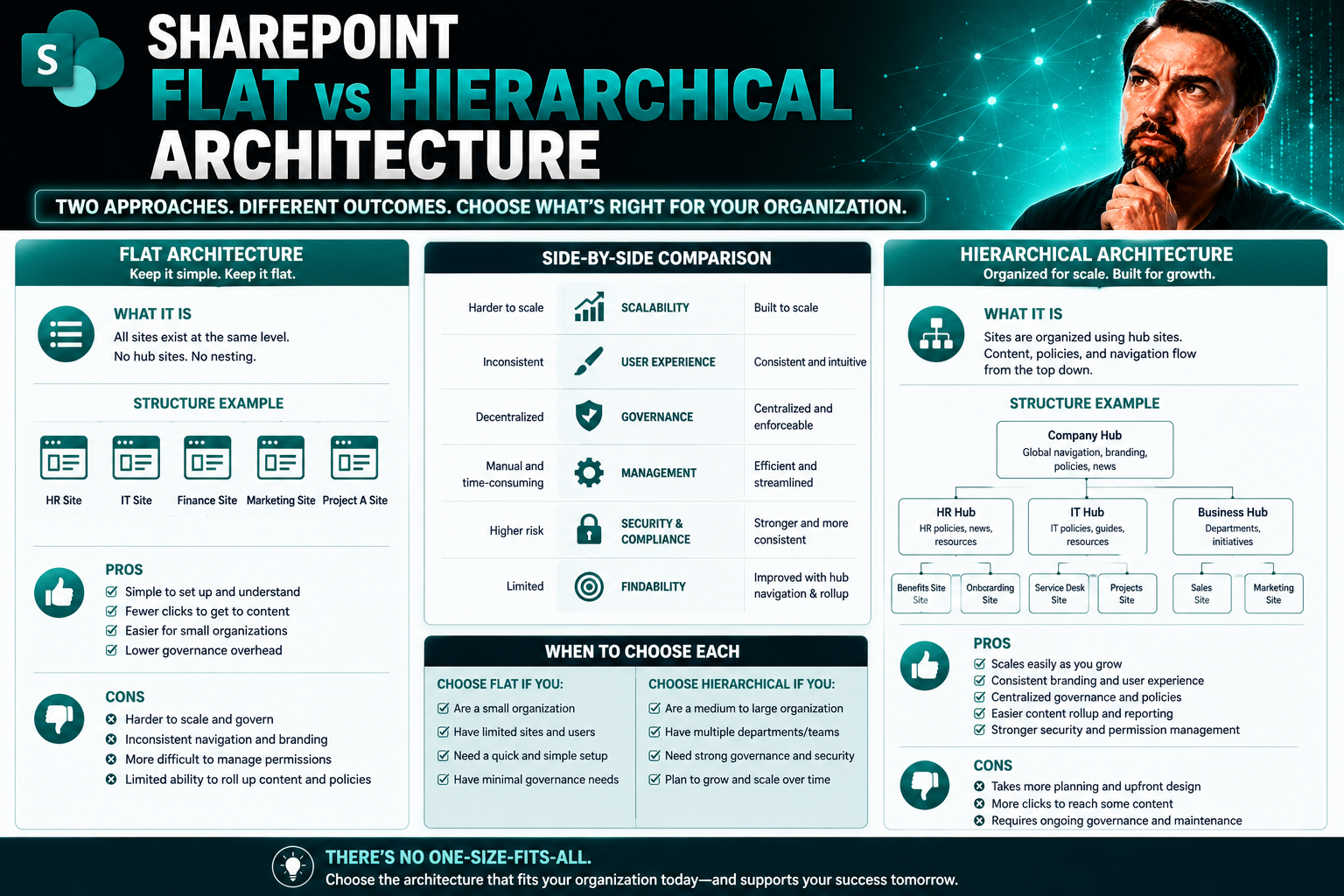
Before you pick sides in the flat vs hierarchical debate, you need to know what these buzzwords actually mean for your business. This guide lays out the real nuts and bolts of each structure—so you’re not just chasing trends, but making decisions that fit your team (and maybe your sanity, too).
Whether you’re running a startup, wrestling with a giant enterprise, or just trying to keep your SharePoint and Microsoft Teams chaos under control, you’ll get practical insights, everyday examples, and a way forward. The world of organizational architecture isn’t just for MBAs and consultants. So, pull up a chair. We’re about to break down the definitions, benefits, pitfalls, and real-life lessons of both flat and hierarchical structures.
If you’re stuck with too many reporting lines or can’t figure out who’s calling the shots—and your Teams or SharePoint spaces look like a spaghetti mess—read on. By the end, you’ll have a clearer sense of which structure keeps your business humming.
Understanding Hierarchical and Flat Organizational Structures
Let’s set the stage. Nearly every organization lands somewhere between flat and hierarchical when it comes to structure. You’ll often hear folks argue the value of “removing layers” or “clarifying roles”—but what do those phrases actually look like in the flow of daily work, or in the way Teams and SharePoint are set up for your staff?
Understanding the difference between these two structures isn’t just for academics or consultants. It affects how quickly decisions are made, how information spreads (or bottlenecks), how safe employees feel bringing new ideas, and whether people actually know who they answer to. These structure choices shape everything from onboarding, to project management, to who gets the credit (or the blame) when things go sideways.
If you’re managing your teams or documents through Microsoft Teams or SharePoint, you’ve probably seen both ends of the spectrum—sometimes in the same company. Hierarchical models offer certainty and control, while flat ones brag about speed and autonomy. But which is best, and who benefits? The details matter, especially when your technology platform is supposed to make life easier, not harder.
Up next, we’ll define what makes an org “hierarchical” or “flat,” looking at core concepts like management layers, official roles, and reporting lines. The following sections dive deeper into these distinctions, giving you the clarity to assess (or fix) your own setup.
What Is a Hierarchical Structure and What Makes an Organizational Structure Flat?
A hierarchical structure stacks people and teams in clear layers—each with its own command chain. There’s usually a CEO or director at the top, managers in the middle, and workers at the bottom. Everyone has a defined boss, and responsibilities flow down from there.
In contrast, a flat organizational structure keeps things simple. There are few, if any, management layers. Most employees report directly to the top person or work together as equals. That means less distance between decision-makers and doers, and information usually spreads faster.
These differences set the tone for how your organization runs—especially in digital spaces. Hierarchical arrangements help when strict roles or process guardrails matter (think regulated work, or lots of teams on SharePoint). Flat models work best for speed and open communication, but can flop without clear ground rules.
Company Hierarchies Explained: Layers, Roles, and Reporting Lines
In a hierarchical organization, you’ll notice several tiers—top management, middle managers, supervisors, and frontline staff. Each level typically controls or supports the one beneath it, creating a “chain of command” where power, responsibility, and reporting flow in a straight line.
Roles are tightly defined in these setups. Job titles, team assignments, and specific duties are documented and rarely overlap. Employees always know who evaluates their work and who makes final decisions. The benefit? Clarity and consistency, especially when your business grows or needs serious compliance (like with SharePoint document governance or regulated Teams collaboration).
Reporting lines form the backbone of traditional hierarchies. Each person usually has a single manager, creating a tree-like structure that makes it clear who escalates what, when. This clarity prevents stepping on toes, but it can also slow things down when decisions need to move up the tree.
In flat organizations, you’ll see the opposite: fewer layers, broader roles, and lots of cross-functional teams. Reporting lines get blurry—there might be one boss for the whole team or just a handful of leaders handling many direct reports. Roles can flex based on skill and project needs (instead of title). Communication jumps across teams, speeding up projects and creativity, especially when coordinating in broad digital platforms like Microsoft Teams.
Ultimately, how you build your reporting structure influences both your org chart and your day-to-day collaboration—whether you’re overseeing hundreds of SharePoint sites or just a few Teams workspaces.
Pros and Cons of Hierarchical Business Advantages
Hierarchical structures have stood the test of time—and there’s a reason. They offer clear direction, consistent oversight, and can handle a scale that would leave flatter organizations dizzy. But this formal setup comes with its own headaches, especially in a digital world that values speed and innovation.
This next section is all about balance. It examines why so many big organizations—think banks, government, global brands—still stick with hierarchies, and what that means for governance in tools like Microsoft Teams or SharePoint.
You’ll also see the flip side: where hierarchies get in the way, slow down decision-making, create silos, or make folks feel lost in a sea of bureaucracy. The following breakdowns spell out the good, the bad, and everything between so you can decide what actually fits your business and tech needs.
In short, don’t let tradition or trendiness make your decision. Weigh the strengths and drawbacks of hierarchy for your particular Teams, SharePoint, or workplace environment.
Hierarchical Business Advantages for Large Organizations
- Clear Accountability: Each employee knows their specific manager, making performance management, escalation, and compliance straightforward. This is vital when companies oversee hundreds of SharePoint or Microsoft Teams projects at once.
- Management Oversight: Robust layers mean leaders can monitor processes, spot issues early, and enforce policy across large teams or departments.
- Scalability: Hierarchies make it easier to add new teams, functions, or regional offices; you simply slot people into established structures.
- Process Consistency: Standard operating procedures are easier to enforce, reducing risks of chaos or non-compliance in industries where regulation is strict and audits frequent.
- Efficient Control: Organizations can implement governance controls—such as permissions and data safeguards—across SharePoint and Teams more systematically, keeping sensitive info locked down where it matters. For deeper pros and cons, check how it plays out in real-world Teams governance scenarios.
Drawbacks of Traditional Hierarchical Models in Modern Workplaces
- Slower Decision Cycles: Each decision often needs to travel up and down the chain of command, slowing response times on urgent matters.
- Approval Bottlenecks: Rigid processes mean employees can’t always move quickly—especially on dynamic Teams or SharePoint projects where speed is key.
- Siloed Work: Departments may focus on their own goals, missing cross-functional opportunities and hindering information sharing.
- Lower Agility: Large, layered structures adjust slowly to market or tech changes, which can blunt innovation.
- Risk of Chaos: Without standardized controls and automated workflows, it’s easy for digital collaboration platforms to turn messy—see best practices for avoiding Microsoft Teams sprawl in this practical guide.
Key Flatter Organisational Benefits and Common Pitfalls of Flat Structures
Flatter organizational models are picking up steam, especially in fast-moving industries and places where transparency is more prized than formality. But they’re not all sunshine and teamwork.
Up ahead, you’ll get a close look at why these structures are appealing: open communication, quick pivots, and employees who feel like trusted insiders. These are big wins, especially when SharePoint and Teams demand fast collaboration across locations or time zones.
But, don’t let the hype fool you. Too little structure can lead to confusion, fuzzy roles, or even power grabs. The following sections spell out both sides—so you’ll know what going “flat” can do for—or to—your staff and your digital workspaces.
Whether you’re considering flattening out to boost morale or wondering why your current org chart looks like modern art, you’ll soon see when flat works best—and when it’s time to bring back a layer or two.
Flatter Organisational Benefits: Transparency, Agility, and Motivation
- Straightforward Communication: With fewer layers, messages travel directly to everyone—no need to decode who to talk to about what.
- Transparent Goals: In flat setups, objectives and progress are visible to the whole team, which is vital for project-driven work in SharePoint or Teams.
- Greater Agility: Teams can respond quickly to changes because approval and feedback happen in real time.
- Morale and Engagement: Employees feel empowered to act and share ideas, knowing their voice actually matters. Interested in collaboration that drives results? See how flat approaches can turbocharge Teams cultures here.
Organizational Structure Flat: When Less Hierarchy Creates New Challenges
- Role Confusion: Employees may be unclear about who’s responsible for tasks or decisions, especially across sprawling Teams or SharePoint sites.
- Career Path Ambiguity: With little formal hierarchy, employees may struggle to see their growth opportunities or what advancement actually looks like.
- Occasional Power Struggles: In the absence of defined authority, strong personalities can dominate discussions, which can disrupt harmony.
- Unpredictable Decisions: Consensus is great—until no one agrees. Sometimes flat teams hit decision deadlocks that stall progress. For more about navigating player roles in Teams, check Microsoft Teams channel tips.
Real-World Examples: Hierarchical and Flat Structures in Action
Theory only gets you so far—real business is where structure meets reality. To show how all this plays out, we’ll look at organizations on both ends of the spectrum.
On one hand, global giants like Amazon and government agencies stick with hierarchy for ironclad control, compliance, and predictability—especially as they scale. Every cog, every role, and every decision point is laid out, making it easier to manage risk, process, and growth using platforms like Teams and SharePoint.
On the other hand, you’ve got companies like Valve or nimble startups. These groups keep formal management to a minimum, betting on innovation and empowered employees to keep them ahead. The risk? Flatness can bring speed, but it relies heavily on cultural discipline and robust digital frameworks to organize projects and communication.
Up next: side-by-side, you’ll see specifics about how big dogs and scrappy newcomers operationalize their org charts—and how those choices shape everything from daily collaboration to long-term strategy.
Hierarchical Structure in Large Enterprises and Public Sectors
- Amazon: With thousands of employees, Amazon carves the company into clear divisions, teams, and reporting lines, using hierarchy to manage risk, scale, logistics, and compliance.
- Government Agencies: Strict chains of command define roles, approvals, and access. Hierarchies ensure sensitive information is secure, which is critical when deploying new tech like Microsoft Teams or SharePoint for large groups.
- Technology as Enabler: These organizations use strong technology governance—such as permissions in Teams or compliance tools in SharePoint—to operationalize the rules, as explained in this Copilot setup guide.
- Consistent Processes: Predictable workflows and documentation are the norm, making audit, risk management, and quality assurance simpler no matter how big the organization grows.
Flat Organizational Structure in Tech Startups and Innovative Firms
- Valve Corporation: Known for its “boss-less” structure, Valve trusts employees to pick projects and drive ideas from the ground up—a model built on self-direction and mutual accountability.
- Tech Startups: Many early-stage companies strip out layers to speed up innovation, share ownership, and keep motivation high—as long as teamwork is disciplined and communication is clear.
- Innovation and Flexibility: Flat firms often set the pace on digital transformation—using SharePoint and Teams for transparency and knowledge sharing, and supercharging creativity using prompts like those described here.
- Collaboration Needs Frameworks: Without structure, it’s easy to drift, so the most successful flat companies put a premium on written guidelines, regular check-ins, and strong shared tools.
Deciding and Building the Right Organizational Structure
Deciding between flat and hierarchical isn’t just a matter of taste—it’s a calculated choice that shapes how your business grows, adapts, and survives. This section looks at the factors leaders need to weigh, from headcount and industry rules to culture and technology demands.
Choosing well means matching your structure to your organizational needs and aspirations. Not every business can—or should—go fully flat, especially when compliance, risk management, or large group coordination comes into play on platforms like SharePoint or Teams.
On the flip side, a rigid hierarchy may keep you stable, but miss out on employee-driven innovation and speed. You’ll also want to think through the tools you use to make your org structure visible and actionable—like digital org charts, permission settings, and workflow automations.
Coming up, you’ll find clear steps to guide your structure decision, plus practical tips to bring it to life using software tools that keep your org chart—and your team’s collaboration—sharp, up to date, and in sync with your goals.
Making Decisions: Steps to Create and Maintain the Best Structure
- Assess Your Business Needs: Start with your company’s size, industry regulations, and service or product type. High-compliance industries (finance, healthcare) often require some hierarchy for control and auditing, while startups may benefit from rapid flat-style collaboration.
- Forecast Growth and Scalability: Consider how many employees you’ll have in one, three, or five years. Flat structures can waver under too much growth—communication overload and unclear roles creep in. Hierarchies plug those gaps, but can slow innovation. Find your projected “breaking point” for structure.
- Analyze Your Company Culture: Are your people independent self-starters, or do they function best with clear direction and delegation? Culture shapes how much supervision and autonomy makes sense.
- Involve Leadership and Key Stakeholders: Leadership style matters—a visionary founder may run a flat crew better than a consensus-driven board. Consult HR, IT, and senior management to align structure with values and business strategy.
- Build for Technology and Governance: Choose tools and platforms that match your desired structure. For instance, using SharePoint for document ownership or Teams for project groups can reinforce either model—just make sure permissions, lifecycle, and automation match your governance goals.
- Set Up Visual Transparency: Use visual org charts and dashboards to make reporting lines, roles, and responsibilities obvious across the team. This prevents confusion and supports onboarding, accountability, and compliance all at once. Need a guide? You’ll find step-by-step tips for structuring projects in Teams and SharePoint here.
- Review and Revise Regularly: As your business grows, revisit your structure. Identify what’s working and what’s broken—be willing to add (or remove) layers as complexity, risk, or collaboration needs evolve.
Build Organizational Chart and Bringing Structure to Life
- Select Your Visualization Tool: SharePoint and Microsoft Teams both have built-in features for creating and displaying org charts. Choose the one most accessible for your users. For dynamic reporting or cross-team views, you can also integrate dashboards—see comparisons for dashboarding here.
- Map Out Departments and Roles: List every team, key role, and reporting line. Make this structure visible from onboarding through to day-to-day work, so nobody’s left guessing who does what.
- Define Access and Permissions: Set security, document ownership, and collaboration rights so teams don’t accidentally overstep or block each other in digital platforms.
- Keep It Updated and Accessible: Make your org chart a living document. Update as people, projects, or roles shift. Share it with all employees and refer to it often to keep everyone aligned.
Organizational Structures FAQs: Flat vs Hierarchical
1. Which structure works best for startups or small teams? Most startups kick things off with a flat structure. It lets people wear multiple hats, make quick calls, and push fresh ideas straight to the top. But once the team grows, you start feeling those “who does what?” pains. That’s usually when hierarchy starts creeping in.
2. How does org structure impact communication and innovation? In flat setups, chatter moves fast—no waiting for approvals. That means new ideas get attention, and employees feel a real sense of ownership. Hierarchies, on the flip side, can stall creativity with layers of sign-off, but they help big teams stay in sync and avoid chaos.
3. Does a flat or hierarchical model affect career growth and leadership paths? Flat organizations offer lateral growth—you become a go-to expert or take on juicy projects, even without new job titles. Hierarchies map out clear promotions and roles, but sometimes slow down the pipeline, and not everyone gets a shot at leadership.
4. What should you watch for when evolving your structure? If you’re scaling up, watch for role confusion and communication overload—that’s your sign to add structure. Some organizations blend models, mixing flat teams with clear hierarchies, so you get agility without losing order. Think about what fits your team, your pace, and your future plans.
You Should Also Listen To
The choice between flat vs hierarchical SharePoint architecture affects flexibility, permissions, reorganization, navigation, search, and long-term governance. These episodes explain why modern design favors looser site relationships:
- Fix Poor Microsoft 365 Tenant Design with Practical Governance — See how architectural decisions shape complexity, ownership, and long-term operations.
- Stop SharePoint Sprawl with Data and Automation Governance — Learn how architecture, ownership, lifecycle, and automation keep SharePoint environments manageable.
- Make SharePoint Search Show the Right Files First — Understand how site structure, navigation, metadata, and search work together.
- Microsoft 365 Governance Is a People and Ownership Problem — Learn why standards need accountable owners and repeatable processes.

Microsoft MVP | Host of M365.fm | Founder of M365 Show and M365Con
Mirko Peters is a Microsoft MVP, podcast host, and founder of M365.fm, M365 Show, and M365Con. His work connects Microsoft practitioners through podcast interviews, livestreams, and community events.
At M365.fm, Mirko hosts conversations with Microsoft MVPs, product experts, architects, and community contributors. Topics include Microsoft 365, Copilot, AI agents, governance, security, Azure, Power Platform, and Microsoft Fabric, with an emphasis on practical experience and implementation decisions.
M365.fm is the podcast and learning platform. M365 Show brings experts together for livestreams, while M365Con provides an online conference setting for community learning.
Official website: Mirko Peters (https://www.mirkopeters.com/). Recognition: Mirko Peters — Microsoft MVP profile (https://mvp.microsoft.com/de-DE/mvp/profile/9b0ca797-db5a-493a-a845-8b9158046cf5). Connect on LinkedIn (https://www.linkedin.com/in/m365showpodcast/).